Volume Profile DD 1B
- Indicators
- Version: 1.1
- Activations: 5

IMPORTANT NOTICE – LICENSE & ACTIVATION REQUIRED
🚨 Activation Instructions:
Upon completing your purchase, please contact us immediately to receive your license key, password, or activation details. Without these, the software will not function. We are here to ensure a seamless activation process and assist you with any questions.
Multilingual Customization 🌍
To enhance your trading experience, we offer full customization of the software in multiple languages. Our team can provide translations in:
📌 Chinese | 📌 French | 📌 Portuguese | 📌 Spanish | 📌 Russian
📌 Japanese | 📌 German | 📌 Korean | 📌 Italian | 📌 Turkish
Simply inform us of your preferred language, and we will tailor the indicator to ensure a user-friendly experience.
Volume Profile – Advanced Market Analysis Tool
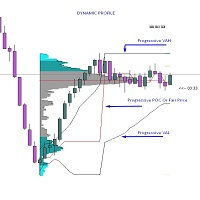
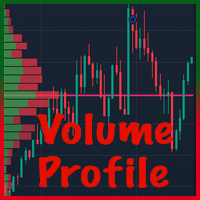
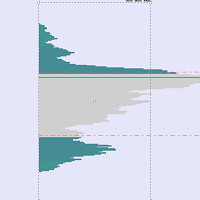
The Volume Profile is a sophisticated analytical tool designed to provide traders with deep insights into market dynamics. It captures price fluctuations over time, offering a live graphical representation of auction data that reveals collective behavioral patterns influencing price movements.
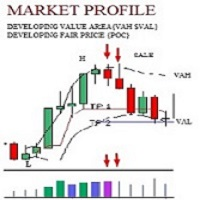
At its core, the Value Area represents the price range containing 68% of the day’s trading activity. This zone, aligned with standard deviation, highlights where the majority of trades occur.
Key Features:
-
Volume Point of Control (VPOC): Identifies the fair price level with the highest traded volume within a specified period.
-
Value Area High (VAH) & Value Area Low (VAL): Define the upper and lower boundaries of the value area.
-
Developing Value Area: Tracks the evolving value range in real-time, offering insights into market shifts.
This MT4-compatible indicator works seamlessly across tick, minute, and range bars, with flexible adjustments to suit your trading strategy. It helps traders accurately identify support and resistance levels by fine-tuning the Value Area and look-back period.
Additionally, the indicator continuously plots the Value Area and VPOC for both current and previous day’s candlesticks, making it particularly effective for lower time frames.
Enhanced Functionalities & Customization
To streamline your analysis, the Volume Profile indicator includes intuitive features:
-
Value Area Toggle (VA): Show or hide the Value Area instantly.
-
Drawing Toggle (DR): Enable or disable the Volume Profile drawing for a clear chart view.
-
Delete Profile (DLT): Quickly remove the profile to maintain a clean and focused chart.
A movable rectangular box allows for precise positioning of the profile to:
-
Measure specific price zones
-
Identify key supply and demand areas
-
Pinpoint critical support and resistance levels
This combination of customization, intuitive controls, and precision tools ensures every trader can tailor their analysis for maximum effectiveness.
Inputs/Features:
✔ Foreground or Background Display
✔ Value Area (VA) Toggle
✔ Point of Control (POC) 68%
✔ Value Area Line
✔ Extended POC
Visualization Options
Color Schemes:
-
PColor Enum:
-
C1: Mono Color
-
C2: Gauss Bell Color (gradient effect)
-
-
Customizable colors for:
-
Main profile (MainClr)
-
Point of Control (POC) (POCClr)
-
Statistical lines (e.g., 25% and 87% levels)
-
Profile Display:
-
Profiles can be drawn in the background (U1) or foreground (U2) via enum_bUp.
-
Interactive buttons:
-
Dr: Drag profile
-
DLT: Delete profile
-
VA: Toggle value area lines
-
Key Levels:
-
POC (Point of Control) displayed as a solid line.
-
Optional 25% and 87% lines with configurable styles and colors.
-
Price range divided into segments (div = 10 by default) for volume distribution.
Interactive Controls
Keyboard Shortcuts:
-
Q (KeyRoll): Toggles between mono and Gauss color schemes.
-
W (HShowLevels): Toggles horizontal level visibility.
-
A (KeyTop): Switches between background and foreground display.
-
Z (KeyFix): Toggles chart scale fixing.
Mouse Events:
-
Double-click to start drawing a rectangular profile area.
-
Drag to adjust the rectangle, then click to finalize.
Performance Optimization
-
Utilizes caching (ProfileData struct) to store profile data and reduce redraw overhead.
-
Limits redraw time to 500ms (maxTime) to avoid lag.
-
Only redraws profiles when necessary (e.g., on scroll, zoom, or data change).
Recommended System Specifications:
-
Minimum RAM: 2GB (4GB or more recommended for smoother performance).
-
Processor: Multi-core CPU (Intel i5/i7 or AMD Ryzen 5/7 and above preferred).
-
Graphics: Dedicated GPU (optional, but recommended for rendering large datasets).
-
Storage: SSD recommended for faster data access.
Data Processing
-
Fetches tick volume, high, and low prices from the M1 (1-minute) timeframe.
-
Calculates volume distribution across price levels within the defined time range.
-
Supports retry logic (up to 3 attempts) for data fetching to handle potential failures.
🚀 Get Started Today!
✔ Secure your license now and gain full access to this advanced trading tool.
✔ Contact us immediately after purchase to receive your license key, password, or activation details.
✔ Need the indicator in your preferred language? Let us know, and we’ll customize it for you!
We’re here to support you every step of the way. Reach out to us for any assistance or questions!