 MetaTrader 5
 Experts
 Indicators
 Libraries
 Utilities
 Widgets
 Rules
Rules
Watch the Market tutorial videos on YouTube
How to buy а trading robot or an indicator
Run your EA on
virtual hosting
virtual hosting
Test аn indicator/trading robot before buying
Want to earn in the Market?
How to present a product for a sell-through
New Expert Advisors and Indicators for MetaTrader 4 - 298
 Trading robots perform market transactions automatically, while indicators allow you to better analyze quotes and predict the price behavior.
With these applications, you will be able to perform deals in MetaTrader 4 in a more informed manner, while capturing more opportunities.
Trading robots perform market transactions automatically, while indicators allow you to better analyze quotes and predict the price behavior.
With these applications, you will be able to perform deals in MetaTrader 4 in a more informed manner, while capturing more opportunities. 
Close all Positions by one click with Fast system strategy, work with every pairs. By the way you can set to "Close all Sell", "Close all Buy" and Close all Orders on a Common Setting. This is a MetaTrader 4 Expert Advisor, Not working on MetaTrader 5.
Thank You FxGangster Powered by TheFxInvestment.com Twitter : @FxGangsterClub Email : Admin@TheFxinvestment.com
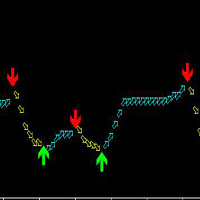
This indicator is suitable for any variety on MT4 and any cycle, but the most suitable cycle is 30 minutes and 4 hours. It is simple to use, the arrows will never change, no drift, no backfire.
The principle of this index is based on ATR and custom MA, combined with mixed computing, developed, high accuracy.
Buy: Look at the green up arrow;
Sell: Look at the red down arrow.
The arrow appears and orders immediately!
It is suggested that the two cycles should be looked at together, which is t
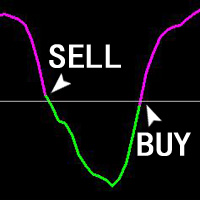
The ZhiBiJuJi indicator analysis system uses a powerful internal loop to call its own external indicators, and then calls the analysis before and after the cycle. The data calculation of this indicator analysis system is very complicated (calling before and after the cycle), so the hysteresis of the signal is reduced, and the accuracy of the advance prediction is achieved. This indicator can be used in all cycles on MT4, and is most suitable for 15 minutes, 30 minutes, 1 hour, 4 hours. Buy:

This indicator was tested on the basis of real statistics for all market indicators according to indicators for 3 months of trading. trade forecasts for usd / jpy on the m30 time frame were received on our statistics! if you have any questions, please contact us in private messages or in discussions under this indicator and we will figure it out and help
any questions will arise personal messages or in discussions under this indicator As soon as the blue points appear, we open a deal to increa

The indicator helps to identify possible rollbacks and reversals. Shows the direction of the price movement and is painted in the appropriate color. Allows you to conduct trend and counter trend trading It works on all timeframes, on any currency pairs, metals and cryptocurrency Can be used when working with binary options Distinctive features Does not redraw; Simple and clear settings; It works on all timeframes and on all symbols; Suitable for trading currencies, metals, options and cryptocurr

The Extreme Breakout EA Lite is a fully automated multi currency Expert Advisor that trades time based breakouts and has various options to improve performance. The Extreme Breakout EA Lite trades using pending orders and has the option to enter using market orders if required. Lite version is limited to 0.01 lots without money management.
View More Products - https://www.mql5.com/en/users/robots4forex/seller#!category=1
Monitoring Signals - https://www.mql5.com/en/signals/author/robots4forex?o
FREE

Taurus All4
Taurus All4 is a high-performance indicator, it will tell you the strength of the trend, and you will be able to observe the strength of the candle. Our indicator has more than 4 trend confirmations.
It is very simple and easy to use.
Confirmation Modes Candle Trend Confirmations: When the candle switches to light green the trend is high. When the candle switches to light red the trend is reverting down. When the candle changes to dark red the trend is low. Trendline Trend Confirm
Технический индикатор Forex ForexMarshalsTrend - это уникальный, эксклюзивный и прорывной финансовый инструмент, основанный на сложном математическом алгоритме колебаний стоимости конвертации цены, который способен прогнозировать дальнейшие изменения цены. Индикатор относится к группе трендовых индикаторов. Он предоставляет возможность принимать правильные решения о своевременном входе или выходе из рынка и в своих настройках указывает, следует ли открывать длинную или короткую позицию для получ

Grid Zone is an automated expert advisor. The system uses filtering measurements from trend signals to create buy zones and sell zones. Trading signals are processed by allocating them into the design zone. The system will automatically calculate the grid distance or the user can set it manually. The key is that it works well in all market conditions, either trend or sideways. The system has automatic management in terms of limited orders. The system can automatically manage delete pending orde
Advisor is an improved and enhanced version of ParabolicSarPro . It has a large number of adjustable parameters. Advisor Parameters:
Lots - lot size; Percentage of free money - percentage of free funds for opening each new transaction (works when Lots = 0); Slippage - slippage (maximum permissible price deviation in points); Magic - a unique identifier (it is necessary to do it differently, if several advisers are running in one terminal); MaxSpread - maximum spread for opening a trade (for

The strategy of the adviser is based on the theory of falsals: a fractal is a set that has the property of self-similarity (an object that exactly or approximately coincides with a part of itself, that is, the whole has the same shape as one or more parts).
A trading expert analyzes four fractal orders of price formations - one fractal order down, the fractal order of the current timeframe and two orders of fractals higher than the timeframe.
Recommended trading tools for the default settings

This adviser can be used without optimization. To get started, you only need to install the desired risk (or the size of the lot) and regularly withdraw profit. For a start, you can install the trial version of the Expert Advisor Hunter bot PriceLines Lite , which will work on a real account with a minimum lot (and therefore with minimal risk). In this, the main version, all settings are available. EA is designed for fully automated trading. It spelled out the function of protection against most
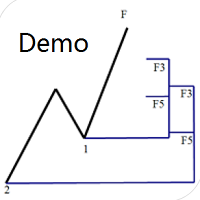
Dinapoli Levels Expansion and Retracement Demo An auxiliary tool written specifically for the DiNapoli point trading method. This is a trial version and there are no restrictions on the XAUUSD H4. Official version https://www.mql5.com/en/market/product/32213
The main function:
1. You can directly draw multiple sets of Fibonacci retracements, and the relationship between important return points is clear at a glance.
2. You can draw Fibonacci extensions, the ratio has three kinds of 0.618, 1, 1
FREE

An expert advisor which tries to take quick trades based on a combination of the latest Stochastic oversold/overbought status and Kagi chart transitions. It closes at minimum amount of profit depending on your risk appetite. Trade position size is also gradually increased automatically depending on risk parameters. Although you can use this on any time frame and symbol, The expert is designed specifically to trigger trades based on the 1 minute time frame and it is optimized for the EURUSD symb

This product is optimally used for scalping. It is a trend following system, it understands that the trend is your friend. It takes advantage of the buying/selling after the pullback in continuation of the current trend wave. It works by analyzing dynamic support and resistance, and is based on the Ichimoku Indicator variables which is know to be the most consistent & holistic indicator out there. Settings can also be adjusted to suite the market conditions. -> can be adjusted for longer term

The Expert Advisor uses the dissonance analysis strategy between the wave formation of the price movement of the lower level and the fractals of two consecutive upper levels.
The data of the Stochastic indicator are confirmatory and decisive when making a decision to enter a transaction.
Each trading position has a stop loss and take profit.
Dangerous trading methods are not used.
The Expert Advisor has a non-linear trailing stop system. Recommended trading tools for defaults: 15M: EURGBP, E

This StrongCurrency is a complete trading system based on a variety of technical indicators, moving averages and pivots. Each of those elements can be assessed in defined rules and coefficients (depending on the indicator) providing limitless optimization scenarios for the StrongCurrency. In order to work the StrongCurrency creates a trend strength and entry point signal list display by evaluating these data, that takes data from all symbols. It extrapolates all the information in order to get t

PipSense Ichimoku is a fully automated trend following strategy that you can use to backtest a 10-year of data with modelling quality of at least 90%. It uses only an entry analysis based on the Ichimoku Indicator with a proprietary settings to detect price breakout movement. The success secrets of the Expert Advisor if backtested correctly are the combination of the entry method with the Money Management and multiple exit strategies. Once opportunity level is determined, it will open trades rig
UniversalIndicator is a universal indicator. A great helper for beginners and professional traders. The indicator algorithm uses probabilistic and statistical methods for analyzing the price of a trading instrument. The indicator is set in the usual way. Advantages of the indicator works on any time period works with any trading tool has a high probability of a positive forecast does not redraw Indicator Parameters LengthForecast = 30 - the number of predicted bars

This product is a multi-functional MT4 indicator and is an indispensable tool for account information statistics, strategy analysis and risk assessment. Functions:
1. Statistical account basic information of profit and loss . 2. Statistics and display the account profit and loss fund curve. 3. Display the order's track on chart ,so that we can analys the strategy and risk of the account. 4 .List account's trade pairs and order totals ,we also can see the profits of each pair.
If you have any qu
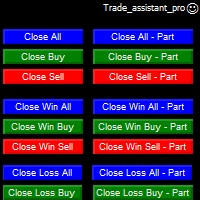
Trade Assistant helps in order management. Just run EA, set up your settings and open a store. EA automatically set = Target Profit, Stop Loss, Trailing Stop / Break Even, Close Trade after + "X" pips (Volume Size "X"%), Delete Pending Orders After "X" Seconds. See the buttons on the chart. He works to close trade, close partialli trade and delete orders
parameters: Set button - close partially (close all part) Volume Size "X"% More settings Enable / Disable Target Profit Target profit Enable
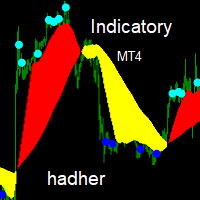
Indicatory is an indicator uses price action and averaging movement to trigger it's signals buy signal when the blue sun completely sunset's under the yellow clouds Sell signals when the aqua sun completely rise's over the red clouds you could call the indicator to any EA code for auto trading ,optimizing,sell signal index buffer number is (2) buy signals index buffer number is (3)... try to avoid weak signals which occur at the end of clouds ,strong signals occur's when there is a wid

TIMES TRAVEL IN THE TRADE
Now you have found what you were looking for !!
The Times is based on the probabilistic approach.
This EA has been working for years, is a very complex research project with the ultimate goal of creating a perfect trading robot.
This project has several updates!
This robot does not work with Grid or Martingale / Obs: There is a martingale option in it, but we do not use it, it is only for those who want to be at high risk!
The EA comes with fixed Stoploss and fix

With this indicator you'll have a general reading of the market's range using Gann's calculating modes. Gann's swing is used to have a quick reading to the market latest movements at first glance. The foundation of this swing calculation is in the count of candles in relation to the break-up and break-down of the price. When the price breaks-up the last maximum, the swing will get traced if a certain number of candles is exceeded from the last minimum. It can be used a "pure Gann" or not: If set

Over Arrow - уникальный авторский индикатор, имеющий возможность отображения сигналов в направлении основной тенденции, или против нее. Over Arrow подходит для любого таймфрейма, валютной пары, но лучше всего использовать его на средних временных периодах, таких как М30, Н1, Н4. Сигналы индикатора не пропадают ни при каких условиях. Отличительной особенностью является наличие фильтра тенденции, при активации которого, сигналы будут появляться только в направлении основного движения.
Параметры
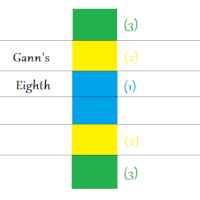
This indicator will let you have at disposal Gann's Eighth, with few clicks!! Gann's Eighth were used by this great Trader to obtain the maximum fluctuation price and the possible inversion points of it. Gann have always given importance to the number 8 in his studies, an it is the reason why we find the retracement points as 0.25(10/8=1.25). Other than the number 8, also the numer 3 had is own importance in Gann, number founded in the eighth division, infact we have three eighth describing the

NIGHTCRUSHER is a fully automated expert advisor, designed for scalping on quite market situation.
The Lite - Version is limited to minimal Lot per Pair and dont has lot mulitplier and dynamic function you can also run different strategies like swing trading or grid different Trade Entry Signals different Exit Strategies included (MA Cut / Signal Change / Trailing TP) clever Risk & Money management - Balance based - Longrun trades tracking You can also use a Grid function or Lot multipier, if ne
FREE

Индикатор вычисляет наиболее вероятные уровни возврата цены. Может быть использован для установки уровня тейк профит. Рекомендуемый таймфрейм - любой, при соответствующей настройке. Настройки.
Period - количество свечей для анализа. Accuracy - точность расчёта уровня в пунктах. Width - размер ценовой метки. Отработка уровней как правило не занимает много времени, уровни достаточно точны при касании и процент возврата цены к ним достаточно высок. Но следует учитывать риск продаж на локальных мин
FREE

MHA News Trader v1.0 This Is a News Trader EA that has many similarities to other News traders. Strategy is placing two pending order some seconds before releasing high impact economic news on investing.com and removing remaining pending order some seconds after news releasing time and there are some extra features like trailing Stop , hidden trailing stop , recovery loss and lot multiplier. But what is very important it's choosing proper setting of parameters in proper broker. The EA is tested
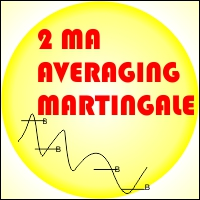
EA 2 MA Martingale Averaging If there is a crossing of the 1st MA Period through the Ma of the 2nd period from the bottom to the top then it will be Open buy, vice versa If there is a crossing of the 1st MA Period through the Ma of the 2nd period from the top to the bottom then it will be Open Sell
Installation of Charts on EA will affect the period of the Moving Average Example: EA is installed in H1 time frame, then MA indicator is Time Frame H1, EA is installed in M30 time frame, then MA i

TigerGrid EA MT4
TigerGrid EA robot is a fully automated robot for Forex trade. TigerGrid EA is based on the price actions and support and resistance, combine numerous indicators ,that It provides the possibility the best entries of the trade . This system uses a grid of orders . A new order is added into the grid only if the EA notice a potential reversal trend. The grid size is limited for more safety It can be used in any time frame but we recommend H1 . Do not believe in any backtest re

The Grid Expert Expert Advisor is a professional tool for trading grids of orders on financial instruments. The algorithm of the program is arranged in such a way that the EA uses signals based not on the current price, but on the price of the edges of channel. A special algorithm calculates the channel and the price range and uses it to generate signals. A special code processes the channel for the last several periods to identify the trend direction. Advantages Automatic trading mode, no n

This is the binary options signal you all have been looking for. This in a modified version of the Garuda Scalper, that has been modified for Binary Options traders. Signals are very unique! Why this is so effective for binary options is because it is a trend following system, it understands that the trend is your friend. It takes advantage of the buying/selling after the pullback in continuation of the current trend wave. Because signals are generated after the pullback, you can place shor
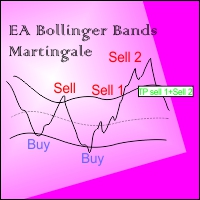
EA BB Martingale If the price touches the upper Bands then OP SELL. However, if the price rises again from the previous order, OP SELL will return with a larger Lot, if it goes down to the previous price then Close all sell transactions together (of course this profit has been calculated ), Conversely if the price touches the Lower Bands then OP BUY
This EA can run in two different directions (Buy will be counted separately from Sell orders) #Recomend Start Balance $1000 Flat movement is very
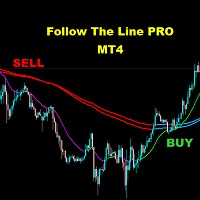
FOLLOW THE LINE (PRO VERSION) This powerful indicator is the full and complete version of my free indicator called "Follow The Line". IT IS BASED ON the popular maxim that: "THE TREND IS YOUR FRIEND" It gives alarms and alerts of all kinds. IT DOES NOT REPAINT and can be used for all currency pairs and timeframes.
AVOID FALSE SIGNALS:
BUY ONLY when price closes above the green line and the green line is above the blue channel.
SELL ONLY when price closes below the pink line and the pink line i
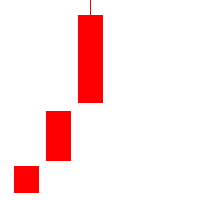
Outline A strategy based on K-line shape requires only three K-lines. Grasping opportunities quickly when the market is emotional can not only get into the market as soon as possible, but also make great profits. Understand the market through three K-lines. Parameter Lots: The basic position at the time of placing an order is 0.1 by default. SlipPage: Consider the impact of sliding points in trading,Default 3 base points.

Trading Hours:
useTradingHours = false; - if it is true, the system opens trades only in defined time;
StartTime = "06:00"; - start time of trading;
StopTime = "18:00"; - end time of trading;
GMT_Offset = 0; - GMT offset;mnvnmkvbb
Trading Days:
Monday = true;
Tuesday = true;
Wednesday = true;
Thursday = true;
Friday = true;
Saturday = true;
Sunday = true;
View settings:
showMenu = true; - if true, EA shows on graph information about open trade

This is a simple and useful indicator for gold. Timeframe is 15M.
It simply shows the meanginful potential turning check point for gold.
You can combine your method with this signal. You can use it as a part of your decision signal to become a more powful strategy for yourself to get more great decision.
The indicator will not be repianted. Just simple and useful. Guys, just try it.

The Wolfalizer Indicator combines the functionality of the Engulfing Stochastic along with the ConsecutiveRSI and adds alerts along with more detailed output to the journal. This Indicator will alert you when RSI or Stochastics cross into oversold or overbought. You can set the oversold and overbought levels for RSI and Stochastics separately. You can pick if you want an engulfing candle to appear on the cross or set a number of consecutive candles you would like to see. Interesting Inputs i

Djuba Breakout System
Djuba Breakout System is a fully automated breakout trading system.
Features
1. 100% Free
2. 100% automated trading system
3. No Martingale, No Grid
4. Trade with SL & TP
Recommendations
1. Pairs: EURUSD, GBPUSD
2. Timeframe: H1
Parameters
1. Lots: default lots. ignored if LotsFor1K > 0
2. LotsFor1K: lots per 1000 USD
3. MaxOrders: please set to 10
4. TestGmtOffset: the GMT offset for the backtest
FREE

22.12.2020 New version is released. Bug fixed and exit by MA removed.Improved fully automated Expert Advisor without martingale. Follow the trend. Checking important trade levels.
It is complex calculated to catch right trend strategy. Special candles, custom indicator and maths are used for entries. Live Results shown at here https://www.mql5.com/en/signals/669290 Default settings recomended for EURUSD m1/m5 gmt +3(or +2 winter time) . Click here for the symbol sets you can make testing .

Grid Manual is a trading panel for working with grid strategies. The utility is universal, has flexible settings and an intuitive interface. It works with a grid of orders not only in the direction of averaging losses, but also in the direction of increasing profits. The trader does not need to create and maintain a grid of orders, the utility will do it. It is enough to open an order and the Grid manual will automatically create a grid of orders for it and will accompany it until the close. Ful
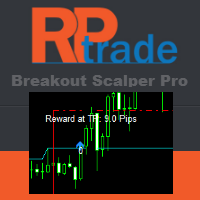
Breakout Pro Scalper Solution
This indicator is part of the RPTrade Pro Solutions systems. Breakout Pro Scalper Solution is a daily trend indicator using Price Action, Dynamic Support and Resistances.
It's designed to be used by anyone, even the absolute beginner in trading can use it.
NEVER repaints .
Indications are given from close to close .
Designed to be used alone , no other indicators are required.
Gives you the trend and potential Take Profit at the beginning of the day.
A spec

Automate the ACB Breakout Workflow ACB Breakout Arrows EA evaluates breakout signals on the attached chart and manages trades with the built-in ACB Breakout Arrows and ACB Trade Filter logic. Attach the EA to the symbol and timeframe you want it to monitor, enable automated trading, then choose the position, session, filter and exit rules that fit your test plan. The required indicators and dependencies are embedded in the EA, so no separate download is needed. Their panels are not displayed on

The system is a combination of two strategies , one complementing the other .Main strategy uses virtual trade lines in order to open it's orders and the other strategy opens one or multiple orders for achieving profit if the price moves out of a predefined range . Virtual trade lines are also based on trade channel , also having the possibility to place trades over or under the computed channel line . The same channel is also used for the second strategy , but other trade conditions are add

Based on MACD indicator waves with standard parameters Applies Fibonacci levels to the last two MACD waves, positive and negative respectively, if at the moment the MACD indicator runs out of negative Wave - the color is green, if at the moment the MACD indicator runs out of positive Wave - the color is red. The Wave termination criterion is two ticks with a different MACD sign. Applies trend lines on the last four MACD Waves. Works well with the expert Figures MACD https://www.mql5.com/ru/mar
I recommend you to read the product's blog (manual) from start to end so that it is clear from the beginning what the indicactor offers. This multi time frame and multi symbol trend indicator sends an alert when a strong trend or trend reversal has been identified. It can do so by selecting to build up the dashboard using Moving average (single or double ( both MA:s aligned and price above/below both ) ), RSI, Bollinger bands, ADX, Composite index, Parabolic SAR, Awesome (AO), MACD (signal l

The trend pigs is a trend EA with a filtering system. It is recommended to configure the EA based on your experience.
To configure the EA, you can use the following indicators:
MA Cross indicator with parameters(periods) settings. Main signal A TREND indicator with parameters(periods) settings. There is a possibility of switching off. The Squeeze indicator with the settings(periods). There is a possibility of switching off.
The expert advisors have the ability to filter signals according to t
FREE
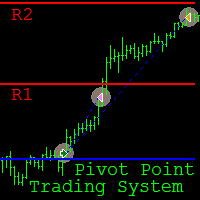
Pivot Point Trading System is a fully automated Expert Advisor (EA) designed for intraday trading on the M15 time frame . The main currency pair is GBP/USD , however it can be used on other pairs, provided that the input parameters are selected through optimization in the strategy tester. The EA implements trading strategies based on the breakout and rebound from the Pivot Point levels . The principle of the EA consists in order opening in the direction of the breakout of the Pivot Point level (

Swing & Price Action Trader ( SPA Trader) How to trade with SPA Trader? SPA Trader is a very special tool for both Automatic and Semi-Automatic trading . It works as an Indicator and Expert Advisor to trade fully automatic, if trader sets it to true and by false setting , then it will trade when trader enter into the position via SPA Trader manually, but the money management and risk management functions remain automatically to manage the opened positions for trader... The SPA Trader is the

Arrow indicator showing market trends The histogram shows the direction of movement, and the arrows indicate favorable points for opening positions. Can be used on any currency pairs, metals and cryptocurrency Suitable for working with binary options
Distinctive features Defines a change in trend; Works on all timeframes and on all symbols; Suitable for trading currencies, metals, options and cryptocurrency (Bitcoin, Litecoin, Ethereum, etc.) Suitable for manual trading and for developing advis
I present an indicator for professionals. ProfitMACD is very similar to classic MACD in appearance and its functions . However, ProfitMACD is based on completely new algorithms (for example, it has only one averaging period) and is more robust, especially on small timeframes, since it filters random price walks. The classic MACD indicator (Moving Average Convergence / Divergence) is a very good indicator following the trend, based on the ratio between two moving averages, namely the EM
A top-quality implementation of the famous Super Trend indicator, which needs no introduction. It is completely loyal to the original algorithm, and implements many other useful features such as a multi-timeframe dashboard. [ Installation Guide | Update Guide | Troubleshooting | FAQ | All Products ] Easy to trade It implements alerts of all kinds It implements a multi-timeframe dashboard It is non-repainting and non-backpainting Input Parameters
ATR Period - This is the average true range period
FREE
The Expert Advisor uses the dissonance analysis strategy between the wave formation of the price movement of the lower level and the fractals of two consecutive upper levels.
The data of the MACD indicator are confirmatory and decisive when making a decision to enter a transaction.
Each trading position has a stop loss and take profit.
Dangerous trading methods are not used.
The Expert Advisor has a non-linear trailing stop system.
Recommended trading tools for default settings: 5M: EURGBP,

Trend Exploit The logic behind Trend Exploit EA is very simple but effective , the EA uses breakouts of the Bollinger Bands for entry and exit signals, enter in the market in the direction of a strong trend, after a reasonable correction is detected. The exit logic is also based on the Bollinger Bands indicator and it will close the trade even on a loss when the price breaks Bollinger Bands line.
Trend Exploit was strictly developed, tested and optimized using the "Reversed Sampling" devel
FREE

RSI indicator with signal lines, at the intersection of which a corresponding notification will be issued, which can be in the form of a normal alert, or in the form of a user sound file.
The indicator also has the function of sending push-notifications and email notifications at the intersection of these levels.
The values of the levels can be set independently in the indicator settings, and, if desired, they can be changed and configured directly in the indicator window. This product is a
FREE

TopSecret TopSecret - automated adviser for professional work in the foreign exchange market. The decision-making algorithm is based on my own method. Statistical methods for a certain time interval is calculated the price level to which the current market price of the trading instrument is always likely to return. The adviser works on any time period, but I recommend working on H1, H4, D1 . The Expert Advisor is installed in the usual way and is immediately ready for operation.
Advisor Benefit

ComplexPulse - pulse indicator or signal. Sensitive and responsive to price movements. The indicator shows the interdependence of various currency pairs, namely: USD, EUR, GBP, CHF, JPY.
Currencies are measured in relative units, so in each unit of time the sum of all currencies will be equal to zero. Hence, one of the main elements of cluster indicators is the zero line, or the balance line (zero line). If a currency is below the balance line, then it is said that the currency is oversold rela

The logic behind Trend Exploit EA is very simple but effective , the EA uses breakouts of the Bollinger Bands for entry and exit signals, enter in the market in the direction of a strong trend, after a reasonable correction is detected. The exit logic is also based on the Bollinger Bands indicator and it will close the trade even on a loss when the price breaks Bollinger Bands line.
Trend Exploit was strictly developed, tested and optimized using the "Reversed Sampling" development methodology

Advisor works on the basis of determining the impulse movements in wide price ranges.
The algorithm of the adviser determines the size of wave movements, the frequency of touches of the boundaries of the price channels and the amplitude of the price.
If there are sufficient data indicating a strong trend movement, the adviser starts working.
Each position of the adviser has a stop loss and take profit.
Recommended trading tools for working with default settings: 5 minutes timeframe: GBPUSD,

(8th Feb 2019 Launch Promo: $97/lifetime just for 1 day! Price goes to $180/lifetime in 24 hours!) The TFA Trade Manager helps you easily manage your trades with an intelligent vertical "bars" system. You easily now easily click + drag your entry, stop loss, take profit, breakeven, partial profit and trailing stop with a few simple mouse clicks. You can also easily calculate the risk you wish to allocate to each trade by telling the trade manager your desired risk %, lot size or $dollars to risk

Descption: The Volume Profile displays detailed informations of historical trading activities at certain price levels (Market Profile). So you can locate the areas with the best prices in the market and get an advantage about other market participants.
Features: Customizable Volume Profile / Market Profile Shows the "fair" Value Area with 70% of all Volume
Shows critical low volume zones
Shows VPOC, VAL and VAH Points Works on all timeframes Also available for MT5 ( https://www.mql5.com/en/mark

boss ! Trading opportunities can be used in any underlying asset, but experts in conducting tests prefer the currency pair USD / JPY.
The most favorable time for work is the European, American session.
When the blue arrow appears, a red option under the candle is acquired UP.
When the red arrow appears, the option DOWN is acquired. It is recommended to avoid trading during strong news releases

Orion EA uses indicators to enter and exit orders. Giving you the choice of times to open orders. Orion EA works on both 4 and 5-digit quotes. This EA gives you the option of max spread which prevent EA from opening order during high spread. When a opposite signal appears: if there is an open order in profit, then the EA closes it; if the open order is in loss, the EA opens opposite orders. The EA has a Overlap Order option, this gives it the ability to use percentage of profit from the last ord

RSI indicator with signal lines, at the intersection of which a corresponding notification will be issued, which can be in the form of a normal alert, or in the form of a user sound file.
The indicator also has the function of sending push-notifications and email notifications at the intersection of these levels.
The values of the levels can be set independently in the indicator settings, and, if desired, they can be changed and configured directly in the indicator window. To check the oper
This ALL IN ONE indicator detects Inside Bar Narrow Range 4 and Inside Bar Narrow Range 7 two powerful patterns on 17 CFD on all timeframes. "Inside Bar Narrow Range 4" is an inside bar with the narrowest range out of the last 4 bars so "Inside Bar Narrow Range 7" an inside bar with the narrowest range out of the last 7 bars.
Hence, IBNR4 and better IBNR7 are an objective criterion for identifying decreased range and volatility. Once we find an IBNR4 or an IBNR7 pattern, we aim to trade the
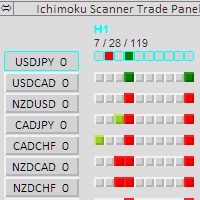
This scanner is a tool used to support trading with the Ichimoku method. Its basic features are: 10 trading setups implemented in accordance with the Ichimoku technique, the possibility of simultaneous scanning, all financial instruments available on the platform, the possibility of simultaneous scanning, in all timeframes available on the platform, available Manual and Auto trade , the ability to open in Manual mode from the level of the chart, the ability to determine the size of the position

EA Undead is fully automated bot to generate a stable profit from the volatile FOREX market. This EA will never depend on any indicator.
How this EA works? At the very first it will open a Buy order and Sell Order at same time. And by default take profit will be 15 Pips for all orders. Once take profit reaches it will Re-Open that order. If the market goes against any order than it will add more positions, by default 50 Pips away from last open trade. To minimize the draw-down and loss and to b
FREE
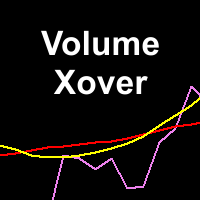
This indicator determines minimum volumes needed during a candle formed so that it would be higher than current volume's average. Although you can place MAs on your volume indicator, this indicator has non-repaint characteristic so you may not to worry about sudden volume increase. This indiator also draw volume indicator for its own. Input Description: period: Period used for indicator. Must be higher than 1. Output Description: VolumeXover: This indicator's main feature. During the time the vo
FREE

Spread Data tool will display current spread and average spread. It will record spread for every hour (from 0 to 23) and can give better data about your broker spread. Run it for 2 days or more to get better spread data . Every spread smaller than MinSpread will be recorded as MinSpread Every spread larger than MaxSpread will be recorded as MaxSpread It help to decide what spread to be used when do backtest, EA spread settings, EA that trade in specific time interval, especially for scalping EA
FREE
The MetaTrader Market is the only store where you can download a free demo trading robot for testing and optimization using historical data.
Read the application overview and reviews from other customers, download it right to your terminal and test a trading robot before you buy. Only on the MetaTrader Market you can test an application absolutely free of charge.

You are missing trading opportunities:
- Free trading apps
- Over 8,000 signals for copying
- Economic news for exploring financial markets
Registration
Log in
You agree to website policy and terms of use
If you do not have an account, please register