 MetaTrader 5
 Experts
 지표
지표
 라이브러리
라이브러리
 유틸리티
유틸리티
 위젯
위젯
 규칙
규칙
MetaTrader 4용 새 Expert Advisor 및 지표 - 298
 트레이딩 로봇은 자동으로 시장거래를 수행하는 반면 지표는 가격을 더 잘 분석하고 가격 행동을 예측할 수 있게 해줍니다.
이러한 어플리케이션을 사용하면 MetaTrader 4에서 더 많은 기회를 포착하는 동시에 보다 정보에 입각한 방식으로 거래를 수행할 수 있습니다.
트레이딩 로봇은 자동으로 시장거래를 수행하는 반면 지표는 가격을 더 잘 분석하고 가격 행동을 예측할 수 있게 해줍니다.
이러한 어플리케이션을 사용하면 MetaTrader 4에서 더 많은 기회를 포착하는 동시에 보다 정보에 입각한 방식으로 거래를 수행할 수 있습니다. 
NeveScalping is a Scalping Trading and Intraday Trading. NeverScalping uses predictions and predictions using artificial intelligence algorithms. In this way, the professional higher law has lost its luck.
EURUSD does a practical, historically important job. Download the demo yourself. My tests were 90 days of accuracy, actual spread, extra slip and high visibility date of actual ticks.
The recommendations are as follows
optimized for the EUR / USD's D1 chart. There are no other compone
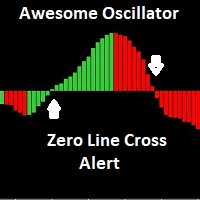
The Awesome Oscillator (AO) is an indicator used to measure market momentum. AO calculates the difference between a 34 Period and 5 Period Simple Moving Average. The Simple Moving Averages that are used are not calculated using closing price but rather each bar's midpoints. This indicator has email and pushup "mobile" features Alert, for any suggestions, please don't hesitate, thanks
FREE

Keyboard Trading Open and Close orders with your keyboard. This tool allows you to open and close orders with your keyboard. As opening and closing orders with your keyboard is faster than with your mouse, this tool is very useful for Scalpers. How does it work? If you press the key "b", it will open a buy order with lot size, SL and TP as specified in the settings. If you press the key "s", it will open a sell order with lot size, SL and TP as specified in the settings. If you press the key "c
FREE

This is the Free Version of "Quick Copier MT4" (Please check : https://www.mql5.com/en/market/product/34184) This free version is available to be used within 2 hours only, and it has limited features. Please also check this product at fxina.hostingerapp.com.
"Quick Copier" is designed to copy trading without any complicated settings. It copies master orders faster than "Just Copier". The copy can be done in one PC. One EA can be set as master (provider) or slave (receiver). The receiver lot ca
FREE

Signals and Alerts for Accelerator/Decelerator indicator based on these MQL5 posts: Accelerator Oscillator and Signals of the Indicator Accelerator Oscillator . Note : this tool is based on the code of Accelerator indicator developed by MetaQuotes Software Corp.
Features The signals are triggered at closing of last bar/opening of a new bar; Any kind of alerts can be enabled: Dialog Box, Email message, SMS notifications for smartphones and tablets, and Sound alerts; Customizable arrows. By d
FREE

ATTENTION : The Tiger Locker EA can not be tested in the MT4 strategy tester !!!
Tiger Locker EA robot is a very Powerful tools and a fully automated robot for Forex trade. Tiger Locker EA is a combination numerous special trend strategy ,that It provides the possibility the best entries of the trade . Tiger Locker EA robot is designed for medium and long term trading ,the robot will help you deal with and manage emotions ,and you don't need worry about news release any more !! The tren
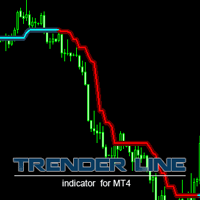
This is a trend-tracking indicator that determines the change in trend through changes in color. It can capture the big trend market and assist trend traders to enter and hold positions. A small rebound in the market will be filtered until the end of the trend. In the turbulent market, the horizontal line in the indicator can also be used as a support or pressure reference. More EA&Indicators click here https://www.mql5.com/en/users/chenshaofei/seller parameter Period - indicator period (large s

The latest Binary Options arrow indicator in the Garuda Signals product line. Binary options signal based on multiple time frame cross over analysis. Gets confirmation from the most consistent signals known to man; Ichimoku, SMA, Bollinger Bands; and also uses the 1 Hour time frame as trend confirmation , so you don't have to open up multiple chart and waste time. - Can be used for all time frames up to 1 hour, but is most POWERFUL for 1 and 5 min options. - Place your Call/PUT based on the Arro

What is Double Top and Bottom Double top and bottom patterns are chart patterns that occur when the underlying investment moves in a similar pattern to the letter "W" (double bottom) or "M" (double top). Double top and bottom analysis is used in technical analysis to explain movements in a security or other investment, and can be used as part of a trading strategy to exploit recurring patterns. You can find MT5 version hier
Indicator shows you 2 Level target and stop loss level. Stoploss level

Day By Day
Требования к использованию советника: Для работы даного советника никакие требования не предусмотрены! Советник представляет собой систему, которая работает по сигналам индикатора RSI. Работает советник по времени терминала с 10:00 по 10:20, это значит что в это время он пытается войти в рынок, если по истечении этого времени войти не удается - ждет следующего дня. Рекомендуемая валюта: EURUSD, USDJPY;
Таймфрейм : H1; Мониторинг: https://www.mql5.com/ru/signals/557506 Оптимальные на

Robot experto diseñado para valorar las tendencias del mercado especialmente y apropiado para operar sobre el índice Dow Jones. Realiza operaciones de forma automática siguiendo la tendencia del mercado en las últimas horas. Adecuado para todo tipo de usuarios interesados en un robot sencillo de gestionar, muy intuitivo y apto para personas no expertas.
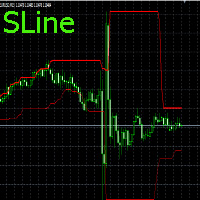
Входные параметры отсутствуют.По индикатору просто определять направление движения цены.Если линии сходятся,то используем ордера на пробой,если расходятся используем SELL,BUY,SELLLIMIT,BUYLIMIT.Работает на любых периодах.С любыми парами.Для нахождения минимального и максимального расстояния между линиями,нужно использовать инструмент"перекрестие".Для пары EURUSD на периоде М15,можно применять значения :для схождения <80 п.п.,а максимальное >500-800 п.п. Удачи в торговле!!! There are no input

Представляю Вашему вниманию советник Solaris, который торгует по принципу выставления разнонаправленых отложеных ордеров. Подробную информацию о системе торговли Вы можете увидеть на скриншоте ниже (скриншот 1).
Рекомендации: Для данного советника не предусмотрено никаких особых рекомендаций, единственное, как и для большинства советников, желательно использовать инструменты с наименьшим спредом! Параметры работы советника можно использовать по умолчанию. Время работы выбрано период наибольшей
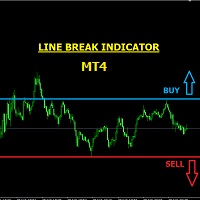
LINE BREAK INDICATOR This is a semi-automatic indicator that shows buy and sell arrows when your trendline (or horizontal line) is broken. You must first draw your lines, it will alert you of breaks through email, pop-ups, etc. It is important that you use just two main lines to avoid confusion, because the indicator signals BUY when the upper trendline or upper horizontal line is broken, and it signals SELL when the lower trendline or lower horizontal line is broken. It can be used for any curr

DAY BREAK INDICATOR
NB: THIS INDICATOR SHOWS MUCH DETAILS AND CORRECT SIGNALS ONLY ON THE CURRENT DAY'S CHART. PAST CHARTS AND STRATEGY TESTER DOESN'T SHOW MUCH POTENTIAL. It is an indicator for the current day's market purposely. This is an arbitrary Asian support and resistance breakout indicator for the current day only. Signals are no more valid for the next day ONLY FOR SCALPING AND INTRADAY TRADING. It signals in the direction of only the intraday trend. It should never be used for swing

This indikator is used as a supporting indicator. its function is to find out the position of the price reflection position, but he cannot work alone, requires another set of indicators which will immediately be sold separately
The principle of Supply And Demand can be used as a forex trading analysis tool. One way to use it is to rely on the balance zone as zone stops Supply And Demand and the trading system applied, as well as the legal basis for general supply and demand.
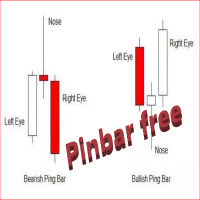
The Free Pin Bar MT4 indicator identifies Pin Bars It will even give you sound or email alerts if want them. If you download it and like it please leave a review! It would be wonderful
Pin Bars are purely based on price action as reflected by the candle formations created by Forex price movements. input Parameters are maximum allowed body/length ratio for the Nose bar. Nose body should be position in top (bottom for bearish pattern) part of the Nose bar. tells the indicator that the Left Ey
FREE

This is our Expert Advisor base on research over the Internet. This Expert Advisor use RSI check TF 1 Hour and for execution, Install it at TF 5 Minutes (double Check 24 last bar), It's code contains CCI Filter as consideration for Long or Short Trade. When the market turned to wrong direction, expert advisor will double it lot in the same direction, until all the losses on the OP before it will be covered. This EA include News Management, so it doesn't trade when there is high impact news. It's

An automated Expert Advisor that uses Price action techniques.
It is developed and tested repeatedly.
It is the only EA in the market that has passed 29 years of backtesting from 1990 to 2019.
Recommendation:
EURUSD
1hr timeframe
Use the settings found on the comment page.
You can play around with the settings like the deposits and lots. Do not change the take profit and stoploss settings.

자동화된 수요 및 공급 구역의 차세대. 모든 차트에서 작동하는 새롭고 혁신적인 알고리즘. 모든 구역은 시장의 가격 움직임에 따라 동적으로 생성됩니다.
두 가지 유형의 경고 --> 1)가격이 영역에 도달할 때 2)새로운 영역이 형성될 때
당신은 더 이상 쓸모없는 지표를 얻을 수 없습니다. 입증된 결과로 완벽한 거래 전략을 얻을 수 있습니다.
새로운 기능:
가격이 공급/수요 영역에 도달하면 경고
새로운 공급/수요 구역이 생성되면 알림
푸시 알림 알림
핍의 영역 너비 레이블
기동특무부대에 한 번 더 시간이 주어집니다. 따라서 현재보다 위의 2개의 시간 프레임 대신 현재보다 높은 3개의 시간 프레임을 볼 수 있습니다.
Alerts/Zones/MTF 기능을 활성화/비활성화하는 버튼
당신이 얻는 이점:
거래에서 감정을 제거하십시오.
거래 항목을 객관화하십시오.
높은 확률 설정을 사용하여 수익

최고의 스캘핑 트레이딩 로봇인 RSI 스캘퍼는 정밀성, 수익률, 손실률 회복 기능을 제공하여 높은 성과를 추구하는 트레이더에게 이상적입니다. 이 강력한 스캘핑 전문가 자문(EA)은 속도, 정밀성, 그리고 지능적인 위험 관리를 위해 설계되었으며, 적응형 랏 사이징 시스템, 통합 손실 회복, 그리고 시간 관리 전략을 통해 거래를 전략적 수익으로 전환합니다.
빠르고 효율적인 스캘핑에 탁월하며, 빠른 시장 변동에 최적화되어 정확한 타이밍으로 수익을 확보합니다. EA는 스마트한 위험 관리 기능을 통해 노출을 조절하고 손실을 자동으로 복구하여 자본을 보호합니다. 특히, 고점 거래 조건에서만 작동하여 불필요한 변동성 노출을 제거합니다. RSI 신호를 활용하는 모멘텀 기반 진입 전략은 최적의 순간에 시장 기회를 포착합니다. 15분 단위의 EUR/USD에 맞춰 설계되었지만, 다른 통화쌍에 대한 설정도 가능합니다(다른 설정은 "코멘트" 섹션에서 확인하실 수 있습니다).
획기적인 기능 중에는 손실

"추세 식별" 표시기는 매우 정확하고 가장 중요한 것은 짧은 지연으로 진정한 추세 움직임의 시작을 확립할 수 있는 강력한 필터링 방법을 사용합니다. 지표는 거래 스캘퍼 전략과 장기 거래 전략 모두에 사용할 수 있습니다. 지표 평균 알고리즘은 마지막 스크린샷에 나와 있습니다. 표시기 판독값은 명확하고 매우 간단하며 설명이 필요하지 않습니다. 지표의 파란색 선은 상승 추세를 표시하고 금색 선은 플랫, 빨간색 선은 하락 추세를 나타냅니다. 빨간색 또는 금색 선이 파란색으로 바뀌면 바이 로트가 열려야 합니다. 파란색 또는 금색 라인이 빨간색으로 변경되면 매도 포지션이 열립니다. 가격 변경 방향의 가능한 순간은 어떤 상황에서도 다시 그려지지 않는 화살표로 표시됩니다. 표시기는 모든 유형의 알림을 포함합니다. 표시 지침(추세 방향에 대한)이 마지막 두 막대에서 일치할 때 경고가 트리거됩니다. 표시기 설
FREE

Multicurrency and multitimeframe modification of the Commodity Channel Index (CCI) indicator. You can specify any desired currencies and timeframes in the parameters. Also, the panel can send notifications when crossing overbought and oversold levels. By clicking on a cell with a period, this symbol and period will be opened. This is MTF Scanner. The key to hide the dashboard from the chart is "D" by default
Parameters CCI Period — averaging period.
CCI Applied price — price type.
Clear the c
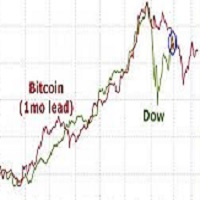
Correlation EA is a robot based on a strategy of correlation between two financial assets.
Two Assets are correlated when they follow the same directions in the medium and long term.
The robot takes two opposing orders of the same size in dollars on both assets and automatically closes the two orders after x dollars of profits defined by the users
Look for two assets that have a correlation of + 90% and a close average volatil.
Is not possible to bactest this strategy on metatrader 4 Tester
P
FREE
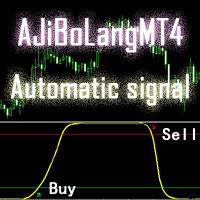
This AJiBoLang indicator is suitable for all cycles of the signal, very suitable for short-term signals
Just look at the arrows on the chart and make a single order. The green arrow is the Buy single and the red arrow is the Sell single.
After making the Buy order, if the yellow line goes up to the upper level and travels a certain distance, then you can sell the Buy order.
After making the Sell single, if the yellow line goes to the lower level and travels a certain distance, then the Sell o
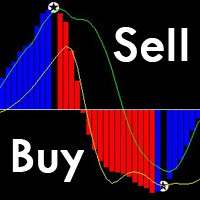
This is a unique MACD indicator that is more accurate and easy to use than traditional MACD. It is suitable for any chart cycle and is suitable for any market variety.
The red column is the (Buy) band signal, and the blue column is the (Sell) band signal.
The yellow and green lines are trend lines, and the two lines never cross.
Buy: In the blue column, look at the green line up through the middle 0 axis.
Sell: In the red column, look at the yellow line down the middle 0 axis.
The MACD's de

The indicator shows on the selected range tick volumes in the form of a horizontal histogram Highlights the maximum and most significant price levels near which correction and price reversals are most likely Allows you to conduct trend and counter trend trading using support and resistance levels It works on all timeframes, on any currency pairs, metals and cryptocurrency Can be used when working with binary options Distinctive features Shows the most significant levels of support and resistanc
*Non-Repainting Indicator Message Me Immediately After Purchase For VIP Installation Help and Free Strategy Bruce's Price Predictor is an indicator that shows precise price reversals. A great arsenal to add to any chart. Bruce's Price Predictor points price reversals with high degree of accuracy and it is great for scalping on the 1min time frame, Or swing trading on the 1hr time frame. Buy and sell arrows are shown on the chart as for entry signals. They do not repaint but confirmation ent
A self-learning advisor can adjust to changing market algorithms with minimal latency.
With built-in analytical systems, the expert monitors the effectiveness of trading decisions.
In case of decreasing productivity of work, the adviser produces a new self-study based on the new market phase. Recommended trading tools - 5m: EURUSD, GBPUSD, EURJPY, USDCAD, USDJPY. Settings:
Comment to orders - Comment on trading positions; MaxRisk - Risk level for the calculation of the trading lot; Lot will be

S ignal : https://www.mql5.com/zh/signals/506069 Get your IC Markets Rebeat Discount Account: Click here . Through this link,you will get 3$/Lot.If you apply for it yourself,it is 3.5$/Lot. Are you ready? Do you ever see an EA who cannot stop gaining? Are you boring to find a good EA? Now I offer an full automatic EA,just install it in seconds,money will keep coming...
-------------------------------------------------------------------------------------------------------------------

NightSniper - полностью автоматический советник. Особенности -Советник торгует по нескольким валютным парам из одного графика -Советник использует оптимальные параметры для каждой валютной пары и не требует оптимизации -Советник использует минимальное количество входных параметров доступных для понимания -Советник не входит в сделки при завышенных спредах(Max_Spread=4 - не доступно для изменения, указано для 4-ех значных котировок, для 5-ти знака пересчитывается автоматически) -Советник всем

ATTENTION : The Tiger Security EA can not be tested in the MT4 strategy tester !!!
TigerSecurity EA robot is a fully automated robot for Forex trade. TigerSecurity EA is a combination numerous special trend strategy ,that It provides the possibility the best entries of the trade . TigerSecurity EA robot is designed for medium and long term trading ,the robot will help you deal with and manage emotions ,and you don't need worry about news release any more !! The trend is the key ,the Tige
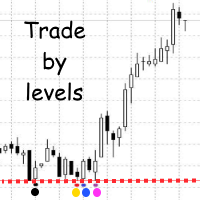
The Trade by levels indicator is designed to automatically determine the formation of a model for entering the market on the chart of the selected instrument.
Definitions: ⦁ BFl is the bar that formed the level. ⦁ BCL1 and BCL2 bars, confirming the level.
The graphical model: ⦁ levels high\low the bars BFL and BCL1 must match the accuracy to the point ⦁ there can be any number of bars between BFL and BCL1. ⦁ between BCL1 and BCL2 intermediate bars
FREE

This trend Advisor is based on Alexander elder's multi-timeframe strategy. Automatic Advisor "Elvis79" royally strict, reliable and chic. It is optimized for the USDZAR currency pair. With the author's settings is set to the timeframe H4. At the same time, the EA trades at the level of the daily timeframe, that is, it holds the trade for several days.
The EA uses a sophisticated trading system "Giant". His whole concept is directed against the risky and irresponsible policies. Before trading on
FREE

The EA has a very simple setup , but effective . Uses only pending orders , which improves the accuracy of position entry . The principle of operation is to capture the slightest movement of the market during a trend , while ignoring the flat periods . Fully automated program for trading in the FOREX market. At the core of the algorithm is simply following the price movement ( trend ). Profit and limit potential losses by using placing Take Profit and Stop Loss . The function "Trailing Stop" all

A fully autonomous trading expert works on the principle of calculating counter divergences of averaged price values simultaneously on two timeframes. An additional filter for opening trading positions is the Bollinger Bands indicator.
Each position has a stop loss and take profit.
Used trailing stop.
For the full and stable operation of this trading expert, you must have a stable VPS.
Recommended trading tools - 5m: EURUSD, GBPUSD, USDJPY, USDCAD. Settings: Comment to orders - Comment to

PipSense CBS (Candlestick Breakout System) is a fully automated trend following strategy with stop-loss that you can use to backtest a 10-year of data with modelling quality of at least 90%. It uses only an entry analysis based on the proprietary candlestick breakout system to detect price breakout movement. The success secrets of the Expert Advisor if backtested correctly are the combination of the entry method with the Money Management and multiple exit strategies. Once opportunity level is de
Advanced Trend Finder follow trend. Color change trend changed.
Works in EURUSD/GBPUSD/XAUUSD/USOIL/US500/USDJPY/USDCAD/JP225/USDTRY/USDMXN and all pairs
Best timeframes 5M/15M/1H/4H/DAILY
Signal on close of a bar.
DOES NOT repaint. DOES NOT repaint. DOES NOT repaint. DOES NOT repaint.
DOES NOT recalculate. DOES NOT recalculate. DOES NOT recalculate. DOES NOT recalculate Settings SoundOn : true/false EmailOn : true/false PushNotificationOn : true/false
ver 1.1 update notes:
Added Alert Arr

Smart Recovery is a fully automated Expert Advisor. This Expert Advisor is based on the Money Flow Index (MFI) and Trend Following Strategies. The Money Flow Index used to evaluate oversold and overbought market conditions. MFI values of 80 and over indicate overbought conditions, meanwhile, values of 20 and below indicate oversold conditions. For this indicator, it has been applied to be more efficient by modifying to be consistent with the current market conditions. This algorithm uses re

close all profitable orders The set contains scripts for different purposes, facilitating work in the MetaTrader 4 terminal. If necessary, a screen is provided for some scripts. Before working on a real account, check (on a demo account) whether the required script responds to your tasks (for example, there is a script for opening five orders at the same time, by default the lot is set to 10; so that you do not accidentally open five positions with a total volume of 50 lots - be attentive))) Use

Порядок работы
В советнике использован блок анализа ценового движения аналогичный блоку советника T-Rex. Советник не открывает следующий ордер, пока не закроется предыдущий.
Советник не имеет блок модификации и не позволяет выставлять уровни TakeProfit и StopLoss, вместо этого выставляются уровни прибыли и убытка в денежном выражении. Это позволяет обойти минимальные уровни, установленные брокером.
Параметры Set_Lots – объем лота открываем ого ордера. CloseProfit – прибыль по позиции, при

There is the first expert enters a sale deal The second expert enters the purchase Each expert works on pending deals multiples With each expert closing his trades at a 10 point profit Better to watch the video before working the experiment. Parameters: OP_symbol_1 : Open positions BUY or open positions SELL. Lot1: Manual Lot Size. Auto_Lot: Set to true to automatically calculate optimal Lot Size based on risk preferences, set to false if you want to use manual lot size. Max_Risk: Max Risk as p

The work of the expert is based on identifying zones of price consolidation in the presence of multiple multidirectional divergences. As the price leaves the narrow price range, the adviser starts working. The SAR indicator acts as an additional filter for making decisions about the direction of the transaction.
It is recommended to use the adviser with the following trading tools - 5m: EURUSD, GBPUSD, USDCAD. Standard settings are recommended for EURUSD and USDCAD . For GBPUSD , set the TRUE -
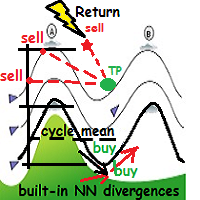
WindReturn is a fully automated solution to exploit the particular market tendence of the price to return, periodically and cyclically, to its own mean. This algo-solution is the result of years of research through charts and market theories with particular attention to dynamic behavior of currency pairs "ripples", encapsulating the observations in a technical art form.
Technical details WindReturn will mainly focus to profit in the short term trend ,but also in the "hot zones" where the pric

Attention : The TigerGBP Power EA can not be tested in the MT4 strategy tester !!! Trend is the KEY !
TigerGBPPower EA robot is a fully automated robot for Forex trade. TigerGBPPower EA is a combination numerous special trend strategy ,that It provides the possibility the best entries of the trade . TigerGBPPower EA robot is designed for medium and long term trading ,the robot will help you deal with and manage emotions ,and you don't need worry about news release any more !! The trend is

ATTENTION : The Tiger Eur Power EA can not be tested in the MT4 strategy tester !!!
TigerEurPower EA robot is a fully automated robot for Forex trade. TigerEurPower EA is a combination numerous special trend strategy ,that It provides the possibility the best entries of the trade . TigerEurPower EA robot is designed for medium and long term trading ,the robot will help you deal with and manage emotions ,and you don't need worry about news release any more !! The trend is the key ,the

The diamond top and bottom are reversal patterns. It represents a rally to a new high with a drop to a support level followed by a rally to make a new high and a quick decline, breaking the support level to make a higher low. The bounce from the higher low is then followed by a rally, but making a lower high instead. Once this behavior is identified, prices then break the trend line connecting the first and second lows and start to decline further. You can find MT5 version hier
Indicator shows

A signal will be formed when the needle stick is shaped like a needle. and you can set it in SHADOW. EA is good for TF5 with shadow 2 or 3 pips, and use martingale 1.5 - 2. Even better if the market is experiencing flats. This EA is only good for using the EURUSD pair and using the martingale system with a distance of TP 10-15 pips, sustainable with pipsteep 40 - 50 pips to open a martingale position if needed

The assistant sets Stop Loss and Take Profit for all open positions. Settings for the symbol, position type, Stop Loss and Take Profit are set in an external file.
The ability to express one's thoughts is no less important than the thoughts themselves, for most people have a hearing to be saddened, and only a few have a mind that can judge what has been said.
If presidents cannot do this with their wives, they do so with their countries.

MULTI CURRENCY SCALPING SYSTEM - DEFAULT FOR EURCHF
YOU CAN OPTIMIZE THIS EA WITH EVERY SINGLE PAIR - REMEMBER ABOUT CHOOSING GOOD WORK HOURS FOR EACH PAIR !!!
HappyProgress is a fully automatic Expert Advisor. This expert advisor is based on channel reverse price. Robot is trading after closing EUR session and before closing USD session. The Robot was tested and optimized from 2004 to Today with 100% data from ICMARKETS MT5

There are a lot of support tools in the Forex trading market, such as ea - robot., to help the transaction become automated and can be traded 24 hours a day, and there are also lots of points. The quote is called an "indicator", such as: sar parabolic, cci, macd., bollinger band ... combining all the junk issues will give a "signal" and we call it "trading signal". But,null, and perhaps many market participants have not defined what the trend is, and what is the wave, to have more effective "str

KT Asian Breakout carefully analyzes the range-bound market during the Asian session and then fires a long or short trade after doing some preassessment based on its inbuilt technical analysis module.
The executed orders are closed within a day before the completion of the next day session. The inbuilt technical analysis module checks for the session range and compares it with the last 20 days price movement. If it finds any erratic price movement within the session, the orders are not executed
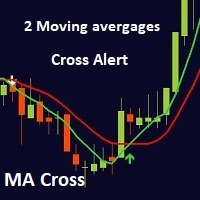
This indicator is a full 2 moving averages cross Alert ( email and push notification "mobile"), 2 MA with full control of MA method and applied price for each moving average "slow and fast", -simple, exponential, smoothed, linear weighted. -close, open, high, low, median price, typical price, weighted price. you can modify periods as well for both MA. For any suggestions don't hesitate, thanks

Daily Movement( Called Power) is effects to morning time of Japan Markets , Using this effects with Intelligence Averaging system ,This EA " Power Scalping " is made. M15 EURUSD ,EURCHF,USDCHF Recommended. For News Filter ,Please add at MT4 Tools/Options/ExpertAdvisors URL: http://ec.forexprostools.com/
Parameters If you want to use JPY accounts, Please multiplied by 110 to Amount for Initial Lots like 150*110= 16500.

适用于低点差平台(10点以内)或者ECN平台,短线交易EURUSD使用周期为:1M和5M。参数默认。 如果点差过高可能会产生亏损。标准账户测试请把点差改为10以后回测,请仔细阅读后测试
MinLots = 0.01;------最小手数 MaxLots = 100.0;-----最大手数 Risk = 50.0; -----最大风险 FixedLots = 0.1;------固定手数 UseMM = TRUE;-------是否启用按资金控制手数,请选 用TRUE
StartHour = 0;----------开始时间,小时 StartMinute = 0;--------开始时间,分钟 EndHour = 23;-----------结束时间,小时 EndMinute = 59;---------结束时间,分钟
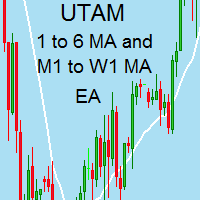
I speak in Hungarian. Magyarul beszélek benne. Első felvétel. https://www.youtube.com/watch?v=h7UbTWiM-Lw Második felvétel. https://www.youtube.com/watch?v=y54q4Rasf2A&t=1s Harmadik felvétel. https://www.youtube.com/watch?v=13zYjsoe6ZQ Negyedik felvétel. https://www.youtube.com/watch?v=NGiB1AnxxfU Nice Day Signalos! If the Muving Average closes the candle over the candle. Buy takes. If the Muving Average closes the candle under the candle. Sell takes. MA trend. It can be set for him. Positive MA

THEWINNERTURTLE EXPERT ADVISOR MT4 This EA is based on price action and RSI indicator to trade EURUSD currency pair on M15 timeframe. THEWINNERTURTLE is a price action swing system working for a long-term profit as showed by backtesting. THEWINNERTURTLE identifies price movement to easily find buy and sell opportunities and places automatically trades based on defined parameters. THEWINNERTURTLE does not use neither martingale nor averaging of losing positions. SETTINGS THEWINNERTURTLE is a long

The Expert Advisor opens trades based on the Bollinger Bands signals and RSI. But it's not simple. The EA has been developed and optimized for
Currency: USD/JPY Timeframe: M15 Indicator parameters Sell Entry Bands - Default value is 2.1. Sell Exit Bands - Default value is 2.3. Buy Entry Bands - Default value is 2.3. Buy Exit Bands - Default value is 2.9.
RSI Sell Exit Point - Default value is 10.
RSI only Sell Exit Point - Default value is 70.
RSI only Buy Exit point - Default value is 10.
Se

The Trend Line PRO indicator is an independent trading strategy. It shows the trend change, the entry point to the transaction, as well as automatically calculates three levels of Take Profit and Stop Loss protection.
Trend Line PRO is perfect for all Meta Trader symbols: currencies, metals, cryptocurrencies, stocks and indices. The indicator is used in trading on real accounts, which confirms the reliability of the strategy. Robots using Trend Line PRO and real Signals can be found here:
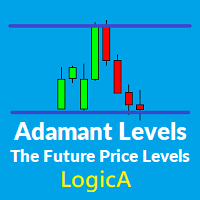
This Indicator Paints levels which are very ' Adamant ' and strong in nature. These levels act as strong Price rejection levels for a life time and never repaint.
Disclaimer : If you are looking for a Fancy, colorful and eye catchy indicator please stay away.
No trader can become a good trader without considering levels where the price can hold, bounce or break. These levels help traders to enter markets at a cheaper price. They can be Support resistance, demand supply, pivot point, Fibonacci

A simple risk management tool that closes all open orders if equity drops by a specified percentage. This tool is useful if you are running multiple EAs and multiple charts and pairs in order to control your risk. All orders will close accordingly. Once it hits specified percentage drawdown the closing of all orders cannot be stopped. The EA will reset once all orders are closed, until account equity drops again relative to account balance. Use at your own risk. This is only for MT4. There is on
FREE
Your safety net to turn losing trades into winners
Have you ever taken a trade at literally the worst possible moment? Have you ever bought an asset just before a significant price crash?
Or perhaps you've gone short at the worst possible moment before a rip-off rally? I have. And it sucks. It's one of the worst feelings in the world. Like a kick in the groin. To come out unscathed and in profit from these situations, I developed PZ Hedging EA. [ User Guide | Installation Guide | Update Guide |
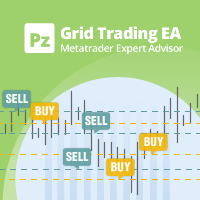
Profit consistently from the wavy nature of the market Grid trading is an efficient mechanical trading strategy which has no reliance on direction, profits from volatility and uses the intrinsic wavy nature of the market. It uses fixed price levels to enter and exit trades in one or both directions. Such trades, generally spaced at 20-200 pip intervals, create a trading grid. [ User Guide | Installation Guide | Update Guide | Troubleshooting | FAQ | All Products ] Advantages
Easy to set up and
This EA recovers losing trades using a sequential and controlled martingale: it places consecutive trades with increasing lot sizes until the initial trade is recovered, plus a small profit. It offers a complete hassle-free trading framework, from managing initial trades to recovery. Please note that the EA implements a martingale, which means that it takes balance losses that are recovered later. [ User Guide | Installation Guide | Update Guide | Troubleshooting | FAQ | All Products ] Features
Profit even when too early: the perfect robot for position trades This EA turns your losing trades into winners using averaging. Once your initial trade moves into negative territory, the recovery mechanism will kick in and place consecutive market orders in the same direction at fixed price intervals, all of which will be closed with a combined profit or approximately breakeven. This mechanism is compatible with NFA/FIFO rules and accepted by US Brokers. [ User Guide | Installation Guide | Upda
Fx Technical Analysis Sharing System, Experts make technical analysis and you can see the analysis. Analyses are updated during the day. One-click analysis with MetaTrader is displayed on the screen. If there are pending orders for these analyses, you will open the transaction with a single click. It is quite easy and easy to use. Related analysis , period and information is saved as template to your computer. You can then download and view it from the files folder. It is quite educational and a
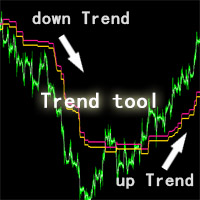
This ZhiBiQuShi tool is suitable for all varieties and is suitable for more than 5 minutes. It is a good tool for judging trends!
The price is a downward trend below the two lines, and the price is an upward trend above the two lines.
DESCRIPTION OF SETTINGS till_breakeven_rate : Determines how closely the channel will follow the price till the trade breaks even. RECOMMEND 1 space1 : Determines the width of the channel from the beginning of a trade till profi
FREE
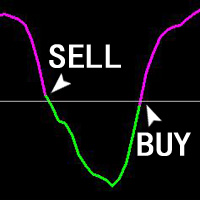
The ZhiBiJuJi indicator analysis system uses a powerful internal loop to call its own external indicators, and then calls the analysis before and after the cycle. The data calculation of this indicator analysis system is very complicated (calling before and after the cycle), so the hysteresis of the signal is reduced, and the accuracy of the advance prediction is achieved. This indicator can be used in all cycles on MT4, and is most suitable for 15 minutes, 30 minutes, 1 hour, 4 hours. Buy:
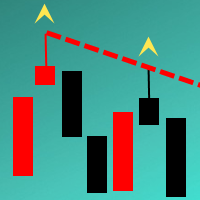
The Indicator automatically draws trend lines on the specified timeframe ( Trend lines period parameter). The lines are drawn based on the last two known fractals of the specified period. A peculiarity of this Indicator is that the lines are drawn with accuracy up to 15 minutes. It allows analyzing the chart on smaller timeframes without loosing the precision of drawing the lines in relation to the extrema of the prices. It is suitable for an intraday and medium term trading. The minimum timefr

Indicator for determining adjustments and price reversals It gives signals for inputs and shows the general direction of the price movement. Allows you to conduct trend and counter trend trading It works on all timeframes, on any currency pairs, metals and cryptocurrency Can be used when working with binary options Distinctive features Does not redraw; Thanks to simple settings, you can quickly adapt to any trading instrument; It works on all timeframes and on all symbols; Suitable for trading c
MetaTrader 마켓은 MetaTrader 플랫폼용 애플리케이션을 구입할 수 있는 편리하고 안전한 환경을 제공합니다. Strategy Tester의 테스트를 위해 터미널에서 Expert Advisor 및 인디케이터의 무료 데모 버전을 다운로드하십시오.
MQL5.community 결제 시스템을 이용해 성능을 모니터링하고 원하는 제품에 대해 결제할 수 있도록 다양한 모드로 애플리케이션을 테스트할 수 있습니다.
