Close Minus by Plus - Closing loss-making positions, by finding and closing of profitable positions

| ➕ Exp – Close Minus by Plus for MetaTrader 4 & MetaTrader 5 Smart MetaTrader utility for closing unprofitable positions by finding and closing profitable positions that can cover the loss. Close Minus by Plus helps traders clean up losing positions without blindly closing the entire account, using a controlled profit-loss balancing algorithm. |
[Русский] - [English] - [Español] - [Português] - [Deutsch] - [Français] - [한국어] - [日本語] - [中文] - [Türkçe] - [Italiano]
| 💎 Close Minus by Plus MT4 | 💎 Close Minus by Plus MT5 |
| ⬇ Download / Free Version | 📘 Full Instruction |
| ▶ Watch Video | 🛒 All Expforex Products |
| 🏠 Main | 🎓 Documentation | ⚙ Settings |
| ❓ FAQ | ⭐ Reviews | 💬 Comments |
🎬 Watch How Close Minus by Plus WorksThe video explains the main idea: the Expert Advisor searches for losing positions and finds profitable positions that can cover the loss with an additional profit buffer. |
🚀 What is Close Minus by Plus?
Close Minus by Plus is a MetaTrader assistant designed to close unprofitable positions by identifying profitable positions that can cover the loss.
The Expert Advisor searches among open positions, finds the largest losing position, then calculates whether one or several profitable positions can compensate this loss. If the profit is enough according to your settings, the EA closes the losing position together with the selected profitable positions.
This is not a signal robot and not a trading strategy for opening new deals. It is a position management utility for traders who already have open positions and want a smarter way to reduce negative exposure.
🔍 Finds the Worst PositionThe EA searches for the most unprofitable position according to your filter settings. | ➕ Finds Profitable PositionsThe EA looks for profitable positions that can cover the selected loss. |
⚖ Balances Loss by ProfitThe algorithm checks whether total profit is enough to close the minus with an additional profit buffer. | 🧹 Cleans the AccountThe tool helps remove losing positions without closing all trades blindly. |
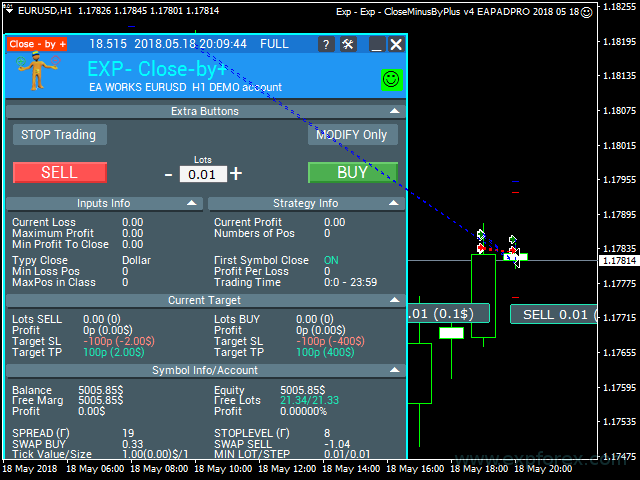
📊 Product Interface and Work Example The Expert Advisor can be placed on a separate chart. After configuration, it monitors the terminal and waits until the programmed closing condition appears. |
⭐ Why Traders Use Close Minus by Plus
- Close losing positions using profitable positions found on the account
- Reduce negative exposure without manually searching for combinations
- Work with a basket of positions, not only with one trade
- Filter positions by symbol, order type and Magic number
- Control the minimum loss level that activates the algorithm
- Define additional profit required before closing the selected set
- Limit the number of positions included in one closing group
- Use dollars or points for profit/loss calculations
- Work with manual trades or EA trades depending on Magic filters
- Use logs to see what the EA found and what it closed
| ⚠ Important: Close Minus by Plus does not remove trading risk. It closes a losing position only when enough profitable positions are found according to your settings. If there are no suitable profitable positions, the EA cannot magically compensate the loss. |
⚙ How Close Minus by Plus Works
The EA is installed on a separate chart. You configure the filters and closing conditions. After that, you continue trading manually or using other Expert Advisors. When the programmed condition appears, Close Minus by Plus starts its calculation.
1️⃣ Position SearchThe EA scans open positions and searches for the largest losing position that matches your filters. | 2️⃣ Profit Group CalculationThe EA searches for one or several profitable positions that can cover the selected loss. |
3️⃣ Condition CheckThe EA checks whether the total profit is greater than the loss plus the additional profit value. | 4️⃣ Closing Set ExecutionIf the condition is met, the EA closes the losing position and the selected profitable positions. |
📌 Simple Example
Suppose you have one losing position with a current result of -50 points. At the same time, your account has several profitable positions. The EA searches for a group of profitable trades that can cover this loss and leave additional profit.
If your settings require AdditionalProfitInUnit = 20, the EA must find enough profitable positions to cover the -50 points and add at least +20 points more. In this example, the required total profit is at least +70 points.
| Condition | Example |
| Largest losing position | -50 points |
| Additional profit required | +20 points |
| Required profitable group | At least +70 points |
| Action | The EA closes the losing position and the profitable positions found. |
| Practical meaning: instead of keeping a bad position for days and hoping for a reversal, you can use existing profitable positions to close the minus in a controlled way. |
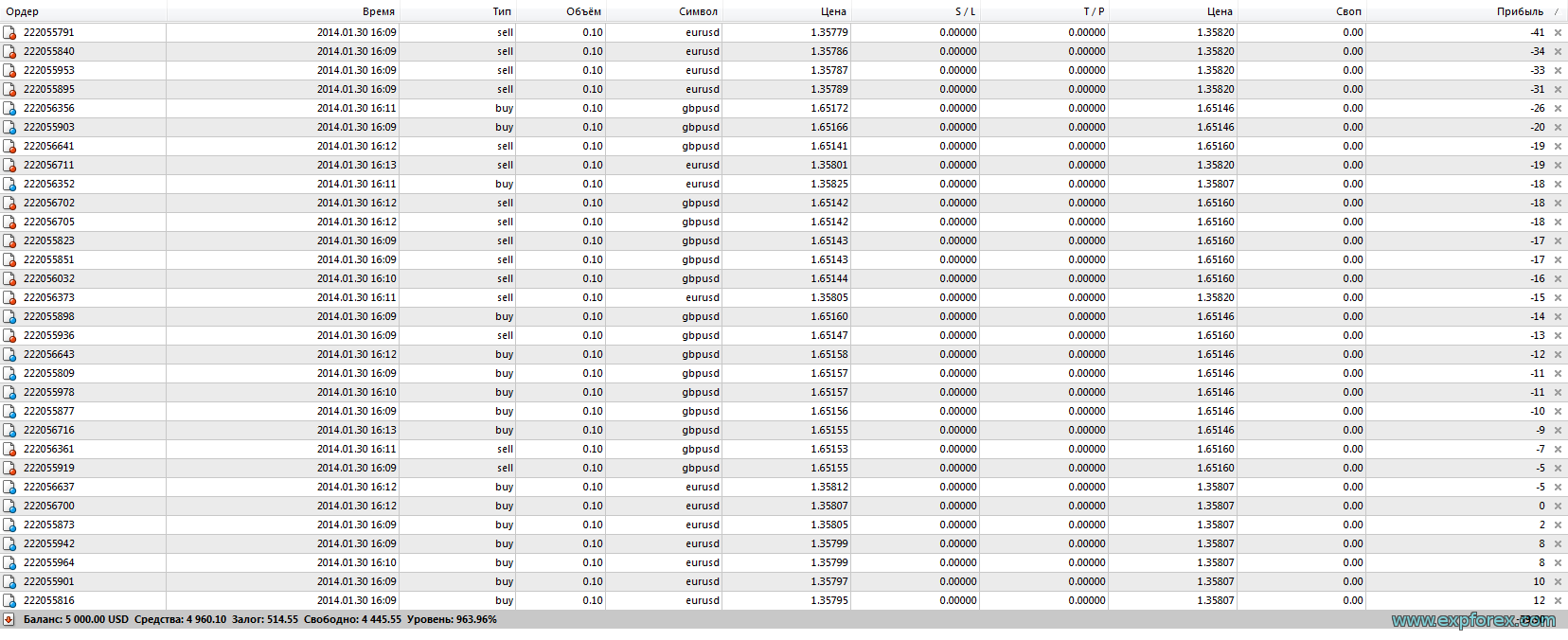
🧾 Example from the Expert Log
The Expert Advisor writes the full calculation process into the logs. This helps the trader understand what the EA found, which position was selected as the biggest loss, and which profitable positions were used to cover it.
| Example logic from the log:
|
📉 Before Processing The account has several open positions. One position is in loss, while other positions have floating profit. |
📈 After Processing The EA closes the losing position together with selected profitable positions according to the configured conditions. |

🧩 Typical Use Cases
| Scenario | How Close Minus by Plus Helps |
| Many open positions | The EA finds which losing position can be covered by profitable positions. |
| Manual trading cleanup | The trader does not need to manually calculate which trades to close together. |
| Grid or basket trading | The EA can help remove the worst losing position when enough profitable trades exist. |
| EA portfolio management | The tool can process positions opened by different strategies using Magic filters. |
| Profit-loss balancing | The EA uses positive trades to compensate selected negative trades. |
| Controlled closing | You can define minimum loss, additional profit and maximum number of positions in the set. |
🧪 Example with Another Expert Advisor
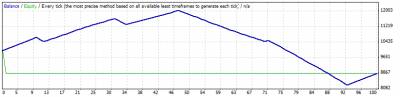
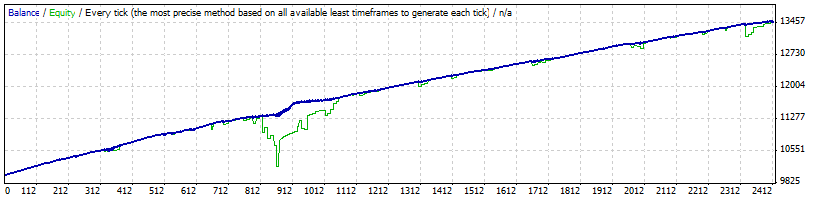
The original documentation also shows how the algorithm can improve the work of another Expert Advisor when a function for overlapping losing positions is added.
Without Close Minus by Plus Logic The losing position remains in the account without the overlapping function. |
With Closing Function by Overlapping The algorithm can help close losing positions when profitable positions are available to compensate the loss. |
⚙ Main Settings You Should Understand
Close Minus by Plus has a small but important group of settings. The full documentation is available on the product page, but the most important parameters are below.
| Setting | Why it matters |
| TypeOfUnitToClose | Defines whether profit and loss are calculated in money or in points. |
| MinLossInUnit | Minimum loss level for a position to be included in the search. For example, -100 dollars or -50 points. |
| AdditionalProfitInUnit | Extra profit required above the loss before the EA closes the selected group. |
| MaxPos_in_Class | Maximum number of positions in one closing set. |
| FirstSymbolClose | If enabled, the EA searches and closes positions only for the same symbol as the losing position. |
| OrderToClose | Defines which position type can be processed: all positions, BUY positions or SELL positions. |
| MagicToClose | Defines which Magic numbers should be processed. You can use all Magic numbers or selected ones. |
| SymbolToClose | Defines whether the EA works with all symbols or only the current symbol. |
| OpenHoura / OpenMinutea | Start time when the EA is allowed to work. |
| CloseHoura / CloseMinutea | End time when the EA stops processing closing conditions. |
| 📘 Want the full parameter list? Open the complete Close Minus by Plus Settings documentation before using the utility on a real account. |
🧮 How the Closing Condition Is Calculated
The logic is based on a simple formula: the total profit of selected profitable positions must be greater than the loss of the selected losing position plus your additional profit requirement.
| Formula Element | Meaning |
| Losing position | The position with loss that the EA wants to close. |
| Profitable group | One or several profitable positions found by the EA. |
| AdditionalProfitInUnit | Extra profit required before closing the group. |
| Closing rule | Profitable group must cover the loss and leave the configured additional profit. |
📋 What You Can See in the Logs
Close Minus by Plus writes its calculations to the Expert log. This helps you understand why a certain set of positions was selected and closed.
| Log Information | Meaning |
| The biggest negative | The largest losing position found by the EA. |
| The biggest plus | The largest profitable position found during the calculation. |
| Aggregate Profit | Total profit of the selected profitable positions. |
| Number of positions to close | How many positions are included in the closing set. |
| Tickets for closing | List of losing and profitable tickets selected by the algorithm. |
✅ When Close Minus by Plus Can Be Useful
- You have many open positions and want to remove the worst losing position.
- You do not want to close the whole account manually.
- You want to use existing profitable positions to compensate a losing one.
- You use basket trading, grid systems or several Expert Advisors.
- You want to reduce emotional decisions when closing trades.
- You need a controlled algorithm for profit-loss balancing.
- You want to process only selected symbols, directions or Magic numbers.
⚠ When You Must Be Careful
|
🌐 Broker, Account and VPS Recommendations
Close Minus by Plus uses position monitoring and closing operations. Broker execution, slippage and account conditions can affect the final result.
✅ Recommended
| ⚠ Check Carefully
|
🛠 How to Install Close Minus by Plus
Installation is standard for MQL5 Market products. The most important part is not installation itself, but correct filtering: symbols, Magic numbers, position direction and loss/profit thresholds.
| Step | Action |
| 1 | Download, install or open the free version of Close Minus by Plus. |
| 2 | Open MetaTrader 4 or MetaTrader 5 and log in to your MQL5 account. |
| 3 | Install the product from the Market section of the terminal. |
| 4 | Attach the EA to a separate chart, for example EURUSD. |
| 5 | Enable Algo Trading / Auto Trading in the terminal. |
| 6 | Allow automated trading in the EA settings window. |
| 7 | Set TypeOfUnitToClose, MinLossInUnit and AdditionalProfitInUnit. |
| 8 | Configure SymbolToClose, MagicToClose, OrderToClose and MaxPos_in_Class. |
| 9 | Test the utility on a demo account with many different position scenarios. |
| 10 | Check the Expert log to understand what positions the EA selected and why. |
🔗 Useful Links🔹 How to Buy and Install a Market Advisor 🔹 Download / Full Close Minus by Plus Guide 🔹 Read FAQ |
🆚 Close Minus by Plus vs Manual Closing
Manual closing can be emotional and inaccurate when many positions are open. Close Minus by Plus automates the calculation and helps find a group of positions that can close the selected loss according to predefined rules.
| Manual Closing | Close Minus by Plus |
| Trader manually searches which trades to close | EA automatically finds the losing position and profitable group |
| Risk of emotional decisions | Rules are configured in advance |
| Difficult when many symbols are open | Can work with all symbols or selected symbols |
| No automatic additional profit condition | AdditionalProfitInUnit can require extra profit above the loss |
| Hard to track all calculations | The EA writes selected tickets and closing logic to logs |
📌 Practical Recommendations Before You Start
- Start on a demo account.
- Use clear Magic number filters if you run several Expert Advisors.
- Decide whether the EA should work with all symbols or only one symbol.
- Do not set AdditionalProfitInUnit too low.
- Limit MaxPos_in_Class so the EA does not close too many trades at once.
- Check the logs after every closing cycle.
- Do not use the tool as a replacement for risk management.
- Understand that profitable positions will also be closed.
- Test different scenarios: one losing trade, several profitable trades, mixed symbols and mixed Magic numbers.
- Use a VPS if you want the EA to monitor conditions continuously.
⚠ Risk Warning
| Trading Forex and CFDs involves risk. Close Minus by Plus can help balance losing and profitable positions, but it cannot guarantee profit or remove market risk. It may close profitable positions that could continue moving in profit. Always test your settings on demo before using real funds. |
🏁 Final Thoughts
Close Minus by Plus is created for traders who want a smarter way to remove losing positions using existing profitable positions. It is especially useful when the account has many open trades and manual calculation becomes difficult.
If you understand that the EA closes both losing and profitable positions, configure filters carefully, use a reasonable additional profit buffer and test everything on demo, Close Minus by Plus can become a serious position-management assistant for MetaTrader 4 and MetaTrader 5.
🚀 Start with Close Minus by Plus TodayWatch the video, download the utility, read the full instruction, test profit-loss balancing scenarios and decide whether Close Minus by Plus fits your trading workflow. |
| ▶ Watch Video | ⬇ Download / Free Version |
| 📘 Read Documentation | ⚙ Open Settings |
| 💎 Download MT5 | 💎 Download MT4 |
SEO Tags
Close Minus by Plus, Exp Close Minus by Plus, Close Minus by Plus MT4, Close Minus by Plus MT5, close losing positions by profit, close unprofitable trades, profitable positions closing, loss recovery utility, Forex position management, MetaTrader assistant, MT4 position manager, MT5 position manager, profit loss balancing, close minus by plus, close loss by profit, Forex risk management, basket position closing, automated position closure, MagicToClose, MinLossInUnit, AdditionalProfitInUnit, MaxPos_in_Class, TypeOfUnitToClose, MQL5 Market utility, Expforex Close Minus by Plus