
This is a step-by-step video tutorial on how to install and use SWING MASTER EA
Subscribe to stay up to date on my promotions, updates, and new set files.


Set-files - click to download Updated 28.04.2026 (Next update 28.10.2026)
These settings are used for trading on this signal - https://www.mql5.com/en/signals/2362558?source=Site+Profile+Seller
Simultaneous trading in 2 directions allows us to trade in both directions simultaneously on the same asset.
For example, if a SELL trade is already open, the EA (if there is a valid trade signal) can now open a BUY trade on the same asset — and vice versa.
For example, if a SELL trade is already open, the EA (if there is a valid trade signal) can now open a BUY trade on the same asset — and vice versa.
What does this update give us?
In simple terms: we will no longer miss trading signals just because a position is already open on an asset. More precisely:
-
The average number of trades increases by 5–15%
-
The maximum drawdown decreases by 5–15%
-
The Recovery Factor improves by 5–10%
I believe this is a powerful upgrade that boosts the efficiency and profitability of the system by 10–15%, while also reducing trading risks. That’s a big win!
Also, if your account type is Netting, this feature will not work.
So before enabling dual-direction trading, check with your broker to make sure this is supported on your account.
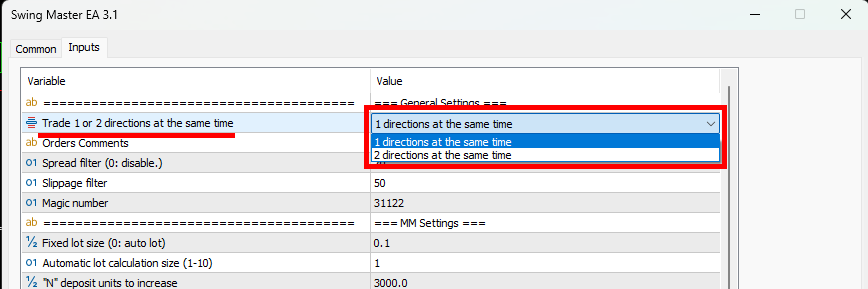
By default, the dual-direction trading at the same time feature is disabled. You are not required to use it. If you wish to activate it, double-click the variable
"Trade 1 or 2 directions at the same time" and from the dropdown menu, select "2 directions at the same time."

- Minimum capital to start: $200
- Minimum leverage: 1:30 and more
Guys, I recommend using this expert advisor on accounts with a narrow spread. If you don't know which account type will be best, then choose one of the recommended brokers:
This is the first recommended broker
This is the second recommended broker
If you are from the US and they do not want to register you on the two previous links, then you can definitely register here
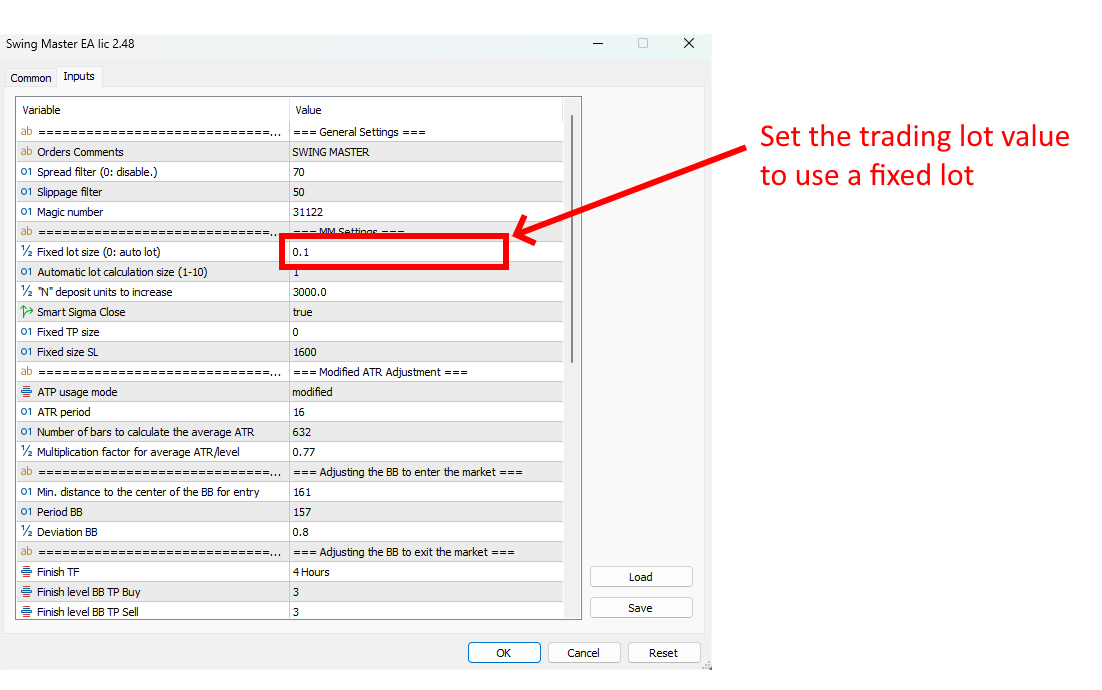
If you want to use a fixed lot size
Attention. By default, the automatic calculation mode of the trading lot size is set in the set files. If you want to use a fixed lot, then set the value of the desired trading lot size for the corresponding variable in the manual settings of the adviser.