

MQL5 Bootstrap (II): Essential Validators for Robust Trading Systems
 1 657
1 657
 0
0

Content
- Introduction
- Lot size validators
- Stop loss and take profit validators
- Price Normalizer
- Freeze level check in orders
- Checking if there are sufficient funds to open a trade
- Checking to ensure new modification levels are given
- Checking if a new order is allowed
- Checking if a new bar has emerged
- Checking if a symbol is tradable
- Checking if there is news nearby
- Trading session detectors
- Connecting the dots
- Conclusion
Introduction
It takes more than just a trading strategy to build a reliable Expert Advisor (EA). An EA that blindly sends trade requests or repeatedly attempts to modify orders without first validating trading conditions will quickly generate numerous errors and warnings, resulting in poor performance and an unpleasant user experience.
Like most software systems, the MetaTrader 5 platform operates under a set of rules and constraints. Some of these restrictions are imposed by the trading terminal itself, while others are defined by the broker and the type of trading account being used. These constraints are designed to protect both the trading infrastructure and the trader from invalid or risky trading operations.
Some common examples include:
- The maximum number of positions or pending orders that may be open simultaneously (for example, 200).
- Minimum and maximum trading volumes permitted for a particular symbol.
- Minimum distances allowed between the current market price and Stop Loss, Take Profit, or pending order prices.
- Margin requirements that must be satisfied before opening a new position.
- Trading restrictions based on market sessions, symbol trading permissions, or scheduled economic news events.
If you have ever published an Expert Advisor to the MQL5 Market, you have likely encountered the automatic validation process. Before an EA is accepted for publication, it is executed under various simulated broker environments to verify that it complies with these trading restrictions and handles different account configurations correctly.
Because these validations are essential to every Expert Advisor, repeatedly implementing them in every project quickly becomes tedious and error-prone. In this article, we will continue building our MQL5 Bootstrap library by creating a collection of reusable validators and helper functions that can be shared across multiple trading systems. Again, the goal is not only reduce duplicated code but also to make our Expert Advisors more robust, maintainable, and reliable.
Lot Size Validators
To avoid trade server return code 10014 ("Invalid volume in the request"), ensure the requested volume is within broker's minimum/maximum limits and is a multiple of the volume step. Read more.
That being said, we introduce a function that checks if a given volume is valid.
validators.mqh.
//+------------------------------------------------------------------+
//| Checks if a given lotsize (volume) value is appropriate according|
//| to instrument's specs.                                           |
//+------------------------------------------------------------------+
bool isValidLotsize(double volume, string symbol = NULL, bool verbose = false)
  {
   if(symbol == NULL || symbol == "")
      symbol = Symbol();

//--- minimal allowed volume for trade operations
   double min_volume = SymbolInfoDouble(Symbol(), SYMBOL_VOLUME_MIN);
   if(volume < min_volume)
     {
      if(verbose)
         printf("Volume is less than the minimal allowed SYMBOL_VOLUME_MIN=%.2f", min_volume);
      return(false);
     }

//--- maximal allowed volume of trade operations
   double max_volume = SymbolInfoDouble(Symbol(), SYMBOL_VOLUME_MAX);
   if(volume > max_volume)
     {
      if(verbose)
         printf("Volume is greater than the maximal allowed SYMBOL_VOLUME_MAX=%.2f", max_volume);
      return(false);
     }

//--- get minimal step of volume changing
   double volume_step = SymbolInfoDouble(Symbol(), SYMBOL_VOLUME_STEP);

   int ratio = (int)MathRound(volume / volume_step);
   if(MathAbs(ratio * volume_step - volume) > 0.0000001)
     {
      if(verbose)
         printf("Volume is not a multiple of the minimal step SYMBOL_VOLUME_STEP=%.2f, the closest correct volume is %.2f", volume_step, ratio * volume_step);
      return(false);
     }

   return true;
  }
It returns true if a given volume satisfies all three caveats.
However, more often than not, we want whatever lot size we set manually or calculate automatically in our trading bot to be used regardless. If a value happens to be larger than the maximum, smaller than the minimum, or not a multiple of the volume step, a value closer to it should be applied.
That being said, we need a function to decide (normalize) for the next correct lot size according to a received/initial value.
//+------------------------------------------------------------------+
//|  Function to validate Lot size                                   |
//+------------------------------------------------------------------+
double NormalizeLotSize(const double volume, string symbol = "")
  {
   if(symbol == NULL || symbol == "")
      symbol = Symbol();

//--- Get the minimum, maximum, and step size for the symbol

   double min_volume = SymbolInfoDouble(symbol, SYMBOL_VOLUME_MIN);
   double max_volume = SymbolInfoDouble(symbol, SYMBOL_VOLUME_MAX);
   double step_volume = SymbolInfoDouble(symbol, SYMBOL_VOLUME_STEP);

//--- Check if the volume is less than the minimum
   if(volume < min_volume)
      return min_volume;

//--- Check if the volume is greater than the maximum

   if(volume > max_volume)
      return max_volume;

//--- Check if the volume is a multiple of the step size

   int ratio = (int) MathRound(volume / step_volume);
   double adjusted_volume = ratio * step_volume;

   if(MathAbs(adjusted_volume - volume) > 0.0000001)
      return adjusted_volume;

   return adjusted_volume;
  }
Stop loss and Take profit Validators
To avoid placing stop loss or take profit values too close to the market, we have to ensure these values respect the SYMBOL_TRADE_STOPS_LEVEL threshold.
//+------------------------------------------------------------------+
//| Checks if either a given SL or TP is valid.                     |
//+------------------------------------------------------------------+
bool isValidStoploss_Takeprofit(ENUM_ORDER_TYPE type, double SL, double TP, string symbol = "", bool verbose = false)
  {

   if(symbol == NULL || symbol == "")
      symbol = Symbol();

//--- get the SYMBOL_TRADE_STOPS_LEVEL level

   int stops_level = (int)SymbolInfoInteger(symbol, SYMBOL_TRADE_STOPS_LEVEL);
   if(stops_level != 0)
     {
      if(verbose)
         PrintFormat("SYMBOL_TRADE_STOPS_LEVEL=%d: StopLoss and TakeProfit must" +
                     " not be nearer than %d points from the closing price", stops_level, stops_level);
     }

//---

   MqlTick ticks;
   if(!SymbolInfoTick(symbol, ticks))
     {
      printf("Failed to obtain ticks from %s. Error = %d", symbol, GetLastError());
      return false;
     }

   double ask = ticks.ask, bid = ticks.bid;
   double point = SymbolInfoDouble(symbol, SYMBOL_POINT);

//---
   bool SL_check = false, TP_check = false;
//--- check only two order types
   switch(type)
     {
      //--- Buy operation
      case  ORDER_TYPE_BUY:
        {
         //--- check the StopLoss
         SL_check = (bid - SL > stops_level * point);
         if(!SL_check)
            if(verbose)
               PrintFormat("For order %s StopLoss=%.5f must be less than %.5f" +
                           " (bid=%.5f - SYMBOL_TRADE_STOPS_LEVEL=%d points)",
                           EnumToString(type), SL, bid - stops_level * point, bid, stops_level);
         //--- check the TakeProfit
         TP_check = (TP - bid > stops_level * point);
         if(!TP_check)
            if(verbose)
               PrintFormat("For order %s TakeProfit=%.5f must be greater than %.5f" +
                           " (bid=%.5f + SYMBOL_TRADE_STOPS_LEVEL=%d points)",
                           EnumToString(type), TP, bid + stops_level * point, bid, stops_level);
         //--- return the result of checking
         return(SL_check && TP_check);
        }
      //--- Sell operation
      case  ORDER_TYPE_SELL:
        {
         //--- check the StopLoss
         SL_check = (SL - ask > stops_level * point);
         if(!SL_check)
            if(verbose)
               PrintFormat("For order %s StopLoss=%.5f must be greater than %.5f " +
                           " (ask=%.5f + SYMBOL_TRADE_STOPS_LEVEL=%d points)",
                           EnumToString(type), SL, ask + stops_level * point, ask, stops_level);
         //--- check the TakeProfit
         TP_check = (ask - TP > stops_level * point);
         if(!TP_check)
            if(verbose)
               PrintFormat("For order %s TakeProfit=%.5f must be less than %.5f " +
                           " (ask=%.5f - SYMBOL_TRADE_STOPS_LEVEL=%d points)",
                           EnumToString(type), TP, ask - stops_level * point, ask, stops_level);
         //--- return the result of checking
         return(TP_check && SL_check);
        }
      break;
     }
//--- a slightly different function is required for pending orders
   return false;
  }
Because SL/TP levels may be derived from risk settings, manual input, or indicators, their next values cannot be predicted reliably. The above function ensures bad values aren't sent to a broker server, and the verbose argument is there to let us know about it. When the verbose argument is set to true, the function prints information about the state of both SL and TP the moment an invalid value is detected.
Price Normalizer
Despite being less common nowadays, trade server return code 10015 (Invalid price in the request) is one of the most annoying error codes you can encounter.
The error occurs when you send a raw price in the request. For example, 1.3425 is not equal to 1.34251. This tiny distinction is enough to cause a rejection when trying to open positions or orders in a 4-digit instrument.
To avoid this, a simple function to normalize raw prices to suit the instrument's digits becomes handy:
//+---------------------------------------------------------------------+
//| Normalizes the price of a particular symbol considering instrument's|
//| digits.                                                             |
//+---------------------------------------------------------------------+
double NormalizePrice(double price, string symbol = NULL)
  {
   if(symbol == NULL || symbol == "")
      symbol = Symbol();

   int digits = (int)SymbolInfoInteger(symbol, SYMBOL_DIGITS);

   return NormalizeDouble(price, digits);
  }
Freeze Level Check in Orders
Before trying to modify an order, you have to ensure a new entry price isn't too tight to the current ask or bid price, depending on the order type. The threshold is SYMBOL_TRADE_FREEZE_LEVEL.
The SYMBOL_TRADE_FREEZE_LEVEL parameter shows the distance of freezing the trade operations for pending orders and open positions in points.
For example, when an instrument is processed by an external trading system, a Buy Limit order may become too close to the Ask price. If a modification request is sent at that moment, the order may already have been executed and cannot be modified.
Therefore, the symbol specifications for pending orders and open positions may have a freeze distance specified, within which they cannot be modified. In general, before attempting to send a modification request, it is necessary to perform a check with consideration of the SYMBOL_TRADE_FREEZE_LEVEL:
| Type of order/position | Activation price | Check |
|---|---|---|
| Buy Limit order | Ask | Ask-OpenPrice >= SYMBOL_TRADE_FREEZE_LEVEL |
| Buy Stop order | Ask | OpenPrice-Ask >= SYMBOL_TRADE_FREEZE_LEVEL |
| Sell Limit order | Bid | OpenPrice-Bid >= SYMBOL_TRADE_FREEZE_LEVEL |
| Sell Stop order | Bid | Bid-OpenPrice >= SYMBOL_TRADE_FREEZE_LEVEL |
| Buy position | Bid | TakeProfit-Bid >= SYMBOL_TRADE_FREEZE_LEVEL Bid-StopLoss >= SYMBOL_TRADE_FREEZE_LEVEL |
| Sell position | Ask | Ask-TakeProfit >= SYMBOL_TRADE_FREEZE_LEVEL StopLoss-Ask >= SYMBOL_TRADE_FREEZE_LEVEL |
We compile this logic in a function named OrderFreezeLevelCheck:
//+------------------------------------------------------------------+
//| Checks if the new order modification price isn't smaller than the|
//| freeze level value set by the broker.                            |
//+------------------------------------------------------------------+
bool OrderFreezeLevelCheck(ulong order_ticket, double new_price, bool verbose = true)
  {
//--- Get the order

   COrderInfo order;
   if(!order.Select(order_ticket))
     {
      printf("Failed to select an order with ticket %I64u. LastError = %d", order_ticket, GetLastError());
      return false;
     }

   string symbol = order.Symbol();

   MqlTick ticks;
   if(!SymbolInfoTick(symbol, ticks))
     {
      printf("Failed to obtain ticks from %s. Error = %d", symbol, GetLastError());
      return false;
     }

   double ask = ticks.ask, bid = ticks.bid;
   int freeze_level = (int)SymbolInfoInteger(symbol, SYMBOL_TRADE_FREEZE_LEVEL);
   double point = SymbolInfoDouble(symbol, SYMBOL_POINT);

   ENUM_ORDER_TYPE order_type = order.OrderType();

//--- check the order type

   bool check = false;
   switch(order_type)
     {
      //--- BuyLimit pending order
      case  ORDER_TYPE_BUY_LIMIT:
        {
         //--- check the distance from the opening price to the activation price
         if(!(ask - new_price) > freeze_level * point)
           {
            if(verbose)
               PrintFormat("Order %s #%d cannot be modified: ask-Open=%d points < SYMBOL_TRADE_FREEZE_LEVEL=%d points",
                           EnumToString(order_type), order_ticket, (int)((ask - new_price) / point), freeze_level);
            return false;
           }
        }
      break;
      case  ORDER_TYPE_SELL_LIMIT://--- BuyLimit pending order
        {
         //--- check the distance from the opening price to the activation price
         if(!(new_price - bid) > freeze_level * point)
           {
            if(verbose)
               PrintFormat("Order %s #%d cannot be modified: Open-bid=%d points < SYMBOL_TRADE_FREEZE_LEVEL=%d points",
                           EnumToString(order_type), order_ticket, (int)((new_price - bid) / point), freeze_level);

            return false;
           }
        }
      break;
      case  ORDER_TYPE_BUY_STOP: //--- BuyStop pending order
        {
         //--- check the distance from the opening price to the activation price
         if(!(new_price - ask) > freeze_level * point)
           {
            if(verbose)
               PrintFormat("Order %s #%d cannot be modified: ask-Open=%d points < SYMBOL_TRADE_FREEZE_LEVEL=%d points",
                           EnumToString(order_type), order_ticket, (int)((new_price - ask) / point), freeze_level);

            return false;
           }
        }
      break;
      case  ORDER_TYPE_SELL_STOP: //--- SellStop pending order
        {
         //--- check the distance from the opening price to the activation price
         if(!(bid - new_price) > freeze_level * point)
           {
            if(verbose)
               PrintFormat("Order %s #%d cannot be modified: bid-Open=%d points < SYMBOL_TRADE_FREEZE_LEVEL=%d points",
                           EnumToString(order_type), order_ticket, (int)((bid - new_price) / point), freeze_level);
            return false;
           }
        }
      break;
     }

   return true;
  }
Checking if there are Sufficient Funds to Open a Trade
Before opening a position or placing an order, you should ensure that your account has sufficient funds to support the trade. Attempting to open a trade without enough margin or available funds may result in the order being rejected and is generally considered poor risk management.
//+------------------------------------------------------------------+
//| Checks if there is enough money to open a new trade.             |
//+------------------------------------------------------------------+
bool isEnoughMoneyForTrade(string symb, double lots, ENUM_ORDER_TYPE type, bool verbosity = false)
  {
//--- Getting the opening price

   MqlTick ticks;
   if(!SymbolInfoTick(symb, ticks))
      printf("Failed to get tick information on %s. Error = %d", symb, GetLastError());

   double price = ticks.ask;
   if(type == ORDER_TYPE_SELL)
      price = ticks.bid;

//--- values of the required and free margin

   double margin, free_margin = AccountInfoDouble(ACCOUNT_MARGIN_FREE);

//--- margin calculations
   if(!OrderCalcMargin(type, symb, lots, price, margin))
     {
      Print("Failed to calculate margin Error= ", GetLastError());
      return(false);
     }

//--- if there are insufficient funds to perform the operation

   if(margin > free_margin)
     {
      //--- report the error and return false
      if(verbosity)
         printf("Not enough money for %s(%s, %.3f). Error = %d", EnumToString(type), symb, lots, GetLastError());
      return(false);
     }

//--- checking successful
   return(true);
  }
Checking to Ensure New Modification Levels are Given
When sending requests to modify orders and positions, a request sent might have the same levels (SL, TP, entry price) as the order you are trying to modify. When this happens, the terminal will throw a trade server return code TRADE_RETCODE_NO_CHANGES. The error lets you know that nothing is happening.
To prevent unnecessary modification attempts, we have to ensure that at least a single new value is received in the request.
For Orders:
//+------------------------------------------------------------------+
//| Checking the new values of levels before order modification      |
//+------------------------------------------------------------------+
bool isOrderModificationSameLevels(ulong ticket, double new_price, double new_sl, double new_tp, bool verbosity = false)
  {
   COrderInfo order;

//--- select order by ticket
   if(order.Select(ticket))
     {
      //--- point size and name of the symbol, for which a pending order was placed
      string symbol = order.Symbol();
      double point = SymbolInfoDouble(symbol, SYMBOL_POINT);
      int digits = (int)SymbolInfoInteger(symbol, SYMBOL_DIGITS);

      //--- check if there are changes in the Open price
      bool PriceOpenChanged = (MathAbs(order.PriceOpen() - new_price) > point);
      //--- check if there are changes in the StopLoss level
      bool StopLossChanged = (MathAbs(order.StopLoss() - new_sl) > point);
      //--- check if there are changes in the Takeprofit level
      bool TakeProfitChanged = (MathAbs(order.TakeProfit() - new_tp) > point);
      //--- if there are any changes in levels
      if(PriceOpenChanged || StopLossChanged || TakeProfitChanged)
         return(true);  // order can be modified

      //--- there are no changes in the Open, StopLoss and Takeprofit levels
      else
        {
         //--- notify about the error
         if(verbosity)
            PrintFormat("Order #%d already has levels of Open=%.5f SL=%.5f TP=%.5f", ticket, order.PriceOpen(), order.StopLoss(), order.TakeProfit());
        }
     }
//--- came to the end, no changes for the order
   return(false);       // no point in modifying
  }
For Positions:
//+------------------------------------------------------------------+
//| Checking the new values of levels before order modification      |
//+------------------------------------------------------------------+
bool isPositionModificationSameLevels(ulong ticket, double new_sl, double new_tp, bool verbosity = false)
  {
   CPositionInfo pos;
//--- select order by ticket
   if(pos.SelectByTicket(ticket))
     {
      //--- point size and name of the symbol, for which a pending order was placed
      string symbol = pos.Symbol();
      double point = SymbolInfoDouble(symbol, SYMBOL_POINT);
      //--- check if there are changes in the StopLoss level
      bool StopLossChanged = (MathAbs(pos.StopLoss() - new_sl) > point);
      //--- check if there are changes in the Takeprofit level
      bool TakeProfitChanged = (MathAbs(pos.TakeProfit() - new_tp) > point);
      //--- if there are any changes in levels
      if(StopLossChanged || TakeProfitChanged)
         return(true);  // position can be modified
      //--- there are no changes in the StopLoss and Takeprofit levels
      else
        {
         //--- notify about the error
         if(verbosity)
            PrintFormat("Position #%d already has levels of Open=%.5f SL=%.5f TP=%.5f", ticket, pos.PriceOpen(), pos.StopLoss(), pos.TakeProfit());
        }
     }
//--- came to the end, no changes for the order
   return(false);       // no point in modifying
  }
To make this more convenient, we introduce two functions on top of all orders and position modification validators, respectively.
//+------------------------------------------------------------------+
//| Checks whether order's modification attempt is valid or not.     |
//+------------------------------------------------------------------+
bool OrderModificationCheck(ulong ticket, double new_price, double new_sl, double new_tp, bool verbosity = false)
  {
   if(!OrderFreezeLevelCheck(ticket, new_price, verbosity))
      return false;
   if(!isOrderModificationSameLevels(ticket, new_price, new_sl, new_tp, verbosity))
      return false;

   return true;
  }
//+------------------------------------------------------------------+
//| Checks whether position modification attempt is valid or not.    |
//+------------------------------------------------------------------+
bool PositionModificationCheck(ulong ticket, double new_sl, double new_tp, bool verbosity = false)
  {
   if(!isPositionModificationSameLevels(ticket, new_sl, new_tp, verbosity))
      return false;

   return true;
  }
Checking if a New Order is Allowed
Some instruments limit the number of active orders that can be placed simultaneously on the account. We have to ensure this rule is respected in our programs every time before trying to place a new pending order.
//+------------------------------------------------------------------+
//| Check if another order can be placed                             |
//+------------------------------------------------------------------+
bool isNewOrderAllowed()
  {
//--- get the number of pending orders allowed on the account
   int max_allowed_orders = (int)AccountInfoInteger(ACCOUNT_LIMIT_ORDERS);

//--- if there is no limitation, return true; you can send an order
   if(max_allowed_orders == 0)
      return(true);

//--- if we passed to this line, then there is a limitation; find out how many orders are already placed
   int orders = OrdersTotal();

//--- return the result of comparing
   return(orders < max_allowed_orders);
  }
Checking if a New Bar Has Emerged
Detecting the formation of a new bar is one of the most common techniques used to improve the efficiency of an Expert Advisor. Instead of executing computationally expensive logic on every incoming tick, you can perform calculations only once whenever a new bar opens, significantly reducing unnecessary processing.
For example, if your trading strategy relies on indicator values calculated from the closing price of the previous bar, there is no need to recalculate those values on every tick while the current bar is still forming. You can compute them once when a new bar opens and reuse the results throughout the lifetime of that bar.
There are several ways to implement a new-bar detector in MQL5. The implementation presented below is intentionally simple, lightweight, and suitable for most trading systems. Don't hesitate to adapt it to your preferred approach if you find this lacking.
//+------------------------------------------------------------------+
//| Checks if a new bar has just emerged                             |
//+------------------------------------------------------------------+
bool isNewBar(ENUM_TIMEFRAMES tf)
  {
   int tf_seconds = PeriodSeconds(tf);
   int current_time_seconds = (int)TimeCurrent();

   return current_time_seconds % tf_seconds == 0;
  }
Checking if a Symbol is Tradable
To prevent unnecessary logs in the experts tab caused by working with prohibited instruments for whatever reason, we have to check if an instrument trade mode isn't SYMBOL_TRADE_MODE_DISABLED (disabled instrument).
A symbol can be disabled to trade for several reasons, including:
| Reason | Example |
|---|---|
| Symbol is informational only | Volatility indexes, sentiment, and custom broker indexes. |
| Market is permanently closed. | Delisted stock, expired futures contract. |
| Investor/read-only account | You can't trade on a read-only account. |
| Custom symbol | Custom symbols created locally are not tradable. |
//+------------------------------------------------------------------+
//| Checks if the instrument is tradable                             |
//+------------------------------------------------------------------+
bool isSymbolTradable(string symbol = NULL)
  {
   if(symbol == NULL || symbol == "")
      symbol = _Symbol;

   long trade_mode = SymbolInfoInteger(symbol, SYMBOL_TRADE_MODE);
   return trade_mode != SYMBOL_TRADE_MODE_DISABLED;
  }
Checking if there is News Nearby
Many trading strategies avoid opening positions immediately before or after major economic news releases.
High-impact events such as the Non-Farm Payrolls (NFP), Consumer Price Index (CPI), Interest Rate Decisions, and Gross Domestic Product (GDP) can cause sudden spikes in volatility, wider spreads, slippage, and unexpected market movements. It is recommend that you close your positions or halt your trading activities during such a window unless that is what you want.
Since the terminal provides access to the built-in economic calendar that allows us to query upcoming news events, we can make a universal function for the task:
//+------------------------------------------------------------------+
//| Checks if there is a nearby NFP event                            |
//+------------------------------------------------------------------+
bool isNewsTime(string currency, ENUM_CALENDAR_EVENT_IMPORTANCE importance, uint period_minutes = 60)
  {
   if(MQLInfoInteger(MQL_TESTER) || MQLInfoInteger(MQL_OPTIMIZATION))
      return false;

//---

   long current_time_seconds = (long)TimeCurrent();
   long next_time_seconds = current_time_seconds + (period_minutes * 60);

//---

   static MqlCalendarValue values[]; //https://www.mql5.com/en/docs/constants/structures/mqlcalendar#mqlcalendarvalue

   ResetLastError();
   int all_news = CalendarValueHistory(values, datetime(current_time_seconds), datetime(next_time_seconds), NULL, currency); //we obtain all the news with their values https://www.mql5.com/en/docs/calendar/calendarvaluehistory

   if(all_news <= 0)  //if CalendarValue History returns a value less than zero it is and indicator that thre is either an error or there are no news
     {
      if(GetLastError() > 0) //we check if there was an error
         printf("Failed to get the news for %s. Error=%d", currency, GetLastError());
      else //if there was no error then there are no news for this symbol available since not all symbols have news
         return false;
     }

//---

   for(int i = 0; i < all_news; i++) //we loop through all the news
     {
      MqlCalendarEvent event;
      CalendarEventById(values[i].event_id, event); //Here among all the news we select one after the other by its id https://www.mql5.com/en/docs/calendar/calendareventbyid

      MqlCalendarCountry country; //The couhtry where the currency pair originates
      CalendarCountryById(event.country_id, country); //https://www.mql5.com/en/docs/calendar/calendarcountrybyid

      if(event.importance == importance) //filter the news by importance
        {
         if((long)MathAbs(current_time_seconds - values[i].time) <= (period_minutes * 60)) //filter the news by time | do not trade 15 minutes before or after the news | NB: the difference it time when subtracted gives out seconds
            return true; //There is a high impact new(s) coming shortly
        }
     }

   return false;
  }
The IsNewsTime() helper function checks whether there is an upcoming economic event for a specific currency within a given time window (60 minutes by default).
The function filters events by their importance level, making it possible to detect low, medium, or high impact news.
Keep in mind, the above function doesn't work in backtesting and optimization environments, since the current way of querying news is meant for live trading; read more.
For example, if we want to avoid opening trades one hour before or after a high-impact USD news event, we can write:
if(IsNewsTime("USD", CALENDAR_IMPORTANCE_HIGH, 60))
{
   Print("High-impact USD news detected. Trading suspended.");
   return;
}
Trading Session Detectors
Being able to identify the current trading session in the market can be crucial in some trading strategies and for analysis purposes. Yet, despite this functionality being crucial, there is no built-in or reusable function that traders can refer to for such a simple task. This leads to the tiresome implementation of the function.
Forex sessions UTC:
| Forex Session | Opens (UTC) | Closes (UTC) |
|---|---|---|
| Sydney | 22:00 | 07:00 |
| Tokyo | 00:00 | 09:00 |
| London | 08:00 | 16:00 |
| New York | 13:00 | 22:00 |
//+------------------------------------------------------------------+
//| Trading Sessions                                                 |
//+------------------------------------------------------------------+
enum ENUM_TRADING_SESSION
{
   SESSION_SYDNEY,
   SESSION_TOKYO,
   SESSION_LONDON,
   SESSION_NEWYORK,
   SESSION_UNKNOWN
};
//+------------------------------------------------------------------+
//| Returns the trading session using UTC/GMT time                   |
//+------------------------------------------------------------------+
ENUM_TRADING_SESSION GetTradingSession(datetime utc_time=0)
{
   if(utc_time == 0)
      utc_time = TimeGMT();

   MqlDateTime dt;
   TimeToStruct(utc_time, dt);

   int hour = dt.hour;

//--- Sydney
   if(hour >= 22 || hour < 7)
      return SESSION_SYDNEY;

//--- Tokyo
   if(hour >= 0 && hour < 9)
      return SESSION_TOKYO;

//--- London
   if(hour >= 8 && hour < 17)
      return SESSION_LONDON;

//--- New York
   if(hour >= 13 && hour < 22)
      return SESSION_NEWYORK;

   return SESSION_UNKNOWN;
}
The function GetTradingSession() returns the current session value. We can derive specific helper functions for detecting each session using the above function.
//+------------------------------------------------------------------+
//|  Checks if the current session in the market is Sydney           |
//+------------------------------------------------------------------+
bool isSydneySession(datetime utc_time=0)
 {
   return GetTradingSession(utc_time) == SESSION_SYDNEY;
 }
//+------------------------------------------------------------------+
//|  Checks if the current session in the market is Tokyo            |
//+------------------------------------------------------------------+
bool isTokyoSession(datetime utc_time=0)
 {
   return GetTradingSession(utc_time) == SESSION_TOKYO;
 }
//+------------------------------------------------------------------+
//|  Checks if the current session in the market is London           |
//+------------------------------------------------------------------+
bool isLondonSession(datetime utc_time=0)
 {
   return GetTradingSession(utc_time) == SESSION_LONDON;
 }
//+------------------------------------------------------------------+
//|  Checks if the current session in the market is New York         |
//+------------------------------------------------------------------+
bool isNewYorkSession(datetime utc_time=0)
 {
   return GetTradingSession(utc_time) == SESSION_NEWYORK;
 }
Connecting the Dots
With all these helper functions in place, together with those introduced in the previous article of this series, let us build a simple volatility breakout trading robot.
The strategy is straightforward. Whenever there are no existing pending orders, the Expert Advisor places both a Buy Stop and a Sell Stop order. The Buy Stop order is positioned above the current Ask price, while the Sell Stop order is positioned below the current Bid price. The distance of each pending order from the current market price is determined by the Average True Range (ATR), allowing the strategy to automatically adapt to changing market volatility.
   if (isNewOrderAllowed() && desired_trading_sessions)
    {
      uint buy_positions = PositionCount(user_symbol, magic_number, POSITION_TYPE_BUY),
           sell_positions = PositionCount(user_symbol, magic_number, POSITION_TYPE_SELL);

      if (!OrderExists(user_symbol, magic_number, ORDER_TYPE_BUY_STOP))
        {
          double sl = upper_entry-atr_value*sl_multiplier,
                 tp = upper_entry+atr_value*tp_multiplier;

          LOTS = NormalizeLotSize(lotsize, user_symbol);

          if (isEnoughMoneyForTrade(user_symbol, LOTS, ORDER_TYPE_BUY_STOP, true) && buy_positions<max_open_positions)
              {
                m_trade.BuyStop(LOTS, upper_entry, user_symbol, sl, tp);
              }
        }

   //---

      if (!OrderExists(user_symbol, magic_number, ORDER_TYPE_SELL_STOP))
        {
          double sl = lower_entry+atr_value*sl_multiplier,
                 tp = lower_entry-atr_value*tp_multiplier;

          LOTS = NormalizeLotSize(lotsize, user_symbol);
          if (isEnoughMoneyForTrade(user_symbol, LOTS, ORDER_TYPE_SELL_STOP, true) && sell_positions<max_open_positions)
             {
               m_trade.SellStop(LOTS, lower_entry, user_symbol, sl, tp);
             }
     }
As the market moves, these pending orders might become obsolete. We introduce code to reposition these orders to remain approximately one ATR away from the current price until they are triggered into positions.
//--- Since the Market can move away from a pending order, we modify it constanly relative to the atr value,
//--- bringing it closer to the market every time the market moves away from it.

   if(isNewBar(Period()))  //During a new bar
     {
      for(int i = OrdersTotal() - 1; i >= 0; i--)
        {
         if(m_order.SelectByIndex(i))
            if(m_order.Magic() == magic_number && m_order.Symbol() == user_symbol)
              {
               ulong ticket = m_order.Ticket();

               switch(m_order.OrderType())
                 {
                  case  ORDER_TYPE_BUY_STOP:
                     if(ask < upper_entry)
                       {
                        double new_sl = upper_entry - atr_value * sl_multiplier, new_tp = upper_entry + atr_value * tp_multiplier;

                        if(OrderModificationCheck(ticket, upper_entry, new_sl, new_tp))
                           m_trade.OrderModify(ticket, upper_entry, new_sl, new_tp, ORDER_TIME_GTC, 0);
                       }
                     break;
                  case  ORDER_TYPE_SELL_STOP:
                     if(bid > lower_entry)
                       {
                        double new_sl = lower_entry + atr_value * sl_multiplier, new_tp = lower_entry - atr_value * tp_multiplier;

                        if(OrderModificationCheck(ticket, lower_entry, new_sl, new_tp))
                           m_trade.OrderModify(ticket, lower_entry, new_sl, new_tp, ORDER_TIME_GTC, 0);
                       }
                     break;
                  default:
                     printf("Unsupported order type");
                     break;
                 }
              }
        }
     }
To prevent frequent modification attempts, we modify orders only at the opening of a new bar.
Notice that the trading logic is executed only when the correct trading session is detected and when a new order is eligible. Not to mention, trading is disabled during a news release window; all open positions and pending orders are terminated.
   datetime utc_time = MQLInfoInteger(MQL_TESTER) ? TimeCurrent() : TimeGMT();
   bool desired_trading_sessions = (isNewYorkSession(utc_time) || isLondonSession(utc_time));

   if (nearby_news_found)
     {
       CancelOrders(user_symbol, magic_number);
       PositionClose(slippage, user_symbol, magic_number);
       return; //Halt trading operations afterwards
     }

//---

   if (isNewOrderAllowed() && desired_trading_sessions)
     {
        // Trading logic
With just a few lines of code, we can implement a solid trading strategy.
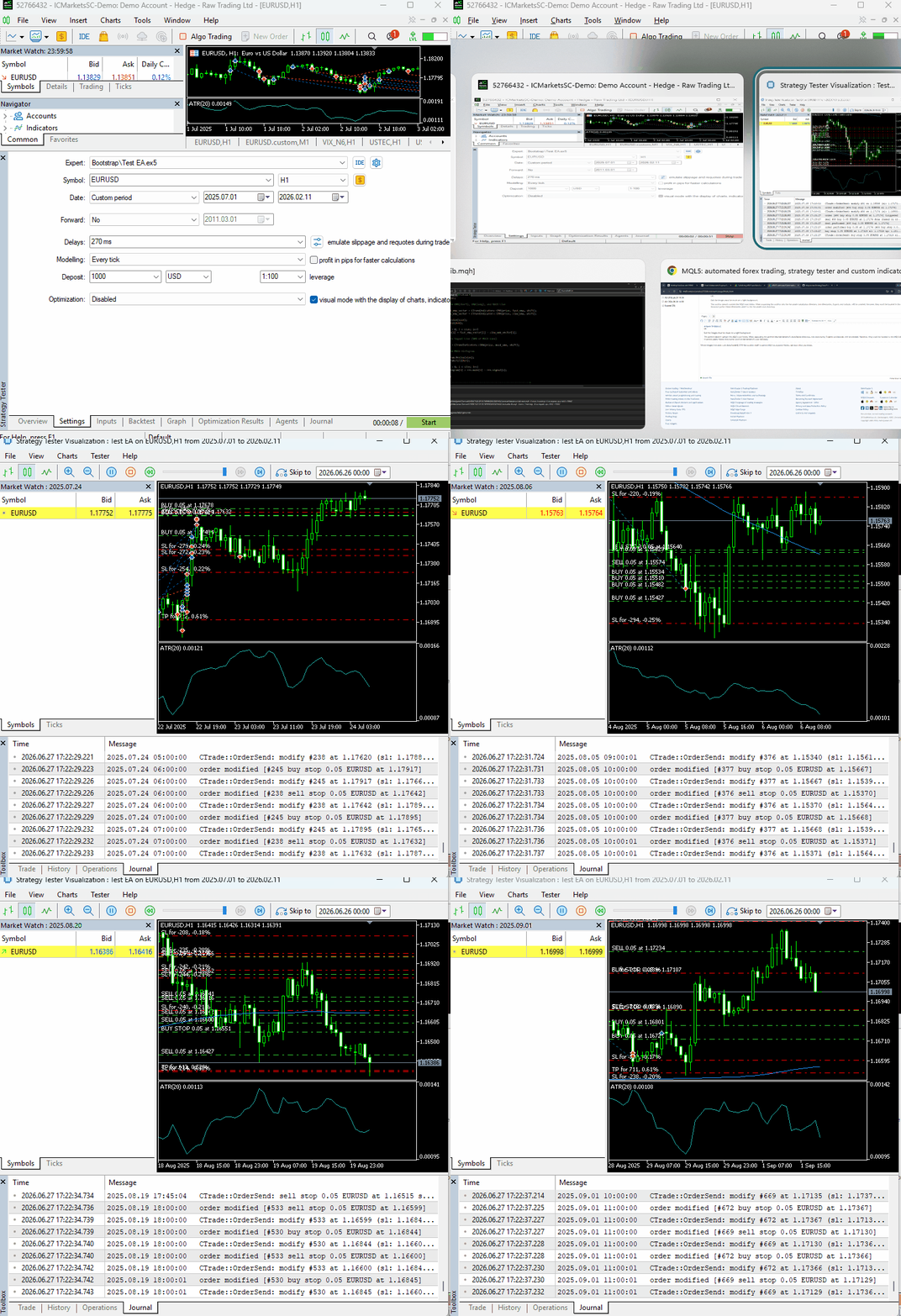
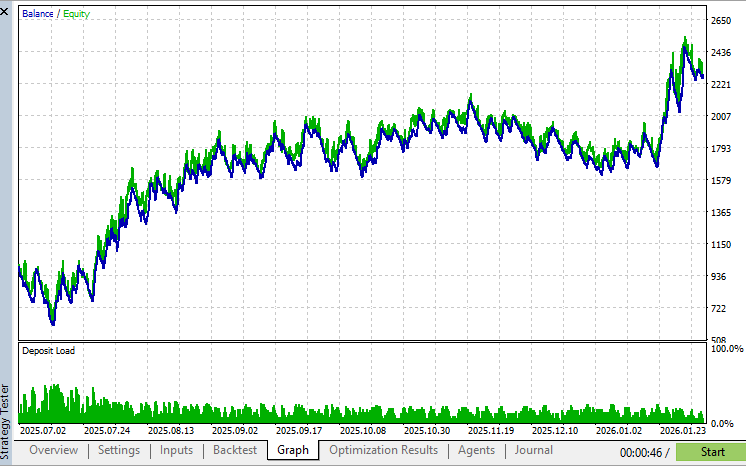
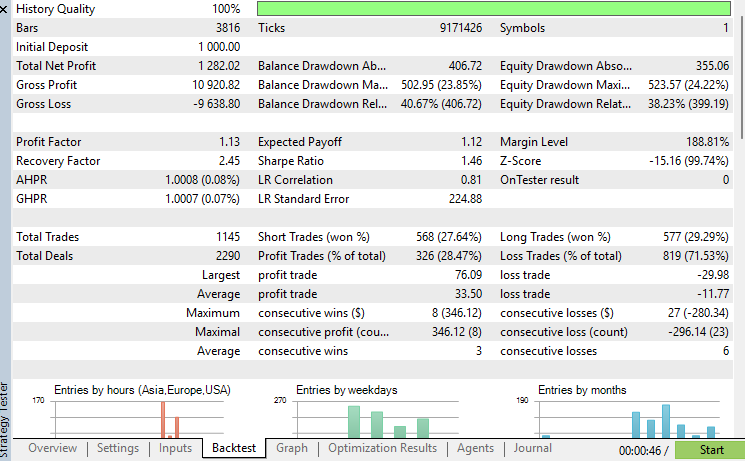
Below is backtesting progress and tester outcome from July, 2025 to February, 2026.
Tester graph:
Report:
Conclusion
The addition of checkers/validators to the bootstrap project introduces crucial functions to ensure your trading strategies execute smoothly as you want them to and provide the best possible outcome.
Beyond making your code cleaner and easier to maintain, these utilities help prevent many of the common issues that lead to failed order requests or unintended trading behavior.
As the Bootstrap project continues to grow throughout this series, these foundational building blocks will allow us to focus on implementing trading strategies instead of repeatedly solving the same infrastructure problems. In the next article, we will continue expanding the library with additional reusable components that further simplify the development of professional-grade trading systems in MQL5.
Stay tuned!
Attachments Table
| Filename | Description & Usage |
|---|---|
| MQL5\Experts\Bootstrap\Test EA.mq5 | A sample Expert Advisor demonstrating how to use reusable bootstrap libraries. |
| MQL5\Include\Bootstrap\orders.mqh | A helper library containing reusable functions for working with pending orders, including creating, modifying, querying, etc. |
| MQL5\Include\Bootstrap\positions.mqh | A utility library that provides reusable functions for working with open positions, including searching, counting, closing, etc. |
| MQL5\Include\Bootstrap\validators.mqh | A collection of reusable validation and helper functions introduced in this article. |
Warning: All rights to these materials are reserved by MetaQuotes Ltd. Copying or reprinting of these materials in whole or in part is prohibited.
This article was written by a user of the site and reflects their personal views. MetaQuotes Ltd is not responsible for the accuracy of the information presented, nor for any consequences resulting from the use of the solutions, strategies or recommendations described.

 How to Connect AI Agents to MQL5 Algo Forge via MCP
 MQL5 Trading Tools (Part 39): Adding a Pinned-Tools Ribbon for Quick Access to Favorite Tools
 From Basic to Intermediate: Objects (IV)
 Implementing Walk-Forward Efficiency Ratio Scoring in MQL5 to Detect Over-Optimized Strategies

- Free trading apps
- Over 8,000 signals for copying
- Economic news for exploring financial markets
You agree to website policy and terms of use