

MQL5 Trading Tools (Part 39): Adding a Pinned-Tools Ribbon for Quick Access to Favorite Tools
 1 639
1 639
 0
0

Introduction
In the previous article (Part 38), we completed a deep, tabbed settings window that gives a full editor for any selected object. That rich, organized sidebar is the right home for discovery and detailed control, but it imposes avoidable friction for repeated actions: in a typical session you reach for the same 3–7 tools (trendlines, Fibonacci, etc.) dozens of times, yet each draw requires three steps — open the sidebar, open a category, find the row. Simply "speeding up" the sidebar is insufficient because the sidebar's purpose is discovery and organization; a different, flat quick-access layer is required for frequent, one-click workflows without corrupting the catalog.
To address this, we add a pinned-tools ribbon — a second floating bar that holds only favorites, one click away, and remains hidden when empty. The implementation introduces three integrated components: an ordered pin set in the engine (append/remove/contains + toggle), a shared anti-aliased pushpin glyph used by the sidebar tile, flyout rows, and ribbon, and a draggable, resizable, horizontally scrollable ribbon with offscreen clipping and a floating scrollbar thumb. The solution is judged ready when it supports pin/unpin from the flyout, shows the Pinned category only when nonempty, preserves pin order, activates tools on click, and offers smooth drag/resize/scroll behavior.
This article is written for the intermediate-to-advanced MetaQuotes Language 5 (MQL5) developer comfortable with the inheritance chain and the floating-surface machinery we built up across the previous parts. The subtopics we will cover are:
- From a Deep Sidebar to One-Click Favorites
- Building the Pin Model and the Pushpin Affordance
- Implementing the Pinned-Tools Ribbon
- Visualization
- Conclusion
The sections ahead cover the motivation, the pin model and glyph, the flyout affordance, and the ribbon implementation and visualization.
From a Deep Sidebar to One-Click Favorites
The sidebar and the pinned ribbon answer two different questions. The sidebar answers "what tools exist and how are they organized," so it sorts forty-plus tools into categories behind flyouts — ideal for discovery, but a three-step trip every time we draw. The pinned ribbon answers "what do I reach for constantly," so it is flat, small, and always one click away. Rather than replace the sidebar, we layer the ribbon beside it as a fast lane for the few tools we live in, while the sidebar stays the organized home for everything. This is how the native MetaTrader 5 terminal objects structure handles its pinned/favorite/starred objects and the ordered flyouts, which we want to use as a guide. See below.

In our case, we build this on the same foundation that the property ribbon has already established. The pinned ribbon is a floating bar with its own canvas, shadow, and drag behavior. It sits in the inheritance chain above the settings window, inherits the shared machinery, and receives events through the same shell routing as other floating surfaces. The set of pinned tools lives in the engine as an ordered list, so the order we pin in is the order the icons appear, and a pushpin control on each flyout row toggles a tool in and out of that list. A pinned-tools tile in the sidebar shows or hides the ribbon, and it stays hidden until the list has at least one entry.
A few genuinely new mechanics sit on top of that. We need an ordered pin set (append/remove/contains) and an anti-aliased pushpin glyph shared by the sidebar tile, flyout rows, and the ribbon. We also need the ribbon to behave well when favorites pile up: a user-resizable width, horizontal scrolling with a thumb when the icons overflow, and an offscreen scratch canvas to clip the scrolled icons cleanly against the bar's rounded edges. See our visualized objectives below.

With that relationship clear, we can move on to building the pin model and the pushpin affordance.
Building the Pin Model and the Pushpin Affordance
The Pin Storage and the Pushpin Glyph
We implement the pin model in the Tools file, and the first piece is the storage plus the pushpin glyph that every pin affordance draws — the sidebar tile, the flyout row, and the ribbon all render the same pin through one routine.
//--- WE IMPLEMENT THE PIN MODEL IN THE TOOLS FILE
//--- ToolsPalette_Tools.mqh

//+------------------------------------------------------------------+
//| CToolRegistry owns category + tool definitions and last-used map |
//+------------------------------------------------------------------+
class CToolRegistry : public CAnnotationTools
  {
protected:
   //--- Category catalog indexed by ENUM_CATEGORY (the full set of registered categories)
   CategoryDefinition m_categories[CAT_COUNT];
   //--- Per-category memory of the last tool the user selected (drives sidebar tile icon)
   TOOL_TYPE     m_lastUsedToolPerCategory[CAT_COUNT];
   //--- Ordered list of pinned tool types (array order = pin order, drives the pinned ribbon)
   TOOL_TYPE     m_pinnedTools[];

protected:
   //--- EXISTING METHODS

   //--- Draw the tilted-pushpin glyph anti-aliased (outline when unpinned, solid when pinned)
   void          DrawPinGlyphOnCanvas(CCanvas &canvas, int cx, int cy, int size,
                                        uint argb, bool filled);
   //--- Even-odd point-in-polygon test (drives the pin glyph's anti-aliased coverage fill)
   bool          PinPointInPoly(const double &px[], const double &py[], int n, double x, double y);
   //--- Source-over composite of argb at fractional coverage onto a canvas pixel
   void          PinBlendAA(CCanvas &canvas, int ix, int iy, uint argb, double cov);
   //--- Pinned-tools list management (ordered append/remove + queries)
   int           PinnedCount();
   TOOL_TYPE     GetPinnedTool(int idx);
   bool          IsToolPinned(TOOL_TYPE toolType);
   void          PinTool(TOOL_TYPE toolType);
   void          UnpinTool(TOOL_TYPE toolType);
   bool          ToggleToolPin(TOOL_TYPE toolType);
   //--- True when a category tile should currently be shown (CAT_PINNED hides while empty)
   bool          IsCategoryVisible(ENUM_CATEGORY cat);
   //--- Populate all categories and their tool lists (calls AddTool for every registered tool)
   void          InitAllCategoriesAndTools();
  };


//+------------------------------------------------------------------+
//| Even-odd point-in-polygon test (ray-cast parity)                 |
//+------------------------------------------------------------------+
bool CToolRegistry::PinPointInPoly(const double &px[], const double &py[], int n, double x, double y)
  {
   //--- Standard ray-cast: count edge crossings to the right of the point
   bool inside = false;
   int  j = n - 1;
   for(int i = 0; i < n; i++)
     {
      //--- Edge (j -> i) straddles the horizontal ray and crosses to the right of x
      if(((py[i] > y) != (py[j] > y)) &&
         (x < (px[j] - px[i]) * (y - py[i]) / (py[j] - py[i]) + px[i]))
         inside = !inside;
      j = i;
     }
   return inside;
  }

//+------------------------------------------------------------------+
//| Source-over composite of argb at fractional coverage onto canvas |
//+------------------------------------------------------------------+
void CToolRegistry::PinBlendAA(CCanvas &canvas, int ix, int iy, uint argb, double cov)
  {
   //--- Clamp coverage and fold it into the source alpha
   if(cov <= 0.0) return;
   if(cov > 1.0) cov = 1.0;
   double sA = (double)((argb >> 24) & 0xFF) / 255.0 * cov;
   if(sA <= 0.0) return;
   //--- Read the destination pixel and compute the composited output alpha
   uint   ex = canvas.PixelGet(ix, iy);
   double dA = (double)((ex >> 24) & 0xFF) / 255.0;
   double oA = sA + dA * (1.0 - sA);
   if(oA <= 0.0) return;
   //--- Source-over blend per channel (un-premultiplied result)
   double sR = (double)((argb >> 16) & 0xFF) / 255.0;
   double sG = (double)((argb >>  8) & 0xFF) / 255.0;
   double sB = (double)( argb        & 0xFF) / 255.0;
   double dR = (double)((ex >> 16) & 0xFF) / 255.0;
   double dG = (double)((ex >>  8) & 0xFF) / 255.0;
   double dB = (double)( ex        & 0xFF) / 255.0;
   uchar  oR = (uchar)((sR * sA + dR * dA * (1.0 - sA)) / oA * 255.0 + 0.5);
   uchar  oG = (uchar)((sG * sA + dG * dA * (1.0 - sA)) / oA * 255.0 + 0.5);
   uchar  oB = (uchar)((sB * sA + dB * dA * (1.0 - sA)) / oA * 255.0 + 0.5);
   uchar  oAb = (uchar)(oA * 255.0 + 0.5);
   canvas.PixelSet(ix, iy, ((uint)oAb << 24) | ((uint)oR << 16) | ((uint)oG << 8) | (uint)oB);
  }

//+------------------------------------------------------------------+
//| Draw the tilted-pushpin glyph (anti-aliased coverage fill)       |
//+------------------------------------------------------------------+
void CToolRegistry::DrawPinGlyphOnCanvas(CCanvas &canvas, int cx, int cy, int size,
                                          uint argb, bool filled)
  {
   //--- Pushpin silhouette in local units, traced clockwise: cap bar, barrel, flared skirt, needle to the sharp tip (vertex 6)
   double lx[13] = { -11, -11,  -7,  -7, -11, -3.5,  0, 3.5,  11,   7,   7,  11,  11 };
   double ly[13] = {   0,   5,   5,  16,  21,   21, 35,  21,  21,  16,   5,   5,   0 };
   const int n = 13;
   //--- Local centroid (rotation pivot + the focus the outline erodes toward)
   const double pivotX = 0.0, pivotY = 13.15;
   //--- Uniform scale so the silhouette fits the requested icon size
   const double s = (double)size / 42.0;
   //--- Tilt clockwise so the cap sits upper-right and the tip points lower-left (matches the reference pin)
   const double ang = 40.0 * 3.14159265358979 / 180.0;
   const double co = MathCos(ang), si = MathSin(ang);
   //--- Outer silhouette transformed into canvas pixels
   double ox[13], oy[13];
   for(int i = 0; i < n; i++)
     {
      const double dx = (lx[i] - pivotX) * s;
      const double dy = (ly[i] - pivotY) * s;
      ox[i] = (double)cx + dx * co - dy * si;
      oy[i] = (double)cy + dx * si + dy * co;
     }
   //--- Outline stroke width in pixels (the inner silhouette is the outer eroded by this)
   const double strokePx = MathMax(1.6, size * 0.10);
   //--- Inner silhouette: erode each vertex toward the centroid in LOCAL units, then apply the SAME scale/tilt as the outer
   const double insL = strokePx / s;
   double qx[13], qy[13];
   for(int i = 0; i < n; i++)
     {
      const double vx = lx[i] - pivotX, vy = ly[i] - pivotY;
      const double len = MathSqrt(vx * vx + vy * vy);
      const double f = (len > 1e-6) ? MathMax(0.0, len - insL) / len : 0.0;
      const double dx = vx * f * s;
      const double dy = vy * f * s;
      qx[i] = (double)cx + dx * co - dy * si;
      qy[i] = (double)cy + dx * si + dy * co;
     }
   //--- Pixel bounding box of the outer silhouette (1 px guard for the AA fringe)
   double minX = ox[0], maxX = ox[0], minY = oy[0], maxY = oy[0];
   for(int i = 1; i < n; i++)
     {
      if(ox[i] < minX) minX = ox[i];
      if(ox[i] > maxX) maxX = ox[i];
      if(oy[i] < minY) minY = oy[i];
      if(oy[i] > maxY) maxY = oy[i];
     }
   const int bbL = (int)MathFloor(minX) - 1, bbR = (int)MathCeil(maxX) + 1;
   const int bbT = (int)MathFloor(minY) - 1, bbB = (int)MathCeil(maxY) + 1;
   //--- 4x4 supersampling configuration for the coverage estimate
   const int    sub  = 4;
   const double step = 1.0 / sub;
   const double subN = (double)(sub * sub);
   //--- Walk the bounding box: solid = inside-outer coverage, outline = (inside-outer minus inside-inner) ring coverage
   for(int py = bbT; py <= bbB; py++)
     {
      for(int px = bbL; px <= bbR; px++)
        {
         int inO = 0, inI = 0;
         for(int a = 0; a < sub; a++)
            for(int b = 0; b < sub; b++)
              {
               const double sxp = (double)px + (a + 0.5) * step;
               const double syp = (double)py + (b + 0.5) * step;
               if(PinPointInPoly(ox, oy, n, sxp, syp))
                 {
                  inO++;
                  if(!filled && PinPointInPoly(qx, qy, n, sxp, syp)) inI++;
                 }
              }
         if(inO == 0) continue;
         //--- Coverage fraction for this pixel, then composite the glyph color
         const double cov = filled ? (double)inO / subN : (double)(inO - inI) / subN;
         PinBlendAA(canvas, px, py, argb, cov);
        }
     }
  }
First, we add the storage as an ordered array of tool types on "CToolRegistry", where the array order is the pin order that later drives the ribbon's icon sequence. Alongside it, we declare the glyph trio and the management API — "PinnedCount", "GetPinnedTool", "IsToolPinned", "PinTool", "UnpinTool", and "ToggleToolPin" — whose bodies we cover next; here we focus on the three routines that actually paint the pushpin.
We start at the bottom with "PinPointInPoly", a standard even-odd ray-cast test. We walk each polygon edge and count how many cross the horizontal ray to the right of the query point, and an odd count means the point sits inside. This is what lets us fill an arbitrary silhouette by coverage rather than relying on a built-in shape primitive.
We then composite with "PinBlendAA", a source-over blend that takes a color and a fractional coverage. We fold the coverage into the source alpha, read the destination pixel, and blend the two per channel into an un-premultiplied result, so a partially covered edge pixel mixes smoothly with whatever is already on the canvas instead of producing a hard jagged edge.
Finally, "DrawPinGlyphOnCanvas" renders the pin. It traces a 13-vertex silhouette, scales it to the requested size, and rotates it 40 degrees so the cap sits upper-right and the tip points lower-left. For the outline case, we build a second, inner silhouette by eroding each vertex toward the centroid by the stroke width, and then we walk the bounding box with four-by-four supersampling: a solid pin takes the coverage inside the outer silhouette, while an outline pin takes the ring coverage of the outer minus the inner. The "filled" flag is what switches the same routine between a pinned tool (solid) and an unpinned one (outline). You can use any geometry math you are comfortable with. If you choose the pin glyph as we did, here is its architecture.

With the glyph in hand, we move on to the pin management API that decides when a tool is pinned.
The Pin Management API
Here, we back the pin set with a small ordered-list API that the flyout affordance and the ribbon both call to read and mutate which tools are pinned.
//+------------------------------------------------------------------+
//| Number of currently pinned tools                                 |
//+------------------------------------------------------------------+
int CToolRegistry::PinnedCount()
  {
   return ArraySize(m_pinnedTools);
  }

//+------------------------------------------------------------------+
//| Pinned tool at the given index (TOOL_NONE when out of range)     |
//+------------------------------------------------------------------+
TOOL_TYPE CToolRegistry::GetPinnedTool(int idx)
  {
   //--- Defensive bounds check
   if(idx < 0 || idx >= ArraySize(m_pinnedTools)) return TOOL_NONE;
   return m_pinnedTools[idx];
  }

//+------------------------------------------------------------------+
//| True when the given tool is already pinned                       |
//+------------------------------------------------------------------+
bool CToolRegistry::IsToolPinned(TOOL_TYPE toolType)
  {
   //--- Linear scan over the ordered pinned list
   const int n = ArraySize(m_pinnedTools);
   for(int i = 0; i < n; i++)
      if(m_pinnedTools[i] == toolType) return true;
   return false;
  }

//+------------------------------------------------------------------+
//| Append a tool to the pinned list (no-op if invalid or duplicate) |
//+------------------------------------------------------------------+
void CToolRegistry::PinTool(TOOL_TYPE toolType)
  {
   //--- Reject the empty tool and anything already pinned (keeps pin order stable)
   if(toolType == TOOL_NONE) return;
   if(IsToolPinned(toolType)) return;
   //--- Grow the ordered list by one and store the new tool at the end
   const int sz = ArraySize(m_pinnedTools);
   ArrayResize(m_pinnedTools, sz + 1);
   m_pinnedTools[sz] = toolType;
  }

//+------------------------------------------------------------------+
//| Remove a tool from the pinned list, compacting the order         |
//+------------------------------------------------------------------+
void CToolRegistry::UnpinTool(TOOL_TYPE toolType)
  {
   const int n = ArraySize(m_pinnedTools);
   //--- Find the tool's slot in the ordered list
   int found = -1;
   for(int i = 0; i < n; i++)
      if(m_pinnedTools[i] == toolType) { found = i; break; }
   if(found < 0) return;
   //--- Shift every later entry down one slot to close the gap
   for(int i = found; i < n - 1; i++)
      m_pinnedTools[i] = m_pinnedTools[i + 1];
   //--- Drop the now-duplicated final slot
   ArrayResize(m_pinnedTools, n - 1);
  }

//+------------------------------------------------------------------+
//| Toggle a tool's pinned state; returns the resulting state        |
//+------------------------------------------------------------------+
bool CToolRegistry::ToggleToolPin(TOOL_TYPE toolType)
  {
   //--- Already pinned -> unpin and report the new "off" state
   if(IsToolPinned(toolType)) { UnpinTool(toolType); return false; }
   //--- Otherwise pin and report the new "on" state
   PinTool(toolType);
   return true;
  }

//+------------------------------------------------------------------+
//| True when a category tile should currently be drawn              |
//+------------------------------------------------------------------+
bool CToolRegistry::IsCategoryVisible(ENUM_CATEGORY cat)
  {
   //--- Out-of-range categories are never visible
   if((int)cat < 0 || (int)cat >= CAT_COUNT) return false;
   //--- The pinned tile only appears once at least one tool is pinned
   if(cat == CAT_PINNED) return (ArraySize(m_pinnedTools) > 0);
   //--- Every other category tile is always visible
   return true;
  }
We keep the three queries trivial — "PinnedCount" returns the array size, "GetPinnedTool" returns the tool at an index with a bounds check that falls back to the empty tool, and "IsToolPinned" linear-scans the list for a match. The list is short by nature, so a scan is more than fast enough, and we avoid the overhead of a separate lookup structure.
We mutate the list with "PinTool" and "UnpinTool". In "PinTool", we reject the empty tool and anything already pinned, then grow the array by one and store the new tool at the end, so pinning always appends and the existing pin order stays stable. In "UnpinTool", we find the tool's slot, shift every later entry down one to close the gap, and shrink the array, which preserves the relative order of everything that remains.
We wrap those in "ToggleToolPin", which unpins when the tool is already pinned and pins it otherwise, returning the resulting on or off state so the caller can update its own visuals in one call. We then add "IsCategoryVisible", which reports whether a category tile should draw — every normal category is always visible, but the pinned tile only appears once the list holds at least one tool, which is what keeps it hidden on an empty toolkit. With the model complete, we move on to the pushpin affordance in the sidebar flyout.
The Flyout Pin Affordance
We move to the sidebar file and add the pin affordance to the flyout — a hover field that tracks which row's pin is lit, a hit-tester that maps the cursor to a row's pin icon, and the pushpin that marks the Pinned category tile.
//--- WE IMPLEMENT THE PIN MODEL IN THE TOOLS FILE
//--- ToolsPalette_Sidebar.mqh

//+------------------------------------------------------------------+
//| CFlyoutPanel owns the tool-list flyout layout and rendering      |
//+------------------------------------------------------------------+
class CFlyoutPanel : public CSidebarLayout
  {
protected:
   //--- EXISTING MEMBERS

   //--- Row index whose pin icon is hovered (-1 = none)
   int           m_hoveredFlyoutPin;

   //--- EXISTING MEMBERS
protected:
   //--- EXISTING METHODS

   //--- Hit-test cursor against a row's pin icon + return the matched row index (-1 = none)
   int           HitTestFlyoutPin(int lx, int ly);

   //--- EXISTING MEMBERS
  };


//+------------------------------------------------------------------+
//| Hit-test a row's pin icon; returns the row index or -1           |
//+------------------------------------------------------------------+
int CFlyoutPanel::HitTestFlyoutPin(int lx, int ly)
  {
   //--- Pins exist only on regular tool rows (action categories have none)
   if(m_flyoutActiveCat == CAT_NONE || IsActionCategory(m_flyoutActiveCat)) return -1;
   //--- Resolve the row under the cursor using the same geometry as HitTestFlyoutItem
   int nTools = ArraySize(m_categories[(int)m_flyoutActiveCat].tools);
   int titleH = 26, dispBx = m_flyoutPointerOnLeft ? m_flyoutPointerHeight : 0;
   int visibleTools = MathMin(nTools, m_flyoutMaxVisibleItems);
   int itemClipTop = titleH + m_flyoutPadding;
   int itemClipBot = titleH + m_flyoutPadding + visibleTools * m_flyoutItemHeight;
   if(ly < itemClipTop || ly >= itemClipBot) return -1;
   int idx = (ly - itemClipTop + m_flyoutScrollPixels) / m_flyoutItemHeight;
   if(idx < 0 || idx >= nTools) return -1;
   //--- The pin occupies its cubicle at the row's trailing edge (kept in sync with the draw geometry: 3px inset, 16px pin)
   int pinPad = 3;
   int rowBgR = dispBx + m_flyoutWidth - m_flyoutPadding;
   int zoneR  = rowBgR;
   int zoneL  = rowBgR - pinPad - (16 + 2 * pinPad);
   if(lx < zoneL || lx > zoneR) return -1;
   return idx;
  }

//+------------------------------------------------------------------+
//| Render category icons + sidebar control labels on display canvas |
//+------------------------------------------------------------------+
void CSidebarRenderer::DrawSidebarIconLabels(TOOL_TYPE activeTool)
  {
   for(int c = 0; c < CAT_COUNT; c++)
     {
      //--- EXISTING LOGIC

      //--- Action categories take a custom canvas icon (trash bin for Delete, pushpin for Pinned)
      if(IsActionCategory((ENUM_CATEGORY)c))
        {
         //--- Pinned is non-destructive (white on the active-blue bg / on hover, normal pin color otherwise); Delete stays danger-red
         color actionIconColor;
         if((ENUM_CATEGORY)c == CAT_PINNED)
            actionIconColor = (IsPinnedTileActive() || m_hoveredCategory == (ENUM_CATEGORY)c)
                               ? m_themeColors.buttonIconActiveColor   // white on the active blue / on hover
                               : m_themeColors.buttonIconColor;        // normal pin color
         else
            actionIconColor = (isActive || m_hoveredCategory == (ENUM_CATEGORY)c)
                               ? C'255,80,80'      // brighter red on hover/active
                               : C'220,53,69';     // standard "danger" red
         drewCanvasIcon = DrawActionCategoryIconOnCanvas(tmpIcons,
                                                          (ENUM_CATEGORY)c,
                                                          tileCx, tileCy,
                                                          FlyoutIconSize,
                                                          actionIconColor);
        }

      //--- EXISTING LOGIC

     }
  }
Here, we add "m_hoveredFlyoutPin" to hold the row index whose pin is under the cursor, which drives both the hover brightening and the unpin slash we overlay when a pinned tool's pin is hovered. We then resolve clicks with "HitTestFlyoutPin". Since only regular tool rows carry a pin, the action categories have none — we bail immediately on an action or empty category. We locate the row under the cursor with the same geometry the item hit-test uses, accounting for the scroll offset and the visible-item clip, then confirm the cursor falls inside the pin's cubicle at the row's trailing edge, a fixed zone sized to the inset and pin width that we keep in sync with the draw side. A hit returns the row index; anything else returns the no-hit sentinel.
We then color the Pinned tile's icon in "DrawSidebarIconLabels", where the action categories take a custom canvas glyph rather than a tool icon. We treat the pinned tile as non-destructive, so its pushpin draws white when the tile is active or hovered and in the normal pin color otherwise, while the Delete tile stays danger-red since it clears objects. Both route through the shared action-icon drawer, which dispatches the pinned case to the same pushpin glyph we built in the Tools file.
The per-row pushpin is drawn in the flyout item render, reusing the glyph with a darkened rounded cubicle behind it and a brightening when its row is the hovered pin, keyed off "m_hoveredFlyoutPin". What the pin will do is communicated through a tooltip rather than a painted mark — the shell's mouse-move routing sets the flyout object's tooltip to "Add to Pinned Tools" or "Remove from Pinned Tools" depending on whether the hovered row's tool is already pinned. We removed the dot convention in the flyout items to use that space for the pin cubicle since it was redundant; we had it in the sidebar as well. Also, we updated the flyout category widths so they are dynamic to the maximum item width instead of rendering the entire width as a constant and leaving unused space. See the illustrations below.
Before the update.

After the update.

With the affordance in place — clicking a row's pin toggles it, and the Pinned tile appears once the first tool is pinned — we move on to the pinned-tools ribbon itself.
Implementing the Pinned-Tools Ribbon
Declaring the Pinned-Tools Ribbon
We declare the pinned ribbon as "CPinnedRibbon", extending "CSettingsWindow" so it sits at the top of the floating-surface chain and inherits the canvas, theme, and event machinery everything below it provides.
//+------------------------------------------------------------------+
//|                                    ToolsPalette_RibbonPinned.mqh |
//|                           Copyright 2026, Allan Munene Mutiiria. |
//|                                   https://t.me/Forex_Algo_Trader |
//+------------------------------------------------------------------+
#property copyright "Copyright 2026, Allan Munene Mutiiria."
#property link "https://t.me/Forex_Algo_Trader"
#property version "1.00"
#property strict

//--- Guard against multiple inclusion of this header
#ifndef TOOLS_PALETTE_RIBBON_PINNED_MQH
#define TOOLS_PALETTE_RIBBON_PINNED_MQH

//--- Pull in the settings window (and the whole chain below it) so we can extend it
#include "ToolsPalette_Settings.mqh"

//+------------------------------------------------------------------+
//| CPinnedRibbon - second ribbon holding pinned tool icons          |
//+------------------------------------------------------------------+
class CPinnedRibbon : public CSettingsWindow
  {
protected:
   //--- Backing chart-object name + display canvas
   string          m_namePinned;
   CCanvas         m_canvasPinned;
   //--- Persistent offscreen buffer for clipping scrolled icons (created once, never per-frame)
   CCanvas         m_canvasPinnedScratch;

   //--- Visibility + logical top-left position (excludes the shadow halo)
   bool            m_isPinnedVisible;
   int             m_pinnedX;
   int             m_pinnedY;
   //--- Cached position so reopening restores the user's last placement
   int             m_lastPinnedX;
   int             m_lastPinnedY;
   bool            m_lastPinnedValid;

   //--- Current content dimensions (recomputed whenever the pin set / window changes)
   int             m_pinnedWidth;
   int             m_pinnedHeight;
   //--- Shadow halo padding + body corner radius (matches the properties ribbon)
   int             m_pinnedShadowPad;
   int             m_pinnedCornerRadius;

   //--- Layout constants: grip strip width, icon size/gap, row padding
   int             m_pinnedGripWidth;
   int             m_pinnedIconSize;
   int             m_pinnedIconGap;
   int             m_pinnedIconRowPadX;
   //--- Icon band height (the icons + floating scrollbar live within this band)
   int             m_pinnedIconBandH;
   //--- Trailing-edge resize handle width
   int             m_pinnedResizeHandleW;

   //--- Visible window WIDTH in pixels (user-resizable). Large default = auto (grow to fit all icons)
   int             m_pinnedUserWidthPx;
   //--- Cached layout results from the last RecomputePinnedLayout pass
   int             m_pinnedEffViewportW;
   bool            m_pinnedNeedsScroll;
   //--- True when the trailing resize grip is active (from 2 items upward)
   bool            m_pinnedShowResize;
   //--- Pixel scroll offset of the content within the visible window (smooth, like the sidebar)
   int             m_pinnedScrollPixels;

   //--- Hover state: which pinned tool index is under the cursor (-1 = none)
   int             m_hoveredPinnedIdx;
   bool            m_hoveredPinnedScrollbar;
   //--- True while the cursor is over the scrollbar thumb specifically (drives its color)
   bool            m_hoveredPinnedThumb;
   //--- True while the cursor is over the trailing resize grip (drives its color)
   bool            m_hoveredPinnedResize;

   //--- Drag state (whole-ribbon move via the grip)
   bool            m_isPinnedDragging;
   int             m_pinnedDragOffsetX;
   int             m_pinnedDragOffsetY;
   //--- Resize state (trailing grip widens/narrows the window in pixels, smooth)
   bool            m_isPinnedResizing;
   int             m_pinnedResizeGrabX;
   int             m_pinnedResizeStartPx;
   //--- Scrollbar-thumb drag state (pixel-based, mirrors the sidebar thumb drag)
   bool            m_isPinnedThumbDragging;
   int             m_pinnedThumbDragStartX;
   int             m_pinnedThumbDragStartPixels;

protected:
   //--- Recompute width/height + clamp the visible window and scroll offset
   void            RecomputePinnedLayout();
   //--- Default spawn position (stacked just under the properties ribbon)
   void            CalcPinnedDefaultPosition(int &outX, int &outY);
   //--- Clamp the ribbon so its body always stays inside the chart
   void            ClampPinnedToChart();
   //--- Push the logical position to the chart object (offset by the shadow halo)
   void            ApplyPinnedPosition();
   //--- Body-local X where the icon row begins (just past the grip + left pad)
   int             PinnedIconRowLeft()  const { return m_pinnedGripWidth + m_pinnedIconRowPadX; }
   //--- Body-local Y of the icon row top (icons vertically centered in the band)
   int             PinnedIconRowTop()   const { return (m_pinnedIconBandH - m_pinnedIconSize) / 2; }
   //--- Effective visible-window width in pixels (cached each layout pass)
   int             PinnedViewportW()    const { return m_pinnedEffViewportW; }
   //--- Full content width (all pinned icons laid end to end)
   int             PinnedContentW();
   //--- Largest viewport width that still keeps the whole ribbon inside the chart
   int             PinnedMaxFitPx();
   //--- Grow the offscreen bitmap to the chart-max (only when needed; never during a drag)
   void            EnsurePinnedBitmap();
   //--- Crop the visible window (OBJPROP_XSIZE/YSIZE) to the current ribbon size
   void            CropPinnedCanvas();
   //--- Maximum horizontal scroll offset in pixels
   int             PinnedMaxScrollPx();
   //--- Trailing resize-handle bounds in ribbon-local coordinates
   void            GetPinnedResizeHandleRect(int &outL, int &outT, int &outR, int &outB);
   //--- Horizontal scrollbar thumb bounds in ribbon-local coordinates (false when no scroll)
   bool            GetPinnedThumbRect(int &outL, int &outT, int &outR, int &outB);
   //--- Hit-tests against the grip strip / a visible icon (returns the pinned-tool index)
   bool            HitTestPinnedGrip(int lx, int ly);
   int             HitTestPinnedIcon(int lx, int ly);
   //--- Draw a tool's glyph (custom canvas icon, else its Wingdings fallback)
   void            DrawPinnedToolGlyph(CCanvas &canvas, TOOL_TYPE toolType,
                                         int cx, int cy, int size, color glyphColor);

public:
   //--- Canvas lifecycle
   bool            CreatePinnedCanvas();
   void            DestroyPinnedCanvas();
   //--- Show / hide / toggle the ribbon
   void            ShowPinnedRibbon();
   void            HidePinnedRibbon();
   void            TogglePinnedRibbon();
   bool            IsPinnedRibbonVisible() const { return m_isPinnedVisible; }
   //--- Sidebar Pinned tile renders active (blue) while the pinned ribbon is shown (overrides CSidebarRenderer)
   virtual bool    IsPinnedTileActive() override { return m_isPinnedVisible; }
   //--- True while any pinned-ribbon drag is in progress (move / resize / scroll-thumb)
   bool            IsDraggingPinned() const
                     { return m_isPinnedDragging || m_isPinnedResizing || m_isPinnedThumbDragging; }
   //--- Rebuild + repaint after the pinned set changes while visible
   void            RefreshPinnedRibbon();
   //--- Full repaint of the ribbon body + icons + scrollbar
   void            RedrawPinnedRibbon();

   //--- Hit-test screen coords against the ribbon body (emits ribbon-local coords)
   bool            HitTestOverPinned(int mouseX, int mouseY, int &outLx, int &outLy);
   //--- Mouse routing (called by the Shell dispatcher)
   bool            PinnedMouseDown(int mouseX, int mouseY);
   bool            PinnedMouseMove(int mouseX, int mouseY, uint mouseButtons);
   bool            PinnedMouseUp();
   //--- Wheel-over-ribbon horizontal scroll
   void            ScrollPinnedByWheel(int wheelDelta);

   //--- Hook the Shell overrides to activate the clicked tool (default no-op here)
   virtual void    OnPinnedToolActivated(TOOL_TYPE toolType) { }
   //--- Hook the Shell overrides to report the active tool so its icon renders in the active color
   virtual TOOL_TYPE PinnedActiveTool() { return TOOL_NONE; }
  };
We give the ribbon two canvases — the visible one it paints to, and a persistent offscreen scratch canvas we use to clip the scrolled icons against the bar's rounded edges. We create that scratch once rather than per frame, since allocating a canvas on every redraw during a scroll would be wasteful. Alongside them, we hold the visibility flag, the logical top-left position that excludes the shadow halo, and a cached last-position so reopening restores where we last left the bar.
We then declare the layout state in a few groups. The dimensions and styling fields carry the current width and height, the shadow padding, and the corner radius that matches the properties ribbon. The layout constants fix the grip strip width, the icon size and gap, the row padding, the icon band height, and the trailing resize-handle width. A small set of cached layout results — the effective viewport width, the needs-scroll flag, the resize-visible flag, and the pixel scroll offset — are recomputed each layout pass so the render and hit-test paths read them rather than recompute them.
We keep three blocks of interaction state, one per gesture the ribbon supports. The hover block tracks which icon, the scrollbar, the thumb, and the resize grip are under the cursor, each driving its own color. The drag block holds the whole-ribbon move offsets, the resize block holds the grab anchor, the starting width for the trailing-grip resize, and the thumb block holds the scrollbar-thumb drag anchors. We also expose a handful of small inline helpers for the icon-row origin and the viewport width, so the geometry routines stay terse.
On the public side, we declare the canvas lifecycle, the show, hide, and toggle entry points, the refresh and full-redraw routines, the hit-test and mouse routers the shell dispatches into, and the wheel scroll handler. We override "IsPinnedTileActive" so the sidebar's Pinned tile renders in its active color while the ribbon is showing, and we leave two hooks — "OnPinnedToolActivated" and "PinnedActiveTool" — as no-ops here for the shell to override, one to activate a clicked tool and one to report the active tool so its icon renders highlighted. With the surface declared, we move on to the canvas lifecycle and layout.
Layout, the Resize Clamp, and the Handle Rectangle
We recompute the ribbon's geometry in "RecomputePinnedLayout", and the resize-aware width math is the new piece here — the rest of the layout follows the same shape as the property ribbon, and the scroll thumb mirrors the sidebar's.
//+------------------------------------------------------------------+
//| Recompute width/height + clamp the visible window and scroll     |
//+------------------------------------------------------------------+
void CPinnedRibbon::RecomputePinnedLayout()
  {
   //--- Total pinned tools available
   const int total = PinnedCount();
   //--- The trailing resize grip is available from 2 items upward
   m_pinnedShowResize = (total >= 2);
   //--- Full content width and the largest viewport the chart can hold
   const int contentW = PinnedContentW();
   const int maxFit   = PinnedMaxFitPx();
   //--- Effective viewport = user's chosen width, capped at content width (no dead margin) then at chart fit (overflow scrolls)
   int eff = m_pinnedUserWidthPx;
   if(eff > contentW) eff = contentW;     // capped at the content => no dead space on the right
   if(eff > maxFit)   eff = maxFit;       // capped at the chart width => scroll when there are too many
   if(eff < m_pinnedIconSize) eff = (contentW < m_pinnedIconSize) ? contentW : m_pinnedIconSize;
   if(eff < 0) eff = 0;
   m_pinnedEffViewportW = eff;
   //--- Scroll is needed only when the content cannot fully fit the visible window
   m_pinnedNeedsScroll = (eff < contentW);
   //--- Clamp the pixel scroll offset to its valid range
   const int maxPx = PinnedMaxScrollPx();
   if(m_pinnedScrollPixels > maxPx) m_pinnedScrollPixels = maxPx;
   if(m_pinnedScrollPixels < 0)     m_pinnedScrollPixels = 0;

   //--- Width = grip + left pad + visible-window width + right pad (+ resize grip from 2 items)
   int w = m_pinnedGripWidth + m_pinnedIconRowPadX + m_pinnedEffViewportW + m_pinnedIconRowPadX;
   if(m_pinnedShowResize) w += m_pinnedResizeHandleW;
   m_pinnedWidth = w;
   //--- Height is constant; the horizontal scrollbar FLOATS over the band's bottom edge (no reserved lane)
   m_pinnedHeight = m_pinnedIconBandH;
   //--- Ensure the bitmap is large enough (grows only when the chart widens; a no-op during a resize-drag)
   EnsurePinnedBitmap();
  }

//+------------------------------------------------------------------+
//| Grow the bitmap to fit the pinned content (chart-capped, no crop)|
//+------------------------------------------------------------------+
void CPinnedRibbon::EnsurePinnedBitmap()
  {
   //--- Size to the largest window the chart can hold (NOT capped at current content) so adding a pin never reallocates the bitmap (reallocation is what flickers); only a wider chart can grow it
   const int maxViewport = PinnedMaxFitPx();
   const int maxBody = m_pinnedGripWidth + 2 * m_pinnedIconRowPadX
                     + maxViewport + m_pinnedResizeHandleW;
   const int cw = maxBody + 2 * m_pinnedShadowPad;
   const int ch = m_pinnedIconBandH + 2 * m_pinnedShadowPad;
   //--- Grow-only: reallocate solely when the chart itself widens (the bitmap is pre-sized to chart-max); never during a resize-drag
   if(m_canvasPinned.Width() >= cw && m_canvasPinned.Height() >= ch) return;
   const int gw = MathMax(cw, m_canvasPinned.Width());
   const int gh = MathMax(ch, m_canvasPinned.Height());
   m_canvasPinned.Resize(gw, gh);
   m_canvasPinnedScratch.Resize(gw, gh);
  }

//+------------------------------------------------------------------+
//| Largest viewport width that keeps the whole ribbon in the chart  |
//+------------------------------------------------------------------+
int CPinnedRibbon::PinnedMaxFitPx()
  {
   //--- Chrome around the icon row (grip + both pads + resize grip + shadow halo + edge margin)
   const int chartW = (int)ChartGetInteger(0, CHART_WIDTH_IN_PIXELS, 0);
   const int chrome = m_pinnedGripWidth + 2 * m_pinnedIconRowPadX
                    + m_pinnedResizeHandleW + 2 * m_pinnedShadowPad + 16;
   int fit = chartW - chrome;
   //--- Always allow at least one icon
   if(fit < m_pinnedIconSize) fit = m_pinnedIconSize;
   return fit;
  }

//+------------------------------------------------------------------+
//| Trailing resize-handle bounds in ribbon-local coordinates        |
//+------------------------------------------------------------------+
void CPinnedRibbon::GetPinnedResizeHandleRect(int &outL, int &outT, int &outR, int &outB)
  {
   //--- A vertical strip on the trailing edge, spanning the icon band
   outR = m_pinnedWidth;
   outL = m_pinnedWidth - m_pinnedResizeHandleW;
   outT = 0;
   outB = m_pinnedIconBandH;
  }

//+------------------------------------------------------------------+
//| Horizontal scrollbar thumb bounds (false when no scroll needed)  |
//+------------------------------------------------------------------+
bool CPinnedRibbon::GetPinnedThumbRect(int &outL, int &outT, int &outR, int &outB)
  {
   //--- Initialize out-params and bail when nothing scrolls
   outL = outT = outR = outB = 0;
   if(!m_pinnedNeedsScroll) return false;
   //--- Track spans from the first icon to the right padding (minus the resize grip when present)
   const int trackL = PinnedIconRowLeft();
   const int trackR = m_pinnedWidth - m_pinnedIconRowPadX
                    - (m_pinnedShowResize ? m_pinnedResizeHandleW : 0);
   const int trackW = trackR - trackL;
   if(trackW <= 8) return false;
   //--- Thumb width = track * (viewport / content), proportional to the visible fraction (min 16 px)
   const int contentW = PinnedContentW();
   if(contentW <= 0) return false;
   int thumbW = (int)((double)trackW * (double)PinnedViewportW() / (double)contentW);
   if(thumbW < 16)     thumbW = 16;
   if(thumbW > trackW) thumbW = trackW;
   //--- Thumb X = track left + (pixel-scroll fraction * available travel)
   const int maxPx  = PinnedMaxScrollPx();
   const int travel = trackW - thumbW;
   const int thumbX = (maxPx > 0)
                      ? trackL + (int)((double)travel * (double)m_pinnedScrollPixels / (double)maxPx)
                      : trackL;
   //--- Thumb is a 3-px pill that floats over the band's bottom edge with a 1-px gap to the bottom
   const int pillH = 3;
   outL = thumbX;
   outR = thumbX + thumbW;
   outB = m_pinnedIconBandH - 1;
   outT = outB - pillH;
   return true;
  }
We drive everything from "RecomputePinnedLayout". We enable the trailing resize grip only from two pinned tools upward, since a single-icon bar has nothing to resize toward. We then resolve the effective viewport width by taking the user's chosen width and capping it twice — first at the full content width so a wide drag leaves no dead space past the last icon, then at the largest width the chart can hold so an over-wide drag turns into scrolling instead of spilling off-screen. From that, we set the needs-scroll flag, clamp the scroll offset into its new range, and compute the body width as the grip plus pads plus viewport, adding the resize-handle width only when the grip is shown.
We keep the bitmap ahead of the content in "EnsurePinnedBitmap", sizing it to the largest window the chart can hold rather than to the current content. This is what lets a resize drag stay smooth — because the backing canvas is already chart-max wide, widening the ribbon never reallocates the bitmap mid-drag, and reallocation is what would flicker. We grow it only when the chart itself widens. The ceiling for both the bitmap and the resize comes from "PinnedMaxFitPx", which subtracts the ribbon's chrome — grip, pads, resize handle, shadow halo, and a margin — from the chart width and floors the result at one icon, so the resize can never drag the bar past the chart edge.
We place the grab zone in "GetPinnedResizeHandleRect" as a vertical strip on the trailing edge, the handle is wide and spans the icon band, which the mouse-down test checks against to start a resize. We position the scroll thumb in "GetPinnedThumbRect" using the same proportional-thumb math as the sidebar and flyout scrollbars — thumb width as the visible fraction of the track, thumb position from the scroll fraction — so we will not walk through it in detail. With the layout and the handle rect settled, we move on to the mouse handling that drives the resize.
Driving the Resize from the Mouse Routers
We route every ribbon gesture through the three mouse handlers, and the resize is the new behavior worth walking — the grip drag, thumb drag, and icon activation mirror the property ribbon and sidebar we already covered.
//+------------------------------------------------------------------+
//| Hit-test ribbon-local coords against the leading grip strip      |
//+------------------------------------------------------------------+
bool CPinnedRibbon::HitTestPinnedGrip(int lx, int ly)
  {
   //--- Grip occupies the leftmost strip across the icon band height
   return (lx >= 0 && lx < m_pinnedGripWidth && ly >= 0 && ly < m_pinnedIconBandH);
  }

//+------------------------------------------------------------------+
//| Hit-test screen coords against the ribbon body (emits local x/y) |
//+------------------------------------------------------------------+
bool CPinnedRibbon::HitTestOverPinned(int mouseX, int mouseY, int &outLx, int &outLy)
  {
   //--- Bail when hidden
   if(!m_isPinnedVisible) return false;
   //--- Translate to ribbon-local coordinates + containment test
   outLx = mouseX - m_pinnedX;
   outLy = mouseY - m_pinnedY;
   return (outLx >= 0 && outLx < m_pinnedWidth && outLy >= 0 && outLy < m_pinnedHeight);
  }

//+------------------------------------------------------------------+
//| Route a mouse-down on the ribbon (grip / resize / scroll / icon) |
//+------------------------------------------------------------------+
bool CPinnedRibbon::PinnedMouseDown(int mouseX, int mouseY)
  {
   //--- Bail when hidden + ignore clicks outside the body
   if(!m_isPinnedVisible) return false;
   int lx, ly;
   if(!HitTestOverPinned(mouseX, mouseY, lx, ly)) return false;

   //--- Grip strip -> begin a whole-ribbon drag (lock chart scroll so it doesn't slide)
   if(HitTestPinnedGrip(lx, ly))
     {
      m_isPinnedDragging  = true;
      m_pinnedDragOffsetX = lx;
      m_pinnedDragOffsetY = ly;
      ChartSetInteger(0, CHART_MOUSE_SCROLL, false);
      return true;
     }

   //--- Trailing resize grip -> begin a smooth pixel resize of the visible window
   if(m_pinnedShowResize)
     {
      int hL, hT, hR, hB;
      GetPinnedResizeHandleRect(hL, hT, hR, hB);
      if(lx >= hL && lx < hR && ly >= hT && ly < hB)
        {
         m_isPinnedResizing    = true;
         m_pinnedResizeGrabX   = mouseX;
         m_pinnedResizeStartPx = m_pinnedEffViewportW;
         ChartSetInteger(0, CHART_MOUSE_SCROLL, false);
         return true;
        }
     }

   //--- Scrollbar thumb -> begin a thumb drag (generous vertical grab zone since the pill is thin)
   if(m_pinnedNeedsScroll)
     {
      int tL, tT, tR, tB;
      if(GetPinnedThumbRect(tL, tT, tR, tB)
         && lx >= tL && lx < tR && ly >= tT - 6 && ly <= tB + 2)
        {
         m_isPinnedThumbDragging      = true;
         m_pinnedThumbDragStartX      = mouseX;
         m_pinnedThumbDragStartPixels = m_pinnedScrollPixels;
         ChartSetInteger(0, CHART_MOUSE_SCROLL, false);
         return true;
        }
     }

   //--- Icon click -> resolve the pinned tool and route activation through the hook
   const int pinIdx = HitTestPinnedIcon(lx, ly);
   if(pinIdx >= 0)
     {
      const TOOL_TYPE tool = GetPinnedTool(pinIdx);
      if(tool != TOOL_NONE)
         OnPinnedToolActivated(tool);
      return true;
     }

   //--- Body click outside any control - consume so it doesn't leak to the chart
   return true;
  }

//+------------------------------------------------------------------+
//| Route mouse-move: active drag/resize/scroll, else hover state    |
//+------------------------------------------------------------------+
bool CPinnedRibbon::PinnedMouseMove(int mouseX, int mouseY, uint mouseButtons)
  {
   //--- Active whole-ribbon drag
   if(m_isPinnedDragging)
     {
      //--- Button released mid-drag -> end the drag defensively
      if((mouseButtons & 1) == 0) { PinnedMouseUp(); return false; }
      //--- Apply the grab offset, clamp, reposition, and cache the new spot
      m_pinnedX = mouseX - m_pinnedDragOffsetX;
      m_pinnedY = mouseY - m_pinnedDragOffsetY;
      ClampPinnedToChart();
      ApplyPinnedPosition();
      m_lastPinnedX     = m_pinnedX;
      m_lastPinnedY     = m_pinnedY;
      m_lastPinnedValid = true;
      ChartRedraw();
      return true;
     }

   //--- Active smooth resize of the visible window (pixel-for-pixel, like the sidebar edge resize)
   if(m_isPinnedResizing)
     {
      //--- Button released mid-resize -> end it
      if((mouseButtons & 1) == 0) { PinnedMouseUp(); return false; }
      //--- New window width follows the cursor 1:1 from the grab point
      const int delta = mouseX - m_pinnedResizeGrabX;
      int newPx = m_pinnedResizeStartPx + delta;
      //--- Clamp to [one icon, the largest width the chart can hold]
      const int maxFit = PinnedMaxFitPx();
      if(newPx < m_pinnedIconSize) newPx = m_pinnedIconSize;
      if(newPx > maxFit)           newPx = maxFit;
      //--- Rebuild only when the width actually changed
      if(newPx != m_pinnedUserWidthPx)
        {
         //--- Capture the old visible width to decide expand vs contract
         const int oldWidth = m_pinnedWidth;
         m_pinnedUserWidthPx = newPx;
         RecomputePinnedLayout();
         ClampPinnedToChart();
         ApplyPinnedPosition();
         if(m_pinnedWidth > oldWidth) CropPinnedCanvas();
         RedrawPinnedRibbon();
         ChartRedraw();
        }
      return true;
     }

   //--- Active scrollbar-thumb drag (pixel-based, smooth - mirrors the sidebar thumb drag)
   if(m_isPinnedThumbDragging)
     {
      //--- Button released mid-drag -> end it
      if((mouseButtons & 1) == 0) { PinnedMouseUp(); return false; }
      //--- Recompute the track + thumb geometry to map cursor travel to a pixel offset
      const int trackL = PinnedIconRowLeft();
      const int trackR = m_pinnedWidth - m_pinnedIconRowPadX
                       - (m_pinnedShowResize ? m_pinnedResizeHandleW : 0);
      const int trackW = trackR - trackL;
      const int contentW = PinnedContentW();
      int thumbW = (contentW > 0) ? (int)((double)trackW * (double)PinnedViewportW() / (double)contentW) : 16;
      if(thumbW < 16)     thumbW = 16;
      if(thumbW > trackW) thumbW = trackW;
      const int travel = trackW - thumbW;
      const int maxPx  = PinnedMaxScrollPx();
      //--- Translate thumb travel proportionally into scroll pixels; clamp to [0, maxPx]
      if(travel > 0)
        {
         const int dx = mouseX - m_pinnedThumbDragStartX;
         int newPx = m_pinnedThumbDragStartPixels + (int)MathRound((double)dx / travel * maxPx);
         if(newPx < 0)     newPx = 0;
         if(newPx > maxPx) newPx = maxPx;
         if(newPx != m_pinnedScrollPixels)
           { m_pinnedScrollPixels = newPx; RedrawPinnedRibbon(); ChartRedraw(); }
        }
      return true;
     }

   //--- Bail when hidden
   if(!m_isPinnedVisible) return false;
   //--- Hover pass: resolve the hovered tool index + scrollbar visibility + thumb hover
   int lx, ly;
   const bool over = HitTestOverPinned(mouseX, mouseY, lx, ly);
   const int newHover = over ? HitTestPinnedIcon(lx, ly) : -1;
   //--- Scrollbar autohides: shown whenever the cursor is over the ribbon while scrollable
   const bool newSbHover = (over && m_pinnedNeedsScroll);
   //--- Thumb-specific hover drives the pill color (generous vertical zone since the pill is thin)
   bool newThumbHover = false;
   if(over && m_pinnedNeedsScroll)
     {
      int tL, tT, tR, tB;
      if(GetPinnedThumbRect(tL, tT, tR, tB)
         && lx >= tL && lx < tR && ly >= tT - 6 && ly <= tB + 2)
         newThumbHover = true;
     }
   //--- Resize-grip hover drives the grip-line color (hover tint vs idle)
   bool newResizeHover = false;
   if(over && m_pinnedShowResize)
     {
      int hL, hT, hR, hB;
      GetPinnedResizeHandleRect(hL, hT, hR, hB);
      if(lx >= hL && lx < hR && ly >= hT && ly < hB)
         newResizeHover = true;
     }
   //--- Repaint + update the tooltip only when something changed
   if(newHover != m_hoveredPinnedIdx || newSbHover != m_hoveredPinnedScrollbar
      || newThumbHover != m_hoveredPinnedThumb || newResizeHover != m_hoveredPinnedResize)
     {
      m_hoveredPinnedIdx       = newHover;
      m_hoveredPinnedScrollbar = newSbHover;
      m_hoveredPinnedThumb     = newThumbHover;
      m_hoveredPinnedResize    = newResizeHover;
      //--- Tooltip = the hovered tool's label
      string tip = "";
      if(newHover >= 0)
        {
         const TOOL_TYPE t = GetPinnedTool(newHover);
         if(t != TOOL_NONE) tip = GetToolLabel(t);
        }
      ObjectSetString(0, m_namePinned, OBJPROP_TOOLTIP, tip);
      RedrawPinnedRibbon();
      ChartRedraw();
     }
   //--- Returning over=true tells the dispatcher to swallow the event
   return over;
  }

//+------------------------------------------------------------------+
//| End any active drag / resize / scroll-thumb interaction          |
//+------------------------------------------------------------------+
bool CPinnedRibbon::PinnedMouseUp()
  {
   //--- Track whether any interaction was active
   bool consumed = false;
   if(m_isPinnedDragging)      { m_isPinnedDragging = false;      consumed = true; }
   if(m_isPinnedResizing)      { m_isPinnedResizing = false;      consumed = true; }
   if(m_isPinnedThumbDragging) { m_isPinnedThumbDragging = false; consumed = true; }
   //--- Restore chart wheel scroll + repaint once when an interaction ended
   if(consumed)
     {
      ChartSetInteger(0, CHART_MOUSE_SCROLL, true);
      RedrawPinnedRibbon();
      ChartRedraw();
     }
   return consumed;
  }
First, we resolve the two containment tests — "HitTestPinnedGrip" checks the leading grip strip and "HitTestOverPinned" translates screen coordinates to ribbon-local and tests the body bounds. In "PinnedMouseDown", after confirming the click is on the body, we check the targets in priority order. The resize branch is the one to note: when the grip is showing and the click lands in the handle rect, we set the resizing flag, cache the cursor's screen X as the grab point, snapshot the current effective viewport width as the starting width, and lock chart scrolling so the chart does not slide under us mid-resize. The grip drag, the scroll-thumb drag, and the icon click that routes the pinned tool through "OnPinnedToolActivated" all follow the same shape we have used before.
We handle the live resize in "PinnedMouseMove". We take the cursor delta from the grab X and add it to the starting width so the trailing edge follows the cursor one-for-one, then clamp the result to between one icon and the largest width the chart can hold from "PinnedMaxFitPx". We rebuild only when the width actually changed — we write the new user width, re-run "RecomputePinnedLayout", reclamp and reapply the position, crop the visible canvas when the ribbon grew, and repaint. The whole-ribbon drag, the thumb drag, and the hover pass are the familiar patterns; the only resize-specific bit in the hover pass is the branch that lights the resize grip when the cursor is over its handle rect.
We end every gesture in "PinnedMouseUp", which clears whichever of the move, resize, and thumb flags was set, restores chart wheel scrolling, and repaints once so the grip and thumb return to their idle colors. When wired to the shell, we get the following outcome.

This completes the objectives for this part. What remains now is testing the program, and that is handled in the next section.
Visualization
We compile the program, attach it to the chart, pin a few tools from the sidebar flyout, and toggle the pinned ribbon to confirm that the icons, dragging, resizing, and scrolling all behave.
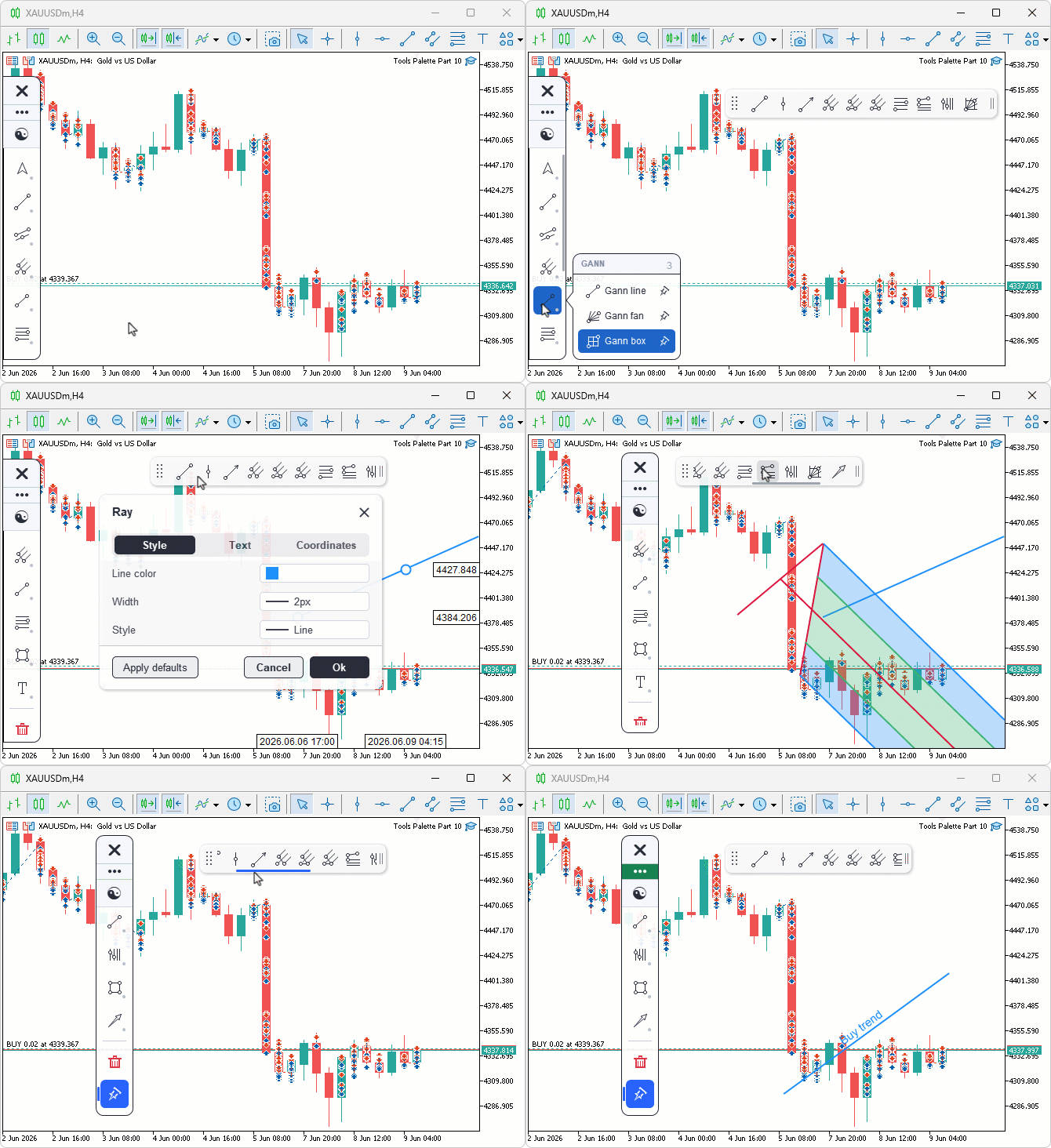
During testing, clicking a row's pushpin in the flyout toggled the tool in and out of the pinned set, with the tooltip naming the action and the Pinned tile appearing once the first tool was pinned. The ribbon toggled from that tile, rendered the pinned icons in pin order, and activated the matching tool on a single click. Dragging the grip moved the whole bar, dragging the trailing handle resized its width pixel-for-pixel up to the chart edge, and once the icons overflowed the bar, a floating scrollbar appeared that scrolled them by thumb drag and by mouse wheel.
Conclusion
In conclusion, we turned the three-step draw flow into a one-click path by adding a pinned-tools ribbon that coexists with the sidebar: discovery remains in the deep catalog, while your most-used tools sit immediately at hand. The article delivers an integrated, testable feature set that matches the readiness criteria we set out at the start:
- Engine API: an ordered pin store with "PinnedCount", "GetPinnedTool", "IsToolPinned", "PinTool", "UnpinTool", and "ToggleToolPin", preserving pin order and exposing simple queries.
- Unified glyph: an anti-aliased pushpin renderer that draws outline or solid states, so the same visual is reused across the sidebar tile, flyout rows, and the ribbon.
- Flyout affordance: per-row pushpins with hover feedback and a context tooltip, and a Pinned category tile that appears only when the pin list is nonempty.
- Pinned ribbon: a floating surface built on the existing settings-window foundation that supports dragging, pixel-for-pixel trailing-edge resize clamped to the chart, horizontal scrolling with a proportional thumb, and a persistent offscreen scratch canvas to cleanly clip scrolled icons without reallocating during interaction.
- Integration hooks: "OnPinnedToolActivated" and "PinnedActiveTool" for the shell to wire activation and to highlight the active tool.
These pieces close the gap from problem to solution: frequent tools are accessible in one click, pin order is preserved, and the ribbon scales ergonomically as favorites accumulate. After reading this article, you will be able to:
- Build an ordered pin set with an append, remove, and query API, backed by an anti-aliased pushpin glyph that one routine renders as outline or solid across every surface that shows it.
- Add a pin affordance to a sidebar flyout — a per-row pushpin with hover feedback and an add-or-remove tooltip — plus a category tile that stays hidden until the set has at least one entry.
- Implement a floating, draggable, user-resizable, horizontally scrollable ribbon with offscreen icon clipping and a smooth pixel-for-pixel resize handle.
From here, you can extend the toolkit by adding more tools, persisting the pin list across sessions, or slimming the implementation for environments with tighter resource budgets. Good luck.
Attachments
| S/N | Name | Type | Description |
|---|---|---|---|
| 1 | Tools Palette Part 10.mq5 | Expert Advisor | Main entry point that owns the global sidebar instance and forwards initialization, deinitialization, chart event, and timer callbacks to it. |
| 2 | ToolsPalette_Annotations.mqh | Include File | Annotation tools covering Text, Arrow, Arrow Marker, Arrow Up, Arrow Down, Note, Price Note, Callout, and Comment, plus the shared word-wrap and editable text rendering helpers. |
| 3 | ToolsPalette_Channels.mqh | Include File | Channels, pitchforks, and Gann tools library carrying every channel, pitchfork, and Gann draw routine and hit tester. |
| 4 | ToolsPalette_Crosshair.mqh | Include File | Crosshair manager that owns the reticle, magnifier, cross-line, and measurement canvases plus their axis labels. |
| 5 | ToolsPalette_Engine_Edit.mqh | Include File | Drawing engine method bodies for the in-place label editing subsystem covering edit lifecycle, caret operations, selection model, and chart keyboard override. |
| 6 | ToolsPalette_Engine_Interact.mqh | Include File | Drawing engine method bodies for pointer-mode interaction covering hit testing dispatch, handle reshape logic, drag move and release, and selection management. |
| 7 | ToolsPalette_Engine_Properties.mqh | Include File | Drawing engine method bodies for the property get and set API, snapshot and restore for live preview, and per-level add and remove. |
| 8 | ToolsPalette_Engine_Render.mqh | Include File | Drawing engine method bodies for the render pipeline covering full-redraw dispatch, rubber-band preview, label rendering, and permanent axis labels. |
| 9 | ToolsPalette_Fibonacci.mqh | Include File | Fibonacci tools library covering retracement, expansion, channel, time zone, speed resistance fan, and speed resistance arcs. |
| 10 | ToolsPalette_Lines.mqh | Include File | Base line tools class providing every line drawing routine plus the shared handle renderer and tool icon dispatch. |
| 11 | ToolsPalette_Primitives.mqh | Include File | Foundational pixel primitives covering alpha-compositing pixel set, anti-aliased thick line, supersampled fills, theme manager, and the input parameter declarations. |
| 12 | ToolsPalette_Properties.mqh | Include File | Property descriptor system defining the property type enum, the descriptor struct, the per-tool registration functions, and the build dispatcher. |
| 13 | ToolsPalette_PropertyWidgets.mqh | Include File | Property-editing widget renderers covering the color picker, the line width and style popovers, the compact rows, and the ribbon icons. |
| 14 | ToolsPalette_RibbonPinned.mqh | Include File | Pinned-tools ribbon: a floating, draggable, user-resizable, horizontally scrollable bar of pinned tool icons with offscreen icon clipping. |
| 15 | ToolsPalette_RibbonProperties.mqh | Include File | Per-object property-editing ribbon that pops up beside the selection and opens the color, width, and style popovers wired to the engine. |
| 16 | ToolsPalette_Settings.mqh | Include File | Tabbed settings window layout and rendering covering the tab strip, property rows, chips, scrollbars, and the Text tab. |
| 17 | ToolsPalette_Settings_Interact.mqh | Include File | Settings window interaction covering mouse routing, inline coordinate and float editing, and the sub-popover dispatch. |
| 18 | ToolsPalette_Shapes.mqh | Include File | Shape tools library covering Rectangle, Triangle, Rotated Rectangle, Rotated Ellipse, Path, Circle, Arc, and Curve. |
| 19 | ToolsPalette_Shell.mqh | Include File | Sidebar shell that routes chart events, dispatches keyboard input, drives the caret blink timer, and wires both ribbons into the event loop. |
| 20 | ToolsPalette_Sidebar.mqh | Include File | Sidebar renderer and flyout panel, now carrying the per-row pushpin affordance and the Pinned category tile that appears once a tool is pinned. |
| 21 | ToolsPalette_Tools.mqh | Include File | Tool registry plus the drawing engine class, now holding the ordered pinned-tools set, its management API, and the anti-aliased pushpin glyph. |
| 22 | Tools Palette Part 10.zip | Archive | A ready-to-extract archive containing all 21 project files in a single folder. Unzip it into your MetaTrader 5 terminal data folder; the files will be placed under MQL5/Experts/ with every file in its correct location, ready to compile. |
Warning: All rights to these materials are reserved by MetaQuotes Ltd. Copying or reprinting of these materials in whole or in part is prohibited.
This article was written by a user of the site and reflects their personal views. MetaQuotes Ltd is not responsible for the accuracy of the information presented, nor for any consequences resulting from the use of the solutions, strategies or recommendations described.

 MQL5 Bootstrap (II): Essential Validators for Robust Trading Systems
 Implementing Walk-Forward Efficiency Ratio Scoring in MQL5 to Detect Over-Optimized Strategies
 How to Connect AI Agents to MQL5 Algo Forge via MCP
 Building a Broker-Agnostic Symbol Resolution Layer in MQL5

- Free trading apps
- Over 8,000 signals for copying
- Economic news for exploring financial markets
You agree to website policy and terms of use