

MQL5 Trading Tools (Part 37): Adding a Per-Object Property-Editing Ribbon to the Canvas Drawing Layer
 1 822
1 822
 0
0

Introduction
In the previous article (Part 36), we added shape and annotation tools with an in-place label editor, so we can now draw filled shapes, drop annotation markers, and type text directly onto chart objects. But once an object is placed, its appearance is locked. The colors, opacities, line widths, dash styles, fonts, and per-level visibility are all baked in at creation time from the tool defaults or the per-tool memory — there is no way to select a rectangle and change its fill color, dim a Fibonacci level, restyle a channel's center line, or thicken a trendline after the fact. The drawing layer can create objects, but it cannot edit them.
This part fixes that with a floating property-editing ribbon. We add four new files that form a descriptor-driven property stack:
- A descriptor system that declares what each tool exposes
- An engine-side get/set API with snapshot-based live preview
- Widget renderers for each control
- A ribbon panel that appears next to the current selection and binds widgets to the engine
Selecting any object surfaces its editable properties; changing a value updates the object on the chart in real time, and cancelling rolls it back. This article is written for the intermediate-to-advanced MetaQuotes Language 5 (MQL5) developer who is comfortable with the inheritance chain we built up in the previous parts. The subtopics we will cover are:
- From Fixed Styles to User-Editable Properties
- Building the Property Descriptor System
- Rendering the Property-Editing Widgets
- Assembling the Property Ribbon
- Visualization
- Conclusion
By the end, every object on the canvas drawing layer will be fully editable through a compact, draggable ribbon, with each tool surfacing only the properties that apply to it and a live preview that updates the chart as the user drags a slider or picks a color.
From Fixed Styles to User-Editable Properties
Every drawn object already carries its full visual state as fields on the object structure — line width, line style, fill color and opacity, text color, font size, the per-level ratio and visibility arrays, the channel band sigmas, the pitchfork tine colors, and so on. Until now, those fields were written once at placement, either from the tool defaults or from the per-tool memory, and never touched again. Exposing them for editing is not a rendering problem, since the draw routines already read these fields on every redraw; it is a user-interface problem of getting a value from a widget into the right field on the right object.
The naive approach would use a bespoke editing panel, hand-built for each of the forty-odd tools. That path leads to enormous duplication and a maintenance nightmare. Instead, we take a descriptor-driven design. Each tool registers a list of property descriptors that declare what it exposes: a fill-color property, a line-width property, and a level-list property. Each descriptor names a type, a label, a value range, and a string identifier. The ribbon reads that list and renders the appropriate widget for each entry. One generic pipeline then drives every tool. Adding a property to a tool becomes a one-line registration rather than a new panel.
This system has four parts. The descriptor layer defines which properties a tool exposes. The widget layer defines how each property is rendered and edited. The engine get/set layer maps a descriptor ID to an object field. Finally, snapshot-and-restore enables live preview: slider changes apply immediately, and canceling restores the snapshot taken when the ribbon opens. With that conceptual map in place, we can move on to the implementation, but first, have a look at the visualized conceptual map below.

Building the Property Descriptor System
The Property Descriptor Model
We begin the property system by declaring the two foundations everything else rests on — the "PROP_TYPE" enumeration that names every kind of editable property, and the "SToolProperty" structure that describes a single property. Together, they let us treat "what a tool exposes" as plain data rather than hand-built code.
//+------------------------------------------------------------------+
//|                                      ToolsPalette_Properties.mqh |
//|                           Copyright 2026, Allan Munene Mutiiria. |
//|                                   https://t.me/Forex_Algo_Trader |
//+------------------------------------------------------------------+
#property copyright "Copyright 2026, Allan Munene Mutiiria."
#property link "https://t.me/Forex_Algo_Trader"
#property version "1.00"
#property strict

//--- Guard against multiple inclusion of this header
#ifndef TOOLS_PALETTE_PROPERTIES_MQH
#define TOOLS_PALETTE_PROPERTIES_MQH

//--- Pull in the Tools header so TOOL_TYPE and DrawnObject are visible
#include "ToolsPalette_Tools.mqh"

//+------------------------------------------------------------------+
//| Widget-type enum - drives which UI widget renders each property  |
//+------------------------------------------------------------------+
enum PROP_TYPE
  {
   PROP_COLOR,        // color swatch + popup grid + opacity slider
   PROP_LINE_WIDTH,   // dropdown of 1px/2px/3px/4px line previews
   PROP_LINE_STYLE,   // dropdown of continuous/dashed/dotted
   PROP_FONT_SIZE,    // dropdown of common font sizes
   PROP_TEXT,         // single-line text input
   PROP_MULTITEXT,    // multi-line text input (text-tab content)
   PROP_BOOL,         // checkbox
   PROP_OPACITY,      // slider 0..100 percent (used inside color picker)
   PROP_DROPDOWN_INT, // generic int dropdown with string options
   PROP_NUMERIC,      // number input with optional spinners
   PROP_PRICE,        // price input (for coordinate-tab rows)
   PROP_TIME,         // time/bar input (for coordinate-tab rows)
   PROP_FLOAT,        // bounded double with min/max/step/decimals
   PROP_COMPACT_ROW,  // composite row: checkbox + value + color + width + style mini-cubes on one line
   PROP_LEVEL_LIST,   // meta descriptor that expands at runtime into N compact rows + "Add level" row
   PROP_ACTION        // sentinel for action-button ribbon icons (Settings, Remove)
  };

//--- Settings-window tab group names
#define PROP_GROUP_STYLE        "Style"
#define PROP_GROUP_TEXT         "Text"
#define PROP_GROUP_COORDS       "Coordinates"
#define PROP_GROUP_VISIBILITY   "Visibility"

//+------------------------------------------------------------------+
//| SToolProperty - one descriptor entry per editable tool property  |
//+------------------------------------------------------------------+
struct SToolProperty
  {
   //--- Identity + display label + widget type + tab grouping
   string id;
   string label;
   PROP_TYPE type;
   string group;
   bool   showInRibbon;
   bool   showInSettings;
   string tooltip;

   //--- Default value (one slot per supported value type)
   color  defaultColor;
   int    defaultInt;
   double defaultDouble;
   string defaultString;
   bool   defaultBool;

   //--- Dropdown options (used by PROP_DROPDOWN_INT and similar)
   string options[];
   int    optionInts[];

   //--- Numeric bounds + step + decimal-places (used by PROP_FLOAT and PROP_LEVEL_LIST)
   double minValue;
   double maxValue;
   double stepValue;
   int    decimals;

   //--- Sub-property IDs for PROP_COMPACT_ROW (the row's checkbox/value/color/width/style cubes)
   string subVisibleId;
   string subValueId;
   string subColorId;
   string subWidthId;
   string subStyleId;

   //--- Runtime-set fields used by PROP_LEVEL_LIST pseudo-row synthesis
   int    levelIdx;
   bool   isAddLevelRow;
   string levelListPrefix;
  };
We guard the header with the "TOOLS_PALETTE_PROPERTIES_MQH" include macro and pull in the Tools header so "TOOL_TYPE" and the "DrawnObject" structures are visible. The "PROP_TYPE" enumeration then names each widget kind the ribbon and settings window know how to render — a color picker ("PROP_COLOR"), the line width and style dropdowns ("PROP_LINE_WIDTH" and "PROP_LINE_STYLE"), the font-size dropdown, single- and multi-line text inputs, a checkbox ("PROP_BOOL"), an opacity slider, a generic integer dropdown, numeric and price and time inputs, and a bounded float. Three entries are special: "PROP_COMPACT_ROW" is a composite that packs a checkbox, value stepper, and color/width/style mini-cubes onto a single line; "PROP_LEVEL_LIST" is a meta-descriptor that expands at runtime into one compact row per Fibonacci or Gann level plus an "Add level" row; and "PROP_ACTION" is a sentinel for the ribbon's action buttons like Settings and Remove.
We also define four tab-group name macros ("PROP_GROUP_STYLE", "PROP_GROUP_TEXT", "PROP_GROUP_COORDS", "PROP_GROUP_VISIBILITY") that sort properties into tabs in the settings window. We define this early because we will need it when we integrate the settings window, which will complete the structure. We intend to use the default MQL5 web tools window for this settings palette, though it has no major difference from the native one. See an example below for clarity.
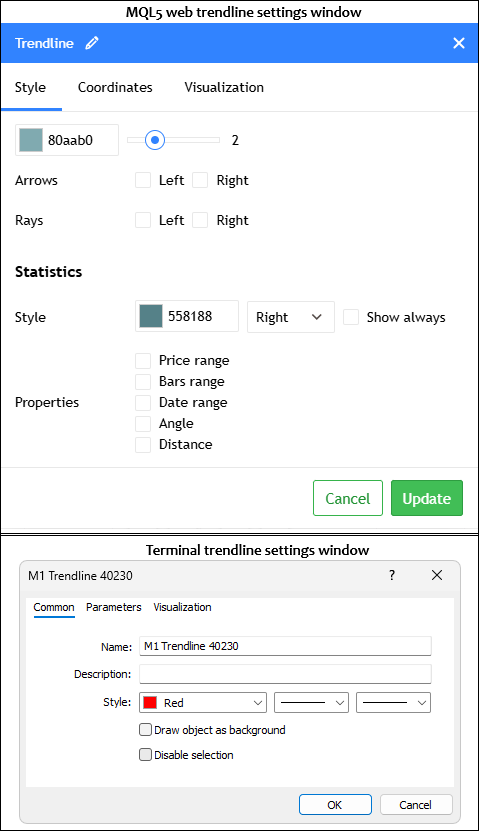
Next, the "SToolProperty" struct is one descriptor entry per editable property. The identity block carries the string id (the key the engine gets/sets API uses to find the underlying field), the display label, the "PROP_TYPE", the tab group, two flags for whether the property shows in the ribbon and in the settings window, and a tooltip. Because a property can hold any of several value kinds, we give it one default slot per type — color, int, double, string, and bool — and the registration code fills whichever slot matches. The dropdown arrays hold the option labels and their backing integer values for "PROP_DROPDOWN_INT", and the numeric block holds the min, max, step, and decimal-place count for "PROP_FLOAT" and the level list.
The last two blocks support the composite types. The sub-property ID fields wire each mini-cube of a compact row to its own underlying property — the row's checkbox, value, color, width, and style each resolve to a separate engine property by ID. And the runtime fields at the bottom — "levelIdx", "isAddLevelRow", and "levelListPrefix" — are left empty in the static descriptors and filled in only when a "PROP_LEVEL_LIST" is expanded into its per-level rows at render time, which is how one level-list descriptor becomes N concrete rows. With the descriptor model declared, we can move on to the registration helpers that build these entries.
The Registration Helpers
We add three small helpers that the per-tool registration functions lean on. Two of them append descriptor entries to a property list, and the third resolves the opacity property that pairs with a given color property.
//+------------------------------------------------------------------+
//| Map a color property ID to its sibling opacity property ID       |
//+------------------------------------------------------------------+
string ColorToOpacityProp(string colorPropId)
  {
   //--- Hand-rolled mapping for the 5 known top-level color properties
   if(colorPropId == "textColor")    return "textOpacity";
   if(colorPropId == "fillColor")    return "fillOpacity";
   if(colorPropId == "fillColor2")   return "fillOpacity2";
   if(colorPropId == "midColor")     return "midOpacity";
   if(colorPropId == "centerColor")  return "centerOpacity";
   //--- Per-level color IDs end with ":color"; rewrite the suffix to ":opacity"
   const int trailLen = StringLen(":color");
   const int propLen  = StringLen(colorPropId);
   if(propLen > trailLen
      && StringSubstr(colorPropId, propLen - trailLen, trailLen) == ":color")
     {
      return StringSubstr(colorPropId, 0, propLen - trailLen) + ":opacity";
     }
   //--- Default fallback: every unknown color maps to the main line opacity
   return "lineOpacity";
  }

//+------------------------------------------------------------------+
//| Append a compact-row descriptor (checkbox + value + color cubes) |
//+------------------------------------------------------------------+
void AddCompactRowDescriptor(SToolProperty &props[],
                              string id, string label,
                              string subVisibleId, string subValueId,
                              string subColorId, string subWidthId,
                              string subStyleId,
                              string group = "Style",
                              double minValue = 0.0, double maxValue = 100.0,
                              double stepValue = 0.1, int decimals = 2)
  {
   //--- Grow the array by one + populate the new entry
   const int n = ArraySize(props);
   ArrayResize(props, n + 1);
   props[n].id              = id;
   props[n].label           = label;
   props[n].type            = PROP_COMPACT_ROW;
   props[n].group           = group;
   //--- Compact rows live only in the settings window, never in the ribbon
   props[n].showInRibbon    = false;
   props[n].showInSettings  = true;
   props[n].tooltip         = "";
   //--- Default-value slots (compact rows themselves don't carry a value, but populate for safety)
   props[n].defaultColor    = clrBlack;
   props[n].defaultInt      = 0;
   props[n].defaultDouble   = 0.0;
   props[n].defaultString   = "";
   props[n].defaultBool     = false;
   //--- Numeric stepper bounds for the row's value cube
   props[n].minValue        = minValue;
   props[n].maxValue        = maxValue;
   props[n].stepValue       = stepValue;
   props[n].decimals        = decimals;
   //--- Sub-property IDs that wire each mini-cube to its underlying engine property
   props[n].subVisibleId    = subVisibleId;
   props[n].subValueId      = subValueId;
   props[n].subColorId      = subColorId;
   props[n].subWidthId      = subWidthId;
   props[n].subStyleId      = subStyleId;
   //--- Not a level pseudo-row (those get their levelIdx set at runtime)
   props[n].levelIdx        = -1;
   props[n].isAddLevelRow   = false;
   props[n].levelListPrefix = "";
  }

//+------------------------------------------------------------------+
//| Append a single SToolProperty entry to a property list           |
//+------------------------------------------------------------------+
void AddPropertyDescriptor(SToolProperty &props[],
                            string id,
                            string label,
                            PROP_TYPE type,
                            string group,
                            bool showInRibbon,
                            bool showInSettings,
                            string tooltip = "")
  {
   //--- Grow the array by one + populate the new entry's identity fields
   int n = ArraySize(props);
   ArrayResize(props, n + 1);
   props[n].id              = id;
   props[n].label           = label;
   props[n].type            = type;
   props[n].group           = group;
   props[n].showInRibbon    = showInRibbon;
   props[n].showInSettings  = showInSettings;
   props[n].tooltip         = tooltip;
   //--- Not a level pseudo-row (caller can override later for the level-list case)
   props[n].levelIdx        = -1;
   props[n].isAddLevelRow   = false;
   props[n].levelListPrefix = "";
  }
Here, the "ColorToOpacityProp" function exists because every color in the system has a matching opacity that the color picker edits alongside it — picking a fill color and dragging its opacity slider both write back through the property API, so the picker needs to know which opacity ID goes with the color ID it was opened for. For the five top-level colors (text, fill, second fill, mid-line, center), the mapping is hand-rolled. For per-level colors, whose IDs follow a "prefix:color" convention, we rewrite the trailing ":color" to ":opacity" so a Fibonacci level's color ID resolves to that same level's opacity ID. Anything unrecognized falls back to the main line opacity.
"AddCompactRowDescriptor" appends a "PROP_COMPACT_ROW" entry — the one-line composite that packs a checkbox, value stepper, and color, width, and style mini-cubes. The function grows the descriptor array by one and populates the new entry, marking it settings-only (compact rows never appear in the ribbon), setting the numeric stepper bounds for the value cube, and wiring each of the five sub-property IDs so every mini-cube knows which underlying engine property it edits. The level-list runtime fields are left empty here since a static compact row is not itself a per-level pseudo-row.
"AddPropertyDescriptor" is the general-purpose appender for every non-composite property. It grows the array, fills the identity block from its arguments — id, label, type, group, the two visibility flags, and the tooltip — and clears the level-list runtime fields, which a caller can override afterward for the level-list case. Both appenders follow the same grow-by-one-then-populate pattern, so the registration functions in the next steps read as a flat sequence of "AddPropertyDescriptor" calls, one per property a tool exposes. Next, we will define the actual logic to register these tools.
Registering a Tool's Property Set
We now look at a representative registration function, "RegisterLineToolWithLabelProperties", which declares the full property set for the labeled line tools — trendline, ray, extended line, horizontal and vertical lines, info line, and trend angle. Every tool family has one of these functions, and they all read as a flat sequence of "AddPropertyDescriptor" calls.
//+------------------------------------------------------------------+
//| Register standard property set for line tools WITH text label    |
//+------------------------------------------------------------------+
void RegisterLineToolWithLabelProperties(SToolProperty &props[])
  {
   //--- Line color (ribbon + settings)
   AddPropertyDescriptor(props, "lineColor", "Line color",
                          PROP_COLOR, PROP_GROUP_STYLE,
                          true, true, "Line tool colors");
   //--- Text color (ribbon + settings, lives in the Text tab)
   AddPropertyDescriptor(props, "textColor", "Text color",
                          PROP_COLOR, PROP_GROUP_TEXT,
                          true, true, "Line tool text colors");
   //--- Line width + style (default 2 px, solid)
   AddPropertyDescriptor(props, "lineWidth", "Width",
                          PROP_LINE_WIDTH, PROP_GROUP_STYLE,
                          true, true, "Line tool widths");
   props[ArraySize(props) - 1].defaultInt = 2;
   AddPropertyDescriptor(props, "lineStyle", "Style",
                          PROP_LINE_STYLE, PROP_GROUP_STYLE,
                          true, true, "Style");
   props[ArraySize(props) - 1].defaultInt = 0;
   //--- Line opacity (settings only)
   AddPropertyDescriptor(props, "lineOpacity", "Line opacity",
                          PROP_OPACITY, PROP_GROUP_STYLE,
                          false, true, "");
   props[ArraySize(props) - 1].defaultInt = 100;
   //--- Label text + per-text opacity + font size + bold + alignment
   AddPropertyDescriptor(props, "text", "Text",
                          PROP_TEXT, PROP_GROUP_TEXT,
                          false, true, "");
   AddPropertyDescriptor(props, "textOpacity", "Text opacity",
                          PROP_OPACITY, PROP_GROUP_TEXT,
                          false, true, "");
   props[ArraySize(props) - 1].defaultInt = 100;
   AddPropertyDescriptor(props, "fontSize", "Font size",
                          PROP_FONT_SIZE, PROP_GROUP_TEXT,
                          false, true, "");
   props[ArraySize(props) - 1].defaultInt = 11;
   AddPropertyDescriptor(props, "bold", "Bold",
                          PROP_BOOL, PROP_GROUP_TEXT,
                          false, true, "");
   props[ArraySize(props) - 1].defaultBool = false;
   //--- Vertical alignment (default Top = 0)
   AddPropertyDescriptor(props, "vAlign", "Vertical alignment",
                          PROP_DROPDOWN_INT, PROP_GROUP_TEXT,
                          false, true, "");
   props[ArraySize(props) - 1].defaultInt = 0;
   //--- Horizontal alignment (default Center = 1)
   AddPropertyDescriptor(props, "hAlign", "Horizontal alignment",
                          PROP_DROPDOWN_INT, PROP_GROUP_TEXT,
                          false, true, "");
   props[ArraySize(props) - 1].defaultInt = 1;
  }
The function appends one descriptor per editable property that the labeled line tools expose. The line color and text color come first, both flagged to appear in the ribbon and the settings window, with the text color sorted into the Text tab. The line width and style follow, also ribbon-visible, and immediately after each call, we reach back into the just-appended entry via "props[ArraySize(props) - 1]" to set its default integer — width defaults to 2 pixels and style to 0 (solid). This back-reference is the idiom for setting a default, since "AddPropertyDescriptor" only fills the identity block and leaves the value slots untouched.
The remaining properties are settings-only — they have their ribbon flag set to false, so they appear in the settings window but not on the compact ribbon. The line opacity defaults to 100, then the label text, its own per-text opacity (also 100), the font size (defaulting to 11), a bold checkbox, and the vertical and horizontal alignment dropdowns round out the Text tab. The alignment dropdowns are "PROP_DROPDOWN_INT" entries whose option labels and values get attached later by the widget layer, with vertical alignment defaulting to Top (0) and horizontal to Center (1).
The order of these calls matters because it is the order in which the settings window renders the rows. Every other registration function in the file follows this same shape — closed shapes, channels, pitchforks, Gann tools, and the annotations each append the descriptors that apply to them and set their defaults the same way, so we will not walk through the rest individually. The one that introduces genuinely new mechanics is the Fibonacci registration, which we cover next.
Registering the Fibonacci Level List
We now reach the level-list mechanism, which is what lets the Fibonacci and Gann tools expose an editable list of ratio levels rather than a fixed set of properties. We define a reusable helper, "AddLevelListDescriptor", and then look at how the Fibonacci retracement registers its own level list.
//+------------------------------------------------------------------+
//| Append a PROP_LEVEL_LIST descriptor (helper for other Fib/Gann)  |
//+------------------------------------------------------------------+
void AddLevelListDescriptor(SToolProperty &props[],
                             string id, string label,
                             double minR, double maxR, double stepR, int dec)
  {
   //--- Grow + populate the new descriptor
   const int n = ArraySize(props);
   ArrayResize(props, n + 1);
   props[n].id              = id;
   props[n].label           = label;
   props[n].type            = PROP_LEVEL_LIST;
   props[n].group           = PROP_GROUP_STYLE;
   //--- Levels live only in the settings window
   props[n].showInRibbon    = false;
   props[n].showInSettings  = true;
   props[n].tooltip         = "";
   //--- Default-value slots
   props[n].defaultColor    = clrBlack;
   props[n].defaultInt      = 0;
   props[n].defaultDouble   = 0.0;
   props[n].defaultString   = "";
   props[n].defaultBool     = false;
   //--- Caller-supplied per-level ratio bounds + step + decimal places
   props[n].minValue        = minR;
   props[n].maxValue        = maxR;
   props[n].stepValue       = stepR;
   props[n].decimals        = dec;
   //--- No per-row sub-IDs (rows are synthesized at runtime from the level data)
   props[n].subVisibleId    = "";
   props[n].subValueId      = "";
   props[n].subColorId      = "";
   props[n].subWidthId      = "";
   props[n].subStyleId      = "";
   props[n].levelIdx        = -1;
   props[n].isAddLevelRow   = false;
   props[n].levelListPrefix = "";
  }

//+------------------------------------------------------------------+
//| Register property set for Fibonacci retracement (PROP_LEVEL_LIST)|
//+------------------------------------------------------------------+
void RegisterFibonacciRetracementProperties(SToolProperty &props[])
  {
   //--- Default level color (ribbon-only; cascades onto per-level colors when changed)
   AddPropertyDescriptor(props, "lineColor", "Default level color",
                          PROP_COLOR, PROP_GROUP_STYLE,
                          true, false, "Default color for new levels");
   //--- Levels list descriptor - manually populated (predates AddLevelListDescriptor below)
   const int n = ArraySize(props);
   ArrayResize(props, n + 1);
   props[n].id              = "fibo";
   props[n].label           = "Levels";
   props[n].type            = PROP_LEVEL_LIST;
   props[n].group           = PROP_GROUP_STYLE;
   //--- Levels live only in the settings window, never in the ribbon
   props[n].showInRibbon    = false;
   props[n].showInSettings  = true;
   props[n].tooltip         = "";
   //--- Default-value slots
   props[n].defaultColor    = clrBlack;
   props[n].defaultInt      = 0;
   props[n].defaultDouble   = 0.0;
   props[n].defaultString   = "";
   props[n].defaultBool     = false;
   //--- Ratio bounds for each level's value cube: -10..10 with 0.01 step and 3 decimal places
   props[n].minValue        = -10.0;
   props[n].maxValue        =  10.0;
   props[n].stepValue       = 0.01;
   props[n].decimals        = 3;
   //--- The level-list itself has no per-row sub-IDs (rows are synthesized at runtime)
   props[n].subVisibleId    = "";
   props[n].subValueId      = "";
   props[n].subColorId      = "";
   props[n].subWidthId      = "";
   props[n].subStyleId      = "";
   props[n].levelIdx        = -1;
   props[n].isAddLevelRow   = false;
   props[n].levelListPrefix = "";
  }
We use "AddLevelListDescriptor" to append a single "PROP_LEVEL_LIST" entry. We grow the array by one and populate it much like the other appenders, marking it settings-only and storing the caller-supplied per-level ratio bounds — the min, max, step, and decimal-place count that each level's value cube will respect when we edit a ratio. We deliberately leave all five sub-property ID fields empty here, because unlike a static compact row, the per-level rows of a level list do not exist yet — we synthesize them at runtime from the object's actual level data, so there is nothing to wire up at registration time. We need these levels to be the same as the native terminal does. See below.

In "RegisterFibonacciRetracementProperties", we first add a "lineColor" descriptor labeled "Default level color". We flag it ribbon-visible but settings-hidden, and we treat it as a cascade control — when the user changes it from the ribbon, that color flows onto every per-level color. We then append the level-list descriptor itself. This one we populate by hand rather than calling the helper, since this registration predates the helper, but the result is identical: a "PROP_LEVEL_LIST" entry with id "fibo", settings-only visibility, and ratio bounds of -10 to 10 with a 0.01 step and three decimal places.
What makes this descriptor different from everything we have registered so far is that it is a meta-descriptor — it does not describe one row, it describes a family of rows. When the settings window renders it, we expand the single "fibo" entry into one compact row per level the object currently holds, plus a trailing "Add level" row, filling in the "levelIdx" and "levelListPrefix" runtime fields on each synthesized row so the widget layer knows which level it edits. We handle that expansion in the widget and ribbon layers, so for now we just register the one descriptor and move on. The Gann fan and Gann box register their level lists the same way through "AddLevelListDescriptor", and the master dispatcher routes each tool type to the registration function that applies to it. Next, in a new file, we will describe the logic to get and set the object properties in the drawing engine as follows.
Reading a Property by String ID
We now cross over to the engine side, where the descriptors actually reach the object's fields. We define "GetObjectProperty", the read half of the property API, and walk through its color overload — the int, bool, double, and string overloads and the whole setter family all follow this same id-dispatch shape, so this is the only snippet we need from this file.
//+------------------------------------------------------------------+
//|                               ToolsPalette_Engine_Properties.mqh |
//|                           Copyright 2026, Allan Munene Mutiiria. |
//|                                   https://t.me/Forex_Algo_Trader |
//+------------------------------------------------------------------+
#property copyright "Copyright 2026, Allan Munene Mutiiria."
#property link "https://t.me/Forex_Algo_Trader"
#property version "1.00"
#property strict

//--- Guard against multiple inclusion of this header
#ifndef TOOLS_PALETTE_ENGINE_PROPERTIES_MQH
#define TOOLS_PALETTE_ENGINE_PROPERTIES_MQH

//--- Pull in the Tools header so CDrawingEngine and DrawnObject are visible to the bodies below
#include "ToolsPalette_Tools.mqh"

//+------------------------------------------------------------------+
//| Read a color-typed property by string ID                         |
//+------------------------------------------------------------------+
bool CDrawingEngine::GetObjectProperty(int objId, string propId, color &outValue)
  {
   //--- Resolve the object's array index by ID; bail on unknown ID
   int idx = FindObjectIndexById(objId);
   if(idx < 0) return false;

   //--- Primary stroke/fill color of the object
   if(propId == "lineColor")
     {
      outValue = m_drawnObjects[idx].objColor;
      return true;
     }
   //--- Text color (for label-bearing tools)
   if(propId == "textColor")
     {
      outValue = m_drawnObjects[idx].textColor;
      return true;
     }
   //--- Fill color (for shapes with a fill)
   if(propId == "fillColor")
     {
      outValue = m_drawnObjects[idx].fillColor;
      return true;
     }
   //--- Channel midline color
   if(propId == "midColor")
     {
      outValue = m_drawnObjects[idx].midColor;
      return true;
     }
   //--- Secondary fill color (e.g., the second std-dev band fill)
   if(propId == "fillColor2")
     {
      outValue = m_drawnObjects[idx].fillColor2;
      return true;
     }
   //--- Regression centerline color
   if(propId == "centerColor")
     {
      outValue = m_drawnObjects[idx].centerColor;
      return true;
     }
   //--- Pitchfork per-part-group color getters
   if(propId == "medianColor") { outValue = m_drawnObjects[idx].medianColor; return true; }
   if(propId == "outerColor")  { outValue = m_drawnObjects[idx].outerColor;  return true; }
   if(propId == "innerColor")  { outValue = m_drawnObjects[idx].innerColor;  return true; }
   //--- Per-level color for ANY PROP_LEVEL_LIST tool (fibo/fibex/fibch/fibtz/fibfan/fibarc/gannfan/gannbox)
     {
      string pfx; int li; string fld;
      if(ParseLevelPropId(propId, pfx, li, fld) && fld == "color")
        {
         //--- Dispatch by prefix to the matching tool's level-color array
         if(pfx == "fibo")
           {
            if(li < ArraySize(m_drawnObjects[idx].fiboLevelColor))
              { outValue = m_drawnObjects[idx].fiboLevelColor[li]; return true; }
           }
         else if(pfx == "fibex")
           {
            if(li < ArraySize(m_drawnObjects[idx].fibexLevelColor))
              { outValue = m_drawnObjects[idx].fibexLevelColor[li]; return true; }
           }
         else if(pfx == "fibch")
           {
            if(li < ArraySize(m_drawnObjects[idx].fibchLevelColor))
              { outValue = m_drawnObjects[idx].fibchLevelColor[li]; return true; }
           }
         else if(pfx == "fibtz")
           {
            if(li < ArraySize(m_drawnObjects[idx].fibtzLevelColor))
              { outValue = m_drawnObjects[idx].fibtzLevelColor[li]; return true; }
           }
         else if(pfx == "fibfan")
           {
            if(li < ArraySize(m_drawnObjects[idx].fibfanLevelColor))
              { outValue = m_drawnObjects[idx].fibfanLevelColor[li]; return true; }
           }
         else if(pfx == "fibarc")
           {
            if(li < ArraySize(m_drawnObjects[idx].fibarcLevelColor))
              { outValue = m_drawnObjects[idx].fibarcLevelColor[li]; return true; }
           }
         else if(pfx == "gannfan")
           {
            if(li < ArraySize(m_drawnObjects[idx].gannfanLevelColor))
              { outValue = m_drawnObjects[idx].gannfanLevelColor[li]; return true; }
           }
         else if(pfx == "gannbox")
           {
            if(li < ArraySize(m_drawnObjects[idx].gannboxLevelColor))
              { outValue = m_drawnObjects[idx].gannboxLevelColor[li]; return true; }
           }
         //--- Unknown prefix or out-of-range level index
         return false;
        }
     }

   //--- Unrecognized property ID for the color type
   return false;
  }
We start by resolving the object's array index from its id via "FindObjectIndexById", bailing out if the id is unknown. From there, we match the incoming "propId" string against each color the object can expose and write the matching field into the output parameter. We handle the top-level colors first — "lineColor" reads the object's primary stroke color, "textColor" the label color, "fillColor" and "fillColor2" the two fill colors, "midColor" the channel mid-line, and "centerColor" the regression center line. We then handle the three pitchfork tine colors ("medianColor", "outerColor", "innerColor") on single lines since they are simple field reads.
The interesting branch is the per-level color path, which we reach for any tool that carries a level list. We call "ParseLevelPropId" to split a level color id into its prefix, level index, and field name, and when the field is "color," we dispatch on the prefix to the matching tool's level-color array — "fibo" reads "fiboLevelColor", "gannfan" reads "gannfanLevelColor", and so on across all eight level-list tools. We bounds-check the level index against the array size before reading, so a stale ID pointing past the end of a shrunk level list fails cleanly rather than reading out of range. Anything we do not recognize returns false, which tells the caller the property does not apply to this object.
The rest of the objects repeat this pattern. We provide a "GetObjectProperty" overload per value type and a matching "SetObjectProperty" per type, where the setters take the same ID and an extra "preview" flag and write the field instead of reading it. Since every one of these follows the id-dispatch we just walked through, we move on to the widgets that drive these calls.
Rendering the Property-Editing Widgets
The Transparency-Checker Helpers
We open the widget file with two small painting helpers that lay down the checkerboard pattern behind any color we are editing. We need this because a swatch showing a semi-transparent color has to sit on a checker backdrop for the transparency to read visually — a flat backdrop would make a 40%-opacity red look like a solid pale pink instead of a see-through one. Here is what a transparency checker looks like in context for reference.

Any colors can be used for the checker pattern.
//+------------------------------------------------------------------+
//|                                 ToolsPalette_PropertyWidgets.mqh |
//|                           Copyright 2026, Allan Munene Mutiiria. |
//|                                   https://t.me/Forex_Algo_Trader |
//+------------------------------------------------------------------+
#property copyright "Copyright 2026, Allan Munene Mutiiria."
#property link "https://t.me/Forex_Algo_Trader"
#property version "1.00"
#property strict

//--- Guard against multiple inclusion of this header
#ifndef TOOLS_PALETTE_PROPERTY_WIDGETS_MQH
#define TOOLS_PALETTE_PROPERTY_WIDGETS_MQH

//--- Pull in the Sidebar header (transitively pulls Primitives + Tools)
#include "ToolsPalette_Sidebar.mqh"

//+------------------------------------------------------------------+
//| Paint a transparency-checker pattern clipped to a pill shape     |
//+------------------------------------------------------------------+
void WidgetCheckerFillPill(CCanvas &canvas,
                            int l, int t, int r, int b,
                            int checkerSize)
  {
   //--- Bail on degenerate rectangles
   const int h = b - t;
   if(h <= 0 || r <= l) return;
   //--- Pill = rect with semicircular ends - radius is half the height
   const int radius = h / 2;
   //--- Two checker colors (light + lighter gray)
   const uint checkerA = ColorToARGB(C'200,200,200', 255);
   const uint checkerB = ColorToARGB(C'232,232,232', 255);
   const int yMid = (t + b) / 2;
   //--- Walk every row, compute the per-row x-inset that keeps us inside the pill
   for(int y = t; y < b; y++)
     {
      //--- Distance from the pill's vertical centerline - rows beyond `radius` are outside
      const int dyFromMid = MathAbs(y - yMid);
      if(dyFromMid >= radius) continue;
      //--- Half-width of the pill at this y (from circle equation x = sqrt(r^2 - dy^2))
      const double rr = (double)radius;
      const double extent = MathSqrt(rr * rr - (double)dyFromMid * (double)dyFromMid);
      const int rowInset = (int)(rr - extent);
      const int xStart = l + rowInset;
      const int xEnd   = r - rowInset;
      //--- Paint each column with the alternating checker pattern
      for(int x = xStart; x < xEnd; x++)
        {
         const bool dark = (((x - l) / checkerSize) + ((y - t) / checkerSize)) % 2 == 0;
         canvas.PixelSet(x, y, dark ? checkerA : checkerB);
        }
     }
  }

//+------------------------------------------------------------------+
//| Paint a transparency-checker pattern inside a plain rectangle    |
//+------------------------------------------------------------------+
void WidgetCheckerFillRect(CCanvas &canvas,
                            int l, int t, int r, int b,
                            int checkerSize)
  {
   //--- Bail on degenerate rectangles
   if(r <= l || b <= t) return;
   //--- Two checker colors (light + lighter gray)
   const uint checkerA = ColorToARGB(C'200,200,200', 255);
   const uint checkerB = ColorToARGB(C'232,232,232', 255);
   //--- Walk every pixel; xor the cell index to pick the alternating color
   for(int y = t; y < b; y++)
     {
      for(int x = l; x < r; x++)
        {
         const bool dark = (((x - l) / checkerSize) + ((y - t) / checkerSize)) % 2 == 0;
         canvas.PixelSet(x, y, dark ? checkerA : checkerB);
        }
     }
  }
We guard the header with the "TOOLS_PALETTE_PROPERTY_WIDGETS_MQH" macro and pull in the Sidebar header, which transitively brings along the primitives and the Tools layer that the widgets draw on top of.
We paint the pill-clipped version in "WidgetCheckerFillPill". After rejecting degenerate rectangles, we treat the shape as a rectangle with semicircular caps whose radius is half the height. We iterate over rows and compute each row's distance from the vertical centerline. Rows beyond the radius lie outside the caps and are skipped. For the remaining rows, we use the circle equation to compute the half-width and inset the row accordingly. Within each row's clipped span, we pick the checker color by adding the cell's column and row indices and testing the sum's parity, which gives the familiar alternating two-tone grid. We use the two light grays so the pattern stays subtle behind whatever color we lay over it.
We paint the simpler version in "WidgetCheckerFillRect", which fills a plain rectangle with no rounding. We walk every pixel in the rectangle and pick the checker color with the same parity test on the cell indices. We reach for this rectangular variant wherever a swatch or preview area is square-cornered, and the pill variant wherever the control has rounded ends. Next, we will do the color picker swatch and the rendering pipeline.
The Color Picker Palette
We begin the color picker — the richest widget in the ribbon — by laying down the layout constants that fix its geometry and the preset palette it offers.
//--- Color picker layout constants (grid + spacing + opacity strip + label box)
#define COLORPICKER_GRID_COLS         10
#define COLORPICKER_GRID_ROWS         8
#define COLORPICKER_SWATCH_SIZE       18
#define COLORPICKER_SWATCH_GAP         5
#define COLORPICKER_SWATCH_RADIUS      4
#define COLORPICKER_PAD_X             11
#define COLORPICKER_PAD_Y_TOP         11
#define COLORPICKER_PAD_Y_BOTTOM      11
#define COLORPICKER_GRID_TO_DIVIDER   10
#define COLORPICKER_DIVIDER_TO_OPACITY 10
#define COLORPICKER_OPACITY_LABEL_H   14
#define COLORPICKER_OPACITY_LABEL_GAP  6
#define COLORPICKER_OPACITY_STRIP_H   10
#define COLORPICKER_OPACITY_BOX_W     46
#define COLORPICKER_OPACITY_BOX_H     22
#define COLORPICKER_OPACITY_BOX_GAP    8
#define COLORPICKER_RING_OFFSET        2
#define COLORPICKER_RING_THICKNESS     2
#define COLORPICKER_WHITE_BORDER_COLOR_R  220
#define COLORPICKER_WHITE_BORDER_COLOR_G  220
#define COLORPICKER_WHITE_BORDER_COLOR_B  220

//+------------------------------------------------------------------+
//| Color picker preset palette (80 swatches arranged as 10x8 grid)  |
//+------------------------------------------------------------------+
color GetColorPickerSwatch(int idx)
  {
   //--- 80-entry preset palette organized by tonal row
   static color s_palette[80] =
     {
      //--- Row 0: grayscale (white to black)
      C'255,255,255', C'232,232,232', C'209,209,209', C'186,186,186', C'163,163,163',
      C'140,140,140', C'117,117,117', C'94,94,94',    C'47,47,47',    C'0,0,0',
      //--- Row 1: lightest pastels
      C'255,205,210', C'255,224,178', C'255,249,196', C'200,230,201', C'178,235,242',
      C'179,229,252', C'197,202,233', C'209,196,233', C'225,190,231', C'248,187,208',
      //--- Row 2: soft pastels
      C'255,154,162', C'255,196,148', C'255,236,139', C'165,214,167', C'128,222,234',
      C'129,212,250', C'159,168,218', C'179,157,219', C'206,147,216', C'244,143,177',
      //--- Row 3: pastel-vivid
      C'255,138,128', C'255,167, 38', C'255,213,  0', C'129,199,132', C' 77,208,225',
      C' 79,195,247', C'121,134,203', C'149,117,205', C'186,104,200', C'240,98 ,146',
      //--- Row 4: clean mid
      C'244, 67, 54', C'255,152,  0', C'255,193,  7', C' 76,175, 80', C'  0,188,212',
      C' 33,150,243', C' 63, 81,181', C'103, 58,183', C'156, 39,176', C'233, 30, 99',
      //--- Row 5: deeper mid
      C'229, 57, 53', C'251,140,  0', C'251,177,  0', C' 56,142, 60', C'  0,151,167',
      C' 30,136,229', C' 57, 73,171', C' 94, 53,177', C'142, 36,170', C'216, 27, 96',
      //--- Row 6: deep saturated
      C'198, 40, 40', C'239,108,  0', C'245,127, 23', C' 46,125, 50', C'  0,121,107',
      C' 21,101,192', C' 48, 63,159', C' 81, 45,168', C'123, 31,162', C'194, 24, 91',
      //--- Row 7: darkest
      C'183, 28, 28', C'230, 81,  0', C'191, 54, 12', C' 27, 94, 32', C'  0, 96, 100',
      C' 13, 71,161', C' 26, 35,126', C' 49, 27,146', C' 74, 20,140', C'136, 14, 79'
     };
   //--- Out-of-range index returns the sentinel clrNONE
   if(idx < 0 || idx >= 80) return clrNONE;
   return s_palette[idx];
  }

//+------------------------------------------------------------------+
//| Reverse lookup: find the palette index for a given color value   |
//+------------------------------------------------------------------+
int FindColorPickerSwatchIndex(color c)
  {
   //--- Linear scan through the 80-entry palette; return -1 if not present
   for(int i = 0; i < 80; i++)
     {
      if(GetColorPickerSwatch(i) == c) return i;
     }
   return -1;
  }
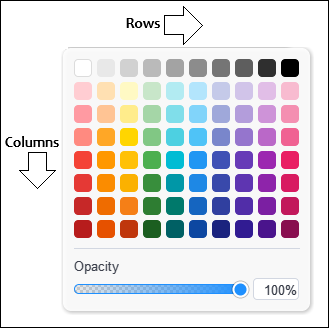
We start with a block of "#define" constants that pin down every dimension of the picker — ten columns by eight rows of eighteen-pixel swatches with a five-pixel gap and a four-pixel corner radius, plus the padding, the divider spacing, the opacity strip height, the opacity box size, and the selection ring offset and thickness. We keep these as named constants in one place so the layout math in the render and hit-test routines stays readable, and so a single edit here shifts the whole picker consistently.
Next, we define "GetColorPickerSwatch", which returns one of eighty preset colors by index from a static array arranged as that ten-by-eight grid. We run the first row grayscale from white to black, then sweep the seven rows below from the lightest pastels down to the darkest saturated tones, keeping each column in one hue family so we can scan down for a darker shade or across for a different hue. We hand back clrNONE for an out-of-range index so callers can treat it as a missing entry.
Finally, we add "FindColorPickerSwatchIndex" to go the other way, linear-scanning the palette for a color value and returning its index, or -1 when the color is not a preset. We call this when the picker opens on an existing object — it tells us which swatch matches the object's current color, so we can ring it, and the -1 result tells us the object is holding a custom color outside the preset grid. We chose these colors for flexibility in case one wants to expand the palette in the future. Feel free to add more columns or rows. We prioritized the black and white to be at the top row since it is the one most used. When rendered, this will give us the following outcome.
To render the line-property popovers, we use the following approach.
Rendering the Line-Width and Line-Style Popovers
We render both the line-width popover and the line-style popover from a single function, "RenderLinePopoverRows", since the two dropdowns share an identical row layout and differ only in which axis changes down the rows.
//+------------------------------------------------------------------+
//| Render the rows of the line-width OR line-style popover          |
//+------------------------------------------------------------------+
void RenderLinePopoverRows(CCanvas &canvas,
                            int originX, int originY, int bodyW,
                            int activeOptionIdx,
                            int hoveredIdx,
                            int lineWidthOption,
                            int lineStyleOption,
                            color strokeColor,
                            const ThemeColorSet &theme)
  {
   //--- 4 fixed rows (LINEPOPOVER_NUM_OPTIONS) - one per width or style
   for(int i = 0; i < LINEPOPOVER_NUM_OPTIONS; i++)
     {
      int rL, rT, rR, rB;
      GetLinePopoverRowRect(i, originX, originY, bodyW, rL, rT, rR, rB);
      //--- Active-row highlight (stronger than hover)
      if(i == activeOptionIdx)
        {
         const uint actArgb = ColorToARGB(theme.flyoutTextColor, 55);
         for(int yy = rT; yy < rB; yy++)
            for(int xx = rL; xx < rR; xx++)
               WidgetBlendPixel(canvas, xx, yy, actArgb);
        }
      else if(i == hoveredIdx)
        {
         //--- Hover-row highlight (more subtle)
         const uint hovArgb = ColorToARGB(theme.flyoutTextColor, 25);
         for(int yy = rT; yy < rB; yy++)
            for(int xx = rL; xx < rR; xx++)
               WidgetBlendPixel(canvas, xx, yy, hovArgb);
        }
      //--- Width and style preview: in width-popover, w varies (i+1) and s is fixed; in style-popover, s varies (i) and w is fixed
      const int w = (lineWidthOption >= 0) ? lineWidthOption : (i + 1);
      const int s = (lineStyleOption >= 0) ? lineStyleOption : i;
      //--- Stroke preview at the left of the row
      const int sL = rL + LINEPOPOVER_PAD_X;
      const int sR = sL + LINEPOPOVER_STROKE_W;
      StrokeLinePreview(canvas, sL, rT, sR, rB, w, s,
                          ColorToARGB(strokeColor, 255));
      //--- Label text: "Xpx" for width-popover, style name for style-popover, empty for the orthogonal axis
      string label = "";
      if(lineWidthOption < 0)
         label = IntegerToString(i + 1) + "px";
      else if(lineStyleOption < 0)
         label = GetLineStyleLabel(i);
      //--- Position the label to the right of the stroke preview with gap, vertically centered
      const int textX = sR + LINEPOPOVER_STROKE_LABEL_GAP;
      const int textY = (rT + rB) / 2 - 7;
      canvas.FontSet("Arial", -100);
      canvas.TextOut(textX, textY, label,
                       ColorToARGB(theme.flyoutTextColor, 240));
     }
  }
We start by looping over the four fixed rows, fetching each row's rectangle from "GetLinePopoverRowRect" and painting its highlight — a stronger tint when the row is the active option matching the object's current value, and a subtler tint when the row is merely under the cursor. We then work out the width and style this row should preview: when the caller fixes "lineWidthOption", the style varies down the rows as "i" while the width stays put, which gives us the style popover, and when it fixes "lineStyleOption", the width varies as "i + 1" while the style stays put, which gives us the width popover.
Next, we draw a short stroke preview at the left of the row through "StrokeLinePreview" using that resolved width and style, so we see the exact line we are about to choose. Finally, we build the row label — "Xpx" for the width popover, or the style name from "GetLineStyleLabel" for the style popover, and an empty string on whichever axis does not vary — and we paint it just to the right of the preview, vertically centered in the row. To assemble the property ribbon, we house the logic in a new file, so maintenance can be easy.
Assembling the Property Ribbon
Declaring the Ribbon Class
We declare the ribbon itself as "CRibbon", extending "CSidebarRenderer" so it slots into the same inheritance chain as the sidebar and inherits its canvas and theme machinery.
//+------------------------------------------------------------------+
//|                                          ToolsPalette_Ribbon.mqh |
//|                           Copyright 2026, Allan Munene Mutiiria. |
//|                                   https://t.me/Forex_Algo_Trader |
//+------------------------------------------------------------------+
#property copyright "Copyright 2026, Allan Munene Mutiiria."
#property link "https://t.me/Forex_Algo_Trader"
#property version "1.00"
#property strict

//--- Guard against multiple inclusion of this header
#ifndef TOOLS_PALETTE_RIBBON_MQH
#define TOOLS_PALETTE_RIBBON_MQH

//--- Pull in the Sidebar (base class), property descriptor system, and widget renderers
#include "ToolsPalette_Sidebar.mqh"
#include "ToolsPalette_Properties.mqh"
#include "ToolsPalette_PropertyWidgets.mqh"

//+------------------------------------------------------------------+
//| CRibbon - quick-access property-editing ribbon for the selection |
//+------------------------------------------------------------------+
class CRibbon : public CSidebarRenderer
  {
protected:
   //--- Ribbon canvas + high-res supersample backing canvas
   string          m_nameRibbon;
   CCanvas         m_canvasRibbon;
   CCanvas         m_canvasRibbonHighRes;

   //--- Ribbon dimensions (recomputed when content changes)
   int             m_ribbonWidth;
   int             m_ribbonHeight;
   int             m_ribbonCornerRadius;
   int             m_ribbonShadowPad;

   //--- Current ribbon position + last-known position cache (for restore after hide/show)
   int             m_ribbonX;
   int             m_ribbonY;
   int             m_lastRibbonX;
   int             m_lastRibbonY;
   bool            m_lastRibbonValid;

   //--- Visibility + bound object ID (the drawn object the ribbon edits)
   bool            m_isRibbonVisible;
   int             m_ribbonOwnerObjectId;

   //--- Drag state (set while the user is moving the ribbon via the grip)
   bool            m_isRibbonDragging;
   int             m_ribbonDragOffsetX;
   int             m_ribbonDragOffsetY;

   //--- Width of the drag-grip area on the left edge
   int             m_ribbonGripWidth;

   //--- Icon row geometry (size, gap between icons, left/right padding inside the body)
   int             m_ribbonIconSize;
   int             m_ribbonIconGap;
   int             m_ribbonIconRowPadX;

   //--- Hovered icon index (-1 when nothing is hovered)
   int             m_hoveredRibbonIconIdx;

   //--- Filtered property descriptor list (subset of BuildPropertyListForTool that's ribbon-eligible)
   SToolProperty   m_ribbonProperties[];

   //--- Popover canvas + high-res backing canvas
   string          m_namePopover;
   CCanvas         m_canvasPopover;
   CCanvas         m_canvasPopoverHighRes;

   //--- Popover visibility + which property's popover is open + screen-space rect
   bool            m_isPopoverVisible;
   string          m_activePopoverPropId;
   int             m_popoverX;
   int             m_popoverY;
   int             m_popoverWidth;
   int             m_popoverHeight;
   int             m_popoverShadowPad;
   int             m_popoverCornerRadius;

   //--- True when a parent owns the property-edit snapshot lifecycle (Settings window case)
   bool            m_popoverSnapshotIsExternal;

   //--- Opacity slider drag state + current slider value
   bool            m_isOpacityDragging;
   int             m_opacityValuePct;

   //--- Hovered popover item index (swatch / row / row depending on popover type)
   int             m_hoveredPopoverSwatchIdx;

   //--- Inline opacity-box editing state (text buffer + caret position + blink phase)
   bool            m_isEditingBoxOpacity;
   string          m_boxEditBuffer;
   int             m_boxCaretPos;
   bool            m_boxCaretOn;
   ulong           m_boxBlinkTickAt;

public:
   //--- Lifecycle - create/destroy the ribbon's chart-object canvases
   bool            CreateRibbonCanvases();
   void            DestroyRibbonCanvases();

   //--- Show/hide the ribbon bound to a specific drawn-object ID
   void            ShowRibbonFor(int objId);
   void            HideRibbon();
   bool            IsRibbonVisible() const { return m_isRibbonVisible; }

   //--- Hook for subclasses that route the Settings action button into a settings window
   virtual void    OpenSettingsWindowForObject(int objId) { }

   //--- Force a full re-render of the ribbon canvas
   void            RedrawRibbon();

   //--- Mouse routing + grip hit-test (returns local coords via out-params)
   bool            HitTestOverRibbon(int mouseX, int mouseY, int &lx, int &ly);
   bool            HitTestOverRibbonGrip(int lx, int ly);
   bool            RibbonMouseMove(int mouseX, int mouseY, uint mouseButtons);
   bool            RibbonMouseDown(int mouseX, int mouseY);
   bool            RibbonMouseUp();

   //--- Popover lifecycle + show for a specific property id (optionally with flip anchor)
   bool            CreatePopoverCanvas();
   void            DestroyPopoverCanvas();
   void            ShowPopoverForProperty(string propId, int anchorX, int anchorY,
                                            int flipBaseTop = -1);
   void            HidePopover();
   bool            IsPopoverVisible() const { return m_isPopoverVisible; }
   void            RedrawPopover();
   bool            HitTestOverPopover(int mouseX, int mouseY, int &lx, int &ly);
   bool            PopoverMouseDown(int mouseX, int mouseY);
   bool            PopoverMouseMove(int mouseX, int mouseY, uint mouseButtons);
   bool            PopoverMouseUp();

   //--- Popover keyboard handler (for the editable opacity box) + caret-blink tick
   bool            PopoverKeyDown(uint keyCode);
   void            RibbonTick();

   //--- Selection-changed hook from CSidebarRenderer - show/hide ribbon based on the new selection
   virtual void    OnSelectionChanged(int objId)
     {
      //--- Positive objId = a single drawn object was selected; otherwise hide
      if(objId >= 0)
         ShowRibbonFor(objId);
      else
         HideRibbon();
     }

   //--- Hook for subclasses that need to know when the popover just closed (e.g., refocus a parent)
   virtual void    OnPopoverClosed() { /* default no-op */ }

protected:
   //--- Position calculation + clamp-to-chart-bounds + apply to the chart object
   void            CalcRibbonDefaultPosition(int &outX, int &outY);
   void            ClampRibbonToChart();
   void            ApplyRibbonPosition();
   //--- Draw the 2x4 grip-dot pattern on the left edge
   void            DrawGripDots(CCanvas &canvas, int hrScale);

   //--- Rebuild the filtered descriptor list + compute the ribbon's content-width
   void            RefreshRibbonProperties();
   int             CalcRibbonContentWidth();
   void            DrawRibbonIcons();
   int             HitTestRibbonIcon(int lx, int ly);
   void            GetRibbonIconBounds(int idx, int &outX, int &outY, int &outSize);
   int             GetRibbonIconWidthForType(PROP_TYPE t);

   //--- Popover positioning + flip-when-clipped logic
   void            ApplyPopoverPosition();
   void            ClampPopoverToChart();
   void            CalcPopoverPositionForAnchor(int anchorX, int anchorY,
                                                  int popoverW, int popoverH,
                                                  int &outX, int &outY,
                                                  int flipBaseTop = -1);

   //--- Commit the opacity-box text buffer back to the live opacity property
   void            CommitBoxEditToOpacity();
  };
First, we guard the header and pull in three includes — the Sidebar base class, the property descriptor system, and the widget renderers — so the ribbon has both the descriptors that tell it what to show and the widgets that draw each control.
Then, we give the ribbon two backing canvases, a visible one and a high-resolution supersample canvas behind it, alongside the fields that track its dimensions, its current and last-known position (so we can restore it after a hide and show), its visibility, and the ID of the drawn object it currently edits. We also hold the drag state for moving the ribbon by its grip, the icon-row geometry, the hovered icon index, and the filtered descriptor list — the ribbon-eligible subset of what "BuildPropertyListForTool" returns.
We also define a second field set for the popover: its canvases, visibility, active property ID, and screen rectangle. Additional fields track opacity-slider dragging, the hovered item, and inline opacity-box editing (buffer, caret position, blink state). This allows exact opacity input, not only slider dragging.
On the public side, we declare the canvas lifecycle, the show and hide bound to an object ID, the ribbon mouse routing, the popover lifecycle with its mouse and keyboard handlers, and the "RibbonTick" caret-blink driver. We override "OnSelectionChanged" — the hook inherited from the sidebar — to show the ribbon for a positive object ID and hide it otherwise, which is what makes the ribbon appear and disappear as the selection changes.
Finally, we keep the internals protected — the position calculation and clamp-to-chart logic, the grip-dot drawing, the descriptor-list rebuild and content-width math, the icon layout and hit-testing, the popover positioning with its flip-when-clipped logic, and the commit of the opacity-box text back to the live property. The ribbon implementation follows the same approach as the sidebar and tool flyouts, since it is mainly rendering and registry work. That marks the end of the implementation. What remains is testing the new features when wired into the shell, and that is handled in the next section.
Visualization
We compile the program, attach it to the chart, and select objects one at a time to confirm the ribbon surfaces the right controls and edits them live.
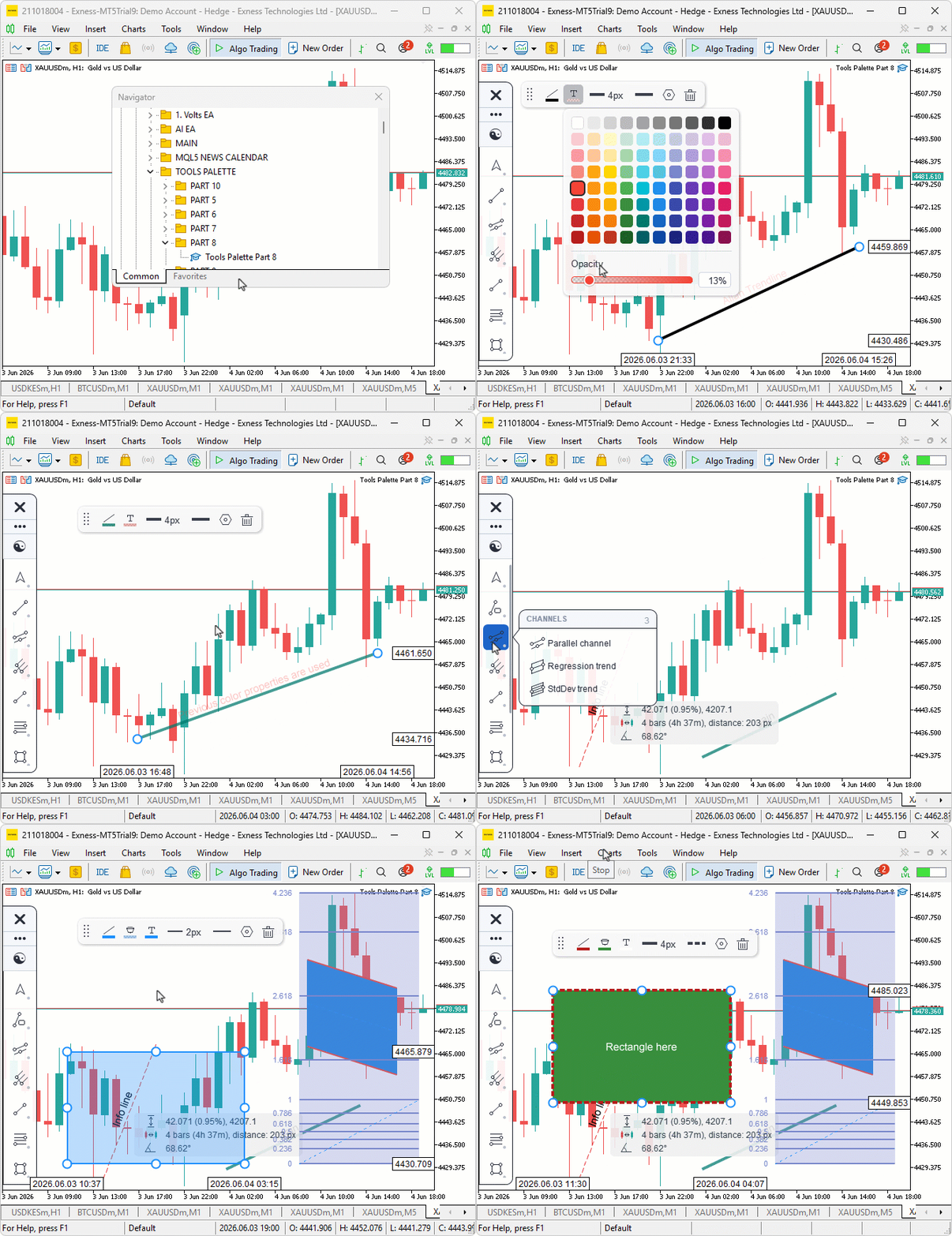
During testing, the ribbon popped up beside each selection and showed only the properties that applied to that tool, and clicking an icon opened the matching popover — the swatch grid for colors, the preview rows for width and style. Picking a color or dragging the opacity slider updated the object on the chart in real time, typing an exact value into the opacity box worked the same way, and dragging the ribbon by its grip moved it without disturbing the selection underneath.
Conclusion
In conclusion, we added a per-object property-editing ribbon to the canvas drawing layer in MQL5, built on four new files: a descriptor system that declares what each tool exposes, an engine-side get/set API with snapshot-based live preview, widget renderers for the color picker, dropdowns, and compact rows, and the floating ribbon itself that binds to the current selection. We wired it into the event loop through the inheritance chain. Selecting an object shows only the applicable properties. Clicking an icon opens the matching popover. Changing a value updates the object in real time, and canceling restores the snapshot taken when the ribbon opened. After reading this article, you will be able to:
- Build a descriptor-driven property system where each tool registers what it exposes as plain data, and one generic pipeline renders and edits every tool.
- Implement an engine-side get and set API keyed by string property IDs, with snapshot and restore that makes a dragged-slider preview live yet undo-safe.
- Assemble a floating, draggable ribbon that binds to the current selection, lays out per-property icons, and opens color, width, and style popovers wired to the engine.
In the next part of the series, we will build the full tabbed settings window that the ribbon's Settings button opens, with Style, Text, Coordinates, and Visibility tabs, editable per-level rows, and direct coordinate and numeric input for the selected object. Stay tuned.
Attachments
| S/N | Name | Type | Description |
|---|---|---|---|
| 1 | Tools Palette Part 8.zip | Archive | A ready-to-extract archive containing all 18 project files in a single folder. Unzip it into your MetaTrader 5 terminal data folder; the files will be placed under MQL5/Experts/ with every file in its correct location, ready to compile. |
Warning: All rights to these materials are reserved by MetaQuotes Ltd. Copying or reprinting of these materials in whole or in part is prohibited.
This article was written by a user of the site and reflects their personal views. MetaQuotes Ltd is not responsible for the accuracy of the information presented, nor for any consequences resulting from the use of the solutions, strategies or recommendations described.

 Shape of Price: An Introduction to TDA and Takens Embedding in MQL5
 Price Action Analysis Toolkit Development (Part 73): Building a Weekend Gap Trading Signal System in MQL5
 Community of Scientists Optimization (CoSO): Theory
 From Static MA to Adaptive Filtering (Part 2): Implementing the SAMA_NLMS Indicator in MQL5

- Free trading apps
- Over 8,000 signals for copying
- Economic news for exploring financial markets
You agree to website policy and terms of use