

MQL5 Trading Tools (Part 38): Adding a Tabbed Settings Window for Editing Object Properties
 1 785
1 785
 0
0

Introduction
In the previous article (Part 37), we added a floating ribbon for quick property edits. While fast for common tweaks, it exposes only select properties. To handle the full breadth of settings, we need a more comprehensive, tabbed editor. This article covers that upgrade.
We add a tabbed settings window in two new files. It opens from the ribbon's Settings button and binds to the selected object. The window exposes four tabs — Style, Text, Coordinates, and Visibility — driven by the same descriptor system as the ribbon. It also supports scrolling, expands level lists into per-level rows, allows exact price/time entry for anchors, and reuses the ribbon's color/width/style popovers where needed.
This article is written for the intermediate-to-advanced MetaQuotes Language 5 (MQL5) developer who is comfortable with the inheritance chain and the property descriptor system we built in the previous parts. The subtopics we will cover are:
- From a Quick Ribbon to a Full Settings Window
- Building the Settings Window Layout and Rendering
- Implementing the Settings Window Interaction
- Visualization
- Conclusion
By the end, we will be able to select any object, open its settings window, and edit every property the tool exposes from one place — switching tabs, scrolling the rows, editing per-level ratios and colors, typing exact coordinates, and committing or discarding the whole batch of changes when the window closes.
From a Quick Ribbon to a Full Settings Window
The ribbon and the settings window solve the same problem at two different scales, so rather than build a second editor from scratch, we layer the window on top of everything the ribbon already established. Both read the same per-tool descriptor list, both drive the same engine get-and-set API keyed by property identifier, and both open the same color, width, and style popovers. The difference is one of breadth: the ribbon filters that descriptor list down to the few properties worth a one-click tweak, whereas the window takes the descriptors flagged for the fuller view and lays all of them out, organized into tabs by the group each descriptor belongs to.
We add a handful of genuinely new mechanics on top of that shared foundation. The window needs a tab strip to switch between the Style, Text, Coordinates, and Visibility groups, and a scrollable body for when a tab's rows overflow the available height. We tabbed it this way to mirror how the native MetaTrader 5 terminal handles its object properties. It expands the level lists — which the ribbon never showed — into one editable row per level, each carrying its own visibility checkbox, ratio value, color, width, and style. And it adds two kinds of direct text entry the ribbon had no place for: typing an exact price or time for each anchor point on the Coordinates tab, and typing a bounded numeric value into a chip on the Style and Visibility tabs.
We also give the window a clear commit-or-discard lifecycle. When it opens, we lean on the same property snapshot the ribbon takes, so every edit previews live on the chart as we make it; when it closes, we either keep the changes or roll the object back to the snapshot. The window itself sits one layer above the ribbon in the inheritance chain and is opened by the ribbon's Settings button, so the two share state cleanly rather than competing for the selection. Have a look below at a visualization of what we intend to achieve.

In the default MetaTrader 5 setup, we can edit the object name, but we chose not to enable it in our implementation. With that relationship clear, we can move on to building the window's layout and rendering.
Building the Settings Window Layout and Rendering
Declaring the Settings Window Class
To keep the project manageable, we define the settings logic in a new dedicated file. We declare the settings window as "CSettingsWindow", extending "CRibbon" so it sits one layer above the ribbon in the inheritance chain and inherits the descriptor system, the engine property API, and the popover machinery that the ribbon already established.
//+------------------------------------------------------------------+
//|                                        ToolsPalette_Settings.mqh |
//|                           Copyright 2026, Allan Munene Mutiiria. |
//|                                   https://t.me/Forex_Algo_Trader |
//+------------------------------------------------------------------+
#property copyright "Copyright 2026, Allan Munene Mutiiria."
#property link "https://t.me/Forex_Algo_Trader"
#property version "1.00"
#property strict

//--- Guard against multiple inclusion of this header
#ifndef TOOLS_PALETTE_SETTINGS_MQH
#define TOOLS_PALETTE_SETTINGS_MQH

#include "ToolsPalette_Ribbon.mqh"

//+------------------------------------------------------------------+
//| CSettingsWindow - Settings dialog inheriting from CRibbon        |
//+------------------------------------------------------------------+
class CSettingsWindow : public CRibbon
  {
protected:
   //--- Settings chart-object name + display canvas
   string          m_nameSettings;
   CCanvas         m_canvasSettings;
   //--- Visibility flag + current top-left position + content dimensions
   bool            m_isSettingsVisible;
   int             m_settingsX;
   int             m_settingsY;
   int             m_settingsWidth;
   int             m_settingsHeight;
   //--- Shadow halo padding + body corner radius (matches popover styling)
   int             m_settingsShadowPad;
   int             m_settingsCornerRadius;

   //--- Saved position cache (so reopening restores the user's last placement)
   int             m_savedSettingsX;
   int             m_savedSettingsY;

   //--- The drawn-object ID this Settings window is bound to (the tool being edited)
   int             m_settingsOwnerObjectId;

   //--- Tab strip state (parallel arrays: group id + display label)
   string          m_tabGroups[];
   string          m_tabLabels[];
   int             m_activeTabIdx;
   int             m_hoveredTabIdx;

   //--- Full descriptor list for the bound tool + per-tab row index mapping
   SToolProperty   m_settingsProperties[];
   int             m_activeTabRowIdxs[];
   int             m_hoveredRowIdx;
   //--- Synthesized descriptors for level-list rows (one per Fibo level, etc.)
   SToolProperty   m_synthRowDescriptors[];

   //--- Header + footer button hover states
   bool            m_hoveredCloseBtn;
   int             m_hoveredFooterBtn;
   //--- Text tab control hover (1=color, 2=fontSize, 3=bold, 5=text input, 6=vAlign, 7=hAlign)
   int             m_hoveredTextTabCtrl;

   //--- Text-area edit state (multi-line text input on the Text tab)
   bool            m_textAreaFocused;
   int             m_textAreaScrollPx;
   bool            m_textAreaCaretBlinkOn;
   uint            m_textAreaCaretBlinkLastMs;
   bool            m_textAreaThumbDragging;
   int             m_textAreaThumbGrabOffsetY;
   bool            m_hoveredTextAreaScrollbar;
   bool            m_textAreaAutoScrollPending;
   //--- Cached text-area content rectangle + layout metrics (updated each redraw)
   int             m_taContentL, m_taContentT, m_taContentR, m_taContentB;
   int             m_taTotalContentH;
   int             m_taLineH;
   int             m_taMaxScrollPx;

   //--- Body scrollbar state (the main content scrollbar on the Style/etc tabs)
   int             m_bodyContentH;
   int             m_bodyViewportH;
   int             m_bodyScrollPx;
   int             m_bodyMaxScrollPx;
   bool            m_bodyThumbDragging;
   int             m_bodyThumbGrabOffsetY;
   bool            m_hoveredBodyScrollbar;
   bool            m_textAreaAutoScrollPending_body;   // alias unused — kept for layout parity

   //--- Coordinate-edit state (Coordinates tab inline price/time edit)
   int             m_coordEditPointIdx;
   int             m_coordEditField;
   string          m_coordEditBuffer;
   int             m_coordEditCaretPos;
   int             m_coordSelectionAnchor;
   bool            m_coordEditCaretBlinkOn;
   uint            m_coordEditCaretBlinkLastMs;
   //--- Hover state for the coords tab (row + field + stepper direction)
   int             m_coordHoveredRow;
   int             m_coordHoveredField;
   int             m_coordHoveredStepper;

   //--- Float-edit state (numeric chip edit on Style/Visibility tabs)
   string          m_floatEditPropId;
   string          m_floatEditBuffer;
   int             m_floatEditCaretPos;
   int             m_floatSelectionAnchor;
   bool            m_floatEditCaretBlinkOn;
   uint            m_floatEditCaretBlinkLastMs;
   int             m_floatEditDecimals;
   double          m_floatEditMinValue;
   double          m_floatEditMaxValue;

   //--- Compact row hover state (sub-widgets inside a compact row: checkbox/value/color/width/style)
   int             m_compactHoveredRow;
   int             m_compactHoveredStepper;
   int             m_compactHoveredSubRow;
   int             m_compactHoveredSubButton;

   //--- Drag state (window-move via header)
   bool            m_isDraggingSettings;
   int             m_dragGrabOffsetX;
   int             m_dragGrabOffsetY;

   //--- Layout constants (heights/widths/paddings)
   int             m_settingsHeaderH;
   int             m_settingsTabBarH;
   int             m_settingsTabContainerH;
   int             m_settingsRowH;
   int             m_settingsFooterH;
   int             m_settingsPadX;
   int             m_settingsRowGap;
   int             m_settingsChipW;
   int             m_settingsChipH;

protected:
   //--- Window initialization helpers
   bool            InitSettingsWindow();
   void            InitSettingsDefaults();

public:
   //--- Show/hide/redraw the window
   void            ShowSettingsForObject(int objectId);
   void            HideSettings();
   bool            IsSettingsVisible() const { return m_isSettingsVisible; }
   //--- True when ANY drag is in progress (window, body thumb, or text-area thumb)
   bool            IsDraggingSettings() const
                     { return m_isDraggingSettings
                           || m_textAreaThumbDragging
                           || m_bodyThumbDragging; }
   void            RedrawSettings();
   //--- Override CRibbon's hook so clicking the Settings ribbon icon opens this window
   virtual void    OpenSettingsWindowForObject(int objId) override
                     { ShowSettingsForObject(objId); }

   //--- Override CRibbon hook so the Settings window repaints when a popover closes
   virtual void    OnPopoverClosed() override
     {
      if(m_isSettingsVisible) RedrawSettings();
     }

   //--- Mouse routing (called by Shell.mqh dispatcher; impls live in Settings_Interact.mqh)
   bool            SettingsMouseDown(int mouseX, int mouseY);
   bool            SettingsMouseMove(int mouseX, int mouseY, uint mouseButtons);
   bool            SettingsMouseUp();
   //--- Hit-test against the window's body rect (emits local coords via out-params)
   bool            HitTestOverSettings(int mouseX, int mouseY, int &outLx, int &outLy);

protected:
   //--- Rebuild the tab list + per-tab row mapping for the bound object
   void            RefreshTabsForObject();
   void            RefreshActiveTabRows();

   //--- Quick lookup: true if a property id is registered for the bound tool
   bool            HasRegisteredProperty(const string propId)
     {
      const int n = ArraySize(m_settingsProperties);
      for(int i = 0; i < n; i++)
         if(m_settingsProperties[i].id == propId) return true;
      return false;
     }

   //--- Resolve a row slot to its descriptor (real or synthesized via the levellist expansion)
   SToolProperty   ResolveActiveRowDescriptor(int rowSlot);
   //--- Recompute window size based on active tab content
   void            RecalcSettingsSize();
   //--- Push current XY to the chart object (offset by shadow padding)
   void            ApplySettingsPosition();

   //--- Layout rect helpers (return component bounds in window-local coords)
   void            GetTabContainerRect(int &outL, int &outT, int &outR, int &outB);
   void            GetTabRect(int tabIdx, int &outL, int &outT, int &outR, int &outB);
   void            GetRowRect(int rowSlot, int &outL, int &outT, int &outR, int &outB);
   void            GetRowChipRect(int rowSlot, int &outL, int &outT, int &outR, int &outB);

   //--- Compact-row sub-widget rect helpers (used by both render + hit-test)
   bool            GetCompactValueButtonRect(int rowSlot,
                                               int &outL, int &outT,
                                               int &outR, int &outB);
   bool            GetCompactStepperRect(int rowSlot, int dir,
                                          int &outL, int &outT,
                                          int &outR, int &outB);

   //--- Body scrollbar rendering + thumb hit-rect calculation
   void            DrawBodyScrollbar();
   bool            GetBodyThumbRect(int &outL, int &outT, int &outR, int &outB,
                                      bool settingsRelativeOnly);
   //--- Header close-X + footer buttons (Cancel/Ok/Apply Defaults) rect helpers
   void            GetCloseButtonRect(int &outL, int &outT, int &outR, int &outB);
   void            GetFooterButtonRect(int btnIdx, int &outL, int &outT, int &outR, int &outB);

   //--- Hit-tests for each interactive region
   int             HitTestTab(int lx, int ly);
   int             HitTestRow(int lx, int ly);
   int             HitTestFooterButton(int lx, int ly);
   bool            HitTestCloseButton(int lx, int ly);
   bool            HitTestHeaderDragArea(int lx, int ly);

   //--- Major draw routines (split out for readability)
   void            DrawSettingsHeader();
   void            DrawSettingsTabStrip();
   void            DrawSettingsRows();
   void            DrawTextTabRows();
   //--- Text-tab control hit-test + per-control rect helpers
   int             HitTestTextTabControl(int lx, int ly);
   void            GetTextTabColorRect(int &outL, int &outT, int &outR, int &outB);
   void            GetTextTabFontSizeRect(int &outL, int &outT, int &outR, int &outB);
   void            GetTextTabBoldRect(int &outL, int &outT, int &outR, int &outB);
   void            GetTextTabTextInputRect(int &outL, int &outT, int &outR, int &outB);
   void            GetTextTabVAlignRect(int &outL, int &outT, int &outR, int &outB);
   void            GetTextTabHAlignRect(int &outL, int &outT, int &outR, int &outB);
   void            DrawSettingsFooter();
   //--- Per-row chip renderer (dispatch by descriptor type)
   void            RenderRowChip(int rowSlot, const SToolProperty &prop);

   //--- Text-area lifecycle (focus loss + buffer-change notifier)
   void            UnfocusTextArea();
   //--- Coordinates tab rendering + hit-tests + edit-mode helpers
   void            DrawCoordsTabRows();
   void            GetCoordRowRect(int rowIdx, int &outL, int &outT, int &outR, int &outB);
   void            GetCoordPriceButtonRect(int rowIdx, int &outL, int &outT, int &outR, int &outB);
   void            GetCoordTimeButtonRect(int rowIdx, int &outL, int &outT, int &outR, int &outB);
   void            GetCoordStepperRect(int rowIdx, int field, int dir,
                                         int &outL, int &outT, int &outR, int &outB);
   bool            HitTestCoordsTab(int lx, int ly,
                                      int &outRow, int &outField, int &outStepper);
   //--- Coordinate-edit lifecycle (start/commit/cancel/step) + value formatting helpers
   void            StartCoordEdit(int pointIdx, int field);
   void            CommitCoordEdit();
   void            CancelCoordEdit();
   void            ApplyCoordStep(int pointIdx, int field, int dir);
   void            PositionCoordCaretFromClickX(int lx);
   string          FormatPriceForDisplay(double price);
   string          FormatBarForDisplay(datetime time);

public:
   //--- Keyboard handlers for the two inline edit modes (impls in Settings_Interact.mqh)
   bool            HandleCoordKey(uint vk);
   bool            IsEditingCoord() const { return m_coordEditPointIdx >= 0; }
   void            BeginFloatEdit(string propId, int decimals,
                                    double minValue, double maxValue);
   void            CommitFloatEdit();
   void            CancelFloatEdit();
   bool            IsEditingFloat() const { return StringLen(m_floatEditPropId) > 0; }
   bool            HandleFloatKey(uint vk);
   void            PositionFloatCaretFromClickX(int lx, int textStartX);
   //--- Open a sub-popover anchored to a sub-widget inside the Settings body
   void            OpenSettingsSubPopover(string propId, int anchorX, int anchorY,
                                            int flipBaseTop = -1);
   //--- Text-area integration with the engine's label-edit state
   void            NotifyTextAreaBufferChanged();
   bool            IsTextAreaFocused() const { return m_textAreaFocused; }
   bool            HitTestOverTextArea(int mouseX, int mouseY);
   bool            HitTestOverSettingsBody(int mouseX, int mouseY);
   int             SettingsBodyMaxScroll() const { return m_bodyMaxScrollPx; }
   //--- Wheel scroll handlers (chart wheel events route here when over the body / text area)
   void            ScrollSettingsBodyByWheel(int wheelDelta);
   void            ScrollTextAreaByWheel(int wheelDelta);
   //--- Caret-blink tick (called from the Shell's OnTimer)
   void            SettingsTick();
   bool            GetTextAreaThumbRect(int &outL, int &outT, int &outR, int &outB,
                                          bool settingsRelativeOnly);

protected:
   //--- Footer Ok/Cancel action handlers
   void            CommitSettingsChanges();
   void            DiscardSettingsChanges();
  };
Here, we give the window its own backing canvas and the usual placement fields — visibility, current position, content dimensions, shadow padding, corner radius, and a saved-position cache so reopening restores where we last dragged it — alongside the ID of the drawn object it is bound to. We then hold the tab-strip state as two parallel arrays, one for the group IDs and one for the display labels, plus the active and hovered tab indices.
We keep the property data in three arrays: the full descriptor list for the bound tool, a per-tab row-index mapping that picks out which descriptors belong to the active tab, and a list of synthesized descriptors for the level-list rows we expand at runtime, one per Fibonacci or Gann level. We track hover state separately for the header close button, the footer buttons, and the text-tab controls, since each lights up independently under the cursor.
We then declare four blocks of edit state, one per interactive region that accepts typing or dragging. The text-area block drives the multi-line label editor on the Text tab, with its own scroll offset, caret blink, scrollbar thumb drag, and cached content metrics. The body scrollbar block tracks the main content scroll on the other tabs. The coordinate-edit block holds the buffer, caret, and selection for inline price and time entry on the Coordinates tab, and the float-edit block mirrors it for bounded numeric chips, adding the decimals and the min and max the value clamps to. A small compact-row hover block rounds these out, and the layout constants at the end fix the header, tab bar, row, and footer heights, along with the paddings and chip sizes.
On the public side, we expose the show, hide, and redraw entry points, the override of the ribbon's Settings hook so clicking the ribbon's Settings icon opens this window, the mouse routers that the shell dispatches into, and the keyboard handlers for the two inline edit modes. We keep the layout rectangle helpers, hit testers, draw routines, and the commit and discard handlers protected, since they are internal to the window's own operation. With the surface declared, we move on to the lifecycle that brings the window up for a selected object. Let us define a unified function for this.
Bringing the Window Up for an Object
We bring the window up through "ShowSettingsForObject", which binds it to a drawn object, builds its entire layout from that object's descriptors, positions it, and renders it.
//+------------------------------------------------------------------+
//| Bind the window to an object, build its layout, and show it      |
//+------------------------------------------------------------------+
void CSettingsWindow::ShowSettingsForObject(int objectId)
  {
   //--- Bail on invalid object id
   if(objectId <= 0) return;
   m_settingsOwnerObjectId = objectId;

   //--- Resolve the drawn-object index + tool type
   const int idx = FindObjectIndexById(objectId);
   if(idx < 0) return;
   const TOOL_TYPE tool = m_drawnObjects[idx].toolType;
   //--- Rebuild the full property descriptor list for this tool
   ArrayResize(m_settingsProperties, 0);
   BuildPropertyListForTool(tool, m_settingsProperties);

   //--- Take a property snapshot (Cancel later will RestoreProperties from this)
   SnapshotProperties(objectId);

   //--- Build tab list + row mapping + recompute window size
   RefreshTabsForObject();
   m_activeTabIdx = 0;
   RefreshActiveTabRows();
   RecalcSettingsSize();

   //--- Position: restore saved if any (clamped to chart), otherwise center
   const int chartW = (int)ChartGetInteger(0, CHART_WIDTH_IN_PIXELS);
   const int chartH = (int)ChartGetInteger(0, CHART_HEIGHT_IN_PIXELS);
   if(m_savedSettingsX >= 0 && m_savedSettingsY >= 0)
     {
      //--- Restore previous position + clamp to chart bounds
      m_settingsX = m_savedSettingsX;
      m_settingsY = m_savedSettingsY;
      if(m_settingsX + m_settingsWidth  > chartW) m_settingsX = chartW - m_settingsWidth;
      if(m_settingsY + m_settingsHeight > chartH) m_settingsY = chartH - m_settingsHeight;
      if(m_settingsX < 0) m_settingsX = 0;
      if(m_settingsY < 0) m_settingsY = 0;
     }
   else
     {
      //--- First open: center the window in the chart
      m_settingsX = (chartW - m_settingsWidth)  / 2;
      m_settingsY = (chartH - m_settingsHeight) / 2;
     }
   ApplySettingsPosition();

   //--- Hide the ribbon while Settings is open (HideSettings restores it on close)
   HideRibbon();

   //--- Flip visibility + attach the chart object + render
   m_isSettingsVisible = true;
   ObjectSetInteger(0, m_nameSettings, OBJPROP_TIMEFRAMES, OBJ_ALL_PERIODS);
   RedrawSettings();
   ChartRedraw();
  }
We start by rejecting an invalid object ID, then store the owner ID and resolve the object's array index and tool type via "FindObjectIndexById". We then rebuild the full property descriptor list for that tool by clearing the array and calling "BuildPropertyListForTool" — the same dispatcher the ribbon uses, so the window and the ribbon always agree on what a tool exposes.
Next, we take a property snapshot with "SnapshotProperties". This is what makes the whole window undo-safe: every edit from here previews live on the object, and if we cancel on close, we restore the object from this snapshot. Think of this as a backup plan. We then build the tab list and the per-tab row mapping through "RefreshTabsForObject", reset the active tab to the first one, fill its rows with "RefreshActiveTabRows", and size the window to that content with "RecalcSettingsSize".
After that, we position the window. When a saved position exists from a previous open, we restore it and clamp it to the chart bounds so the window never lands off-screen; on the first open, we center it in the chart. We push that position to the chart object with "ApplySettingsPosition".
Finally, we hide the ribbon so the two editors do not overlap (closing the window restores it), flip the visibility flag, attach the window's chart object across all timeframes so it never disappears on a timeframe switch, and render it with "RedrawSettings" followed by ChartRedraw. With the window on screen, we move on to how it builds its tabs and maps each descriptor to a row, but first, let's define the logic to help discard or commit the changes.
//+------------------------------------------------------------------+
//| Ok handler - commit any pending edits + discard snapshot + close |
//+------------------------------------------------------------------+
void CSettingsWindow::CommitSettingsChanges()
  {
   //--- Force-commit any inline edits before closing
   if(m_textAreaFocused) UnfocusTextArea();
   if(m_coordEditPointIdx >= 0) CommitCoordEdit();
   //--- Drop the snapshot (commits the live preview values to the engine)
   DiscardSnapshot();
   HideSettings();
  }

//+------------------------------------------------------------------+
//| Cancel handler - restore from snapshot + close                   |
//+------------------------------------------------------------------+
void CSettingsWindow::DiscardSettingsChanges()
  {
   //--- Cancel any in-progress text edit
   if(m_textAreaFocused)
     {
      if(m_isEditingLabel) CancelLabel();
      m_textAreaFocused      = false;
      m_textAreaCaretBlinkOn = false;
     }
   //--- Cancel any in-progress coordinate edit
   if(m_coordEditPointIdx >= 0) CancelCoordEdit();
   //--- Restore the snapshot values to undo all live preview edits
   RestoreProperties();
   //--- Redraw all drawn objects so the chart shows the restored values
   RedrawAllObjects();
   HideSettings();
  }
We start "CommitSettingsChanges" by force-committing any edit still in progress, since the user can hit Ok while a text area or a coordinate field is mid-edit — we unfocus the text area and commit the coordinate edit so their buffers reach the object before we close. We then call "DiscardSnapshot", which sounds backwards but is exactly right: the live edits have been previewing on the object the whole time, so dropping the snapshot simply makes those previewed values permanent and leaves nothing to roll back to. We close with "HideSettings".
We handle the opposite case in "DiscardSettingsChanges". Here we cancel any in-progress edits rather than commit them — if a label edit is live, we cancel it and clear the text-area focus, and we cancel a coordinate edit the same way. We then call "RestoreProperties" to copy the snapshot values back onto the object, which undoes every live-preview change in one move, and we follow with "RedrawAllObjects" so the chart repaints with the restored values before we close the window with "HideSettings".
The asymmetry between the two is the whole point. Because every edit previews directly on the object, committing is the cheap path — we just stop holding the safety copy — while cancelling is the path that has to actively restore. With the lifecycle in place, we move on to how the window builds its tabs and maps each descriptor to a row now.
Building the Tabs and Mapping the Rows
Here, we turn the descriptor list into the window's visible structure through three methods. "RefreshTabsForObject" collects the tabs, "RefreshActiveTabRows" fills the active tab with rows, and "ResolveActiveRowDescriptor" resolves a row slot back to the descriptor that drives it.
//+------------------------------------------------------------------+
//| Rebuild the tab list (one tab per distinct group) for the object |
//+------------------------------------------------------------------+
void CSettingsWindow::RefreshTabsForObject()
  {
   //--- Reset tab arrays
   ArrayResize(m_tabGroups, 0);
   ArrayResize(m_tabLabels, 0);
   const int n = ArraySize(m_settingsProperties);
   //--- Walk every settings-eligible non-action property and collect distinct group ids
   for(int i = 0; i < n; i++)
     {
      if(m_settingsProperties[i].type == PROP_ACTION) continue;
      if(!m_settingsProperties[i].showInSettings) continue;
      const string g = m_settingsProperties[i].group;
      //--- Skip if this group is already in the tab list
      bool found = false;
      const int t = ArraySize(m_tabGroups);
      for(int k = 0; k < t; k++)
         if(m_tabGroups[k] == g) { found = true; break; }
      if(found) continue;
      //--- Append the group + map it to a display label
      const int sz = t + 1;
      ArrayResize(m_tabGroups, sz);
      ArrayResize(m_tabLabels, sz);
      m_tabGroups[sz - 1] = g;
      string lbl = g;
      if(g == PROP_GROUP_STYLE)           lbl = "Style";
      else if(g == PROP_GROUP_TEXT)       lbl = "Text";
      else if(g == PROP_GROUP_COORDS)     lbl = "Coordinates";
      else if(g == PROP_GROUP_VISIBILITY) lbl = "Visibility";
      m_tabLabels[sz - 1] = lbl;
     }

   //--- Auto-inject the Coordinates tab when the object has points (even if no coord-group properties are registered)
   const int pointCount = GetObjectPointCount(m_settingsOwnerObjectId);
   if(pointCount > 0)
     {
      bool hasCoordTab = false;
      const int tCount = ArraySize(m_tabGroups);
      for(int k = 0; k < tCount; k++)
         if(m_tabGroups[k] == PROP_GROUP_COORDS) { hasCoordTab = true; break; }
      if(!hasCoordTab)
        {
         //--- Coords tab missing - append it now
         const int sz = tCount + 1;
         ArrayResize(m_tabGroups, sz);
         ArrayResize(m_tabLabels, sz);
         m_tabGroups[sz - 1] = PROP_GROUP_COORDS;
         m_tabLabels[sz - 1] = "Coordinates";
        }
     }
  }

//+------------------------------------------------------------------+
//| Build the row-index list for the currently active tab            |
//+------------------------------------------------------------------+
void CSettingsWindow::RefreshActiveTabRows()
  {
   //--- Reset row mappings + clear hover state for stale rows
   ArrayResize(m_activeTabRowIdxs, 0);
   ArrayResize(m_synthRowDescriptors, 0);
   m_hoveredRowIdx          = -1;
   m_compactHoveredRow      = -1;
   m_compactHoveredStepper  = 0;
   m_compactHoveredSubRow      = -1;
   m_compactHoveredSubButton   = 0;
   //--- Bail on invalid active tab index
   if(m_activeTabIdx < 0 || m_activeTabIdx >= ArraySize(m_tabGroups)) return;
   const string activeGroup = m_tabGroups[m_activeTabIdx];
   const int n = ArraySize(m_settingsProperties);
   //--- Walk every property and add the ones in the active group to the row list
   for(int i = 0; i < n; i++)
     {
      const SToolProperty p = m_settingsProperties[i];
      if(p.type == PROP_ACTION) continue;
      if(!p.showInSettings) continue;
      if(p.group != activeGroup) continue;
      //--- PROP_LEVEL_LIST expands into one synthesized compact row per level
      if(p.type == PROP_LEVEL_LIST)
        {
         //--- Query the actual level count from the engine
         int levelCount = 0;
         GetObjectProperty(m_settingsOwnerObjectId, p.id + ":count", levelCount);
         for(int li = 0; li < levelCount; li++)
           {
            //--- Build a synthesized PROP_COMPACT_ROW descriptor for this level
            const string idxs = IntegerToString(li);
            SToolProperty row;
            row.id              = p.id + ":" + idxs;
            row.label           = "";
            row.type            = PROP_COMPACT_ROW;
            row.group           = p.group;
            row.showInRibbon    = false;
            row.showInSettings  = true;
            row.tooltip         = "";
            row.defaultColor    = clrBlack;
            row.defaultInt      = 0;
            row.defaultDouble   = 0.0;
            row.defaultString   = "";
            row.defaultBool     = false;
            row.minValue        = p.minValue;
            row.maxValue        = p.maxValue;
            row.stepValue       = p.stepValue;
            row.decimals        = p.decimals;
            //--- Sub-widget ids follow the convention: "<list>:<idx>:<field>"
            row.subVisibleId    = p.id + ":" + idxs + ":visible";
            row.subValueId      = p.id + ":" + idxs + ":ratio";
            row.subColorId      = p.id + ":" + idxs + ":color";
            row.subWidthId      = p.id + ":" + idxs + ":width";
            row.subStyleId      = p.id + ":" + idxs + ":style";
            row.levelIdx        = li;
            row.isAddLevelRow   = false;
            row.levelListPrefix = p.id;
            //--- Append to the synth array + reference it from the row list via negative encoding
            const int sySz = ArraySize(m_synthRowDescriptors);
            ArrayResize(m_synthRowDescriptors, sySz + 1);
            m_synthRowDescriptors[sySz] = row;
            const int rsz = ArraySize(m_activeTabRowIdxs);
            ArrayResize(m_activeTabRowIdxs, rsz + 1);
            //--- Negative-encoded: -(idx + 1) -> resolved by ResolveActiveRowDescriptor
            m_activeTabRowIdxs[rsz] = -(sySz + 1);
           }
         continue;
        }
      //--- Filter to the 6 renderable types (others are not row-eligible)
      if(p.type != PROP_COLOR && p.type != PROP_LINE_WIDTH
         && p.type != PROP_LINE_STYLE && p.type != PROP_COMPACT_ROW
         && p.type != PROP_BOOL && p.type != PROP_FLOAT)
         continue;
      //--- Append the real-descriptor index to the row list
      const int sz = ArraySize(m_activeTabRowIdxs);
      ArrayResize(m_activeTabRowIdxs, sz + 1);
      m_activeTabRowIdxs[sz] = i;
     }
  }

//+------------------------------------------------------------------+
//| Resolve a row slot to its descriptor (real or synthesized)       |
//+------------------------------------------------------------------+
SToolProperty CSettingsWindow::ResolveActiveRowDescriptor(int rowSlot)
  {
   //--- Out-of-range -> default-constructed empty descriptor
   SToolProperty empty;
   if(rowSlot < 0 || rowSlot >= ArraySize(m_activeTabRowIdxs)) return empty;
   const int code = m_activeTabRowIdxs[rowSlot];
   //--- Non-negative code -> direct index into m_settingsProperties
   if(code >= 0)
     {
      if(code >= ArraySize(m_settingsProperties)) return empty;
      return m_settingsProperties[code];
     }
   //--- Negative code -> negative-encoded synth index (-(idx + 1))
   const int synthIdx = -(code + 1);
   if(synthIdx < 0 || synthIdx >= ArraySize(m_synthRowDescriptors)) return empty;
   return m_synthRowDescriptors[synthIdx];
  }
We build the tab strip in "RefreshTabsForObject" by walking every settings-eligible property and collecting the distinct group each one belongs to, skipping action sentinels and anything not flagged for the settings view. For each new group we have not seen yet, we append it and map its ID to a friendly display label — Style, Text, Coordinates, or Visibility. We then auto-inject the Coordinates tab when the object has anchor points, even if no coordinate properties were registered, since every object with points should let us edit those points regardless of what its descriptor list declares.
We fill the active tab in "RefreshActiveTabRows". After resetting the row mappings and clearing stale hover state, we walk the descriptors again and keep only the ones belonging to the active group. A level list gets special treatment here: rather than render as one row, we query the engine for the actual level count and synthesize one compact-row descriptor per level, naming each sub-widget by the convention of the list id, the level index, and the field — visible, ratio, color, width, or style. We store these synthesized descriptors in their own array and reference them from the row list through a negative-encoded index, so a real descriptor sits at its own array position while a synthesized one is encoded as the negative of its synth-array slot.
We untangle that encoding in "ResolveActiveRowDescriptor". Given a row slot, we read its code from the row list: a non-negative code is a direct index into the real descriptor list, and a negative code is a synthesized row whose actual position we recover by undoing the negative encoding. This is the single point every render and hit-test path goes through to get a row's descriptor, so neither side has to know or care whether a row is a real property or a synthesized level. With the tabs and rows mapped, we move on to sizing the window and the rect helpers that lay each component out.
Sizing and Positioning the Window
We recompute the window's size whenever its content changes through "RecalcSettingsSize", and we push its logical position to the chart object through "ApplySettingsPosition".
//+------------------------------------------------------------------+
//| Recompute window size based on the active tab's content height   |
//+------------------------------------------------------------------+
void CSettingsWindow::RecalcSettingsSize()
  {
   //--- Resolve the active group; empty string if no tabs
   const string activeGroup = (m_activeTabIdx >= 0
                              && m_activeTabIdx < ArraySize(m_tabGroups))
                              ? m_tabGroups[m_activeTabIdx]
                              : "";

   //--- Compute the content height for the active tab
   int contentH = 0;
   if(activeGroup == PROP_GROUP_TEXT)
     {
      //--- Text tab has 3 fixed-height rows: row1 (color+font+bold) 32 + gap 8 + row2 (text area) 90 + gap 8 + row3 (alignments) 32
      contentH = 32 + 8 + 90 + 8 + 32;     // = 170
     }
   else if(activeGroup == PROP_GROUP_COORDS)
     {
      //--- Coords tab has one row per drawn-object point (or 1 fallback)
      const int pointCount = GetObjectPointCount(m_settingsOwnerObjectId);
      const int rows = MathMax(1, pointCount);
      const int rowH = 32;
      const int rowGap = 8;
      contentH = rows * rowH + (rows - 1) * rowGap;
     }
   else
     {
      //--- Default tab: row-per-descriptor with the standard row height + gap
      int rows = ArraySize(m_activeTabRowIdxs);
      if(rows < 1) rows = 1;
      contentH = rows * (m_settingsRowH + m_settingsRowGap);
     }

   //--- Window width is fixed; height is content + chrome, clamped to the chart
   m_settingsWidth = 360;

   const int idealH = m_settingsHeaderH
                    + m_settingsTabBarH
                    + contentH
                    + m_settingsFooterH;
   //--- Clamp to chart-cap (min 160 to avoid degenerate windows)
   const int chartH = (int)ChartGetInteger(0, CHART_HEIGHT_IN_PIXELS);
   const int chartCap = MathMax(160, chartH - 16);
   const int actualH = (idealH < chartCap) ? idealH : chartCap;
   m_settingsHeight  = actualH;
   //--- Chrome = header + tab bar + footer; body viewport = actualH - chrome
   const int bodyChromeH = m_settingsHeaderH + m_settingsTabBarH
                          + m_settingsFooterH;
   m_bodyContentH    = contentH;
   m_bodyViewportH   = actualH - bodyChromeH;
   if(m_bodyViewportH < 0) m_bodyViewportH = 0;
   //--- Max scroll = content - viewport (or 0 if content fits)
   m_bodyMaxScrollPx = MathMax(0, m_bodyContentH - m_bodyViewportH);
   if(m_bodyScrollPx > m_bodyMaxScrollPx) m_bodyScrollPx = m_bodyMaxScrollPx;
   if(m_bodyScrollPx < 0)                  m_bodyScrollPx = 0;

   //--- Resize canvas only when the actual size changed (avoids unnecessary reallocations)
   const int canvasW = m_settingsWidth  + 2 * m_settingsShadowPad;
   const int canvasH = m_settingsHeight + 2 * m_settingsShadowPad;
   if(m_canvasSettings.Width() != canvasW || m_canvasSettings.Height() != canvasH)
      m_canvasSettings.Resize(canvasW, canvasH);
   //--- Also push the new size to the chart object so MT5 knows the new bounds
   ObjectSetInteger(0, m_nameSettings, OBJPROP_XSIZE, canvasW);
   ObjectSetInteger(0, m_nameSettings, OBJPROP_YSIZE, canvasH);
  }

//+------------------------------------------------------------------+
//| Push the window's logical (X, Y) to the chart object             |
//+------------------------------------------------------------------+
void CSettingsWindow::ApplySettingsPosition()
  {
   //--- Subtract the shadow halo so the chart-object top-left = our logical top-left minus halo
   ObjectSetInteger(0, m_nameSettings, OBJPROP_XDISTANCE,
                     m_settingsX - m_settingsShadowPad);
   ObjectSetInteger(0, m_nameSettings, OBJPROP_YDISTANCE,
                     m_settingsY - m_settingsShadowPad);
  }
Here, we start "RecalcSettingsSize" by resolving the active group, then computing the content height for whichever tab is showing. The Text tab is fixed at three stacked rows — the color-font-bold row, the text-area row, and the alignment row — so we sum their known heights and gaps. The Coordinates tab gives one row per anchor point on the object, so we query the point count and multiply by the row height plus gaps. Every other tab is a row-per-descriptor, so we count the active tab's rows and multiply by the standard row height plus gap.
We then turn that content height into the window size. The width is fixed at 360 pixels, and the ideal height is the content plus the chrome — header, tab bar, and footer. You can alter the fixed width; this is just an arbitrary one we used to standardize the implementation. Then, we clamp that ideal height to the chart so a tall property list never overflows the screen, keeping a minimum so the window never collapses. From the clamped height, we derive the body viewport (the actual height minus the chrome) and the maximum scroll (the content height minus the viewport, or zero when everything fits), then clamp the current scroll offset into that new range so a shrink does not leave us scrolled past the end.
We finish by resizing the backing canvas, but only when the computed size actually differs from the current one, since reallocating a canvas every redraw would be wasteful. We push the new size to the chart object so the terminal knows the new bounds.
We keep "ApplySettingsPosition" simple — it writes the window's logical position to the chart object, subtracting the shadow halo padding on both axes so the chart object's top-left lands at our logical top-left minus the halo. This keeps the soft shadow we draw around the window from shifting the window's apparent position. With the sizing and placement settled, we move on to the rect helpers that lay each interactive component out within these bounds.
The Layout Rect Helpers
We lay each interactive component out with a family of rect helpers that return a component's bounds in window-local pixels. They all share one structure — derive a sub-rectangle from the window's dimensions and the layout constants — so we walk through two representative ones, and the rest follow the same pattern.
//+------------------------------------------------------------------+
//| Layout helpers - return per-component bounds in window-local px  |
//+------------------------------------------------------------------+
void CSettingsWindow::GetTabContainerRect(int &outL, int &outT, int &outR, int &outB)
  {
   //--- Container = window pad to window pad horizontally + centered vertically inside the tab bar
   outL = m_settingsPadX;
   outR = m_settingsWidth - m_settingsPadX;
   const int barT = m_settingsHeaderH;
   outT = barT + (m_settingsTabBarH - m_settingsTabContainerH) / 2;
   outB = outT + m_settingsTabContainerH;
  }

//+------------------------------------------------------------------+
//| Tab segment rect (n-th tab inside the container, equal width)    |
//+------------------------------------------------------------------+
void CSettingsWindow::GetTabRect(int tabIdx, int &outL, int &outT, int &outR, int &outB)
  {
   //--- Bail on empty or out-of-range tab index
   const int n = ArraySize(m_tabLabels);
   if(n <= 0 || tabIdx < 0 || tabIdx >= n)
     { outL = outT = outR = outB = 0; return; }
   //--- Divide the container into n equal-width segments
   int cL, cT, cR, cB;
   GetTabContainerRect(cL, cT, cR, cB);
   const int containerW = cR - cL;
   const int segW = containerW / n;
   //--- Last tab gets any leftover width so the strip extends fully to the right edge
   const bool isLast = (tabIdx == n - 1);
   outL = cL + tabIdx * segW;
   outR = isLast ? cR : (outL + segW);
   outT = cT;
   outB = cB;
  }
First, we compute the tab container in "GetTabContainerRect", the strip that holds all the tabs. We inset its left and right edges by the window padding, set its top just below the header, and center it vertically inside the tab bar by splitting the leftover height above and below. This gives us the box every individual tab is placed within.
We then carve out a single tab in "GetTabRect". After rejecting an empty or out-of-range index, we fetch the container, divide its width into equal segments, and place the requested tab at its segment offset. We hand any leftover width from the integer division to the last tab so the strip always extends cleanly to the container's right edge rather than leaving a one- or two-pixel gap.
Every other rectangle helper in the window follows this same shape — "GetRowRect", "GetRowChipRect", the compact-row sub-widget rects, the close button, the footer buttons, and the per-control rects on the Text and Coordinates tabs all derive their bounds from the window origin, the layout constants, and in some cases the row index or scroll offset. Since the construction is identical, we will not walk through each one. The drawing and hit testing of the window follows the same pattern as we did with other objects. When wired, the window looks as follows.
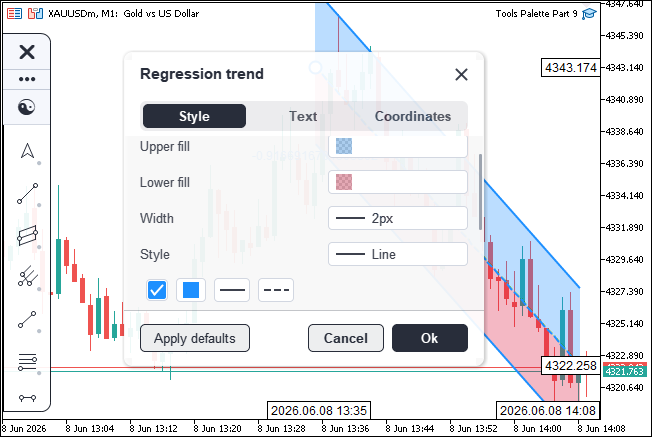
With that done, we can implement the settings window interaction logic, which takes a similar path to the other objects we have constructed already. We created its logic in a new file to keep the flow maintainable.
Implementing the Settings Window Interaction
Routing Clicks Through the Window
Here, we move to the interaction file, which holds the "CSettingsWindow" method bodies that handle input. The hub is "SettingsMouseDown", the click router every press inside the window flows through, paired with "SettingsMouseUp" that ends any active drag.
//+------------------------------------------------------------------+
//|                              ToolsPalette_Settings_Interact.mqh  |
//|                           Copyright 2026, Allan Munene Mutiiria. |
//|                                   https://t.me/Forex_Algo_Trader |
//+------------------------------------------------------------------+
#property copyright "Copyright 2026, Allan Munene Mutiiria."
#property link "https://t.me/Forex_Algo_Trader"
#property version "1.00"
#property strict

//--- Guard against multiple inclusion of this header
#ifndef TOOLS_PALETTE_SETTINGS_INTERACT_MQH
#define TOOLS_PALETTE_SETTINGS_INTERACT_MQH

//--- Pull in the Settings window declaration (CSettingsWindow class)
#include "ToolsPalette_Settings.mqh"

//+------------------------------------------------------------------+
//| SettingsMouseDown - click router for the Settings window         |
//+------------------------------------------------------------------+
bool CSettingsWindow::SettingsMouseDown(int mouseX, int mouseY)
  {
   //--- Reject clicks outside the window (return false so the engine can route elsewhere)
   int lx, ly;
   if(!HitTestOverSettings(mouseX, mouseY, lx, ly)) return false;

   //--- Cache active-tab + Text-tab control hit (needed for the text-area unfocus rule below)
   const bool isTextTabActive = (m_activeTabIdx >= 0
                              && m_activeTabIdx < ArraySize(m_tabGroups)
                              && m_tabGroups[m_activeTabIdx] == PROP_GROUP_TEXT);
   const int  textCtrlClicked = isTextTabActive ? HitTestTextTabControl(lx, ly) : 0;
   //--- Click anywhere except the text-input itself unfocuses the text area
   if(m_textAreaFocused && textCtrlClicked != 5)
      UnfocusTextArea();

   //--- Cache Coords-tab active flag (needed for coord-edit commit rules below)
   const bool isCoordsTabActive = (m_activeTabIdx >= 0
                                && m_activeTabIdx < ArraySize(m_tabGroups)
                                && m_tabGroups[m_activeTabIdx] == PROP_GROUP_COORDS);
   //--- Commit any in-progress coord edit when clicking outside its row OR outside the Coords tab
   if(IsEditingCoord() && isCoordsTabActive)
     {
      //--- Allow re-clicking the same field's text area without committing (just repositions caret)
      int hitRow, hitField, hitStepper;
      const bool overCoords = HitTestCoordsTab(lx, ly, hitRow, hitField, hitStepper);
      const bool clickingSameField = overCoords
                                    && hitRow == m_coordEditPointIdx
                                    && hitField == m_coordEditField
                                    && hitStepper == 0;
      if(!clickingSameField) CommitCoordEdit();
     }
   else if(IsEditingCoord() && !isCoordsTabActive)
     {
      //--- Coord edit lives only on Coords tab; switching tabs commits it
      CommitCoordEdit();
     }
   //--- Commit any in-progress float edit when clicking outside its value button (steppers excluded)
   if(IsEditingFloat())
     {
      bool clickingSameField = false;
      const int rn = ArraySize(m_activeTabRowIdxs);
      //--- Scan rows to find the value button that matches the currently-edited prop id
      for(int rr = 0; rr < rn; rr++)
        {
         const SToolProperty pp = ResolveActiveRowDescriptor(rr);
         string thisValueId = "";
         if(pp.type == PROP_FLOAT)
            thisValueId = pp.id;
         else if(pp.type == PROP_COMPACT_ROW)
            thisValueId = pp.subValueId;
         if(thisValueId != m_floatEditPropId) continue;
         //--- Resolve the value-button + stepper rects for this row
         int bL, bT, bR, bB;
         if(!GetCompactValueButtonRect(rr, bL, bT, bR, bB)) break;
         int sUL, sUT, sUR, sUB; GetCompactStepperRect(rr, 0, sUL, sUT, sUR, sUB);
         int sDL, sDT, sDR, sDB; GetCompactStepperRect(rr, 1, sDL, sDT, sDR, sDB);
         //--- "Same field" = inside the button but NOT on the stepper chevrons
         const bool onUp   = (lx >= sUL && lx < sUR && ly >= sUT && ly < sUB);
         const bool onDown = (lx >= sDL && lx < sDR && ly >= sDT && ly < sDB);
         const bool inBtn  = (lx >= bL && lx < bR && ly >= bT && ly < bB);
         if(inBtn && !onUp && !onDown) clickingSameField = true;
         break;
        }
      if(!clickingSameField) CommitFloatEdit();
     }

   //--- Close-X click -> discard changes (Cancel-equivalent) + close window
   if(HitTestCloseButton(lx, ly))
     { DiscardSettingsChanges(); return true; }

   //--- Footer button dispatch (1=Cancel, 2=Ok, 3=Apply Defaults)
   const int btn = HitTestFooterButton(lx, ly);
   if(btn == 1) { DiscardSettingsChanges(); return true; }
   if(btn == 2) { CommitSettingsChanges();  return true; }
   if(btn == 3)
     {
      //--- Apply Defaults: cancel any in-progress edits + apply tool defaults + rebuild layout
      if(m_textAreaFocused)
        {
         if(m_isEditingLabel) CancelLabel();
         m_textAreaFocused      = false;
         m_textAreaCaretBlinkOn = false;
        }
      if(m_coordEditPointIdx >= 0) CancelCoordEdit();
      if(IsEditingFloat())          CancelFloatEdit();
      //--- Reset all properties to their type-specific defaults
      ApplyToolDefaults(m_settingsOwnerObjectId);
      RefreshActiveTabRows();
      RecalcSettingsSize();
      ApplySettingsPosition();
      RedrawSettings();
      ChartRedraw();
      return true;
     }

   //--- Tab click - switch active tab + rebuild row list + recompute size
   const int tabIdx = HitTestTab(lx, ly);
   if(tabIdx >= 0)
     {
      //--- Only repaint if the tab actually changed
      if(tabIdx != m_activeTabIdx)
        {
         m_activeTabIdx = tabIdx;
         RefreshActiveTabRows();
         //--- Reset body scroll when switching tabs (new content layout)
         m_bodyScrollPx = 0;
         RecalcSettingsSize();
         ApplySettingsPosition();
         RedrawSettings();
         ChartRedraw();
        }
      return true;
     }

   //--- Header drag-area click - begin window drag (offsets captured for the duration of the drag)
   if(HitTestHeaderDragArea(lx, ly))
     {
      m_isDraggingSettings = true;
      m_dragGrabOffsetX = lx;
      m_dragGrabOffsetY = ly;
      return true;
     }

   //--- OTHER OBJECTS FOLLOW THE SAME STRUCTURE

   }


//+------------------------------------------------------------------+
//| SettingsMouseUp - end any active drag (window or scrollbar)      |
//+------------------------------------------------------------------+
bool CSettingsWindow::SettingsMouseUp()
  {
   //--- "Consumed" tracking - true if any drag was active
   bool consumed = false;
   //--- End each of the three possible drags + flag consumed
   if(m_isDraggingSettings)    { m_isDraggingSettings    = false; consumed = true; }
   if(m_textAreaThumbDragging) { m_textAreaThumbDragging = false; consumed = true; }
   if(m_bodyThumbDragging)     { m_bodyThumbDragging     = false; consumed = true; }
   //--- Repaint once if a drag ended (so the thumb returns to its idle color)
   if(consumed) { RedrawSettings(); ChartRedraw(); }
   return consumed;
  }
We open "SettingsMouseDown" by rejecting clicks outside the window, returning false so the engine can route them elsewhere. Before we act on the click target, we settle any edit already in progress. A click anywhere but the text input itself unfocuses the text area. A coordinate edit commits when we click outside its own field or switch away from the Coordinates tab, though re-clicking the same field just repositions the caret rather than committing. A float edit commits the same way — we scan the rows to find the value button matching the property being edited, and treat the click as staying in the same field only when it lands inside that button but not on its stepper chevrons.
We then dispatch on what was actually clicked. The close button discards changes and closes, mirroring Cancel. The footer buttons split three ways — Cancel discards, Ok commits, and Apply Defaults cancels any in-progress edits, resets the object to its type defaults, and rebuilds the layout. A tab click switches the active tab, rebuilds its row list, resets the body scroll, and resizes the window, but only repaints when the tab actually changed. A click in the header drag area begins a window move, capturing the grab offset for the duration of the drag.
We let the remaining targets — the property rows, the compact-row sub-widgets, and the scrollbar thumb — follow this same structure, each hit-tested through its rectangle helper and dispatched to its handler. We close out with "SettingsMouseUp", which ends whichever of the three drags was active — the window move, the text-area thumb, or the body thumb — and repaints once if any drag was running so the thumb returns to its idle color. With the routing in place, we move on to the coordinate editing of the Coordinates tab drives. The coordinates we are talking about are the x and y axes, or rather the date time and price axes in the MetaTrader 5 chart. We used its convention. See below.

In the terminal, the date and price scale are used. You can edit the date from the dropdown, but in the web version, only the price is editable. See below.

In the MQL5 web version, the date coordinate is simplified and represented as bar time. In our implementation, rendering a calendar UI like the native terminal would be cumbersome, and direct date entry is error-prone. Therefore, we display and edit the bar index instead of a full date-time value. We use a price-and-bar coordinate system and provide steppers for both fields, consistent with the native UI.
Laying Out and Hit-Testing the Coordinates Tab
Here, we lay out the Coordinates tab as one row per anchor point, each row carrying a price button and a time button, and we place those with a set of rectangle helpers, and map clicks back to them with "HitTestCoordsTab".
//--- Coords tab row geometry (heights / button widths / stepper widths)
#define COORDS_ROW_H         32
#define COORDS_ROW_GAP        8
#define COORDS_LABEL_W       100
#define COORDS_BTN_GAP        6
#define COORDS_BTN_H         24
#define COORDS_STEPPER_W     16

//+------------------------------------------------------------------+
//| Coords row rect (offset by body scroll, padded by window pad-X)  |
//+------------------------------------------------------------------+
void CSettingsWindow::GetCoordRowRect(int rowIdx, int &outL, int &outT, int &outR, int &outB)
  {
   //--- Rows start below header+tabs, indexed by rowIdx, offset by scroll
   const int rowsTop = m_settingsHeaderH + m_settingsTabBarH;
   outL = m_settingsPadX;
   outR = m_settingsWidth - m_settingsPadX;
   outT = rowsTop + rowIdx * (COORDS_ROW_H + COORDS_ROW_GAP) - m_bodyScrollPx;
   outB = outT + COORDS_ROW_H;
  }

//+------------------------------------------------------------------+
//| Price button rect (left half of the two-button cluster on a row) |
//+------------------------------------------------------------------+
void CSettingsWindow::GetCoordPriceButtonRect(int rowIdx, int &outL, int &outT, int &outR, int &outB)
  {
   //--- Row bounds + label-W carve-out at the left + 2 equal buttons in remaining space
   int rL, rT, rR, rB;
   GetCoordRowRect(rowIdx, rL, rT, rR, rB);
   const int btnsL = rL + COORDS_LABEL_W;
   const int btnsR = rR;
   const int btnW  = (btnsR - btnsL - COORDS_BTN_GAP) / 2;
   //--- Price button = left button
   outL = btnsL; outR = outL + btnW;
   outT = rT + (COORDS_ROW_H - COORDS_BTN_H) / 2;
   outB = outT + COORDS_BTN_H;
  }

//+------------------------------------------------------------------+
//| Time button rect (right half of the two-button cluster)          |
//+------------------------------------------------------------------+
void CSettingsWindow::GetCoordTimeButtonRect(int rowIdx, int &outL, int &outT, int &outR, int &outB)
  {
   //--- Same geometry, but right-aligned (right button of the pair)
   int rL, rT, rR, rB;
   GetCoordRowRect(rowIdx, rL, rT, rR, rB);
   const int btnsL = rL + COORDS_LABEL_W;
   const int btnsR = rR;
   const int btnW  = (btnsR - btnsL - COORDS_BTN_GAP) / 2;
   //--- Time button = right button (anchored to btnsR, extending left by btnW)
   outR = btnsR; outL = outR - btnW;
   outT = rT + (COORDS_ROW_H - COORDS_BTN_H) / 2;
   outB = outT + COORDS_BTN_H;
  }

//+------------------------------------------------------------------+
//| Coords stepper rect (up/down chevron inside price or time button)|
//+------------------------------------------------------------------+
void CSettingsWindow::GetCoordStepperRect(int rowIdx, int field, int dir,
                                            int &outL, int &outT, int &outR, int &outB)
  {
   //--- Resolve the parent button rect based on the field (1=price, 2=time)
   int bL, bT, bR, bB;
   if(field == 1) GetCoordPriceButtonRect(rowIdx, bL, bT, bR, bB);
   else           GetCoordTimeButtonRect(rowIdx,  bL, bT, bR, bB);
   //--- Stepper sits on the right edge of the button (same convention as compact-row stepper)
   outR = bR - 2;
   outL = outR - COORDS_STEPPER_W;
   const int halfH = (bB - bT) / 2;
   //--- dir=0 -> upper half (increment), dir=1 -> lower half (decrement)
   if(dir == 0) { outT = bT + 2; outB = bT + halfH; }
   else         { outT = bT + halfH; outB = bB - 2; }
  }

//+------------------------------------------------------------------+
//| Hit-test against Coords-tab rows + fields + steppers             |
//+------------------------------------------------------------------+
bool CSettingsWindow::HitTestCoordsTab(int lx, int ly,
                                         int &outRow, int &outField, int &outStepper)
  {
   //--- Initialize out-params to "no hit" sentinels
   outRow = -1; outField = 0; outStepper = 0;
   //--- Reject hits outside the body viewport
   const int viewportT = m_settingsHeaderH + m_settingsTabBarH;
   const int viewportB = viewportT + m_bodyViewportH;
   if(ly < viewportT || ly >= viewportB) return false;
   //--- Walk each point's row; bail when row found (returns true with field+stepper set)
   const int pointCount = GetObjectPointCount(m_settingsOwnerObjectId);
   for(int r = 0; r < pointCount; r++)
     {
      //--- Skip rows that don't contain ly
      int rL, rT, rR, rB;
      GetCoordRowRect(r, rL, rT, rR, rB);
      if(ly < rT || ly >= rB) continue;
      outRow = r;
      //--- Check both fields (1=price, 2=time) for stepper hits first (chevrons take priority)
      int sL, sT, sR, sB;
      for(int f = 1; f <= 2; f++)
        {
         //--- Up-stepper hit: stepper key 1 (price up) or 3 (time up)
         GetCoordStepperRect(r, f, 0, sL, sT, sR, sB);
         if(lx >= sL && lx < sR && ly >= sT && ly < sB)
           { outField = f; outStepper = (f == 1) ? 1 : 3; return true; }
         //--- Down-stepper hit: stepper key 2 (price down) or 4 (time down)
         GetCoordStepperRect(r, f, 1, sL, sT, sR, sB);
         if(lx >= sL && lx < sR && ly >= sT && ly < sB)
           { outField = f; outStepper = (f == 1) ? 2 : 4; return true; }
        }
      //--- Then check field hits (price text area)
      int pL, pT, pR, pB;
      GetCoordPriceButtonRect(r, pL, pT, pR, pB);
      if(lx >= pL && lx < pR && ly >= pT && ly < pB)
        { outField = 1; return true; }
      //--- Then time text area
      GetCoordTimeButtonRect(r, pL, pT, pR, pB);
      if(lx >= pL && lx < pR && ly >= pT && ly < pB)
        { outField = 2; return true; }
      //--- Row hit but no field hit (clicked the label) - still return true with field=0
      return true;
     }
   return false;
  }
We start with a block of constants fixing the row height, label width, button gap, button height, and stepper width, then place each row with "GetCoordRowRect" by indexing down from below the tab bar and offsetting by the body scroll. We carve the label width off the left of the row in "GetCoordPriceButtonRect" and split the remaining space into two equal buttons, taking the left one for price, and we mirror that in "GetCoordTimeButtonRect" by anchoring to the right edge for the time button. We then place the up and down steppers with "GetCoordStepperRect", which resolves whichever parent button the field names and sits the chevrons on its right edge, the upper half incrementing and the lower half decrementing — the same convention we use for the compact-row stepper.
We map a click in "HitTestCoordsTab" by first rejecting anything outside the body viewport, then walking each point's row to find the one containing the click's Y. Once we have the row, we test the steppers first so the chevrons take priority over the field behind them, returning a distinct stepper key for price-up, price-down, time-up, and time-down. We then test the price text area and the time text area, and if the click landed on the row but on neither field — the label area — we still return a hit with the field left at zero so the caller knows which row was clicked. With the geometry and hit-testing settled, we move on to the coordinate-edit lifecycle that these rows drive.
The Coordinate-Edit Lifecycle
We drive the inline price and time editing through a small lifecycle — "StartCoordEdit" opens a field, "CommitCoordEdit" parses the buffer and writes it back to the object, and "CancelCoordEdit" drops the buffer untouched — backed by two formatting helpers for turning raw values into editable text.
//+------------------------------------------------------------------+
//| Format a price for display (uses symbol digits for precision)    |
//+------------------------------------------------------------------+
string CSettingsWindow::FormatPriceForDisplay(double price)
  {
   //--- Use the symbol's tick-digit precision
   const int digits = (int)SymbolInfoInteger(_Symbol, SYMBOL_DIGITS);
   return DoubleToString(price, digits);
  }

//+------------------------------------------------------------------+
//| Format a time as a bar index (relative to current chart period)  |
//+------------------------------------------------------------------+
string CSettingsWindow::FormatBarForDisplay(datetime time)
  {
   //--- iBarShift returns -1 for times in the future; clamp to 0
   int bar = iBarShift(_Symbol, _Period, time, false);
   if(bar < 0) bar = 0;
   return IntegerToString(bar);
  }

//+------------------------------------------------------------------+
//| Start an inline edit on a coordinate field (price or time)       |
//+------------------------------------------------------------------+
void CSettingsWindow::StartCoordEdit(int pointIdx, int field)
  {
   //--- Commit any existing edit before starting a new one
   if(m_coordEditPointIdx >= 0) CommitCoordEdit();
   //--- Build the initial edit buffer from the current property value
   string buf = "";
   if(field == 1)
     {
      //--- Price field: read price + format with symbol digits
      double p = 0.0;
      if(GetObjectPointPrice(m_settingsOwnerObjectId, pointIdx, p))
         buf = FormatPriceForDisplay(p);
     }
   else if(field == 2)
     {
      //--- Time field: read time + format as a bar shift
      datetime t = 0;
      if(GetObjectPointTime(m_settingsOwnerObjectId, pointIdx, t))
         buf = FormatBarForDisplay(t);
     }
   //--- Initialize the edit state (caret at end of buffer; no selection)
   m_coordEditPointIdx = pointIdx;
   m_coordEditField    = field;
   m_coordEditBuffer   = buf;
   m_coordEditCaretPos = StringLen(buf);
   m_coordSelectionAnchor = -1;
   m_coordEditCaretBlinkOn     = true;
   m_coordEditCaretBlinkLastMs = (uint)GetTickCount();
   //--- Take over keyboard input from the chart while editing
   BeginKeyboardOverride();
  }

//+------------------------------------------------------------------+
//| Commit the current coordinate edit (parse + push to the engine)  |
//+------------------------------------------------------------------+
void CSettingsWindow::CommitCoordEdit()
  {
   //--- No-op when not editing
   if(m_coordEditPointIdx < 0) return;
   //--- Cache edit state locally (cleared below)
   const int  pIdx  = m_coordEditPointIdx;
   const int  field = m_coordEditField;
   const string buf = m_coordEditBuffer;
   if(field == 1)
     {
      //--- Price field: trim + replace "," with "." (Euro-locale tolerance) + parse double + push
      string trimmed = buf;
      StringTrimLeft(trimmed); StringTrimRight(trimmed);
      StringReplace(trimmed, ",", ".");
      const double newPrice = StringToDouble(trimmed);
      //--- Only push when the buffer wasn't empty (preserves the original value on accidental clears)
      if(StringLen(trimmed) > 0)
         SetObjectPointPrice(m_settingsOwnerObjectId, pIdx, newPrice, false);
     }
   else if(field == 2)
     {
      //--- Time field: trim + parse int as bar shift + clamp >= 0 + convert to datetime via iTime
      string trimmed = buf;
      StringTrimLeft(trimmed); StringTrimRight(trimmed);
      const int newBar = (int)StringToInteger(trimmed);
      const int clamped = (newBar < 0) ? 0 : newBar;
      const datetime newTime = iTime(_Symbol, _Period, clamped);
      //--- Only push when iTime returned a valid timestamp (guards against unloaded history)
      if(newTime > 0)
         SetObjectPointTime(m_settingsOwnerObjectId, pIdx, newTime, false);
     }
   //--- Clear edit state + release keyboard override
   m_coordEditPointIdx = -1; m_coordEditField = 0;
   m_coordEditBuffer   = ""; m_coordEditCaretPos = 0;
   m_coordSelectionAnchor = -1;
   EndKeyboardOverride();
   //--- Repaint to remove the focus border + caret
   if(m_isSettingsVisible) RedrawSettings();
  }

//+------------------------------------------------------------------+
//| Cancel the current coordinate edit (drop buffer without saving)  |
//+------------------------------------------------------------------+
void CSettingsWindow::CancelCoordEdit()
  {
   //--- No-op when not editing
   if(m_coordEditPointIdx < 0) return;
   //--- Clear edit state without committing anything
   m_coordEditPointIdx = -1; m_coordEditField = 0;
   m_coordEditBuffer   = ""; m_coordEditCaretPos = 0;
   m_coordSelectionAnchor = -1;
   EndKeyboardOverride();
   if(m_isSettingsVisible) RedrawSettings();
  }
We format the two field kinds with "FormatPriceForDisplay" and "FormatBarForDisplay". The price helper renders the value to the symbol's own digit precision, so a five-digit symbol shows five decimals. The time helper converts a timestamp into a bar index relative to the current chart period via iBarShift, clamping a future time to zero, so we edit time as a whole-number bar offset rather than a raw date string.
We open a field in "StartCoordEdit" by first committing any edit already running, then seeding the edit buffer from the field's current value — a formatted price for the price field, a formatted bar index for the time field. We place the caret at the end of the buffer with no selection, prime the blink state, and call "BeginKeyboardOverride" to take keyboard input away from the chart so our typing does not trigger the chart's own shortcuts.
We close a field in "CommitCoordEdit" by caching the edit state locally and parsing the buffer per field. For a price, we trim it, swap a comma for a dot so a Euro-locale decimal still parses, convert to a double, and push it through "SetObjectPointPrice" — but only when the trimmed buffer is non-empty, so an accidental clear preserves the original value. For a time, we trim, parse the bar index, clamp it to zero or above, convert it back to a timestamp with iTime, and push it through "SetObjectPointTime" only when that timestamp is valid, which guards against unloaded history. We then clear the edit state, release the keyboard with "EndKeyboardOverride", and repaint to drop the focus border and caret.
We keep "CancelCoordEdit" as the escape hatch — it clears the same edit state and releases the keyboard without parsing or writing anything, leaving the object's coordinate exactly as it was. With the coordinate lifecycle in place, we move on to rendering the coordinates tab.
Rendering the Coordinates Tab
We render the whole Coordinates tab in "DrawCoordsTabRows", which pulls together the rectangle helpers, the live coordinate values, and the edit state into one pass — one row per anchor point, each with a price field and a time field side by side.
//+------------------------------------------------------------------+
//| DrawCoordsTabRows - full render for the Coordinates tab          |
//+------------------------------------------------------------------+
void CSettingsWindow::DrawCoordsTabRows()
  {
   //--- Canvas-space top-left + bound object id + point count + viewport bounds
   const int boxL = m_settingsShadowPad;
   const int boxT = m_settingsShadowPad;
   const int objId = m_settingsOwnerObjectId;
   const int pointCount = GetObjectPointCount(objId);
   const int viewportT = m_settingsHeaderH + m_settingsTabBarH;
   const int viewportB = viewportT + m_bodyViewportH;

   //--- One row per drawn-object point
   for(int r = 0; r < pointCount; r++)
     {
      //--- Skip rows fully above or below the viewport (scroll clipping)
      int rcL, rcT, rcR, rcB;
      GetCoordRowRect(r, rcL, rcT, rcR, rcB);
      if(rcB <= viewportT) continue;
      if(rcT >= viewportB) continue;

      //--- Read the live coordinate values for this point from the engine
      double price = 0.0;
      datetime t = 0;
      GetObjectPointPrice(objId, r, price);
      GetObjectPointTime(objId, r, t);

      //--- Label = "#1 (price, bar)" etc. (left-aligned at pad-X, vertically centered)
      int rL, rT, rR, rB;
      GetCoordRowRect(r, rL, rT, rR, rB);
      m_canvasSettings.FontSet("Arial", -100);
      const string lbl = "#" + IntegerToString(r + 1) + " (price, bar)";
      const int lLH = m_canvasSettings.TextHeight(lbl);
      m_canvasSettings.TextOut(boxL + rL,
                                 boxT + rT + (COORDS_ROW_H - lLH) / 2,
                                 lbl,
                                 ColorToARGB(m_themeColors.flyoutTextColor, 220));

      //--- 2 fields per row: 1=price, 2=time (rendered side-by-side)
      for(int field = 1; field <= 2; field++)
        {
         //--- Field button rect
         int bL, bT, bR, bB;
         if(field == 1) GetCoordPriceButtonRect(r, bL, bT, bR, bB);
         else           GetCoordTimeButtonRect(r,  bL, bT, bR, bB);

         //--- State flags: is this field being edited / is the mouse hovering it
         const bool isEditing = (m_coordEditPointIdx == r && m_coordEditField == field);
         const bool isHov     = (m_coordHoveredRow == r && m_coordHoveredField == field);

         //--- Border color = DodgerBlue focus when editing, separator otherwise
         const uint focusArgb  = ColorToARGB(clrDodgerBlue, 255);
         const uint normalArgb = ColorToARGB(m_themeColors.separatorColor, 255);
         const uint fillArgb   = ColorToARGB(m_themeColors.flyoutBackground, 255);
         //--- Paint button outline + fill
         WidgetStrokeRoundRect(m_canvasSettings,
                                 boxL + bL, boxT + bT, boxL + bR, boxT + bB,
                                 4, 1, isEditing ? focusArgb : normalArgb, fillArgb);
         //--- Editing state: paint a second inner border for emphasis
         if(isEditing)
            WidgetStrokeRoundRect(m_canvasSettings,
                                    boxL + bL + 1, boxT + bT + 1,
                                    boxL + bR - 1, boxT + bB - 1,
                                    3, 1, focusArgb, fillArgb);
         //--- Hover tint when not editing
         if(isHov && !isEditing)
           {
            const uint tintArgb = ColorToARGB(m_themeColors.flyoutTextColor, 28);
            FillNoteRoundRect(m_canvasSettings,
                                boxL + bL + 1, boxT + bT + 1,
                                boxL + bR - 1, boxT + bB - 1,
                                3, tintArgb);
           }

         //--- Display text = edit buffer if editing, formatted price/bar otherwise
         m_canvasSettings.FontSet("Arial", -100);
         string displayText;
         if(isEditing)       displayText = m_coordEditBuffer;
         else if(field == 1) displayText = FormatPriceForDisplay(price);
         else                displayText = FormatBarForDisplay(t);

         //--- Show steppers when hovered OR editing
         const bool showSteppers = (isHov || isEditing);
         //--- Text geometry (6 px left pad, vertically centered)
         const int textLH = m_canvasSettings.TextHeight(displayText);
         const int textY  = boxT + bT + (COORDS_BTN_H - textLH) / 2;
         const int textX  = boxL + bL + 6;

         //--- Render text selection highlight when there's an active selection range
         if(isEditing
            && m_coordSelectionAnchor >= 0
            && m_coordSelectionAnchor != m_coordEditCaretPos)
           {
            //--- Normalize selection bounds + measure pre/in widths
            const int selS = (m_coordSelectionAnchor < m_coordEditCaretPos) ? m_coordSelectionAnchor : m_coordEditCaretPos;
            const int selE = (m_coordSelectionAnchor > m_coordEditCaretPos) ? m_coordSelectionAnchor : m_coordEditCaretPos;
            const string preSel = StringSubstr(m_coordEditBuffer, 0, selS);
            const string inSel  = StringSubstr(m_coordEditBuffer, selS, selE - selS);
            const int preW = (StringLen(preSel) > 0) ? m_canvasSettings.TextWidth(preSel) : 0;
            const int selW = (StringLen(inSel) > 0)  ? m_canvasSettings.TextWidth(inSel)  : 0;
            //--- Paint the highlight at 90 alpha
            const uint selArgb = ColorToARGB(clrDodgerBlue, 90);
            for(int yy = boxT + bT + 3; yy < boxT + bB - 3; yy++)
               for(int xx = textX + preW; xx < textX + preW + selW; xx++)
                  WidgetBlendPixel(m_canvasSettings, xx, yy, selArgb);
           }

         //--- Draw the text on top of the (optional) highlight
         m_canvasSettings.TextOut(textX, textY, displayText,
                                    ColorToARGB(m_themeColors.flyoutTextColor, 230));

         //--- Caret: thin AA line at the caret column when editing + visible blink phase
         if(isEditing && m_coordEditCaretBlinkOn)
           {
            const string seg = StringSubstr(m_coordEditBuffer, 0, m_coordEditCaretPos);
            const int caretX = textX + m_canvasSettings.TextWidth(seg);
            const uint caretArgb = ColorToARGB(m_themeColors.flyoutTextColor, 255);
            WidgetThickLineAA(m_canvasSettings, caretX, boxT + bT + 4,
                                                 caretX, boxT + bB - 4, 1, caretArgb);
           }

         //--- Render steppers (up + down chevrons) when hovered or editing
         if(showSteppers)
           {
            //--- Two stepper directions: 0 = up, 1 = down
            for(int dir = 0; dir <= 1; dir++)
              {
               int sL, sT, sR, sB;
               GetCoordStepperRect(r, field, dir, sL, sT, sR, sB);
               //--- Stepper key naming: field 1 (price) = keys 1/2; field 2 (time) = keys 3/4
               const int stepperKey = (field == 1) ? ((dir == 0) ? 1 : 2) : ((dir == 0) ? 3 : 4);
               const bool stepHov = (m_coordHoveredRow == r && m_coordHoveredStepper == stepperKey);
               if(stepHov)
                 {
                  //--- Subtle hover background behind the stepper
                  const uint stepBgArgb = ColorToARGB(m_themeColors.flyoutTextColor, 45);
                  FillNoteRoundRect(m_canvasSettings,
                                      boxL + sL, boxT + sT, boxL + sR, boxT + sB,
                                      2, stepBgArgb);
                 }
               //--- Chevron glyph (up or down)
               const int cx = boxL + (sL + sR) / 2;
               const int cy = boxT + (sT + sB) / 2;
               const uint chevArgb = ColorToARGB(m_themeColors.flyoutTextColor, 230);
               if(dir == 0)
                 { WidgetThickLineAA(m_canvasSettings, cx-3,cy+1,cx,cy-1,2,chevArgb);
                   WidgetThickLineAA(m_canvasSettings, cx,cy-1,cx+3,cy+1,2,chevArgb); }
               else
                 { WidgetThickLineAA(m_canvasSettings, cx-3,cy-1,cx,cy+1,2,chevArgb);
                   WidgetThickLineAA(m_canvasSettings, cx,cy+1,cx+3,cy-1,2,chevArgb); }
              }
           }
        }
     }
   //--- Draw body scrollbar on top when content overflows
   if(m_bodyMaxScrollPx > 0)
      DrawBodyScrollbar();
  }
We walk one row per point and skip any row that scrolls fully above or below the viewport, so a long point list only paints what is visible. For each row, we read the live price and time from the engine, then draw the row label as the point number with a "price, bar" hint, left-aligned and vertically centered.
We then render the two fields in a small loop, fetching each field's button rect and resolving two state flags — whether this field is the one being edited and whether the cursor is hovering over it. We paint the button outline and fill, switching the border to a focus blue and adding a second inner border when the field is in edit mode, and we lay a subtle tint behind it on hover when it is not being edited. The display text is the live edit buffer when editing, and the formatted price or bar index otherwise, so the field shows exactly what we are typing mid-edit and the committed value at rest.
We layer the edit decorations on top only while editing. When an active selection range exists, we measure the buffer slice before the selection and the slice inside it, then paint a translucent highlight band across the selected span. We draw the caret as a thin anti-aliased vertical line at the caret column whenever the blink phase is on, positioning it by measuring the buffer up to the caret.
We finish each field by drawing its steppers when the field is hovered or being edited, looping the up and down directions, tinting whichever chevron the cursor is over, and stroking the chevron glyph itself. Once every row is drawn, we paint the body scrollbar on top when the content overflows. When we wire this logic to the engine and shell states, we get the following outcome.
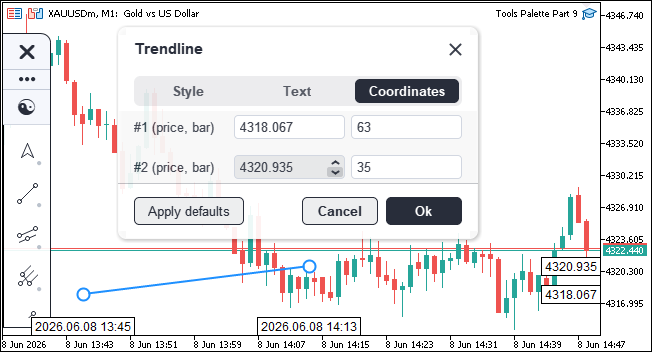
We can see everything is wired and rendered correctly. That completes the settings window implementation. What remains is testing the program, and that is handled in the next section.
Visualization
We compile the program, attach it to the chart, select an object, and open its settings window from the ribbon's Settings button to confirm that every tab edits the object correctly.
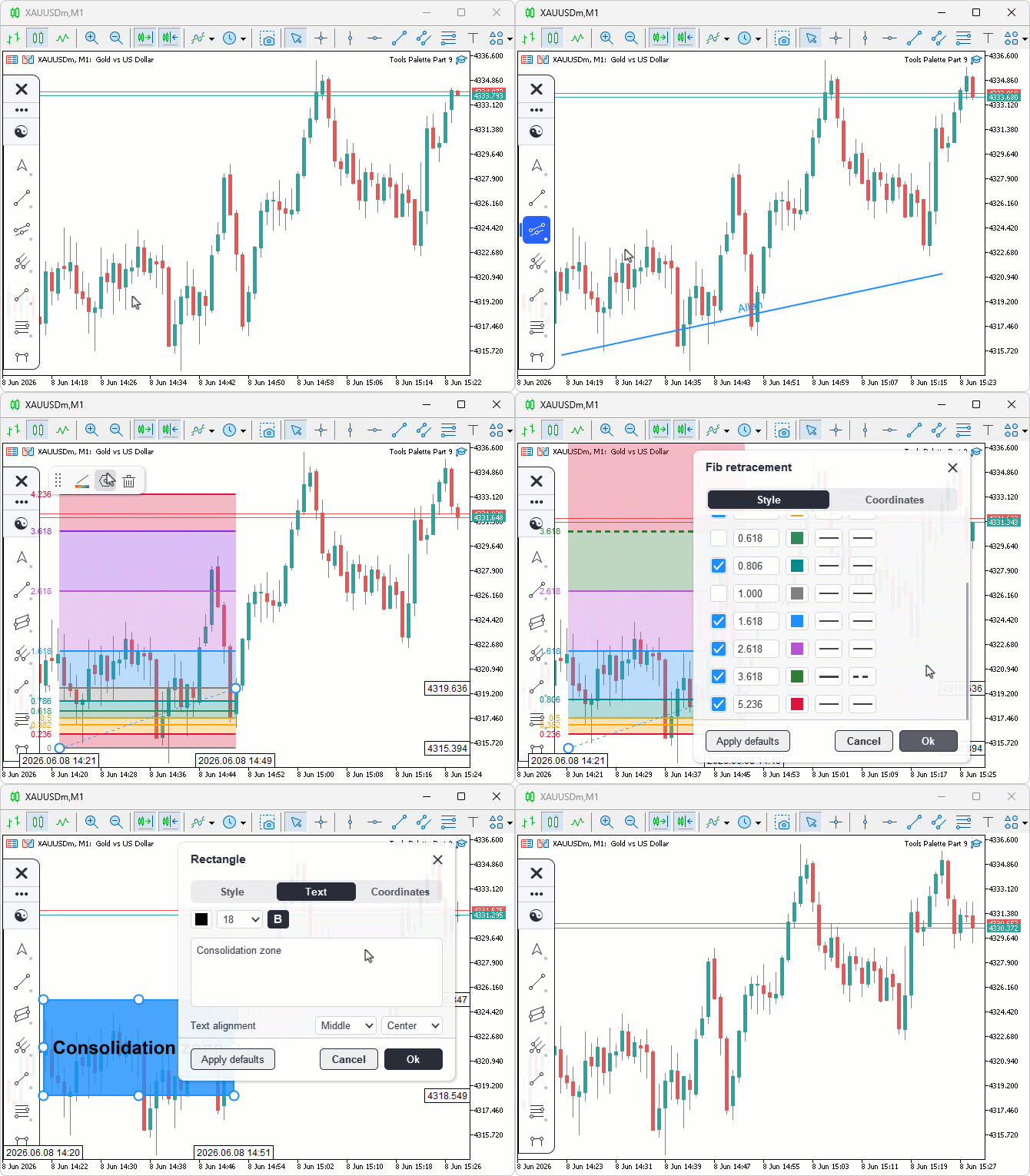
During testing, the window opened centered on the chart and showed only the tabs that applied to the selected tool, and switching tabs rebuilt the rows and resized the window to fit. Editing a value previewed live on the chart — dragging a slider, typing a bounded number into a chip, editing a Fibonacci level's ratio in a compact row, and typing an exact price or bar index on the Coordinates tab all updated the object immediately. The body scrolled when the rows overflowed, the window dragged by its header, and closing with Ok kept the changes while Cancel rolled the object back to where it stood when the window opened.
Conclusion
In conclusion, we added a tabbed settings window to the canvas drawing layer. It opens from the ribbon's Settings button, binds to the selected object, and renders properties using the same descriptor system as the ribbon. Tabs include Style, Text, Coordinates, and Visibility. We worked through the window's layout and rendering on one side and its interaction on the other, covering the tab building and row mapping that expands level lists into editable per-level rows, the size and position math, the scrollable body, and the inline coordinate and float editing with a blinking caret. Every edit previews live on the chart, and closing the window either keeps the batch with Ok or rolls the object back to the snapshot with Cancel. After reading this article, you will be able to:
- Build a tabbed, scrollable settings window over a descriptor system, sorting properties into tabs and expanding level lists into synthesized per-level rows.
- Implement a commit-and-discard lifecycle backed by a property snapshot, so live edits preview on the chart yet roll back cleanly on cancel.
- Drive inline text entry — exact prices, bar indices, and bounded numbers — through a caret-and-buffer edit machine with selection, keyboard override, and per-field parsing.
In the next part of the series, we will add a second, pinned-tools ribbon — a floating, scrollable, resizable bar that holds the user's favorite tool icons for one-click access without reopening the sidebar. Stay tuned.
Attachments
| S/N | Name | Type | Description |
|---|---|---|---|
| 1 | Tools Palette Part 9.zip | Archive | A ready-to-extract archive containing all 20 project files in a single folder. Unzip it into your MetaTrader 5 terminal data folder; the files will be placed under MQL5/Experts/ with every file in its correct location, ready to compile. |
Warning: All rights to these materials are reserved by MetaQuotes Ltd. Copying or reprinting of these materials in whole or in part is prohibited.
This article was written by a user of the site and reflects their personal views. MetaQuotes Ltd is not responsible for the accuracy of the information presented, nor for any consequences resulting from the use of the solutions, strategies or recommendations described.

 Designing a Strategy State Machine in MQL5: Replacing Nested If-Else Logic with Formal States
 From Cloud to Complex: The Vietoris-Rips Filtration in MQL5
 Meta-Labeling the Classics (Part 2): Filtering and Sizing ADX Trades
 Interactive Supply and Demand Zone Manager in MQL5 (Part II): Event-Driven Architecture and Persistent Lifecycle Logging

- Free trading apps
- Over 8,000 signals for copying
- Economic news for exploring financial markets
You agree to website policy and terms of use