

MQL5 Trading Tools (Part 35): Adding Channel, Pitchfork, Gann, and Fibonacci Tools to the Canvas Drawing Layer
 1 733
1 733
 0
0

Introduction
In the previous article (Part 34), we replaced the native MetaTrader 5 chart objects with an interactive canvas drawing layer and shipped a small set of basic line tools on it. The foundation is clean, but the analytical toolkit that defines serious chart analysis is missing — no channels for trend envelopes, no pitchforks for swing structure, no Gann tools for angle-based analysis, and no Fibonacci tools for retracement, expansion, time projection, or arc analysis. This article addresses that gap.
We extend the canvas drawing layer with fifteen new analytical tools, grouped into seven clear categories: channels (parallel, equidistant, regression), pitchforks (standard, Schiff, modified Schiff), Gann tools (fan, grid, box), Fibonacci tools (retracement, expansion, time projection, arc, fan, channel), and a delete-all action. This article is written for the intermediate-to-advanced MetaQuotes Language 5 (MQL5) developer who is comfortable with the inheritance chain we built in the previous part. The subtopics we will cover are:
- From Two-Point Lines to Multi-Anchor Analytical Tools
- Implementing the Channel and Pitchfork Tools
- Implementing the Gann and Fibonacci Tools
- Integrating the New Tools into the Drawing Engine
- Visualization
- Conclusion
By the end, the canvas drawing layer will host a full set of multi-anchor analytical drawing tools that the user can place, hover over, select, reshape, and delete using the same interaction grammar as the basic line tools.
From Two-Point Lines to Multi-Anchor Analytical Tools
The line tools we shipped in the previous part all share a common shape. They are defined by at most two anchor points, every handle on them sits directly on one of those anchors, and the geometry the engine renders is a direct function of those anchors, with no derived points in between. This works for trendlines, rays, rectangles, and the other basic tools, but it breaks the moment we try to model a channel, a pitchfork, a Gann fan, or any Fibonacci tool — these need more anchors, derived handles, per-tool level arrays, or geometry computed from market data at every redraw.
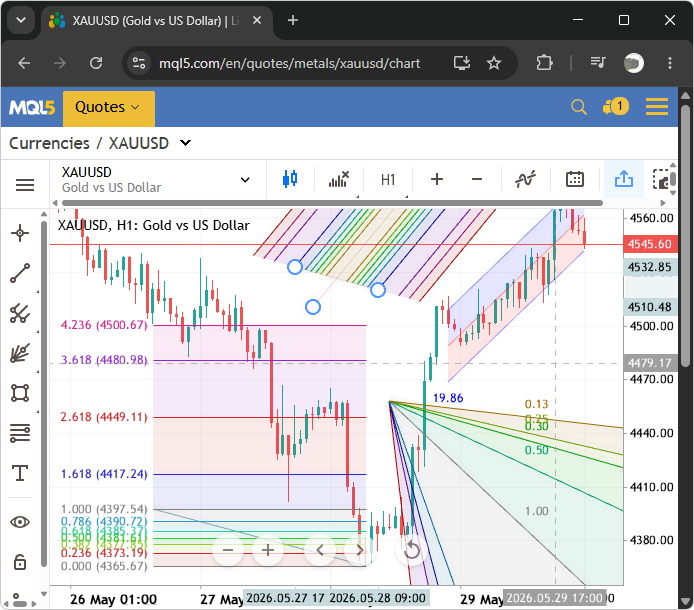
The new tools fall into three architectural buckets. Some require three-click placement because their geometry needs three anchors — the first two clicks define a baseline, and the third picks an offset, a projection origin, or an apex. Others derive handles from existing handles to preserve geometric invariants — the parallel channel's fourth corner is computed from the other three, the regression channel's endpoints come from an ordinary least squares fit to the bars in the time window, and the pitchfork's median tine starts at a derived point that differs across the Andrew, Schiff, and modified Schiff variants. The Fibonacci tools add a third twist: each one renders a family of ratio lines or arcs whose ratios, colors, and visibility flags live on the drawn object itself as a level array the engine reads at every redraw. This architecture was inspired by the default MQL5 web chart system, which uses shaded tools, unlike the terminal tools that have mostly lines, and lack opacity control. See a representation below.
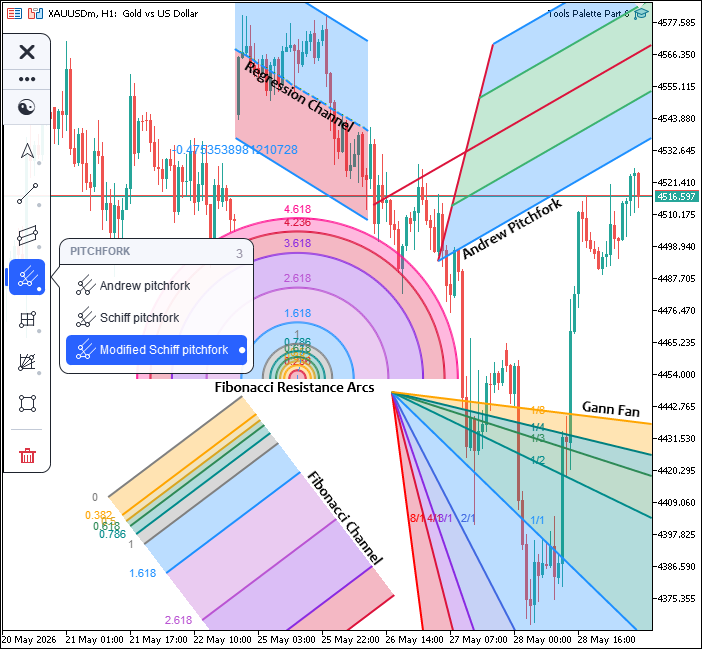
To avoid rewriting the engine, we extend the inheritance chain. The line tool class becomes the base for a channel tool class. That, in turn, becomes the base for a Fibonacci tool class, which becomes the new parent of the tool registry and ultimately the drawing engine. Each layer adds draw routines, hit testers, and shared helpers — regression endpoint computation, ray-to-canvas-edge clipping, scanline quadrilateral fill, anti-aliased arc tracing — reused by the layers above. The drawn object struct grows new field groups to carry per-tool properties, the engine grows a tool memory system so customizations persist across consecutive placements of the same tool, and the rubber-band preview pipeline learns to render two preview states for three-click tools. Here is a visualization of our objectives.
With the conceptual map in place, we can move on to the implementation.
Implementing the Channel and Pitchfork Tools
Declaring the Channel Tools Class
We open the implementation by declaring "CChannelTools", the new layer that inherits from the line tools class shipped in the previous part. This is the protocol layer for the new analytical tools — it declares every public draw routine and hit tester that the drawing engine will call into when rendering or interacting with channels, pitchforks, and Gann tools.
//+------------------------------------------------------------------+
//|                                        ToolsPalette_Channels.mqh |
//|                           Copyright 2026, Allan Munene Mutiiria. |
//|                                   https://t.me/Forex_Algo_Trader |
//+------------------------------------------------------------------+
#ifndef TOOLS_PALETTE_CHANNELS_MQH
#define TOOLS_PALETTE_CHANNELS_MQH

//--- Include the base line-tools layer that CChannelTools extends
#include "ToolsPalette_Lines.mqh"

//+------------------------------------------------------------------+
//| Channel tools library: parallel / regression / stddev            |
//+------------------------------------------------------------------+
class CChannelTools : public CLineTools
  {
protected:

public:
   //--- Compute regression line endpoints for the bar range [t1, t2]
   bool   ComputeRegressionEndpoints(datetime t1, datetime t2,
                                     double &leftP, double &rightP); // leftP/rightP correspond to stored t1/t2 (unsorted)

   //--- Draw the parallel channel onto the given canvas
   void   DrawParallelChannelOn(CCanvas &canvas,
                                int x1, int y1, int x2, int y2, int x3, int y3,
                                color objColor, bool selected, bool hovered,
                                int lineWidth = 2,     int lineOpacity = 100,  int lineStyle = 0,
                                color midColor = clrNONE,  int midOpacity = 80, int midStyle = 1,
                                color fillColor = clrNONE, int fillOpacity = 30,
                                bool midVisible = true,
                                int midWidth = 2,      double midOffset = 0.5);

   //--- Draw the regression channel onto the given canvas
   void   DrawRegressionChannelOn(CCanvas &canvas, long chartId,
                                  datetime t1, datetime t2,
                                  color objColor, bool selected, bool hovered,
                                  int lineWidth = 2,       int lineOpacity = 100,   int lineStyle = 0,
                                  color fillColor = clrNONE,  int fillOpacity = 30,
                                  color fillColor2 = clrNONE, int fillOpacity2 = 30,
                                  color textColor = clrNONE,  int textOpacity = 100,
                                  bool centerVisible = true,
                                  color centerColor = clrNONE, int centerOpacity = 100,
                                  int centerWidth = 2,     int centerStyle = 1,
                                  bool upperBandVisible = true, double upperBandSigma = 2.0,
                                  bool lowerBandVisible = true, double lowerBandSigma = 2.0,
                                  bool pearsonVisible = true);

   //--- Draw the std deviation channel onto the given canvas
   void   DrawStdDevChannelOn(CCanvas &canvas, long chartId,
                              datetime t1, datetime t2,
                              color objColor, bool selected, bool hovered,
                              int lineWidth = 2,      int lineOpacity = 100,  int lineStyle = 0,
                              color fillColor = clrNONE, int fillOpacity = 30,
                              bool centerVisible = true,
                              color centerColor = clrNONE, int centerOpacity = 100,
                              int centerWidth = 2,    int centerStyle = 1,
                              bool upperBandVisible = true, double upperBandSigma = 2.0,
                              bool lowerBandVisible = true, double lowerBandSigma = 2.0);

   //--- Hit test the parallel channel body (2 solid lines + dashed center)
   bool   HitTestParallelChannel(int mx, int my,
                                 int x1, int y1, int x2, int y2, int x3, int y3,
                                 int threshold);

   //--- Hit test the regression channel body (recomputes regression to find line positions)
   bool   HitTestRegressionChannel(int mx, int my, long chartId,
                                   datetime t1, datetime t2, int threshold);

   //--- Hit test the std deviation channel body (delegates to regression hit test)
   bool   HitTestStdDevChannel(int mx, int my, long chartId,
                               datetime t1, datetime t2, int threshold);

   //--- Draw Andrew's Pitchfork onto the given canvas
   void   DrawAndrewsPitchforkOn(CCanvas &canvas,
                                 int x1, int y1, int x2, int y2, int x3, int y3,
                                 color objColor, bool selected, bool hovered,
                                 bool medianVisible, color medianColor, int medianWidth, int medianStyle,
                                 bool outerVisible,  color outerColor,  int outerWidth,  int outerStyle,
                                 bool innerVisible,  color innerColor,  int innerWidth,  int innerStyle,
                                 int lineOpacity, int fillOpacity);

   //--- Hit test Andrew's Pitchfork body (tests all 6 drawn lines)
   bool   HitTestAndrewsPitchfork(int mx, int my, int canvasW, int canvasH,
                                  int x1, int y1, int x2, int y2, int x3, int y3,
                                  int threshold);

   //--- Draw Schiff Pitchfork onto the given canvas
   void   DrawSchiffPitchforkOn(CCanvas &canvas,
                                int x1, int y1, int x2, int y2, int x3, int y3,
                                color objColor, bool selected, bool hovered,
                                bool medianVisible, color medianColor, int medianWidth, int medianStyle,
                                bool outerVisible,  color outerColor,  int outerWidth,  int outerStyle,
                                bool innerVisible,  color innerColor,  int innerWidth,  int innerStyle,
                                int lineOpacity, int fillOpacity);

   //--- Hit test Schiff Pitchfork body
   bool   HitTestSchiffPitchfork(int mx, int my, int canvasW, int canvasH,
                                 int x1, int y1, int x2, int y2, int x3, int y3,
                                 int threshold);

   //--- Draw Modified Schiff Pitchfork onto the given canvas
   void   DrawModSchiffPitchforkOn(CCanvas &canvas,
                                   int x1, int y1, int x2, int y2, int x3, int y3,
                                   color objColor, bool selected, bool hovered,
                                   bool medianVisible, color medianColor, int medianWidth, int medianStyle,
                                   bool outerVisible,  color outerColor,  int outerWidth,  int outerStyle,
                                   bool innerVisible,  color innerColor,  int innerWidth,  int innerStyle,
                                   int lineOpacity, int fillOpacity);

   //--- Hit test Modified Schiff Pitchfork body
   bool   HitTestModSchiffPitchfork(int mx, int my, int canvasW, int canvasH,
                                    int x1, int y1, int x2, int y2, int x3, int y3,
                                    int threshold);

   //--- Draw Gann Line: single ray from P1 through P2, extended to the right canvas edge
   void   DrawGannLineOn(CCanvas &canvas,
                         int x1, int y1, int x2, int y2,
                         color objColor, bool selected, bool hovered,
                         int lineOpacity, int lineWidth, int lineStyle);

   //--- Hit test Gann Line body (distance from cursor to extended ray)
   bool   HitTestGannLine(int mx, int my, int canvasW, int canvasH,
                          int x1, int y1, int x2, int y2, int threshold);

   //--- Draw Gann Fan: 9 rays from P1 at canonical Gann ratios
   void   DrawGannFanOn(CCanvas &canvas,
                        int x1, int y1, int x2, int y2,
                        color objColor, bool selected, bool hovered,
                        const double &lvlRatio[],
                        const color  &lvlColor[],
                        const int    &lvlOpacity[],
                        const int    &lvlWidth[],
                        const int    &lvlStyle[],
                        const bool   &lvlVisible[],
                        int fillOpacity);

   //--- Hit test Gann Fan (returns true if cursor is near any of the 9 rays)
   bool   HitTestGannFan(int mx, int my, int canvasW, int canvasH,
                         int x1, int y1, int x2, int y2, int threshold);

   //--- Draw Gann Box: 7 ratios drive both horizontal price-fib and vertical time-fib lines
   void   DrawGannBoxOn(CCanvas &canvas,
                        int x1, int y1, int x2, int y2,
                        color objColor, bool selected, bool hovered,
                        const double &lvlRatio[],
                        const color  &lvlColor[],
                        const int    &lvlOpacity[],
                        const int    &lvlWidth[],
                        const int    &lvlStyle[],
                        const bool   &lvlVisible[],
                        int fillOpacity);

   //--- Hit test Gann Box (returns true if cursor is near any edge or interior Fib grid line)
   bool   HitTestGannBox(int mx, int my,
                         int x1, int y1, int x2, int y2, int threshold);
  };
We start by guarding the header with the "TOOLS_PALETTE_CHANNELS_MQH" include macro and pulling in the line tools header, which gives us the canvas helpers, the handle renderer, and the dashed-line drawing routines that the new tools reuse. The class itself extends the line tools class, so every method we added in the previous part — anti-aliased line drawing, scanline rectangle fill, handle rendering with hover halos — is available to channels and pitchforks without re-declaration.
The first declaration is "ComputeRegressionEndpoints", which takes two datetimes marking the start and end of a time window and returns the left and right endpoint prices of the ordinary least squares (OLS) regression line fit to the closing prices of all bars in that window. We will use this both at placement time (to snap regression channel anchors to the regression endpoints) and at every redraw (to keep the center line glued to current price action as new bars print). The two output prices correspond to the stored datetimes in their original order, so the caller does not need to sort them.
We then declare three channel draw routines: "DrawParallelChannelOn", "DrawRegressionChannelOn", and "DrawStdDevChannelOn". Each takes a target canvas, anchor points (three or two depending on the variant), object state (selected/hovered), and per-component style parameters. The parallel channel takes mid-line color, opacity, style, and visibility separately from the channel border properties, since users typically want the mid-line to differ visually from the boundary. The regression channel exposes the center line, both sigma band visibilities and widths, the Pearson R label color, and a second fill color so users can color the upper and lower halves of the channel differently. The standard deviation channel is a stripped-down variant with a single fill color and no Pearson label.
The three hit testers — "HitTestParallelChannel", "HitTestRegressionChannel", and "HitTestStdDevChannel" — match the draw routines. The regression hit testers take the chart ID rather than precomputed pixel coordinates because they need to recompute the regression internally to find where the lines actually fall right now.
Next come the three pitchfork draw routines — "DrawAndrewsPitchforkOn", "DrawSchiffPitchforkOn", and "DrawModSchiffPitchforkOn" — with matching hit testers. Each pitchfork takes the three anchors, per-tine visibility, and color and width and style for the median, outer, and inner tines, plus shared opacity and fill opacity. The three variants share an identical parameter signature because the only difference between them is where the median tine originates — Andrew's at P1, Schiff at P1's time with the midpoint of P2-P3 as the price, and modified Schiff at the true midpoint of P1-P2. The variant-specific logic lives inside each draw routine rather than at the call site.
The Gann section completes the declarations. "DrawGannLineOn" is the simplest — two anchors and a single ray extended to the right canvas edge. "DrawGannFanOn" and "DrawGannBoxOn" take the same six per-level arrays — ratios, colors, opacities, widths, styles, and visibility flags — so the engine can pass the object's stored level configuration directly without unpacking it. The matching hit testers — "HitTestGannLine", "HitTestGannFan", and "HitTestGannBox" — round out the public surface. With the protocol declared, we can move on to the implementations. Since the object categories use the same approach, and we had set the foundation from the previous part, we will explain the most critical and relevant sections. We will start with the OLS regression implementation, since this has the sigma bands, and the other channel objects use the same approach. Let's define the helper functions first.
Shared Channel Helpers and Regression Endpoint Computation
We define four shared helpers that every channel, pitchfork, Gann, and Fibonacci tool in this part calls into. The first three handle pixel-level rendering — alpha compositing, scanline polygon fill, and dashed-line drawing — and the fourth computes the ordinary leastsquares (OLS) regression endpoints that the regression and standard deviation channels depend on.
//+------------------------------------------------------------------+
//| Blend a single pixel onto the canvas with alpha compositing      |
//+------------------------------------------------------------------+
#ifndef CHANNEL_BLEND_PIXEL_SET_DEFINED
#define CHANNEL_BLEND_PIXEL_SET_DEFINED
void ChannelBlendPixelSet(CCanvas &canvas, int px, int py, uint srcArgb)
  {
   int cW = canvas.Width(), cH = canvas.Height();
   //--- Reject out-of-bounds pixels immediately
   if(px < 0 || px >= cW || py < 0 || py >= cH) return;
   //--- Extract source alpha from the top byte
   uchar sA = (uchar)((srcArgb >> 24) & 0xFF);
   //--- Skip fully transparent pixels
   if(sA == 0) return;
   //--- Fully opaque: write directly without compositing math
   if(sA == 255) { canvas.PixelSet(px, py, srcArgb); return; }
   //--- Read the existing destination pixel for blending
   uint dst = canvas.PixelGet(px, py);
   uchar dA = (uchar)((dst >> 24) & 0xFF);
   //--- Normalize alpha values to [0, 1] range
   double a  = sA / 255.0;
   double da = dA / 255.0;
   //--- Compute the combined output alpha (porter-duff over)
   double oa = a + da * (1.0 - a);
   if(oa <= 0.0) return;
   //--- Normalize source RGB channels
   double sR = ((srcArgb >> 16) & 0xFF) / 255.0;
   double sG = ((srcArgb >>  8) & 0xFF) / 255.0;
   double sB = ( srcArgb        & 0xFF) / 255.0;
   //--- Normalize destination RGB channels
   double dR = ((dst >> 16) & 0xFF) / 255.0;
   double dG = ((dst >>  8) & 0xFF) / 255.0;
   double dB = ( dst        & 0xFF) / 255.0;
   //--- Assemble the composited ARGB output pixel
   uint outPix = ((uint)(uchar)(oa * 255.0 + 0.5) << 24) |
                 ((uint)(uchar)((sR*a + dR*da*(1.0-a)) / oa * 255.0 + 0.5) << 16) |
                 ((uint)(uchar)((sG*a + dG*da*(1.0-a)) / oa * 255.0 + 0.5) <<  8) |
                  (uint)(uchar)((sB*a + dB*da*(1.0-a)) / oa * 255.0 + 0.5);
   canvas.PixelSet(px, py, outPix);
  }
#endif

//+------------------------------------------------------------------+
//| Scanline fill a 4-vertex quad with flat alpha-composited color   |
//+------------------------------------------------------------------+
#ifndef CHANNEL_FILL_QUAD_DEFINED
#define CHANNEL_FILL_QUAD_DEFINED
void ChannelFillQuad(CCanvas &canvas,
                     int x0, int y0, int x1, int y1,
                     int x2, int y2, int x3, int y3,
                     uint fillArgb)
  {
   //--- Pack vertices into arrays for scanline traversal
   int pxs[4]; int pys[4];
   pxs[0] = x0; pys[0] = y0;
   pxs[1] = x1; pys[1] = y1;
   pxs[2] = x2; pys[2] = y2;
   pxs[3] = x3; pys[3] = y3;
   //--- Find the vertical extents of the quad
   int ymin = pys[0], ymax = pys[0];
   for(int k = 1; k < 4; k++) { if(pys[k] < ymin) ymin = pys[k]; if(pys[k] > ymax) ymax = pys[k]; }
   int cW = canvas.Width(), cH = canvas.Height();
   //--- Clamp vertical range to canvas bounds
   if(ymin < 0)   ymin = 0;
   if(ymax >= cH) ymax = cH - 1;
   //--- Scanline rasterization: one horizontal span per row
   for(int yy = ymin; yy <= ymax; yy++)
     {
      double xs[4]; int nx = 0;
      //--- Intersect each edge of the quad with the current scanline
      for(int e = 0; e < 4; e++)
        {
         int e2 = (e + 1) & 3;
         double ay = (double)pys[e], by = (double)pys[e2];
         //--- Skip edges that don't cross this scanline row
         if((ay > yy) == (by > yy)) continue;
         double ax = (double)pxs[e], bx = (double)pxs[e2];
         double t  = ((double)yy - ay) / (by - ay);
         xs[nx++] = ax + t * (bx - ax);
        }
      if(nx < 2) continue;
      //--- Sort intersection X values ascending for span fill
      for(int a = 0; a < nx - 1; a++)
         for(int b = a + 1; b < nx; b++)
            if(xs[b] < xs[a]) { double tmp = xs[a]; xs[a] = xs[b]; xs[b] = tmp; }
      //--- Fill each horizontal span between paired intersections
      for(int p = 0; p + 1 < nx; p += 2)
        {
         int xL = (int)MathCeil(xs[p]);
         int xR = (int)MathFloor(xs[p + 1]);
         //--- Clamp span to canvas horizontal bounds
         if(xL < 0) xL = 0;
         if(xR >= cW) xR = cW - 1;
         for(int xx = xL; xx <= xR; xx++)
            ChannelBlendPixelSet(canvas, xx, yy, fillArgb);
        }
     }
  }
#endif

//+------------------------------------------------------------------+
//| Draw a 1px dashed line (4-on 4-off) between two canvas points    |
//+------------------------------------------------------------------+
void ChannelDrawDashedLine(CCanvas &canvas, int x1, int y1, int x2, int y2, uint argb)
  {
   //--- Compute direction and total pixel length of the segment
   double dxl = x2 - x1, dyl = y2 - y1;
   double ll  = MathSqrt(dxl * dxl + dyl * dyl);
   //--- Skip degenerate zero-length segments
   if(ll <= 1.0) return;
   int steps = (int)ll;
   int cW = canvas.Width(), cH = canvas.Height();
   //--- Walk along the segment and paint only the "on" dash pixels
   for(int s = 0; s < steps; s++)
     {
      //--- 4-on, 4-off: skip every second 4-pixel run
      if((s / 4) % 2 != 0) continue;
      int px = x1 + (int)(dxl * s / steps);
      int py = y1 + (int)(dyl * s / steps);
      //--- Paint only pixels that land inside the canvas
      if(px >= 0 && px < cW && py >= 0 && py < cH)
         ChannelBlendPixelSet(canvas, px, py, argb);
     }
  }

//+------------------------------------------------------------------+
//| Compute regression endpoints over bar closes in [t1, t2]         |
//+------------------------------------------------------------------+
bool CChannelTools::ComputeRegressionEndpoints(datetime t1, datetime t2,
                                               double &leftP, double &rightP)
  {
   //--- Identify the chronologically earlier and later datetimes
   datetime tL = (t1 < t2) ? t1 : t2;
   datetime tR = (t1 < t2) ? t2 : t1;
   //--- Map datetimes to bar indices (nearest bar, no strict mode)
   int barR = iBarShift(_Symbol, _Period, tR, false);
   int barL = iBarShift(_Symbol, _Period, tL, false);
   //--- Ensure barL is the higher (older) bar index
   if(barL < barR) { int tmp = barL; barL = barR; barR = tmp; }
   int nBars = barL - barR + 1;
   //--- Reject ranges too small for a valid regression
   if(nBars < 2) return false;
   //--- Accumulate regression sums over all bars in range
   double Sx = 0, Sy = 0, Sxx = 0, Sxy = 0;
   for(int i = 0; i < nBars; i++)
     {
      int shift = barL - i;
      double cls = iClose(_Symbol, _Period, shift);
      //--- Skip bars with no valid close price
      if(cls == 0.0) continue;
      double x = (double)i;
      Sx += x; Sy += cls; Sxx += x*x; Sxy += x*cls;
     }
   double dn    = (double)nBars;
   double denom = dn*Sxx - Sx*Sx;
   //--- Reject degenerate case where X-variance is effectively zero
   if(MathAbs(denom) < 1e-12) return false;
   //--- Compute slope and intercept of the OLS regression line
   double slope     = (dn*Sxy - Sx*Sy) / denom;
   double intercept = (Sy - slope*Sx) / dn;
   //--- Evaluate the line at the leftmost and rightmost bar positions
   leftP  = intercept;
   rightP = slope * (double)(nBars - 1) + intercept;
   //--- Swap outputs if caller passed t1 > t2 (preserve stored order)
   if(t1 > t2) { double tmp = leftP; leftP = rightP; rightP = tmp; }
   return true;
  }
We start with "ChannelBlendPixelSet", the alpha-compositing primitive that lets translucent fills layer cleanly on top of whatever is already drawn on the canvas. Naive pixel writing replaces the existing pixel with the new one, which breaks the moment we render a translucent band over another translucent band — the lower band gets wiped out. Alpha compositing fixes this by combining the source pixel with the destination pixel based on their alpha values using the Porter-Duff "source over destination" formula. We bail out early on the trivial cases (fully transparent or fully opaque) and only do the full math when partial alpha is involved, normalizing both alphas to the zero-to-one range, computing the combined output alpha, and blending each RGB channel proportionally.
Next, "ChannelFillQuad" fills the interior of a four-vertex convex quadrilateral with a flat alpha-composited color using scanline rasterization. Instead of testing every pixel for inclusion (which is expensive), we walk the polygon one horizontal row at a time, find where each edge crosses that row by linear interpolation, sort the intersections ascending, and fill the horizontal spans between intersection pairs through the blend primitive. This is the standard algorithm for software polygon fill, and it composites correctly over whatever is underneath because every pixel goes through "ChannelBlendPixelSet".
The third helper, "ChannelDrawDashedLine", renders a one-pixel-wide dashed line between two canvas points using a four-on, four-off pattern by walking the segment one pixel at a time and skipping every second four-pixel run. Both "ChannelBlendPixelSet" and "ChannelFillQuad" are wrapped in include guards ("CHANNEL_BLEND_PIXEL_SET_DEFINED" and "CHANNEL_FILL_QUAD_DEFINED") because the lines header also defines them for its rectangle renderer — the guards let either file be included first without producing a duplicate-definition error. We chose to define them in the channels file for easy extensibility in case we require a more complex algorithm in the future.
Finally, "ComputeRegressionEndpoints" is the OLS regression helper that drives both the regression and standard deviation channels. We identify the chronologically earlier and later datetimes, map them to bar indices using the iBarShift function, and walk the bars, accumulating the textbook OLS sums — sum of X, sum of Y, sum of X squared, and sum of X times Y — fetching closes with the iClose function. From these sums, we compute the slope and intercept of the best-fit line, evaluate it at the leftmost and rightmost bar positions to get the endpoint prices, and swap the outputs if the caller passed the datetimes in reverse order so they line up with the stored time order. With these four helpers in place, the actual channel renderers can be built on top of them. We will start with the regression channel now.
Drawing the Regression Channel
The regression channel renders an OLS-fit center line through the bar closes in a chosen time window, two sigma bands around it, translucent fills between the center and each band, and a Pearson R label showing how well the price action fits the line.
//+------------------------------------------------------------------+
//| Draw a regression channel onto the canvas                        |
//+------------------------------------------------------------------+
void CChannelTools::DrawRegressionChannelOn(CCanvas &canvas, long chartId,
      datetime t1, datetime t2,
      color objColor, bool selected, bool hovered,
      int lineWidth = 2,       int lineOpacity = 100,   int lineStyle = 0,
      color fillColor = clrNONE,  int fillOpacity = 30,
      color fillColor2 = clrNONE, int fillOpacity2 = 30,
      color textColor = clrNONE,  int textOpacity = 100,
      bool centerVisible = true,
      color centerColor = clrNONE, int centerOpacity = 100,
      int centerWidth = 2,     int centerStyle = 1,
      bool upperBandVisible = true, double upperBandSigma = 2.0,
      bool lowerBandVisible = true, double lowerBandSigma = 2.0,
      bool pearsonVisible = true)
  {
   //--- Clamp line width to the supported [1, 4] range
   if(lineWidth < 1) lineWidth = 1;
   if(lineWidth > 4) lineWidth = 4;
   //--- Clamp center-line width to the supported [1, 4] range
   if(centerWidth < 1) centerWidth = 1;
   if(centerWidth > 4) centerWidth = 4;
   //--- Clamp line style to the supported [0, 3] range
   if(lineStyle < 0) lineStyle = 0;
   if(lineStyle > 3) lineStyle = 3;
   //--- Clamp center style to the supported [0, 3] range
   if(centerStyle < 0) centerStyle = 0;
   if(centerStyle > 3) centerStyle = 3;
   //--- Prevent sigma values collapsing to zero
   if(upperBandSigma < 0.1) upperBandSigma = 0.1;
   if(lowerBandSigma < 0.1) lowerBandSigma = 0.1;
   //--- Resolve clrNONE to the appropriate default colors per part
   color lineCol   = objColor;
   color centerCol = (centerColor == clrNONE) ? objColor      : centerColor;
   color fillUp    = (fillColor   == clrNONE) ? clrDodgerBlue : fillColor;
   color fillDn    = (fillColor2  == clrNONE) ? clrCrimson    : fillColor2;
   color labelCol  = (textColor   == clrNONE) ? objColor      : textColor;
   //--- Build ARGB values for band boundary lines and fills
   const uint lineArgb      = ColorWithPercentOpacity(lineCol, lineOpacity);
   const uint upperFillArgb = ColorWithPercentOpacity(fillUp,  fillOpacity);
   const uint lowerFillArgb = ColorWithPercentOpacity(fillDn,  fillOpacity2);
   const int  thick         = lineWidth;
   //--- Determine the chronologically left and right datetimes
   datetime tL = (t1 < t2) ? t1 : t2;
   datetime tR = (t1 < t2) ? t2 : t1;
   //--- Map datetimes to bar indices
   int barR = iBarShift(_Symbol, _Period, tR, false);
   int barL = iBarShift(_Symbol, _Period, tL, false);
   //--- Ensure barL is the older (higher-index) bar
   if(barL < barR) { int tmp = barL; barL = barR; barR = tmp; }
   int nBars = barL - barR + 1;
   //--- Need at least 2 bars for a valid regression
   if(nBars < 2) return;
   //--- Accumulate OLS sums including Syy for Pearson R
   double Sx = 0, Sy = 0, Sxx = 0, Syy = 0, Sxy = 0;
   for(int i = 0; i < nBars; i++)
     {
      int shift = barL - i;
      double cls = iClose(_Symbol, _Period, shift);
      //--- Skip bars with invalid close price
      if(cls == 0.0) continue;
      double x = (double)i;
      Sx += x; Sy += cls; Sxx += x*x; Syy += cls*cls; Sxy += x*cls;
     }
   double dn    = (double)nBars;
   double denom = dn * Sxx - Sx * Sx;
   //--- Reject degenerate X-variance case
   if(MathAbs(denom) < 1e-12) return;
   //--- Compute OLS slope and intercept
   double slope     = (dn * Sxy - Sx * Sy) / denom;
   double intercept = (Sy - slope * Sx) / dn;
   //--- Compute the Y-variance denominator needed for Pearson R
   double denomY   = dn * Syy - Sy * Sy;
   double pearsonR = 0.0;
   //--- Compute Pearson R only when both denominators are well-defined
   if(denomY > 1e-12 && denom > 1e-12)
      pearsonR = (dn * Sxy - Sx * Sy) / MathSqrt(denom * denomY);
   //--- Accumulate sum of squared residuals for sigma
   double sumSq = 0.0;
   for(int i = 0; i < nBars; i++)
     {
      int shift = barL - i;
      double cls = iClose(_Symbol, _Period, shift);
      //--- Skip invalid bars in residual pass
      if(cls == 0.0) continue;
      double pred = slope * (double)i + intercept;
      double r    = cls - pred;
      sumSq += r * r;
     }
   //--- Compute residual standard deviation
   double sigma = MathSqrt(sumSq / dn);
   //--- Convert bar indices back to chart datetimes
   datetime leftTime  = (datetime)iTime(_Symbol, _Period, barL);
   datetime rightTime = (datetime)iTime(_Symbol, _Period, barR);
   //--- Compute the center, upper, and lower band prices at both ends
   double leftCP  = intercept;
   double rightCP = slope * (double)(nBars - 1) + intercept;
   double leftUP  = leftCP  + upperBandSigma * sigma;
   double rightUP = rightCP + upperBandSigma * sigma;
   double leftLP  = leftCP  - lowerBandSigma * sigma;
   double rightLP = rightCP - lowerBandSigma * sigma;
   //--- Map all price/time coordinates to canvas pixel positions
   int xL_p=0, yLc=0, xR_p=0, yRc=0, xtmp=0;
   int yLu=0, yRu=0, yLl=0, yRl=0;
   ChartTimePriceToXY(chartId, 0, leftTime,  leftCP,  xL_p, yLc);
   ChartTimePriceToXY(chartId, 0, rightTime, rightCP, xR_p, yRc);
   ChartTimePriceToXY(chartId, 0, leftTime,  leftUP,  xtmp, yLu);
   ChartTimePriceToXY(chartId, 0, rightTime, rightUP, xtmp, yRu);
   ChartTimePriceToXY(chartId, 0, leftTime,  leftLP,  xtmp, yLl);
   ChartTimePriceToXY(chartId, 0, rightTime, rightLP, xtmp, yRl);
   //--- Fill the upper band region between the center and upper boundary
   if(upperBandVisible)
      ChannelFillQuad(canvas, xL_p, yLu, xR_p, yRu, xR_p, yRc, xL_p, yLc, upperFillArgb);
   //--- Fill the lower band region between center and lower boundary
   if(lowerBandVisible)
      ChannelFillQuad(canvas, xL_p, yLc, xR_p, yRc, xR_p, yRl, xL_p, yLl, lowerFillArgb);
   //--- Draw upper and lower band boundary lines gated by visibility
   if(upperBandVisible || lowerBandVisible)
     {
      if(lineStyle == 0)
        {
         if(upperBandVisible) DrawThickLine(canvas, xL_p, yLu, xR_p, yRu, thick, lineArgb);
         if(lowerBandVisible) DrawThickLine(canvas, xL_p, yLl, xR_p, yRl, thick, lineArgb);
        }
      else
        {
         int pat[];
         const int n = BuildLineStylePattern(lineStyle, thick, pat);
         if(n > 0)
           {
            if(upperBandVisible) WidgetDashedLineAA(canvas, xL_p, yLu, xR_p, yRu, thick, lineArgb, pat);
            if(lowerBandVisible) WidgetDashedLineAA(canvas, xL_p, yLl, xR_p, yRl, thick, lineArgb, pat);
           }
         else
           {
            //--- Fall back to solid lines if pattern build fails
            if(upperBandVisible) DrawThickLine(canvas, xL_p, yLu, xR_p, yRu, thick, lineArgb);
            if(lowerBandVisible) DrawThickLine(canvas, xL_p, yLl, xR_p, yRl, thick, lineArgb);
           }
        }
     }
   //--- Draw the center regression line with its own style/width/color
   if(centerVisible)
     {
      const uint centerArgb = ColorWithPercentOpacity(centerCol, centerOpacity);
      if(centerStyle == 0)
        {
         DrawThickLine(canvas, xL_p, yLc, xR_p, yRc, centerWidth, centerArgb);
        }
      else
        {
         int cpat[];
         const int cn = BuildLineStylePattern(centerStyle, centerWidth, cpat);
         if(cn > 0)
            WidgetDashedLineAA(canvas, xL_p, yLc, xR_p, yRc, centerWidth, centerArgb, cpat);
         else
            DrawThickLine(canvas, xL_p, yLc, xR_p, yRc, centerWidth, centerArgb);
        }
     }
   //--- Render the Pearson R label only when visibility is enabled
   if(pearsonVisible)
     {
      int fontPxSize = 9;
      string fontName = "Arial";
      string rText = DoubleToString(pearsonR, 17);
      //--- Set font for the upcoming TextGetSize / TextOut calls
      TextSetFont(fontName, -(fontPxSize * 10));
      uint twU = 0, thU = 0;
      TextGetSize(rText, twU, thU);
      int tw = (int)twU, th = (int)thU;
      if(tw > 0 && th > 0)
        {
         uint textArgb = ColorWithPercentOpacity(labelCol, textOpacity);
         //--- First pass: render on black background to extract ink coverage
         uint bufB[]; ArrayResize(bufB, tw * th);
         ArrayFill(bufB, 0, tw * th, 0xFF000000);
         TextOut(rText, 0, 0, TA_LEFT | TA_TOP, bufB, tw, th,
                 textArgb, COLOR_FORMAT_ARGB_NORMALIZE);
         //--- Second pass: render on white background to extract ink coverage
         uint bufW[]; ArrayResize(bufW, tw * th);
         ArrayFill(bufW, 0, tw * th, 0xFFFFFFFF);
         TextOut(rText, 0, 0, TA_LEFT | TA_TOP, bufW, tw, th,
                 textArgb, COLOR_FORMAT_ARGB_NORMALIZE);
         //--- Position the label below the lower band's left endpoint
         int txtX = xL_p - tw / 2;
         int txtY = yLl + 4;
         int cW_t = canvas.Width();
         int cH_t = canvas.Height();
         //--- Clamp label to stay inside the canvas bounds
         if(txtX < 0)          txtX = 0;
         if(txtX + tw >= cW_t) txtX = cW_t - tw - 1;
         if(txtY + th >= cH_t) txtY = cH_t - th - 1;
         //--- Extract source RGB from the label color
         uchar srcR = (uchar)((labelCol)       & 0xFF);
         uchar srcG = (uchar)((labelCol >> 8)  & 0xFF);
         uchar srcB = (uchar)((labelCol >> 16) & 0xFF);
         //--- Composite each glyph pixel onto the canvas using alpha from ink coverage
         for(int py = 0; py < th; py++)
           {
            for(int px = 0; px < tw; px++)
              {
               int i = py * tw + px;
               //--- Derive per-pixel alpha from the black/white render difference
               int dR = (int)((bufW[i] >> 16) & 0xFF) - (int)((bufB[i] >> 16) & 0xFF);
               int dG = (int)((bufW[i] >>  8) & 0xFF) - (int)((bufB[i] >>  8) & 0xFF);
               int dB = (int)( bufW[i]        & 0xFF) - (int)( bufB[i]        & 0xFF);
               int a  = 255 - (dR + dG + dB) / 3;
               //--- Skip transparent pixels
               if(a <= 0) continue;
               if(a > 255) a = 255;
               int dstX = txtX + px, dstY = txtY + py;
               //--- Reject pixels that land outside the canvas
               if(dstX < 0 || dstX >= cW_t || dstY < 0 || dstY >= cH_t) continue;
               uint existing = canvas.PixelGet(dstX, dstY);
               //--- Blend label pixel over the existing canvas pixel
               double sA = (double)a / 255.0;
               double dA = ((existing >> 24) & 0xFF) / 255.0;
               double oA = sA + dA * (1.0 - sA);
               if(oA <= 0.0) continue;
               double sR = srcR / 255.0, sG = srcG / 255.0, sB = srcB / 255.0;
               double dR_ = ((existing >> 16) & 0xFF) / 255.0;
               double dG_ = ((existing >>  8) & 0xFF) / 255.0;
               double dB_ = ( existing        & 0xFF) / 255.0;
               uint outPix = ((uint)(uchar)(oA * 255.0 + 0.5) << 24) |
                             ((uint)(uchar)((sR*sA + dR_*dA*(1.0-sA)) / oA * 255.0 + 0.5) << 16) |
                             ((uint)(uchar)((sG*sA + dG_*dA*(1.0-sA)) / oA * 255.0 + 0.5) <<  8) |
                              (uint)(uchar)((sB*sA + dB_*dA*(1.0-sA)) / oA * 255.0 + 0.5);
               canvas.PixelSet(dstX, dstY, outPix);
              }
           }
        }
     }
   //--- Draw 2 handles at center-line endpoints when selected or hovered
   if(selected || hovered)
     {
      if(m_hideHandleIdx != 0)
         DrawHandleOnCanvas(canvas, xL_p, yLc, selected, lineCol, m_haloHandleIdx == 0);
      if(m_hideHandleIdx != 1)
         DrawHandleOnCanvas(canvas, xR_p, yRc, selected, lineCol, m_haloHandleIdx == 1);
     }
  }
We start by clamping line and center widths to the supported one-to-four range, line and center styles to the zero-to-three range, and sigma values to a minimum of 0.1 so the bands never collapse to zero. We then resolve any clrNONE color inputs to their per-part defaults — center line falls back to the object color, upper fill defaults to DodgerBlue, lower fill to Crimson, and the Pearson label to the object color — and build ARGB values for the band boundaries and fills using "ColorWithPercentOpacity".
The regression itself follows the textbook OLS formulation, similar to "ComputeRegressionEndpoints" but extended with the sum of Y squared so we can also compute the Pearson correlation coefficient. We identify the older and newer bar indices via iBarShift, accumulate the four sums (X, Y, X squared, XY) plus Y squared over all valid closes, and derive the slope and intercept. The Pearson R is the standard formula — the bar count times the XY sum minus the X sum times the Y sum, all divided by the square root of the X-variance denominator times the Y-variance denominator. A second pass walks the bars again to accumulate the sum of squared residuals between each close and the predicted price, and from this, we compute sigma as the residual standard deviation. The center, upper, and lower band prices at both endpoints are then derived by evaluating the line and adding or subtracting the sigma multiplied by the user-configured upper or lower band sigma value.
Pixel mapping uses the ChartTimePriceToXY function to convert each time/price pair to canvas coordinates, and we fill the upper and lower bands with "ChannelFillQuad" so each band composites correctly over whatever lies underneath. The two band boundary lines are drawn with either "DrawThickLine" for solid style or "WidgetDashedLineAA" for dashed styles, with the pattern built by "BuildLineStylePattern". The center line follows the same logic but with its own independent style, width, and opacity, so users can render it dashed even when the band boundaries are solid.
The Pearson R label uses dual-pass black/white rendering to extract glyph alpha. We render the text into a black buffer and a white buffer using the TextSetFont and TextGetSize functions to measure it first. For each pixel, we compute per-pixel alpha from the difference between the two renders — where the glyph is fully opaque, both buffers match; where the glyph is absent, the black render stays black and the white render stays white; where the glyph is partially covered, the channel difference reveals exactly how much background bled through. The per-pixel alpha is 255 minus the average channel difference between the white and black renders. We then composite each glyph pixel onto the canvas with Porter-Duff "over" blending. Finally, when the channel is selected or hovered, we draw two handles at the center-line endpoints via "DrawHandleOnCanvas", respecting the hide and halo indices so dragged or hovered handles behave correctly. We can now define the hit-testing logic for this channel, since the other channels use the same approach.
Hit Testing the Regression and Standard Deviation Channels
Hit testing the regression channel means recomputing the regression every frame the cursor moves, since the line positions depend on live price action rather than stored anchors. We define "HitTestRegressionChannel" to do exactly that, and "HitTestStdDevChannel" reuses the same logic since both tools share the same three-line geometry.
//+------------------------------------------------------------------+
//| Hit test the regression channel body (recomputes regression)     |
//+------------------------------------------------------------------+
bool CChannelTools::HitTestRegressionChannel(int mx, int my, long chartId,
                                             datetime t1, datetime t2, int threshold)
  {
   //--- Identify chronologically left and right datetimes
   datetime tL = (t1 < t2) ? t1 : t2;
   datetime tR = (t1 < t2) ? t2 : t1;
   //--- Map datetimes to bar indices
   int barR = iBarShift(_Symbol, _Period, tR, false);
   int barL = iBarShift(_Symbol, _Period, tL, false);
   //--- Ensure barL holds the older bar
   if(barL < barR) { int tmp = barL; barL = barR; barR = tmp; }
   int nBars = barL - barR + 1;
   //--- Abort if too few bars for a regression
   if(nBars < 2) return false;
   //--- Accumulate OLS sums for slope and intercept
   double Sx = 0, Sy = 0, Sxx = 0, Sxy = 0;
   for(int i = 0; i < nBars; i++)
     {
      int shift = barL - i;
      double cls = iClose(_Symbol, _Period, shift);
      //--- Skip bars with no valid close
      if(cls == 0.0) continue;
      double x = (double)i;
      Sx += x; Sy += cls; Sxx += x*x; Sxy += x*cls;
     }
   double dn    = (double)nBars;
   double denom = dn*Sxx - Sx*Sx;
   //--- Reject degenerate X-variance
   if(MathAbs(denom) < 1e-12) return false;
   //--- Compute slope and intercept
   double slope     = (dn*Sxy - Sx*Sy) / denom;
   double intercept = (Sy - slope*Sx) / dn;
   //--- Compute residual sigma
   double sumSq = 0.0;
   for(int i = 0; i < nBars; i++)
     {
      int shift = barL - i;
      double cls = iClose(_Symbol, _Period, shift);
      //--- Skip invalid bars
      if(cls == 0.0) continue;
      double pred = slope*(double)i + intercept;
      double r    = cls - pred;
      sumSq += r*r;
     }
   double sigma = MathSqrt(sumSq / dn);
   //--- Recover bar datetimes for coordinate mapping
   datetime leftTime  = (datetime)iTime(_Symbol, _Period, barL);
   datetime rightTime = (datetime)iTime(_Symbol, _Period, barR);
   double leftCP  = intercept;
   double rightCP = slope*(double)(nBars-1) + intercept;
   //--- Map all six band endpoints to pixel coordinates
   int xL_p=0, yLc=0, xR_p=0, yRc=0, xt=0, yLu=0, yRu=0, yLl=0, yRl=0;
   ChartTimePriceToXY(chartId, 0, leftTime,  leftCP,                xL_p, yLc);
   ChartTimePriceToXY(chartId, 0, rightTime, rightCP,               xR_p, yRc);
   ChartTimePriceToXY(chartId, 0, leftTime,  leftCP  + 2.0*sigma,   xt,   yLu);
   ChartTimePriceToXY(chartId, 0, rightTime, rightCP + 2.0*sigma,   xt,   yRu);
   ChartTimePriceToXY(chartId, 0, leftTime,  leftCP  - 2.0*sigma,   xt,   yLl);
   ChartTimePriceToXY(chartId, 0, rightTime, rightCP - 2.0*sigma,   xt,   yRl);
   //--- Test all 3 lines: upper band, lower band, center regression
   if(PointToSegmentDistance(mx, my, xL_p, yLu, xR_p, yRu) <= threshold) return true;
   if(PointToSegmentDistance(mx, my, xL_p, yLl, xR_p, yRl) <= threshold) return true;
   if(PointToSegmentDistance(mx, my, xL_p, yLc, xR_p, yRc) <= threshold) return true;
   return false;
  }

//+------------------------------------------------------------------+
//| Hit test the std deviation channel body                          |
//+------------------------------------------------------------------+
bool CChannelTools::HitTestStdDevChannel(int mx, int my, long chartId,
                                         datetime t1, datetime t2, int threshold)
  {
   //--- Std dev channel shares identical 3-line geometry with regression; delegate
   return HitTestRegressionChannel(mx, my, chartId, t1, t2, threshold);
  }
Here, we open by repeating the same regression setup used in the draw routine — identify the older and newer bar indices via "iBarShift", accumulate the OLS sums (X, Y, X squared, XY), reject the degenerate case, and compute the slope and intercept. A second pass over the bars accumulates the sum of squared residuals, so we can derive sigma. The center, upper-band, and lower-band endpoint prices are then evaluated at both ends of the bar range using a fixed two-sigma offset for the bands.
We map all six endpoints to pixel coordinates with the ChartTimePriceToXY function and test the cursor against each of the three lines — upper band, lower band, and center regression — using the inherited "PointToSegmentDistance" helper. A hit on any of the three returns true. "HitTestStdDevChannel" is a one-liner that delegates to the regression hit tester since the band geometry is identical for both tools. When we integrate this into the engine, we get the following outcome.

With that done, we will implement the full Andrew's pitchfork object and mirror the same approach to the other pitchfork objects.
Drawing and Hit Testing Andrew's Pitchfork
Andrew's pitchfork renders six lines — a base between P2 and P3, a median ray from P1 through the midpoint of P2-P3, two outer tines parallel to the median originating at P2 and P3, and two inner tines at the halfway points between each outer tine and the median. We define "DrawAndrewsPitchforkOn" to render all six lines plus the translucent band fills between them, and "HitTestAndrewsPitchfork" to test the cursor against every drawn line.
//+------------------------------------------------------------------+
//| Extend a pitchfork ray to the right (or nearest) canvas edge     |
//+------------------------------------------------------------------+
void PitchforkExtendToRight(int canvasW, int canvasH,
                            int x0, int y0, double dx, double dy,
                            int &ex, int &ey)
  {
   //--- Positive dx: intersect the right canvas edge
   if(dx > 0.5)
     {
      double t = ((double)(canvasW - 1) - (double)x0) / dx;
      ex = canvasW - 1;
      ey = (int)MathRound((double)y0 + dy * t);
     }
   else if(dx < -0.5)
     {
      //--- Negative dx: intersect the left canvas edge instead
      double t = ((double)0 - (double)x0) / dx;
      ex = 0;
      ey = (int)MathRound((double)y0 + dy * t);
     }
   else
     {
      //--- Near-vertical line: extend to the top or bottom edge based on dy sign
      if(dy >= 0) { ex = x0; ey = canvasH - 1; }
      else        { ex = x0; ey = 0; }
     }
  }

//+------------------------------------------------------------------+
//| Draw Andrew's Pitchfork onto the canvas                          |
//+------------------------------------------------------------------+
void CChannelTools::DrawAndrewsPitchforkOn(CCanvas &canvas,
      int x1, int y1, int x2, int y2, int x3, int y3,
      color objColor, bool selected, bool hovered,
      bool medianVisible, color medianColor, int medianWidth, int medianStyle,
      bool outerVisible,  color outerColor,  int outerWidth,  int outerStyle,
      bool innerVisible,  color innerColor,  int innerWidth,  int innerStyle,
      int lineOpacity, int fillOpacity)
  {
   const int cW = canvas.Width();
   const int cH = canvas.Height();
   //--- Build per-group ARGBs honoring the shared user opacity
   const uint medArgb = ColorWithPercentOpacity(medianColor, lineOpacity);
   const uint outArgb = ColorWithPercentOpacity(outerColor,  lineOpacity);
   const uint innArgb = ColorWithPercentOpacity(innerColor,  lineOpacity);
   //--- Compute the midpoint of P2-P3 through which the median passes
   const int mx = (x2 + x3) / 2;
   const int my = (y2 + y3) / 2;
   //--- Build the median direction vector from P1 toward the midpoint
   const double mdx  = (double)(mx - x1);
   const double mdy  = (double)(my - y1);
   const double mlen = MathSqrt(mdx * mdx + mdy * mdy);
   //--- Reject degenerate pivot where P1 equals the midpoint
   if(mlen < 1.0) return;
   //--- Extend each of the three primary lines to the right canvas edge
   int medEndX = 0, medEndY = 0;
   int upEndX  = 0, upEndY  = 0;
   int loEndX  = 0, loEndY  = 0;
   PitchforkExtendToRight(cW, cH, mx, my, mdx, mdy, medEndX, medEndY);
   PitchforkExtendToRight(cW, cH, x2, y2, mdx, mdy, upEndX,  upEndY);
   PitchforkExtendToRight(cW, cH, x3, y3, mdx, mdy, loEndX,  loEndY);
   //--- Compute inner (green) anchor points at 50% between each outer and the midpoint
   const int gUpStartX = (x2 + mx) / 2, gUpStartY = (y2 + my) / 2;
   const int gLoStartX = (x3 + mx) / 2, gLoStartY = (y3 + my) / 2;
   //--- Compute inner extension endpoints midway between outer ends and median end
   const int gUpEndX = (upEndX + medEndX) / 2, gUpEndY = (upEndY + medEndY) / 2;
   const int gLoEndX = (loEndX + medEndX) / 2, gLoEndY = (loEndY + medEndY) / 2;
   //--- Build fill ARGBs for the outer and inner band regions
   const uint outerFill = ColorWithPercentOpacity(outerColor, fillOpacity);
   const uint innerFill = ColorWithPercentOpacity(innerColor, fillOpacity);
   //--- Fill outer bands only when both outer and inner groups are visible
   if(outerVisible && innerVisible)
     {
      ChannelFillQuad(canvas,
                      x2, y2, upEndX, upEndY,
                      gUpEndX, gUpEndY, gUpStartX, gUpStartY,
                      outerFill);
      ChannelFillQuad(canvas,
                      gLoStartX, gLoStartY, gLoEndX, gLoEndY,
                      loEndX, loEndY, x3, y3,
                      outerFill);
     }
   //--- Fill inner (green) band when inner group is visible
   if(innerVisible)
     {
      ChannelFillQuad(canvas,
                      gUpStartX, gUpStartY, gUpEndX, gUpEndY,
                      gLoEndX, gLoEndY, gLoStartX, gLoStartY,
                      innerFill);
     }
   //--- Stroke the median group: base line P2-P3 plus median ray P1->medEnd
   if(medianVisible)
     {
      const int thM = (medianWidth > 0) ? medianWidth : 2;
      if(medianStyle == 0)
        {
         DrawThickLine(canvas, x2, y2, x3, y3,           thM, medArgb);
         DrawThickLine(canvas, x1, y1, medEndX, medEndY, thM, medArgb);
        }
      else
        {
         int pat[]; const int pn = BuildLineStylePattern(medianStyle, thM, pat);
         if(pn > 0)
           {
            WidgetDashedLineAA(canvas, x2, y2, x3, y3,           thM, medArgb, pat);
            WidgetDashedLineAA(canvas, x1, y1, medEndX, medEndY, thM, medArgb, pat);
           }
         else
           {
            DrawThickLine(canvas, x2, y2, x3, y3,           thM, medArgb);
            DrawThickLine(canvas, x1, y1, medEndX, medEndY, thM, medArgb);
           }
        }
     }
   //--- Stroke the outer (blue) parallels from P2 and P3
   if(outerVisible)
     {
      const int thO = (outerWidth > 0) ? outerWidth : 2;
      if(outerStyle == 0)
        {
         DrawThickLine(canvas, x2, y2, upEndX, upEndY, thO, outArgb);
         DrawThickLine(canvas, x3, y3, loEndX, loEndY, thO, outArgb);
        }
      else
        {
         int pat[]; const int pn = BuildLineStylePattern(outerStyle, thO, pat);
         if(pn > 0)
           {
            WidgetDashedLineAA(canvas, x2, y2, upEndX, upEndY, thO, outArgb, pat);
            WidgetDashedLineAA(canvas, x3, y3, loEndX, loEndY, thO, outArgb, pat);
           }
         else
           {
            DrawThickLine(canvas, x2, y2, upEndX, upEndY, thO, outArgb);
            DrawThickLine(canvas, x3, y3, loEndX, loEndY, thO, outArgb);
           }
        }
     }
   //--- Stroke the inner (green) parallels at 50% between each outer and median
   if(innerVisible)
     {
      const int thI = (innerWidth > 0) ? innerWidth : 2;
      if(innerStyle == 0)
        {
         DrawThickLine(canvas, gUpStartX, gUpStartY, gUpEndX, gUpEndY, thI, innArgb);
         DrawThickLine(canvas, gLoStartX, gLoStartY, gLoEndX, gLoEndY, thI, innArgb);
        }
      else
        {
         int pat[]; const int pn = BuildLineStylePattern(innerStyle, thI, pat);
         if(pn > 0)
           {
            WidgetDashedLineAA(canvas, gUpStartX, gUpStartY, gUpEndX, gUpEndY, thI, innArgb, pat);
            WidgetDashedLineAA(canvas, gLoStartX, gLoStartY, gLoEndX, gLoEndY, thI, innArgb, pat);
           }
         else
           {
            DrawThickLine(canvas, gUpStartX, gUpStartY, gUpEndX, gUpEndY, thI, innArgb);
            DrawThickLine(canvas, gLoStartX, gLoStartY, gLoEndX, gLoEndY, thI, innArgb);
           }
        }
     }
   //--- Draw 3 handles at the user-defined anchor points when selected or hovered
   if(selected || hovered)
     {
      color handleColor = (hovered || selected) ? clrDodgerBlue : objColor;
      if(m_hideHandleIdx != 0) DrawHandleOnCanvas(canvas, x1, y1, selected, handleColor, m_haloHandleIdx == 0);
      if(m_hideHandleIdx != 1) DrawHandleOnCanvas(canvas, x2, y2, selected, handleColor, m_haloHandleIdx == 1);
      if(m_hideHandleIdx != 2) DrawHandleOnCanvas(canvas, x3, y3, selected, handleColor, m_haloHandleIdx == 2);
     }
  }

//+------------------------------------------------------------------+
//| Hit test Andrew's Pitchfork body (all 6 drawn lines)             |
//+------------------------------------------------------------------+
bool CChannelTools::HitTestAndrewsPitchfork(int mx_h, int my_h, int canvasW, int canvasH,
                                            int x1, int y1, int x2, int y2, int x3, int y3,
                                            int threshold)
  {
   //--- Reconstruct the midpoint of P2-P3
   int mpx = (x2 + x3) / 2;
   int mpy = (y2 + y3) / 2;
   double mdx  = (double)(mpx - x1);
   double mdy  = (double)(mpy - y1);
   double mlen = MathSqrt(mdx * mdx + mdy * mdy);
   //--- Reject degenerate pivot
   if(mlen < 1.0) return false;
   //--- Extend the three primary rays to the canvas edge
   int medEndX = 0, medEndY = 0;
   int upEndX  = 0, upEndY  = 0;
   int loEndX  = 0, loEndY  = 0;
   PitchforkExtendToRight(canvasW, canvasH, mpx, mpy, mdx, mdy, medEndX, medEndY);
   PitchforkExtendToRight(canvasW, canvasH, x2,  y2,  mdx, mdy, upEndX,  upEndY);
   PitchforkExtendToRight(canvasW, canvasH, x3,  y3,  mdx, mdy, loEndX,  loEndY);
   //--- Reconstruct the inner (green) start and end points
   int gUpStartX = (x2 + mpx) / 2, gUpStartY = (y2 + mpy) / 2;
   int gLoStartX = (x3 + mpx) / 2, gLoStartY = (y3 + mpy) / 2;
   int gUpEndX   = (upEndX + medEndX) / 2, gUpEndY = (upEndY + medEndY) / 2;
   int gLoEndX   = (loEndX + medEndX) / 2, gLoEndY = (loEndY + medEndY) / 2;
   //--- Test each of the 6 lines in order: base, median, outer up, outer lo, inner up, inner lo
   if(PointToSegmentDistance(mx_h, my_h, x2, y2, x3, y3) <= threshold) return true;
   if(PointToSegmentDistance(mx_h, my_h, x1, y1, medEndX, medEndY) <= threshold) return true;
   if(PointToSegmentDistance(mx_h, my_h, x2, y2, upEndX,  upEndY)  <= threshold) return true;
   if(PointToSegmentDistance(mx_h, my_h, x3, y3, loEndX,  loEndY)  <= threshold) return true;
   if(PointToSegmentDistance(mx_h, my_h, gUpStartX, gUpStartY, gUpEndX, gUpEndY) <= threshold) return true;
   if(PointToSegmentDistance(mx_h, my_h, gLoStartX, gLoStartY, gLoEndX, gLoEndY) <= threshold) return true;
   return false;
  }
We first define "PitchforkExtendToRight", a small free helper that extends a ray from an origin point in a given direction to whichever canvas edge it hits first. If the X direction is meaningfully positive, we intersect the right edge; if negative, we intersect the left edge; otherwise, we fall back to the top or bottom based on the Y direction sign. This is what gives every tine of the pitchfork an open-ended look running off the chart edge.
Inside "DrawAndrewsPitchforkOn", we build per-group ARGB values using "ColorWithPercentOpacity" so the median, outer, and inner tines each honor their own color while sharing the user-set opacity. We compute the midpoint of P2-P3, derive the median direction vector from P1 toward that midpoint, and reject the degenerate case where P1 sits exactly on the midpoint. The three primary ray endpoints (median, upper tine, lower tine) are computed by extending from their respective origins in the median direction, and the inner tine anchors are placed at the halfway points between each outer tine and the median, both at the start and at the canvas edge.
The translucent band fills come next via "ChannelFillQuad" — the outer bands fill the regions between each outer tine and its inner counterpart, and the inner band fills the strip between the two inner tines. Each fill is gated by its visibility flag, so users can disable any band group independently. The six line strokes follow, each rendered with "DrawThickLine" for solid styles or "WidgetDashedLineAA" with a pattern built by "BuildLineStylePattern" for dashed styles. Finally, when the pitchfork is selected or hovered, we draw three handles at the user-defined anchor points P1, P2, and P3 via "DrawHandleOnCanvas".
"HitTestAndrewsPitchfork" reconstructs the same six lines using identical geometry and tests the cursor against each in turn using the inherited "PointToSegmentDistance" helper. The order is base, median, outer upper, outer lower, inner upper, inner lower, and a hit on any of the six returns true immediately. We use the same approach to define the other objects. This gives the following outcome.

We added the native terminal's pitchfork to make the comparison clearer. We can see that the same structure persists. In the future, we will add a settings window where we can easily modify the default values and add more levels, just like the terminal does. With that a success, we will implement the Gann tools, and that is handled in the next section.
Implementing the Gann and Fibonacci Tools
Drawing and Hit Testing the Gann Fan
The Gann fan renders nine rays emanating from P1 at canonical price-per-time ratios (8/1, 4/1, 3/1, 2/1, 1/1, 1/2, 1/3, 1/4, 1/8), with translucent wedge fills between adjacent visible rays, ratio labels anchored at the P2 crosshair, and two handles at the anchor points. We also introduce two free helpers — "GannDrawLabel" for label rendering and "GannExtendRay" for ray-to-edge clipping — that the rest of the Gann and Fibonacci tools reuse.
//+------------------------------------------------------------------+
//| Draw a text label with 2-pass black/white alpha extraction       |
//+------------------------------------------------------------------+
void GannDrawLabel(CCanvas &canvas, const string text, int anchorX, int anchorY,
                   color textColor, int fontPxSize = 8)
  {
   //--- Skip empty strings immediately
   if(StringLen(text) == 0) return;
   //--- Set the font for the upcoming size query and render calls
   TextSetFont("Arial", -(fontPxSize * 10));
   uint twU = 0, thU = 0;
   TextGetSize(text, twU, thU);
   int tw = (int)twU, th = (int)thU;
   //--- Skip if the font engine returned a zero-size bounding box
   if(tw <= 0 || th <= 0) return;
   uint textArgb = ColorToARGB(textColor, 255);
   //--- First pass: render on black to record ink coverage per pixel
   uint bufB[]; ArrayResize(bufB, tw * th);
   ArrayFill(bufB, 0, tw * th, 0xFF000000);
   TextOut(text, 0, 0, TA_LEFT | TA_TOP, bufB, tw, th,
           textArgb, COLOR_FORMAT_ARGB_NORMALIZE);
   //--- Second pass: render on white to record ink coverage per pixel
   uint bufW[]; ArrayResize(bufW, tw * th);
   ArrayFill(bufW, 0, tw * th, 0xFFFFFFFF);
   TextOut(text, 0, 0, TA_LEFT | TA_TOP, bufW, tw, th,
           textArgb, COLOR_FORMAT_ARGB_NORMALIZE);
   int txtX = anchorX, txtY = anchorY;
   int cW = canvas.Width(), cH = canvas.Height();
   //--- Skip labels whose bounding box falls entirely outside the canvas
   if(txtX + tw < 0 || txtX >= cW) return;
   if(txtY + th < 0 || txtY >= cH) return;
   //--- Extract source RGB from the caller-supplied text color
   uchar srcR = (uchar)((textColor)       & 0xFF);
   uchar srcG = (uchar)((textColor >> 8)  & 0xFF);
   uchar srcB = (uchar)((textColor >> 16) & 0xFF);
   //--- Composite each glyph pixel onto the canvas
   for(int py = 0; py < th; py++)
     {
      for(int px = 0; px < tw; px++)
        {
         int i = py * tw + px;
         //--- Derive per-pixel alpha from the black/white render difference
         int dR = (int)((bufW[i] >> 16) & 0xFF) - (int)((bufB[i] >> 16) & 0xFF);
         int dG = (int)((bufW[i] >>  8) & 0xFF) - (int)((bufB[i] >>  8) & 0xFF);
         int dB = (int)( bufW[i]        & 0xFF) - (int)( bufB[i]        & 0xFF);
         int a  = 255 - (dR + dG + dB) / 3;
         //--- Skip transparent pixels
         if(a <= 0) continue;
         if(a > 255) a = 255;
         int dstX = txtX + px, dstY = txtY + py;
         //--- Reject pixels outside the canvas
         if(dstX < 0 || dstX >= cW || dstY < 0 || dstY >= cH) continue;
         uint existing = canvas.PixelGet(dstX, dstY);
         //--- Blend the label pixel over the canvas background
         double sA = (double)a / 255.0;
         double dA = ((existing >> 24) & 0xFF) / 255.0;
         double oA = sA + dA * (1.0 - sA);
         if(oA <= 0.0) continue;
         double sRf = srcR / 255.0, sGf = srcG / 255.0, sBf = srcB / 255.0;
         double dRf = ((existing >> 16) & 0xFF) / 255.0;
         double dGf = ((existing >>  8) & 0xFF) / 255.0;
         double dBf = ( existing        & 0xFF) / 255.0;
         uint outPix = ((uint)(uchar)(oA * 255.0 + 0.5) << 24) |
                       ((uint)(uchar)((sRf*sA + dRf*dA*(1.0-sA)) / oA * 255.0 + 0.5) << 16) |
                       ((uint)(uchar)((sGf*sA + dGf*dA*(1.0-sA)) / oA * 255.0 + 0.5) <<  8) |
                        (uint)(uchar)((sBf*sA + dBf*dA*(1.0-sA)) / oA * 255.0 + 0.5);
         canvas.PixelSet(dstX, dstY, outPix);
        }
     }
  }

//+------------------------------------------------------------------+
//| Extend a ray from (x0, y0) in direction (dx, dy) to canvas edge  |
//+------------------------------------------------------------------+
void GannExtendRay(int canvasW, int canvasH, int x0, int y0,
                   double dx, double dy, int &outX, int &outY)
  {
   double tMax = 1e18;
   //--- Test intersection with the right edge
   if(dx > 1e-9)
     {
      double t = ((double)(canvasW - 1) - (double)x0) / dx;
      if(t < tMax) tMax = t;
     }
   //--- Test intersection with the bottom edge
   if(dy > 1e-9)
     {
      double t = ((double)(canvasH - 1) - (double)y0) / dy;
      if(t < tMax) tMax = t;
     }
   //--- Test intersection with the top edge
   if(dy < -1e-9)
     {
      double t = (0.0 - (double)y0) / dy;
      if(t < tMax) tMax = t;
     }
   //--- Clamp to zero if no valid forward intersection was found
   if(tMax < 0 || tMax > 1e17) tMax = 0;
   //--- Write the resulting canvas-edge endpoint
   outX = (int)MathRound((double)x0 + dx * tMax);
   outY = (int)MathRound((double)y0 + dy * tMax);
  }

//+------------------------------------------------------------------+
//| Draw Gann Fan: 9 rays from P1 at canonical Gann ratios           |
//+------------------------------------------------------------------+
void CChannelTools::DrawGannFanOn(CCanvas &canvas,
                                  int x1, int y1, int x2, int y2,
                                  color objColor, bool selected, bool hovered,
                                  const double &lvlRatio[],
                                  const color  &lvlColor[],
                                  const int    &lvlOpacity[],
                                  const int    &lvlWidth[],
                                  const int    &lvlStyle[],
                                  const bool   &lvlVisible[],
                                  int fillOpacity)
  {
   const int cW = canvas.Width(), cH = canvas.Height();
   //--- Derive the unit scale from the P1->P2 vector; dxUnit is the time unit
   const double dxUnit = (double)(x2 - x1);
   const double dyUnit = (double)(y2 - y1);
   //--- Reject a degenerate zero-horizontal extent
   if(MathAbs(dxUnit) < 1e-6) return;
   const int nLev = ArraySize(lvlRatio);
   //--- Nothing to draw if no levels are defined
   if(nLev <= 0) return;
   //--- Pre-compute each ray's canvas-edge endpoint
   const int MAX_GFAN = 32;
   int endX[]; ArrayResize(endX, MAX_GFAN);
   int endY[]; ArrayResize(endY, MAX_GFAN);
   for(int i = 0; i < nLev; i++)
     {
      const double dxR = dxUnit;
      const double dyR = dyUnit * lvlRatio[i];
      int eX = x2, eY = y2;
      GannExtendRay(cW, cH, x1, y1, dxR, dyR, eX, eY);
      endX[i] = eX; endY[i] = eY;
     }
   //--- Draw translucent wedge fills between adjacent visible rays
   int cornerPts[4][2] = { {cW - 1, 0}, {cW - 1, cH - 1}, {0, cH - 1}, {0, 0} };
   int prevVis = -1;
   for(int i = 0; i < nLev; i++)
     {
      if(!lvlVisible[i]) continue;
      //--- Need at least two visible rays to form a wedge
      if(prevVis < 0) { prevVis = i; continue; }
      const uint fillArgb = ColorWithPercentOpacity(lvlColor[i], fillOpacity);
      const int eaX = endX[prevVis], eaY = endY[prevVis];
      const int ebX = endX[i],       ebY = endY[i];
      //--- Determine which canvas edge each ray endpoint sits on
      int edgeA = -1, edgeB = -1;
      if(eaY <= 0)           edgeA = 0;
      else if(eaX >= cW - 1) edgeA = 1;
      else if(eaY >= cH - 1) edgeA = 2;
      else                   edgeA = 3;
      if(ebY <= 0)           edgeB = 0;
      else if(ebX >= cW - 1) edgeB = 1;
      else if(ebY >= cH - 1) edgeB = 2;
      else                   edgeB = 3;
      //--- Build the wedge polygon from P1, the two ray endpoints, and any corner vertices
      int polyX[8], polyY[8];
      int nPts = 0;
      polyX[nPts] = x1;  polyY[nPts] = y1;  nPts++;
      polyX[nPts] = eaX; polyY[nPts] = eaY; nPts++;
      //--- Determine winding direction to walk corners in the correct order
      const double aDx = (double)(eaX - x1), aDy = (double)(eaY - y1);
      const double bDx = (double)(ebX - x1), bDy = (double)(ebY - y1);
      const double cross = aDx * bDy - aDy * bDx;
      const int step = (cross >= 0.0) ? 1 : 3;
      //--- Walk canvas corners from edgeA to edgeB in the correct winding
      if(edgeA != edgeB)
        {
         int e = edgeA;
         int guard = 0;
         while(e != edgeB && guard < 4)
           {
            int cIdx = (step == 1) ? e : ((e + 3) % 4);
            polyX[nPts] = cornerPts[cIdx][0];
            polyY[nPts] = cornerPts[cIdx][1];
            nPts++;
            e = (e + step) % 4;
            guard++;
           }
        }
      polyX[nPts] = ebX; polyY[nPts] = ebY; nPts++;
      //--- Scanline rasterize the polygon with even-odd rule
      int ymin = polyY[0], ymax = polyY[0];
      for(int k = 1; k < nPts; k++)
        {
         if(polyY[k] < ymin) ymin = polyY[k];
         if(polyY[k] > ymax) ymax = polyY[k];
        }
      //--- Clamp vertical range to canvas
      if(ymin < 0) ymin = 0;
      if(ymax >= cH) ymax = cH - 1;
      for(int yy = ymin; yy <= ymax; yy++)
        {
         double xs[16]; int nx = 0;
         //--- Intersect each polygon edge with the current scanline
         for(int e = 0; e < nPts; e++)
           {
            int e2 = (e + 1) % nPts;
            double ay = (double)polyY[e], by_ = (double)polyY[e2];
            if((ay > yy) == (by_ > yy)) continue;
            double ax = (double)polyX[e], bx_ = (double)polyX[e2];
            double tt = ((double)yy - ay) / (by_ - ay);
            if(nx < 16) xs[nx++] = ax + tt * (bx_ - ax);
           }
         if(nx < 2) continue;
         //--- Sort intersection X values for span fill
         for(int a = 0; a < nx - 1; a++)
            for(int b = a + 1; b < nx; b++)
               if(xs[b] < xs[a]) { double tmp = xs[a]; xs[a] = xs[b]; xs[b] = tmp; }
         //--- Fill each span between paired intersections
         for(int p = 0; p + 1 < nx; p += 2)
           {
            int sxL = (int)MathCeil(xs[p]);
            int sxR = (int)MathFloor(xs[p + 1]);
            if(sxL < 0)   sxL = 0;
            if(sxR >= cW) sxR = cW - 1;
            for(int xx = sxL; xx <= sxR; xx++)
               ChannelBlendPixelSet(canvas, xx, yy, fillArgb);
           }
        }
      prevVis = i;
     }
   //--- Draw the rays on top of the fills, gated by visibility
   for(int i = 0; i < nLev; i++)
     {
      if(!lvlVisible[i]) continue;
      const color lCol  = lvlColor[i];
      const uint  lArgb = ColorWithPercentOpacity(lCol, lvlOpacity[i]);
      const int   thick = (lvlWidth[i] > 0) ? lvlWidth[i] : 2;
      const int   style = lvlStyle[i];
      if(style == 0)
         DrawThickLine(canvas, x1, y1, endX[i], endY[i], thick, lArgb);
      else
        {
         int pat[]; const int pn = BuildLineStylePattern(style, thick, pat);
         if(pn > 0) WidgetDashedLineAA(canvas, x1, y1, endX[i], endY[i], thick, lArgb, pat);
         else       DrawThickLine(canvas, x1, y1, endX[i], endY[i], thick, lArgb);
        }
     }
   //--- Draw ratio labels at the crosshair through P2 per visible level
   for(int i = 0; i < nLev; i++)
     {
      if(!lvlVisible[i]) continue;
      const double r    = lvlRatio[i];
      const double dxR  = dxUnit;
      const double dyR  = dyUnit * r;
      int labX = x2, labY = y2;
      //--- Anchor the label on the horizontal or vertical P2 crosshair per ratio
      if(MathAbs(r - 1.0) < 0.001)
        {
         //--- r == 1.0 (1/1): label sits at P2 itself
         labX = x2 + 4;
         labY = y2 - 10;
        }
      else if(r > 1.0)
        {
         //--- Steep rays (r > 1): intersect horizontal line y=y2
         if(MathAbs(dyR) > 1e-9)
           {
            double tt = (double)(y2 - y1) / dyR;
            labX = (int)MathRound((double)x1 + dxR * tt);
            labY = y2;
           }
         labX += 2;
         labY -= 12;
        }
      else
        {
         //--- Shallow rays (r < 1): intersect vertical line x=x2
         if(MathAbs(dxR) > 1e-9)
           {
            double tt = (double)(x2 - x1) / dxR;
            labX = x2;
            labY = (int)MathRound((double)y1 + dyR * tt);
           }
         //--- Offset anchor so text box is vertically centered on the line
         const int gannLabelHalfH = 5;
         labX += 4;
         labY -= gannLabelHalfH;
        }
      //--- Build the label string: canonical Gann ratios get "p/t" format
      string lbl = "";
      const double tol = 0.005;
      if(MathAbs(r - 8.0) < tol)              lbl = "8/1";
      else if(MathAbs(r - 4.0) < tol)         lbl = "4/1";
      else if(MathAbs(r - 3.0) < tol)         lbl = "3/1";
      else if(MathAbs(r - 2.0) < tol)         lbl = "2/1";
      else if(MathAbs(r - 1.0) < tol)         lbl = "1/1";
      else if(MathAbs(r - 0.5) < tol)         lbl = "1/2";
      else if(MathAbs(r - (1.0/3.0)) < tol)   lbl = "1/3";
      else if(MathAbs(r - 0.25) < tol)        lbl = "1/4";
      else if(MathAbs(r - 0.125) < tol)       lbl = "1/8";
      else
        {
         //--- Non-canonical ratio: format as decimal and strip trailing zeros
         lbl = DoubleToString(r, 3);
         while(StringLen(lbl) > 1
               && StringSubstr(lbl, StringLen(lbl) - 1, 1) == "0")
            lbl = StringSubstr(lbl, 0, StringLen(lbl) - 1);
         //--- Strip a trailing decimal point left after zero removal
         if(StringLen(lbl) > 0
            && StringSubstr(lbl, StringLen(lbl) - 1, 1) == ".")
            lbl = StringSubstr(lbl, 0, StringLen(lbl) - 1);
        }
      GannDrawLabel(canvas, lbl, labX, labY, lvlColor[i], 8);
     }
   //--- Draw 2 handles at P1 and P2 when selected or hovered
   if(selected || hovered)
     {
      if(m_hideHandleIdx != 0) DrawHandleOnCanvas(canvas, x1, y1, selected, objColor, m_haloHandleIdx == 0);
      if(m_hideHandleIdx != 1) DrawHandleOnCanvas(canvas, x2, y2, selected, objColor, m_haloHandleIdx == 1);
     }
  }

//+------------------------------------------------------------------+
//| Hit test Gann Fan (cursor near any of the 9 rays)                |
//+------------------------------------------------------------------+
bool CChannelTools::HitTestGannFan(int mx, int my, int canvasW, int canvasH,
                                   int x1, int y1, int x2, int y2, int threshold)
  {
   //--- Derive the unit scale from P1->P2
   double dxUnit = (double)(x2 - x1);
   double dyUnit = (double)(y2 - y1);
   //--- Reject zero horizontal extent
   if(MathAbs(dxUnit) < 1e-6) return false;
   //--- Canonical Gann price-per-time and time-per-price ratios
   double ratios_p[9] = {8, 4, 3, 2, 1, 1, 1, 1, 1};
   double ratios_t[9] = {1, 1, 1, 1, 1, 2, 3, 4, 8};
   //--- Test cursor distance to each of the 9 extended rays
   for(int i = 0; i < 9; i++)
     {
      double dxR = dxUnit * ratios_t[i];
      double dyR = dyUnit * ratios_p[i];
      int endX = 0, endY = 0;
      GannExtendRay(canvasW, canvasH, x1, y1, dxR, dyR, endX, endY);
      if(PointToSegmentDistance(mx, my, x1, y1, endX, endY) <= threshold) return true;
     }
   return false;
  }
First, we define "GannDrawLabel" using the same dual-pass black-and-white alpha extraction technique we used for the Pearson R label, since the MQL5 text rendering API still does not support transparent backgrounds. We measure the text with TextGetSize, render it twice into in-memory buffers via TextOut (once on black, once on white), and derive per-pixel alpha from the difference between the two renders before compositing each glyph pixel onto the canvas with the standard Porter-Duff over formula.
Next, "GannExtendRay" extends a ray from an origin in a given direction to whichever canvas edge it hits first. We compute the intersection parameter against the right, bottom, and top edges (whichever the direction vector points toward), pick the smallest valid parameter, and write back the clamped endpoint. This is the helper every ray-based tool in the Gann and Fibonacci families uses to clip its rays to the canvas.
Inside "DrawGannFanOn", we derive the unit time and price scales from the P1-to-P2 vector and reject the degenerate zero-horizontal case. For each level, we pre-compute the canvas-edge endpoint by extending a ray from P1 with the unit time scale and the unit price scale multiplied by the ratio. The translucent wedge fills come next — for each pair of adjacent visible rays, we build a polygon consisting of P1, the two ray endpoints, and any canvas corners that lie between the two endpoints along the winding direction. The winding sign is computed from the 2D cross product of the two ray vectors, and we walk corners forward or backward depending on the sign to keep the polygon convex. The polygon is then scanline-rasterized with the inherited blend primitive so the fills composite correctly over whatever lies underneath.
The ray strokes are drawn on top of the fills using "DrawThickLine" or "WidgetDashedLineAA", depending on the level style, each gated by its visibility flag. Labels follow, with their anchor position depending on the ratio — steep rays where the ratio exceeds 1.0 get their labels at the horizontal crosshair through P2, shallow rays below 1.0 get theirs at the vertical crosshair through P2, and the 1/1 ray itself sits at P2. The label string is built by matching the ratio against the canonical Gann values within a small tolerance and substituting the "p/t" notation (8/1, 4/1, and so on), with a decimal fallback that strips trailing zeros for non-canonical ratios. Finally, when the fan is selected or hovered, two handles are drawn at P1 and P2.
"HitTestGannFan" reconstructs the nine canonical Gann ratios as parallel price and time arrays, extends each ray to the canvas edge with the same helper, and tests the cursor against each extended ray using the inherited "PointToSegmentDistance" helper. A hit on any of the nine rays returns true. This gives us the following outcome.
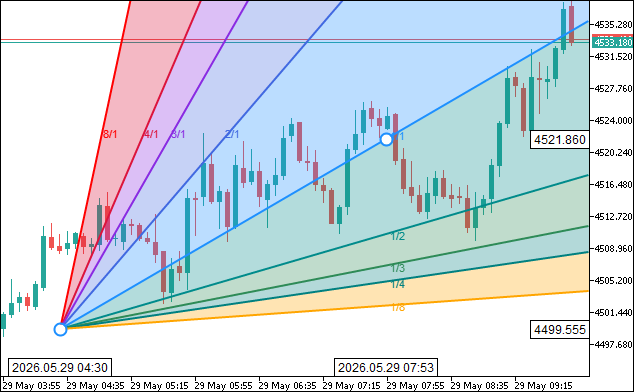
That was a success. The Gann grid implementation uses the same logic. We will now move on to the Fibonacci tools implementation. Similar logic persists, but we will organize this in a new file for future expansion, in case we need to, so we know where its logic lives.
Declaring the Fibonacci Tools Class
We move from the Gann tools to Fibonacci by declaring "CFibonacciTools", the next layer in the inheritance chain. This class extends "CChannelTools", so every channel helper, Gann ray helper, and pixel primitive we built up to this point becomes available to the six Fibonacci tools without re-declaration.
//+------------------------------------------------------------------+
//|                                       ToolsPalette_Fibonacci.mqh |
//|                           Copyright 2026, Allan Munene Mutiiria. |
//|                                   https://t.me/Forex_Algo_Trader |
//+------------------------------------------------------------------+
#ifndef TOOLS_PALETTE_FIBONACCI_MQH
#define TOOLS_PALETTE_FIBONACCI_MQH

//--- Include the channel tools layer that CFibonacciTools extends
#include "ToolsPalette_Channels.mqh"

//+------------------------------------------------------------------+
//| Fibonacci tool library: retracement, expansion, channel,         |
//| time zone, fan, and arcs                                         |
//+------------------------------------------------------------------+
class CFibonacciTools : public CChannelTools
  {
protected:
   color   FibColorForLevel(double lvl) const; // Return canonical color for a Fibonacci ratio level
   void    FiboDrawLabel(CCanvas &canvas, const string text,
                         int anchorX, int anchorY, color textColor,
                         int fontPxSize = 8); // Wrap GannDrawLabel for Fib label rendering

   //--- Trace an anti-aliased parametric circular arc at (cx, cy) with given radius
   void    FiboDrawArc(CCanvas &canvas, int cx, int cy, double radius,
                       double startAngle, double endAngle,
                       uint argb, int thickness);

public:
   //--- Draw Fib Retracement horizontal ratio lines between two price anchors
   void   DrawFibRetracementOn(CCanvas &canvas,
                               int x1, int y1, int x2, int y2,
                               color objColor, bool selected, bool hovered,
                               const double &lvlRatio[], const color &lvlColor[],
                               const int &lvlOpacity[], const int &lvlWidth[],
                               const int &lvlStyle[],   const bool &lvlVisible[]);
   //--- Hit test Fib Retracement body
   bool   HitTestFibRetracement(int mx, int my, int canvasW,
                                int x1, int y1, int x2, int y2, int threshold);

   //--- Draw Fib Expansion projected extensions from 3-click anchors
   void   DrawFibExpansionOn(CCanvas &canvas,
                             int x1, int y1, int x2, int y2, int x3, int y3,
                             color objColor, bool selected, bool hovered,
                             const double &lvlRatio[], const color &lvlColor[],
                             const int &lvlOpacity[], const int &lvlWidth[],
                             const int &lvlStyle[],   const bool &lvlVisible[]);
   //--- Hit test Fib Expansion body
   bool   HitTestFibExpansion(int mx, int my, int canvasW,
                              int x1, int y1, int x2, int y2, int x3, int y3,
                              int threshold);

   //--- Draw Fib Channel parallel ratio lines from 3-click anchors
   void   DrawFibChannelOn(CCanvas &canvas,
                           int x1, int y1, int x2, int y2, int x3, int y3,
                           color objColor, bool selected, bool hovered,
                           const double &lvlRatio[], const color &lvlColor[],
                           const int &lvlOpacity[], const int &lvlWidth[],
                           const int &lvlStyle[],   const bool &lvlVisible[]);
   //--- Hit test Fib Channel body
   bool   HitTestFibChannel(int mx, int my, int canvasW,
                            int x1, int y1, int x2, int y2, int x3, int y3,
                            int threshold);

   //--- Draw Fib Time Zone vertical lines at Fibonacci multiples of the unit interval
   void   DrawFibTimeZoneOn(CCanvas &canvas,
                            int x1, int y1, int x2, int y2,
                            color objColor, bool selected, bool hovered,
                            const double &lvlRatio[], const color &lvlColor[],
                            const int &lvlOpacity[], const int &lvlWidth[],
                            const int &lvlStyle[],   const bool &lvlVisible[]);
   //--- Hit test Fib Time Zone body
   bool   HitTestFibTimeZone(int mx, int my, int canvasH,
                             int x1, int y1, int x2, int y2, int threshold);

   //--- Draw Fib Speed Resistance Fan price and time ray families
   void   DrawFibFanOn(CCanvas &canvas,
                       int x1, int y1, int x2, int y2,
                       color objColor, bool selected, bool hovered,
                       const double &lvlRatio[], const color &lvlColor[],
                       const int &lvlOpacity[], const int &lvlWidth[],
                       const int &lvlStyle[],   const bool &lvlVisible[]);
   //--- Hit test Fib Fan body
   bool   HitTestFibFan(int mx, int my, int canvasW, int canvasH,
                        int x1, int y1, int x2, int y2, int threshold);

   //--- Draw Fib Speed Resistance Arcs concentric semicircles
   void   DrawFibArcsOn(CCanvas &canvas,
                        int x1, int y1, int x2, int y2,
                        color objColor, bool selected, bool hovered,
                        const double &lvlRatio[], const color &lvlColor[],
                        const int &lvlOpacity[], const int &lvlWidth[],
                        const int &lvlStyle[],   const bool &lvlVisible[]);
   //--- Hit test Fib Arcs body
   bool   HitTestFibArcs(int mx, int my,
                         int x1, int y1, int x2, int y2, int threshold);
  };
We guard the header with the "TOOLS_PALETTE_FIBONACCI_MQH" include macro and pull in the channels header to inherit its full surface. Three protected helpers are declared first: "FibColorForLevel" returns the canonical color for a Fibonacci ratio (gold for 0.5, sea green for 0.618, and so on), "FiboDrawLabel" is a thin wrapper over "GannDrawLabel" to keep call sites readable, and "FiboDrawArc" traces an anti-aliased parametric arc at a center and radius — needed specifically by the Fibonacci speed resistance arcs tool.
The public surface declares the six Fibonacci draw routines and their matching hit testers. "DrawFibRetracementOn" and "DrawFibTimeZoneOn" are two-click tools, while "DrawFibExpansionOn" and "DrawFibChannelOn" are three-click tools that need a third anchor. "DrawFibFanOn" and "DrawFibArcsOn" round out the family with the two speed-resistance variants. Every draw routine takes the same six per-level arrays — ratios, colors, opacities, widths, styles, and visibility flags — so the engine can pass the object's stored level configuration directly without unpacking it, and every hit tester takes the canvas dimensions it needs (width, height, or both) to clip rays and arcs to the canvas during cursor distance computation. With the protocol declared, we move on to the implementations. We will implement the Fibonacci retracement logic, and the others will follow the same approach.
Fibonacci Helpers and Fib Retracement
We implement the three Fibonacci helpers — color lookup, label wrapper, and parametric arc tracer — and then the Fib retracement tool itself. The retracement renders horizontal ratio lines between two price anchors with translucent band fills between adjacent levels.
//+------------------------------------------------------------------+
//| Return the canonical color for a recognized Fibonacci ratio      |
//+------------------------------------------------------------------+
color CFibonacciTools::FibColorForLevel(double lvl) const
  {
   //--- Use a small epsilon for floating-point safe comparison
   double eps = 1e-4;
   if(MathAbs(lvl - 0.0)   < eps) return clrGray;
   if(MathAbs(lvl - 0.236) < eps) return clrCrimson;
   if(MathAbs(lvl - 0.382) < eps) return clrOrange;
   if(MathAbs(lvl - 0.5)   < eps) return clrGoldenrod;
   if(MathAbs(lvl - 0.618) < eps) return clrSeaGreen;
   if(MathAbs(lvl - 0.786) < eps) return clrDarkCyan;
   if(MathAbs(lvl - 1.0)   < eps) return clrGray;
   if(MathAbs(lvl - 1.618) < eps) return clrDodgerBlue;
   if(MathAbs(lvl - 2.618) < eps) return clrMediumOrchid;
   if(MathAbs(lvl - 3.618) < eps) return clrBlueViolet;
   if(MathAbs(lvl - 4.236) < eps) return clrCrimson;
   if(MathAbs(lvl - 4.618) < eps) return clrDeepPink;
   //--- Unrecognized ratio: fall back to the project default color
   return clrDodgerBlue;
  }

//+------------------------------------------------------------------+
//| Wrap GannDrawLabel for Fib-context label rendering               |
//+------------------------------------------------------------------+
void CFibonacciTools::FiboDrawLabel(CCanvas &canvas, const string text,
                                    int anchorX, int anchorY, color textColor,
                                    int fontPxSize)
  {
   GannDrawLabel(canvas, text, anchorX, anchorY, textColor, fontPxSize);
  }

//+------------------------------------------------------------------+
//| Trace an anti-aliased parametric arc from startAngle to endAngle |
//+------------------------------------------------------------------+
void CFibonacciTools::FiboDrawArc(CCanvas &canvas, int cx, int cy, double radius,
                                   double startAngle, double endAngle,
                                   uint argb, int thickness)
  {
   //--- Skip degenerate radii
   if(radius < 0.5) return;
   int cW = canvas.Width(), cH = canvas.Height();
   //--- Compute step count so each step is roughly 1 pixel of arc length
   double arcLen = MathAbs(endAngle - startAngle) * radius;
   int steps = (int)MathCeil(arcLen);
   if(steps < 8)    steps = 8;
   if(steps > 4000) steps = 4000;
   double da = (endAngle - startAngle) / (double)steps;
   //--- 2px thickness uses two offset passes; 1px uses only the centerline
   int passes = (thickness >= 2) ? 2 : 1;
   for(int s = 0; s <= steps; s++)
     {
      double a       = startAngle + da * (double)s;
      double xCenter = (double)cx + radius * MathCos(a);
      double yCenter = (double)cy - radius * MathSin(a); // screen Y flip
      for(int p = 0; p < passes; p++)
        {
         double off = (passes == 1) ? 0.0 : (p == 0 ? -0.5 : 0.5);
         double xf  = xCenter + off * MathCos(a);
         double yf  = yCenter + off * (-MathSin(a));
         int ix = (int)MathFloor(xf), iy = (int)MathFloor(yf);
         double dx = xf - ix, dy = yf - iy;
         //--- 4-pixel bilinear coverage for anti-aliasing
         double covs[4] = { (1.0-dx)*(1.0-dy), dx*(1.0-dy), (1.0-dx)*dy, dx*dy };
         int    pxs[4]  = { ix, ix+1, ix,   ix+1 };
         int    pys[4]  = { iy, iy,   iy+1, iy+1 };
         for(int k = 0; k < 4; k++)
           {
            int px = pxs[k], py = pys[k];
            if(px < 0 || px >= cW || py < 0 || py >= cH) continue;
            double cov = covs[k];
            if(cov <= 0.0) continue;
            //--- Extract source channels and apply coverage-weighted alpha
            uchar srcA = (uchar)((argb >> 24) & 0xFF);
            uchar srcR = (uchar)((argb >> 16) & 0xFF);
            uchar srcG = (uchar)((argb >>  8) & 0xFF);
            uchar srcB = (uchar)( argb        & 0xFF);
            double effA = (double)srcA / 255.0 * cov;
            uint   existing = canvas.PixelGet(px, py);
            double dA  = ((existing >> 24) & 0xFF) / 255.0;
            double oA  = effA + dA * (1.0 - effA);
            if(oA <= 0.0) continue;
            //--- Composite over the existing pixel
            double dRf = ((existing >> 16) & 0xFF) / 255.0;
            double dGf = ((existing >>  8) & 0xFF) / 255.0;
            double dBf = ( existing        & 0xFF) / 255.0;
            double sRf = srcR / 255.0, sGf = srcG / 255.0, sBf = srcB / 255.0;
            uint outPix = ((uint)(uchar)(oA * 255.0 + 0.5) << 24) |
                          ((uint)(uchar)((sRf*effA + dRf*dA*(1.0-effA)) / oA * 255.0 + 0.5) << 16) |
                          ((uint)(uchar)((sGf*effA + dGf*dA*(1.0-effA)) / oA * 255.0 + 0.5) <<  8) |
                           (uint)(uchar)((sBf*effA + dBf*dA*(1.0-effA)) / oA * 255.0 + 0.5);
            canvas.PixelSet(px, py, outPix);
           }
        }
     }
  }

//+------------------------------------------------------------------+
//| Draw Fib Retracement horizontal ratio lines between two anchors  |
//+------------------------------------------------------------------+
void CFibonacciTools::DrawFibRetracementOn(CCanvas &canvas,
                                           int x1, int y1, int x2, int y2,
                                           color objColor, bool selected, bool hovered,
                                           const double &lvlRatio[], const color &lvlColor[],
                                           const int &lvlOpacity[], const int &lvlWidth[],
                                           const int &lvlStyle[],   const bool &lvlVisible[])
  {
   const int nLev = ArraySize(lvlRatio);
   if(nLev <= 0) return;
   //--- Lines span strictly between P1 and P2 on the X axis
   const int xL = MathMin(x1, x2);
   const int xR = MathMax(x1, x2);
   //--- Fill translucent bands between adjacent visible levels
   const uchar bandAlpha = 77;
   int prevVisIdx = -1;
   for(int i = 0; i < nLev; i++)
     {
      if(!lvlVisible[i]) continue;
      if(prevVisIdx >= 0)
        {
         const int  ly1   = y1 + (int)MathRound((double)(y2 - y1) * lvlRatio[prevVisIdx]);
         const int  ly2   = y1 + (int)MathRound((double)(y2 - y1) * lvlRatio[i]);
         const uint fArgb = ColorToARGB(lvlColor[i], bandAlpha);
         const int  yTop  = MathMin(ly1, ly2);
         const int  yBot  = MathMax(ly1, ly2);
         ChannelFillQuad(canvas, xL, yTop, xR, yTop, xR, yBot, xL, yBot, fArgb);
        }
      prevVisIdx = i;
     }
   //--- Draw horizontal ratio lines and labels per visible level
   for(int i = 0; i < nLev; i++)
     {
      if(!lvlVisible[i]) continue;
      const int   ly    = y1 + (int)MathRound((double)(y2 - y1) * lvlRatio[i]);
      const color lCol  = lvlColor[i];
      const uint  lArgb = ColorWithPercentOpacity(lCol, lvlOpacity[i]);
      const int   thick = (lvlWidth[i] > 0) ? lvlWidth[i] : 2;
      const int   style = lvlStyle[i];
      if(style == 0)
        {
         DrawThickLine(canvas, xL, ly, xR, ly, thick, lArgb);
        }
      else
        {
         int pat[];
         const int pn = BuildLineStylePattern(style, thick, pat);
         if(pn > 0) WidgetDashedLineAA(canvas, xL, ly, xR, ly, thick, lArgb, pat);
         else       DrawThickLine(canvas, xL, ly, xR, ly, thick, lArgb);
        }
      //--- Format ratio label and strip trailing zeros
      string lbl = DoubleToString(lvlRatio[i], 3);
      while(StringLen(lbl) > 1 && StringSubstr(lbl, StringLen(lbl) - 1, 1) == "0")
         lbl = StringSubstr(lbl, 0, StringLen(lbl) - 1);
      if(StringLen(lbl) > 0 && StringSubstr(lbl, StringLen(lbl) - 1, 1) == ".")
         lbl = StringSubstr(lbl, 0, StringLen(lbl) - 1);
      const int fontPx = 8, labelGap = 7, glyphPadX = 3;
      TextSetFont("Arial", -(fontPx * 10));
      uint twU = 0, thU = 0;
      TextGetSize(lbl, twU, thU);
      const int tw = (int)twU, th = (int)thU;
      FiboDrawLabel(canvas, lbl, xL - (labelGap + glyphPadX) - tw, ly - th / 2, lCol, fontPx);
     }
   //--- Dashed connector showing the anchored swing
   ChannelDrawDashedLine(canvas, x1, y1, x2, y2, ColorToARGB(clrDodgerBlue, 200));
   //--- 2 handles at the anchor points
   if(selected || hovered)
     {
      if(m_hideHandleIdx != 0) DrawHandleOnCanvas(canvas, x1, y1, selected, objColor, m_haloHandleIdx == 0);
      if(m_hideHandleIdx != 1) DrawHandleOnCanvas(canvas, x2, y2, selected, objColor, m_haloHandleIdx == 1);
     }
  }

//+------------------------------------------------------------------+
//| Hit test Fib Retracement body                                    |
//+------------------------------------------------------------------+
bool CFibonacciTools::HitTestFibRetracement(int mx, int my, int canvasW,
                                            int x1, int y1, int x2, int y2, int threshold)
  {
   double levels[] = {0.0, 0.236, 0.382, 0.5, 0.618, 0.786, 1.0,
                      1.618, 2.618, 3.618, 4.236};
   int nLev = ArraySize(levels);
   int xL   = MathMin(x1, x2);
   int xR   = MathMax(x1, x2);
   for(int i = 0; i < nLev; i++)
     {
      int ly = y1 + (int)MathRound((double)(y2 - y1) * levels[i]);
      if(PointToSegmentDistance(mx, my, xL, ly, xR, ly) <= threshold) return true;
     }
   return false;
  }
Here, "FibColorForLevel" is a simple lookup that matches the given ratio against the canonical Fibonacci values within a small epsilon and returns the corresponding color (gray for 0.0 and 1.0, crimson for 0.236, orange for 0.382, goldenrod for 0.5, sea green for 0.618, dark cyan for 0.786, and so on through the extension levels). Unrecognized ratios fall back to DodgerBlue. This is what we have been using as the default color all along; you can choose any of your liking. "FiboDrawLabel" is a one-line wrapper that delegates to "GannDrawLabel" — keeping the call sites readable is the only reason it exists.
"FiboDrawArc" traces an anti-aliased parametric arc by stepping through the angle range at approximately one pixel per step. For each step, we compute the floating-point arc position via MathCos and MathSin, with a Y-axis flip since screen coordinates grow downward. We then distribute the pixel's coverage across its four neighboring integer pixels using bilinear weights — each pixel gets a coverage value equal to the product of its X and Y proximity to the floating-point position, and the source alpha is multiplied by this coverage before compositing. This is what gives the arc its smooth edges instead of the jaggy staircase a naive plot would produce. For a two-pixel thickness, we run two offset passes, one shifted half a pixel inward along the radial direction and one half a pixel outward, giving the arc a double-thickness without aliasing seams.
"DrawFibRetracementOn" starts by computing the left and right X coordinates so the lines span strictly between the two anchors, regardless of draw direction. For the band fills, we walk the visible levels and, for each pair of adjacent visible levels, compute the two Y positions by linearly interpolating between the anchor Y values using the level ratio, then call "ChannelFillQuad" to scanline-fill the band with a low-alpha translucent color. The ratio lines themselves are drawn with "DrawThickLine" or "WidgetDashedLineAA" depending on the style, and each visible level gets a label rendered to the left of the line via "FiboDrawLabel" with trailing zeros stripped from the formatted ratio. A dashed connector via "ChannelDrawDashedLine" shows the anchored swing between the two anchors, and two handles are drawn at the anchor points when the object is selected or hovered.
"HitTestFibRetracement" reconstructs the same eleven canonical ratios as a hardcoded array, computes each line's Y position from the level ratio, and tests the cursor distance against each horizontal segment using the inherited "PointToSegmentDistance" helper. This gives the following outcome.

From the visualization, we can see the Fibonacci retracement is rendered correctly with color fills. Again, we presented the terminal's retracement with default values for easier comparison. The rest of the tools use the same approach. What remains is to integrate these tools into the engine for completeness so they inherit the full control capabilities like hit test handles, redrawing, memory update, and registration. This is handled in the next section.
Integrating the New Tools into the Drawing Engine
Routing Hit Tests to the New Tools
We define "HitTestAllObjects" to walk every drawn object and dispatch the cursor position to the matching hit tester. This is the function the engine calls on every mouse move to figure out which object (if any) the cursor is over, and the dispatch switch is where the new channel, pitchfork, Gann, and Fibonacci tools plug into the existing hit testing pipeline.
//+------------------------------------------------------------------+
//| Hit test all drawn objects; return the topmost hit object ID     |
//+------------------------------------------------------------------+
int CDrawingEngine::HitTestAllObjects(int mouseX, int mouseY)
  {
   int n = ArraySize(m_drawnObjects);
   //--- Iterate in reverse draw order so the topmost object wins
   for(int i = n - 1; i >= 0; i--)
     {
      if(!m_drawnObjects[i].visible) continue;
      //--- Map all three anchors to screen coordinates
      int x1=0, y1=0, x2=0, y2=0, x3=0, y3=0;
      ChartTimePriceToXY(m_chartId, 0,
                         m_drawnObjects[i].time1, m_drawnObjects[i].price1, x1, y1);
      if(m_drawnObjects[i].time2 != 0)
         ChartTimePriceToXY(m_chartId, 0,
                            m_drawnObjects[i].time2, m_drawnObjects[i].price2, x2, y2);
      if(m_drawnObjects[i].time3 != 0)
         ChartTimePriceToXY(m_chartId, 0,
                            m_drawnObjects[i].time3, m_drawnObjects[i].price3, x3, y3);
      bool hit = false;
      switch(m_drawnObjects[i].toolType)
        {
         case TOOL_TRENDLINE:
         case TOOL_RAY:
         case TOOL_EXTENDED_LINE:
         case TOOL_TREND_ANGLE:
            hit = HitTestTrendLine(mouseX, mouseY, x1, y1, x2, y2, m_hitThreshold);
            break;
         case TOOL_INFO_LINE:
            //--- Hit on either the line body or its floating info panel
            hit = HitTestTrendLine(mouseX, mouseY, x1, y1, x2, y2, m_hitThreshold) ||
                  HitTestInfoLinePanel(mouseX, mouseY);
            break;
         case TOOL_HLINE:
            hit = HitTestHorizontalLine(mouseX, mouseY, y1, m_hitThreshold);
            break;
         case TOOL_VLINE:
            hit = HitTestVerticalLine(mouseX, mouseY, x1, m_hitThreshold);
            break;
         case TOOL_CROSS_LINE:
            //--- Hit on either the H-line or V-line component
            hit = HitTestHorizontalLine(mouseX, mouseY, y1, m_hitThreshold) ||
                  HitTestVerticalLine(mouseX, mouseY, x1, m_hitThreshold);
            break;
         case TOOL_RECTANGLE:
            hit = HitTestRectangle(mouseX, mouseY, x1, y1, x2, y2);
            break;
         case TOOL_FIBO_RETRACEMENT:
            hit = HitTestFibRetracement(mouseX, mouseY,
                                        m_canvasDrawings.Width(),
                                        x1, y1, x2, y2, m_hitThreshold);
            break;
         case TOOL_FIBO_EXPANSION:
            hit = HitTestFibExpansion(mouseX, mouseY,
                                      m_canvasDrawings.Width(),
                                      x1, y1, x2, y2, x3, y3, m_hitThreshold);
            break;
         case TOOL_FIBO_CHANNEL:
            hit = HitTestFibChannel(mouseX, mouseY,
                                    m_canvasDrawings.Width(),
                                    x1, y1, x2, y2, x3, y3, m_hitThreshold);
            break;
         case TOOL_FIBO_TIMEZONES:
            hit = HitTestFibTimeZone(mouseX, mouseY,
                                     m_canvasDrawings.Height(),
                                     x1, y1, x2, y2, m_hitThreshold);
            break;
         case TOOL_FIBO_FAN:
            hit = HitTestFibFan(mouseX, mouseY,
                                m_canvasDrawings.Width(), m_canvasDrawings.Height(),
                                x1, y1, x2, y2, m_hitThreshold);
            break;
         case TOOL_FIBO_ARCS:
            hit = HitTestFibArcs(mouseX, mouseY,
                                 x1, y1, x2, y2, m_hitThreshold);
            break;
         case TOOL_PARALLEL_CHANNEL:
            hit = HitTestParallelChannel(mouseX, mouseY,
                                         x1, y1, x2, y2, x3, y3, m_hitThreshold);
            break;
         case TOOL_REGRESSION_CHANNEL:
            hit = HitTestRegressionChannel(mouseX, mouseY, m_chartId,
                                           m_drawnObjects[i].time1,
                                           m_drawnObjects[i].time2, m_hitThreshold);
            break;
         case TOOL_STDDEV_CHANNEL:
            hit = HitTestStdDevChannel(mouseX, mouseY, m_chartId,
                                       m_drawnObjects[i].time1,
                                       m_drawnObjects[i].time2, m_hitThreshold);
            break;
         case TOOL_PITCHFORK:
            hit = HitTestAndrewsPitchfork(mouseX, mouseY,
                                          m_canvasDrawings.Width(), m_canvasDrawings.Height(),
                                          x1, y1, x2, y2, x3, y3, m_hitThreshold);
            break;
         case TOOL_SCHIFF_PITCHFORK:
            hit = HitTestSchiffPitchfork(mouseX, mouseY,
                                         m_canvasDrawings.Width(), m_canvasDrawings.Height(),
                                         x1, y1, x2, y2, x3, y3, m_hitThreshold);
            break;
         case TOOL_MOD_SCHIFF:
            hit = HitTestModSchiffPitchfork(mouseX, mouseY,
                                            m_canvasDrawings.Width(), m_canvasDrawings.Height(),
                                            x1, y1, x2, y2, x3, y3, m_hitThreshold);
            break;
         case TOOL_GANN_LINE:
            hit = HitTestGannLine(mouseX, mouseY,
                                  m_canvasDrawings.Width(), m_canvasDrawings.Height(),
                                  x1, y1, x2, y2, m_hitThreshold);
            break;
         case TOOL_GANN_FAN:
            hit = HitTestGannFan(mouseX, mouseY,
                                 m_canvasDrawings.Width(), m_canvasDrawings.Height(),
                                 x1, y1, x2, y2, m_hitThreshold);
            break;
         case TOOL_GANN_BOX:
            hit = HitTestGannBox(mouseX, mouseY,
                                 x1, y1, x2, y2, m_hitThreshold);
            break;
         default: break;
        }
      if(hit) return m_drawnObjects[i].id;
     }
   return -1;
  }
We iterate the drawn objects in reverse draw order so the topmost rendered object wins on overlap, skipping any object whose visibility flag is false. For each candidate, we map all three potential anchor points to screen coordinates using ChartTimePriceToXY, with the second and third anchors only computed when their stored times are non-zero.
The switch then routes each tool to its specific hit tester. The basic line tools fall through their existing branches unchanged. The new tools each get their own case — "HitTestFibRetracement", "HitTestFibExpansion", "HitTestFibChannel", "HitTestFibTimeZone", "HitTestFibFan", and "HitTestFibArcs" for the Fibonacci family; "HitTestParallelChannel", "HitTestRegressionChannel", and "HitTestStdDevChannel" for channels; "HitTestAndrewsPitchfork", "HitTestSchiffPitchfork", and "HitTestModSchiffPitchfork" for the pitchforks; and "HitTestGannLine", "HitTestGannFan", and "HitTestGannBox" for the Gann tools. The first object that reports a hit returns its ID immediately. If no object claims the cursor, the function returns -1. That marks the complete implementation; we will next test its performance.
Visualization
We compile the program, attach it to the chart, and place every new tool in turn to confirm the engine handles all of them. The GIF below shows a typical session — placing a parallel channel, a regression channel with its sigma bands and Pearson R label, an Andrew's pitchfork, a Gann fan, a Fibonacci retracement, and the speed resistance arcs, then dragging handles to reshape them and clearing everything via the delete action tile.
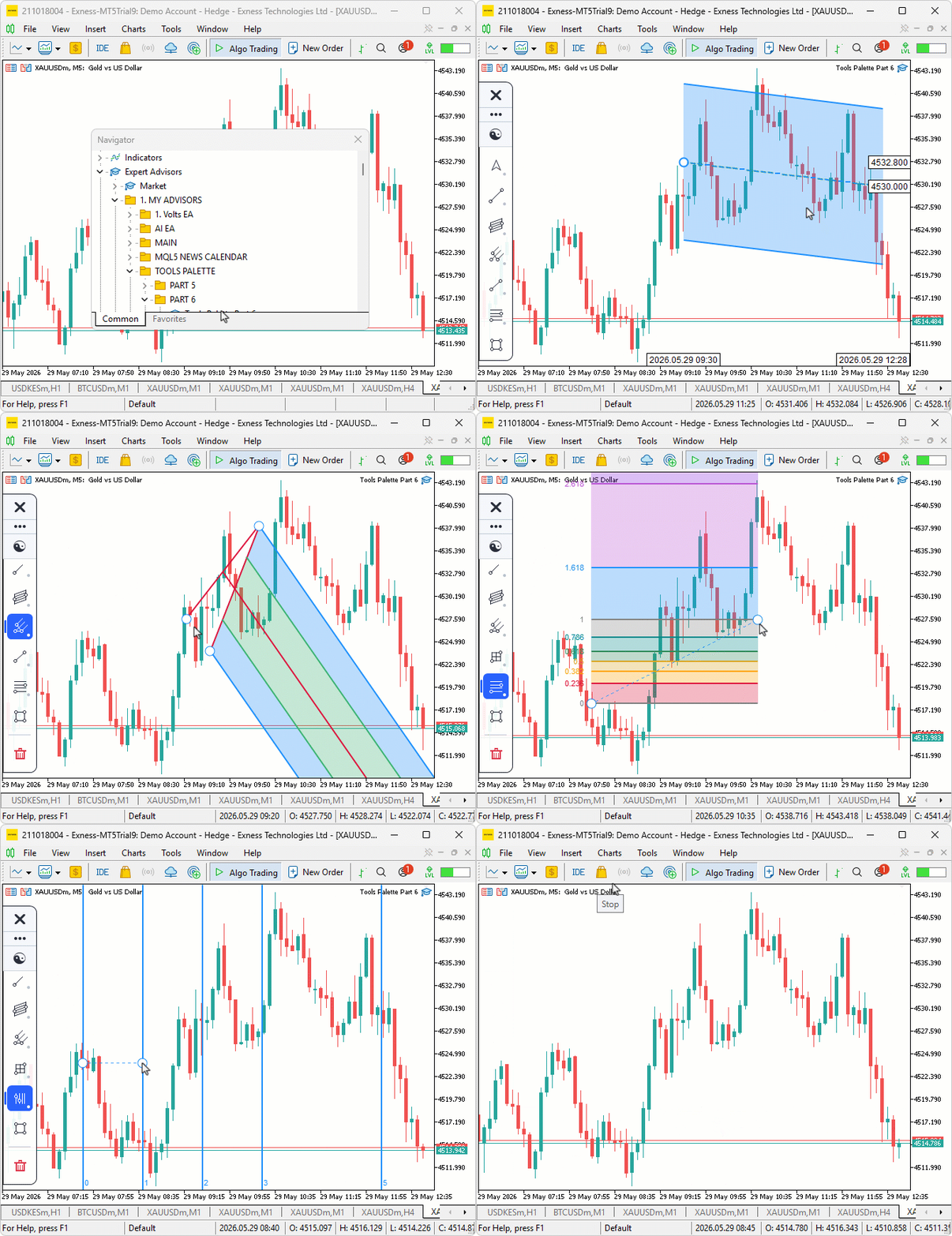
During testing, the rubber-band preview tracked the cursor cleanly between clicks for every three-click tool, the regression channel re-fit its center line on every redraw as new bars were printed, and the delete tile cleared the chart in a single click via its live drawing count flyout.
Conclusion
In conclusion, we extended the canvas drawing layer with fifteen analytical tools across the channels, pitchfork, Gann, and Fibonacci categories, plus a delete-all action tile. All tools share the same hit-testing, selection, reshape, and rubber-band preview pipeline. A tool-memory system preserves style settings across consecutive placements of the same tool. The new tools rely on a small set of shared helpers — alpha compositing, scanline polygon fill, ray-to-canvas-edge clipping, ordinary least squares (OLS) regression endpoint computation, and anti-aliased parametric arc tracing — layered into the inheritance chain so every tool reuses the same primitives. After reading this article, you will be able to:
- Implement multi-anchor analytical drawing tools on a custom canvas layer with derived handles that preserve geometric invariants on drag.
- Use OLS regression to compute live channel endpoints from market data and re-fit the regression on every redraw so the channel stays glued to the price action.
- Render translucent band fills, anti-aliased arcs, and dual-pass alpha-extracted text labels on a canvas without leaning on the native MetaTrader 5 chart objects.
In the next part of the series, we will add the shapes and annotations categories to the palette and wire up label editing so the user can type text directly into drawn label objects on the chart. Stay tuned.
Attachments
| S/N | Name | Type | Description |
|---|---|---|---|
| 1 | Tools Palette Part 6.zip | Archive | A ready-to-extract archive containing all 11 project files in a single folder. Unzip it into your MetaTrader 5 terminal data folder; the files will be placed under MQL5/Experts/ with every file in its correct location, ready to compile. |
Warning: All rights to these materials are reserved by MetaQuotes Ltd. Copying or reprinting of these materials in whole or in part is prohibited.
This article was written by a user of the site and reflects their personal views. MetaQuotes Ltd is not responsible for the accuracy of the information presented, nor for any consequences resulting from the use of the solutions, strategies or recommendations described.

 How to Detect and Normalize Chart Objects in MQL5 (Part 2): Collecting and Structuring Data from Complex Analytical Objects
 Feature Engineering for ML (Part 5): Microstructural Features in Python
 Recurrence Network Analysis (RNA) in MQL5: From Recurrence Matrices to Complex Networks
 Engineering Trading Discipline into Code (Part 7): Automating Equity Protection Through Governance Logic

- Free trading apps
- Over 8,000 signals for copying
- Economic news for exploring financial markets
You agree to website policy and terms of use