

MQL5 Trading Tools (Part 36): Adding Shape and Annotation Tools with In-Place Label Editing to the Canvas Drawing Layer
 1 145
1 145
 2
2

Introduction
In the previous article (Part 35), we extended the canvas drawing layer with seven categories of multi-anchor analytical drawing tools — channels, pitchforks, Gann, and Fibonacci — wired into the same hit testing, selection, reshape, and rubber-band preview pipeline as the basic line tools. The analytical toolkit is now complete, but the canvas is still missing two things that any serious chart annotation workflow depends on: shapes that the trader can fill and reshape (rectangles, triangles, circles, ellipses, arcs, curves, paths, rotated rectangles), and annotation tools that carry editable text (notes, callouts, comments, arrows, price labels). Without these, the canvas is read-only — the trader can mark structure but cannot label it, scribble a comment on a setup, or pin a price note next to a level.
We added seventeen new tools across two categories. The shapes category brings eight tools — Rectangle (now with eight handles), Triangle, Rotated Rectangle, Rotated Ellipse, Path (N-point polyline), Circle, Arc (quadratic Bezier with clamped apex), and Curve (quadratic Bezier with free apex). The annotations category brings the remaining nine: Text, Arrow, Arrow Marker, Arrow Up, Arrow Down, Note, Price Note, Callout, and Comment. Most of these tools have editable labels, so we implement an in-place canvas text editor. It supports a caret-driven edit state machine, multi-line word wrap (binary-search prefix fitting), supersampled text rendering with per-pixel alpha extraction, click-to-caret mapping, Windows virtual-key to Unicode translation, and shift-arrow selection.
This article is written for the intermediate-to-advanced MetaQuotes Language 5 (MQL5) developer who is comfortable with the inheritance chain we built up in the previous parts. The subtopics we will cover are:
- From Analytical Tools to Visual Annotations with Editable Text
- Implementing the Shape Tools
- Implementing the Annotation Tools
- Implementing the In-Place Label Editing System
- Visualization
- Conclusion
By the end, the canvas drawing layer will host a full set of shape and annotation tools with editable text labels, and the trader will be able to click any annotation to type directly on the chart with a blinking caret, word wrap, arrow-key navigation, and shift-arrow selection — all rendered as anti-aliased pixels on the canvas without leaning on a single native MetaTrader 5 chart object.
From Analytical Tools to Visual Annotations with Editable Text
The tools we have added so far all describe structure on the chart. A channel envelopes a trend. A pitchfork frames a swing. A Fibonacci retracement marks key ratios. However, none of them carries the meaning that the trader has authored in their own words. For example, a regression channel cannot say "this is the buy zone if price holds 1.0865." A Gann fan cannot annotate which ray the next reaction came from. The new tools fix this. They add filled shapes for visual emphasis and editable text annotations.
The new tools fall into two categories (shapes and annotations) and share a third architectural layer: in-place text editing. Shapes are filled regions defined by two or three anchor points, with a translucent fill rendered using signed-distance anti-aliasing. This makes the edges look clean even on rotated geometry. Annotations are markers that carry user text. A Note pins a rectangle to an anchor with a connector line. A Callout extends a tail from the rectangle to point at something. A Comment tucks a rounded badge against a click point. An Arrow draws a directional indicator with a filled triangular head. The text editing layer is the most demanding piece. We need a word-wrap that finds the right break point per visual line through binary search prefix measurement. There is a blinking caret driven by a timer. Mouse-click coordinates are translated into character positions. Windows virtual-key capture enables typing. Arrow-key navigation respects visual lines after wrap. Shift-arrow extends selection. A chart keyboard control override ensures typing does not trigger MetaTrader 5's own navigation. We did much of this on the AI series, so we will just refer to it, since the same logic is used here.
To avoid rewriting the inheritance chain, we add two layers. "CFibonacciTools" becomes the base for "CShapeTools", and "CShapeTools" becomes the base for "CAnnotationTools". "CAnnotationTools" then becomes the parent of the tool registry and the drawing engine. Each layer adds draw routines, hit testers, and shared helpers. These include supersampled rounded-rectangle fills, dual-pass black/white alpha extraction for text, point-in-polygon tests for filled silhouettes, two-pass separable box blurs for drop shadows, and shared word-wrap and text-rendering utilities. All this is inspired by the default MQL5 web chart analysis tools, which we went an extra mile to extend. Have a look below at a visualization of our objectives.

With that map in place, we can move on to the implementation.
Implementing the Shape Tools
Declaring the Shape Tools Class
We open the implementation by declaring "CShapeTools", the new layer that extends the Fibonacci tools class with shape drawing primitives. We use it as the protocol layer for the eight new shape tools, declaring every public draw routine and hit tester so the drawing engine has a stable surface to call into.
//+------------------------------------------------------------------+
//|                                          ToolsPalette_Shapes.mqh |
//|                           Copyright 2026, Allan Munene Mutiiria. |
//|                                   https://t.me/Forex_Algo_Trader |
//+------------------------------------------------------------------+
#property copyright "Copyright 2026, Allan Munene Mutiiria."
#property link "https://t.me/Forex_Algo_Trader"
#property version "1.00"
#property strict

//--- Guard against multiple inclusion of this header
#ifndef TOOLS_PALETTE_SHAPES_MQH
#define TOOLS_PALETTE_SHAPES_MQH

//--- Pull in CFibonacciTools (the parent class in the tool chain)
#include "ToolsPalette_Fibonacci.mqh"

//+------------------------------------------------------------------+
//| CShapeTools owns the geometric shape drawing and hit-test paths  |
//+------------------------------------------------------------------+
class CShapeTools : public CFibonacciTools
  {
public:
   //--- Rectangle: 2 stored anchors (opposite corners) + 8 derived handles
   void   DrawRectangleOn(CCanvas &canvas, int x1, int y1, int x2, int y2,
                           color objColor, bool selected, bool hovered,
                           int lineWidth = 2, int lineOpacity = 100,
                           int lineStyle = 0,
                           color fillColor = clrNONE, int fillOpacity = 30);

   //--- Triangle: 3 vertex anchors (P1, P2, P3); each handle drags one vertex
   void   DrawTriangleOn(CCanvas &canvas,
                          int x1, int y1, int x2, int y2, int x3, int y3,
                          color objColor, bool selected, bool hovered,
                          int lineWidth = 2, int lineOpacity = 100,
                          int lineStyle = 0,
                          color fillColor = clrNONE, int fillOpacity = 30);
   bool   HitTestTriangle(int mx, int my,
                           int x1, int y1, int x2, int y2, int x3, int y3,
                           int threshold);
   //--- Sign-of-cross-product point-in-triangle test (helper for HitTestTriangle)
   bool   HitTestTriangleInside(int mx, int my,
                                 int x1, int y1, int x2, int y2, int x3, int y3);

   //--- Rotated Ellipse: P1, P2 = major-axis endpoints; P3 sets perpendicular semi-minor distance
   void   DrawEllipseOn(CCanvas &canvas, int x1, int y1, int x2, int y2, int x3, int y3,
                         color objColor, bool selected, bool hovered,
                         int lineWidth = 2, int lineOpacity = 100,
                         int lineStyle = 0,
                         color fillColor = clrNONE, int fillOpacity = 30);
   bool   HitTestEllipseRotated(int mx, int my,
                                 int x1, int y1, int x2, int y2, int x3, int y3,
                                 int threshold);

   //--- Compute the 6 handle positions for the rotated rectangle (canonical TL/TR/BR/BL order)
   void   ComputeRotatedRectHandles(int x1, int y1, int x2, int y2, int x3, int y3,
                                     int &outX[], int &outY[]);
   //--- Rotated Rectangle: P1-P2 sets the length/axis; P3 inflates the perpendicular width
   void   DrawRotatedRectangleOn(CCanvas &canvas,
                                  int x1, int y1, int x2, int y2, int x3, int y3,
                                  color objColor, bool selected, bool hovered,
                                  int lineWidth = 2, int lineOpacity = 100,
                                  int lineStyle = 0,
                                  color fillColor = clrNONE, int fillOpacity = 30);
   bool   HitTestRotatedRectangle(int mx, int my,
                                   int x1, int y1, int x2, int y2, int x3, int y3,
                                   int threshold);

   //--- Path (polyline): N-point arrays; draws N-1 SDF AA segments + optional arrowhead
   void   DrawPathOn(CCanvas &canvas,
                      const int &xs[], const int &ys[],
                      color objColor, bool selected, bool hovered,
                      bool drawArrowhead = true,
                      int lineWidth = 2, int lineOpacity = 100,
                      int lineStyle = 0);
   bool   HitTestPath(int mx, int my, const int &xs[], const int &ys[], int threshold);

   //--- Circle: P1 = center, P2 = border point; radius = screen-distance(P1, P2)
   void   DrawCircleOn(CCanvas &canvas,
                        int cx, int cy, int bx, int by,
                        color objColor, bool selected, bool hovered,
                        bool hideCenterHandle,
                        int lineWidth = 2, int lineOpacity = 100,
                        int lineStyle = 0,
                        color fillColor = clrNONE, int fillOpacity = 30);
   bool   HitTestCircle(int mx, int my, int cx, int cy, int bx, int by, int threshold);

   //--- Arc: 3-click quadratic Bezier (P1=start, P2=end, P3=clamped apex); chord-enclosed fill
   void   DrawArcOn(CCanvas &canvas,
                     int x1, int y1, int x2, int y2, int x3, int y3,
                     color objColor, bool selected, bool hovered,
                     int lineWidth = 2, int lineOpacity = 100,
                     int lineStyle = 0,
                     color fillColor = clrNONE, int fillOpacity = 30);
   bool   HitTestArc(int mx, int my, int x1, int y1, int x2, int y2, int x3, int y3,
                      int threshold);
   //--- Compute the clamped apex (apX, apY) and the X-component of the Bezier control point
   bool   ArcCircumcircle(int x1, int y1, int x2, int y2, int x3, int y3,
                           double &apX, double &apY, double &cpX);

   //--- Curve: 3-click quadratic Bezier with FREE apex (no clamp, no fill, no chord)
   void   DrawCurveOn(CCanvas &canvas,
                       int x1, int y1, int x2, int y2, int x3, int y3,
                       color objColor, bool selected, bool hovered,
                       int lineWidth = 2, int lineOpacity = 100,
                       int lineStyle = 0);
   bool   HitTestCurve(int mx, int my, int x1, int y1, int x2, int y2, int x3, int y3,
                        int threshold);
  };
We start by guarding the header with the "TOOLS_PALETTE_SHAPES_MQH" include macro, then we pull in the Fibonacci tools header. To get the alpha-compositing primitives, scanline polygon fill, regression endpoint helper, and dual-pass label renderer from the previous parts, we inherit from "CFibonacciTools" so none of those need re-declaring here.
Next, we declare eight shape tools, each paired with its hit tester. To keep the simplest pair lightweight, we give "DrawRectangleOn" and "DrawTriangleOn" two and three anchors, respectively, with translucent fill and a stroked border. Then we move on to "DrawEllipseOn" and "DrawRotatedRectangleOn", both taking three anchors where the first two define the major axis or length and the third sets the perpendicular extent. To stabilize the rotated rectangle's handle indices regardless of which side of the axis the third anchor sits on, we pair it with the companion helper "ComputeRotatedRectHandles", which we use to resolve the six handle positions in canonical visual order (top-left, top-right, bottom-right, bottom-left, plus the two side midpoints).
Following that, we declare "DrawPathOn" for the N-point polyline tool, taking parallel pixel coordinate arrays rather than the usual P1/P2/P3 signature so the engine can build a path from the object's stored time and price arrays. To handle the two-click circle, we add "DrawCircleOn" where P1 is the center, and P2 sits on the border. Finally, we round out the family with "DrawArcOn" and "DrawCurveOn", two variants of a quadratic Bezier — the arc clamps its third anchor to a chord-perpendicular envelope and fills the enclosed region, while the curve leaves the apex free and skips the fill entirely. To make sure both placement and rendering use identical math when computing the clamped apex and the derived Bezier control point's X coordinate, we share the helper "ArcCircumcircle" between the two paths. With the protocol declared, we move on to the implementations. We will start with the triangle (3 handles); the other tools reuse the same hit-testing and AA border approach.
Drawing and Hit Testing the Triangle
The triangle is the first tool in this part where the border cannot be drawn as a simple axis-aligned scan, since the three edges sit at arbitrary angles. To handle that cleanly, we introduce signed-distance anti-aliasing for the border, which we will then reuse across every rotated and non-axis-aligned shape in this file.
//+------------------------------------------------------------------+
//| Draw a Triangle: 30% fill + SDF-AA or dashed border + 3 handles  |
//+------------------------------------------------------------------+
void CShapeTools::DrawTriangleOn(CCanvas &canvas,
                                  int x1, int y1, int x2, int y2, int x3, int y3,
                                  color objColor, bool selected, bool hovered,
                                  int lineWidth = 2, int lineOpacity = 100,
                                  int lineStyle = 0,
                                  color fillColor = clrNONE, int fillOpacity = 30)
  {
   //--- Clamp the line width and style into the supported ranges
   if(lineWidth < 1) lineWidth = 1;
   if(lineWidth > 4) lineWidth = 4;
   if(lineStyle < 0) lineStyle = 0;
   if(lineStyle > 3) lineStyle = 3;
   //--- fillColor=clrNONE means "use the object's stroke color for the fill"
   color fc = (fillColor == clrNONE) ? objColor : fillColor;
   const int thick = lineWidth;
   //--- Interior fill at fillOpacity% alpha via the inherited HR triangle rasterizer
   const uint fillArgb = ColorWithPercentOpacity(fc, fillOpacity);
   FillTriangleHR(canvas, x1, y1, x2, y2, x3, y3, fillArgb);
   //--- Border stroke color at lineOpacity% alpha
   const uint borderFullArgb = ColorWithPercentOpacity(objColor, lineOpacity);
   //--- Dashed/dotted/dash-dot border: render each edge with the dashed AA path
   if(lineStyle != 0)
     {
      //--- Build the stroke pattern; n>0 means a valid pattern was produced
      int pat[];
      const int n = BuildLineStylePattern(lineStyle, thick, pat);
      if(n > 0)
        {
         //--- Render the 3 dashed edges in order
         WidgetDashedLineAA(canvas, x1, y1, x2, y2, thick, borderFullArgb, pat);
         WidgetDashedLineAA(canvas, x2, y2, x3, y3, thick, borderFullArgb, pat);
         WidgetDashedLineAA(canvas, x3, y3, x1, y1, thick, borderFullArgb, pat);
         //--- Handles when selected/hovered (early return so we skip the solid SDF path below)
         if(selected || hovered)
           {
            if(m_hideHandleIdx != 0) DrawHandleOnCanvas(canvas, x1, y1, selected, objColor, m_haloHandleIdx == 0);
            if(m_hideHandleIdx != 1) DrawHandleOnCanvas(canvas, x2, y2, selected, objColor, m_haloHandleIdx == 1);
            if(m_hideHandleIdx != 2) DrawHandleOnCanvas(canvas, x3, y3, selected, objColor, m_haloHandleIdx == 2);
           }
         return;
        }
      //--- Pattern build failed: fall through to the solid SDF AA border path below
     }
   //--- Solid SDF AA border: scan the bounding box and compute distance to nearest triangle edge
   uint  borderRGBmask  = borderFullArgb & 0x00FFFFFF;
   const uchar borderAlpha = (uchar)((borderFullArgb >> 24) & 0xFF);
   //--- Bounding box of the 3 vertices (with 1px padding for AA boundary)
   int xLo = x1; if(x2 < xLo) xLo = x2; if(x3 < xLo) xLo = x3;
   int xHi = x1; if(x2 > xHi) xHi = x2; if(x3 > xHi) xHi = x3;
   int yLo = y1; if(y2 < yLo) yLo = y2; if(y3 < yLo) yLo = y3;
   int yHi = y1; if(y2 > yHi) yHi = y2; if(y3 > yHi) yHi = y3;
   //--- Cache canvas extents and clip the bounding box accordingly
   int cWT = canvas.Width(), cHT = canvas.Height();
   xLo -= 1; yLo -= 1; xHi += 1; yHi += 1;
   if(xLo < 0)     xLo = 0;
   if(yLo < 0)     yLo = 0;
   if(xHi >= cWT)  xHi = cWT - 1;
   if(yHi >= cHT)  yHi = cHT - 1;
   //--- Cache half-thickness for the coverage formula
   double halfThick = (double)thick * 0.5;
   //--- Walk every pixel in the bounding box and compute its border coverage
   for(int yy = yLo; yy <= yHi; yy++)
     {
      for(int xx = xLo; xx <= xHi; xx++)
        {
         //--- Distance from the pixel to each of the 3 triangle edges
         double d1 = PointToSegmentDistance(xx, yy, x1, y1, x2, y2);
         double d2 = PointToSegmentDistance(xx, yy, x2, y2, x3, y3);
         double d3 = PointToSegmentDistance(xx, yy, x3, y3, x1, y1);
         //--- Use the smallest distance for the coverage calculation
         double dMin = d1;
         if(d2 < dMin) dMin = d2;
         if(d3 < dMin) dMin = d3;
         //--- Coverage shrinks linearly with distance from the nearest edge centerline
         double cov = halfThick + 0.5 - dMin;
         if(cov <= 0.0) continue;
         if(cov > 1.0) cov = 1.0;
         //--- Compose the coverage-weighted alpha and blend the pixel
         uchar aCov = (uchar)((double)borderAlpha * cov + 0.5);
         uint  covArgb = ((uint)aCov << 24) | borderRGBmask;
         ChannelBlendPixelSet(canvas, xx, yy, covArgb);
        }
     }
   //--- 3 vertex handles when selected/hovered
   if(selected || hovered)
     {
      if(m_hideHandleIdx != 0) DrawHandleOnCanvas(canvas, x1, y1, selected, objColor, m_haloHandleIdx == 0);
      if(m_hideHandleIdx != 1) DrawHandleOnCanvas(canvas, x2, y2, selected, objColor, m_haloHandleIdx == 1);
      if(m_hideHandleIdx != 2) DrawHandleOnCanvas(canvas, x3, y3, selected, objColor, m_haloHandleIdx == 2);
     }
  }

//+------------------------------------------------------------------+
//| Point-in-triangle test via sign of cross products                |
//+------------------------------------------------------------------+
bool CShapeTools::HitTestTriangleInside(int mx, int my,
                                         int x1, int y1, int x2, int y2, int x3, int y3)
  {
   //--- Cross-product sign for each triangle edge relative to the cursor point
   double d1 = (double)(mx - x2) * (double)(y1 - y2) - (double)(x1 - x2) * (double)(my - y2);
   double d2 = (double)(mx - x3) * (double)(y2 - y3) - (double)(x2 - x3) * (double)(my - y3);
   double d3 = (double)(mx - x1) * (double)(y3 - y1) - (double)(x3 - x1) * (double)(my - y1);
   //--- Inside the triangle iff all signs are the same (no mix of positive and negative)
   bool hasNeg = (d1 < 0) || (d2 < 0) || (d3 < 0);
   bool hasPos = (d1 > 0) || (d2 > 0) || (d3 > 0);
   return !(hasNeg && hasPos);
  }

//+------------------------------------------------------------------+
//| Hit-test Triangle: interior + edge proximity within threshold    |
//+------------------------------------------------------------------+
bool CShapeTools::HitTestTriangle(int mx, int my,
                                   int x1, int y1, int x2, int y2, int x3, int y3,
                                   int threshold)
  {
   //--- Interior hit always counts
   if(HitTestTriangleInside(mx, my, x1, y1, x2, y2, x3, y3)) return true;
   //--- Edge proximity test for each of the 3 triangle edges
   if(PointToSegmentDistance(mx, my, x1, y1, x2, y2) <= threshold) return true;
   if(PointToSegmentDistance(mx, my, x2, y2, x3, y3) <= threshold) return true;
   if(PointToSegmentDistance(mx, my, x3, y3, x1, y1) <= threshold) return true;
   return false;
  }
We define "DrawTriangleOn" to take three anchors and render the interior fill, the border, and the three vertex handles in that order. After clamping the line width and style, we resolve the fill color (defaulting to the object color if the caller passed clrNONE) and render the interior at "fillOpacity" percent alpha via the inherited "FillTriangleHR" helper.
For dashed borders, we walk the three edges in order and stroke each one with "WidgetDashedLineAA", passing a pattern built by "BuildLineStylePattern". To avoid double-drawing the handles on this path, we render them in-line and return immediately. If the pattern build fails for any reason, we fall through to the solid SDF border path below as a safety net.
For solid borders, we use signed-distance anti-aliasing. The idea is straightforward: instead of rasterizing each edge separately and worrying about how to join them at the vertices, we compute the bounding box of all three vertices, walk every pixel in that box, and find each pixel's distance to the nearest of the three triangle edges via "PointToSegmentDistance". From that minimum distance, we derive a sub-pixel coverage value — pixels at the centerline get full coverage, pixels exactly half the border thickness away get zero, and anything between gets a linearly falling fraction. This coverage scales the source alpha before we blend the pixel via "ChannelBlendPixelSet". Because every pixel goes through the same minimum-distance calculation, the three vertex joins close naturally with no overlap seams.
For hit testing, "HitTestTriangleInside" does the point-in-triangle test using the sign-of-cross-product technique — for each edge we compute the cross product of the edge vector with the vector from the edge's start point to the cursor, and the cursor is inside if all three signs agree. The outer "HitTestTriangle" wrapper combines this interior test with edge-proximity tests via "PointToSegmentDistance" on each of the three edges, so a click on the border just outside the interior still registers as a hit within the threshold. This is the same logic we use to implement the other shapes like rectangles. The ellipse uses the same approach as the circle, so we will define the ellipse logic.
Drawing and Hit Testing the Rotated Ellipse
The rotated ellipse uses three anchor points — P1 and P2 mark the ends of the major axis, and P3 sits anywhere in the plane to set the perpendicular semi-minor distance. Rendering reuses the same signed-distance anti-aliasing idea from the triangle, but applied to an implicit ellipse equation instead of three line segments.
//+------------------------------------------------------------------+
//| Draw a rotated Ellipse: 30% fill + SDF AA border + 4 handles     |
//+------------------------------------------------------------------+
void CShapeTools::DrawEllipseOn(CCanvas &canvas,
                                 int x1, int y1, int x2, int y2, int x3, int y3,
                                 color objColor, bool selected, bool hovered,
                                 int lineWidth = 2, int lineOpacity = 100,
                                 int lineStyle = 0,
                                 color fillColor = clrNONE, int fillOpacity = 30)
  {
   //--- Clamp the line width into the [1, 4] px range
   if(lineWidth < 1) lineWidth = 1;
   if(lineWidth > 4) lineWidth = 4;
   //--- fillColor=clrNONE means "use the object's stroke color for the fill"
   color fc = (fillColor == clrNONE) ? objColor : fillColor;
   const int thick = lineWidth;
   //--- Center = midpoint of the major axis (P1-P2)
   double cx = (x1 + x2) * 0.5;
   double cy = (y1 + y2) * 0.5;
   //--- Major-axis vector and length; reject degenerate ellipses
   double dxM = (double)(x2 - x1);
   double dyM = (double)(y2 - y1);
   double lenM = MathSqrt(dxM * dxM + dyM * dyM);
   if(lenM < 2.0) return;
   //--- Semi-major (a) = half of the major-axis length
   double a = lenM * 0.5;
   //--- Rotation angle's cosine and sine come from the major-axis direction
   double cosT = dxM / lenM;
   double sinT = dyM / lenM;
   //--- P3 relative to the center; its perpendicular projection onto the minor axis = b
   double dx3 = (double)x3 - cx;
   double dy3 = (double)y3 - cy;
   double b   = MathAbs(-dx3 * sinT + dy3 * cosT);
   //--- Clamp the semi-minor to at least 1 pixel so degenerate ellipses still render
   if(b < 1.0) b = 1.0;
   //--- Fill color at fillOpacity% alpha
   const uint fillArgb = ColorWithPercentOpacity(fc, fillOpacity);
   //--- Cache canvas extents for the bounding-box clip
   int   cWE       = canvas.Width();
   int   cHE       = canvas.Height();
   //--- Axis-aligned bounding box of the rotated ellipse (from the extremum formula)
   double halfW = MathSqrt(a * a * cosT * cosT + b * b * sinT * sinT);
   double halfH = MathSqrt(a * a * sinT * sinT + b * b * cosT * cosT);
   int   bxLo = (int)MathFloor(cx - halfW) - 1;
   int   bxHi = (int)MathCeil (cx + halfW) + 1;
   int   byLo = (int)MathFloor(cy - halfH) - 1;
   int   byHi = (int)MathCeil (cy + halfH) + 1;
   //--- Clip the bounding box to canvas bounds
   if(bxLo < 0)    bxLo = 0;
   if(byLo < 0)    byLo = 0;
   if(bxHi >= cWE) bxHi = cWE - 1;
   if(byHi >= cHE) byHi = cHE - 1;
   //--- Cached squared semi-axes for the ellipse-equation tests
   double aSq = a * a;
   double bSq = b * b;
   //--- PASS 1: interior fill - walk bounding box and paint pixels where F<=1
   for(int yy = byLo; yy <= byHi; yy++)
     {
      for(int xx = bxLo; xx <= bxHi; xx++)
        {
         //--- Translate to center origin, then inverse-rotate into the ellipse's local (u, v) frame
         double dxp =  (double)xx - cx;
         double dyp =  (double)yy - cy;
         double u   =  dxp * cosT + dyp * sinT;
         double v   = -dxp * sinT + dyp * cosT;
         //--- Ellipse equation: F = (u^2)/(a^2) + (v^2)/(b^2). F<=1 means inside
         double F   = (u * u) / aSq + (v * v) / bSq;
         if(F <= 1.0)
            ChannelBlendPixelSet(canvas, xx, yy, fillArgb);
        }
     }
   //--- PASS 2: SDF AA border - signed-distance approximation to the ellipse boundary
   uint  borderFullArgb = ColorWithPercentOpacity(objColor, lineOpacity);
   uint  borderRGBmask  = borderFullArgb & 0x00FFFFFF;
   const uchar borderAlpha = (uchar)((borderFullArgb >> 24) & 0xFF);
   double halfThick = (double)thick * 0.5;
   //--- Safety margin so the bounding box covers the AA boundary
   double safety = halfThick + 1.5;
   //--- Walk every pixel in the bounding box and compute its border coverage
   for(int yy = byLo; yy <= byHi; yy++)
     {
      for(int xx = bxLo; xx <= bxHi; xx++)
        {
         //--- Translate to center origin and inverse-rotate into the ellipse's local frame
         double dxp =  (double)xx - cx;
         double dyp =  (double)yy - cy;
         double u   =  dxp * cosT + dyp * sinT;
         double v   = -dxp * sinT + dyp * cosT;
         //--- Quick reject: skip pixels well outside the [a + safety, b + safety] envelope
         double absU = MathAbs(u);
         double absV = MathAbs(v);
         if(absU > a + safety || absV > b + safety) continue;
         //--- Ellipse equation and its square root (used as the F-distance to the boundary)
         double F   = (u * u) / aSq + (v * v) / bSq;
         double sqrtF = MathSqrt(F);
         if(sqrtF < 1e-9) continue;
         //--- Gradient magnitude (used to convert F into approximate Euclidean distance)
         double gu = u / aSq;
         double gv = v / bSq;
         double gmag = MathSqrt(gu * gu + gv * gv);
         if(gmag < 1e-12) continue;
         //--- Perpendicular distance from the pixel to the ellipse boundary
         double dist = MathAbs((sqrtF - 1.0) / gmag);
         //--- Edge-case rejects outside the ellipse: prevent the AA from leaking into far pixels
         if(absV > b + halfThick + 1.0 && sqrtF > 1.0) continue;
         if(absU > a + halfThick + 1.0 && sqrtF > 1.0) continue;
         //--- Coverage shrinks linearly with distance from the boundary centerline
         double cov  = halfThick + 0.5 - dist;
         if(cov <= 0.0) continue;
         if(cov > 1.0) cov = 1.0;
         //--- Compose the coverage-weighted alpha and blend the pixel
         uchar aCov = (uchar)((double)borderAlpha * cov + 0.5);
         uint  covArgb = ((uint)aCov << 24) | borderRGBmask;
         ChannelBlendPixelSet(canvas, xx, yy, covArgb);
        }
     }
   //--- 4 handles when selected or hovered: 2 major-axis ends + 2 minor-axis ends
   if(selected || hovered)
     {
      //--- P3's sign determines which side of the major axis the (+) minor handle lands on
      double perpSide = -dx3 * sinT + dy3 * cosT;
      double signP3 = (perpSide >= 0.0) ? 1.0 : -1.0;
      //--- Perpendicular unit vector pointing toward P3's side of the major axis
      double perpX = -sinT * signP3;
      double perpY =  cosT * signP3;
      //--- Major-axis handles sit at the stored P1 and P2 positions
      int h0x = x1,                               h0y = y1;
      int h1x = x2,                               h1y = y2;
      //--- Minor-axis handles sit at center +/- b along the perpendicular
      int h2x = (int)MathRound(cx + perpX * b);   int h2y = (int)MathRound(cy + perpY * b);
      int h3x = (int)MathRound(cx - perpX * b);   int h3y = (int)MathRound(cy - perpY * b);
      //--- Render the 4 handles honoring hide/halo state
      if(m_hideHandleIdx != 0) DrawHandleOnCanvas(canvas, h0x, h0y, selected, objColor, m_haloHandleIdx == 0);
      if(m_hideHandleIdx != 1) DrawHandleOnCanvas(canvas, h1x, h1y, selected, objColor, m_haloHandleIdx == 1);
      if(m_hideHandleIdx != 2) DrawHandleOnCanvas(canvas, h2x, h2y, selected, objColor, m_haloHandleIdx == 2);
      if(m_hideHandleIdx != 3) DrawHandleOnCanvas(canvas, h3x, h3y, selected, objColor, m_haloHandleIdx == 3);
     }
  }

//+------------------------------------------------------------------+
//| Hit-test rotated Ellipse: inside-ellipse or near boundary        |
//+------------------------------------------------------------------+
bool CShapeTools::HitTestEllipseRotated(int mx, int my,
                                         int x1, int y1, int x2, int y2, int x3, int y3,
                                         int threshold)
  {
   //--- Center of the rotated ellipse = midpoint of the major axis (P1-P2)
   double cx = (x1 + x2) * 0.5;
   double cy = (y1 + y2) * 0.5;
   //--- Major-axis vector and length; reject degenerate ellipses
   double dxM = (double)(x2 - x1);
   double dyM = (double)(y2 - y1);
   double lenM = MathSqrt(dxM * dxM + dyM * dyM);
   if(lenM < 2.0) return false;
   //--- Semi-major (a) and rotation cosine/sine
   double a = lenM * 0.5;
   double cosT = dxM / lenM;
   double sinT = dyM / lenM;
   //--- Semi-minor (b) = perpendicular distance from P3 to the major axis
   double dx3 = (double)x3 - cx;
   double dy3 = (double)y3 - cy;
   double b   = MathAbs(-dx3 * sinT + dy3 * cosT);
   if(b < 1.0) b = 1.0;
   //--- Translate the cursor to center origin and inverse-rotate into the ellipse's local frame
   double dxp =  (double)mx - cx;
   double dyp =  (double)my - cy;
   double u   =  dxp * cosT + dyp * sinT;
   double v   = -dxp * sinT + dyp * cosT;
   //--- F<=1 means inside the ellipse: interior hit
   double F   = (u * u) / (a * a) + (v * v) / (b * b);
   if(F <= 1.0) return true;
   //--- Outside the ellipse: estimate distance to boundary via gradient magnitude
   double sqrtF = MathSqrt(F);
   if(sqrtF < 1e-9) return true;
   double gu = u / (a * a);
   double gv = v / (b * b);
   double gmag = MathSqrt(gu * gu + gv * gv);
   if(gmag < 1e-12) return true;
   double dist = MathAbs((sqrtF - 1.0) / gmag);
   //--- Hit iff cursor is within threshold pixels of the ellipse boundary
   return (dist <= (double)threshold);
  }
We open "DrawEllipseOn" by computing the center as the midpoint of P1 and P2 and deriving the semi-major axis (a) as half the distance between them. The rotation angle's cosine and sine fall out of the major-axis direction vector divided by its length, so there is no need to call MathAtan2 and then "MathCos" and "MathSin" separately. To get the semi-minor axis (b), we project the P3 offset onto the perpendicular direction via the dot product, take its absolute value, and clamp to one pixel so degenerate ellipses still render something visible.
The interior fill walks the bounding box of the rotated ellipse (computed from the extremum formula so we cover the full extent regardless of rotation), and for each pixel we translate to the center origin and inverse-rotate into the ellipse's local frame. The standard ellipse equation "F = u^2/a^2 + v^2/b^2" then tells us whether the pixel sits inside — anything with "F <= 1.0" gets blended via "ChannelBlendPixelSet" at the fill alpha. Let us visualize an ellipse geometry so we can follow closely.
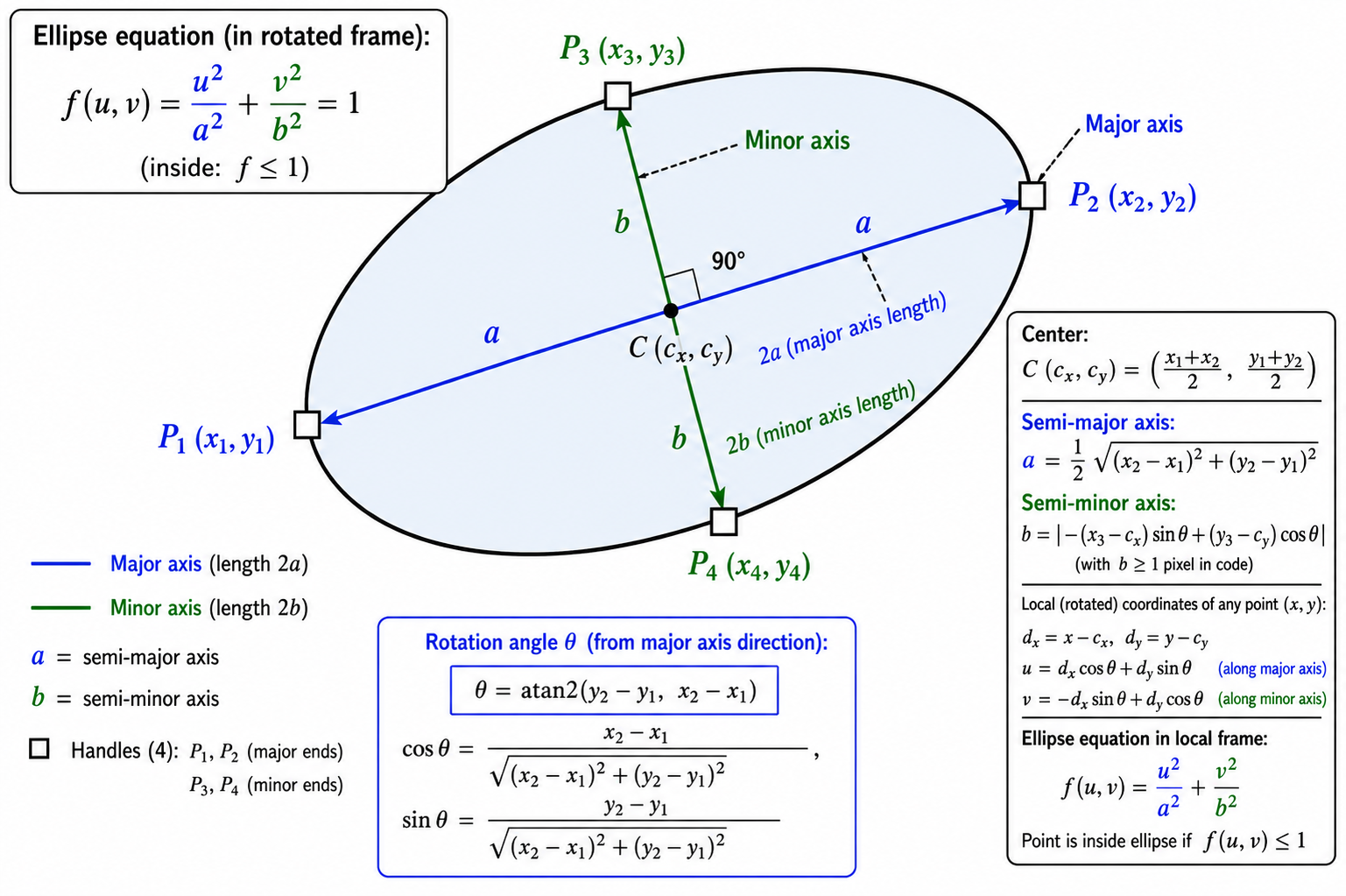
For the border, we use the same signed-distance approach we established for the triangle, except the distance to the boundary now comes from an implicit curve rather than line segments. Instead of computing the exact perpendicular distance (which would need an iterative solve for the closest point on the ellipse), we approximate it from the gradient magnitude of the ellipse equation — "(sqrt(F) - 1) / |gradient|" gives a signed distance that is accurate to first order near the boundary, which is exactly where the AA band lives. A pair of edge-case rejects keeps the AA from leaking into pixels that sit far outside the ellipse, and the same coverage formula then converts distance into a sub-pixel alpha for the blend.
When the ellipse is selected or hovered, we render four handles — two at the stored P1 and P2 positions for the major-axis ends, and two derived ones at the center plus or minus the perpendicular vector scaled by b. The sign of the P3 projection tells us which side of the major axis the original P3 was on, and we use that sign to flip the perpendicular vector, so the third handle (index 2) always lands on the same side P3 was placed.
"HitTestEllipseRotated" reuses the same coordinate transform and ellipse equation. If the cursor's "F" value is at or below 1.0, the cursor is inside; otherwise, we run the gradient-magnitude distance estimate and treat the cursor as a hit when it falls within the threshold pixels of the boundary. Next, we define the path tool; the key new piece here is the arrowhead algorithm, since the line logic has been covered multiple times already.
Drawing and Hit Testing the Path Tool
The path tool is the N-point polyline — instead of fixed P1/P2/P3 anchors, it stores an arbitrary number of vertices in parallel coordinate arrays, renders the connecting segments as a single stroked polyline, and optionally tips the final segment with an arrowhead.
//+------------------------------------------------------------------+
//| Draw a Path (polyline): N-1 SDF segments + optional arrowhead    |
//+------------------------------------------------------------------+
void CShapeTools::DrawPathOn(CCanvas &canvas,
                              const int &xs[], const int &ys[],
                              color objColor, bool selected, bool hovered,
                              bool drawArrowhead,
                              int lineWidth = 2, int lineOpacity = 100,
                              int lineStyle = 0)
  {
   //--- Reject paths with fewer than 2 points (no segments to render)
   int N = ArraySize(xs);
   if(N < 2) return;
   //--- Clamp line width and style into supported ranges
   if(lineWidth < 1) lineWidth = 1;
   if(lineWidth > 4) lineWidth = 4;
   if(lineStyle < 0) lineStyle = 0;
   if(lineStyle > 3) lineStyle = 3;
   const int thick = lineWidth;
   //--- Border stroke ARGB and unpacked alpha/RGB for coverage-weighted blending
   const uint  borderFullArgb = ColorWithPercentOpacity(objColor, lineOpacity);
   uint  borderRGBmask  = borderFullArgb & 0x00FFFFFF;
   const uchar borderAlpha = (uchar)((borderFullArgb >> 24) & 0xFF);
   //--- Cache half-thickness and canvas extents for the per-segment scan
   double halfThick = (double)thick * 0.5;
   int cW = canvas.Width();
   int cH = canvas.Height();
   //--- Walk every segment in the polyline (N-1 segments for N points)
   for(int s = 0; s < N - 1; s++)
     {
      //--- Endpoints of this segment
      int ax = xs[s],     ay = ys[s];
      int bx = xs[s + 1], by = ys[s + 1];
      //--- Dashed/dotted/dash-dot path: build a stroke pattern and dispatch dashed AA
      if(lineStyle != 0)
        {
         int pat[];
         const int n = BuildLineStylePattern(lineStyle, thick, pat);
         if(n > 0)
           {
            WidgetDashedLineAA(canvas, ax, ay, bx, by, thick, borderFullArgb, pat);
            continue;
           }
        }
      //--- Solid SDF AA path: scan the segment's bounding box for per-pixel coverage
      int xLo = (ax < bx) ? ax : bx;
      int xHi = (ax < bx) ? bx : ax;
      int yLo = (ay < by) ? ay : by;
      int yHi = (ay < by) ? by : ay;
      //--- 2px padding around the bounding box for AA boundary
      xLo -= 2;  xHi += 2;  yLo -= 2;  yHi += 2;
      //--- Clip the bounding box to canvas bounds
      if(xLo < 0)     xLo = 0;
      if(yLo < 0)     yLo = 0;
      if(xHi >= cW)   xHi = cW - 1;
      if(yHi >= cH)   yHi = cH - 1;
      //--- Walk every pixel in the bounding box and compute its segment coverage
      for(int yy = yLo; yy <= yHi; yy++)
        {
         for(int xx = xLo; xx <= xHi; xx++)
           {
            //--- Distance from the pixel to the segment
            double d = PointToSegmentDistance(xx, yy, ax, ay, bx, by);
            //--- Coverage shrinks linearly with distance from the segment centerline
            double cov = halfThick + 0.5 - d;
            if(cov <= 0.0) continue;
            if(cov > 1.0) cov = 1.0;
            //--- Compose the coverage-weighted alpha and blend the pixel
            uchar aCov = (uchar)((double)borderAlpha * cov + 0.5);
            uint  covArgb = ((uint)aCov << 24) | borderRGBmask;
            ChannelBlendPixelSet(canvas, xx, yy, covArgb);
           }
        }
     }
   //--- Arrowhead at the final vertex (two wing segments back along the last shaft direction)
   if(drawArrowhead && N >= 2)
     {
      //--- End vertex and the prior vertex (defines the incoming shaft direction)
      int ex = xs[N - 1];
      int ey = ys[N - 1];
      int px = xs[N - 2];
      int py = ys[N - 2];
      //--- Final segment vector and length
      double dxS = (double)(ex - px);
      double dyS = (double)(ey - py);
      double lenS = MathSqrt(dxS * dxS + dyS * dyS);
      //--- Skip arrowhead if the final segment is degenerate
      if(lenS >= 1.0)
        {
         //--- Unit direction along the final segment
         double ux = dxS / lenS;
         double uy = dyS / lenS;
         //--- Wing length and spread half-angle (each wing rotated +/-25deg from the shaft)
         double wingLen = 12.0;
         double wingAng = 25.0 * 3.14159265358979 / 180.0;
         double cA = MathCos(wingAng);
         double sA = MathSin(wingAng);
         //--- Two wing direction vectors (back along the shaft, rotated +/-25deg)
         double w1dx = -(ux * cA - uy * sA);
         double w1dy = -(uy * cA + ux * sA);
         double w2dx = -(ux * cA + uy * sA);
         double w2dy = -(uy * cA - ux * sA);
         //--- Wing endpoints in canvas coords
         int w1x = (int)MathRound((double)ex + w1dx * wingLen);
         int w1y = (int)MathRound((double)ey + w1dy * wingLen);
         int w2x = (int)MathRound((double)ex + w2dx * wingLen);
         int w2y = (int)MathRound((double)ey + w2dy * wingLen);
         //--- Pack the 2 wing endpoints into parallel arrays for the rendering loop
         int wxs[2] = {w1x, w2x};
         int wys[2] = {w1y, w2y};
         //--- Render each wing as an SDF AA segment from the tip back along the wing direction
         for(int w = 0; w < 2; w++)
           {
            //--- Bounding box of this wing segment with 2px AA padding
            int wxLo = (ex < wxs[w]) ? ex : wxs[w];
            int wxHi = (ex < wxs[w]) ? wxs[w] : ex;
            int wyLo = (ey < wys[w]) ? ey : wys[w];
            int wyHi = (ey < wys[w]) ? wys[w] : ey;
            wxLo -= 2; wxHi += 2; wyLo -= 2; wyHi += 2;
            //--- Clip the bounding box to canvas bounds
            if(wxLo < 0)    wxLo = 0;
            if(wyLo < 0)    wyLo = 0;
            if(wxHi >= cW)  wxHi = cW - 1;
            if(wyHi >= cH)  wyHi = cH - 1;
            //--- Walk every pixel in the wing's bounding box and compute its segment coverage
            for(int yy = wyLo; yy <= wyHi; yy++)
              {
               for(int xx = wxLo; xx <= wxHi; xx++)
                 {
                  //--- Distance from the pixel to the wing segment
                  double d = PointToSegmentDistance(xx, yy, ex, ey, wxs[w], wys[w]);
                  //--- Coverage shrinks linearly with distance from the segment centerline
                  double cov = halfThick + 0.5 - d;
                  if(cov <= 0.0) continue;
                  if(cov > 1.0) cov = 1.0;
                  //--- Compose the coverage-weighted alpha and blend the pixel
                  uchar aCov = (uchar)((double)borderAlpha * cov + 0.5);
                  uint  covArgb = ((uint)aCov << 24) | borderRGBmask;
                  ChannelBlendPixelSet(canvas, xx, yy, covArgb);
                 }
              }
           }
        }
     }
   //--- N handles when selected or hovered (one per path vertex)
   if(selected || hovered)
     {
      for(int hi = 0; hi < N; hi++)
         if(m_hideHandleIdx != hi)
            DrawHandleOnCanvas(canvas, xs[hi], ys[hi], selected, objColor, m_haloHandleIdx == hi);
     }
  }

//+------------------------------------------------------------------+
//| Hit-test Path: cursor within threshold of any of the N-1 segments|
//+------------------------------------------------------------------+
bool CShapeTools::HitTestPath(int mx, int my, const int &xs[], const int &ys[], int threshold)
  {
   //--- Reject paths with fewer than 2 points
   int N = ArraySize(xs);
   if(N < 2) return false;
   //--- Test every segment in turn; any match returns true
   for(int s = 0; s < N - 1; s++)
     {
      if(PointToSegmentDistance(mx, my, xs[s], ys[s], xs[s + 1], ys[s + 1]) <= threshold)
         return true;
     }
   return false;
  }
We define "DrawPathOn" to take parallel "xs" and "ys" arrays of canvas coordinates, plus a flag for the arrowhead. Anything with fewer than two points has no segments to render, so we bail out early. After clamping the line width and style, we pre-compute the border alpha and RGB mask once outside the segment loop, then walk every consecutive pair of vertices to draw "N - 1" segments.
For dashed styles, we delegate each segment to "WidgetDashedLineAA" with a pattern from "BuildLineStylePattern". For solid strokes, we reuse the same signed-distance anti-aliasing approach already established for the triangle — bounding box around the segment, walk every pixel in it, compute the distance to the segment via "PointToSegmentDistance", derive sub-pixel coverage from the linear falloff, and blend through "ChannelBlendPixelSet". Each segment is drawn independently, but because the SDF coverage falloff is symmetric and continuous, consecutive segments sharing a vertex blend cleanly without overlap seams.
The arrowhead at the final vertex is the new geometric piece worth calling out, since the Arrow annotation tool in the next subtopic will reuse this exact construction. We derive the unit direction vector of the final segment, then rotate it by plus and minus 25 degrees and negate it so the two wing vectors point back along the shaft. Multiplying each rotated unit vector by a fixed wing length of 12 pixels and adding it to the end vertex gives us the two wing endpoints. Each wing is then rendered as its own SDF AA segment using the same loop body as the main shaft, so the wings carry the same thickness, anti-aliasing, and opacity as the rest of the polyline.
When the path is selected or hovered, we render one handle per stored vertex by iterating from index zero to "N - 1" and calling "DrawHandleOnCanvas" for each, honoring the hide and halo indices set by the engine.
"HitTestPath" is straightforward — we walk every segment and test the cursor distance via "PointToSegmentDistance". A hit on any segment returns true immediately. There is no interior test since paths are open polylines, not closed regions. When added to the engine, this gives us the following outcome.

With that done, we will define the arc tool logic, which introduces a Bezier sampling approach, a thing worth noting for easier future reference.
Drawing and Hit Testing the Arc
The arc is a three-click quadratic Bezier with a chord-enclosed fill — P1 and P2 define the chord endpoints, and the third anchor sets the apex height above the chord. We clamp the apex to sit exactly on the chord's perpendicular bisector so the curve is always symmetric, then render the enclosed region between the chord and the curve as a translucent fill with an anti-aliased curve stroke on top.
//+------------------------------------------------------------------+
//| Compute the apex + Bezier control X for the Arc 3-click input    |
//+------------------------------------------------------------------+
bool CShapeTools::ArcCircumcircle(int x1, int y1, int x2, int y2, int x3, int y3,
                                   double &apX, double &apY, double &cpX)
  {
   //--- Chord vector and length; reject degenerate chords
   double chx = (double)(x2 - x1);
   double chy = (double)(y2 - y1);
   double chordLen = MathSqrt(chx * chx + chy * chy);
   if(chordLen < 2.0) return false;
   //--- Unit-along and unit-perpendicular vectors of the chord
   double ux = chx / chordLen;
   double uy = chy / chordLen;
   double nx = -uy;
   double ny =  ux;
   //--- Project P3 onto the perpendicular to get the signed perpendicular distance from the chord
   double dx3 = (double)x3 - (double)x1;
   double dy3 = (double)y3 - (double)y1;
   double perp = dx3 * nx + dy3 * ny;
   //--- Chord midpoint - the symmetric apex sits at midpoint + perp * perpendicular_unit
   double midCX = 0.5 * ((double)x1 + (double)x2);
   double midCY = 0.5 * ((double)y1 + (double)y2);
   //--- Symmetric apex on the perpendicular bisector at distance perp from the midpoint
   apX = midCX + perp * nx;
   apY = midCY + perp * ny;
   //--- Bezier control X = reflection of midpoint through apex (so the curve midpoint hits apex)
   cpX = 2.0 * apX - midCX;
   return true;
  }

//+------------------------------------------------------------------+
//| Evaluate a quadratic Bezier curve at parameter t                 |
//+------------------------------------------------------------------+
void ArcBezierEval(double p1x, double p1y, double cpX, double cpY,
                    double p2x, double p2y, double t,
                    double &outX, double &outY)
  {
   //--- Standard quadratic Bezier formula: B(t) = (1-t)^2*P1 + 2(1-t)t*CP + t^2*P2
   double u = 1.0 - t;
   outX = u * u * p1x + 2.0 * u * t * cpX + t * t * p2x;
   outY = u * u * p1y + 2.0 * u * t * cpY + t * t * p2y;
  }

//+------------------------------------------------------------------+
//| Approximate distance from a point to a quadratic Bezier curve    |
//+------------------------------------------------------------------+
double ArcDistToBezier(double px, double py,
                        double p1x, double p1y, double cpX, double cpY,
                        double p2x, double p2y)
  {
   //--- Sample the curve in 64 line segments and find the minimum point-to-segment distance
   const int N = 64;
   double prevX, prevY;
   //--- Start at t=0 (curve start point)
   ArcBezierEval(p1x, p1y, cpX, cpY, p2x, p2y, 0.0, prevX, prevY);
   double dMin = 1e18;
   //--- Walk every sample step and accumulate the minimum squared distance
   for(int i = 1; i <= N; i++)
     {
      //--- Evaluate the curve at parameter t for the current segment endpoint
      double t = (double)i / (double)N;
      double cx, cy;
      ArcBezierEval(p1x, p1y, cpX, cpY, p2x, p2y, t, cx, cy);
      //--- Segment vector and squared length for the projection math
      double sdx = cx - prevX;
      double sdy = cy - prevY;
      double slen2 = sdx * sdx + sdy * sdy;
      //--- Project the point onto the segment; clamp parameter to [0, 1]
      double tSeg = 0.0;
      if(slen2 > 1e-12)
         tSeg = ((px - prevX) * sdx + (py - prevY) * sdy) / slen2;
      if(tSeg < 0.0) tSeg = 0.0;
      if(tSeg > 1.0) tSeg = 1.0;
      //--- Compute the projected foot and its squared distance to the input point
      double qx = prevX + tSeg * sdx;
      double qy = prevY + tSeg * sdy;
      double dx = px - qx, dy = py - qy;
      double d2 = dx * dx + dy * dy;
      //--- Track the minimum squared distance across all segments
      if(d2 < dMin) dMin = d2;
      //--- Advance to the next segment's starting point
      prevX = cx; prevY = cy;
     }
   return MathSqrt(dMin);
  }

//+------------------------------------------------------------------+
//| Draw an Arc (quadratic Bezier): chord-enclosed fill + AA curve   |
//+------------------------------------------------------------------+
void CShapeTools::DrawArcOn(CCanvas &canvas,
                             int x1, int y1, int x2, int y2, int x3, int y3,
                             color objColor, bool selected, bool hovered,
                             int lineWidth, int lineOpacity,
                             int lineStyle,
                             color fillColor, int fillOpacity)
  {
   //--- Clamp line width into the [1, 4] px range
   if(lineWidth < 1) lineWidth = 1;
   if(lineWidth > 4) lineWidth = 4;
   //--- fillColor=clrNONE means "use the object's stroke color for the fill"
   color fc = (fillColor == clrNONE) ? objColor : fillColor;
   const int thick = lineWidth;
   //--- Compute the clamped apex and the Bezier control point X via the helper
   double apX = 0, apY = 0, cpX = 0;
   bool ok = ArcCircumcircle(x1, y1, x2, y2, x3, y3, apX, apY, cpX);
   //--- Degenerate chord: skip the curve render but still draw the 3 handles
   if(!ok)
     {
      if(selected || hovered)
        {
         if(m_hideHandleIdx != 0) DrawHandleOnCanvas(canvas, x1, y1, selected, objColor, m_haloHandleIdx == 0);
         if(m_hideHandleIdx != 1) DrawHandleOnCanvas(canvas, x2, y2, selected, objColor, m_haloHandleIdx == 1);
         if(m_hideHandleIdx != 2) DrawHandleOnCanvas(canvas, x3, y3, selected, objColor, m_haloHandleIdx == 2);
        }
      return;
     }
   //--- CP.y is the mirror of the chord midpoint Y through the apex Y
   double cpY = 2.0 * apY - 0.5 * ((double)y1 + (double)y2);
   //--- Cache endpoint coordinates as doubles for the Bezier math
   double p1x = (double)x1, p1y = (double)y1;
   double p2x = (double)x2, p2y = (double)y2;
   //--- Chord vector (used for side-of-chord testing)
   double chx = p2x - p1x;
   double chy = p2y - p1y;
   //--- Side of the chord that the apex sits on (sign of the cross product)
   double sideApex = chx * (apY - p1y) - chy * (apX - p1x);
   if(MathAbs(sideApex) < 1e-9) sideApex = 1.0;
   double signApex = (sideApex >= 0.0) ? 1.0 : -1.0;
   //--- Bounding box of the curve: start from chord endpoints, expand via sampled curve points
   double bMinX = MathMin(p1x, p2x);
   double bMaxX = MathMax(p1x, p2x);
   double bMinY = MathMin(p1y, p2y);
   double bMaxY = MathMax(p1y, p2y);
   //--- Sample the curve in 16 steps to find the true axis-aligned bounding box
   const int samp = 16;
   for(int i = 0; i <= samp; i++)
     {
      //--- Evaluate the Bezier curve at parameter t and expand the bounding box
      double t = (double)i / (double)samp;
      double cx_, cy_;
      ArcBezierEval(p1x, p1y, cpX, cpY, p2x, p2y, t, cx_, cy_);
      if(cx_ < bMinX) bMinX = cx_;
      if(cx_ > bMaxX) bMaxX = cx_;
      if(cy_ < bMinY) bMinY = cy_;
      if(cy_ > bMaxY) bMaxY = cy_;
     }
   //--- Integer bounding box with 2px AA padding
   int xLo = (int)MathFloor(bMinX) - 2;
   int xHi = (int)MathCeil (bMaxX) + 2;
   int yLo = (int)MathFloor(bMinY) - 2;
   int yHi = (int)MathCeil (bMaxY) + 2;
   //--- Cache canvas extents and clip the bounding box accordingly
   int cW = canvas.Width(), cH = canvas.Height();
   if(xLo < 0)    xLo = 0;
   if(yLo < 0)    yLo = 0;
   if(xHi >= cW)  xHi = cW - 1;
   if(yHi >= cH)  yHi = cH - 1;
   //--- Compose fill and border ARGB values + unpacked alpha/RGB masks
   const uint  fillArgb       = ColorWithPercentOpacity(fc, fillOpacity);
   const uint  borderFullArgb = ColorWithPercentOpacity(objColor, lineOpacity);
   const uint  borderRGBmask  = borderFullArgb & 0x00FFFFFF;
   const uchar borderBaseA    = (uchar)((borderFullArgb >> 24) & 0xFF);
   double halfThick = (double)thick * 0.5;
   //--- Chord unit-along (u) and unit-perpendicular (n) vectors
   double ux_c, uy_c, nx_c, ny_c;
   {
      double cLen = MathSqrt(chx * chx + chy * chy);
      ux_c = chx / cLen;  uy_c = chy / cLen;
      nx_c = -uy_c;       ny_c =  ux_c;
   }
   //--- Sample the Bezier curve into N line segments for the per-pixel distance + side-of-curve tests
   const int N = 64;
   double segAx[64], segAy[64], segBx[64], segBy[64];
   {
      //--- Walk every sample step and fill the segment endpoint arrays
      double prevX, prevY;
      ArcBezierEval(p1x, p1y, cpX, cpY, p2x, p2y, 0.0, prevX, prevY);
      for(int si = 0; si < N; si++)
        {
         //--- Current segment's end-of-segment point at parameter t
         double t = (double)(si + 1) / (double)N;
         double cx_, cy_;
         ArcBezierEval(p1x, p1y, cpX, cpY, p2x, p2y, t, cx_, cy_);
         segAx[si] = prevX; segAy[si] = prevY;
         segBx[si] = cx_;   segBy[si] = cy_;
         prevX = cx_; prevY = cy_;
        }
   }
   //--- Walk every pixel in the bounding box and compute fill + border coverage
   for(int yy = yLo; yy <= yHi; yy++)
     {
      for(int xx = xLo; xx <= xHi; xx++)
        {
         //--- Pixel relative to P1; decomposed into along-chord and perp-to-chord components
         double rx = (double)xx - p1x;
         double ry = (double)yy - p1y;
         double alongPx = rx * ux_c + ry * uy_c;
         //--- Signed perpendicular distance (positive on the apex side via signApex)
         double perpPx  = (rx * nx_c + ry * ny_c) * signApex;
         //--- Depth from the chord (positive inside the arc, negative outside)
         double depthChord = perpPx;
         //--- Find the minimum squared distance from the pixel to any of the curve's N sampled segments
         double dMin2 = 1e18;
         for(int si = 0; si < N; si++)
           {
            //--- Segment vector and squared length for the projection math
            double sdx = segBx[si] - segAx[si];
            double sdy = segBy[si] - segAy[si];
            double slen2 = sdx * sdx + sdy * sdy;
            //--- Project the pixel onto the segment; clamp parameter into [0, 1]
            double tSeg = 0.0;
            if(slen2 > 1e-12)
               tSeg = (((double)xx - segAx[si]) * sdx + ((double)yy - segAy[si]) * sdy) / slen2;
            if(tSeg < 0.0) tSeg = 0.0;
            if(tSeg > 1.0) tSeg = 1.0;
            //--- Compute the projected foot and its squared distance to the pixel
            double qx = segAx[si] + tSeg * sdx;
            double qy = segAy[si] + tSeg * sdy;
            double ddx = (double)xx - qx, ddy = (double)yy - qy;
            double d2 = ddx * ddx + ddy * ddy;
            //--- Track the minimum across all curve segments
            if(d2 < dMin2) dMin2 = d2;
           }
         //--- Convert minimum squared distance into actual distance to the curve
         double distCurve = MathSqrt(dMin2);
         //--- Determine the curve's perpendicular depth at the same along-chord coordinate (side-of-curve test)
         double curvePerp = 0.0;
         bool   found = false;
         for(int si = 0; si < N; si++)
           {
            //--- Each segment's along-chord range
            double ax_ = segAx[si], ay_ = segAy[si];
            double bx_ = segBx[si], by_ = segBy[si];
            double aA = (ax_ - p1x) * ux_c + (ay_ - p1y) * uy_c;
            double aB = (bx_ - p1x) * ux_c + (by_ - p1y) * uy_c;
            double lo = MathMin(aA, aB), hi = MathMax(aA, aB);
            //--- Test whether the pixel's along-chord coordinate falls inside this segment's range
            if(alongPx >= lo && alongPx <= hi)
              {
               //--- Interpolate along the segment to find the curve point at the same alongPx
               double rng = aB - aA;
               double tt  = (MathAbs(rng) > 1e-9) ? (alongPx - aA) / rng : 0.0;
               double cxs = ax_ + tt * (bx_ - ax_);
               double cys = ay_ + tt * (by_ - ay_);
               //--- Perpendicular depth of the curve at this along-chord position
               double rxc = cxs - p1x;
               double ryc = cys - p1y;
               double perpC = (rxc * nx_c + ryc * ny_c) * signApex;
               //--- Track the maximum curve depth across all matching segments
               if(perpC > curvePerp) curvePerp = perpC;
               found = true;
              }
           }
         //--- Chord length (cached for the along-range test below)
         double cLen2 = MathSqrt(chx * chx + chy * chy);
         //--- Along-chord range test: pixel must be within [0, chord-length]
         bool alongInRange = (alongPx >= 0.0 && alongPx <= cLen2);
         //--- Pixel is "inside" the arc region iff inside the chord X-range AND on the apex side of the curve
         bool insideCurveSide = found && alongInRange && (perpPx <= curvePerp);
         //--- Curve-depth signed distance (positive when inside, negative when outside)
         double depthCurve = insideCurveSide ? distCurve : -distCurve;
         //--- The smaller of chord-depth and curve-depth is the inside-region SDF value
         double depthInside = (depthChord < depthCurve) ? depthChord : depthCurve;
         //--- Fill coverage: depth-based smooth boundary at 0.5 transition
         double fillCov = 0.5 + depthInside;
         if(fillCov > 1.0) fillCov = 1.0;
         if(fillCov > 0.0)
           {
            //--- Compose the coverage-weighted fill alpha and blend the pixel
            const uchar fillBaseA = (uchar)((fillArgb >> 24) & 0xFF);
            uchar aFill = (uchar)((double)fillBaseA * fillCov + 0.5);
            uint  argb  = ((uint)aFill << 24) | (fillArgb & 0x00FFFFFF);
            ChannelBlendPixelSet(canvas, xx, yy, argb);
           }
         //--- Border coverage: only nonzero near the curve
         if(distCurve <= halfThick + 0.5)
           {
            //--- Coverage shrinks linearly with distance from the curve centerline
            double cov = halfThick + 0.5 - distCurve;
            if(cov > 1.0) cov = 1.0;
            if(cov > 0.0)
              {
               //--- Compose the coverage-weighted border alpha and blend the pixel
               uchar aCov = (uchar)((double)borderBaseA * cov + 0.5);
               uint  covArgb = ((uint)aCov << 24) | borderRGBmask;
               ChannelBlendPixelSet(canvas, xx, yy, covArgb);
              }
           }
        }
     }
   //--- 3 handles when selected or hovered: P1, P2, and the CLAMPED apex
   if(selected || hovered)
     {
      //--- Round the clamped apex to integer pixel coords for the handle (idx 2 lands on the curve midpoint)
      int iApX = (int)MathRound(apX);
      int iApY = (int)MathRound(apY);
      //--- Render handles honoring hide/halo state
      if(m_hideHandleIdx != 0) DrawHandleOnCanvas(canvas, x1, y1, selected, objColor, m_haloHandleIdx == 0);
      if(m_hideHandleIdx != 1) DrawHandleOnCanvas(canvas, x2, y2, selected, objColor, m_haloHandleIdx == 1);
      if(m_hideHandleIdx != 2) DrawHandleOnCanvas(canvas, iApX, iApY, selected, objColor, m_haloHandleIdx == 2);
     }
  }

//+------------------------------------------------------------------+
//| Hit-test Arc: cursor near the curve OR inside the enclosed region|
//+------------------------------------------------------------------+
bool CShapeTools::HitTestArc(int mx, int my, int x1, int y1, int x2, int y2, int x3, int y3,
                              int threshold)
  {
   //--- Compute the clamped apex and the Bezier control X via the helper; reject degenerate chords
   double apX = 0, apY = 0, cpX = 0;
   if(!ArcCircumcircle(x1, y1, x2, y2, x3, y3, apX, apY, cpX)) return false;
   //--- CP.y is the mirror of the chord midpoint Y through the apex Y
   double cpY = 2.0 * apY - 0.5 * ((double)y1 + (double)y2);
   //--- Cache endpoint coords as doubles
   double p1x = (double)x1, p1y = (double)y1;
   double p2x = (double)x2, p2y = (double)y2;
   //--- Approximate distance from the cursor to the Bezier curve
   double d = ArcDistToBezier((double)mx, (double)my, p1x, p1y, cpX, cpY, p2x, p2y);
   //--- Cursor within threshold of the curve always counts
   if(d <= threshold) return true;
   //--- Otherwise test whether the cursor sits in the enclosed (chord-to-curve) region
   double chx = p2x - p1x;
   double chy = p2y - p1y;
   //--- Side of the chord that the apex sits on (sign of the cross product)
   double sideApex = chx * (apY - p1y) - chy * (apX - p1x);
   if(MathAbs(sideApex) < 1e-9) return false;
   double signApex = (sideApex >= 0.0) ? 1.0 : -1.0;
   //--- Side of the chord that the cursor sits on; reject if opposite the apex
   double sideM = chx * ((double)my - p1y) - chy * ((double)mx - p1x);
   if(sideM * signApex < 0.0) return false;
   //--- Chord length (reject degenerate chords)
   double cLen = MathSqrt(chx * chx + chy * chy);
   if(cLen < 1e-9) return false;
   //--- Chord unit-along (u) and unit-perpendicular (n) vectors
   double ux_c = chx / cLen, uy_c = chy / cLen;
   double nx_c = -uy_c,      ny_c =  ux_c;
   //--- Cursor decomposed into along-chord and signed perp-to-chord components
   double alongPx = ((double)mx - p1x) * ux_c + ((double)my - p1y) * uy_c;
   double perpPx  = (((double)mx - p1x) * nx_c + ((double)my - p1y) * ny_c) * signApex;
   //--- Along-chord range test: cursor must be within [0, chord-length]
   if(alongPx < 0.0 || alongPx > cLen) return false;
   //--- Determine the curve's perpendicular depth at the cursor's along-chord position
   const int N = 64;
   double prevX, prevY;
   ArcBezierEval(p1x, p1y, cpX, cpY, p2x, p2y, 0.0, prevX, prevY);
   double curvePerp = 0.0;
   for(int si = 0; si < N; si++)
     {
      //--- Sample the curve at parameter t for this segment's endpoint
      double t = (double)(si + 1) / (double)N;
      double cx_, cy_;
      ArcBezierEval(p1x, p1y, cpX, cpY, p2x, p2y, t, cx_, cy_);
      //--- Along-chord range of this segment
      double aA = (prevX - p1x) * ux_c + (prevY - p1y) * uy_c;
      double aB = (cx_   - p1x) * ux_c + (cy_   - p1y) * uy_c;
      double lo = MathMin(aA, aB), hi = MathMax(aA, aB);
      //--- Does the cursor's along-chord position fall in this segment's range?
      if(alongPx >= lo && alongPx <= hi)
        {
         //--- Interpolate along the segment to find the curve point at the same alongPx
         double rng = aB - aA;
         double tt  = (MathAbs(rng) > 1e-9) ? (alongPx - aA) / rng : 0.0;
         double cxs = prevX + tt * (cx_ - prevX);
         double cys = prevY + tt * (cy_ - prevY);
         //--- Perpendicular depth of the curve at this along-chord position
         double perpC = ((cxs - p1x) * nx_c + (cys - p1y) * ny_c) * signApex;
         //--- Track the maximum curve depth across matching segments
         if(perpC > curvePerp) curvePerp = perpC;
        }
      prevX = cx_; prevY = cy_;
     }
   //--- Cursor is inside the enclosed region iff its perp depth is between 0 (chord) and curvePerp (curve)
   return (perpPx >= 0.0 && perpPx <= curvePerp);
  }
We start with "ArcCircumcircle", the shared helper that converts the three-click input into the clamped apex and the derived Bezier control point's X coordinate. The chord vector and its perpendicular unit vector come straight from the P1-P2 difference, and we project the P3 offset onto the perpendicular to get the signed distance from the chord midpoint. The clamped apex then lives on the perpendicular bisector at exactly that signed distance, and the Bezier control point's X coordinate is the reflection of the chord midpoint through the apex's X — this reflection is what guarantees the curve passes through the apex at parameter t=0.5.
Next come two small free helpers that the arc and the curve both depend on. "ArcBezierEval" is the textbook quadratic Bezier formula expanded out at a given parameter t. "ArcDistToBezier" approximates the distance from a point to the curve by sampling the curve into 64 line segments, projecting the point onto each segment, and taking the minimum perpendicular distance. 64 segments are enough for the curve to look smooth at any reasonable zoom level while keeping the per-pixel inner loop cheap. It is an arbitrary value we used as our standard; feel free to increase or decrease it.
Then, inside "DrawArcOn", we compute the apex and control point via the helper and then derive the control point's Y coordinate as the reflection of the chord midpoint Y through the apex Y. The bounding box of the curve comes from a 16-step sample of the Bezier, so the AABB covers the full curve sweep, not just the three endpoints. We then unpack the chord's unit-along and unit-perpendicular vectors and pre-sample the curve into 64 segment endpoints stored in parallel arrays — the inner per-pixel loop scans these arrays instead of re-evaluating the Bezier formula for every pixel.
Fill rendering uses a signed-distance approach similar to the ellipse. We combine two fields: distance to the chord and distance to the sampled Bezier curve. A pixel is inside when it lies within the chord range and between the chord and the curve on the apex side. To get the curve-depth, we walk the 64 sampled segments looking for one whose along-chord range contains the pixel's along-chord coordinate, interpolate to find the curve's perpendicular depth at that exact along-chord position, and take the maximum across matches. The smaller of the two depths gives us the signed distance to the region boundary, which we convert into sub-pixel fill coverage with the standard "0.5 + depth" smoothing.
The border rendering rides on the same per-pixel loop. The minimum distance to any of the 64 sampled segments is already computed for the curve-depth lookup, so we reuse it for the SDF AA stroke — pixels within half the line thickness of the curve get coverage-weighted alpha and blend through "ChannelBlendPixelSet". When the arc is selected or hovered, three handles are rendered: two at the stored P1 and P2 positions and a third at the clamped apex, which always lands on the visible midpoint of the curve.
"HitTestArc" reuses the same geometry. We compute the curve distance via "ArcDistToBezier", and a cursor within the threshold of the curve registers as a hit. For cursors that miss the curve, we run the same chord-side, along-chord-range, and curve-depth checks to determine whether the cursor sits in the enclosed region. A cursor inside that region also counts as a hit. The Curve tool reuses the exact same Bezier sampling and SDF stroke logic — it just skips the apex clamp (leaving P3 free in both axes) and renders only the curve stroke with no fill, so we will not walk through its draw routine separately. However, the curve we draw is not just the standard one; it is a parametric curve, so we have more freedom to define our range. Here is what we get from the arc and curve tools.

The next thing we will do is implement the annotation tools.
Implementing the Annotation Tools
Declaring the Annotation Tools Class
We now move to the annotation tools by declaring "CAnnotationTools", the next layer in the inheritance chain. This is the protocol layer for the nine annotation tools — Text, Arrow, Arrow Marker, Arrow Up, Arrow Down, Note, Price Note, Callout, and Comment — and it inherits from "CShapeTools" so every shape primitive, channel helper, and dual-pass label renderer we set up earlier is already on hand.
//+------------------------------------------------------------------+
//|                                     ToolsPalette_Annotations.mqh |
//|                           Copyright 2026, Allan Munene Mutiiria. |
//|                                   https://t.me/Forex_Algo_Trader |
//+------------------------------------------------------------------+
#property copyright "Copyright 2026, Allan Munene Mutiiria."
#property link "https://t.me/Forex_Algo_Trader"
#property version "1.00"
#property strict

//--- Guard against multiple inclusion of this header
#ifndef TOOLS_PALETTE_ANNOTATIONS_MQH
#define TOOLS_PALETTE_ANNOTATIONS_MQH

//--- Pull in the base shape tools class that this class extends
#include "ToolsPalette_Shapes.mqh"

//+------------------------------------------------------------------+
//| Callout shaft attach case enum                                   |
//+------------------------------------------------------------------+
enum ENUM_CALLOUT_ATTACH
  {
   CA_E,    // East: right edge midpoint
   CA_NE,   // North-east corner
   CA_N,    // North: top edge midpoint
   CA_NW,   // North-west corner
   CA_W,    // West: left edge midpoint
   CA_SW,   // South-west corner
   CA_S,    // South: bottom edge midpoint
   CA_SE    // South-east corner
  };

//+------------------------------------------------------------------+
//| Arrow Up/Down fixed pixel parameters                             |
//+------------------------------------------------------------------+
const double ARROW_UPDOWN_TOTAL_H  = 28.0; // Total arrow length apex-to-base
const double ARROW_UPDOWN_HEAD_LEN = 13.0; // Head triangle height
const double ARROW_UPDOWN_SHAFT_HW = 4.0;  // Half-width of the shaft
const double ARROW_UPDOWN_HEAD_HW  = 9.0;  // Half-width of the wings

//+------------------------------------------------------------------+
//| CAnnotationTools class declaration                               |
//+------------------------------------------------------------------+
class CAnnotationTools : public CShapeTools
  {
public:
   //--- Draw a Text annotation box centered at (ax, ay)
   void   DrawTextAnnotationOn(CCanvas &canvas,
                                int ax, int ay,
                                const string committedText,
                                bool isEditing, const string editBuffer,
                                int caretPos,
                                color objColor, bool selected, bool hovered,
                                int &outL, int &outT, int &outR, int &outB,
                                int fontSize = 12, bool bold = false,
                                int vAlign = 0, int hAlign = 0,
                                int textOpacityPct = 100);
   //--- Hit-test for a Text annotation box
   bool   HitTestTextAnnotation(int mx, int my,
                                 int ax, int ay,
                                 const string committedText,
                                 bool isEditing, const string editBuffer,
                                 int fontSize = 12, bool bold = false);
   //--- Compute the Text annotation bounding box
   void   ComputeTextAnnotationBox(int ax, int ay,
                                    const string committedText,
                                    bool isEditing, const string editBuffer,
                                    int &outL, int &outT, int &outR, int &outB,
                                    int fontSize = 12, bool bold = false);
   //--- Draw a 2-click annotation Arrow with filled triangular head
   void   DrawArrowOn(CCanvas &canvas,
                       int x1, int y1, int x2, int y2,
                       color objColor, bool selected, bool hovered,
                       int lineWidth = 2, int lineOpacity = 100);
   //--- Hit-test for an Arrow shaft or either wing
   bool   HitTestArrow(int mx, int my, int x1, int y1, int x2, int y2, int threshold);
   //--- Draw an Arrow Marker (6-vertex filled dart silhouette)
   void   DrawArrowMarkerOn(CCanvas &canvas,
                             int x1, int y1, int x2, int y2,
                             color objColor, bool selected, bool hovered,
                             bool outlineOnly = false,
                             int lineOpacity = 100);
   //--- Hit-test for an Arrow Marker silhouette
   bool   HitTestArrowMarker(int mx, int my, int x1, int y1, int x2, int y2, int threshold);
   //--- Draw an Arrow Up/Down single-click fixed-size marker
   void   DrawArrowUpDownOn(CCanvas &canvas,
                             int ax, int ay,
                             bool pointsUp,
                             color objColor, bool selected, bool hovered,
                             bool outlineOnly = false,
                             int lineOpacity = 100);
   //--- Hit-test for an Arrow Up/Down marker
   bool   HitTestArrowUpDown(int mx, int my, int ax, int ay, bool pointsUp, int threshold);
   //--- Compute the 7 silhouette vertices for an Arrow Up/Down marker
   void   ComputeArrowUpDownVerts(int ax, int ay, bool pointsUp,
                                   double &vx[], double &vy[]);
   //--- Draw a Note (anchor P1 plus rectangle at P2 with connector line and shadow)
   void   DrawNoteOn(CCanvas &canvas,
                      int p1x, int p1y, int p2x, int p2y,
                      const string committedText,
                      bool isEditing, const string editBuffer,
                      int caretPos,
                      color objColor, bool selected, bool hovered,
                      int &outBoxL, int &outBoxT, int &outBoxR, int &outBoxB,
                      int lineOpacity = 100, int fontSize = 12,
                      bool bold = false,
                      color fillColor = clrNONE, int fillOpacity = 100,
                      color textColor = clrNONE, int textOpacity = 100);
   //--- Hit-test for a Note (rect, connector line, or anchor dot)
   bool   HitTestNote(int mx, int my,
                       int p1x, int p1y, int p2x, int p2y,
                       const string committedText,
                       bool isEditing, const string editBuffer,
                       int fontSize = 12);
   //--- Compute the Note rectangle bounds with edge-midpoint attach to P2
   void   ComputeNoteBox(int p1x, int p1y, int p2x, int p2y,
                          const string committedText,
                          bool isEditing, const string editBuffer,
                          int &outL, int &outT, int &outR, int &outB,
                          int fontSize = 12);
   //--- Draw a Price Note (Note variant showing formatted anchor price)
   void   DrawPriceNoteOn(CCanvas &canvas,
                           int p1x, int p1y, int p2x, int p2y,
                           double anchorPrice,
                           color objColor, bool selected, bool hovered,
                           int &outBoxL, int &outBoxT, int &outBoxR, int &outBoxB,
                           int lineOpacity = 100, int fontSize = 10,
                           color fillColor = clrNONE, int fillOpacity = 100,
                           color textColor = clrNONE, int textOpacity = 100);
   //--- Hit-test for a Price Note
   bool   HitTestPriceNote(int mx, int my,
                            int p1x, int p1y, int p2x, int p2y,
                            double anchorPrice,
                            int fontSize = 10);
   //--- Compute the Callout rectangle bounds plus shaft attach points and case
   void   ComputeCalloutGeometry(int p1x, int p1y, int p2x, int p2y,
                                  const string committedText,
                                  bool isEditing, const string editBuffer,
                                  int &outBoxL, int &outBoxT,
                                  int &outBoxR, int &outBoxB,
                                  int &outA1x, int &outA1y,
                                  int &outA2x, int &outA2y,
                                  ENUM_CALLOUT_ATTACH &outCase,
                                  int fontSize = 12);
   //--- Draw a Callout (rounded rect plus shaft to P1 with continuous border and fill)
   void   DrawCalloutOn(CCanvas &canvas,
                         int p1x, int p1y, int p2x, int p2y,
                         const string committedText,
                         bool isEditing, const string editBuffer,
                         int caretPos,
                         color objColor, bool selected, bool hovered,
                         int &outBoxL, int &outBoxT, int &outBoxR, int &outBoxB,
                         int lineOpacity = 100, int fontSize = 12,
                         bool bold = false,
                         color fillColor = clrNONE, int fillOpacity = 100,
                         color textColor = clrNONE, int textOpacity = 100);
   //--- Hit-test for a Callout (rect interior, shaft triangle, or P1 handle)
   bool   HitTestCallout(int mx, int my,
                          int p1x, int p1y, int p2x, int p2y,
                          const string text,
                          bool isEditing, const string editBuffer,
                          int fontSize = 12);
   //--- Draw a Comment (1-click rectangle with mixed corner radii; P1 = bottom-left)
   void   DrawCommentOn(CCanvas &canvas,
                         int p1x, int p1y,
                         const string committedText,
                         bool isEditing, const string editBuffer,
                         int caretPos,
                         color objColor, bool selected, bool hovered,
                         int &outBoxL, int &outBoxT, int &outBoxR, int &outBoxB,
                         int lineOpacity = 100, int fontSize = 12,
                         bool bold = false,
                         color fillColor = clrNONE, int fillOpacity = 100,
                         color textColor = clrNONE, int textOpacity = 100);
   //--- Compute the Comment rectangle bounds
   void   ComputeCommentBox(int p1x, int p1y,
                             const string committedText,
                             bool isEditing, const string editBuffer,
                             int &outL, int &outT, int &outR, int &outB,
                             int fontSize = 12);
   //--- Hit-test for a Comment rectangle
   bool   HitTestComment(int mx, int my, int p1x, int p1y,
                          const string text,
                          bool isEditing, const string editBuffer,
                          int fontSize = 12);
   //--- Compute the 6 silhouette vertices for an Arrow Marker dart shape
   void   ComputeArrowMarkerVerts(int x1, int y1, int x2, int y2,
                                   double &vx[], double &vy[]);
  };
The header is guarded with the "TOOLS_PALETTE_ANNOTATIONS_MQH" include macro, and we pull in the shape tools header to inherit the full surface. Before the class itself, we define two file-scope helpers that the implementations need to see. The first is "ENUM_CALLOUT_ATTACH", an enum naming the eight possible attach points on the Callout's border — four edge midpoints (E, N, W, S) and four corners (NE, NW, SW, SE) — which we use to classify where the shaft tail joins the rectangle. We adapt this from MQL5's TextOut alignment anchors for text.

The second is a small group of fixed-pixel constants for the Arrow Up and Arrow Down markers (total height, head length, shaft half-width, head half-width) so the silhouette stays a consistent size regardless of zoom level.
The class declares each annotation tool with its draw routine and matching hit tester. The Text annotation also has a "ComputeTextAnnotationBox" helper so the renderer and the hit tester both derive the bounding box from the same source. The Arrow takes two anchors (tail at P1, tip at P2) and renders a stroked shaft with a filled triangular head. The Arrow Marker is a six-vertex filled dart silhouette where "ComputeArrowMarkerVerts" generates the polygon vertices that draw and hit testing both consume. The Arrow Up and Arrow Down markers are single-click fixed-size variants, with "ComputeArrowUpDownVerts" producing their seven-vertex silhouettes.
The Note, Price Note, Callout, and Comment all carry editable text, so their signatures expose "committedText", "isEditing", "editBuffer", and "caretPos" parameters that the drawing engine threads through from its label edit state. Each one also exposes its bounding box via output parameters so the engine can store the rect for later hit testing of the text region during edit. The Note and Price Note share the edge-midpoint attach behavior — their "ComputeNoteBox" helper picks which edge of the rectangle sits at P2 based on the dominant axis from P1 to P2. The Callout is more involved because the shaft tail attaches at one of eight points on the rectangle border, so its geometry resolver "ComputeCalloutGeometry" returns both the rectangle bounds and the two shaft attach points along with the chosen attach case. The Comment is the simplest of the four — a single-click rectangle with P1 as the bottom-left corner — with its own "ComputeCommentBox" helper that sizes the box to the text content. With the protocol declared, we move on to the implementations. We will start with the Note tool, which uses a fill algorithm with drop shadow, and use the same approach for the other annotation tools.
Supersampled Rounded Rectangle and Drop Shadow
We define two shared rendering helpers that the Note, Price Note, and Callout all build on top of. "FillNoteRoundRect" produces the smooth-cornered rectangle body using a supersample-then-downsample technique, and "DrawNoteDropShadow" produces the soft drop shadow underneath it via a two-pass separable box blur.
//+------------------------------------------------------------------+
//| Fill a rounded rectangle with 4x SSAA and downsample averaging   |
//+------------------------------------------------------------------+
void FillNoteRoundRect(CCanvas &canvas, int boxL, int boxT, int boxR, int boxB,
                       int cornerRadius, uint argb)
  {
   //--- Compute box dimensions and reject empty rectangles
   int w = boxR - boxL;
   int h = boxB - boxT;
   if(w <= 0 || h <= 0) return;
   //--- Configure the 4x supersampling factor and HR canvas dimensions
   const int SS = 4;
   int wHR = w * SS;
   int hHR = h * SS;
   int crHR = cornerRadius * SS;
   //--- Create the temporary high-res canvas; fall back to plain rendering on failure
   CCanvas tmpHR;
   if(!tmpHR.Create("NoteRectHR_tmp", wHR, hHR, COLOR_FORMAT_ARGB_NORMALIZE))
     {
      //--- Fallback path uses non-supersampled CCanvas primitives
      int radius = cornerRadius;
      //--- Clamp radius to half the shorter dimension
      if(radius > w / 2) radius = w / 2;
      if(radius > h / 2) radius = h / 2;
      //--- Zero-radius case is a plain rectangle
      if(radius <= 0)
        {
         canvas.FillRectangle(boxL, boxT, boxR - 1, boxB - 1, argb);
         return;
        }
      //--- Paint the four corner circles plus two cross strips for the rounded shape
      canvas.FillCircle(boxL + radius,     boxT + radius,     radius, argb);
      canvas.FillCircle(boxR - radius - 1, boxT + radius,     radius, argb);
      canvas.FillCircle(boxL + radius,     boxB - radius - 1, radius, argb);
      canvas.FillCircle(boxR - radius - 1, boxB - radius - 1, radius, argb);
      canvas.FillRectangle(boxL + radius, boxT,          boxR - radius - 1, boxB - 1,          argb);
      canvas.FillRectangle(boxL,          boxT + radius, boxR - 1,          boxB - radius - 1, argb);
      return;
     }
   //--- Render the rounded rect at high resolution into the temp canvas
   tmpHR.Erase(0x00000000);
   int radiusHR = crHR;
   //--- Clamp HR radius to half the HR dimension
   if(radiusHR > wHR / 2) radiusHR = wHR / 2;
   if(radiusHR > hHR / 2) radiusHR = hHR / 2;
   if(radiusHR <= 0)
     {
      //--- Zero-radius HR case is a plain rectangle
      tmpHR.FillRectangle(0, 0, wHR - 1, hHR - 1, argb);
     }
   else
     {
      //--- Paint four corner circles and two cross strips at high resolution
      tmpHR.FillCircle(radiusHR,         radiusHR,         radiusHR, argb);
      tmpHR.FillCircle(wHR - radiusHR - 1, radiusHR,         radiusHR, argb);
      tmpHR.FillCircle(radiusHR,         hHR - radiusHR - 1, radiusHR, argb);
      tmpHR.FillCircle(wHR - radiusHR - 1, hHR - radiusHR - 1, radiusHR, argb);
      tmpHR.FillRectangle(radiusHR, 0,        wHR - radiusHR - 1, hHR - 1,        argb);
      tmpHR.FillRectangle(0,        radiusHR, wHR - 1,            hHR - radiusHR - 1, argb);
     }
   //--- Downsample the high-res buffer by averaging each SS x SS block
   int ss2 = SS * SS;
   int cW = canvas.Width(), cH = canvas.Height();
   for(int py = 0; py < h; py++)
     {
      //--- Compute the canvas target Y row with clipping
      int targetY = boxT + py;
      if(targetY < 0 || targetY >= cH) continue;
      for(int px = 0; px < w; px++)
        {
         //--- Compute the canvas target X column with clipping
         int targetX = boxL + px;
         if(targetX < 0 || targetX >= cW) continue;
         //--- Accumulate alpha and RGB sums across the SS x SS source block
         int sumA = 0, sumR = 0, sumG = 0, sumB = 0, wc = 0;
         for(int dy = 0; dy < SS; dy++)
           {
            for(int dx = 0; dx < SS; dx++)
              {
               //--- Read the HR pixel and accumulate channel sums for opaque samples
               int sx = px * SS + dx;
               int sy = py * SS + dy;
               uint p = tmpHR.PixelGet(sx, sy);
               uchar pa = (uchar)((p >> 24) & 0xFF);
               sumA += pa;
               if(pa > 0)
                 {
                  sumR += (int)((p >> 16) & 0xFF);
                  sumG += (int)((p >>  8) & 0xFF);
                  sumB += (int)( p        & 0xFF);
                  wc++;
                 }
              }
           }
         //--- Compose the averaged pixel and blend onto the target canvas
         uchar fa = (uchar)(sumA / ss2);
         if(fa == 0 || wc == 0) continue;
         uchar fr = (uchar)(sumR / wc);
         uchar fg = (uchar)(sumG / wc);
         uchar fb = (uchar)(sumB / wc);
         uint outArgb = ((uint)fa << 24) | ((uint)fr << 16) | ((uint)fg << 8) | (uint)fb;
         BlendPxNote(canvas, targetX, targetY, outArgb);
        }
     }
   //--- Release the temporary high-res canvas
   tmpHR.Destroy();
  }

//+------------------------------------------------------------------+
//| Draw a Note drop shadow using a 2-pass separable box blur        |
//+------------------------------------------------------------------+
void DrawNoteDropShadow(CCanvas &canvas,
                        int boxL, int boxT, int boxR, int boxB,
                        int cornerRadius)
  {
   //--- Shadow tuning parameters: offset, blur radius, and base alpha
   int offX      = 1;
   int offY      = 1;
   int blurR     = 3;
   int baseAlpha = 80;
   //--- Compute the offset shadow silhouette bounds
   int shL = boxL + offX;
   int shT = boxT + offY;
   int shR = boxR + offX;
   int shB = boxB + offY;
   //--- Compute padding for the blur kernel plus offset overhang
   int padLeft   = blurR + (offX < 0 ? -offX : 0);
   int padTop    = blurR + (offY < 0 ? -offY : 0);
   int padRight  = blurR + (offX > 0 ?  offX : 0);
   int padBottom = blurR + (offY > 0 ?  offY : 0);
   //--- Compute the padded working buffer dimensions
   int bufL = boxL - padLeft;
   int bufT = boxT - padTop;
   int bufR = boxR + padRight;
   int bufB = boxB + padBottom;
   int bufW = bufR - bufL;
   int bufH = bufB - bufT;
   if(bufW <= 0 || bufH <= 0) return;
   //--- Allocate and zero-initialize the silhouette alpha buffer
   uchar silhouette[];
   ArrayResize(silhouette, bufW * bufH);
   ArrayInitialize(silhouette, 0);
   //--- Build the rounded-rect silhouette via SDF-style inner-rect distance
   double cr = (double)cornerRadius;
   double innerL = (double)shL + cr;
   double innerR = (double)shR - cr;
   double innerT = (double)shT + cr;
   double innerB = (double)shB - cr;
   for(int yy = 0; yy < bufH; yy++)
     {
      //--- Compute the pixel-center Y for the distance query
      double py = (double)(yy + bufT) + 0.5;
      for(int xx = 0; xx < bufW; xx++)
        {
         //--- Compute the pixel-center X for the distance query
         double px = (double)(xx + bufL) + 0.5;
         //--- Compute distance from the pixel to the inner rectangle
         double ddx = MathMax(MathMax(innerL - px, px - innerR), 0.0);
         double ddy = MathMax(MathMax(innerT - py, py - innerB), 0.0);
         double dist = MathSqrt(ddx * ddx + ddy * ddy);
         //--- Mark pixels inside the rounded boundary at the base alpha
         if(dist <= cr)
            silhouette[yy * bufW + xx] = (uchar)baseAlpha;
        }
     }
   //--- Horizontal box-blur pass writing into a temporary buffer
   uchar tempH[];
   ArrayResize(tempH, bufW * bufH);
   int kernelSize = 2 * blurR + 1;
   for(int yy = 0; yy < bufH; yy++)
     {
      //--- Compute the row base offset for this scanline
      int rowBase = yy * bufW;
      //--- Seed the sliding-window sum with the leftmost kernel placement
      int runSum = 0;
      for(int k = -blurR; k <= blurR; k++)
        {
         int sx = k;
         if(sx < 0) sx = 0;
         if(sx >= bufW) sx = bufW - 1;
         runSum += (int)silhouette[rowBase + sx];
        }
      //--- Slide the window across the row writing averaged output
      for(int xx = 0; xx < bufW; xx++)
        {
         //--- Write the averaged output pixel for this column
         tempH[rowBase + xx] = (uchar)(runSum / kernelSize);
         //--- Update the sliding sum: remove leftmost, add rightmost
         int subX = xx - blurR;
         if(subX < 0) subX = 0;
         int addX = xx + blurR + 1;
         if(addX >= bufW) addX = bufW - 1;
         runSum -= (int)silhouette[rowBase + subX];
         runSum += (int)silhouette[rowBase + addX];
        }
     }
   //--- Vertical box-blur pass writing back into the silhouette buffer
   for(int xx = 0; xx < bufW; xx++)
     {
      //--- Seed the column sliding-window sum with the topmost kernel placement
      int runSum = 0;
      for(int k = -blurR; k <= blurR; k++)
        {
         int sy = k;
         if(sy < 0) sy = 0;
         if(sy >= bufH) sy = bufH - 1;
         runSum += (int)tempH[sy * bufW + xx];
        }
      //--- Slide the window down the column writing averaged output
      for(int yy = 0; yy < bufH; yy++)
        {
         //--- Write the averaged output pixel for this row
         silhouette[yy * bufW + xx] = (uchar)(runSum / kernelSize);
         //--- Update the sliding sum: remove topmost, add bottommost
         int subY = yy - blurR;
         if(subY < 0) subY = 0;
         int addY = yy + blurR + 1;
         if(addY >= bufH) addY = bufH - 1;
         runSum -= (int)tempH[subY * bufW + xx];
         runSum += (int)tempH[addY * bufW + xx];
        }
     }
   //--- Composite the blurred shadow onto the destination canvas
   int cW = canvas.Width(), cH = canvas.Height();
   for(int yy = 0; yy < bufH; yy++)
     {
      //--- Compute the canvas target Y with clipping
      int canvasY = yy + bufT;
      if(canvasY < 0 || canvasY >= cH) continue;
      for(int xx = 0; xx < bufW; xx++)
        {
         //--- Compute the canvas target X with clipping
         int canvasX = xx + bufL;
         if(canvasX < 0 || canvasX >= cW) continue;
         //--- Skip fully transparent shadow pixels
         uchar a = silhouette[yy * bufW + xx];
         if(a == 0) continue;
         //--- Blend a black pixel at the blurred alpha onto the canvas
         uint shadowArgb = ((uint)a << 24) | 0x00000000;
         BlendPxNote(canvas, canvasX, canvasY, shadowArgb);
        }
     }
  }
The supersampling approach in "FillNoteRoundRect" is the same idea we used for our text rendering in the AI-powered trading systems article — render the shape at four times the resolution into a temporary canvas, then downsample by averaging each four-by-four block. The high-resolution render uses the native FillCircle and FillRectangle primitives to paint four corner discs plus two cross strips that compose the rounded shape, and the averaging step turns the discs' jagged edges into a smooth anti-aliased curve. A non-supersampled fallback path covers the case where the temp canvas allocation fails — it paints the same four-corner-discs-plus-cross-strips construction directly onto the target canvas without the smoothing.
For "DrawNoteDropShadow", the new technique worth explaining is the two-pass separable box blur. A naive 2D blur convolves each output pixel with every pixel in a square kernel, which costs roughly "kernelSize^2" operations per pixel. The separable variant exploits the fact that a box kernel can be decomposed into two one-dimensional passes — a horizontal blur followed by a vertical blur — bringing the cost down to "2 * kernelSize" operations per pixel.
We start by building the rounded-rectangle silhouette into a single-channel alpha buffer using the same SDF-style inner-rect distance test we use elsewhere — every pixel within the rounded boundary gets the base shadow alpha (80) and everything else stays at zero. The horizontal pass then walks every row with a sliding-window sum: we seed the sum with the kernel placed at the leftmost column, then for each output column we write the average and update the sum by subtracting the leftmost pixel and adding the rightmost pixel that just entered the window. This keeps the per-pixel cost constant regardless of kernel size. The vertical pass does the same thing along columns, reading from the horizontal pass's output and writing back into the original silhouette buffer.
The final compositing step walks the blurred alpha buffer and blends each pixel onto the canvas according to the buffer's per-pixel alpha. The small one-pixel offset on both axes biases the shadow toward the bottom-right while the blur halo still spreads on all sides, which gives the rectangle the subtle directional lift typical of real drop shadows. The Note tool drawing technique is the same as that of other tools.
Note Geometry, Drawing, and Hit Testing
The Note annotation combines several of the helpers we have already set up. We compute its rectangle bounds with the edge-midpoint attach rule so the connector line enters the rectangle naturally, render the drop shadow and rounded fill on top, then drop the text inside via the universal "RenderEditableTextBlockAA" helper.
//+------------------------------------------------------------------+
//| Compute the Note rectangle bounds with edge-midpoint attach      |
//+------------------------------------------------------------------+
void CAnnotationTools::ComputeNoteBox(int p1x, int p1y, int p2x, int p2y,
                                       const string committedText,
                                       bool isEditing, const string editBuffer,
                                       int &outL, int &outT, int &outR, int &outB,
                                       int fontSize)
  {
   //--- Resolve the text used for sizing the rectangle
   string content    = isEditing ? editBuffer : committedText;
   bool   hasContent = (StringLen(content) > 0);
   string measure;
   if(isEditing && !hasContent)
      measure = "Add text";
   else if(StringLen(content) > 0)
      measure = content;
   else
      measure = "  ";
   //--- Measure the multi-line text block via the shared helper
   int textW = 0, textH = 0, lineH = 0;
   MeasureTextBlock(measure, "Arial", fontSize, textW, textH, lineH);
   if(textW < 1) textW = 1;
   if(textH < 1) textH = lineH;
   //--- Compute the total box dimensions including padding and cursor slack
   int cursorReserve = 2;
   int padX = 10;
   int padY = 6;
   int boxW = textW + cursorReserve + 2 * padX;
   int boxH = textH + 2 * padY;
   //--- Pick the attaching edge based on the dominant direction from P1 to P2
   int dx = p2x - p1x;
   int dy = p2y - p1y;
   bool horizontalDominant = (MathAbs(dx) >= MathAbs(dy));
   if(horizontalDominant)
     {
      //--- Horizontal dominant: attach the rect's left or right edge midpoint at P2
      if(dx >= 0)
        { outL = p2x; outR = p2x + boxW; }
      else
        { outR = p2x; outL = p2x - boxW; }
      outT = p2y - boxH / 2;
      outB = outT + boxH;
     }
   else
     {
      //--- Vertical dominant: attach the rect's top or bottom edge midpoint at P2
      if(dy >= 0)
        { outT = p2y; outB = p2y + boxH; }
      else
        { outB = p2y; outT = p2y - boxH; }
      outL = p2x - boxW / 2;
      outR = outL + boxW;
     }
  }

//+------------------------------------------------------------------+
//| Draw a Note (anchor dot, connector line, rect with text)         |
//+------------------------------------------------------------------+
void CAnnotationTools::DrawNoteOn(CCanvas &canvas,
                                   int p1x, int p1y, int p2x, int p2y,
                                   const string committedText,
                                   bool isEditing, const string editBuffer,
                                   int caretPos,
                                   color objColor, bool selected, bool hovered,
                                   int &outBoxL, int &outBoxT, int &outBoxR, int &outBoxB,
                                   int lineOpacity, int fontSize, bool bold,
                                   color fillColor, int fillOpacity,
                                   color textColor, int textOpacity)
  {
   //--- Clamp all opacity values to [0, 100]
   if(lineOpacity < 0)   lineOpacity = 0;
   if(lineOpacity > 100) lineOpacity = 100;
   if(fillOpacity < 0)   fillOpacity = 0;
   if(fillOpacity > 100) fillOpacity = 100;
   if(textOpacity < 0)   textOpacity = 0;
   if(textOpacity > 100) textOpacity = 100;
   //--- Clamp the font size to a sane range
   if(fontSize < 6)  fontSize = 6;
   if(fontSize > 32) fontSize = 32;
   //--- Resolve the effective fill color (user-set or chart background)
   color effFillColor = (fillColor == clrNONE)
                         ? (color)ChartGetInteger(0, CHART_COLOR_BACKGROUND)
                         : fillColor;
   //--- Resolve the effective text color (user-set or object color)
   color effTextColor = (textColor == clrNONE) ? objColor : textColor;
   //--- Compose the connector line ARGB at the requested opacity
   uint  connectorArgb = ColorWithPercentOpacity(objColor, lineOpacity);
   //--- Compute the rectangle bounds via the shared geometry helper
   int boxL=0, boxT=0, boxR=0, boxB=0;
   ComputeNoteBox(p1x, p1y, p2x, p2y, committedText, isEditing, editBuffer,
                   boxL, boxT, boxR, boxB, fontSize);
   outBoxL = boxL; outBoxT = boxT; outBoxR = boxR; outBoxB = boxB;
   int boxW = boxR - boxL;
   int boxH = boxB - boxT;
   int radius = 4;
   //--- Draw the soft drop shadow first so the rect renders on top
   DrawNoteDropShadow(canvas, boxL, boxT, boxR, boxB, radius);
   //--- Draw the connector line between the anchor point and the rectangle
   DrawNoteConnectorLine(canvas, (double)p1x, (double)p1y,
                          (double)p2x, (double)p2y, connectorArgb);
   //--- Fill the rounded rectangle body
   uint rectFillArgb = ColorWithPercentOpacity(effFillColor, fillOpacity);
   FillNoteRoundRect(canvas, boxL, boxT, boxR, boxB, radius, rectFillArgb);
   //--- Resolve which text to render (committed, placeholder, or buffer)
   string labelPart  = isEditing ? editBuffer : committedText;
   bool   hasContent = (StringLen(labelPart) > 0);
   bool   usePlaceholder = isEditing && !hasContent;
   string renderText = usePlaceholder ? "Add text" : labelPart;
   int effectiveCaret = usePlaceholder ? 0 : caretPos;
   //--- Compute the inner text rectangle from rect padding
   int textL = boxL + 10;
   int textT = boxT + 6;
   int textR = boxR - 10;
   int textB = boxB - 6;
   //--- Center the text block within the rectangle interior
   if(StringLen(renderText) > 0)
     {
      //--- Measure the wrapped block for centering math
      int measW = 0, measH = 0, measLineH = 0;
      MeasureTextBlock(renderText, "Arial", fontSize, measW, measH, measLineH);
      //--- Vertically center if the block is shorter than the available height
      int avail = (boxB - boxT) - 12;
      if(measH < avail)
         textT = boxT + 6 + (avail - measH) / 2;
      //--- Horizontally center if the block is narrower than the available width
      int availW = (boxB - boxT > 0) ? (boxR - boxL) - 20 : 0;
      if(availW > 0 && measW < availW)
         textL = boxL + 10 + (availW - measW) / 2;
     }
   //--- Render the text into the rectangle interior
   if(StringLen(renderText) > 0 || isEditing)
     {
      RenderEditableTextBlockAA(canvas, renderText, isEditing, effectiveCaret,
                                  textL, textT, boxL + 10, boxT + 6,
                                  boxR - 10, boxB - 6,
                                  "Arial", fontSize, effTextColor, effTextColor,
                                  0, bold, 0, 0, textOpacity);
     }
   //--- Render the anchor dot only when idle (the handle takes over on hover/select)
   if(!(selected || hovered))
     {
      int dotR = 3;
      //--- Paint a small AA-filled disc at P1
      for(int dy = -dotR; dy <= dotR; dy++)
        {
         for(int dx = -dotR; dx <= dotR; dx++)
           {
            //--- Subsample inside the candidate pixel to compute coverage
            double sub = 4.0;
            int inside = 0, tot = 0;
            for(int sy = 0; sy < 4; sy++)
               for(int sx = 0; sx < 4; sx++)
                 {
                  //--- Compute the subpixel sample offset and test against the disc
                  double sdx = dx - 0.5 + (sx + 0.5) / sub;
                  double sdy = dy - 0.5 + (sy + 0.5) / sub;
                  if(sdx * sdx + sdy * sdy <= (double)dotR * dotR) inside++;
                  tot++;
                 }
            if(inside == 0) continue;
            //--- Compose the dot pixel ARGB at the coverage alpha
            uchar aCov = (uchar)(255 * inside / tot);
            uint dotArgb = ((uint)aCov << 24) | (connectorArgb & 0x00FFFFFF);
            int px = p1x + dx, py = p1y + dy;
            if(px >= 0 && py >= 0 && px < canvas.Width() && py < canvas.Height())
               BlendPxNote(canvas, px, py, dotArgb);
           }
        }
     }
   //--- Draw selection handles at P1 and P2
   if(selected || hovered)
     {
      if(m_hideHandleIdx != 0) DrawHandleOnCanvas(canvas, p1x, p1y, selected, objColor, m_haloHandleIdx == 0);
      if(m_hideHandleIdx != 1) DrawHandleOnCanvas(canvas, p2x, p2y, selected, objColor, m_haloHandleIdx == 1);
     }
  }

//+------------------------------------------------------------------+
//| Hit-test for a Note (rect, connector line, or anchor dot)        |
//+------------------------------------------------------------------+
bool CAnnotationTools::HitTestNote(int mx, int my,
                                    int p1x, int p1y, int p2x, int p2y,
                                    const string committedText,
                                    bool isEditing, const string editBuffer,
                                    int fontSize)
  {
   //--- Compute the rectangle bounds via the shared geometry helper
   int boxL=0, boxT=0, boxR=0, boxB=0;
   ComputeNoteBox(p1x, p1y, p2x, p2y, committedText, isEditing, editBuffer,
                   boxL, boxT, boxR, boxB, fontSize);
   //--- Inside the rectangle counts as a hit
   if(mx >= boxL && mx <= boxR && my >= boxT && my <= boxB) return true;
   //--- Inside the small anchor dot counts as a hit
   double dotR = 4.0;
   double dxP = mx - p1x, dyP = my - p1y;
   if(dxP * dxP + dyP * dyP <= dotR * dotR) return true;
   //--- Near the connector line counts as a hit
   double dx = p2x - p1x, dy = p2y - p1y;
   double len2 = dx * dx + dy * dy;
   if(len2 > 1e-6)
     {
      //--- Project (mx, my) onto the line and clamp to the segment
      double t = ((mx - p1x) * dx + (my - p1y) * dy) / len2;
      if(t < 0) t = 0; else if(t > 1) t = 1;
      //--- Compute the closest segment point and its distance to the cursor
      double qx = p1x + t * dx, qy = p1y + t * dy;
      double d  = MathSqrt((mx - qx)*(mx - qx) + (my - qy)*(my - qy));
      if(d <= 4.0) return true;
     }
   return false;
  }
"ComputeNoteBox" is the single source of truth for the Note's rectangle bounds. We pick the sizing text — the edit buffer when editing, the committed text otherwise, or the "Add text" placeholder when editing an empty buffer — and measure it via "MeasureTextBlock". The total box dimensions add padding on both axes, plus a small horizontal slack, so the caret can sit at the end of a line without being clipped by the rectangle border.
The edge-midpoint attach logic decides which side of the rectangle sits exactly at P2. We compare the absolute X and Y components of the P1-to-P2 vector — if the horizontal component dominates, the rectangle extends left or right of P2 based on the sign of "dx", with the rectangle vertically centered on P2's Y. If the vertical component dominates, the rectangle extends above or below P2 based on the sign of "dy", with the rectangle horizontally centered on P2's X. The result is that the connector line from P1 always enters the rectangle through the closest edge midpoint instead of piercing the fill.
"DrawNoteOn" orchestrates the layered render. We clamp every opacity to its valid range, resolve the effective fill and text colors (falling back to the chart background and object color when the user passed "clrNONE"), and compute the rectangle bounds via the geometry helper. The render order matters here — the drop shadow goes down first via "DrawNoteDropShadow" so the rectangle paints on top of it; the connector line follows via "DrawNoteConnectorLine"; then the rounded fill via "FillNoteRoundRect" covers the line where it enters the rectangle; and finally the text goes on top.
The text path resolves which content to render (edit buffer, committed text, or "Add text" placeholder) and measures the wrapped block via "MeasureTextBlock" to compute centering offsets within the rectangle interior. We then call "RenderEditableTextBlockAA" with the inner text region and the host's clip rect — the helper handles the caret rendering, word-wrap layout, and supersampled glyph compositing internally. When the Note is idle (not selected, not hovered), we paint a small AA-filled anchor dot at P1 using a sub-sampled disc inside-test. When the Note is selected or hovered, the dot gives way to the selection handles at P1 and P2.
"HitTestNote" tests three things in order: cursor inside the rectangle bounds, cursor inside a small disc around the anchor dot at P1, and cursor near the connector line via a clamped projection onto the segment. A hit on any of the three returns true. The Price Note tool is built on the same geometry and the same rect-fill path — it just swaps the editable text for a DoubleToString of the anchor price formatted to the symbol's digit precision, drops the drop shadow, and uses a fixed blue fill. We will not walk through its draw routine separately. The rest of the tools use the existing approach. For text edits and rendering, we define in the next section.
Implementing the In-Place Label Editing System
Label Selection Model
The label edit subsystem lives in its own file, "ToolsPalette_Engine_Edit.mqh", which holds every "CDrawingEngine" method body that drives the in-place text editor. The selection model is the foundational layer — every typing operation, every backspace, every shift-arrow extension consults this code to know what range of the buffer is currently selected. We define three small methods that together form the entire selection API.
//+------------------------------------------------------------------+
//|                                     ToolsPalette_Engine_Edit.mqh |
//|                           Copyright 2026, Allan Munene Mutiiria. |
//|                                   https://t.me/Forex_Algo_Trader |
//+------------------------------------------------------------------+
#property copyright "Copyright 2026, Allan Munene Mutiiria."
#property link "https://t.me/Forex_Algo_Trader"
#property version "1.00"
#property strict

//--- Guard against multiple inclusion of this header
#ifndef TOOLS_PALETTE_ENGINE_EDIT_MQH
#define TOOLS_PALETTE_ENGINE_EDIT_MQH

//--- Pull in CDrawingEngine class declaration (Tools.mqh include guard handles double-load)
#include "ToolsPalette_Tools.mqh"

//+------------------------------------------------------------------+
//| Test whether the label buffer has an active selection range      |
//+------------------------------------------------------------------+
bool CDrawingEngine::HasLabelSelection()
  {
   //--- Anchor at -1 means selection inactive
   if(m_labelSelectionAnchor < 0)                       return false;
   //--- Anchor equal to caret means zero-width selection (treated as none)
   if(m_labelSelectionAnchor == m_labelCaretPos)        return false;
   return true;
  }

//+------------------------------------------------------------------+
//| Read the ordered [start, end) range of the active selection      |
//+------------------------------------------------------------------+
bool CDrawingEngine::GetLabelSelectionRange(int &outStart, int &outEnd)
  {
   //--- Bail out when no selection is active and zero the outputs
   if(!HasLabelSelection()) { outStart = outEnd = 0; return false; }
   //--- Order anchor and caret so start <= end regardless of selection direction
   outStart = (m_labelSelectionAnchor < m_labelCaretPos) ? m_labelSelectionAnchor : m_labelCaretPos;
   outEnd   = (m_labelSelectionAnchor > m_labelCaretPos) ? m_labelSelectionAnchor : m_labelCaretPos;
   //--- Clamp defensively in case the buffer was mutated mid-edit
   const int len = StringLen(m_labelEditBuffer);
   if(outStart < 0)   outStart = 0;
   if(outEnd   > len) outEnd   = len;
   if(outStart > outEnd) outStart = outEnd;
   return outEnd > outStart;
  }

//+------------------------------------------------------------------+
//| Delete the active selection from the buffer and return success   |
//+------------------------------------------------------------------+
bool CDrawingEngine::DeleteLabelSelection()
  {
   //--- Bail out when there is no selection to delete
   int s, e;
   if(!GetLabelSelectionRange(s, e)) return false;
   //--- Compute the buffer slices before and after the selection
   const int len = StringLen(m_labelEditBuffer);
   const string before = (s > 0) ? StringSubstr(m_labelEditBuffer, 0, s) : "";
   const string after  = (e < len) ? StringSubstr(m_labelEditBuffer, e, len - e) : "";
   //--- Concatenate the slices, park the caret at the deleted region start
   m_labelEditBuffer = before + after;
   m_labelCaretPos        = s;
   m_labelSelectionAnchor = -1;
   return true;
  }
The selection state is represented by two integer fields on the engine: "m_labelSelectionAnchor" (the position where the selection started) and "m_labelCaretPos" (the current caret position). When the anchor is -1 or equal to the caret, there is no active selection — "HasLabelSelection" is the predicate that encodes this rule for every caller. "GetLabelSelectionRange" reads the ordered start and end of the selection. We order anchor and caret so the start is always less than or equal to the end, regardless of which direction the user dragged the selection, and we clamp both values defensively against the buffer length in case the buffer was mutated by some concurrent operation.
"DeleteLabelSelection" performs the atomic delete that backspace, the delete key, and any character insertion (when typing over a selection) all dispatch through. We grab the selection range, slice the buffer into the part before the start and the part after the end, concatenate them, then park the caret at the deleted region's start and clear the anchor so the selection becomes inactive.
This is the only snippet we cover from this file. The remaining methods in "ToolsPalette_Engine_Edit.mqh" — keyboard override, edit lifecycle ("StartLabelEdit", "CommitLabel", "CancelLabel"), caret operations (insert, delete, backspace, arrow navigation, home, end, page up, page down), shift-extend selection, and click-to-caret resolution via the rotated label frame — follow the same pattern: small, targeted updates to "m_labelEditBuffer" and "m_labelCaretPos" driven by chart key events. The deepest mechanical part (dual-pass black-and-white alpha extraction for glyph rendering, supersampled text composite, caret blink) is implemented inside "RenderEditableTextBlockAA", which we already covered when we introduced the universal text helpers, and the underlying technique is the same one we walked through in detail in the AI-powered trading systems series article on text rendering. Readers who want the deep dive on the supersampling math, the black-and-white background trick, and the per-pixel alpha extraction should reference that article — the implementation here applies the same logic to an editable buffer with caret tracking instead of a static label string. Testing and visualization are covered in the next section.
Visualization
We compile the program, attach it to the chart, and exercise every new tool — placing each shape, dropping each annotation, and typing into the editable text labels.
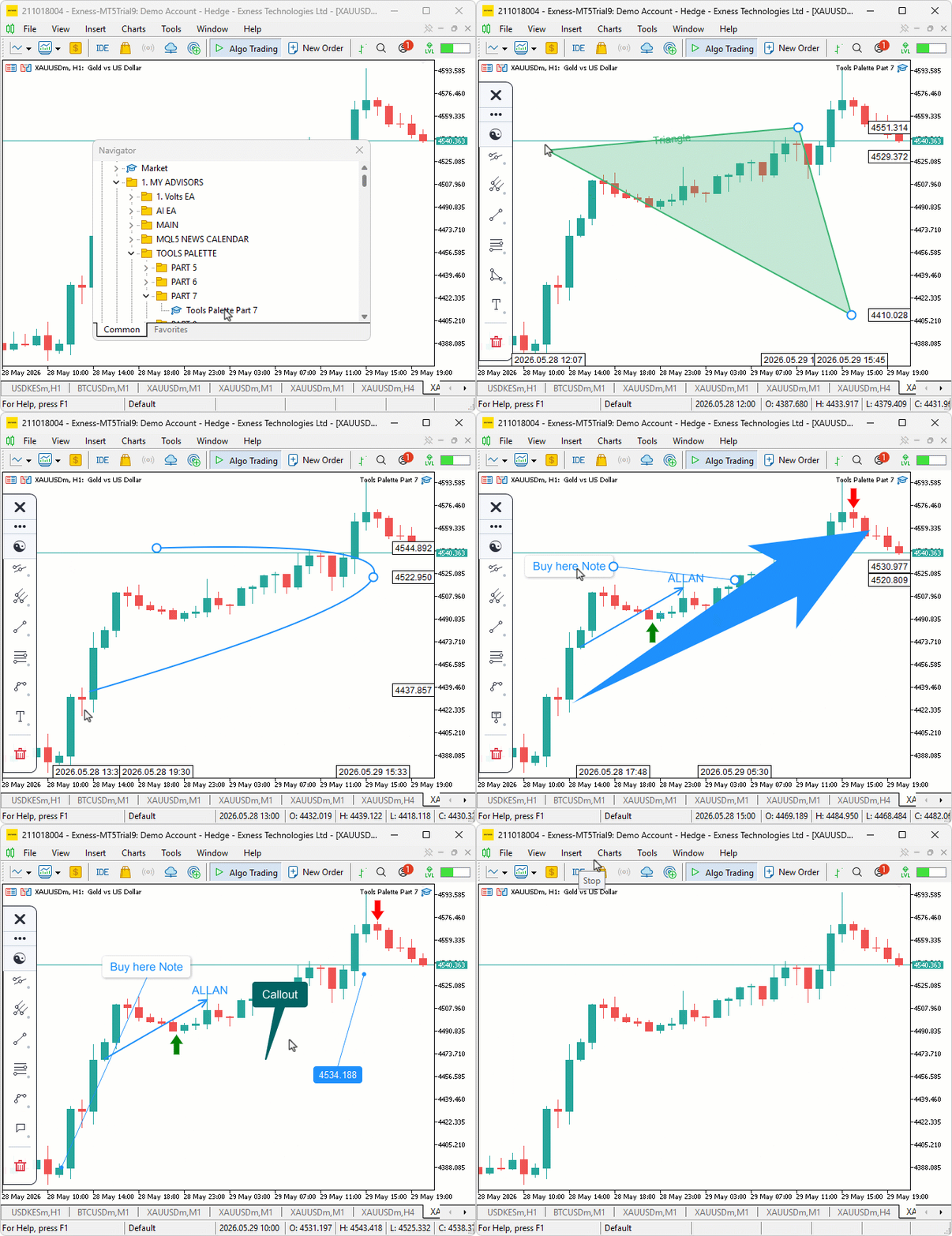
During testing, the shape tools placed cleanly with the rubber-band preview tracking the cursor between clicks, the annotation tools opened straight into edit mode with the blinking caret inside the rectangle, and word-wrap kicked in automatically inside the Rectangle, Circle, and Ellipse labels when the typed content exceeded the host width. Arrow-key navigation moved the caret by visual line, shift-arrow extended the selection, and committing an empty annotation buffer discarded the object as designed.
Conclusion
In conclusion, we have extended the Canvas drawing layer with eight new shape tools — Rectangle, Triangle, Rotated Rectangle, Rotated Ellipse, Path, Circle, Arc, and Curve — and nine annotation tools — Text, Arrow, Arrow Marker, Arrow Up, Arrow Down, Note, Price Note, Callout, and Comment. We also wired up a complete in-place label editing system with caret-driven keyboard navigation, word-wrap that respects visual lines, shift-arrow selection extension, mouse-click-to-caret positioning through the rotated label frame, and a chart keyboard control override so typing does not trigger MetaTrader 5's own navigation. Each new tool plugs into the same hit testing, selection, reshape, and rubber-band preview pipeline established earlier in the series, and the editable annotations share a single set of text helpers — so behavior stays consistent across every tool that carries a buffer. After reading this article, you will be able to:
- Implement filled shape tools on a custom canvas layer with signed-distance anti-aliased borders and quadratic Bezier curves with chord-enclosed fills.
- Render annotation tools with edge-midpoint attach, eight-way callout shafts, supersampled rounded rectangles, and two-pass separable box blur drop shadows.
- Build a complete in-place text editor on a canvas with multi-line word wrap, blinking caret, shift-arrow selection, and mouse-click-to-caret positioning through a rotated label frame.
In the next part of the series, we will add a per-object property-editing ribbon that pops up next to the current selection, letting the user tweak colors, opacities, line widths, dash styles, font sizes, per-level visibility, and every other per-tool property via dedicated widgets, with a live preview that updates as values change, just like the terminal's object behavior. Stay tuned.
Attachments
| S/N | Name | Type | Description |
|---|---|---|---|
| 1 | Tools Palette Part 7.mq5 | Expert Advisor | Main expert advisor entry point that owns the global sidebar instance and forwards initialization, deinitialization, chart event, and timer callbacks to it. |
| 2 | ToolsPalette_Annotations.mqh | Include File | Annotation tools library covering Text, Arrow, Arrow Marker, Arrow Up, Arrow Down, Note, Price Note, Callout, and Comment, plus the universal word-wrap, text-block measurement, and editable text rendering helpers. |
| 3 | ToolsPalette_Channels.mqh | Include File | Channels, pitchforks, and Gann tools library carrying every channel, pitchfork, and Gann draw routine and hit tester built up in the previous part. |
| 4 | ToolsPalette_Crosshair.mqh | Include File | Crosshair manager that owns the reticle, magnifier, cross-line, and measurement canvases plus their axis labels. |
| 5 | ToolsPalette_Engine_Edit.mqh | Include File | Drawing engine method bodies for the in-place label editing subsystem covering edit lifecycle, caret operations, selection model, shift-extend navigation, mouse-click-to-caret resolution, and chart keyboard override. |
| 6 | ToolsPalette_Engine_Interact.mqh | Include File | Drawing engine method bodies for pointer-mode interaction covering hit testing dispatch, handle reshape logic, drag move and release, and selection management. |
| 7 | ToolsPalette_Engine_Render.mqh | Include File | Drawing engine method bodies for the render pipeline covering full-redraw dispatch, rubber-band preview, label rendering with shape clipping, and permanent axis labels. |
| 8 | ToolsPalette_Fibonacci.mqh | Include File | Fibonacci tools library covering retracement, expansion, channel, time zone, speed resistance fan, and speed resistance arcs. |
| 9 | ToolsPalette_Lines.mqh | Include File | Base line tools class providing trendline, ray, extended line, horizontal line, vertical line, cross line, info line, and trend angle drawing plus the shared handle renderer and tool icon dispatch. |
| 10 | ToolsPalette_Primitives.mqh | Include File | Foundational pixel primitives covering alpha-compositing pixel set, anti-aliased thick line, supersampled circle fill, theme manager, and the input parameter declarations. |
| 11 | ToolsPalette_Shapes.mqh | Include File | Shape tools library covering Rectangle, Triangle, Rotated Rectangle, Rotated Ellipse, Path, Circle, Arc, and Curve draw routines and hit testers. |
| 12 | ToolsPalette_Shell.mqh | Include File | Sidebar shell that routes chart events, dispatches keyboard input during label editing, drives the caret blink timer, and owns the top-level public surface used by the expert advisor. |
| 13 | ToolsPalette_Sidebar.mqh | Include File | Sidebar renderer and flyout panel covering category tile layout, flyout open and close, scroll handling, and the action category delete flyout. |
| 14 | ToolsPalette_Tools.mqh | Include File | Tool registry plus the drawing engine class itself, including the drawn object struct, tool memory system, placement engine, and tool default colors. |
| 15 | Tools Palette Part 7.zip | Archive | A ready-to-extract archive containing all 14 project files in a single folder. Unzip it into your MetaTrader 5 terminal data folder; the files will be placed under MQL5/Experts/ with every file in its correct location, ready to compile. |
Warning: All rights to these materials are reserved by MetaQuotes Ltd. Copying or reprinting of these materials in whole or in part is prohibited.
This article was written by a user of the site and reflects their personal views. MetaQuotes Ltd is not responsible for the accuracy of the information presented, nor for any consequences resulting from the use of the solutions, strategies or recommendations described.

 From Static MA to Adaptive Filtering (Part 1): Introducing SAMA with NLMS in MQL5
 A Generic Object Pool in MQL5: Eliminating Heap Fragmentation in High-Frequency Indicators
 Swing Extremes and Pullbacks (Part 4): Dynamic Pullback Depth Using Volatility Models
 Market Microstructure in MQL5 (Part 5): Microstructure Noise

- Free trading apps
- Over 8,000 signals for copying
- Economic news for exploring financial markets
You agree to website policy and terms of use
This is truly great work! I'm testing it now.