

Automating Trading Strategies in MQL5 (Part 50): Turtle Soup Liquidity Sweeps
 7 439
7 439
 5
5

Introduction
Obvious breaks of recent N-bar highs or lows look like reliable continuation signals, yet they frequently prove to be liquidity grabs: price pokes past the extreme, triggers clustered stop orders, and then snaps back — leaving traders short at the bottom or long at the top. For an algo developer, this ambiguity cannot be resolved by feel; we need precise, testable rules.
This article is for MetaQuotes Language 5 (MQL5) developers and algorithmic traders who want to fade these false breakouts with clear, mechanical rules rather than judgment. In our previous article (Part 49), we automated the Quasimodo reversal pattern from a zig-zag of swing pivots. In this article, we reframe the Turtle Soup problem as a formal detection-and-action contract: how to define a sweep (absolute depth in points and as a percent of the lookback range), how to confirm rejection (number of consecutive closes back inside, optional reversal body), how old the reference extreme must be, what sweep window to use, and what operational constraints the program must obey — working on bar close, avoiding duplicate signals, enforcing per-direction position limits, and respecting broker stop-level constraints. We will cover the following topics:
- Understanding the Turtle Soup Liquidity Sweep Strategy
- Implementation in MQL5
- Backtesting
- Conclusion
By the end, you will have an automated MQL5 program that marks the N-bar liquidity pools, detects and confirms sweeps, and executes trades with configurable stops, targets, and optional trailing — ready for Strategy Tester runs and further customization.
Understanding the Turtle Soup Liquidity Sweep Strategy
The Turtle Soup strategy began as a fade of the classic Turtle breakout system. The Turtles bought new twenty-bar highs and sold new twenty-bar lows, expecting the breakout to run; Turtle Soup does the opposite, fading the breakout when it fails. The reasoning rests on where liquidity sits. A prominent N-bar high is an obvious place for buy stops to rest above it, and a prominent N-bar low is where sell stops rest below. We call the area above the high the buy-side liquidity (the high-liquidity area), and the area below the low the sell-side liquidity (the low-liquidity area). Price is often drawn to these pools, sweeping just beyond the level to trigger the resting orders, and then snapping back inside the range once that liquidity is taken. Turtle Soup trades that snap-back: when price sweeps above the N-bar high and then closes back below it, we fade the move and sell; when price sweeps below the N-bar low and closes back above it, we buy. A general setup looks as follows.

Profitability depends on the applied filters. A real sweep should push a meaningful distance beyond the level, not merely tag it, so we require a minimum sweep depth measured both in absolute points and as a share of the range. The swept extreme should also be old enough to matter; a level only a bar or two back is not a meaningful pool, so we require a minimum age. Most importantly, we wait for confirmation: one or more bars that close back inside the level, optionally with a reversal candle body in our trade direction, so we are fading a rejection rather than guessing mid-sweep. The stop sits just beyond the sweep extreme, where the idea is wrong if price pushes through again, and the target is either a fixed reward-to-risk multiple or the opposite side of the range.
In live trading, use the N-bar high and low as your liquidity reference and let the sweep do the work. Mark the recent extreme, wait for the price to spike beyond it, and watch for the close back inside rather than acting on the wick alone. Sell failed breaks of the high and buy failed breaks of the low. Place the stop beyond the sweep extreme so a true continuation exits the trade quickly. Favor sweeps that are deep and clean against an older level, and stand aside when price merely hovers at the level without a decisive rejection. For targets, a measured reward-to-risk multiple keeps the math consistent, while the opposite side of the range suits ranging conditions where price tends to travel pool to pool. By the end, we will create a system that resembles the one visualized below.

Implementation in MQL5
Configuration: Enumerations, Inputs, and Globals
We open the program by pulling in the trade library and laying out its configuration: the enumerations for the mode choices, the user inputs grouped by concern, and the globals that carry state between bars.
//+------------------------------------------------------------------+
//|                                         TBS Turtle Body Soup.mq5 |
//|                           Copyright 2026, Allan Munene Mutiiria. |
//|                                   https://t.me/Forex_Algo_Trader |
//+------------------------------------------------------------------+
#property copyright "Copyright 2026, Allan Munene Mutiiria."
#property link      "https://t.me/Forex_Algo_Trader"
#property version   "1.00"
#property strict

#include <Trade\Trade.mqh>

//+------------------------------------------------------------------+
//| Enums                                                            |
//+------------------------------------------------------------------+
enum ENUM_SLTP_METHOD
  {
   SLTP_Dynamic = 0, // Dynamic (SL beyond sweep extreme)
   SLTP_Static  = 1  // Static (fixed points)
  };

enum ENUM_TRAILING_TYPE
  {
   Trail_None   = 0, // None
   Trail_Points = 1  // By Points
  };

enum ENUM_TP_MODE
  {
   TP_RiskReward    = 0, // Fixed Risk:Reward multiple
   TP_OppositeRange = 1  // Opposite side of the lookback range
  };

//+------------------------------------------------------------------+
//| Inputs                                                           |
//+------------------------------------------------------------------+
input group "Setup Detection"
input ENUM_TIMEFRAMES InpSignalTimeframe       = PERIOD_CURRENT; // Signal Timeframe
input int    InpLookbackBars                   = 20;             // Lookback Bars for N-Bar High/Low (Turtle = 20)
input int    InpMinExtremeAgeBars              = 4;              // Min Bars Between Prior Extreme and Sweep
input int    InpSweepWindowBars                = 1;              // Bars Allowed to Contain the Sweep (1 = Classic)
input int    InpConfirmCloseBars               = 1;              // Consecutive Closes Back Inside to Confirm
input bool   InpRequireBearBullBody            = true;           // Require Reversal Candle Body in Trade Direction

input group "Sweep Depth Filter"
input bool   InpUseSweepDepthFilter            = true;           // Enable Sweep Depth Filter
input double InpMinSweepDepthPoints            = 30.0;           // Min Sweep Beyond Level (Points)
input double InpMinSweepDepthPctRange          = 2.0;            // Min Sweep as % of Lookback Range

input group "Risk / Orders"
input double InpLotSize                        = 0.01;           // Trade Volume (Lots)
input ENUM_SLTP_METHOD InpSLTPMethod           = SLTP_Dynamic;   // SL Calculation Method
input ENUM_TP_MODE     InpTPMode               = TP_RiskReward;  // Take-Profit Mode
input double InpRiskRewardRatio                = 1.0;            // Risk:Reward Ratio (RR Target Mode)
input int    InpStaticSLPoints                 = 5000;            // SL Points (Static Method)
input double InpSLBufferPoints                 = 3000.0;           // Extra SL Buffer in Points (Both Methods)
input int    InpMaxPositionsPerDirection       = 1;              // Max Open Positions Per Direction
input int    InpMagicNumber                    = 1107;       // Magic Number

input group "Trailing"
input ENUM_TRAILING_TYPE InpTrailingType                = Trail_None; // Trailing Stop Type
input double             InpTrailingStopPoints          = 300.0;       // Trailing Stop Distance (Points)
input double             InpMinProfitToActivateTrail    = 1000.0;       // Min Profit to Start Trailing (Points)

input group "Visuals"
input bool   InpShowVisuals    = true;          // Draw Chart Objects
input color  InpNBarHighColor  = clrOrange;     // N-Bar High (Buy-Side Liquidity) Color
input color  InpNBarLowColor   = clrDodgerBlue; // N-Bar Low (Sell-Side Liquidity) Color
input color  InpSellSetupColor = clrCrimson;    // Sell Setup Color
input color  InpBuySetupColor  = C'0,150,0';   // Buy Setup Color

//+------------------------------------------------------------------+
//| Global Variables                                                 |
//+------------------------------------------------------------------+
CTrade   g_trade;                            // Trade execution object
datetime g_lastBarTime        = 0;           // Last processed signal-bar open time
datetime g_lastSellSignalTime = 0;           // Last sell signal bar time (deduplication guard)
datetime g_lastBuySignalTime  = 0;           // Last buy signal bar time (deduplication guard)
double   g_cachedRefHigh      = 0.0;         // Most recent lookback reference high price
double   g_cachedRefLow       = 0.0;         // Most recent lookback reference low price
string   OBJ_PREFIX           = "TSOUP_";    // Chart object name prefix for bulk cleanup
We begin by including the standard trade library, which gives us the CTrade class for sending and modifying orders. We then define three enumerations that turn the program's mode switches into named choices. The "ENUM_SLTP_METHOD" enumeration selects between a dynamic stop placed beyond the sweep extreme and a static stop of fixed points. Alongside it, the "ENUM_TRAILING_TYPE" enumeration toggles the trailing stop between off and a points-based trail, and the "ENUM_TP_MODE" enumeration chooses between a fixed reward-to-risk target and the opposite side of the lookback range.
Next, we expose the inputs in labeled groups so the settings window stays organized. The setup-detection group controls the signal timeframe, the N-bar lookback, and how a sweep is detected and confirmed. The remaining groups cover the sweep-depth filter, the risk and order settings, the trailing options, and the chart visuals. Grouping them this way lets us tune the program by concern rather than scan a flat list.
Finally, we declare the globals that tie everything together. We create the trade object from the library, keep guard timestamps that stop the same signal bar from firing twice, and cache the most recent N-bar high and low. We also hold a shared object-name prefix so we can clean up all our chart drawings in one call. We will proceed to define utility helpers that we will use throughout the program to make it modular.
Counting Our Positions and Confirming the Closes
Two small checks support the detection logic: one counts how many of our positions are open in a direction, and the other verifies that the price has closed back inside the swept level.
//+------------------------------------------------------------------+
//| Count active positions filtered by symbol, magic, and direction  |
//+------------------------------------------------------------------+
int CountActivePositions(ENUM_POSITION_TYPE positionType)
  {
   int count = 0;
   //--- Scan all open positions in reverse order
   for(int pos = PositionsTotal() - 1; pos >= 0; pos--)
     {
      //--- Retrieve ticket for this position slot
      ulong ticket = PositionGetTicket(pos);
      //--- Skip invalid or unselectable tickets
      if(ticket == 0) continue;
      //--- Count only positions matching this symbol, magic number, and direction
      if(PositionGetString(POSITION_SYMBOL)    == _Symbol
         && PositionGetInteger(POSITION_MAGIC) == InpMagicNumber
         && PositionGetInteger(POSITION_TYPE)  == positionType)
         count++;
     }
   //--- Return total matched positions
   return count;
  }

//+------------------------------------------------------------------+
//| Check that N consecutive closed bars are inside the level        |
//+------------------------------------------------------------------+
bool AllConfirmClosesInsideLevel(bool checkBelowLevel, double referenceLevel, int barsToConfirm)
  {
   //--- Test each confirmation bar from the most recent closed bar outward
   for(int barIdx = 1; barIdx <= barsToConfirm; barIdx++)
     {
      //--- Fetch closing price of this confirmation bar
      double closePrice = iClose(_Symbol, InpSignalTimeframe, barIdx);
      //--- Sell confirmation: close must be below the swept high
      if(checkBelowLevel)
        {
         //--- Fail immediately if any close is still above the level
         if(!(closePrice < referenceLevel)) return false;
        }
      else
        {
         //--- Buy confirmation: close must be above the swept low
         //--- Fail immediately if any close is still below the level
         if(!(closePrice > referenceLevel)) return false;
        }
     }
   //--- All confirmation bars closed on the correct side
   return true;
  }
First, we define the "CountActivePositions" function to count how many of our positions are open in a given direction. We pass it a position type, then loop through the open positions with the PositionsTotal function and fetch each ticket with the PositionGetTicket function. We count only those that match our symbol, magic number, and the requested direction. This keeps the program honest about its exposure, so we never exceed the per-direction limit.
Next, we create the "AllConfirmClosesInsideLevel" function to confirm that the price has been rejected back inside the swept level. We pass it a flag for which side we are checking, the reference level, and the number of bars that must confirm. We then walk that many closed bars back from the most recent one, reading each close with the iClose function. For a sell, every checked close must sit below the swept high; for a buy, every close must sit above the swept low. The moment one bar closes on the wrong side, we return false, since a single failed close means the rejection is not clean. Only when every confirmation bar closes on the correct side do we accept the setup. For visualization, we define some utility functions too.
Drawing Helpers: Segments, Boxes, Arrows, and Levels
To put each setup on the chart, we add a set of helpers that draw bounded segments, filled risk and reward boxes, a labeled signal arrow, and the dotted N-bar level lines.
//+------------------------------------------------------------------+
//| Draw a bounded horizontal price segment as an entry reference    |
//+------------------------------------------------------------------+
void DrawHorizontalSegment(string objName, datetime startTime, double price, datetime endTime,
                           color lineColor, ENUM_LINE_STYLE lineStyle, int lineWidth)
  {
   //--- Remove any prior object sharing this name
   ObjectDelete(ChartID(), objName);
   //--- Create a horizontal trend line anchored between startTime and endTime
   ObjectCreate(ChartID(), objName, OBJ_TREND, 0, startTime, price, endTime, price);
   //--- Apply visual properties
   ObjectSetInteger(ChartID(), objName, OBJPROP_COLOR,      lineColor);
   ObjectSetInteger(ChartID(), objName, OBJPROP_STYLE,      lineStyle);
   ObjectSetInteger(ChartID(), objName, OBJPROP_WIDTH,      lineWidth);
   //--- Disable rightward ray so segment stays bounded
   ObjectSetInteger(ChartID(), objName, OBJPROP_RAY_RIGHT,  false);
   //--- Lock the object from accidental user interaction
   ObjectSetInteger(ChartID(), objName, OBJPROP_SELECTABLE, false);
  }

//+------------------------------------------------------------------+
//| Draw a filled risk or reward rectangle behind the candles        |
//+------------------------------------------------------------------+
void DrawFilledTradeBox(string objName, datetime startTime, double priceA,
                        datetime endTime, double priceB, color fillColor)
  {
   //--- Remove any prior object sharing this name
   ObjectDelete(ChartID(), objName);
   //--- Create rectangle spanning entry price to SL or TP
   ObjectCreate(ChartID(), objName, OBJ_RECTANGLE, 0, startTime, priceA, endTime, priceB);
   //--- Apply solid fill and visual properties
   ObjectSetInteger(ChartID(), objName, OBJPROP_COLOR,      fillColor);
   ObjectSetInteger(ChartID(), objName, OBJPROP_FILL,       true);
   //--- Render behind candlesticks so price action stays readable
   ObjectSetInteger(ChartID(), objName, OBJPROP_BACK,       true);
   ObjectSetInteger(ChartID(), objName, OBJPROP_STYLE,      STYLE_SOLID);
   ObjectSetInteger(ChartID(), objName, OBJPROP_WIDTH,      1);
   //--- Lock the object from accidental user interaction
   ObjectSetInteger(ChartID(), objName, OBJPROP_SELECTABLE, false);
  }

//+------------------------------------------------------------------+
//| Draw a Spectra-style vertical signal arrow with rotated label    |
//+------------------------------------------------------------------+
void DrawSignalArrowAndLabel(string baseName, datetime signalTime, double anchorPrice,
                             bool isBuy, string labelText, color signalColor)
  {
   //--- Select Wingdings glyph: 217 = up arrow for buy, 218 = down arrow for sell
   int arrowCode  = isBuy ? 217 : 218;
   //--- Rotate label -90 degrees (upward) for buy, +90 degrees (downward) for sell
   double labelAngle = isBuy ? -90.0 : 90.0;

   //--- Build unique object names for the arrow and text components
   string arrowObjName = baseName + "_ARW";
   string textObjName  = baseName + "_TXT";

   //--- Remove any prior arrow object
   ObjectDelete(ChartID(), arrowObjName);
   //--- Create the directional arrow at the signal bar price
   ObjectCreate(ChartID(), arrowObjName, OBJ_ARROW, 0, signalTime, anchorPrice);
   ObjectSetInteger(ChartID(), arrowObjName, OBJPROP_ARROWCODE,  arrowCode);
   ObjectSetInteger(ChartID(), arrowObjName, OBJPROP_COLOR,      signalColor);
   ObjectSetInteger(ChartID(), arrowObjName, OBJPROP_WIDTH,      2);
   //--- Render in foreground so arrow sits above candles
   ObjectSetInteger(ChartID(), arrowObjName, OBJPROP_BACK,       false);
   //--- Anchor top of arrow below candle for buy; anchor bottom above candle for sell
   ObjectSetInteger(ChartID(), arrowObjName, OBJPROP_ANCHOR,     isBuy ? ANCHOR_TOP : ANCHOR_BOTTOM);
   ObjectSetInteger(ChartID(), arrowObjName, OBJPROP_SELECTABLE, false);

   //--- Remove any prior text label object
   ObjectDelete(ChartID(), textObjName);
   //--- Create the rotated label at the same coordinate as the arrow
   ObjectCreate(ChartID(), textObjName, OBJ_TEXT, 0, signalTime, anchorPrice);
   //--- Four leading spaces visually clear the arrow glyph before the label text
   ObjectSetString(ChartID(),  textObjName, OBJPROP_TEXT,        "    " + labelText);
   ObjectSetString(ChartID(),  textObjName, OBJPROP_FONT,        "Calibri Bold");
   ObjectSetInteger(ChartID(), textObjName, OBJPROP_FONTSIZE,    11);
   ObjectSetInteger(ChartID(), textObjName, OBJPROP_COLOR,       signalColor);
   //--- Apply vertical rotation to render the label upright beside the arrow
   ObjectSetDouble(ChartID(),  textObjName, OBJPROP_ANGLE,       labelAngle);
   ObjectSetInteger(ChartID(), textObjName, OBJPROP_ANCHOR,      ANCHOR_LEFT);
   ObjectSetInteger(ChartID(), textObjName, OBJPROP_SELECTABLE,  false);
  }

//+------------------------------------------------------------------+
//| Render or update a dotted horizontal price level line            |
//+------------------------------------------------------------------+
void RenderHorizontalLevel(string objName, double levelPrice, color levelColor, string tooltipText)
  {
   //--- Create the horizontal line only on the first call
   if(ObjectFind(ChartID(), objName) < 0)
     {
      ObjectCreate(ChartID(), objName, OBJ_HLINE, 0, 0, levelPrice);
      ObjectSetInteger(ChartID(), objName, OBJPROP_STYLE,   STYLE_DOT);
      ObjectSetString(ChartID(),  objName, OBJPROP_TOOLTIP, tooltipText);
     }
   //--- Update price and color on every subsequent call
   ObjectSetDouble(ChartID(),  objName, OBJPROP_PRICE, levelPrice);
   ObjectSetInteger(ChartID(), objName, OBJPROP_COLOR, levelColor);
   ChartRedraw(ChartID());
  }

//+------------------------------------------------------------------+
//| Create or replace a text label at a chart time/price coordinate  |
//+------------------------------------------------------------------+
void RenderPriceLabel(string objName, datetime labelTime, double labelPrice,
                      string labelText, color textColor, int anchorType)
  {
   //--- Always delete and recreate to guarantee position accuracy
   ObjectDelete(ChartID(), objName);
   ObjectCreate(ChartID(), objName, OBJ_TEXT, 0, labelTime, labelPrice);
   ObjectSetString(ChartID(),  objName, OBJPROP_TEXT,     labelText);
   ObjectSetInteger(ChartID(), objName, OBJPROP_COLOR,    textColor);
   ObjectSetInteger(ChartID(), objName, OBJPROP_ANCHOR,   anchorType);
   ObjectSetInteger(ChartID(), objName, OBJPROP_FONTSIZE, 10);
   ChartRedraw(ChartID());
  }
We begin with two simple shape helpers. We define the "DrawHorizontalSegment" function to draw a bounded horizontal line between two points. We pass it a name, the two anchor coordinates, and the line's visual properties. We delete any prior object of the same name with the ObjectDelete function, create a trend line with the ObjectCreate function, and turn off the rightward ray so the segment stays bounded. We build the "DrawFilledTradeBox" function the same way, but as a filled rectangle that we render behind the candles, so price action stays readable.
Next, we add the "DrawSignalArrowAndLabel" function to mark the signal bar. We pass it a base name, the signal coordinate, a buy flag, and the label text and color. We place a Wingdings arrow pointing up for a buy and down for a sell, then add a text label rotated ninety degrees with the ObjectSetDouble function, so it reads upright alongside the arrow rather than running across the candles.
For the persistent N-bar levels, we create the "RenderHorizontalLevel" function. We pass it a name, a price, a color, and a tooltip. Unlike the other helpers, we build the line once and then only update its price and color on later calls, so the level glides as the lookback range shifts. Finally, we add the "RenderPriceLabel" function to place a text label at a given coordinate, deleting and recreating it each time to guarantee the position is exact. We will now concatenate these functions in a main helper to composite the setup.
Composing the Full Trade Annotation
We bring the helpers together in one function that draws the entire setup: the sweep zone, the risk and reward boxes, the entry line, the signal arrow, and the price labels.
//+------------------------------------------------------------------+
//| Draw sweep box, filled R/R boxes, signal arrow, and price labels |
//+------------------------------------------------------------------+
void DrawTradeSetupVisuals(bool isBuy, double sweptLevel, double sweepExtreme, double entryPrice,
                           double stopLoss, double takeProfit, datetime signalBarTime)
  {
   //--- Build a unique object name suffix from the signal bar timestamp
   string timeSuffix = IntegerToString((long)signalBarTime);
   //--- Choose colors based on trade direction
   color setupColor = isBuy ? InpBuySetupColor : InpSellSetupColor;

   //--- Clamp sweep window to at least one bar
   int sweepWindowSize = MathMax(InpSweepWindowBars, 1);

   //--- Resolve the start time of the sweep window and the current bar time
   datetime sweepStartTime = iTime(_Symbol, InpSignalTimeframe, sweepWindowSize);
   datetime currentBarTime = iTime(_Symbol, InpSignalTimeframe, 0);
   //--- Project the trade annotation box eight bars into the future for readability
   datetime tradeBoxEndTime = currentBarTime + (datetime)(PeriodSeconds(InpSignalTimeframe) * 8);

   //--- Define annotation colors
   color slBorderColor  = clrCrimson;     // Stop loss label color
   color tpBorderColor  = C'0,140,0';     // Take profit label color (dark green)
   color entryLineColor = C'40,40,40';    // Entry line and label color (near-black)
   color riskBoxFill    = C'255,200,200'; // Risk zone fill (light red)
   color rewardBoxFill  = C'200,235,200'; // Reward zone fill (light green)
   color buyArrowColor  = C'0,150,0';     // Buy signal arrow color
   color sellArrowColor = clrCrimson;     // Sell signal arrow color

   //--- Compute sweep rectangle boundary prices
   double rectTop = MathMax(sweptLevel, sweepExtreme);
   double rectBot = MathMin(sweptLevel, sweepExtreme);

   //--- Draw the sweep zone rectangle from sweep window start to current bar
   string sweepRectName = OBJ_PREFIX + "Sweep_" + timeSuffix;
   ObjectCreate(ChartID(), sweepRectName, OBJ_RECTANGLE, 0, sweepStartTime, rectTop, currentBarTime, rectBot);
   ObjectSetInteger(ChartID(), sweepRectName, OBJPROP_COLOR, setupColor);
   ObjectSetInteger(ChartID(), sweepRectName, OBJPROP_FILL,  false);
   ObjectSetInteger(ChartID(), sweepRectName, OBJPROP_BACK,  true);
   ObjectSetInteger(ChartID(), sweepRectName, OBJPROP_STYLE, STYLE_DOT);
   ObjectSetInteger(ChartID(), sweepRectName, OBJPROP_WIDTH, 2);

   //--- Place the "Turtle Soup (sweep)" label centered vertically on the left edge of the box
   double sweepBoxMidPrice = (rectTop + rectBot) * 0.5;
   RenderPriceLabel(OBJ_PREFIX + "SwTxt_" + timeSuffix, sweepStartTime, sweepBoxMidPrice,
                    "Turtle Soup (sweep)  ", setupColor, ANCHOR_RIGHT);

   //--- Draw the filled risk box (entry to SL) and reward box (entry to TP)
   DrawFilledTradeBox(OBJ_PREFIX + "RiskBox_" + timeSuffix,
                      signalBarTime, entryPrice, tradeBoxEndTime, stopLoss,   riskBoxFill);
   DrawFilledTradeBox(OBJ_PREFIX + "RewBox_"  + timeSuffix,
                      signalBarTime, entryPrice, tradeBoxEndTime, takeProfit, rewardBoxFill);

   //--- Draw the entry reference line spanning the width of the trade box
   DrawHorizontalSegment(OBJ_PREFIX + "EnLine_" + timeSuffix,
                         signalBarTime, entryPrice, tradeBoxEndTime, entryLineColor, STYLE_SOLID, 2);

   //--- Anchor the signal arrow to bar low for buy, bar high for sell
   double signalArrowPrice = isBuy
                             ? iLow (_Symbol, InpSignalTimeframe, 1)
                             : iHigh(_Symbol, InpSignalTimeframe, 1);
   DrawSignalArrowAndLabel(OBJ_PREFIX + "Sig_" + timeSuffix,
                           signalBarTime, signalArrowPrice, isBuy,
                           isBuy ? "  Buy" : "  Sell",
                           isBuy ? buyArrowColor : sellArrowColor);

   //--- Compute SL distance in points and achieved R multiple for the labels
   double slDistancePoints = MathAbs(entryPrice - stopLoss) / _Point;
   double achievedRMultiple = (MathAbs(entryPrice - stopLoss) > 0.0)
                              ? MathAbs(takeProfit - entryPrice) / MathAbs(entryPrice - stopLoss)
                              : 0.0;

   //--- For buy: SL label anchors below, TP label anchors above; mirror for sell
   int slLabelAnchor = isBuy ? ANCHOR_RIGHT_UPPER : ANCHOR_RIGHT_LOWER;
   int tpLabelAnchor = isBuy ? ANCHOR_RIGHT_LOWER : ANCHOR_RIGHT_UPPER;

   //--- Render entry, SL, and TP price labels at the right edge of the trade box
   RenderPriceLabel(OBJ_PREFIX + "EnTxt_" + timeSuffix, tradeBoxEndTime, entryPrice,
                    "Entry " + DoubleToString(entryPrice, _Digits) + "  ",
                    entryLineColor, ANCHOR_RIGHT);
   RenderPriceLabel(OBJ_PREFIX + "SlTxt_" + timeSuffix, tradeBoxEndTime, stopLoss,
                    "SL " + DoubleToString(stopLoss, _Digits)
                    + " (" + DoubleToString(slDistancePoints, 0) + " pts)  ",
                    slBorderColor, slLabelAnchor);
   RenderPriceLabel(OBJ_PREFIX + "TpTxt_" + timeSuffix, tradeBoxEndTime, takeProfit,
                    "TP " + DoubleToString(takeProfit, _Digits)
                    + " (" + DoubleToString(achievedRMultiple, 2) + "R)  ",
                    tpBorderColor, tpLabelAnchor);

   ChartRedraw(ChartID());
  }
Here, we define the "DrawTradeSetupVisuals" function to render a single setup. It draws the sweep zone, the risk/reward boxes, the entry line, the signal arrow, and price labels. We pass it the direction and the two sweep levels, the swept level, and the sweep extreme. We also pass the entry, stop, and target prices along with the signal bar time. We build a unique name suffix from that bar time so each setup's objects stay separate, then pick the direction color. We first draw the sweep zone as a dotted rectangle spanning the sweep window with the ObjectCreate function, and label it as a Turtle Soup sweep with the "RenderPriceLabel" function.
Next, we lay out the trade itself. We draw a filled risk box from entry to stop, and a reward box from entry to target with the "DrawFilledTradeBox" function, both projected a few bars into the future for readability. We add the entry reference line across the same span with the "DrawHorizontalSegment" function, then place the signal arrow at the signal bar's low for a buy or its high for a sell with the "DrawSignalArrowAndLabel" function.
Finally, we label the prices. We compute the stop distance in points and the achieved reward-to-risk multiple, then render entry, stop, and target labels at the right edge of the boxes. The stop label carries its distance in points and the target label its R multiple, so the trade's risk and reward read straight off the chart. We finish by repainting with the ChartRedraw function. We can now define the logic to find the setups and trade them, but we will create a function to place orders first, as follows.
Building the Stops and Targets and Sending the Order
This is where a confirmed setup is converted into a live order. We compute the stop and target, enforce the broker's stop-level constraints, send the market order, log it, and draw the annotation.
//+------------------------------------------------------------------+
//| Calculate SL/TP, place the market order, and log the result      |
//+------------------------------------------------------------------+
bool OpenTurtleSoupTrade(bool isBuy, double sweptLevel, double sweepExtreme,
                         double oppositeRangeLevel, double lookbackRange,
                         int extremeAgeBars, double sweepDepth, datetime signalBarTime)
  {
   //--- Gather current market prices and symbol properties
   double askPrice         = SymbolInfoDouble(_Symbol, SYMBOL_ASK);
   double bidPrice         = SymbolInfoDouble(_Symbol, SYMBOL_BID);
   double pointSize        = _Point;
   int    priceDigits      = (int)_Digits;
   long   brokerStopsLevel = SymbolInfoInteger(_Symbol, SYMBOL_TRADE_STOPS_LEVEL);
   //--- Convert broker stops level from points to price distance
   double minStopDistance  = (double)brokerStopsLevel * pointSize;

   double entryPrice, stopLoss, takeProfit, riskDistance;

   if(isBuy)
     {
      //--- Enter long at the current ask price
      entryPrice = askPrice;
      //--- Place SL below the sweep low with optional extra buffer (dynamic), or at a fixed distance (static)
      if(InpSLTPMethod == SLTP_Dynamic)
         stopLoss = sweepExtreme - InpSLBufferPoints * pointSize;
      else
         stopLoss = entryPrice - (InpStaticSLPoints + InpSLBufferPoints) * pointSize;
      //--- Calculate raw risk distance from entry to SL
      riskDistance = entryPrice - stopLoss;
      //--- Clamp risk distance to the broker minimum to avoid rejection
      if(riskDistance < minStopDistance || riskDistance <= 0.0)
        {
         riskDistance = minStopDistance;
         stopLoss     = entryPrice - riskDistance;
        }
      //--- Target the opposite side of the lookback range if that mode is active
      if(InpTPMode == TP_OppositeRange)
        {
         takeProfit = oppositeRangeLevel;
         //--- Fall back to RR ratio if the opposite level is too close to entry
         if(takeProfit - entryPrice < minStopDistance)
            takeProfit = entryPrice + riskDistance * InpRiskRewardRatio;
        }
      else
        {
         //--- Target a fixed RR multiple of the risk distance
         takeProfit = entryPrice + riskDistance * InpRiskRewardRatio;
        }
      //--- Enforce broker minimum stop distance on both SL and TP
      if(entryPrice - stopLoss    < minStopDistance) stopLoss   = entryPrice - minStopDistance;
      if(takeProfit - entryPrice  < minStopDistance) takeProfit = entryPrice + minStopDistance;
      //--- Round SL and TP to the symbol's decimal precision
      stopLoss   = NormalizeDouble(stopLoss,   priceDigits);
      takeProfit = NormalizeDouble(takeProfit, priceDigits);
      //--- Send the buy market order to the server
      if(!g_trade.Buy(InpLotSize, _Symbol, entryPrice, stopLoss, takeProfit, "Turtle Soup Buy"))
        {
         Print("Buy failed: ", g_trade.ResultRetcodeDescription());
         return false;
        }
      //--- Abort if the server did not confirm the fill
      if(g_trade.ResultRetcode() != TRADE_RETCODE_DONE) return false;
      //--- Log all relevant trade details to the journal
      Print("BUY (Turtle Soup): swept ", DoubleToString(InpLookbackBars), "-bar low ",
            DoubleToString(sweptLevel,  priceDigits), " by ",
            DoubleToString(sweepDepth / pointSize, 0), " pts (",
            DoubleToString(sweepDepth  / lookbackRange * 100.0, 1), "% of range). Low was ",
            extremeAgeBars, " bars old. Entry ", DoubleToString(entryPrice, priceDigits),
            " SL ", DoubleToString(stopLoss,    priceDigits),
            " TP ", DoubleToString(takeProfit,  priceDigits));
     }
   else
     {
      //--- Enter short at the current bid price
      entryPrice = bidPrice;
      //--- Place SL above the sweep high with optional extra buffer (dynamic), or at a fixed distance (static)
      if(InpSLTPMethod == SLTP_Dynamic)
         stopLoss = sweepExtreme + InpSLBufferPoints * pointSize;
      else
         stopLoss = entryPrice + (InpStaticSLPoints + InpSLBufferPoints) * pointSize;
      //--- Calculate raw risk distance from entry to SL
      riskDistance = stopLoss - entryPrice;
      //--- Clamp risk distance to the broker minimum to avoid rejection
      if(riskDistance < minStopDistance || riskDistance <= 0.0)
        {
         riskDistance = minStopDistance;
         stopLoss     = entryPrice + riskDistance;
        }
      //--- Target the opposite side of the lookback range if that mode is active
      if(InpTPMode == TP_OppositeRange)
        {
         takeProfit = oppositeRangeLevel;
         //--- Fall back to RR ratio if the opposite level is too close to entry
         if(entryPrice - takeProfit < minStopDistance)
            takeProfit = entryPrice - riskDistance * InpRiskRewardRatio;
        }
      else
        {
         //--- Target a fixed RR multiple of the risk distance
         takeProfit = entryPrice - riskDistance * InpRiskRewardRatio;
        }
      //--- Enforce broker minimum stop distance on both SL and TP
      if(stopLoss   - entryPrice  < minStopDistance) stopLoss   = entryPrice + minStopDistance;
      if(entryPrice - takeProfit  < minStopDistance) takeProfit = entryPrice - minStopDistance;
      //--- Round SL and TP to the symbol's decimal precision
      stopLoss   = NormalizeDouble(stopLoss,   priceDigits);
      takeProfit = NormalizeDouble(takeProfit, priceDigits);
      //--- Send the sell market order to the server
      if(!g_trade.Sell(InpLotSize, _Symbol, entryPrice, stopLoss, takeProfit, "Turtle Soup Sell"))
        {
         Print("Sell failed: ", g_trade.ResultRetcodeDescription());
         return false;
        }
      //--- Abort if the server did not confirm the fill
      if(g_trade.ResultRetcode() != TRADE_RETCODE_DONE) return false;
      //--- Log all relevant trade details to the journal
      Print("SELL (Turtle Soup): swept ", DoubleToString(InpLookbackBars), "-bar high ",
            DoubleToString(sweptLevel,  priceDigits), " by ",
            DoubleToString(sweepDepth / pointSize, 0), " pts (",
            DoubleToString(sweepDepth  / lookbackRange * 100.0, 1), "% of range). High was ",
            extremeAgeBars, " bars old. Entry ", DoubleToString(entryPrice, priceDigits),
            " SL ", DoubleToString(stopLoss,    priceDigits),
            " TP ", DoubleToString(takeProfit,  priceDigits));
     }

   //--- Draw the visual trade setup annotations on the chart
   if(InpShowVisuals)
      DrawTradeSetupVisuals(isBuy, sweptLevel, sweepExtreme,
                            entryPrice, stopLoss, takeProfit, signalBarTime);
   return true;
  }
We define the "OpenTurtleSoupTrade" function to size the stop and target, send the order, and report the result. We pass it the direction, the swept level and sweep extreme, the opposite-range level, and the context values used in the log. We read the current ask and bid and the broker's minimum stop distance with the SymbolInfoDouble and SymbolInfoInteger functions, since every level we set has to respect that minimum.
For a buy, we enter at the ask and place the stop below the sweep extreme. In the dynamic method, the stop sits a buffer beyond the swept low, where a push back through the sweep would prove the fade wrong; in the static method, it sits a fixed number of points below entry. We then measure the risk distance and, if it is tighter than the broker's minimum, widen it to that floor so the order is not rejected.
The target depends on the take-profit mode. In opposite-range mode, we aim for the far side of the lookback range, falling back to the reward-to-risk projection if that level sits too close to entry. In reward-to-risk mode, we project the target as a fixed multiple of the risk beyond entry. Before sending, we enforce the broker's minimum on both the stop and the target and round them with the NormalizeDouble function.
With the levels ready, we send the market order with the trade object's Buy method and bail out on a failed send or an unconfirmed fill. On success, we log the swept level, the sweep depth in points and as a share of the range, and the resulting prices. The sell branch mirrors all of this in reverse, entering at the bid with the stop above the sweep high and the Sell method. Either way, we finish by drawing the annotation with the "DrawTradeSetupVisuals" function. We can compute the signal scan and open trades on confirmed setups using this logic now.
Scanning for the Sweep Setup
This is the detection engine. On each new bar we locate the N-bar high and low, check whether price swept and rejected either one, and fire the matching trade when every condition lines up.
//+------------------------------------------------------------------+
//| Scan for Turtle Soup setups on the most recently closed bar      |
//+------------------------------------------------------------------+
void ScanForTurtleSoupSetups()
  {
   //--- Clamp windowing parameters to their minimum legal values
   int sweepWindow   = MathMax(InpSweepWindowBars,   1);
   int confirmBars   = MathMax(InpConfirmCloseBars,  1);
   //--- Calculate the minimum number of bars required to run the scan
   int minBarsNeeded = InpLookbackBars + sweepWindow + 2;
   //--- Abort silently until enough bar history is available
   if(Bars(_Symbol, InpSignalTimeframe) < minBarsNeeded) return;

   //--- The reference extreme is the highest/lowest of InpLookbackBars bars before the sweep window
   int refWindowStartShift = 1 + sweepWindow;
   //--- Locate the bar indices of the reference high and low within the lookback range
   int refHighBarShift = iHighest(_Symbol, InpSignalTimeframe, MODE_HIGH, InpLookbackBars, refWindowStartShift);
   int refLowBarShift  = iLowest (_Symbol, InpSignalTimeframe, MODE_LOW,  InpLookbackBars, refWindowStartShift);
   //--- Abort if either extreme lookup returned an invalid index
   if(refHighBarShift < 0 || refLowBarShift < 0) return;

   //--- Read the reference high and low prices
   double refHighPrice  = iHigh(_Symbol, InpSignalTimeframe, refHighBarShift);
   double refLowPrice   = iLow (_Symbol, InpSignalTimeframe, refLowBarShift);
   //--- Compute the full height of the lookback range
   double lookbackRange = refHighPrice - refLowPrice;
   //--- Abort if the range is degenerate (zero or negative)
   if(lookbackRange <= 0.0) return;

   //--- Cache the reference extremes for potential external access
   g_cachedRefHigh = refHighPrice;
   g_cachedRefLow  = refLowPrice;

   //--- Render the N-bar high and low liquidity level lines and labels
   if(InpShowVisuals)
     {
      RenderHorizontalLevel(OBJ_PREFIX + "HighLevel", refHighPrice, InpNBarHighColor,
                            "N-Bar High (BSL - buy-side liquidity)");
      RenderHorizontalLevel(OBJ_PREFIX + "LowLevel",  refLowPrice,  InpNBarLowColor,
                            "N-Bar Low (SSL - sell-side liquidity)");
      //--- Fetch current bar time for label placement
      datetime currentTime = iTime(_Symbol, InpSignalTimeframe, 0);
      RenderPriceLabel(OBJ_PREFIX + "HighTxt", currentTime, refHighPrice,
                       IntegerToString(InpLookbackBars) + "-Bar High (BSL)", InpNBarHighColor, ANCHOR_RIGHT_LOWER);
      RenderPriceLabel(OBJ_PREFIX + "LowTxt",  currentTime, refLowPrice,
                       IntegerToString(InpLookbackBars) + "-Bar Low (SSL)",  InpNBarLowColor,  ANCHOR_RIGHT_UPPER);
     }

   //--- Find the highest high and lowest low inside the sweep window [shift 1 .. sweepWindow]
   int    sweepHighBarShift = iHighest(_Symbol, InpSignalTimeframe, MODE_HIGH, sweepWindow, 1);
   int    sweepLowBarShift  = iLowest (_Symbol, InpSignalTimeframe, MODE_LOW,  sweepWindow, 1);
   double sweepWindowHigh   = iHigh(_Symbol, InpSignalTimeframe, sweepHighBarShift);
   double sweepWindowLow    = iLow (_Symbol, InpSignalTimeframe, sweepLowBarShift);

   //--- Compute the age of each reference extreme in bars (relative to the most recently closed bar)
   int refHighAgeBars = refHighBarShift - 1;
   int refLowAgeBars  = refLowBarShift  - 1;

   //--- Record the open time of the signal/confirmation bar
   datetime signalBarTime = iTime(_Symbol, InpSignalTimeframe, 1);

   //--- Evaluate sell setup: fade a false breakout above the N-bar high
   bool sellHighSwept       = (sweepWindowHigh > refHighPrice);
   //--- Verify all confirmation closes are back below the reference high
   bool sellClosedBelow     = AllConfirmClosesInsideLevel(true, refHighPrice, confirmBars);
   //--- Optionally require the confirmation bar to close with a bearish body
   bool sellBearishBody     = (!InpRequireBearBullBody)
                              || (iClose(_Symbol, InpSignalTimeframe, 1) < iOpen(_Symbol, InpSignalTimeframe, 1));
   //--- Require the reference high to be old enough to represent a meaningful prior extreme
   bool sellExtremeOldEnough = (refHighAgeBars >= InpMinExtremeAgeBars);
   //--- Measure how far price swept beyond the reference high
   double sellSweepDepth    = sweepWindowHigh - refHighPrice;
   //--- Apply the optional sweep depth filter (absolute points and range percentage)
   bool sellDepthPasses     = (!InpUseSweepDepthFilter)
                              || (sellSweepDepth >= InpMinSweepDepthPoints * _Point
                                  && (sellSweepDepth / lookbackRange * 100.0) >= InpMinSweepDepthPctRange);
   //--- Trigger a sell trade only when all conditions pass, the signal is not a duplicate, and the position limit allows
   if(sellHighSwept && sellClosedBelow && sellBearishBody && sellExtremeOldEnough && sellDepthPasses
      && g_lastSellSignalTime != signalBarTime
      && CountActivePositions(POSITION_TYPE_SELL) < InpMaxPositionsPerDirection)
     {
      //--- Attempt to open the sell and mark the signal bar as processed on success
      if(OpenTurtleSoupTrade(false, refHighPrice, sweepWindowHigh, refLowPrice,
                             lookbackRange, refHighAgeBars, sellSweepDepth, signalBarTime))
         g_lastSellSignalTime = signalBarTime;
     }

   //--- Evaluate buy setup: fade a false breakout below the N-bar low
   bool buyLowSwept         = (sweepWindowLow < refLowPrice);
   //--- Verify all confirmation closes are back above the reference low
   bool buyClosedAbove      = AllConfirmClosesInsideLevel(false, refLowPrice, confirmBars);
   //--- Optionally require the confirmation bar to close with a bullish body
   bool buyBullishBody      = (!InpRequireBearBullBody)
                              || (iClose(_Symbol, InpSignalTimeframe, 1) > iOpen(_Symbol, InpSignalTimeframe, 1));
   //--- Require the reference low to be old enough to represent a meaningful prior extreme
   bool buyExtremeOldEnough  = (refLowAgeBars >= InpMinExtremeAgeBars);
   //--- Measure how far price swept below the reference low
   double buySweepDepth     = refLowPrice - sweepWindowLow;
   //--- Apply the optional sweep depth filter (absolute points and range percentage)
   bool buyDepthPasses      = (!InpUseSweepDepthFilter)
                              || (buySweepDepth >= InpMinSweepDepthPoints * _Point
                                  && (buySweepDepth / lookbackRange * 100.0) >= InpMinSweepDepthPctRange);
   //--- Trigger a buy trade only when all conditions pass, the signal is not a duplicate, and the position limit allows
   if(buyLowSwept && buyClosedAbove && buyBullishBody && buyExtremeOldEnough && buyDepthPasses
      && g_lastBuySignalTime != signalBarTime
      && CountActivePositions(POSITION_TYPE_BUY) < InpMaxPositionsPerDirection)
     {
      //--- Attempt to open the buy and mark the signal bar as processed on success
      if(OpenTurtleSoupTrade(true, refLowPrice, sweepWindowLow, refHighPrice,
                             lookbackRange, refLowAgeBars, buySweepDepth, signalBarTime))
         g_lastBuySignalTime = signalBarTime;
     }
  }
We define the "ScanForTurtleSoupSetups" function to run the whole detection on the most recently closed bar. We first clamp the windowing inputs and bail out with the Bars function until enough history exists. We then locate the reference extreme, which is the highest high and lowest low over the lookback window that ends just before the sweep window. We find their bar indices with the iHighest and iLowest functions, read the prices, and compute the lookback range, aborting if that range is not positive.
With the levels known, we cache them and, when visuals are on, draw them as the N-bar high and low. We render each as a dotted line with the "RenderHorizontalLevel" function and label them as buy-side and sell-side liquidity with the "RenderPriceLabel" function, so the liquidity pools the strategy fades stay visible on the chart.
Next, we measure the sweep itself. We find the highest high and lowest low inside the sweep window, the bars where price may have pushed beyond a level, and compute how old each reference extreme is by its distance back from the most recent closed bar. We also record the signal bar's time so we can guard against acting on it twice.
From there, we evaluate the sell setup, which fades a false breakout above the N-bar high. It requires five conditions:
- The sweep window high pushed above the reference high.
- Every confirmation close returned below it, checked with the "AllConfirmClosesInsideLevel" function.
- The confirmation bar closed with a bearish body.
- The swept high was old enough.
- The sweep was deep enough in both points and percentage of range.
When all five hold, the signal is not a duplicate, and the "CountActivePositions" function shows room under the per-direction limit, we open the trade with the "OpenTurtleSoupTrade" function and stamp the signal bar as processed. The buy setup mirrors this below the N-bar low. We can now bring all this together and call the functions in the respective event handlers for the initialization, scanning for setups, and trading the validated setups.
New-Bar Detection and the Event Handlers
We add a small new-bar helper and then wire the logic into the three standard event handlers: validating the inputs at startup, cleaning up at shutdown, and scanning once per new bar.
//+------------------------------------------------------------------+
//| Detect and record the opening of a new signal-timeframe bar      |
//+------------------------------------------------------------------+
bool IsNewSignalBarOpen()
  {
   //--- Read the open time of the current (forming) bar
   datetime currentBarTime = iTime(_Symbol, InpSignalTimeframe, 0);
   //--- Return false if the symbol/timeframe has no data yet
   if(currentBarTime == 0) return false;
   //--- Compare with the last recorded bar time to detect a new bar
   if(currentBarTime != g_lastBarTime)
     {
      //--- Store the new bar time and signal detection
      g_lastBarTime = currentBarTime;
      return true;
     }
   //--- Same bar is still forming
   return false;
  }

//+------------------------------------------------------------------+
//| Expert initialization function                                   |
//+------------------------------------------------------------------+
int OnInit()
  {
   //--- Reject initialization if the lookback period is too short to form a range
   if(InpLookbackBars < 2)
     {
      Print("ERROR: InpLookbackBars must be >= 2");
      return(INIT_PARAMETERS_INCORRECT);
     }
   //--- Reject initialization if the sweep window is zero or negative
   if(InpSweepWindowBars < 1)
     {
      Print("ERROR: InpSweepWindowBars must be >= 1");
      return(INIT_PARAMETERS_INCORRECT);
     }
   //--- Reject initialization if the confirmation bar count is zero or negative
   if(InpConfirmCloseBars < 1)
     {
      Print("ERROR: InpConfirmCloseBars must be >= 1");
      return(INIT_PARAMETERS_INCORRECT);
     }
   //--- Reject initialization if RR ratio or lot size would produce invalid orders
   if(InpRiskRewardRatio <= 0.0 || InpLotSize <= 0.0)
     {
      Print("ERROR: InpRiskRewardRatio and InpLotSize must be > 0");
      return(INIT_PARAMETERS_INCORRECT);
     }
   //--- Configure the trade object with the EA's magic number and execution settings
   g_trade.SetExpertMagicNumber(InpMagicNumber);
   g_trade.SetMarginMode();
   g_trade.SetTypeFillingBySymbol(_Symbol);
   return(INIT_SUCCEEDED);
  }

//+------------------------------------------------------------------+
//| Expert deinitialization function                                 |
//+------------------------------------------------------------------+
void OnDeinit(const int reason)
  {
   //--- Remove every chart object this EA created using the shared prefix
   ObjectsDeleteAll(ChartID(), OBJ_PREFIX);
   ChartRedraw(ChartID());
  }

//+------------------------------------------------------------------+
//| Expert tick function                                             |
//+------------------------------------------------------------------+
void OnTick()
  {
   //--- Execute setup detection logic only once per new signal-timeframe bar
   if(!IsNewSignalBarOpen()) return;
   ScanForTurtleSoupSetups();
  }
First, we define the "IsNewSignalBarOpen" function to fire our logic once per bar rather than on every tick. We read the open time of the forming bar with the iTime function and compare it against the last time we stored. When the time has advanced, we record the new time and report a fresh bar; otherwise, we report that the same bar is still forming.
In the OnInit event handler, we validate the inputs before the program runs. We reject initialization with INIT_PARAMETERS_INCORRECT if the lookback is too short to form a range, the sweep or confirmation windows are below one, or the reward-to-risk ratio or lot size would produce invalid orders. Once the inputs pass, we configure the trade object with our magic number, margin mode, and fill type before returning INIT_SUCCEEDED.
In the OnDeinit event handler, we remove every chart object we created by its shared prefix with the ObjectsDeleteAll function and repaint the chart. In the OnTick event handler, we keep the work to once per bar: we return early unless the new-bar helper reports a fresh bar, and only then run the detection with the "ScanForTurtleSoupSetups" function. Upon compilation, we get the following outcome.

We can see that we scan, validate, visualize, and trade the setups. What remains is a wiring trailing stop mechanism for optional trade management. We use the following logic to achieve that.
//+------------------------------------------------------------------+
//| Advance the trailing stop for all qualifying open positions      |
//+------------------------------------------------------------------+
void ApplyPointsBasedTrailingStop()
  {
   double pointSize = _Point;
   //--- Iterate all open positions in reverse order to allow safe modification
   for(int i = PositionsTotal() - 1; i >= 0; i--)
     {
      //--- Fetch the position ticket at this index
      ulong ticket = PositionGetTicket(i);
      //--- Skip unselectable or invalid tickets
      if(ticket == 0) continue;
      //--- Skip positions that belong to a different symbol or magic number
      if(PositionGetString(POSITION_SYMBOL)    != _Symbol
         || PositionGetInteger(POSITION_MAGIC) != InpMagicNumber) continue;

      //--- Read current SL, TP, and open price for this position
      double currentSL  = PositionGetDouble(POSITION_SL);
      double currentTP  = PositionGetDouble(POSITION_TP);
      double openPrice  = PositionGetDouble(POSITION_PRICE_OPEN);

      if(PositionGetInteger(POSITION_TYPE) == POSITION_TYPE_BUY)
        {
         //--- Read current bid to measure floating profit
         double currentBid    = SymbolInfoDouble(_Symbol, SYMBOL_BID);
         //--- Propose a new SL one trailing distance below the current bid
         double newTrailingSL = NormalizeDouble(currentBid - InpTrailingStopPoints * pointSize, _Digits);
         //--- Move SL upward only if the new level is higher and minimum profit threshold is met
         if(newTrailingSL > currentSL
            && (currentBid - openPrice) > InpMinProfitToActivateTrail * pointSize)
            g_trade.PositionModify(ticket, newTrailingSL, currentTP);
        }
      else if(PositionGetInteger(POSITION_TYPE) == POSITION_TYPE_SELL)
        {
         //--- Read current ask to measure floating profit
         double currentAsk    = SymbolInfoDouble(_Symbol, SYMBOL_ASK);
         //--- Propose a new SL one trailing distance above the current ask
         double newTrailingSL = NormalizeDouble(currentAsk + InpTrailingStopPoints * pointSize, _Digits);
         //--- Move SL downward only if the new level is lower (or SL is zero) and minimum profit threshold is met
         if((newTrailingSL < currentSL || currentSL == 0.0)
            && (openPrice - currentAsk) > InpMinProfitToActivateTrail * pointSize)
            g_trade.PositionModify(ticket, newTrailingSL, currentTP);
        }
     }
  }

//--- We call the trailing stop logic per tick

//+------------------------------------------------------------------+
//| Expert tick function                                             |
//+------------------------------------------------------------------+
void OnTick()
  {
   //--- Apply trailing stop logic on every tick when trailing is enabled and positions are open
   if(InpTrailingType == Trail_Points && PositionsTotal() > 0)
      ApplyPointsBasedTrailingStop();
   //--- Execute setup detection logic only once per new signal-timeframe bar
   if(!IsNewSignalBarOpen()) return;
   ScanForTurtleSoupSetups();
  }
First, we define the "ApplyPointsBasedTrailingStop" function to pull the stop along behind a winning position. We loop through the open positions with the PositionsTotal function and skip anything that is not ours by symbol or magic number. For each remaining position, we read its current stop, target, and open price. For a buy, we propose a new stop one trailing distance below the current bid; for a sell, one trailing distance above the current ask. We move the stop only when two things hold: the new level improves on the current stop, and the open profit has cleared the minimum needed to start trailing. When both are true, we apply it with the trade object's PositionModify method.
With the trail in place, we add it to the OnTick event handler. On every tick, when trailing is enabled and we hold positions, we run the trail first so a winning stop keeps pace with the price. We then proceed to the once-per-bar gate, returning early unless the new-bar helper reports a fresh bar and only then running the detection with the "ScanForTurtleSoupSetups" function. This split keeps management responsive on every tick while the heavier detection still runs just once per closed bar. Upon activating the trailing stop, we get the following outcome.

We can see that the trailing stop is activated and active when needed. What remains is testing the program, and that is handled in the next section.
Backtesting
We compile the program and run it in the MetaTrader 5 strategy tester in visual mode, which lets us watch the setups bar by bar. The result is captured below as a Graphics Interchange Format (GIF).
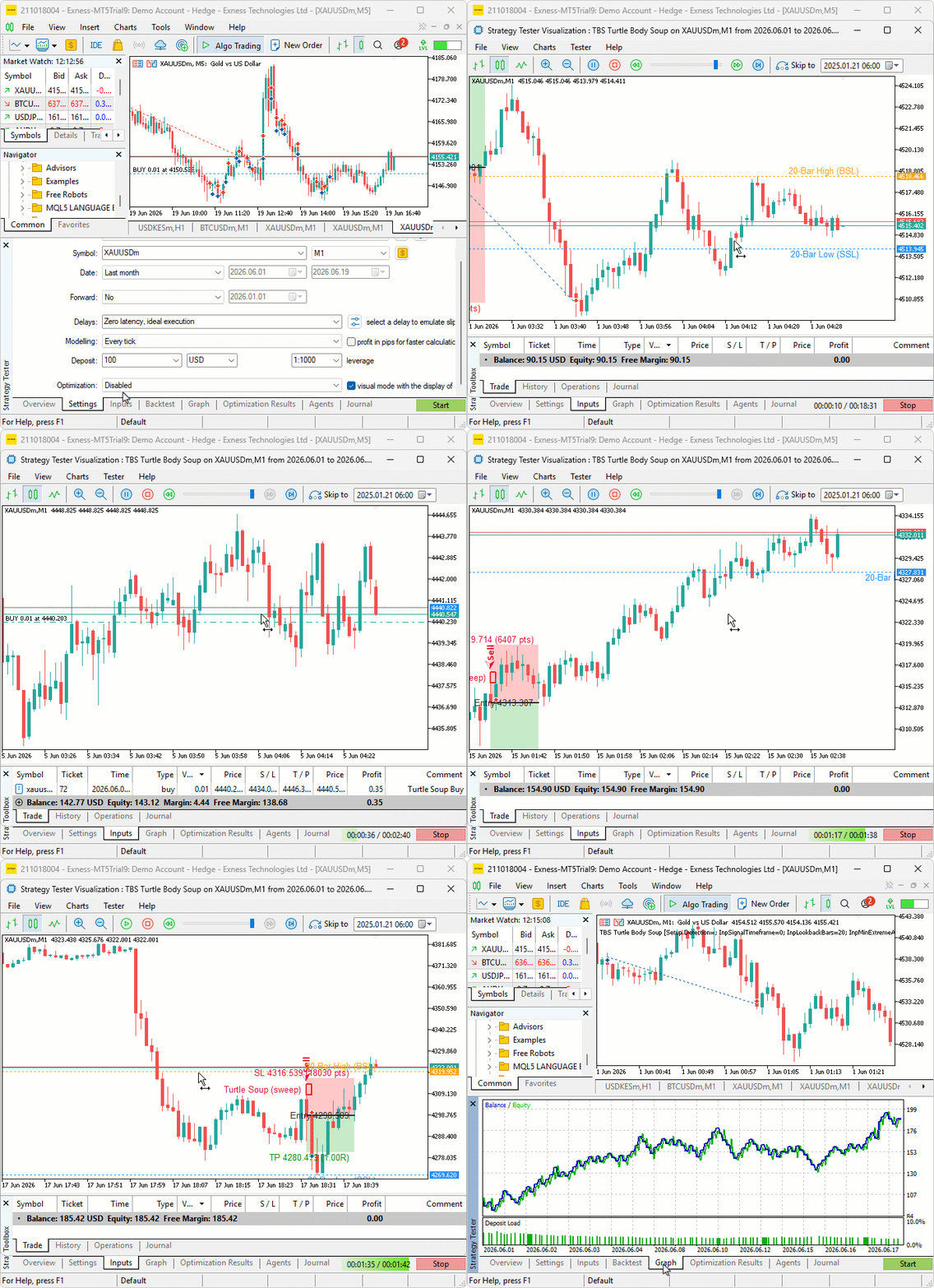
During testing, the program marked the N-bar high and low as buy-side and sell-side liquidity and updated them as the lookback range shifted. Setups were taken only after price swept beyond a level and closed back inside, with the sweep-depth and reversal-body filters rejecting shallow pokes that did not push far enough past the level. Each confirmed setup drew its sweep zone and its filled risk and reward boxes. A signal arrow and the entry, stop, and target labels marked the trade. On the trades that ran in our favor, the points trailing stop advanced behind the price once profit cleared the activation threshold.
Backtest graph:

Backtest report:

Conclusion
In conclusion, we translated the Turtle Soup concept into a reproducible MQL5 program and a clear rule set. The program:
- Identifies N-bar highs and lows as buy-side and sell-side liquidity
- Detects sweeps beyond those levels inside a configurable sweep window
- Confirms rejection via consecutive closes back inside and an optional reversal-body requirement
- Applies depth and age filters to reject shallow or too-recent extremes
It converts confirmed signals into orders with dynamic or static stops placed beyond the sweep extreme, two take-profit modes (fixed reward-to-risk or the opposite side of the lookback range), broker-safe enforcement of minimum stop distances, per-direction position limits, duplicate-signal guards, visual annotations, and an optional points-based trailing stop. All key parameters are exposed for testing: lookback, sweep window, confirmation closes, sweep depth in points and percent, minimum extreme age, stop and take-profit modes, lot size, and trailing settings.
Disclaimer: This article is for educational purposes only. Trading carries significant financial risks, and past performance during backtesting does not guarantee future results. Thorough backtesting and careful risk management are essential before deploying this program in live markets.
After reading this article, you will be able to:
- Mark the N-bar high and low as buy-side and sell-side liquidity, and watch for sweeps on either side directly on your chart.
- Fade a false breakout only after price sweeps a level by a meaningful depth and closes back inside with a confirming reversal body.
- Place stops beyond the sweep extreme, target a fixed reward-to-risk multiple or the opposite side of the range, and trail the position by points as it moves in your favor.
Warning: All rights to these materials are reserved by MetaQuotes Ltd. Copying or reprinting of these materials in whole or in part is prohibited.
This article was written by a user of the site and reflects their personal views. MetaQuotes Ltd is not responsible for the accuracy of the information presented, nor for any consequences resulting from the use of the solutions, strategies or recommendations described.

 Implementing a Circular Buffer Class in MQL5: Fixed-Memory Rolling Windows for Real-Time Indicator Calculations
 Reimagining Classic Strategies (Part 22): Ensemble Mean Reverting Strategy
 Building a Divergence System (Part II): Adaptive SuperTrend Custom Indicator
 Extreme Value Theory in MQL5: Building a Tail-Risk Crash Gauge Beyond Monte Carlo VaR

- Free trading apps
- Over 8,000 signals for copying
- Economic news for exploring financial markets
You agree to website policy and terms of use
Thank you so much for sharing your knowledge with all of us.
Thanks you sir for this educative EA article. I will test it. It is very simple to understand.
I don't know how it works