

Automating Trading Strategies in MQL5 (Part 49): The Quasimodo (QM) Reversal Pattern
 5 346
5 346
 0
0

Introduction
Reversal trading often causes traders their worst losses. Entering early means fighting the prevailing move; waiting for confirmation often means missing the best price. The Quasimodo pattern offers a structured way to read a reversal, but spotting it by eye is subjective. Where exactly is the left shoulder? Is the new extreme a real head or just noise? Has the structure actually broken, or is the price merely pausing? And once the shape is there, where do you enter, where is the trade invalidated, and how far can it reasonably run? Without a rule-based framework, these answers shift from chart to chart, and the same pattern that looks clean in hindsight becomes guesswork in real time.
This article is for MetaQuotes Language 5 (MQL5) developers and algorithmic traders who want to automate a price-action reversal approach with clear, repeatable rules. In our previous article (Part 48), we automated a smart money approach built on order blocks, inducement, and break of structure. In this article, we shift focus to a single reversal structure and build a program that detects the Quasimodo pattern from a sequence of confirmed swing pivots, validates it through a break of structure, waits for the price to retrace into the entry level, and manages the resulting position from entry to exit. We will cover the following topics:
By the end, you will have an automated MQL5 program that detects Quasimodo reversals, arms a setup after confirmation, enters on a retrace to the QM line, and applies structural stops, risk-based sizing, and trade management. It will be ready for backtesting and customization.
Understanding the Quasimodo (QM) Reversal Pattern
The Quasimodo pattern, sometimes called the "over-and-under" pattern, is a reversal structure built from a recognizable sequence of swing points. It belongs to the same family as the head-and-shoulders formation, but it reframes the structure around a liquidity sweep and a confirmed break of market structure rather than a symmetrical neckline. Picture an uptrend topping out. Price prints a swing high (Left Shoulder), pulls back to a swing low (Leg), then pushes to a higher high (Head) that sweeps liquidity above the shoulder. Instead of continuing, price rolls over and drives down through the leg low, and that move is the break of structure signaling the prior uptrend has likely ended. The mirror image applies to a downtrend reversing upward: a Left Shoulder low, a Leg high, a lower Head, and a break of structure above the Leg. Have a look below at a general structure of the pattern.

Once the structure is confirmed, the pattern hands us three precise levels without guesswork. The entry sits at the left shoulder price, which becomes the QM line, on the expectation that price retraces back to that level before the reversal extends; the invalidation sits just beyond the head, since a close back through the head means the sweep was not the end of the trend; and the target is the structural level that price broke, giving a measured objective tied to real market structure. Reliable detection requires consistent swing reading. We confirm a pivot only after a fixed number of bars close on both sides, then connect confirmed pivots into an alternating zig-zag of highs and lows. When two highs or two lows appear in a row, we keep only the more extreme one, so the last four pivots always read cleanly as a candidate shape, and a prior-trend filter can verify the swings leading into the shoulder were genuinely trending before we accept the reversal.
In the market, treat the QM line as your entry reference and let the structure define your risk. For a bearish Quasimodo, wait for the Head to sweep above the Left Shoulder and for the price to break down through the Leg low, then sell the retrace back up into the QM line, with the stop above the Head and the target at the broken Leg level. For a bullish Quasimodo, the reverse applies: wait for the Head to sweep below the Left Shoulder, look for a break above the Leg high, and buy the retrace down to the QM line. Favor setups that follow a clear prior trend, since a reversal needs something to reverse, and skip setups whose reward-to-risk falls below your threshold. If you prefer confirmation over aggression, wait for the price to pierce the QM line and then close back through it before entering, which filters out retraces that run straight through your level. In a nutshell, have a look below at what we will be creating.

Implementation in MQL5
Setting Up Inputs, Enumerations, and Program State
Here, we lay out the program's configuration and the structures that carry its state. We define the version macro, pull in the trade library, expose the user inputs, and declare the enumerations and structures that hold the pattern and trade information.
//+------------------------------------------------------------------+
//|                                    Quasimodo (QM) Pattern EA.mq5 |
//|                           Copyright 2026, Allan Munene Mutiiria. |
//|                                   https://t.me/Forex_Algo_Trader |
//+------------------------------------------------------------------+
#property copyright "Copyright 2026, Allan Munene Mutiiria."
#property link      "https://t.me/Forex_Algo_Trader"
#property version   "1.00"

//--- Define the EA version string
#define EA_VERSION "1.00"

//--- Include the trade library
#include <Trade\Trade.mqh>

//+------------------------------------------------------------------+
//| Enumerations                                                     |
//+------------------------------------------------------------------+
enum LotSizingMode
  {
   LOTS_FIXED,        // Fixed lot size
   LOTS_RISK_PERCENT  // Risk percent of balance (auto lot)
  };

enum TakeProfitMode
  {
   TP_REWARD_RISK,    // Reward-to-risk multiple
   TP_STRUCTURE       // Structural broken-swing extreme
  };

enum TrailingMode
  {
   TRAIL_OFF,         // No trailing
   TRAIL_ATR,         // ATR distance behind price
   TRAIL_POINTS       // Fixed points behind price
  };

enum TradeDirection
  {
   TRADE_BOTH,        // Both directions
   TRADE_BUYS_ONLY,   // Bullish QM only (buys)
   TRADE_SELLS_ONLY   // Bearish QM only (sells)
  };

//+------------------------------------------------------------------+
//| Inputs                                                           |
//+------------------------------------------------------------------+
input group "GENERAL"
input long           InpMagicNumber           = 1107;              // Magic number (unique ID for this EA)
input string         InpOrderComment          = "QM";              // Order comment
input TradeDirection InpTradeDirection        = TRADE_BOTH;        // Allowed trade direction
input bool           InpAllowMultipleTrades   = false;             // Allow several open trades at once
input bool           InpShowLogs              = true;              // Print log messages to the Journal
input string         InpLogPrefix             = "QM> ";            // Log prefix

input group "RISK & POSITION SIZING"
input LotSizingMode  InpLotSizingMode         = LOTS_RISK_PERCENT; // Lot sizing mode
input double         InpFixedLots             = 0.01;              // Fixed lot (Fixed mode)
input double         InpRiskPercent           = 0.5;               // Risk per trade, percent of balance (Risk mode)

input group "SWING / PATTERN DETECTION"
input int            InpSwingLookback         = 5;                 // Swing pivot lookback (bars each side)
input int            InpEntryBufferPoints     = 0;                 // Points the close must clear beyond the QM line
input bool           InpWaitForRejectionClose = false;             // Wait for a confirmation close back through the QM line
input int            InpMaxWaitBars           = 30;                // Max bars to wait for the retrace, then cancel
input double         InpMinRewardRisk         = 1.0;               // Skip setups whose target reward-to-risk is below this
input bool           InpSkipSharedShoulder    = true;              // Skip a new setup that reuses the last Left Shoulder
input bool           InpRequirePriorTrend     = true;              // Require a prior trend into the pattern
input int            InpTrendPivots           = 2;                 // Swing pivots behind the Left Shoulder to confirm the trend

input group "STOP LOSS"
input int            InpStopBufferPoints      = 200;               // Buffer beyond the Head (points)
input bool           InpUseAtrStopFloor       = true;              // Widen the stop to an ATR floor if structural stop is tight
input int            InpAtrPeriod             = 14;                // ATR period (stop floor and ATR trail)
input double         InpAtrStopMultiplier     = 1.0;               // ATR multiple for the stop floor

input group "TAKE PROFIT"
input TakeProfitMode InpTakeProfitMode        = TP_REWARD_RISK;    // Take-profit mode
input double         InpRewardRiskRatio       = 2.0;               // Reward-to-risk ratio (RR mode)

input group "TRADE MANAGEMENT"
input bool           InpUseBreakeven          = true;              // Move stop to breakeven
input double         InpBreakevenAtRR         = 1.0;               // Profit in R before breakeven
input int            InpBreakevenLockPoints   = 50;                // Points locked beyond entry at breakeven
input TrailingMode   InpTrailingMode          = TRAIL_OFF;         // Trailing-stop method for the runner
input double         InpTrailStartRR          = 1.5;               // Profit in R before ATR trailing begins
input double         InpTrailAtrMultiplier    = 2.0;               // ATR multiple for the ATR trailing distance
input int            InpTrailLockPoints       = 1000;              // Points trail: min profit (points) locked once trailing begins
input int            InpTrailDistancePoints   = 300;               // Points trail: distance behind price (points)
input bool           InpUsePartialClose       = false;             // Bank a partial at the first target
input double         InpPartialAtRR           = 1.0;               // Partial target in R
input double         InpPartialPercent        = 50.0;              // Percent of the position to close at the partial

input group "CHART VISUALS"
input bool           InpDrawVisuals           = true;              // Draw QM structure (lines, levels, arrows)
input bool           InpShowSwingMarkers      = true;              // Draw labeled swing points (H/HH/LH, L/LL/HL)
input color          InpBullColor             = clrDodgerBlue;     // Bullish QM color
input color          InpBearColor             = clrRed;            // Bearish QM color
input color          InpQmLineColor           = clrDarkViolet;     // QM line (entry) color
input color          InpSwingHighColor        = clrDarkOrange;     // Swing-high marker color
input color          InpSwingLowColor         = clrDodgerBlue;     // Swing-low marker color
input color          InpTrendColor            = clrGray;           // Prior-trend connector color

//+------------------------------------------------------------------+
//| Swing pivot point                                                |
//+------------------------------------------------------------------+
struct SwingPivot
  {
   bool     isHigh; // True when the pivot is a swing high
   double   price;  // Pivot price
   datetime time;   // Pivot bar time
  };

//+------------------------------------------------------------------+
//| Armed QM setup awaiting the retrace                              |
//+------------------------------------------------------------------+
struct ArmedSetup
  {
   bool     isActive;      // True while the setup waits for entry
   bool     isBull;        // True for a bullish QM (buy)
   double   qmLinePrice;   // Shoulder price, the entry level (QM line)
   double   headPrice;     // Head price, the invalidation and stop anchor
   double   targetPrice;   // Structural target (broken swing extreme)
   double   legPrice;      // Broken leg level (for the BOS drawing)
   datetime shoulderTime;  // Left-shoulder bar time
   datetime legTime;       // Leg bar time
   datetime headTime;      // Head bar time
   datetime bosTime;       // Break-of-structure bar time
   double   shoulderPrice; // Left-shoulder price
   datetime armedTime;     // Bar time the setup was armed (expiry base)
   bool     lineBroken;    // True once price closed beyond the QM line (rejection step 1)
  };

//+------------------------------------------------------------------+
//| Per-ticket trade record                                          |
//+------------------------------------------------------------------+
struct TradeRecord
  {
   ulong  ticket;       // Position ticket
   bool   isBull;       // True for a buy
   double entryPrice;   // Fill price
   double initialStop;  // Initial stop price
   double riskDistance; // Distance between entry and the initial stop
   bool   partialTaken; // True once the partial has been banked
  };

//+------------------------------------------------------------------+
//| Global Variables                                                 |
//+------------------------------------------------------------------+
CTrade   Trade;                       // Trade execution object
int      SymDigits;                   // Symbol digits
double   SymPoint;                    // Symbol point size
int      AtrHandle = INVALID_HANDLE;  // ATR indicator handle
datetime g_lastBarTime = 0;           // Time of the last processed bar

SwingPivot g_pivots[];                // Alternating H/L zig-zag of confirmed pivots
int        g_maxPivots = 24;          // Max zig-zag pivots to retain

double   g_lastLabeledHigh = 0.0;     // Last labeled swing-high price
datetime g_lastLabeledHighTime = 0;   // Last labeled swing-high time
double   g_lastLabeledLow = 0.0;      // Last labeled swing-low price
datetime g_lastLabeledLowTime = 0;    // Last labeled swing-low time

ArmedSetup g_setup;                   // Current armed QM setup
datetime g_lastArmedBosTime = 0;      // Guard against re-arming the same pattern
datetime g_lastArmedShoulderTime = 0; // Guard against reusing the same Left Shoulder

TradeRecord g_trades[];               // Per-ticket trade records
We begin by declaring the "EA_VERSION" macro and including the standard trade library, which gives us the CTrade class for sending and modifying orders. Next, we define four enumerations that turn mode switches into named choices. They cover lot sizing, the take-profit method, the trailing method, and the allowed trade direction, so each option reads clearly in the settings window.
Following that, we expose the inputs in labeled groups so we can configure the program by concern rather than scanning a flat list. The groups run from general settings and risk sizing to swing detection, stops, take-profit, and trade management. With the inputs in place, we define three structures for the working data: the "SwingPivot" structure records a confirmed turning point, the "ArmedSetup" structure holds a detected pattern waiting for entry along with its key levels and times, and the "TradeRecord" structure stores the per-ticket details we need after a fill.
Finally, we declare the global variables that tie everything together. The trade object, cached symbol metrics, and ATR handle drive execution and indicator reads. The zig-zag array stores the confirmed pivots, while the armed setup and the trade-record array hold the live pattern and the positions we manage. We can now define some helper functions we will use to wire everything together.
Utility Functions: Logging, Sizing, and Trade-Record Bookkeeping
A handful of support functions do the quiet work the rest of the program depends on: writing logs, deciding when to draw, sizing trades, and tracking what we already have open.
//+------------------------------------------------------------------+
//| Print a prefixed message to the Journal                          |
//+------------------------------------------------------------------+
void Log(string message)
  {
   //--- Print only when logging is enabled
   if(InpShowLogs) Print(InpLogPrefix + message);
  }

//+------------------------------------------------------------------+
//| Decide whether chart visuals may be drawn                        |
//+------------------------------------------------------------------+
bool VisualsAllowed()
  {
   //--- Skip drawing during a non-visual backtest
   if(MQLInfoInteger(MQL_TESTER) && !MQLInfoInteger(MQL_VISUAL_MODE)) return false;
   //--- Allow drawing otherwise
   return true;
  }

//+------------------------------------------------------------------+
//| Detect the open of a new bar                                     |
//+------------------------------------------------------------------+
bool IsNewBar()
  {
   //--- Read the current bar's open time
   datetime currentBarTime = iTime(_Symbol, _Period, 0);
   //--- Report a new bar when the open time advances
   if(currentBarTime != g_lastBarTime)
     {
      //--- Store the new bar time and signal a fresh bar
      g_lastBarTime = currentBarTime;
      return true;
     }
   //--- Same bar as before
   return false;
  }

//+------------------------------------------------------------------+
//| Read one indicator buffer value at a shift                       |
//+------------------------------------------------------------------+
double IndicatorValue(int handle, int buffer, int shift)
  {
   //--- Receive a single value from the buffer
   double values[];
   //--- Fail safe when the copy returns nothing
   if(CopyBuffer(handle, buffer, shift, 1, values) < 1) return EMPTY_VALUE;
   //--- Return the copied value
   return values[0];
  }

//+------------------------------------------------------------------+
//| Check whether a trade direction is permitted                     |
//+------------------------------------------------------------------+
bool IsDirectionAllowed(bool isBull)
  {
   //--- Allow both directions
   if(InpTradeDirection == TRADE_BOTH) return true;
   //--- Allow only buys
   if(InpTradeDirection == TRADE_BUYS_ONLY) return isBull;
   //--- Otherwise allow only sells
   return !isBull;
  }

//+------------------------------------------------------------------+
//| Convert risk percent and stop distance into a lot size           |
//+------------------------------------------------------------------+
double CalcLotsByRisk(double entry, double stop)
  {
   //--- Compute the money to risk from balance and risk percent
   double riskMoney = AccountInfoDouble(ACCOUNT_BALANCE) * InpRiskPercent / 100.0;
   //--- Measure the stop distance in points
   double stopPoints = MathAbs(entry - stop) / SymPoint;
   //--- Abort on a zero stop distance
   if(stopPoints <= 0) return 0;
   //--- Read the tick value and tick size
   double tickValue = SymbolInfoDouble(_Symbol, SYMBOL_TRADE_TICK_VALUE);
   double tickSize  = SymbolInfoDouble(_Symbol, SYMBOL_TRADE_TICK_SIZE);
   //--- Abort on invalid tick metrics
   if(tickValue <= 0 || tickSize <= 0) return 0;
   //--- Derive the money value of one point per lot
   double valuePerPoint = tickValue / tickSize * SymPoint;
   //--- Abort on a zero point value
   if(valuePerPoint <= 0) return 0;
   //--- Size the position from risk money and stop value
   double lots = riskMoney / (stopPoints * valuePerPoint);
   //--- Read the broker volume constraints
   double volMin  = SymbolInfoDouble(_Symbol, SYMBOL_VOLUME_MIN);
   double volMax  = SymbolInfoDouble(_Symbol, SYMBOL_VOLUME_MAX);
   double volStep = SymbolInfoDouble(_Symbol, SYMBOL_VOLUME_STEP);
   //--- Floor the lot to the volume step
   if(volStep > 0) lots = MathFloor(lots / volStep) * volStep;
   //--- Clamp to the allowed range and normalize
   return NormalizeDouble(MathMax(volMin, MathMin(volMax, lots)), 2);
  }

//+------------------------------------------------------------------+
//| Find a trade record index by ticket                             |
//+------------------------------------------------------------------+
int FindTradeRecord(ulong ticket)
  {
   //--- Scan every stored record
   for(int i = 0; i < ArraySize(g_trades); i++)
      //--- Return the index on a ticket match
      if(g_trades[i].ticket == ticket) return i;
   //--- Report not found
   return -1;
  }

//+------------------------------------------------------------------+
//| Count this EA's open positions on the symbol                     |
//+------------------------------------------------------------------+
int CountOurPositions()
  {
   //--- Start a running count
   int count = 0;
   //--- Walk the open positions
   for(int i = PositionsTotal() - 1; i >= 0; i--)
     {
      //--- Select the position by index
      ulong ticket = PositionGetTicket(i);
      //--- Skip on a failed select
      if(ticket == 0 || !PositionSelectByTicket(ticket)) continue;
      //--- Skip foreign magic numbers
      if(PositionGetInteger(POSITION_MAGIC) != InpMagicNumber) continue;
      //--- Skip other symbols
      if(PositionGetString(POSITION_SYMBOL) != _Symbol) continue;
      //--- Count this position
      count++;
     }
   //--- Return the total
   return count;
  }

//+------------------------------------------------------------------+
//| Append a new trade record                                        |
//+------------------------------------------------------------------+
void AddTradeRecord(ulong ticket, bool isBull, double entry, double stop)
  {
   //--- Ignore an empty or already-tracked ticket
   if(ticket == 0 || FindTradeRecord(ticket) >= 0) return;
   //--- Grow the records array by one
   int n = ArraySize(g_trades);
   ArrayResize(g_trades, n + 1);
   //--- Populate the new record
   g_trades[n].ticket       = ticket;
   g_trades[n].isBull       = isBull;
   g_trades[n].entryPrice   = entry;
   g_trades[n].initialStop  = stop;
   g_trades[n].riskDistance = MathAbs(entry - stop);
   g_trades[n].partialTaken = false;
  }

//+------------------------------------------------------------------+
//| Drop records whose position has closed                           |
//+------------------------------------------------------------------+
void PruneTradeRecords()
  {
   //--- Walk the records from the back
   for(int i = ArraySize(g_trades) - 1; i >= 0; i--)
     {
      //--- Act when the position no longer exists
      if(!PositionSelectByTicket(g_trades[i].ticket))
        {
         //--- Shift later records down over the gap
         for(int j = i; j < ArraySize(g_trades) - 1; j++) g_trades[j] = g_trades[j + 1];
         //--- Shrink the array by one
         ArrayResize(g_trades, ArraySize(g_trades) - 1);
        }
     }
  }

//+------------------------------------------------------------------+
//| Adopt any of our open positions not yet tracked                  |
//+------------------------------------------------------------------+
void SyncTradeRecords()
  {
   //--- Walk the open positions
   for(int i = PositionsTotal() - 1; i >= 0; i--)
     {
      //--- Select the position by index
      ulong ticket = PositionGetTicket(i);
      //--- Skip on a failed select
      if(ticket == 0 || !PositionSelectByTicket(ticket)) continue;
      //--- Skip foreign magic numbers
      if(PositionGetInteger(POSITION_MAGIC) != InpMagicNumber) continue;
      //--- Skip other symbols
      if(PositionGetString(POSITION_SYMBOL) != _Symbol) continue;
      //--- Skip already-tracked tickets
      if(FindTradeRecord(ticket) >= 0) continue;
      //--- Grow the records array by one
      int n = ArraySize(g_trades);
      ArrayResize(g_trades, n + 1);
      //--- Populate the adopted record from the live position
      g_trades[n].ticket       = ticket;
      g_trades[n].isBull       = (PositionGetInteger(POSITION_TYPE) == POSITION_TYPE_BUY);
      g_trades[n].entryPrice   = PositionGetDouble(POSITION_PRICE_OPEN);
      g_trades[n].initialStop  = PositionGetDouble(POSITION_SL);
      g_trades[n].riskDistance = MathAbs(g_trades[n].entryPrice - g_trades[n].initialStop);
      //--- Mark adopted so no unintended partial fires
      g_trades[n].partialTaken = true;
     }
  }
We start with the smallest helpers. To keep the Journal readable, we define the "Log" function to print a prefixed message, but only when logging is enabled. Alongside it, we create the "VisualsAllowed" function to return false during a non-visual backtest, so we never waste cycles drawing objects the tester will not show. To ensure our per-bar logic fires at the right moment, we add the "IsNewBar" function, which reads the current bar's open time using the iTime function and returns true whenever a new bar appears. And to pull a single number out of an indicator, we write the "IndicatorValue" function to copy one buffer value at a given shift using the CopyBuffer function, returning EMPTY_VALUE if nothing comes back.
Next, we move to direction and sizing. We define the "IsDirectionAllowed" function to take a flag for whether a setup is bullish and check it against the allowed-direction input, permitting the trade only when that direction is enabled. To turn a risk percentage into a position size, we create the "CalcLotsByRisk" function. We pass in the entry and stop prices, compute the money-to-risk from the account balance, and measure the stop distance in points. To convert that distance into lots, we read the tick value and tick size to find the monetary value of one point per lot, then divide the risk money by the stop distance multiplied by that point value. We then floor the result to the broker's volume step and clamp it between the minimum and maximum allowed volume.
To keep the program honest about its own trades, we add a few record helpers. We define the "FindTradeRecord" function to return the array index of a record matching a given ticket, or minus one when none exists. For counting, we create the "CountOurPositions" function, which loops through the open positions with the PositionsTotal function, fetches each one with the PositionGetTicket function, and counts only those carrying our magic number on the current symbol. After a fill, we use the "AddTradeRecord" function to append a new record with the entry, initial stop, and risk distance, and we define the "PruneTradeRecords" function to drop any record whose position has closed.
Finally, we handle one special case: a restart. If the program reloads on a chart that already holds trades, we rely on the "SyncTradeRecords" function to adopt any of our open positions that are not yet tracked. It rebuilds each record straight from the live position and marks the partial as already banked, so an adopted trade never fires an unintended partial close. Next, we will define two extra utility functions to build the zig-zag and confirm the previous trend.
Building the Zig-Zag and Confirming the Prior Trend
These two functions turn a stream of raw pivots into a clean alternating structure and verify that a real trend led into the pattern before we accept it.
//+------------------------------------------------------------------+
//| Push a confirmed pivot into the alternating zig-zag              |
//+------------------------------------------------------------------+
void AddPivotToZigZag(bool isHigh, double price, datetime time)
  {
   //--- Read the current pivot count
   int count = ArraySize(g_pivots);
   //--- Seed the very first pivot directly
   if(count == 0)
     {
      //--- Store the first pivot and return
      ArrayResize(g_pivots, 1);
      g_pivots[0].isHigh = isHigh;
      g_pivots[0].price  = price;
      g_pivots[0].time   = time;
      return;
     }
   //--- Merge when the new pivot repeats the last type
   if(g_pivots[count - 1].isHigh == isHigh)
     {
      //--- Keep only the more extreme of the two
      bool moreExtreme = isHigh ? (price > g_pivots[count - 1].price) : (price < g_pivots[count - 1].price);
      //--- Overwrite the last pivot when this one is more extreme
      if(moreExtreme)
        {
         //--- Replace price and time on the last pivot
         g_pivots[count - 1].price = price;
         g_pivots[count - 1].time  = time;
        }
      return;
     }
   //--- Append the alternating pivot
   ArrayResize(g_pivots, count + 1);
   g_pivots[count].isHigh = isHigh;
   g_pivots[count].price  = price;
   g_pivots[count].time   = time;
   //--- Cap the stored history
   if(ArraySize(g_pivots) > g_maxPivots)
     {
      //--- Compute how many old pivots to drop
      int drop = ArraySize(g_pivots) - g_maxPivots;
      //--- Shift the surviving pivots to the front
      for(int i = 0; i < ArraySize(g_pivots) - drop; i++) g_pivots[i] = g_pivots[i + drop];
      //--- Trim the array to the cap
      ArrayResize(g_pivots, g_maxPivots);
     }
  }

//+------------------------------------------------------------------+
//| Confirm a prior trend behind the Left Shoulder                   |
//+------------------------------------------------------------------+
bool IsPriorTrendConfirmed(bool isBull, int shoulderIndex)
  {
   //--- Pass when the trend filter is off
   if(!InpRequirePriorTrend) return true;
   //--- Pass when fewer than two pivots are requested
   if(InpTrendPivots < 2) return true;
   //--- Walk back this many pivots from the shoulder
   int oldestIndex = shoulderIndex - InpTrendPivots;
   //--- Fail when there is not enough history behind the shoulder
   if(oldestIndex < 0) return false;
   //--- Compare each same-type pair (two apart) up to the shoulder
   for(int i = oldestIndex; i + 2 <= shoulderIndex; i++)
     {
      //--- Read the earlier same-type pivot
      double earlier = g_pivots[i].price;
      //--- Read the later same-type pivot
      double later = g_pivots[i + 2].price;
      //--- Require ascending pivots for a prior uptrend (bearish QM)
      if(!isBull) { if(!(later > earlier)) return false; }
      //--- Require descending pivots for a prior downtrend (bullish QM)
      else        { if(!(later < earlier)) return false; }
     }
   //--- All compared pairs stair-stepped correctly
   return true;
  }
To detect the Quasimodo shape reliably, we need the swing history to read as a clean alternation of highs and lows, never two highs or two lows in a row. We build that with the "AddPivotToZigZag" function, passing it a flag for whether the pivot is a high, its price, and its bar time. The very first pivot is simply seeded into the array with the ArrayResize function. After that, the logic splits on whether the new pivot repeats the type of the last stored one.
When the new pivot is the same type as the last — another high after a high, or another low after a low — we do not append it. Instead, we keep only the more extreme of the two: a higher high replaces the previous high, and a lower low replaces the previous low. This merging is what keeps the zig-zag honest, collapsing a cluster of same-direction pivots into the single point that matters for structure. Only when the type actually alternates do we append a new pivot, and to stop the array from growing without bound, we cap it at a maximum count and shift the surviving pivots to the front once that cap is exceeded.
A Quasimodo is a reversal, so it should follow a real trend. To enforce that, we define the "IsPriorTrendConfirmed" function, passing it the setup direction and the index of the left shoulder in the pivot array. It passes immediately when the trend filter is off or fewer than two confirming pivots are requested. Otherwise, it walks back a set number of pivots behind the shoulder and compares each same-type pair two positions apart.
The reason we compare pivots two apart is that, in an alternating zig-zag, same-type pivots sit two indices away from each other — high to high, low to low. For a bearish setup, which reverses a prior uptrend, we require each later pivot to sit above its earlier counterpart, confirming ascending structure. For a bullish setup, we require the opposite, a descending structure. If any pair fails to stair-step in the right direction, the function rejects the setup; only when every compared pair lines up does it confirm the trend. For the visualization, we will define helper functions too.
Drawing Helpers: Lines, Levels, Labels, and Swing Markers
To put the pattern on the chart, we add a small set of drawing helpers that create the objects we need the first time and simply reposition them afterward.
//+------------------------------------------------------------------+
//| Create or move a trend-line segment                              |
//+------------------------------------------------------------------+
void DrawTrendline(string name, datetime time1, double price1, datetime time2, double price2, color clr, ENUM_LINE_STYLE style, int width, bool ray = false)
  {
   //--- Create the object when missing
   if(ObjectFind(0, name) < 0)
      ObjectCreate(0, name, OBJ_TREND, 0, time1, price1, time2, price2);
   //--- Otherwise reposition the existing object
   else
     {
      //--- Move both anchors of the line
      ObjectMove(0, name, 0, time1, price1);
      ObjectMove(0, name, 1, time2, price2);
     }
   //--- Apply color, style and width
   ObjectSetInteger(0, name, OBJPROP_COLOR, clr);
   ObjectSetInteger(0, name, OBJPROP_STYLE, style);
   ObjectSetInteger(0, name, OBJPROP_WIDTH, width);
   //--- Set the ray flags
   ObjectSetInteger(0, name, OBJPROP_RAY_RIGHT, ray);
   ObjectSetInteger(0, name, OBJPROP_RAY_LEFT, false);
   //--- Hide from selection and keep in the foreground
   ObjectSetInteger(0, name, OBJPROP_SELECTABLE, false);
   ObjectSetInteger(0, name, OBJPROP_HIDDEN, true);
   ObjectSetInteger(0, name, OBJPROP_BACK, false);
  }

//+------------------------------------------------------------------+
//| Draw a horizontal segment between two times                      |
//+------------------------------------------------------------------+
void DrawHLevel(string name, datetime time1, datetime time2, double price, color clr, ENUM_LINE_STYLE style, int width)
  {
   //--- Draw a flat trend line at a single price
   DrawTrendline(name, time1, price, time2, price, clr, style, width, false);
  }

//+------------------------------------------------------------------+
//| Create or update a text label                                    |
//+------------------------------------------------------------------+
void DrawText(string name, datetime time, double price, string text, color clr, ENUM_ANCHOR_POINT anchor)
  {
   //--- Create the label once with its font and flags
   if(ObjectFind(0, name) < 0)
     {
      //--- Build the text object
      ObjectCreate(0, name, OBJ_TEXT, 0, time, price);
      ObjectSetString(0, name, OBJPROP_FONT, "Arial Bold");
      ObjectSetInteger(0, name, OBJPROP_FONTSIZE, 9);
      ObjectSetInteger(0, name, OBJPROP_SELECTABLE, false);
      ObjectSetInteger(0, name, OBJPROP_HIDDEN, true);
     }
   //--- Refresh the text, color and anchor
   ObjectSetString(0, name, OBJPROP_TEXT, text);
   ObjectSetInteger(0, name, OBJPROP_COLOR, clr);
   ObjectSetInteger(0, name, OBJPROP_ANCHOR, anchor);
   //--- Reposition the label
   ObjectMove(0, name, 0, time, price);
  }

//+------------------------------------------------------------------+
//| Draw one labeled swing marker (icon and text)                    |
//+------------------------------------------------------------------+
void DrawSwingMarker(bool isHigh, datetime time, double price, string label, color clr)
  {
   //--- Build unique object names for this pivot
   string tag      = (isHigh ? "QM_SWH_" : "QM_SWL_") + IntegerToString((int)time);
   string iconName = tag + "_i";
   string textName = tag + "_t";
   //--- Create the round marker icon once
   if(ObjectFind(0, iconName) < 0)
     {
      //--- Build the Wingdings marker
      ObjectCreate(0, iconName, OBJ_TEXT, 0, time, price);
      ObjectSetString(0, iconName, OBJPROP_FONT, "Wingdings");
      ObjectSetString(0, iconName, OBJPROP_TEXT, CharToString(174));
      ObjectSetInteger(0, iconName, OBJPROP_FONTSIZE, 9);
      ObjectSetInteger(0, iconName, OBJPROP_COLOR, clr);
      ObjectSetInteger(0, iconName, OBJPROP_ANCHOR, isHigh ? ANCHOR_RIGHT_LOWER : ANCHOR_RIGHT_UPPER);
      ObjectSetInteger(0, iconName, OBJPROP_SELECTABLE, false);
      ObjectSetInteger(0, iconName, OBJPROP_HIDDEN, true);
     }
   //--- Create the H/HH/LH or L/LL/HL text once
   if(ObjectFind(0, textName) < 0)
     {
      //--- Build the label text
      ObjectCreate(0, textName, OBJ_TEXT, 0, time, price);
      ObjectSetString(0, textName, OBJPROP_FONT, "Arial Bold");
      ObjectSetString(0, textName, OBJPROP_TEXT, label);
      ObjectSetInteger(0, textName, OBJPROP_FONTSIZE, 9);
      ObjectSetInteger(0, textName, OBJPROP_COLOR, clr);
      ObjectSetInteger(0, textName, OBJPROP_ANCHOR, isHigh ? ANCHOR_LEFT_LOWER : ANCHOR_LEFT_UPPER);
      ObjectSetInteger(0, textName, OBJPROP_SELECTABLE, false);
      ObjectSetInteger(0, textName, OBJPROP_HIDDEN, true);
     }
   //--- Repaint the chart
   ChartRedraw(0);
  }
We begin with the workhorse of the visuals, the "DrawTrendline" function, which we use to create or move a single trend-line segment. We pass it an object name, the two anchor points, and its visual properties, including an optional ray flag. When no object by that name exists yet, we create it with the ObjectCreate function; otherwise, we reposition both of its anchors with the ObjectMove function. Once it is placed, we apply the color, style, and width, then hide it from selection so we cannot drag it by accident.
On top of that, we define the "DrawHLevel" function to draw a flat horizontal segment between two points. Rather than repeat all the object code, we just call the trend-line helper with the same price at both anchors, which gives us a clean level line with no extra work.
For the labels, we create the "DrawText" function. We pass it a name, a chart position, the text to show, and its color and anchor. On the first call for a given name, we build the text object and set its font once; on later calls, we only refresh the text, color, and anchor and move it back into place.
Finally, we add the "DrawSwingMarker" function to place a labeled marker at a confirmed pivot. We build two unique object names from the pivot time, then create a small, round Wingdings icon and a text label, such as H, HH, or LH, beside it. We anchor the high markers above the bar and the low markers below, color them by type, and once both objects exist, we repaint the chart with the ChartRedraw function. These are the utility functions we will use to visualize the pattern for visual confirmation. We can use them to create functions we will call for the setup painting.
Drawing the QM Structure, Prior Trend, and Entry Levels
With the low-level helpers in hand, we compose them into three functions that draw the complete picture: the pattern itself, the trend behind it, and the trade once it fires.
//+------------------------------------------------------------------+
//| Draw the full QM structure for the armed setup                   |
//+------------------------------------------------------------------+
void DrawQMStructure()
  {
   //--- Skip when visuals are disabled
   if(!(InpDrawVisuals && VisualsAllowed())) return;
   //--- Pick the direction color and build the base object name
   color  clr  = g_setup.isBull ? InpBullColor : InpBearColor;
   string id   = IntegerToString((int)g_setup.bosTime);
   string base = "QM_STRUCT_" + id;
   //--- Draw the shoulder -> leg zig-zag leg
   DrawTrendline(base + "_l1", g_setup.shoulderTime, g_setup.shoulderPrice, g_setup.legTime, g_setup.legPrice, clr, STYLE_SOLID, 2);
   //--- Draw the leg -> head zig-zag leg
   DrawTrendline(base + "_l2", g_setup.legTime, g_setup.legPrice, g_setup.headTime, g_setup.headPrice, clr, STYLE_SOLID, 2);
   //--- Draw the head -> BOS zig-zag leg
   DrawTrendline(base + "_l3", g_setup.headTime, g_setup.headPrice, g_setup.bosTime, g_setup.targetPrice, clr, STYLE_SOLID, 2);
   //--- Draw the broken leg level (the BOS line)
   DrawHLevel(base + "_bosln", g_setup.legTime, g_setup.bosTime, g_setup.legPrice, clr, STYLE_DOT, 1);
   //--- Label the Left Shoulder
   DrawText(base + "_ls", g_setup.shoulderTime, g_setup.shoulderPrice, "Left Shoulder", clr, g_setup.isBull ? ANCHOR_UPPER : ANCHOR_LOWER);
   //--- Label the Head
   DrawText(base + "_head", g_setup.headTime, g_setup.headPrice, "Head", clr, g_setup.isBull ? ANCHOR_LOWER : ANCHOR_UPPER);
   //--- Label the Leg
   DrawText(base + "_leg", g_setup.legTime, g_setup.legPrice, g_setup.isBull ? "Leg high" : "Leg low", clr, g_setup.isBull ? ANCHOR_LOWER : ANCHOR_UPPER);
   //--- Label the Break of Structure
   DrawText(base + "_bos", g_setup.bosTime, g_setup.legPrice, " BOS", clr, g_setup.isBull ? ANCHOR_LOWER : ANCHOR_UPPER);
   //--- Compute the right edge of the QM line through the wait window
   datetime lineEnd = g_setup.bosTime + (datetime)(PeriodSeconds(_Period) * (InpMaxWaitBars + 5));
   //--- Draw the QM entry line at the shoulder level
   DrawHLevel(base + "_qml", g_setup.shoulderTime, lineEnd, g_setup.qmLinePrice, InpQmLineColor, STYLE_DASH, 1);
   //--- Label the QM entry line
   DrawText(base + "_qmltxt", lineEnd, g_setup.qmLinePrice, " QM line (entry)", InpQmLineColor, ANCHOR_LEFT);
   //--- Repaint the chart
   ChartRedraw(0);
  }

//+------------------------------------------------------------------+
//| Draw the prior-trend connector behind the shoulder               |
//+------------------------------------------------------------------+
void DrawPriorTrend(int shoulderIndex, bool isBull, string baseName, color clr)
  {
   //--- Start the connector this many pivots behind the shoulder
   int startIndex = shoulderIndex - InpTrendPivots;
   //--- Abort when there is not enough history
   if(startIndex < 0) return;
   //--- Link each pivot up to the shoulder
   for(int i = startIndex; i < shoulderIndex; i++)
     {
      //--- Draw one connector segment
      string segName = baseName + "_trend" + IntegerToString(i);
      DrawTrendline(segName, g_pivots[i].time, g_pivots[i].price, g_pivots[i + 1].time, g_pivots[i + 1].price, clr, STYLE_DOT, 1);
     }
   //--- Anchor the label above a high or below a low
   ENUM_ANCHOR_POINT labelAnchor = g_pivots[startIndex].isHigh ? ANCHOR_LOWER : ANCHOR_UPPER;
   //--- Label the connector by trend direction
   DrawText(baseName + "_trendlbl", g_pivots[startIndex].time, g_pivots[startIndex].price, isBull ? "Downtrend" : "Uptrend", clr, labelAnchor);
   //--- Repaint the chart
   ChartRedraw(0);
  }

//+------------------------------------------------------------------+
//| Draw entry, stop and target lines plus an entry arrow            |
//+------------------------------------------------------------------+
void DrawEntryLevels(bool isBull, datetime time, double entry, double stop, double takeProfit)
  {
   //--- Build the base name and the right edge of the levels
   string   id      = "QM_ENT_" + IntegerToString((int)time);
   datetime endTime = time + (datetime)(PeriodSeconds(_Period) * 30);
   //--- Draw the entry line
   DrawHLevel(id + "_e", time, endTime, entry, clrDodgerBlue, STYLE_SOLID, 2);
   //--- Draw the stop line
   DrawHLevel(id + "_sl", time, endTime, stop, C'220,60,60', STYLE_DASH, 1);
   //--- Draw the target line
   DrawHLevel(id + "_tp", time, endTime, takeProfit, C'0,200,80', STYLE_DASH, 1);
   //--- Read the just-closed bar extremes for arrow placement
   string arrowName = id + "_a";
   double barHigh   = iHigh(_Symbol, _Period, 1);
   double barLow    = iLow(_Symbol, _Period, 1);
   //--- Create the entry arrow once
   if(ObjectFind(0, arrowName) < 0)
     {
      //--- Build the direction arrow at the bar extreme
      ObjectCreate(0, arrowName, OBJ_ARROW, 0, time, isBull ? barLow : barHigh);
      ObjectSetInteger(0, arrowName, OBJPROP_ARROWCODE, isBull ? 233 : 234);
      ObjectSetInteger(0, arrowName, OBJPROP_COLOR, isBull ? InpBullColor : InpBearColor);
      ObjectSetInteger(0, arrowName, OBJPROP_WIDTH, 3);
      ObjectSetInteger(0, arrowName, OBJPROP_ANCHOR, isBull ? ANCHOR_TOP : ANCHOR_BOTTOM);
      ObjectSetInteger(0, arrowName, OBJPROP_SELECTABLE, false);
      ObjectSetInteger(0, arrowName, OBJPROP_HIDDEN, true);
     }
   //--- Repaint the chart
   ChartRedraw(0);
  }
Here, we define the "DrawQMStructure" function to lay out the whole pattern once a setup is armed. We first pick the direction, color, and build a base object name from the break-of-structure time, so every piece of this drawing shares a unique prefix. From there, we draw the three zig-zag legs with the "DrawTrendline" function: shoulder to leg, leg to head, and head to the break of structure. We also mark the broken leg level as a dotted line with the "DrawHLevel" function, then label each point — Left Shoulder, Head, Leg, and the break of structure — using the "DrawText" function.
To show where the trade will trigger, we extend the QM line from the shoulder out to the right edge of the wait window, which we compute from the period length and the maximum wait bars using the PeriodSeconds function. We draw that level as a dashed line at the shoulder price, label it as the entry line, and repaint the chart with the ChartRedraw function.
Next, we add the "DrawPriorTrend" function to draw the connector behind the shoulder that shows the trend the pattern is reversing. We pass it the shoulder index, the setup direction, a base name, and a color. We start a set number of pivots behind the shoulder, link each pivot to the next with a dotted segment, and label the whole connector as an uptrend or a downtrend depending on the setup.
Finally, we create the "DrawEntryLevels" function to draw the trade itself once it fills. We pass it the direction and the entry time, along with the entry, stop, and target prices. We draw the entry, stop, and target as three horizontal lines. We then place a direction arrow at the just-closed bar's extreme, below the bar for a buy and above it for a sell, reading the extreme with the iHigh and iLow functions. As before, we repaint the chart at the end. We will now define the logic to detect the setup.
Detecting the QM Shape and Arming the Setup
This is where the pattern actually gets recognized. We test the most recent pivots for the Quasimodo shape and, when it holds, store the setup and draw it on the chart.
//+------------------------------------------------------------------+
//| Arm a detected QM and draw its structure                         |
//+------------------------------------------------------------------+
void ArmSetup(bool isBull, const SwingPivot &shoulder, const SwingPivot &leg, const SwingPivot &head, const SwingPivot &bos, int shoulderIndex)
  {
   //--- Respect the one-at-a-time rule
   if(!InpAllowMultipleTrades && CountOurPositions() > 0) return;
   //--- Activate the setup and store its direction
   g_setup.isActive      = true;
   g_setup.isBull        = isBull;
   //--- Store the QM line and entry level at the shoulder
   g_setup.qmLinePrice   = shoulder.price;
   g_setup.shoulderPrice = shoulder.price;
   //--- Store the head, target and leg levels
   g_setup.headPrice     = head.price;
   g_setup.targetPrice   = bos.price;
   g_setup.legPrice      = leg.price;
   //--- Store the pivot times
   g_setup.shoulderTime  = shoulder.time;
   g_setup.legTime       = leg.time;
   g_setup.headTime      = head.time;
   g_setup.bosTime       = bos.time;
   //--- Stamp the arming bar time and reset the rejection flag
   g_setup.armedTime     = iTime(_Symbol, _Period, 0);
   g_setup.lineBroken    = false;
   //--- Remember this pattern to avoid re-arming it
   g_lastArmedBosTime      = bos.time;
   g_lastArmedShoulderTime = shoulder.time;
   //--- Draw the QM structure
   DrawQMStructure();
   //--- Draw the prior-trend connector when required
   if(InpRequirePriorTrend && InpDrawVisuals && VisualsAllowed())
      DrawPriorTrend(shoulderIndex, isBull, "QM_STRUCT_" + IntegerToString((int)bos.time), InpTrendColor);
   //--- Log the armed setup
   Log((isBull ? "BULLISH" : "BEARISH") + " QM armed | QM line=" + DoubleToString(g_setup.qmLinePrice, SymDigits) + "  Head=" + DoubleToString(g_setup.headPrice, SymDigits) + "  Target=" + DoubleToString(g_setup.targetPrice, SymDigits) + "  -> waiting for the retrace to the QM line.");
  }

//+------------------------------------------------------------------+
//| Test the last four pivots for a QM pattern                       |
//+------------------------------------------------------------------+
void CheckForQMPattern()
  {
   //--- Need at least four pivots to test
   int count = ArraySize(g_pivots);
   if(count < 4) return;
   //--- Read the last four pivots as shoulder, leg, head and BOS
   SwingPivot shoulder = g_pivots[count - 4];
   SwingPivot leg      = g_pivots[count - 3];
   SwingPivot head     = g_pivots[count - 2];
   SwingPivot bos      = g_pivots[count - 1];
   //--- Test a bearish QM: H, L, H, L
   if(shoulder.isHigh && !leg.isHigh && head.isHigh && !bos.isHigh)
     {
      //--- Require Head>Shoulder, Leg<Shoulder and BOS<Leg
      if(head.price > shoulder.price && leg.price < shoulder.price && bos.price < leg.price)
        {
         //--- Arm when fresh, allowed, not shoulder-shared and trend-confirmed
         if(bos.time != g_lastArmedBosTime && IsDirectionAllowed(false) && (!InpSkipSharedShoulder || shoulder.time != g_lastArmedShoulderTime) && IsPriorTrendConfirmed(false, count - 4))
            ArmSetup(false, shoulder, leg, head, bos, count - 4);
        }
      //--- Stop after handling the bearish shape
      return;
     }
   //--- Test a bullish QM: L, H, L, H
   if(!shoulder.isHigh && leg.isHigh && !head.isHigh && bos.isHigh)
     {
      //--- Require Head<Shoulder, Leg>Shoulder and BOS>Leg
      if(head.price < shoulder.price && leg.price > shoulder.price && bos.price > leg.price)
        {
         //--- Arm when fresh, allowed, not shoulder-shared and trend-confirmed
         if(bos.time != g_lastArmedBosTime && IsDirectionAllowed(true) && (!InpSkipSharedShoulder || shoulder.time != g_lastArmedShoulderTime) && IsPriorTrendConfirmed(true, count - 4))
            ArmSetup(true, shoulder, leg, head, bos, count - 4);
        }
     }
  }
First, we define the "ArmSetup" function, which we call the moment a valid pattern is found. We pass it the direction and the four pivots that make up the shape — shoulder, leg, head, and break of structure — along with the shoulder's index. Before doing anything else, we respect the one-at-a-time rule by bailing out if multiple trades are disabled and we already hold a position, which we check with the "CountOurPositions" function.
With that clear, we activate the setup and record everything we will need later. We store the shoulder price as both the QM line and the entry level, keep the head as the invalidation anchor, take the break-of-structure extreme as the target, and remember the leg level for the drawing. We also stamp the bar time the setup was armed, which starts the wait-window clock, and reset the line-broken flag used by the rejection-entry mode. To avoid re-arming the same pattern, we remember the break-of-structure time and the shoulder time. Finally, we draw the structure with the "DrawQMStructure" function, add the prior-trend connector with the "DrawPriorTrend" function when it is required, and log the armed setup.
The detection that decides when to arm lives in the "CheckForQMPattern" function, which we run each time a new pivot lands in the zig-zag. We read the last four pivots — shoulder, leg, head, and break of structure — then test them against the two QM shapes.
A bearish Quasimodo reads as high, low, high, low. For it to qualify, the head must print above the shoulder, which is the liquidity sweep. The leg must sit below the shoulder, and the break of the structure must close below the leg. A bullish Quasimodo is the mirror image: low, high, low, high. Here, the head sits below the shoulder, the leg above it, and the break of structure above the leg. When the prices line up, we still do not arm blindly. We check four things: the pattern is fresh, the direction is allowed, the shoulder is not reused, and the prior trend confirms. The direction and trend checks call the "IsDirectionAllowed" and "IsPriorTrendConfirmed" functions, and only when all four pass do we arm the setup. We can proceed to visualize this, but first, let us define a function to detect the swing points for trend price action.
//+------------------------------------------------------------------+
//| Detect a confirmed swing pivot and feed the zig-zag              |
//+------------------------------------------------------------------+
void DetectSwingPivot()
  {
   //--- Clamp the lookback to at least one bar
   int lookback = InpSwingLookback;
   if(lookback < 1) lookback = 1;
   //--- Need enough bars for a centered pivot
   if(iBars(_Symbol, _Period) < lookback * 2 + 2) return;
   //--- Read the candidate pivot bar (lookback closed bars to its right)
   int      pivotShift = lookback + 1;
   datetime pivotTime  = iTime(_Symbol, _Period, pivotShift);
   double   pivotHigh  = iHigh(_Symbol, _Period, pivotShift);
   double   pivotLow   = iLow(_Symbol, _Period, pivotShift);
   //--- Assume both a high and a low until disproven
   bool isHigh = true, isLow = true;
   //--- Compare the candidate against bars on each side
   for(int j = 1; j <= lookback; j++)
     {
      //--- Reject the high if any neighbor is higher or equal
      if(iHigh(_Symbol, _Period, pivotShift - j) >= pivotHigh || iHigh(_Symbol, _Period, pivotShift + j) >= pivotHigh) isHigh = false;
      //--- Reject the low if any neighbor is lower or equal
      if(iLow(_Symbol, _Period, pivotShift - j) <= pivotLow || iLow(_Symbol, _Period, pivotShift + j) <= pivotLow) isLow = false;
     }
   //--- Handle a confirmed swing high
   if(isHigh && pivotTime != g_lastLabeledHighTime)
     {
      //--- Choose the H / HH / LH label and color
      string label; color clr = InpSwingHighColor;
      if(g_lastLabeledHigh <= 0) label = "H";
      else if(pivotHigh > g_lastLabeledHigh) label = "HH";
      else { label = "LH"; clr = InpSwingLowColor; }
      //--- Draw the swing marker when visuals are on
      if(InpShowSwingMarkers && InpDrawVisuals && VisualsAllowed()) DrawSwingMarker(true, pivotTime, pivotHigh, label, clr);
      //--- Remember this high and push it into the zig-zag
      g_lastLabeledHigh = pivotHigh;
      g_lastLabeledHighTime = pivotTime;
      AddPivotToZigZag(true, pivotHigh, pivotTime);
      //--- Re-test the pattern with the new pivot
      CheckForQMPattern();
     }
   //--- Handle a confirmed swing low
   if(isLow && pivotTime != g_lastLabeledLowTime)
     {
      //--- Choose the L / LL / HL label and color
      string label; color clr = InpSwingLowColor;
      if(g_lastLabeledLow <= 0) label = "L";
      else if(pivotLow < g_lastLabeledLow) label = "LL";
      else { label = "HL"; clr = InpSwingHighColor; }
      //--- Draw the swing marker when visuals are on
      if(InpShowSwingMarkers && InpDrawVisuals && VisualsAllowed()) DrawSwingMarker(false, pivotTime, pivotLow, label, clr);
      //--- Remember this low and push it into the zig-zag
      g_lastLabeledLow = pivotLow;
      g_lastLabeledLowTime = pivotTime;
      AddPivotToZigZag(false, pivotLow, pivotTime);
      //--- Re-test the pattern with the new pivot
      CheckForQMPattern();
     }
  }
Here, we define the "DetectSwingPivot" function to find a confirmed turning point and feed it into the zig-zag. The idea behind a confirmed pivot is simple: a bar is a swing high only if no bar within a fixed window on either side reaches as high, and a swing low only if none reaches as low. Because we need bars on both sides of the candidate, we cannot judge the most recent bar; instead, we step back so the candidate has a full lookback of closed bars to its right. We clamp the lookback to at least one bar and bail out early when the chart does not yet hold enough history, which we check with the iBars function.
To test the candidate, we read its high and low with the iHigh and "iLow" functions and assume it is both a high and a low until proven otherwise. We then walk outward one bar at a time, comparing each neighbor on the left and right against the candidate. The moment a neighbor reaches as high, we drop the swing-high claim; the moment one reaches as low, we drop the swing-low claim. Whatever survives the loop is a confirmed pivot.
When a swing high is confirmed, and we have not already labeled this bar, we choose its label by comparing it to the last high we recorded. The first high is simply an H, a higher high becomes an HH, and a lower high becomes an LH, which we recolor to keep the structure readable. We draw the marker with the "DrawSwingMarker" function when visuals are on, remember this height as the latest, and push it into the structure with the "AddPivotToZigZag" function. Right after, we re-test the pattern with the "CheckForQMPattern" function so a fresh pivot can complete a setup immediately.
The swing low follows the same path in reverse. The first low is an L, a lower low becomes an LL, and a higher low becomes an HL. We draw it, store it as the latest low, push it into the zig-zag, and run the pattern test again. We can call these functions now to detect and arm the pattern.
Wiring the Logic into the Event Handlers
With every piece built, we add our logic to the three standard event handlers the terminal calls for us — once at startup, once at shutdown, and on each incoming tick.
//+------------------------------------------------------------------+
//| Expert initialization function                                   |
//+------------------------------------------------------------------+
int OnInit()
  {
   //--- Cache the symbol digits and point size
   SymDigits = (int)SymbolInfoInteger(_Symbol, SYMBOL_DIGITS);
   SymPoint  = _Point;
   //--- Configure the trade object
   Trade.SetExpertMagicNumber(InpMagicNumber);
   Trade.SetDeviationInPoints(20);
   //--- Create the ATR handle
   AtrHandle = iATR(_Symbol, _Period, InpAtrPeriod);
   //--- Fail init when the handle is invalid
   if(AtrHandle == INVALID_HANDLE)
     {
      //--- Report the failure and abort init
      Log("ERROR: failed to create the ATR handle.");
      return INIT_FAILED;
     }
   //--- Reset the pivot and trade arrays and clear the setup
   ArrayResize(g_pivots, 0);
   ArrayResize(g_trades, 0);
   g_setup.isActive = false;
   //--- Adopt any of our positions already open
   SyncTradeRecords();
   //--- Seed the last-bar time
   g_lastBarTime = iTime(_Symbol, _Period, 0);
   //--- Announce readiness
   Log("Quasimodo Pattern EA v" + EA_VERSION + " ready on " + _Symbol + " (" + EnumToString((ENUM_TIMEFRAMES)_Period) + ")  | Magic " + IntegerToString(InpMagicNumber));
   //--- Report a successful init
   return INIT_SUCCEEDED;
  }

//+------------------------------------------------------------------+
//| Expert deinitialization function                                 |
//+------------------------------------------------------------------+
void OnDeinit(const int reason)
  {
   //--- Release the ATR handle
   if(AtrHandle != INVALID_HANDLE) IndicatorRelease(AtrHandle);
   //--- Clear drawings only on a real removal or chart close
   if(reason == REASON_REMOVE || reason == REASON_CHARTCLOSE || reason == REASON_CLOSE)
      ObjectsDeleteAll(0, "QM_");
   //--- Clear any chart comment
   Comment("");
  }

//+------------------------------------------------------------------+
//| Expert tick function                                             |
//+------------------------------------------------------------------+
void OnTick()
  {
   //--- Run per-bar work once on a fresh bar
   if(IsNewBar())
     {
      //--- Detect swings, test the pattern and confirm any entry
      DetectSwingPivot();
      CheckForQMPattern();
     }
  }
In the OnInit event handler, we prepare the program for the chart it is running on. We cache the symbol digits and point size for later price normalization, configure the trade object with our magic number and a small deviation tolerance, and create the ATR handle with the iATR function. If that handle comes back as "INVALID_HANDLE", we log the problem and return INIT_FAILED so the program never runs half-ready. Otherwise, we reset the pivot and trade arrays and clear any armed setup. We then adopt any positions already open with the "SyncTradeRecords" function, seed the last-bar time, and return INIT_SUCCEEDED.
In the OnDeinit event handler, we clean up after ourselves. We release the ATR handle with the IndicatorRelease function, and we delete our chart objects with the ObjectsDeleteAll function only on a real removal or chart close, so a simple recompile or timeframe switch leaves the drawings in place. We also clear any chart comments.
In the OnTick event handler, we keep the per-bar work cheap by running it only once a fresh bar opens, which we detect with the "IsNewBar" function. On each new bar, we detect a swing pivot with the "DetectSwingPivot" function and then test the latest pivots with the "CheckForQMPattern" function. Running this on closed bars rather than on every tick keeps the pivots stable and avoids reacting to noise inside a forming candle. Upon compilation, we get the following outcome.

We can see the setups are confirmed and armed. Next is triggering entries on retraces to the entry lines. In our case, we require a reversal confirmation; alternatively, you can require price to enter the reversal zone by a defined percentage instead of touching the line exactly.
Confirming the Entry and Opening the Trade
Now we turn an armed setup into a live trade. We build the stop and target, validate the reward, size the position, and confirm the entry on the closed bar before sending anything.
//+------------------------------------------------------------------+
//| Size, build SL/TP, validate and open the QM trade                |
//+------------------------------------------------------------------+
void OpenTrade(bool isBull, double entryLevel)
  {
   //--- Respect the one-at-a-time rule
   if(!InpAllowMultipleTrades && CountOurPositions() > 0) return;
   //--- Convert the stop buffer to price and read the ATR floor
   double stopBuffer = InpStopBufferPoints * SymPoint;
   double atr        = (InpUseAtrStopFloor ? IndicatorValue(AtrHandle, 0, 1) : 0.0);
   if(atr == EMPTY_VALUE) atr = 0.0;
   //--- Declare the order working values
   double entry, stop, takeProfit;
   ENUM_ORDER_TYPE    orderType;
   ENUM_POSITION_TYPE posType;
   //--- Build a buy order
   if(isBull)
     {
      //--- Price the buy at the ask
      entry = NormalizeDouble(SymbolInfoDouble(_Symbol, SYMBOL_ASK), SymDigits);
      //--- Set the structural stop below the head
      double structStop = g_setup.headPrice - stopBuffer;
      //--- Set the ATR-floor stop below entry
      double atrStop = (atr > 0) ? entry - InpAtrStopMultiplier * atr : structStop;
      //--- Take the wider (further) of the two stops
      stop = MathMin(structStop, atrStop);
      //--- Tag the order and position types
      orderType = ORDER_TYPE_BUY;
      posType   = POSITION_TYPE_BUY;
     }
   //--- Build a sell order
   else
     {
      //--- Price the sell at the bid
      entry = NormalizeDouble(SymbolInfoDouble(_Symbol, SYMBOL_BID), SymDigits);
      //--- Set the structural stop above the head
      double structStop = g_setup.headPrice + stopBuffer;
      //--- Set the ATR-floor stop above entry
      double atrStop = (atr > 0) ? entry + InpAtrStopMultiplier * atr : structStop;
      //--- Take the wider (further) of the two stops
      stop = MathMax(structStop, atrStop);
      //--- Tag the order and position types
      orderType = ORDER_TYPE_SELL;
      posType   = POSITION_TYPE_SELL;
     }
   //--- Normalize the stop price
   stop = NormalizeDouble(stop, SymDigits);
   //--- Measure the risk distance
   double riskDistance = MathAbs(entry - stop);
   //--- Cancel on an invalid risk distance
   if(riskDistance <= 0) { CancelArmedSetup("invalid risk distance"); return; }
   //--- Build the take-profit from R:R
   if(InpTakeProfitMode == TP_REWARD_RISK)
      takeProfit = isBull ? entry + InpRewardRiskRatio * riskDistance : entry - InpRewardRiskRatio * riskDistance;
   //--- Otherwise use the structural target
   else
      takeProfit = g_setup.targetPrice;
   //--- Normalize the take-profit price
   takeProfit = NormalizeDouble(takeProfit, SymDigits);
   //--- Measure the reward distance
   double rewardDistance = MathAbs(takeProfit - entry);
   //--- Reject setups below the minimum reward-to-risk
   if(riskDistance > 0 && (rewardDistance / riskDistance) < InpMinRewardRisk)
     {
      //--- Cancel and report the shortfall
      CancelArmedSetup("R:R " + DoubleToString(rewardDistance / riskDistance, 2) + " below minimum " + DoubleToString(InpMinRewardRisk, 2));
      return;
     }
   //--- Size the position by the selected mode
   double lots    = (InpLotSizingMode == LOTS_FIXED) ? InpFixedLots : CalcLotsByRisk(entry, stop);
   //--- Read the broker volume constraints
   double volMin  = SymbolInfoDouble(_Symbol, SYMBOL_VOLUME_MIN);
   double volMax  = SymbolInfoDouble(_Symbol, SYMBOL_VOLUME_MAX);
   double volStep = SymbolInfoDouble(_Symbol, SYMBOL_VOLUME_STEP);
   //--- Floor the lot to the volume step
   if(volStep > 0) lots = MathFloor(lots / volStep) * volStep;
   //--- Clamp and normalize the lot
   lots = MathMax(volMin, MathMin(volMax, lots));
   lots = NormalizeDouble(lots, 2);
   //--- Cancel on a lot calculation error
   if(lots <= 0) { CancelArmedSetup("lot calc error"); return; }
   //--- Send the market order
   if(Trade.PositionOpen(_Symbol, orderType, lots, entry, stop, takeProfit, InpOrderComment))
     {
      //--- Track the new trade
      ulong ticket = Trade.ResultOrder();
      AddTradeRecord(ticket, isBull, entry, stop);
      //--- Read the current bar time for drawing
      datetime now = iTime(_Symbol, _Period, 0);
      //--- Draw the completed retracement and entry levels
      if(InpDrawVisuals && VisualsAllowed())
        {
         //--- Connect the BOS extreme to the entry point
         color  clr         = isBull ? InpBullColor : InpBearColor;
         string retraceName = "QM_STRUCT_" + IntegerToString((int)g_setup.bosTime) + "_retr";
         DrawTrendline(retraceName, g_setup.bosTime, g_setup.targetPrice, now, entry, clr, STYLE_DOT, 1);
         //--- Draw the entry, stop and target levels
         DrawEntryLevels(isBull, now, entry, stop, takeProfit);
        }
      //--- Log the fill details
      Log((isBull ? "BUY" : "SELL") + " filled @ " + DoubleToString(entry, SymDigits) + "  SL=" + DoubleToString(stop, SymDigits) + "  TP=" + DoubleToString(takeProfit, SymDigits) + "  lots=" + DoubleToString(lots, 2) + "  (R:R " + DoubleToString(rewardDistance / riskDistance, 2) + ")");
     }
   //--- Report a failed open
   else
      Log("Open failed: " + Trade.ResultRetcodeDescription());
   //--- Consume the armed setup while leaving its drawing in place
   g_setup.isActive = false;
  }

//+------------------------------------------------------------------+
//| Confirm entry on the just-closed bar (index 1)                   |
//+------------------------------------------------------------------+
void CheckArmedSetupForEntry()
  {
   //--- Read the prior closed bar and the entry buffer
   double priorClose = iClose(_Symbol, _Period, 1);
   double buffer     = InpEntryBufferPoints * SymPoint;
   //--- Cancel when the wait window has expired
   int barsElapsed = iBarShift(_Symbol, _Period, g_setup.armedTime);
   if(barsElapsed > InpMaxWaitBars) { CancelArmedSetup("expired (no retrace in time)"); return; }
   //--- Respect the one-at-a-time rule
   if(!InpAllowMultipleTrades && CountOurPositions() > 0) return;
   //--- Handle a bullish setup
   if(g_setup.isBull)
     {
      //--- Invalidate when the close breaks below the head
      if(priorClose < g_setup.headPrice) { CancelArmedSetup("invalidated (Head broken on close)"); return; }
      //--- Enter directly on a close beyond the line
      if(!InpWaitForRejectionClose)
        {
         //--- Buy when the close is at or below the QM line
         if(priorClose <= g_setup.qmLinePrice - buffer) OpenTrade(true, g_setup.qmLinePrice);
        }
      //--- Otherwise require a rejection back through the line
      else
        {
         //--- Stage 1: mark the break once the close pierces below the line
         if(!g_setup.lineBroken)
           {
            //--- Record the downward break
            if(priorClose <= g_setup.qmLinePrice) g_setup.lineBroken = true;
           }
         //--- Stage 2: buy when a later close returns above the line
         else if(priorClose >= g_setup.qmLinePrice + buffer)
            OpenTrade(true, g_setup.qmLinePrice);
        }
     }
   //--- Handle a bearish setup
   else
     {
      //--- Invalidate when the close breaks above the head
      if(priorClose > g_setup.headPrice) { CancelArmedSetup("invalidated (Head broken on close)"); return; }
      //--- Enter directly on a close beyond the line
      if(!InpWaitForRejectionClose)
        {
         //--- Sell when the close is at or above the QM line
         if(priorClose >= g_setup.qmLinePrice + buffer) OpenTrade(false, g_setup.qmLinePrice);
        }
      //--- Otherwise require a rejection back through the line
      else
        {
         //--- Stage 1: mark the break once the close pierces above the line
         if(!g_setup.lineBroken)
           {
            //--- Record the upward break
            if(priorClose >= g_setup.qmLinePrice) g_setup.lineBroken = true;
           }
         //--- Stage 2: sell when a later close returns below the line
         else if(priorClose <= g_setup.qmLinePrice - buffer)
            OpenTrade(false, g_setup.qmLinePrice);
        }
     }
  }
Here, we define the "OpenTrade" function to size, validate, and send the order once an entry is confirmed. We pass it the direction and the entry level, then immediately honor the one-at-a-time rule. We price a buy at the ask and a sell at the bid, normalizing the price with the NormalizeDouble function.
The stop is built from two candidates, and we keep whichever one sits further from the entry. The structural stop sits as a buffer beyond the head, since a close back through the head invalidates the pattern. The ATR-floor stop sits a multiple of the ATR away from entry, which we read with the "IndicatorValue" function. For a buy, we take the lower of the two, and for a sell, the higher, so a tight structural stop is always widened to at least the volatility floor. This keeps us from placing a stop so close to entry that ordinary noise knocks us out.
With the risk distance measured, we build the take-profit. In reward-to-risk mode, we project the target a fixed multiple of the risk beyond entry; in structural mode, we use the broken-swing extreme stored on the setup. We then measure the reward distance and reject the setup outright if its reward-to-risk falls below the minimum, calling the "CancelArmedSetup" function with the shortfall.
Sizing follows the chosen mode: a fixed lot, or a risk-based lot from the "CalcLotsByRisk" function. We floor it to the broker's volume step and clamp it to the allowed range, canceling if the result is not positive. We then send the market order with the trade object's "PositionOpen" method. On success, we record the trade with the "AddTradeRecord" function, draw the retracement and the entry levels, and log the fill. On failure, we log the reason instead. Either way, we mark the setup inactive while leaving its drawing on the chart.
To decide when to call all of that, we define the "CheckArmedSetupForEntry" function, which we run on each new bar while a setup is armed. We read the just-closed bar's close with the iClose function and convert the entry buffer to price. If too many bars have passed since arming, measured with the iBarShift function, we cancel the setup as expired. We also cancel a bullish setup the moment a close breaks below the head, or a bearish setup the moment a close breaks above it, since that closes the door on the pattern.
How we enter depends on the rejection toggle. In the direct mode, we buy as soon as a close reaches the QM line or below it by the buffer, and we sell on a close at or above it. In the rejection mode, we wait for two stages: first, we mark the line as broken once the price closes through it, then we enter only when a later close returns back through the line in our favor. The rejection path filters out retraces that run straight through the level without showing any reaction. When we call the function in the tick event handler, we get the following outcome.

We can see that the confirmed setups get trades opened with the respective trade levels. What remains is managing those trades, and to achieve that, we use the following logic.
Managing the Open Trade: Partial, Breakeven, and Trailing
Once a trade is live, we manage it on every tick. We bank an optional partial at the first target, move the stop to breakeven, and trail the runner as price extends.
//+------------------------------------------------------------------+
//| Manage one open trade (partial, breakeven, trail)                |
//+------------------------------------------------------------------+
void ManageOneTrade(ulong ticket)
  {
   //--- Abort when the ticket cannot be selected
   if(!PositionSelectByTicket(ticket)) return;
   //--- Skip foreign magic numbers
   if(PositionGetInteger(POSITION_MAGIC) != InpMagicNumber) return;
   //--- Skip other symbols
   if(PositionGetString(POSITION_SYMBOL) != _Symbol) return;
   //--- Read the position direction and prices
   ENUM_POSITION_TYPE posType = (ENUM_POSITION_TYPE)PositionGetInteger(POSITION_TYPE);
   bool   isBull      = (posType == POSITION_TYPE_BUY);
   double entry       = PositionGetDouble(POSITION_PRICE_OPEN);
   double currentStop = PositionGetDouble(POSITION_SL);
   double currentTP   = PositionGetDouble(POSITION_TP);
   double volume      = PositionGetDouble(POSITION_VOLUME);
   //--- Resolve the trade's initial risk distance
   int    recIdx       = FindTradeRecord(ticket);
   double riskDistance = (recIdx >= 0 && g_trades[recIdx].riskDistance > 0) ? g_trades[recIdx].riskDistance : MathAbs(entry - currentStop);
   //--- Abort on a zero risk distance
   if(riskDistance <= 0) return;
   //--- Read current prices and the profit in R
   double bid     = SymbolInfoDouble(_Symbol, SYMBOL_BID);
   double ask     = SymbolInfoDouble(_Symbol, SYMBOL_ASK);
   double profitR = isBull ? (bid - entry) / riskDistance : (entry - ask) / riskDistance;
   //--- Read the ATR for ATR trailing
   double atr = IndicatorValue(AtrHandle, 0, 1);
   if(atr == EMPTY_VALUE) atr = 0.0;
   //--- Bank a partial at the first target
   if(InpUsePartialClose && recIdx >= 0 && !g_trades[recIdx].partialTaken && profitR >= InpPartialAtRR)
     {
      //--- Compute the volume to close on the partial
      double volMin   = SymbolInfoDouble(_Symbol, SYMBOL_VOLUME_MIN);
      double volStep  = SymbolInfoDouble(_Symbol, SYMBOL_VOLUME_STEP);
      double closeVol = MathFloor((volume * InpPartialPercent / 100.0) / volStep) * volStep;
      closeVol = NormalizeDouble(closeVol, 2);
      //--- Close the partial when both sides remain valid
      if(closeVol >= volMin && (volume - closeVol) >= volMin)
        {
         //--- Send the partial close and log it
         if(Trade.PositionClosePartial(ticket, closeVol))
            Log("Partial close " + DoubleToString(closeVol, 2) + " @ " + DoubleToString(profitR, 2) + "R");
        }
      //--- Mark the partial as taken
      g_trades[recIdx].partialTaken = true;
     }
   //--- Move the stop to breakeven once in profit
   if(InpUseBreakeven && profitR >= InpBreakevenAtRR)
     {
      //--- Compute the locked breakeven stop
      double lockDistance  = InpBreakevenLockPoints * SymPoint;
      double breakevenStop = NormalizeDouble(isBull ? entry + lockDistance : entry - lockDistance, SymDigits);
      //--- Only move the stop in the favorable direction
      bool improves = isBull ? (currentStop < breakevenStop) : (currentStop == 0 || currentStop > breakevenStop);
      //--- Apply the breakeven stop
      if(improves)
        {
         //--- Modify and adopt the new stop on success
         if(Trade.PositionModify(ticket, breakevenStop, currentTP)) currentStop = breakevenStop;
        }
     }
   //--- Trail the runner
   if(InpTrailingMode != TRAIL_OFF)
     {
      //--- Hold the candidate trailing stop
      double newStop = 0;
      //--- Points trail activates on locked profit, independent of breakeven
      if(InpTrailingMode == TRAIL_POINTS)
        {
         //--- Measure the open profit in points
         double profitPoints = isBull ? (bid - entry) / SymPoint : (entry - ask) / SymPoint;
         //--- Engage once profit clears the lock plus the trail distance
         if(profitPoints >= InpTrailLockPoints + InpTrailDistancePoints)
            newStop = isBull ? bid - InpTrailDistancePoints * SymPoint : ask + InpTrailDistancePoints * SymPoint;
        }
      //--- ATR trail engages after a profit-in-R threshold
      else if(InpTrailingMode == TRAIL_ATR && profitR >= InpTrailStartRR && atr > 0)
         newStop = isBull ? bid - InpTrailAtrMultiplier * atr : ask + InpTrailAtrMultiplier * atr;
      //--- Apply the trailing stop when set
      if(newStop > 0)
        {
         //--- Normalize the candidate stop
         newStop = NormalizeDouble(newStop, SymDigits);
         //--- Only move the stop in the favorable direction
         bool improves = isBull ? (newStop > currentStop) : (currentStop == 0 || newStop < currentStop);
         //--- Modify the position on improvement
         if(improves)
            Trade.PositionModify(ticket, newStop, currentTP);
        }
     }
  }

//+------------------------------------------------------------------+
//| Manage every tracked open trade                                  |
//+------------------------------------------------------------------+
void ManageOpenTrades()
  {
   //--- Manage each tracked ticket from the back
   for(int i = ArraySize(g_trades) - 1; i >= 0; i--)
      ManageOneTrade(g_trades[i].ticket);
  }
Here, we define the "ManageOneTrade" function to handle a single position from one tick to the next. We pass it a ticket, select it with the PositionSelectByTicket function, and skip anything that is not ours by magic number or symbol. We then read the direction, entry, current stop, and volume. We resolve the trade's initial risk distance from the value stored at the fill, falling back to the live entry-to-stop distance if no record exists. With that, we express the open profit as a multiple of risk, which we call profit in R, so every threshold below reads in the same units as our stop.
The first management step is the optional partial. When partials are enabled, and profit reaches the partial threshold, we compute the slice of volume to close, floor it to the broker's step, and verify both the closed and remaining sides clear the minimum volume. If they do, we close that slice with the trade object's PositionClosePartial method and mark the partial as taken so it fires only once.
Next comes breakeven. Once profit clears the breakeven threshold, we compute a stop loss a few points beyond entry, in profit rather than exactly at the open price. We apply it only when it improves on the current stop — never loosening a stop that is already tighter — and we adopt the new level with the trade object's PositionModify method.
Last is the trailing stop, which has two modes. The points trail engages once open profit clears a locked amount plus the trail distance, then follows the price a fixed number of points behind. The ATR trail instead waits for a profit-in-R threshold, then trails a multiple of the ATR behind price, so the distance breathes with volatility. In both modes, we compute a candidate stop and apply the same rule as breakeven: we move it only when it tightens in our favor, never against us.
Finally, we wrap this in the "ManageOpenTrades" function, which walks our tracked tickets and runs the single-trade manager on each one. We call it on every tick, so management keeps pace with price even between bars. When we call this, we get the following outcome.

We can see that the setup is confirmed, armed, and when validated, we enter trades and manage them as per the objectives. What remains is backtesting the program, and we handle that in the next section.
Backtesting
We compile the program and run it in the MetaTrader 5 strategy tester in visual mode, which lets us watch the structure build bar by bar. The result is captured below as a Graphics Interchange Format (GIF).
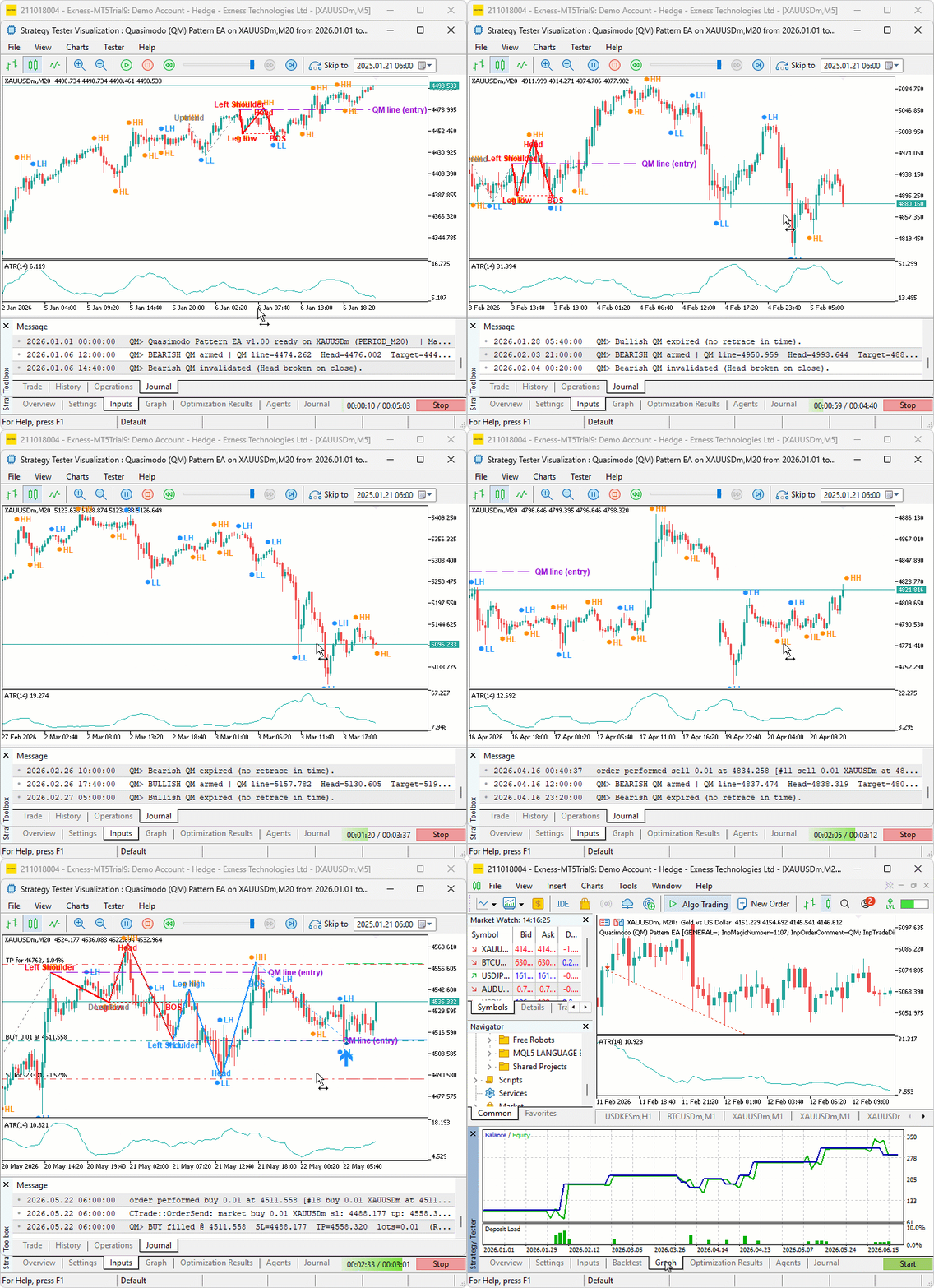
During testing, the program labeled swing points as they confirmed and threaded them into the zig-zag, keeping the running structure readable. Setups were armed only after a head swept the shoulder and price broke the leg, and each armed setup drew its full structure with the dashed QM entry line. Some setups expired without a trade when the price never returned to the line, while others filled on the retrace, with the stop placed beyond the head and the target at the reward-to-risk projection. On the trades that ran in our favor, the stop advanced to breakeven once profit reached the threshold and trailed behind the price as the move extended.
Backtest graph:

Backtest report:

Conclusion
In conclusion, we have built an automated trading program in MQL5 that detects the Quasimodo reversal pattern from a zig-zag of confirmed swing pivots, validates it through a break of structure and a prior-trend filter, and trades the retrace back to the QM line with structure-based risk. We covered centered swing-pivot detection feeding an alternating zig-zag, the Quasimodo shape rules for both directions, and the entry logic on the retrace to the QM line. We also added structural stops with an ATR floor and a trade-management layer with breakeven, trailing, and an optional partial close.
Disclaimer: This article is for educational purposes only. Trading carries significant financial risks, and past performance during backtesting does not guarantee future results. Thorough backtesting and careful risk management are essential before deploying this program in live markets.
After reading this article, you will be able to:
- Detect Quasimodo reversals automatically from a zig-zag of confirmed swing pivots, validated by a break of structure and a prior trend, drawn directly on your chart.
- Place entries at the QM line with a structural stop beyond the head and a target drawn from the broken structure, while skipping setups that fall below your minimum reward-to-risk.
- Manage open positions with breakeven, ATR, or fixed-point trailing, and an optional partial close as price extends in your favor.
Warning: All rights to these materials are reserved by MetaQuotes Ltd. Copying or reprinting of these materials in whole or in part is prohibited.
This article was written by a user of the site and reflects their personal views. MetaQuotes Ltd is not responsible for the accuracy of the information presented, nor for any consequences resulting from the use of the solutions, strategies or recommendations described.

 Market Microstructure in MQL5 (Part 7): Regime Classification
 Developing a Neural Network Trading Robot Based on Mamba with Selective State Space Models
 Heatmap Visualization of Intraday Return Patterns in MQL5 Using CCanvas
 Engineering Trading Discipline into Code (Part 8): Building a Setup Confirmation and Trade Authorization Layer in MQL5

- Free trading apps
- Over 8,000 signals for copying
- Economic news for exploring financial markets
You agree to website policy and terms of use