

Engineering Trading Discipline into Code (Part 3): Enforcing Symbol-Level Trading Boundaries with a Whitelist System in MQL5
 5 047
5 047
 0
0

Contents
- Introduction
- Understanding the Concept
- System Architecture Overview
- MQL5 Implementation
- Testing and Outcomes
- Conclusion
Introduction
Even disciplined traders can lose money not because their strategy is flawed, but because they trade the wrong instrument. In MetaTrader 5 this can occur in common situations such as attaching an Expert Advisor to an unfamiliar chart, placing a manual pending order on a symbol that has not been tested, or running the same strategy across multiple instruments without restricting its scope. The engineering problem is therefore straightforward: prevent any order execution or deal on instruments that are not explicitly approved, for both manual and EA trading.
This article presents a practical solution implemented in MQL5 that enforces symbol-level discipline at the trading-event level using OnTradeTransaction. The system is built around a whitelist of approved instruments and actively blocks both pending-order additions and market deals on symbols that are not part of the allowed set. Each blocked attempt is logged for transparency, while a dashboard provides configuration and real-time visibility of the permitted symbols.
In practice, this approach converts symbol discipline from a discretionary guideline into a structural rule enforced by the trading environment itself. Instead of relying on the trader to remember which instruments should be traded, the system ensures that only the predefined universe of symbols can participate in strategy execution.
The following sections describe the concept behind symbol-level trade restriction, the architecture of the solution, and its implementation in MQL5. We then present testing results demonstrating how the mechanism reliably blocks trading attempts on non-approved symbols while allowing normal operation on the configured whitelist.
Understanding the Concept
In the previous two parts of this series, Engineering Trading Discipline into Code, we explored how discipline can move beyond intention and become embedded directly into trading systems. Those discussions emphasized a critical reality: knowing the rules is not the same as enforcing them. A trader may fully understand risk management principles and still violate them under pressure. Automation, therefore, is not about replacing the trader—it is about protecting the trader from inconsistency.
Why Symbol Discipline Matters
One of the most common areas where discipline breaks down is symbol selection. Many traders begin with a defined set of currency pairs or instruments they understand well. Over time, they study how those symbols behave during different sessions, how they react to news, how volatile they are, and how cleanly their setups form. This familiarity creates statistical comfort and structured decision-making. However, modern trading platforms provide access to dozens—sometimes hundreds—of instruments. With a single scroll, a trader can move from EURUSD to NASDAQ, from Gold to exotic crosses.
That accessibility introduces temptation. Traders often diversify impulsively. Even algorithmic traders sometimes attach an Expert Advisor to multiple charts without carefully controlling which instruments are allowed. What begins as “exploration” can quietly evolve into inconsistency.
Over time, this leads to:
- Strategy drift - applying a strategy designed for one market structure to instruments with different volatility and liquidity characteristics.
- Data contamination in backtesting comparisons - mixing results from instruments that were never part of the original testing scope, making performance evaluation unreliable.
- Psychological inconsistency - shifting focus between symbols reduces clarity and increases emotional decision-making.
- Risk expansion beyond intended limits - exposure increases unintentionally when multiple unplanned instruments are traded simultaneously.
It is important to recognize that often, the strategy itself is not the problem. The trader may have a well-tested approach that performs effectively under defined conditions. The real weakness lies in the absence of enforcement. Rules exist, but nothing prevents them from being broken.
Symbol Whitelist
The system implemented in this framework follows a whitelist model, meaning it operates on an approval-based execution model. There is no independent blacklist component maintaining a list of prohibited instruments. Instead, the architecture defines a controlled trading universe by explicitly specifying which symbols are authorized for execution. Any instrument not included in that predefined set is automatically considered ineligible.
A symbol whitelist is therefore a formally configured collection of financial instruments approved for trading within the system. It serves as a validation layer integrated directly into the execution logic. Before an order request is processed, the system verifies whether the current symbol exists within the approved list. This validation occurs programmatically and consistently, without exception.
The decision structure is binary and deterministic:
- If the symbol exists in the whitelist: execution proceeds.
- If the symbol does not exist in the whitelist: execution is denied automatically.
There are no conditional overrides, no situational interpretation, and no manual intervention at runtime. The eligibility check is mechanical and absolute.
Whitelist vs. Blacklist
It is essential to distinguish this model from a blacklist-based design.
- A whitelist model explicitly defines what is allowed and excludes everything else by default.
- A blacklist model explicitly defines what is forbidden while leaving the remainder of the trading universe accessible.
This system follows the whitelist model exclusively. Instruments are not rejected because they appear on a prohibited list; they are rejected because they are not part of the approved set. The restriction is implicit through exclusion rather than explicit prohibition. From a structural standpoint, this distinction is significant. A blacklist still permits broad participation and only filters out selected symbols. A whitelist, however, creates a closed operational scope. Trading activity cannot expand beyond what has been intentionally configured. If a broker adds new instruments or the platform provides additional symbols, they remain inaccessible unless deliberately included in the whitelist configuration.
Why Enforcement at Code Level Matters
In discretionary environments, symbol selection can gradually drift beyond the original design scope. Even in automated environments, Expert Advisors may be attached to multiple charts without strict control over which instruments are permitted. Over time, this introduces variability that was not accounted for during strategy validation.
By embedding a whitelist model validation into the execution pipeline, instrument eligibility becomes a controlled parameter rather than an adjustable variable. The system does not evaluate whether a setup “looks valid” on an unapproved symbol. It simply verifies authorization status before proceeding. This ensures that strategy logic operates strictly within its researched and tested domain.
Advantages of the Whitelist Model
When implemented as part of the trading infrastructure, whitelist enforcement provides measurable operational benefits:
| Advantage | Operational Impact |
|---|---|
| Defined Trading Universe | Execution remains confined to instruments originally researched and validated. |
| Protection Against Scope Expansion | Prevents unplanned inclusion of additional or newly listed symbols. |
| Backtesting Integrity | Ensures that performance results are not distorted by unintended instruments. |
| Exposure Control | Keeps aggregate market participation within predefined boundaries. |
| Configuration Accountability | Makes the approved instrument set transparent and reviewable. |
| Deployment Safety | Blocks execution when an EA is attached to a non-authorized chart. |
| Structural Governance | Introduces rule-based control comparable to institutional risk filters. |
| Audit Readiness | Enables logging of rejected symbols for monitoring and evaluation. |
Operational Outcome
Without symbol-level enforcement, instrument eligibility remains fluid. That fluidity may appear harmless initially, but it introduces inconsistency into execution data, risk exposure, and performance analysis. A whitelist removes that ambiguity by transforming eligibility into a fixed configuration parameter. The system does not rely on restraint, judgment, or memory. It relies on validation logic. Only instruments that pass the authorization check are allowed to interact with the execution engine.
System Architecture Overview
The Symbol Whitelist Enforcer is structured as a modular three-layer system designed for clarity, separation of responsibilities, and long-term maintainability. Each component performs a single, well-defined role, while coordination between them is handled through a shared file-based storage mechanism. This design ensures that configuration, validation, enforcement, and reporting remain synchronized without creating tight coupling between modules.
The architecture consists of:
- Core Include File - SymbolWhitelist.mqh
- Dashboard Indicator - SymbolWhitelistDashboard.mq5
- Enforcement Expert Advisor - SymbolWhitelistEnforcer.mq5
All components interact through persistent storage files (SymbolWhitelist.txt and SymbolWhitelistLog.csv), which function as the shared state layer of the system.
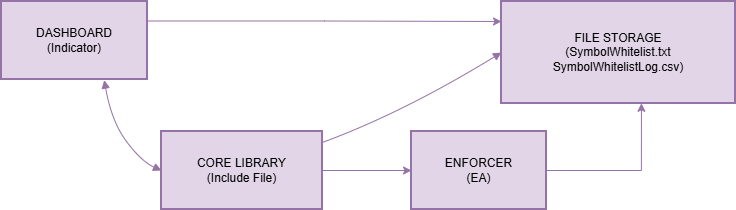
The file system acts as the neutral synchronization layer. No component communicates directly with another; instead, each reads from and writes to shared storage through the core library. This eliminates cross-dependencies and keeps the system clean and predictable.
1. Core Include File - SymbolWhitelist.mqh
The core include file serves as the central logic engine of the system. It is not an executable program, but a reusable library imported by both the dashboard and the enforcement EA. By consolidating all validation and file-handling logic in a single location, the system guarantees that every module applies identical rules and operates on consistent data.
Its responsibilities are organized into three functional areas.
Whitelist Management
The library manages the persistence of approved symbols. SaveWhitelist() writes the configured symbol list to SymbolWhitelist.txt, while LoadWhitelist() retrieves it when needed. To ensure reliability, ParseWhitelist() converts the stored comma-separated string into a properly trimmed array, allowing flexible user input formatting without breaking validation logic.
Symbol Validation
IsSymbolAllowed() is the decisive control function. It loads the current whitelist, parses it, and performs a case-insensitive comparison against the symbol under evaluation. This function is invoked by the enforcer before any corrective action is taken.
Logging and Auditing
For transparency, LogBlockedAttempt() records every rejected trade attempt in SymbolWhitelistLog.csv, including timestamp, symbol, and trade source (manual or EA). ReadLog() retrieves recent entries for dashboard display. This mechanism establishes traceability and operational accountability.
Because all file operations are centralized and error-checked within this library, it acts as the single source of truth for the entire system.
2. Dashboard Indicator - SymbolWhitelistDashboard.mq5
The dashboard provides configuration control and real-time visibility. It does not interfere with trading operations; instead, it translates system state into an accessible visual format. During initialization, the dashboard accepts the InpWhitelist parameter and writes the approved symbols to the shared file using the core library. This action defines the operational scope for the entire system.
Visually, the dashboard renders a structured panel displaying
- The approved symbol list
- The current chart’s authorization status
- Recent blocked attempts
- Enforcement status confirmation
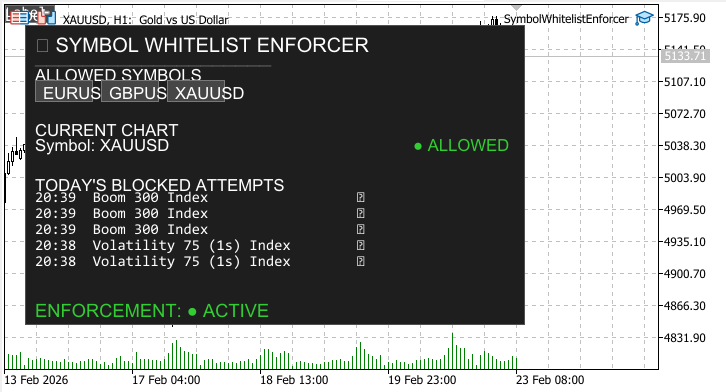
A one-second timer refreshes the display by reloading whitelist and log data. This ensures that enforcement activity performed by the EA is immediately reflected on screen. The dashboard’s purpose is clarity. It makes rule configuration visible and enforcement activity observable without embedding enforcement logic into the interface itself.
3. Enforcement Expert Advisor - SymbolWhitelistEnforcer.mq5
The Enforcement EA is the active control layer responsible for applying restrictions. It operates independently of the dashboard and focuses solely on monitoring and corrective action. Upon initialization, the EA confirms activation and then listens to OnTradeTransaction events generated by the MetaTrader 5 terminal. It specifically evaluates new pending orders (TRADE_TRANSACTION_ORDER_ADD) and executed market deals (TRADE_TRANSACTION_DEAL_ADD).
For each relevant event, the EA extracts the symbol and calls IsSymbolAllowed() from the core library. If the symbol is authorized, no action is taken.
If the symbol is not authorized, the EA immediately:
- Logs the attempt via LogBlockedAttempt()
- Cancels pending orders or closes open positions
- Writes a confirmation message to the Experts log
The EA is event-driven and stateless. It does not rely on timers or background loops; it reacts instantly to trading events, ensuring immediate enforcement.
Integrated System Behavior
The workflow follows a structured sequence. The whitelist is defined through the dashboard. The core library stores and standardizes validation logic. The enforcement EA monitors trading activity and applies restrictions when necessary. Any blocked attempt is logged and then displayed by the dashboard. This separation ensures that configuration, validation, enforcement, and reporting remain independent yet synchronized.
MQL5 Implementation
Having established the architectural foundation, we now move from concept to executable MQL5 code. The implementation mirrors the modular design outlined in the system overview and consists of three interdependent but distinct components: the core engine, the dashboard indicator, and the enforcement Expert Advisor. Each component plays a critical role in transforming symbol-level trade discipline from theory into a robust, automated mechanism. By structuring the implementation this way, the system ensures consistency, maintainability, and a seamless user experience.
This section goes beyond mere code description—it emphasizes the reasoning behind every design choice, illustrating how engineering discipline into code safeguards strategy integrity, enforces risk controls, and reduces the influence of emotion in trading decisions.
Part 1 - The Core Engine (SymbolWhitelist.mqh)
The core engine serves as the intellectual backbone of the system. Placing all critical logic within a shared include file ensures that both the dashboard and the enforcement EA operate on the same rules and data, eliminating duplication and potential inconsistencies. This approach exemplifies the principle of single responsibility in software engineering: one component handles logic and data operations, while others focus on presentation or enforcement.
A dedicated namespace, SWL, isolates all functions, preventing naming conflicts with other trading utilities. Two constants, WHITELIST_FILE and LOG_FILE, define the text and CSV files used to persist configuration and event logs. This design choice ensures that the system remains human-readable, inspectable, and editable if necessary, while being fully compatible with runtime operations.
//+------------------------------------------------------------------+
//|                                               SymbolWhitelist.mqh|
//|                                   Copyright 2026, MetaQuotes Ltd.|
//|                           https://www.mql5.com/en/users/lynnchris|
//+------------------------------------------------------------------+
namespace SWL
  {
const string WHITELIST_FILE = "SymbolWhitelist.txt";
const string LOG_FILE       = "SymbolWhitelistLog.csv";
Saving the Whitelist - SaveWhitelist()
The SaveWhitelist() function persists the list of allowed symbols to disk. It opens the file in write mode, writes the comma-separated string of symbols, and returns a boolean status. Persisting configuration externally decouples the system from static code, enabling dynamic updates. You can modify the allowed instruments by editing the file directly or re-attaching the dashboard with updated input, eliminating the need for code recompilation.
//+------------------------------------------------------------------+
//| Saves the whitelist string to file                               |
//+------------------------------------------------------------------+
bool SaveWhitelist(string whitelist)
  {
   int handle = FileOpen(WHITELIST_FILE,FILE_TXT|FILE_WRITE);
   if(handle==INVALID_HANDLE)
      return false;
   FileWrite(handle,whitelist);
   FileClose(handle);
   return true;
  }
//+------------------------------------------------------------------+
By separating configuration from execution, SaveWhitelist() ensures that updates are instantaneously shared across components, maintaining a single source of truth. This approach also supports automated workflows in multi-user or multi-strategy environments.
Loading the Whitelist - LoadWhitelist()
LoadWhitelist() is the complementary function for reading persisted configuration. It first checks if the file exists, returning an empty string if not, providing a safe default for initialization. If the file exists, it reads the content and returns it for processing. This mechanism ensures that the dashboard and EA always operate with the current configuration and gracefully handles first-time runs or accidental deletions.
//+------------------------------------------------------------------+
//| Loads the whitelist from file, returns as string                 |
//+------------------------------------------------------------------+
string LoadWhitelist()
  {
   if(!FileIsExist(WHITELIST_FILE))
      return "";
   int handle = FileOpen(WHITELIST_FILE,FILE_TXT|FILE_READ);
   if(handle==INVALID_HANDLE)
      return "";
   string data = FileReadString(handle);
   FileClose(handle);
   return data;
  }
//+------------------------------------------------------------------+
The function supports robustness in both manual and automated trading setups. By preventing runtime failures due to missing files, it guarantees that the system is operational from the moment it is deployed.
Parsing the Whitelist - ParseWhitelist()
While the whitelist is stored as a simple comma-separated string, ParseWhitelist() converts this into a clean array of individual symbols. It uses StringSplit() to extract each entry and trims whitespace using StringTrimLeft() and StringTrimRight(). Empty entries are ignored, ensuring a reliable and consistent array regardless of user input formatting.
//+------------------------------------------------------------------+
//| Parses a comma‑separated whitelist into an array of symbols      |
//+------------------------------------------------------------------+
int ParseWhitelist(string list,string &result[])
  {
   ArrayResize(result,0);
   if(list=="")
      return 0;
   string parts[];
   int count = StringSplit(list,',',parts);
   for(int i=0; i<count; i++)
     {
      string trimmed = parts[i];
      StringTrimLeft(trimmed);
      StringTrimRight(trimmed);
      if(trimmed!="")
        {
         int sz = ArraySize(result);
         ArrayResize(result,sz+1);
         result[sz] = trimmed;
        }
     }
   return ArraySize(result);
  }
//+------------------------------------------------------------------+
For example, you might input "EURUSD, GBPUSD , XAUUSD" with inconsistent spacing. ParseWhitelist() will standardize this to ["EURUSD","GBPUSD","XAUUSD"], preventing potential mismatches or enforcement errors. This attention to detail ensures the system remains user-friendly while reducing human errors.
Checking if a Symbol is Allowed-IsSymbolAllowed()
IsSymbolAllowed() encapsulates the enforcement check. It loads and parses the whitelist, then iterates through the array, performing a case-insensitive comparison against the provided symbol. If a match is found, it returns true; otherwise, false.
//+------------------------------------------------------------------+
//| Checks if a given symbol is in the whitelist                     |
//+------------------------------------------------------------------+
bool IsSymbolAllowed(string symbol)
  {
   string list = LoadWhitelist();
   string allowed[];
   ParseWhitelist(list,allowed);
   for(int i=0; i<ArraySize(allowed); i++)
      if(StringCompare(allowed[i],symbol,false)==0)
         return true;
   return false;
  }
//+------------------------------------------------------------------+
Centralizing this check ensures uniformity: the dashboard for visual feedback and the enforcer for active blocking operate under identical rules. Case-insensitive comparisons align with MetaTrader’s conventions and prevent accidental mismatches. This function is the linchpin of symbol-level discipline, translating abstract rules into enforceable logic.
Logging Blocked Attempts - LogBlockedAttempt()
Whenever a trade is blocked, LogBlockedAttempt() records every rejected trade attempt in SymbolWhitelistLog.csv, including timestamp, symbol, and source (manual or EA). This transparent audit trail allows traders to review enforcement actions, identify impulsive behavior patterns, and validate the system’s effectiveness.
//+------------------------------------------------------------------+
//| Appends a blocked attempt to the log file                        |
//+------------------------------------------------------------------+
void LogBlockedAttempt(datetime time,string symbol,string source)
  {
   int handle = FileOpen(LOG_FILE,FILE_TXT|FILE_READ|FILE_WRITE|FILE_CSV,',');
   if(handle==INVALID_HANDLE)
      return;
   FileSeek(handle,0,SEEK_END);
   FileWrite(handle,TimeToString(time),symbol,source);
   FileClose(handle);
  }
//+------------------------------------------------------------------+
Accurate logging also supports analytical review: over time, you can quantify how often disallowed trades are attempted and adjust their strategies or automate additional safeguards accordingly.
Reading Log History - ReadLog()
The dashboard relies on ReadLog() to display the most recent blocked attempts. It reads the CSV file and returns entries in reverse chronological order, limiting the display to a configurable maximum (default 10). This ensures a concise, up-to-date visual record that reinforces discipline while preventing information overload.
//+------------------------------------------------------------------+ //| Reads the last N log entries (most recent first) | //+------------------------------------------------------------------+ int ReadLog(string ×[],string &symbols[],string &sources[],int max=10) { ArrayResize(times,0); ArrayResize(symbols,0); ArrayResize(sources,0); if(!FileIsExist(LOG_FILE)) return 0; int handle = FileOpen(LOG_FILE,FILE_TXT|FILE_READ|FILE_CSV,','); if(handle==INVALID_HANDLE) return 0; string tmpTime[], tmpSym[], tmpSrc[]; while(!FileIsEnding(handle)) { string t = FileReadString(handle); string s = FileReadString(handle); string src = FileReadString(handle); if(t!="" && s!="") { int sz = ArraySize(tmpTime); ArrayResize(tmpTime,sz+1); ArrayResize(tmpSym,sz+1); ArrayResize(tmpSrc,sz+1); tmpTime[sz] = t; tmpSym[sz] = s; tmpSrc[sz] = src; } } FileClose(handle); int total = ArraySize(tmpTime); int start = (total>max) ? total-max : 0; for(int i=total-1; i>=start; i--) { int sz = ArraySize(times); ArrayResize(times,sz+1); ArrayResize(symbols,sz+1); ArrayResize(sources,sz+1); times[sz] = tmpTime[i]; symbols[sz] = tmpSym[i]; sources[sz] = tmpSrc[i]; } return ArraySize(times); } } //+------------------------------------------------------------------+
Part 2 - Dashboard Indicator (SymbolWhitelistDashboard.mq5)
The dashboard translates the abstract rules into a real-time visual cockpit, providing full visibility into the system without executing trades. Its separation from the enforcer ensures a clean, modular design. Traders can attach the dashboard to any chart, allowing flexible setups that integrate with multiple strategies or trading accounts.
//+------------------------------------------------------------------+
//|                                      SymbolWhitelistDashboard.mq5|
//|                                   Copyright 2026, MetaQuotes Ltd.|
//|                           https://www.mql5.com/en/users/lynnchris|
//+------------------------------------------------------------------+
#property copyright "Copyright 2026, Christian Benjamin"
#property link      "https://www.mql5.com/en/users/lynnchris"
#property version   "1.00"
#property indicator_chart_window
#property indicator_buffers 0
#property indicator_plots   0

#include <SymbolWhitelist.mqh>

//--- input parameters
input string InpWhitelist = "EURUSD,GBPUSD,XAUUSD";   // Allowed symbols (comma separated)
input int    InpX         = 20;                       // Panel X offset
input int    InpY         = 20;                       // Panel Y offset
input int    InpWidth     = 500;                      // Panel width
input int    InpHeight    = 300;                      // Panel height

//--- colors
input color  InpBgColor       = C'30,30,30';          // Background
input color  InpBorderColor   = C'80,80,80';          // Border
input color  InpChipBg        = C'70,70,70';          // Chip background
input color  InpChipBorder    = C'120,120,120';       // Chip border
input color  InpTextColor     = clrWhite;             // Text
input color  InpAllowedColor  = clrLimeGreen;         // Allowed indicator
input color  InpBlockedColor  = clrTomato;            // Blocked indicator
input color  InpActiveColor   = clrLimeGreen;         // Enforcement active

//--- global prefixes
string PREFIX = "SWL_";
Initialization - OnInit()
Upon attachment, OnInit() writes the input whitelist to the shared file via SWL::SaveWhitelist(), ensuring alignment with the enforcer. It then draws the panel and starts a one-second timer. This timer drives live updates, enabling the display to refresh dynamically without blocking normal chart operations.
//+------------------------------------------------------------------+
//| Custom indicator initialization function                         |
//+------------------------------------------------------------------+
int OnInit()
  {
   //--- Save initial whitelist to file
   SWL::SaveWhitelist(InpWhitelist);

   CreatePanel();
   EventSetTimer(1);
   return(INIT_SUCCEEDED);
  }
//+------------------------------------------------------------------+

//+------------------------------------------------------------------+
//| Custom indicator deinitialization function                       |
//+------------------------------------------------------------------+
void OnDeinit(const int reason)
  {
   EventKillTimer();
   DeleteObjectsByPrefix(PREFIX);
  }
//+------------------------------------------------------------------+
Timer Updates - OnTimer() and UpdateDashboard()
Every second, the timer triggers UpdateDashboard(). The function reloads the whitelist and the log, updating visual elements to reflect the current system state. This live feedback loop provides continuous reinforcement of trading discipline, showing which trades are allowed and which are blocked.
//+------------------------------------------------------------------+
//| Custom indicator iteration function (required)                   |
//+------------------------------------------------------------------+
int OnCalculate(const int rates_total,
                const int prev_calculated,
                const datetime &time[],
                const double &open[],
                const double &high[],
                const double &low[],
                const double &close[],
                const long &tick_volume[],
                const long &volume[],
                const int &spread[])
  {
   return(rates_total);
  }
//+------------------------------------------------------------------+

//+------------------------------------------------------------------+
//| Timer function                                                   |
//+------------------------------------------------------------------+
void OnTimer()
  {
   UpdateDashboard();
  }
//+------------------------------------------------------------------+
Drawing the Panel - CreatePanel()
CreatePanel() constructs a professional, clear, and visually intuitive interface. It deletes any previous objects to prevent clutter, draws the background, section headers, and placeholders for dynamic elements like symbol chips, chart status, and log entries. Consistent naming conventions allow clean management of objects. The visual layout uses color-coded status indicators, maintaining readability and preventing confusion during live trading.
//+------------------------------------------------------------------+
//| Creates the entire panel                                         |
//+------------------------------------------------------------------+
void CreatePanel()
  {
   DeleteObjectsByPrefix(PREFIX);

   //--- Background
   ObjectCreate(0,PREFIX+"BG",OBJ_RECTANGLE_LABEL,0,0,0);
   ObjectSetInteger(0,PREFIX+"BG",OBJPROP_XDISTANCE,InpX);
   ObjectSetInteger(0,PREFIX+"BG",OBJPROP_YDISTANCE,InpY);
   ObjectSetInteger(0,PREFIX+"BG",OBJPROP_XSIZE,InpWidth);
   ObjectSetInteger(0,PREFIX+"BG",OBJPROP_YSIZE,InpHeight);
   ObjectSetInteger(0,PREFIX+"BG",OBJPROP_BGCOLOR,InpBgColor);
   ObjectSetInteger(0,PREFIX+"BG",OBJPROP_BORDER_TYPE,BORDER_FLAT);
   ObjectSetInteger(0,PREFIX+"BG",OBJPROP_COLOR,InpBorderColor);
   ObjectSetInteger(0,PREFIX+"BG",OBJPROP_BACK,false);

   //--- Header
   ObjectCreate(0,PREFIX+"HEADER",OBJ_LABEL,0,0,0);
   ObjectSetInteger(0,PREFIX+"HEADER",OBJPROP_XDISTANCE,InpX+10);
   ObjectSetInteger(0,PREFIX+"HEADER",OBJPROP_YDISTANCE,InpY+8);
   ObjectSetString(0,PREFIX+"HEADER",OBJPROP_TEXT,"SYMBOL WHITELIST ENFORCER");
   ObjectSetInteger(0,PREFIX+"HEADER",OBJPROP_COLOR,InpTextColor);
   ObjectSetInteger(0,PREFIX+"HEADER",OBJPROP_FONTSIZE,12);
   ObjectSetInteger(0,PREFIX+"HEADER",OBJPROP_BACK,false);
   ObjectSetInteger(0,PREFIX+"HEADER",OBJPROP_SELECTABLE,false);

   //--- Separator line
   ObjectCreate(0,PREFIX+"SEP1",OBJ_LABEL,0,0,0);
   ObjectSetInteger(0,PREFIX+"SEP1",OBJPROP_XDISTANCE,InpX+10);
   ObjectSetInteger(0,PREFIX+"SEP1",OBJPROP_YDISTANCE,InpY+30);
   ObjectSetString(0,PREFIX+"SEP1",OBJPROP_TEXT,"────────────────────");
   ObjectSetInteger(0,PREFIX+"SEP1",OBJPROP_COLOR,InpBorderColor);
   ObjectSetInteger(0,PREFIX+"SEP1",OBJPROP_BACK,false);
   ObjectSetInteger(0,PREFIX+"SEP1",OBJPROP_SELECTABLE,false);

   //--- Allowed symbols section header
   ObjectCreate(0,PREFIX+"ALLOWED_TITLE",OBJ_LABEL,0,0,0);
   ObjectSetInteger(0,PREFIX+"ALLOWED_TITLE",OBJPROP_XDISTANCE,InpX+10);
   ObjectSetInteger(0,PREFIX+"ALLOWED_TITLE",OBJPROP_YDISTANCE,InpY+40);
   ObjectSetString(0,PREFIX+"ALLOWED_TITLE",OBJPROP_TEXT,"ALLOWED SYMBOLS");
   ObjectSetInteger(0,PREFIX+"ALLOWED_TITLE",OBJPROP_COLOR,InpTextColor);
   ObjectSetInteger(0,PREFIX+"ALLOWED_TITLE",OBJPROP_FONTSIZE,10);
   ObjectSetInteger(0,PREFIX+"ALLOWED_TITLE",OBJPROP_BACK,false);
   ObjectSetInteger(0,PREFIX+"ALLOWED_TITLE",OBJPROP_SELECTABLE,false);

   //--- Current chart section header
   ObjectCreate(0,PREFIX+"CURRENT_TITLE",OBJ_LABEL,0,0,0);
   ObjectSetInteger(0,PREFIX+"CURRENT_TITLE",OBJPROP_XDISTANCE,InpX+10);
   ObjectSetInteger(0,PREFIX+"CURRENT_TITLE",OBJPROP_YDISTANCE,InpY+95);
   ObjectSetString(0,PREFIX+"CURRENT_TITLE",OBJPROP_TEXT,"CURRENT CHART");
   ObjectSetInteger(0,PREFIX+"CURRENT_TITLE",OBJPROP_COLOR,InpTextColor);
   ObjectSetInteger(0,PREFIX+"CURRENT_TITLE",OBJPROP_FONTSIZE,10);
   ObjectSetInteger(0,PREFIX+"CURRENT_TITLE",OBJPROP_BACK,false);
   ObjectSetInteger(0,PREFIX+"CURRENT_TITLE",OBJPROP_SELECTABLE,false);

   //--- Log section header
   ObjectCreate(0,PREFIX+"LOG_TITLE",OBJ_LABEL,0,0,0);
   ObjectSetInteger(0,PREFIX+"LOG_TITLE",OBJPROP_XDISTANCE,InpX+10);
   ObjectSetInteger(0,PREFIX+"LOG_TITLE",OBJPROP_YDISTANCE,InpY+150);
   ObjectSetString(0,PREFIX+"LOG_TITLE",OBJPROP_TEXT,"TODAY'S BLOCKED ATTEMPTS");
   ObjectSetInteger(0,PREFIX+"LOG_TITLE",OBJPROP_COLOR,InpTextColor);
   ObjectSetInteger(0,PREFIX+"LOG_TITLE",OBJPROP_FONTSIZE,10);
   ObjectSetInteger(0,PREFIX+"LOG_TITLE",OBJPROP_BACK,false);
   ObjectSetInteger(0,PREFIX+"LOG_TITLE",OBJPROP_SELECTABLE,false);

   //--- Footer (enforcement status)
   ObjectCreate(0,PREFIX+"FOOTER",OBJ_LABEL,0,0,0);
   ObjectSetInteger(0,PREFIX+"FOOTER",OBJPROP_XDISTANCE,InpX+10);
   ObjectSetInteger(0,PREFIX+"FOOTER",OBJPROP_YDISTANCE,InpY+InpHeight-25);
   ObjectSetInteger(0,PREFIX+"FOOTER",OBJPROP_COLOR,InpActiveColor);
   ObjectSetInteger(0,PREFIX+"FOOTER",OBJPROP_FONTSIZE,11);
   ObjectSetInteger(0,PREFIX+"FOOTER",OBJPROP_BACK,false);
   ObjectSetInteger(0,PREFIX+"FOOTER",OBJPROP_SELECTABLE,false);

   //--- Dynamic elements (chips, status, log lines)
   for(int i=0; i<10; i++)
     {
      string name = PREFIX+"CHIP_"+IntegerToString(i);
      ObjectCreate(0,name,OBJ_RECTANGLE_LABEL,0,0,0);
      ObjectSetInteger(0,name,OBJPROP_BGCOLOR,InpChipBg);
      ObjectSetInteger(0,name,OBJPROP_BORDER_TYPE,BORDER_FLAT);
      ObjectSetInteger(0,name,OBJPROP_COLOR,InpChipBorder);
      ObjectSetInteger(0,name,OBJPROP_BACK,false);
      ObjectSetInteger(0,name,OBJPROP_HIDDEN,true);
      ObjectSetInteger(0,name,OBJPROP_SELECTABLE,false);

      name = PREFIX+"CHIPTXT_"+IntegerToString(i);
      ObjectCreate(0,name,OBJ_LABEL,0,0,0);
      ObjectSetInteger(0,name,OBJPROP_COLOR,InpTextColor);
      ObjectSetInteger(0,name,OBJPROP_FONTSIZE,10);
      ObjectSetInteger(0,name,OBJPROP_BACK,false);
      ObjectSetInteger(0,name,OBJPROP_HIDDEN,true);
      ObjectSetInteger(0,name,OBJPROP_SELECTABLE,false);

      name = PREFIX+"LOG_"+IntegerToString(i);
      ObjectCreate(0,name,OBJ_LABEL,0,0,0);
      ObjectSetInteger(0,name,OBJPROP_COLOR,InpTextColor);
      ObjectSetInteger(0,name,OBJPROP_FONTSIZE,9);
      ObjectSetString(0,name,OBJPROP_FONT,"Consolas");
      ObjectSetInteger(0,name,OBJPROP_BACK,false);
      ObjectSetInteger(0,name,OBJPROP_HIDDEN,true);
      ObjectSetInteger(0,name,OBJPROP_SELECTABLE,false);
     }

   //--- Status lines
   ObjectCreate(0,PREFIX+"STATUS_SYM",OBJ_LABEL,0,0,0);
   ObjectSetInteger(0,PREFIX+"STATUS_SYM",OBJPROP_COLOR,InpTextColor);
   ObjectSetInteger(0,PREFIX+"STATUS_SYM",OBJPROP_FONTSIZE,10);
   ObjectSetInteger(0,PREFIX+"STATUS_SYM",OBJPROP_BACK,false);
   ObjectSetInteger(0,PREFIX+"STATUS_SYM",OBJPROP_SELECTABLE,false);

   ObjectCreate(0,PREFIX+"STATUS_IND",OBJ_LABEL,0,0,0);
   ObjectSetInteger(0,PREFIX+"STATUS_IND",OBJPROP_FONTSIZE,10);
   ObjectSetInteger(0,PREFIX+"STATUS_IND",OBJPROP_BACK,false);
   ObjectSetInteger(0,PREFIX+"STATUS_IND",OBJPROP_SELECTABLE,false);

   UpdateDashboard();
  }
//+------------------------------------------------------------------+
Displaying Allowed Symbols - Chip Drawing
Symbols are displayed as "chips," visually distinct rounded rectangles with the symbol name. The layout wraps dynamically to adapt to the panel width, providing an at-a-glance view of the entire whitelist. Unlike simple text lists, this graphical representation reduces cognitive load and helps the trader quickly understand which instruments are permitted.
//+------------------------------------------------------------------+
//| Updates all dynamic panel content                                |
//+------------------------------------------------------------------+
void UpdateDashboard()
  {
   string whitelist = SWL::LoadWhitelist();
   string allowed[];
   int num = SWL::ParseWhitelist(whitelist,allowed);

   //--- Hide all chips first
   for(int i=0; i<10; i++)
     {
      ObjectSetInteger(0,PREFIX+"CHIP_"+IntegerToString(i),OBJPROP_HIDDEN,true);
      ObjectSetInteger(0,PREFIX+"CHIPTXT_"+IntegerToString(i),OBJPROP_HIDDEN,true);
     }

   //--- Draw chips
   int x = InpX + 10;
   int y = InpY + 55;
   int chipHeight = 22;
   int margin = 8;
   for(int i=0; i<num && i<10; i++)
     {
      string sym = allowed[i];
      int textWidth = StringLen(sym) * 7;
      int chipWidth = textWidth + 16;

      if(x + chipWidth > InpX + InpWidth - 10)
        {
         x = InpX + 10;
         y += chipHeight + 5;
        }

      string chipName = PREFIX+"CHIP_"+IntegerToString(i);
      ObjectSetInteger(0,chipName,OBJPROP_XDISTANCE,x);
      ObjectSetInteger(0,chipName,OBJPROP_YDISTANCE,y);
      ObjectSetInteger(0,chipName,OBJPROP_XSIZE,chipWidth);
      ObjectSetInteger(0,chipName,OBJPROP_YSIZE,chipHeight);
      ObjectSetInteger(0,chipName,OBJPROP_HIDDEN,false);

      string txtName = PREFIX+"CHIPTXT_"+IntegerToString(i);
      ObjectSetInteger(0,txtName,OBJPROP_XDISTANCE,x+8);
      ObjectSetInteger(0,txtName,OBJPROP_YDISTANCE,y+3);
      ObjectSetString(0,txtName,OBJPROP_TEXT,sym);
      ObjectSetInteger(0,txtName,OBJPROP_HIDDEN,false);

      x += chipWidth + margin;
     }
Current Chart Status - Dynamic Feedback
The dashboard checks the symbol of the chart it is attached to and displays a green "ALLOWED" or red "BLOCKED" indicator. Positioning adjusts dynamically to prevent overlaps, and long symbol names are truncated elegantly. Traders can immediately see whether the current chart is part of the whitelist, eliminating errors caused by oversight or impulsive decision-making.
   //--- Current chart status with dynamic positioning
   string currSym = Symbol();
   bool allowedNow = SWL::IsSymbolAllowed(currSym);
   string statusText = allowedNow ? "ALLOWED" : "BLOCKED";
   color statusColor = allowedNow ? InpAllowedColor : InpBlockedColor;

   int statusWidth = StringLen(statusText) * 8;
   int statusX = InpX + InpWidth - statusWidth - 40;
   if(statusX < InpX + 10)
      statusX = InpX + 10;

   int maxSymbolWidth = statusX - (InpX + 10) - 10;
   int maxChars = maxSymbolWidth / 7;
   string prefix = "Symbol: ";
   int prefixLen = StringLen(prefix);
   int symLen = StringLen(currSym);

   string displaySym;
   if(prefixLen + symLen <= maxChars)
      displaySym = prefix + currSym;
   else
     {
      int availableForSym = maxChars - prefixLen - 3;
      if(availableForSym < 1)
         availableForSym = 1;
      string truncated = StringSubstr(currSym,0,availableForSym) + "...";
      displaySym = prefix + truncated;
     }

   ObjectSetInteger(0,PREFIX+"STATUS_SYM",OBJPROP_XDISTANCE,InpX+10);
   ObjectSetInteger(0,PREFIX+"STATUS_SYM",OBJPROP_YDISTANCE,InpY+110);
   ObjectSetString(0,PREFIX+"STATUS_SYM",OBJPROP_TEXT,displaySym);

   ObjectSetInteger(0,PREFIX+"STATUS_IND",OBJPROP_XDISTANCE,statusX);
   ObjectSetInteger(0,PREFIX+"STATUS_IND",OBJPROP_YDISTANCE,InpY+110);
   ObjectSetString(0,PREFIX+"STATUS_IND",OBJPROP_TEXT,statusText);
   ObjectSetInteger(0,PREFIX+"STATUS_IND",OBJPROP_COLOR,statusColor);
Displaying Logs - Aligned Entries
The dashboard shows recent blocked attempts in aligned, monospaced columns. Each line displays the time (HH:MM), padded symbol name, and an icon indicating manual or EA source. This clean layout enables rapid comprehension and reinforces the system’s transparency and accountability.
   //--- Log entries with fixed‑width columns (monospaced font)
   string times[], symbols[], sources[];
   int logCount = SWL::ReadLog(times,symbols,sources,5);
   int logY = InpY + 165;
   for(int i=0; i<5; i++)
     {
      string name = PREFIX+"LOG_"+IntegerToString(i);
      if(i < logCount)
        {
         string timePart = StringSubstr(times[i],11,5);
         string symPart = symbols[i];
         string icon = (sources[i] == "manual" ? "M" : "EA");

         int symLen = StringLen(symPart);
         if(symLen < 30)
           {
            for(int j=symLen; j<30; j++)
               symPart += " ";
           }
         else if(symLen > 30)
               symPart = StringSubstr(symPart,0,30);

         string text = StringFormat("%s  %s  %s",timePart,symPart,icon);
         ObjectSetString(0,name,OBJPROP_TEXT,text);
         ObjectSetInteger(0,name,OBJPROP_XDISTANCE,InpX+10);
         ObjectSetInteger(0,name,OBJPROP_YDISTANCE,logY + i*16);
         ObjectSetInteger(0,name,OBJPROP_HIDDEN,false);
        }
      else
         ObjectSetInteger(0,name,OBJPROP_HIDDEN,true);
     }

   ObjectSetString(0,PREFIX+"FOOTER",OBJPROP_TEXT,"ENFORCEMENT: ● ACTIVE");
  }
//+------------------------------------------------------------------+

//+------------------------------------------------------------------+
//| Deletes all objects with a given prefix                          |
//+------------------------------------------------------------------+
void DeleteObjectsByPrefix(string prefix)
  {
   for(int i=ObjectsTotal(0)-1; i>=0; i--)
     {
      string name = ObjectName(0,i);
      if(StringFind(name,prefix) == 0)
         ObjectDelete(0,name);
     }
  }
//+------------------------------------------------------------------+
Part 3 - The Enforcement EA (SymbolWhitelistEnforcer.mq5)
The enforcement EA is the active guardian of symbol-level discipline. Unlike the dashboard, it intervenes automatically, blocking any trade on a symbol outside the whitelist. By running independently, it ensures that the system functions even if the dashboard is removed or charts are closed.
//+------------------------------------------------------------------+
//|                                      SymbolWhitelistEnforcer.mq5|
//|                                   Copyright 2026, MetaQuotes Ltd.|
//|                           https://www.mql5.com/en/users/lynnchris|
//+------------------------------------------------------------------+
#property copyright "Copyright 2026, Christian Benjamin"
#property link      "https://www.mql5.com/en/users/lynnchris"
#property version   "1.00"
#property strict
#property description "Blocks any trade on symbols not in the whitelist."

#include <SymbolWhitelist.mqh>
Initialization - OnInit()
On startup, the EA logs a confirmation message and verifies that AutoTrading is enabled. While it can set a timer, the primary logic relies on event-driven monitoring, ensuring immediate response to trade transactions without consuming excessive CPU resources.
//+------------------------------------------------------------------+
//| Expert initialization function                                   |
//+------------------------------------------------------------------+
int OnInit()
  {
   Print("SymbolWhitelistEnforcer started. AutoTrading must be enabled.");
   EventSetTimer(1);
   return(INIT_SUCCEEDED);
  }
//+------------------------------------------------------------------+

//+------------------------------------------------------------------+
//| Expert deinitialization function                                 |
//+------------------------------------------------------------------+
void OnDeinit(const int reason)
  {
   EventKillTimer();
   Print("SymbolWhitelistEnforcer stopped.");
  }
//+------------------------------------------------------------------+

//+------------------------------------------------------------------+
//| Timer function (not strictly needed)                             |
//+------------------------------------------------------------------+
void OnTimer()
  {
   //--- Nothing to do here
  }
//+------------------------------------------------------------------+
Monitoring Transactions - OnTradeTransaction()
//+------------------------------------------------------------------+
//| Trade transaction handler - block disallowed symbols             |
//+------------------------------------------------------------------+
void OnTradeTransaction(const MqlTradeTransaction &trans,
                        const MqlTradeRequest &request,
                        const MqlTradeResult &result)
  {
   string symbol = "";
   ulong ticket = 0;
   bool isManual = false;

   if(trans.type == TRADE_TRANSACTION_ORDER_ADD)
     {
      ticket = trans.order;
      if(ticket == 0)
         return;
      if(!OrderSelect(ticket))
        {
         Print("Failed to select order ", ticket);
         return;
        }
      symbol = OrderGetString(ORDER_SYMBOL);
      isManual = (OrderGetInteger(ORDER_MAGIC) == 0);
     }
   else
      if(trans.type == TRADE_TRANSACTION_DEAL_ADD)
        {
         ticket = trans.deal;
         if(ticket == 0)
            return;
         if(HistoryDealSelect(ticket))
           {
            symbol = HistoryDealGetString(ticket, DEAL_SYMBOL);
            long magic = HistoryDealGetInteger(ticket, DEAL_MAGIC);
            isManual = (magic == 0);
           }
        }
      else
         return;

   if(symbol == "")
      return;

   if(!SWL::IsSymbolAllowed(symbol))
     {
      string source = isManual ? "manual" : "EA";
      Print("Blocking ", source, " trade on disallowed symbol: ", symbol);
      SWL::LogBlockedAttempt(TimeCurrent(), symbol, source);

      if(trans.type == TRADE_TRANSACTION_ORDER_ADD)
        {
         MqlTradeRequest req = {};
         MqlTradeResult  res = {};
         req.action   = TRADE_ACTION_REMOVE;
         req.order    = ticket;
         req.comment  = "Symbol not whitelisted";
         if(!OrderSend(req, res))
            Print("Failed to cancel order ", ticket, ": ", res.comment);
        }
      else
         if(trans.type == TRADE_TRANSACTION_DEAL_ADD)
           {
            ulong posTicket = HistoryDealGetInteger(ticket, DEAL_POSITION_ID);
            if(posTicket == 0)
               return;
            if(!PositionSelectByTicket(posTicket))
              {
               Print("Position ", posTicket, " not found.");
               return;
              }

            MqlTradeRequest req = {};
            MqlTradeResult  res = {};
            req.action    = TRADE_ACTION_DEAL;
            req.position  = posTicket;
            req.symbol    = symbol;
            req.volume    = PositionGetDouble(POSITION_VOLUME);
            req.deviation = 5;
            req.comment   = "Symbol not whitelisted";

            if(PositionGetInteger(POSITION_TYPE) == POSITION_TYPE_BUY)
              {
               req.price = SymbolInfoDouble(symbol, SYMBOL_BID);
               req.type  = ORDER_TYPE_SELL;
              }
            else
              {
               req.price = SymbolInfoDouble(symbol, SYMBOL_ASK);
               req.type  = ORDER_TYPE_BUY;
              }
            if(!OrderSend(req, res))
               Print("Failed to close position ", posTicket, ": ", res.comment);
           }
     }
  }
//+------------------------------------------------------------------+
The EA monitors TRADE_TRANSACTION_ORDER_ADD and TRADE_TRANSACTION_DEAL_ADD. For each event, it extracts the symbol, validates it using SWL::IsSymbolAllowed(), and reacts accordingly. This event-driven approach ensures immediate enforcement, providing a robust safety net against impulsive trading decisions.
Identifying Trade Source - Magic Number
By examining the magic number, the EA distinguishes manual trades from automated ones. This information is logged for analytical purposes, giving traders insights into which trades would have violated the whitelist and whether automated strategies respect account rules.
Blocking Disallowed Trades - Immediate Action
If a symbol is not allowed, the EA logs the event and immediately cancels pending orders or closes market positions using a market order in the opposite direction. A small deviation is applied to improve execution success in fast-moving markets. This ensures no disallowed trade remains open, making discipline structural rather than discretionary.
Practical Workflow
Once attached, the dashboard and EA operate seamlessly: traders configure allowed symbols, monitor live status, and rely on the enforcer to guard against any deviation. This fully automates symbol-level discipline, transforming a behavioral requirement into a system-level property.
Testing and Outcomes
With the MQL5 implementation complete, the next critical step is to evaluate how effectively the system enforces symbol-level discipline under real trading conditions. This section presents the methodology, test scenarios, and observed outcomes, highlighting both the reliability of the enforcement mechanism and its impact on maintaining strategic integrity.
The first test focused on verifying the system’s ability to accurately determine whether the symbol of the chart it is attached to is allowed or disallowed. This is a fundamental check, as all subsequent enforcement actions rely on this recognition. The dashboard and enforcer were attached to multiple charts with both approved and non-approved symbols, and their responses were observed.
The following diagrams illustrate the system’s performance, highlighting instances where allowed symbols were correctly identified and marked as “ALLOWED,” and disallowed symbols were immediately flagged as “BLOCKED.” The results demonstrate that the system reliably distinguishes between approved and unapproved instruments, providing a solid foundation for full trade enforcement.
Allowed
Blocked

Validating Trade Allowance and Blocking
The most critical test for the system was to verify its ability to perform two primary functions: (1) allowing trades only on whitelisted symbols and (2) blocking trades on symbols not included in the whitelist.
The diagram below visualizes all trading attempts on the chart. Trades executed on approved, whitelisted symbols proceed normally, while attempts on non-whitelisted symbols are intercepted and blocked by the enforcer. Each trade attempt—whether allowed or blocked—is represented, providing a complete view of the system’s operation.

This visualization demonstrates that the tool functions as intended: whitelisted symbols are processed without interference, and all other symbols are effectively prevented from execution. By displaying every trade attempt on the chart, the system provides full transparency, reinforcing symbol-level discipline and ensuring that trading activity remains strictly within the predefined strategic boundaries.
Conclusion
We implemented a focused enforcement mechanism that transforms symbol discipline from intention into system behavior within the MetaTrader 5 environment. The solution ensures that trading activity occurs only on a predefined whitelist of instruments, protecting strategies from accidental execution on unfamiliar symbols.
The implementation is composed of three cooperating MQL5 components. A shared include module manages the whitelist configuration, parsing, validation logic, and event logging. A dashboard indicator provides visual feedback by displaying the approved symbols and recent blocked attempts. Finally, an enforcement Expert Advisor monitors trading events through OnTradeTransaction and immediately cancels pending orders or closes positions executed on non-approved symbols.
Testing confirms that the mechanism consistently enforces the defined restrictions. Orders placed on whitelisted symbols proceed normally, while attempts to trade disallowed instruments are intercepted, removed, and recorded in the system log.
By embedding validation directly into the trading pipeline, the system converts symbol discipline from a behavioral habit into a programmatic constraint. Strategies therefore operate only within the intended set of instruments, while expanding that universe remains an explicit and controlled configuration decision.
Attached files:
| File Name | Description |
|---|---|
| SymbolWhitelist.mqh | Core engine/shared include file. Contains all central logic for whitelist management (SaveWhitelist, LoadWhitelist, ParseWhitelist), symbol validation (IsSymbolAllowed), and logging/auditing functions (LogBlockedAttempt, ReadLog). Serves as the single source of truth for the system. |
| SymbolWhitelistDashboard.mq5 | Dashboard indicator. Provides configuration control and real-time visibility. Accepts the whitelist input, saves it to file, and displays a structured panel showing approved symbols, current chart authorization status, recent blocked attempts, and enforcement status. Updates via a one-second timer. |
| SymbolWhitelistEnforcer.mq5 | Enforcement Expert Advisor. Acts as the active control layer that monitors trade transactions (OnTradeTransaction). Listens for new pending orders and executed deals, validates symbols against the whitelist, and automatically cancels or closes any trade on non-authorized symbols. Logs all blocked attempts. |
Warning: All rights to these materials are reserved by MetaQuotes Ltd. Copying or reprinting of these materials in whole or in part is prohibited.
This article was written by a user of the site and reflects their personal views. MetaQuotes Ltd is not responsible for the accuracy of the information presented, nor for any consequences resulting from the use of the solutions, strategies or recommendations described.

 Graph Theory: Traversal Depth-First Search (DFS) Applied in Trading
 MQL5 Trading Tools (Part 23): Camera-Controlled, DirectX-Enabled 3D Graphs for Distribution Insights
 Unified Validation Pipeline Against Backtest Overfitting
 Implementing the Truncated Newton Conjugate-Gradient Algorithm in MQL5

- Free trading apps
- Over 8,000 signals for copying
- Economic news for exploring financial markets
You agree to website policy and terms of use