

Risk Management (Part 3): Building the Main Class for Risk Management
 4 414
4 414
 1
1

- Introduction
- Risk Management Design and Planning
- Definition of Constants, Enumerations, and Structures
- Declaration of Key Variables for Risk Management
- Creation of Constructor, Destructor, and Initialization Methods
- Methods for Assigning Values to Losses and Profits
- Calculation of Lot Size and Stop Loss Based on Per-Trade Risk
- Functions to Retrieve Loss, Profit, and Risk Values
- Scheduled Events for New Day and New Week
- Conclusion
Introduction
We continue our series of articles, in which we develop a risk management system. In the previous article, we created the interface by applying the concepts learned in the first part. Now, in the third part of the series, we will focus on completing the core structure of the risk management class.
In this article, we will create a class that allows us to assign values to losses and profits, laying the foundation for profit calculation and tracking. This represents a key step toward building a robust and functional risk management system.
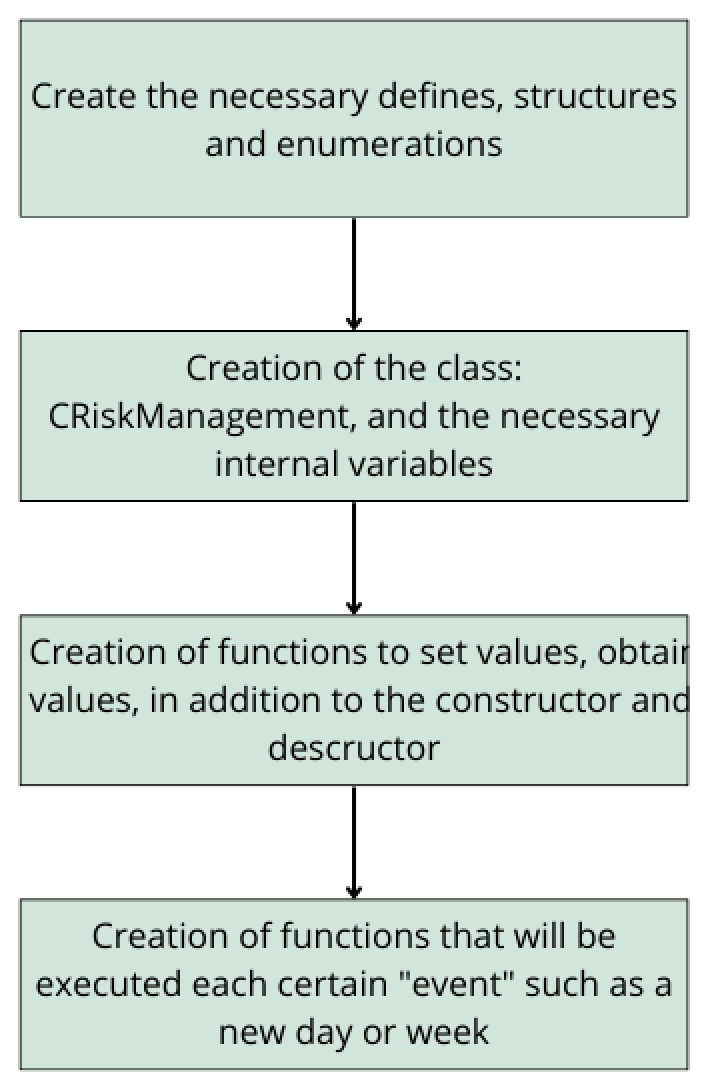
The following framework outlines a structured plan for designing and planning risk management in our system:
-
Definitions, Structures, and Enumerations
The first step is to define the necessary structures and enumerations. These are essential for storing key information, such as cumulative losses and profits, and for facilitating data handling within the system. -
Creating the CRiskManagement Class
Next, we will develop the main class responsible for risk management CRiskManagement. This central class will consolidate all calculations and processes related to risk control, ensuring an organized and efficient implementation. -
Basic Functions: Assignment and Retrieval of Values
We will then implement functions to assign and retrieve values, enabling us to update and query losses and profits. At this stage, we will also define the class constructor and destructor to properly manage memory and data initialization. -
Event-Driven Functions
Finally, we will develop functions triggered at key moments, such as the start of a new day or week. These functions will be useful for recalculating profits, adjusting risk, and reinitializing accumulated variables over certain periods, ensuring proper performance tracking over time.
With this plan in place, we will start building from the ground up.
Definition of Constants, Enumerations, and Structures
Before implementing the code, we will organize all risk management logic into a separate file called Risk_Management.mqh (the base file we created). This keeps the code more structured and modular.
Following our risk management framework, the first step is to define the required structures, enumerations, and constants. These elements are essential for multiple functions, primarily those responsible for calculating and controlling values such as daily, weekly, or per-trade maximum loss.
Definition of Constants (#define)
To facilitate risk management and improve code readability, we will define several key constants:
1. NOT_MAGIC_NUMBER
This constant will be used as an initialization value in the class constructor. Its purpose is to indicate that a specific magic number will not be used; instead, risk management will apply to all trades without restriction to a particular identifier. This is useful when implementing risk management for the full account in a live trading environment.
#define NOT_MAGIC_NUMBER 0 //Not Magic Number
2.Flags for Closing Trades
To make the position-closing function more dynamic, we will use flags instead of creating multiple separate functions to close trades with profit, loss, or both. These flags simplify the code and enhance reusability.
#define FLAG_CLOSE_ALL_PROFIT 2 //Flag indicating to close only operations with profit
#define FLAG_CLOSE_ALL_LOSS   4 //Flag indicating to close only operations without profit
Enumerations
1. Calculation Method: Fixed Amount or Percentage
We need an enumeration to determine how maximum losses and profits are calculated within the strategy. There are two main approaches:
-
Fixed (money): The user sets a specific monetary amount to define the maximum loss or profit. This value remains constant regardless of account balance.
- Example: A daily maximum loss of $1,000 will remain unchanged while the system is running.
-
Dynamic (percentage): Instead of a fixed value, the user selects a percentage applied to a reference parameter within the account, such as balance or equity.
- Example: If the limit is 2% of the balance, the maximum loss varies with the account balance. If the balance grows, the loss limit increases proportionally; if the balance decreases, the limit decreases.
This is represented in code with the following enumeration.
enum ENUM_RISK_CALCULATION_MODE //enumeration to define the types of calculation of the value of maximum profits and losses
 {
  money, //Money
  percentage //Percentage %
 };
2. Percentage Application: Reference Parameter for Risk Calculation
If the calculation method is percentage-based, we must define the account value to which this percentage will apply. We consider four key options:
- Balance - applied to total account balance.
- Net Profit (ganancianeta) - based on cumulative profit since account creation.
- Free Margin - calculated on capital available for opening new trades.
- Equity - represents balance adjusted for open position profits or losses.
enum ENUM_APPLIED_PERCENTAGES //enumeration to define the value to which the percentages will be applied
 {
  Balance, //Balance
  ganancianeta,//Net profit
  free_margin, //Free margin
  equity //Equity
 };
3. Risk Management Type: Personal Account or Prop Firm (FTMO)
As mentioned in previous chapters, this system can be applied to both personal accounts and Prop Firms, specifically FTMO. FTMO has a more dynamic approach to daily maximum loss calculation.
Later, when analyzing structures, we will explain in detail how FTMO handles this calculation. For now, we will create an enumeration allowing the user to select the account type for risk management.
enum ENUM_MODE_RISK_MANAGEMENT //enumeration to define the type of risk management
 {
  propfirm_ftmo, //Prop Firm FTMO
  personal_account // Personal Account
 };
4. Select Lot Type
Not all traders prefer to trade with a dynamic lot. We will allow the user to choose the lot type. This choice does not affect the core logic of the risk management class but is important for developing an EA, as the user should be able to trade with either a fixed or dynamic lot.
We will create the following enumeration:
enum ENUM_LOTE_TYPE //lot type
  {
   Dinamico,//Dynamic
   Fijo//Fixed
  };
When opening a trade, lot selection can be conditioned as follows:
trade.Sell( (Lote_Type == Dinamico ? risk.GetLote(ORDER_TYPE_SELL,GET_LOT_BY_ONLY_RISK_PER_OPERATION) : lote), _Symbol,tick.bid,sl,tp,"EA Sell");
In this code, if the user selects a dynamic lot (Dinamico), the GetLote function will calculate the lot size based on the risk per trade. If the user selects a fixed lot (Fijo), the EA will use the default value assigned to the lot variable (lote).
Later, we will create the GetLot function to properly retrieve the dynamic lot.
5. Dynamic Lot Calculation Method
If the user chooses a dynamic lot, we need to define how its size is calculated. We will create an enumeration to specify whether the calculation is based solely on per-trade risk or adjusted according to stop loss.
-
Calculation based only on risk per trade:
Lot size is determined based solely on the per-trade risk percentage. In this case, there is no need to specify a specific value for stop-loss. -
Calculation based on risk and stop loss
Lot size is calculated based on per-trade risk and adjusted according to the stop loss. This is important because if you set a fixed percentage of risk without reference to stop-loss, you may receive an inappropriate lot size.Example:
Let's say we want to risk 1% of a $1000 account, which equates to a maximum risk of $10. Our strategy uses a 1:2 risk-reward ratio and a 100-point stop loss on EUR/USD (5-digit broker), a naive calculation might yield a lot of 0.02.- If the trade hits stop loss, the actual loss would be $2 instead of $10.
- If the trade hits take profit, the actual gain would be $4 instead of $20.
To solve this problem, we adjust the lot size so that for a given stop-loss, the maximum loss would be exactly 1% of the account. This ensures that if the deal reaches take profit at a ratio of 1:2, the profit will be 2%.
The function GetIdealLot (introduced in a previous article) automatically adjusts the lot.
void GetIdealLot(double& nlot, double glot, double max_risk_per_operation, double& new_risk_per_operation, long StopLoss)
It adjust the lot so that the risk per trades stays within the specified limit.
To represent these two calculation methods, we define the following enumeration:enum ENUM_GET_LOT { GET_LOT_BY_ONLY_RISK_PER_OPERATION, //Obtain the lot for the risk per operation GET_LOT_BY_STOPLOSS_AND_RISK_PER_OPERATION //Obtain and adjust the lot through the risk per operation and stop loss respectively. };
Structures:
Structures play a key role in our risk management system. As mentioned, losses and profits are calculated either directly (fixed amount) or dynamically (percentage). If using the percentage method, it applies to a reference value in the account.
We will create a structure containing all necessary information to define a loss or profit.
- value - represents the loss or profit amount.
- assigned_percentage - indicates the assigned percentage if the calculation is dynamic.
- mode_calculation_risk - defines the per-trade risk calculation method (direct or dynamic).
- percentage_applied_to - enumeration specifying which account metric the percentage applies to when using the dynamic method.
This is represented in code as:
struct Loss_Profit
 {
  double             value; //value
  double             assigned_percentage; //percentage to apply
  ENUM_RISK_CALCULATION_MODE mode_calculation_risk; //risk calculation method
  ENUM_APPLIED_PERCENTAGES percentage_applied_to; //percentage applied to
 };
Using this structure, we can identify the following profit and loss options:
| Name | Description | Reset |
|---|---|---|
| Maximum Daily Loss (MDL) | The maximum loss allowed in a single day. | Resets to 0 daily. |
| Maximum Loss (ML) | The maximum total loss that an account can reach over its lifetime. | Does not reset. |
| Maximum Loss Per Trade (GMLPO) | Similar to the per-trade risk defined by the user; used to estimate the appropriate lot size. | Recalculated each time a trade is closed or at the start of a new day. |
| Maximum Weekly Loss (MWL) | The maximum loss allowed within a week. Optional, as it is not required for prop firms. | Resets weekly. |
| Net Maximum Loss Per Trade (NMLPO) | Generated only when calling the function that calculates the lot based on per-trade risk and stop loss. | Recalculated each time the risk-and-stop-loss-based lot retrieval function is called. |
| Maximum Daily Profit | The maximum profit the bot or account can achieve in a single day. | Resets daily. |
Particularities of Maximum Daily Loss in FTMO
When adapting this risk management system for regular accounts and prop firms such as FTMO, some key differences arise. In FTMO, the Maximum Daily Loss is highly dynamic because it can increase if profits are generated during the day.
For example, in the case of an FTMO Challenge with the initial account balance of $200,000, the Max Daily Loss limit is $10,000. If you happen to lose $8,000 in your closed trades, your account must not decline more than $2,000 this day. It must also not go -$2,000 in your open floating losses. The limit is inclusive of commissions and swaps.
Vice versa, if you profit $5,000 in one day, then you can afford to lose $15,000, but not more than that. Once again, be reminded that your Maximum Daily Loss counts your open trades as well. For example, if in one day, you have closed trades with a loss of $6,000 and then you open a new trade that goes into a floating loss of some -$5,700 but ends up positive in the end, unfortunately, it is already too late. In one moment, your daily loss was -$11,700 on the equity, which is more than the permitted loss of $10,000.
As noted directly from FTMO's guidelines, the maximum daily loss can vary depending on the profits achieved throughout the day.
For example, if at the start of the day your allowed maximum loss is $10,000 and you generate a profit on the same day, this profit is added to the initial $10,000, increasing your permissible loss margin. Thus, as profits accumulate, the amount you can risk also adjusts accordingly.
Declaration of Key Variables for Risk Management
In this section, we will define the CRiskManagement class, responsible for managing the risk of trades.
//+------------------------------------------------------------------+
//|                  Class CRisk Management                          |
//+------------------------------------------------------------------+
class CRiskManagemet final
Including Libraries
Before defining the class, we'll include the CTrade.mqh library to be able to manage trades, such as closing positions:
#include <Trade/Trade.mqh> 1. Pointer to CTrade
As the first variable, we create a pointer to the CTrade class, which will allow us to interact with open positions:
private:
  //--- CTrade class pointer to be able to work with open positions
  CTrade             *trade;
2. Key variables
We define three main variables:
- account_profit (double) - stores the account's net profit since 1972.01.01 (minimum date in datetime type);
- StopLoss (long) - maintains the level of stop-loss in points used to calculate the lot size;
- batch (double) - an internal variable that stores the last calculated lot.
Code:
  //-- Main variables
  double             account_profit;
  long               StopLoss;
  double             lote;
3. Common variables
- magic_number (ulong) - stores the magic number used to manage the risk associated with a given set of trades. It can also be equal to 0, which allows it to be used on personal accounts.
- mode_risk_management (ENUM_MODE_RISK_MANAGEMENT) - defines the type of risk management that will be applied: for regular accounts or prop companies (e.g. FTMO).
Code:
  //--- General variables
  ENUM_MODE_RISK_MANAGEMENT mode_risk_managemet;
  ulong              magic_number;
4. Specific variables for prop firm accounts (FTMO)
In prop firm accounts, risk management rules apply to the opening balance, not the running balance. For example, the maximum daily loss and maximum total loss are typically calculated as a percentage of the opening balance (usually 10%).
To account for this feature, we will add a variable to store the initial balance, which the user will have to set manually:
  //--- Variables to work with anchoring tests
  double             account_balance_propfirm;
5. Variable for expected maximum loss on the next trade (NMLPO)
This variable will store the estimated maximum loss for the next trade. It is not mandatory, but can be useful for predicting how much the robot will lose if the position reaches the stop loss level.
It will be calculated only with the GetLote() call.
//--- Variables to store the values of the maximum losses double nmlpo;
6. Variables for profit and loss management
The previously defined Loss_Profit structure will be used to store the amount of the loss, the method for calculating it, and the way the percentage is applied.
Let's define five key variables:
  //--- variables that store percentages and enumeration, which will be used for the subsequent calculation of losses
  Loss_Profit        mdl, mwl, ml, gmlpo, mdp;
where:
- mdl - maximum daily loss;
- mwl - maximum weekly loss;
- ml - maximum total loss;
- gmlpo - maximum loss per trade;
- mdp - maximum daily profit.
7. Variables for profit (daily, weekly and total)
To monitor the robot/Expert Advisor performance, we will add variables that will store profit data and will allow for alerts to be issued when loss limits are reached or when security measures are taken.
We will need:
- reference time from which profit is calculated,
- variables to store profit.
Code:
  //--- Variables to store the profit and the time from which they will be obtained
  double             daily_profit, weekly_profit, gross_profit;
  datetime           last_weekly_time, last_day_time, init_time;
where:
- daily_profit - profit received during the day,
- weekly_profit - profit received during the week,
- gross_profit - total profit since the beginning of risk management,
- last_weekly_time - the last recorded date for calculating weekly profit,
- last_day_time - the last recorded date for calculating daily profit,
- init_time - the start date of risk management.
Creation of Constructor, Destructor, and Initialization Methods
Now that we have defined the key variables, we will implement the main functions of the CRiskManagement class.
Constructor
The constructor will be responsible for initializing key variables such as the magic number, risk management mode, and the prop company account balance (if applicable).
The constructor declaration is as follows:
CRiskManagemet(ulong magic_number_ = NOT_MAGIC_NUMBER,ENUM_MODE_RISK_MANAGEMENT mode_risk_management_ = personal_account, double account_propfirm_balance=0);
In the constructor implementation, we assign values to variables, initialize the CTrade object, and calculate the account's net profit starting from January 1, 1972. We also set appropriate timestamps to track profits.
CRiskManagemet::CRiskManagemet(ulong magic_number_ =  NOT_MAGIC_NUMBER,ENUM_MODE_RISK_MANAGEMENT mode_risk_management_ = personal_account, double account_propfirm_balance =0)
 {
  if(magic_number_ == NOT_MAGIC_NUMBER)
   {
    Print("| Warning | No magic number has been chosen, taking into account all the magic numbers and the user's trades");
   }
//---
  this.account_balance_propfirm = account_propfirm_balance ;
  trade = new CTrade();
  this.account_profit = GetNetProfitSince(true,this.magic_number,D'1972.01.01 00:00');
  this.magic_number = magic_number_;
  this.mode_risk_managemet = mode_risk_management_;
//---
  this.last_day_time = iTime(_Symbol,PERIOD_D1,0);
  this.last_weekly_time = iTime(_Symbol,PERIOD_W1,0);
  this.init_time =magic_number_ != NOT_MAGIC_NUMBER ? TimeCurrent() : D'1972.01.01 00:00';
 }
Note: If the user does not specify a magic number, a warning will be displayed that the system will take into account all trades opened by the user.
Destructor
The class destructor will be responsible for freeing the memory allocated to the CTrade object when the CRiskManagement instance is deleted.
CRiskManagemet::~CRiskManagemet()
 {
  delete trade;
 }
Initialization Methods
To simplify the risk management setup and update, we will create special functions that will allow you to:
- set stop loss,
- set up profit and loss parameters.
1. Functions for Setting Loss Structure Values
We define methods that will allow us to assign values to key variables for profit and loss calculations.
//--- Functions to assign values to variables for subsequent calculation of losses void SetPorcentages(double percentage_or_money_mdl, double percentage_or_money_mwl,double percentage_or_money_gmlpo, double percentage_or_money_ml, double percentage_or_money_mdp_); void SetEnums(ENUM_RISK_CALCULATION_MODE mode_mdl_, ENUM_RISK_CALCULATION_MODE mode_mwl_, ENUM_RISK_CALCULATION_MODE mode_gmlpo_, ENUM_RISK_CALCULATION_MODE mode_ml_, ENUM_RISK_CALCULATION_MODE mode_mdp_); void SetApplieds(ENUM_APPLIED_PERCENTAGES applied_mdl_, ENUM_APPLIED_PERCENTAGES applied_mwl_, ENUM_APPLIED_PERCENTAGES applied_gmlpo_, ENUM_APPLIED_PERCENTAGES applied_ml_, ENUM_APPLIED_PERCENTAGES applied_mdp_);
2. Assigning Percent to Loss Structures
The following method assigns percentage or monetary values to the corresponding structures.
void CRiskManagemet::SetPorcentages(double percentage_or_money_mdl,double percentage_or_money_mwl,double percentage_or_money_gmlpo,double percentage_or_money_ml,double percentage_or_money_mdp_)
 {
  this.gmlpo.assigned_percentage = percentage_or_money_gmlpo;
  this.mdl.assigned_percentage = percentage_or_money_mdl;
  this.ml.assigned_percentage = percentage_or_money_ml;
  this.mdp.assigned_percentage = percentage_or_money_mdp_;
  this.mwl.assigned_percentage = percentage_or_money_mwl;
 }
3. Initialization of Risk Calculation Modes
This method sets the calculation mode for each structure. If the user selects the money-based calculation mode, the corresponding value is assigned directly.
void CRiskManagemet::SetEnums(ENUM_RISK_CALCULATION_MODE mode_mdl_,ENUM_RISK_CALCULATION_MODE mode_mwl_,ENUM_RISK_CALCULATION_MODE mode_gmlpo_,ENUM_RISK_CALCULATION_MODE mode_ml_,ENUM_RISK_CALCULATION_MODE mode_mdp_)
 {
  this.gmlpo.mode_calculation_risk = mode_gmlpo_;
  this.mdl.mode_calculation_risk  = mode_mdl_;
  this.mdp.mode_calculation_risk  = mode_mdp_;
  this.ml.mode_calculation_risk  = mode_ml_;
  this.mwl.mode_calculation_risk  = mode_mwl_;
//-- If the money mode has been chosen, assign the variable that stores the money or percentage to the corresponding variables.
  this.gmlpo.value = this.gmlpo.mode_calculation_risk  == money ? this.gmlpo.value : 0;
  this.mdp.value  = this.mdp.mode_calculation_risk  == money ? this.mdp.value : 0;
  this.mdl.value  = this.mdl.mode_calculation_risk  == money ? this.mdl.value : 0;
  this.ml.value  = this.ml.mode_calculation_risk  == money ? this.ml.value : 0;
  this.mwl.value  = this.mwl.mode_calculation_risk  == money ? this.mwl.value : 0;
 }
4. Assigning Parameters Applied to the Account
This method determines how the configured percents will be applied to the account.
void CRiskManagemet::SetApplieds(ENUM_APPLIED_PERCENTAGES applied_mdl_,ENUM_APPLIED_PERCENTAGES applied_mwl_,ENUM_APPLIED_PERCENTAGES applied_gmlpo_,ENUM_APPLIED_PERCENTAGES applied_ml_,ENUM_APPLIED_PERCENTAGES applied_mdp_)
 {
  this.gmlpo.percentage_applied_to = applied_gmlpo_;
  this.mdl.percentage_applied_to  = applied_mdl_;
  this.mdp.percentage_applied_to  = applied_mdp_;
  this.mwl.percentage_applied_to  = applied_mwl_;
  this.ml.percentage_applied_to  = applied_ml_;
 }
5. Stop-Loss Setting Functions
To set the stop loss, we will use 2 simple methods to assign a value to the StopLoss variable:
- Method 1: The user directly sets the number of stop loss points.
- Method 2: The user defines the distance between the stop loss and the entry point, after which it is converted into points (using the function we programmed in the first part of the article).
  //--- Function to set the "StopLoss" variable, in points or distance
  inline void        SetStopLoss(double dist_open_sl) {     this.StopLoss = DistanceToPoint(dist_open_sl);  }
  inline void        SetStopLoss(long _sl_point_)     {     this.StopLoss = _sl_point_;                     }
Methods for Assigning Values to Losses and Profits
In this section, we will develop the methods needed to assign values to profit and loss in our risk management system.
1. General Function for Assigning Values
To ensure flexible and adaptive risk management, we will create a general function that will calculate the appropriate value based on the percentage applied to various account metrics.
Function definition:
The main function we will be using is the following:
//--- General function to assign values to loss variables double GetValorWithApplied(const ENUM_APPLIED_PERCENTAGES applied,const double percentage_);
This function will take two key parameters:
- applied - defines which account metric the percentage will be applied to (balance, free margin, equity, etc.).
- percentage_ - the percentage to be applied to the selected metric.
double CRiskManagemet::GetValorWithApplied(const ENUM_APPLIED_PERCENTAGES applied,const double percentage_)
 {
  if(this.mode_risk_managemet == propfirm_ftmo && percentage_ != this.mdp.assigned_percentage && percentage_ != this.gmlpo.assigned_percentage)
    return this.account_balance_propfirm * (percentage_/100.0);
  switch(applied)
   {
    case Balance:
      return NormalizeDouble((percentage_/100.0) * AccountInfoDouble(ACCOUNT_BALANCE),2);
    case ganancianeta:
     {
      if(this.account_profit <= 0)
       {
        PrintFormat("The total profit of the account which is %+.2f is invalid or negative",this.account_profit);
        return 0;
       }
      else
        return NormalizeDouble((percentage_/100.0) * this.account_profit,2);
     }
    case free_margin:
     {
      if(AccountInfoDouble(ACCOUNT_MARGIN_FREE) <= 0)
       {
        PrintFormat("free margin of %+.2f is invalid",AccountInfoDouble(ACCOUNT_MARGIN_FREE));
        return 0;
       }
      else
        return NormalizeDouble((percentage_/100.0) * AccountInfoDouble(ACCOUNT_MARGIN_FREE),2);
     }
    case equity:
      return NormalizeDouble((percentage_/100.0) * AccountInfoDouble(ACCOUNT_EQUITY),2);
    default:
      Print("Critical Error | It was not found that: ", EnumToString(applied), " be part of the allowed enumeration");
   }
  return 0;
 }
Code explanation
- Managing Prop Firm Accounts:
- If the account belongs to a prop firm (e.g. FTMO), and the percentage applied does not refer to the maximum daily loss (mdp.assigned_percentage) or the maximum loss per trade (gmlpo.assigned_percentage), the calculation is based on the prop firm's account balance.
- Calculation based on various account metrics:
- Balance - percentage applied to total account balance.
- ganancianeta - percentage applied to the account's net profit. If the profit is negative or zero, an error message is displayed.
- free_margin - percentage applied to the free margin. If the free margin is negative, the function returns 0.
- equity - percentage applied to the account's current equity.
- Error handling:
- If an invalid metric is passed to the applied function, the function will print an error message and return 0.
2. Creating functions to configure loss and profit variables
To efficiently manage losses and profits, we will create a set of functions that allow us to assign values in a structured manner. In total, we will define six functions: five dedicated to configuring the main loss parameters, and one to calculate the ideal lot size based on the Stop Loss.
1. Value Assignment Functions
The method for assigning loss and profit values is based on the following logic:
- If the calculation mode is money, the previously assigned value is retained.
- If the calculation is not in money mode, the GetValorWithApplied function is used to determine the value based on the assigned percentage and the corresponding application parameter.
- If the assigned percentage is 0, the loss is considered unused and, therefore, a value of 0 is assigned.
2. Assignment Functions
The following functions implement the logic described above for each type of loss:
//--- Functions to assign values to internal variables void SetMDL() {this.mdl.value = this.mdl.mode_calculation_risk == money ? this.mdl.value : (this.mdl.assigned_percentage > 0 ? GetValorWithApplied(this.mdl.percentage_applied_to,mdl.assigned_percentage) : 0); } void SetMWL() {this.mwl.value = this.mwl.mode_calculation_risk == money ? this.mwl.value : (this.mwl.assigned_percentage > 0 ? GetValorWithApplied(this.mwl.percentage_applied_to,mwl.assigned_percentage) : 0); } void SetML() {this.ml.value = this.ml.mode_calculation_risk == money ? this.ml.value : (this.ml.assigned_percentage > 0 ? GetValorWithApplied(this.ml.percentage_applied_to,ml.assigned_percentage): 0); } void SetGMLPO() {this.gmlpo.value = this.gmlpo.mode_calculation_risk == money ? this.gmlpo.value : (this.gmlpo.assigned_percentage > 0 ? GetValorWithApplied(this.gmlpo.percentage_applied_to,gmlpo.assigned_percentage) : 0); } void SetMDP() {this.mdp.value = this.mdp.mode_calculation_risk == money ? this.mdp.value : (this.mdp.assigned_percentage > 0 ? GetValorWithApplied(this.mdp.percentage_applied_to,mdp.assigned_percentage) : 0); } void SetNMPLO(double& TLB_new, double tlb) { GetIdealLot(TLB_new,tlb,this.gmlpo.value,this.nmlpo,this.StopLoss); }
Calculation of Lot Size and Stop Loss Based on Per-Trade Risk
In this section, we will implement two essential functions to accurately calculate the lot size and stop loss, ensuring that each trade aligns with the level of risk we are willing to assume.
1. Function to Calculate Lot Size
To calculate the lot size, we will use the functions developed in the first article, ensuring that the lot complies with our predefined risk rules.
The function that allows us to obtain the appropriate lot size is:
  //--- Get the lot
  double             GetLote(const ENUM_ORDER_TYPE order_type, const ENUM_GET_LOT mode_get_lot);
Its parameters:
- order_type - specifies the order type (buy, sell, stop, limit, stop-limit, etc.).
- mode_get_lot - indicates the lot calculation method (explained earlier in the enumerations section).
Purpose of the function
This function helps calculate the ideal lot size using two different approaches:
- based on the stop loss and maximum risk per trade,
- based directly on the maximum risk per trade.
Now, let's see how the calculation is implemented in the code.
//+-----------------------------------------------------------------------------------------------+
//| Function to obtain the ideal lot based on the maximum loss per operation and the stop loss    |
//+-----------------------------------------------------------------------------------------------+
double CRiskManagemet::GetLote(const ENUM_ORDER_TYPE order_type, const ENUM_GET_LOT mode_get_lot)
 {
  if(mode_get_lot == GET_LOT_BY_STOPLOSS_AND_RISK_PER_OPERATION)
   {
    double MaxLote = GetMaxLote(order_type);
    SetNMPLO(this.lote,MaxLote);
    PrintFormat("Maximum loss in case the next operation fails %.2f ", this.nmlpo);
   }
  else
   {
    this.lote = GetLotByRiskPerOperation(this.gmlpo.value,order_type);
   }
  return this.lote;
 }
Mode 1. Lot Calculation Based on Stop Loss and Maximum Per-Trade Risk
When the user selects GET_LOT_BY_STOPLOSS_AND_RISK_PER_OPERATION, the system calculates the lot size based on per-trade risk and then adjusts it according to the stop loss, ensuring that if the trade results in a loss, the actual loss matches the defined risk.
- The maximum allowed lot is obtained using the GetMaxLote(order_type) function.
- The lot size is adjusted using SetNMPLO(this.lot, MaxLot) to prevent exceeding account limits.
- An informational message is printed indicating the expected maximum loss if the trade reaches the stop loss.
Mode 2. Lot Calculation Based on Maximum Per-Trade Risk
When the user selects a different calculation mode (for example, GET_LOT_BY_RISK_PER_OPERATION), the system adjusts the lot size in a more direct manner:
- The GetLotByRiskPerOperation(this.gmlpo.value, order_type) function determines the lot size based on the maximum risk we are willing to assume for the trade.
- This method is simpler and may be useful for traders who do not rely on a fixed stop loss, instead adjusting their risk more dynamically.
2. Function to Calculate the Stop Loss
Since we have already developed auxiliary functions in previous sections, this function will be relatively simple, as we will reuse those functions to calculate the stop loss efficiently.
The function that helps us obtain the ideal stop loss is:
long GetSL(const ENUM_ORDER_TYPE type, double DEVIATION = 100, double STOP_LIMIT = 50);
Its parameters:
- type - specifies the order type: buy, sell, stop, limit, stop-limit, etc.
- DEVIATION (optional) - represents the allowed execution deviation, with a default value of 100 points.
- STOP_LIMIT (optional) - represents the distance in points for STOP_LIMIT-type orders.
These parameters ensure that the stop loss calculation is dynamic and adaptable to different market conditions.
Function implementation:
//+----------------------------------------------------------------------------------+
//| Get the ideal stop loss based on a specified lot and the maximum loss per trade  |
//+----------------------------------------------------------------------------------+
long CRiskManagemet::GetSL(const ENUM_ORDER_TYPE type, double DEVIATION = 100, double STOP_LIMIT = 50)
 {
  double lot;
  return CalculateSL(type,this.gmlpo.value,lot,DEVIATION,STOP_LIMIT);
 }
- How this function works
- It defines the variable lot, which will store the lot size resulting from the stop loss calculation.
- It calls the CalculateSL() function, passing the following parameters:
- order type (type), so that the stop loss is calculated correctly for buys or sells;
- maximum per-trade risk (this.gmlpo.value), so that the stop loss is consistent with risk management rules;
- lot - it will be updated based on the lot size in use;
- DEVIATION - the allowed deviation, providing certain flexibility in order execution;
- STOP_LIMIT - represents the distance in points for STOP_LIMIT orders.
- Finally, the function returns the stop loss value in points.
Functions to Retrieve Loss and Profit Values
This section describes the functions responsible for retrieving key loss and profit metrics within the trading system. These functions are declared as inline and const to ensure efficiency and prevent unintended modifications to class variables.
1. Functions to Retrieve Maximum Losses and Profits
The following functions return the values stored in variables that track the maximum profit and loss reached over different periods:
  inline double      GetML()    const { return this.ml.value;    }
  inline double      GetMWL()   const { return this.mwl.value;   }
  inline double      GetMDL()   const { return this.mdl.value;   }
  inline double      GetGMLPO() const { return this.gmlpo.value; }
  inline double      GetNMLPO() const { return this.nmlpo; }
  inline double      GetMDP()   const { return this.mdp.value;   }
Each function provides relevant data regarding trading performance at different levels of analysis.
2. Functions to Get Daily, Weekly, and Total Profit
These functions return profits over different time periods, allowing for performance evaluation of the system.
  //--- Obtain only profits:
  inline double      GetGrossProfit()  const { return this.gross_profit;   }
  inline double      GetWeeklyProfit() const { return this.weekly_profit;  }
  inline double      GetDailyProfit()  const { return this.daily_profit;   }
3. Function to Close Open Positions Based on Magic Number and Flags
This function is designed to close all open positions that meet specific criteria. It is based on a flag system that allows specifying which trades to close:
- only profitable,
- only losing,
- Both types (all trades).
void CloseAllPositions(int flags = FLAG_CLOSE_ALL_LOSS | FLAG_CLOSE_ALL_PROFIT);
- Flags - an integer representing the conditions under which positions will be closed. Multiple flags can be combined using bitwise OR operators (|).
#define FLAG_CLOSE_ALL_PROFIT 2 //Flag indicating to close only operations with profit
#define FLAG_CLOSE_ALL_LOSS   4 //Flag indicating to close only operations without profit
The flags are defined as powers of two.
Each flag represents a value that can be activated independently or in combination:
| Flag | Value (decimal) | Value (binary) | Purpose |
|---|---|---|---|
| FLAG_CLOSE_ALL_PROFIT | 2 | 00000010 | Closes only profitable trades. |
| FLAG_CLOSE_ALL_LOSS | 4 | 00000100 | Closes only losing trades. |
2. Function to Close Positions
This function iterates through all open positions and closes them according to the active flags.
3. Iterating Through All Open Positions
for(int i = PositionsTotal() - 1; i >= 0; i--)
- PositionsTotal() returns the total number of open positions.
- The loop iterates through positions in reverse order (from last to first) to avoid errors when closing positions in real time.
4. Retrieving the Position Identifier (Ticket)
ulong position_ticket = PositionGetTicket(i);
- Each position has a unique ticket that identifies it.
5. Position Selection
if (!PositionSelectByTicket(position_ticket))

    continue;
- PositionSelectByTicket(position_ticket) tries to select a position based on the received ticket.
- If selection fails, 'continue' moves to the next position.
6. Checking the Magic Number
ulong magic = PositionGetInteger(POSITION_MAGIC);

if (magic != this.magic_number && this.magic_number != NOT_MAGIC_NUMBER)

    continue;
- The magic number of the position is retrieved.
- If the position has a magic number different from the expected one and operating on any order is not allowed (NOT_MAGIC_NUMBER), the position is ignored.
7. Retrieving the Position Profit
double profit = PositionGetDouble(POSITION_PROFIT);
- POSITION_PROFIT returns the current profit of the trade. This value can be positive (profit) or negative (loss).
8. Checking Flags and Closing Trades
if ((flags & FLAG_CLOSE_ALL_PROFIT) != 0 && profit > 0) {

    trade.PositionClose(position_ticket);
}

else if ((flags & FLAG_CLOSE_ALL_LOSS) != 0 && profit < 0) {

    trade.PositionClose(position_ticket);
}
- The & operator is used to check whether a flag is enabled.
- If FLAG_CLOSE_ALL_PROFIT is active and the position is profitable, it is closed.
- If FLAG_CLOSE_ALL_LOSS is active and the position is losing, it is closed.
void CRiskManagemet::CloseAllPositions(int flags = FLAG_CLOSE_ALL_LOSS | FLAG_CLOSE_ALL_PROFIT)
 {
  for(int i = PositionsTotal() - 1; i >= 0; i--)
   {
    ulong position_ticket = PositionGetTicket(i);
    if(!PositionSelectByTicket(position_ticket))
      continue; // If you don't select the position, continue
    double profit = PositionGetDouble(POSITION_PROFIT);
    // Check flags before closing the position
    if((flags & FLAG_CLOSE_ALL_PROFIT) != 0 && profit > 0) // Close only profit positions
     {
      trade.PositionClose(position_ticket);
     }
    else
      if((flags & FLAG_CLOSE_ALL_LOSS) != 0 && profit < 0) // Close only losing positions
       {
        trade.PositionClose(position_ticket);
       }
   }
 }
Scheduled Events for New Day and New Week
To conclude this article, we will implement the final functions that execute during specific events. In particular, we will create two key functions:
- Daily Event - executed at the beginning of each new day.
- Weekly Event - executed at the start of each new week.
These events help manage losses and profits in a structured manner, ensuring that values are updated correctly.
Daily Event
Each day, it is necessary to recalculate and set the values for all maximum losses and gains, as well as reset the accumulated daily profit to zero. We will also print loss and profit values to the log for monitoring purposes.//+------------------------------------------------------------------+ //| Function that runs every new day | //+------------------------------------------------------------------+ void CRiskManagemet::OnNewDay(void) { SetMWL(); SetMDL(); SetML(); SetMDP(); SetGMLPO(); this.daily_profit = 0; this.last_day_time = iTime(_Symbol,PERIOD_D1,0); Print(" New day "); Print(StringFormat("%-6s| %s", "Losses", "Loss")); Print(StringFormat("%-6s| %.2f", "MDP", this.mdp.value)); Print(StringFormat("%-6s| %.2f", "MWL", this.mwl.value)); Print(StringFormat("%-6s| %.2f", "ML", this.ml.value)); Print(StringFormat("%-6s| %.2f", "MDl", this.mdl.value)); Print(StringFormat("%-6s| %.2f", "GMLPO", this.gmlpo.value)); }
- All required functions to set loss and profit values are called.
- The daily_profit variable is reset to zero to start a new day without carrying over previous gains or losses.
- The timestamp of the last recorded day is stored using iTime(_Symbol, PERIOD_D1, 0).
- Loss and profit values are printed to the log to monitor system behavior.
Weekly Event
The weekly event is responsible for registering the start of a new week and resetting the accumulated profit from the previous week to zero.//+------------------------------------------------------------------+ //| Function that runs every new week | //+------------------------------------------------------------------+ void CRiskManagemet::OnNewWeek(void) { this.last_weekly_time = iTime(_Symbol,PERIOD_W1,0); this.weekly_profit = 0; }
- The last_weekly_time variable is updated with the opening time of the new week.
- The weekly_profit variable is reset to zero to prevent accumulation of gains or losses from the previous week.
Detection of New Events (Day/Week/Custom Period)
To execute these functions automatically within an Expert Advisor (EA), we can check whether the time period has changed using a datetime variable. This allows us to detect a new day, week, or any other timeframe (H1, H12, etc.).
Example of new day detection:
datetime prev_time = 0;

void OnTick()
{
  if(prev_time != iTime(_Symbol, PERIOD_D1, 0))
  {
    Print("New day detected");
    prev_time = iTime(_Symbol, PERIOD_D1, 0);
    OnNewDay(); // Call the corresponding function
  }
}
Example of new week detection:
datetime prev_week_time = 0;

void OnTick()
{
  if(prev_week_time != iTime(_Symbol, PERIOD_W1, 0))
  {
    Print("New week detected")
   //Call the corresponding function
    prev_week_time = iTime(_Symbol, PERIOD_W1, 0);
  }
}
Explanation:
- A datetime variable is defined to store the previously recorded time.
- On each tick (OnTick), the current time is compared with the value stored in prev_time or prev_week_time.
- If the value has changed, it indicates that a new day or week has started, and the OnNewDay() or OnNewWeek() function is called.
- The prev_time or prev_week_time variable is updated with the new value.
Conclusion
In this article, we have developed the first part of the CRiskManagement risk management class. At this initial stage, our primary focus has been on assigning values to maximum losses and profits, thereby establishing the foundation for structured risk control.
Although the class is not yet ready for use in a live trading environment, we can already see how these values are assigned and managed within the system.
In the next article, we will complete the implementation of this class by adding key functions that will allow us to:
- check whether maximum loss limits have been exceeded and execute the corresponding actions;
- add new events to further improve risk management;
- create specific functions, such as the automatic updating of maximum daily loss for Prop Firm–type accounts, such as FTMO.
With these improvements, the CRiskManagement class will be ready to efficiently manage risk limits and adapt to different market conditions.
Files used/improved in this article:
| File name | Type | Description |
|---|---|---|
| Risk_Management.mqh | .mqh (include file) | The main file containing common functions and the implementation of the CRiskManagement class, which is responsible for risk management in the system. This file defines, develops, and extends all functions related to profit and loss management. |
Translated from Spanish by MetaQuotes Ltd.
Original article: https://www.mql5.com/es/articles/17249
Warning: All rights to these materials are reserved by MetaQuotes Ltd. Copying or reprinting of these materials in whole or in part is prohibited.
This article was written by a user of the site and reflects their personal views. MetaQuotes Ltd is not responsible for the accuracy of the information presented, nor for any consequences resulting from the use of the solutions, strategies or recommendations described.


 MQL5 Trading Tools (Part 13): Creating a Canvas-Based Price Dashboard with Graph and Stats Panels
 Price Action Analysis Toolkit Development (Part 56): Reading Session Acceptance and Rejection with CPI
 Data Science and ML (Part 48): Are Transformers a Big Deal for Trading?
 Larry Williams Market Secrets (Part 7): An Empirical Study of the Trade Day of the Week Concept

- Free trading apps
- Over 8,000 signals for copying
- Economic news for exploring financial markets
You agree to website policy and terms of use