

MQL5 Trading Tools (Part 23): Camera-Controlled, DirectX-Enabled 3D Graphs for Distribution Insights
 2 850
2 850
 0
0

Introduction
You have a binomial distribution graphing tool in two dimensions, but without depth-based visualization, patterns in probability mass functions can be harder to inspect - bar overlaps feel flat, frequency differences lose spatial contrast, and switching between analytical perspectives requires restarting rather than a simple toggle. This article is for MetaQuotes Language 5 (MQL5) developers and algorithmic traders looking to extend statistical visualization tools with interactive three-dimensional rendering for deeper probabilistic insights.
In our previous article (Part 22), we built an MQL5 graphing tool to visualize the binomial distribution with a histogram of simulated samples and the theoretical probability mass function curve on an interactive canvas. In Part 23, we integrate Direct3D into the MQL5 binomial distribution viewer, enabling switchable 2D/3D modes and camera control for rotation, zoom, and auto-fit. The article shows how to render 3D histogram bars with ground plane and axes, project the PMF curve, and preserve 2D statistics, legend, and theming. It also covers the class-based architecture, mouse interactions, real-time updates, and parameter tuning to improve inspection of frequencies and PMF shape. We will cover the following topics:
- Understanding the Architecture of a DirectX 3D Visualization Framework
- Implementation in MQL5
- Backtesting
- Conclusion
By the end, you’ll have a functional MQL5 tool with 3D capabilities for binomial distribution analysis, ready for customization—let’s dive in!
Understanding the Architecture of a DirectX 3D Visualization Framework
The DirectX 3D visualization framework in MQL5 leverages hardware-accelerated graphics to render complex 3D scenes on charts, integrating with the canvas system for seamless 2D/3D mode switching and interactive controls. It utilizes DirectX for efficient rendering of 3D objects, such as boxes for histogram bars, planes for ground planes, and lines for axes, while managing camera positions, lighting, and projections to create depth and perspective in data displays. This architecture supports dynamic user interactions like rotation, zoom, and auto-fitting, making it ideal for exploring multidimensional data like distributions in trading contexts where visual depth highlights patterns not visible in 2D.
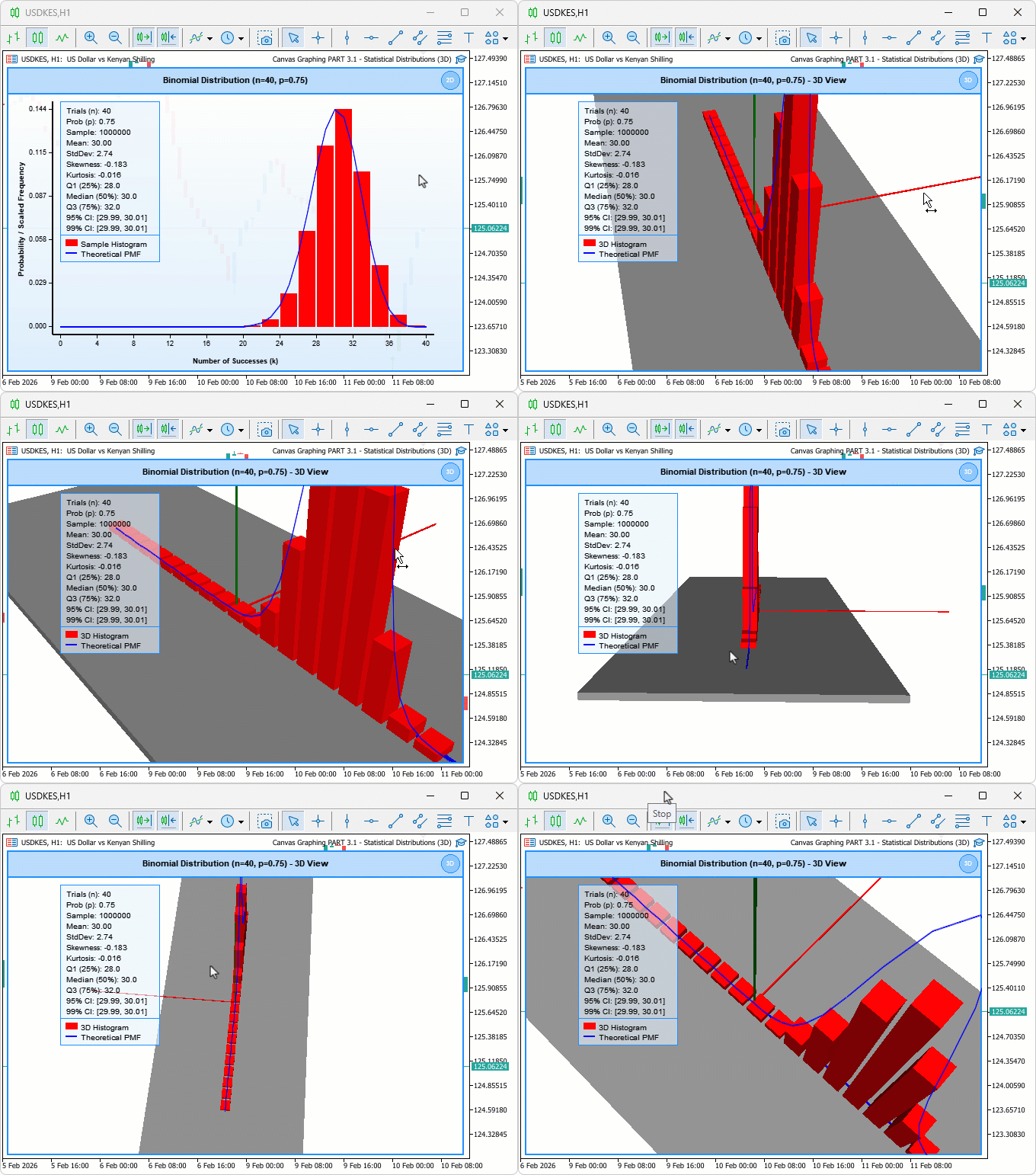
We intend to build upon the 2D binomial graphing tool by adding a 3D mode that visualizes histogram bars in three dimensions, incorporates ground planes and colored axes for orientation, and enables camera manipulation for better inspection of probability mass functions and frequencies. The blueprint involves a class-based structure to handle canvas creation, 3D object initialization, data loading for simulations, and event-driven updates for real-time responsiveness. We will define a visualizer class that encapsulates 2D and 3D rendering logic, create 3D elements using box primitives, set up projection and view matrices for camera control, and integrate mode switching with interactive features like dragging, resizing, and wheel zooming, ultimately providing a tool for in-depth probabilistic analysis in trading scenarios. In brief, this framework transforms flat data plots into interactive 3D models for enhanced insights. See what we intend to achieve.
Implementation in MQL5
Including Libraries, Enumerations, and Inputs for Three-Dimensional Support
Before any three-dimensional rendering is possible, we need to extend the program's foundation — bringing in the right libraries for three-dimensional canvas and DirectX box support, defining an enumeration that allows the user to switch between two-dimensional and three-dimensional modes at runtime without restarting, and setting up the corresponding input parameters and constants that will govern how the three-dimensional environment looks and behaves from the moment the program loads. Here is the logic we use to achieve that.
//+------------------------------------------------------------------+
//|    Canvas Graphing PART 3.1 - Statistical Distributions (3D).mq5 |
//|                           Copyright 2026, Allan Munene Mutiiria. |
//|                                   https://t.me/Forex_Algo_Trader |
//+------------------------------------------------------------------+
#property copyright "Copyright 2026, Allan Munene Mutiiria."
#property link      "https://t.me/Forex_Algo_Trader"
#property version   "1.00"
#property strict

#include <Canvas\Canvas.mqh>
#include <Canvas\Canvas3D.mqh>
#include <Canvas\DX\DXBox.mqh>
#include <Math\Stat\Binomial.mqh>
#include <Math\Stat\Math.mqh>

//+------------------------------------------------------------------+
//| Enumerations                                                     |
//+------------------------------------------------------------------+
enum ResizeDirection {
   NO_RESIZE,                                           // No resize
   RESIZE_BOTTOM_EDGE,                                  // Resize bottom edge
   RESIZE_RIGHT_EDGE,                                   // Resize right edge
   RESIZE_CORNER                                        // Resize corner
};

enum ViewModeType {
   VIEW_2D_MODE,                                        // 2D mode
   VIEW_3D_MODE                                         // 3D mode
};

//+------------------------------------------------------------------+
//| Inputs                                                           |
//+------------------------------------------------------------------+
sinput group "=== VIEW MODE SETTINGS ==="
input ViewModeType     viewMode = VIEW_2D_MODE;         // View Mode (2D or 3D)

sinput group "=== 3D VIEW SETTINGS ==="
input bool               autoFitCamera = true;          // Auto-Fit Camera on Load
input double             initialCameraDistance = 60.0;  // Initial Camera Distance (3D)
input double             initialCameraAngleX = 0.6;     // Initial Camera Angle X (3D)
input double             initialCameraAngleY = 0.8;     // Initial Camera Angle Y (3D)

sinput group "=== 3D GROUND AND AXES SETTINGS ==="
input color              groundPlaneColor = clrLightGray; // Ground Plane Color
input double             groundPlaneOpacity = 0.6;      // Ground Plane Opacity (0-1)
input float              groundPlaneWidth = 50.0;       // Ground Plane Width (X direction)
input float              groundPlaneDepth = 20.0;       // Ground Plane Depth (Z direction)
input float              groundPlaneThickness = 0.5;    // Ground Plane Thickness (Y direction)
input bool               show3DAxes = true;             // Show 3D Axes
input color              axisXColor = clrRed;           // X Axis Color
input color              axisYColor = clrGreen;         // Y Axis Color
input color              axisZColor = clrBlue;          // Z Axis Color
input float              axisLength = 20.0;             // Axis Length
input float              axisThickness = 0.1f;          // Axis Thickness

//+------------------------------------------------------------------+
//| Constants                                                        |
//+------------------------------------------------------------------+
const int MIN_CANVAS_WIDTH = 300;
const int MIN_CANVAS_HEIGHT = 200;
const int HEADER_BAR_HEIGHT = 35;
const int SWITCH_ICON_SIZE = 24;
const int SWITCH_ICON_MARGIN = 6;
We begin the implementation by including the extra necessary libraries: "#include <Canvas\Canvas3D.mqh>" to enable 3D rendering capabilities and "#include <Canvas\DX\DXBox.mqh>" for DirectX box primitives used in 3D models. Next, add an enumeration for user views. The "ViewModeType" enumeration has "VIEW_2D_MODE" and "VIEW_3D_MODE" to toggle between display types. We then set up extra input parameters grouped for organization, starting with view mode selection via "viewMode", defaulting to "VIEW_2D_MODE". For 3D-specific settings, we provide inputs like "autoFitCamera" for automatic camera positioning, "initialCameraDistance", "initialCameraAngleX", and "initialCameraAngleY" to configure initial camera views.
Additionally, we add inputs for 3D ground and axes: "groundPlaneColor", "groundPlaneOpacity", dimensions such as "groundPlaneWidth", "groundPlaneDepth", and "groundPlaneThickness", a toggle "show3DAxes", axis colors like "axisXColor", and lengths/thicknesses with "axisLength" and "axisThickness", allowing customization of the 3D environment. Finally, we declare extra icon-related constants like "SWITCH_ICON_SIZE" and "SWITCH_ICON_MARGIN" for the mode switch button. We have highlighted the specific changes for clarity. Next, we will refactor all our global variables and functions into a class for easier management and to make the code modular. We begin with the globals, which we refactor to class member variables.
Defining the Visualizer Class and Its Member Variables
To keep the code organized and scalable, we refactor the entire tool into a single class — moving all state variables, rendering logic, and interaction handling under one roof. This section establishes the class definition and declares every member variable needed to track canvas identity, window geometry, user interaction states, three-dimensional camera orientation, DirectX scene objects including bars, ground plane, and axes, as well as all data arrays and statistical metrics that drive the visualization.
//+------------------------------------------------------------------+
//| Distribution visualization window class                          |
//+------------------------------------------------------------------+
class DistributionVisualizer
  {
protected:
   CCanvas3D         m_mainCanvas;           // Main 3D-capable canvas
   string            m_canvasObjectName;     // Chart object name for the canvas bitmap

   int               m_currentPositionX;     // Current X position of the canvas on chart
   int               m_currentPositionY;     // Current Y position of the canvas on chart
   int               m_currentWidth;         // Current canvas width in pixels
   int               m_currentHeight;        // Current canvas height in pixels

   bool              m_isDragging;           // True while user is dragging the canvas
   bool              m_isResizing;           // True while user is resizing the canvas
   int               m_dragStartX;           // Mouse X when drag began
   int               m_dragStartY;           // Mouse Y when drag began
   int               m_canvasStartX;         // Canvas X when drag began
   int               m_canvasStartY;         // Canvas Y when drag began
   int               m_resizeStartX;         // Mouse X when resize began
   int               m_resizeStartY;         // Mouse Y when resize began
   int               m_resizeInitialWidth;   // Canvas width at resize start
   int               m_resizeInitialHeight;  // Canvas height at resize start
   ResizeDirection   m_activeResizeMode;     // Currently active resize direction
   ResizeDirection   m_hoverResizeMode;      // Resize direction under cursor hover

   bool              m_isHoveringCanvas;      // True when mouse is over the canvas
   bool              m_isHoveringHeader;      // True when mouse is over the header bar
   bool              m_isHoveringResizeZone;  // True when mouse is in a resize grip zone
   bool              m_isHoveringSwitchIcon;  // True when mouse is over the mode switch icon
   int               m_lastMouseX;            // Last recorded mouse X coordinate
   int               m_lastMouseY;            // Last recorded mouse Y coordinate
   int               m_previousMouseButtonState; // Mouse button state on previous event

   ViewModeType      m_currentViewMode;      // Active view mode (2D or 3D)
   bool              m_are3DObjectsCreated;  // True once 3D scene objects have been built

   CDXBox            m_histogramBars[];      // Array of 3D boxes representing histogram bars
   CDXBox            m_groundPlane;          // 3D box used as the ground reference plane
   CDXBox            m_axisX;                // 3D box representing the X axis
   CDXBox            m_axisY;                // 3D box representing the Y axis
   CDXBox            m_axisZ;                // 3D box representing the Z axis

   double            m_cameraDistance;       // Distance from camera to scene origin
   double            m_cameraAngleX;         // Camera elevation angle (radians)
   double            m_cameraAngleY;         // Camera azimuth angle (radians)
   int               m_mouse3DStartX;        // Mouse X when 3D rotation drag began
   int               m_mouse3DStartY;        // Mouse Y when 3D rotation drag began
   bool              m_isRotating3D;         // True while user is rotating the 3D scene

   double            m_sampleData[];                   // Raw binomial sample values
   double            m_histogramIntervals[];           // Histogram bin center positions
   double            m_histogramFrequencies[];         // Scaled frequency per histogram bin
   double            m_theoreticalXValues[];           // X values for the theoretical PMF curve
   double            m_theoreticalYValues[];           // Y values for the theoretical PMF curve
   double            m_minDataValue;                   // Minimum value in data range
   double            m_maxDataValue;                   // Maximum value in data range
   double            m_maxFrequency;                   // Peak raw frequency across all bins
   double            m_maxTheoreticalValue;            // Peak theoretical PMF value
   bool              m_isDataLoaded;                   // True once distribution data is ready

   double            m_sampleMean;                     // Computed sample mean
   double            m_sampleStandardDeviation;        // Computed sample standard deviation
   double            m_sampleSkewness;                 // Computed sample skewness
   double            m_sampleKurtosis;                 // Computed sample excess kurtosis
   double            m_percentile25;                   // 25th percentile (Q1)
   double            m_percentile50;                   // 50th percentile (median)
   double            m_percentile75;                   // 75th percentile (Q3)
   double            m_confidenceInterval95Lower;      // Lower bound of 95% confidence interval
   double            m_confidenceInterval95Upper;      // Upper bound of 95% confidence interval
   double            m_confidenceInterval99Lower;      // Lower bound of 99% confidence interval
   double            m_confidenceInterval99Upper;      // Upper bound of 99% confidence interval
};
Here, we define the "DistributionVisualizer" class to encapsulate the entire graphing tool's logic, serving as a window manager for both 2D and 3D visualizations of the binomial distribution. In the protected section, we declare members starting with the CCanvas3D object "m_mainCanvas" for 3D-capable rendering, a string "m_canvasObjectName" for the object identifier, integers for current position and dimensions like "m_currentPositionX" and "m_currentWidth", booleans and integers for interaction states such as "m_isDragging", "m_dragStartX", and "m_activeResizeMode" using the "ResizeDirection" enum. We include view-related variables like "m_currentViewMode" from "ViewModeType" and "m_are3DObjectsCreated", arrays of "CDXBox" for "m_histogramBars", and individual boxes for "m_groundPlane", "m_axisX", "m_axisY", "m_axisZ" to model 3D elements.
For camera control, we have doubles like "m_cameraDistance", "m_cameraAngleX", "m_cameraAngleY", and interaction trackers "m_mouse3DStartX" and "m_isRotating3D". Data storage includes arrays for samples, histograms, and theoretical values such as "m_sampleData" and "m_histogramFrequencies", min/max trackers, a load flag "m_isDataLoaded", and statistical globals like "m_sampleMean" and "m_confidenceInterval95Lower". We are not going to reference every member variable since most of them are identical to the previous versions, and we have added detailed comments for clarity. With that done, we will create a public constructor to initialize our variables as follows.
Initializing and Destroying the Class Instance
With the class structure in place, we need a constructor to bring all member variables to safe, predictable starting values before any rendering or interaction takes place, and a destructor to explicitly release the DirectX resources tied to the three-dimensional bars, ground plane, and axes when the object is no longer needed — ensuring the program exits cleanly without leaving GPU memory allocated.
public:
   //+------------------------------------------------------------------+
   //| Initialize all member variables to safe defaults                 |
   //+------------------------------------------------------------------+
   DistributionVisualizer(void)
     {
      //--- Set canvas object name
      m_canvasObjectName = "DistCanvas";
      //--- Set initial canvas X position from input
      m_currentPositionX = initialCanvasX;
      //--- Set initial canvas Y position from input
      m_currentPositionY = initialCanvasY;
      //--- Set initial canvas width from input
      m_currentWidth = initialCanvasWidth;
      //--- Set initial canvas height from input
      m_currentHeight = initialCanvasHeight;

      //--- Reset drag state
      m_isDragging = false;
      //--- Reset resize state
      m_isResizing = false;
      //--- Reset drag origin X
      m_dragStartX = 0;
      //--- Reset drag origin Y
      m_dragStartY = 0;
      //--- Reset canvas position snapshot X
      m_canvasStartX = 0;
      //--- Reset canvas position snapshot Y
      m_canvasStartY = 0;
      //--- Reset resize origin X
      m_resizeStartX = 0;
      //--- Reset resize origin Y
      m_resizeStartY = 0;
      //--- Reset width snapshot for resize
      m_resizeInitialWidth = 0;
      //--- Reset height snapshot for resize
      m_resizeInitialHeight = 0;
      //--- Reset active resize direction
      m_activeResizeMode = NO_RESIZE;
      //--- Reset hover resize direction
      m_hoverResizeMode = NO_RESIZE;

      //--- Reset canvas hover flag
      m_isHoveringCanvas = false;
      //--- Reset header hover flag
      m_isHoveringHeader = false;
      //--- Reset resize zone hover flag
      m_isHoveringResizeZone = false;
      //--- Reset switch icon hover flag
      m_isHoveringSwitchIcon = false;
      //--- Reset last mouse X
      m_lastMouseX = 0;
      //--- Reset last mouse Y
      m_lastMouseY = 0;
      //--- Reset previous mouse button state
      m_previousMouseButtonState = 0;

      //--- Set view mode from input
      m_currentViewMode = viewMode;
      //--- Mark 3D objects as not yet created
      m_are3DObjectsCreated = false;

      //--- Set camera distance from input
      m_cameraDistance = initialCameraDistance;
      //--- Set camera elevation angle from input
      m_cameraAngleX = initialCameraAngleX;
      //--- Set camera azimuth angle from input
      m_cameraAngleY = initialCameraAngleY;
      //--- Reset 3D rotation drag origin X
      m_mouse3DStartX = -1;
      //--- Reset 3D rotation drag origin Y
      m_mouse3DStartY = -1;
      //--- Mark 3D rotation as inactive
      m_isRotating3D = false;

      //--- Reset data range minimum
      m_minDataValue = 0.0;
      //--- Reset data range maximum
      m_maxDataValue = 0.0;
      //--- Reset peak histogram frequency
      m_maxFrequency = 0.0;
      //--- Reset peak theoretical PMF value
      m_maxTheoreticalValue = 0.0;
      //--- Mark data as not yet loaded
      m_isDataLoaded = false;

      //--- Reset sample mean
      m_sampleMean = 0.0;
      //--- Reset standard deviation
      m_sampleStandardDeviation = 0.0;
      //--- Reset skewness
      m_sampleSkewness = 0.0;
      //--- Reset kurtosis
      m_sampleKurtosis = 0.0;
      //--- Reset 25th percentile
      m_percentile25 = 0.0;
      //--- Reset median
      m_percentile50 = 0.0;
      //--- Reset 75th percentile
      m_percentile75 = 0.0;
      //--- Reset 95% CI lower bound
      m_confidenceInterval95Lower = 0.0;
      //--- Reset 95% CI upper bound
      m_confidenceInterval95Upper = 0.0;
      //--- Reset 99% CI lower bound
      m_confidenceInterval99Lower = 0.0;
      //--- Reset 99% CI upper bound
      m_confidenceInterval99Upper = 0.0;
}
We define the constructor for the "DistributionVisualizer" class to initialize member variables with default or input-based values upon instantiation. We set the canvas name to "DistCanvas" and assign initial positions and dimensions from user inputs. Next, we reset interaction flags to false, coordinate trackers to zero, and resize modes to "NO_RESIZE". We initialize hover states to false, mouse trackers to zero, view mode from "viewMode", and the 3D object flag to false. For the camera, we apply initial distance and angles, set the 3D mouse to -1, and the rotation flag to false. Finally, we default data min/max and load flag to appropriate starting values, along with statistical metrics to zero, readying the class for operations. Now, we will need to destroy our elements on deinitialization, so we can do that in the class destructor. It usually uses the class name just like the constructor, except that it has a tilde prefix.
//+------------------------------------------------------------------+
//| Release all 3D scene objects on destruction                      |
//+------------------------------------------------------------------+
~DistributionVisualizer(void)
  {
   //--- Get total number of histogram bar boxes
   int count = ArraySize(m_histogramBars);
   //--- Loop over every bar and release its DirectX resources
   for(int i = 0; i < count; i++)
     {
      m_histogramBars[i].Shutdown();
     }
   //--- Release ground plane DirectX resources
   m_groundPlane.Shutdown();
   //--- Release X axis DirectX resources
   m_axisX.Shutdown();
   //--- Release Y axis DirectX resources
   m_axisY.Shutdown();
   //--- Release Z axis DirectX resources
   m_axisZ.Shutdown();
  }
Here, we define the destructor for the "DistributionVisualizer" class to ensure proper cleanup of resources when the object is destroyed. We retrieve the number of histogram bars with ArraySize on "m_histogramBars", then loop through each to call the "Shutdown" method, releasing associated DirectX resources for the 3D bars. Next, we invoke "Shutdown" on "m_groundPlane", "m_axisX", "m_axisY", and "m_axisZ" to deallocate the ground plane and axis objects, preventing memory leaks and ensuring clean termination. It is important to understand that the destructor is called automatically; defining it is optional but recommended for proper resource cleanup.
The next thing we will do is define the class member functions. You can choose to declare them inside the class and then define them outside the class using the scope operator (::), but for us, we will declare them publicly inside the class as functions to reduce complexity. Let us start with the 3D visualization.
Building the Three-Dimensional Histogram Bars and Camera
This is where the core three-dimensional scene takes shape. We define functions to create and color each histogram bar as a DirectX box primitive, compute an auto-fit camera distance that frames the entire scene within view based on actual bar heights, build the ground plane that anchors the bars visually, construct the X, Y, and Z axis lines for spatial orientation, update the camera's world position and lighting direction on every frame based on current angle and distance values, and reposition and rescale each bar dynamically whenever the underlying distribution data changes.
//+------------------------------------------------------------------+
//| Allocate and configure one DXBox per histogram bin               |
//+------------------------------------------------------------------+
bool create3DHistogramBars()
  {
   //--- Allocate the bar array to match the required bin count
   ArrayResize(m_histogramBars, histogramCells);

   //--- Decompose histogram colour into RGB byte components
   uchar r = (uchar)((histogramColor)       & 0xFF);
   uchar g = (uchar)((histogramColor >> 8)  & 0xFF);
   uchar b = (uchar)((histogramColor >> 16) & 0xFF);

   //--- Create and configure each bar box
   for(int i = 0; i < histogramCells; i++)
     {
      //--- Create unit box; actual transform applied later in update step
      if(!m_histogramBars[i].Create(m_mainCanvas.DXDispatcher(), m_mainCanvas.InputScene(),
                                    DXVector3(-0.5f, 0.0f, -0.5f),
                                    DXVector3(0.5f, 1.0f, 0.5f)))
        {
         Print("ERROR: Failed to create 3D box for bar ", i);
         return false;
        }

      //--- Set the bar's base diffuse colour from the histogram colour input
      m_histogramBars[i].DiffuseColorSet(DXColor(r / 255.0f, g / 255.0f, b / 255.0f, 1.0f));
      //--- Add a subtle specular highlight for depth perception
      m_histogramBars[i].SpecularColorSet(DXColor(0.2f, 0.2f, 0.2f, 0.3f));
      //--- Set specular shininess exponent
      m_histogramBars[i].SpecularPowerSet(32.0f);
      //--- Disable self-emission (bars lit only by scene lights)
      m_histogramBars[i].EmissionColorSet(DXColor(0.0f, 0.0f, 0.0f, 0.0f));

      //--- Register the bar with the 3D scene
      m_mainCanvas.ObjectAdd(GetPointer(m_histogramBars[i]));
     }

   return true;
  }

//+------------------------------------------------------------------+
//| Compute an optimal camera distance and angles for the scene      |
//+------------------------------------------------------------------+
void autoFitCameraPosition()
  {
   //--- Abort if not in 3D mode or data has not been loaded
   if(m_currentViewMode != VIEW_3D_MODE || !m_isDataLoaded) return;

   //--- Fixed scene width used for distance estimation
   float totalWidth  = 30.0f;
   //--- Track the tallest bar in the scene
   float maxBarHeight = 0.0f;

   //--- Use the peak theoretical value as the Y scale reference
   double rangeY = m_maxTheoreticalValue;
   //--- Guard against division by zero
   if(rangeY == 0) rangeY = 1;

   //--- Find the maximum normalised bar height across all bins
   for(int i = 0; i < histogramCells; i++)
     {
      float normalizedHeight = (float)(m_histogramFrequencies[i] / rangeY);
      float barHeight = normalizedHeight * 15.0f;
      if(barHeight > maxBarHeight) maxBarHeight = barHeight;
     }

   //--- Determine bounding extents for the entire scene
   float sceneWidth  = totalWidth;
   float sceneHeight = MathMax(maxBarHeight, 15.0f);
   float sceneDepth  = 10.0f;

   //--- Compute the scene bounding diagonal for FOV-based fitting
   float diagonal = MathSqrt(sceneWidth  * sceneWidth  +
                             sceneHeight * sceneHeight +
                             sceneDepth  * sceneDepth);

   //--- Match the projection FOV used in initialize3DContext
   float fov = (float)(DX_PI / 6.0);
   //--- Derive camera distance so the scene fills the view with a 1.5x margin
   m_cameraDistance = (diagonal / 2.0f) / MathTan(fov / 2.0f) * 1.5;

   //--- Set a comfortable default elevation angle
   m_cameraAngleX = 0.5;
   //--- Set a comfortable default azimuth angle
   m_cameraAngleY = 0.7;

   //--- Enforce minimum distance to avoid clipping near-plane
   if(m_cameraDistance <  35.0) m_cameraDistance =  35.0;
   //--- Enforce maximum distance to keep bars visible
   if(m_cameraDistance > 100.0) m_cameraDistance = 100.0;

   Print("Auto-fit camera: Distance = ", m_cameraDistance,
         ", AngleX = ", m_cameraAngleX, ", AngleY = ", m_cameraAngleY);
  }

//+------------------------------------------------------------------+
//| Create the flat ground reference plane in 3D space               |
//+------------------------------------------------------------------+
bool createGroundPlane()
  {
   //--- Build a thin box spanning the configured width and depth
   if(!m_groundPlane.Create(m_mainCanvas.DXDispatcher(), m_mainCanvas.InputScene(),
                            DXVector3(-groundPlaneWidth / 2.0f, -groundPlaneThickness, -groundPlaneDepth / 2.0f),
                            DXVector3( groundPlaneWidth / 2.0f,  0.0f,                  groundPlaneDepth / 2.0f)))
     {
      Print("ERROR: Failed to create ground plane");
      return false;
     }

   //--- Decompose ground colour into RGB byte components (BGR layout)
   uchar r = (uchar)((groundPlaneColor >> 16) & 0xFF);
   uchar g = (uchar)((groundPlaneColor >> 8)  & 0xFF);
   uchar b = (uchar)( groundPlaneColor         & 0xFF);
   //--- Apply the configured ground colour and opacity
   m_groundPlane.DiffuseColorSet(DXColor(r / 255.0f, g / 255.0f, b / 255.0f,
                                         (float)groundPlaneOpacity));
   //--- Remove specular highlight for a flat matte look
   m_groundPlane.SpecularColorSet(DXColor(0.0f, 0.0f, 0.0f, 0.0f));

   //--- Register the ground plane with the 3D scene
   m_mainCanvas.ObjectAdd(GetPointer(m_groundPlane));

   return true;
  }

//+------------------------------------------------------------------+
//| Create colour-coded X, Y, and Z coordinate axis boxes            |
//+------------------------------------------------------------------+
bool create3DAxes()
  {
   //--- Create X axis as a thin horizontal box along positive X
   if(!m_axisX.Create(m_mainCanvas.DXDispatcher(), m_mainCanvas.InputScene(),
                      DXVector3(0.0f, 0.0f, 0.0f),
                      DXVector3(axisLength, axisThickness, axisThickness)))
     {
      Print("ERROR: Failed to create X axis");
      return false;
     }
   //--- Extract X axis colour components
   uchar rx = (uchar)((axisXColor >> 16) & 0xFF);
   uchar gx = (uchar)((axisXColor >> 8)  & 0xFF);
   uchar bx = (uchar)( axisXColor         & 0xFF);
   //--- Apply X axis diffuse colour
   m_axisX.DiffuseColorSet(DXColor(rx / 255.0f, gx / 255.0f, bx / 255.0f, 1.0f));
   //--- Remove specular for clean axis appearance
   m_axisX.SpecularColorSet(DXColor(0.0f, 0.0f, 0.0f, 0.0f));
   //--- Register X axis with the scene
   m_mainCanvas.ObjectAdd(GetPointer(m_axisX));

   //--- Create Y axis as a thin vertical box along positive Y
   if(!m_axisY.Create(m_mainCanvas.DXDispatcher(), m_mainCanvas.InputScene(),
                      DXVector3(0.0f, 0.0f, 0.0f),
                      DXVector3(axisThickness, axisLength, axisThickness)))
     {
      Print("ERROR: Failed to create Y axis");
      return false;
     }
   //--- Extract Y axis colour components
   uchar ry = (uchar)((axisYColor >> 16) & 0xFF);
   uchar gy = (uchar)((axisYColor >> 8)  & 0xFF);
   uchar by = (uchar)( axisYColor         & 0xFF);
   //--- Apply Y axis diffuse colour
   m_axisY.DiffuseColorSet(DXColor(ry / 255.0f, gy / 255.0f, by / 255.0f, 1.0f));
   //--- Remove specular for clean axis appearance
   m_axisY.SpecularColorSet(DXColor(0.0f, 0.0f, 0.0f, 0.0f));
   //--- Register Y axis with the scene
   m_mainCanvas.ObjectAdd(GetPointer(m_axisY));

   //--- Create Z axis as a thin depth box along positive Z
   if(!m_axisZ.Create(m_mainCanvas.DXDispatcher(), m_mainCanvas.InputScene(),
                      DXVector3(0.0f, 0.0f, 0.0f),
                      DXVector3(axisThickness, axisThickness, axisLength)))
     {
      Print("ERROR: Failed to create Z axis");
      return false;
     }
   //--- Extract Z axis colour components
   uchar rz = (uchar)((axisZColor >> 16) & 0xFF);
   uchar gz = (uchar)((axisZColor >> 8)  & 0xFF);
   uchar bz = (uchar)( axisZColor         & 0xFF);
   //--- Apply Z axis diffuse colour
   m_axisZ.DiffuseColorSet(DXColor(rz / 255.0f, gz / 255.0f, bz / 255.0f, 1.0f));
   //--- Remove specular for clean axis appearance
   m_axisZ.SpecularColorSet(DXColor(0.0f, 0.0f, 0.0f, 0.0f));
   //--- Register Z axis with the scene
   m_mainCanvas.ObjectAdd(GetPointer(m_axisZ));

   return true;
  }

//+------------------------------------------------------------------+
//| Recompute and apply the view matrix from spherical coordinates   |
//+------------------------------------------------------------------+
void updateCameraPosition()
  {
   //--- Only apply in 3D mode
   if(m_currentViewMode != VIEW_3D_MODE) return;

   //--- Start with a camera positioned along the negative Z axis
   DXVector4 camera = DXVector4(0.0f, 0.0f, (float)(-m_cameraDistance), 1.0f);

   //--- Rotate camera around the X axis by the elevation angle
   DXMatrix rotationX;
   DXMatrixRotationX(rotationX, (float)m_cameraAngleX);
   DXVec4Transform(camera, camera, rotationX);

   //--- Rotate the result around the Y axis by the azimuth angle
   DXMatrix rotationY;
   DXMatrixRotationY(rotationY, (float)m_cameraAngleY);
   DXVec4Transform(camera, camera, rotationY);

   //--- Apply the final camera world position
   m_mainCanvas.ViewPositionSet(DXVector3(camera));

   //--- Place the key light slightly above the camera position
   DXVector3 cameraPos = DXVector3(camera.x, camera.y, camera.z);
   DXVector3 lightPos  = DXVector3(cameraPos.x, cameraPos.y + 10.0f, cameraPos.z);
   //--- Scene origin is always the light target
   DXVector3 target    = DXVector3(0.0f, 0.0f, 0.0f);

   //--- Compute the raw light direction vector
   DXVector3 lightDir;
   lightDir.x = target.x - lightPos.x;
   lightDir.y = target.y - lightPos.y;
   lightDir.z = target.z - lightPos.z;

   //--- Compute the vector length for normalisation
   float length = MathSqrt(lightDir.x * lightDir.x +
                           lightDir.y * lightDir.y +
                           lightDir.z * lightDir.z);
   //--- Normalise the direction vector if it has non-zero length
   if(length > 0.0f)
     {
      lightDir.x /= length;
      lightDir.y /= length;
      lightDir.z /= length;
     }

   //--- Apply the normalised light direction to the scene
   m_mainCanvas.LightDirectionSet(lightDir);
  }

//+------------------------------------------------------------------+
//| Reposition and scale every 3D histogram bar to match data        |
//+------------------------------------------------------------------+
void update3DHistogramBars()
  {
   //--- Abort if data has not been loaded
   if(!m_isDataLoaded) return;

   //--- Compute the X data range for spatial mapping
   double rangeX = m_maxDataValue - m_minDataValue;
   //--- Use the peak PMF value as the height scale reference
   double rangeY = m_maxTheoreticalValue;
   //--- Guard against division by zero for X
   if(rangeX == 0) rangeX = 1;
   //--- Guard against division by zero for Y
   if(rangeY == 0) rangeY = 1;

   //--- Total scene width used to space the bars evenly
   float totalWidth = 30.0f;
   //--- Compute even spacing for each bar slot
   float barSpacing = totalWidth / (float)histogramCells;
   //--- Make each bar 80% of its slot to leave a small gap
   float barWidth   = barSpacing * 0.8f;
   //--- Shift origin so bars are centred on the scene
   float offsetX    = -totalWidth / 2.0f;

   //--- Update scale and position of every bar
   for(int i = 0; i < histogramCells; i++)
     {
      //--- Normalise this bin's frequency against the peak PMF
      float normalizedHeight = (float)(m_histogramFrequencies[i] / rangeY);
      //--- Map to scene height units (max 15 units tall)
      float barHeight = normalizedHeight * 15.0f;
      //--- Enforce a minimum visible height so bars are always rendered
      if(barHeight < 0.5f) barHeight = 0.5f;

      //--- Compute the bar's X centre in scene space
      float xPos = offsetX + (float)i * barSpacing + barWidth / 2.0f;

      //--- Build scale, translation and combined transform matrices
      DXMatrix scale, translation, transform;
      DXMatrixScaling(scale, barWidth, barHeight, barWidth);
      DXMatrixTranslation(translation, xPos, 0.0f, 0.0f);
      DXMatrixMultiply(transform, scale, translation);

      //--- Apply the combined world transform to this bar
      m_histogramBars[i].TransformMatrixSet(transform);
     }
  }
First, we define the "create3DHistogramBars" function to initialize 3D bars for the histogram. We resize the "m_histogramBars" array to match "histogramCells" with ArrayResize, extract RGB components from "histogramColor" using bit operations, then loop over cells to create each "CDXBox" with the "Create" method passing the DX dispatcher and input scene, along with vector dimensions for a unit box. If creation fails, we print an error and return false; otherwise, set the diffuse color via "DiffuseColorSet" using normalized RGB, apply specular with "SpecularColorSet" and power via "SpecularPowerSet", emission to zero with "EmissionColorSet", and add the box to the canvas using "ObjectAdd" with a pointer, returning true on success.
To automatically position the camera for optimal viewing, we implement the "autoFitCameraPosition" function, returning early if not in "VIEW_3D_MODE" or if data is unloaded. We set a total width, find the max normalized bar height scaled to 15.0f by looping over frequencies divided by Y range, compute scene dimensions with MathMax for height, derive the diagonal using MathSqrt, and calculate "m_cameraDistance" based on field of view with MathTan, applying a 1.5 multiplier. We assign fixed angles to "m_cameraAngleX" and "m_cameraAngleY", clamp the distance between 35.0 and 100.0, and print the settings for debugging.
Next, we create the "createGroundPlane" function to add a base surface in 3D. We call the "Create" method on "m_groundPlane" with vectors centered at the origin adjusted by input dimensions and thickness, handling failure with error print and false return. Extract RGB from "groundPlaneColor", set diffuse with "DiffuseColorSet" incorporating "groundPlaneOpacity" for transparency, specular to zero, and add to the canvas via "ObjectAdd", returning true. For orientation, we define the "create3DAxes" function to build X, Y, and Z axes if "show3DAxes" is true. For each axis, we invoke "Create" with appropriate vector sizes along their directions, extract RGB from respective colors like "axisXColor", set diffuse fully opaque and specular off with "DiffuseColorSet" and "SpecularColorSet", add to canvas using "ObjectAdd", and return true if all succeed, or false with errors.
We then implement the "updateCameraPosition" function to adjust the 3D view, returning if not in 3D mode. We form a camera vector at negative "m_cameraDistance" on Z, create rotation matrices with "DXMatrixRotationX" and "DXMatrixRotationY" based on angles, transform the vector sequentially using "DXVec4Transform", and set the view position via "ViewPositionSet". To simulate directional lighting, we derive the light position above the camera, compute and normalize the direction to the target at the origin with "MathSqrt", and apply it with "LightDirectionSet".
Finally, we define the "update3DHistogramBars" function to position and scale bars dynamically, exiting if no data. After computing ranges with safeguards, we set total width to 30.0f, derive spacing and bar width, offset for centering, then loop to normalize heights scaled to 15.0f with min 0.5f, calculate X positions, build scale matrix via "DXMatrixScaling" and translation with "DXMatrixTranslation", multiply them using "DXMatrixMultiply", and apply the transform to each bar with "TransformMatrixSet" for 3D placement. Next thing we will do is draw the header and the border for the 3D visual.
Drawing the Header, Switch Icon, and Border in Three-Dimensional Mode
Even in three-dimensional mode, the tool needs a proper header bar to display the distribution title, a clearly positioned toggle button that lets the user switch back to two-dimensional mode with a single click, and a border that frames the entire canvas — all rendered as two-dimensional overlays on top of the DirectX scene so the interface remains familiar and functional regardless of the active view mode.
//+------------------------------------------------------------------+
//| Draw the circular 2D/3D toggle icon in the header bar            |
//+------------------------------------------------------------------+
void drawSwitchIcon()
  {
   //--- Compute the icon's top-left corner from the canvas right margin
   int iconX = m_currentWidth  - SWITCH_ICON_SIZE - SWITCH_ICON_MARGIN;
   //--- Vertically centre the icon within the header bar
   int iconY = (HEADER_BAR_HEIGHT - SWITCH_ICON_SIZE) / 2;

   //--- Compute icon background colour from hover state
   color iconBgColor = m_isHoveringSwitchIcon
                       ? DarkenColor(themeColor, 0.1)     // Slightly darker on hover
                       : LightenColor(themeColor, 0.5);   // Default lighter shade

   uint argbIconBg = ColorToARGB(iconBgColor, 255);

   //--- Fill the circular icon background
   m_mainCanvas.FillCircle(iconX + SWITCH_ICON_SIZE / 2, iconY + SWITCH_ICON_SIZE / 2,
                           SWITCH_ICON_SIZE / 2, argbIconBg);

   //--- Draw the circular icon border using the theme colour
   uint argbBorder = ColorToARGB(themeColor, 255);
   m_mainCanvas.Circle(iconX + SWITCH_ICON_SIZE / 2, iconY + SWITCH_ICON_SIZE / 2,
                       SWITCH_ICON_SIZE / 2, argbBorder);

   //--- Set a small bold font for the mode label
   m_mainCanvas.FontSet("Arial Bold", 10);
   uint argbLabel = ColorToARGB(clrWhite, 255);

   //--- Display "2D" or "3D" depending on the active mode
   string modeLabel = (m_currentViewMode == VIEW_2D_MODE) ? "2D" : "3D";
   m_mainCanvas.TextOut(iconX + SWITCH_ICON_SIZE / 2, iconY + (SWITCH_ICON_SIZE - 10) / 2,
                        modeLabel, argbLabel, TA_CENTER);
  }

//+------------------------------------------------------------------+
//| Draw the header bar overlaid on the 3D rendered scene            |
//+------------------------------------------------------------------+
void drawHeaderBarOn3D()
  {
   //--- Compute the header fill colour from the current interaction state
   color headerColor;
   if(m_isDragging)
      headerColor = DarkenColor(themeColor, 0.1);       // Slightly darker while dragging
   else if(m_isHoveringHeader)
      headerColor = LightenColor(themeColor, 0.4);      // Medium light on hover
   else
      headerColor = LightenColor(themeColor, 0.7);      // Very light at rest

   uint argbHeader = ColorToARGB(headerColor, 255);

   //--- Paint over the top portion of the 3D render with the header colour
   m_mainCanvas.FillRectangle(0, 0, m_currentWidth - 1, HEADER_BAR_HEIGHT, argbHeader);

   //--- Overlay a border frame on the header if enabled
   if(showBorderFrame)
     {
      uint argbBorder = ColorToARGB(themeColor, 255);
      m_mainCanvas.Rectangle(0, 0, m_currentWidth - 1, HEADER_BAR_HEIGHT, argbBorder);
      m_mainCanvas.Rectangle(1, 1, m_currentWidth - 2, HEADER_BAR_HEIGHT - 1, argbBorder);
     }

   //--- Set the bold title font
   m_mainCanvas.FontSet("Arial Bold", titleFontSize);
   uint argbText = ColorToARGB(titleTextColor, 255);

   //--- Format the title string with current parameters and 3D label
   string titleText = StringFormat("Binomial Distribution (n=%d, p=%.2f) - 3D View",
                                   numTrials, successProbability);
   //--- Draw the title centred horizontally within the header
   m_mainCanvas.TextOut(m_currentWidth / 2, (HEADER_BAR_HEIGHT - titleFontSize) / 2,
                        titleText, argbText, TA_CENTER);

   //--- Draw the interactive 2D/3D mode switch icon
   drawSwitchIcon();
  }
//+------------------------------------------------------------------+
//| Draw the outer and inner border rectangles for 3D overlay        |
//+------------------------------------------------------------------+
void draw3DBorder()
  {
   //--- Use a slightly darker border when hovering a resize zone
   color borderColor = m_isHoveringResizeZone ? DarkenColor(themeColor, 0.2) : themeColor;
   uint  argbBorder  = ColorToARGB(borderColor, 255);

   //--- Draw the outermost border rectangle over the 3D render
   m_mainCanvas.Rectangle(0, 0, m_currentWidth - 1, m_currentHeight - 1, argbBorder);
   //--- Draw an inner border rectangle for a double-line effect
   m_mainCanvas.Rectangle(1, 1, m_currentWidth - 2, m_currentHeight - 2, argbBorder);
  }
Here, we define the "drawSwitchIcon" function to render a toggle button in the header for switching views. We calculate icon position based on constants like "SWITCH_ICON_SIZE" and "SWITCH_ICON_MARGIN", select a background color darkened on hover with "DarkenColor" or lightened otherwise using "LightenColor", convert to ARGB via "ColorToARGB", and fill a circle with the FillCircle method. We add a border circle using Circle, set a bold font with "FontSet", prepare white ARGB text, format a label as "2D" or "3D" depending on "m_currentViewMode", and center it with TextOut for interactive feedback.
Next, we create the "drawHeaderBarOn3D" function to overlay a header in 3D mode, similar to 2D but with a modified title. We determine the header color based on drag or hover states using "DarkenColor" or "LightenColor", fill the rectangle with FillRectangle, add borders if "showBorderFrame" is true via Rectangle, set the font, format a title including "- 3D View" with StringFormat, draw it centered using "TextOut", and call "drawSwitchIcon" to include the toggle. To frame the canvas in 3D, we implement the "draw3DBorder" function, choosing a border color darkened on resize hover with "DarkenColor", converting to ARGB, and drawing inner and outer rectangles with "Rectangle" for consistency with 2D borders. Next, we will draw the 3D theoretical curve so it uses the 3D plane for consistency. We will use a normal line curve for now to make it simple.
Projecting the Theoretical Curve onto the Three-Dimensional Scene
While the histogram bars exist as true three-dimensional objects in the DirectX scene, the theoretical probability mass function curve is drawn as a two-dimensional overlay projected into perspective space — meaning we manually transform each curve point through the combined view and projection matrices to compute where it lands on screen, then draw it as an anti-aliased line on the canvas. We also include a clipping function to prevent any part of the curve from rendering over the header bar.
//+------------------------------------------------------------------+
//| Project the theoretical PMF curve into 3D screen space           |
//+------------------------------------------------------------------+
void draw3DTheoreticalCurve()
  {
   //--- Abort if data has not been loaded yet
   if(!m_isDataLoaded) return;

   //--- Compute the data ranges for world-space mapping
   double rangeX = m_maxDataValue - m_minDataValue;
   double rangeY = m_maxTheoreticalValue;
   if(rangeX == 0) rangeX = 1;
   if(rangeY == 0) rangeY = 1;

   //--- Match the total scene width used for the histogram bars
   float totalWidth = 30.0f;
   float offsetX    = -totalWidth / 2.0f;

   //--- Retrieve the current view-projection matrices for projection
   DXMatrix projection, view, worldToScreen;
   m_mainCanvas.ViewMatrixGet(view);
   m_mainCanvas.ProjectionMatrixGet(projection);
   //--- Combine view and projection into a single world-to-clip matrix
   DXMatrixMultiply(worldToScreen, view, projection);

   uint curveColor = ColorToARGB(theoreticalCurveColor, 255);

   //--- Transform and draw each consecutive pair of PMF samples
   for(int i = 0; i < ArraySize(m_theoreticalXValues) - 1; i++)
     {
      //--- Map PMF X and Y values into 3D world space
      float x1 = offsetX + (float)((m_theoreticalXValues[i]     - m_minDataValue) / rangeX * totalWidth);
      float y1 = (float)(m_theoreticalYValues[i]     / rangeY * 20.0);
      float x2 = offsetX + (float)((m_theoreticalXValues[i + 1] - m_minDataValue) / rangeX * totalWidth);
      float y2 = (float)(m_theoreticalYValues[i + 1] / rangeY * 20.0);

      //--- Build homogeneous 3D points on the Z = 0 plane
      DXVector4 p1_3d = DXVector4(x1, y1, 0.0f, 1.0f);
      DXVector4 p2_3d = DXVector4(x2, y2, 0.0f, 1.0f);

      //--- Project both points into clip space
      DXVec4Transform(p1_3d, p1_3d, worldToScreen);
      DXVec4Transform(p2_3d, p2_3d, worldToScreen);

      //--- Perform perspective divide only for points in front of the near plane
      if(p1_3d.w > 0.0f && p2_3d.w > 0.0f)
        {
         DXVec4Scale(p1_3d, p1_3d, 1.0f / p1_3d.w);
         DXVec4Scale(p2_3d, p2_3d, 1.0f / p2_3d.w);

         //--- Convert NDC coordinates to pixel coordinates
         int sx1 = (int)((float)m_currentWidth  * (0.5f + 0.5f * p1_3d.x));
         int sy1 = (int)((float)m_currentHeight * (0.5f - 0.5f * p1_3d.y));
         int sx2 = (int)((float)m_currentWidth  * (0.5f + 0.5f * p2_3d.x));
         int sy2 = (int)((float)m_currentHeight * (0.5f - 0.5f * p2_3d.y));

         //--- Clip line endpoints against the header bar boundary
         if(clipLineToHeader(sx1, sy1, sx2, sy2))
           {
            //--- Draw multiple offset passes for the configured line width
            for(int w = 0; w < curveLineWidth; w++)
               m_mainCanvas.LineAA(sx1, sy1 + w, sx2, sy2 + w, curveColor);
           }
        }
     }
  }

//+------------------------------------------------------------------+
//| Clip a line segment to exclude the header bar region             |
//+------------------------------------------------------------------+
bool clipLineToHeader(int &x1, int &y1, int &x2, int &y2)
  {
   //--- Reject the segment entirely if both endpoints are inside the header
   if(y1 < HEADER_BAR_HEIGHT && y2 < HEADER_BAR_HEIGHT)
      return false;

   //--- Accept the segment entirely if both endpoints are below the header
   if(y1 >= HEADER_BAR_HEIGHT && y2 >= HEADER_BAR_HEIGHT)
      return true;

   //--- Clip the first endpoint when it falls inside the header
   if(y1 < HEADER_BAR_HEIGHT)
     {
      if(y2 != y1)
        {
         //--- Linearly interpolate X to find the intersection with the header boundary
         x1 = x1 + (x2 - x1) * (HEADER_BAR_HEIGHT - y1) / (y2 - y1);
         y1 = HEADER_BAR_HEIGHT;
        }
     }
   //--- Clip the second endpoint when it falls inside the header
   else if(y2 < HEADER_BAR_HEIGHT)
     {
      if(y2 != y1)
        {
         //--- Linearly interpolate X to find the intersection with the header boundary
         x2 = x1 + (x2 - x1) * (HEADER_BAR_HEIGHT - y1) / (y2 - y1);
         y2 = HEADER_BAR_HEIGHT;
        }
     }

   return true;
  }
Here, we define the "draw3DTheoreticalCurve" function to overlay the theoretical probability mass function as a 2D line on the 3D scene, ensuring it appears correctly in perspective without requiring full 3D curve modeling. It is possible, but we just don't want to for now, since we want to concentrate on the 3D bars alone. We return early if data is not loaded, compute X and Y ranges with safeguards, set a total width matching the histogram for alignment, and calculate an offset for centering.
To project 3D points to 2D screen space, we declare matrices, retrieve the view and projection with "ViewMatrixGet" and "ProjectionMatrixGet", multiply them into a world-to-screen matrix using "DXMatrixMultiply", and prepare the curve color via ColorToARGB. Looping over consecutive theoretical points, we scale X and Y coordinates to fit the 3D space, form "DXVector4" points at z=0, transform them with "DXVec4Transform", check positive w for visibility, normalize by dividing with "DXVec4Scale", convert to screen integers based on canvas dimensions, clip the segment to avoid the header using "clipLineToHeader", and draw anti-aliased lines with LineAA in a width loop from "curveLineWidth" for thickness.
This projection technique is crucial as it bridges 3D rendering with 2D overlays: by transforming world coordinates through the combined matrix, we simulate depth while drawing flat lines on the canvas, allowing the curve to appear as if floating in 3D space relative to the bars, which enhances visual correlation without complex 3D spline interpolation. To prevent drawing over the header, we implement the "clipLineToHeader" function as a simple line clipping utility against the header boundary. We reject if both y-coordinates are above "HEADER_BAR_HEIGHT", accept if both are below, and otherwise clip the offending point by interpolating x at the boundary y, updating the coordinates by reference, ensuring clean integration of 2D elements in the 3D view. We can actually proceed to initialize the 3D so we can see our progress. We will now define the logic to create the visualization.
Creating and Initializing the Three-Dimensional Context
With all the individual drawing and camera functions defined, we now need the logic that ties everything together — creating the canvas, configuring the DirectX context, assembling the three-dimensional objects, loading the distribution data, and triggering the first render. These functions form the backbone of the tool's startup sequence. Each one has a clear responsibility: the canvas creation sets up the rendering surface, the context initialization configures lighting and projection, object creation populates the scene, and data loading feeds the histogram with simulated binomial samples. Without this orchestration layer, none of the individual functions we defined earlier would fire in the right order.
//+------------------------------------------------------------------+
//| Dispatch rendering to the active 2D or 3D pipeline               |
//+------------------------------------------------------------------+
void renderVisualization()
  {
   //--- Render using the 2D canvas pipeline
   if(m_currentViewMode == VIEW_2D_MODE)
      render2DVisualization();
   else
      //--- Render using the 3D DirectX pipeline
      render3DVisualization();
  }
//+------------------------------------------------------------------+
//| Render the 3D scene and overlay 2D UI elements on top            |
//+------------------------------------------------------------------+
void render3DVisualization()
  {
   //--- Abort if data has not been loaded
   if(!m_isDataLoaded) return;

   //--- Recompute the view and light transforms for this frame
   updateCameraPosition();
   //--- Reposition all 3D histogram bars to match current data
   update3DHistogramBars();

   //--- Use the configured background colour for the clear pass
   color bgColor     = backgroundTopColor;
   uint  bgColorArgb = ColorToARGB(bgColor, 255);
   //--- Clear colour and depth buffers, then render the 3D scene
   m_mainCanvas.Render(DX_CLEAR_COLOR | DX_CLEAR_DEPTH, bgColorArgb);

   //--- Overlay the 2D border frame on top of the 3D render
   if(showBorderFrame)
      draw3DBorder();

   //--- Overlay the header bar on the rendered 3D image
   drawHeaderBarOn3D();
   //--- Overlay the stats panel and legend if enabled
   if(showStatistics)
     {
      drawStatisticsPanelOn3D();
      drawLegendOn3D();
     }
   //--- Project and draw the theoretical PMF curve into screen space
   draw3DTheoreticalCurve();

   //--- Draw the resize grip indicator when hovering
   if(m_isHoveringResizeZone && enableResizing)
      drawResizeIndicatorOn3D();

   //--- Flush the pixel buffer to the chart object
   m_mainCanvas.Update();
  }
//+------------------------------------------------------------------+
//| Create bitmap label, initialise 3D context and scene objects     |
//+------------------------------------------------------------------+
bool createCanvasAndObjects()
  {
   //--- Create the canvas bitmap label on the chart
   if(!m_mainCanvas.CreateBitmapLabel(m_canvasObjectName, 0, 0, m_currentWidth, m_currentHeight,
                                      COLOR_FORMAT_ARGB_NORMALIZE))
     {
      Print("ERROR: Failed to create canvas");
      return false;
     }

   //--- Position the canvas horizontally
   ObjectSetInteger(0, m_canvasObjectName, OBJPROP_XDISTANCE, m_currentPositionX);
   //--- Position the canvas vertically
   ObjectSetInteger(0, m_canvasObjectName, OBJPROP_YDISTANCE, m_currentPositionY);

   //--- Initialise the DirectX 3D rendering context
   if(!initialize3DContext())
     {
      Print("ERROR: Failed to initialize 3D context");
      return false;
     }

   //--- Build all 3D scene objects (bars, ground, axes)
   if(!create3DObjects())
     {
      Print("ERROR: Failed to create 3D objects");
      return false;
     }

   return true;
  }

//+------------------------------------------------------------------+
//| Set up projection, lighting and initial camera for 3D rendering  |
//+------------------------------------------------------------------+
bool initialize3DContext()
  {
   //--- Set perspective projection matrix with 30-degree FOV
   m_mainCanvas.ProjectionMatrixSet((float)(DX_PI / 6.0),
                                    (float)m_currentWidth / (float)m_currentHeight,
                                    0.1f, 1000.0f);

   //--- Point the camera at the scene origin
   m_mainCanvas.ViewTargetSet(DXVector3(0.0f, 0.0f, 0.0f));
   //--- Define world up direction as positive Y
   m_mainCanvas.ViewUpDirectionSet(DXVector3(0.0f, 1.0f, 0.0f));

   //--- Set directional light colour to near-white
   m_mainCanvas.LightColorSet(DXColor(1.0f, 1.0f, 1.0f, 0.9f));
   //--- Set ambient light colour for soft fill
   m_mainCanvas.AmbientColorSet(DXColor(0.6f, 0.6f, 0.6f, 0.5f));

   //--- Auto-fit camera if enabled and data is ready
   if(autoFitCamera && m_isDataLoaded)
      autoFitCameraPosition();

   //--- Recompute and apply the camera transform
   updateCameraPosition();

   Print("SUCCESS: 3D context initialized");
   return true;
  }
//+------------------------------------------------------------------+
//| Build all 3D scene objects: bars, ground plane, and axes         |
//+------------------------------------------------------------------+
bool create3DObjects()
  {
   //--- Create the histogram bar boxes
   if(!create3DHistogramBars())
     {
      Print("ERROR: Failed to create 3D histogram bars");
      return false;
     }

   //--- Create the flat ground reference plane
   if(!createGroundPlane())
     {
      Print("ERROR: Failed to create ground plane");
      return false;
     }

   //--- Create coordinate axes only when the option is enabled
   if(show3DAxes && !create3DAxes())
     {
      Print("ERROR: Failed to create 3D axes");
      return false;
     }

   //--- Flag that all 3D objects are ready
   m_are3DObjectsCreated = true;
   Print("SUCCESS: 3D objects created");
   return true;
  }

//+------------------------------------------------------------------+
//| Prepare the scene for 3D rendering after a mode switch           |
//+------------------------------------------------------------------+
bool setup3DMode()
  {
   //--- If objects already exist, simply refresh the camera
   if(m_are3DObjectsCreated)
     {
      //--- Auto-fit camera when enabled and data is available
      if(autoFitCamera && m_isDataLoaded)
         autoFitCameraPosition();

      //--- Apply updated camera transform
      updateCameraPosition();
      return true;
     }

   //--- Warn if this path is reached unexpectedly
   Print("WARNING: 3D objects not created - this shouldn't happen!");
   //--- Attempt to create objects as a fallback
   return create3DObjects();
  }

//+------------------------------------------------------------------+
//| Generate binomial sample, compute histogram and statistics       |
//+------------------------------------------------------------------+
bool loadDistributionData()
  {
   //--- Seed the random number generator with current tick count
   MathSrand(GetTickCount());

   //--- Allocate the sample data buffer
   ArrayResize(m_sampleData, sampleSize);
   //--- Fill the buffer with random binomial variates
   MathRandomBinomial(numTrials, successProbability, sampleSize, m_sampleData);

   //--- Compute the frequency histogram from the sample
   if(!computeHistogram(m_sampleData, m_histogramIntervals, m_histogramFrequencies,
                        m_maxDataValue, m_minDataValue, histogramCells))
     {
      Print("ERROR: Failed to calculate histogram");
      return false;
     }

   //--- Allocate arrays for the theoretical PMF curve
   ArrayResize(m_theoreticalXValues, numTrials + 1);
   ArrayResize(m_theoreticalYValues, numTrials + 1);
   //--- Fill X values as integer sequence 0 .. numTrials
   MathSequence(0, numTrials, 1, m_theoreticalXValues);
   //--- Compute binomial PMF for each X value
   MathProbabilityDensityBinomial(m_theoreticalXValues, numTrials, successProbability,
                                  false, m_theoreticalYValues);

   //--- Find the tallest histogram bin
   m_maxFrequency = m_histogramFrequencies[ArrayMaximum(m_histogramFrequencies)];
   //--- Find the peak theoretical PMF value
   m_maxTheoreticalValue = m_theoreticalYValues[ArrayMaximum(m_theoreticalYValues)];

   //--- Compute scaling factor to align histogram with PMF curve
   double scaleFactor = m_maxFrequency / m_maxTheoreticalValue;
   //--- Scale every bin frequency so it matches PMF units
   for(int i = 0; i < histogramCells; i++)
      m_histogramFrequencies[i] /= scaleFactor;

   //--- Compute all descriptive statistics
   computeAdvancedStatistics();

   //--- Mark data as successfully loaded
   m_isDataLoaded = true;

   //--- Update 3D bar heights if the scene is already built
   if(m_currentViewMode == VIEW_3D_MODE && m_are3DObjectsCreated)
     {
      //--- Refit camera to new data extents
      if(autoFitCamera)
         autoFitCameraPosition();
      //--- Reposition every bar in 3D space
      update3DHistogramBars();
     }

   Print("SUCCESS: Loaded distribution data");
   return true;
  }
First, we define the "renderVisualization" function to handle drawing based on the current mode, checking "m_currentViewMode" against "VIEW_2D_MODE" to call "render2DVisualization" or otherwise "render3DVisualization", centralizing the rendering logic for both 2D and 3D views. We are not going to do much on 2D since it is the same logic as we did with the prior version. For 3D, we implement the "render3DVisualization" function, returning early without data, updating camera and histogram bars, setting a background color from "backgroundTopColor" converted to ARGB, clearing the scene with Render using "DX_CLEAR_COLOR | DX_CLEAR_DEPTH" flags, drawing the border if enabled via "draw3DBorder", adding the header with "drawHeaderBarOn3D", and finalizing with "Update" to display the 3D content. To set up the canvas, we create the "createCanvasAndObjects" function, invoking CreateBitmapLabel on "m_mainCanvas" with normalized ARGB format, setting object distances via ObjectSetInteger for "OBJPROP_XDISTANCE" and "OBJPROP_YDISTANCE", then calling "initialize3DContext" and "create3DObjects", returning false on any failure with error prints.
We then define "initialize3DContext" to configure the 3D environment: set the projection matrix with "ProjectionMatrixSet" using a 30-degree FOV, aspect ratio from dimensions, and near/far planes; define view target and up direction via "ViewTargetSet" and "ViewUpDirectionSet" at origin; apply light and ambient colors with "LightColorSet" and "AmbientColorSet"; auto-fit camera if enabled and data loaded by calling "autoFitCameraPosition"; update position with "updateCameraPosition"; and print success.
Next, "create3DObjects" orchestrates 3D element creation by sequentially calling "create3DHistogramBars", "createGroundPlane", and conditionally "create3DAxes" if "show3DAxes" is true, setting "m_are3DObjectsCreated" to true on success with a print message, or returning false on any error. For mode activation, we implement "setup3DMode" to check if objects are created and, if so, auto-fit and update the camera; otherwise, print a warning and attempt to create them via "create3DObjects". Finally, we define "loadDistributionData" to prepare binomial data: seed random with MathSrand using GetTickCount, resize "m_sampleData" and generate samples via MathRandomBinomial, compute histogram with "computeHistogram", set theoretical arrays using "MathSequence" and MathProbabilityDensityBinomial, find max values with ArrayMaximum, scale frequencies to match theoretical max, compute statistics, set "m_isDataLoaded" to true, and if in "VIEW_3D_MODE" with objects created, auto-fit camera and update bars, printing success. To initialize this, we call the functions as follows in the initialization event handler.
Wiring the Initialization Event Handler
With all the class logic defined, we now need to connect it to the program's entry point. The OnInit event handler is where the visualizer instance is created, the canvas and three-dimensional objects are set up, the distribution data is loaded, and the first render is triggered. Any failure at this stage is handled cleanly by deleting the instance and returning an initialization failure code, preventing the program from running in a broken state.
//+------------------------------------------------------------------+
//| Global Variables                                                 |
//+------------------------------------------------------------------+
DistributionVisualizer *distributionVisualizer = NULL; // Pointer to the active visualizer instance

//+------------------------------------------------------------------+
//| Initialise the EA, create the canvas and load distribution data  |
//+------------------------------------------------------------------+
int OnInit()
  {
   //--- Enable mouse movement events on the chart
   ChartSetInteger(0, CHART_EVENT_MOUSE_MOVE,  true);
   //--- Enable mouse wheel events on the chart
   ChartSetInteger(0, CHART_EVENT_MOUSE_WHEEL, true);

   //--- Allocate and construct the visualizer object
   distributionVisualizer = new DistributionVisualizer();
   if(distributionVisualizer == NULL)
     {
      Print("ERROR: Failed to create window object");
      return INIT_FAILED;
     }

   //--- Create the canvas bitmap label and initialise the 3D scene
   if(!distributionVisualizer.createCanvasAndObjects())
     {
      Print("ERROR: Failed to create canvas");
      delete distributionVisualizer;
      distributionVisualizer = NULL;
      return INIT_FAILED;
     }

   //--- Generate the binomial sample and compute all statistics
   if(!distributionVisualizer.loadDistributionData())
     {
      Print("ERROR: Failed to load distribution data");
      delete distributionVisualizer;
      distributionVisualizer = NULL;
      return INIT_FAILED;
     }

   //--- Render the initial frame
   distributionVisualizer.renderVisualization();
   ChartRedraw();

   Print("SUCCESS: Distribution window initialized");
   return INIT_SUCCEEDED;
  }
First, we declare a global pointer "distributionVisualizer" to the "DistributionVisualizer" class, initialized to NULL, to manage the tool's instance throughout the program. In the OnInit event handler, we enable mouse events by setting CHART_EVENT_MOUSE_MOVE and "CHART_EVENT_MOUSE_WHEEL" to true with ChartSetInteger for interaction support. We instantiate the visualizer with new, check for NULL, and handle failure by printing an error and returning "INIT_FAILED". Next, we call "createCanvasAndObjects" to set up the canvas and 3D elements, with error handling to delete the instance and return failure. We then load data via "loadDistributionData", again with cleanup on error. Finally, we render the visualization, redraw the chart with ChartRedraw, print success, and return INIT_SUCCEEDED to confirm setup. Upon compilation, we get the following outcome.

We will now need to add the statistics and legend panel. Here is the logic we use to achieve that.
Rendering the Statistics Panel, Legend, and Resize Indicator in Three-Dimensional Mode
The statistics panel and legend were already implemented in the two-dimensional version and carry significant analytical value — they show the user key metrics like mean, standard deviation, confidence intervals, and a key for reading the histogram versus the theoretical curve. In three-dimensional mode, these elements need to be preserved as two-dimensional overlays drawn on top of the three-dimensional scene after each render pass. The resize indicator similarly needs to appear whenever the user hovers over a resize zone, regardless of the current display mode. This block wires those overlays into the three-dimensional rendering pipeline.
//+------------------------------------------------------------------+
//| Draw the statistics panel overlay on the 3D render               |
//+------------------------------------------------------------------+
void drawStatisticsPanelOn3D()
  {
   //--- Reuse the same 2D statistics panel for the 3D overlay
   drawStatisticsPanel();
  }
//+------------------------------------------------------------------+
//| Draw the legend panel overlay on the 3D render                   |
//+------------------------------------------------------------------+
void drawLegendOn3D()
  {
   //--- Compute legend panel absolute position (same layout as 2D)
   int legendX          = statsPanelX;
   int legendY          = HEADER_BAR_HEIGHT + statsPanelY + statsPanelHeight;
   int legendWidth      = statsPanelWidth;
   int legendHeightThis = legendHeight;

   //--- Compute legend background colour as a very light theme tint
   color legendBgColor = LightenColor(themeColor, 0.9);
   uchar bgAlpha       = 153;
   uint  argbLegendBg  = ColorToARGB(legendBgColor, bgAlpha);
   uint  argbBorder    = ColorToARGB(themeColor, 255);
   uint  argbText      = ColorToARGB(clrBlack, 255);

   //--- Flood-fill the legend background with alpha blending
   for(int y = legendY; y <= legendY + legendHeightThis; y++)
      for(int x = legendX; x <= legendX + legendWidth; x++)
         blendPixelSet(m_mainCanvas, x, y, argbLegendBg);

   //--- Draw all four border lines of the legend panel
   for(int x = legendX; x <= legendX + legendWidth; x++)
      blendPixelSet(m_mainCanvas, x, legendY, argbBorder); // Top border
   for(int y = legendY; y <= legendY + legendHeightThis; y++)
      blendPixelSet(m_mainCanvas, legendX + legendWidth, y, argbBorder); // Right border
   for(int x = legendX; x <= legendX + legendWidth; x++)
      blendPixelSet(m_mainCanvas, x, legendY + legendHeightThis, argbBorder); // Bottom border
   for(int y = legendY; y <= legendY + legendHeightThis; y++)
      blendPixelSet(m_mainCanvas, legendX, y, argbBorder); // Left border

   //--- Set the legend text font
   m_mainCanvas.FontSet("Arial", panelFontSize);

   //--- Initialise vertical text cursor inside the legend
   int itemY      = legendY + 10;
   int lineSpacing = panelFontSize;

   //--- Draw 3D histogram colour swatch and its label
   uint argbHist = ColorToARGB(histogramColor, 255);
   m_mainCanvas.FillRectangle(legendX + 7, itemY - 4, legendX + 22, itemY + 4, argbHist);
   m_mainCanvas.TextOut(legendX + 27, itemY - 4, "3D Histogram", argbText, TA_LEFT);
   itemY += lineSpacing;

   //--- Draw a short horizontal line as the curve colour swatch
   uint argbCurve = ColorToARGB(theoreticalCurveColor, 255);
   for(int i = 0; i < 15; i++)
     {
      blendPixelSet(m_mainCanvas, legendX + 7 + i, itemY,     argbCurve); // Upper swatch pixel row
      blendPixelSet(m_mainCanvas, legendX + 7 + i, itemY + 1, argbCurve); // Lower swatch pixel row
     }
   //--- Draw the PMF curve label beside the swatch
   m_mainCanvas.TextOut(legendX + 27, itemY - 4, "Theoretical PMF", argbText, TA_LEFT);
  }
//+------------------------------------------------------------------+
//| Draw resize grip indicators overlaid on the 3D render            |
//+------------------------------------------------------------------+
void drawResizeIndicatorOn3D()
  {
   //--- Reuse the same 2D resize indicator for the 3D overlay
   drawResizeIndicator();
  }

//--- Call these in the 3D visual function

if(showStatistics)
  {
   drawStatisticsPanelOn3D();
   drawLegendOn3D();
  }
//--- Project and draw the theoretical PMF curve into screen space
draw3DTheoreticalCurve();

//--- Draw the resize grip indicator when hovering
if(m_isHoveringResizeZone && enableResizing)
   drawResizeIndicatorOn3D();
Here, we define the "drawStatisticsPanelOn3D" function to render statistics in 3D mode by simply calling "drawStatisticsPanel", reusing the 2D logic for overlay consistency. For the legend in 3D, we implement "drawLegendOn3D" similarly to 2D but with a "3D Histogram" label: set positions from inputs, lighten "themeColor" for background with "LightenColor", prepare ARGB colors including alpha via ColorToARGB, loop to blend pixels for fill and borders using "blendPixelSet", set font with FontSet, draw a histogram sample rectangle via FillRectangle and label with "TextOut", then blend a curve sample line and add its label, providing visual keys adapted for 3D. To indicate resize areas in 3D, we create "drawResizeIndicatorOn3D," which invokes "drawResizeIndicator" to maintain the same feedback as 2D.
In the 3D rendering flow, if "showStatistics" is true, we call "drawStatisticsPanelOn3D" and "drawLegendOn3D" to overlay info panels; draw the curve with "draw3DTheoreticalCurve" for probabilistic overlay; and if hovering a resize zone with resizing enabled, add the indicator via "drawResizeIndicatorOn3D", integrating 2D elements post-3D render for hybrid display. When we compile, we get the following outcome.

With the panel done, we need to handle the chart interactions now.
Handling Mouse Interactions and View Mode Switching
A three-dimensional visualization is only as useful as its interactivity. The user needs to be able to rotate the scene to inspect bars from different angles, zoom in and out to focus on specific regions of the distribution, drag the canvas to reposition it on the chart, resize it to adjust the viewing area, and toggle between two-dimensional and three-dimensional modes with a single click. All of these interactions happen through mouse events, and each one must be handled carefully to avoid conflicts — for example, a drag intended for rotating the three-dimensional scene should not also scroll the chart, and clicking the switch icon should not simultaneously trigger a drag. This block defines all the interaction logic needed to make the tool fully responsive.
//+------------------------------------------------------------------+
//| Process mouse move and button events for interaction             |
//+------------------------------------------------------------------+
void handleMouseEvent(int mouseX, int mouseY, int mouseState)
  {
   //--- Snapshot previous hover states to detect changes
   bool previousHoverState       = m_isHoveringCanvas;
   bool previousHeaderHoverState = m_isHoveringHeader;
   bool previousResizeHoverState = m_isHoveringResizeZone;
   bool previousSwitchHoverState = m_isHoveringSwitchIcon;

   //--- Update canvas hover flag based on cursor position
   m_isHoveringCanvas = (mouseX >= m_currentPositionX &&
                         mouseX <= m_currentPositionX + m_currentWidth &&
                         mouseY >= m_currentPositionY &&
                         mouseY <= m_currentPositionY + m_currentHeight);

   //--- Update individual zone hover flags
   m_isHoveringHeader      = isMouseOverHeaderBar(mouseX, mouseY);
   m_isHoveringSwitchIcon  = isMouseOverSwitchIcon(mouseX, mouseY);
   m_isHoveringResizeZone  = isMouseInResizeZone(mouseX, mouseY, m_hoverResizeMode);

   //--- Determine if a redraw is needed due to hover state changes
   bool needRedraw = (previousHoverState       != m_isHoveringCanvas  ||
                      previousHeaderHoverState != m_isHoveringHeader  ||
                      previousResizeHoverState != m_isHoveringResizeZone ||
                      previousSwitchHoverState != m_isHoveringSwitchIcon);

   //--- Handle 3D orbit drag when in 3D mode and not over the header
   if(m_currentViewMode == VIEW_3D_MODE && m_isHoveringCanvas && !m_isHoveringHeader)
     {
      //--- Begin rotation on fresh left-button press
      if(mouseState == 1 && m_previousMouseButtonState == 0)
        {
         m_isRotating3D  = true;
         m_mouse3DStartX = mouseX;
         m_mouse3DStartY = mouseY;
         //--- Prevent chart from consuming mouse scroll during rotation
         ChartSetInteger(0, CHART_MOUSE_SCROLL, false);
        }
      //--- Continue rotation while button is held and dragging
      else if(mouseState == 1 && m_previousMouseButtonState == 1 && m_isRotating3D)
        {
         //--- Update azimuth angle proportional to horizontal mouse delta
         m_cameraAngleY += (mouseX - m_mouse3DStartX) / 300.0;
         //--- Update elevation angle proportional to vertical mouse delta
         m_cameraAngleX += (mouseY - m_mouse3DStartY) / 300.0;

         //--- Clamp elevation to avoid gimbal lock at poles
         if(m_cameraAngleX < -DX_PI * 0.49) m_cameraAngleX = -DX_PI * 0.49;
         if(m_cameraAngleX >  DX_PI * 0.49) m_cameraAngleX =  DX_PI * 0.49;

         //--- Update rotation anchor for the next delta computation
         m_mouse3DStartX = mouseX;
         m_mouse3DStartY = mouseY;
         needRedraw = true;
        }
      //--- End rotation on button release
      else if(mouseState == 0 && m_previousMouseButtonState == 1)
        {
         m_isRotating3D = false;
         //--- Restore chart scroll on release
         ChartSetInteger(0, CHART_MOUSE_SCROLL, true);
        }
     }

   //--- Handle button-press interactions
   if(mouseState == 1 && m_previousMouseButtonState == 0)
     {
      //--- Switch view mode when the icon is clicked
      if(m_isHoveringSwitchIcon)
        {
         switchViewMode();
         m_previousMouseButtonState = mouseState;
         return;
        }
      //--- Begin canvas drag when clicking the header (not a resize zone)
      else if(enableDragging && m_isHoveringHeader && !m_isHoveringResizeZone)
        {
         m_isDragging   = true;
         m_dragStartX   = mouseX;
         m_dragStartY   = mouseY;
         m_canvasStartX = m_currentPositionX;
         m_canvasStartY = m_currentPositionY;
         ChartSetInteger(0, CHART_MOUSE_SCROLL, false);
         needRedraw = true;
        }
      //--- Begin canvas resize when clicking a resize grip zone
      else if(m_isHoveringResizeZone)
        {
         m_isResizing          = true;
         m_activeResizeMode    = m_hoverResizeMode;
         m_resizeStartX        = mouseX;
         m_resizeStartY        = mouseY;
         m_resizeInitialWidth  = m_currentWidth;
         m_resizeInitialHeight = m_currentHeight;
         ChartSetInteger(0, CHART_MOUSE_SCROLL, false);
         needRedraw = true;
        }
     }
   //--- Continue drag or resize while button stays pressed
   else if(mouseState == 1 && m_previousMouseButtonState == 1)
     {
      if(m_isDragging)
         handleCanvasDrag(mouseX, mouseY);
      else if(m_isResizing)
         handleCanvasResize(mouseX, mouseY);
     }
   //--- End drag or resize on button release
   else if(mouseState == 0 && m_previousMouseButtonState == 1)
     {
      if(m_isDragging || m_isResizing)
        {
         m_isDragging       = false;
         m_isResizing       = false;
         m_activeResizeMode = NO_RESIZE;
         ChartSetInteger(0, CHART_MOUSE_SCROLL, true);
         needRedraw = true;
        }
     }

   //--- Redraw the visualization if any state changed
   if(needRedraw)
     {
      renderVisualization();
      ChartRedraw();
     }

   //--- Record current mouse position for next event
   m_lastMouseX = mouseX;
   m_lastMouseY = mouseY;
   //--- Record current button state for next event
   m_previousMouseButtonState = mouseState;
  }

//+------------------------------------------------------------------+
//| Handle mouse wheel zoom for the 3D scene                         |
//+------------------------------------------------------------------+
void handleMouseWheel(int mouseX, int mouseY, double delta)
  {
   //--- Determine if the wheel event occurred over the 3D canvas body
   bool isOverCanvas = (mouseX >= m_currentPositionX &&
                        mouseX <= m_currentPositionX + m_currentWidth &&
                        mouseY >= m_currentPositionY + HEADER_BAR_HEIGHT &&
                        mouseY <= m_currentPositionY + m_currentHeight);

   //--- Apply zoom only in 3D mode and when cursor is over the canvas
   if(m_currentViewMode == VIEW_3D_MODE && isOverCanvas)
     {
      //--- Suppress chart scroll so wheel is captured by the visualizer
      ChartSetInteger(0, CHART_MOUSE_SCROLL, false);

      //--- Adjust camera distance by a small fraction of the wheel delta
      m_cameraDistance *= 1.0 - delta * 0.001;

      //--- Clamp distance to prevent clipping through the scene
      if(m_cameraDistance <  20.0) m_cameraDistance =  20.0;
      if(m_cameraDistance > 200.0) m_cameraDistance = 200.0;

      //--- Re-render with updated camera distance
      renderVisualization();
      ChartRedraw();
     }
   else
     {
      //--- Restore chart scroll when wheel is outside the canvas
      ChartSetInteger(0, CHART_MOUSE_SCROLL, true);
     }
  }

//+------------------------------------------------------------------+
//| Return true when the cursor is over the mode switch icon         |
//+------------------------------------------------------------------+
bool isMouseOverSwitchIcon(int mouseX, int mouseY)
  {
   //--- Compute the icon's left edge from the canvas right margin
   int iconX = m_currentPositionX + m_currentWidth - SWITCH_ICON_SIZE - SWITCH_ICON_MARGIN;
   //--- Vertically centre the icon within the header bar
   int iconY = m_currentPositionY + (HEADER_BAR_HEIGHT - SWITCH_ICON_SIZE) / 2;

   //--- Return true if the cursor falls within the icon bounding box
   return (mouseX >= iconX && mouseX <= iconX + SWITCH_ICON_SIZE &&
           mouseY >= iconY && mouseY <= iconY + SWITCH_ICON_SIZE);
  }

//+------------------------------------------------------------------+
//| Toggle between 2D and 3D view modes                              |
//+------------------------------------------------------------------+
void switchViewMode()
  {
   //--- Switch from 2D to 3D
   if(m_currentViewMode == VIEW_2D_MODE)
     {
      m_currentViewMode = VIEW_3D_MODE;
      Print("Switched to 3D mode");

      //--- Set up the 3D scene; revert to 2D on failure
      if(!setup3DMode())
        {
         Print("ERROR: Failed to setup 3D mode, reverting to 2D");
         m_currentViewMode = VIEW_2D_MODE;
        }
      else
        {
         //--- Auto-fit camera to the scene on mode entry
         if(autoFitCamera)
            autoFitCameraPosition();
        }
     }
   else
     {
      //--- Switch from 3D back to 2D
      m_currentViewMode = VIEW_2D_MODE;
      Print("Switched to 2D mode");
     }

   //--- Render the scene in the new mode immediately
   renderVisualization();
   ChartRedraw();
  }
We define the "handleMouseEvent" function to manage all mouse interactions within the visualizer. We store previous hover states, update "m_isHoveringCanvas" by checking mouse position against canvas bounds, set "m_isHoveringHeader" with "isMouseOverHeaderBar", "m_isHoveringSwitchIcon" via "isMouseOverSwitchIcon", and "m_isHoveringResizeZone" using "isMouseInResizeZone".
A redraw flag is triggered if any hover changes. In "VIEW_3D_MODE" over the canvas but not header, we handle rotation: on press, set "m_isRotating3D" true, record start points, disable scroll with "ChartSetInteger" for CHART_MOUSE_SCROLL; on drag, adjust "m_cameraAngleY" and "m_cameraAngleX" by deltas scaled by 300.0, clamp X angle between -0.49PI and 0.49PI to prevent flips, update starts, and flag redraw; on release, reset rotation and enable scroll. We then check presses: if over switch icon, call "switchViewMode" and return after updating state; if draggable over header without resize, activate dragging with starts and disable scroll; if over resize zone, enable resizing, set mode, capture initials, and disable scroll, flagging redraw. For held button, invoke "handleCanvasDrag" or "handleCanvasResize"; on release, reset flags/mode and enable scroll, flagging redraw. If needed, call "renderVisualization" and ChartRedraw, then update the last mouse and state.
Next, we implement the "handleMouseWheel" function for zooming in 3D. We verify if the mouse is over the plot area below the header in "VIEW_3D_MODE", disable scroll, multiply "m_cameraDistance" by 1.0 minus scaled delta for smooth adjustment, clamp between 20.0 and 200.0, and re-render with redraw; otherwise, enable scroll to allow chart navigation.
To detect toggle button hover, we create the "isMouseOverSwitchIcon" function, computing icon coordinates from current dimensions and constants, and returning true if the mouse is inside the square bounds. Finally, we define the "switchViewMode" function to toggle modes: if 2D, set to "VIEW_3D_MODE", print switch, attempt "setup3DMode" and revert/print error on failure, else auto-fit camera if enabled; if 3D, switch to 2D and print. We then render the new mode and redraw the chart for immediate update. We can now call these functions in the chart event handler.
//+------------------------------------------------------------------+
//| Route chart mouse and wheel events to the visualizer             |
//+------------------------------------------------------------------+
void OnChartEvent(const int id, const long &lparam, const double &dparam, const string &sparam)
  {
   //--- Abort if the visualizer has not been initialised
   if(distributionVisualizer == NULL) return;

   //--- Handle mouse move and button events
   if(id == CHARTEVENT_MOUSE_MOVE)
     {
      int mouseX     = (int)lparam;                        // Horizontal cursor position in pixels
      int mouseY     = (int)dparam;                        // Vertical cursor position in pixels
      int mouseState = (int)StringToInteger(sparam);       // Bitmask of pressed mouse buttons

      distributionVisualizer.handleMouseEvent(mouseX, mouseY, mouseState);
     }

   //--- Handle mouse wheel scroll events
   if(id == CHARTEVENT_MOUSE_WHEEL)
     {
      //--- Unpack the cursor X from the low 16 bits of lparam
      int mouseX = (int)(short) lparam;
      //--- Unpack the cursor Y from the high 16 bits of lparam
      int mouseY = (int)(short)(lparam >> 16);

      distributionVisualizer.handleMouseWheel(mouseX, mouseY, dparam);
     }
  }
In the OnChartEvent event handler, we process chart interactions globally, returning early if "distributionVisualizer" is NULL to avoid errors. If the id is CHARTEVENT_MOUSE_MOVE, we cast parameters to get mouse coordinates and state, then delegate to "handleMouseEvent" on the visualizer instance. For "CHARTEVENT_MOUSE_WHEEL", we extract adjusted mouse positions from lparam bits and call "handleMouseWheel" with delta, enabling wheel-based zoom in 3D. We can now update the de-initialization and tick event handler to take effect on the changes using the same format as follows.
//+------------------------------------------------------------------+
//| Release all resources when the EA is removed                     |
//+------------------------------------------------------------------+
void OnDeinit(const int reason)
  {
   //--- Destroy the visualizer object if it still exists
   if(distributionVisualizer != NULL)
     {
      delete distributionVisualizer;
      distributionVisualizer = NULL;
     }

   //--- Redraw the chart to remove the canvas bitmap object
   ChartRedraw();
   Print("Distribution window deinitialized");
  }

//+------------------------------------------------------------------+
//| Reload distribution data on each new bar                         |
//+------------------------------------------------------------------+
void OnTick()
  {
   //--- Track the last processed bar open time across calls
   static datetime lastBarTimestamp = 0;
   //--- Read the current bar open time on the configured timeframe
   datetime currentBarTimestamp = iTime(_Symbol, chartTimeframe, 0);

   //--- Reload and redraw only when a new bar has formed
   if(currentBarTimestamp > lastBarTimestamp)
     {
      if(distributionVisualizer != NULL)
        {
         //--- Regenerate the binomial sample and statistics
         if(distributionVisualizer.loadDistributionData())
           {
            //--- Redraw the updated visualization
            distributionVisualizer.renderVisualization();
            ChartRedraw();
           }
        }
      //--- Update the bar timestamp to prevent repeated processing
      lastBarTimestamp = currentBarTimestamp;
     }
  }
In the OnDeinit event handler, we check if "distributionVisualizer" is not NULL, delete the instance to free resources, set the pointer to NULL, redraw the chart with "ChartRedraw", and print a deinitialization message. Next, in the OnTick event handler, we use a static "lastBarTimestamp" to track the previous bar open time and get the current one via iTime with symbol, "chartTimeframe", and shift 0. If a new bar is detected, we verify the visualizer exists, reload data with "loadDistributionData", re-render via "renderVisualization" if successful, redraw the chart, and update the timestamp. The complete logging cycle looks as follows.

That done, our implementation for 3D visualization is now done. What now remains is testing the workability of the system, and that is handled in the preceding section.
Backtesting
We did the testing, and below is the compiled visualization in a single Graphics Interchange Format (GIF) image.
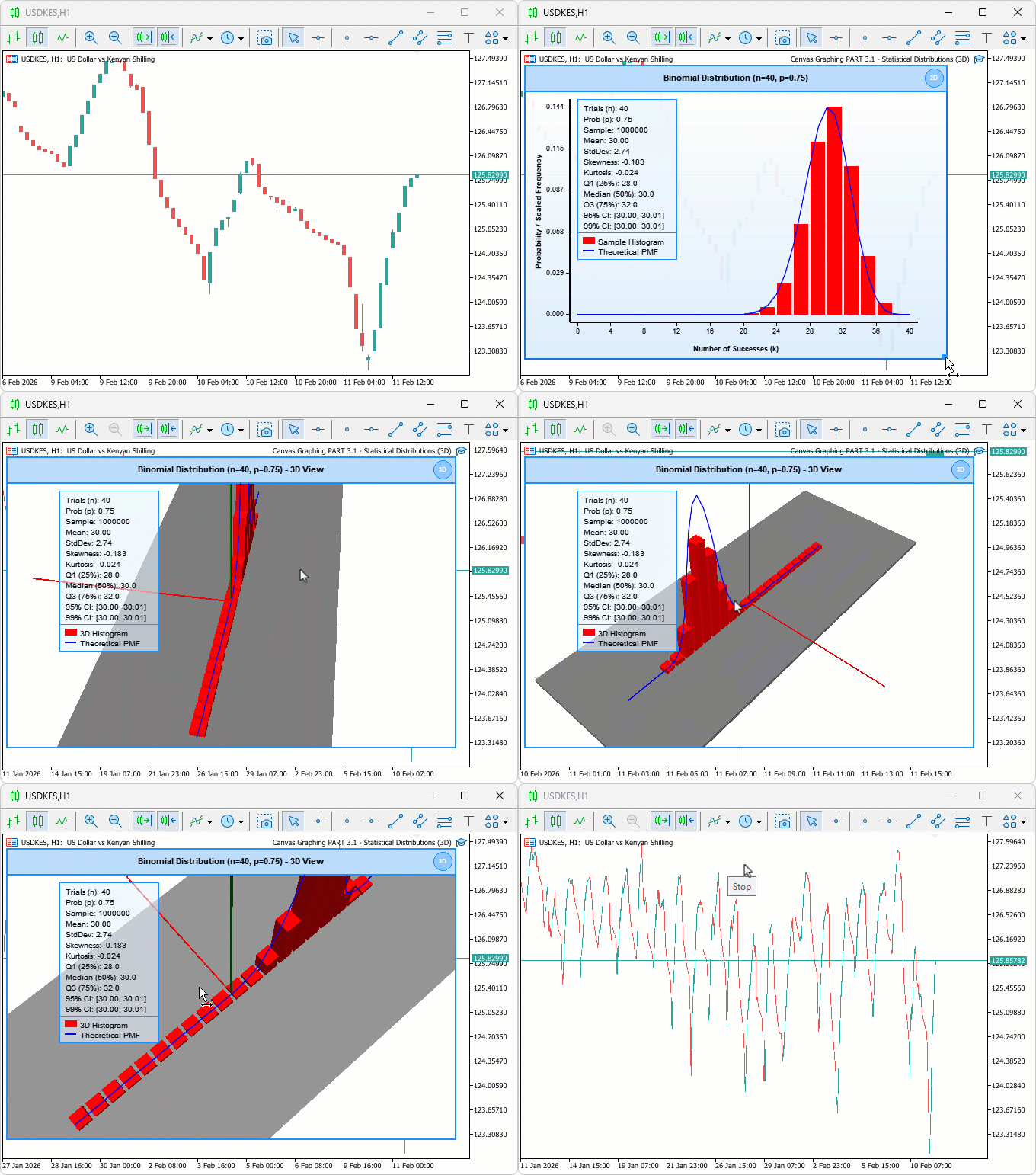
During testing, the histogram bars scaled accurately in three dimensions across varying trial counts, camera auto-fit consistently positioned the view for full bar visibility on load, and mode switching between two-dimensional and three-dimensional rendered without data loss or layout disruption.
Conclusion
In this article, we integrated DirectX 3D into the MQL5 binomial distribution viewer, enabling switchable 2D/3D modes and camera control for rotation, zoom, and auto-fit. We rendered 3D histogram bars with a ground plane and color-coded axes, projected the theoretical PMF curve into perspective space, and preserved 2D elements such as statistics panels, legends, and customizable themes. The implementation details covered class-based architecture, mouse interactions, real-time updates on new bars, and configurable inputs for trials, probability, sample size, and display settings. After the article, you will be able to:
- Toggle between two-dimensional and three-dimensional views of binomial distributions directly on the chart without restarting
- Rotate and zoom the three-dimensional histogram to inspect probability mass function shapes and frequency contrasts from any angle
- Use the three-dimensional visualization alongside the overlaid theoretical curve to compare simulated sample distributions against expected binomial probabilities in real time
In the next parts, we will explore how we can add a pan for dragging the 3D view, more statistical distribution functions to our 2D bar plotting and enable seamless switching. Stay tuned!
Warning: All rights to these materials are reserved by MetaQuotes Ltd. Copying or reprinting of these materials in whole or in part is prohibited.
This article was written by a user of the site and reflects their personal views. MetaQuotes Ltd is not responsible for the accuracy of the information presented, nor for any consequences resulting from the use of the solutions, strategies or recommendations described.

 Engineering Trading Discipline into Code (Part 3): Enforcing Symbol-Level Trading Boundaries with a Whitelist System in MQL5
 Implementing the Truncated Newton Conjugate-Gradient Algorithm in MQL5
 Graph Theory: Traversal Depth-First Search (DFS) Applied in Trading
 Mastering PD Arrays: Optimizing Trading from Imbalances in PD Arrays

- Free trading apps
- Over 8,000 signals for copying
- Economic news for exploring financial markets
You agree to website policy and terms of use