

MQL5での取引戦略の自動化(第39回):信頼区間とダッシュボードを備えた統計的平均回帰
 334
334
 0
0

はじめに
前回の記事(第38回)では、MetaQuotes Language 5 (MQL5)を用い、隠れRSIダイバージェンス取引システムを開発しました。このシステムは、スイングポイントを用いて隠れ強気および弱気ダイバージェンスを検出し、バーのレンジと許容誤差によるクリーンチェックを適用し、価格ラインおよびRSIラインの傾き角度をカスタマイズ可能なフィルタとして活用し、リスク管理付きでトレードを実行し、角度表示付きの視覚的マーカーをチャート上に表示する機能を備えていました。第39回では、信頼区間とダッシュボードを備えた統計的平均回帰システムを開発します。
このシステムは、定義した期間の価格データを分析し、平均、分散、歪度、尖度、ジャック=ベラ統計量といった統計モーメントを計算します。適応的な閾値を用いた信頼区間に基づいて平均回帰シグナルを生成し、さらに上位時間足による確認を組み合わせます。加えて、エクイティベースのロットサイジング、トレーリングストップ、部分決済、時間ベースのエグジットなどの取引管理機能を実装し、リアルタイム監視のためのオンチャートダッシュボードを提供します。本記事では以下のトピックを扱います。
記事を読み終える頃には、統計的平均回帰トレード戦略の実用的なMQL5戦略が完成し、自由にカスタマイズできる状態になります。それでは始めましょう。
統計的平均回帰戦略の理解
統計的平均回帰戦略は、価格が大きく乖離した後に歴史的平均値へ回帰する傾向を活用する手法です。これを統計解析で強化し、非対称性や裾のリスク(テールリスク)が存在する非正規分布を特定することで、そのような環境下では回帰が発生する確率がより高いという前提を利用します。
買いセットアップでは、価格が下側信頼区間を下回り、負の歪度が観測される場合、売られ過ぎの状態からの上昇モメンタムの可能性を示唆します。売りセットアップでは、価格が上側信頼区間を上回り、かつ正の歪度が確認される場合、買われ過ぎの状態からの下方修正の可能性を示唆します。これらのシグナルは、非正規性を確認するためのジャック=ベラ統計量によってフィルタリングされ、さらに過度に尖度が大きい市場を回避するための尖度閾値によって制御されます。
この戦略では、エントリー精度を高めるために上位時間足との整合性も確認します。さらに、エクイティ割合に基づくポジションサイジング、基本ストップロスおよびテイクプロフィット距離、利益確保のためのトレーリングストップ、あらかじめ定義した利益水準での部分決済、保有期間制限による時間ベースのエグジットといった動的リスク管理を実装し、長期的なエクスポージャーを抑制します。これらの統計的要素とリスク管理要素を統合することにより、ボラティリティの高い市場において、信頼性の高い平均回帰機会の捕捉を目指します。以下に、このシステムで使用する統計分布の概念図を示します。
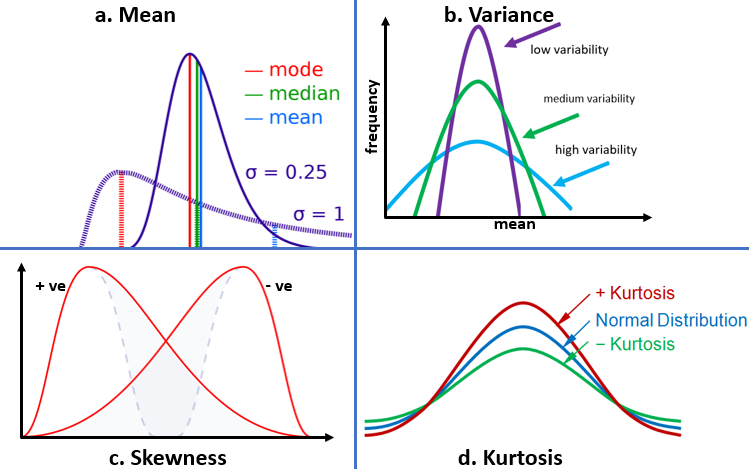
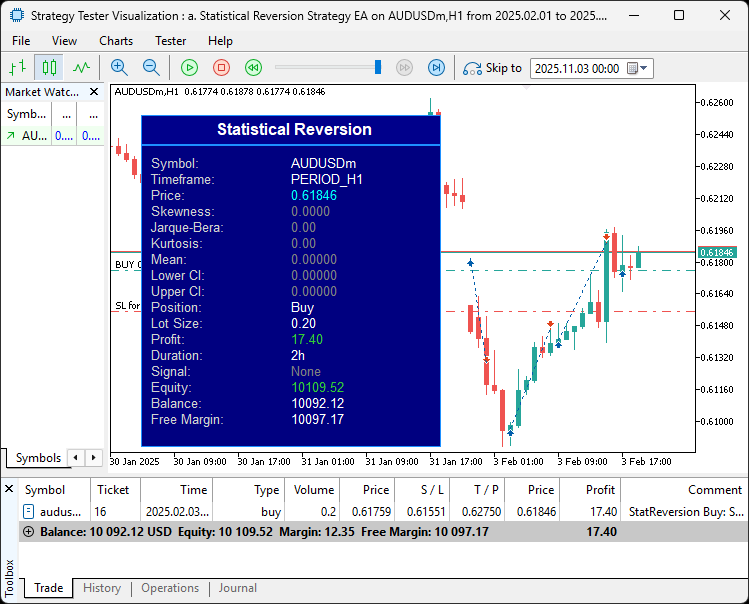
ジャック=ベラ統計量は、歪度と尖度を組み合わせた統計指標です。実装時に具体的に定式化しますのでご安心ください。このシステムでは、指定期間にわたり平均、分散、歪度、尖度、ジャック=ベラ統計量を計算し、適応的な歪度閾値および非正規性フィルタを用いて、価格が信頼区間を突破した際に売買シグナルを生成します。必要に応じて上位時間足で確認をおこない、リスクベースまたは固定ロットで取引を実行し、基本SL/TPを設定します。その後、トレーリングストップ、部分決済、保有期間制限を適用してポジション管理を行い、リアルタイム統計指標をチャート上のダッシュボードに表示します。簡単に言えば、本記事で最終的に実現する内容は以下のとおりです。
MQL5での実装
MQL5でプログラムを作成するには、まずMetaEditorを開き、ナビゲーターで[Experts]フォルダを探します。[新規]タブをクリックして指示に従い、ファイルを作成します。ファイルが作成されたら、コーディング環境で、まずプログラム全体で使用する入力パラメータとグローバル変数をいくつか宣言する必要があります。
//+------------------------------------------------------------------+
//|                                 StatisticalReversionStrategy.mq5 |
//|                           Copyright 2025, Allan Munene Mutiiria. |
//|                                   https://t.me/Forex_Algo_Trader |
//+------------------------------------------------------------------+
#property copyright "Copyright 2025, Allan Munene Mutiiria."
#property link      "https://t.me/Forex_Algo_Trader"
#property version   "1.00"
#property strict

#include <Trade\Trade.mqh>
#include <Math\Stat\Math.mqh>
#include <ChartObjects\ChartObjectsTxtControls.mqh>

//+------------------------------------------------------------------+
//| Input Parameters                                                 |
//+------------------------------------------------------------------+
input group "=== Statistical Parameters ==="
input int InpPeriod = 50;                   // Period for statistical calculations
input double InpConfidenceLevel = 0.95;     // Confidence level for intervals (0.90-0.99)
input double InpJBThreshold = 2.0;          // Jarque-Bera threshold (lowered for more trades)
input double InpKurtosisThreshold = 5.0;    // Max excess kurtosis (relaxed)
input ENUM_TIMEFRAMES InpHigherTF = 0;      // Higher timeframe for confirmation (0 to disable)

input group "=== Trading Parameters ==="
input double InpRiskPercent = 1.0;          // Risk per trade (% of equity, 0 for fixed lots)
input double InpFixedLots = 0.01;           // Fixed lot size if InpRiskPercent = 0
input int InpBaseStopLossPips = 50;         // Base Stop Loss in pips
input int InpBaseTakeProfitPips = 100;      // Base Take Profit in pips
input int InpMagicNumber = 123456;          // Magic number for trades
input int InpMaxTradeHours = 48;            // Max trade duration in hours (0 to disable)

input group "=== Risk Management ==="
input bool InpUseTrailingStop = true;       // Enable trailing stop
input int InpTrailingStopPips = 30;         // Trailing stop distance in pips
input int InpTrailingStepPips = 10;         // Trailing step in pips
input bool InpUsePartialClose = true;       // Enable partial profit-taking
input double InpPartialClosePercent = 0.5;  // Percent of position to close at 50% TP

input group "=== Dashboard Parameters ==="
input bool InpShowDashboard = true;         // Show dashboard
input int InpDashboardX = 30;               // Dashboard X position
input int InpDashboardY = 30;               // Dashboard Y position
input int InpFontSize = 10;                 // Font size for dashboard text

//+------------------------------------------------------------------+
//| Global Variables                                                 |
//+------------------------------------------------------------------+
CTrade trade;                                      //--- Trade object
datetime g_lastBarTime = 0;                        //--- Last processed bar time
double g_pointMultiplier = 1.0;                    //--- Point multiplier for broker digits
CChartObjectRectLabel* g_dashboardBg = NULL;       //--- Dashboard background object
CChartObjectRectLabel* g_headerBg = NULL;          //--- Header background object
CChartObjectLabel* g_titleLabel = NULL;            //--- Title label object
CChartObjectLabel* g_staticLabels[];               //--- Static labels array
CChartObjectLabel* g_valueLabels[];                //--- Value labels array
string g_staticNames[] = {
   "Symbol:", "Timeframe:", "Price:", "Skewness:", "Jarque-Bera:", "Kurtosis:",
   "Mean:", "Lower CI:", "Upper CI:", "Position:", "Lot Size:", "Profit:", "Duration:", "Signal:",
   "Equity:", "Balance:", "Free Margin:"
};                                                 //--- Static label names
int g_staticCount = ArraySize(g_staticNames);      //--- Number of static labels
まず、必要なライブラリを読み込みます。「#include <Trade\Trade.mqh>」は取引操作のために使用します。「#include <Math\Stat\Math.mqh>」はモーメントや分布などの統計計算のために使用します。「#include <ChartObjects\ChartObjectsTxtControls.mqh>」はダッシュボード表示用のチャートオブジェクトを扱うために使用します。次に、ユーザー設定用の入力パラメータをグループ化して定義します。「Statistical Parameters」グループでは、InpPeriodはデフォルト50で統計計算のルックバック期間を指定します。InpConfidenceLevelは0.95で、信頼区間の信頼水準(範囲0.90~0.99)を設定します。InpJBThresholdは2.0で、ジャック=ベラ統計量による非正規性フィルタを設定します(値を下げるとシグナルが増加します)。InpKurtosisThresholdは5.0で、過剰尖度の上限を設定します(緩和された閾値です)。InpHigherTFは0の場合は上位時間足による確認を無効にし、それ以外の値では指定した時間足で確認をおこないます。
「Trading Parameters」では、InpRiskPercentは1.0で、エクイティベースのリスク管理を有効にします(0にすると固定ロットになります)。InpFixedLotsは0.01で、リスク管理を無効にした場合の固定ロットサイズを設定します。InpBaseStopLossPipsは50、InpBaseTakeProfitPipsは100で、基本のリスク/リワード距離を定義します。InpMagicNumberは123456で、取引識別用のマジックナンバーです。InpMaxTradeHoursは48で、最大保有時間を制限します(0で無効化)。「Risk Management」では、InpUseTrailingStopをtrueにするとトレーリングストップを有効化します。InpTrailingStopPipsは30でストップ距離を定義し、InpTrailingStepPipsは10で調整ステップ幅を設定します。InpUsePartialCloseをtrueにすると部分決済を有効化します。InpPartialClosePercentは0.5で、利益が50%に達した時点でポジションの50%をクローズします。
「Dashboard Parameters」では、InpShowDashboardをtrueにするとビジュアルパネルの表示を切り替えます。InpDashboardXおよびInpDashboardYは30で表示位置を指定します。InpFontSizeは10でテキストサイズを設定します。
続いて、グローバル変数を宣言します。tradeは注文処理用のCTradeインスタンスです。g_lastBarTimeは0で初期化し、処理済みバーを追跡します。g_pointMultiplierは1.0で、ブローカーの桁数差異を調整するために使用します。また、ダッシュボード要素としてg_dashboardBg、g_headerBg、g_titleLabelをNULLで宣言します。ラベル管理用にg_staticLabels[]およびg_valueLabels[]の配列を用意します。さらに、g_staticNames[]を文字列配列として定義し、「Symbol:」「Mean:」などの固定ダッシュボードテキストを格納します。g_staticCountにはArraySize関数を用いてその配列サイズを設定し、反復処理に使用します。ここまで準備が整ったので、最も基本的な処理であるダッシュボードの作成から開始できます。このロジックを関数として実装します。
//+------------------------------------------------------------------+
//| Create Dashboard                                                 |
//+------------------------------------------------------------------+
bool CreateDashboard() {
   if (!InpShowDashboard) return true;             //--- Return if dashboard disabled

   Print("Creating dashboard...");                 //--- Log dashboard creation

// Create main background rectangle
   if (g_dashboardBg == NULL) {                    //--- Check if background exists
      g_dashboardBg = new CChartObjectRectLabel(); //--- Create background object
      if (!g_dashboardBg.Create(0, "StatReversion_DashboardBg", 0, InpDashboardX, InpDashboardY + 30, 300, g_staticCount * (InpFontSize + 6) + 30)) { //--- Create dashboard background
         Print("Error creating dashboard background: ", GetLastError()); //--- Log error
         return false;                             //--- Return failure
      }
      g_dashboardBg.Color(clrDodgerBlue);          //--- Set border color
      g_dashboardBg.BackColor(clrNavy);            //--- Set background color
      g_dashboardBg.BorderType(BORDER_FLAT);       //--- Set border type
      g_dashboardBg.Corner(CORNER_LEFT_UPPER);     //--- Set corner alignment
   }

// Create header background
   if (g_headerBg == NULL) {                       //--- Check if header background exists
      g_headerBg = new CChartObjectRectLabel();    //--- Create header background object
      if (!g_headerBg.Create(0, "StatReversion_HeaderBg", 0, InpDashboardX, InpDashboardY, 300, InpFontSize + 20)) { //--- Create header background
         Print("Error creating header background: ", GetLastError()); //--- Log error
         return false;                             //--- Return failure
      }
      g_headerBg.Color(clrDodgerBlue);             //--- Set border color
      g_headerBg.BackColor(clrDarkBlue);           //--- Set background color
      g_headerBg.BorderType(BORDER_FLAT);          //--- Set border type
      g_headerBg.Corner(CORNER_LEFT_UPPER);        //--- Set corner alignment
   }

// Create title label (centered)
   if (g_titleLabel == NULL) {                     //--- Check if title label exists
      g_titleLabel = new CChartObjectLabel();      //--- Create title label object
      if (!g_titleLabel.Create(0, "StatReversion_Title", 0, InpDashboardX + 75, InpDashboardY + 5)) { //--- Create title label
         Print("Error creating title label: ", GetLastError()); //--- Log error
         return false;                             //--- Return failure
      }
      if (!g_titleLabel.Font("Arial Bold") || !g_titleLabel.FontSize(InpFontSize + 2) || !g_titleLabel.Description("Statistical Reversion")) { //--- Set title properties
         Print("Error setting title properties: ", GetLastError()); //--- Log error
         return false;                             //--- Return failure
      }
      g_titleLabel.Color(clrWhite);                //--- Set title color
   }

// Initialize static labels (left-aligned)
   ArrayFree(g_staticLabels);                      //--- Free static labels array
   ArrayResize(g_staticLabels, g_staticCount);     //--- Resize static labels array
   int y_offset = InpDashboardY + 30 + 10;         //--- Set y offset for labels
   for (int i = 0; i < g_staticCount; i++) {       //--- Iterate through static labels
      g_staticLabels[i] = new CChartObjectLabel(); //--- Create static label object
      string label_name = "StatReversion_Static_" + IntegerToString(i); //--- Generate label name
      if (!g_staticLabels[i].Create(0, label_name, 0, InpDashboardX + 10, y_offset)) { //--- Create static label
         Print("Error creating static label: ", label_name, ", Error: ", GetLastError()); //--- Log error
         DeleteDashboard();                        //--- Delete dashboard
         return false;                             //--- Return failure
      }
      if (!g_staticLabels[i].Font("Arial") || !g_staticLabels[i].FontSize(InpFontSize) || !g_staticLabels[i].Description(g_staticNames[i])) { //--- Set static label properties
         Print("Error setting static label properties: ", label_name, ", Error: ", GetLastError()); //--- Log error
         DeleteDashboard();                        //--- Delete dashboard
         return false;                             //--- Return failure
      }
      g_staticLabels[i].Color(clrLightGray);       //--- Set static label color
      y_offset += InpFontSize + 6;                 //--- Update y offset
   }

// Initialize value labels (right-aligned, starting at center)
   ArrayFree(g_valueLabels);                       //--- Free value labels array
   ArrayResize(g_valueLabels, g_staticCount);      //--- Resize value labels array
   y_offset = InpDashboardY + 30 + 10;             //--- Reset y offset for values
   for (int i = 0; i < g_staticCount; i++) {       //--- Iterate through value labels
      g_valueLabels[i] = new CChartObjectLabel();  //--- Create value label object
      string label_name = "StatReversion_Value_" + IntegerToString(i); //--- Generate label name
      if (!g_valueLabels[i].Create(0, label_name, 0, InpDashboardX + 150, y_offset)) { //--- Create value label
         Print("Error creating value label: ", label_name, ", Error: ", GetLastError()); //--- Log error
         DeleteDashboard();                        //--- Delete dashboard
         return false;                             //--- Return failure
      }
      if (!g_valueLabels[i].Font("Arial") || !g_valueLabels[i].FontSize(InpFontSize) || !g_valueLabels[i].Description("")) { //--- Set value label properties
         Print("Error setting value label properties: ", label_name, ", Error: ", GetLastError()); //--- Log error
         DeleteDashboard();                        //--- Delete dashboard
         return false;                             //--- Return failure
      }
      g_valueLabels[i].Color(clrCyan);             //--- Set value label color
      y_offset += InpFontSize + 6;                 //--- Update y offset
   }

   ChartRedraw();                                  //--- Redraw chart
   Print("Dashboard created successfully");        //--- Log success
   return true;                                    //--- Return true on success
}
CreateDashboard関数では、InpShowDashboardがtrueの場合に戦略メトリクス表示用のチャート上のビジュアルパネルを構築します。falseの場合は何もせずtrueを返します。まず、Printで作成開始をログ出力します。次にg_dashboardBgがNULLであるかを確認し、NULLであれば新しいCChartObjectRectLabelインスタンスを生成します。そのCreateメソッドを使用し、サブウィンドウ0、名前StatReversion_DashboardBg、位置はInpDashboardXと「InpDashboardY + 30」、幅300、高さは「g_staticCount * (InpFontSize + 6) + 30」で動的計算した値を指定します。作成に失敗した場合は、GetLastErrorで取得したエラーをログ出力し、falseを返します。作成後は各種プロパティを設定します。ColorをclrDodgerBlue(枠線)、BackColorをclrNavy(塗りつぶし)、BorderTypeをBORDER_FLAT、CornerをCORNER_LEFT_UPPERに設定します。
同様にヘッダについても、g_headerBgがNULLであれば別のCChartObjectRectLabelを生成します。位置はInpDashboardXおよび「InpDashboardY + 30」、幅は300、高さは「g_staticCount * (InpFontSize + 6) + 30」で動的に計算した値を指定します。タイトルについても、g_titleLabelがNULLであればCChartObjectLabelをインスタンス化し、名前StatReversion_Titleで「InpDashboardX + 75」「InpDashboardY + 5」に中央付近に配置します。その後、FontをArial Bold、FontSizeを「InpFontSize + 2」、Descriptionを「Statistical Reversion」、ColorをclrWhiteに設定します。エラーが発生した場合はログ出力し、falseを返します。
同様に、g_valueLabelsを解放してからサイズ変更kし、y_offsetを「InpDashboardY + 30 + 10」に再初期化します。ループ内で値表示用ラベルを作成し、名前を「StatReversion_Value_」+インデックス、位置を「InpDashboardX + 150」とy_offsetとします。初期Descriptionは空文字列とし、ColorはclrCyan、フォント設定は静的ラベルと同様です。作成やプロパティ設定でエラーが発生した場合も、DeleteDashboardを呼び出してfalseを返します。各反復ごとにy_offsetを「InpFontSize + 6」ずつ増加させます。
同様に、g_valueLabelsを解放してサイズを変更し、y_offsetをリセットして、「StatReversion_Value_」という名前の値ラベルを作成し、さらに、位置を「InpDashboardX + 150」およびy_offsetに設定します。初期のDescriptionは空で、色はclrCyan、フォント設定は同じで、エラーも同様に処理します。最後に、ChartRedrawを呼び出して表示を更新し、成功ログを出力してtrueを返します。同様の形式で、ダッシュボードを更新するUpdateDashboard関数および削除するDeleteDashboard関数も実装します。
//+------------------------------------------------------------------+
//| Update Dashboard                                                 |
//+------------------------------------------------------------------+
void UpdateDashboard(double mean, double lower_ci, double upper_ci, double skewness, double jb_stat, double kurtosis,
                     double skew_buy, double skew_sell, string position, double lot_size, double profit, string duration, string signal) {
   if (!InpShowDashboard || ArraySize(g_valueLabels) != g_staticCount) { //--- Check if dashboard enabled and labels valid
      Print("Dashboard update skipped: Not initialized or invalid array size"); //--- Log skip
      return;                                      //--- Exit function
   }

   double balance = AccountInfoDouble(ACCOUNT_BALANCE); //--- Get account balance
   double equity = AccountInfoDouble(ACCOUNT_EQUITY); //--- Get account equity
   double free_margin = AccountInfoDouble(ACCOUNT_MARGIN_FREE); //--- Get free margin
   double price = iClose(_Symbol, _Period, 0);     //--- Get current close price

   string values[] = {
      _Symbol, EnumToString(_Period), DoubleToString(price, _Digits),
      DoubleToString(skewness, 4), DoubleToString(jb_stat, 2), DoubleToString(kurtosis, 2),
      DoubleToString(mean, _Digits), DoubleToString(lower_ci, _Digits), DoubleToString(upper_ci, _Digits),
      position, DoubleToString(lot_size, 2), DoubleToString(profit, 2), duration, signal,
      DoubleToString(equity, 2), DoubleToString(balance, 2), DoubleToString(free_margin, 2)
   };                                              //--- Set value strings

   color value_colors[] = {
      clrWhite, clrWhite, (price > 0 ? clrCyan : clrGray), (skewness != 0 ? clrCyan : clrGray), (jb_stat != 0 ? clrCyan : clrGray), (kurtosis != 0 ? clrCyan : clrGray),
      (mean != 0 ? clrCyan : clrGray), (lower_ci != 0 ? clrCyan : clrGray), (upper_ci != 0 ? clrCyan : clrGray),
      clrWhite, clrWhite, (profit > 0 ? clrLimeGreen : profit < 0 ? clrRed : clrGray), clrWhite,
      (signal == "Buy" ? clrLimeGreen : signal == "Sell" ? clrRed : clrGray),
      (equity > balance ? clrLimeGreen : equity < balance ? clrRed : clrGray), clrWhite, clrWhite
   };                                              //--- Set value colors

   for (int i = 0; i < g_staticCount; i++) {       //--- Iterate through values
      if (g_valueLabels[i] != NULL) {              //--- Check if label exists
         g_valueLabels[i].Description(values[i]);  //--- Set value description
         g_valueLabels[i].Color(value_colors[i]);  //--- Set value color
      } else {                                     //--- Handle null label
         Print("Warning: Value label ", i, " is NULL"); //--- Log warning
      }
   }
   ChartRedraw();                                  //--- Redraw chart
   Print("Dashboard updated: Signal=", signal, ", Position=", position, ", Profit=", profit); //--- Log update
}

//+------------------------------------------------------------------+
//| Delete Dashboard                                                 |
//+------------------------------------------------------------------+
void DeleteDashboard() {
   if (g_dashboardBg != NULL) {                    //--- Check if background exists
      g_dashboardBg.Delete();                      //--- Delete background
      delete g_dashboardBg;                        //--- Free background memory
      g_dashboardBg = NULL;                        //--- Set background to null
      Print("Dashboard background deleted");       //--- Log deletion
   }
   if (g_headerBg != NULL) {                       //--- Check if header background exists
      g_headerBg.Delete();                         //--- Delete header background
      delete g_headerBg;                           //--- Free header background memory
      g_headerBg = NULL;                           //--- Set header background to null
      Print("Header background deleted");          //--- Log deletion
   }
   if (g_titleLabel != NULL) {                     //--- Check if title label exists
      g_titleLabel.Delete();                       //--- Delete title label
      delete g_titleLabel;                         //--- Free title label memory
      g_titleLabel = NULL;                         //--- Set title label to null
      Print("Title label deleted");                //--- Log deletion
   }
   for (int i = 0; i < ArraySize(g_staticLabels); i++) { //--- Iterate through static labels
      if (g_staticLabels[i] != NULL) {             //--- Check if label exists
         g_staticLabels[i].Delete();               //--- Delete static label
         delete g_staticLabels[i];                 //--- Free static label memory
         g_staticLabels[i] = NULL;                 //--- Set static label to null
      }
   }
   for (int i = 0; i < ArraySize(g_valueLabels); i++) { //--- Iterate through value labels
      if (g_valueLabels[i] != NULL) {              //--- Check if label exists
         g_valueLabels[i].Delete();                //--- Delete value label
         delete g_valueLabels[i];                  //--- Free value label memory
         g_valueLabels[i] = NULL;                  //--- Set value label to null
      }
   }
   ArrayFree(g_staticLabels);                      //--- Free static labels array
   ArrayFree(g_valueLabels);                       //--- Free value labels array
   ChartRedraw();                                  //--- Redraw chart
   Print("Dashboard labels cleared");              //--- Log clearance
}
UpdateDashboard関数を定義し、チャート上のパネルを最新の戦略データで更新します。表示用のパラメータとして、mean、lower_ci、upper_ci、skewness、jb_stat、kurtosis、skew_buy、skew_sell、position、lot_size、profit、duration、signalを受け取ります。まず、表示許可がない場合や、ラベルサイズがg_staticCountと一致しない場合は、ログにスキップを出力して早期に終了します。次に口座情報を取得します。balanceはAccountInfoDouble(ACCOUNT_BALANCE)で、equityおよびfree_marginも同様に取得します。現在価格はiClose関数で、対象の銘柄、時間足、「shift 0」を指定して取得します。
続いて、values文字列配列に表示用データを格納します。symbol、時間足はEnumToStringで取得、priceは_Digits精度でDoubleToString、統計指標は適切に丸めて、position情報や口座残高も含めます。条件付きのカラー配列value_colorsを設定します。統計値がゼロでなければcyan、利益が正ならlime green、負ならred、signalやequityとbalanceの比較でも同様のロジックで色を設定します。ループでg_staticCount分繰り返し、各g_valueLabels[i]がNULLでない場合は、Descriptionをvalues[i]、Colorをvalue_colors[i]に更新します。NULLの場合は警告ログを出力します。最後にChartRedrawを呼び出して表示を更新し、signal、position、profitをログに出力します。
DeleteDashboard関数を作成してクリーンアップをおこないます。まず、g_dashboardBgがNULLでない場合、Deleteメソッドを呼び出してオブジェクトを削除し、deleteでメモリを解放、NULLに設定し、削除をログ出力します。同様にg_headerBgおよびg_titleLabelも処理します。配列については、ArraySizeでg_staticLabelsのサイズを取得し、各要素がNULLでない場合はDeleteで削除、deleteで解放、NULLに設定します。g_valueLabelsも同様に処理します。その後、ArrayFreeで両配列を解放し、ChartRedrawでチャートを更新、ラベルがクリアされたことをログ出力します。これらの関数は、初期化イベントハンドラ内で呼び出すことができます。
//+------------------------------------------------------------------+
//| Expert Initialization Function                                   |
//+------------------------------------------------------------------+
int OnInit() {
   trade.SetExpertMagicNumber(InpMagicNumber);     //--- Set magic number
   trade.SetDeviationInPoints(10);                 //--- Set deviation in points
   trade.SetTypeFilling(ORDER_FILLING_FOK);        //--- Set filling type

// Adjust point multiplier for broker digits
   if (_Digits == 5 || _Digits == 3)               //--- Check broker digits
      g_pointMultiplier = 10.0;                    //--- Set multiplier for 5/3 digits
   else                                            //--- Default digits
      g_pointMultiplier = 1.0;                     //--- Set multiplier for others

// Validate inputs (use local variables)
   double confidenceLevel = InpConfidenceLevel;    //--- Copy confidence level
   if (InpConfidenceLevel < 0.90 || InpConfidenceLevel > 0.99) { //--- Check confidence level range
      Print("Warning: InpConfidenceLevel out of range (0.90-0.99). Using 0.95."); //--- Log warning
      confidenceLevel = 0.95;                      //--- Set default confidence level
   }
   double riskPercent = InpRiskPercent;            //--- Copy risk percent
   if (InpRiskPercent < 0 || InpRiskPercent > 10) { //--- Check risk percent range
      Print("Warning: InpRiskPercent out of range (0-10). Using 1.0."); //--- Log warning
      riskPercent = 1.0;                           //--- Set default risk percent
   }

// Initialize dashboard (non-critical)
   if (InpShowDashboard && !CreateDashboard()) {   //--- Check if dashboard creation failed
      Print("Failed to initialize dashboard, continuing without it"); //--- Log failure
   }

   Print("Statistical Reversion Strategy Initialized. Period: ", InpPeriod, ", Confidence: ", confidenceLevel * 100, "% on ", _Symbol, "/", Period()); //--- Log initialization
   return(INIT_SUCCEEDED);                         //--- Return success
}

//+------------------------------------------------------------------+
//| Expert Deinitialization Function                                 |
//+------------------------------------------------------------------+
void OnDeinit(const int reason) {
   DeleteDashboard();                              //--- Delete dashboard
   Print("Statistical Reversion Strategy Deinitialized. Reason: ", reason); //--- Log deinitialization
}
OnInitイベントハンドラでは、まずtradeオブジェクトを設定します。trade.SetExpertMagicNumberでInpMagicNumberを渡してマジックナンバーを設定し、SetDeviationInPointsで10ポイントの許容スリッページを指定、SetTypeFillingでORDER_FILLING_FOKを設定して正確な注文執行を確保します。次に、g_pointMultiplierをブローカーの桁数に応じて調整します。_Digitsが5または3の場合は10.0に設定してpipスケーリングを正しくおこない、それ以外は1.0のままにします。入力の検証もおこないます。InpConfidenceLevelをローカル変数confidenceLevelにコピーし、0.90~0.99の範囲外であれば警告ログを出力し、デフォルト0.95にリセットします。InpRiskPercentについても0~10の範囲でチェックし、範囲外なら警告ログを出力して1.0にリセットします。実際に自分で設定することもできます。これらは私たちが選択した単なる任意の範囲です。
ダッシュボードが有効でCreateDashboardが失敗した場合は、ログに記録し、ダッシュボードなしで処理を続行します。最後に、Period、confidenceLevelのパーセンテージ、symbol、timeframeをPrintで出力して初期化完了をログに記録し、INIT_SUCCEEDEDを返します。OnDeinitイベントハンドラでは、定数整数reasonを受け取り、DeleteDashboardを呼び出してチャート上の表示をクリーンアップし、提供されたreasonとともに終了をログ出力します。コンパイルすると、次の結果が得られます。
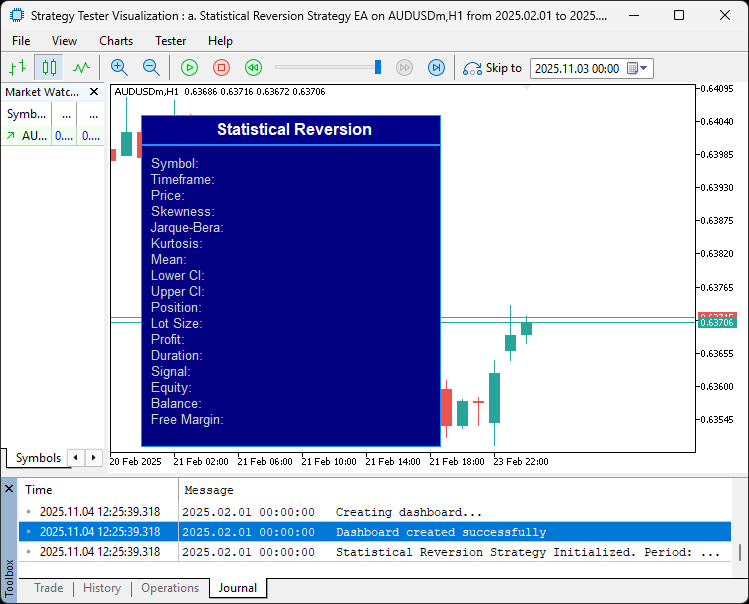
画像から、準備が整っていることがわかります。次に、ダッシュボード更新や統計計算で必要となるヘルパー関数を定義していきます。
//+------------------------------------------------------------------+
//| Normal Inverse CDF Approximation                                 |
//+------------------------------------------------------------------+
double NormalInverse(double p) {
   double t = MathSqrt(-2.0 * MathLog(p < 0.5 ? p : 1.0 - p)); //--- Calculate t value
   double sign = (p < 0.5) ? -1.0 : 1.0;           //--- Determine sign
   return sign * (t - (2.515517 + 0.802853 * t + 0.010328 * t * t) /
                  (1.0 + 1.432788 * t + 0.189269 * t * t + 0.001308 * t * t * t)); //--- Return approximated inverse CDF
}

//+------------------------------------------------------------------+
//| Get Position Status                                              |
//+------------------------------------------------------------------+
string GetPositionStatus() {
   if (HasPosition(POSITION_TYPE_BUY)) return "Buy"; //--- Return "Buy" if buy position open
   if (HasPosition(POSITION_TYPE_SELL)) return "Sell"; //--- Return "Sell" if sell position open
   return "None";                                    //--- Return "None" if no position
}

//+------------------------------------------------------------------+
//| Get Current Lot Size                                             |
//+------------------------------------------------------------------+
double GetCurrentLotSize() {
   for (int i = PositionsTotal() - 1; i >= 0; i--) { //--- Iterate through positions
      if (PositionGetSymbol(i) == _Symbol && PositionGetInteger(POSITION_MAGIC) == InpMagicNumber) //--- Check symbol and magic
         return PositionGetDouble(POSITION_VOLUME); //--- Return position volume
   }
   return 0.0;                                      //--- Return 0 if no position
}

//+------------------------------------------------------------------+
//| Get Current Profit                                               |
//+------------------------------------------------------------------+
double GetCurrentProfit() {
   for (int i = PositionsTotal() - 1; i >= 0; i--) { //--- Iterate through positions
      if (PositionGetSymbol(i) == _Symbol && PositionGetInteger(POSITION_MAGIC) == InpMagicNumber) //--- Check symbol and magic
         return PositionGetDouble(POSITION_PROFIT); //--- Return position profit
   }
   return 0.0;                                      //--- Return 0 if no position
}

//+------------------------------------------------------------------+
//| Get Position Duration                                            |
//+------------------------------------------------------------------+
string GetPositionDuration() {
   for (int i = PositionsTotal() - 1; i >= 0; i--) { //--- Iterate through positions
      if (PositionGetSymbol(i) == _Symbol && PositionGetInteger(POSITION_MAGIC) == InpMagicNumber) { //--- Check symbol and magic
         datetime open_time = (datetime)PositionGetInteger(POSITION_TIME); //--- Get open time
         datetime current_time = TimeCurrent(); //--- Get current time
         int hours = (int)((current_time - open_time) / 3600); //--- Calculate hours
         return IntegerToString(hours) + "h"; //--- Return duration string
      }
   }
   return "0h";                                   //--- Return "0h" if no position
}

//+------------------------------------------------------------------+
//| Get Signal Status                                                |
//+------------------------------------------------------------------+
string GetSignalStatus(bool buy_signal, bool sell_signal) {
   if (buy_signal) return "Buy";                  //--- Return "Buy" if buy signal
   if (sell_signal) return "Sell";                //--- Return "Sell" if sell signal
   return "None";                                 //--- Return "None" if no signal
}

//+------------------------------------------------------------------+
//| Check for Open Position of Type                                  |
//+------------------------------------------------------------------+
bool HasPosition(ENUM_POSITION_TYPE pos_type) {
   for (int i = PositionsTotal() - 1; i >= 0; i--) { //--- Iterate through positions
      if (PositionGetSymbol(i) == _Symbol && PositionGetInteger(POSITION_MAGIC) == InpMagicNumber && PositionGetInteger(POSITION_TYPE) == pos_type) //--- Check details
         return true;                                //--- Return true if match
   }
   return false;                                     //--- Return false if no match
}

//+------------------------------------------------------------------+
//| Check for Any Open Position                                      |
//+------------------------------------------------------------------+
bool HasPosition() {
   return (HasPosition(POSITION_TYPE_BUY) || HasPosition(POSITION_TYPE_SELL)); //--- Check for buy or sell position
}
まず、NormalInverse関数を実装します。これは標準正規分布の逆累積分布関数(CDF)の近似をおこなうもので、確率pを受け取り、信頼区間計算で使用するt値を算出します。具体的には、pが0.5を超える場合は鏡映して調整し、MathSqrtで負の対数を取った値をtとして計算します。signはpが0.5未満かどうかで決定し、最後に多項式近似を用いた有理関数で精度の高い逆関数値を返します。
次に、ポジションおよびシグナル取得用のヘルパー関数を定義します。GetPositionStatusは、POSITION_TYPE_BUYまたはPOSITION_TYPE_SELLのHasPositionを使い、買いまたは売りポジションがあるか確認し、存在すればタイプを返し、なければNoneを返します。GetCurrentLotSizeは、「PositionsTotal - 1」から逆順にポジションをループし、PositionGetSymbolで銘柄を確認、PositionGetIntegerでマジックナンバーがInpMagicNumberと一致するかをチェックします。条件が一致すればPositionGetDouble(POSITION_VOLUME)でロット数を返し、なければ0を返します。GetCurrentProfitは、上記と同様に条件一致のポジションを探し、PositionGetDouble(POSITION_PROFIT)で利益を取得します。
GetPositionDurationでは、マッチするポジションをループで探し、PositionGetInteger(POSITION_TIME)で開始時刻をdatetimeで取得します。TimeCurrentとの差から経過時間を算出し、文字列「Xh」にフォーマットします。該当ポジションがなければ「0h」を返します。GetSignalStatusは、BuyフラグまたはSellフラグがtrueならBuyまたはSellを返し、どちらもfalseならNoneを返します。特定のENUM_POSITION_TYPEのポジションを検知します。ポジションをループし、PositionGetSymbolで銘柄確認、PositionGetIntegerでマジックナンバーとタイプを確認し、一致すればtrueを返します。オーバーロード版では型指定をせず、BuyまたはSellのいずれかでHasPositionを呼び出す形で任意のポジションを判定できます。これらの関数を用いることで、統計計算を行いシグナルを生成する準備が整いました。そのためのロジックを以下に実装します。
//+------------------------------------------------------------------+
//| Expert Tick Function                                             |
//+------------------------------------------------------------------+
void OnTick() {
// Check for new bar to avoid over-calculation
   if (iTime(_Symbol, _Period, 0) == g_lastBarTime) { //--- Check if new bar
      UpdateDashboard(0, 0, 0, 0, 0, 0, 0, 0, GetPositionStatus(), GetCurrentLotSize(), GetCurrentProfit(), GetPositionDuration(), GetSignalStatus(false, false)); //--- Update dashboard with no signal
      return;                                        //--- Exit function
   }
   g_lastBarTime = iTime(_Symbol, _Period, 0);       //--- Update last bar time

// Check market availability
   if (!SymbolInfoDouble(_Symbol, SYMBOL_BID) || !SymbolInfoDouble(_Symbol, SYMBOL_ASK)) { //--- Check market data
      Print("Error: Market data unavailable for ", _Symbol); //--- Log error
      UpdateDashboard(0, 0, 0, 0, 0, 0, 0, 0, GetPositionStatus(), GetCurrentLotSize(), GetCurrentProfit(), GetPositionDuration(), "None"); //--- Update dashboard with no signal
      return;                                        //--- Exit function
   }

// Copy historical close prices
   double prices[];                                  //--- Declare prices array
   ArraySetAsSeries(prices, true);                   //--- Set as series
   int copied = CopyClose(_Symbol, _Period, 1, InpPeriod, prices); //--- Copy close prices
   if (copied != InpPeriod) {                        //--- Check copy success
      Print("Error copying prices: ", copied, ", Error: ", GetLastError()); //--- Log error
      UpdateDashboard(0, 0, 0, 0, 0, 0, 0, 0, GetPositionStatus(), GetCurrentLotSize(), GetCurrentProfit(), GetPositionDuration(), "None"); //--- Update dashboard with no signal
      return;                                        //--- Exit function
   }

// Calculate statistical moments
   double mean, variance, skewness, kurtosis;        //--- Declare statistical variables
   if (!MathMoments(prices, mean, variance, skewness, kurtosis, 0, InpPeriod)) { //--- Calculate moments
      Print("Error calculating moments: ", GetLastError()); //--- Log error
      UpdateDashboard(0, 0, 0, 0, 0, 0, 0, 0, GetPositionStatus(), GetCurrentLotSize(), GetCurrentProfit(), GetPositionDuration(), "None"); //--- Update dashboard with no signal
      return;                                        //--- Exit function
   }

// Jarque-Bera test
   double n = (double)InpPeriod;                     //--- Set sample size
   double jb_stat = n * (skewness * skewness / 6.0 + (kurtosis * kurtosis) / 24.0); //--- Calculate JB statistic

// Log statistical values
   Print("Stats: Skewness=", DoubleToString(skewness, 4), ", JB=", DoubleToString(jb_stat, 2), ", Kurtosis=", DoubleToString(kurtosis, 2)); //--- Log stats

// Adaptive skewness thresholds
   double skew_buy_threshold = -0.3 - 0.05 * kurtosis; //--- Calculate buy skew threshold
   double skew_sell_threshold = 0.3 + 0.05 * kurtosis; //--- Calculate sell skew threshold

// Kurtosis filter
   if (kurtosis > InpKurtosisThreshold) {          //--- Check kurtosis threshold
      Print("Trade skipped: High kurtosis (", kurtosis, ") > ", InpKurtosisThreshold); //--- Log skip
      UpdateDashboard(mean, 0, 0, skewness, jb_stat, kurtosis, skew_buy_threshold, skew_sell_threshold, GetPositionStatus(), GetCurrentLotSize(), GetCurrentProfit(), GetPositionDuration(), "None"); //--- Update dashboard with no signal
      return;                                      //--- Exit function
   }

   double std_dev = MathSqrt(variance);            //--- Calculate standard deviation

// Adaptive confidence interval
   double confidenceLevel = InpConfidenceLevel;    //--- Copy confidence level
   if (confidenceLevel < 0.90 || confidenceLevel > 0.99) //--- Validate confidence level
      confidenceLevel = 0.95;                      //--- Set default confidence level
   double z_score = NormalInverse(0.5 + confidenceLevel / 2.0); //--- Calculate z-score
   double ci_mult = z_score / MathSqrt(n);         //--- Calculate CI multiplier
   double upper_ci = mean + ci_mult * std_dev;     //--- Calculate upper CI
   double lower_ci = mean - ci_mult * std_dev;     //--- Calculate lower CI

// Current close price
   double current_price = iClose(_Symbol, _Period, 0); //--- Get current close price

// Higher timeframe confirmation (if enabled)
   bool htf_valid = true;                          //--- Initialize HTF validity
   if (InpHigherTF != 0) {                         //--- Check if HTF enabled
      double htf_prices[];                         //--- Declare HTF prices array
      ArraySetAsSeries(htf_prices, true);          //--- Set as series
      int htf_copied = CopyClose(_Symbol, InpHigherTF, 1, InpPeriod, htf_prices); //--- Copy HTF close prices
      if (htf_copied != InpPeriod) {               //--- Check HTF copy success
         Print("Error copying HTF prices: ", htf_copied, ", Error: ", GetLastError()); //--- Log error
         UpdateDashboard(mean, lower_ci, upper_ci, skewness, jb_stat, kurtosis, skew_buy_threshold, skew_sell_threshold, GetPositionStatus(), GetCurrentLotSize(), GetCurrentProfit(), GetPositionDuration(), "None"); //--- Update dashboard with no signal
         return;                                   //--- Exit function
      }
      double htf_mean, htf_variance, htf_skewness, htf_kurtosis; //--- Declare HTF stats
      if (!MathMoments(htf_prices, htf_mean, htf_variance, htf_skewness, htf_kurtosis, 0, InpPeriod)) { //--- Calculate HTF moments
         Print("Error calculating HTF moments: ", GetLastError()); //--- Log error
         UpdateDashboard(mean, lower_ci, upper_ci, skewness, jb_stat, kurtosis, skew_buy_threshold, skew_sell_threshold, GetPositionStatus(), GetCurrentLotSize(), GetCurrentProfit(), GetPositionDuration(), "None"); //--- Update dashboard with no signal
         return;                                   //--- Exit function
      }
      htf_valid = (current_price <= htf_mean && skewness <= 0) || (current_price >= htf_mean && skewness >= 0); //--- Check HTF validity
      Print("HTF Check: Price=", DoubleToString(current_price, _Digits), ", HTF Mean=", DoubleToString(htf_mean, _Digits), ", Valid=", htf_valid); //--- Log HTF check
   }

// Generate signals
   bool buy_signal = htf_valid && (current_price < lower_ci) && (skewness < skew_buy_threshold) && (jb_stat > InpJBThreshold); //--- Check buy signal conditions
   bool sell_signal = htf_valid && (current_price > upper_ci) && (skewness > skew_sell_threshold) && (jb_stat > InpJBThreshold); //--- Check sell signal conditions

// Fallback signal
   if (!buy_signal && !sell_signal) {              //--- Check no primary signal
      buy_signal = htf_valid && (current_price < mean - 0.3 * std_dev); //--- Check fallback buy
      sell_signal = htf_valid && (current_price > mean + 0.3 * std_dev); //--- Check fallback sell
      Print("Fallback Signal: Buy=", buy_signal, ", Sell=", sell_signal); //--- Log fallback signals
   }

// Log signal status
   Print("Signal Check: Buy=", buy_signal, ", Sell=", sell_signal, ", Price=", DoubleToString(current_price, _Digits),
         ", LowerCI=", DoubleToString(lower_ci, _Digits), ", UpperCI=", DoubleToString(upper_ci, _Digits),
         ", Skew=", DoubleToString(skewness, 4), ", BuyThresh=", DoubleToString(skew_buy_threshold, 4),
         ", SellThresh=", DoubleToString(skew_sell_threshold, 4), ", JB=", DoubleToString(jb_stat, 2)); //--- Log signal details

}
OnTickイベントハンドラでは、まず新しいバーが形成されたか確認します。iTimeで_Symbol、_Period、「shift 0」の現在バー時間とg_lastBarTimeを比較し、一致しなければ新バーではないと判断します。その場合は、ダッシュボードを更新します。統計値には仮のゼロ、現在のポジション情報はGetPositionStatusやGetCurrentLotSizeなどのヘルパーから取得、signalはGetSignalStatusにfalseフラグを渡してNoneを返し、処理を早期終了します。新バーの場合は、g_lastBarTimeを現在時間に更新します。市場データが利用可能か確認するため、SymbolInfoDoubleでSYMBOL_BIDおよびSYMBOL_ASKを取得します。どちらかが欠けていればエラーをログ出力し、ダッシュボードを同様に更新して終了します。次に、prices配列を宣言し、ArraySetAsSeriesで系列として設定、CopyClose で「shift 1」からInpPeriod分の終値を取得して埋めます。コピーされた件数がInpPeriodと一致しなければ、GetLastErrorで問題をログ出力し、ダッシュボード更新後に早期終了します。
統計計算用にmean、variance、skewness、kurtosisを宣言し、MathMomentsを呼び出してprices配列の0~InpPeriodを計算します。失敗した場合はエラーをログに出力して、ダッシュボードを更新し、終了します。ジャック=ベラ統計量は、サンプルサイズnに対して「(歪度)² / 6 + (尖度)² / 24」を掛けて算出し、可読性のため丸めてログに出力します。適応閾値を、買い用の「skew_buy_threshold = -0.3 - 0.05 * kurtosis」、売り用の「skew_sell_threshold = 0.3 + 0.05 * kurtosis」に設定します。kurtosisがInpKurtosisThresholdを超えた場合、高尾リスク回避のため処理をスキップし、ダッシュボードに現在の統計値とsignal = "None"を反映して終了します。
次に標準偏差std_devをMathSqrt(variance)で計算し、confidenceLevelが妥当範囲内か確認(範囲外なら0.95にデフォルト)。z_scoreを「NormalInverse(confidenceLevel/2 + 0.5)」で算出、「ci_mult = z_score / MathSqrt(n)」とし、「upper_ci = mean + ci_mult * std_dev」、「lower_ci = mean - ci_mult * std_dev」を計算します。現在価格はiCloseで「shift 0」から取得します。上位時間足(InpHigherTF)が設定されている場合、同様にHTF価格をコピーし、その価格データからモーメントを計算します。そして、価格が平均値と歪度の符号に沿っている場合、すなわち価格が平均値以下で歪度が負、または価格が平均値以上で歪度が正である場合にhtf_validをtrueに設定し、チェック内容をログに出力します。上位時間足の確認が無効の場合は、htf_validをtrueとして扱います。
シグナルは以下の条件で生成されます。buy_signalは、htf_validがtrueで、価格がlower_ciを下回り、歪度がbuy_threshold未満、かつJarque-Bera統計量がInpJBThresholdを上回る場合に発生します。sell_signalは、上側信頼区間(upper_ci)およびsell_thresholdに対して同様の条件で発生します。主要シグナルが存在しない場合は、フォールバックとして、htf_validがtrueで価格が「平均値±0.3 * std_dev」を突破した場合にbuyまたはsellシグナルを生成し、これもログに出力されます。このセグメントの最後に、価格、信頼区間、歪度と閾値、ジャック=ベラ統計量など、シグナル判定に関わる詳細条件をログに記録します。コンパイルすると、次の結果が得られます。
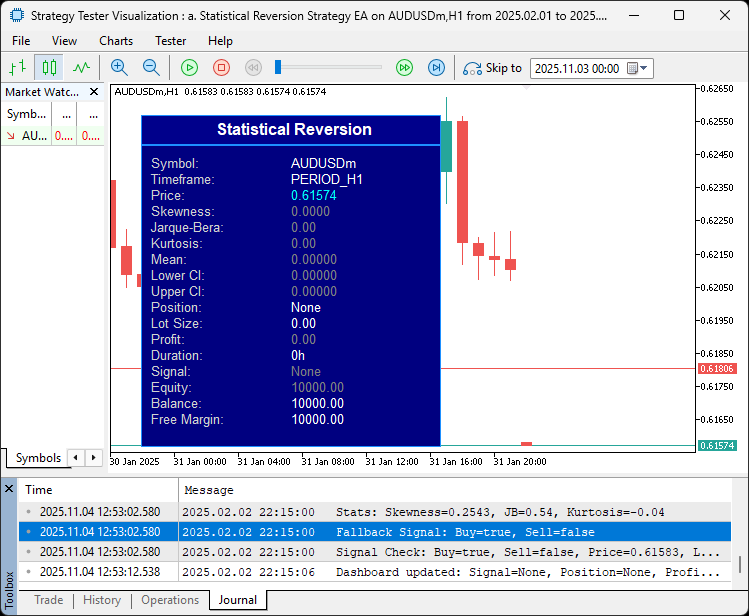
画像からも確認できるように、計算をおこないシグナルの閾値を判定できることが分かります。これで完了しました。次のステップとして、生成されたシグナルに基づいて実際に取引を処理する必要があります。具体的には、新しいシグナルが出た場合には既存のポジションをクローズする必要があります。これを実現するためのロジックを関数として実装します。
//+------------------------------------------------------------------+
//| Close All Positions of Type                                      |
//+------------------------------------------------------------------+
void CloseAllPositions(ENUM_POSITION_TYPE pos_type) {
   for (int i = PositionsTotal() - 1; i >= 0; i--) { //--- Iterate through positions
      if (PositionGetSymbol(i) == _Symbol && PositionGetInteger(POSITION_MAGIC) == InpMagicNumber && PositionGetInteger(POSITION_TYPE) == pos_type) { //--- Check details
         ulong ticket = PositionGetInteger(POSITION_TICKET); //--- Get ticket
         double profit = PositionGetDouble(POSITION_PROFIT); //--- Get profit
         trade.PositionClose(ticket);                //--- Close position
      }
   }
}
CloseAllPositions関数を定義し、指定されたENUM_POSITION_TYPE(買いまたは売り)のすべてのポジションをクローズできるようにします。これにより、新しいシグナルが出た際に、反対方向のポジションを確実に整理することができます。安全にインデックスを扱うため、「PositionsTotal - 1」から0まで逆順でループします。各ポジションについて、PositionGetSymbolが_Symbolと一致し、PositionGetInteger(POSITION_MAGIC)がInpMagicNumberと一致、さらにPositionGetInteger(POSITION_TYPE)が指定されたpos_typeと一致する場合に処理をおこないます。一致した場合は、PositionGetInteger(POSITION_TICKET)でticketを取得し、必要であればPositionGetDouble(POSITION_PROFIT)で利益を確認およびログ出力できます。その後、trade.PositionClose(ticket)を呼び出してポジションをクローズします。これにより、反対方向のポジションをクローズした上で、新しいシグナルに従ったポジションをオープンする準備が整います。
// Position management: Close opposite positions
if (HasPosition(POSITION_TYPE_BUY) && sell_signal) //--- Check buy position with sell signal
   CloseAllPositions(POSITION_TYPE_BUY);        //--- Close all buys
if (HasPosition(POSITION_TYPE_SELL) && buy_signal) //--- Check sell position with buy signal
   CloseAllPositions(POSITION_TYPE_SELL);       //--- Close all sells

// Calculate lot size
double lot_size = InpFixedLots;                 //--- Set default lot size
double riskPercent = InpRiskPercent;            //--- Copy risk percent
if (riskPercent > 0) {                          //--- Check if risk percent enabled
   double account_equity = AccountInfoDouble(ACCOUNT_EQUITY); //--- Get account equity
   double sl_points = InpBaseStopLossPips * g_pointMultiplier; //--- Calculate SL points
   double tick_value = SymbolInfoDouble(_Symbol, SYMBOL_TRADE_TICK_VALUE); //--- Get tick value
   if (tick_value == 0) {                       //--- Check invalid tick value
      Print("Error: Invalid tick value for ", _Symbol); //--- Log error
      return;                                   //--- Exit function
   }
   lot_size = NormalizeDouble((account_equity * riskPercent / 100.0) / (sl_points * tick_value), 2); //--- Calculate risk-based lot size
   lot_size = MathMax(SymbolInfoDouble(_Symbol, SYMBOL_VOLUME_MIN), MathMin(lot_size, SymbolInfoDouble(_Symbol, SYMBOL_VOLUME_MAX))); //--- Clamp lot size
   Print("Lot Size: Equity=", account_equity, ", SL Points=", sl_points, ", Tick Value=", tick_value, ", Lot=", lot_size); //--- Log lot size calculation
}

// Open new positions
if (!HasPosition() && buy_signal) {             //--- Check no position and buy signal
   double sl = current_price - InpBaseStopLossPips * _Point * g_pointMultiplier; //--- Calculate SL
   double tp = current_price + InpBaseTakeProfitPips * _Point * g_pointMultiplier; //--- Calculate TP
   if (trade.Buy(lot_size, _Symbol, 0, sl, tp, "StatReversion Buy: Skew=" + DoubleToString(skewness, 4) + ", JB=" + DoubleToString(jb_stat, 2))) { //--- Open buy order
      Print("Buy order opened. Mean: ", DoubleToString(mean, 5), ", Current: ", DoubleToString(current_price, 5)); //--- Log buy open
   } else {                                     //--- Handle buy open failure
      Print("Buy order failed: ", GetLastError()); //--- Log error
   }
} else if (!HasPosition() && sell_signal) {     //--- Check no position and sell signal
   double sl = current_price + InpBaseStopLossPips * _Point * g_pointMultiplier; //--- Calculate SL
   double tp = current_price - InpBaseTakeProfitPips * _Point * g_pointMultiplier; //--- Calculate TP
   if (trade.Sell(lot_size, _Symbol, 0, sl, tp, "StatReversion Sell: Skew=" + DoubleToString(skewness, 4) + ", JB=" + DoubleToString(jb_stat, 2))) { //--- Open sell order
      Print("Sell order opened. Mean: ", DoubleToString(mean, 5), ", Current: ", DoubleToString(current_price, 5)); //--- Log sell open
   } else {                                     //--- Handle sell open failure
      Print("Sell order failed: ", GetLastError()); //--- Log error
   }
}

// Update dashboard
UpdateDashboard(mean, lower_ci, upper_ci, skewness, jb_stat, kurtosis, skew_buy_threshold, skew_sell_threshold,
                GetPositionStatus(), lot_size, GetCurrentProfit(), GetPositionDuration(), GetSignalStatus(buy_signal, sell_signal)); //--- Update dashboard with signals
ポジション管理では、まず反対方向のポジションを確認します。例えば買いポジションがオープンしている状態で売りシグナルが出た場合は、CloseAllPositionsをPOSITION_TYPE_BUYで呼び出し、すべてのロングポジションを決済します。逆に、売りポジションがある状態で買いシグナルが出た場合も同様に処理し、新規エントリー前に矛盾するポジションが残らないようにします。ロットサイズは、デフォルトでInpFixedLotsを使用しますが、InpRiskPercentが正の場合はアカウントエクイティに基づき動的に計算します。AccountInfoDouble(ACCOUNT_EQUITY)でエクイティを取得し、SL距離はg_pointMultiplierで調整、SymbolInfoDouble(SYMBOL_TRADE_TICK_VALUE)でティック値を取得します。取得できなければログ出力して処理を終了します。この式は、口座のエクイティにリスクパーセントを掛けた値を、「SLポイント * ティック値」で割って正規化し、小数点以下2桁に丸めます。その後、MathMaxおよびMathMinを使って銘柄の最小ロットと最大ロットの範囲内に制限し、計算内容をログに出力します。
既存ポジションがなく、buy_signalがアクティブな場合は、SLを現在価格の下に「BaseStopLossPips * _Point * g_pointMultiplier」で設定し、TPを上に同様に設定します。その後、trade.Buyで計算したロット、銘柄、市場価格(price未指定)、SL、TP、コメントに歪度とJB統計量を含めて注文を発行します。成功時はmeanと現在価格の比較をログに出力し、失敗時はGetLastErrorで原因を記録します。売り注文も同様に、SLを価格の上、TPを下に設定してtrade.Sellで発注します。最後に、UpdateDashboard関数に、計算済みのmean、信頼区間、歪度、JB、尖度、閾値、ポジション状況、ロット数、利益、保有時間、シグナルを渡してダッシュボードを更新します。これでダッシュボードは、必要なすべての情報を表示できる状態になります。コンパイルすると、次の結果が得られます。
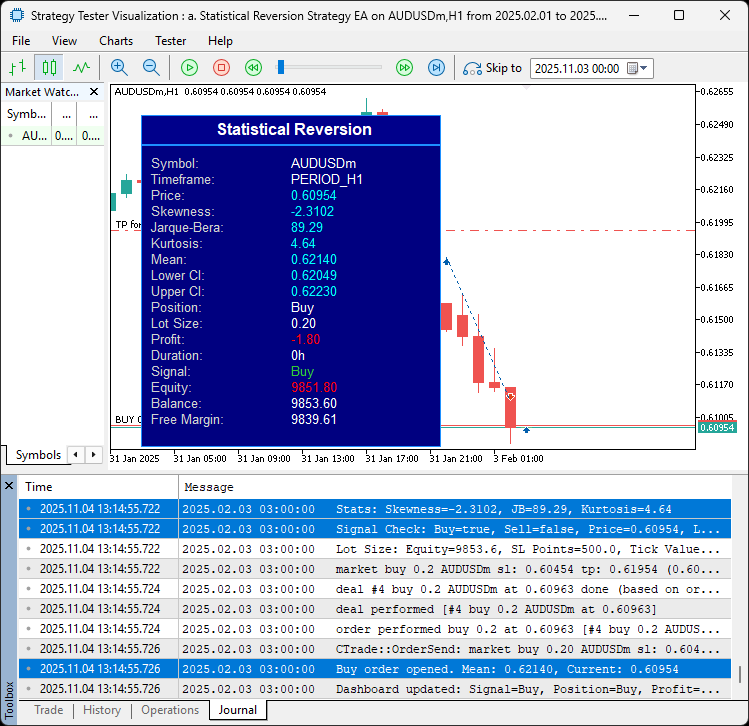
ポジションを建てられるできるようになったので、次はそれらを管理する必要があります。具体的には、トレーリングストップの適用、部分決済の実行、保有時間に基づくクローズ処理などをおこない、過剰なエクスポージャーを防ぎます。これらはすべて付加機能であり、必要ないものはスキップしたり条件付きで実行することも可能です。これらの処理を関数として実装していきます。
//+------------------------------------------------------------------+
//| Manage Trailing Stop                                             |
//+------------------------------------------------------------------+
void ManageTrailingStop() {
   for (int i = PositionsTotal() - 1; i >= 0; i--) { //--- Iterate through positions
      if (PositionGetSymbol(i) != _Symbol || PositionGetInteger(POSITION_MAGIC) != InpMagicNumber) //--- Check symbol and magic
         continue;                                   //--- Skip if not match

      ulong ticket = PositionGetInteger(POSITION_TICKET); //--- Get ticket
      double current_sl = PositionGetDouble(POSITION_SL); //--- Get current SL
      ENUM_POSITION_TYPE pos_type = (ENUM_POSITION_TYPE)PositionGetInteger(POSITION_TYPE); //--- Get position type
      double current_price = (pos_type == POSITION_TYPE_BUY) ? SymbolInfoDouble(_Symbol, SYMBOL_BID) : SymbolInfoDouble(_Symbol, SYMBOL_ASK); //--- Get current price

      double trail_distance = InpTrailingStopPips * _Point * g_pointMultiplier; //--- Calculate trail distance
      double trail_step = InpTrailingStepPips * _Point * g_pointMultiplier; //--- Calculate trail step

      if (pos_type == POSITION_TYPE_BUY) {            //--- Check buy position
         double new_sl = current_price - trail_distance; //--- Calculate new SL
         if (new_sl > current_sl + trail_step || current_sl == 0) { //--- Check if update needed
            trade.PositionModify(ticket, new_sl, PositionGetDouble(POSITION_TP)); //--- Modify position
         }
      } else if (pos_type == POSITION_TYPE_SELL) {    //--- Check sell position
         double new_sl = current_price + trail_distance; //--- Calculate new SL
         if (new_sl < current_sl - trail_step || current_sl == 0) { //--- Check if update needed
            trade.PositionModify(ticket, new_sl, PositionGetDouble(POSITION_TP)); //--- Modify position
         }
      }
   }
}

//+------------------------------------------------------------------+
//| Manage Partial Close                                             |
//+------------------------------------------------------------------+
void ManagePartialClose() {
   for (int i = PositionsTotal() - 1; i >= 0; i--) { //--- Iterate through positions
      if (PositionGetSymbol(i) != _Symbol || PositionGetInteger(POSITION_MAGIC) != InpMagicNumber) //--- Check symbol and magic
         continue;                                   //--- Skip if not match

      ulong ticket = PositionGetInteger(POSITION_TICKET); //--- Get ticket
      double open_price = PositionGetDouble(POSITION_PRICE_OPEN); //--- Get open price
      double tp = PositionGetDouble(POSITION_TP); //--- Get TP
      double current_price = (PositionGetInteger(POSITION_TYPE) == POSITION_TYPE_BUY) ? SymbolInfoDouble(_Symbol, SYMBOL_BID) : SymbolInfoDouble(_Symbol, SYMBOL_ASK); //--- Get current price
      double volume = PositionGetDouble(POSITION_VOLUME); //--- Get position volume

      double half_tp_distance = MathAbs(tp - open_price) * 0.5; //--- Calculate half TP distance
      bool should_close = (PositionGetInteger(POSITION_TYPE) == POSITION_TYPE_BUY && current_price >= open_price + half_tp_distance) ||
                          (PositionGetInteger(POSITION_TYPE) == POSITION_TYPE_SELL && current_price <= open_price - half_tp_distance); //--- Check if at half TP

      if (should_close) {                             //--- Check if partial close needed
         double close_volume = NormalizeDouble(volume * InpPartialClosePercent, 2); //--- Calculate close volume
         if (close_volume >= SymbolInfoDouble(_Symbol, SYMBOL_VOLUME_MIN)) { //--- Check minimum volume
            trade.PositionClosePartial(ticket, close_volume); //--- Close partial position
         }
      }
   }
}

//+------------------------------------------------------------------+
//| Manage Time-Based Exit                                           |
//+------------------------------------------------------------------+
void ManageTimeBasedExit() {
   if (InpMaxTradeHours == 0) return;                //--- Exit if no max duration

   for (int i = PositionsTotal() - 1; i >= 0; i--) { //--- Iterate through positions
      if (PositionGetSymbol(i) != _Symbol || PositionGetInteger(POSITION_MAGIC) != InpMagicNumber) //--- Check symbol and magic
         continue;                                   //--- Skip if not match

      ulong ticket = PositionGetInteger(POSITION_TICKET); //--- Get ticket
      datetime open_time = (datetime)PositionGetInteger(POSITION_TIME); //--- Get open time
      datetime current_time = TimeCurrent();         //--- Get current time
      if ((current_time - open_time) / 3600 >= InpMaxTradeHours) { //--- Check if duration exceeded
         double profit = PositionGetDouble(POSITION_PROFIT); //--- Get profit
         trade.PositionClose(ticket);                //--- Close position
      }
   }
}
ここでは、まずManageTrailingStop関数を実装します。この関数は、価格が有利に動いた際にオープン中ポジションのストップロスを動的に調整するものです。「PositionsTotal - 1」から0まで逆順でループし、銘柄とマジックナンバーが一致するポジションを対象とします。対象ポジションでは、PositionGetInteger(POSITION_TICKET)でticketを取得し、現在のストップロス、PositionGetInteger(POSITION_TYPE)でENUM_POSITION_TYPEを取得、さらにタイプに応じてbid価格(買い)またはask価格(売り)を取得します。トレーリング距離とステップは、入力されたpipsに_Pointとマルチプライヤーを掛けて算出します。買いポジションの場合、現在価格から距離分下に新しいストップレベルを提案し、現在のストップロスが未設定または現在「ストップロス + ステップ」より下の場合にtrade.PositionModifyで更新します。売りポジションも同様に、現在価格から距離分上に移動させ、条件を満たせばPositionModifyで更新します。
次にManagePartialClose関数は、利益確定を部分的におこなうものです。「PositionsTotal - 1」から0までループで該当ポジションを見つけ、ticket、PositionGetDouble(POSITION_PRICE_OPEN)で建値、TP、タイプに応じた現在価格、PositionGetDouble(POSITION_VOLUME)でロット数を取得します。半分のTP距離を計算し、買いでは現在価格が半分TP以上、売りでは半分TP以下に到達しているかを確認します。条件を満たす場合、閉じるロット量を「ポジションサイズ * InpPartialClosePercent」で算出し、小数点以下2桁に丸めます。さらにSymbolInfoDouble(SYMBOL_VOLUME_MIN)で取得した最小ロット以上であれば、trade.PositionClosePartialを実行して部分決済します。
最後にManageTimeBasedExit関数です。InpMaxTradeHoursが0であれば即座にreturnします。それ以外の場合、対象ポジションをループで確認し、ticketと開始時間(PositionGetInteger(POSITION_TIME))を取得します。TimeCurrentとの差から経過時間(時間単位)を算出し、InpMaxTradeHoursを超えていれば、利益を記録した上でtrade.PositionCloseでポジションをクローズします。これらの関数を呼び出すことで、ポジション管理が可能になります。
if (InpUseTrailingStop)                      //--- Check trailing stop enabled
   ManageTrailingStop();                     //--- Manage trailing stop
if (InpUsePartialClose)                      //--- Check partial close enabled
   ManagePartialClose();                     //--- Manage partial close
ManageTimeBasedExit();                       //--- Manage time-based exit
コンパイルすると、次の結果が得られます。
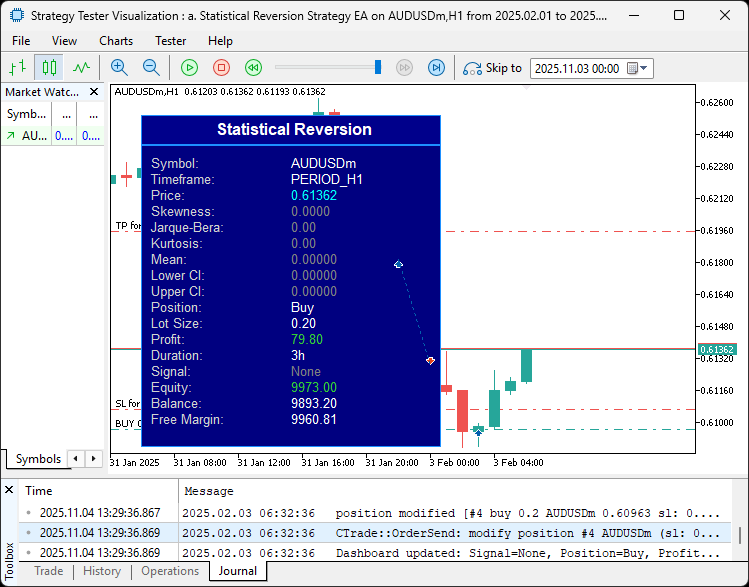
有利に動くポジションに対してトレーリングや部分決済を積極的におこなうことができました。 これで基本的な目標は達成されましたので、残る作業はプログラムのバックテストです。バックテストは次のセクションで扱います。
バックテスト
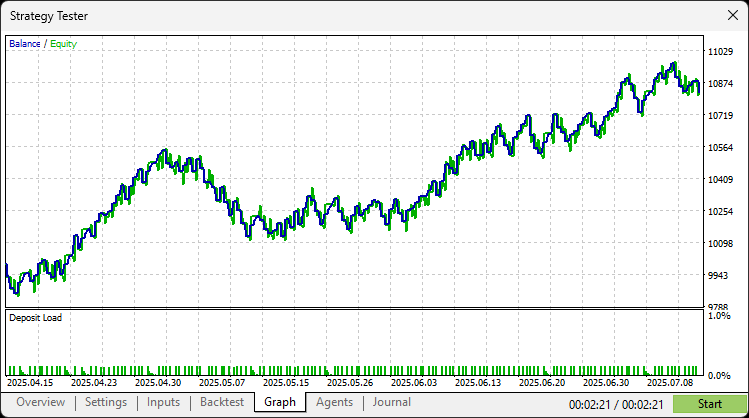
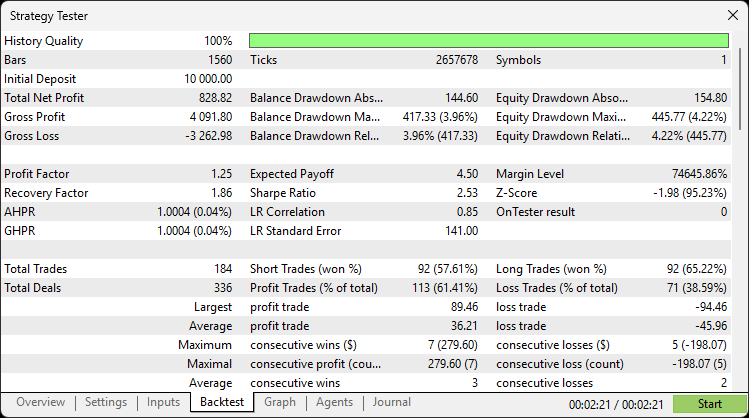
徹底的なバックテストによって、次の結果が得られました。
バックテストグラフ
バックテストレポート
結論
MQL5で統計的平均回帰システムを開発しました。このシステムは、価格データを解析して平均、分散、歪度、尖度、ジャック=ベラ統計量といったモーメントを計算し、信頼区間のブレイクに基づくシグナルを適応閾値や任意の上位時間足確認と組み合わせて生成します。トレードはエクイティベースまたは固定ロットで実行され、トレーリングストップ、部分決済、時間制限によるクローズを組み合わせて包括的なリスク管理を実現しています。さらに、チャート上のリアルタイムダッシュボードで情報を確認できます。
免責条項:本記事は教育目的のみを意図したものです。取引には重大な財務リスクが伴い、市場の変動によって損失が生じる可能性があります。本プログラムを実際の市場で運用する前に、十分なバックテストと慎重なリスク管理が不可欠です。
この統計的平均回帰戦略を用いることで、非正規分布の機会を捉え、さらなる最適化をおこなう準備が整います。安全で効率的な取引を目指して活用してください。取引をお楽しみください。
MetaQuotes Ltdにより英語から翻訳されました。
元の記事: https://www.mql5.com/en/articles/20167
警告: これらの資料についてのすべての権利はMetaQuotes Ltd.が保有しています。これらの資料の全部または一部の複製や再プリントは禁じられています。
この記事はサイトのユーザーによって執筆されたものであり、著者の個人的な見解を反映しています。MetaQuotes Ltdは、提示された情報の正確性や、記載されているソリューション、戦略、または推奨事項の使用によって生じたいかなる結果についても責任を負いません。

 オンチャートUIを使用したリスクベースの取引執行EA(第2回):インタラクティブ性とロジックの追加
 古典的な戦略を再構築する(第18回):ローソク足パターンの探索
 取引戦略の開発:トリプルサイン平均回帰法
 ダイナミックマルチペアEAの形成(第5回):スキャルピングとスイングトレードの切替設計

- 無料取引アプリ
- 8千を超えるシグナルをコピー
- 金融ニュースで金融マーケットを探索