

Python-MetaTrader 5ストラテジーテスター(第1回):取引シミュレーター
 179
179
 2
2

内容
- はじめに
- 取引シミュレーター入門
- ポジションの損益計算
- ポジションのシミュレーション
- 取引パラメータの検証
- ポジションの変更
- ポジションの監視
- マーケットの未約定注文
- 未約定注文の削除
- 未約定注文の変更
- 未約定注文の監視
- 口座の監視
- Pythonによるリアルタイム取引シミュレーション
- リアルタイムシミュレーションGUIアプリケーション
- 外部からのポジションおよび注文の管理・制御
- 約定の取り扱い
- 結論
何もせずにすべてを成し遂げるのを待つよりも、何かをするほうがよい。
―ウィンストン・チャーチル
はじめに
MetaTrader5-Pythonパッケージは、Python開発者がMetaTrader5プラットフォーム向けの取引アプリケーションを開発するための有用なモジュールです。このパッケージにより、開発者は取引データの取得、注文の送信、および取引の監視をおこなうことができます。
このモジュールは、MetaTrader 5デスクトップアプリに対する私たちの見方を大きく変えました。MetaTrader 5はもはや、MQL5と呼ばれるネイティブ言語でのみ自動売買ロボットを構築するための単一目的のアプリではありません。この取引アプリは柔軟性が高く、MQL5以外の外部プログラミング言語からでも取引命令を受け取ることが可能です。
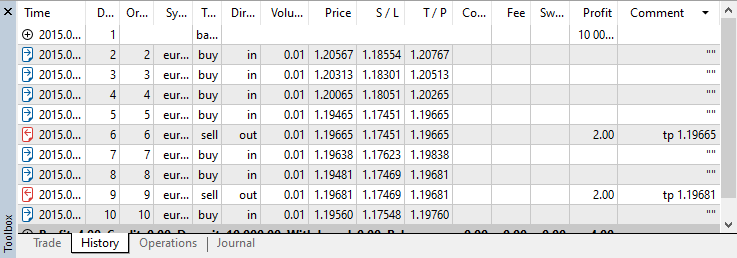
ただし、MetaTrader5モジュールには、ユーザーがPythonからMetaTrader5上で取引を実行できる機能はあるものの、MQL5ベースの取引アプリに備わっている重要な機能が欠けています。それは、完成した取引アプリケーションをストラテジーテスターで検証する機能です。
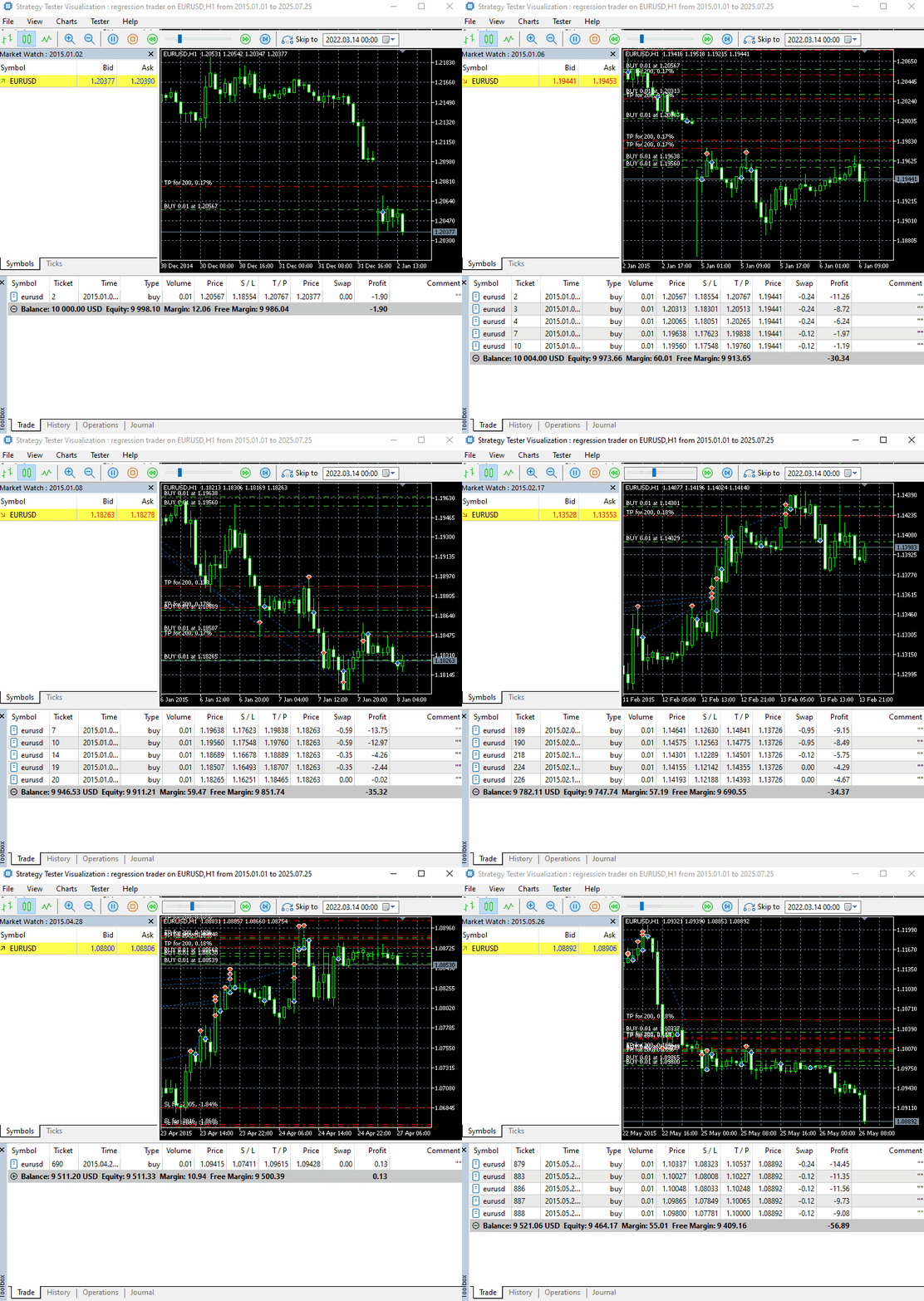
自動売買ロボットを作成したにもかかわらず、それをテストできない状況を想像できるでしょうか。
Pythonには便利なモジュールが数多く存在するため、BacktraderやBacktesting.pyといった取引戦略をテストするためのライブラリやフレームワークも豊富にあります。しかし、これらのPythonベースのツールの問題点は、単純な、あるいはインジケータ主体の取引戦略のテストのために設計されていることです。
これらのツールは取引シグナルのみに基づいてパフォーマンスを評価します。しかし、ブローカー手数料、取引コスト、取引口座の制限、特定の銘柄の仕様、口座レバレッジなど、実際の取引において重要な要素の多くを考慮していません。これらはMetaTrader5のストラテジーテスターでは考慮されています。
MetaTrader5-Pythonモジュールは、ユーザーがMetaTrader5アプリの基本的な情報にアクセスし、Pythonから簡単に利用を始めるための手段を提供することを目的としています。
こうした背景を踏まえ、本連載では、Pythonベースの自動売買ロボットをテストするための、MetaTrader5ストラテジーテスターのような便利な仕組みを構築していきます。
まずは、記事の末尾に添付されているrequirements.txtファイルに記載されているすべてのPython依存関係をインストールするところから始めます。
pip install -r requirements.txt
取引シミュレーター入門
Pythonで取引戦略をテストできるようにするためには、取引シミュレーターを作成する必要があります。これはMetaTrader5のストラテジーテスターが行っていることと同様で、市場をシミュレートし、その過程でアプリケーションまたは関数(自動売買ロボットやインジケータ)を実行します。
念のため補足すると、MetaTrader5アプリが提供しているストラテジーテスター自体が取引シミュレーターです。
ここでは(少なくとも現時点では)ストラテジーテスターのようなグラフィカルユーザーインターフェース(GUI)は実装しません。そのために、まずPythonクラスを実装していきます。
import MetaTrader5 as mt5

class TradeSimulator:
    def __init__(self, simulator_name: str, mt5_instance: mt5, deposit: float, leverage: str="1:100"):

        self.mt5_instance = mt5_instance
        self.simulator_name = simulator_name
最終的な目標は、MetaTrader 5のストラテジーテスターの設定に似たクラスコンストラクタを作成することです。
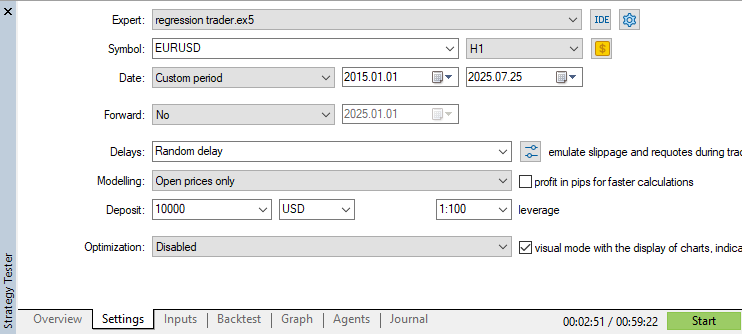
- 変数mt5_instanceは非常に重要です。これは、選択したMetaTrader5インスタンスへのアクセスに使用します。
- 変数simulator_nameはフォルダやパスを作成するために利用でき、複数の取引シミュレーターを識別するために利用できます。この変数は、自動売買ロボット(エキスパートアドバイザーやインジケータ)の名前のようなものだと考えるとよいです。
取引シミュレータークラスでは、MetaTrader5と同様に、すべての未約定注文、ポジション、および決済済みポジション(ディール)の情報を追跡する仕組みが必要になります。
class TradeSimulator:
    def __init__(self, simulator_name: str, mt5_instance: mt5, deposit: float, leverage: str="1:100"):

        # .... other variables
        # ...
        # ...

        # Position's information

        self.position_info = {
            "time": None,
            "id" : 0,
            "magic": 0,
            "symbol": None,
            "type": None,
            "volume": 0.0,
            "open_price": 0.0,
            "price": 0.0,
            "sl": 0.0,
            "tp": 0.0,
            "commission": 0.0,
            "margin_required": 0.0,
            "fee": 0.0,
            "swap": 0.0,
            "profit": 0,
            "comment": 0
        }

        # Order's information

        self.order_info = self.position_info.copy()
        self.order_info["expiry_date"] = datetime
        self.order_info["expiration_mode"] = ""

        # Deal's information

        self.deal_info = self.position_info.copy()

        self.deal_info["reason"] = None # This is used to store the reason why the trade was closed, e.g. "Take Profit", "Stop Loss", etc.
        self.deal_info["direction"] = None # The only difference btn an open trade and a closed one is that the closed one has a direction showing if at that instance it was opened or closed in history

        # Containers for positions, orders, and deals

        self.positions_container = [] # a list for storing all opened trades
        self.deals_container = [] # a list for storing all deals
        self.orders_container = []
下記の表には、シミュレータークラスに格納されているポジション、注文、および決済済みポジション情報の説明が記載されています。
| 変数 | 説明 |
|---|---|
| time | ポジションまたは注文が実行された時刻。ディールの場合は、ディールの実行時刻(エントリーまたはエグジット)を指します。 |
| id | すべての注文、ポジション、またはディールに対して一意に増加する識別子 |
| magic | ポジション、注文、またはディールのマジックナンバー |
| Symbol | 取引された銘柄(例:EURUSD、USDJPY) |
| type | ポジション/注文の種類 |
| volume | ポジション、注文、またはディールに適用される取引量(ロットサイズ) |
| open_price | 注文またはポジションの始値。ディールの場合は、そのディールの理由に応じて決済価格またはエントリー価格(建値)になります。 |
| price | 現在の市場価格。買いポジションおよび買い関連の未約定注文ではAsk価格、売りポジションおよび売り関連の未約定注文ではBid価格に相当します。 |
| sl | 注文、ポジション、またはディールのストップロスの値 |
| tp | 注文、ポジション、またはディールのテイクプロフィットの値 |
| comission | ポジションに対して発生する手数料 |
| margin_required | ポジションまたは注文の実行に必要な証拠金 |
| fee | ブローカーによって課される追加手数料 |
| swap | ポジションに対して発生するスワップポイント |
| profit | ポジションまたはディールの損益 |
| comment | ポジション、注文、またはディールのコメント |
| expiration_mode | 未約定注文のSYMBOL_EXPIRATION_MODE(self.order_info) |
| expiry_date | 注文の有効期限(UTC時間) |
すべてのオープンポジション、発注済みの未約定注文、および約定済みのディールに関する情報は、それぞれ対応する配列に格納され、シミュレーター内で容易に参照できるようになっています。
        # Containers for positions, orders, and deals

        self.positions_container = [] # a list for storing all opened trades
        self.deals_container = [] # a list for storing all deals
        self.orders_container = [] # for storing all pending orders placed
ポジションによる損益の計算
自動売買ロボットの観点からすべての取引アクティビティをシミュレーションする主な目的は、特定の過去の時点からそのロボットを使用した場合に得られる可能性のある損益を算出することです。
以下は、この目的のための汎用関数です。
def _calculate_profit(self, action: str, symbol: str, entry_price: float, exit_price: float, lotsize: float) -> float:

    """
    Calculate profit based on entry and exit prices, lot size, tick size, and tick value.

    Args:
        action (str): The action taken, either 'buy' or 'sell'.
        entry_price (float): The price at which the position was opened.
        exit_price (float): The price at which the position was closed.
        lotsize (float): The size of the lot in terms of contract units.
    """

    if action != "buy" and action != "sell":
        print(f"Unknown order type, It can be either 'buy' or 'sell'. Received '{action}' instead.")
        return 0

    order_type = self.mt5_instance.ORDER_TYPE_BUY if action == "buy" else self.mt5_instance.ORDER_TYPE_SELL

    profit = self.mt5_instance.order_calc_profit(
        order_type,
        symbol,
        lotsize,
        entry_price,
        exit_price
    )

    return profit
この関数は、MetaTrader5におけるすべての成行注文(ポジション)の損益を計算するために使用します。エントリー価格とエグジット価格、取引銘柄、およびロットサイズを与えることで計算をおこないます。
if not mt5.initialize():
    print(f"Failed to Initialize MetaTrader5. Error = {mt5.last_error()}")
    mt5.shutdown()
    quit()

sim = TradeSimulator(simulator_name="MySimulator", mt5_instance=mt5, deposit=1000, leverage="1:500")
profit = sim._calculate_profit(action="buy",
                            symbol="EURUSD",
                            entry_price=1.17246,
                            exit_price=1.17390,
                            lotsize=0.07)

print("profit: ", profit)
以下が実行結果です。
(pystrategytester) C:\Users\Omega Joctan\OneDrive\Desktop\Python Strategy Tester>conda run --live-stream --name pystrategytester python "c:/Users/Omega Joctan/OneDrive/Desktop/Python Strategy Tester/trade_simulator.py"
profit:  10.08

ポジションのシミュレーション
取引シミュレーションにおいて、ポジションとは本質的には、メモリまたはディスク上に保存された取引を模倣するための計算済み情報の集合にすぎません。
以下は、ポジションを建てるための基本関数です。
    def _open_position(self, pos_type: str, volume: float, symbol: str, price: float, sl: float = 0.0, tp: float = 0.0, comment: str = "") -> bool:

        trade_info = self.trade_info.copy()

        self.m_symbol.name(symbol)

        self.id += 1  # Increment trade ID

        trade_info["time"] = self.time
        trade_info["id"] = self.id
        trade_info["magic"] = self.magic_number
        trade_info["symbol"] = symbol
        trade_info["type"] = pos_type
        trade_info["volume"] = volume
        trade_info["price"] = price
        trade_info["sl"] = sl
        trade_info["tp"] = tp
        trade_info["commission"] = 0.0
        trade_info["fee"] = 0.0
        trade_info["swap"] = 0.0
        trade_info["profit"] = 0.0
        trade_info["comment"] = comment
        trade_info["margin_required"] = self._calculate_margin(symbol=symbol, volume=volume, price=price)

        # Append to open trades
        self.open_trades_container.append(trade_info)
        print("Trade opened successfully: ", trade_info)

        return True
再度になりますが、idというプロパティはポジションのチケット番号に相当するものであり、このクラスインスタンス内で新しくポジションが開かれるたびに、自動的にインクリメントされて一意のチケット番号が生成されます。
また、margin_requiredプロパティは、これまでの中でも特に実装が難しい要素の一つです。なぜなら、MetaTrader5モジュールには証拠金計算を支援する関数が用意されているものの、それは現在MetaTrader5アプリにログインしている実際の口座情報(レバレッジを含む)を前提として動作するためです。
しかし、今回作成するのはPython上のシミュレーション用口座です。そのため、シミュレーターに割り当てられた仮想アカウントの条件に基づいて、各ポジションの必要証拠金を計算するためのカスタム関数を用意する必要があります。
    def _calculate_margin(self, symbol: str, volume: float, open_price: float, margin_rate=1.0) -> float:

        """
        Calculates margin requirement similar to MetaTrader5 based on the margin mode.
        """
        self.m_symbol.name(symbol)

        if not self.m_symbol.select():
            print(f"Margin calculation failed: MetaTrader5 error = {self.mt5_instance.last_error()}")
            return 0.0

        contract_size = self.m_symbol.contract_size()
        leverage = self.leverage
        margin_mode = self.m_symbol.trade_calc_mode()

        print("Margin calculation mode: ",self.m_symbol.trade_calc_mode_description())

        tick_size = self.m_symbol.tick_size() or 0.0001
        tick_value = self.m_symbol.tick_value() or 0.0
        initial_margin = self.m_symbol.margin_initial() or 0.0
        face_value = self.m_symbol.trade_face_value()


        if margin_mode == self.mt5_instance.SYMBOL_CALC_MODE_FOREX:
            margin = (volume * contract_size * margin_rate) / leverage

        elif margin_mode == self.mt5_instance.SYMBOL_CALC_MODE_FOREX_NO_LEVERAGE:
            margin = volume * contract_size * margin_rate

        elif margin_mode == self.mt5_instance.SYMBOL_CALC_MODE_CFD:
            margin = volume * contract_size * open_price * margin_rate

        elif margin_mode == self.mt5_instance.SYMBOL_CALC_MODE_CFDLEVERAGE:
            margin = (volume * contract_size * open_price * margin_rate) / leverage

        elif margin_mode == self.mt5_instance.SYMBOL_CALC_MODE_CFDINDEX:
            margin = volume * contract_size * open_price * tick_value / tick_size * margin_rate

        elif margin_mode in [self.mt5_instance.SYMBOL_CALC_MODE_EXCH_STOCKS, self.mt5_instance.SYMBOL_CALC_MODE_EXCH_STOCKS_MOEX]:
            margin = volume * contract_size * open_price * margin_rate

        elif margin_mode in [self.mt5_instance.SYMBOL_CALC_MODE_FUTURES,
                             self.mt5_instance.SYMBOL_CALC_MODE_EXCH_FUTURES]:

            margin = volume * initial_margin * margin_rate

        elif margin_mode in [self.mt5_instance.SYMBOL_CALC_MODE_EXCH_BONDS, self.mt5_instance.SYMBOL_CALC_MODE_EXCH_BONDS_MOEX]:
            margin = volume * contract_size * face_value * open_price / 100

        elif margin_mode == self.mt5_instance.SYMBOL_CALC_MODE_SERV_COLLATERAL:
            margin = 0.0

        else:
            print(f"Unknown margin mode: {margin_mode}, falling back to default margin calc.")
            margin = (volume * contract_size * open_price) / leverage

        return margin
この関数は完全ではありませんが、MetaTrader5-Pythonモジュールを使用している中で、証拠金計算に関わるMQL5の計算式において使用されていると思われる変数margin_rateを取得する方法を見つけることができなかったため、このような設計になっています。
また、この変数はsymbol_infoから取得することができないため、margin_rateという引数(デフォルト値は1.0)を用意することで、手動でこの値を指定できるようにしています。
ポジションをコンテナに保存する処理は、そのポジションに与えられた条件がすべて正しいことを前提としています。しかし、これは正しくありません。なぜなら、MetaTrader5アプリには、取引が口座、銘柄、ブローカーの条件を満たしているかどうかを事前に検証する仕組みがあるためです。
たとえば、ストップロスやテイクプロフィットが市場価格に近すぎる場合には、その条件を満たさない取引は拒否されます。また、ロットサイズ(取引数量)が有効な範囲であるかどうかもチェックされます。
このため、すべてのポジションを検証するための関数が必要になります。この関数はboolean値を返し、すべての条件を満たしたポジションのみを受け入れ、それ以外は拒否するように設計されるべきです。
取引パラメータの検証
(a) ロットサイズの検証
取引のロットサイズを検証するためには、以下の3つの条件を確認します。
- 指定されたロットサイズが、銘柄に対して許容される最小取引量より小さくないか
- 指定されたロットサイズが、銘柄に対して許容される最大取引量より大きくないか
- 指定されたロットサイズが、ステップサイズ(約定可能な最小ロット増分単位)の倍数になっているか
    def _position_validation(self,
                       volume: float,
                       symbol: str,
                       pos_type: str,
                       open_price: float,
                       sl: float = 0.0,
                       tp: float = 0.0,
                       expiry_date: datetime = None) -> bool:
        """
        Validates trade parameters similar to MQL5's OrderCheck()

        Returns:
            bool: True if validation passes, False with error message if fails
        """

        self.m_symbol.name(symbol) # Assign the current symbol to the CSymbolInfo class for accessing its properties

        # Get symbol properties
        symbol_info = self.m_symbol.get_info() # Get the information about the current symbol
        if symbol_info is None:
            print(f"Trade validation failed. MetaTrader5 error = {self.mt5_instance.last_error()}")
            return False

        # Validate volume

        if volume < self.m_symbol.lots_min(): # check if the received lotsize is smaller than minimum accepted lot of a symbol
            print(f"Trade validation failed: Volume ({volume}) is less than minimum allowed ({self.m_symbol.lots_min()})")
            return False

        if volume > self.m_symbol.lots_max(): # check if the received lotsize is greater than the maximum accepted lot
            print(f"Trade validation failed: Volume ({volume}) is greater than maximum allowed ({self.m_symbol.lots_max()})")
            return False

        step_count = volume / self.m_symbol.lots_step()

        if abs(step_count - round(step_count)) > 1e-7: # check if the stoploss is a multiple of the step size
            print(f"Trade validation failed: Volume ({volume}) must be a multiple of step size ({self.m_symbol.lots_step()})")
            return False
(b)取引のエントリー価格検証およびスリッページチェック
MetaTrader5のストラテジーテスターと同様に、ポジションを受け入れる前に、そのエントリー価格が有効であることを確認する必要があります。つまり、買いポジションの場合はエントリー価格が銘柄のAsk価格と極めて近い、または一致している必要があります。一方、売りポジションの場合はエントリー価格がBid価格と極めて近い、または一致している必要があります。
また、スリッページ値が与えられている場合、それは価格比較のみに使用されます。具体的には、指定されたエントリー価格がBid価格に対して許容範囲内で近いかどうかを確認するために利用されます。
        # Validate the opening price

        self.m_symbol.refresh_rates() # Get recent ticks information

        ask = self.m_symbol.ask()
        bid = self.m_symbol.bid()

        if ask is None or bid is None or ask==0 or bid==0:
            print("Trade Validate: Failed to Get Ask and Bid prices, Call the function market_update() to update the simulator with newly simulated price values")
            return False

        # Slippage check

        actual_price = ask if pos_type == "buy" else bid
        point = self.m_symbol.point()

        # Allowable slippage range (in absolute price)

        max_deviation = self.deviation_points * point
        lower_bound = actual_price - max_deviation
        upper_bound = actual_price + max_deviation

        # Check if requested price is within allowed slippage

        if not (lower_bound <= open_price <= upper_bound):
            print(f"Trade validation failed: {pos_type.capitalize()} price ({open_price}) is out of slippage range: {lower_bound:.5f} - {upper_bound:.5f}")
            return False
(c)ストップロスとテイクプロフィットの検証
すべての成行注文(ポジション)におけるストップロス(SL)およびテイクプロフィット(TP)の値が、MetaTrader5のブローカーによって必ずしも受け入れられるとは限りません。一部のSL/TP値は無効であったり、市場価格に近すぎるためにポジションの発注が拒否される場合があります。
この検証では、ストップレベルおよびフリーズレベルに対して同様のロジックを適用します。
まず、そもそも適切なストップロスが指定されているかどうかを確認します。
買いポジションの場合、ストップロスはエントリー価格よりも下でなければならず、テイクプロフィットはエントリー価格よりも上でなければなりません。売りポジションの場合、ストップロスはエントリー価格よりも上でなければならず、テイクプロフィットはエントリー価格よりも下でなければなりません。
# Validate stop loss and take profit levels

if sl > 0:
    if pos_type == "buy" and sl >= open_price:
        print(f"Trade validation failed: Buy stop loss ({sl}) must be below order opening price ({open_price})")
        return False
    if pos_type == "sell" and sl <= open_price:
        print(f"Trade validation failed: Sell stop loss ({sl}) must be above order opening price ({open_price})")
        return False
    if not self._check_stop_level(symbol, open_price, sl, pos_type):
        return False

if tp > 0:
    if pos_type == "buy" and tp <= open_price:
        print(f"Trade validation failed: Buy take profit ({tp}) must be above order opening price ({open_price})")
        return False
    if pos_type == "sell" and tp >= open_price:
        print(f"Trade validation failed: Sell take profit ({tp}) must be below order opening price ({open_price})")
        return False
    if not self._check_stop_level(symbol, open_price, tp, pos_type):
        return False
上記のコードは_check_stops_level関数内にあります。
    def _check_stop_level(self, symbol: str, price: float, stop_price: float, pos_type: str) -> bool:

        """Check if stop levels comply with broker requirements"""

        self.m_symbol.name(symbol)

        # Validate symbol
        if not self.m_symbol.select():
            print(f"Failed to check stop level: Symbol {symbol}. MetaTrader5 error = {self.mt5_instance.last_error()}")
            return False

        # Check for stops level
        stop_level = self.m_symbol.stops_level()

        if pos_type == "buy":
            if stop_price > price - stop_level * self.m_symbol.point():
                print(f"Trade validation failed: Stop level too close. Must be at least {stop_level} points away")
                return False
        else:  # sell
            if stop_price < price + stop_level * self.m_symbol.point():
                print(f"Trade validation failed: Stop level too close. Must be at least {stop_level} points away")
                return False


        # Check for freeze level

        freeze_level = self.m_symbol.freeze_level()

        if pos_type == "buy":
            if stop_price > price - freeze_level * self.m_symbol.point():
                print(f"Trade validation failed: Stop level too close. Must be at least {freeze_level} points away")
                return False
        else:  # sell
            if stop_price < price + freeze_level * self.m_symbol.point():
                print(f"Trade validation failed: Stop level too close. Must be at least {freeze_level} points away")
                return False

        return True
上記の関数は、買いまたは売りポジションにおいて無効なストップロスまたはテイクプロフィットの値が検出された場合にFalseを返します。それ以外の場合は、Trueを返します。
最後に、ポジションを建てるための基底関数内で_position_validationという関数を呼び出します。この関数は、ポジションを配列に格納する前に、その有効性を検証します。
    def _open_position(self, pos_type: str, volume: float, symbol: str, price: float, sl: float = 0.0, tp: float = 0.0, comment: str = "") -> bool:

        trade_info = self.trade_info.copy()

        self.m_symbol.name(symbol)

        if not self._position_validation(volume=volume, symbol=symbol, pos_type=pos_type, price=price, sl=sl, tp=tp):
            return False

        self.id += 1  # Increment trade ID

        trade_info["time"] = self.time
        trade_info["id"] = self.id

        # ... proceeds to store a trade

        # Append to open trades
        self.open_trades_container.append(trade_info)
        print("Trade opened successfully: ", trade_info)

        return True
取引をより便利におこなえるようにするため、buyとsellという2つの専用関数を作成しています。これらはそれぞれ買いポジションと売りポジションを開くための関数です。これら2つの関数は、共通の基底関数である_open_positionに依存しています。buyとsellの違いは、ポジションの種類を設定する変数pos_typeのみであり、この値が関数内で明示的に指定されます。この値は、以下の関数内で明示的に適用されます。
    def buy(self, volume: float, symbol: str, price: float, sl: float = 0.0, tp: float = 0.0, comment: str = "") -> bool:
        return self._open_position("buy", volume, symbol, price, sl, tp, comment)

    def sell(self, volume: float, symbol: str, price: float, sl: float = 0.0, tp: float = 0.0, comment: str = "") -> bool:
        return self._open_position("sell", volume, symbol, price, sl, tp, comment)
上記の関数は、MQL5の標準トレードライブラリに含まれるCTradeクラスの同様の関数から着想を得ています。
ポジションの変更
ポジションを変更できることは、さまざまなトレードおよび資金管理の観点から非常に重要です。たとえばトレーダーは、損失を抑えるため、あるいは利益を確保するために、ストップロスの値をエントリー価格方向やテイクプロフィット方向へ移動させることがよくあります。これはトレーリングストップやブレークイーブンとして知られています。
以下は、シミュレーター内でPython開発者がポジションを変更するための関数です。
    def position_modify(self, pos: dict, new_sl: float, new_tp) -> bool:

        new_position = pos.copy()

        if pos["type"] == "buy":
            if new_sl >= pos["price"]:
                print("Failed to modify sl, new_sl >= current price")
                return False

        if pos["type"] == "sell":
            if new_sl <= pos["price"]:
                print("Failed to modify sl, new_sl <= current price")
                return False

        if not self._check_stops_level(symbol=pos["symbol"], open_price=pos["open_price"], stop_price=new_sl, pos_type=pos["type"]):
            print("Failed to Modify the Stoploss")

        if not self._check_stops_level(symbol=pos["symbol"], open_price=pos["open_price"], stop_price=new_tp, pos_type=pos["type"]):
            print("Failed to Modify the Takeprofit")

        # new sl and tp values

        new_position["sl"] = new_sl
        new_position["tp"] = new_tp

        # Update the position in a container

        for i, p in enumerate(self.positions_container):
            if p["id"] == pos["id"]:
                self.positions_container[i] = new_position
                print(f"Position with id=[{pos['id']}] modified! new_sl={new_sl} new_tp={new_tp}")
                return True

        print("Failed to modify position: ID not found")

        return True
MetaTrader5におけるポジションの変更プロセスは、ポジションの新規建てといくつかの共通点があります。上記の関数では、ポジション変更を確定する前に、以下の2つのチェックが満たされていることを確認します。
- 1つ目は、新しく設定されたストップロスがポジションの種類に対して有効であるかどうかの確認です。つまり、買いポジションの場合は新しいストップロスが現在の市場価格よりも上にある必要があり、売りポジションの場合はその逆で、現在の市場価格よりも下にある必要があります。
- 2つ目は、新しいストップロスまたはテイクプロフィットの値が市場価格に近すぎないかを確認することです。
使用例:
まずシンプルな買いポジションを開き、そのストップロスを変更します。その後、1秒ごとにストップロスを0.005ずつ引き下げることで、段階的に調整していきます。
stoploss = 500

ask = m_symbol.ask()
point = m_symbol.point()

sim.buy(volume=0.1, symbol=symbol, open_price=ask, sl=ask-stoploss*point)


while True: # constantly monitor trades and account metrics

    sim.monitor_pending_orders()
    sim.monitor_positions(verbose=False)

    for pos in sim.get_positions(): # go through all positions, same as in MQL5
        if pos["type"] == "buy" and pos["symbol"] == symbol: # select a buy position for the current symbol
            sim.position_modify(pos=pos, new_sl=pos["sl"]-0.005, new_tp=pos["tp"])

    sim.run_toolbox_gui()  # Run the simulator toolbox GUI

    time.sleep(5) # sleep for one second
以下が実行結果です。
Position with id=[1] modified! new_sl=1.1320700000000001 new_tp=0.0
Position with id=[1] modified! new_sl=1.1270700000000002 new_tp=0.0
Position with id=[1] modified! new_sl=1.1220700000000003 new_tp=0.0
Position with id=[1] modified! new_sl=1.1170700000000005 new_tp=0.0
ポジションの監視
ポジションは一時的にメモリ上に保存される情報の集合にすぎないため、この情報は常に更新され続ける必要があります。
例えばポジションを建てた後は、市場価格の変動(直近のAskおよびBid価格)に応じて、未実現の損益を継続的に更新しなければなりません。さらに、すべてのポジションについてエグジット条件の監視も必要です。つまり、現在の市場価格(買いポジションの場合はBid、売りポジションの場合はAsk)がストップロスまたはテイクプロフィットに到達した場合、そのポジションは決済されます。
(a) 取引の損益監視
前述のポジション損益計算関数を用いて、すべてのポジションについて発生している損益を常時監視し、継続的に更新します。
    def monitor_positions(self, verbose: bool):

        # monitoring all open trades

        for pos in self.positions_container:

            self.m_symbol.name(pos["symbol"])
            self.m_symbol.refresh_rates()

            # Get ticks information for every symbol

            ask = self.m_symbol.ask()
            bid = self.m_symbol.bid()

            # update price information on all positions

            pos["price"] = ask if pos["type"] == "buy" else bid

            # Monitor and calculate the profit of a position

            pos["profit"] = self._calculate_profit(action=pos["type"], symbol=pos["symbol"], lotsize=pos["volume"], entry_price=pos["open_price"],
                                                    exit_price=(ask if pos["type"]=="buy" else bid))
(b)ポジションの決済監視
ストラテジーテスターにおいてポジションは、一度建てられると、たとえストップロスやテイクプロフィットが設定されていたとしても、ストラテジーテスター自動的に終了するわけではありません 。
そのため、ポジションは常に監視する必要があります。具体的には、現在の市場価格(買いポジションの場合はBid、売りポジションの場合はAsk)がストップロスまたはテイクプロフィットに到達しているかどうかをチェックします。そして、いずれかの目標価格に到達した場合、そのポジションは決済され、同時にその取引はディール履歴に追加されます。
    def monitor_positions(self, verbose: bool):

        # monitoring all open trades

        for pos in self.positions_container:

            self.m_symbol.name(pos["symbol"])
            self.m_symbol.refresh_rates()

            # Get ticks information for every symbol

            ask = self.m_symbol.ask()
            bid = self.m_symbol.bid()


            # ... other monitors


            # Monitor the stoploss and takeprofit situation of positions

            if pos["tp"] > 0 and ((pos["type"] == "buy" and bid >= pos["tp"]) or (pos["type"] == "sell" and ask <= pos["tp"])): # Take profit hit
                self.position_close(pos_id=pos) # close such position

            if pos["sl"] > 0 and ((pos["type"] == "buy" and bid <= pos["sl"]) or (pos["type"] == "sell" and ask >= pos["sl"])): # Stop loss hit
                self.position_close(pos_id=pos) # close such position
最後に、MetaTrader 5のターミナルのツールボックスのように、更新されるすべてのポジションの情報を表示したいと考えます(アクティブなポジションを表示する機能と同様です)。
ただし、この出力は変数verboseがTrueの場合にのみ実行されます。
            # Print the information about all trades (positions and orders (if any))

            if verbose:
                print(f'sim -> ticket | {trade["id"]} | symbol {trade["symbol"]} | time {trade["time"]} | type {trade["type"]} | volume {trade["volume"]} | sl {trade["sl"]} | tp {trade["tp"]} | profit {trade["profit"]:.2f}')
現在は、買いおよび売りポジションのみを監視対象としていますが、後ほど未約定注文の監視についても扱います。
マーケットの未約定注文
成行注文(ポジション)が即時約定を前提としているのに対し、未約定注文は特定の条件が成立した場合に取引を実行するための注文です。また、未約定注文には有効期限といった時間制約が設定される場合もあります。
未約定注文には以下の種類があります。
今回の段階では、まず上記のうち最初の4種類の未約定注文を取引シミュレータークラスに実装し、基本的な仕組みを構築します。
まずは、未約定注文を発注するためのベース関数から実装を開始します。
チェック項目
(a)注文タイプの検証
    def _place_a_pending_order(self,
                               order_type: str,
                               volume: float,
                               symbol: str,
                               open_price: float,
                               sl: float = 0.0,
                               tp: float = 0.0,
                               comment: str = "",
                               expiry_date: datetime = None,
                               expiration_mode: str="gtc"
                               ):

        order_types = ["buy limit", "buy stop", "sell limit", "sell stop"]

        if order_type not in order_types:
            raise ValueError(f"Invalid pending order type, available order types include: {order_types}")

        expiration_modes = ["gtc", "daily", "daily_excluding_stops"]
        if expiration_mode not in expiration_modes:
            raise ValueError(f"Invalid Expiration mode, available modes include: {expiration_modes}")
(b)マーケット付近にある未約定注文の制限チェック
- 買い関連の未約定注文については、その発注価格が現在のBid価格に対して近すぎないことを確認します。
- 同様に、売り関連の未約定注文については、その発注価格が現在のAsk価格に対して近すぎないことを確認します。
# Get market info

self.m_symbol.name(symbol_name=symbol) # assign symbol's name
self.m_symbol.refresh_rates() # get recent ticks from the market using the current selected symbol

if order_type in ("buy limit", "buy stop"):

    if abs(open_price - self.m_symbol.bid()) < self.m_symbol.stops_level() * self.m_symbol.point():
        print(f"Failed to open a pending order, a '{order_type}' order is too close to the market")

if order_type in ("sell limit", "sell stop"):

    if abs(open_price - self.m_symbol.ask()) < self.m_symbol.stops_level() * self.m_symbol.point():
        print(f"Failed to open a pending order, a '{order_type}' order is too close to the market")
(c)有効な注文の有効期限の検証
有効期限または有効時刻は、必ず現在時刻よりも後の時刻でなければなりません。つまり、未来の時間 である必要があります。
# check if the order has a valid expiry date

if expiry_date is not None: # if an expiry date is given in the first place
    if expiry_date <= self.m_symbol.time(timezone=pytz.UTC):
        print(f"Failed to place a pending order {order_type}, Invalid datetime")
        return
最後に、注文がこれら3つのチェックをすべて通過した場合、その注文はクラス内で管理されている注文リストに追加されます。
order_info = self.order_info.copy()

self.id += 1

order_info["id"] = self.id
order_info["type"] = order_type
order_info["volume"] = volume
order_info["symbol"] = symbol
order_info["open_price"] = open_price
order_info["sl"] = sl
order_info["tp"] = tp
order_info["comment"] = comment
order_info["magic"] = self.magic_number
order_info["margin_required"] = self._calculate_margin(symbol=symbol, volume=volume, open_price=open_price)

order_info["expiry_date"] = expiry_date
order_info["expiration_mode"] = expiration_mode

self.orders_container.append(order_info) # add a valid order to it's container
ポジションのid(チケット番号)として使用しているものと同じidを、未約定注文の発注時にもインクリメントして使用します。これは、未約定注文は実質的には「まだ開かれていないポジション」であり、すべてのポジションは元々は注文であったためです。
同じidを使用することで、トリガーされたポジションにおいてidが重複することを防ぐことができます。
この基底関数を用いて、未約定注文を発注するための便利な個別関数を実装していきます。
買い逆指値注文を出す
    def buy_stop(self, volume: float, symbol: str, open_price: float, sl: float = 0.0, tp: float = 0.0, comment: str = "", expiry_date: datetime = None,expiration_mode: str="gtc"):

        # validate an order according to it's type

        self.m_symbol.name(symbol_name=symbol)
        self.m_symbol.refresh_rates()

        if self.m_symbol.bid() >= open_price:
            print("Failed to place a buy stop order, open price <= the bid price")
            return

        self._place_a_pending_order("buy stop", volume, symbol, open_price, sl, tp, comment, expiry_date, expiration_mode)
買い指値注文を出す
    def buy_limit(self, volume: float, symbol: str, open_price: float, sl: float = 0.0, tp: float = 0.0, comment: str = "", expiry_date: datetime = None, expiration_mode: str="gtc"):

        self.m_symbol.name(symbol_name=symbol)
        self.m_symbol.refresh_rates()

        if self.m_symbol.bid() <= open_price:
            print("Failed to place a buy limit order, open price >= current bid price")
            return

        self._place_a_pending_order("buy limit", volume, symbol, open_price, sl, tp, comment, expiry_date, expiration_mode)
売り逆指値注文を出す
    def sell_stop(self, volume: float, symbol: str, open_price: float, sl: float = 0.0, tp: float = 0.0, comment: str = "", expiry_date: datetime = None, expiration_mode: str="gtc"):

        self.m_symbol.name(symbol_name=symbol)
        self.m_symbol.refresh_rates()

        if self.m_symbol.ask() <= open_price:
            print("Failed to place a sell stop order, open price >= current ask price")
            return

        self._place_a_pending_order("sell stop", volume, symbol, open_price, sl, tp, comment, expiry_date, expiration_mode)
売り指値注文を出す
    def sell_limit(self, volume: float, symbol: str, open_price: float, sl: float = 0.0, tp: float = 0.0, comment: str = "", expiry_date: datetime = None, expiration_mode: str="gtc"):

        self.m_symbol.name(symbol_name=symbol)
        self.m_symbol.refresh_rates()

        if self.m_symbol.ask() >= open_price:
            print("Failed to place a sell limit order, open price <= current ask price")
            return

        self._place_a_pending_order("sell limit", volume, symbol, open_price, sl, tp, comment, expiry_date, expiration_mode)
上記の関数では、各上記の関数では、それぞれの注文が正しい位置に配置されていることを保証するために条件を追加しています。
- 買い逆指値注文は、現在の市場価格(Ask価格)よりも上に配置されなければなりません
- 買い指値注文は、現在の市場価格(Bid価格)よりも下に配置されなければなりません
- 売り逆指値注文は、現在の市場価格(Bid価格)よりも下に配置されなければなりません
- 売り指値注文は、現在の市場価格(Ask価格)よりも上に配置されなければなりません
未約定注文の削除
未約定注文を削除するための関数を用意することは、未約定注文を発注する関数と同じくらい重要です。
この関数では特に追加のチェックは必要ありません。また、注文が削除された場合でも、その内容がディールとして保存されることはありません。
    def order_delete(self, selected_order: dict) -> bool:

        # delete a pending order from the orders container

        if selected_order in self.orders_container:

            self.orders_container.remove(selected_order)
            return True

        else:
            print(f"Warning: An Order with ID {selected_order['id']} not found!")
            return False
未約定注文の変更
ポジションを変更する関数と同様に、未約定注文を変更するための関数も必要になります。
このタスクでは、関数内で以下の3つの重要なチェックをおこなう必要があります。
(a)新しい発注価格の位置が注文タイプに対して適切かどうかの検証
すべての未約定注文において、新しい発注価格は市場価格に対して正しい位置に設定されている必要があります。
- 買い逆指値注文:新しい発注価格は現在の市場価格(Ask価格)より上でなければなりません
- 買い指値注文:新しい発注価格は現在の市場価格(Bid価格)より下でなければなりません
- 売り逆指値注文:新しい発注価格は現在の市場価格(Bid価格)より下でなければなりません
- 売り指値注文:新しい発注価格は現在の市場価格(Ask価格)よりも上でなければなりません
    def order_modify(self, order: dict, new_open_price: float, new_sl: float, new_tp: float, new_expiry: datetime = None, new_expiration_mode: str = None):
        """
         Modify an existing pending order's open price, SL/TP, and optionally its expiration settings.
        """
        new_order = order.copy()

        # Validate order type
        valid_types = ["buy limit", "buy stop", "sell limit", "sell stop"]
        if order["type"] not in valid_types:
            print(f"Invalid order type for modification: {order['type']}")
            return False

        self.m_symbol.name(order["symbol"])
        self.m_symbol.refresh_rates()

        # Ensure open price is placed logically according to type
        ask = self.m_symbol.ask()
        bid = self.m_symbol.bid()

        if order["type"] == "buy stop" and bid >= new_open_price:
            print("Failed to modify Buy Stop: new open price <= current bid price")
            return False
        if order["type"] == "buy limit" and bid <= new_open_price:
            print("Failed to modify Buy Limit: new open price >= current bid price")
            return False
        if order["type"] == "sell stop" and ask <= new_open_price:
            print("Failed to modify Sell Stop: new open price >= current ask price")
            return False
        if order["type"] == "sell limit" and ask >= new_open_price:
            print("Failed to modify Sell Limit: new open price <= current ask price")
            return False
(b)新しい注文の発注価格が市場価格に対して近すぎないことを確認するためのチェックです
# ensure the order ins't close to the market

order_type = order["type"]
if order_type in ("buy limit", "buy stop"):

    if abs(new_open_price - self.m_symbol.bid()) < self.m_symbol.stops_level() * self.m_symbol.point():
        print(f"Failed to open a pending order, a '{order_type}' order is too close to the market")
        return False

if order_type in ("sell limit", "sell stop"):

    if abs(new_open_price - self.m_symbol.ask()) < self.m_symbol.stops_level() * self.m_symbol.point():
        print(f"Failed to open a pending order, a '{order_type}' order is too close to the market")
        return False
(c)新しく指定された注文の有効期限が適切であることを確認するためのチェック。
if new_expiry and new_expiry <= self.m_symbol.time(timezone=pytz.UTC):
    print("Invalid Expiry date, new expiry date must be a value in the future")
最後に、コンテナ内のすべての注文を修正および更新します。
# Update the order in the container
for i, o in enumerate(self.orders_container):
    if o["id"] == order["id"]:
        self.orders_container[i] = new_order
        print(f"Order with id=[{order['id']}] modified successfully.")
        return True

print("Failed to modify order: ID not found")
return False
未約定注文の監視
ポジションと同様に、注文もクラス内の辞書のリストとして保存されている単なる情報の集合にすぎません。一度注文が保存された後は、常に監視される必要があります。つまり、現在の価格(AskまたはBid)が未約定注文の発注価格に到達しているかどうかをチェックするコードが必要になります。現在の市場価格が注文の発注価格に到達した場合、その注文はトリガーされ、オープンポジションのリストに追加されます。
また、有効期限が設定されているすべての未約定注文については、その有効期限と適切な有効期限モードの両方を考慮しながら監視する必要があります(詳しくはこちら)。
    def monitor_pending_orders(self):

        now = datetime.now(tz=pytz.UTC)

        expired_orders = []
        triggered_orders = []

        for order in self.orders_container: # loop through all orders

            expiration_mode = order.get("expiration_mode", "gtc")
            expiry_date = order.get("expiry_date")

            # Check for expiration based on mode
            if expiration_mode == "daily" or expiration_mode == "daily_excluding_stops":
                if expiry_date and now >= expiry_date:

                    expired_orders.append(order)
                    continue  # Skip to next order

            self.m_symbol.name(symbol_name=order["symbol"])

            if not self.m_symbol.refresh_rates():
                continue

            ask = self.m_symbol.ask()
            bid = self.m_symbol.bid()
            open_price = order["open_price"]
            order_type = order["type"].lower()

            if order_type in ("buy limit", "buy stop"):
                order["price"] = self.m_symbol.ask()

            if order_type in ("sell limit", "sell stop"):
                order["price"] = self.m_symbol.bid()

            triggered = False # store the triggered condition of an order

            if order_type == "buy limit" and ask <= open_price:
                triggered = self.buy(order["volume"], order["symbol"], ask, order["sl"], order["tp"], order["comment"]) # open a buy position with credentials taken from an order

            elif order_type == "buy stop" and ask >= open_price:
                triggered = self.buy(order["volume"], order["symbol"], ask, order["sl"], order["tp"], order["comment"]) # open a buy position

            elif order_type == "sell limit" and bid >= open_price:
                triggered = self.sell(order["volume"], order["symbol"], bid, order["sl"], order["tp"], order["comment"]) # open a sell position

            elif order_type == "sell stop" and bid <= open_price:
                triggered = self.sell(order["volume"], order["symbol"], bid, order["sl"], order["tp"], order["comment"]) # open a sell position

            if triggered:
                triggered_orders.append(order) # add a triggerd order to the list

        # Clean up expired and triggered orders
        for order in expired_orders + triggered_orders:

            if order in self.orders_container:
                self.orders_container.remove(order)
口座の監視
すべてのポジションを監視し、その損益を含む各種情報を更新した後は、取引活動に応じて口座情報も更新する必要があります。具体的には、シミュレーターの初期入金額を基にした残高、エクイティ、必要証拠金、余剰証拠金、および証拠金維持率などです。これらの口座情報はすべて取引アクティビティによって変動します。

シミュレーションされた口座は、monitor_accountという関数内で監視されます。
| 口座のプロパティ | 計算 | 説明 |
|---|---|---|
| 未実現損益の計算 | unrealized_pl = sum(pos['profit'] or 0 for pos in self.positions_container) self.account_info["profit"] = unrealized_pl | シミュレーター内のすべてのオープンポジションの損益合計を計算します |
| エクイティ更新 | self.account_info['equity'] = self.account_info['balance'] + unrealized_pl | 残高に未実現損益を加えた値がエクイティになります |
| 使用証拠金 | self.account_info['margin'] = sum(pos['margin_required'] or 0 for pos in self.positions_container) | 全ポジションの証拠金合計を算出します |
| 余剰証拠金 | self.account_info['free_margin'] = self.account_info['equity'] - self.account_info['margin'] | エクイティから使用証拠金を引いた値 |
| 証拠金維持率 | self.account_info['margin_level'] = (self.account_info['equity'] / self.account_info['margin']) * 100 \ if self.account_info['margin'] > 0 else 0.0 | エクイティを使用証拠金で割った割合。ただし使用証拠金が0より大きい場合のみ計算されます |
最後に、monitor_account関数の終了時に口座情報を出力します。
ただし、この出力は引数verboseがTrueの場合にのみ実行されます。
    def monitor_account(self, verbose: bool):

        """Recalculates all account metrics based on current positions"""

        # 1. Calculate unrealized P/L
        unrealized_pl = sum(pos['profit'] or 0 for pos in self.open_trades_container)

        self.account_info["profit"] = unrealized_pl

        # 2. Update Equity (Balance + Floating P/L)
        self.account_info['equity'] = self.account_info['balance'] + unrealized_pl

        # 3. Calculate Used Margin
        self.account_info['margin'] = sum(pos['margin_required'] or 0 for pos in self.open_trades_container)

        # 4. Calculate Free Margin (Equity - Used Margin)
        self.account_info['free_margin'] = self.account_info['equity'] - self.account_info['margin']

        # 5. Calculate Margin Level (Equity / Margin * 100)
        self.account_info['margin_level'] = (self.account_info['equity'] / self.account_info['margin']) * 100 \
            if self.account_info['margin'] > 0 else 0.0

        if verbose:
            print(f"Balance: {self.account_info['balance']:.2f} | Equity: {self.account_info['equity']:.2f} | Profit: {self.account_info['profit']:.2f} | Margin: {self.account_info['margin']:.2f} | Free margin: {self.account_info['free_margin']} | Margin level: {self.account_info['margin_level']:.2f}%")
口座残高は取引が決済されたときにのみ更新されます。これは、position_close関数に戻ることを意味します。
    def position_close(self, selected_pos: dict) -> bool:

        # Update deal info

        deal_info = selected_pos.copy()
        deal_info["direction"] = "closed"

        # check if the reason was SL or TP according to recent tick/price information

        self.m_symbol.name(selected_pos["symbol"])
        self.m_symbol.refresh_rates()

        ask = self.m_symbol.ask()
        bid = self.m_symbol.bid()
        digits = self.m_symbol.digits()

        deal_info["reason"] = "Unknown" # Unkown deal reason if the stoploss or takeprofit wasn't hit

        if selected_pos["type"] == "buy":
            if np.isclose(selected_pos["tp"], bid, digits): # check if the current bid price is almost equal to the takeprofit
                deal_info["reason"] = "Take profit"

            elif np.isclose(selected_pos["sl"], bid, digits): # check if the current bid price is almost equal to the stoploss
                deal_info["reason"] = "Stop loss"


        if selected_pos["type"] == "sell":
            if np.isclose(selected_pos["tp"], ask, digits): # check if the current ask price is almost equal to the takeprofit
                deal_info["reason"] = "Take profit"

            elif np.isclose(selected_pos["sl"], ask, digits): # check if the current ask price is almost equal to the stoploss
                deal_info["reason"] = "Stop loss"


        self.deals_container.append(deal_info.copy()) # add the deal to the deals container

        print("Trade closed successfully: ", deal_info)

        # Save closed deal to database
        self._save_closed_deal(deal_info, self.history_db_name)

        # Remove trade from open positions

        if selected_pos in self.open_trades_container:

            # update the account balance
            self.account_info["balance"] += selected_pos["profit"]

            self.open_trades_container.remove(selected_pos)
        else:
            print(f"Warning: Position with ID {selected_pos['id']} not found!")

        return True
Pythonによるリアルタイム取引シミュレーション
クラスTradeSimulator内で取引の発注と監視ができるようになったので、いよいよシミュレーション上およびMetaTrader5デスクトップアプリ上で、最初の取引を実際に建てていきます。目的は、これら2つの異なる環境における取引アクティビティの共通点を見つけることです。
取引を開始する前に、シミュレーター内で重要な取引パラメータを設定するために使用されるメソッドについて十分に注意する必要があります。
class TradeSimulator:
    def __init__(self, simulator_name: str, mt5_instance: mt5, deposit: float, leverage: str="1:100"):

    #... other functions

    def set_magicnumber(self, magic_number: int):

        self.magic_number = magic_number

    def set_deviation_in_points(self, deviation_points: int):

        self.deviation_points = deviation_points
関数set_magicnumberは、シミュレーター内のすべての取引に対してマジックナンバーを設定します。一方、set_deviation_in_pointsは、クラス内のすべての取引に対するスリッページを設定します。
必要なモジュールをすべてsimulator_test.pyファイル内にインポートした後、MetaTrader5モジュールを使用してMetaTrader5デスクトップアプリを初期化します。
import MetaTrader5 as mt5
from Trade.SymbolInfo import CSymbolInfo
from Trade.Trade import CTrade
from datetime import datetime
import time
import pytz
from trade_simulator import TradeSimulator


if not mt5.initialize(): # Initialize MetaTrader5 instance
    print(f"Failed to Initialize MetaTrader5. Error = {mt5.last_error()}")
    mt5.shutdown()
    quit()
続いて、TradeSimulatorクラスを初期化します。
sim = TradeSimulator(simulator_name="MySimulator", mt5_instance=mt5, deposit=1078.30, leverage="1:500")

magic_number = 123456
slippage = 10

sim.set_magicnumber(magic_number=magic_number) #sets the magic number of a simulator
sim.set_deviation_in_points(deviation_points=slippage) # sets slippage of the simulator
この記事で説明したクラスCTradeを使用してMetaTrader 5で同じ取引を開始し、シミュレーターで開始した取引とMetaTrader 5で開始した取引を比較します。
m_trade = CTrade() # Initializing the CTrade class

symbol = "EURUSD"

m_trade.set_magicnumber(magic_number=magic_number) # sets the magic number of the CTrade class
m_trade.set_deviation_in_points(deviation_points=slippage) # sets slippage
m_trade.set_filling_type_by_symbol(symbol=symbol) #set filling type by the given symbol
取引シミュレーターとMetaTrader 5の両方で、同じ取引をおこないます。
m_symbol = CSymbolInfo(mt5_instance=mt5)
m_symbol.name(symbol_name=symbol) # sets the symbol name for the class CSymbolInfo

if m_symbol.refresh_rates() is None: # Get recent ticks data from MetaTrader 5
    print("failed to get recent ticks data")

sim.monitor_account(verbose=True)  # calculate account credentials initially

# Open trades in a Simulator

lotsize = 0.01

if not sim.buy(volume=lotsize, symbol=symbol, open_price=m_symbol.ask(), sl=0.0, tp=0.0, comment="Test Buy Trade"):
    print("Failed to simulate a trade")

if not sim.sell(volume=lotsize, symbol=symbol, open_price=m_symbol.bid(), sl=0.0, tp=0.0, comment="Test Sell Trade"):
    print("Failed to simulate a trade")

# Open trades in MetaTrader5

if not m_trade.buy(volume=lotsize, symbol=symbol, price=m_symbol.ask(), sl=0.0, tp=0.0, comment="Test Buy Trade"):
    print("Failed to open a trade in MetaTrader5")

if not m_trade.sell(volume=lotsize, symbol=symbol, price=m_symbol.bid(), sl=0.0, tp=0.0, comment="Test Buy Trade"):
    print("Failed to open a trade in MetaTrader5")
無限ループの中で、すべてのポジションおよび口座を継続的に監視するようにします。これがシミュレーションにおける基本的な実行構造となります。
while True: # constantly monitor trades and account metrics

    sim.monitor_account(verbose=True)
    sim.monitor_positions(verbose=True)

    time.sleep(1) # sleep for one second
以下が実行結果です。
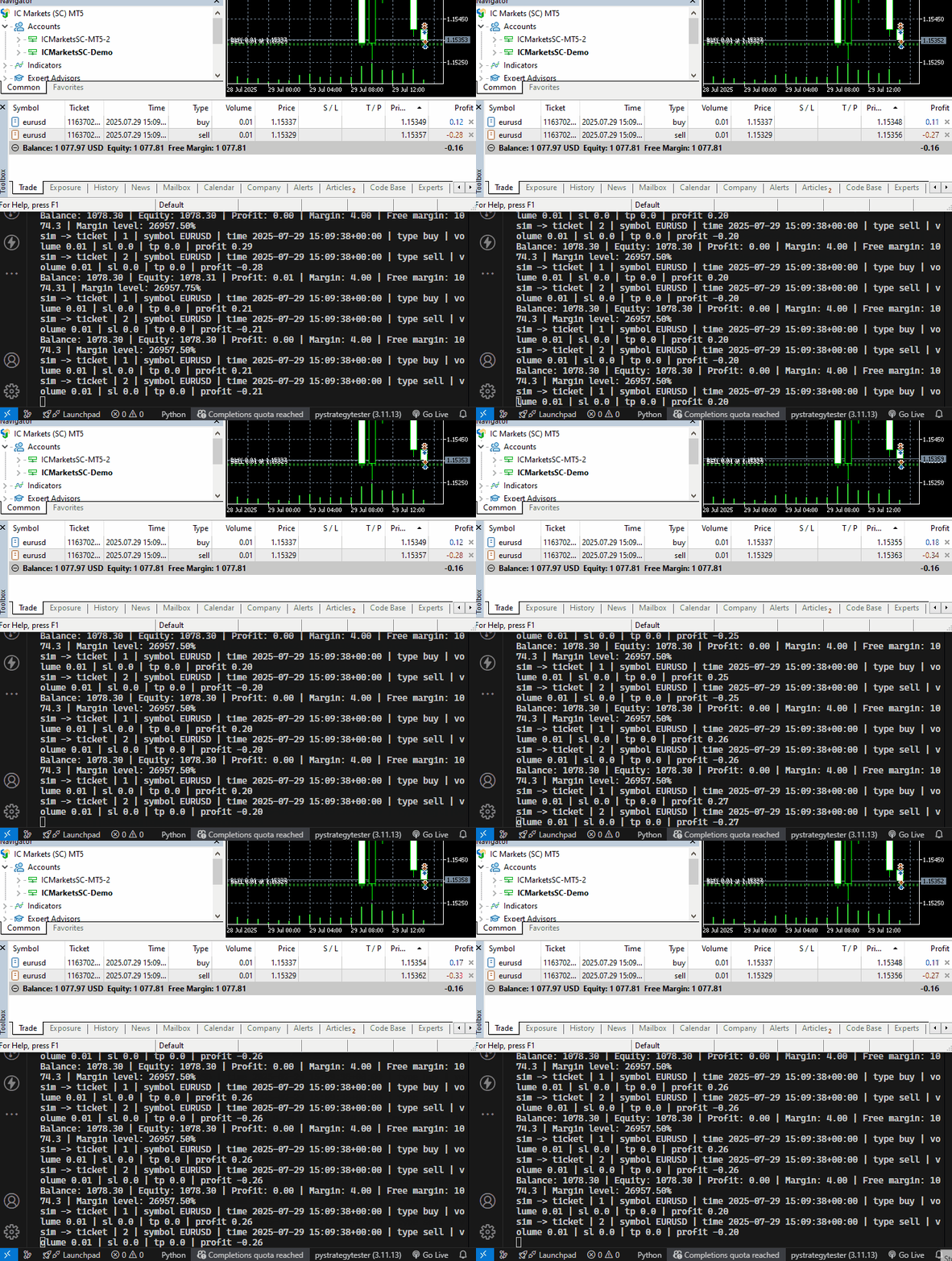
これは見ていてかなり扱いづらいので、Pythonでの取引アクティビティを可視化するためのシンプルなGUIアプリケーションを作成します。
リアルタイムシミュレーションGUIアプリケーション
このシンプルなアプリケーションでは、tkinterモジュールを使用します。
import tkinter as tk
from tkinter import ttk
from datetime import datetime

class SimToolboxGUI:

    def __init__(self):
        self.root = tk.Tk()
        self.root.title("Trade Simulator Monitor")
        self.root.geometry("900x700")
        self.root.configure(bg="#f0f0f0")

        # === ACCOUNT INFO DISPLAY ===
        self.account_label = tk.Label(
            self.root,
            text="",
            font=("Courier", 8),
            anchor="w",
            justify="left",
            bg="#f0f0f0",
            fg="#333",
        )
        self.account_label.pack(fill="x", padx=5, pady=(5, 6))

        # === POSITION TABLE ===
        position_frame = tk.LabelFrame(self.root, text="Open Positions", bg="#f0f0f0")
        position_frame.pack(fill="both", expand=True, padx=10, pady=5)

        self.position_columns = [
            "id", "symbol", "time", "type", "volume", "open_price", "sl", "tp",
            "swap", "price", "profit", "comment"
        ]

        self.position_tree = ttk.Treeview(position_frame, columns=self.position_columns, show="headings", height=10)
        for col in self.position_columns:
            self.position_tree.heading(col, text=col)
            self.position_tree.column(col, anchor="center", width=80)
        self.position_tree.pack(fill="both", expand=True, padx=5, pady=5)

        vsb1 = ttk.Scrollbar(position_frame, orient="vertical", command=self.position_tree.yview)
        self.position_tree.configure(yscrollcommand=vsb1.set)
        vsb1.pack(side="right", fill="y")

        # === ORDER TABLE ===
        order_frame = tk.LabelFrame(self.root, text="Pending Orders", bg="#f0f0f0")
        order_frame.pack(fill="both", expand=True, padx=10, pady=5)

        self.order_columns = [
            "id", "symbol", "time", "type", "volume", "open_price", "sl", "tp", "price",
            "expiry_date", "expiration_mode", "comment"
        ]

        self.order_tree = ttk.Treeview(order_frame, columns=self.order_columns, show="headings", height=10)
        for col in self.order_columns:
            self.order_tree.heading(col, text=col)
            self.order_tree.column(col, anchor="center", width=100)
        self.order_tree.pack(fill="both", expand=True, padx=5, pady=5)

        vsb2 = ttk.Scrollbar(order_frame, orient="vertical", command=self.order_tree.yview)
        self.order_tree.configure(yscrollcommand=vsb2.set)
        vsb2.pack(side="right", fill="y")

    def update(self, account_info: dict, positions: list, orders: list):
        # === Update account info ===
        acc_text = (
            f"Balance: {account_info['balance']:.2f} | "
            f"Equity: {account_info['equity']:.2f} | "
            f"Profit: {account_info['profit']:.2f} | "
            f"Margin: {account_info['margin']:.2f} | "
            f"Free margin: {account_info['free_margin']:.5f} | "
            f"Margin level: {account_info['margin_level']:.2f}%"
        )
        self.account_label.config(text=acc_text)

        # === Refresh positions ===
        for row in self.position_tree.get_children():
            self.position_tree.delete(row)

        for pos in positions:
            row = [pos.get(col, "") for col in self.position_columns]
            self.position_tree.insert("", "end", values=row)

        # === Refresh orders ===
        for row in self.order_tree.get_children():
            self.order_tree.delete(row)

        for order in orders:
            row = []
            for col in self.order_columns:
                val = order.get(col, "")
                if isinstance(val, datetime):
                    val = val.strftime("%Y-%m-%d %H:%M:%S")
                row.append(val)
            self.order_tree.insert("", "end", values=row)

        self.root.update()

    def run(self):
        self.root.mainloop()
上記のクラスは2つのテーブルを作成します。1つは注文を表示するためのテーブルで、もう1つはポジションを表示するためのテーブルです。GUIの上部には口座情報を表示します。
TradeSimulatorクラスの内部では、このシミュレーション用ToolBox GUIをクラスのコンストラクタ内で初期化します。
trade_simulator.pyの内部
from toolbox_gui import SimToolboxGUI

class TradeSimulator:
    def __init__(self, simulator_name: str, mt5_instance: mt5, deposit: float, leverage: str="1:100"):

        # ... other variables

        self.toolbox_gui = SimToolboxGUI()  # Initialize the GUI
GUIアプリケーションに表示されるデータを更新するための別の関数を作成します。
class TradeSimulator:

    # ... other functions

    def run_toolbox_gui(self):

        """
        Runs the simulator toolbox GUI.
        """

        self.toolbox_gui.update(self.account_info, self.open_trades_container)
ポジション、注文、および口座を監視および調整するための関数を呼び出した後、GUIアプリケーションを更新するための関数を呼び出します。
while True: # constantly monitor trades and account metrics

    sim.monitor_account(verbose=False)
    sim.monitor_positions(verbose=False)
    sim.monitor_orders()

    sim.run_toolbox_gui()  # Run the simulator toolbox GUI

    time.sleep(1) # sleep for one second
それでは、MetaTrader 5とPythonシミュレーターの両方でいくつかのポジションと注文を開き、それぞれの結果を観察してみましょう。
ファイル名:simulator_test.py
if not mt5.initialize(): # Initialize MetaTrader5 instance
    print(f"Failed to Initialize MetaTrader5. Error = {mt5.last_error()}")
    mt5.shutdown()
    quit()


sim = TradeSimulator(simulator_name="MySimulator", mt5_instance=mt5, deposit=1078.30, leverage="1:500")

magic_number = 123456
slippage = 10

sim.set_magicnumber(magic_number=magic_number) #sets the magic number of a simulator
sim.set_deviation_in_points(deviation_points=slippage) # sets slippage of the simulator

m_trade = CTrade() # Initializing the CTrade class

symbol = "EURUSD"

m_trade.set_magicnumber(magic_number=magic_number) # sets the magic number of the CTrade class
m_trade.set_deviation_in_points(deviation_points=slippage) # sets slippage
m_trade.set_filling_type_by_symbol(symbol=symbol) #set filling type by the given symbol

m_symbol = CSymbolInfo(mt5_instance=mt5)
m_symbol.name(symbol_name=symbol) # sets the symbol name for the class CSymbolInfo


# Open trades in a Simulator

sim.monitor_account(verbose=False)

if m_symbol.refresh_rates() is None: # Get recent ticks data from MetaTrader5
    print("failed to get recent ticks data")

# Market Orders

sim.buy(volume=0.1, symbol=symbol, open_price=m_symbol.ask())
sim.sell(volume=0.1, symbol=symbol, open_price=m_symbol.bid())

m_trade.buy(volume=0.1, symbol=symbol, price=m_symbol.ask())
m_trade.sell(volume=0.1, symbol=symbol, price=m_symbol.bid())

# Pending Orders

expiry = datetime.now(tz=pytz.UTC) + timedelta(days=1) # expiration date for pending orders
price_gap = 0.0005

# Buy Stop: place above current ask
sim.buy_stop(volume=0.1, symbol=symbol, open_price=m_symbol.ask() + price_gap, sl=0.0, tp=0.0,
             comment="Buy Stop Example", expiry_date=expiry, expiration_mode="daily")

m_trade.buy_stop(volume=0.1, symbol=symbol, price=m_symbol.ask() + price_gap)

# Buy Limit: place below current bid
sim.buy_limit(volume=0.1, symbol=symbol, open_price=m_symbol.bid() - price_gap, sl=0.0, tp=0.0,
              comment="Buy Limit Example", expiry_date=expiry, expiration_mode="daily_excluding_stops")

m_trade.buy_limit(volume=0.1, symbol=symbol, price=m_symbol.bid() - price_gap)

# Sell Stop: place below current bid

sim.sell_stop(volume=0.1, symbol=symbol, open_price=m_symbol.bid() - price_gap, sl=0.0, tp=0.0,
              comment="Sell Stop Example", expiry_date=expiry, expiration_mode="gtc")

m_trade.sell_stop(volume=0.1, symbol=symbol, price=m_symbol.ask() - price_gap)

# Sell Limit: place above current ask
sim.sell_limit(volume=0.1, symbol=symbol, open_price=m_symbol.ask() + price_gap, sl=0.0, tp=0.0,
               comment="Sell Limit Example", expiry_date=expiry, expiration_mode="gtc")

m_trade.sell_limit(volume=0.1, symbol=symbol, price=m_symbol.bid() + price_gap)

while True: # constantly monitor trades and account metrics

    sim.monitor_account()
    sim.monitor_pending_orders()
    sim.monitor_positions(verbose=False)
    sim.monitor_orders()

    sim.run_toolbox_gui()  # Run the simulator toolbox GUI

    time.sleep(1) # sleep for one second
以下が実行結果です。
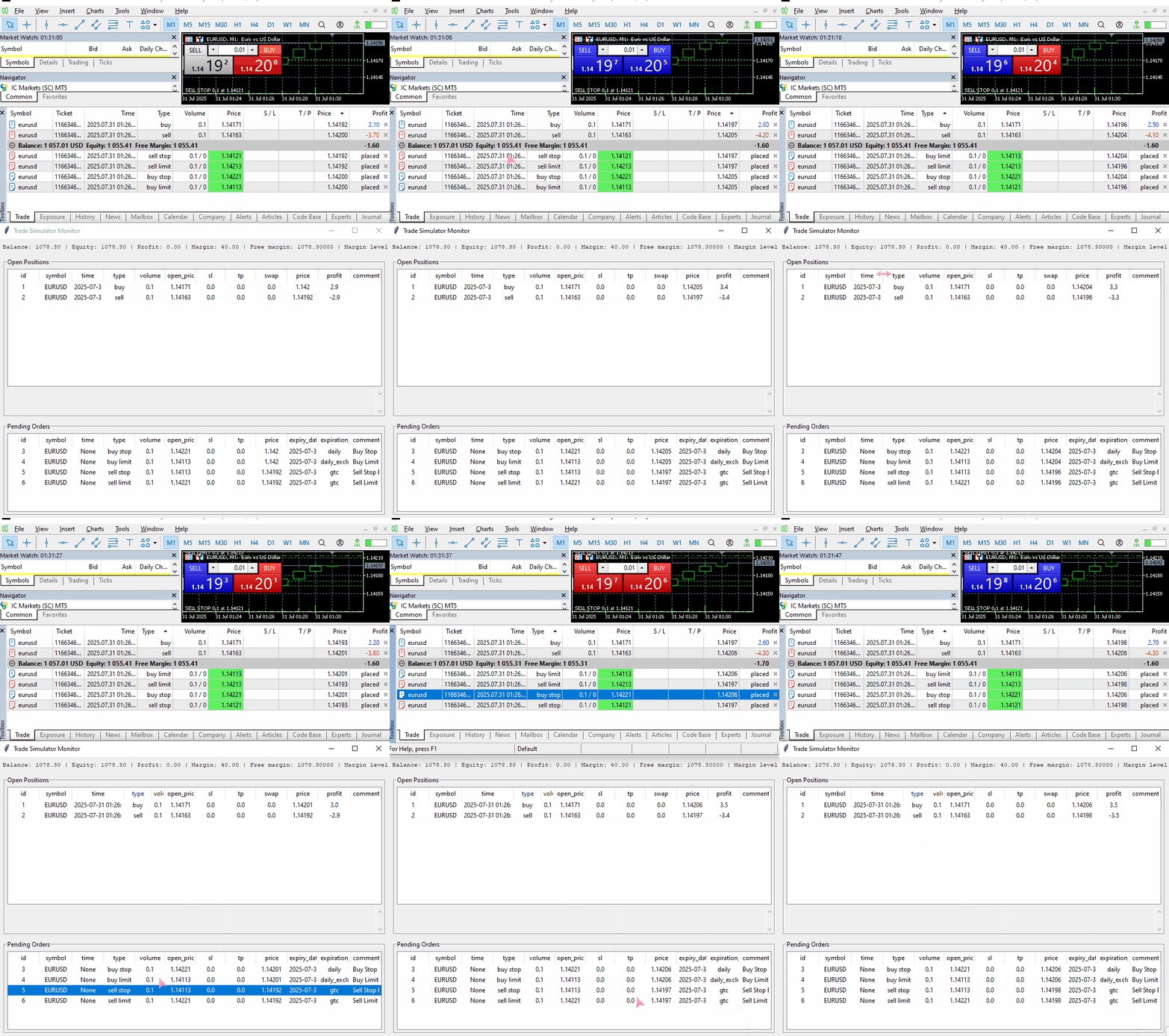
シミュレーションによる取引結果は、実際の取引結果とそれほどかけ離れていません。これは大きな進歩です。
シミュレーター外部からのポジションおよび注文の管理と制御
シミュレーターの外部からオープンポジションや注文の情報を取得し、それらを制御できることは非常に重要です。これはアルゴリズム取引の本質でもあります。
たとえば多くの取引戦略では、過去に開かれたポジションの有無を知る必要があります。ある戦略では、同じ方向と同じ銘柄のポジションが存在しない場合にのみ新規の買いポジションを開く、といった条件が求められることがあります。
そのため、以下の表ではTradeSimulatorクラスの外部から注文、ポジション、ディールへアクセスするための関数を示します。
| 関数 | 戻り値 |
|---|---|
def get_positions(self) -> list: | コンテナに保存されているすべての未決ポジション |
def get_orders(self) -> list: | コンテナに保存されているすべての未約定注文 |
def get_deals(self, start_time: datetime = None, end_time: datetime = None, from_db: bool = False) -> list: | 指定した期間(start_timeからend_time)に実行されたすべてのディール。 from_db引数は、メモリ上のデータを使用するか、データベースに保存されたデータを使用するかを切り替えます。 |
使用例:
sim.buy(volume=0.1, symbol=symbol, open_price=m_symbol.ask())
sim.sell(volume=0.1, symbol=symbol, open_price=m_symbol.bid())

price_gap = 0.0005
# Buy Stop: place above current ask
sim.buy_stop(volume=0.1, symbol=symbol, open_price=m_symbol.ask() + price_gap)


print("Positions total: ",len(sim.get_positions()))
print("Orders total: ",len(sim.get_orders()))

now = m_symbol.time(timezone=pytz.UTC)
start_time = now - timedelta(minutes=5)
end_time = now

print("Deals total: ",len(sim.get_deals(start_time=start_time,
                                        end_time=end_time,
                                        from_db=False
                              )))
以下が実行結果です。
(pystrategytester) C:\Users\Omega Joctan\OneDrive\Desktop\Python Strategy Tester>conda run --live-stream --name pystrategytester python "c:/Users/Omega Joctan/OneDrive/Desktop/Python Strategy
Tester/simulator_test.py"
Trade opened successfully:  {'time': datetime.datetime(2025, 7, 31, 9, 59, 51, tzinfo=<UTC>), 'id': 1, 'magic': 123456, 'symbol': 'EURUSD', 'type': 'buy', 'volume': 0.1, 'open_price': 1.14597, 'price': 0.0, 'sl': 0.0, 'tp': 0.0, 'commission': 0.0, 'margin_required': 20.0, 'fee': 0.0, 'swap': 0.0, 'profit': 0.0, 'comment': ''}
Trade opened successfully:  {'time': datetime.datetime(2025, 7, 31, 9, 59, 51, tzinfo=<UTC>), 'id': 2, 'magic': 123456, 'symbol': 'EURUSD', 'type': 'sell', 'volume': 0.1, 'open_price': 1.14589, 'price': 0.0, 'sl': 0.0, 'tp': 0.0, 'commission': 0.0, 'margin_required': 20.0, 'fee': 0.0, 'swap': 0.0, 'profit': 0.0, 'comment': ''}
Margin calculation mode:   Calculation of profit and margin for Forex
Positions total:  2
Orders total:  1
Deals total:  2
注文を選択する際には、時間の不一致を避けるために現在のローカル時間ではなく、ポジションや注文の発注時にも使用した銘柄のUTC時間を使用する必要があります。
これらの関数によって、取引戦略に対してより具体的な条件を導入できるようになります。
(a) 特定の取引タイプがシミュレーションに存在するかどうかの確認
これは取引監視において非常に一般的な処理です。多くの取引戦略では、特定の方向や銘柄のポジションや注文が既に存在する場合には、新たなポジションを開かない、といった条件が必要になります。
if not mt5.initialize(): # Initialize MetaTrader5 instance
    print(f"Failed to Initialize MetaTrader5. Error = {mt5.last_error()}")
    mt5.shutdown()
    quit()

sim = TradeSimulator(simulator_name="MySimulator", mt5_instance=mt5, deposit=1078.30, leverage="1:500")

magic_number = 123456
slippage = 10

sim.set_magicnumber(magic_number=magic_number) #sets the magic number of a simulator
sim.set_deviation_in_points(deviation_points=slippage) # sets slippage of the simulator

symbol = "EURUSD"
m_symbol = CSymbolInfo(mt5_instance=mt5)
m_symbol.name(symbol_name=symbol) # sets the symbol name for the class CSymbolInfo


def is_position_exists(type: str) -> bool:

    for pos in sim.get_positions():
        if pos["magic"] == magic_number and pos["symbol"] == symbol and pos["type"] == type:
            return True # position exists

    return False

while True: #imitating the OnTick function offered in MQL5 language

    sim.monitor_pending_orders()
    sim.monitor_positions(verbose=False)
    sim.monitor_account(verbose=False)

    sim.run_toolbox_gui()  # Run the simulator toolbox GUI

    if m_symbol.refresh_rates() is None: # Get recent ticks data from MetaTrader5
        # print("failed to get recent ticks data")
        continue

    if not is_position_exists("buy"): # open a buy trade in a simulator if it doesn't exist
        sim.buy(volume=0.1, symbol=symbol, open_price=m_symbol.ask())

    if not is_position_exists("sell"): # open a sell trade in a simulator if it doesn't exist
        sim.sell(volume=0.1, symbol=symbol, open_price=m_symbol.bid())

    time.sleep(1) # sleep for one second
以下が実行結果です。
(pystrategytester) C:\Users\Omega Joctan\OneDrive\Desktop\Python Strategy Tester>conda run --live-stream --name pystrategytester python "c:/Users/Omega Joctan/OneDrive/Desktop/Python Strategy
Tester/simulator_test.py"
Trade opened successfully:  {'time': datetime.datetime(2025, 7, 31, 10, 13, 18, tzinfo=<UTC>), 'id': 1, 'magic': 123456, 'symbol': 'EURUSD', 'type': 'buy', 'volume': 0.1, 'open_price': 1.14565, 'price': 0.0, 'sl': 0.0, 'tp': 0.0, 'commission': 0.0, 'margin_required': 20.0, 'fee': 0.0, 'swap': 0.0, 'profit': 0.0, 'comment': ''}
Trade opened successfully:  {'time': datetime.datetime(2025, 7, 31, 10, 13, 18, tzinfo=<UTC>), 'id': 2, 'magic': 123456, 'symbol': 'EURUSD', 'type': 'sell', 'volume': 0.1, 'open_price': 1.14557, 'price': 0.0, 'sl': 0.0, 'tp': 0.0, 'commission': 0.0, 'margin_required': 20.0, 'fee': 0.0, 'swap': 0.0, 'profit': 0.0, 'comment': ''}
2つの異なるポジション(買いと売り)のみが建てられています。
これはMQL5で提供されているインターフェースとよく似ており、特定のポジションが存在するかどうかを確認する際によく使用されるものです。
(b)特定のポジションの決済
def close_positions(type: str):

    for pos in sim.get_positions():
        if pos["magic"] == magic_number and pos["symbol"] == symbol and pos["type"] == type:
            sim.position_close(pos)
いくつかの戦略では、特定のプログラム条件が成立した際に特定のポジションをクローズする必要があります。そのような場合、上記の関数、またはそれに類似したアプローチが非常に有用になります。
まず、2つのポジション(買いポジションと売りポジション)を建て、その後、買いポジションを決済します。
while True:

    sim.monitor_pending_orders()
    sim.monitor_positions(verbose=False)
    sim.monitor_account(verbose=False)

    sim.run_toolbox_gui()  # Run the simulator toolbox GUI

    if m_symbol.refresh_rates() is None: # Get recent ticks data from MetaTrader5
        # print("failed to get recent ticks data")
        continue

    if not is_position_exists("buy"): # open a buy trade in a simulator if it doesn't exist
        sim.buy(volume=0.1, symbol=symbol, open_price=m_symbol.ask())

    close_positions("buy") # close all buy positions

    if not is_position_exists("sell"): # open a sell trade in a simulator if it doesn't exist
        sim.sell(volume=0.1, symbol=symbol, open_price=m_symbol.bid())

    time.sleep(1) # sleep for one second
以下が実行結果です。
(pystrategytester) C:\Users\Omega Joctan\OneDrive\Desktop\Python Strategy Tester>conda run --live-stream --name pystrategytester python "c:/Users/Omega Joctan/OneDrive/Desktop/Python Strategy
Tester/simulator_test.py"
Trade opened successfully:  {'time': datetime.datetime(2025, 7, 31, 10, 50, 35, tzinfo=<UTC>), 'id': 1, 'magic': 123456, 'symbol': 'EURUSD', 'type': 'buy', 'volume': 0.1, 'open_price': 1.14447, 'price': 0.0, 'sl': 0.0, 'tp': 0.0, 'commission': 0.0, 'margin_required': 20.0, 'fee': 0.0, 'swap': 0.0, 'profit': 0.0, 'comment': ''}
Trade closed successfully:  {'time': datetime.datetime(2025, 7, 31, 10, 50, 35, tzinfo=<UTC>), 'id': 1, 'magic': 123456, 'symbol': 'EURUSD', 'type': 'buy', 'volume': 0.1, 'open_price': 1.14447, 'price': 0.0, 'sl': 0.0, 'tp': 0.0, 'commission': 0.0, 'margin_required': 20.0, 'fee': 0.0, 'swap': 0.0, 'profit': 0.0, 'comment': '', 'direction': 'closed', 'reason': 'Take profit'}
Trade opened successfully:  {'time': datetime.datetime(2025, 7, 31, 10, 50, 35, tzinfo=<UTC>), 'id': 2, 'magic': 123456, 'symbol': 'EURUSD', 'type': 'sell', 'volume': 0.1, 'open_price': 1.14439, 'price': 0.0, 'sl': 0.0, 'tp': 0.0, 'commission': 0.0, 'margin_required': 20.0, 'fee': 0.0, 'swap': 0.0, 'profit': 0.0, 'comment': ''}
Trade opened successfully:  {'time': datetime.datetime(2025, 7, 31, 10, 50, 37, tzinfo=<UTC>), 'id': 3, 'magic': 123456, 'symbol': 'EURUSD', 'type': 'buy', 'volume': 0.1, 'open_price': 1.14446, 'price': 0.0, 'sl': 0.0, 'tp': 0.0, 'commission': 0.0, 'margin_required': 20.0, 'fee': 0.0, 'swap': 0.0, 'profit': 0.0, 'comment': ''}
Trade closed successfully:  {'time': datetime.datetime(2025, 7, 31, 10, 50, 37, tzinfo=<UTC>), 'id': 3, 'magic': 123456, 'symbol': 'EURUSD', 'type': 'buy', 'volume': 0.1, 'open_price': 1.14446, 'price': 0.0, 'sl': 0.0, 'tp': 0.0, 'commission': 0.0, 'margin_required': 20.0, 'fee': 0.0, 'swap': 0.0, 'profit': 0.0, 'comment': '', 'direction': 'closed', 'reason': 'Take profit'}
ディールの取り扱い
MetaTrader5において、ディールとは取引の実際の約定を表すものであり、注文が実行された結果として生成されるものです。各ディールは特定の注文に基づいていますが、1つの注文から複数のディールが発生する場合もあります(例:部分約定)。
ディールは以下のタイミングで生成されます。
- ポジションが新規に建てられたとき
- ポジションが部分的または完全に決済されたとき
- 指値注文や逆指値注文などがトリガーされ実行されたとき
つまり、エントリーおよびエグジットの両方の約定はすべてディールとして記録されます。
注文やポジションとは異なり、ディールは変更不可能であり、常に取引履歴として保存されます。これらは実行された取引の永続的な記録として機能し、変更または削除することはできません。
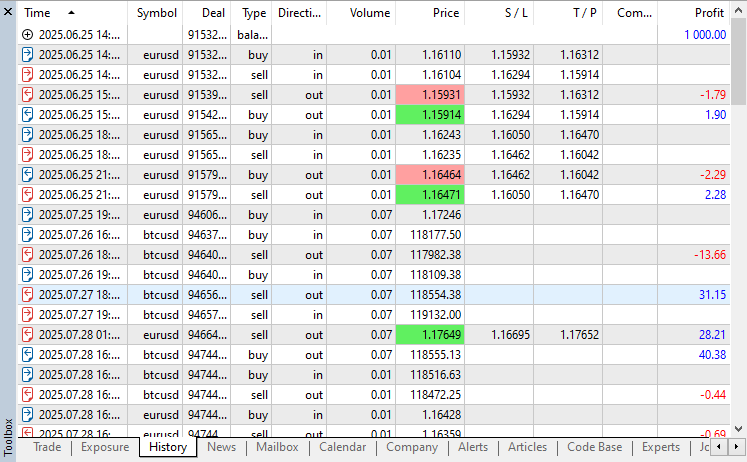
さらに、ポジションを開く関数( _position_open)およびポジションを決済する関数(position_close)の両方の末尾では、生成されたディールがクラス内のdeals_containerリストに追加されます。
    def _open_position(self, pos_type: str, volume: float, symbol: str, price: float, sl: float = 0.0, tp: float = 0.0, comment: str = "") -> bool:

        trade_info = self.trade_info.copy()

        # ... other operations
        # ...

        # Append to open trades
        self.open_trades_container.append(trade_info)
        print("Trade opened successfully: ", trade_info)

        # Track deal
        self.deal_info.update(trade_info)
        self.deal_info["direction"] = "opened"
        self.deal_info["reason"] = "Expert"
        self.deals_container.append(self.deal_info.copy())
    def position_close(self, selected_pos: dict) -> bool:

        # Update deal info

        deal_info = selected_pos.copy()
        deal_info["direction"] = "closed"

        # ... other operations

        deal_info["reason"] = "Unknown" # Unkown deal reason if the stoploss or takeprofit wasn't hit

        if selected_pos["type"] == "buy":
            if np.isclose(selected_pos["tp"], bid, digits): # check if the current bid price is almost equal to the takeprofit
                deal_info["reason"] = "Take profit"

            elif np.isclose(selected_pos["sl"], bid, digits): # check if the current bid price is almost equal to the stoploss
                deal_info["reason"] = "Stop loss"


        if selected_pos["type"] == "sell":
            if np.isclose(selected_pos["tp"], ask, digits): # check if the current ask price is almost equal to the takeprofit
                deal_info["reason"] = "Take profit"

            elif np.isclose(selected_pos["sl"], ask, digits): # check if the current ask price is almost equal to the stoploss
                deal_info["reason"] = "Stop loss"


        self.deals_container.append(deal_info.copy()) # add the deal to the deals container

        print("Trade closed successfully: ", deal_info)
しかし、シミュレーターによって生成されたディールをリストや配列に保存する方法は理想的ではありません。なぜなら、プログラムを終了した時点でその情報は失われてしまうためです。そこで、これらのデータをSQLite3データベースに保存し、MetaTrader5と同様に、変更または削除されない限り永続的な記録として保持するようにします。
    def _create_deals_db(self, db_name: str):

        """
         Creates a SQLite database to store trade history and account information.

        Args:
            db_name (str): The name of the database file.
        """

        conn = sqlite3.connect(db_name)
        cursor = conn.cursor()

        # Create tables if they do not exist
        cursor.execute('''
            CREATE TABLE IF NOT EXISTS closed_deals (
                id INTEGER PRIMARY KEY AUTOINCREMENT,
                time TEXT,
                magic INTEGER,
                symbol TEXT,
                type TEXT,
                direction TEXT,
                volume REAL,
                price REAL,
                sl REAL,
                tp REAL,
                commission REAL,
                margin_required REAL,
                fee REAL,
                swap REAL,
                profit REAL,
                comment TEXT,
                reason TEXT
            )
        ''')

        conn.commit()
        conn.close()
上記の関数は、TradeSimulatorクラスのコンストラクタ内で呼び出されます。
class TradeSimulator:
    def __init__(self, simulator_name: str, mt5_instance: mt5, deposit: float, leverage: str="1:100"):

        # ... other variables
        # ...

        # Database for trade history

        self.sim_folder = "Simulations"

        os.makedirs(self.sim_folder, exist_ok=True)  # Ensure the simulations path exists

        # Create the database file name

        self.history_db_name = os.path.join(self.sim_folder, self.simulator_name+".db")
        self._create_deals_db(self.history_db_name)
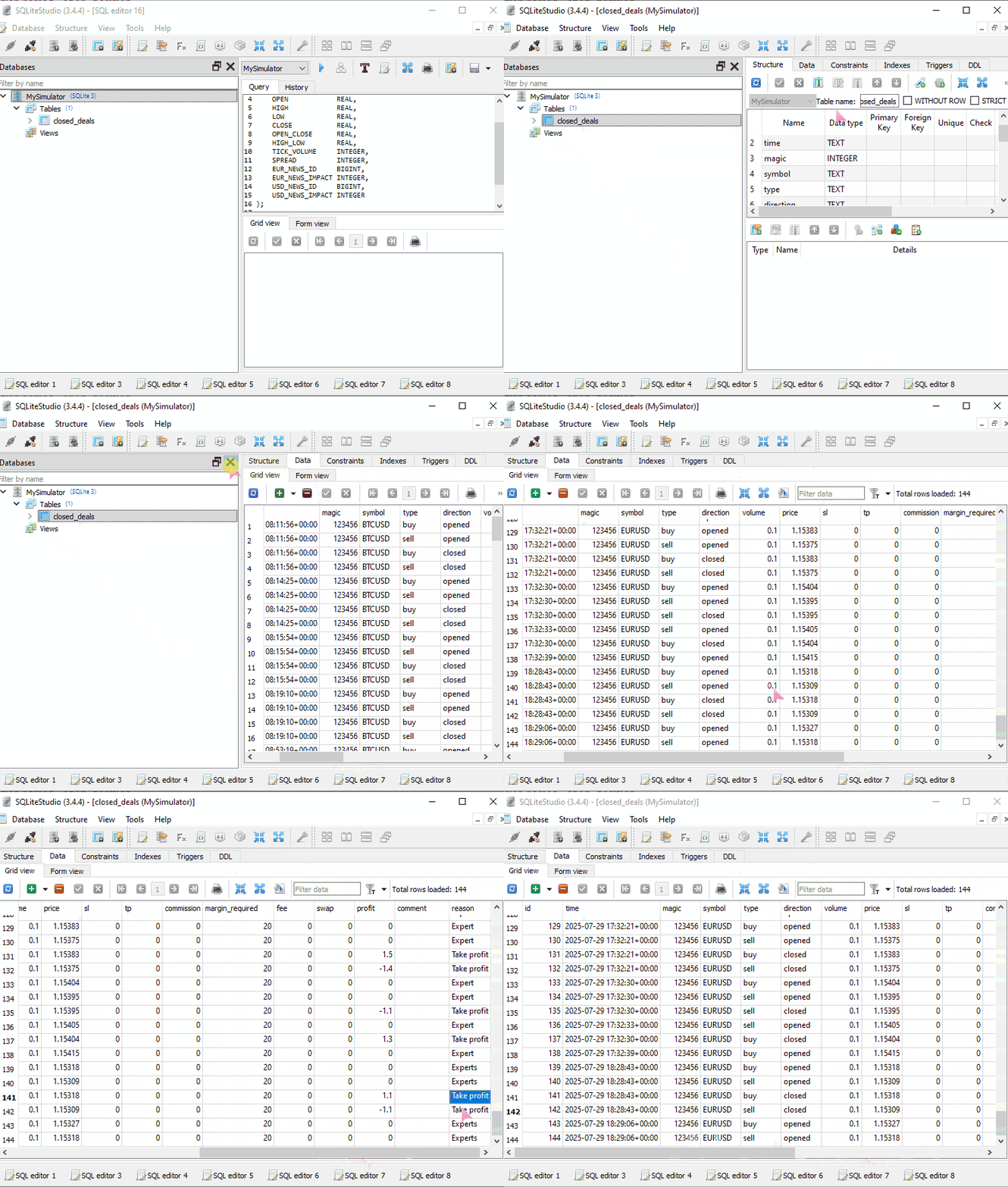
変数simulator_nameで指定されたシミュレーター名と同様のデータベースを作成した後、関数_create_deals_dbで、closed_dealsというテーブルを作成します(存在しない場合のみ)。
また、各ディールをデータベースへ保存するための関数も必要になります。
    def _save_deal(self, deal: dict, db_name: str):
        """
            Saves a closed deal to the SQLite database.
        """

        conn = sqlite3.connect(db_name)
        cursor = conn.cursor()

        cursor.execute("""
            INSERT INTO closed_deals (
                time, magic, symbol, type, direction, volume, price, sl, tp,
                commission, margin_required, fee, swap, profit, comment, reason
            ) VALUES (
                :time, :magic, :symbol, :type, :direction, :volume, :price, :sl, :tp,
                :commission, :margin_required, :fee, :swap, :profit, :comment, :reason
            );
        """, deal)

        conn.commit()
        conn.close()
ここで注意すべき点として、データベースにid列を明示的に追加していないことがあります。これは、データベーステーブル側のid列がAUTOINCREMENTに設定されているためです。この設定により、すべてのディールに対して0から正の無限大に向かって一意のidが自動的に付与されます。
これらのディールは、まずdeals_container.というリストに保存された後、ポジションの新規建ておよび決済処理をおこなう関数内でデータベースにも保存する必要があります。
関数position_closeの内部:
    def position_close(self, selected_pos: dict) -> bool:

        # Update deal info

        deal_info = selected_pos.copy()
        deal_info["direction"] = "closed"


        #...
        #...

        print("Trade closed successfully: ", deal_info)

        # Save closed deal to database
        self._save_deal(deal_info, self.history_db_name)
関数_open_positionの内部:
    def _open_position(self, pos_type: str, volume: float, symbol: str, price: float, sl: float = 0.0, tp: float = 0.0, comment: str = "") -> bool:

        trade_info = self.trade_info.copy()

        #...
        #...
        #...

        self.deals_container.append(self.deal_info.copy())

        # Log to database
        self._save_deal(self.deal_info, self.history_db_name)

        return True
以下は、過去数時間および数日にわたって生成されたすべてのディールを含むSQLiteデータベースです。
最終的な考察
MetaTrader5シミュレーターの初期部分を実装していく中で、MetaTrader 5のストラテジーテスターがいかに高度で洗練されているかを改めて実感せざるを得ません。このツールの内部では、単に取引を実行するだけでなく、非常に多くの処理がバックグラウンドでおこなわれています。
ここまでの時点で、「このシミュレーターは本当に必要なのか?」と疑問に思うかもしれません。なぜなら、すでにMetaTrader5-Pythonモジュールを使って実口座とほぼ同様に取引を実行するシミュレーターを構築しており、それはMetaTrader5アプリそのものと大きく変わらないように見えるからです。
この記事の目的は、取引シミュレーターの動作原理を理解することにあります。シンプルな取引をシミュレーションし、それらがリアル口座での取引と非常に近い動きをすることを確認することで、目的に一歩近づいていると言えます。
また、このシミュレーターはMetaTrader5のストラテジーテスターと比較すると、まだ完全でも完璧でもありません。実装されていない機能や不十分な部分も多く存在します。実装されていない機能や不十分な部分も多く存在します。正直なところ、すべての詳細を追跡するのは非常に難しい作業です 。そのため、もし意見やアイデアがある場合、あるいはプロジェクトへの協力を希望する場合は、GitHubリポジトリ(https://github.com/MegaJoctan/PyMetaTester)をご参照ください。
次の段階
現在のTradeSimulatorでは、マーケットから現在のAsk価格・Bid価格を含む重要な情報を取得し、選択された銘柄に関するデータを活用していました。次回の記事では、ティックデータの取得方法や、それらをループ処理で反復しながらストラテジーテスターのようなヒストリカルバックテスト挙動を再現する方法について解説します。
では、また。
添付ファイルの表
| ファイル名 | 説明と使用法 |
|---|---|
| requirements.txt | このプロジェクトで使用するすべてのPython依存関係を含みます。 |
| trade_simulator.py | TradeSimulatorクラスを含み、シミュレーター全体のロジックを実装しています。 |
| simulator_test.py | 本記事で解説した取引シミュレーターをテストするためのプレイグラウンドスクリプトです。 |
| toolbox_gui.py | 取引およびアカウント残高情報を表示する、MetaTrader5風のシンプルGUIアプリケーションを含みます。 |
| Trade\SymbolInfo.py | MetaTrader5から特定銘柄に関するすべての情報を取得する、CSymbolInfoクラスを含みます。 |
| Trade\Trade.py | MetaTrader5-Pythonモジュールを使用してポジションおよび注文を発注するための機能を提供する CTradeクラスを含みます。 |
MetaQuotes Ltdにより英語から翻訳されました。
元の記事: https://www.mql5.com/en/articles/18971
警告: これらの資料についてのすべての権利はMetaQuotes Ltd.が保有しています。これらの資料の全部または一部の複製や再プリントは禁じられています。
この記事はサイトのユーザーによって執筆されたものであり、著者の個人的な見解を反映しています。MetaQuotes Ltdは、提示された情報の正確性や、記載されているソリューション、戦略、または推奨事項の使用によって生じたいかなる結果についても責任を負いません。



 MetaTrader 5とMQL5経済指標カレンダー:ニュースを再現性のあるトレードシステムに変える方法
 OpenCLを用いたMQL5におけるCPUからGPUへの実践的移行パス
 MQL5におけるイベント駆動型アーキテクチャ:エキスパートアドバイザーを本格的なトレードシステムに進化させる方法
 ルーチン作業なしのアルゴリズム取引:MetaTrader 5におけるSQLiteを用いた高速取引分析

- 無料取引アプリ
- 8千を超えるシグナルをコピー
- 金融ニュースで金融マーケットを探索