
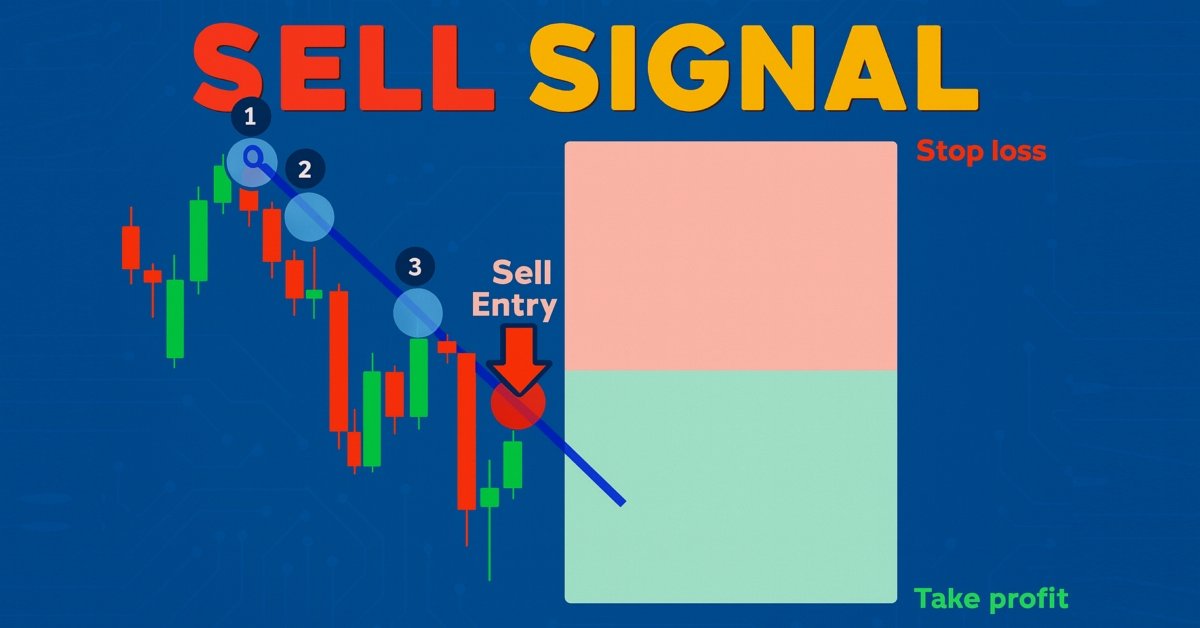
Automatización de estrategias de trading en MQL5 (Parte 25): Sistema de líneas de tendencia con ajuste por mínimos cuadrados y generación dinámica de señales
 16
16
 0
0

Introducción
En nuestro artículo anterior (Parte 24), desarrollamos un sistema London Session Breakout en MetaQuotes Language 5 (MQL5) que utilizaba los rangos previos a la sesión de Londres para colocar órdenes pendientes con gestión de riesgos y stops dinámicos, lo que permitía operar de forma eficaz en función de las sesiones. En la parte 25, creamos un programa de trading basado en líneas de tendencia que utiliza un ajuste por mínimos cuadrados para detectar líneas de tendencia de soporte y resistencia, generando señales automáticas de compra y venta cuando los precios tocan estas líneas, complementadas con elementos visuales como flechas y parámetros de trading personalizables. Trataremos los siguientes temas:
Al final, tendrás una potente estrategia MQL5 para operar en función de las tendencias, lista para personalizar. ¡Empecemos!
Diseño del marco de trading con líneas de tendencia
El trading con líneas de tendencia es una estrategia que utiliza líneas diagonales trazadas en los gráficos de precios para conectar los máximos de oscilación (resistencia) o los mínimos de oscilación (soporte), lo que ayuda a los operadores a identificar la tendencia predominante. Los operadores compran cerca de las líneas de tendencia ascendentes (soporte) en una tendencia alcista o venden cerca de las líneas de tendencia descendentes (resistencia) en una tendencia bajista, esperando que el precio rebote. Una ruptura de la línea de tendencia suele indicar un posible cambio de tendencia o un debilitamiento de la misma, lo que lleva a los operadores a cerrar o invertir sus posiciones. Aquí se muestra un ejemplo de una línea de tendencia bajista.
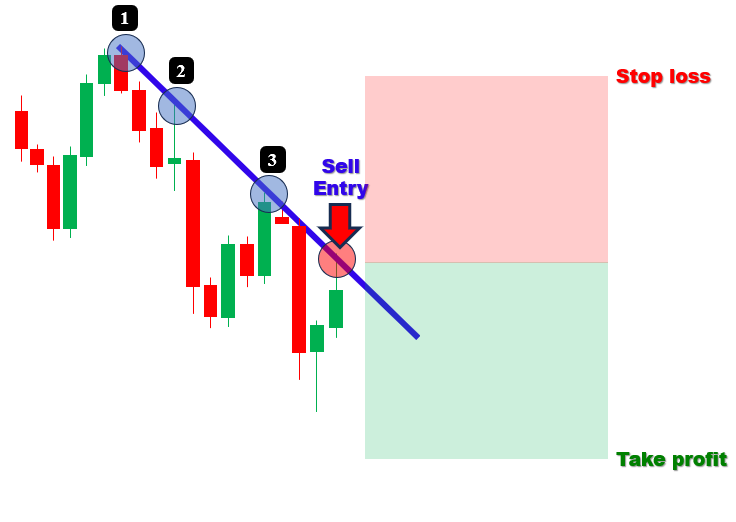
Ahora desarrollaremos un programa de trading basado en líneas de tendencia para automatizar las operaciones mediante la detección de líneas de tendencia de soporte y resistencia utilizando un método de ajuste por mínimos cuadrados, lo que permitirá obtener señales precisas de compra y venta cuando los precios toquen estas líneas.
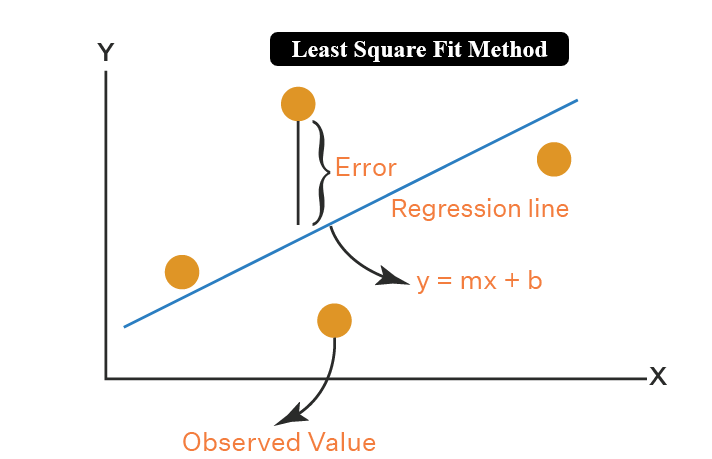
Por si te interesa saberlo, el método de mínimos cuadrados es una técnica estadística que se utiliza para determinar la recta (o curva) que mejor se ajusta a un conjunto de puntos de datos, minimizando la suma de los cuadrados de las desviaciones verticales (errores) entre los puntos de datos y la recta ajustada. Será importante para nosotros porque proporcionará la aproximación lineal más precisa de la relación entre los puntos de giro (swing), lo cual será esencial para la predicción, el análisis de tendencias y el modelado de datos en nuestra disciplina. A continuación, puedes consultar la lógica estadística.
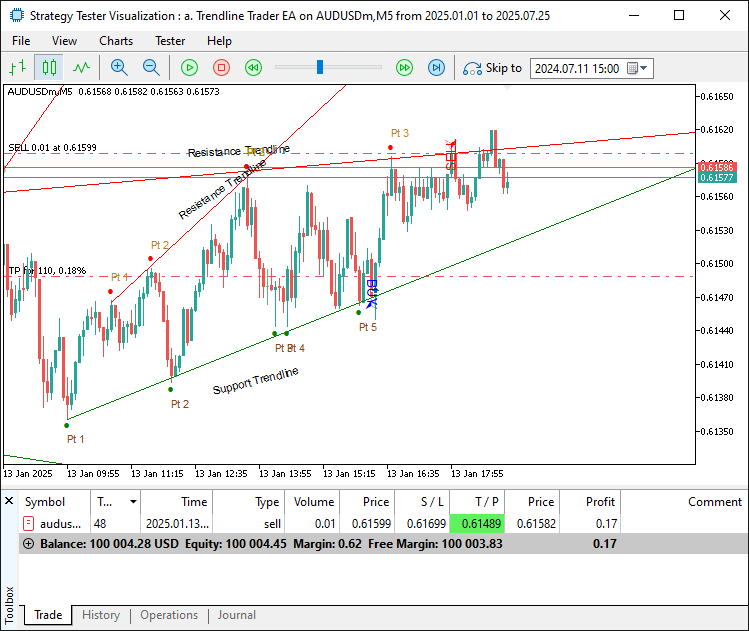
Tenemos previsto combinar la detección matemática de líneas de tendencia con retroalimentación visual y parámetros de negociación configurables, lo que nos permitirá aprovechar de forma eficiente los rebotes de tendencia en mercados dinámicos. Nuestro objetivo es identificar puntos de giro (swing), ajustar líneas de tendencia con suficientes toques (un mínimo de 3 toques), validar su integridad y activar operaciones con gestión de riesgos, todo ello mientras mostramos las líneas de tendencia y los puntos de toque en el gráfico para mayor claridad. Veamos el resultado que buscamos y luego podremos proceder a la implementación.
Implementación en MQL5
Para crear el programa en MQL5, abre el MetaEditor, ve al Navegador, busca la carpeta «Indicators», haz clic en la pestaña «Nuevo» y sigue las instrucciones para crear el archivo. Una vez creado, en el entorno de programación, empezaremos por declarar algunas entradas y estructuras que harán que el programa sea más dinámico.//+------------------------------------------------------------------+ //| a. Trendline Trader EA.mq5 | //| Copyright 2025, Allan Munene Mutiiria. | //| https://t.me/Forex_Algo_Trader | //+------------------------------------------------------------------+ #property copyright "Copyright 2025, Allan Munene Mutiiria." #property link "https://t.me/Forex_Algo_Trader" #property description "Trendline Trader using mean Least Squares Fit" #property version "1.00" #property strict #include <Trade\Trade.mqh> //--- Include Trade library for trading operations CTrade obj_Trade; //--- Instantiate trade object //+------------------------------------------------------------------+ //| Swing point structure | //+------------------------------------------------------------------+ struct Swing { //--- Define swing point structure datetime time; //--- Store swing time double price; //--- Store swing price }; //+------------------------------------------------------------------+ //| Starting point structure | //+------------------------------------------------------------------+ struct StartingPoint { //--- Define starting point structure datetime time; //--- Store starting point time double price; //--- Store starting point price bool is_support; //--- Indicate support/resistance flag }; //+------------------------------------------------------------------+ //| Trendline storage structure | //+------------------------------------------------------------------+ struct TrendlineInfo { //--- Define trendline info structure string name; //--- Store trendline name datetime start_time; //--- Store start time datetime end_time; //--- Store end time double start_price; //--- Store start price double end_price; //--- Store end price double slope; //--- Store slope bool is_support; //--- Indicate support/resistance flag int touch_count; //--- Store number of touches datetime creation_time; //--- Store creation time int touch_indices[]; //--- Store touch indices array bool is_signaled; //--- Indicate signal flag }; //+------------------------------------------------------------------+ //| Forward declarations | //+------------------------------------------------------------------+ void DetectSwings(); //--- Declare swing detection function void SortSwings(Swing &swings[], int count); //--- Declare swing sorting function double CalculateAngle(datetime time1, double price1, datetime time2, double price2); //--- Declare angle calculation function bool ValidateTrendline(bool isSupport, datetime start_time, datetime ref_time, double ref_price, double slope, double tolerance_pen); //--- Declare trendline validation function void FindAndDrawTrendlines(bool isSupport); //--- Declare trendline finding/drawing function void UpdateTrendlines(); //--- Declare trendline update function void RemoveTrendlineFromStorage(int index); //--- Declare trendline removal function bool IsStartingPointUsed(datetime time, double price, bool is_support); //--- Declare starting point usage check function void LeastSquaresFit(const datetime ×[], const double &prices[], int n, double &slope, double &intercept); //--- Declare least squares fit function //+------------------------------------------------------------------+ //| Inputs | //+------------------------------------------------------------------+ input int LookbackBars = 200; // Set bars for swing detection lookback input double TouchTolerance = 10.0; // Set tolerance for touch points (points) input int MinTouches = 3; // Set minimum touch points for valid trendline input double PenetrationTolerance = 5.0; // Set allowance for bar penetration (points) input int ExtensionBars = 100; // Set bars to extend trendline right input int MinBarSpacing = 10; // Set minimum bar spacing between touches input double inpLot = 0.01; // Set lot size input double inpSLPoints = 100.0; // Set stop loss (points) input double inpRRRatio = 1.1; // Set risk:reward ratio input double MinAngle = 1.0; // Set minimum inclination angle (degrees) input double MaxAngle = 89.0; // Set maximum inclination angle (degrees) input bool DeleteExpiredObjects = false; // Enable deletion of expired/broken objects input bool EnableTradingSignals = true; // Enable buy/sell signals and trades input bool DrawTouchArrows = true; // Enable drawing arrows at touch points input bool DrawLabels = true; // Enable drawing trendline/point labels input color SupportLineColor = clrGreen; // Set color for support trendlines input color ResistanceLineColor = clrRed; // Set color for resistance trendlines //+------------------------------------------------------------------+ //| Global variables | //+------------------------------------------------------------------+ Swing swingLows[]; //--- Store swing lows int numLows = 0; //--- Track number of swing lows Swing swingHighs[]; //--- Store swing highs int numHighs = 0; //--- Track number of swing highs TrendlineInfo trendlines[]; //--- Store trendlines int numTrendlines = 0; //--- Track number of trendlines StartingPoint startingPoints[]; //--- Store used starting points int numStartingPoints = 0; //--- Track number of starting points
Empezamos configurando los componentes básicos del programa para automatizar las operaciones en función de los toques en las líneas de tendencia. En primer lugar, incluimos la biblioteca «<Trade\Trade.mqh>» y creamos una instancia de «obj_Trade» como objeto «CTrade» para gestionar operaciones de trading, como la ejecución de órdenes de compra y venta. A continuación, procedemos a definir tres estructuras: «Swing», con «time» (datetime) y «price» (double) para registrar los puntos de oscilación; «StartingPoint», con «time» (datetime), «price» (double) y «is_support» (bool) para realizar un seguimiento de los puntos de partida utilizados como soporte o resistencia; y «TrendlineInfo», con «name» (cadena), «start_time» y «end_time» (fechas y horas), «start_price» y «end_price» (dobles), «slope» (double), «is_support» (bool), «touch_count» (int), «creation_time» (datetime), «touch_indices» (matriz de enteros) y «is_signaled» (bool) para almacenar los detalles de la línea de tendencia.
A continuación, declaramos por adelantado las funciones que se encargarán de las tareas clave: «DetectSwings» para identificar los puntos de oscilación, «SortSwings» para ordenar las oscilaciones, «CalculateAngle» para calcular la inclinación de la línea de tendencia, «ValidateTrendline» para garantizar la validez de la línea de tendencia, «FindAndDrawTrendlines» para crear y trazar líneas de tendencia, «UpdateTrendlines» para mantenerlas, «RemoveTrendlineFromStorage» para la limpieza, «IsStartingPointUsed» para comprobar el uso de los puntos y «LeastSquaresFit» para calcular la pendiente y la ordenada en el origen utilizando el método de mínimos cuadrados.
Por último, configuramos los parámetros de entrada y las variables globales: parámetros de entrada como «LookbackBars» (200) para el rango de detección de oscilaciones, «TouchTolerance» (10,0 puntos) para la precisión del contacto, «MinTouches» (3) para la validez, y el resto, que se explican por sí mismos; y variables globales como las matrices «swingLows» y «swingHighs» con «numLows» y «numHighs» (0) para los puntos de oscilación, y las matrices «trendlines» y «startingPoints» con «numTrendlines» y «numStartingPoints» (0) para el almacenamiento de líneas de tendencia y puntos. Esta configuración estructurada sienta las bases para que el EA detecte y opere con eficacia en las líneas de tendencia. Ahora que ya lo tenemos todo listo, podemos inicializar las matrices de almacenamiento durante la inicialización.
//+------------------------------------------------------------------+
//| Expert initialization function                                   |
//+------------------------------------------------------------------+
int OnInit() {
   ArrayResize(trendlines, 0);                     //--- Resize trendlines array
   numTrendlines = 0;                              //--- Reset trendlines count
   ArrayResize(startingPoints, 0);                 //--- Resize starting points array
   numStartingPoints = 0;                          //--- Reset starting points count
   return(INIT_SUCCEEDED);                         //--- Return success
}

//+------------------------------------------------------------------+
//| Expert deinitialization function                                 |
//+------------------------------------------------------------------+
void OnDeinit(const int reason) {
   ArrayResize(trendlines, 0);                     //--- Resize trendlines array
   numTrendlines = 0;                              //--- Reset trendlines count
   ArrayResize(startingPoints, 0);                 //--- Resize starting points array
   numStartingPoints = 0;                          //--- Reset starting points count
}
Para garantizar una configuración y una limpieza adecuadas de los recursos, en el controlador de eventos OnInit, preparamos el EA ajustando el tamaño de la matriz «trendlines» a 0 con ArrayResize y estableciendo «numTrendlines» en 0 para borrar cualquier dato existente de líneas de tendencia; a continuación, ajustamos el tamaño de la matriz «startingPoints» a 0 y establecemos «numStartingPoints» en 0 para restablecer los registros de puntos de inicio, y, por último, devolvemos «INIT_SUCCEEDED» para confirmar que la inicialización se ha realizado correctamente.
A continuación, en la función OnDeinit, hacemos lo mismo, asegurándonos de que no haya fugas de memoria cuando se cierre el programa, lo que permite empezar de cero para el funcionamiento del EA y una gestión adecuada de los recursos. Una vez realizada la inicialización, ya podemos pasar a definir la lógica de la estrategia. Para facilitar la modularización de la lógica, utilizaremos funciones, y la primera lógica que definiremos será la detección de puntos de oscilación, de modo que podamos disponer de puntos de referencia para construir la línea de tendencia.
//+------------------------------------------------------------------+
//| Check for new bar                                                |
//+------------------------------------------------------------------+
bool IsNewBar() {
   static datetime lastTime = 0;                      //--- Store last bar time
   datetime currentTime = iTime(_Symbol, _Period, 0); //--- Get current bar time
   if (lastTime != currentTime) {                     //--- Check for new bar
      lastTime = currentTime;                         //--- Update last time
      return true;                                    //--- Indicate new bar
   }
   return false;                                      //--- Indicate no new bar
}

//+------------------------------------------------------------------+
//| Sort swings by time (ascending, oldest first)                    |
//+------------------------------------------------------------------+
void SortSwings(Swing &swings[], int count) {
   for (int i = 0; i < count - 1; i++) {               //--- Iterate through swings
      for (int j = 0; j < count - i - 1; j++) {        //--- Compare adjacent swings
         if (swings[j].time > swings[j + 1].time) {    //--- Check time order
            Swing temp = swings[j];                    //--- Store temporary swing
            swings[j] = swings[j + 1];                 //--- Swap swings
            swings[j + 1] = temp;                      //--- Complete swap
         }
      }
   }
}

//+------------------------------------------------------------------+
//| Detect swing highs and lows                                      |
//+------------------------------------------------------------------+
void DetectSwings() {
   numLows = 0;                                         //--- Reset lows count
   ArrayResize(swingLows, 0);                           //--- Resize lows array
   numHighs = 0;                                        //--- Reset highs count
   ArrayResize(swingHighs, 0);                          //--- Resize highs array
   int totalBars = iBars(_Symbol, _Period);             //--- Get total bars
   int effectiveLookback = MathMin(LookbackBars, totalBars); //--- Calculate effective lookback
   if (effectiveLookback < 5) {                         //--- Check sufficient bars
      Print("Not enough bars for swing detection.");    //--- Log insufficient bars
      return;                                           //--- Exit function
   }
   for (int i = 2; i < effectiveLookback - 2; i++) {    //--- Iterate through bars
      double low_i = iLow(_Symbol, _Period, i);         //--- Get current low
      double low_im1 = iLow(_Symbol, _Period, i - 1);   //--- Get previous low
      double low_im2 = iLow(_Symbol, _Period, i - 2);   //--- Get two bars prior low
      double low_ip1 = iLow(_Symbol, _Period, i + 1);   //--- Get next low
      double low_ip2 = iLow(_Symbol, _Period, i + 2);   //--- Get two bars next low
      if (low_i < low_im1 && low_i < low_im2 && low_i < low_ip1 && low_i < low_ip2) { //--- Check for swing low
         Swing s;                                       //--- Create swing struct
         s.time = iTime(_Symbol, _Period, i);           //--- Set swing time
         s.price = low_i;                               //--- Set swing price
         ArrayResize(swingLows, numLows + 1);           //--- Resize lows array
         swingLows[numLows] = s;                        //--- Add swing low
         numLows++;                                     //--- Increment lows count
      }
      double high_i = iHigh(_Symbol, _Period, i);       //--- Get current high
      double high_im1 = iHigh(_Symbol, _Period, i - 1); //--- Get previous high
      double high_im2 = iHigh(_Symbol, _Period, i - 2); //--- Get two bars prior high
      double high_ip1 = iHigh(_Symbol, _Period, i + 1); //--- Get next high
      double high_ip2 = iHigh(_Symbol, _Period, i + 2); //--- Get two bars next high
      if (high_i > high_im1 && high_i > high_im2 && high_i > high_ip1 && high_i > high_ip2) { //--- Check for swing high
         Swing s;                                       //--- Create swing struct
         s.time = iTime(_Symbol, _Period, i);           //--- Set swing time
         s.price = high_i;                              //--- Set swing price
         ArrayResize(swingHighs, numHighs + 1);         //--- Resize highs array
         swingHighs[numHighs] = s;                      //--- Add swing high
         numHighs++;                                    //--- Increment highs count
      }
   }
   if (numLows > 0) SortSwings(swingLows, numLows);     //--- Sort swing lows
   if (numHighs > 0) SortSwings(swingHighs, numHighs);  //--- Sort swing highs
}
En este apartado, implementamos funciones clave para gestionar la detección de barras y la identificación de puntos de giro (swing), sentando así las bases para el análisis de líneas de tendencia. En primer lugar, creamos la función «IsNewBar», que comprueba si hay una nueva barra almacenando «lastTime» de forma estática como 0, comparándolo con «currentTime» de iTime para el símbolo y el período actuales en el desplazamiento 0 de la barra actual, actualizando «lastTime» si es diferente y devolviendo «true» si hay una nueva barra o «false» en caso contrario. A continuación, procedemos a implementar la función «SortSwings», que ordena el array «swings» por «time» en orden ascendente (primero las más antiguas) utilizando un algoritmo de ordenación por burbuja, iterando a través de «count - 1» elementos e intercambiando las estructuras «Swing» structs adyacentes con una variable temporal «temp» si sus tiempos no están en orden.
Por último, implementamos la función «DetectSwings», restableciendo «numLows» y «numHighs» a 0 y ajustando el tamaño de las matrices «swingLows» y «swingHighs» a 0, calculando «effectiveLookback» como el mínimo entre «LookbackBars» y el número total de barras de iBars, saliendo con un registro Print si hay menos de 5 barras disponibles, e iterando por las barras desde la 2 hasta «effectiveLookback - 2» para identificar mínimos y máximos de oscilación comparando los valores de «iLow» e «iHigh» con las dos barras anteriores y posteriores, creando estructuras «Swing» con «time» a partir de «iTime» y «price» a partir de «iLow» o iHigh, añadiéndolas a «swingLows» o «swingHighs» mediante ArrayResize, incrementando los contadores y ordenando las matrices con «SortSwings» si no están vacías. Esto garantizará una detección oportuna de los puntos swing para construir líneas de tendencia con precisión. Definamos ahora las funciones para calcular la pendiente de la línea de tendencia con el fin de establecer una restricción basada en dicha pendiente y su validación.
//+------------------------------------------------------------------+
//| Calculate visual inclination angle                               |
//+------------------------------------------------------------------+
double CalculateAngle(datetime time1, double price1, datetime time2, double price2) {
   int x1, y1, x2, y2;                                               //--- Declare coordinate variables
   if (!ChartTimePriceToXY(0, 0, time1, price1, x1, y1)) return 0.0; //--- Convert time1/price1 to XY
   if (!ChartTimePriceToXY(0, 0, time2, price2, x2, y2)) return 0.0; //--- Convert time2/price2 to XY
   double dx = (double)(x2 - x1);                                    //--- Calculate x difference
   double dy = (double)(y2 - y1);                                    //--- Calculate y difference
   if (dx == 0.0) return (dy > 0.0 ? -90.0 : 90.0);                  //--- Handle vertical line case
   double angle = MathArctan(-dy / dx) * 180.0 / M_PI;               //--- Calculate angle in degrees
   return angle;                                                     //--- Return angle
}

//+------------------------------------------------------------------+
//| Validate trendline                                               |
//+------------------------------------------------------------------+
bool ValidateTrendline(bool isSupport, datetime start_time, datetime ref_time, double ref_price, double slope, double tolerance_pen) {
   int bar_start = iBarShift(_Symbol, _Period, start_time);          //--- Get start bar index
   if (bar_start < 0) return false;                                  //--- Check invalid bar index
   for (int bar = bar_start; bar >= 0; bar--) {                      //--- Iterate through bars
      datetime bar_time = iTime(_Symbol, _Period, bar);              //--- Get bar time
      double dk = (double)(bar_time - ref_time);                     //--- Calculate time difference
      double line_price = ref_price + slope * dk;                    //--- Calculate line price
      if (isSupport) {                                               //--- Check support case
         double low = iLow(_Symbol, _Period, bar);                   //--- Get bar low
         if (low < line_price - tolerance_pen) return false;         //--- Check if broken
      } else {                                                       //--- Handle resistance case
         double high = iHigh(_Symbol, _Period, bar);                 //--- Get bar high
         if (high > line_price + tolerance_pen) return false;        //--- Check if broken
      }
   }
   return true;                                                      //--- Return valid
}
Procedemos a implementar funciones clave para calcular los ángulos de las líneas de tendencia y validar su integridad, garantizando así una detección fiable de las mismas. En primer lugar, creamos la función «CalculateAngle», que convierte dos puntos («time1», «price1» y «time2», «price2») en coordenadas del gráfico mediante la función ChartTimePriceToXY, transformándolos en «x1», «y1», «x2», «y2», devolviendo 0,0 si la conversión falla; a continuación, calcula la diferencia en x «dx» y la diferencia en y «dy», gestionando las líneas verticales devolviendo -90,0 o 90,0 si «dx» es cero, y calcula el ángulo en grados utilizando «MathArctan(-dy / dx) * 180,0 / M_PI» para obtener la inclinación visual.
A continuación, procedemos a implementar la función «ValidateTrendline», que valida una línea de tendencia obteniendo el índice de la barra inicial con iBarShift para «start_time», devolviendo «false» si no es válida, e iterando desde «bar_start» hasta 0, calculando el precio de la línea de tendencia en cada «bar_time» mediante «ref_price + slope * dk», donde «dk» es la diferencia de tiempo respecto al tiempo de referencia. En el caso de las líneas de tendencia de soporte («isSupport» true), comprobamos si el iLow de la barra cae por debajo de «line_price - tolerance_pen», devolviendo «false» si se rompe; en el caso de la resistencia, comprobamos si el iHigh supera «line_price + tolerance_pen», devolviendo «false» si se rompe, y devolvemos «true» si la línea de tendencia se mantiene. Ahora podemos centrarnos en la función que rige la lógica de cálculo del ajuste por mínimos cuadrados. Lo explicaremos de forma sencilla.
//+------------------------------------------------------------------+ //| Perform least-squares fit for slope and intercept | //+------------------------------------------------------------------+ void LeastSquaresFit(const datetime ×[], const double &prices[], int n, double &slope, double &intercept) { double sum_x = 0, sum_y = 0, sum_xy = 0, sum_x2 = 0; //--- Initialize sums for (int k = 0; k < n; k++) { //--- Iterate through points double x = (double)times[k]; //--- Convert time to x double y = prices[k]; //--- Set price as y sum_x += x; //--- Accumulate x sum_y += y; //--- Accumulate y sum_xy += x * y; //--- Accumulate x*y sum_x2 += x * x; //--- Accumulate x^2 } slope = (n * sum_xy - sum_x * sum_y) / (n * sum_x2 - sum_x * sum_x); //--- Calculate slope intercept = (sum_y - slope * sum_x) / n; //--- Calculate intercept }
Implementamos la función «LeastSquaresFit» para calcular la pendiente y la ordenada en el origen óptimas de las líneas de tendencia, lo que permite un ajuste preciso de las mismas. En primer lugar, inicializamos las variables «sum_x», «sum_y», «sum_xy» y «sum_x2» con el valor 0 para acumular los valores necesarios para el cálculo de mínimos cuadrados. A continuación, recorremos los «n» puntos de las matrices «times» y «prices», convirtiendo cada «times[k]» en un número de tipo «double» al que asignamos el nombre «x» y asignando a «y» el valor de «prices[k]», sumando «x» a «sum_x», «y» a «sum_y», «x * y» a «sum_xy» y «x * x» a «sum_x2». Por último, calculamos la «pendiente» utilizando la fórmula «(n * suma_xy - suma_x * suma_y) / (n * suma_x² - suma_x * suma_x)» y la «ordenada en el origen» como «(suma_y - pendiente * suma_x) / n», lo que nos proporciona la línea de mejor ajuste para la línea de tendencia a partir de los puntos introducidos. Si tienes alguna duda sobre la fórmula, échale un vistazo a continuación.
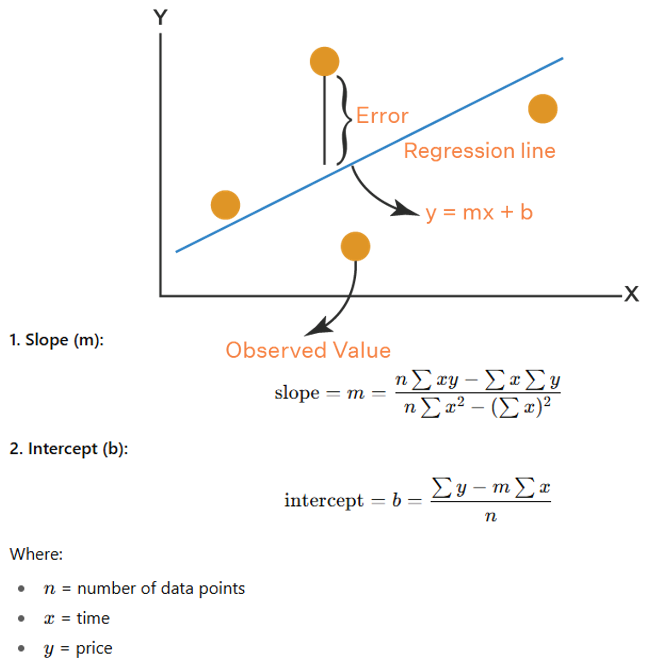
Esto garantizará una colocación matemáticamente precisa de las líneas de tendencia, lo que permitirá obtener señales de negociación fiables. Definamos ahora una función para gestionar las líneas de tendencia.
//+------------------------------------------------------------------+
//| Check if starting point is already used                          |
//+------------------------------------------------------------------+
bool IsStartingPointUsed(datetime time, double price, bool is_support) {
   for (int i = 0; i < numStartingPoints; i++) {  //--- Iterate through starting points
      if (startingPoints[i].time == time && MathAbs(startingPoints[i].price - price) < TouchTolerance * _Point && startingPoints[i].is_support == is_support) { //--- Check match
         return true;                             //--- Return used
      }
   }
   return false;                                   //--- Return not used
}

//+------------------------------------------------------------------+
//| Remove trendline from storage and optionally chart objects       |
//+------------------------------------------------------------------+
void RemoveTrendlineFromStorage(int index) {
   if (index < 0 || index >= numTrendlines) return;                    //--- Check valid index
   Print("Removing trendline from storage: ", trendlines[index].name); //--- Log removal
   if (DeleteExpiredObjects) {                                         //--- Check deletion flag
      ObjectDelete(0, trendlines[index].name);                         //--- Delete trendline object
      for (int m = 0; m < trendlines[index].touch_count; m++) {        //--- Iterate touches
         string arrow_name = trendlines[index].name + "_touch" + IntegerToString(m); //--- Generate arrow name
         ObjectDelete(0, arrow_name);                                  //--- Delete touch arrow
         string text_name = trendlines[index].name + "_point_label" + IntegerToString(m); //--- Generate text name
         ObjectDelete(0, text_name);                                   //--- Delete point label
      }
      string label_name = trendlines[index].name + "_label";           //--- Generate label name
      ObjectDelete(0, label_name);                                     //--- Delete trendline label
      string signal_arrow = trendlines[index].name + "_signal_arrow";  //--- Generate signal arrow name
      ObjectDelete(0, signal_arrow);                                   //--- Delete signal arrow
      string signal_text = trendlines[index].name + "_signal_text";    //--- Generate signal text name
      ObjectDelete(0, signal_text);                                    //--- Delete signal text
   }
   for (int i = index; i < numTrendlines - 1; i++) {                   //--- Shift array
      trendlines[i] = trendlines[i + 1];                               //--- Copy next trendline
   }
   ArrayResize(trendlines, numTrendlines - 1);                         //--- Resize trendlines array
   numTrendlines--;                                                    //--- Decrement trendlines count
}
Procedemos a implementar funciones de utilidad para gestionar los puntos de inicio de las líneas de tendencia y su limpieza, garantizando un seguimiento eficaz de las líneas de tendencia y una gestión óptima de los gráficos. En primer lugar, creamos la función «IsStartingPointUsed», que recorre los «numStartingPoints» del array «startingPoints» y comprueba si un «time», un «price» y un «is_support» determinados coinciden con algún punto de partida existente, comparando el «time» de forma exacta, el «price» dentro de «TouchTolerance * _Point» utilizando MathAbs, y «is_support», devolviendo «true» si lo encuentra o «false» si no. A continuación, procedemos a implementar la función «RemoveTrendlineFromStorage», que comprueba que el valor de «index» sea válido en relación con «numTrendlines», sale de la función si no lo es y registra la eliminación.
Si «DeleteExpiredObjects» es «true», eliminamos el objeto de línea de tendencia con ObjectDelete para «trendlines[index].name»; recorremos «touch_count» para eliminar las flechas de contacto y las etiquetas con nombres del tipo «trendlines[index].name + “_touch” + IntegerToString(m)» y «trendlines[index].name + “_point_label” + IntegerToString(m)», y eliminamos la etiqueta de la línea de tendencia, la flecha de señal y el texto de señal utilizando «label_name», «signal_arrow» y «signal_text». Por último, desplazamos la matriz «trendlines» de «index» a «numTrendlines - 1» para eliminar la entrada, redimensionamos «trendlines» con ArrayResize y disminuimos su número, lo que ayuda a evitar líneas de tendencia duplicadas y a eliminar de forma eficaz las líneas de tendencia caducadas o rotas. Definamos ahora una función para calcular y trazar las líneas de tendencia utilizando las funciones auxiliares que hemos definido.
//+------------------------------------------------------------------+
//| Find and draw trendlines if no active one exists                 |
//+------------------------------------------------------------------+
void FindAndDrawTrendlines(bool isSupport) {
   bool has_active = false;                       //--- Initialize active flag
   for (int i = 0; i < numTrendlines; i++) {      //--- Iterate through trendlines
      if (trendlines[i].is_support == isSupport) { //--- Check type match
         has_active = true;                       //--- Set active flag
         break;                                   //--- Exit loop
      }
   }
   if (has_active) return;                        //--- Exit if active trendline exists
   Swing swings[];                                //--- Initialize swings array
   int numSwings;                                 //--- Initialize swings count
   color lineColor;                               //--- Initialize line color
   string prefix;                                 //--- Initialize prefix
   if (isSupport) {                               //--- Handle support case
      numSwings = numLows;                        //--- Set number of lows
      ArrayResize(swings, numSwings);             //--- Resize swings array
      for (int i = 0; i < numSwings; i++) {       //--- Iterate through lows
         swings[i].time = swingLows[i].time;      //--- Copy low time
         swings[i].price = swingLows[i].price;    //--- Copy low price
      }
      lineColor = SupportLineColor;               //--- Set support line color
      prefix = "Trendline_Support_";              //--- Set support prefix
   } else {                                       //--- Handle resistance case
      numSwings = numHighs;                       //--- Set number of highs
      ArrayResize(swings, numSwings);             //--- Resize swings array
      for (int i = 0; i < numSwings; i++) {       //--- Iterate through highs
         swings[i].time = swingHighs[i].time;     //--- Copy high time
         swings[i].price = swingHighs[i].price;   //--- Copy high price
      }
      lineColor = ResistanceLineColor;            //--- Set resistance line color
      prefix = "Trendline_Resistance_";           //--- Set resistance prefix
   }
   if (numSwings < 2) return;                     //--- Exit if insufficient swings
   double pointValue = _Point;                    //--- Get point value
   double touch_tolerance = TouchTolerance * pointValue; //--- Calculate touch tolerance
   double pen_tolerance = PenetrationTolerance * pointValue; //--- Calculate penetration tolerance
   int best_j = -1;                               //--- Initialize best j index
   int max_touches = 0;                           //--- Initialize max touches
   int best_touch_indices[];                      //--- Initialize best touch indices
   double best_slope = 0.0;                       //--- Initialize best slope
   double best_intercept = 0.0;                   //--- Initialize best intercept
   datetime best_min_time = 0;                    //--- Initialize best min time
   for (int i = 0; i < numSwings - 1; i++) {      //--- Iterate through first points
      for (int j = i + 1; j < numSwings; j++) {   //--- Iterate through second points
         datetime time1 = swings[i].time;         //--- Get first time
         double price1 = swings[i].price;         //--- Get first price
         datetime time2 = swings[j].time;         //--- Get second time
         double price2 = swings[j].price;         //--- Get second price
         double dt = (double)(time2 - time1);     //--- Calculate time difference
         if (dt <= 0) continue;                   //--- Skip invalid time difference
         double initial_slope = (price2 - price1) / dt; //--- Calculate initial slope
         int touch_indices[];                     //--- Initialize touch indices
         ArrayResize(touch_indices, 0);           //--- Resize touch indices
         int touches = 0;                         //--- Initialize touches count
         ArrayResize(touch_indices, touches + 1); //--- Add first index
         touch_indices[touches] = i;              //--- Set first index
         touches++;                               //--- Increment touches
         ArrayResize(touch_indices, touches + 1); //--- Add second index
         touch_indices[touches] = j;              //--- Set second index
         touches++;                               //--- Increment touches
         for (int k = 0; k < numSwings; k++) {    //--- Iterate through swings
            if (k == i || k == j) continue;       //--- Skip used indices
            datetime tk = swings[k].time;         //--- Get swing time
            double dk = (double)(tk - time1);     //--- Calculate time difference
            double expected = price1 + initial_slope * dk; //--- Calculate expected price
            double actual = swings[k].price;      //--- Get actual price
            if (MathAbs(expected - actual) <= touch_tolerance) { //--- Check touch within tolerance
               ArrayResize(touch_indices, touches + 1); //--- Add index
               touch_indices[touches] = k;        //--- Set index
               touches++;                         //--- Increment touches
            }
         }
         if (touches >= MinTouches) {             //--- Check minimum touches
            ArraySort(touch_indices);             //--- Sort touch indices
            bool valid_spacing = true;            //--- Initialize spacing flag
            for (int m = 0; m < touches - 1; m++) { //--- Iterate through touches
               int idx1 = touch_indices[m];       //--- Get first index
               int idx2 = touch_indices[m + 1];   //--- Get second index
               int bar1 = iBarShift(_Symbol, _Period, swings[idx1].time); //--- Get first bar
               int bar2 = iBarShift(_Symbol, _Period, swings[idx2].time); //--- Get second bar
               int diff = MathAbs(bar1 - bar2);   //--- Calculate bar difference
               if (diff < MinBarSpacing) {        //--- Check minimum spacing
                  valid_spacing = false;          //--- Mark invalid spacing
                  break;                          //--- Exit loop
               }
            }
            if (valid_spacing) {                  //--- Check valid spacing
               datetime touch_times[];            //--- Initialize touch times
               double touch_prices[];             //--- Initialize touch prices
               ArrayResize(touch_times, touches); //--- Resize times array
               ArrayResize(touch_prices, touches); //--- Resize prices array
               for (int m = 0; m < touches; m++) { //--- Iterate through touches
                  int idx = touch_indices[m];      //--- Get index
                  touch_times[m] = swings[idx].time;   //--- Set time
                  touch_prices[m] = swings[idx].price; //--- Set price
               }
               double slope, intercept;                //--- Declare slope and intercept
               LeastSquaresFit(touch_times, touch_prices, touches, slope, intercept); //--- Perform least squares fit
               int adjusted_touch_indices[];           //--- Initialize adjusted indices
               ArrayResize(adjusted_touch_indices, 0); //--- Resize adjusted indices
               int adjusted_touches = 0;               //--- Initialize adjusted touches count
               for (int k = 0; k < numSwings; k++) {   //--- Iterate through swings
                  double expected = intercept + slope * (double)swings[k].time; //--- Calculate expected price
                  double actual = swings[k].price;     //--- Get actual price
                  if (MathAbs(expected - actual) <= touch_tolerance) { //--- Check touch
                     ArrayResize(adjusted_touch_indices, adjusted_touches + 1); //--- Add index
                     adjusted_touch_indices[adjusted_touches] = k; //--- Set index
                     adjusted_touches++;               //--- Increment adjusted touches
                  }
               }
               if (adjusted_touches >= MinTouches) { //--- Check minimum adjusted touches
                  datetime temp_min_time = swings[adjusted_touch_indices[0]].time; //--- Get min time
                  double temp_ref_price = intercept + slope * (double)temp_min_time; //--- Calculate ref price
                  if (ValidateTrendline(isSupport, temp_min_time, temp_min_time, temp_ref_price, slope, pen_tolerance)) { //--- Validate trendline
                     datetime temp_max_time = swings[adjusted_touch_indices[adjusted_touches - 1]].time; //--- Get max time
                     double temp_max_price = intercept + slope * (double)temp_max_time; //--- Calculate max price
                     double angle = CalculateAngle(temp_min_time, temp_ref_price, temp_max_time, temp_max_price); //--- Calculate angle
                     double abs_angle = MathAbs(angle); //--- Get absolute angle
                     if (abs_angle >= MinAngle && abs_angle <= MaxAngle) { //--- Check angle range
                        if (adjusted_touches > max_touches || (adjusted_touches == max_touches && j > best_j)) { //--- Check better trendline
                           max_touches = adjusted_touches; //--- Update max touches
                           best_j = j;                     //--- Update best j
                           best_slope = slope;             //--- Update best slope
                           best_intercept = intercept;     //--- Update best intercept
                           best_min_time = temp_min_time;  //--- Update best min time
                           ArrayResize(best_touch_indices, adjusted_touches); //--- Resize best indices
                           ArrayCopy(best_touch_indices, adjusted_touch_indices); //--- Copy indices
                        }
                     }
                  }
               }
            }
         }
      }
   }
   if (max_touches < MinTouches) {                //--- Check insufficient touches
      string type = isSupport ? "Support" : "Resistance"; //--- Set type string
      return;                                     //--- Exit function
   }
   int touch_indices[];                           //--- Initialize touch indices
   ArrayResize(touch_indices, max_touches);       //--- Resize touch indices
   ArrayCopy(touch_indices, best_touch_indices);  //--- Copy best indices
   int touches = max_touches;                     //--- Set touches count
   datetime min_time = best_min_time;             //--- Set min time
   double price_min = best_intercept + best_slope * (double)min_time; //--- Calculate min price
   datetime max_time = swings[touch_indices[touches - 1]].time; //--- Set max time
   double price_max = best_intercept + best_slope * (double)max_time; //--- Calculate max price
   datetime start_time_check = min_time;          //--- Set start time check
   double start_price_check = swings[touch_indices[0]].price; //--- Set start price check
   if (IsStartingPointUsed(start_time_check, start_price_check, isSupport)) { //--- Check used starting point
      return;                                     //--- Skip if used
   }
   datetime time_end = iTime(_Symbol, _Period, 0) + PeriodSeconds(_Period) * ExtensionBars; //--- Calculate end time
   double dk_end = (double)(time_end - min_time);      //--- Calculate end time difference
   double price_end = price_min + best_slope * dk_end; //--- Calculate end price
   string unique_name = prefix + TimeToString(TimeCurrent(), TIME_DATE|TIME_MINUTES|TIME_SECONDS); //--- Generate unique name
   if (ObjectFind(0, unique_name) < 0) {               //--- Check if trendline exists
      ObjectCreate(0, unique_name, OBJ_TREND, 0, min_time, price_min, time_end, price_end); //--- Create trendline
      ObjectSetInteger(0, unique_name, OBJPROP_COLOR, lineColor);   //--- Set color
      ObjectSetInteger(0, unique_name, OBJPROP_STYLE, STYLE_SOLID); //--- Set style
      ObjectSetInteger(0, unique_name, OBJPROP_WIDTH, 1);           //--- Set width
      ObjectSetInteger(0, unique_name, OBJPROP_RAY_RIGHT, false);   //--- Disable right ray
      ObjectSetInteger(0, unique_name, OBJPROP_RAY_LEFT, false);    //--- Disable left ray
      ObjectSetInteger(0, unique_name, OBJPROP_BACK, false);        //--- Set to foreground
   }
   ArrayResize(trendlines, numTrendlines + 1);                      //--- Resize trendlines array
   trendlines[numTrendlines].name = unique_name;                    //--- Set trendline name
   trendlines[numTrendlines].start_time = min_time;                 //--- Set start time
   trendlines[numTrendlines].end_time = time_end;                   //--- Set end time
   trendlines[numTrendlines].start_price = price_min;               //--- Set start price
   trendlines[numTrendlines].end_price = price_end;                 //--- Set end price
   trendlines[numTrendlines].slope = best_slope;                    //--- Set slope
   trendlines[numTrendlines].is_support = isSupport;                //--- Set type
   trendlines[numTrendlines].touch_count = touches;                 //--- Set touch count
   trendlines[numTrendlines].creation_time = TimeCurrent();         //--- Set creation time
   trendlines[numTrendlines].is_signaled = false;                   //--- Set signaled flag
   ArrayResize(trendlines[numTrendlines].touch_indices, touches);   //--- Resize touch indices
   ArrayCopy(trendlines[numTrendlines].touch_indices, touch_indices); //--- Copy touch indices
   numTrendlines++;                                                 //--- Increment trendlines count
   ArrayResize(startingPoints, numStartingPoints + 1);              //--- Resize starting points array
   startingPoints[numStartingPoints].time = start_time_check; //--- Set starting point time
   startingPoints[numStartingPoints].price = start_price_check; //--- Set starting point price
   startingPoints[numStartingPoints].is_support = isSupport; //--- Set starting point type
   numStartingPoints++;                           //--- Increment starting points count
   if (DrawTouchArrows) {                         //--- Check draw arrows
      for (int m = 0; m < touches; m++) {         //--- Iterate through touches
         int idx = touch_indices[m];              //--- Get touch index
         datetime tk_time = swings[idx].time;     //--- Get touch time
         double tk_price = swings[idx].price;     //--- Get touch price
         string arrow_name = unique_name + "_touch" + IntegerToString(m); //--- Generate arrow name
         if (ObjectFind(0, arrow_name) < 0) {                             //--- Check if arrow exists
            ObjectCreate(0, arrow_name, OBJ_ARROW, 0, tk_time, tk_price); //--- Create touch arrow
            ObjectSetInteger(0, arrow_name, OBJPROP_ARROWCODE, 159);      //--- Set arrow code
            ObjectSetInteger(0, arrow_name, OBJPROP_ANCHOR, isSupport ? ANCHOR_TOP : ANCHOR_BOTTOM); //--- Set anchor
            ObjectSetInteger(0, arrow_name, OBJPROP_COLOR, lineColor);    //--- Set color
            ObjectSetInteger(0, arrow_name, OBJPROP_WIDTH, 1);            //--- Set width
            ObjectSetInteger(0, arrow_name, OBJPROP_BACK, false);         //--- Set to foreground
         }
      }
   }
   double angle = CalculateAngle(min_time, price_min, max_time, price_max); //--- Calculate angle
   string type = isSupport ? "Support" : "Resistance"; //--- Set type string
   Print(type + " Trendline " + unique_name + " drawn with " + IntegerToString(touches) + " touches. Inclination angle: " + DoubleToString(angle, 2) + " degrees."); //--- Log trendline
   if (DrawLabels) {                              //--- Check draw labels
      datetime mid_time = min_time + (max_time - min_time) / 2; //--- Calculate mid time
      double dk_mid = (double)(mid_time - min_time); //--- Calculate mid time difference
      double mid_price = price_min + best_slope * dk_mid; //--- Calculate mid price
      double label_offset = 20 * _Point * (isSupport ? -1 : 1); //--- Calculate label offset
      double label_price = mid_price + label_offset; //--- Calculate label price
      int label_anchor = isSupport ? ANCHOR_TOP : ANCHOR_BOTTOM; //--- Set label anchor
      string label_text = type + " Trendline";    //--- Set label text
      string label_name = unique_name + "_label"; //--- Generate label name
      if (ObjectFind(0, label_name) < 0) {        //--- Check if label exists
         ObjectCreate(0, label_name, OBJ_TEXT, 0, mid_time, label_price); //--- Create label
         ObjectSetString(0, label_name, OBJPROP_TEXT, label_text); //--- Set text
         ObjectSetInteger(0, label_name, OBJPROP_COLOR, clrBlack); //--- Set color
         ObjectSetInteger(0, label_name, OBJPROP_FONTSIZE, 8); //--- Set font size
         ObjectSetInteger(0, label_name, OBJPROP_ANCHOR, label_anchor); //--- Set anchor
         ObjectSetDouble(0, label_name, OBJPROP_ANGLE, angle); //--- Set angle
         ObjectSetInteger(0, label_name, OBJPROP_BACK, false); //--- Set to foreground
      }
      color point_label_color = isSupport ? clrSaddleBrown : clrDarkGoldenrod; //--- Set point label color
      double point_text_offset = 20.0 * _Point;   //--- Set point text offset
      for (int m = 0; m < touches; m++) {         //--- Iterate through touches
         int idx = touch_indices[m];              //--- Get touch index
         datetime tk_time = swings[idx].time;     //--- Get touch time
         double tk_price = swings[idx].price;     //--- Get touch price
         double text_price;                       //--- Initialize text price
         int point_text_anchor;                   //--- Initialize text anchor
         if (isSupport) {                         //--- Handle support
            text_price = tk_price - point_text_offset; //--- Set text price below
            point_text_anchor = ANCHOR_LEFT;      //--- Set left anchor
         } else {                                 //--- Handle resistance
            text_price = tk_price + point_text_offset; //--- Set text price above
            point_text_anchor = ANCHOR_BOTTOM;    //--- Set bottom anchor
         }
         string text_name = unique_name + "_point_label" + IntegerToString(m); //--- Generate text name
         string point_text = "Pt " + IntegerToString(m + 1); //--- Set point text
         if (ObjectFind(0, text_name) < 0) {     //--- Check if text exists
            ObjectCreate(0, text_name, OBJ_TEXT, 0, tk_time, text_price); //--- Create text
            ObjectSetString(0, text_name, OBJPROP_TEXT, point_text); //--- Set text
            ObjectSetInteger(0, text_name, OBJPROP_COLOR, point_label_color); //--- Set color
            ObjectSetInteger(0, text_name, OBJPROP_FONTSIZE, 8); //--- Set font size
            ObjectSetInteger(0, text_name, OBJPROP_ANCHOR, point_text_anchor); //--- Set anchor
            ObjectSetDouble(0, text_name, OBJPROP_ANGLE, 0); //--- Set angle
            ObjectSetInteger(0, text_name, OBJPROP_BACK, false); //--- Set to foreground
         }
      }
   }
}
Aquí implementamos la función «FindAndDrawTrendlines» para identificar y trazar líneas de tendencia, asegurándonos de que solo haya una línea de tendencia activa por tipo con puntos de contacto óptimos. En primer lugar, comprobamos si existe una línea de tendencia recorriendo «numTrendlines» en «trendlines», estableciendo «has_active» en «true» si «is_support» coincide con la entrada, y saliendo si la encontramos. A continuación, procedemos a configurar el soporte o la resistencia en función de «isSupport»: para el soporte, copiamos «numLows» en «numSwings», rellenamos «swings» a partir de «swingLows», establecemos «lineColor» en «SupportLineColor» y «prefix» en «Trendline_Support_»; para la resistencia, utilizamos «numHighs», «swingHighs», «ResistanceLineColor» y «Trendline_Resistance_», y salimos si «numSwings» es menor que 2. A continuación, calculamos «touch_tolerance» y «pen_tolerance» utilizando «TouchTolerance» y «PenetrationTolerance» con _Point, y recorremos «numSwings» pares para calcular una «initial_slope» inicial, recopilando «touch_indices» para los puntos que se encuentran dentro de la tolerancia de contacto.
Si los puntos de contacto cumplen el requisito «MinTouches» y superan el «MinBarSpacing» mediante iBarShift, utilizamos «LeastSquaresFit» para obtener la «pendiente» y la «ordenada al origen», volvemos a comprobar los puntos de contacto y validamos con «ValidateTrendline» y «CalculateAngle» en función de «MinAngle» y «MaxAngle», actualizando «best_j», «max_touches», «best_slope», «best_intercept», «best_min_time» y «best_touch_indices» para obtener la mejor línea de tendencia. Por último, si «max_touches» cumple con «MinTouches» y el punto inicial no está en uso según «IsStartingPointUsed», creamos una línea de tendencia con la función ObjectCreate como OBJ_TREND utilizando «unique_name», dibujamos flechas de contacto y etiquetas si «DrawTouchArrows» y «DrawLabels» son verdaderos, almacenamos los detalles en «trendlines», añadimos el punto inicial a los puntos iniciales y lo registramos, garantizando así la creación precisa de la línea de tendencia. Lo que queda ahora es gestionar las líneas de tendencia existentes mediante actualizaciones continuas y comprobar si se producen cruces que generen señales. Para simplificar, incorporaremos toda la lógica en una única función.
//+------------------------------------------------------------------+
//| Update trendlines and check for signals                          |
//+------------------------------------------------------------------+
void UpdateTrendlines() {
   datetime current_time = iTime(_Symbol, _Period, 0);       //--- Get current time
   double pointValue = _Point;                               //--- Get point value
   double pen_tolerance = PenetrationTolerance * pointValue; //--- Calculate penetration tolerance
   double touch_tolerance = TouchTolerance * pointValue;     //--- Calculate touch tolerance
   for (int i = numTrendlines - 1; i >= 0; i--) {            //--- Iterate trendlines backward
      string type = trendlines[i].is_support ? "Support" : "Resistance"; //--- Determine trendline type
      string name = trendlines[i].name;                      //--- Get trendline name
      if (current_time > trendlines[i].end_time) {           //--- Check if expired
         PrintFormat("%s trendline %s is no longer valid (expired). End time: %s, Current time: %s.", type, name, TimeToString(trendlines[i].end_time), TimeToString(current_time)); //--- Log expiration
         RemoveTrendlineFromStorage(i);                      //--- Remove trendline
         continue;                                           //--- Skip to next
      }
      datetime prev_bar_time = iTime(_Symbol, _Period, 1);   //--- Get previous bar time
      double dk = (double)(prev_bar_time - trendlines[i].start_time); //--- Calculate time difference
      double line_price = trendlines[i].start_price + trendlines[i].slope * dk; //--- Calculate line price
      double prev_low = iLow(_Symbol, _Period, 1);           //--- Get previous bar low
      double prev_high = iHigh(_Symbol, _Period, 1);         //--- Get previous bar high
      bool broken = false;                                   //--- Initialize broken flag
      if (trendlines[i].is_support && prev_low < line_price - pen_tolerance) { //--- Check support break
         PrintFormat("%s trendline %s is no longer valid (broken by price). Line price: %.5f, Prev low: %.5f, Penetration: %.5f points.", type, name, line_price, prev_low, PenetrationTolerance); //--- Log break
         RemoveTrendlineFromStorage(i);           //--- Remove trendline
         broken = true;                           //--- Set broken flag
      } else if (!trendlines[i].is_support && prev_high > line_price + pen_tolerance) { //--- Check resistance break
         PrintFormat("%s trendline %s is no longer valid (broken by price). Line price: %.5f, Prev high: %.5f, Penetration: %.5f points.", type, name, line_price, prev_high, PenetrationTolerance); //--- Log break
         RemoveTrendlineFromStorage(i);           //--- Remove trendline
         broken = true;                           //--- Set broken flag
      }
      if (!broken && !trendlines[i].is_signaled && EnableTradingSignals) { //--- Check for trading signal
         bool touched = false;                    //--- Initialize touched flag
         string signal_type = "";                 //--- Initialize signal type
         color signal_color = clrNONE;            //--- Initialize signal color
         int arrow_code = 0;                      //--- Initialize arrow code
         int anchor = 0;                          //--- Initialize anchor
         double text_angle = 0.0;                 //--- Initialize text angle
         double text_offset = 0.0;                //--- Initialize text offset
         double text_price = 0.0;                 //--- Initialize text price
         int text_anchor = 0;                     //--- Initialize text anchor
         if (trendlines[i].is_support && MathAbs(prev_low - line_price) <= touch_tolerance) { //--- Check support touch
            touched = true;                       //--- Set touched flag
            signal_type = "BUY";                  //--- Set buy signal
            signal_color = clrBlue;               //--- Set blue color
            arrow_code = 217;                     //--- Set up arrow for support (BUY)
            anchor = ANCHOR_TOP;                  //--- Set top anchor
            text_angle = -90.0;                   //--- Set vertical upward for BUY
            text_offset = -20 * pointValue;        //--- Set text offset
            text_price = line_price + text_offset; //--- Calculate text price
            text_anchor = ANCHOR_LEFT;            //--- Set left anchor
            double Ask = NormalizeDouble(SymbolInfoDouble(_Symbol, SYMBOL_ASK), _Digits); //--- Get ask price
            double SL = NormalizeDouble(Ask - inpSLPoints * _Point, _Digits); //--- Calculate stop loss
            double TP = NormalizeDouble(Ask + (inpSLPoints * inpRRRatio) * _Point, _Digits); //--- Calculate take profit
            obj_Trade.Buy(inpLot, _Symbol, Ask, SL, TP); //--- Execute buy trade
         } else if (!trendlines[i].is_support && MathAbs(prev_high - line_price) <= touch_tolerance) { //--- Check resistance touch
            touched = true;                       //--- Set touched flag
            signal_type = "SELL";                 //--- Set sell signal
            signal_color = clrRed;                //--- Set red color
            arrow_code = 218;                     //--- Set down arrow for resistance (SELL)
            anchor = ANCHOR_BOTTOM;               //--- Set bottom anchor
            text_angle = 90.0;                    //--- Set vertical downward for SELL
            text_offset = 20 * pointValue;       //--- Set text offset
            text_price = line_price + text_offset; //--- Calculate text price
            text_anchor = ANCHOR_BOTTOM;          //--- Set bottom anchor
            double Bid = NormalizeDouble(SymbolInfoDouble(_Symbol, SYMBOL_BID), _Digits); //--- Get bid price
            double SL = NormalizeDouble(Bid + inpSLPoints * _Point, _Digits); //--- Calculate stop loss
            double TP = NormalizeDouble(Bid - (inpSLPoints * inpRRRatio) * _Point, _Digits); //--- Calculate take profit
            obj_Trade.Sell(inpLot, _Symbol, Bid, SL, TP); //--- Execute sell trade
         }
         if (touched) {                           //--- Check if touched
            PrintFormat("Signal generated for %s trendline %s: %s at price %.5f, time %s.", type, name, signal_type, line_price, TimeToString(current_time)); //--- Log signal
            string arrow_name = name + "_signal_arrow"; //--- Generate signal arrow name
            if (ObjectFind(0, arrow_name) < 0) {  //--- Check if arrow exists
               ObjectCreate(0, arrow_name, OBJ_ARROW, 0, prev_bar_time, line_price); //--- Create signal arrow
               ObjectSetInteger(0, arrow_name, OBJPROP_ARROWCODE, arrow_code); //--- Set arrow code
               ObjectSetInteger(0, arrow_name, OBJPROP_ANCHOR, anchor); //--- Set anchor
               ObjectSetInteger(0, arrow_name, OBJPROP_COLOR, signal_color); //--- Set color
               ObjectSetInteger(0, arrow_name, OBJPROP_WIDTH, 1); //--- Set width
               ObjectSetInteger(0, arrow_name, OBJPROP_BACK, false); //--- Set to foreground
            }
            string text_name = name + "_signal_text"; //--- Generate signal text name
            if (ObjectFind(0, text_name) < 0) {   //--- Check if text exists
               ObjectCreate(0, text_name, OBJ_TEXT, 0, prev_bar_time, text_price); //--- Create signal text
               ObjectSetString(0, text_name, OBJPROP_TEXT, " " + signal_type); //--- Set text content
               ObjectSetInteger(0, text_name, OBJPROP_COLOR, signal_color); //--- Set color
               ObjectSetInteger(0, text_name, OBJPROP_FONTSIZE, 10); //--- Set font size
               ObjectSetInteger(0, text_name, OBJPROP_ANCHOR, text_anchor); //--- Set anchor
               ObjectSetDouble(0, text_name, OBJPROP_ANGLE, text_angle); //--- Set angle
               ObjectSetInteger(0, text_name, OBJPROP_BACK, false); //--- Set to foreground
            }
            trendlines[i].is_signaled = true;     //--- Set signaled flag
         }
      }
   }
}
Para garantizar que se supervisen las líneas de tendencia activas y se tomen las medidas oportunas, creamos la función «UpdateTrendlines», que no devuelve ningún valor, ya que no necesitamos devolver nada. En primer lugar, obtenemos el valor «current_time» utilizando iTime para la barra actual y calculamos «pointValue» como _Point, «pen_tolerance» como «PenetrationTolerance * pointValue» y «touch_tolerance» como «TouchTolerance * pointValue». A continuación, procedemos a recorrer hacia atrás «numTrendlines» en la matriz «trendlines», determinando el «tipo» de la línea de tendencia como «Soporte» o «Resistencia» en función de «is_support», y comprobando si «current_time» supera a «end_time», registrando que ha expirado con PrintFormat y eliminando la línea de tendencia con «RemoveTrendlineFromStorage» si ha vencido.
A continuación, para las líneas de tendencia que no han caducado, calculamos el precio de la línea de tendencia en «prev_bar_time» (a partir de iTime en el desplazamiento 1) utilizando «start_price + slope * dk», comprobamos si la línea de tendencia se ha roto comparando «prev_low» o «prev_high» con «line_price» con «pen_tolerance», registramos las rupturas con «PrintFormat» y, si se ha roto, la eliminamos con «RemoveTrendlineFromStorage».
Por último, si no se ha roto y «is_signaled» es falso con «EnableTradingSignals» en verdadero, comprobamos si se han producido toques: para el soporte, si «prev_low» se encuentra dentro de «touch_tolerance» respecto a «line_price», establecemos una señal de «COMPRA», ejecutamos una operación de compra con «obj_Trade.Buy» utilizando «inpLot», «Ask», «SL» y «TP» calculados con «inpSLPoints» e «inpRRRatio», y dibujamos una flecha azul hacia arriba (código 217) y un texto; en cuanto a la resistencia, si «prev_high» se encuentra dentro de la tolerancia, establecemos una señal de «VENTA», ejecutamos una operación de venta con «obj_Trade.Sell», y dibujamos una flecha roja hacia abajo (código 218) y un texto, registrando con «PrintFormat», creando objetos con ObjectCreate, estableciendo propiedades con ObjectSetInteger y ObjectSetString, y marcando «is_signaled» como verdadero, asegurándonos de que las líneas de tendencia se actualicen y generen señales de trading precisas. La elección de los códigos de flecha que quieras utilizar depende de ti. A continuación te ofrecemos una lista de códigos que puedes utilizar de entre los códigos Wingdings definidos por MQL5.
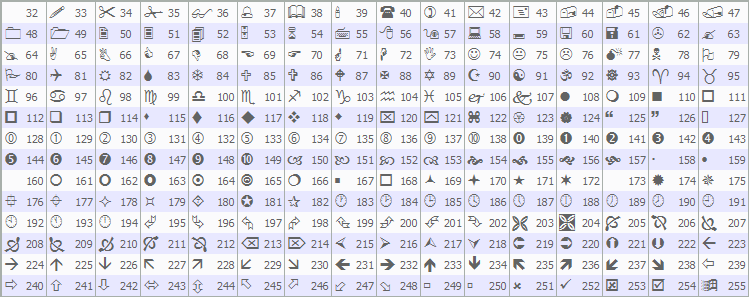
Ahora podemos llamar a estas funciones en el controlador de eventos OnTick para que el sistema proporcione respuesta basada en ticks.
//+------------------------------------------------------------------+
//| Expert tick function                                             |
//+------------------------------------------------------------------+
void OnTick() {
   if (!IsNewBar()) return;                        //--- Exit if not new bar
   DetectSwings();                                 //--- Detect swings
   UpdateTrendlines();                             //--- Update trendlines
   FindAndDrawTrendlines(true);                    //--- Find/draw support trendlines
}
En el controlador de eventos OnTick, gestionamos la detección de líneas de tendencia y la lógica de negociación en cada nueva barra. En primer lugar, comprobamos si se ha formado una nueva barra llamando a la función «IsNewBar» y, si el resultado es falso, salimos inmediatamente para evitar un procesamiento innecesario. A continuación, llamamos a la función «DetectSwings» para identificar y actualizar los máximos y mínimos oscilantes almacenados en «swingHighs» y «swingLows». A continuación, invocamos «UpdateTrendlines» para validar las líneas de tendencia existentes, eliminar las caducadas o rotas y generar señales de negociación si se detectan toques del precio dentro de una tolerancia de toque definida. Por último, llamamos a la función «FindAndDrawTrendlines» con un parámetro «true» para crear líneas de tendencia de soporte, asegurándonos de que solo se dibujen nuevas líneas de tendencia si no existe ninguna línea de tendencia activa de tipo «soporte». Tras la compilación, obtenemos el siguiente resultado.
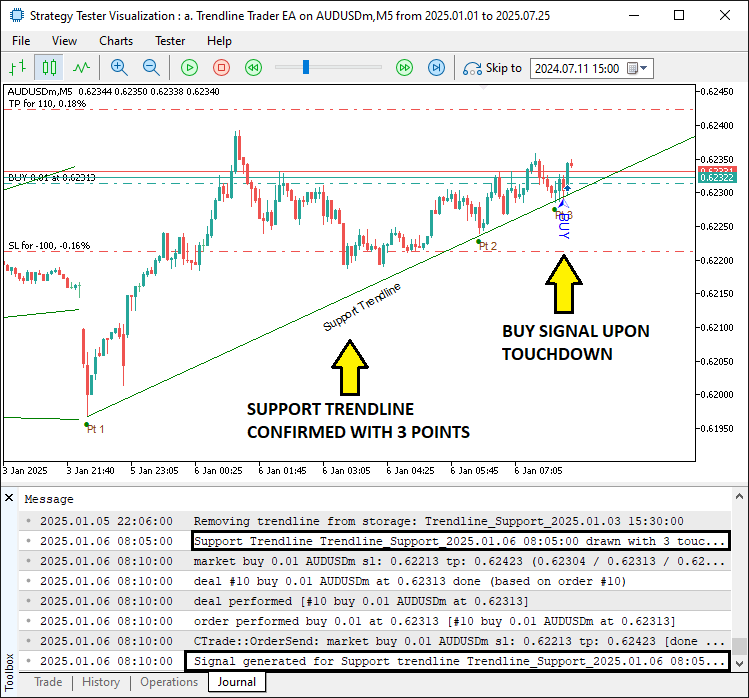
En la imagen podemos ver que localizamos, analizamos, trazamos y operamos con la línea de tendencia en el momento en que se toca. Las líneas caducadas también se eliminan correctamente de la matriz de almacenamiento. Podemos conseguir lo mismo con las líneas de tendencia de resistencia llamando a la misma función que para el soporte, pero indicando «false» como parámetro de entrada.
//--- other ontick functions

FindAndDrawTrendlines(false);                   //--- Find/draw resistance trendlines

//---
Tras añadir la llamada a la función y compilar el programa, obtenemos el siguiente resultado.
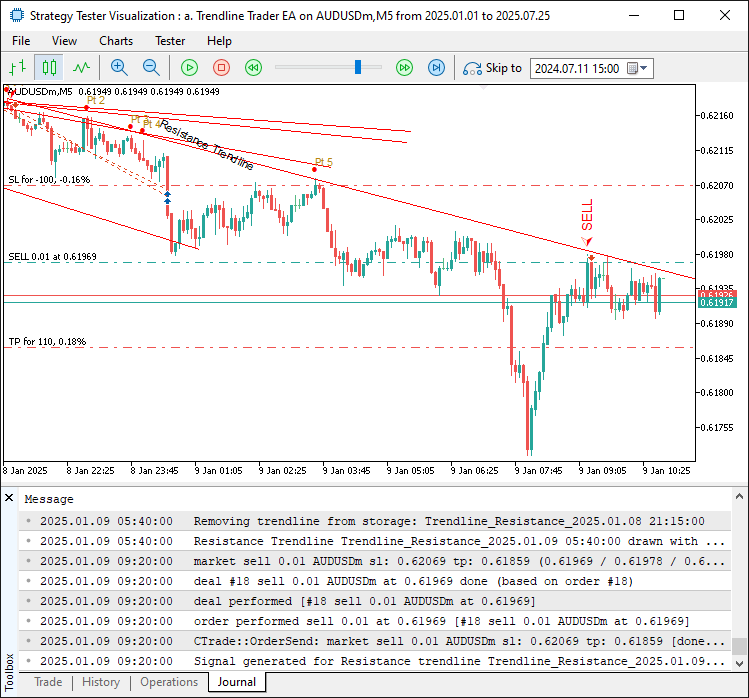
En la imagen podemos ver que también detectamos y operamos con las líneas de tendencia de resistencia. Cuando probamos y combinamos todo, obtenemos el siguiente resultado.
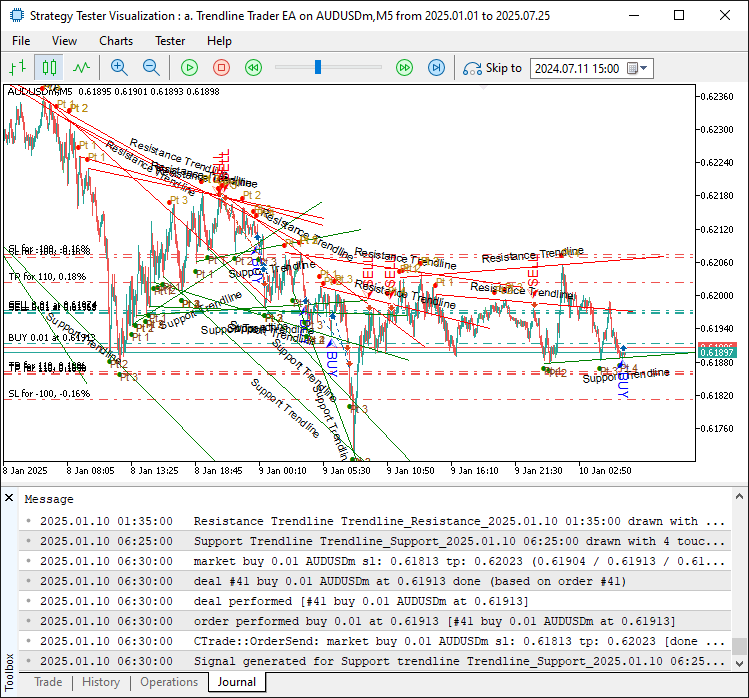
En la imagen podemos ver que detectamos las líneas de tendencia, las visualizamos y actuamos en consecuencia cuando el precio las toca, logrando así nuestros objetivos. Lo que queda por hacer es realizar pruebas retrospectivas del programa, y eso se aborda en la siguiente sección.
Backtesting
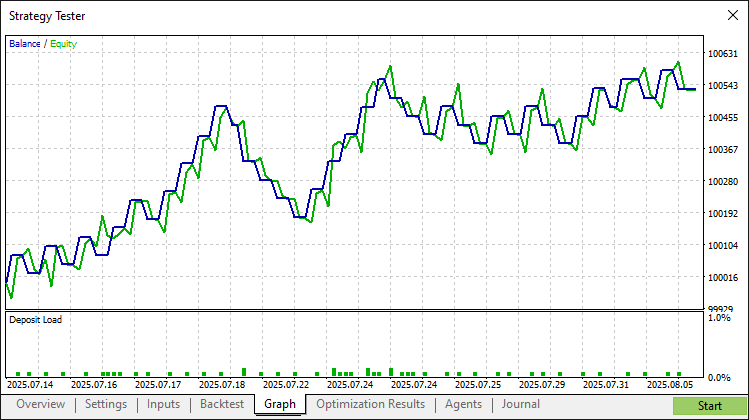
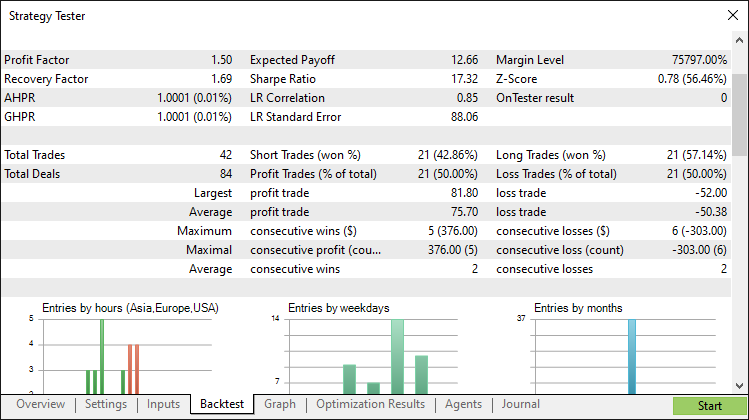
Tras realizar exhaustivas pruebas retrospectivas, hemos obtenido los siguientes resultados.
Gráfico de backtesting:
Informe de backtesting:
Conclusión
En conclusión, hemos desarrollado un programa de estrategia de trading basada en líneas de tendencia en MQL5 que utiliza el método de ajuste por mínimos cuadrados para detectar líneas de tendencia fiables de soporte y resistencia, generando señales automáticas de compra y venta con ayudas visuales como flechas y etiquetas. A través de componentes modulares como la estructura «TrendlineInfo» y funciones como «FindAndDrawTrendlines», ofrece un enfoque riguroso para el trading basado en tendencias que puedes perfeccionar ajustando sus parámetros.
Descargo de responsabilidad: Este artículo tiene fines exclusivamente educativos. Operar en los mercados financieros conlleva riesgos financieros significativos, y la volatilidad del mercado puede ocasionar pérdidas. Es fundamental realizar pruebas retrospectivas exhaustivas y una gestión de riesgos cuidadosa antes de implementar este programa en mercados reales.
Aprovechando los conceptos y la implementación presentados, podrás adaptar este sistema de líneas de tendencia a tu estilo de trading, mejorando así sus estrategias algorítmicas. ¡Feliz trading!
Traducción del inglés realizada por MetaQuotes Ltd.
Artículo original: https://www.mql5.com/en/articles/19077
Advertencia: todos los derechos de estos materiales pertenecen a MetaQuotes Ltd. Queda totalmente prohibido el copiado total o parcial.
Este artículo ha sido escrito por un usuario del sitio web y refleja su punto de vista personal. MetaQuotes Ltd. no se responsabiliza de la exactitud de la información ofrecida, ni de las posibles consecuencias del uso de las soluciones, estrategias o recomendaciones descritas.

 Utilizando redes neuronales en MetaTrader
 Integración de MQL5 con paquetes de procesamiento de datos (Parte 5): Aprendizaje adaptativo y flexibilidad
 Particularidades del trabajo con números del tipo double en MQL4
 Del básico al intermedio: Recursos

- Aplicaciones de trading gratuitas
- 8 000+ señales para copiar
- Noticias económicas para analizar los mercados financieros
Usted acepta la política del sitio web y las condiciones de uso