
MQL5での取引戦略の自動化(第25回):最小二乗法と動的シグナル生成を備えたTrendline Trader
 401
401
 0
0

はじめに
前回の記事(第24回)では、ロンドンセッションブレイクアウトシステムをMetaQuotes Language 5 (MQL5)で開発しました。これは、ロンドン市場開場前のレンジを利用してペンディング注文(指値・逆指値注文)を配置し、リスク管理やトレーリングストップを組み合わせることで、セッション単位の効果的な取引を可能にするものでした。今回の第25回では、最小二乗法を使用してサポートおよびレジスタンスのトレンドラインを検出するトレンドライン取引プログラムを作成します。このプログラムは、価格がトレンドラインに触れたときに自動的に売買シグナルを生成し、矢印などの視覚的インジケーターやカスタマイズ可能な取引パラメータで強化されます。本記事では以下のトピックを扱います。
この記事を読み終える頃には、トレンドに基づく取引のための強力なMQL5戦略を入手でき、カスタマイズも可能になっています。それでは始めましょう!
トレンドライン取引フレームワークの設計
トレンドライン取引とは、価格チャート上でスイングハイ(レジスタンス)やスイングロー(サポート)を結ぶ斜めの線を用いて、現在のトレンドを把握する手法です。価格が反発すると見込み、上昇トレンドでは上向きのトレンドライン(サポート)付近で買い、下降トレンドでは下向きのトレンドライン(レジスタンス)付近で売ります。トレンドラインをブレイクした場合は、トレンドの転換や弱まりのシグナルとなることが多く、トレーダーはポジションのエグジットや反転を検討します。以下は下降トレンドラインの例です。
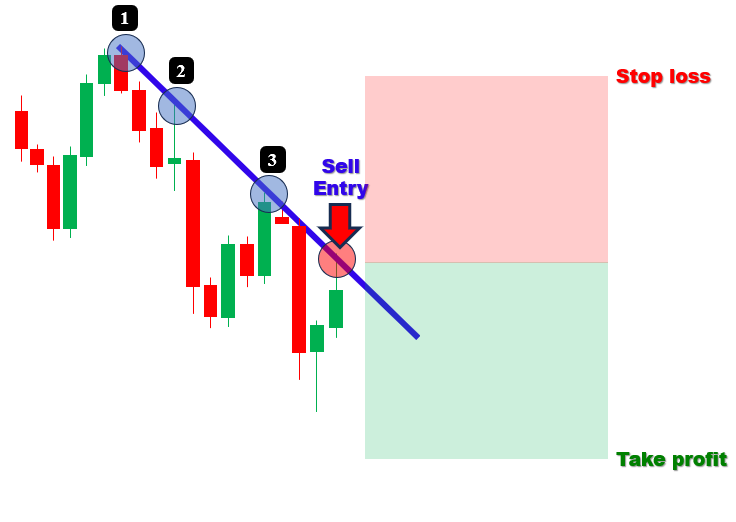
私たちは現在、最小二乗法を使用してサポートとレジスタンスのトレンドラインを検出し、価格がこれらのラインに触れたときに正確な売買シグナルを生成し、取引を自動化するTrendline Traderプログラムを開発しています。
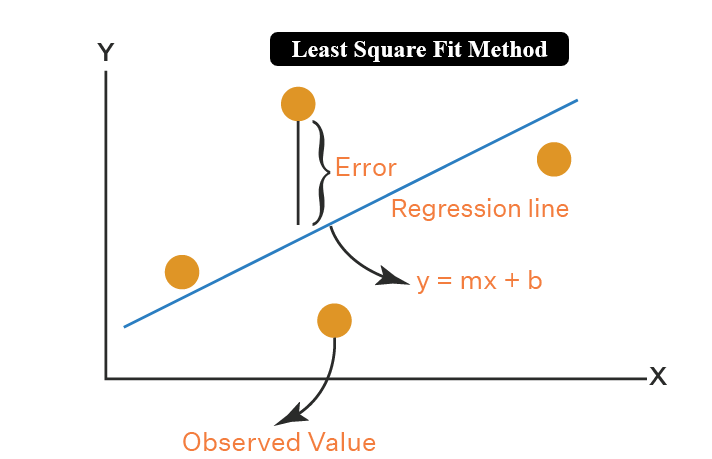
なお、最小二乗近似法について知っておく必要がある場合、最小二乗近似法とは、データ点と近似された直線(または曲線)との垂直方向の偏差(誤差)の二乗和を最小にすることで、データ点に最も適合する線を求めるために用いられる統計的手法です。これは、スイングポイント間の関係を最も正確に線形近似することができるため、予測、トレンド分析、およびこの分野におけるデータモデリングにとって不可欠になるため、私たちにとって重要になります。下の統計的なロジックをご覧ください。
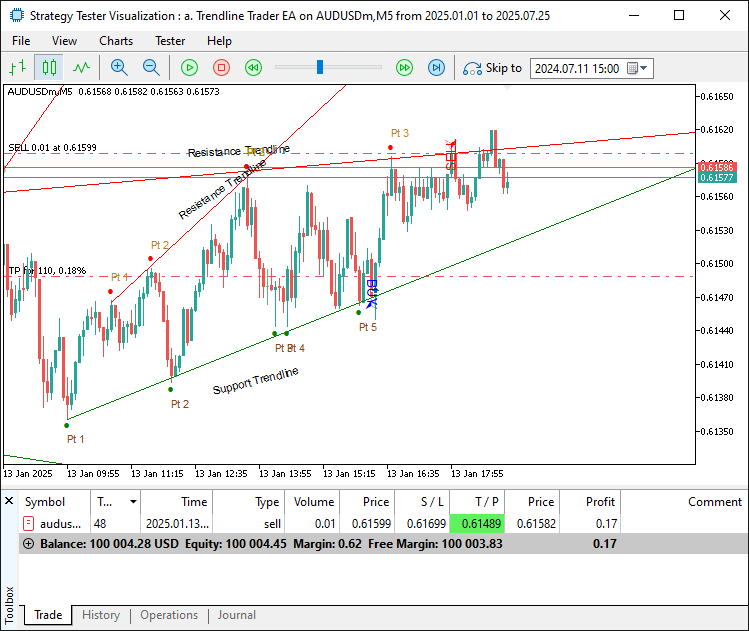
私たちは、数学的なトレンドライン検出を視覚的フィードバックおよび設定可能な取引パラメータと組み合わせることを計画しており、これによりダイナミックな市場においてトレンドの反発を効率的に活用できるようにします。スイングポイントを特定し、十分な接触点(最低3回の接触)を持つトレンドラインをフィットさせ、それらの整合性を検証し、リスク管理をおこないながら取引をトリガーし、明確化のためにトレンドラインと接触点をチャート上に表示することを意図しています。目指す結果を確認してから実装に進みます。
MQL5での実装
MQL5でプログラムを作成するには、まずMetaEditorを開き、ナビゲータに移動して、Indicatorsフォルダを見つけ、[新規作成]タブをクリックして、表示される手順に従ってファイルを作成します。ファイルが作成されたら、コーディング環境でプログラムをより柔軟にするための入力パラメータや構造体を宣言していきます。//+------------------------------------------------------------------+ //| a. Trendline Trader EA.mq5 | //| Copyright 2025, Allan Munene Mutiiria. | //| https://t.me/Forex_Algo_Trader | //+------------------------------------------------------------------+ #property copyright "Copyright 2025, Allan Munene Mutiiria." #property link "https://t.me/Forex_Algo_Trader" #property description "Trendline Trader using mean Least Squares Fit" #property version "1.00" #property strict #include <Trade\Trade.mqh> //--- Include Trade library for trading operations CTrade obj_Trade; //--- Instantiate trade object //+------------------------------------------------------------------+ //| Swing point structure | //+------------------------------------------------------------------+ struct Swing { //--- Define swing point structure datetime time; //--- Store swing time double price; //--- Store swing price }; //+------------------------------------------------------------------+ //| Starting point structure | //+------------------------------------------------------------------+ struct StartingPoint { //--- Define starting point structure datetime time; //--- Store starting point time double price; //--- Store starting point price bool is_support; //--- Indicate support/resistance flag }; //+------------------------------------------------------------------+ //| Trendline storage structure | //+------------------------------------------------------------------+ struct TrendlineInfo { //--- Define trendline info structure string name; //--- Store trendline name datetime start_time; //--- Store start time datetime end_time; //--- Store end time double start_price; //--- Store start price double end_price; //--- Store end price double slope; //--- Store slope bool is_support; //--- Indicate support/resistance flag int touch_count; //--- Store number of touches datetime creation_time; //--- Store creation time int touch_indices[]; //--- Store touch indices array bool is_signaled; //--- Indicate signal flag }; //+------------------------------------------------------------------+ //| Forward declarations | //+------------------------------------------------------------------+ void DetectSwings(); //--- Declare swing detection function void SortSwings(Swing &swings[], int count); //--- Declare swing sorting function double CalculateAngle(datetime time1, double price1, datetime time2, double price2); //--- Declare angle calculation function bool ValidateTrendline(bool isSupport, datetime start_time, datetime ref_time, double ref_price, double slope, double tolerance_pen); //--- Declare trendline validation function void FindAndDrawTrendlines(bool isSupport); //--- Declare trendline finding/drawing function void UpdateTrendlines(); //--- Declare trendline update function void RemoveTrendlineFromStorage(int index); //--- Declare trendline removal function bool IsStartingPointUsed(datetime time, double price, bool is_support); //--- Declare starting point usage check function void LeastSquaresFit(const datetime ×[], const double &prices[], int n, double &slope, double &intercept); //--- Declare least squares fit function //+------------------------------------------------------------------+ //| Inputs | //+------------------------------------------------------------------+ input int LookbackBars = 200; // Set bars for swing detection lookback input double TouchTolerance = 10.0; // Set tolerance for touch points (points) input int MinTouches = 3; // Set minimum touch points for valid trendline input double PenetrationTolerance = 5.0; // Set allowance for bar penetration (points) input int ExtensionBars = 100; // Set bars to extend trendline right input int MinBarSpacing = 10; // Set minimum bar spacing between touches input double inpLot = 0.01; // Set lot size input double inpSLPoints = 100.0; // Set stop loss (points) input double inpRRRatio = 1.1; // Set risk:reward ratio input double MinAngle = 1.0; // Set minimum inclination angle (degrees) input double MaxAngle = 89.0; // Set maximum inclination angle (degrees) input bool DeleteExpiredObjects = false; // Enable deletion of expired/broken objects input bool EnableTradingSignals = true; // Enable buy/sell signals and trades input bool DrawTouchArrows = true; // Enable drawing arrows at touch points input bool DrawLabels = true; // Enable drawing trendline/point labels input color SupportLineColor = clrGreen; // Set color for support trendlines input color ResistanceLineColor = clrRed; // Set color for resistance trendlines //+------------------------------------------------------------------+ //| Global variables | //+------------------------------------------------------------------+ Swing swingLows[]; //--- Store swing lows int numLows = 0; //--- Track number of swing lows Swing swingHighs[]; //--- Store swing highs int numHighs = 0; //--- Track number of swing highs TrendlineInfo trendlines[]; //--- Store trendlines int numTrendlines = 0; //--- Track number of trendlines StartingPoint startingPoints[]; //--- Store used starting points int numStartingPoints = 0; //--- Track number of starting points
まず、トレンドラインの接触に基づいて自動売買をおこなうプログラムのコアコンポーネントを設定することから始めます。まず、<Trade\Trade.mqh>ライブラリをインクルードし、obj_TradeをCTradeオブジェクトとしてインスタンス化して、売買注文の実行などの取引操作を管理します。次に、3つの構造体を定義します。Swingはtime (datetime)とprice (double)を持ち、スイングポイントを保持します。StartingPointはtime (datetime)、price (double)、およびis_support (bool)を持ち、サポートまたはレジスタンスとして使用された開始点を追跡します。TrendlineInfoはname (string)、start_timeとend_time (datetime)、start_priceとend_price (double)、slope (double)、is_support (bool)、touch_count (int)、creation_time (datetime)、touch_indices(int配列)、およびis_signaled (bool)を持ち、トレンドラインの詳細を格納します。
次に、主要なタスクを処理する関数を前方宣言します。DetectSwingsはスイングポイントの検出、SortSwingsはスイングポイントの並べ替え、CalculateAngleはトレンドラインの傾き計算、ValidateTrendlineはトレンドラインの妥当性確認、FindAndDrawTrendlinesはトレンドラインの作成および描画、UpdateTrendlinesはトレンドラインの維持管理、RemoveTrendlineFromStorageはトレンドラインのストレージからの削除、IsStartingPointUsedは開始点の使用状況確認、LeastSquaresFitは最小二乗法による傾きと切片の計算をおこないます。
最後に、入力パラメータとグローバル変数を設定します。入力パラメータとしては、スイング検出範囲のLookbackBars (200)、接触精度のTouchTolerance(10.0ポイント)、妥当性確認用のMinTouches (3)などがあります。その他のパラメータも名前から意味が明確です。グローバル変数としては、スイングポイント用の配列swingLowsとswingHighs、それぞれのカウントnumLowsとnumHighs(初期値0)、およびトレンドラインと開始点の保存用配列trendlinesとstartingPoints、それぞれのカウントnumTrendlinesとnumStartingPoints(初期値0)があります。この構造化されたセットアップにより、EAがトレンドラインを効果的に検出し、取引できる基盤が整います。すべて準備が整ったので、初期化時にストレージ配列を初期化することができます。
//+------------------------------------------------------------------+
//| Expert initialization function                                   |
//+------------------------------------------------------------------+
int OnInit() {
   ArrayResize(trendlines, 0);                     //--- Resize trendlines array
   numTrendlines = 0;                              //--- Reset trendlines count
   ArrayResize(startingPoints, 0);                 //--- Resize starting points array
   numStartingPoints = 0;                          //--- Reset starting points count
   return(INIT_SUCCEEDED);                         //--- Return success
}

//+------------------------------------------------------------------+
//| Expert deinitialization function                                 |
//+------------------------------------------------------------------+
void OnDeinit(const int reason) {
   ArrayResize(trendlines, 0);                     //--- Resize trendlines array
   numTrendlines = 0;                              //--- Reset trendlines count
   ArrayResize(startingPoints, 0);                 //--- Resize starting points array
   numStartingPoints = 0;                          //--- Reset starting points count
}
リソースの適切なセットアップとクリーンアップを確実におこなうために、OnInitイベントハンドラで、ArrayResizeを使用して「trendlines」配列のサイズを0に変更し、「numTrendlines」を0に設定して既存のトレンドラインデータをクリアし、次に「startingPoints」配列のサイズを0に変更し、「numStartingPoints」を0に設定して開始点レコードをリセットし、最後に「INIT_SUCCEEDED」を返して初期化が成功したことを確認します。
次に、OnDeinit関数では同様の処理をおこないます。これは、プログラムが削除された際にメモリリークが発生しないようにするためであり、EAの動作をクリーンな状態で開始し、リソースを適切に管理することを目的としています。初期化が完了したので、次に戦略ロジックの定義に進むことができます。ロジックをモジュール化するために関数を使用し、最初に定義するロジックはスイングポイントの検出です。これにより、基礎となるトレンドラインのポイントを取得できるようになります。
//+------------------------------------------------------------------+
//| Check for new bar                                                |
//+------------------------------------------------------------------+
bool IsNewBar() {
   static datetime lastTime = 0;                      //--- Store last bar time
   datetime currentTime = iTime(_Symbol, _Period, 0); //--- Get current bar time
   if (lastTime != currentTime) {                     //--- Check for new bar
      lastTime = currentTime;                         //--- Update last time
      return true;                                    //--- Indicate new bar
   }
   return false;                                      //--- Indicate no new bar
}

//+------------------------------------------------------------------+
//| Sort swings by time (ascending, oldest first)                    |
//+------------------------------------------------------------------+
void SortSwings(Swing &swings[], int count) {
   for (int i = 0; i < count - 1; i++) {               //--- Iterate through swings
      for (int j = 0; j < count - i - 1; j++) {        //--- Compare adjacent swings
         if (swings[j].time > swings[j + 1].time) {    //--- Check time order
            Swing temp = swings[j];                    //--- Store temporary swing
            swings[j] = swings[j + 1];                 //--- Swap swings
            swings[j + 1] = temp;                      //--- Complete swap
         }
      }
   }
}

//+------------------------------------------------------------------+
//| Detect swing highs and lows                                      |
//+------------------------------------------------------------------+
void DetectSwings() {
   numLows = 0;                                         //--- Reset lows count
   ArrayResize(swingLows, 0);                           //--- Resize lows array
   numHighs = 0;                                        //--- Reset highs count
   ArrayResize(swingHighs, 0);                          //--- Resize highs array
   int totalBars = iBars(_Symbol, _Period);             //--- Get total bars
   int effectiveLookback = MathMin(LookbackBars, totalBars); //--- Calculate effective lookback
   if (effectiveLookback < 5) {                         //--- Check sufficient bars
      Print("Not enough bars for swing detection.");    //--- Log insufficient bars
      return;                                           //--- Exit function
   }
   for (int i = 2; i < effectiveLookback - 2; i++) {    //--- Iterate through bars
      double low_i = iLow(_Symbol, _Period, i);         //--- Get current low
      double low_im1 = iLow(_Symbol, _Period, i - 1);   //--- Get previous low
      double low_im2 = iLow(_Symbol, _Period, i - 2);   //--- Get two bars prior low
      double low_ip1 = iLow(_Symbol, _Period, i + 1);   //--- Get next low
      double low_ip2 = iLow(_Symbol, _Period, i + 2);   //--- Get two bars next low
      if (low_i < low_im1 && low_i < low_im2 && low_i < low_ip1 && low_i < low_ip2) { //--- Check for swing low
         Swing s;                                       //--- Create swing struct
         s.time = iTime(_Symbol, _Period, i);           //--- Set swing time
         s.price = low_i;                               //--- Set swing price
         ArrayResize(swingLows, numLows + 1);           //--- Resize lows array
         swingLows[numLows] = s;                        //--- Add swing low
         numLows++;                                     //--- Increment lows count
      }
      double high_i = iHigh(_Symbol, _Period, i);       //--- Get current high
      double high_im1 = iHigh(_Symbol, _Period, i - 1); //--- Get previous high
      double high_im2 = iHigh(_Symbol, _Period, i - 2); //--- Get two bars prior high
      double high_ip1 = iHigh(_Symbol, _Period, i + 1); //--- Get next high
      double high_ip2 = iHigh(_Symbol, _Period, i + 2); //--- Get two bars next high
      if (high_i > high_im1 && high_i > high_im2 && high_i > high_ip1 && high_i > high_ip2) { //--- Check for swing high
         Swing s;                                       //--- Create swing struct
         s.time = iTime(_Symbol, _Period, i);           //--- Set swing time
         s.price = high_i;                              //--- Set swing price
         ArrayResize(swingHighs, numHighs + 1);         //--- Resize highs array
         swingHighs[numHighs] = s;                      //--- Add swing high
         numHighs++;                                    //--- Increment highs count
      }
   }
   if (numLows > 0) SortSwings(swingLows, numLows);     //--- Sort swing lows
   if (numHighs > 0) SortSwings(swingHighs, numHighs);  //--- Sort swing highs
}
ここでは、バーの検出とスイングポイントの特定を管理する主要な関数を実装します。これにより、トレンドライン分析の基礎を築くことができます。まず、IsNewBar関数を作成します。この関数は、新しいバーが生成されたかどうかを確認するためのものです。関数内でlastTimeを静的に0として保持し、現在のバーのシフト0におけるiTimeで取得したcurrentTimeと比較します。lastTimeとcurrentTimeが異なる場合、lastTimeを更新し、新しいバーであればtrueを返し、そうでなければfalseを返します。次に、SortSwings関数を実装します。この関数は、swings配列をtimeで昇順(古い順)に並べ替えます。バブルソートアルゴリズムを用い、「count - 1」個の要素を順番に繰り返し処理し、隣接するSwing構造体のtimeが順序通りでない場合は、一時変数tempを使って入れ替えをおこないます。
最後に、DetectSwings関数を実装します。まず、numLowsとnumHighsを0にリセットし、swingLowsおよびswingHighs配列のサイズを0に設定します。次に、effectiveLookbackをLookbackBarsとiBarsで取得した総バー数の最小値として計算します。もしバーが5本未満の場合はPrintログを出力して終了します。その後、バーを2から「effectiveLookback - 2」まで繰り返し処理し、スイングローおよびスイングハイを特定します。具体的には、iLowおよびiHighの値を前後2本のバーと比較し、条件を満たす場合にSwing構造体を作成します。timeはiTimeから、priceはiLowまたはiHighから取得します。そして、作成したSwing構造体をArrayResizeでswingLowsまたはswingHighsに追加し、カウンタを増加させます。最後に、配列が空でない場合はSortSwings関数でソートします。これにより、正確なトレンドライン構築のためのスイング検出がタイムリーにおこなえるようになります。次に、トレンドラインの傾きに基づく制限計算と、その妥当性を確認する関数を定義していきます。
//+------------------------------------------------------------------+
//| Calculate visual inclination angle                               |
//+------------------------------------------------------------------+
double CalculateAngle(datetime time1, double price1, datetime time2, double price2) {
   int x1, y1, x2, y2;                                               //--- Declare coordinate variables
   if (!ChartTimePriceToXY(0, 0, time1, price1, x1, y1)) return 0.0; //--- Convert time1/price1 to XY
   if (!ChartTimePriceToXY(0, 0, time2, price2, x2, y2)) return 0.0; //--- Convert time2/price2 to XY
   double dx = (double)(x2 - x1);                                    //--- Calculate x difference
   double dy = (double)(y2 - y1);                                    //--- Calculate y difference
   if (dx == 0.0) return (dy > 0.0 ? -90.0 : 90.0);                  //--- Handle vertical line case
   double angle = MathArctan(-dy / dx) * 180.0 / M_PI;               //--- Calculate angle in degrees
   return angle;                                                     //--- Return angle
}

//+------------------------------------------------------------------+
//| Validate trendline                                               |
//+------------------------------------------------------------------+
bool ValidateTrendline(bool isSupport, datetime start_time, datetime ref_time, double ref_price, double slope, double tolerance_pen) {
   int bar_start = iBarShift(_Symbol, _Period, start_time);          //--- Get start bar index
   if (bar_start < 0) return false;                                  //--- Check invalid bar index
   for (int bar = bar_start; bar >= 0; bar--) {                      //--- Iterate through bars
      datetime bar_time = iTime(_Symbol, _Period, bar);              //--- Get bar time
      double dk = (double)(bar_time - ref_time);                     //--- Calculate time difference
      double line_price = ref_price + slope * dk;                    //--- Calculate line price
      if (isSupport) {                                               //--- Check support case
         double low = iLow(_Symbol, _Period, bar);                   //--- Get bar low
         if (low < line_price - tolerance_pen) return false;         //--- Check if broken
      } else {                                                       //--- Handle resistance case
         double high = iHigh(_Symbol, _Period, bar);                 //--- Get bar high
         if (high > line_price + tolerance_pen) return false;        //--- Check if broken
      }
   }
   return true;                                                      //--- Return valid
}
次に、トレンドラインの角度を計算し、その整合性を検証する重要な関数を実装します。これにより、堅牢なトレンドライン検出が可能になります。まず、CalculateAngle関数を作成します。この関数は、2つのポイント(time1、price1およびtime2、price2)をChartTimePriceToXY関数を用いてチャート座標に変換し、x1、y1、x2、y2として取得します。変換に失敗した場合は0.0を返します。次にdxとdyの差分を計算し、もしdxが0であれば垂直線とみなし -90.0または90.0を返します。それ以外の場合は、「MathArctan(-dy / dx) * 180.0 / M_PI」を用いて角度を度単位で計算し、視覚的な傾きを求めます。
次に、ValidateTrendline関数を実装します。この関数はトレンドラインの妥当性を確認します。まず、start_timeからiBarShiftを使って開始バーのインデックスを取得し、無効な場合はfalseを返します。その後、bar_startから0までのバーを繰り返し処理し、各bar_timeでのトレンドライン価格を「ref_price + slope * dk」(dkは参照時間からの時間差)で計算します。サポートトレンドライン(isSupportがtrue)の場合、バーのiLowが「line_price - tolerance_pen」を下回ると、トレンドラインが破られたとしてfalseを返します。レジスタンストレンドラインの場合は、iHighが「line_price + tolerance_pen」を上回るとトレンドラインが破られたとしてfalseを返します。トレンドラインが破られていなければ、trueを返します。これで、最小二乗近似計算ロジックの機能に集中できます。ここでは、シンプルな実装を目指します。
//+------------------------------------------------------------------+ //| Perform least-squares fit for slope and intercept | //+------------------------------------------------------------------+ void LeastSquaresFit(const datetime ×[], const double &prices[], int n, double &slope, double &intercept) { double sum_x = 0, sum_y = 0, sum_xy = 0, sum_x2 = 0; //--- Initialize sums for (int k = 0; k < n; k++) { //--- Iterate through points double x = (double)times[k]; //--- Convert time to x double y = prices[k]; //--- Set price as y sum_x += x; //--- Accumulate x sum_y += y; //--- Accumulate y sum_xy += x * y; //--- Accumulate x*y sum_x2 += x * x; //--- Accumulate x^2 } slope = (n * sum_xy - sum_x * sum_y) / (n * sum_x2 - sum_x * sum_x); //--- Calculate slope intercept = (sum_y - slope * sum_x) / n; //--- Calculate intercept }
LeastSquaresFit関数を実装し、トレンドラインの最適な傾きと切片を計算します。これにより、トレンドラインを正確にフィットさせることが可能になります。まず、sum_x、sum_y、sum_xy、sum_x2を0に初期化し、最小二乗法計算のための値を蓄積します。その後、times配列とprices配列のn個のポイントを順番に処理します。各times[k]をdouble型に変換してxとし、prices[k]をyとして設定します。xをsum_xに加え、yをsum_yに加え、「x * y」をsum_xyに加え、「x * x」をsum_x2に加えます。最後に、傾きslopeを「(n * sum_xy - sum_x * sum_y) / (n * sum_x2 - sum_x * sum_x)」の式で計算し、切片interceptを「(sum_y - slope * sum_x) / n」で計算します。これにより、入力されたポイントに基づくトレンドラインの最適フィット直線が求められます。式について気になる場合は、下をご覧ください。
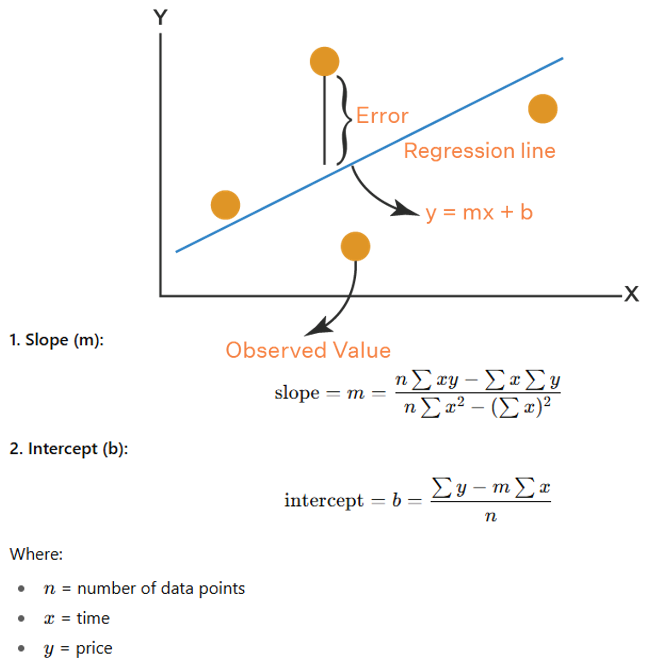
これにより、数学的に正確なトレンドライン配置が可能になり、信頼性の高い売買シグナルを得ることができます。次に、トレンドラインを管理する関数を定義していきます。
//+------------------------------------------------------------------+
//| Check if starting point is already used                          |
//+------------------------------------------------------------------+
bool IsStartingPointUsed(datetime time, double price, bool is_support) {
   for (int i = 0; i < numStartingPoints; i++) {  //--- Iterate through starting points
      if (startingPoints[i].time == time && MathAbs(startingPoints[i].price - price) < TouchTolerance * _Point && startingPoints[i].is_support == is_support) { //--- Check match
         return true;                             //--- Return used
      }
   }
   return false;                                   //--- Return not used
}

//+------------------------------------------------------------------+
//| Remove trendline from storage and optionally chart objects       |
//+------------------------------------------------------------------+
void RemoveTrendlineFromStorage(int index) {
   if (index < 0 || index >= numTrendlines) return;                    //--- Check valid index
   Print("Removing trendline from storage: ", trendlines[index].name); //--- Log removal
   if (DeleteExpiredObjects) {                                         //--- Check deletion flag
      ObjectDelete(0, trendlines[index].name);                         //--- Delete trendline object
      for (int m = 0; m < trendlines[index].touch_count; m++) {        //--- Iterate touches
         string arrow_name = trendlines[index].name + "_touch" + IntegerToString(m); //--- Generate arrow name
         ObjectDelete(0, arrow_name);                                  //--- Delete touch arrow
         string text_name = trendlines[index].name + "_point_label" + IntegerToString(m); //--- Generate text name
         ObjectDelete(0, text_name);                                   //--- Delete point label
      }
      string label_name = trendlines[index].name + "_label";           //--- Generate label name
      ObjectDelete(0, label_name);                                     //--- Delete trendline label
      string signal_arrow = trendlines[index].name + "_signal_arrow";  //--- Generate signal arrow name
      ObjectDelete(0, signal_arrow);                                   //--- Delete signal arrow
      string signal_text = trendlines[index].name + "_signal_text";    //--- Generate signal text name
      ObjectDelete(0, signal_text);                                    //--- Delete signal text
   }
   for (int i = index; i < numTrendlines - 1; i++) {                   //--- Shift array
      trendlines[i] = trendlines[i + 1];                               //--- Copy next trendline
   }
   ArrayResize(trendlines, numTrendlines - 1);                         //--- Resize trendlines array
   numTrendlines--;                                                    //--- Decrement trendlines count
}
次に、トレンドラインの開始点管理とクリーンアップをおこなうユーティリティ関数を実装し、トレンドラインの効率的な追跡とチャート管理を可能にします。まず、IsStartingPointUsed関数を作成します。この関数は、startingPoints配列のnumStartingPointsを順に処理し、与えられたtime、price、およびis_supportが既存の開始点と一致するかを確認します。timeは完全一致、priceはMathAbsを使って「TouchTolerance * _Point」以内、is_supportも比較し、一致する場合はtrueを返し、一致しない場合はfalseを返します。次に、RemoveTrendlineFromStorage関数を実装します。この関数では、入力されたindexをnumTrendlinesと照合し、無効な場合は処理を終了し、削除ログを出力します。
DeleteExpiredObjectsがtrueの場合、ObjectDeleteでtrendlines[index].nameのトレンドラインオブジェクトを削除します。また、touch_count分ループして、「trendlines[index].name + "_touch" + IntegerToString(m)」や「trendlines[index].name + "_point_label" + IntegerToString(m)」の接触点の矢印やラベルを削除します。さらに、label_name、signal_arrow、signal_textを使って、トレンドラインラベル、シグナル矢印、シグナルテキストを削除します。最後に、indexから「numTrendlines - 1」までのtrendlines配列をシフトして該当エントリを削除し、ArrayResizeでtrendlinesをリサイズし、numTrendlinesをデクリメントします。これにより、重複するトレンドラインを防ぎ、期限切れや破損したトレンドラインを効果的にクリーンアップできます。次に、これまで定義したヘルパー関数を使って、トレンドラインを検索し描画する関数を定義していきます。
//+------------------------------------------------------------------+
//| Find and draw trendlines if no active one exists                 |
//+------------------------------------------------------------------+
void FindAndDrawTrendlines(bool isSupport) {
   bool has_active = false;                       //--- Initialize active flag
   for (int i = 0; i < numTrendlines; i++) {      //--- Iterate through trendlines
      if (trendlines[i].is_support == isSupport) { //--- Check type match
         has_active = true;                       //--- Set active flag
         break;                                   //--- Exit loop
      }
   }
   if (has_active) return;                        //--- Exit if active trendline exists
   Swing swings[];                                //--- Initialize swings array
   int numSwings;                                 //--- Initialize swings count
   color lineColor;                               //--- Initialize line color
   string prefix;                                 //--- Initialize prefix
   if (isSupport) {                               //--- Handle support case
      numSwings = numLows;                        //--- Set number of lows
      ArrayResize(swings, numSwings);             //--- Resize swings array
      for (int i = 0; i < numSwings; i++) {       //--- Iterate through lows
         swings[i].time = swingLows[i].time;      //--- Copy low time
         swings[i].price = swingLows[i].price;    //--- Copy low price
      }
      lineColor = SupportLineColor;               //--- Set support line color
      prefix = "Trendline_Support_";              //--- Set support prefix
   } else {                                       //--- Handle resistance case
      numSwings = numHighs;                       //--- Set number of highs
      ArrayResize(swings, numSwings);             //--- Resize swings array
      for (int i = 0; i < numSwings; i++) {       //--- Iterate through highs
         swings[i].time = swingHighs[i].time;     //--- Copy high time
         swings[i].price = swingHighs[i].price;   //--- Copy high price
      }
      lineColor = ResistanceLineColor;            //--- Set resistance line color
      prefix = "Trendline_Resistance_";           //--- Set resistance prefix
   }
   if (numSwings < 2) return;                     //--- Exit if insufficient swings
   double pointValue = _Point;                    //--- Get point value
   double touch_tolerance = TouchTolerance * pointValue; //--- Calculate touch tolerance
   double pen_tolerance = PenetrationTolerance * pointValue; //--- Calculate penetration tolerance
   int best_j = -1;                               //--- Initialize best j index
   int max_touches = 0;                           //--- Initialize max touches
   int best_touch_indices[];                      //--- Initialize best touch indices
   double best_slope = 0.0;                       //--- Initialize best slope
   double best_intercept = 0.0;                   //--- Initialize best intercept
   datetime best_min_time = 0;                    //--- Initialize best min time
   for (int i = 0; i < numSwings - 1; i++) {      //--- Iterate through first points
      for (int j = i + 1; j < numSwings; j++) {   //--- Iterate through second points
         datetime time1 = swings[i].time;         //--- Get first time
         double price1 = swings[i].price;         //--- Get first price
         datetime time2 = swings[j].time;         //--- Get second time
         double price2 = swings[j].price;         //--- Get second price
         double dt = (double)(time2 - time1);     //--- Calculate time difference
         if (dt <= 0) continue;                   //--- Skip invalid time difference
         double initial_slope = (price2 - price1) / dt; //--- Calculate initial slope
         int touch_indices[];                     //--- Initialize touch indices
         ArrayResize(touch_indices, 0);           //--- Resize touch indices
         int touches = 0;                         //--- Initialize touches count
         ArrayResize(touch_indices, touches + 1); //--- Add first index
         touch_indices[touches] = i;              //--- Set first index
         touches++;                               //--- Increment touches
         ArrayResize(touch_indices, touches + 1); //--- Add second index
         touch_indices[touches] = j;              //--- Set second index
         touches++;                               //--- Increment touches
         for (int k = 0; k < numSwings; k++) {    //--- Iterate through swings
            if (k == i || k == j) continue;       //--- Skip used indices
            datetime tk = swings[k].time;         //--- Get swing time
            double dk = (double)(tk - time1);     //--- Calculate time difference
            double expected = price1 + initial_slope * dk; //--- Calculate expected price
            double actual = swings[k].price;      //--- Get actual price
            if (MathAbs(expected - actual) <= touch_tolerance) { //--- Check touch within tolerance
               ArrayResize(touch_indices, touches + 1); //--- Add index
               touch_indices[touches] = k;        //--- Set index
               touches++;                         //--- Increment touches
            }
         }
         if (touches >= MinTouches) {             //--- Check minimum touches
            ArraySort(touch_indices);             //--- Sort touch indices
            bool valid_spacing = true;            //--- Initialize spacing flag
            for (int m = 0; m < touches - 1; m++) { //--- Iterate through touches
               int idx1 = touch_indices[m];       //--- Get first index
               int idx2 = touch_indices[m + 1];   //--- Get second index
               int bar1 = iBarShift(_Symbol, _Period, swings[idx1].time); //--- Get first bar
               int bar2 = iBarShift(_Symbol, _Period, swings[idx2].time); //--- Get second bar
               int diff = MathAbs(bar1 - bar2);   //--- Calculate bar difference
               if (diff < MinBarSpacing) {        //--- Check minimum spacing
                  valid_spacing = false;          //--- Mark invalid spacing
                  break;                          //--- Exit loop
               }
            }
            if (valid_spacing) {                  //--- Check valid spacing
               datetime touch_times[];            //--- Initialize touch times
               double touch_prices[];             //--- Initialize touch prices
               ArrayResize(touch_times, touches); //--- Resize times array
               ArrayResize(touch_prices, touches); //--- Resize prices array
               for (int m = 0; m < touches; m++) { //--- Iterate through touches
                  int idx = touch_indices[m];      //--- Get index
                  touch_times[m] = swings[idx].time;   //--- Set time
                  touch_prices[m] = swings[idx].price; //--- Set price
               }
               double slope, intercept;                //--- Declare slope and intercept
               LeastSquaresFit(touch_times, touch_prices, touches, slope, intercept); //--- Perform least squares fit
               int adjusted_touch_indices[];           //--- Initialize adjusted indices
               ArrayResize(adjusted_touch_indices, 0); //--- Resize adjusted indices
               int adjusted_touches = 0;               //--- Initialize adjusted touches count
               for (int k = 0; k < numSwings; k++) {   //--- Iterate through swings
                  double expected = intercept + slope * (double)swings[k].time; //--- Calculate expected price
                  double actual = swings[k].price;     //--- Get actual price
                  if (MathAbs(expected - actual) <= touch_tolerance) { //--- Check touch
                     ArrayResize(adjusted_touch_indices, adjusted_touches + 1); //--- Add index
                     adjusted_touch_indices[adjusted_touches] = k; //--- Set index
                     adjusted_touches++;               //--- Increment adjusted touches
                  }
               }
               if (adjusted_touches >= MinTouches) { //--- Check minimum adjusted touches
                  datetime temp_min_time = swings[adjusted_touch_indices[0]].time; //--- Get min time
                  double temp_ref_price = intercept + slope * (double)temp_min_time; //--- Calculate ref price
                  if (ValidateTrendline(isSupport, temp_min_time, temp_min_time, temp_ref_price, slope, pen_tolerance)) { //--- Validate trendline
                     datetime temp_max_time = swings[adjusted_touch_indices[adjusted_touches - 1]].time; //--- Get max time
                     double temp_max_price = intercept + slope * (double)temp_max_time; //--- Calculate max price
                     double angle = CalculateAngle(temp_min_time, temp_ref_price, temp_max_time, temp_max_price); //--- Calculate angle
                     double abs_angle = MathAbs(angle); //--- Get absolute angle
                     if (abs_angle >= MinAngle && abs_angle <= MaxAngle) { //--- Check angle range
                        if (adjusted_touches > max_touches || (adjusted_touches == max_touches && j > best_j)) { //--- Check better trendline
                           max_touches = adjusted_touches; //--- Update max touches
                           best_j = j;                     //--- Update best j
                           best_slope = slope;             //--- Update best slope
                           best_intercept = intercept;     //--- Update best intercept
                           best_min_time = temp_min_time;  //--- Update best min time
                           ArrayResize(best_touch_indices, adjusted_touches); //--- Resize best indices
                           ArrayCopy(best_touch_indices, adjusted_touch_indices); //--- Copy indices
                        }
                     }
                  }
               }
            }
         }
      }
   }
   if (max_touches < MinTouches) {                //--- Check insufficient touches
      string type = isSupport ? "Support" : "Resistance"; //--- Set type string
      return;                                     //--- Exit function
   }
   int touch_indices[];                           //--- Initialize touch indices
   ArrayResize(touch_indices, max_touches);       //--- Resize touch indices
   ArrayCopy(touch_indices, best_touch_indices);  //--- Copy best indices
   int touches = max_touches;                     //--- Set touches count
   datetime min_time = best_min_time;             //--- Set min time
   double price_min = best_intercept + best_slope * (double)min_time; //--- Calculate min price
   datetime max_time = swings[touch_indices[touches - 1]].time; //--- Set max time
   double price_max = best_intercept + best_slope * (double)max_time; //--- Calculate max price
   datetime start_time_check = min_time;          //--- Set start time check
   double start_price_check = swings[touch_indices[0]].price; //--- Set start price check
   if (IsStartingPointUsed(start_time_check, start_price_check, isSupport)) { //--- Check used starting point
      return;                                     //--- Skip if used
   }
   datetime time_end = iTime(_Symbol, _Period, 0) + PeriodSeconds(_Period) * ExtensionBars; //--- Calculate end time
   double dk_end = (double)(time_end - min_time);      //--- Calculate end time difference
   double price_end = price_min + best_slope * dk_end; //--- Calculate end price
   string unique_name = prefix + TimeToString(TimeCurrent(), TIME_DATE|TIME_MINUTES|TIME_SECONDS); //--- Generate unique name
   if (ObjectFind(0, unique_name) < 0) {               //--- Check if trendline exists
      ObjectCreate(0, unique_name, OBJ_TREND, 0, min_time, price_min, time_end, price_end); //--- Create trendline
      ObjectSetInteger(0, unique_name, OBJPROP_COLOR, lineColor);   //--- Set color
      ObjectSetInteger(0, unique_name, OBJPROP_STYLE, STYLE_SOLID); //--- Set style
      ObjectSetInteger(0, unique_name, OBJPROP_WIDTH, 1);           //--- Set width
      ObjectSetInteger(0, unique_name, OBJPROP_RAY_RIGHT, false);   //--- Disable right ray
      ObjectSetInteger(0, unique_name, OBJPROP_RAY_LEFT, false);    //--- Disable left ray
      ObjectSetInteger(0, unique_name, OBJPROP_BACK, false);        //--- Set to foreground
   }
   ArrayResize(trendlines, numTrendlines + 1);                      //--- Resize trendlines array
   trendlines[numTrendlines].name = unique_name;                    //--- Set trendline name
   trendlines[numTrendlines].start_time = min_time;                 //--- Set start time
   trendlines[numTrendlines].end_time = time_end;                   //--- Set end time
   trendlines[numTrendlines].start_price = price_min;               //--- Set start price
   trendlines[numTrendlines].end_price = price_end;                 //--- Set end price
   trendlines[numTrendlines].slope = best_slope;                    //--- Set slope
   trendlines[numTrendlines].is_support = isSupport;                //--- Set type
   trendlines[numTrendlines].touch_count = touches;                 //--- Set touch count
   trendlines[numTrendlines].creation_time = TimeCurrent();         //--- Set creation time
   trendlines[numTrendlines].is_signaled = false;                   //--- Set signaled flag
   ArrayResize(trendlines[numTrendlines].touch_indices, touches);   //--- Resize touch indices
   ArrayCopy(trendlines[numTrendlines].touch_indices, touch_indices); //--- Copy touch indices
   numTrendlines++;                                                 //--- Increment trendlines count
   ArrayResize(startingPoints, numStartingPoints + 1);              //--- Resize starting points array
   startingPoints[numStartingPoints].time = start_time_check; //--- Set starting point time
   startingPoints[numStartingPoints].price = start_price_check; //--- Set starting point price
   startingPoints[numStartingPoints].is_support = isSupport; //--- Set starting point type
   numStartingPoints++;                           //--- Increment starting points count
   if (DrawTouchArrows) {                         //--- Check draw arrows
      for (int m = 0; m < touches; m++) {         //--- Iterate through touches
         int idx = touch_indices[m];              //--- Get touch index
         datetime tk_time = swings[idx].time;     //--- Get touch time
         double tk_price = swings[idx].price;     //--- Get touch price
         string arrow_name = unique_name + "_touch" + IntegerToString(m); //--- Generate arrow name
         if (ObjectFind(0, arrow_name) < 0) {                             //--- Check if arrow exists
            ObjectCreate(0, arrow_name, OBJ_ARROW, 0, tk_time, tk_price); //--- Create touch arrow
            ObjectSetInteger(0, arrow_name, OBJPROP_ARROWCODE, 159);      //--- Set arrow code
            ObjectSetInteger(0, arrow_name, OBJPROP_ANCHOR, isSupport ? ANCHOR_TOP : ANCHOR_BOTTOM); //--- Set anchor
            ObjectSetInteger(0, arrow_name, OBJPROP_COLOR, lineColor);    //--- Set color
            ObjectSetInteger(0, arrow_name, OBJPROP_WIDTH, 1);            //--- Set width
            ObjectSetInteger(0, arrow_name, OBJPROP_BACK, false);         //--- Set to foreground
         }
      }
   }
   double angle = CalculateAngle(min_time, price_min, max_time, price_max); //--- Calculate angle
   string type = isSupport ? "Support" : "Resistance"; //--- Set type string
   Print(type + " Trendline " + unique_name + " drawn with " + IntegerToString(touches) + " touches. Inclination angle: " + DoubleToString(angle, 2) + " degrees."); //--- Log trendline
   if (DrawLabels) {                              //--- Check draw labels
      datetime mid_time = min_time + (max_time - min_time) / 2; //--- Calculate mid time
      double dk_mid = (double)(mid_time - min_time); //--- Calculate mid time difference
      double mid_price = price_min + best_slope * dk_mid; //--- Calculate mid price
      double label_offset = 20 * _Point * (isSupport ? -1 : 1); //--- Calculate label offset
      double label_price = mid_price + label_offset; //--- Calculate label price
      int label_anchor = isSupport ? ANCHOR_TOP : ANCHOR_BOTTOM; //--- Set label anchor
      string label_text = type + " Trendline";    //--- Set label text
      string label_name = unique_name + "_label"; //--- Generate label name
      if (ObjectFind(0, label_name) < 0) {        //--- Check if label exists
         ObjectCreate(0, label_name, OBJ_TEXT, 0, mid_time, label_price); //--- Create label
         ObjectSetString(0, label_name, OBJPROP_TEXT, label_text); //--- Set text
         ObjectSetInteger(0, label_name, OBJPROP_COLOR, clrBlack); //--- Set color
         ObjectSetInteger(0, label_name, OBJPROP_FONTSIZE, 8); //--- Set font size
         ObjectSetInteger(0, label_name, OBJPROP_ANCHOR, label_anchor); //--- Set anchor
         ObjectSetDouble(0, label_name, OBJPROP_ANGLE, angle); //--- Set angle
         ObjectSetInteger(0, label_name, OBJPROP_BACK, false); //--- Set to foreground
      }
      color point_label_color = isSupport ? clrSaddleBrown : clrDarkGoldenrod; //--- Set point label color
      double point_text_offset = 20.0 * _Point;   //--- Set point text offset
      for (int m = 0; m < touches; m++) {         //--- Iterate through touches
         int idx = touch_indices[m];              //--- Get touch index
         datetime tk_time = swings[idx].time;     //--- Get touch time
         double tk_price = swings[idx].price;     //--- Get touch price
         double text_price;                       //--- Initialize text price
         int point_text_anchor;                   //--- Initialize text anchor
         if (isSupport) {                         //--- Handle support
            text_price = tk_price - point_text_offset; //--- Set text price below
            point_text_anchor = ANCHOR_LEFT;      //--- Set left anchor
         } else {                                 //--- Handle resistance
            text_price = tk_price + point_text_offset; //--- Set text price above
            point_text_anchor = ANCHOR_BOTTOM;    //--- Set bottom anchor
         }
         string text_name = unique_name + "_point_label" + IntegerToString(m); //--- Generate text name
         string point_text = "Pt " + IntegerToString(m + 1); //--- Set point text
         if (ObjectFind(0, text_name) < 0) {     //--- Check if text exists
            ObjectCreate(0, text_name, OBJ_TEXT, 0, tk_time, text_price); //--- Create text
            ObjectSetString(0, text_name, OBJPROP_TEXT, point_text); //--- Set text
            ObjectSetInteger(0, text_name, OBJPROP_COLOR, point_label_color); //--- Set color
            ObjectSetInteger(0, text_name, OBJPROP_FONTSIZE, 8); //--- Set font size
            ObjectSetInteger(0, text_name, OBJPROP_ANCHOR, point_text_anchor); //--- Set anchor
            ObjectSetDouble(0, text_name, OBJPROP_ANGLE, 0); //--- Set angle
            ObjectSetInteger(0, text_name, OBJPROP_BACK, false); //--- Set to foreground
         }
      }
   }
}
ここでは、FindAndDrawTrendlines関数を実装し、トレンドラインを特定して描画します。これにより、各タイプごとに1本のアクティブなトレンドラインのみを保持し、最適な接触点を確保します。まず、trendlines配列のnumTrendlinesを順に処理して既存のトレンドラインを確認し、is_supportが入力と一致する場合はhas_activeをtrueに設定し、見つかった場合は処理を終了します。次に、isSupportに基づいてサポートまたはレジスタンスの設定をおこないます。サポートの場合はnumLowsをnumSwingsにコピーし、swingsをswingLowsから取得し、lineColorをSupportLineColorに設定し、prefixをTrendline_Support_に設定します。レジスタンスの場合はnumHighs、swingHighs、ResistanceLineColor、Trendline_Resistance_を使用します。numSwingsが2未満の場合は処理を終了します。次に、touch_toleranceとpen_toleranceをTouchToleranceおよびPenetrationToleranceに_Pointを掛けて計算します。その後、numSwingsの組み合わせを順に処理して初期のinitial_slopeを計算し、接触許容範囲内のポイントについてtouch_indicesを収集します。
接触数がMinTouchesを満たし、iBarShiftでMinBarSpacingをクリアする場合、LeastSquaresFitを使用してslopeとinterceptを取得し、再度接触を確認します。その後、ValidateTrendlineおよびCalculateAngleをMinAngleとMaxAngleに基づいて検証し、best_j、max_touches、best_slope、best_intercept、best_min_time、best_touch_indicesを更新して最適なトレンドラインを決定します。最後に、max_touchesがMinTouchesを満たし、IsStartingPointUsedで開始点が未使用である場合、ObjectCreate関数を使ってOBJ_TRENDとしてunique_nameでトレンドラインを作成します。DrawTouchArrowsおよびDrawLabelsがtrueの場合は、接触点の矢印とラベルを描画します。作成したトレンドラインの詳細をtrendlinesに保存し、開始点をstartingPointsに追加してログを出力します。これにより、正確なトレンドライン作成が保証されます。残る作業は、既存のトレンドラインを継続的に更新し、クロスをチェックしてシグナルを発生させる管理です。すべてのロジックを簡略化のため単一の関数に統合して実装します。
//+------------------------------------------------------------------+
//| Update trendlines and check for signals                          |
//+------------------------------------------------------------------+
void UpdateTrendlines() {
   datetime current_time = iTime(_Symbol, _Period, 0);       //--- Get current time
   double pointValue = _Point;                               //--- Get point value
   double pen_tolerance = PenetrationTolerance * pointValue; //--- Calculate penetration tolerance
   double touch_tolerance = TouchTolerance * pointValue;     //--- Calculate touch tolerance
   for (int i = numTrendlines - 1; i >= 0; i--) {            //--- Iterate trendlines backward
      string type = trendlines[i].is_support ? "Support" : "Resistance"; //--- Determine trendline type
      string name = trendlines[i].name;                      //--- Get trendline name
      if (current_time > trendlines[i].end_time) {           //--- Check if expired
         PrintFormat("%s trendline %s is no longer valid (expired). End time: %s, Current time: %s.", type, name, TimeToString(trendlines[i].end_time), TimeToString(current_time)); //--- Log expiration
         RemoveTrendlineFromStorage(i);                      //--- Remove trendline
         continue;                                           //--- Skip to next
      }
      datetime prev_bar_time = iTime(_Symbol, _Period, 1);   //--- Get previous bar time
      double dk = (double)(prev_bar_time - trendlines[i].start_time); //--- Calculate time difference
      double line_price = trendlines[i].start_price + trendlines[i].slope * dk; //--- Calculate line price
      double prev_low = iLow(_Symbol, _Period, 1);           //--- Get previous bar low
      double prev_high = iHigh(_Symbol, _Period, 1);         //--- Get previous bar high
      bool broken = false;                                   //--- Initialize broken flag
      if (trendlines[i].is_support && prev_low < line_price - pen_tolerance) { //--- Check support break
         PrintFormat("%s trendline %s is no longer valid (broken by price). Line price: %.5f, Prev low: %.5f, Penetration: %.5f points.", type, name, line_price, prev_low, PenetrationTolerance); //--- Log break
         RemoveTrendlineFromStorage(i);           //--- Remove trendline
         broken = true;                           //--- Set broken flag
      } else if (!trendlines[i].is_support && prev_high > line_price + pen_tolerance) { //--- Check resistance break
         PrintFormat("%s trendline %s is no longer valid (broken by price). Line price: %.5f, Prev high: %.5f, Penetration: %.5f points.", type, name, line_price, prev_high, PenetrationTolerance); //--- Log break
         RemoveTrendlineFromStorage(i);           //--- Remove trendline
         broken = true;                           //--- Set broken flag
      }
      if (!broken && !trendlines[i].is_signaled && EnableTradingSignals) { //--- Check for trading signal
         bool touched = false;                    //--- Initialize touched flag
         string signal_type = "";                 //--- Initialize signal type
         color signal_color = clrNONE;            //--- Initialize signal color
         int arrow_code = 0;                      //--- Initialize arrow code
         int anchor = 0;                          //--- Initialize anchor
         double text_angle = 0.0;                 //--- Initialize text angle
         double text_offset = 0.0;                //--- Initialize text offset
         double text_price = 0.0;                 //--- Initialize text price
         int text_anchor = 0;                     //--- Initialize text anchor
         if (trendlines[i].is_support && MathAbs(prev_low - line_price) <= touch_tolerance) { //--- Check support touch
            touched = true;                       //--- Set touched flag
            signal_type = "BUY";                  //--- Set buy signal
            signal_color = clrBlue;               //--- Set blue color
            arrow_code = 217;                     //--- Set up arrow for support (BUY)
            anchor = ANCHOR_TOP;                  //--- Set top anchor
            text_angle = -90.0;                   //--- Set vertical upward for BUY
            text_offset = -20 * pointValue;        //--- Set text offset
            text_price = line_price + text_offset; //--- Calculate text price
            text_anchor = ANCHOR_LEFT;            //--- Set left anchor
            double Ask = NormalizeDouble(SymbolInfoDouble(_Symbol, SYMBOL_ASK), _Digits); //--- Get ask price
            double SL = NormalizeDouble(Ask - inpSLPoints * _Point, _Digits); //--- Calculate stop loss
            double TP = NormalizeDouble(Ask + (inpSLPoints * inpRRRatio) * _Point, _Digits); //--- Calculate take profit
            obj_Trade.Buy(inpLot, _Symbol, Ask, SL, TP); //--- Execute buy trade
         } else if (!trendlines[i].is_support && MathAbs(prev_high - line_price) <= touch_tolerance) { //--- Check resistance touch
            touched = true;                       //--- Set touched flag
            signal_type = "SELL";                 //--- Set sell signal
            signal_color = clrRed;                //--- Set red color
            arrow_code = 218;                     //--- Set down arrow for resistance (SELL)
            anchor = ANCHOR_BOTTOM;               //--- Set bottom anchor
            text_angle = 90.0;                    //--- Set vertical downward for SELL
            text_offset = 20 * pointValue;       //--- Set text offset
            text_price = line_price + text_offset; //--- Calculate text price
            text_anchor = ANCHOR_BOTTOM;          //--- Set bottom anchor
            double Bid = NormalizeDouble(SymbolInfoDouble(_Symbol, SYMBOL_BID), _Digits); //--- Get bid price
            double SL = NormalizeDouble(Bid + inpSLPoints * _Point, _Digits); //--- Calculate stop loss
            double TP = NormalizeDouble(Bid - (inpSLPoints * inpRRRatio) * _Point, _Digits); //--- Calculate take profit
            obj_Trade.Sell(inpLot, _Symbol, Bid, SL, TP); //--- Execute sell trade
         }
         if (touched) {                           //--- Check if touched
            PrintFormat("Signal generated for %s trendline %s: %s at price %.5f, time %s.", type, name, signal_type, line_price, TimeToString(current_time)); //--- Log signal
            string arrow_name = name + "_signal_arrow"; //--- Generate signal arrow name
            if (ObjectFind(0, arrow_name) < 0) {  //--- Check if arrow exists
               ObjectCreate(0, arrow_name, OBJ_ARROW, 0, prev_bar_time, line_price); //--- Create signal arrow
               ObjectSetInteger(0, arrow_name, OBJPROP_ARROWCODE, arrow_code); //--- Set arrow code
               ObjectSetInteger(0, arrow_name, OBJPROP_ANCHOR, anchor); //--- Set anchor
               ObjectSetInteger(0, arrow_name, OBJPROP_COLOR, signal_color); //--- Set color
               ObjectSetInteger(0, arrow_name, OBJPROP_WIDTH, 1); //--- Set width
               ObjectSetInteger(0, arrow_name, OBJPROP_BACK, false); //--- Set to foreground
            }
            string text_name = name + "_signal_text"; //--- Generate signal text name
            if (ObjectFind(0, text_name) < 0) {   //--- Check if text exists
               ObjectCreate(0, text_name, OBJ_TEXT, 0, prev_bar_time, text_price); //--- Create signal text
               ObjectSetString(0, text_name, OBJPROP_TEXT, " " + signal_type); //--- Set text content
               ObjectSetInteger(0, text_name, OBJPROP_COLOR, signal_color); //--- Set color
               ObjectSetInteger(0, text_name, OBJPROP_FONTSIZE, 10); //--- Set font size
               ObjectSetInteger(0, text_name, OBJPROP_ANCHOR, text_anchor); //--- Set anchor
               ObjectSetDouble(0, text_name, OBJPROP_ANGLE, text_angle); //--- Set angle
               ObjectSetInteger(0, text_name, OBJPROP_BACK, false); //--- Set to foreground
            }
            trendlines[i].is_signaled = true;     //--- Set signaled flag
         }
      }
   }
}
アクティブなトレンドラインを監視し、適切に処理するために、UpdateTrendlines関数を作成します。返り値は必要ないため、void関数とします。まず、current_timeを現在のバーのiTimeで取得し、pointValueを_Pointとして計算し、pen_toleranceを「PenetrationTolerance * pointValue」、touch_toleranceを「TouchTolerance * pointValue」として計算します。その後、trendlines配列のnumTrendlinesを逆順に処理します。トレンドラインのtypeをis_supportに基づいてSupportまたはResistanceとして判定し、current_timeがend_timeを超えている場合は、PrintFormatで有効期限切れをログ出力し、RemoveTrendlineFromStorageでトレンドラインを削除します。
有効期限が切れていないトレンドラインについては、prev_bar_time(シフト1のiTime)でのトレンドライン価格を「start_price + slope * dk」で計算します。その後、prev_lowまたはprev_highをline_priceとpen_toleranceで比較し、トレンドラインが破られたかどうかを確認します。破られた場合はPrintFormatでログを出力し、RemoveTrendlineFromStorageで削除します。
トレンドラインが破られておらず、かつis_signaledがfalseでEnableTradingSignalsがtrueの場合は、接触判定をおこないます。サポートの場合、prev_lowがline_priceのtouch_tolerance以内であればBUYシグナルを設定し、obj_Trade.BuyでinpLot、Ask、SL、TPを使用して買い注文を実行します。SLおよびTPはinpSLPointsとinpRRRatioで計算します。また、青色の上矢印(コード217)とテキストを描画します。レジスタンスの場合、prev_highが許容範囲内であればSELLシグナルを設定し、obj_Trade.Sellで売り注文を実行し、赤色の下矢印(コード218)とテキストを描画します。PrintFormatでログを出力し、ObjectCreateでオブジェクトを作成、ObjectSetIntegerおよびObjectSetStringでプロパティを設定し、is_signaledをtrueにします。これにより、トレンドラインは更新され、正確な売買シグナルを生成できるようになります。使用する矢印コードの選択は任意です。以下はMQL5で定義されたWingdingsコードから使用できるコードのリストです。
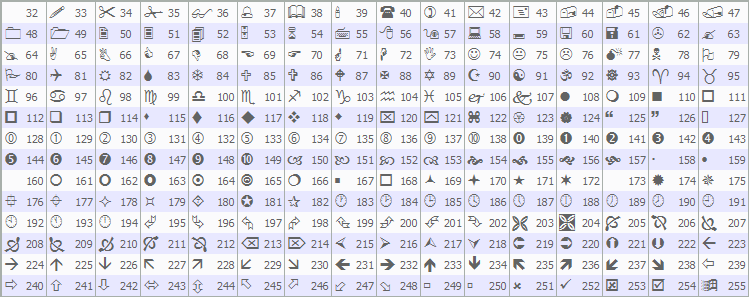
これで、これらの関数をOnTickイベントハンドラ内で呼び出すことができ、システムがティックごとにフィードバックを提供できるようになります。
//+------------------------------------------------------------------+
//| Expert tick function                                             |
//+------------------------------------------------------------------+
void OnTick() {
   if (!IsNewBar()) return;                        //--- Exit if not new bar
   DetectSwings();                                 //--- Detect swings
   UpdateTrendlines();                             //--- Update trendlines
   FindAndDrawTrendlines(true);                    //--- Find/draw support trendlines
}
OnTickイベントハンドラ内では、新しいバーごとのロジックに基づいてトレンドラインの検出と取引を統合します。まず、IsNewBarを呼び出して新しいバーが形成されたかを確認し、falseの場合は冗長な処理を避けるために即座に終了します。次に、DetectSwingsを呼び出してスイング高値および安値を特定し、swingHighsおよびswingLowsに格納されている値を更新します。その後、UpdateTrendlinesを呼び出して既存のトレンドラインを検証し、期限切れまたは破られたトレンドラインを削除し、価格が定義された接触の許容範囲内に触れた場合は取引シグナルを生成します。最後に、FindAndDrawTrendlines関数をtrueパラメータで呼び出し、サポートトレンドラインを作成します。これにより、サポートタイプのアクティブなトレンドラインが存在しない場合にのみ新しいトレンドラインが描画されます。コンパイルすると、次の結果が得られます。
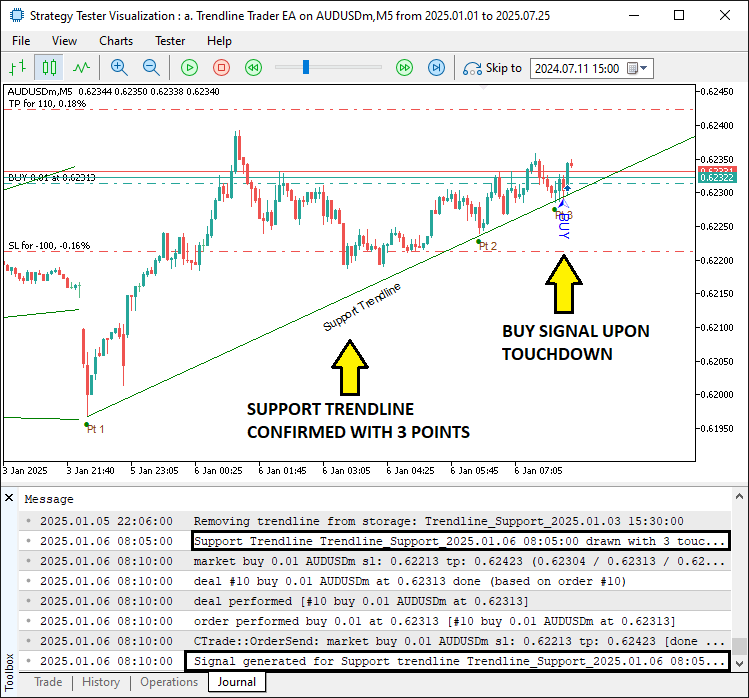
画像からわかるように、トレンドラインを検出、分析、描画し、接触時に取引をおこなうことができます。期限切れのラインもストレージ配列から正常に削除されます。同じ関数をサポートのときと同様に呼び出し、入力パラメータをfalseにすることで、レジスタンストレンドラインについても同様の処理を実現できます。
//--- other ontick functions

FindAndDrawTrendlines(false);                   //--- Find/draw resistance trendlines

//---
関数を渡してコンパイルすると、次の結果が得られます。
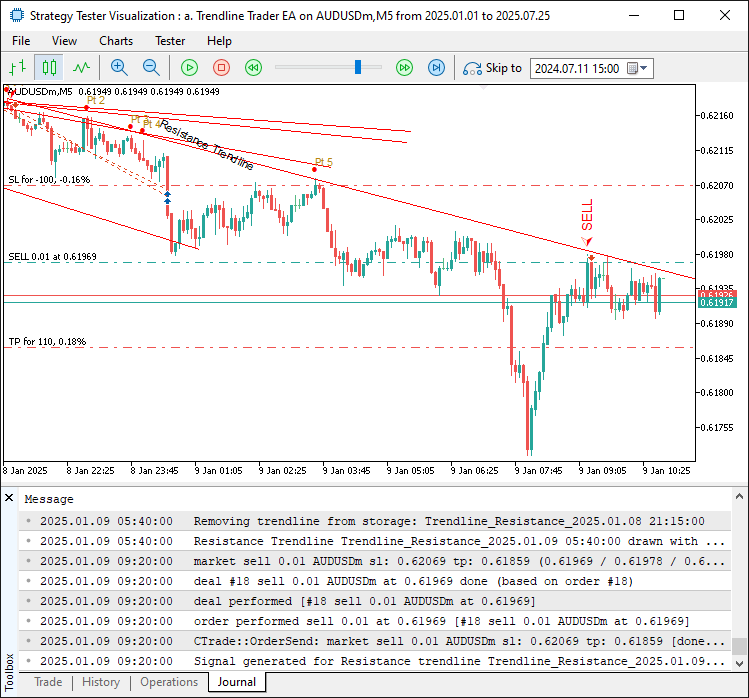
画像からわかるように、レジスタンストレンドラインも検出して取引することができます。すべてをテストして統合すると、次のような結果が得られます。
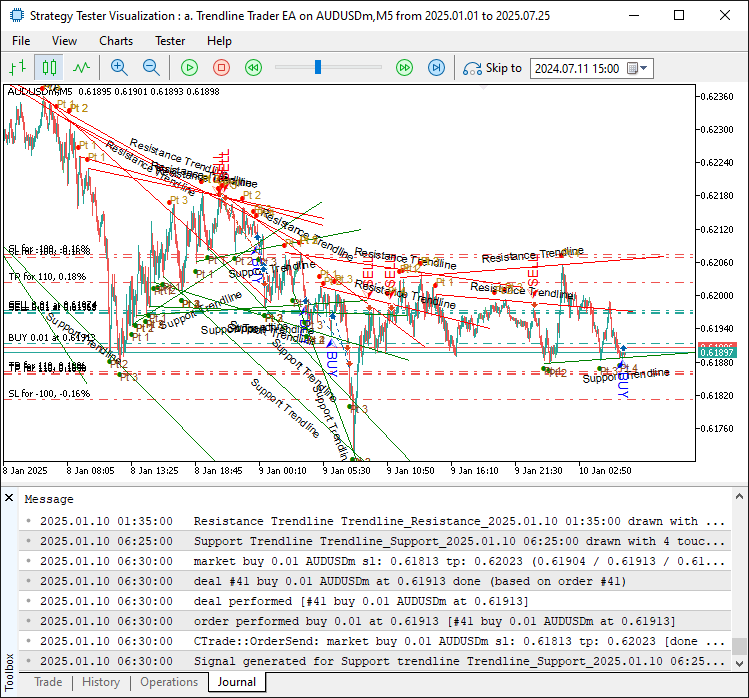
画像からわかるように、トレンドラインを検出し、可視化し、価格が接触したときに取引をおこなうことで、私たちの目的を達成できていることが確認できます。残っている作業は、このプログラムのバックテストをおこなうことです。バックテストについては次のセクションで扱います。
バックテスト
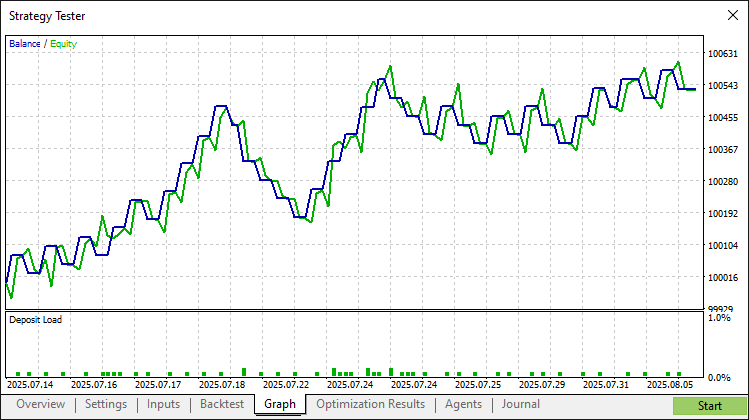
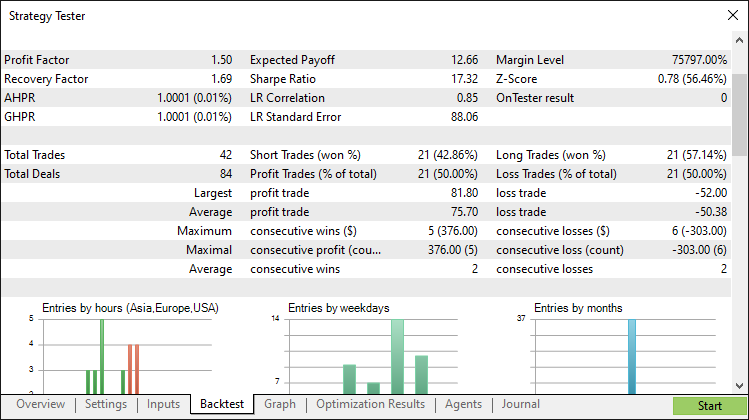
徹底的なバックテストの結果、次の結果が得られました。
バックテストグラフ
バックテストレポート
結論
結論として、私たちはMQL5でトレンドライン取引戦略プログラムを開発しました。最小二乗近似法を利用して堅牢なサポートおよびレジスタンスのトレンドラインを検出し、矢印やラベルなどの視覚的補助を用いて自動的に売買シグナルを生成します。TrendlineInfo構造体やFindAndDrawTrendlines関数といったモジュール化されたコンポーネントを通じて、トレンドベースの取引に対する規律あるアプローチを提供しており、パラメータを調整することでさらに最適化できます。
免責条項:本記事は教育目的のみを意図したものです。取引には重大な財務リスクが伴い、市場の変動によって損失が生じる可能性があります。本プログラムを実際の市場で運用する前に、十分なバックテストと慎重なリスク管理が不可欠です。
提示された概念と実装を活用することで、このトレンドラインシステムを自分の取引スタイルに適応させ、アルゴリズム戦略を強化できます。取引をお楽しみください。
MetaQuotes Ltdにより英語から翻訳されました。
元の記事: https://www.mql5.com/en/articles/19077
警告: これらの資料についてのすべての権利はMetaQuotes Ltd.が保有しています。これらの資料の全部または一部の複製や再プリントは禁じられています。
この記事はサイトのユーザーによって執筆されたものであり、著者の個人的な見解を反映しています。MetaQuotes Ltdは、提示された情報の正確性や、記載されているソリューション、戦略、または推奨事項の使用によって生じたいかなる結果についても責任を負いません。

 MQL5での取引戦略の自動化(第26回):複数ポジション取引のためのピンバーナンピンシステムの構築
 MQL5とデータ処理パッケージの統合(第5回):適応学習と柔軟性
 プライスアクション分析ツールキットの開発(第36回):MetaTrader 5マーケットストリームへ直接アクセスするPython活用法
 ダイナミックマルチペアEAの形成(第4回):ボラティリティとリスク調整

- 無料取引アプリ
- 8千を超えるシグナルをコピー
- 金融ニュースで金融マーケットを探索