MoSalah EA
- Experts
- Version: 4.0
- Updated: 21 March 2025
- Activations: 5

Advanced Trend-Following Expert Advisor with Daily Fibonacci Levels & Smart Grid Management
Overview
MoSalah EA is a sophisticated, fully automated Expert Advisor for MetaTrader 4 (MT4) designed to trade with the prevailing market trend by leveraging dynamic daily Fibonacci retracement levels.
The EA identifies initial high-probability market entries using a combination of price action, daily candle directions, moving averages, and RSI filters. When the market moves against open positions, MoSalah EA deploys a structured grid-recovery mechanism alongside automated Break-Even, Trailing Stop, and complex basket-closing logic to optimize profitability and protect account equity.
💡 How Does MoSalah EA Work?
-
Daily Fibonacci Grid Calculation
-
The EA calculates dynamic Fibonacci levels (L_23 , L_61 , L_127 , L_161 , etc.) based on the high and low of the previous daily candles.
-
Initial entries are strictly aligned with these calculated technical levels and validated by price position relative to the daily mean (MM ).
-
-
Precision Filtered Entries
-
Buy Entry: Triggered when price breaks above specific Fibonacci thresholds, supported by the RSI indicator (RSI < 70) and positive price momentum above the mean line (MM ).
-
Sell Entry: Triggered when price breaks below specific Fibonacci thresholds, supported by the RSI indicator (RSI > 30) and negative price momentum below the mean line (MM ).
-
Safety Filters: Initial orders are regulated by a strict Maximum Spread filter ( Max_SPREAD ) and customizable daily trading windows (Time_Start and Time_End ).
-
-
Smart Grid & Recovery Mechanism
-
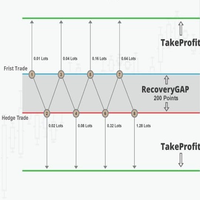
If the market trends away from the initial entry, the EA automatically places sequential orders at defined distance steps (Step ).
-
Depending on the total number of open orders (Total_H ), the EA can open multi-directional hedging or grid layers to balance the exposure.
-
-
Advanced Risk & Profit Management
-
Break-Even & Trailing Stops: Automatically moves stop-losses to break-even or trails them dynamically as profit grows.
-
Dynamic Basket Closure ( Loss_USD & Multi-Order Logic): Features built-in safety thresholds to cut floating losses in deposit currency and complex internal algorithms to selectively close profitable clusters of orders once profit targets are met.
-
✨ Key Features
-
Fibonacci-Driven Trend Trading: Combines classic mathematical retracement levels with algorithmic execution.
-
Smart Momentum Filters: Utilizes 14-period RSI and moving average parameters to filter out false breakouts.
-
Dynamic Lot Sizing: Supports fixed lot trading (Lot1 ) or automatic risk-based lot sizing (Auto_Lots via MaxRisk ).
-
Built-in Spread & Time Filters: Protects against high-volatility sessions and unpredictable spreads.
-
Advanced Multi-Order Management: Includes automated grid scaling, break-even shifts, and intelligent basket closure routines.
-
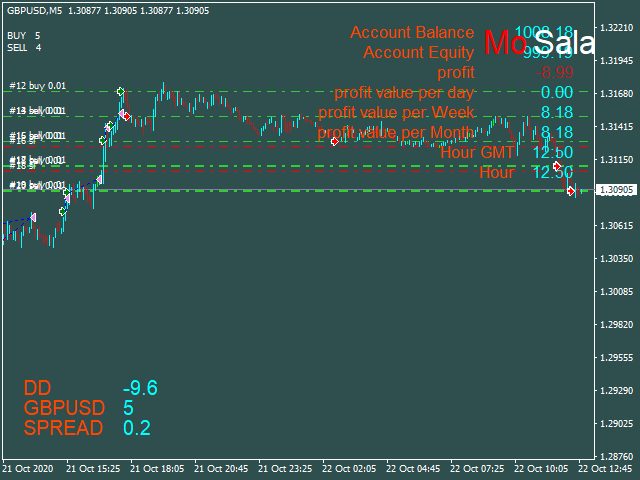
On-Chart HUD (Dashboard): Displays real-time account balance, equity, floating profit/loss, daily/weekly/monthly statistics, current spread, maximum drawdown (DD ), and broker server time.
-
Custom Chart Styling: Automatically applies a clean, modern color scheme to your MT4 chart upon loading.
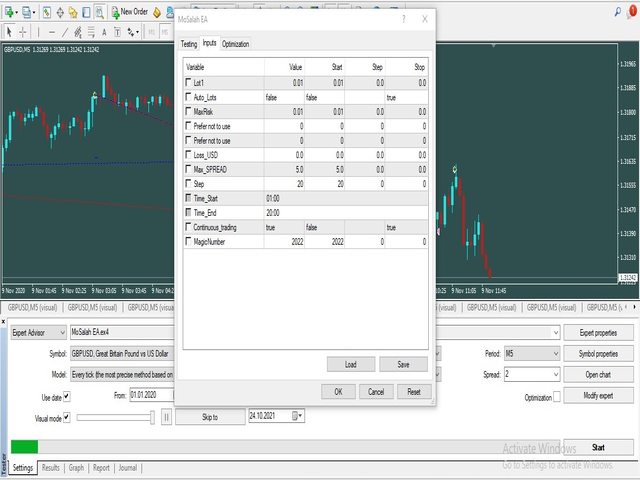
⚙️ Input Parameters Guide
Lot & Risk Management
-
Lot1 : Fixed base lot size when Auto_Lots = false .
-
Auto_Lots : Enables/disables automatic lot calculation (true /false ).
-
MaxRisk : Risk factor percentage used when automatic lots are enabled.
Order Settings & Protection
-
TakeProfit : Take profit distance in points (Default: 0 / Disabled).
-
StopLoss : Stop loss distance in points (Default: 0 / Disabled).
-
Loss_USD : Maximum allowable floating loss threshold in deposit currency to trigger a total close (Default: 0 / Disabled).
Trading & Grid Settings
-
Max_SPREAD : Maximum permitted spread for opening orders (Default: 5 ).
-
Step : Distance step in points between grid orders (Default: 25 ).
-
Time_Start / Time_End : Primary daily trading session window (Default: 01:00 to 20:00 ).
-
Continuous_trading : Controls whether the EA continues trading cycles or removes itself (ExpertRemove() ) after closing a basket (true /false ).
-
MagicNumber : Unique identifier for the EA's trades (Default: 2025 ).
📊 On-Chart Information Panel
The integrated dashboard provides clear real-time visibility directly on your MT4 terminal:
-
Account Status: Balance and Equity tracking.
-
Profit Metrics: Live floating P/L, plus closed profit summaries for the Day, Week, and Month.
-
Market Conditions: Active Symbol, Timeframe, current Spread, and Maximum Recorded Drawdown (DD ).
-
Time Tracking: Local broker time and GMT hour display.
⚠️ Risk Warning
Trading Forex and CFDs carries a high level of risk to your capital. Expert Advisors that utilize grid recovery, multi-order scaling, and dynamic averaging strategies can experience significant drawdown during strong, sustained, one-directional market trends. Always test MoSalah EA thoroughly on a demo account under various market conditions before deploying real funds, and ensure your risk settings align with your risk tolerance.