MT4 Telegram Signal

4.11

!!! New faeture sending Signals as VIP EMAILS

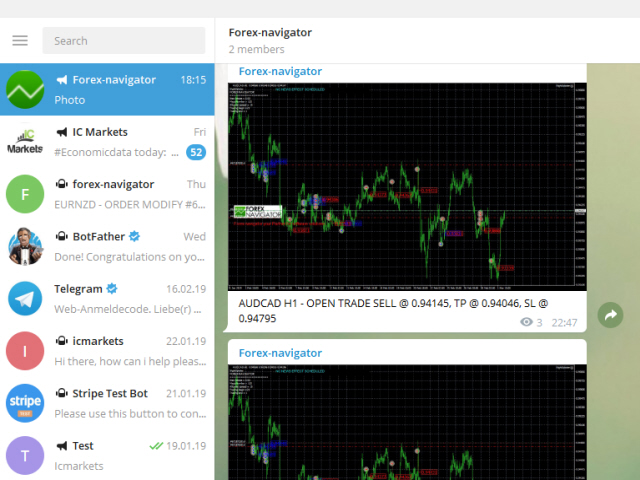
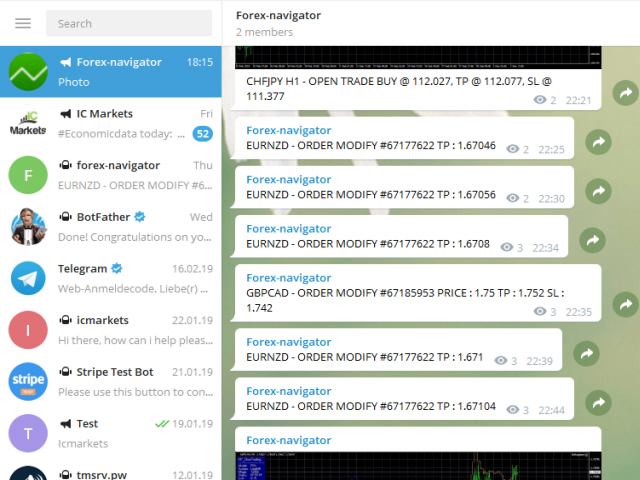
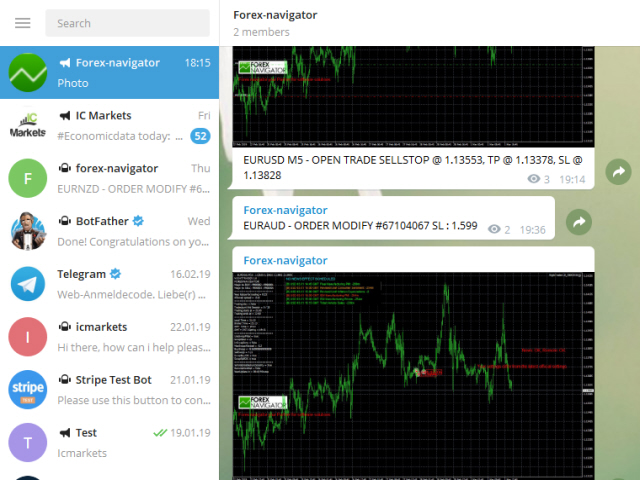
MT4 Telegram Signal is tool, which sends selected trades via magic number to telegram channel, sms and email to user. Tool sends trades when open and close with chart to telegram chanel. It also sends every modification from trades to telegram. Tool can send multiple charts and magic numbers and pairs from a single chart. For this you have to fill in on the chart corresponding magic number to be sent by the chart.

Send information of all type of orders: Opened (including Pending Orders), closed tiggered, and modifeid orders.

You must add the URL “https://api.telegram.org” to Tools > Options > Expert Advisors > Allow Web Request for listed URL in order to load news data from the source.

Telegram Setup instruction

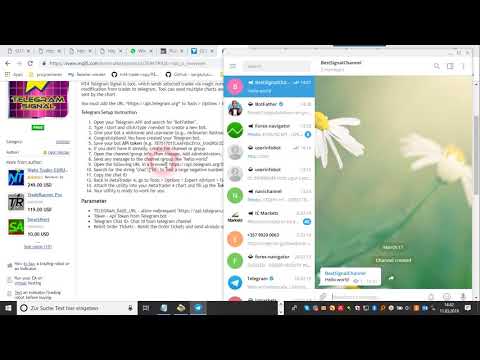
  1. Open your Telegram APP and search for "BotFather".
  2. Type /start and click/type /newbot to create a new bot.
  3. Give your bot a nickname and username (e.g., nickname: Bestnavisignal and username: Bestnavisignalbot <-- username has to be ended by 'bot').
  4. Congratulations! You have created your Telegram bot.
  5. Save your bot API token (e.g. 787517015:AAFnbcZYxx_iXAdRGrZD1W8bsSF5Xr_FmQ0) .
  6. If you don't have it already, create the channel or group
  7. Open the channel/group Info, then Manage, Add Administrators, type the bot username, and click Save
  8. Send any message to the channel/group like "hello world"
  9. Open the following URL in a browser: https://api.telegram.org/bot&lt;token>/getUpdates (dont forget adding your bot token to the URL)
  10. Search for the string "chat":{"id": to find a large negative number. This is your group or channel ID
  11. Copy the chat ID
  12. Back in MetaTrader 4, go to Tools > Options > Expert Advisors > tick 'Allowed WebRequest for listed URL' and add 'https://api.telegram.org'.
  13. Attach the utility into your MetaTrader 4 chart and fill up the Token (from step 5) and ChatID (from step 11).
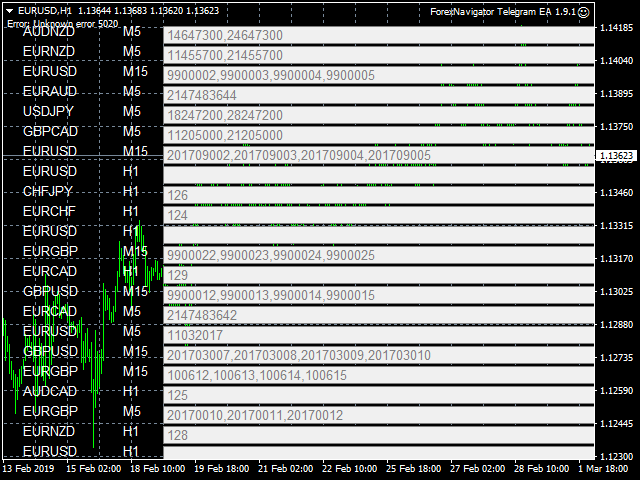
  14. Fill in the magic number sperated with comma "," on utility chart window. So you can select trades which should be sent to Telegram (Important! not shown on video look images please)
  15. Your utility is ready to work for you.

Parameter

  • TELEGRAM_BASE_URL - allow webrequest "https://api.telegram.org"
  • Token - Api Token from Telegram bot
  • Telegram Chat ID- Chat id from telegram channel
  • Reinit Order Tickets - Reinit the Order tickets and send already opened order
  • Digit number after point for EURUSD
  • Send chart to telegram - Set true if you want to send chart to telegram
  • Send pending order information 
  • Send only new orders after start
  • User message to telegram - Custom message to telegram
  • Hour to send User message - which hour everyday send custom message to telegram
  • Profit type - Profit type for report to send. avaliable in "PIP" or Currency
  • include open orders - included open ordersprofit to reports
  • Send Report Weekly - Set true if you want to send weekly report
  • Weekly weport day - Which day of week should weekly report to send
  • Sent monthly report - Set true if you want to send monthly report
  • Report send hour - which hour should weekly report send
  • Send email notification - set true if you want to send messages to email
  • Send mobile notification - set true if you want to send push messages to mobile
  • Order Open Message - user costumizing of order open message
  • Order Close Message -  user costumizing of order close message 
  • Order Modify Message - user costumizing of order ordermodify message
  • PendingOrderTriggerMsg - user costumizing of order Pendingorder message
  • ReportMsgLineProfit - user costumizing of each line at weekly/monthly report
  • ReportMsgLineLoss - user costumizing of each line at weekly/monthly report

avaliabel variables : {Symbol} , {Ticket}, {TimeFrame}, {BuySell}, {OrderLots}, {OpenPrice}, {TakeProfit}, {StopLoss},  {ClosingPrice}, {Profit}, {br}, {B}, {/B}, {I}, {/I}, {MONTH}, , {OrderComment}

 e.g. {B} New Order opened {B} #{MONTH} {Ticket} {BuySell} {OrderLots} lots {Symbol} @ {OpenPrice}, TP @ {TakeProfit}, SL @ {StopLoss} from {TimeFrame}

you can add now emojis to msg hre you find overview https://www.mql5.com/en/blogs/post/730473


    Reviews 28
    canary1411
    15
    canary1411 2024.06.21 02:51 
     

    Works wonderfully. TQVM!

    Fais “Sarasen”
    28
    Fais “Sarasen” 2023.11.09 16:24 
     

    Amazing app! Easy to install! Best utility for now

    K3RN3L P4N1C
    18
    K3RN3L P4N1C 2023.06.09 12:41 
     

    Amazing

    Recommended products
    Auto Supply and Demand Oscillator is an indicator for MetaTrader 4 and MetaTrader 5 that detects supply and demand zones automatically and displays them as a single oscillator value at the bottom of the chart, instead of drawing rectangles directly on price. Concept Supply zones are price areas where strong selling created a sharp downward move away from a balance area. Demand zones are price areas where strong buying created a sharp upward move. Traditional implementations draw boxes on the
    FREE
    OvertradeShield
    Etsushi Ishizuka
    OvertradeShield – Utility EA to Prevent Overtrading in Discretionary Trading Have you ever regretted making “just one more” trade in discretionary trading? OvertradeShield is a utility-type EA that automatically limits and alerts entries based on realized profit and loss, supporting your trading rules and mental discipline. It is ideal for traders who want to keep daily profits and losses in mind, prevent overtrading, and enforce profit and loss rules systematically. Since entries are discretion
    FREE
    Toby Strategy Indicator
    Ahmd Sbhy Mhmd Ahmd ʿYshh
    The indicator rely on The Toby strategy >> The mother candle which is bigger in range than the previous six candles. A vertical line shows the last Toby Candle with the targets shown up and down. The strategy is about the closing price out of the range of the toby candle to reach the 3 targets..The most probable to be hit is target1 so ensure reserving your profits and managing your stop lose.
    FREE
    Safety
    Sergey Ermolov
    5 (2)
    I think everyone knows such a rule of money management as "Safe". For those who are not aware, the safe assumes closing half of the position after the profit on the transaction has equaled the size of the stop. Thus, even if the price reverses and catches the stop, you will not lose money, because exactly the same amount of profit was received when closing part of the position earlier. The Safety Expert Advisor has only one setting – the closing lot. Leaving it at position 0, the adviser will
    FREE
    Harmonic Patterns are utilized for predicting market turning points with precision. These patterns offer a high win rate and numerous trade opportunities within a single trading day. Our indicator identifies the most prominent Harmonic Patterns based on principles outlined in Harmonic Trading literature. **IMPORTANT NOTES:** - The indicator does not repaint, lag, or redraw. It accurately identifies patterns at the D point, ensuring reliability in pattern detection.    **HOW TO USE:** 1. Drag
    FREE
    PZ Penta O MT4
    PZ TRADING SLU
    2.33 (3)
    The Penta-O is a 6-point retracement harmonacci pattern which usually precedes big market movements. Penta-O patterns can expand and repaint quite a bit. To make things easier this indicator implements a twist: it waits for a donchian breakout in the right direction before signaling the trade. The end result is an otherwise repainting indicator with a very reliable trading signal. The donchian breakout period is entered as an input. [ Installation Guide | Update Guide | Troubleshooting | FAQ | A
    FREE
    Profitstat free
    Tonny Obare
    4 (2)
    Profitstat is a free indicator that scans your history and displays it on the chart. The free version shows the number of trades and profit made on the current and previous day. The data is updated instantly as soon as a trade closes. Simply attach it to any chart and it gives the account data irrespective of the chart currency nor timeframe.
    FREE
    SuperTrend V
    Muhammad Hassaan
    *This is TradingView indicator converted to mql4* The SuperTrend V indicator is a popular technical analysis tool used to identify trends and potential trend reversals in financial markets. It is based on the concept of the SuperTrend indicator but incorporates additional features and variations. The SuperTrend V indicator uses a combination of price action and volatility to determine the trend direction and generate trading signals. Here are the key components and features of the indicator: Ca
    FREE
    Candle Countdown — Accurate Time to Close for MT4 Candle Countdown is a simple and precise tool that shows the remaining time until the current candle closes directly on the chart. When your entry depends on the candle close, even a few seconds matter. This indicator helps you see the exact time and make decisions without rushing or guessing. An indicator for precise control over candle closing time. The indicator displays: time remaining until candle close current server time spread Stop Level
    FREE
    Free automatic Fibonacci is an indicator that automatically plots a Fibonacci retracement based on the number of bars you select on the BarsToScan setting in the indicator. The Fibonacci is automatically updated in real time as new highest and lowest values appears amongst the selected bars. You can select which level values to be displayed in the indicator settings. You can also select the color of the levels thus enabling the trader to be able to attach the indicator several times with differe
    FREE
    Virtual Targets
    Hoang Van Dien
    3.83 (6)
    This indicator is very useful for day traders or short term traders. No need to calculate the number of pips manually, just look at the chart and you will see the Virtual Take Profit / Virtual Stop Loss target line and evaluate whether the entry point is feasible to reach the intended target or not. Enter the intended Take Profit / Stop Loss pips for your trade. The indicator will display Virtual Take Profit / Virtual Stop Loss lines for you to easily see if the target is feasible or not.
    FREE
    PPR and Engulfing
    Yury Emeliyanov
    5 (3)
    PPR and Engulfing is a unique technical indicator designed to identify the "PPR" and "Engulfing" patterns on currency charts in the MetaTrader 4 (MT4) trading platform. These patterns can indicate potential trend reversals or continuations, providing traders with valuable signals for entering and exiting the market. Key Features: Automatic Pattern Detection : The indicator automatically identifies and marks PPR and Engulfing patterns with arrows on the chart. Visual Signals : Green upward arrows
    FREE
    Follow The Line
    Oliver Gideon Amofa Appiah
    3.94 (16)
    FOLLOW THE LINE GET THE FULL VERSION HERE: https://www.mql5.com/en/market/product/36024 This indicator obeys the popular maxim that: "THE TREND IS YOUR FRIEND" It paints a GREEN line for BUY and also paints a RED line for SELL.  It gives alarms and alerts of all kinds. IT DOES NOT REPAINT and can be used for all currency pairs and timeframes. Yes, as easy and simple as that. Even a newbie can use it to make great and reliable trades. NB: For best results, get my other premium indicators for more
    FREE
    Welcome to our   Price Wave Pattern   MT4 --(ABCD Pattern)-- The ABCD pattern is a powerful and widely used trading pattern in the world of technical analysis. It is a harmonic price pattern that traders use to identify potential buy and sell opportunities in the market. With the ABCD pattern, traders can anticipate potential price movements and make informed decisions on when to enter and exit trades. Send me a  Message and Get A Free Gift : ABCD  Symbol Scanner Dashboard! EA Version : Price
    FREE
    Candle GAP
    Thushara Dissanayake
    3 (1)
    The Candle GAP indicator is an essential tool for traders utilizing Gap Trading Strategies as it automatically identifies candle gaps for each day of the week. A gap refers to a price level difference between the close and open of two consecutive days. This indicator recognizes four types of gap patterns: Common, Breakaway, Continuation, and Exhaustion. By incorporating this indicator into any chart, traders can validate their signals and enhance their trading decisions. One of the key features
    FREE
    Shadow Flare MT4
    Kestutis Balciunas
    Shadow Flare Indicator is a non-repainting trend & liquidity tool for MetaTrader 4. It runs a configurable moving-average baseline (HMA, EMA, SMA, or RMA) wrapped in an Average True Range envelope and produces a sticky trend state that only flips when price closes through the upper or lower band. The same trend engine drives an automatic supply/demand zone module that detects pivot highs and pivot lows, draws coloured boxes around them, and mitigates each zone the moment price closes through it.
    FREE
    HMA Trend
    Pavel Zamoshnikov
    4.56 (72)
    A trend indicator based on the Hull Moving Average (HMA) with two periods. The Hull Moving Average is an improved variant of the moving average, which shows the moment of trend reversal quite accurately. It is often used as a signal filter. Combination of two types of Hull Moving Averages makes a better use of these advantages: HMA with a slow period identifies the trend, while HMA with a fast period determines the short-term movements and signals in the trend direction. Features The movement d
    FREE
    Aroon Classic
    Etsushi Ishizuka
    Overview of the Aroon Classic Indicator The Aroon Classic indicator is a technical tool that quantitatively identifies the emergence and persistence of trends on a chart. It uses two lines—“Aroon Up” and “Aroon Down”—to display trend strength and turning points within a range of 0–100. A higher Aroon Up value indicates a stronger uptrend, while a higher Aroon Down value indicates a stronger downtrend. Key Features Visually distinguishes trend initiation and reversal Customizable calculation peri
    FREE
    This MQL4 indicator creates a customizable grid of horizontal lines on your trading chart. Here's what it does: **Main Functions:** - Draws equally spaced horizontal lines across the visible price range - Supports two line types: horizontal lines or trend lines with forward projection - Automatically adjusts to price scale changes **Key Features:** 1. **Customizable Spacing**: Set grid distance in pips (20 pips by default) 2. **Flexible Starting Point**: Auto-calculates starting price or lets
    FREE
    Trendline indicator
    David Muriithi
    2 (1)
    Are you tired of drawing trendlines every time you're analyzing charts? Or perhaps you would like more consistency in your technical analysis. Then this is for you. This indicator will draw trend lines automatically when dropped on a chart. How it works Works similar to standard deviation channel found on mt4 and mt5. It has 2 parameters: 1. Starting Bar 2. Number of bars for calculation The   starting bar   is the bar which drawing of the trend lines will begin, while the   number of bars for c
    FREE
    Silver Bullet MT4
    Saksham Solanki
    5 (2)
    Contact me for any queries or custom orders, if you want to use this in an EA. Key Features: Pattern Recognition : Identifies Fair Value Gaps (FVGs) Spots Break of Structure (BOS) points Detects Change of Character (CHoCH) patterns Versatile Application : Optimized for candlestick charts Compatible with any chart type and financial instrument Real-Time and Historical Analysis : Works seamlessly with both real-time and historical data Allows for backtesting strategies and live market analysis Vi
    FREE
    UPD1 D Levels
    Vitaliy Kuznetsov
    5 (3)
    Levels indicator based on the previous day. Mathematical formula determines entry and exit levels.  Trading recommendations. Levels are traded at the beginning of the European session when volatility appears. In case of insufficient volatility use half of take profit to exit. If the price reversed at half take profit, then on the reversal look for a target also at the level of half take profit. If the price bounced from the entry level, then in the opposite direction the price can reach the se
    FREE
    Extremum Reverse Bar
    Yurij Izyumov
    2.8 (5)
    This indicator has been created for finding the probable reversal points of the symbol price. A small candlestick reversal pattern is used it its operation in conjunction with a filter of extremums. The indicator is not redrawn! If the extremum filter is disabled, the indicator shows all points that have a pattern. If the extremum filter is enabled, the condition works – if the history Previous bars 1 candles back contains higher candles and they are farther than the Previous bars 2 candle, such
    FREE
    Show Pips
    Roman Podpora
    4.27 (59)
    This information indicator will be useful for those who always want to be aware of the current situation on the account. The indicator displays data such as profit in points, percentage and currency, as well as the spread for the current pair and the time until the bar closes on the current timeframe. VERSION MT5 - More useful indicators There are several options for placing the information line on the chart: 1. To the right of the price (runs behind the price); 2. As a comment (in the upper
    FREE
    What is Schaff Trend Cycle? The Schaff Trend Cycle (STC) is an oscillator-type indicator designed to detect trend reversals in a timely manner. Compared to traditional indicators like moving averages or MACD, it combines cyclical patterns with momentum to more clearly identify the beginning and end of trends. Main Features Clear trend reversal signals: The cycle line rises in an uptrend and falls in a downtrend. Noise reduction in ranging markets: Smoothing based on cyclical timing helps filter
    FREE
    Lot Calculate
    Maksim Neimerik
    This simple but useful script calculates the lot in % of the deposit. It is indispensable for risk management. There is only one customizable parameter: MaxRisk - risk in % for lot calculation. The product works as a standard script. Launch it once on an appropriate chart and start trading using the calculated lot value. Genious is simplicity! Happy trading!
    FREE
    SWING HIGHS LOWS DETECTOR Swing Detection with Divergence Analysis -------------------------------------------------- Identify swings. Spot divergences. Trade with confluence. -------------------------------------------------- WHAT THIS INDICATOR DOES This indicator automatically detects structural swing highs and lows using configurable depth and deviation filtering. It then analyzes RSI and MACD to detect regular and hidden divergences between consecutive swings of the same type. Diver
    FREE
    SMA Indicator
    Nitu Brijesh Yadav
    Arrow Indicator (Buy/Sell Alerts) – Simple Yet Powerful Tool!             Product Version: 1.01           Indicator Type: Trend Reversal Signals           Timeframes Supported: All (Recommended: H1, H4, D1)           Key Features: Buy Signal: Green upward arrow () appears below the candle  Sell Signal : Red downward arrow () appears above the candle Accurate Trend Reversal Detection – Based on tried and tested SMA strategy. ️ Clean Chart View – Minimalist, non-i
    FREE
    FFx Fractals
    Eric Venturi-Bloxs
    4.5 (2)
    The purpose of this new version of the MT4 standard indicator provided in your platform is to display in a sub-window multiple timeframes of the same indicator. See the example shown in the picture below. But the display isn’t like a simple MTF indicator. This is the real display of the indicator on its timeframe. Here's the options available in the FFx indicator: Select the timeframes to be displayed (M1 to Monthly) Define the width (number of bars) for each timeframe box Alert pop up/sound/ema
    FREE
    Stat Monitor is a good information indicator. Benefits of the indicator: The indicator provides useful information - the current spread, the cost of one lot of the symbol, trading leverage and the recommended lot size for trading. You can use the indicator on the MetaTrader 4 trading platform of any broker. The indicator provides useful information. Version of the Stat Monitor indicator for MetaTrader 5 I wish you all good luck in trading and stable profit!
    FREE
    Buyers of this product also purchase
    Forex Trade Manager MT4
    InvestSoft
    4.98 (446)
    Trade Manager MT4 is an advanced position size calculator and trade management tool for MetaTrader 4, designed to help traders plan trades faster, control risk more precisely, and manage open positions directly from the chart. It combines order placement, risk based lot calculation, Stop Loss and Take Profit management, Break Even, Trailing Stop, Partial Close, Equity Protection, and external trade management in one panel. Whether you trade forex, indices, metals, commodities, or crypto, Trade M
    Trade Indicator Assistant is a powerful MT4 utility designed to turn indicators into automated trading systems. Its main feature is the ability to automatically detect an indicator’s   BUY and SELL signal buffers , without requiring you to know the buffer numbers, search through indicator settings, or modify the indicator source code. Bonus Indicator: After purchasing Trade Indicator Assistant, contact me to receive Trade Signal Pro completely free as a bonus indicator. [Download Demo Version]
    Trade Assistant MT4
    Evgeniy Kravchenko
    4.43 (197)
    It helps to calculate the risk per trade, the easy installation of a new order, order management with partial closing functions, trailing stop of 7 types and other useful functions. Additional materials and instructions Installation instructions   -   Application instructions   -   Trial version of the application for a demo account Line function -   shows on the chart the Opening line, Stop Loss, Take Profit. With this function it is easy to set a new order and see its additional characteris
    Exp COPYLOT CLIENT for MT4
    Vladislav Andruschenko
    4.69 (65)
    Professional Trade Copier for MetaTrader 4 Fast, professional, and reliable trade copier for MetaTrader 4 . COPYLOT helps you copy Forex trades between MetaTrader 4 and MetaTrader 5 terminals with flexible synchronization for different account setups. COPYLOT MT4 version supports: MetaTrader 4 to MetaTrader 4 MetaTrader 5 Hedge to MetaTrader 4 MetaTrader 5 Netting to MetaTrader 4   MT5 version Full Description + DEMO + PDF How To Buy How To Install How to get Log Files How To Test and Optimize A
    Local Trade Copier EA MT4
    Juvenille Emperor Limited
    4.96 (112)
    Local Trade Copier EA MT4 is a fast and flexible trade copier for copying and managing trades between multiple MetaTrader 4 accounts on the same Windows computer or Windows VPS. It combines local trade synchronization with Receiver-side controls for lot sizing, risk management, trade filtering, symbol mapping, trade management and account protection. Set up your Transmitter and Receiver terminals in about 1 minute and copy manual or EA trades between accounts at the same or different brokers. U
    Telegram to MT4 Multi-Channel Copier   automatically copies trading signals from your Telegram channels straight to MetaTrader 4. No bots, no browser extensions, no manual copying. A signal arrives in Telegram and the EA opens the trade in your terminal within seconds. And before you copy a channel, the built-in backtester shows you what that channel would have done in your account. The product has two components: a Windows application that listens to your Telegram channels, and this Expert Advi
    VirtualTradePad mt4 Extra
    Vladislav Andruschenko
    4.85 (61)
    Trading Panel for trading in 1 click.  Working with positions and orders!  Trading from the chart or the keyboard. Using our trading panel, you can trade in one click from the chart and perform trading operations 30 times faster than the standard MetaTrader control. Automatic calculations of parameters and functions that make life easier for a trader and help a trader conduct their trading activities much faster and more conveniently. Graphic tips and full information on trade deals on the chart
    Trade copier MT4
    Alfiya Fazylova
    4.61 (36)
    Trade Copier is a professional utility designed to copy and synchronize trades between trading accounts. Copying occurs from the account / terminal of the supplier to the account / terminal of the recipient, which are installed on the same computer or VPS . Before buying, you can test the demo version on a demo account. Demo version here . Full instruction here . Main functionality and benefits: Supports copying MT4> MT4, MT4> MT5, MT5> MT4, including MT5 netting accounts. * Supports copying Dem
    Smart Copy Local MT4
    Kyra Nickaline Watson-gordon
    5 (7)
    Smart Copy is an Easy-to-Use EA that supports Multi Copying Metatrader4 and Metatrader5 and Local/Remote Copying. (Remote Version is coming soon) Free version is available on Smart Copy Local Free MT4 Specifications :     Real Time, Multi Terminal - Multi Account - MT4/MT5 trade copying     Copy from netting to hedge and hedge to netting is supported.     Fast and instant copy     All settings are input visually.     Easy modifying symbol names, prefix, suffix     Enable/Disable copying s
    Telegram to MT4 Coppy
    Sergey Batudayev
    4.09 (11)
    Telegram to MT4: The Ultimate Signal Copying Solution Streamline your trading with Telegram to MT4 , the cutting-edge utility designed to copy trading signals directly from Telegram channels and chats to your MetaTrader 4 platform—without the need for DLLs. This robust solution ensures seamless execution of signals with unparalleled precision and customization options, saving you time and boosting your efficiency. [ Instructions and DEMO ] [ FAQ ] [ How atach logs properly ] [Settings descrition
    KT Equity Protector MT4
    KEENBASE SOFTWARE SOLUTIONS
    3.75 (4)
    The one EA every MetaTrader trader should be running, but isn't. Most accounts don't blow up because the strategy was wrong. They blow up because, in a bad moment, a trader let a loss run, doubled down, held trades into the weekend, gave back a winning week, or forgot the daily prop-firm limit by one bad click. KT Equity Protector is the automated guardian that won't let that happen. Install it on one chart. Set your rules once in a guided, plain-English wizard: daily loss, max drawdown, profit
    Fibo Heart Expert Advisor
    Mohd Khairol Amin Ramli
    Want automatically to put the pending order, take profit and stop loss? This EA will do it on your behalf! The Fibo Heart EA strategy will place limit order after the ‘check point’ breakout. The position will be triggered when the price make a successful retest. If not, the pending order will automatically deleted after price hit certain level. You also have option to enable market order (instant execution) and custom take profit in the inputs setting. This EA must be attached with Fibo Heart In
    Partial Closure EA MT4
    Juvenille Emperor Limited
    5 (3)
    Partial Closure EA MT4   allows you to partially close any trade on your account, manually by a chosen percentage of the lot size and/or by trade ticket, or automatically at specified percentages of the TP/SL level, closing a percentage of the initial lot size across up to 10 take profit and 10 stop loss levels.  It can manage all or selected trades in your account by specifying or excluding certain magic numbers, comments, or symbols. Tip: Download the free demo version of the Partial Closure E
    MT4 to Telegram Signal Provider   turns your trading account into a signal provider. Every trade action, whether manual, by EA or from your phone, is instantly sent as a message to Telegram. You can fully customize the format or use a ready-made template for quick setup. [ Demo ] [ Manual ] [ MT5 Version ] [ Discord Version ]  New: [ Telegram To MT5 ] Setup A step by step user guide is available. Key Features Ability to customize order details sent to subscribers You can create a tiered subs
    Working Trial Download Copy Cat More Trade Copier MT4 is not just a simple local trade copier; it is a complete risk management and execution framework designed for today’s trading challenges. From prop firm challenges to personal portfolio management, it adapts to every situation with its blend of robust execution, capital protection, flexible configuration, and advanced trade handling. The copier works in both   Master (sender) and Slave (receiver)   modes, with real-time synchronization of
    TradePanel MT4
    Alfiya Fazylova
    4.84 (95)
    Trade Panel is a multi-functional trading assistant. The app contains over 50 trading functions for manual trading and allows you to automate most trading tasks. Application instructions: https://www.mql5.com/en/blogs/post/756482 Trial version of the application for a demo account: https://www.mql5.com/en/blogs/post/750865 How to install the application: https://www.mql5.com/en/blogs/post/756239 How to test the application in visual mode: https://www.mql5.com/en/blogs/post/770277 How to install
    King Trade Copier MT4
    Mohammed Maher Al-sayed Mohammed Ahmed Saleh
    5 (1)
    King Trade Copier connects MetaTrader terminals that run on the same computer or VPS. Trades opened on one account appear on the others. The file carries both roles, so the same download becomes the sender or a receiver depending on what you set Mode to. On every chart the panel states whether this terminal is sending or receiving, names the account on the other side, counts the receivers that answered, and gives the age of the last signal. An order that was not copied leaves its reason on the
    Currency strength meter for MetaTrader 4 This currency strength indicator reads up to 28 major pairs and turns them into one number per currency, for the 8 majors: USD, EUR, GBP, JPY, CHF, CAD, AUD and NZD. Instead of opening chart after chart to work out who is leading, you read one panel on your MetaTrader 4 chart and you know which currency is being bought and which one is being sold. What you see on the chart A ranked strength bar for each of the 8 currencies, with its percentage A multi-tim
    ATTENTION: The Indicator cannot be backtested, as it is generated exclusively from live intraday calculations based on options flow. GEX Level Converter – Gamma Exposure Mapping for CFD Charts NASDAQ-100 edition — for US100 · NDX · NAS100 · USTECH and every Nasdaq-100 CFD equivalent Instantly see professional options-market levels directly on your MetaTrader Nasdaq-100 CFD chart. The GEX Level Converter translates the daily Gamma Exposure (GEX) zones of the NDX options market into precise pri
    天机跟单系统-MT4接收端 天机文件跟单系统是一款专业的跨平台跟单EA,让您在MT4和MT5之间自由复制交易。无论您是管理多个账户、在模拟盘与实盘之间验证策略,还是在不同券商之间迁移交易,天机都能为您提供稳定、灵活、安全的跟单体验。 重要提示:本系统由「发送端 + 接收端」两个EA文件组成,缺一不可,需成对使用。请确保下载了对应您平台(MT4或MT5)的两个文件。 下载   MT5发送端   访问: https://www.mql5.com/zh/market/product/187073 下载   MT5接收端   访问: https://www.mql5.com/zh/market/product/187071 下载   MT4发送端   访问: https://www.mql5.com/zh/market/product/187078 下载   MT4接收端   访问: https://www.mql5.com/zh/market/product/187074 如果这个跟单系统对你有帮助,请给个好评,你的认可是我持续更新最大的动力 核心功能 真正的
    天机跟单系统 -MT4发送端 天机文件跟单系统是一款专业的跨平台跟单EA,让您在MT4和MT5之间自由复制交易。无论您是管理多个账户、在模拟盘与实盘之间验证策略,还是在不同券商之间迁移交易,天机都能为您提供稳定、灵活、安全的跟单体验。 重要提示:本系统由「发送端 + 接收端」两个EA文件组成,缺一不可,需成对使用。请确保下载了对应您平台(MT4或MT5)的两个文件。 下载   MT5发送端   访问: https://www.mql5.com/zh/market/product/187073 下载   MT5接收端   访问: https://www.mql5.com/zh/market/product/187071 下载   MT4发送端   访问: https://www.mql5.com/zh/market/product/187078 下载   MT4接收端   访问: https://www.mql5.com/zh/market/product/187074 如果这个跟单系统对你有帮助,请给个好评,你的认可是我持续更新最大的动力 核心功能 真正的跨
    This is a program in the form of an EA that attaches to a chart in MetaTrader 4. Then, by using API from Bittrex, Binance websites, it downloads the history of altcoins. By selecting a pair name, the EA automatically downloads all time frames history (Daily,H12,H4,H2,H1,M30,M15,M5,M3,M1) so there is no need to attach multiple EAs to different charts. You can select one pair from Bittrex and 4 pairs from Binance exchange with one running EA and create up to 15 timeframes for 5 different pairs. Th
    Smart Trader MT4
    Agus Santoso
    5 (1)
    MT4 Version : https://www.mql5.com/en/market/product/91169 MT5 Version : https://www.mql5.com/en/market/product/110193 Live Signal : https://www.mql5.com/en/signals/2345410 Introducing the "Smart Trader" trading assistant expert advisor – the ultimate tool trusted by professional traders worldwide for its unparalleled adaptability and cutting-edge risk management strategies. At the heart of "Smart Trader" lies its revolutionary risk management switching system, meticulously designed to dynamic
    Copier->Convenient and fast interface interaction, users can use it right away   ->>>> Recommended to use on Windows computers or VPS Windows Features: Diversified and personalized copy trading settings: 1. Different lot modes can be set for different signal sources 2. Different signal sources can be set for forward and reverse copy trading 3. Signals can be set with comments 4. Whether to calibrate the lot according to the contract lot Diversified and personalized copy order settings 2: 1. Dif
    Take a Break
    Eric Emmrich
    5 (31)
    Take a Break pauses your Expert Advisors when trading is a bad idea: before news, after a daily loss, outside your trading hours, or when a rule you wrote yourself says so. When the pause is over, your EAs simply continue. Account protection for all your EAs in one tool: news filter, drawdown and equity protection, time filter and custom rules. One EA on one chart protects the whole account, the free indicator gives every chart its own rules on top. Free demo | What is new in 26.09 | Support Ass
    EA Local Trade Copier Pro MT4: The Ultimate DLL-Free Trade Duplicator Are you tired of complicated trade copiers that require unsafe external DLLs, crash your terminal, or confuse you with separate "Master" and "Client" files? Experience the next generation of trade copying with EA Local Trade Copier Pro MT4. Engineered for maximum stability, lightning-fast execution, and ultimate simplicity, this utility allows you to seamlessly copy trades between multiple MetaTrader terminals on the same Wind
    CloseIfProfitorLoss with Trailing
    Vladislav Andruschenko
    4.88 (32)
    Close If Profit or Loss with Trailing for MetaTrader 4 — automatic closing by total profit or loss A reliable trade-management utility for MetaTrader 4 that automatically closes positions when the total profit or total loss reaches the level you set. The Expert Advisor monitors open trades, calculates floating profit and loss, can trail profit, and helps close positions faster than manual reaction. MetaTrader 4 is still used by many manual traders, grid traders, scalpers, and Expert Advisor use
    Multi Copy
    Kaijun Wang
    5 (1)
    Copier->Convenient and fast interface interaction, users can use it right away   ->>>> Recommended to use on Windows computers or VPS Windows Basic functions: The normal interaction speed of copy trading is less than 0.5s Automatically detect signal sources and display a list of signal source accounts Automatically match symbols, 95% of commonly used trading symbols on different platforms (special cases such as different suffixes) are automatically matched, basically no manual settings are requ
    Trend Line Optimizer
    Evgenii Aksenov
    4.11 (19)
    This is an automatic parameter optimizer for the   Trend Line PRO   indicator Easily and quickly you will select the optimal parameters for your favorite Trend Line PRO indicator.  Optimization takes only a few seconds. The optimizer allows you to find the best parameters for each pair and period: Amplitude, TP1-TP3, StopLoss, as well as values for Time Filter and HTF Filter on the selected history section (Days)  To optimize different timeframes, you need a different range of history: M5-M15
    Trade Dashboard MT4
    Fatemeh Ameri
    4.96 (54)
    Trade Dashboard simplifies how you open, manage, and control your trades, with built-in lot size calculation. It allows you to execute trades, manage risk, and control positions directly on the chart, with tools such as partial close, breakeven, and trailing stop. Designed to reduce manual work and help you stay focused on your trading decisions. A demo version is available for testing. Detailed explanations of features are provided within the MQL5 platform. Installation instructions are include
    More from author
    NightTrader
    Ugur Oezcan
    5 (1)
    No grid! No martingale! No manual configuration or adjustment needed! Every trade is protected by stop loss. You can find metatrader4 version here: https://www.mql5.com/de/market/product/18571# This Expert Advisor only trades for a short time frame at night, during the ending of the New York session. It uses low volatility moments in EURUSD and enters trades based on indicators. It then manages those trades with dynamic stop losses and take profits also based on indicators.  Please find a signal
    NightXploiter
    Ugur Oezcan
    5 (1)
    Expert opens trades by level and uses no indicator. It can be used with multiple currency pairs with correct settings. Depending on the currency pair, trading sessions are mostly short before the newyork close to the middle of Japan session. Due to independence of indicators, the expert can be optimized for several currency pairs and trading times. In case of extended drawdown, take profits are adjusted to exit the market sooner and if at all possibly profitable. The built-in news filter prevent
    This is no martingale, grid, hedge or other averaging strategy. This expert is a classic break-out-strategy with special filter. It monitors market movements and set pending trades. If not activated in a certain time frame, new levels are set. On activation the experts trails the trade very closely. Every trade is protected by stop-loss. Best trading times are while London and USA is open. We suggest – and have tested it with – EURUSD and GBPUSD We also suggest a VPS with very fast ping times an
    Night Trader EURUSD
    Ugur Oezcan
    4.21 (29)
    The EA can trade multiple currencies. Please check our signals ( https://www.mql5.com/en/users/ugur-edin/seller ) for detailed information. No grid or martingale! No manual configuration or adjustment needed! Every trade is protected by stop loss. This Expert Advisor only trades for a short time frame at night, during the ending of the New York session. It uses low volatility moments and enters trades based on indicators. It then manages those trades with dynamic stop losses and take profits als
    This tool monitors your current Expert Advisors and manages stop losses and take profits. You can customize which EAs and/or which currencies to monitor. It is primarily meant for EAs that you feel manage stop losses and/or take profits poorly. If you want this tool to be able to monitor manual trades, please use '0' (zero) as the magic number. Supports hidden stoploss and take profit Supports ATR-calculated dynamic stoploss Supports Breakeven for individual trades Supports Trailing stop Lower r
    Retro Trader
    Ugur Oezcan
    3.9 (10)
    This expert trades on price action. It does not use signals from indicators but creates a statistics-based custom channel for entry and exit of trades. Due to independence of indicators, the expert can be optimized for several currency pairs and trading times. Each trade position is protected by stop-loss, both hidden and visible. No martingale, hedging or grid. The expert uses 3 different strategies within the same channel for entry and exit. Each opens only 1 trade at a time. Please find a sig
    Turbo pivot levels
    Ugur Oezcan
    4.5 (2)
    This Expert Advisor is based on pivot points. Users can choose entry level and direct themselves. Expert use martingale strategy to recover unsuccessful trades. When going into drawdown it starts its slipping mode in which it always tries to keep the whole set of trades on a steady course level. In hedging mode, all take profits will be deleted and the basket will try to close at breakeven price. EA can also be used as normal with Stop loss. Please test before using with Stop loss. The EA can tr
    This indicator shows the trend based on two configurable moving averages. A custom calculation shows market volatility in the lower frame. Higher bars mean higher volatility. The chart also shows suggestions for buy, sell or close with the help of arrows. It is possible to set minimum volatility for entry points and to set time filtered alerts. This indicator is useful to judge trends or market volatility, for example to catch good periods for scalping. Parameters Volatility Period - volatility
    This EA trades mainly in the London and New York Sessions of the market. Forex Agent A is a day scalper with a bigger stop loss and a smaller take profit. Trades are opened at the first tick of the bar. In case of extended drawdown, take profits are adjusted to exit the market sooner and if at all possibly profitable. The built-in news filter prevents the opening of new trades when important news is upcoming. Entry points are determined exclusively by various indicators. Trade exits determined e
    Diamond Pattern
    Ugur Oezcan
    5 (1)
    The diamond top and bottom are reversal patterns. It represents a rally to a new high with a drop to a support level followed by a rally to make a new high and a quick decline, breaking the support level to make a higher low. The bounce from the higher low is then followed by a rally, but making a lower high instead. Once this behavior is identified, prices then break the trend line connecting the first and second lows and start to decline further. You can find MT5 version hier Indicator shows
    What is Double Top and Bottom Double top and bottom patterns are chart patterns that occur when the underlying investment moves in a similar pattern to the letter "W" (double bottom) or "M" (double top). Double top and bottom analysis is used in technical analysis to explain movements in a security or other investment, and can be used as part of a trading strategy to exploit recurring patterns. You can find MT5 version hier Indicator shows you 2 Level target and stop loss level. Stoploss level
    !!! New faeture sending Signals as VIP EMAILS MT4 Telegram Signal is tool, which sends selected trades via magicno to telegram channel , sms and email to user. Tool sends trades when open and close with chart to telegram chanel. It also sends every modification from trades to telegram. Tool can send multiple charts and magicno and pairs from a single chart. For this you have to fill in on the chart corresponding magic number to be sent by the chart. You must add the URL “ http://api.telegram.o
    The diamond top and bottom are reversal patterns. It represents a rally to a new high with a drop to a support level followed by a rally to make a new high and a quick decline, breaking the support level to make a higher low. The bounce from the higher low is then followed by a rally, but making a lower high instead. Once this behavior is identified, prices then break the trend line connecting the first and second lows and start to decline further. You can find MT4 version hier Indicator shows
    What is Double Top and Bottom Double top and bottom patterns are chart patterns that occur when the underlying investment moves in a similar pattern to the letter "W" (double bottom) or "M" (double top). Double top and bottom analysis is used in technical analysis to explain movements in a security or other investment, and can be used as part of a trading strategy to exploit recurring patterns. you can fin MT4 version hier Indicator shows you 2 Level target and stop loss level. Stoploss level
    Filter:
    rollincajun
    63
    rollincajun 2025.02.10 01:18 
     

    Free version spam trying to get free affiliates money through IC markets all the time. Waste of time.

    Ugur Oezcan
    16394
    Reply from developer Ugur Oezcan 2025.02.10 20:57
    It is free version. Tryout the function before buying paid version. Yes affiliate link posted. What is wrong with that
    Luisdeng
    14
    Luisdeng 2024.11.21 08:58 
     

    Excellent app. It worked for 2 days. On the third day it started delivering signals intermittently, then slowly, until finally it stopped working and now it only does daily reporting and IMCMarkets advertising. Does this free version have a day limit, right? thanks.

    canary1411
    15
    canary1411 2024.06.21 02:51 
     

    Works wonderfully. TQVM!

    Abbey Mac
    32
    Abbey Mac 2024.05.17 21:14 
     

    Hello, could you add an option for closed trade to reply to Original message instead of modified message? I noticed if I take a trade and it sends to telegram, and I happen to modify my TP or SL, when closing the trade, it replies to the modified message instead of the original message which the signal was sent. This way copier is not able to grasp the message and close trade on my mt4

    Bahaattin Kirisik
    120
    Bahaattin Kirisik 2023.11.17 20:17 
     

    User didn't leave any comment to the rating

    Fais “Sarasen”
    28
    Fais “Sarasen” 2023.11.09 16:24 
     

    Amazing app! Easy to install! Best utility for now

    K3RN3L P4N1C
    18
    K3RN3L P4N1C 2023.06.09 12:41 
     

    Amazing

    Nasser Hmood N Alqahtani
    371
    Nasser Hmood N Alqahtani 2023.03.07 12:04 
     

    You can add the option of alerting the news ahead of time, as well as the result after the news is issued. It would be a great option

    niknelid
    30
    niknelid 2022.02.03 04:26 
     

    Программа супер, из бесплатных мне понравилась больше всех, сигналы об открытии и закрытии присылает очень быстра, еще и с картинками.

    Ahmed Gaber
    55
    Ahmed Gaber 2021.12.30 09:06 
     

    Hi, It's Really Excellent Product but, I have a question, why always send an advertisement for # ICMarket ( 21 % Live Discount ) & is there a way can prevent it from auto sending ???? Please.

    Ugur Oezcan
    16394
    Reply from developer Ugur Oezcan 2021.12.31 11:51
    free version send about 12 hours addvertisemment. in paid version is no advertisement
    Jia Hsiang Toh
    118
    Jia Hsiang Toh 2021.10.04 10:12 
     

    can i add the trade comment as a variable to the telegram message?

    Ugur Oezcan
    16394
    Reply from developer Ugur Oezcan 2022.10.13 16:17
    Thank you:)
    itskev G-
    95
    itskev G- 2021.09.30 08:48 
     

    I haven't gotten it to work just yet... any suggestions?

    Ugur Oezcan
    16394
    Reply from developer Ugur Oezcan 2021.09.30 10:39
    Can you log in with your Username and pw to https://telegram-trader.com . Do you allow webrequest. Are you correct set for signal parsing. You can send me msg at telegram...
    Ken Sears
    18
    Ken Sears 2021.09.28 23:51 
     

    User didn't leave any comment to the rating

    Glyn Robert Williams
    329
    Glyn Robert Williams 2021.08.31 15:42 
     

    great instructions and seems to work ok - for some reason it will not post xauusd trades though and it would be perfect if it would do twitter too :)

    brown888
    175
    brown888 2021.08.03 10:28 
     

    WORKS THEN stops

    Mehdi Faraz Fard
    2471
    Mehdi Faraz Fard 2021.07.10 13:09 
     

    So good

    Ugur Oezcan
    16394
    Reply from developer Ugur Oezcan 2022.10.13 16:18
    Thank you!
    Godlive Massivi
    18
    Godlive Massivi 2021.07.09 13:40 
     

    COMMENT AJOUTER LE NOMBRE MAGIQUE? je pense que c'est la partie la plus importante qui manque

    Ugur Oezcan
    16394
    Reply from developer Ugur Oezcan 2021.07.09 18:03
    just fill in the white inputbox separate it comma.
    Matthew Todorovski
    13134
    Matthew Todorovski 2021.04.14 11:22 
     

    Awesome utility! Such clear and concise instructions on the complex Telegram setup - very good support! I haven't yet seen the orders get posted to the channel, but I am already impressed that everything appears to be working fine! Thank you so much for sharing your masterpiece!

    Ugur Oezcan
    16394
    Reply from developer Ugur Oezcan 2022.10.13 16:18
    Thank you!
    FiboMatti
    14
    FiboMatti 2021.03.18 20:03 
     

    User didn't leave any comment to the rating

    Ugur Oezcan
    16394
    Reply from developer Ugur Oezcan 2021.03.21 02:09
    which link?
    Austin John Villarico Salvador
    587
    Austin John Villarico Salvador 2021.03.11 08:19 
     

    This is good!

    Ugur Oezcan
    16394
    Reply from developer Ugur Oezcan 2022.10.13 16:18
    Thank you!
    12
    Reply to review