Eagle Trade Copier
- Utilities
- Version: 1.10

<div> <h3><br></h3> Eagle <h3><i>Trade Copier</i></h3> </div>
<div> <br> </div>
<div class="code"> Local trade copier for MetaTrader 4 and MetaTrader 5: copy from MT4 to MT5, from MT5 to MT4 or between terminals of the same platform on one computer or VPS. Every symbol is checked before the first copy, and every copy is checked like a manual order. </div>
<div> <br> </div>
<div> <i><u><b>Eagle Trade Copier</b></u> copies trades and pending orders between MetaTrader terminals running on the same computer or VPS. One file covers three roles: Transmitter on the account you copy from, Receiver on every account that copies, Self Copier to multiply trades inside the same account. Before the first copy it tests the connection and every symbol of the source account, and the panel on the chart tells you what would go wrong and how to fix it.</i> </div>
<div> <br> </div>
<div> <b><i>WHY IT IS DIFFERENT</i></b> </div>
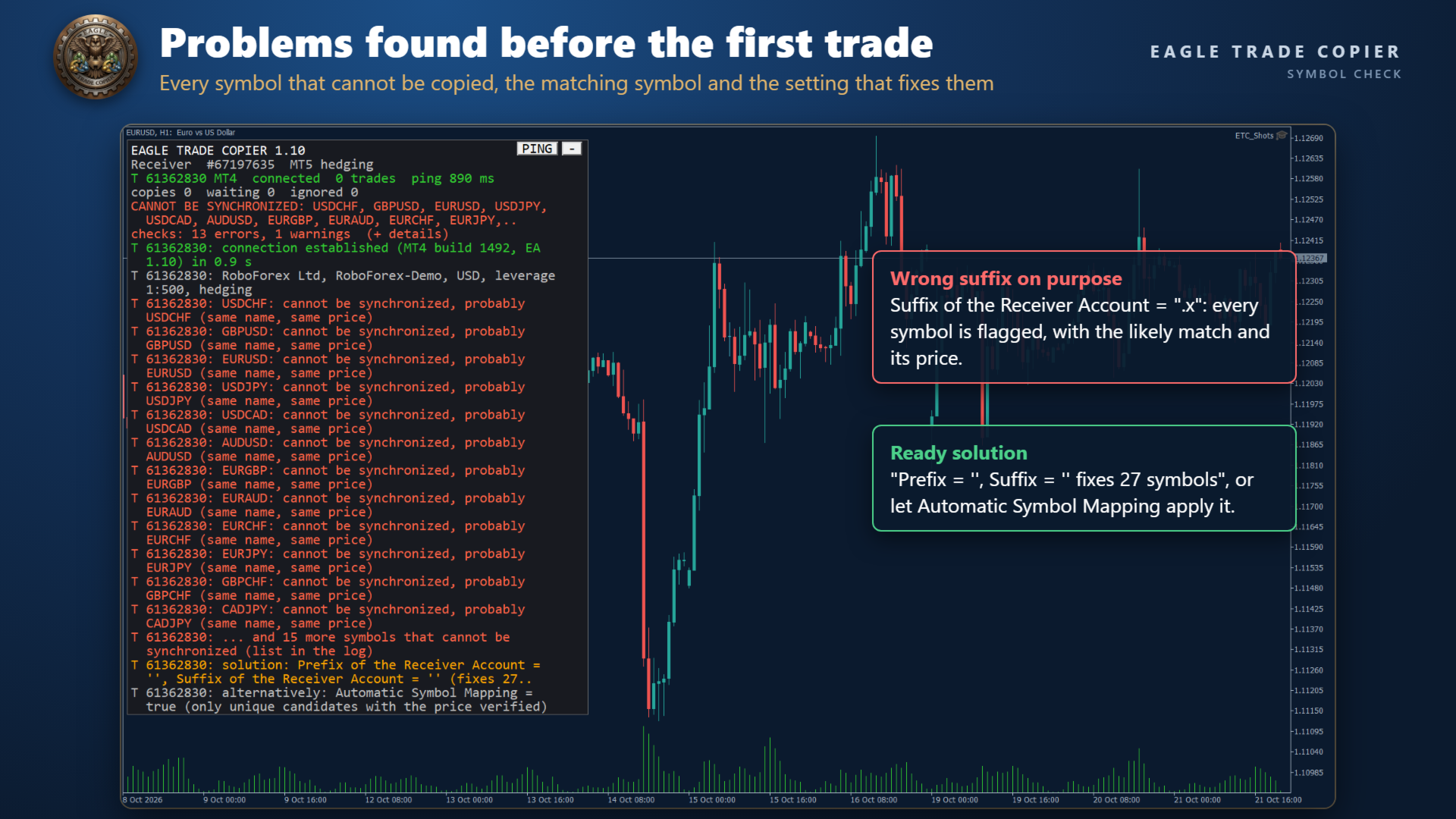
<div> - Brokers name the same instrument in different ways (EURUSD, EURUSD.r, EURUSDm, GOLD and XAUUSD). One click on PING lists every symbol that cannot be copied, the matching symbol on your account and the exact Prefix/Suffix setting that fixes them. </div>
<div> - A copy is never sent blind: free margin, volume limits, stop and freeze levels, trading sessions and the price of the instrument are checked first. If something blocks a copy, the reason is written on the panel. </div>
<div> - MT4 and MT5 in both directions, hedging and netting MT5 accounts, several Transmitters for one Receiver and several Receivers for one Transmitter. </div>
<div> <br> </div>
<div> <b><i>START IN THREE STEPS</i></b> </div>
<div> 1. Attach the EA to one chart of the account you copy from and set Account Mode = Transmitter. </div>
<div> 2. Attach the EA to one chart of each account that copies, set Account Mode = Receiver and type the Transmitter account number. </div>
<div> 3. Press PING on the panel. In about one second it shows "connection established", the response time and the result of the checks. </div>
<div> <br> </div>
<div> <b><i>CONNECTION AND SYMBOL CHECKS</i></b> </div>
<div> - Compact panel on the chart with the state of every link: connected, ping in progress, no answer, offline. The PING runs by itself when a Transmitter comes online and whenever you press the button. </div>
<div> - Checked on both sides: EA version, Algo Trading and account permissions, account currency, server time difference (with the value to type in Transmitter Server Offset Hours). </div>
<div> - Checked for every symbol of the Transmitter: a matching symbol on the Receiver, trading mode, contract size (with the multiplier that keeps the same exposure), price scale and minimum lot. </div>
<div> - For each symbol without a match: the most likely symbol on your account (same name, different prefix or suffix, or a known alias such as GOLD and XAUUSD, US500 and SPX500, GER40 and DE40) and a ready solution: the Prefix/Suffix that fixes most symbols plus Special Symbol lines for the others. </div>
<div> - Automatic Symbol Mapping (optional): uses the suggested symbol only when it is the only candidate and its price matches the Transmitter. </div>
<div> - Copies are blocked, with the reason on the panel, when the Receiver price differs by more than 3% from the Transmitter price (another instrument or another scale) or when the symbol does not accept that order. </div>
<div> - On the Transmitter chart: every connected Receiver with its copies, response time, errors and warnings. A second chart running with the same Magic Number on the same account is reported. </div>
<div> <br> </div>
<div> <b><i>HOW THE COPY WORKS</i></b> </div>
<div> - The Transmitter publishes its trades every 200 milliseconds and immediately after every trade event; each Receiver reads them every 100 milliseconds. Data travel through the common data folder of MetaTrader: no internet connection between terminals, no DLL. </div>
<div> - Opening, modification of SL, TP and pending price, partial closure, activation of pending orders and closure are all synchronized. </div>
<div> - The state of every copy is saved: after a restart of the terminal or of the computer the EA continues from where it stopped and does not copy the same trade twice. </div>
<div> - On MT5 netting accounts each copy is followed as its own unit and its SL/TP are managed virtually. </div>
<div> <br> </div>
<div> <b><i>WHAT YOU CONTROL ON EACH RECEIVER</i></b> </div>
<div> - Filters: magic numbers (exact values, "contains" and ranges), comments, symbols, long or short, market or pending, trades already open or new trades, lot size of the original, copying hours for each day of the week. </div>
<div> - Lot size: 17 methods, from the same lot to fixed lot, multipliers, proportional to balance, equity or free margin, risk per trade in % or in money, lot per 1000 of balance or equity, or your own lot sequence. Custom values per symbol, split into parts, minimum and maximum lot. </div>
<div> - Execution: maximum spread per symbol, slippage, maximum price difference, better price, fixed or random delay, expiration, retry, reverse copying, minimum distance between copies. </div>
<div> - Closure: synchronized closure in 5 modes, closure delay and better price, partial closures, reopening of copies closed on the Receiver, and the option to close the original when its copy is closed. </div>
<div> - Management: own or hidden (virtual) TP and SL in points or money, break even, trailing stop, TP from a risk/reward ratio, 3 partial closures in profit and 3 in loss, scheduled closures, closure after a number of minutes. </div>
<div> - Basket: take profit, stop loss, break even and trailing stop on all copies together, in % of balance, in money or in average points. </div>
<div> - Protection: equity stop loss and take profit, maximum drawdown from the balance high, daily drawdown and daily profit limits, copying only when the Transmitter or Receiver drawdown is inside your limits, limits on symbols, magic numbers, trades, volume and risk. </div>
<div> - Notifications by email and push: every new trade, a daily status at the times you choose, equity alert levels. </div>
<div> <br> </div>
<div> <b><i>TRY IT IN THE STRATEGY TESTER</i></b> </div>
<div> - The Strategy Tester has no second terminal to copy from, so the EA shows itself at work: every 4 hours it opens a sample trade on the chart symbol (minimum lot, magic number 777777), closes it 2 hours later, and the Self Copier copies it with your settings. This happens only in the Strategy Tester and is written in the journal. </div>
<div> - Change lot method, multiplier, virtual levels or basket rules and watch how the copies follow. </div>
<div> <br> </div>
<div> <b><i>REQUIREMENTS</i></b> </div>
<div> - All terminals on the same Windows computer or VPS, under the same Windows user. </div>
<div> - Algo Trading enabled in every terminal that copies. One chart per account and role; a different Magic Number for each Receiver running on the same account. </div>
<div> - Install the version that matches each terminal: this one for MetaTrader 5, the MetaTrader 4 version for MetaTrader 4 (both in the Financial Freedom Shop). They work together in any direction. </div>
<div> - MT5: set Account Type as your account (Hedging or Netting). </div>
<div> <br> </div>
<div> <b><i>PARAMETERS: ACCOUNT SETUP</i></b> </div>
<div> - Account Mode: Transmitter (the account you copy from), Receiver (copies from one or more Transmitters) or Self Copier (copies the trades of this account into the same account). </div>
<div> - Account Type: Hedging or Netting, as the MT5 account. </div>
<div> - Transmitter Account Number: account(s) to copy from, separated by commas. </div>
<div> - Transmitter Comment: comment written on the copies by this Transmitter; # = original comment, @ = original ticket, % = original magic number, & = Transmitter account. </div>
<div> - Receiver Comment: comment of the copies on this Receiver, with the same placeholders; it replaces the Transmitter Comment. </div>
<div> <br> </div>
<div> <b><i>PARAMETERS: GENERAL SETTINGS AND FILTERS</i></b> </div>
<div> - Magic Number: identifies the copies of this Receiver; use a different one for each Receiver on the same account. </div>
<div> - Magic Numbers to Copy / Not to Copy: e.g. 3245,0 (exact), (14) (contains 14), 100-200 (range). </div>
<div> - Maximum Number of Copied Magic Numbers / Maximum Receiver Account Magic Numbers: how many different magic numbers can be copied / can be open on this account. </div>
<div> - Symbols to Copy / Not to Copy: Receiver symbols to include or exclude. </div>
<div> - Maximum Number of Copied Symbols / Maximum Receiver Account Symbols: how many different symbols can be copied / can be open on this account. </div>
<div> - Comments to Copy / Not to Copy: e.g. Expert 1 (exact) or (Expert) (contains). </div>
<div> <br> </div>
<div> <b><i>PARAMETERS: COPYING OPTIONS</i></b> </div>
<div> - Copy on Monday ... Copy on Sunday: copying hours for each day, e.g. 00:00:00-14:30:00,16:30:00-23:59:59; empty = no copying that day. </div>
<div> - Transmitter Server Offset Hours: server time difference between Transmitter and Receiver (the PING suggests the value). </div>
<div> - Copy Long Trades / Copy Short Trades. </div>
<div> - Copy Current Trades: copy the trades already open when the EA starts. Copy New Trades: copy the trades opened later. </div>
<div> - Copy Take Profit / Copy Stop Loss, with Take Profit / Stop Loss Multiplier and Add/Subtract Points in TP / SL Level. </div>
<div> - Do Not Copy Trades/Orders Without SL: waits until the original has a stop loss. </div>
<div> - Allow TP/SL Manual Change: keep your manual changes on the copies; false = the EA restores the copied levels. </div>
<div> - Copy Market Trades / Copy Pending Orders: with pending orders off, an order is copied when it becomes a trade. </div>
<div> - Maximum Spread in Points: e.g. 10,XAUUSD30,BTCUSD1500 (default value, then values per symbol). </div>
<div> - Maximum Slippage in Points. Maximum Copying Difference in Points: maximum distance from the original open price. </div>
<div> - Use Copying Expiration in Seconds / Copying Expiration in Seconds: do not copy trades older than this. </div>
<div> - Copying Delay in Seconds: e.g. 5, or 5,20 for a random delay between 5 and 20 seconds. Retry Attempts in Seconds: wait before retrying a refused order. </div>
<div> - Better Price / Better Price Difference in Points: copy only at a price better than the original by this distance. </div>
<div> - Reverse Copying: buy becomes sell, limit orders become stop orders, TP and SL swap. </div>
<div> - Keep Original TP/SL Distances: TP and SL at the same distance from the copy's own open price. </div>
<div> - Min Distance in Points for Same Symbol/Direction Trades/Orders. </div>
<div> <br> </div>
<div> <b><i>PARAMETERS: LOT SIZE</i></b> </div>
<div> - Lot Size Type: None, Same Lot Size, Fixed Lot, Multiplier, Multiplier by Balance or Equity, Proportional by Balance, Equity or Free Margin, Proportional Multiplier by Balance or Equity, Risk per Trade in % of Balance, Equity or Free Margin, Risk per Trade in Money, Lot Size per 1000 of Balance or Equity, Specific Lot Size Sequence. </div>
<div> - One value for each method: Add/Subtract to Same Lot Size, Fixed Lot Size, Multiplier, Multiplier by Balance, Multiplier by Equity, Proportional Multiplier by Balance, Proportional Multiplier by Equity, Risk per Trade in % of Balance / Equity / Free Margin, Risk per Trade in Money, Lot Size per 1000 of Balance / Equity, Specific Lot Size Sequence (e.g. 0.01,0.03,0.06,0.09). </div>
<div> - Automatic Split of Copied Trades: splits lots above the broker maximum. Split Copied Trades in Parts / in Parts of: split every copy into N parts or into parts of a given lot. </div>
<div> - Custom Symbol Fixed Lot Sizes / Custom Symbol Multipliers: values per symbol, e.g. XAUUSD:0.05,US30:0.1. </div>
<div> - Copying from / Up to Symbol Trade/Order Number: copy only from the Nth trade of a symbol, or up to the Nth. </div>
<div> - Total Symbol / Account Copied Trades, Total Symbol / Account Copied Volume: limits on open copies. </div>
<div> - Maximum Risk % per Symbol / per Currency, Maximum Account Risk %: risk limits based on the stop loss of the copies. </div>
<div> - Minimum / Maximum Receiver Lot Size, Ignore Receiver Lot Size Below / Above, Ignore Transmitter Lot Size Below / Above, Minimum Volume Step. </div>
<div> <br> </div>
<div> <b><i>PARAMETERS: TRADE MANAGEMENT</i></b> </div>
<div> - Synchronized Trade Closure: False, True, True for Market Trades Only, True for Pending Orders Only, True for Same Trade/Order Type. </div>
<div> - Closure Delay in Seconds. Closure Better Price / Closure Better Price Difference in Points. </div>
<div> - Reopen Closed Copied Trades: False, Instantly, At Open Price or Better, At a Specific Time (Reopen Closed Copied Trades Time), for copies closed on the Receiver while the original is still open. </div>
<div> - Apply Partial Closure: the copies close the same share of volume as the original. </div>
<div> - Close Transmitter if Receiver is Closed (set on the Transmitter): when a copy is closed on the Receiver, the original is closed too. </div>
<div> <br> </div>
<div> <b><i>PARAMETERS: RECEIVER TP/SL AND TRAILING</i></b> </div>
<div> - Virtual/Hidden TP/SL Levels: levels kept by the EA, not sent to the broker. Show Virtual Levels on Chart. </div>
<div> - Use TP/SL Levels in: Points or Money. </div>
<div> - Take Profit, Stop Loss: the Receiver's own levels, in points or in money, used when Copy Take Profit / Copy Stop Loss is false. </div>
<div> - Break Even Profit, Trailing Start, Trailing Stop, Trailing Step: in points or in money, active when both Copy Take Profit and Copy Stop Loss are false. </div>
<div> - TP Based on Risk/Reward Ratio 1/: take profit at this multiple of the stop loss distance. </div>
<div> <br> </div>
<div> <b><i>PARAMETERS: PARTIAL CLOSURE</i></b> </div>
<div> - Partial Closure Take Profit % 1-3 with TP Lot Size % 1-3, Partial Closure Stop Loss % 1-3 with SL Lot Size % 1-3: close a share of the initial lot when the trade reaches a share of its TP or SL distance. </div>
<div> <br> </div>
<div> <b><i>PARAMETERS: SCHEDULED CLOSURE</i></b> </div>
<div> - Close All Copied Market Trades on / Time, Delete All Copied Pending Orders on / Time: a day of the week or every day. </div>
<div> - Close Copied Trades in Minutes: closes each copy after this time. </div>
<div> <br> </div>
<div> <b><i>PARAMETERS: BASKET</i></b> </div>
<div> - Three groups with the same rules, measured in % of balance, in money (swap and commission included) and in average points: Use Basket Take Profit, Use Basket Stop Loss, Use Basket Break Even, Use Basket Trailing Stop Loss with Trailing Start, Trailing Stop and Trailing Step. When a rule is hit, all copies are closed. </div>
<div> <br> </div>
<div> <b><i>PARAMETERS: ACCOUNT PROTECTION</i></b> </div>
<div> - Use Emergency Account Protection, Receiver Account Stop Loss Equity / Take Profit Equity: at these equity levels all copies are closed and copying stops. </div>
<div> - Max Drawdown % from Balance High: closes the copies and stops copying until the EA is attached to a new chart. </div>
<div> - Maximum Daily Drawdown / Daily Profit (from Balance or Equity, in % and in money): closes the copies and pauses copying until the next day. </div>
<div> - No Copying if Transmitter / Receiver Drawdown %>, Copy Only if Transmitter Drawdown %> (also per symbol): copy only while the drawdown is inside your limits. </div>
<div> <br> </div>
<div> <b><i>PARAMETERS: NOTIFICATIONS</i></b> </div>
<div> - Send Email Notification / Send Push Notification: every new trade of the account. </div>
<div> - Send Daily Notification / Time: account status at one or more times, e.g. 08:00 or 00:00,12:00,20:00. </div>
<div> - Send Emergency Notification / Emergency Notification Equity: alert at one or more equity levels, e.g. 6000,8000. </div>
<div> <br> </div>
<div> <b><i>PARAMETERS: SYMBOL MAPPING</i></b> </div>
<div> - Prefix / Suffix of the Transmitter Account and of the Receiver Account, e.g. suffix .r on the Receiver. </div>
<div> - Automatic Symbol Mapping: use the suggested symbol when it is unique and its price matches. </div>
<div> - Special Symbol 1-30: pairs Transmitter symbol,Receiver symbol, e.g. GOLD,XAUUSD. </div>
<div> <br> </div>
<div> Questions and suggestions are welcome in the comments of this product or by private message on MQL5. </div>
<div> <br> </div>
<div> <a href="https://www.mql5.com/en/signals/author/crazygian1985" target="_blank">Financial Freedom Signals</a> </div>
<div> <a href="https://www.mql5.com/en/users/crazygian1985/seller" target="_blank">Financial Freedom Shop</a> </div>