RMT Visual Trade Planner

RMT Visual Trade Planner is a position size calculator and order planner for MetaTrader 5: you plan a trade with three lines on the chart. Drag the stop loss and take profit, and it shows the lot size for your risk, the money at risk, the reward and the margin. The order is sent only after you press SEND and then CONFIRM.

The problem it solves

Working out the lot size for a given stop and a given risk takes a calculator, and a mistake there costs more than a bad entry. The order window of MetaTrader does not show the money you are risking. RMT Visual Trade Planner does the arithmetic on the chart, with your broker's own contract data, and shows it before anything is sent.

How it works

  • Attach it to a chart. Three lines appear: ENTRY, SL and TP.
  • Drag SL to where your stop belongs. If it is below the price the plan is a buy; above, a sell.
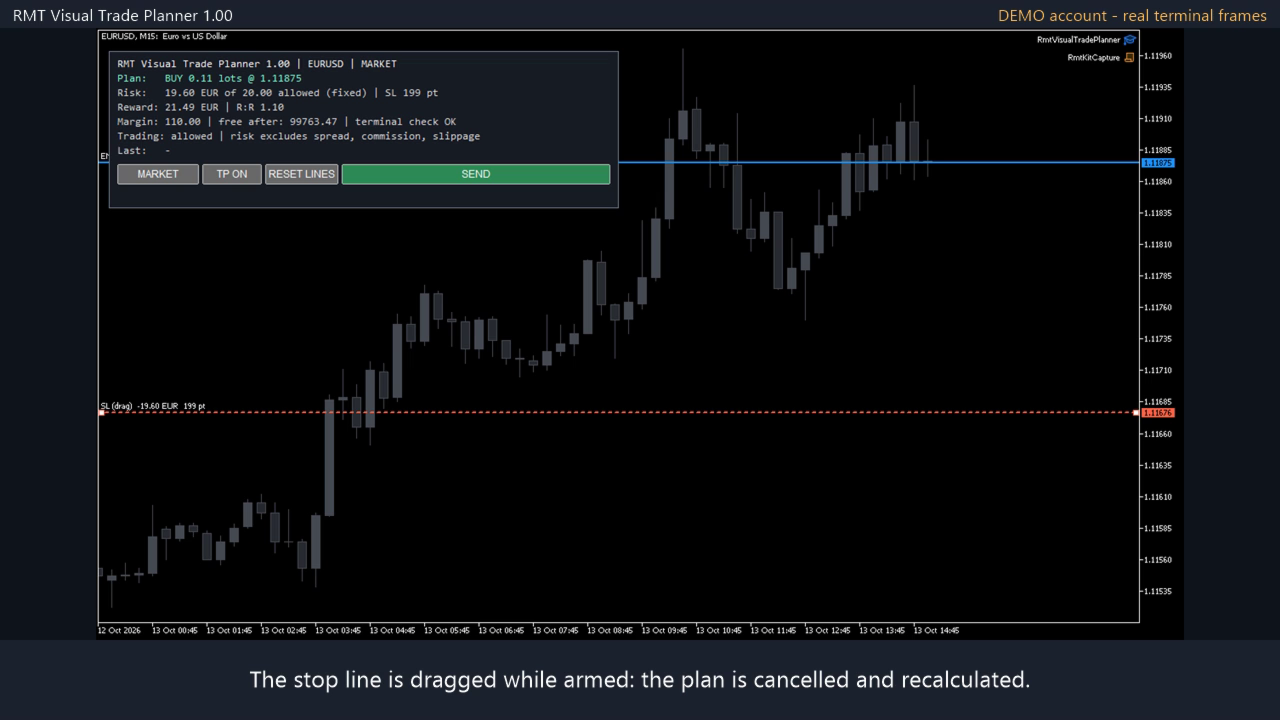
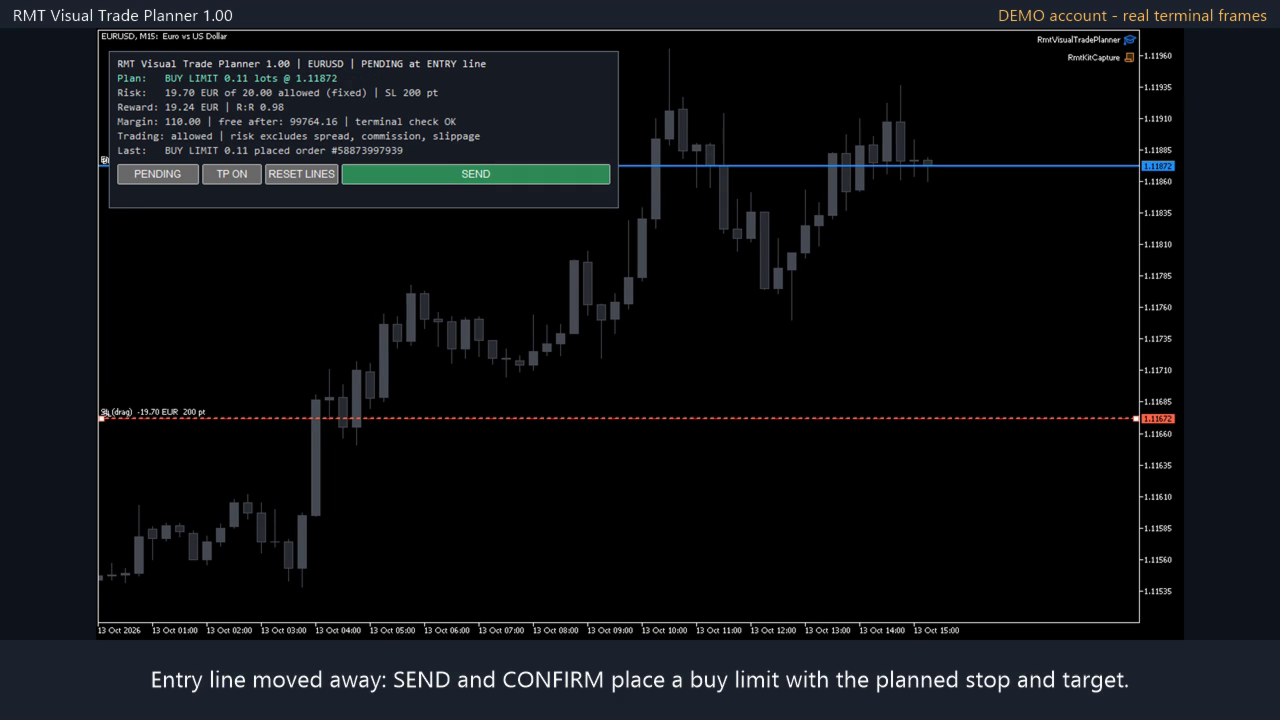
  • The panel shows the volume, the money at risk against the amount you allow, the reward and R:R, and the margin from the terminal's own pre-check.
  • Choose MARKET, or PENDING to place the order at the ENTRY line. The type (limit or stop) follows from where the line is.
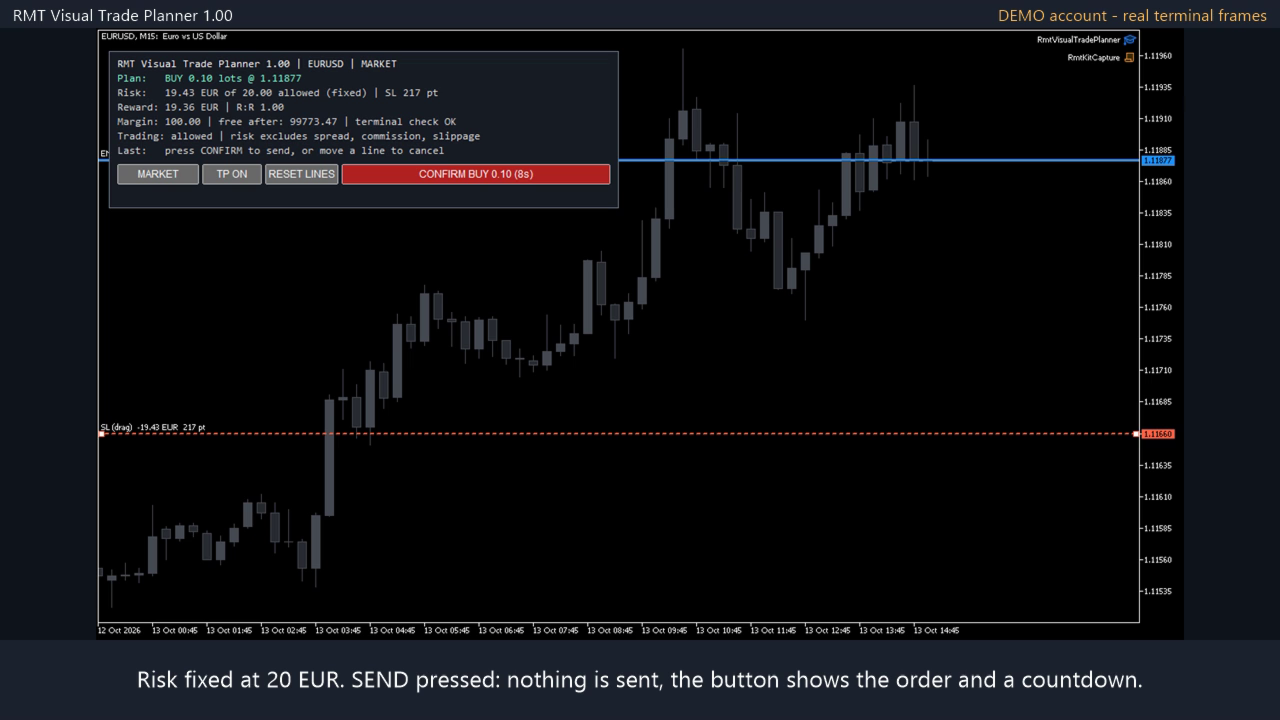
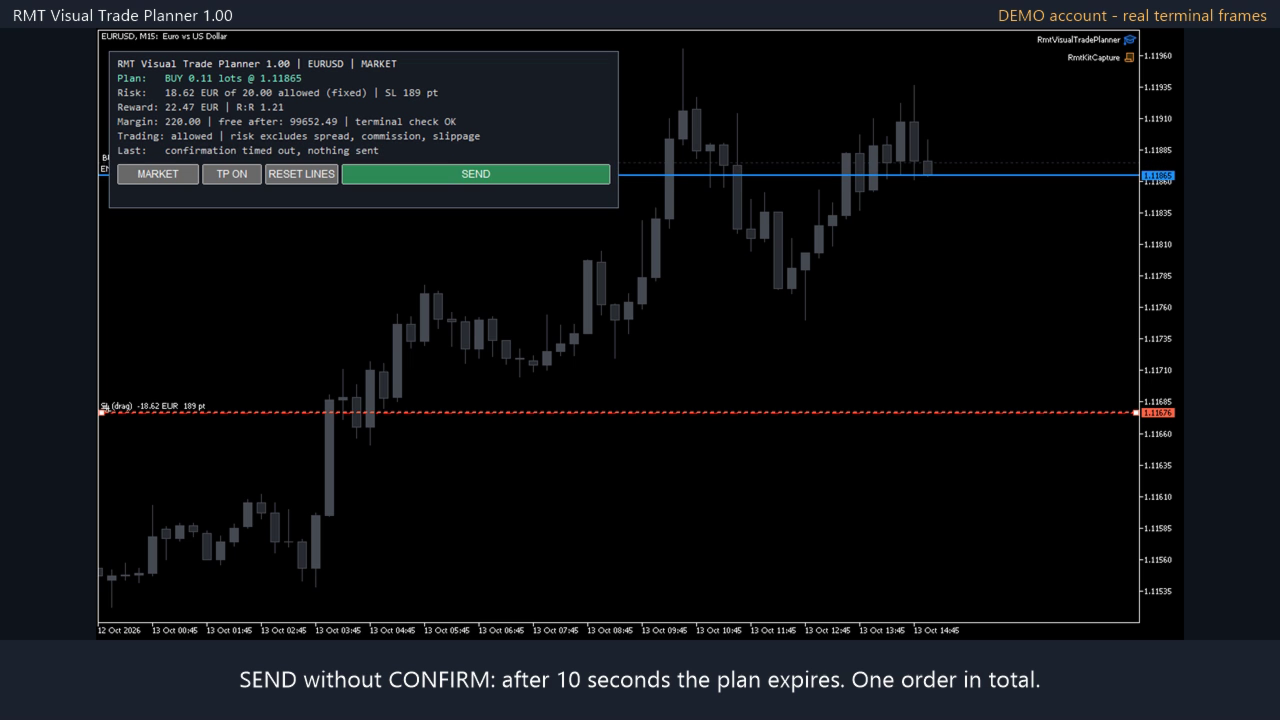
  • Press SEND. The button changes to CONFIRM with the exact order. Press it within 10 seconds to send. Moving a line, changing mode or waiting cancels it.

Sizing rules

  • Risk is a percent of balance, a percent of equity, or a fixed amount, with an optional money cap and volume cap.
  • The volume is the largest one whose loss at the stop fits the risk, rounded down to the broker's lot step. It is never rounded up.
  • If even the minimum lot would lose more than you allow, the plan is refused and the panel shows what the minimum lot would risk.
  • The loss per lot comes from the terminal's profit calculation for your symbol and account currency, so crosses, metals and indices are handled the same way.

Checks before an order can be sent

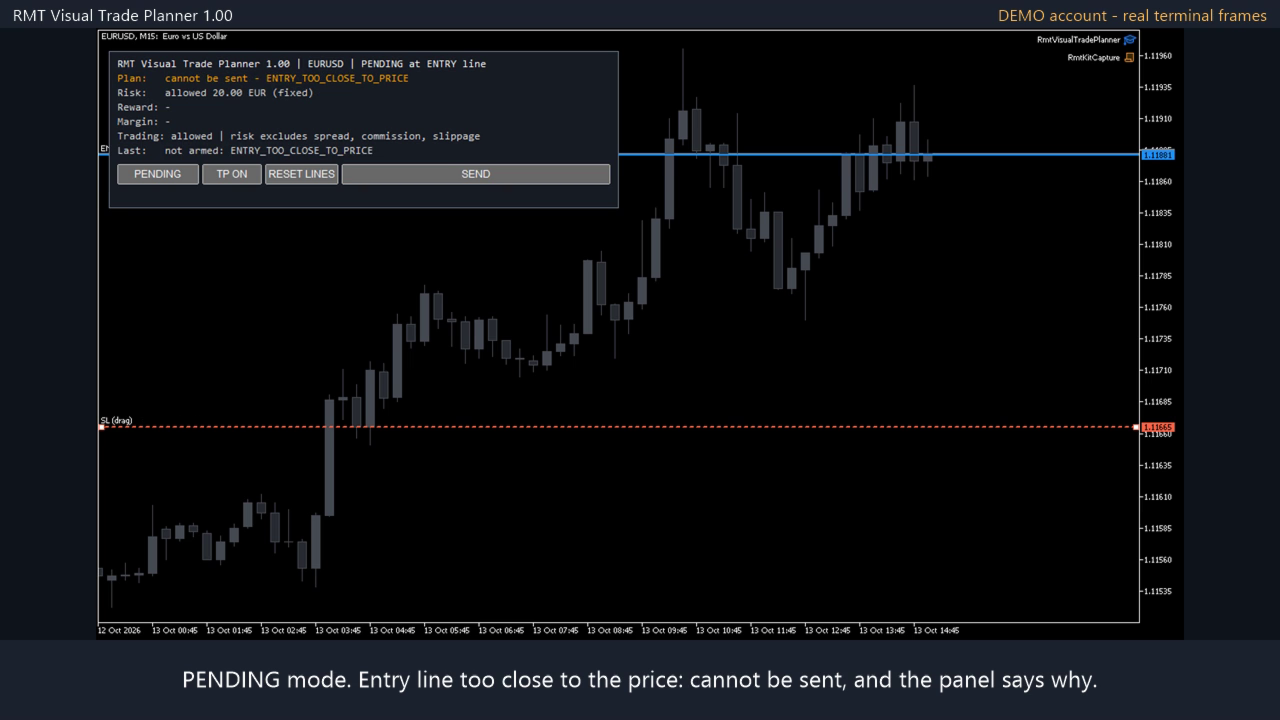
  • Stop loss on the wrong side, take profit on the wrong side, stop or entry closer than the broker's stop level.
  • Quote older than 30 seconds for market orders.
  • The terminal's order pre-check, including margin.
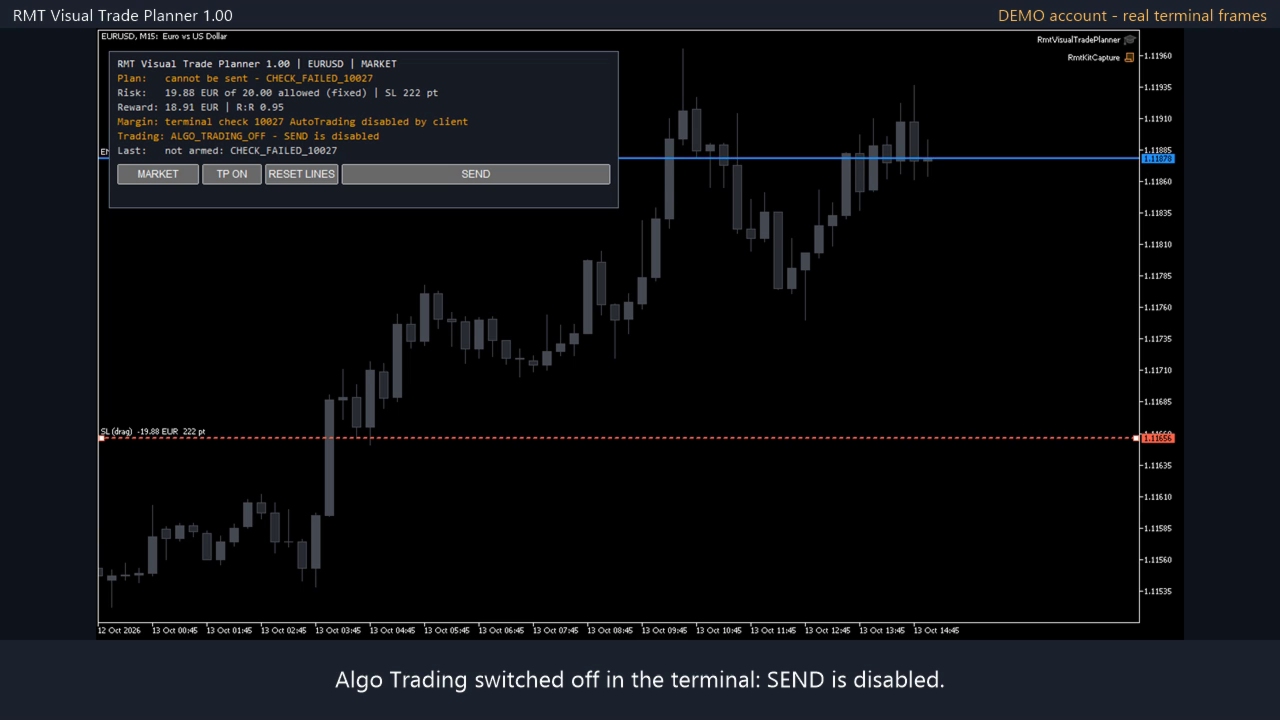
  • Algo Trading and account permissions.
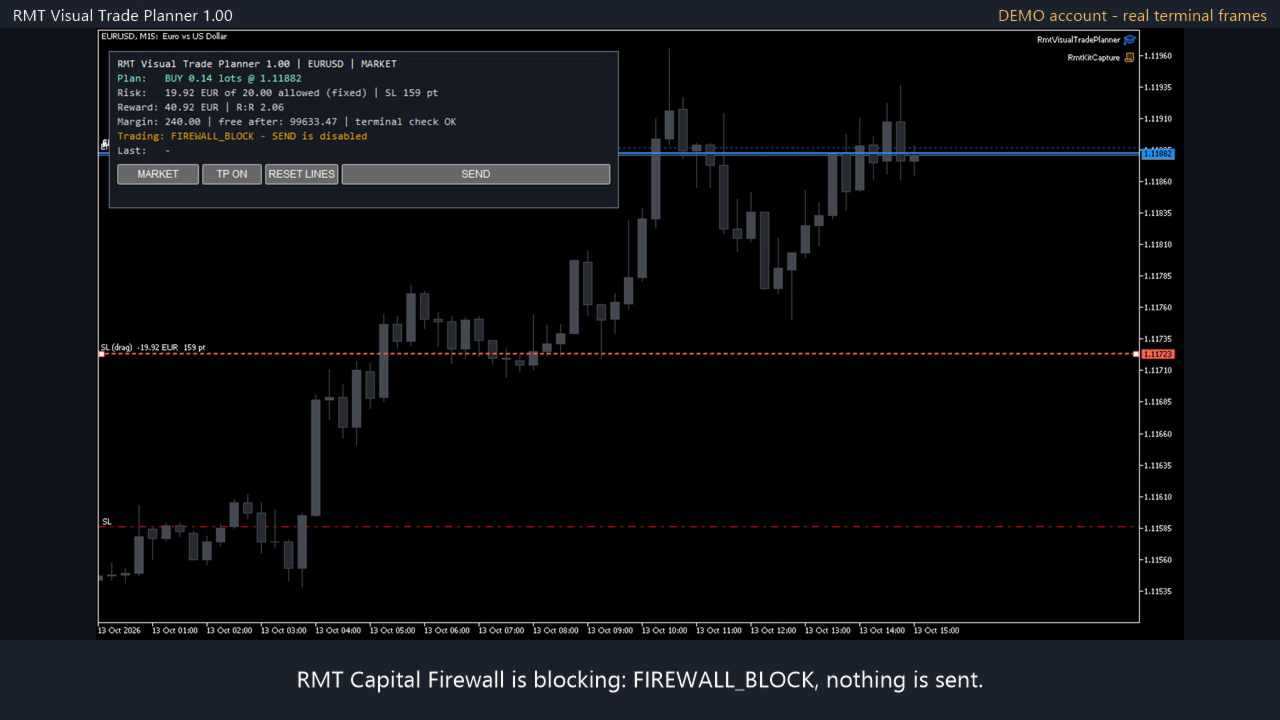
  • A block published by RMT Capital Firewall in the same terminal, if you use it: SEND stays disabled until the Firewall is re-armed.

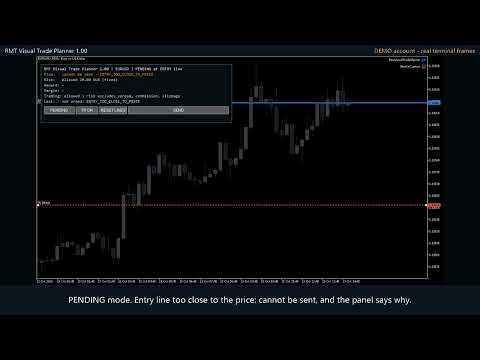
If any check fails the SEND button stays grey and the panel says why.

Why two presses

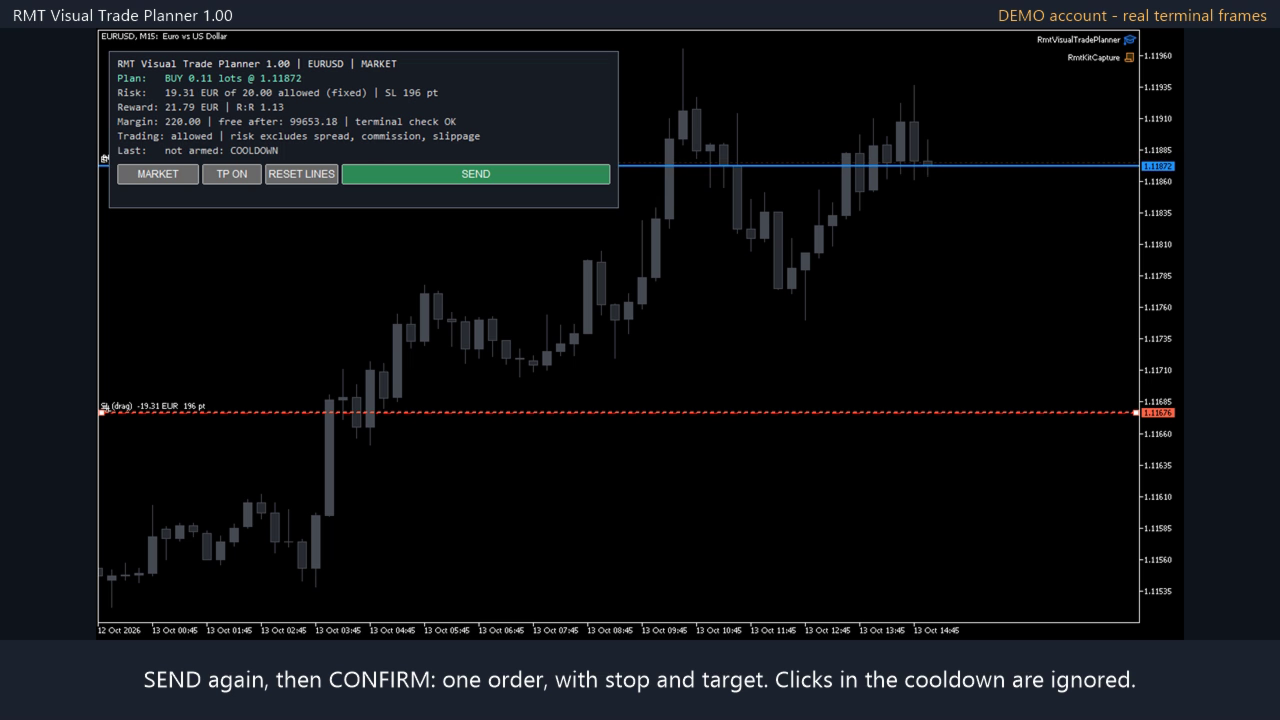
The first press shows the exact order on the button and sends nothing. The second press sends it only if the lines are where they were; if the price has moved, the order carries at most the volume you confirmed and never more than your risk allows. Clicks during the pause after a send do nothing. This flow was run with the real mouse on a demo terminal with this exact file: one confirmation, one order.

What it does not do

  • A line drag never sends an order. There are no automatic entries and no signals.
  • One confirmation sends one order. A refused order is not retried.
  • It does not manage the position after entry. For breakeven, trailing and partial closes use a position manager.
  • The risk shown is the loss from entry to stop. Spread, commission, swap and slippage are not included, and a stop can be filled at a worse price.
  • It does not promise profit.

Requirements

MetaTrader 5, Algo Trading enabled to send orders. Tested on hedging accounts; netting accounts are not certified. No DLLs, no WebRequest. It needs a live chart: the Strategy Tester does not deliver mouse clicks.

Leveraged trading involves risk of loss. Try it on a demo account first.
Recommended products
Xiao Dan Kuai Pao is a fast and clean one-click order panel for MetaTrader 5. Open and manage your trades instantly, with Stop Loss and Take Profit placed automatically — no more typing TP distances by hand. Key features: - One-click buttons: BUY, SELL, CLOSE, BREAK EVEN - Custom Stop Loss and Take Profit (in points) — set any distance you want - Flexible risk/reward — combine SL and TP freely to build any ratio, such as 1:1, 1:2, 1:3, 1:4 or 1:5 - Real-time price display (Bid) - Bar countdown t
MMTrade
Alexander Martynov
5 (4)
This tool is designed to quickly calculate the lot depending on the Stop Loss. The control is done by hot keys By default: 1 - Limit order price level 2 - Stop Loss Level 3 - Take Profit Level Space Bar - Open an order Escape - Cancel All 9 - Open 2 orders Market Order To open a Market order, click (2) and set up Stop Loss with the mouse If you want to put Take Profit - click (3) and set up Take Profit with the mouse
FREE
MT5toTLGRM
Fernando Morales
4.2 (5)
Do not use Windows 7 with this EA MT5toTLGRM EA only sends text messages to a Telegram group or channel of your choice. The messages are customizable to show information about any trading activity in the account. Also it shows a daily PnL report. Several instances of this EA can be used simultaneously in the same MT5 terminal for sending messages to different Telegram group/channel but ensure that each one has a different number in [B13] setting. Following are the features of MT5toTLGRM EA send
FREE
Protective stop and tp assistant
Lawrence Chilambe Mkandawire
SL/TP Mover – The Ultimate Position Manager for MetaTrader 5 Take full control of your stop losses and take profits across all open trades – instantly, visually, and automatically.** The Problems Every Trader Faces - Manually adjusting SL/TP on multiple positions is tedious and error‑prone – especially during fast markets. - New trades often open without any SL/TP unless you remember to set them every time. - Scaling in or adding to a position leaves older and newer trades with inconsistent r
FOX WAVE EXPOSURE COMMAND CENTER MT5 See the Entire Account. Control Every Position. Act with Confidence. FOX WAVE Exposure Command Center MT5 is a premium account-monitoring and position-management utility designed for traders who need a clear, immediate overview of their total market exposure. Instead of switching between charts, searching through the terminal, and calculating exposure manually, the Command Center consolidates the most important account and position information into one profes
Check an MQL5 signal before you subscribe. A signal can look convincing on the provider page and still be a poor fit for your account. Different symbol names, minimum lots, leverage, hedging or netting, copy latency and a fixed monthly fee can materially change what happens on your account. MT5 Signal Sentinel is not a trading robot and not a signal. It does not trade. It analyzes available data and explains technical and historical risks in plain language. Why this tool was created Many problem
This Is Something Useful
Sa No Tsuyoshi Kokorozashi
Description This is a utility tool for MT5, and it displays some useful information on charts for discretionary trading. Some of the information obtained by using indicators that are standardly installed by MT5 or by manual calculation is displayed on the chart from the beginning. Benefits of the This Is Something Useful MT5 The minimum necessary information that needs to be confirmed in discretionary trading can be displayed on the chart at any time. By using this tool, you can quickly access
FREE
Auto Risk Manager Mt5
Mildry Yocasta Feliz Rodriguez
AutoRiskManage v2.3 — Documentation Expert Advisor — MetaTrader 4 & 5 AutoRisk Manage v2.3 Automated risk management EA with interactive graphical panel. Applies SL/TP, Break Even, Trailing Stop, and lot size calculation by risk percentage — for any instrument, any broker. MT4 / MT5 v2.3.0 MQL4 · MQL5 C2C + B2C Time Space Technology Overview AutoRiskManage is an Expert Advisor that acts as a risk management layer on top of any manually opened position. It does not generate trading signals — i
FREE
TradeManager is an automatic stop loss, breakeven and trailing stop utility for MetaTrader 5. It manages the exits on your open positions by fixed rules: auto-breakeven, a fixed or ATR-based trailing stop, and a one-shot partial take-profit. It is not a trading panel - no buttons, no clicking, nothing to babysit. Attach it once and it works on positions opened manually, from your phone, or by another EA. This makes it a set-and-forget trade management tool for traders who want consistent risk ma
This product is an automatic-close support EA that helps discretionary traders carry out the closing rules they have set for themselves. You can set closing conditions based on a specified time, candle confirmation, or MA cross/approach, and use TIME, CANDLE, and MA CROSS individually or at the same time. It can also display 1H, 4H, Daily, Weekly, and Monthly MAs on the current chart. It is not a product that automates trading decisions or entries. It helps you carry out the closing rules you ha
Close Manager
ELITE FOREX TRADERS LLC
One-Click Trade Manager for MetaTrader 5 The Close Manager Buttons EA is a powerful utility designed to give you full control of your open positions and pending orders with just one click. Forget about manually closing trades one by one during fast market moves—this EA does it instantly, safely, and efficiently. Key Features Close All Trades – instantly close every open position Close Only Buy Trades – exit only BUY positions while keeping SELL trades running Close Only Sell Trades – exit only
FREE
Breakeven Bot
Gabriel Paul Ange Perrin
Optimize your trading management with Breakeven Bot, the essential tool for active traders managing multiple positions at once. No more wasting time manually adjusting your stops—one click is all it takes to secure your profits! Main Feature: ️ "BREAKEVEN" Button – Instantly set all profitable positions to breakeven and protect your gains quickly. ️ Customization Options: Set breakeven in pips or currency, depending on your preference. Choose whether breakeven should be at the entr
FREE
Order Flow Footprint Workspace is a read-only order-flow and market microstructure workspace for MetaTrader 5. It transforms the tick data provided by your broker into an interactive session-based footprint view with price-level activity, profiles, historical navigation and diagnostics. The workspace automatically adapts to the information actually available in the broker feed and does not invent trade direction when the source data cannot support it. MAIN FEATURES • Footprint candles with S
ATC Alert Manager lets you set price alarms directly on the chart and manage them from one small panel. Each alarm is shown as a line on the chart that you can drag to a new price. An alarm fires once, at the moment price crosses your level, with a popup alert, a sound and an optional push notification to your phone. Price that is already past the level does not trigger it, so you never get repeated alerts on every tick. This tool is also part of All In One Trade Management Panel MT5 , together
FREE
The Trading Control Panel EA let you: - Calculated lot size based on the (% or $ risk) - Place multiple (Market/Limit/Stop) trades at same time - Manage all open trades (move SL to BE, take partial profit, close all trades) This is a handy tool for those who wont to open multiple orders without spending time on lot calculations. When opening multiple orders the first order has the first TP and all other orders get the second TP.
Manual trading panel for MetaTrader 5. This tool enables you to open a trade in a single step. You can set the risk and levels directly on the chart and the position size will be calculated automatically. The tool does the following: You simply drag the stop-loss (SL), entry, and take-profit (TP) lines directly onto the chart. The position size is then calculated automatically, based on the specified risk as a percentage of the deposit or in the account currency. If necessary, you can specify a
FREE
Quick Exit
Jefferson Judge Metha
This MT5 Utility is designed to simplify the process of managing multiple trades. If you have several open positions, it can be time-consuming to close each one manually. With this tool, you can easily close all profit trades, losing trades, or just the trades that are linked to the chart you're currently viewing. It saves you time and effort by allowing you to manage your trades with just a few clicks, making your trading experience smoother and more efficient. Whether you're focusing on profit
FREE
Telegram Trade Notifier EA Enhanced Utility Expert Advisor Real-time Telegram notifications for new positions AND TP/SL closures on its chart symbol Core Functionality Monitors all new positions (manual/EA/script) on its attached chart Alerts when positions close via Take Profit or Stop Loss Sends Telegram alerts within 0.5-2 seconds Works concurrently with other EAs New Position Alerts Include : • Symbol • Direction (Buy/Sell) • Entry Price • Take Profit Level • Stop Loss Level • Position Tick
SWDM Position Manager EA The SWDM Position Manager EA is a MetaTrader 5 Expert Advisor for automatically managing matching positions on the current chart symbol. It can manage already open positions as well as newly opened positions, as long as they match the configured position filters. It is not a classic entry-signal robot and does not open trades by itself in the default workflow. The EA is designed to protect and manage manual trades or positions opened by other tools using internal risk m
FREE
ATR Stop Loss and Take Profit Calculator. Know your risk before you take the trade! Click any candle and instantly see your stop loss, take profit, and correct lot size, all calculated from ATR, scaled to your account. A useful back-testing and live trading tool.  If you find this indicator useful, please leave a review How It Works Click a candle. The indicator reads ATR at that bar, calculates SL and TP using your configured multipliers, and draws the levels on the chart. An info panel shows
FREE
KS Hotkey Trading Panel Pro  is a MetaTrader 5 Expert Advisor that provides fast keyboard-driven trading plus a clickable on-chart dashboard. Main Features Hotkey trading — Single-key actions for: Market Buy / Sell Buy Limit / Sell Limit Buy Stop / Sell Stop Close All positions Close Buys only / Close Sells only Delete all pending orders Lot size up / down (Arrow Up / Arrow Down) Show / Hide the panel On-chart dashboard — Displays every hotkey, current lot size, live account info (Balance, Equit
CloseAllPosition
Konstantin Chernov
4 (2)
A script for closing positions If you need to quickly close several positions, this script will make all the routine for you! The script does not have any input parameters. Allow AutoTrading before running the script. Usage: Run the script on a chart. If you need to specify the maximal deviation and the number of attempts to close positions, use the script with input parameters https://www.mql5.com/en/market/product/625 You can download MetaTrader 4 version here: https://www.mql5.com/en/market/
FREE
One Click Trade Panel with Risk Manager is an order-entry and trade-management panel for MetaTrader 5. It does not contain a trading strategy and does not open trades by itself on a live or demo account. Trades are opened only when you click BUY or SELL. Position sizing You enter the stop-loss distance and the risk, either as a percentage of balance, equity or free margin, or as a fixed amount in the account currency. The panel calculates the lot from the broker's contract specification (tick
Time Line for MT5 機能: 昨日高値、安値、本日始値、高値、安値の時間から線を引きます。 時間足により表示する時間が変わります。 1分、5分足では1時間ごとの表示 15分、30分足では4時間ごとの表示 1時間、4時間は12時間ごとの表示 日足以降は時間は表示されません。 高値安値は週足より下位足で表示されます。 各ラベルを変更可能になります。 更新頻度を変更できるのでチャート表示が 重くなることはありません。 各パラメータの説明: Server_Time:6 サーバとの時間差を入力 Yesterday_High_Label:昨日高値 Yesterday_Low_Label:昨日安値 Show_Open:true 始値の線を表示するかどうか Today_Open_Label:本日始値 Today_High_Label:本日高値 Today_Low_Label:本日安値 max_bar:true 使用するバーを制限するかどうか Maxbars:1500 制限を使用した場合に1分では5日分 UpdateFrequency:60 更新頻度、ディフォルトは60秒ご
Prop Firm Risk Guardian is a free prop firm risk management panel for MetaTrader 5, built for a funded account or a challenge account. It shows in real time how close you are to breaching your daily loss limit and your trailing max drawdown, counts down to the daily reset, and works out the largest lot size your own rules allow right now, so the lot you type into the next order is one your remaining buffer can absorb if the stop is hit. Pick a preset for a 2-step, 1-step or instant challenge, or
FREE
The EA supports closing orders based on the preset amount. It can close all orders on all pairs, or it can close orders based on Magic ID. Button "Close All" manual Input - Magic Number: Magic Number = 0: Close All pairs Magic Number diffrent 0: Close All with Magic - Money TP: Profitable in money.  the EA will close all orders - Money SL: Loss in money. the EA will close all orders Contact: t.me/nguyenvanbo128
FREE
Account and Market Dashboard
Ezekiel Bronal Nyangweso
Advanced Account Dashboard & Risk Monitor (MT5) This script provides a real-time on-chart dashboard for monitoring account performance, risk exposure, and execution conditions in MetaTrader 5. It is designed for traders who want clear visibility of account health and risk awareness during live trading or VPS operation. The script does not open trades and does not interfere with any strategy logic . Key Features Account Metrics Live equity, balance, and floating profit/loss Open position count an
FREE
Synchronizer
PATRICK PAARSCH
This Expert Advisor monitors all open positions across all symbols in MetaTrader 5. Whenever a Stop Loss (SL) or Take Profit (TP) is manually set or adjusted on any position, the EA automatically applies that value to all other open positions , regardless of symbol or order type (Buy/Sell). This ensures consistent and synchronized SL and TP levels across your account. Perfect for mobile trading via tablet or smartphone!
FREE
MT5 to Telegram Informer
Juergen Marcus Wolfgang Rosswinkel
MT5 to Telegram Signal Provider — Real-Time Trade Notifications for MetaTrader 5 Every trade event on your account, delivered to your Telegram chats and channels as a formatted message the moment it happens. OVERVIEW MT5 to Telegram Signal Provider is a utility Expert Advisor for MetaTrader 5 that automatically sends trade notifications to one or more Telegram chats or channels. Every trade event on the account is captured and delivered as a formatted message in real time. The EA runs on an
Automated Timeframe cycling with Symbols centered.  Force every timeframe onto one clock window, so the story you see on Daily is the same story you are slicing on H4, H1, and M1.  Traders usually flip timeframes and lose the span. A Daily chart shows a few weeks, then M15 shows a few hours, and the eye treats them as different markets. TASSERACT locks the window to N bars of the highest enabled timeframe — default 10 Daily — and maps every lower timeframe to that same stretch. You stay inside o
FREE
Buyers of this product also purchase
Trade Assistant MT5
Evgeniy Kravchenko
4.43 (216)
It helps to calculate the risk per trade, the easy installation of a new order, order management with partial closing functions, trailing stop of 7 types and other useful functions. Additional materials and instructions Installation instructions - Application instructions - Trial version of the application for a demo account Line function -   shows on the chart the Opening line, Stop Loss, Take Profit. With this function it is easy to set a new order and see its additional characteristics bef
Forex Trade Manager MT5
InvestSoft
4.98 (686)
Trade Manager MT5 is an advanced position size calculator and trade management tool for MetaTrader 5, designed to help traders plan trades faster, control risk more precisely, and manage open positions directly from the chart. It combines order placement, risk based lot calculation, Stop Loss and Take Profit management, Break Even, Trailing Stop, Partial Close, Equity Protection, and external trade management in one panel. Whether you trade forex, indices, metals, commodities, crypto, or future
Telegram to MT5 MultiChannel Copier
Sergio Marquez Uroz
4.65 (20)
Telegram to MT5 Multi-Channel Copier   automatically copies trading signals from your Telegram and Discord channels straight to MetaTrader 5. No bots, no browser extensions, no manual copying. A signal arrives in Telegram or Discord and the EA opens the trade in your terminal within seconds. And before you copy a channel, the built-in backtester shows you what that channel would have done in your account. The product has two components: a Windows application that listens to your Telegram channel
================================================================================ POC BREAKOUT - V20.72. Full Professional Grade Toolkit ================================================================================ POC Breakout is a full MetaTrader 5 trading dashboard for discretionary traders who want breakout signals, Point of Control (POC) context, volume profiles, order flow, market structure, news, alerts, and advanced trade planning in one professional workspace. Attached directly to you
TradePanel MT5
Alfiya Fazylova
4.88 (170)
Trade Panel is a multi-functional trading assistant. The app contains over 50 trading functions for manual trading and allows you to automate most trading tasks. Application instructions: https://www.mql5.com/en/blogs/post/756482 Trial version of the application for a demo account: https://www.mql5.com/en/blogs/post/750865 How to install the application: https://www.mql5.com/en/blogs/post/756239 How to test the application in visual mode: https://www.mql5.com/en/blogs/post/770277 How to install
The Patch
Mian Rameez Ali
The Patch It never opens a trade. It walks behind the ones that did. Every open position, every pending order — checked twice a second for the one thing that's easy to forget: a stop, a target. Found bare, it doesn't ask. It writes the missing number in, measured in points from wherever the position began, and moves on to the next. No strategy, no opinion on direction. Just the quiet assumption that nothing should ever sit on the market unprotected — not because someone decided it shouldn't,
Copy Telegram signals with your own trading rules Telegram to MT5 Signal Trader automatically copies text-based trading signals from public and private Telegram channels and groups into MetaTrader 5. Manage multiple providers and MT5 accounts from one desktop app, with individual risk and trade settings for each provider . No Telegram bot or API setup needed for copying. Simply sign in with your own Telegram account by phone or QR code and select the channels or groups you have already joined. Y
Floor Watch
Syed Tauqeer Hussain Shah
Floor Watch One number, watched every thirty seconds: how far equity has fallen since the day began — or since its highest point, if it's told to trail the peak instead of the open. Cross the line and it doesn't argue. Every open position closes, every pending order vanishes, and anything that slips through afterward gets shut the moment it appears. Not asked. Removed. The floor holds until the clock turns 5 AM Pakistan time — then, and only then, does the day start over. One rule. No except
Power Candles Strategy Scanner - Self-Optimizing Multi-Symbol Setup Finder Self-optimizing settings work one chart at a time, and finding where they pay off right now means opening chart after chart. Power Candles Strategy Scanner runs the same self-optimizing engine as the Power Candles indicator on every symbol in your Market Watch, side by side. One panel ranks where it pays off: the winning strategy per symbol, its optimized Stop Loss and Take Profit. An alert fires the moment a fresh signal
The product will copy all telegram signal to MT5 ( which you are member) , also it can work as remote copier.  Easy to set up, copy order instant, can work with almost signal formats, image signal,  s upport to translate other language to English Work with all type of channel or group, even channel have "Restrict Saving Content", work with  multi channel, multi MT5 Work as remote copier: with signal have ticket number, it will copy exactly via ticket number. Support to backtest signal. How to s
Buy once. Get all my MT4 and MT5 indicators - available now and released in the future - at no extra cost. Contact me after purchase for instructions to receive them. The price is planned to rise by 50$ after every 10 purchases, up to 999$. The Market price at checkout applies. Keep the indicator you trust. Automate the work around it. Your signal. Your rules. Your execution. Already have an MT5 indicator you rely on, but still need to watch the chart, wait for a signal, calculate the lot, plac

Quant AI Agents
Ho Tuan Thang
5 (1)
Quant AI Agents are independent trading Expert Advisors. Instead of trading using a fixed strategy like other conventional EAs, Quant AI Agents   is a   multi-agent AI trading framework   that turns natural-language strategy prompts into live.  WANT THE SAME RESULTS AS MY LIVE SIGNAL?   Use the exact same brokers I do:   IC MARKETS , IC TRADING   .  Unlike the centralized stock market, Forex has no single, unified price feed.  Every broker sources liquidity from different providers, creating un
Exp COPYLOT CLIENT for MT5
Vladislav Andruschenko
3.97 (35)
Professional Trade Copier for MetaTrader 5 Fast, professional, and reliable trade copier for MetaTrader . COPYLOT allows you to copy Forex trades between MT4 and MT5 terminals with support for Hedge and Netting accounts. COPYLOT MT5 version supports: - MT5 Hedge to MT5 Hedge - MT5 Hedge to MT5 Netting - MT5 Netting to MT5 Hedge - MT5 Netting to MT5 Netting - MT4 to MT5 Hedge - MT4 to MT5 Netting MT4 version Full Description +DEMO +PDF How To Buy How To Install How to get Log Files H
Welcome to ENTRY IN THE ZONE with SMC MULTI TIMEFRAME Entry In The Zone with SMC Multi Timeframe is a real-time market analysis tool based on Smart Money Concepts (SMC), designed to analyze market structure, price direction, and key trading zones. It supports both Single-Timeframe and Multi-Timeframe Analysis, providing a clearer view of overall market structure across multiple timeframes, with real-time BUY / SELL signals designed with a strict focus on No-Repaint principles.  The signals are d
Grid Manual MT5
Alfiya Fazylova
4.73 (22)
Grid Manual is a trading panel for working with grid strategies. The utility is universal, has flexible settings and an intuitive interface. It works with a grid of orders not only in the direction of averaging losses, but also in the direction of increasing profits. The trader does not need to create and maintain a grid of orders, the utility will do it. It is enough to open an order and the "Grid manual" will automatically create a grid of orders for it and will accompany it until the close. F
Signal Trading View to MT5 Pro
Mirel Daniel Gheonu
4.5 (2)
Signal TradingView to MT5 Pro  Instant professional execution between TradingView and MetaTrader 5 Automate your trading strategy with the most robust communication bridge between TradingView alerts and real execution in MT5. Designed for traders who demand speed, flexibility, and impeccable risk management, this Expert Advisor transforms any alert message into a precise market or limit order.   Install and TEST the TRIAL version HERE STRENGTHS AND ADVANTAGES Universal Parsing Engine (Propriet
VirtualTradePad PRO SE MT5 — professional trading control center for MetaTrader 5 VirtualTradePad PRO SE is a premium chart-based trading panel and trade-management workspace for MetaTrader 5 . It is designed for traders who want faster execution, clearer position control, structured trade management, visual level planning and a professional workflow directly from the chart. This is not only a BUY / SELL panel. PRO SE combines manual trading, pending orders, position management, partial exits, b
FUTURES ORDERFLOW FOOTPRINT CHART Professional OrderFlow EA for MetaTrader 5 Version 1.01| Professional tool for real traders | Institutional-Grade Visualization STRATEGY TESTER USERS - PLEASE SELECT EVERY REAL TICK WHEN TESTING AND YOU HAVE DOWNLOADED HISTORICAL DATA. IF YOU SEE A WAITING SCREEN AND IT IS NOT DOWNLOADING, IT MEANS YOU HAVE LOW HISTORICAL DATA. TRY 1 MIN AND 5 MIN FIRST ON 1 DAY DATA. ONE DAY DATA SHOULD BE THE NEWEST AND MOST CURRENT DATE. PLEASE WAIT UNTIL THE MARKET HAS ROL
Anchor Trade Manager
Kalinskie Gilliam
5 (9)
Your EAs cannot see each other, but Anchor can. Anchor gives you one place to coordinate your EAs, manage risk, and decide when trading is allowed. It works alongside the trading bots you already use without any changes to them. The Problem One EA opens a trade. Then another starts trading. The next thing you know, you wake up to multiple grids built across your account. Each EA may be doing exactly what it was designed to do, but together they can place far more risk on your account than you in
Daily Trading Limiter
AL MOOSAWI ABDULLAH JAFFER BAQER
5 (8)
• Please test the product in the Strategy Tester before purchasing to understand how it works. • If you face any issues, contact me via private message—I’m always available to help. • After purchase, send me a screenshot of your order to receive a FREE EA as a gift. Daily Trading Limiter — the rule you cannot break Every trader knows the number. Three trades. Two percent. One bad day and stop. And every trader has watched themselves take the fourth trade anyway. The problem was never knowing th
The News Filter MT5
Leolouiski Gan
4.78 (23)
This product filters   all expert advisors and manual charts   during news time.  It is able to remove any of your EA during news and automatically reattach them after news ends. This product also comes with a complete  order management system   that can handle your open positions and pending orders before the release of any news. Once you purchase   The News Filter , you will no longer need to rely on built-in news filters for future expert advisors, as this product can filter them all from her
Premium Trade Manager - The Trade Panel With a Coach Built In Premium Trade Manager puts a trading coach inside your chart, with a full execution engine underneath it. Set the trade up the way you always do, then let Max, your AI trading coach, read that exact setup against your live account and give you a straight verdict before you commit: is the stop disciplined, is the risk sane, is a high-impact release minutes away, are you near a prop-firm limit. Below sits the engine that runs everything
YuClusters
Yury Kulikov
4.93 (43)
Attention: You can view the program operation in the free version  YuClusters DEMO .  YuClusters is a professional market analysis system. The trader has unique opportunities to analyze the flow of orders, trade volumes, price movements using various charts, profiles, indicators, and graphical objects. YuClusters operates on data based on Time&Sales or ticks information, depending on what is available in the quotes of a financial instrument. YuClusters allows you to build graphs by combining da
The MT5 to Discord Signal Provider is a user-friendly, fully customizable utility designed for sending trading signals directly to Discord. This tool transforms your trading account into an efficient signal provider. Customize message formats to suit your style! For ease of use, select from pre-designed templates and choose which message elements to include or exclude. [ Demo ] [ Manual ] [ MT4 Version ] [ Telegram Version ]  New: [ Telegram To MT5 ] Setup Follow our detailed user guide for eas
MT5 to Telegram Signal Provider turns your trading account into a signal provider. Every trade action, whether manual, by EA or from your phone, is instantly sent as a message to Telegram. You can fully customize the format or use a ready-made template for quick setup. [ Demo ] [ Manual ] [ MT4 Version ] [ Discord Version ]     New: [ Telegram To MT5 ] Setup A step by step user guide is available. Key Features Ability to customize order details sent to subscribers You can create a tiered subs
Ultimate Extractor
Clifton Creath
5 (7)
Ultimate Extractor - Professional Trading Analytics for MT5 *****this is the local HTML version of Ultimate Extractor. !!!!!it is not compatible with Cloud!!!! For the online version please reach out to me directly****** Ultimate EA manager also now available when you use cloud pro and above for free!! Ultimate Extractor transforms your MetaTrader 5 trading history into actionable insights with comprehensive analytics, interactive charts, and real-time performance tracking. What It Does Automa
Advanced Daily Trading Limiter PRO
AL MOOSAWI ABDULLAH JAFFER BAQER
Advanced Daily Trading Limiter PRO Professional Risk Management. Uncompromising Trading Discipline. One undisciplined trading session can erase weeks of consistent profits. Whether it's overtrading, revenge trading, or exceeding a prop firm's daily risk limits, emotional decisions often become a trader's biggest obstacle—not the market itself. Advanced Daily Trading Limiter PRO is a comprehensive risk management and discipline enforcement utility for MetaTrader 5, designed to help traders stay
Footprint Chart Pro — Professional OrderFlow EA for MetaTrader 5 Version 6.34 | Professional tool for real traders | Institutional-Grade Visualization DEMO USERS - PLEASE SELECT EVERY TICK / REAL TICK WHEN TESTING AND YOU HAVE DOWNLOADED HISTORICAL DATA. IF YOU SEE A WAITING SCREEN AND IT IS NOT DOWNLOADING, IT MEANS YOU HAVE LOW HISTORICAL DATA. TRY 1 MIN AND 5 MIN FIRST ON 1 DAY DATA. ONE DAY DATA SHOULD BE THE NEWEST AND MOST CURRENT DATE. PLEASE WAIT UNTIL THE MARKET HAS ROLLED OVER PERIOD.
FarmedHedge Pair Trading Dashboard
Tanapisit Tepawarapruek
5 (6)
Farmed Hedge Yield Farming | All Markets (Manual - Hybrid - Semi/Automated EA) VERIFIED TRADING RESULTS - Farmed Hedge Yield Axi Copy:  https://www.mql5.com/en/signals/2356376 - Farmed Hedge Yield Exn Copy:   https://www.mql5.com/en/signals/2356404 - Farmed Hedge Yield V Copy:  https://www.mql5.com/en/signals/2357156 IMPORTANT NOTICE: FarmedHedge is a MANUAL-FOCUSED TRADING UTILITY ,not a fully automated EA. Results shown on this Signal include manual trades and overall strategic management.
AI Trading Assistant | Discord/Telegram → MetaTrader 5 Automation An advanced automation framework that enables natural language trade instructions sent from Discord or Telegram to be executed automatically on MetaTrader 5 using n8n workflows and a custom Expert Advisor. This solution integrates modern workflow automation with MetaTrader 5, allowing users to send trade instructions such as: “buy EURUSD 1% risk 30 pip SL 3R TP” “sell GBPUSD now 2% 20 SL 60 TP” “buy limit EURUSD at 1.0850 with 1%
More from author
RMT Capital Firewall
Denis David Garcia Camejo
RMT Capital Firewall is a risk guard for MetaTrader 5. It watches daily loss, drawdown, an equity floor, open risk and positions without a stop loss, warns before a limit, and — only if you authorise it — closes the positions in the scope you chose and stays latched until you re-arm. Every decision is recorded as a structured audit line in the Experts journal. The problem it solves A daily-loss or drawdown rule is easy to write down and hard to keep when a position is running against you, or whe
RMT Execution Inspector
Denis David Garcia Camejo
RMT Execution Inspector is a read-only diagnostics tool for MetaTrader 5. For one symbol it shows the broker's trading conditions, an OrderCheck preflight of a reference order, open positions with a missing-stop-loss flag, and recent trading costs — without ever sending an order. The problem it solves Before you trust an EA or a manual setup on a new broker or symbol, you need to know what the broker will actually accept: minimum lot, lot step, stop level, freeze level, spread, margin for your
RMT Exposure & Stress Matrix shows what all the open positions of your account add up to: net and gross exposure per currency and per symbol in your account currency, and what you would lose if every position moved 1, 2 or 3 ATR against you or one currency moved 1 %. It is read-only and never sends an order. The problem it solves Three trades that look independent can be the same bet. Long EURUSD, long GBPUSD and long gold are all short the dollar. The Trade tab lists positions one by one; it d
RMT Strategy Health Monitor
Denis David Garcia Camejo
RMT Strategy Health Monitor reads the closed trades of one EA, or of your manual trading, from the account history and tells you whether the recent run is still consistent with that strategy's own earlier trades. It resamples the baseline inside the terminal and shows where the recent result falls. Read-only. The problem it solves Every strategy has losing runs. The hard question while one is happening is whether it is a normal bad patch or the strategy has stopped working. Looking at the equit
RMT Position Guardian
Denis David Garcia Camejo
RMT Position Guardian is a trade manager for MetaTrader 5 positions that are already open: automatic breakeven, trailing stop and partial close, for manual trades or for one EA's magic number. It opens nothing, never closes a position completely and leaves every position outside the scope you chose untouched. The problem it solves You open a trade by hand, or an EA opens it, and then you have to watch it: move the stop to breakeven, trail it, take part of the profit. Doing it by hand means sitti
Filter:
No reviews
Reply to review