Stop Loss Manager Eval for MT4

Stop Loss Manager - Precision Risk Management

Additional materials and instructions

Complete manual - MT4 version - MT5 version


Never let a winning trade turn into a loss again.

Try it free: a 14-day evaluation version is available on our website.

The Stop Loss Manager is professional, automatic risk management for MetaTrader. The moment you open a trade, it applies an intelligent stop loss and trails it for you using five proven methods. Minimize risk, stay in full control, and lock in your gains, completely hands-free.

What It Offers: Automatic stop loss detection and management for all manual trades using five proven professional trailing methods: Market Trailing (recent candlestick-based), ATR Trailing (volatility-adjusted), Parabolic SAR Trailing (trend-following), Fix Distance Trailing (constant pip distance), and Breakeven Trailing (entry price protection).

Key Benefits:

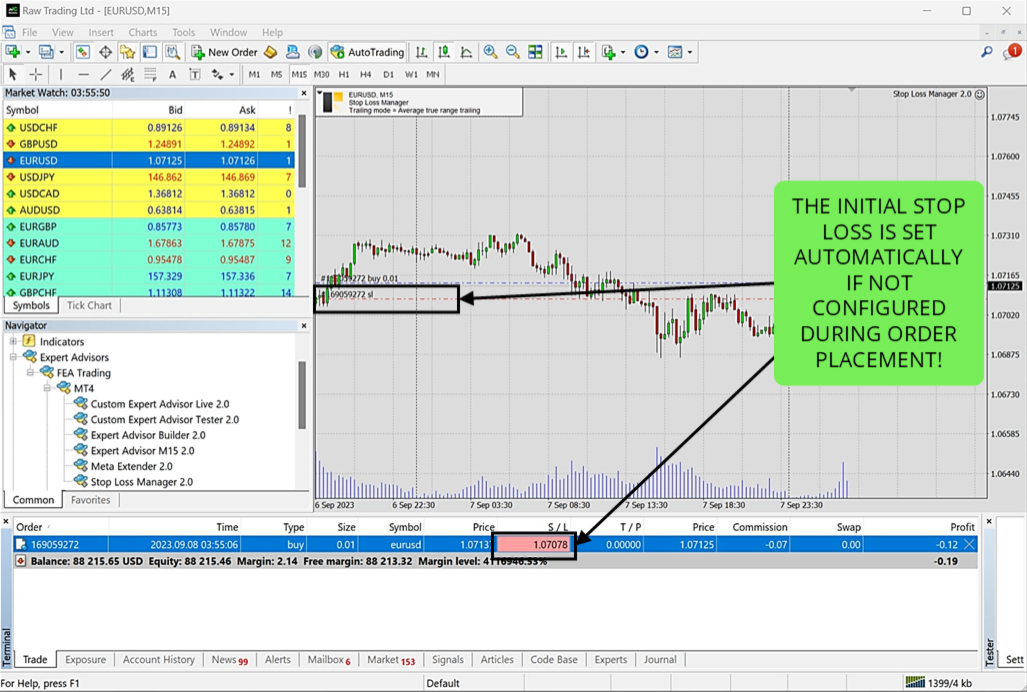
  • Automatically detects new positions and sets initial stop losses instantly

  • Protects trading capital from catastrophic losses during unexpected market events

  • Removes emotional decision-making by automating risk management

  • Manages all trades on the current symbol regardless of how they were opened

How It Works: Attach the Stop Loss Manager to any chart and trade normally. The application automatically detects every trade you open and immediately applies intelligent stop loss management based on your selected trailing method. Works seamlessly with trades opened from mobile devices. Compatible with all timeframes, currency pairs, and brokers.

Trailing Methods

You can choose from five professional trailing methods, each suited to a different trading style:

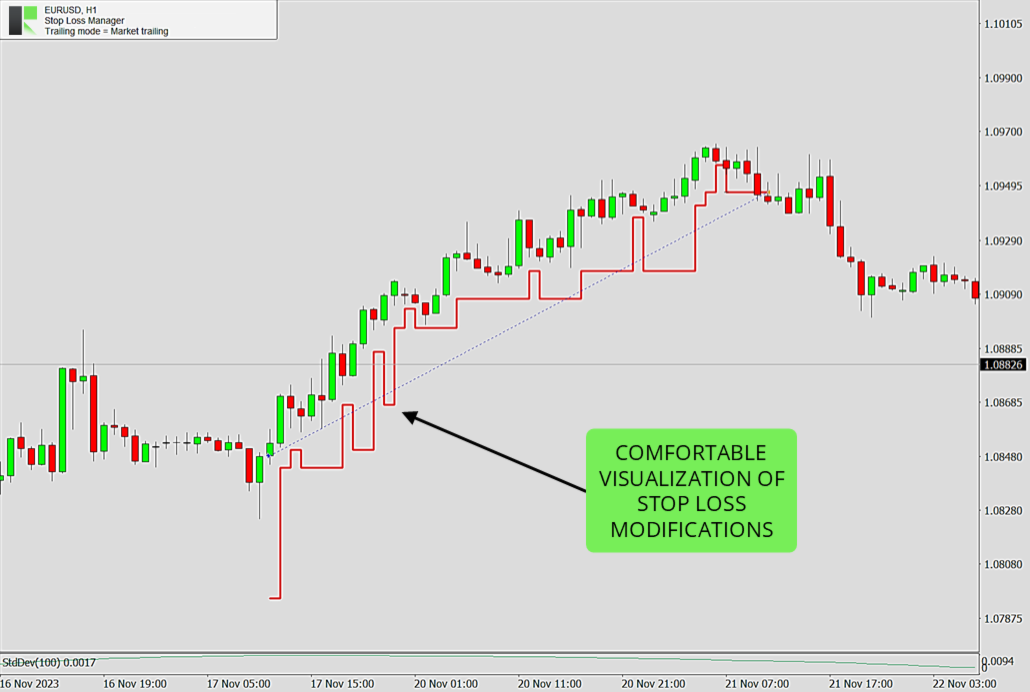
  • Market Trailing: Follows the most recent candlesticks, using the open and close prices of the previous candles together with the spread to decide where the stop loss should sit. It also has a smart setback logic that can give the trade more room again when market conditions allow - this usually happens during phases of market exaggeration, when price has stretched too far in one direction. Two buffer settings, a fixed pip value and a spread-based value, let you fine-tune how much room the trade gets. A good fit for fast-moving day and swing trading.

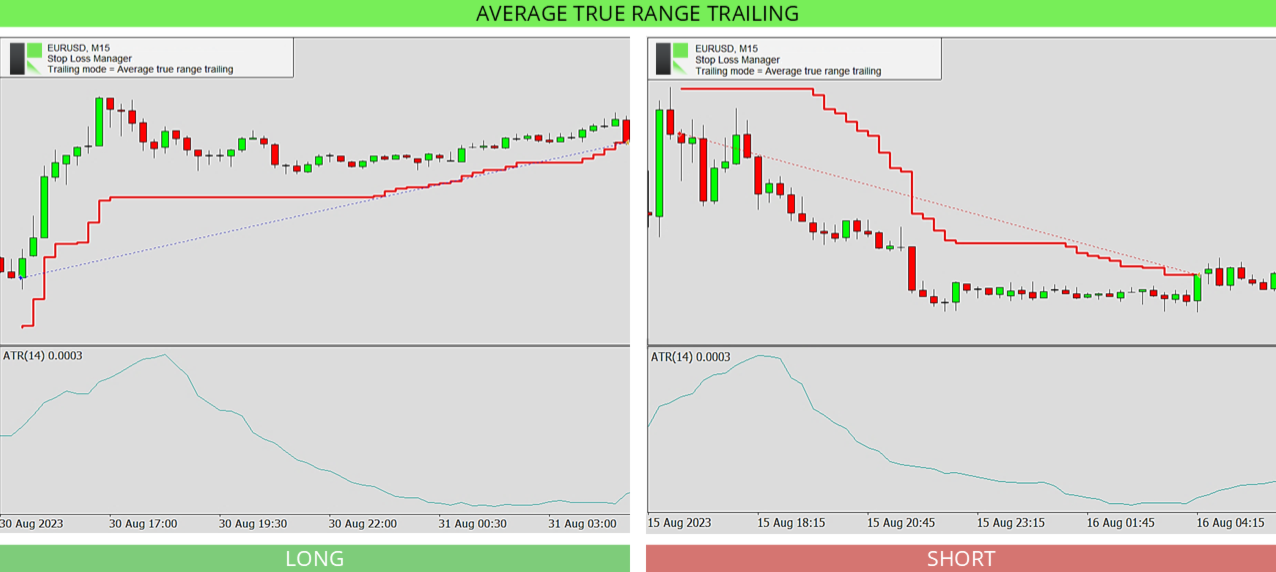
  • ATR Trailing: Uses the Average True Range indicator to set the stop loss distance based on how volatile the market currently is. You set the ATR period (default 14) and a multiplier (default 4.5). When the market moves more, the stop loss is kept further away; when it is calm, it stays closer. Helpful for protecting profits in volatile markets.

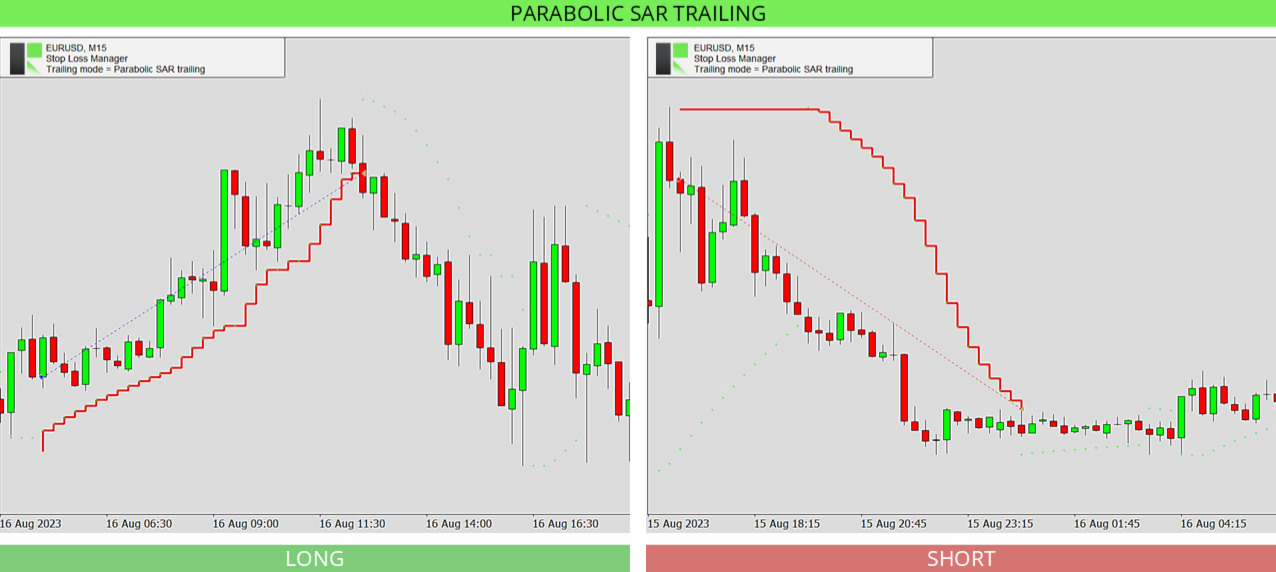
  • Parabolic SAR Trailing: Follows the Parabolic SAR indicator, which places dots above or below price to show the trend direction. You set the step and maximum values, and the stop loss follows these dots as the trend continues. On higher timeframes the dots can sit further from price, so the stop loss may appear to move less often.

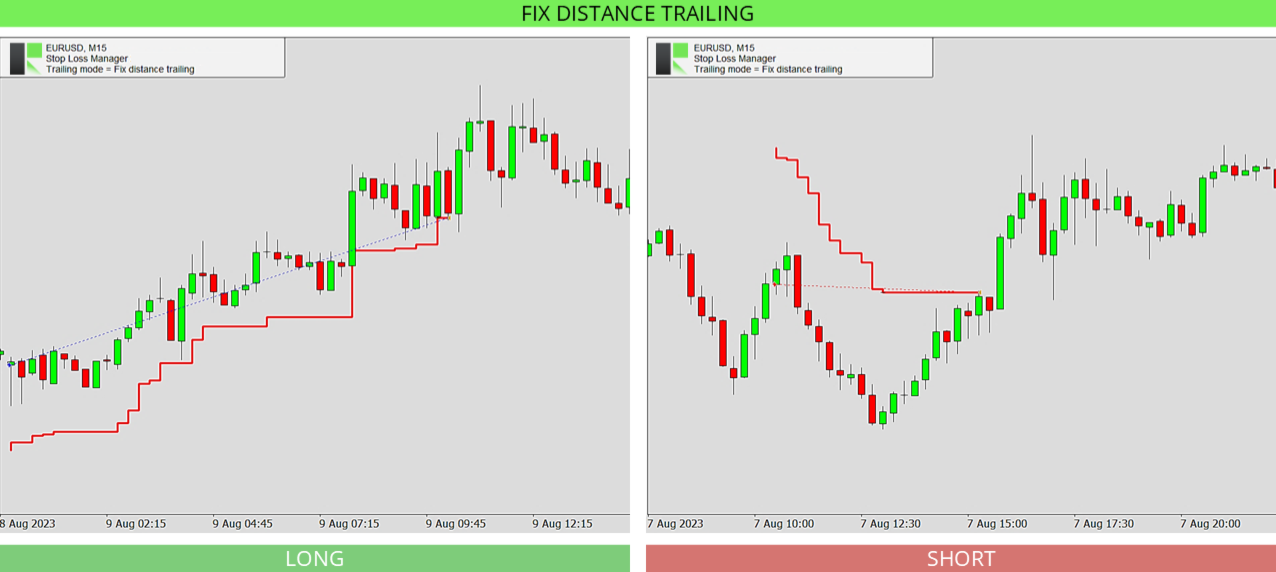
  • Fix Distance Trailing: Keeps the stop loss at a constant distance from the current price. As the price moves in your favor, the stop loss moves with it and locks in profit while staying the same set distance away. The distance can be adjusted directly on the chart.

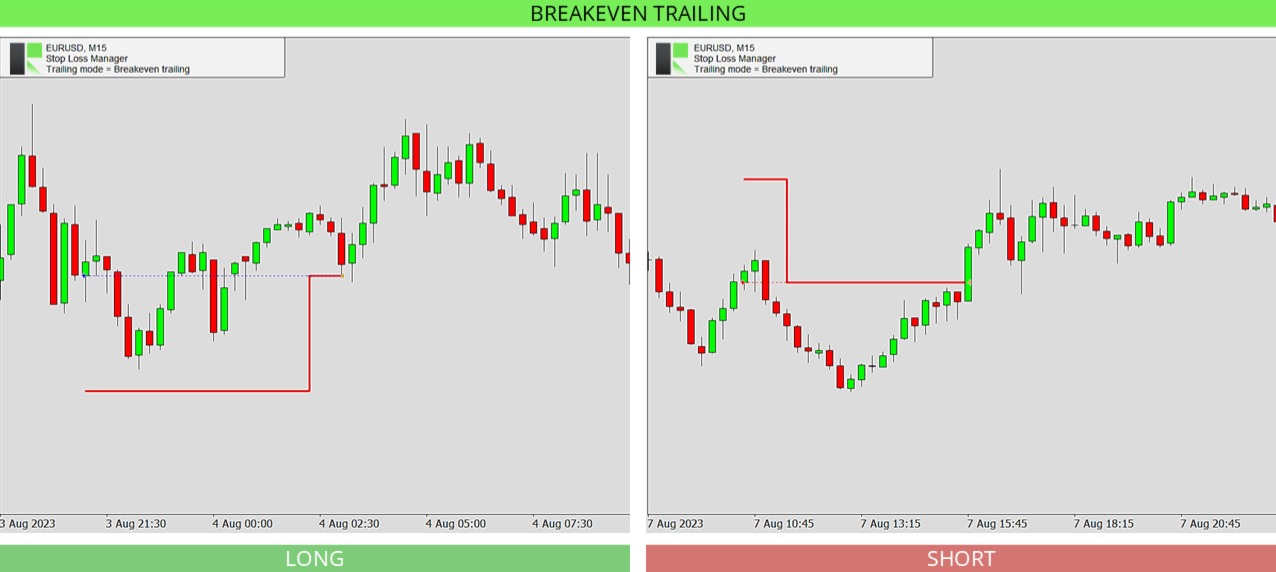
  • Breakeven Trailing: Moves the stop loss to your entry price once the trade reaches a set level of profit (the breakeven position, default 150), so the trade can no longer turn into a loss. Best used together with a take profit or with manual supervision.

Input Parameters

The settings are simple. You first choose your trailing method, then adjust only the values that belong to that method. The defaults are pre-optimized and ready to use.

  • Stop loss trailing mode: Selects the trailing method to use - Market Trailing, ATR Trailing, Parabolic SAR Trailing, Fix Distance Trailing, or Breakeven Trailing. The settings below only apply to the method you choose.

  • Market buffer fix: For Market Trailing. A fixed buffer in pips that is added to the stop loss to give the trade extra room. Default 14.0.

  • Market buffer spread: For Market Trailing. An extra buffer based on the current spread, so the stop loss adapts to wider or narrower spreads. Default 6.0.

  • ATRS period: For ATR Trailing. The number of candles used to measure volatility with the Average True Range indicator. Default 14.

  • ATRS multiplier: For ATR Trailing. How many times the ATR value is used for the stop loss distance. A higher number keeps the stop loss further away. Default 4.5.

  • PSAR step: For Parabolic SAR Trailing. The step (acceleration) of the Parabolic SAR indicator. A larger step makes the stop loss follow price more closely. Default 0.02.

  • PSAR maximum: For Parabolic SAR Trailing. The maximum acceleration of the Parabolic SAR indicator. Default 0.2.

  • Breakeven position: For Breakeven Trailing. How far the trade must move into profit before the stop loss is moved to your entry price. Default 150.

Frequently Asked Questions

Do I need any setup or experience to use the Stop Loss Manager?

No. It comes with pre-optimized default settings that work well in most market conditions, so you can attach it to a chart and start right away. More experienced traders can fine-tune every value.

Does it work with trades I open manually?

Yes. It automatically detects every trade you open on the current symbol and applies your chosen stop loss method, no matter how the trade was opened.

Which trailing method should I start with?

Market Trailing is a good choice to begin with. It follows the recent candlesticks, and the default settings suit most situations. You can switch to another method at any time.

Can I change the trailing method while a trade is open?

The trailing method is set when the application starts. To use a different method, change the setting and restart the application. This keeps the management of your trades consistent.

Can I use it in the strategy tester?

Yes. The Stop Loss Manager runs in the MetaTrader strategy tester, which is a great way to see how each trailing method works before using it on a live chart. Since you cannot place manual trades in the tester, the application automatically opens test trades in both directions, long and short, every 50 bars, so you can watch your selected method manage them. For the best experience, set the modelling mode to "Every tick" and move the speed slider to the second-fastest level.

What happens if my internet connection drops?

The Stop Loss Manager runs directly inside MetaTrader and keeps working, but a stable connection is recommended so your stop loss changes reach your broker without delay.

Which markets and timeframes are supported?

All of them. The Stop Loss Manager works on every currency pair, symbol, timeframe, and broker.

Other Versions

This is the free version of the Stop Loss Manager. It includes every feature and trailing method, but it actively manages only trades with a volume of 0.01 lots; any trade with a higher volume is ignored, so you can try the full application at no cost. An unlimited version that manages trades of any size is available in the Market:

  • Stop Loss Manager (unlimited) (MT4 / MT5, Starting from $39) - manages trades of any size

Need help?

For detailed and personal support, feel free to contact us through our profile or leave a comment here.

More from us

We build a range of trading tools and expert advisors for MetaTrader. Browse all our products here.

Recommended products
NAS100 Auto Sl And TP
Moustapha Boulouz
5 (2)
Introducing NAS100 Auto SL and TP Maker for MT4: Never miss setting StopLoss and TakeProfit again with our NAS100 Auto SL and TP Maker, an indispensable assistant for traders navigating the Nasdaq 100 market on MetaTrader 4. This tool is designed for those who seek a seamless solution to automate the management of StopLoss and TakeProfit levels. Key Features: Effortless Automation: Automatically monitors Nasdaq 100 trades without StopLoss and/or TakeProfit. Dynamically adjusts levels based on us
FREE
Daily Sacrifice Pro
Jesse Frank Cornelson
3 (1)
This is an expanded version of my Daily Sacrifice EA that closes old losing trades at the expense of a portion of your profits. This helps to slowly work away drawdown and accelerate the closure of martingale grids *** Pro Features *** Include/Exclude symbols.   These fields are empty by default, but if populated allow you to include only specific symbols or alternatively exclude specific symbols Execute on an hourly interval.   Allows the EA to be ran every so many hours rather than on a fixed
FREE
Trade Panel Pro by RunwiseFX
Runwise Limited
4.86 (36)
Fully functional manual trade panel with risk/reward, auto SL, lot size calculation, one-click trading, hidden (virtual) stop loss/take profit and pending orders, scale in and out of trades (partial close), news events and more. Works with all symbols not just currency pairs. Brings an incredible amount of functionality to MetaTrader for free and for both demo and live accounts. Features Lot size calculation - based on % of account to risk, fixed amount or dynamic lots Automatic take profit base
FREE
Grid Assistant Pro
Alessandro De Cristofaro
Grid Assistant Pro – Utility for Managing Grid Strategies on MetaTrader 4 Grid Assistant Pro is a professional utility that helps traders manage and monitor unidirectional grid strategies directly from the MT4 chart. It provides a visual dashboard , clear controls, and automated risk protection features for precise and efficient grid operation. Key Features Visual Dashboard Real-time metrics: Balance, Equity, Floating P/L, Drawdown %, Free Margin Grid status: active and pending or
FREE
PZ Trade Pad EA
PZ TRADING SLU
4.29 (31)
This simple visual expert advisor allows you to trade easily from the chart. It handles risk management for you and can perform several useful tasks with your existing trades, saving time and making risk-management for each individual trade easier.  [ Installation Guide | Update Guide | Troubleshooting | FAQ | All Products   |  Get Help ] Trade easily from the chart Trade with precise risk management, hassle free Trade pending order with drag and drop price selection Set SL and TP levels with
FREE
Master the market rhythm with the Advanced Market Sessions indicator. Timing is everything in trading. Knowing exactly when major financial centers open and close is the key to understanding market volatility, liquidity, and directional bias. This indicator gives you crystal-clear visibility into the three major trading sessions: Asia, London, and New York. By automatically mapping the exact High and Low of each session in real-time, this tool empowers you to trade with true institutional contex
FREE
Smart Trade and Order Manager
Md Sakhawat Hossain
4.75 (4)
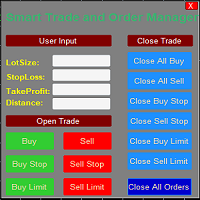
Smart Trade and Order Manager: An Essential Tool for Precision Trading Smart Trade and Order Manager is your trusted trading assistant, meticulously designed to simplify and streamline your trading operations. It empowers traders by enabling swift order execution and effortless order management, allowing you to dedicate your valuable time to in-depth market analysis and decision-making. With just a few clicks, you can initiate various order types, ensuring you are always in control of your tradi
FREE
Free automatic Fibonacci is an indicator that automatically plots a Fibonacci retracement based on the number of bars you select on the BarsToScan setting in the indicator. The Fibonacci is automatically updated in real time as new highest and lowest values appears amongst the selected bars. You can select which level values to be displayed in the indicator settings. You can also select the color of the levels thus enabling the trader to be able to attach the indicator several times with differe
FREE
IceFX TradeInfo
Norbert Mereg
4.77 (44)
IceFX’s TradeInfo is an utility indicator which displays the most important information of the current account and position. Displayed information: Information about the current account (Balance, Equity, Free Margin). Current spread, current drawdown (DD), planned profit, expected losses, etc. Number of open position(s), volume (LOT), profit. Today’s and yesterday’s range. Remaining time to the next candle. Last day profit information (with integrated IceFX ProfitInfo indicator). Risk-based LOT

FREE
Neonplox Trade Manager
Mr Roberto Carlos Ferreira Silva
n3oNpLoX Trade Manager Market Order. Stop Order. Limit Order. To help you Place trades based on the amount of Money in Dollars you want to risk. As it will show in the screenshots you can calculate the right Lot size for the money you want to risk. Calculates Lot Size based on the distance between Stop Loss and Entry Point. 5 Options for TP - (1RR,2RR,3RR,4RR,5RR) It will help you manage your risk and Place trades with the correct Lot Size. So you will not over expose yourself and your money
FREE
A "simple design" trading panel, which is characterized by small byte size, low CPU usage, simple steps, and quick operation, 1 to 2 clicks to complete a functional operation, saving time and increasing efficiency . The panel is easy to use, and it is not complicated to set parameters, which is in line with traders' habits. At the same time, its compact- design, clear at a glance, and comprehensive functions are a powerful tool for manual trading! Key features of the panel:   Click "Bid Price"
FREE
Simple RSI Forex Trading Strategy
Victor Manuel Valderrama Zamora
2.5 (2)
Diversify the risk in your trading account by combining our Expert Advisors. Build your own custom trading system here:   Simple Forex Trading Strategies The expert advisor opens trades when RSI indicator enter in oversold or overbought areas. The Stop Loss, Take Profit, and Trailing Stop are calculated based on the ATR indicator. The recommended currency pair is EURGBP and the recommended timeframe to operate and to do backtests is H4. This Expert Advisor can be profitable in any TimeFrame an
FREE
一键平仓小工具,可以针对买单、卖单和挂单进行批量操作,可以操作当前图表订单和所有订单,简单高效。 第一行第一个按钮是关闭当前图表 品种 所有买单,第二个按钮是关闭当前图表品种的所有卖单,第三个按钮是关闭当前图表 品种 的所有订单; 第二行 第一个按钮是删除当前图表 品种 所有买单挂单,第二个按钮是 删除 当前图表品种的所有卖单 挂单 ,第三个按钮是 删除 当前图表 品种 的所有 挂单 ; 第三行第一个按钮是关闭所有 品种的全部买单,第二个按钮是关闭所有 品种的全 卖单,第三个按钮是关闭所有 品种的全部订单; 第四行第一个按钮是删除所有 品种全部买单挂单 ,第二个按钮是 删除 全部品种 的全部卖单挂单 ,第三个按钮是删除 全部品种 的全部挂单 。 希望此程序能对您有用
FREE
Macd Martin
Roman Yablonskiy
2.5 (2)
Double Breakout   is an automatic expert advisor with two separate strateges that uses martingale. The MACD indicator with adjustable parameters is used as inputs for each flow of orders. The specified takeprofit and stoploss levels are used to exit the position.  General recommendation The minimum recommended deposit is 1000 cents. Spread is recommended not more than 3 points. It is better to use trend currency pairs. The martingale parameter can be set from 0.1 to any value. When martingale i
FREE
Activation initiates the sequence from the initial symbol in the Market Watch roster, forming a perpetual loop that continues until deactivation. The system employs global terminal variables to sustain operational continuity amid symbol-induced reinitializations, thereby ensuring uninterrupted performance. This EA should not be checked off as 'Allowed live Trading' and is functional with that checkmark box, when uploading the EA. Principal advantages encompass augmented productivity in overseein
FREE
Vanda FX
Sayan Vandenhout
5 (2)
Vanda FX USES THE TREND WAVE INDICATOR AND IT CAN IDENTIFY THE BEGINNING AND THE END OF A NEW WAVE TREND MOVEMENT. AS AN OSCILLATOR, THE INDICATOR IDENTIFIES THE OVERBOUGHT AND OVERSOLD ZONES. IT WORKS GREAT TO CATCH THE SHORT TERM PRICE REVERSALS AND USES A MARTINGALE STRATEGY TO CLOSE ALL TRADES IN PROFIT. USE DEFAULT SETTINGS ON H1 OR HIGHER TIME FRAME ON ANY PAIR FOR MORE ACCURATE TRADES WHY THIS EA : Smart entries calculated by 4 great strategies The EA can be run on even a $20000 acc
FREE
Rainbow MT4
Jamal El Alama
Rainbow MT4 is a technical indicator based on Moving average with period 34 and very easy to use. When price crosses above MA and MA changes color to green, it’s a signal to buy. When price crosses below MA and MA changes color to red, it’s a signal to sell. The Expert advisor ( Rainbow EA MT4) based on Rainbow MT4 indicator, as you can see in the short video below is now available here .
FREE
-- Simple but effective. Inversion Indicator -  What is it? A trend-following overlay indicator that combines SuperTrend logic with exponential curve technology. It detects trend direction, draws a dynamic channel on the chart, and sends real-time alerts when the trend reverses. How does it work? The indicator calculates an exponential baseline using ATR and a SuperTrend factor. When price closes above or below this baseline, a trend reversal is confirmed. A green arrow marks the start of a
FREE
Account Protector MT4
Vladimir Mametov
4.5 (10)
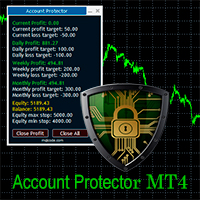
The Expert Advisor is designed to protect the account, fix profit (loss) and display current information about the account. Trading account protection is carried out by closing all open orders in the terminal and/or closing all charts. When running the Expert Advisor with default parameters, it will only display your account information and will be reduced in size. Next, you can set the conditions under which your trading account will be protected. Profit and loss limits can be set for daily pro
FREE
Long Waiting MT4
Aleksandr Davydov
Expert description Algorithm optimized for Nasdaq trading The Expert Advisor is based on the constant maintenance of long positions with daily profit taking, if there is any, and temporary interruption of work during the implementation of prolonged corrections The Expert Advisor's trading principle is based on the historical volatility of the traded asset. The values of the Correction Size (InpMaxMinusForMarginCallShort) and Maximum Fall (InpMaxMinusForMarginCallLong) are set manually. Recomme
FREE
WOz
Andrej Hermann
5 (3)
Universal trading advisor "WOz" with a built-in trading panel The EA's capabilities can be easily tested in the strategy tester in visual mode. The EA can simulate real trading with the ability to move the SL and TP levels.  The EA has 5 modes of operation:  1. AUTOTRADING automatic trading mode on a set signal  2. ONLY SIGNAL mode of tracking the set signal without auto trading  3. RANGE MODUS mode of automatic placement of equidistant orders on Bayi Sell at a specified time  4. HAND MODUS
FREE
QualifiedEngulfing
Ashkan Hazegh Nikrou
QualifiedEngulfing Is Free Version Of ProEngulfing Indicator  ProEngulfing Is Paid Version Of This Indicator  Download It Here . What is Different Between free and paid version of ProEngulfing ?  Free version has limitation of One Signal Per Day Join Koala Trading Solution Channel in mql5 community to find out the latest news about all koala products, join link is below : https://www.mql5.com/en/channels/koalatradingsolution Introducing QualifiedEngulfing   – Your Professional Engulf Pattern In
FREE
Raven
Dmitriy Prigodich
5 (1)
"Raven" is an expert scalper who does not use dangerous strategies in his work. It trades at the extremes of the pullback, according to the trend. Channel scalping means confidence, reliability and minimal risks. The Expert Advisor implements all types of stops from the percentage of the balance to the signal stop, so you can always control your balance and not worry. It is recommended to use a signal stop - this will optimize losses and increase profits. The first 10 copies are priced at $ 10
FREE
Harvest FX
Sayan Vandenhout
4.56 (9)
Harvest FX USES THE TREND WAVE INDICATOR AND IT CAN IDENTIFY THE BEGINNING AND THE END OF A NEW WAVE TREND MOVEMENT. AS AN OSCILLATOR, THE INDICATOR IDENTIFIES THE OVERBOUGHT AND OVERSOLD ZONES. IT WORKS GREAT TO CATCH THE SHORT TERM PRICE REVERSALS AND USES A MARTINGALE STRATEGY TO CLOSE ALL TRADES IN PROFIT. USE DEFAULT SETTINGS ON H1 OR HIGHER TIME FRAME ON ANY PAIR FOR MORE ACCURATE TRADES WHY THIS EA : Smart entries calculated by 3 great strategies The EA can be run on even a $30000 a
FREE
AI Advisor – Let AI See Your Real Trading World AI Advisor builds rich prompts directly from your account information, ready to paste into any AI chat. It helps you quickly review your account status, understand the current market structure, spot risks, and explore potential profit opportunities. Quick links  Download & versions Download:      AI Advisor v1.02.ex4      AI Advisor   v1.02.ex5 Installation guide AI Advisor  Version Overview FAQ & troubleshooting How to Use – 3 Simple Steps Open
FREE
MacdScalper
Roman Yablonskiy
4 (1)
MacdScapler   is an automatic expert advisor with two section of martingale strateges with automation takeprofit. The MACD indicator with adjustable parameters is used as inputs. If parameters of the entry points goes wrong, the EA changes them automaticly. General recommendation The minimum recommended deposit is 1000 cents for 0.01 lot. Spread is recommended less then 2 points. The martingale parameter can be set from 0.1 to any value in two steps - the first for the four trades and the second
FREE
Core Positioning Advanced analytical tool designed specifically for MT4, providing in-depth analysis of trading history, uncovering data insights, optimizing strategies, and enhancing profitability. Core Usage Strategy Performance Evaluation: Analyzes profitability, stability, and risk to provide an objective rating from A+ to D. Trading Pattern Discovery: Identifies high-quality assets, time periods, and profit-making habits suited to different market conditions. Risk Management Optimization: C
FREE
Levels and risk calculator for the Antimartingale (or Antimartingala) technique Totally visual, setup everything from control panel Decide your risk and margin, it will calculate and show trading lavels on the chart Free version of the orginal Antimartingale EA:  https://www.mql5.com/en/market/product/53653 Public Signals using the Antimartingale's technique: https://www.mql5.com/en/signals/1016250 https://www.mql5.com/en/signals/1018964 This EA does not open trades, it only shows the trading le
FREE
This utility allows you to check and improve your binary options trading skills. This is an indicator, not an Expert Advisor. Therefore, you do not need to remove your active EA from the chart. Inputs Expiry, min - option expiration time; InfoPanel background color - info panel background color; InfoPanel text color - info panel text color; InfoPanel text fontsize - info panel font size.
FREE
SuperTrend V
Muhammad Hassaan
*This is TradingView indicator converted to mql4* The SuperTrend V indicator is a popular technical analysis tool used to identify trends and potential trend reversals in financial markets. It is based on the concept of the SuperTrend indicator but incorporates additional features and variations. The SuperTrend V indicator uses a combination of price action and volatility to determine the trend direction and generate trading signals. Here are the key components and features of the indicator: Ca
FREE
Buyers of this product also purchase
Forex Trade Manager MT4
InvestSoft
4.98 (443)
Trade Manager MT4 is an advanced position size calculator and trade management tool for MetaTrader 4, designed to help traders plan trades faster, control risk more precisely, and manage open positions directly from the chart. It combines order placement, risk based lot calculation, Stop Loss and Take Profit management, Break Even, Trailing Stop, Partial Close, Equity Protection, and external trade management in one panel. Whether you trade forex, indices, metals, commodities, or crypto, Trade M
Local Trade Copier EA MT4
Juvenille Emperor Limited
4.96 (110)
Experience exceptionally  fast trade copying with the Local Trade Copier EA MT4 . With its easy 1-minute setup, this trade copier allows you to copy trades between multiple MetaTrader terminals on the same Windows computer or Windows VPS with lightning-fast copying speeds of under 0.5 seconds. Whether you're a beginner or a professional trader, the Local Trade Copier EA MT4 offers a wide range of options to customize it to your specific needs. It's the ultimate solution for anyone looking to inc
Trade Assistant MT4
Evgeniy Kravchenko
4.43 (197)
It helps to calculate the risk per trade, the easy installation of a new order, order management with partial closing functions, trailing stop of 7 types and other useful functions. Additional materials and instructions Installation instructions   -   Application instructions   -   Trial version of the application for a demo account Line function -   shows on the chart the Opening line, Stop Loss, Take Profit. With this function it is easy to set a new order and see its additional characteris
Exp COPYLOT CLIENT for MT4
Vladislav Andruschenko
4.69 (65)
Professional Trade Copier for MetaTrader 4 Fast, professional, and reliable trade copier for MetaTrader 4 . COPYLOT helps you copy Forex trades between MetaTrader 4 and MetaTrader 5 terminals with flexible synchronization for different account setups. COPYLOT MT4 version supports: MetaTrader 4 to MetaTrader 4 MetaTrader 5 Hedge to MetaTrader 4 MetaTrader 5 Netting to MetaTrader 4   MT5 version Full Description + DEMO + PDF How To Buy How To Install How to get Log Files How To Test and Optimize A
Working Trial Download Copy Cat More Trade Copier MT4 is not just a simple local trade copier; it is a complete risk management and execution framework designed for today’s trading challenges. From prop firm challenges to personal portfolio management, it adapts to every situation with its blend of robust execution, capital protection, flexible configuration, and advanced trade handling. The copier works in both   Master (sender) and Slave (receiver)   modes, with real-time synchronization of
TradePanel MT4
Alfiya Fazylova
4.84 (95)
Trade Panel is a multi-functional trading assistant. The app contains over 50 trading functions for manual trading and allows you to automate most trading tasks. Before making a purchase, you can test the demo version on a demo account. Download the trial version of the application for a demonstration account: https://www.mql5.com/en/blogs/post/750865 . Full instructions here . Trade. Allows you to perform trading operations in one click: Open pending orders and positions with automatic risk cal
Unlimited Trade Copier Pro is a tool to copy trade remotely to multiple MT4, MT5 and cTrader accounts at different computers/locations over internet. This is an ideal solution for you if you are a signal provider and want to copy your trades to other receivers globally on your own rules. One provider can copy trades to multiple receivers and one receiver can get trade from multiple providers as well. The provider can even set the subscription expiry for each receiver, so that receiver will not b
The product will copy all telegram signal to MT4   ( which you are member  ) , also it can work as remote copier.  Easy to set up, copy order instant, can work with almost signal formats, image signal, s upport to translate other language to English Work with all type of channel or group, even channel have "Restrict Saving Content", work with  multi channel, multi MT5 Work as remote copier: with signal have ticket number, it will copy exactly via ticket number. Support to backtest signal. How to
VirtualTradePad mt4 Extra
Vladislav Andruschenko
4.85 (61)
Trading Panel for trading in 1 click.  Working with positions and orders!  Trading from the chart or the keyboard. Using our trading panel, you can trade in one click from the chart and perform trading operations 30 times faster than the standard MetaTrader control. Automatic calculations of parameters and functions that make life easier for a trader and help a trader conduct their trading activities much faster and more conveniently. Graphic tips and full information on trade deals on the chart
VirtualTradePad PRO SE MT4 — advanced trading panel and chart workspace for MetaTrader 4 VirtualTradePad PRO SE is a professional trading panel and trade-management workspace for MetaTrader 4 . It helps traders open, manage, protect, close and analyze trades faster from one chart-based interface. The product was created for active manual traders who need more than a simple set of buttons. PRO SE combines one-click execution, pending orders, position control, partial close, basket profit/loss log
Trade copier MT4
Alfiya Fazylova
4.59 (34)
Trade Copier is a professional utility designed to copy and synchronize trades between trading accounts. Copying occurs from the account / terminal of the supplier to the account / terminal of the recipient, which are installed on the same computer or VPS . PROMOTION - If you have already purchased the "Trade Copier MT4," you can receive the "Trade Copier MT5" for free (for copying MT4 > MT5 and MT4 < MT5). For more detailed information about the conditions, please contact us via private message
News Filter EA MT4
Rashed Samir
5 (10)
News Filter EA: Advanced Algo Trading Assistant News Filter EA is an advanced algo trading assistant designed to enhance your trading experience. By using the   News Filter EA , you can integrate a Forex economic news filter into your existing expert advisor, even if you do not have access to its source code. In addition to the news filter, you can also specify   trading days   and   hours   for your expert. The News Filter EA also includes   risk management   and   equity protection   features
Real-time Gamma Exposure (GEX) levels from CBOE options data. ES, NQ, RTY, Gold. Updates every 2 minutes. Full description: GammaOrderBook — All-in-one EA that downloads and displays live Gamma Exposure (GEX) data directly on your chart. No separate indicator needed. What You See • GEX Bars — Call and Put gamma levels as horizontal bars, split by ETF/Index source (different colors) • Zero Gamma Line — The critical level where dealer hedging direction changes • Panorama V4 — Multi-timeframe ga
Strategy Builder offers an incredible amount of functionality. It combines a trade panel with configurable automation (covert indicators into an EA), real-time statistics (profit & draw down) plus automatic optimization of SL, TP/exit, trading hours, indicator inputs. Multiple indicators can be combined into an single alert/trade signal and can include custom indicators, even if just have ex4 file or purchased from Market. The system is easily configured via a CONFIG button and associated pop-up
The Risk to Reward Ratio Manager is a visual order management tool and position size calculator designed to support disciplined trading and professional risk management. It allows traders to visually set entry, stop-loss, and take-profit levels directly on the chart, while automatically calculating the lot size and risk-to-reward ratio before sending an order. The tool helps standardize trade preparation and ensures that each position is opened with a predefined and controlled level of risk. Thi
PZ Trade Pad Pro MT4
PZ TRADING SLU
3.67 (3)
Effortlessly calculate lot sizes and manage trades to save time and avoid costly errors The Trade Pad Pro EA is a tool for the Metatrader Platform that aims to help traders manage their trades more efficiently and effectively. It has a user-friendly visual interface that allows users to easily place and manage an unlimited number of trades, helping to avoid human errors and enhance their trading activity. [ Installation Guide | Update Guide | Troubleshooting | FAQ | All Products ] One of the k
MT4 to Telegram Signal Provider   turns your trading account into a signal provider. Every trade action, whether manual, by EA or from your phone, is instantly sent as a message to Telegram. You can fully customize the format or use a ready-made template for quick setup. [ Demo ] [ Manual ] [ MT5 Version ] [ Discord Version ]  New: [ Telegram To MT5 ] Setup A step by step user guide is available. Key Features Ability to customize order details sent to subscribers You can create a tiered subs
Kali FX Trade Manager
Calvin Andile Mahlangu
Kalifx Trade Manager is a smart on-chart trading and risk-management panel for MetaTrader 4. It replaces manual order tickets and spreadsheet risk math with a compact, draggable panel that lets you place, size, and manage trades directly from the chart — including automatic breakeven, trailing stops, and a 3-level partial close (multi-TP) system with draggable on-chart lines. Built for discretionary traders who want the speed of a one-click panel with the discipline of automated risk rules runn
A professional panel for manual trading that keeps the whole trade cycle in one window on the chart, from a precise entry to protecting your account. Size every position strictly to a defined risk, build the trade with lines directly on the chart using the RR Tool, and place market and pending orders, grids and OCO. The panel takes position management off your hands: partial closing across up to five levels, six types of trailing stop, breakeven and Virtual SL/TP. Daily, weekly and monthly limit
Zone Trader MT4
Lee Samson
5 (1)
Trade support and resistance or supply and demand zones automatically once you have identified the key areas you want to trade from. This EA allows you to draw buy and sell zones with a single click and then place them exactly where you expect price to turn. The EA then monitors those zones and will automatically take trades based on price action you specify for the zones. Once the initial trade is taken, the EA will then get out in profit at the opposite zone you place, which becomes the target
Expert Advisor for MT4 Useful utility MUST have for all traders.  With 1 click button, you're able to close all your open positions. Its come with a warning pop up notification when you click to close all your trades, to avoid an accident press the button. Just press 'Yes' to confirm or 'No' to cancel it. The expert will close all your open positions no matter what pairs you currently open or directions. Just attach the expert on 1 of your chart, and you're good to go.
Tick Volume Chart
Boris Sedov
4 (2)
Tick Volume Chart — fixed volume bars for MetaTrader 4. The tool creates charts on which each candle has a fixed tick volume. Data sampling is carried out not by time but by the tick volume. Each bar contains a given (fixed) tick volume. Tick volume can be adjusted by changing the value of the Volume parameter. You can apply indicators, Expert Advisors and scripts to the tick chart. You get a fully functional chart, on which you can work just as well as on a regular chart. In the process of work
Equity Protect Pro: Your Comprehensive Account Protection Expert for Worry-Free Trading If you're looking for features like account protection, equity protection, portfolio protection, multi-strategy protection, profit protection, profit harvesting, trading security, risk control programs, automatic risk control, automatic liquidation, conditional liquidation, scheduled liquidation, dynamic liquidation, trailing stop loss, one-click close, one-click liquidation, and one-click restore, Equity P
Automatic profit locking when target profit is reached EquityTargetCloser   — is a utility expert advisor for MetaTrader 5 that automatically closes all market positions and deletes pending orders as soon as   equity exceeds the current balance by a specified profit amount . After all positions are closed, the target automatically increases: the new threshold = new balance + specified profit. The EA does not open trades, it only manages existing positions, helping to reliably lock in profit and
CloseIfProfitorLoss with Trailing
Vladislav Andruschenko
4.87 (31)
Close If Profit or Loss with Trailing for MetaTrader 4 — automatic closing by total profit or loss A reliable trade-management utility for MetaTrader 4 that automatically closes positions when the total profit or total loss reaches the level you set. The Expert Advisor monitors open trades, calculates floating profit and loss, can trail profit, and helps close positions faster than manual reaction. MetaTrader 4 is still used by many manual traders, grid traders, scalpers, and Expert Advisor use
DrawDown Limiter MT4
Haidar Lionel Haj Ali
5 (8)
Drawdown Limiter EA You are in the right place if you were searching for Drawdown control, Drawdown limiter, Balance protection, Equity Protection or Daily Drawdown Limit related to Prop Firm, FTMO, or Funded account trading, or if you want to protect your trading account. Have you suffered from controlling your drawdown when trading funded accounts? This EA is meant for you. Prop firms usually set a rule called “Trader Daily Drawdown”, and if it is not respected, you are disqualified.  I am an
Exp Averager
Vladislav Andruschenko
4.82 (22)
Averager for MetaTrader 4 — advanced trade recovery and position series management system A professional Expert Advisor created for traders who need a controlled way to average losing positions, build a structured trade basket, and manage exits with more flexibility. Averager is designed to open additional trades when positions move into drawdown, helping you improve the average entry price and manage the entire series as one coordinated structure. This is not just another averaging utility. It
Trade Copier Professional — Local Copy Solution Trade Copier Professional is a reliable local trade copying system for MetaTrader 4/5. It allows traders to replicate positions instantly across multiple accounts on the same computer, with built‑in safety controls and a professional dashboard. Overview The EA operates in both Master and Slave modes from a single file, with seamless switching. Trades can be copied between MT4 and MT5 terminals without internet dependency, using local file‑based
Trading History MT4
Siarhei Vashchylka
5 (9)
Trading History - A program for trading and money management on the history of quotes in stratagy tester. It can work with pending and immediate orders, and is equipped with trailing stop, breakeven and take profit functions. Very good for training and testing different strategies. Manual (Be sure to read before purchasing) Advantages 1. Allows you to test any trading strategy in the shortest possible time 2. An excellent simulator for trading training. You can gain months of trading experience
Trade Copier Global
Laszlo Tormasi
5 (15)
Trade Copier Global: The name speaks for itself. This copier allows you to copy orders between MT4 terminals even if they are not installed on the same computer. Features Copying trades between MT4 terminals around the world with a short delay. Automatically recognizes symbol prefixes. Can connect many Slaves to the same Master. Supports pending and market orders. Supports partial order close (with limitations, see below) Can send messages and notifications to the Slaves from the Master Several
More from author
Second Timeframe - Professional Multi-Timeframe Analysis Additional materials and instructions Complete manual   -   MT4 version   -   MT5 version See the bigger picture and your entry on one chart. Second Timeframe is a multi-timeframe analysis tool for MetaTrader, taken from the Meta Extender suite. It overlays a higher timeframe directly on your active chart, so you can follow the bigger trend and time precise entries at the same time, without ever switching windows. What It Offers:   View
FREE
Price Alert - Professional Price Notification System Additional materials and instructions Complete manual   -   MT4 version   -   MT5 version Never miss an important price level again. Price Alert is a professional price notification tool for MetaTrader, taken from the Meta Extender suite. Set unlimited custom alerts and get notified instantly by chart pop-up, email, and mobile push the moment price reaches your level, so you can step away from the screen with confidence. What It Offers:   Cr
FREE
Chart Analyzer - Advanced Market Structure Analysis Additional materials and instructions Complete manual   -   MT4 version   -   MT5 version See the market's structure instantly, without drawing a single line. Chart Analyzer is a powerful real-time market analysis tool for MetaTrader, taken from the Meta Extender suite. It reads the chart for you and reveals the support and resistance levels, swing phases, and trend structure that matter, so you always know where price really stands. What It
FREE
Stop Loss Manager - Precision Risk Management Additional materials and instructions Complete manual   -   MT4 version   -   MT5 version Never let a winning trade turn into a loss again. Try it free: a 14-day evaluation version is available on our   website . The Stop Loss Manager is professional, automatic risk management for MetaTrader. The moment you open a trade, it applies an intelligent stop loss and trails it for you using five proven methods. Minimize risk, stay in full control, and loc
FREE
Price Alert - Professional Price Notification System Additional materials and instructions Complete manual   -   MT4 version   -   MT5 version Never miss an important price level again. Price Alert is a professional price notification tool for MetaTrader, taken from the Meta Extender suite. Set unlimited custom alerts and get notified instantly by chart pop-up, email, and mobile push the moment price reaches your level, so you can step away from the screen with confidence. What It Offers:   Cr
FREE
Chart Analyzer - Advanced Market Structure Analysis Additional materials and instructions Complete manual   -   MT4 version   -   MT5 version See the market's structure instantly, without drawing a single line. Chart Analyzer is a powerful real-time market analysis tool for MetaTrader, taken from the Meta Extender suite. It reads the chart for you and reveals the support and resistance levels, swing phases, and trend structure that matter, so you always know where price really stands. What It
FREE
Inspector - Real-Time Performance and Drawdown Monitoring Additional materials and instructions Complete manual   -   MT4 version   -   MT5 version Know exactly how you are trading, in real time. Inspector is a real-time performance and drawdown monitor for MetaTrader, taken from the Meta Extender suite. It tracks your results across every time period as they happen. What It Offers:   Continuous real-time calculation and monitoring of your trading performance, drawdown, and key statistics acro
FREE
Inspector - Real-Time Performance and Drawdown Monitoring Additional materials and instructions Complete manual   -   MT4 version   -   MT5 version Know exactly how you are trading, in real time. Inspector is a real-time performance and drawdown monitor for MetaTrader, taken from the Meta Extender suite. It tracks your results across every time period as they happen. What It Offers:   Continuous real-time calculation and monitoring of your trading performance, drawdown, and key statistics acro
FREE
Closing Assistant - One-Click Multi-Trade Management Additional materials and instructions Complete manual   -   MT4 version   -   MT5 version Close any group of trades in a single click, exactly when it counts. Closing Assistant is a fast, one-click trade management tool for MetaTrader, taken from the Meta Extender suite. When the market moves and every second matters, exit trades instantly by direction or by performance, with no hunting through long trade lists. What It Offers:   Close multi
FREE
MT5 Tick Data - Real Historical Tick Data Additional materials and instructions Complete manual   -   MT4 version   -   MT5 version Looking for real tick data to validate and backtest your expert advisors and indicators? You have found it! Our MT5 Tick Data package, available on our website, gives you genuine historical tick data for MetaTrader 5, so your strategy tests run on real market conditions and real, variable spreads instead of estimated prices. Download the tick data from the tick d
FREE
Closing Assistant - One-Click Multi-Trade Management Additional materials and instructions Complete manual   -   MT4 version   -   MT5 version Close any group of trades in a single click, exactly when it counts. Closing Assistant is a fast, one-click trade management tool for MetaTrader, taken from the Meta Extender suite. When the market moves and every second matters, exit trades instantly by direction or by performance, with no hunting through long trade lists. What It Offers:   Close multi
FREE
Second Timeframe - Professional Multi-Timeframe Analysis Additional materials and instructions Complete manual   -   MT4 version   -   MT5 version See the bigger picture and your entry on one chart. Second Timeframe is a multi-timeframe analysis tool for MetaTrader, taken from the Meta Extender suite. It overlays a higher timeframe directly on your active chart, so you can follow the bigger trend and time precise entries at the same time, without ever switching windows. What It Offers:   View
FREE
MT5 Tick Data - Real Historical Tick Data Additional materials and instructions Complete manual   -   MT4 version   -   MT5 version Looking for real tick data to validate and backtest your expert advisors and indicators? You have found it! Our MT5 Tick Data package, available on our website, gives you genuine historical tick data for MetaTrader 5, so your strategy tests run on real market conditions and real, variable spreads instead of estimated prices. Download the tick data from the tick d
FREE
Signova Premium - Automated 19-Symbol Forex Swing Trading Additional materials and instructions Complete manual   -   MT4 version   -   MT5 version Built on a strategy from the German trading department of a large investment bank, now adapted for retail traders. Low risk by design: at the default risk level, the average trade risk is about 0.75% of your account. Try it free: a 60-day evaluation version is available on our   website . Signova Premium is an automated forex trading robot for Meta
MT5 Tick Data - Real Historical Tick Data Additional materials and instructions Complete manual   -   MT4 version   -   MT5 version Looking for real tick data to validate and backtest your expert advisors and indicators? You have found it! Our MT5 Tick Data package, available on our website, gives you genuine historical tick data for MetaTrader 5, so your strategy tests run on real market conditions and real, variable spreads instead of estimated prices. Download the tick data from the tick d
Expert Advisor Builder - Create Automated Trading Strategies Without Coding Additional materials and instructions Complete manual   -   MT4 version   -   MT5 version Turn your trading idea into a working strategy, without writing a single line of code. Try it free: a 14-day evaluation version is available on our   website . The Expert Advisor Builder lets anyone create fully automated trading strategies for MetaTrader, with no programming at all. You design your strategy visually in an easy-to
Meta Extender - See More, Trade Better. Over 20 Professional Trading Widgets Additional materials and instructions Complete manual   -   MT4 version   -   MT5 version See More, Trade Better. One toolkit that upgrades your entire MetaTrader. Try it free: a 14-day evaluation version is available on our   website . The Meta Extender is an all-in-one in-chart application that adds more than 20 professional trading widgets directly to your MetaTrader charts. Get smart position sizing, one-click ris
Stop Loss Manager - Precision Risk Management Additional materials and instructions Complete manual   -   MT4 version   -   MT5 version Never let a winning trade turn into a loss again. Try it free: a 14-day evaluation version is available on our   website . The Stop Loss Manager is professional, automatic risk management for MetaTrader. The moment you open a trade, it applies an intelligent stop loss and trails it for you using five proven methods. Minimize risk, stay in full control, and loc
Meta Extender - See More, Trade Better. Over 20 Professional Trading Widgets Additional materials and instructions Complete manual   -   MT4 version   -   MT5 version See More, Trade Better. One toolkit that upgrades your entire MetaTrader. Try it free: a 14-day evaluation version is available on our   website . The Meta Extender is an all-in-one in-chart application that adds more than 20 professional trading widgets directly to your MetaTrader charts. Get smart position sizing, one-click ris
Signova Premium - Automated 19-Symbol Forex Swing Trading Additional materials and instructions Complete manual   -   MT4 version   -   MT5 version Built on a strategy from the German trading department of a large investment bank, now adapted for retail traders. Low risk by design: at the default risk level, the average trade risk is about 0.75% of your account. Try it free: a 60-day evaluation version is available on our   website . Signova Premium is an automated forex trading robot for Meta
Expert Advisor Builder - Create Automated Trading Strategies Without Coding Additional materials and instructions Complete manual   -   MT4 version   -   MT5 version Turn your trading idea into a working strategy, without writing a single line of code. Try it free: a 14-day evaluation version is available on our   website . The Expert Advisor Builder lets anyone create fully automated trading strategies for MetaTrader, with no programming at all. You design your strategy visually in an easy-to
MT5 Tick Data - Real Historical Tick Data Additional materials and instructions Complete manual   -   MT4 version   -   MT5 version Looking for real tick data to validate and backtest your expert advisors and indicators? You have found it! Our MT5 Tick Data package, available on our website, gives you genuine historical tick data for MetaTrader 5, so your strategy tests run on real market conditions and real, variable spreads instead of estimated prices. Download the tick data from the tick d
Filter:
No reviews
Reply to review