Stop Loss Manager for MT5

Stop Loss Manager - Precision Risk Management

Additional materials and instructions

Complete manual - MT4 version - MT5 version


Never let a winning trade turn into a loss again.

Try it free: a 14-day evaluation version is available on our website.

The Stop Loss Manager is professional, automatic risk management for MetaTrader. The moment you open a trade, it applies an intelligent stop loss and trails it for you using five proven methods. Minimize risk, stay in full control, and lock in your gains, completely hands-free.

What It Offers: Automatic stop loss detection and management for all manual trades using five proven professional trailing methods: Market Trailing (recent candlestick-based), ATR Trailing (volatility-adjusted), Parabolic SAR Trailing (trend-following), Fix Distance Trailing (constant pip distance), and Breakeven Trailing (entry price protection).

Key Benefits:

  • Automatically detects new positions and sets initial stop losses instantly

  • Protects trading capital from catastrophic losses during unexpected market events

  • Removes emotional decision-making by automating risk management

  • Manages all trades on the current symbol regardless of how they were opened

How It Works: Attach the Stop Loss Manager to any chart and trade normally. The application automatically detects every trade you open and immediately applies intelligent stop loss management based on your selected trailing method. Works seamlessly with trades opened from mobile devices. Compatible with all timeframes, currency pairs, and brokers.

Trailing Methods

You can choose from five professional trailing methods, each suited to a different trading style:

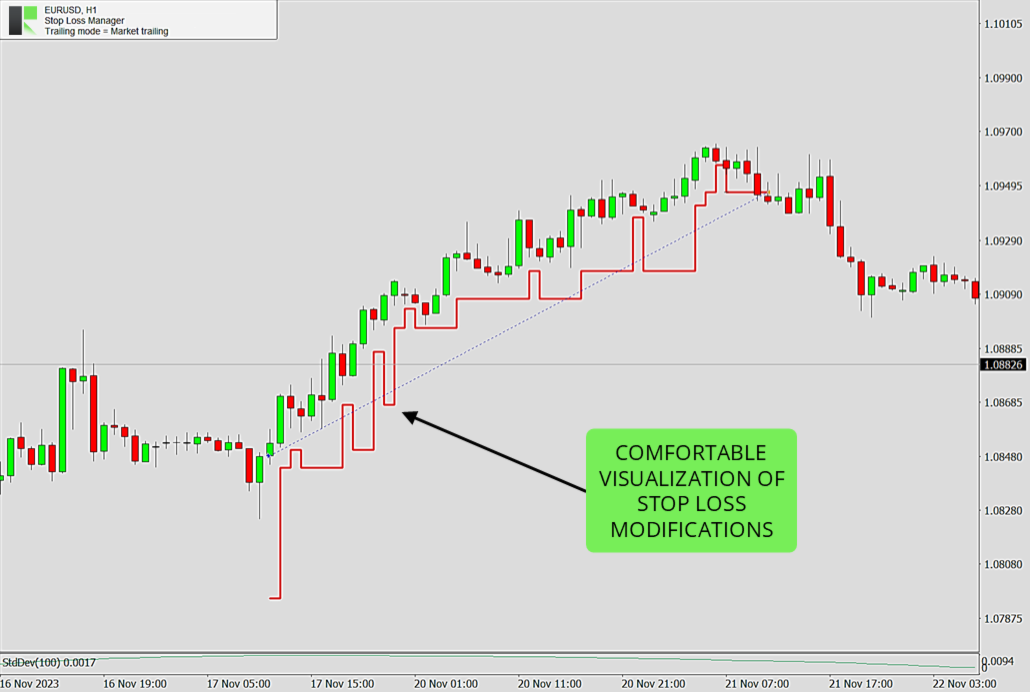
  • Market Trailing: Follows the most recent candlesticks, using the open and close prices of the previous candles together with the spread to decide where the stop loss should sit. It also has a smart setback logic that can give the trade more room again when market conditions allow - this usually happens during phases of market exaggeration, when price has stretched too far in one direction. Two buffer settings, a fixed pip value and a spread-based value, let you fine-tune how much room the trade gets. A good fit for fast-moving day and swing trading.

  • ATR Trailing: Uses the Average True Range indicator to set the stop loss distance based on how volatile the market currently is. You set the ATR period (default 14) and a multiplier (default 4.5). When the market moves more, the stop loss is kept further away; when it is calm, it stays closer. Helpful for protecting profits in volatile markets.

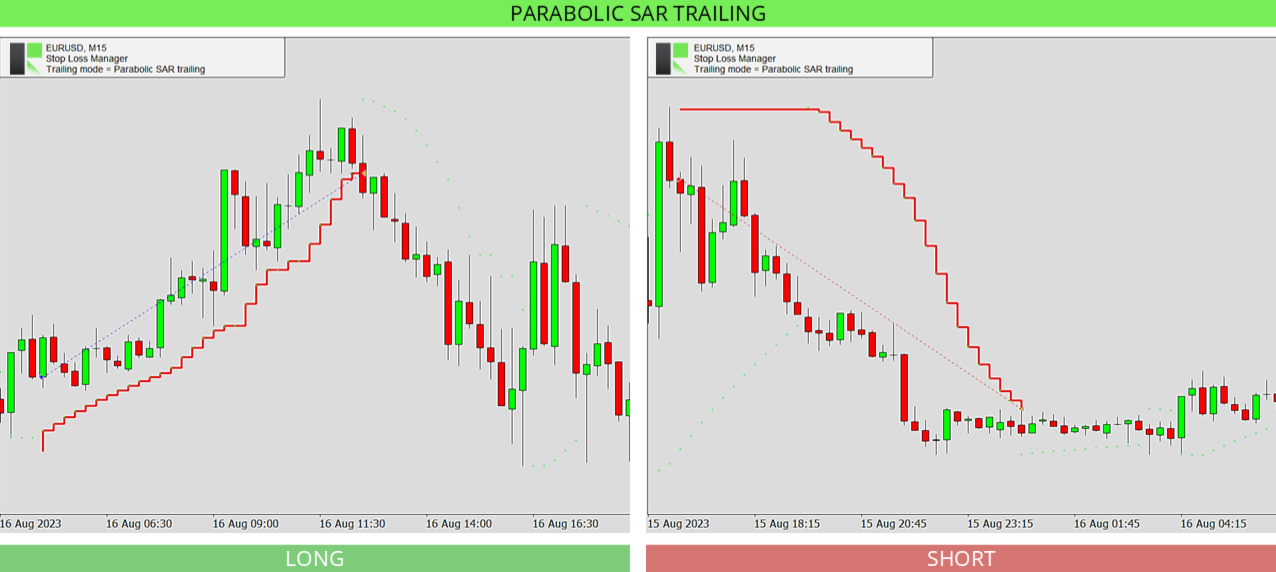
  • Parabolic SAR Trailing: Follows the Parabolic SAR indicator, which places dots above or below price to show the trend direction. You set the step and maximum values, and the stop loss follows these dots as the trend continues. On higher timeframes the dots can sit further from price, so the stop loss may appear to move less often.

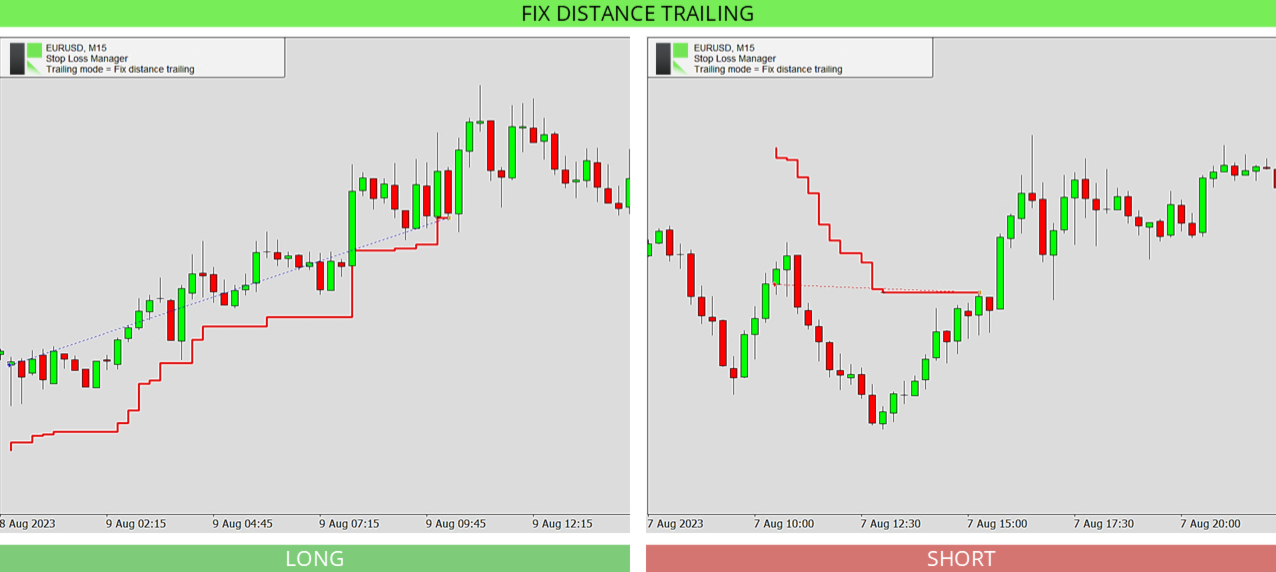
  • Fix Distance Trailing: Keeps the stop loss at a constant distance from the current price. As the price moves in your favor, the stop loss moves with it and locks in profit while staying the same set distance away. The distance can be adjusted directly on the chart.

  • Breakeven Trailing: Moves the stop loss to your entry price once the trade reaches a set level of profit (the breakeven position, default 150), so the trade can no longer turn into a loss. Best used together with a take profit or with manual supervision.

Input Parameters

The settings are simple. You first choose your trailing method, then adjust only the values that belong to that method. The defaults are pre-optimized and ready to use.

  • Stop loss trailing mode: Selects the trailing method to use - Market Trailing, ATR Trailing, Parabolic SAR Trailing, Fix Distance Trailing, or Breakeven Trailing. The settings below only apply to the method you choose.

  • Market buffer fix: For Market Trailing. A fixed buffer in pips that is added to the stop loss to give the trade extra room. Default 14.0.

  • Market buffer spread: For Market Trailing. An extra buffer based on the current spread, so the stop loss adapts to wider or narrower spreads. Default 6.0.

  • ATRS period: For ATR Trailing. The number of candles used to measure volatility with the Average True Range indicator. Default 14.

  • ATRS multiplier: For ATR Trailing. How many times the ATR value is used for the stop loss distance. A higher number keeps the stop loss further away. Default 4.5.

  • PSAR step: For Parabolic SAR Trailing. The step (acceleration) of the Parabolic SAR indicator. A larger step makes the stop loss follow price more closely. Default 0.02.

  • PSAR maximum: For Parabolic SAR Trailing. The maximum acceleration of the Parabolic SAR indicator. Default 0.2.

  • Breakeven position: For Breakeven Trailing. How far the trade must move into profit before the stop loss is moved to your entry price. Default 150.

Frequently Asked Questions

Do I need any setup or experience to use the Stop Loss Manager?

No. It comes with pre-optimized default settings that work well in most market conditions, so you can attach it to a chart and start right away. More experienced traders can fine-tune every value.

Does it work with trades I open manually?

Yes. It automatically detects every trade you open on the current symbol and applies your chosen stop loss method, no matter how the trade was opened.

Which trailing method should I start with?

Market Trailing is a good choice to begin with. It follows the recent candlesticks, and the default settings suit most situations. You can switch to another method at any time.

Can I change the trailing method while a trade is open?

The trailing method is set when the application starts. To use a different method, change the setting and restart the application. This keeps the management of your trades consistent.

Can I use it in the strategy tester?

Yes. The Stop Loss Manager runs in the MetaTrader strategy tester, which is a great way to see how each trailing method works before using it on a live chart. Since you cannot place manual trades in the tester, the application automatically opens test trades in both directions, long and short, every 50 bars, so you can watch your selected method manage them. For the best experience, set the modelling mode to "Every tick" and move the speed slider to the second-fastest level.

What happens if my internet connection drops?

The Stop Loss Manager runs directly inside MetaTrader and keeps working, but a stable connection is recommended so your stop loss changes reach your broker without delay.

Which markets and timeframes are supported?

All of them. The Stop Loss Manager works on every currency pair, symbol, timeframe, and broker.

Need help?

For detailed and personal support, feel free to contact us through our profile or leave a comment here.

More from us

We build a range of trading tools and expert advisors for MetaTrader. Browse all our products here.


Recommended products
EA Performance Monitor A utility for MetaTrader 5 that automatically detects all active Expert Advisors across open charts, maps each EA to its trading data, and displays real-time drawdown, profit, win rate, and open position metrics in a single panel. EA Performance Monitor is an automated tracking utility for MetaTrader 5. It scans all open charts at a configurable interval, identifies each running Expert Advisor by magic number and symbol, and displays their performance data in a structured
FREE
Pro Trader Assistant 1.1 - The Ultimate Trading Companion NB: DOES NOT WORK ON STRATEGY TESTER. FOR TESTING, DM ME   Trade Simple, Smarter, Safer, and More Efficiently Are you ready to transform your trading with institutional-grade risk management? Pro Trader Assistant 1.1  is your complete solution for mastering trading psychology, risk control, and execution efficiency. Built for both prop firm challenges and retail trading. Why Choose Pro Trader Assistant 1.1 Perfect for retail trading
Hisoka Trade Panel — v6.91 Description: Hisoka Trade Panel is a comprehensive on-chart trade management Expert Advisor for MetaTrader 5. It places a draggable, collapsible panel directly on your chart and lets you manage open positions — break-even locks, trailing stops, partial closes, and SL/TP modification — with one click. All risk math is dollar-based, so the same "BE 5$" button locks $5 of profit consistently across XAUUSD, BTCUSD, EURUSD or any other instrument, regardless of contract siz
Classic SNR MetaTrader 5 Expert Advisor | Multi-Symbol Support & Resistance Trading with Trend-Based Logic Overview Classic SNR Breakout EA is a professional trading robot that identifies structural Support & Resistance levels using daily swing points and executes trades based on H1 price action relative to these levels. The EA applies   dual logic : in an uptrend, it sells on H1 rejection below an SNR level; in a downtrend, it buys on H1 rejection above an SNR level. Breakout confirmations are
Только сейчас вы можете приобрести  TradeOps Command Center с 10% скидкой всего за 630$. Акция действует до 01.04.2026 Для получение инструкции об использование утилиты обратитесь в личные сообщения! TradeOps Command Center — Профессиональный инструмент контроля риска и дисциплины в трейдинге TradeOps Command Center — это многофункциональная утилита для MetaTrader 5, разработанная для трейдеров, которые стремятся к системному и дисциплинированному подходу к торговле. Продукт объединяет в себе у
Instructions for Using Reverse Copier EA Attach EA to Charts Open MetaTrader and attach the EA to any chart on both accounts (master & slave). Make sure AutoTrading is enabled. Master Account (Signal Sender) Set Mode = Master in EA settings. This account will send trade signals. Slave Account (Signal Receiver) Set Mode = Slave in EA settings. This account will receive trades in reverse (opposite direction). Lot Multiplier In Slave EA settings, set Multiplier to control lot size. Example: 1.0
TradePilotmt5
Hossein Khalil Alishir
TradePilot Expert Advisor (EA) for MetaTrader 5 TradePilot is a professional and user-friendly Expert Advisor (EA) for MetaTrader 5 (MT5) . It simplifies automated trading , risk management , and trade execution with a smart trading panel . Perfect for beginners and experienced traders looking for a reliable trade manager EA with automated lot size calculation and smart position management. Key Advantages User-Friendly Trading Panel: Customizable panel with buttons and hotkeys for fast ex
ProTrade EA
Jim Ariel Camarce Ignao
Key Features   Automated Candle Pattern Recognition 10 Professional Patterns : Detects Bullish/Bearish Engulfing, Hammer/Shooting Star, Morning/Evening Star, Piercing/Dark Cloud, and 6 additional professional candlestick patterns Smart Filtering : Combine multiple patterns with configurable confirmation logic Volume Confirmation : Optional volume filter to validate pattern strength Multi-Timeframe Analysis : Separate execution and bias timeframes for better timing   Trading Dashboard Int
Multi Account Trade Desk MT5 ## Short description Account-wide MASTER-to-SLAVE trade copier for MetaTrader 5 with per-account risk sizing, automatic broker symbol matching, live readiness monitoring and parallel execution. ## Product description Multi Account Trade Desk MT5 is built for traders who manage several MT5 accounts and want one central place to control risk, account readiness and trade replication. Attach the same EA as MASTER on the source terminal and as SLAVE on every target
Hamster Scalping mt5
Ramil Minniakhmetov
4.71 (242)
Hamster Scalping is a fully automated Expert Advisor. Night scalping strategy. The RSI indicator and an ATR-based filter are used for entries. The advisor needs a hedging account type Be careful i not sell EA or sets at telegram it scam. All settings free here at   blog .  IMPORTANT! Contact me immediately after the purchase to get instructions and a bonus! Real operation monitoring as well as my other products can be found here: https://www.mql5.com/en/users/mechanic/seller General Recommendati
CosmiCLab SMC FIBO CosmiCLab SMC FIBO is a professional trading indicator designed for traders who use Smart Money Concepts (SMC), market structure analysis and Fibonacci retracement levels. The indicator automatically detects market swings and builds Fibonacci levels based on the latest impulse movement. It also identifies market structure changes such as BOS (Break of Structure) and CHOCH (Change of Character), helping traders understand the current market direction. CosmiCLab SMC FIBO also pr
The   Prop Firm Mastery EA   is a cutting-edge low risk expert advisor designed for   multi-symbol   trading with   advanced correlation filters   to increase trade accuracy. Unlike traditional EAs that blindly take trades, this EA ensures   only the strongest Buy and Sell setups   by analyzing   correlation strength   between your chosen trading pairs. This state-of-the-art EA combines pending order execution with a suite of powerful filters to optimize your entry and exit points across up to f
Overview Mirror Signals EA is a powerful monitoring Expert Advisor that automatically sends real-time Telegram notifications for all important trade events on your MetaTrader 5 account. It is engineered specifically for signal providers , trade-copier operators , auditors , educators , and professional trading services that require immediate, detailed, and reliable reporting. Everything from entries, exits, SL/TP changes, comment changes, trailing stop activations, pending order modifications
Trifecta Confluence
Alex Amuyunzu Raymond
Trifecta Confluence Trifecta Confluence — Trade Only When the Market Truly Agrees Most Expert Advisors fire on a single signal — one moving average cross, one oscillator spike, one candle pattern — and get chopped apart the moment the market goes quiet or erratic. Trifecta Confluence was built on a different premise: a trade is only worth taking when three independent, mathematically distinct dimensions of price behavior all point the same direction at the same time. The Three-Engine Core Every
The purpose   of this utility is to manage one or more subwindow in the same chart by opening and closing them through a button or the keyboard keys How it works: If you want to handle more than one subwindow you need to reinstall the indicator . In this case some setups has to be customized onlu in the last subwindow installed and others setups in the installed subwindow during the first time installation. They are denoted in the input rispectively as ' LW ' and ' IW '. First of all install
This PORTFOLIO of 3 strategies has been developed, tested and traded live on DAX H1 timeframe. Multiple EAs traded together will lead to a BIGGER PROFITS and SMOOTHER EQUITY CURVE. 3 not correlated EAs logics for DAX H1 timeframe merged to a single strategy. Very SIMPLE STRATEGIES with only FEW PARAMETERS.  Every trade has his own logic for STOP LOSS. To catch the profits every strategy uses different approach - some has TAKE PROFIT, some uses TIME BASED EXITS or PROFIT TRAILING. EA has been b
This PORTFOLIO of 3 strategies has been developed, tested and traded live on DAX M30 timeframe. Multiple EAs traded together will lead to a BIGGER PROFITS and SMOOTHER EQUITY CURVE. 3 not correlated EAs logics for DAX M30 timeframe merged to a single strategy. Very SIMPLE STRATEGIES with only FEW PARAMETERS.  Every trade has his own logic for STOP LOSS. To catch the profits every strategy uses different approach - some has TAKE PROFIT, some uses TIME BASED EXITS or PROFIT TRAILING. EA has been
Black Volume By ZeeAM Khan a Multi-Engine EA Professional Multi-Timeframe Volume & Breakout Trading System Black Volume Multi-Engine EA is an advanced automated trading system that combines volume analysis, spread analysis, liquidity sweeps, support/resistance breakouts, and multi-basket trade management into one powerful Expert Advisor. The EA continuously scans higher-timeframe candles to identify significant market activity, automatically draws key support and resistance zones, and executes
FREE
To those who have already purchased, the team would like to express our sincere gratitude. Your support motivates the team and encourages us to continue developing and improving the quality of our products. Transform Your Gold Trading! Unleash Exponential & Sustainable Growth with the "Gold Martingale Robot EA" (MT5) Are you tired of constantly watching charts? Stressed out every time high-impact economic news is released? Or perhaps you've made profits only to watch them vanish due to ho
DDKiller Pro
Njaratahiry Michael Randrianiaina
Stop Blowing Your Account. Once and For All. DDKiller Pro is the MT5 risk guardian that runs silently on your chart and shuts down trading the moment you hit a limit — whether you're grinding a prop firm challenge or managing your own CFD account. The problem every trader knows: You set your rules. You break them anyway. One revenge trade. One overleveraged position. One session that erases a month of gains. DDKiller Pro removes that decision from your hands entirely. What it does: The second yo
HMA Scalper Pro EA
Vladimir Shumikhin
5 (2)
HMA Scalper Pro EA — Automated Trading Advisor Based on Hull Moving Average (HMA) for MetaTrader 5 OVERVIEW HMA Scalper Pro EA is a professional trading robot (Expert Advisor) for MetaTrader 5 that trades in the direction of the Hull Moving Average (HMA). The HMA indicator determines the current trend direction, and the EA opens trades in that direction, enhanced by Smart Risk capital management, adaptive grid trading, trailing stop, breakeven, and time filters. The EA supports both Netting a
Adaptive Trade Manager TimeTH Professional Trade Management System for MetaTrader 5 One Expert Advisor. Four Operating Modes. Unlimited Trading Flexibility. Adaptive Trade Manager TimeTH is a professional MetaTrader 5 Expert Advisor designed to combine manual trading, automated execution, advanced trade management, basket protection, and intelligent recovery into one complete trading solution. Unlike traditional Expert Advisors that focus on only one trading style, Adaptive Trade Manager allows
Perfect Trade EA Indicator 2026 for XAUUSD MT5 Премиальный многоуровневый самообучающийся индикатор с режимом автоторговли для XAUUSD Perfect Trade EA Indicator 2026 — это не просто индикатор и не обычный советник с примитивным входом по шаблону. Это премиальный торговый комплекс для MetaTrader 5, созданный для работы с XAUUSD, который объединяет в себе: - многоуровневый анализ рынка; - интеллектуальную фильтрацию сигналов; - режим автоматической торговли; - продвинутое сопровождение сделки;
GU Liquidity Sniper
Wootthipong Chaiyaphum
Apex Reversal — M1 Precision Reversal Scalper Apex Reversal is a precision intraday scalper that trades reversals at Double Top and Double Bottom turning points on the 1-minute chart. Instead of chasing momentum, it waits for price to fail twice at the same level, confirms the rejection candle, and enters with a tight, structure-based stop and a fixed 2:1 reward target. Every trade is filtered by an event-based BOS / CHoCH market-structure engine on a higher timeframe, so the robot only takes re
Gyroscopes mt5
Nadiya Mirosh
5 (2)
Gyroscope        professional forex expert   (for EURUSD, GBPUSD, USDJPY, AUDUSD, USDCHF, EURGBP, EURJPY, NZDUSD, USDCAD, EURCHF, AUDJPY, CADJPY pairs)   alyzing the market using the Elliot Wave Index. Elliott wave theory is the interpretation of processes in financial markets through a system of visual models (waves) on price charts. The author of the theory, Ralph Elliott, identified eight variants of alternating waves (of which five are in the trend and three are against the trend). The mov
Trade Copilot - Semi-Automatic Risk Management Panel for Gold (XAUUSD) and any instrument Trade Copilot is a semi-automatic trading panel built for manual traders who want an EA's discipline without giving up control of their own entries. You decide the direction and the level - the panel handles risk sizing, stop-loss placement, take-profit management, and trade protection automatically. KEY FEATURES - Risk-based lot sizing - choose Risk %, Risk $, or Fixed Lot; the panel calculates positio
Sniper FVG
Ignacio Agustin Mene Franco
Sniper FVG XAU – Professional Trading Expert Sniper FVG is a high-precision trading system developed for trading the Gold (XAUUSD) market on the M1 timeframe. Combining three powerful pillars of modern price action: Price Action Patterns (3 White Soldiers, 3 Black Crows, and filtered Spinning Tops) Fair Value Gaps (FVG) with intelligent detection of unfilled gaps High-quality Supply & Demand Zones The EA identifies high-probability opportunities with a very controlled risk structure, seeking
About the Indicator This indicator is based on Monte carlo simulations on the closing prices of a financial instrument. By definition, Monte carlo is a statistical technique used to model the probability of different outcomes in  a process that involves random numbers based on previously observed outcomes. How does it Work? This indicator generates multiple price scenarios for a security by modelling random price changes over time based on historical data. Each simulation trial uses random vari
Neopips Engine EA
Md Billal Hossain
NeoPips Engine EA – The Ultimate Trading Revolution Has Arrived! “The real power of trading lies in seeing what others miss. NeoPips Engine doesn’t follow the market — it masters it.” About NeoPips Engine EA: Your Intelligent Trading Ally NeoPips Engine EA is not your average trading robot. It’s a multi-dimensional, AI-optimized expert advisor crafted for traders who demand precision, adaptability, and long-term performance. Unlike outdated bots with rigid rules, NeoPips Engine is a livin
EA Risk Inspector is a professional MetaTrader 5 dashboard for reviewing the live risk created by Expert Advisors and open positions. It groups exposure by Magic Number and strategy context, highlights missing protection and presents account-level concentration in a transparent operational view. MAIN FEATURES • Position and EA grouping by Magic Number • Stop Loss validity and uncovered-exposure checks • Strategy-level risk and position summaries • Symbol and directional concentration analysis •
Buyers of this product also purchase
Trading Chaos Expert
Gennadiy Stanilevych
5 (11)
This software has no equals in the world and represents a universal trade "console" covering trading signals, automated market entry, setting of Stop Loss and Take Profit, as well as Trailing Profit for multiple trades at the same time in a single open window. Intuitive control of the Expert Advisor in "three clicks" ensures a comprehensive use of all its functions on different computers, including tablets PCs. Interacting with additional signal indicators that mark the chart to give a real mark
FarmedHedge Pair Trading Dashboard
Tanapisit Tepawarapruek
5 (3)
Farmed Hedge Yield Farming | All Markets (Manual - Hybrid - Semi/Automated EA) VERIFIED TRADING RESULTS - Farmed Hedge Yield Axi Copy:  https://www.mql5.com/en/signals/2356376 - Farmed Hedge Yield Exn Copy:   https://www.mql5.com/en/signals/2356404 - Farmed Hedge Yield V Copy:  https://www.mql5.com/en/signals/2357156 * Before purchasing, please feel free to send me a message if you have any questions about the product or setup. ** After purchase,  Contact me via private message to receive t
Quant AI Agents
Ho Tuan Thang
5 (1)
Quant AI Agents are independent trading Expert Advisors. Instead of trading using a fixed strategy like other conventional EAs, Quant AI Agents   is a   multi-agent AI trading framework   that turns natural-language strategy prompts into live.  WANT THE SAME RESULTS AS MY LIVE SIGNAL?   Use the exact same brokers I do:   IC MARKETS , IC TRADING   .  Unlike the centralized stock market, Forex has no single, unified price feed.  Every broker sources liquidity from different providers, creating un
YuClusters
Yury Kulikov
4.93 (43)
Attention: You can view the program operation in the free version  YuClusters DEMO .  YuClusters is a professional market analysis system. The trader has unique opportunities to analyze the flow of orders, trade volumes, price movements using various charts, profiles, indicators, and graphical objects. YuClusters operates on data based on Time&Sales or ticks information, depending on what is available in the quotes of a financial instrument. YuClusters allows you to build graphs by combining da
AI Agents Supervisor
Ho Tuan Thang
5 (1)
AI Agent Supervisor is NOT an Expert Advisor. AI Agent Supervisor   is a   multi-agent AI risk & portfolio supervisor   that watches every EA on your account and intervenes in real time.  WANT AN AI PORTFOLIO MANAGER WATCHING YOUR FLEET 24/7?   Run your fleet on the same brokers I do:   IC MARKETS , IC TRADING   .  Unlike the centralized stock market, Forex has no single, unified price feed.  Every broker sources liquidity from different providers, creating unique data streams. The Supervisor r
Check EA performance  https://www.mql5.com/en/signals/2376164?source=Site +Profile+Seller Spot vs Future Arbitrage EA for MT5 Spot vs Future Arbitrage EA is an automated Expert Advisor designed for MetaTrader 5 that operates using price differences between Gold spot and Gold futures instruments. The strategy opens positions on both instruments simultaneously to take advantage of temporary differences between spot and futures prices. Requirements The trading account must provide both Gold spot
Adam FTMO MT5
Vyacheslav Izvarin
5 (2)
ADAM EA Special Version for FTMO Please use ShowInfo= false for backtesting ! Our 1st EA created using ChatGPT technology Trade only GOOD and checked PROP FIRMS  Default parameters for Challenge $100,000 Tested on EURUSD and GBPUSD only  Use 15MIN Time Frame Close all deals and Auto-trading  before Weekend at 12:00 GMT+3  Friday For Prop Firms MUST use special Protector  https://www.mql5.com/en/market/product/94362 --------------------------------------------------------------------------------
Mt5 To InterativeBrokers Copier allows you to copy deals from MT5 account to Interactive Brokers. With this, you can run your EA strategy on a MT5 Demo/Real Account, then copy all the deals to Interactive Brokers account real time. Features: 1. Copy or Invert-Copy deals Realtime from MT5 to IB Account. 2. Synchronizing positions of both accounts periodicaly, in case any missing copying. 3. You can choose only Buy position or Sell position. Symbols Setup: General Format:  {MT Symbol} -> {IB S
Features   With MT5 to Interactive Brokers(IB) Trader, you can: 1. Load chart data from IB to MT5, and Analyze with all standard or customer Indicators. 2. Place Orders to IB Account Directly in MT5. 3. Make your Own EAs upon IB Securities by only making minus changes of the trading function. Usage 1) Installation Copy the "Mt5ToIBTraderEn.ex4" and sample files to [MT5 Data Folder]->MQL5->Experts.  2)  MT5 Settings Add the IP Address to the MT5 Allowed URLs in 'Tools->Options->Expert Adviso
HINN Lazy Trader
ALGOFLOW OÜ
5 (1)
The core idea: using the user interface, you configure the parameters the chart must meet before entering a position (or positions), choose which entry models to use, and set the rules for when trading and planning should end. Lazy Trader  handles the rest: it  takes over all the routine chart watching and execution! full description  :: 3 key videos [1] ->  [2]   ->  [3] What can it do? - Understands Larry Williams market structure - Understands swing market structure by Michael Huddleston
Latency Arbitrage
Heri Yusufu Kaniugu
Latency Arbitrage – Ultra Fast Execution & Price Inefficiency Capture Latency Arbitrage  utility tool is designed to exploit short-term price inefficiencies between fast and slow price feeds. Instead of predicting market direction, the EA focuses on execution speed and price deviation opportunities, allowing traders to capture micro-movements before the market fully adjusts. With built-in risk controls and smart filtering, it ensures precise and disciplined trading performance. Price increases b
Unlimited Trade Copier Pro MT5 is a tool to copy trade remotely to multiple MT4, MT5 and cTrader accounts at different computers/locations over internet. This is an ideal solution for you if you are a signal provider and want to copy your trades to other receivers globally on your own rules. One provider can copy trades to multiple receivers and one receiver can get trade from multiple providers as well. The provider can even set the subscription expiry for each receiver, so that receiver will n
# If you have any other requirements or are interested in collaboration, please contact  dev.quantech.london@gmail.com . Flash Trade (FT) Most friendly manual trading tool. Easy operation to secure your funds. Features of FT Click the chart to trade fast FT supports market orders and pending orders Click twice to complete the order and set SL and TP Click trice to complete the pending order and set SL and TP Automatically set the stop-loss amount of each order to a fixed percentage of the bala
MT5 Trading Deck
Manuel Michiels
5 (2)
One button. One trade. MT5 Trading Deck is a hotkey trading panel for MetaTrader 5 that turns the platform into a keyboard-driven execution cockpit. Stop loss, take profit and lot size are pre-calculated for every key; the moment you press, a market order is live on the broker. A complete technical user manual is attached in the product Comments section. It documents every input parameter, the full hotkey map, the recommended Stream Deck XL layout, and the advanced workflows for Pre-Limit orders
Gamma Edge Pro MT5
Xuan Nam Diep
1 (1)
Gamma Edge Pro MT5 — GexBot Classic API Integration Gamma Edge Pro   brings institutional-grade   Gamma Exposure (GEX) data   directly onto your MetaTrader 5 chart — the same data used by professional options traders to anticipate price magnets, hedging flows, and dealer positioning. Powered by the   GexBot Classic API , this indicator automatically maps options market data from US-listed instruments onto any   MT5 CFD instrument   — Forex pairs, Gold, indices, and more — with intelligent price
QCML Assistant
Maxime Turcotte-lafreniere
QCML Assistant MT5 Your Trading. Our Assistant. Your Edge. Looking for a tool that completely transforms your experience on MetaTrader 5? QCML Assistant is the all-in-one solution built by traders, for traders. Just one tool installed on your chart, and you get access to an ultra-complete, ultra-fast, and ultra-simple trading platform. No more hours wasted setting up your workspace. No more complicated trade entries. With QCML Assistant, everything becomes simple, smooth, and efficient right fro
Hedge Trimmer EA
Michael Sipho Bhiya
Hedge Trimmer & Roll-Over EA Managing a hedged position means carrying two opposing trades simultaneously. Over time, the losing side grows while the profitable side offsets it. The standard problem is that closing the loser costs money you may not have sitting in cash — it has to come from somewhere. Hedge Trimmer EA solves this by using the floating profit on your winning trades as the funding source to progressively close down the losing side. It identifies which trades are in profit, uses a
News Trader Pro is a unique robot that allows you to trade the news by your predefined strategy. It loads every piece of news from several popular Forex websites. You can choose any news and preset the strategy to trade it, and then News Trader Pro will trade that news by selected strategy automatically when the news comes. News release gives opportunity to have pips since the price usually has big move at that time. Now, with this tool, trading news becomes easier, more flexible and more exciti
Elliott Wave Counter is a panel for rapid and user-friendly manual markup of Elliott waves. One can select a color and a level of marks. There are also functions for removing the last markup and the entire markup made by the tool. Markup is made in one click. Click five times - have five waves! Elliott Wave Counter will be a great instrument both for beginners and professional analysts of Elliott waves. Elliott Wave Counter Installation & Inputs Guide if you want to get   notifications  about t
If you wish to draw Support and Resistance lines, view: daily market opening, classical pivot levels, Fibonacci pivot levels, trend lines, Fibonacci levels, the remaining time to candle closing, and current spread. If you seek to place your orders with the exact lot that meets your desired stop loss risk. If you wish to do all this and more with just one click, then this is the perfect tool to use. This tool will allow you to feel more relaxed when deciding to open orders, as well as predicting
如果产品有任何问题或者您需要在此产品上添加功能,请联系我 Contact/message me if you encounter any issue using the product or need extra feature to add on the base version. There is Demo version of this panel Dashboard Babon Scalping System MT5 Demo in my product list, please try it out to get familiar with all functionalities for free. Free version: LINK MT4 version: LINK This system basically utilizes TDI, Heiken Ashi Trend, Price Trend on H1 time-frame and TMA on H1&H4 time-frame to generate the trend (big picture). Then
The new version of  MirrorSoftware 2021  has been completely rewriten and optimized.  This version requires to be loaded only on a single chart because  it can detect all actions on every symbol and not only the actions of symbol where it is loaded. Even the  graphics and the configuration mode  have been completely redesigned. The MirrorSoftware is composed of two components (all components are required to work):  MirrorController  (free indicator): This component must be loaded into the MASTER
ClusterSecond
Rafil Nurmukhametov
4.78 (32)
The utility allows you to build different types of graphs: Seconds chart from 1 second to 86400 seconds Tick chart from 1 tick and above The volume chart Delta chart Renko chart Range chart Demo version of the utility https://www.mql5.com/ru/channels/clustersecond Built-in indicators for volumetric analysis: daily market profile and market profile of the selected timeframe, Cluster Search Imbalance VWAP Dynamic POC, VAH, VAL the profile depth of the market vertical volume with various display op
Corporate Report MT5
Pavel Verveyko
5 (1)
The script displays info about the share's corporate reports and dividends. The data is downloaded from   investing.com : Report date Profit per share (EPS) Revenue Market capitalization Amount of dividends Date of payment of dividends Dividend income The product cannot be tested in the tester (since it is not possible to receive data from the Internet). Before launching:  Add 2   URL   https://ru.investing.com/earnings-calendar/Service/getCalendarFilteredData  and   https://ru.investing.com/di
Telegram Publisher Agent  is an add-on that allows traders to send signals to their Telegram channels and groups in real-time. With customizable messages, chart screenshots, and other features, the tool helps traders share their trading insights and strategies with their followers. The tool also features a beautiful design with light and dark theme switch, providing users with an aesthetic and functional trading experience. Telegram Publisher Agent was designed to Publish all your trades as sig
Telegram Notify MT5 Telegram Notify MT5 is an utility tool to bridge your MetaTrader 5 activities to your Telegram chat/channel. It is useful for monitoring your MetaTrader 5 account by sending a notification to your particular Telegram chat/channel when someone/EA is placing trades, modifying order's TP/SL, closing trades and etc. This EA does not place any trade for your account. This EA also could be a convenient tool for monitoring other's EA trading activities or a tool for publishing your
Telegram ChartSnap MT5 is an utility tool to bridge your MetaTrader 5 activities to your Telegram chat/group/channel. It will screen shot your MetaTrader 5 chart and send it to your dedicated Telegram chat/group/channel through a Telegram bot. The whole process will keep repeating based on a time cycle that predetermined by the user. It is a convenient tool for those who like to get access to their favorite system/dashboard that only available at MetaTrader Desktop. Beside that, trader can easi
Easy Strategy Builder 5
Gheis Mohammadi
5 (4)
The  Easy Strategy Builder (ESB)  is a " Do It Yourself " solution that allows you to create a wide range of the automated trading strategies without any line of codes. This is the world’s easiest method to automate your strategies that can be used in STP, ECN and FIFO brokers. No drag and drop is needed. Just by set conditions of your trading strategy and change settings on desired values and let it work in your account. ESB has hundreds of modules to define unlimited possibilities of strategi
Quick operation, quick purchase, sale, empty operation. Provide three buttons: Buy, Sell, empty. Buy: Quickly place more orders after clicking, default 1 hand, profit point and stop-loss point are 110 points, after successful order can be manually modified. Sell: Quickly place an empty order after clicking, default 1 hand, profit point and stop-loss point are 110 points, can be manually modified after the order is successful. Empty: Quickly clear all orders, including purchase and s
GoDom Depth of Market EA
Fabio Oliveira Magalhaes
Go Depth of Market   This product helps to watch the order book in a easily and friendly way, helping traders to take decisions that are more consistent with the timing of the market. Parameters: Activating EA (robot) mode   if you leave true it will become a robot, if you leave false it will become an indicator. Initial volume  VolumeDynamic   if you leave it enabled will be automatic batch Proportion:   Example: If you put 500 every 500 $ it will open a lot of 1.0 Takeprofit Stoploss Daily pr
More from author
Price Alert - Professional Price Notification System Additional materials and instructions Complete manual   -   MT4 version   -   MT5 version Never miss an important price level again. Price Alert is a professional price notification tool for MetaTrader, taken from the Meta Extender suite. Set unlimited custom alerts and get notified instantly by chart pop-up, email, and mobile push the moment price reaches your level, so you can step away from the screen with confidence. What It Offers:   Cr
FREE
Second Timeframe - Professional Multi-Timeframe Analysis Additional materials and instructions Complete manual   -   MT4 version   -   MT5 version See the bigger picture and your entry on one chart. Second Timeframe is a multi-timeframe analysis tool for MetaTrader, taken from the Meta Extender suite. It overlays a higher timeframe directly on your active chart, so you can follow the bigger trend and time precise entries at the same time, without ever switching windows. What It Offers:   View
FREE
Chart Analyzer - Advanced Market Structure Analysis Additional materials and instructions Complete manual   -   MT4 version   -   MT5 version See the market's structure instantly, without drawing a single line. Chart Analyzer is a powerful real-time market analysis tool for MetaTrader, taken from the Meta Extender suite. It reads the chart for you and reveals the support and resistance levels, swing phases, and trend structure that matter, so you always know where price really stands. What It
FREE
Chart Analyzer - Advanced Market Structure Analysis Additional materials and instructions Complete manual   -   MT4 version   -   MT5 version See the market's structure instantly, without drawing a single line. Chart Analyzer is a powerful real-time market analysis tool for MetaTrader, taken from the Meta Extender suite. It reads the chart for you and reveals the support and resistance levels, swing phases, and trend structure that matter, so you always know where price really stands. What It
FREE
Stop Loss Manager - Precision Risk Management Additional materials and instructions Complete manual   -   MT4 version   -   MT5 version Never let a winning trade turn into a loss again. Try it free: a 14-day evaluation version is available on our   website . The Stop Loss Manager is professional, automatic risk management for MetaTrader. The moment you open a trade, it applies an intelligent stop loss and trails it for you using five proven methods. Minimize risk, stay in full control, and loc
FREE
Second Timeframe - Professional Multi-Timeframe Analysis Additional materials and instructions Complete manual   -   MT4 version   -   MT5 version See the bigger picture and your entry on one chart. Second Timeframe is a multi-timeframe analysis tool for MetaTrader, taken from the Meta Extender suite. It overlays a higher timeframe directly on your active chart, so you can follow the bigger trend and time precise entries at the same time, without ever switching windows. What It Offers:   View
FREE
Price Alert - Professional Price Notification System Additional materials and instructions Complete manual   -   MT4 version   -   MT5 version Never miss an important price level again. Price Alert is a professional price notification tool for MetaTrader, taken from the Meta Extender suite. Set unlimited custom alerts and get notified instantly by chart pop-up, email, and mobile push the moment price reaches your level, so you can step away from the screen with confidence. What It Offers:   Cr
FREE
Closing Assistant - One-Click Multi-Trade Management Additional materials and instructions Complete manual   -   MT4 version   -   MT5 version Close any group of trades in a single click, exactly when it counts. Closing Assistant is a fast, one-click trade management tool for MetaTrader, taken from the Meta Extender suite. When the market moves and every second matters, exit trades instantly by direction or by performance, with no hunting through long trade lists. What It Offers:   Close multi
FREE
Inspector - Real-Time Performance and Drawdown Monitoring Additional materials and instructions Complete manual   -   MT4 version   -   MT5 version Know exactly how you are trading, in real time. Inspector is a real-time performance and drawdown monitor for MetaTrader, taken from the Meta Extender suite. It tracks your results across every time period as they happen. What It Offers:   Continuous real-time calculation and monitoring of your trading performance, drawdown, and key statistics acro
FREE
Stop Loss Manager - Precision Risk Management Additional materials and instructions Complete manual   -   MT4 version   -   MT5 version Never let a winning trade turn into a loss again. Try it free: a 14-day evaluation version is available on our   website . The Stop Loss Manager is professional, automatic risk management for MetaTrader. The moment you open a trade, it applies an intelligent stop loss and trails it for you using five proven methods. Minimize risk, stay in full control, and loc
FREE
MT5 Tick Data - Real Historical Tick Data Additional materials and instructions Complete manual   -   MT4 version   -   MT5 version Looking for real tick data to validate and backtest your expert advisors and indicators? You have found it! Our MT5 Tick Data package, available on our website, gives you genuine historical tick data for MetaTrader 5, so your strategy tests run on real market conditions and real, variable spreads instead of estimated prices. Download the tick data from the tick d
FREE
Inspector - Real-Time Performance and Drawdown Monitoring Additional materials and instructions Complete manual   -   MT4 version   -   MT5 version Know exactly how you are trading, in real time. Inspector is a real-time performance and drawdown monitor for MetaTrader, taken from the Meta Extender suite. It tracks your results across every time period as they happen. What It Offers:   Continuous real-time calculation and monitoring of your trading performance, drawdown, and key statistics acro
FREE
Closing Assistant - One-Click Multi-Trade Management Additional materials and instructions Complete manual   -   MT4 version   -   MT5 version Close any group of trades in a single click, exactly when it counts. Closing Assistant is a fast, one-click trade management tool for MetaTrader, taken from the Meta Extender suite. When the market moves and every second matters, exit trades instantly by direction or by performance, with no hunting through long trade lists. What It Offers:   Close multi
FREE
MT5 Tick Data - Real Historical Tick Data Additional materials and instructions Complete manual   -   MT4 version   -   MT5 version Looking for real tick data to validate and backtest your expert advisors and indicators? You have found it! Our MT5 Tick Data package, available on our website, gives you genuine historical tick data for MetaTrader 5, so your strategy tests run on real market conditions and real, variable spreads instead of estimated prices. Download the tick data from the tick d
FREE
Signova Premium - Automated 19-Symbol Forex Swing Trading Additional materials and instructions Complete manual   -   MT4 version   -   MT5 version Built on a strategy from the German trading department of a large investment bank, now adapted for retail traders. Low risk by design: at the default risk level, the average trade risk is about 0.75% of your account. Try it free: a 60-day evaluation version is available on our   website . Signova Premium is an automated forex trading robot for Meta
MT5 Tick Data - Real Historical Tick Data Additional materials and instructions Complete manual   -   MT4 version   -   MT5 version Looking for real tick data to validate and backtest your expert advisors and indicators? You have found it! Our MT5 Tick Data package, available on our website, gives you genuine historical tick data for MetaTrader 5, so your strategy tests run on real market conditions and real, variable spreads instead of estimated prices. Download the tick data from the tick d
Expert Advisor Builder - Create Automated Trading Strategies Without Coding Additional materials and instructions Complete manual   -   MT4 version   -   MT5 version Turn your trading idea into a working strategy, without writing a single line of code. Try it free: a 14-day evaluation version is available on our   website . The Expert Advisor Builder lets anyone create fully automated trading strategies for MetaTrader, with no programming at all. You design your strategy visually in an easy-to
Meta Extender - See More, Trade Better. Over 20 Professional Trading Widgets Additional materials and instructions Complete manual   -   MT4 version   -   MT5 version See More, Trade Better. One toolkit that upgrades your entire MetaTrader. Try it free: a 14-day evaluation version is available on our   website . The Meta Extender is an all-in-one in-chart application that adds more than 20 professional trading widgets directly to your MetaTrader charts. Get smart position sizing, one-click ris
Stop Loss Manager - Precision Risk Management Additional materials and instructions Complete manual   -   MT4 version   -   MT5 version Never let a winning trade turn into a loss again. Try it free: a 14-day evaluation version is available on our   website . The Stop Loss Manager is professional, automatic risk management for MetaTrader. The moment you open a trade, it applies an intelligent stop loss and trails it for you using five proven methods. Minimize risk, stay in full control, and loc
Meta Extender - See More, Trade Better. Over 20 Professional Trading Widgets Additional materials and instructions Complete manual   -   MT4 version   -   MT5 version See More, Trade Better. One toolkit that upgrades your entire MetaTrader. Try it free: a 14-day evaluation version is available on our   website . The Meta Extender is an all-in-one in-chart application that adds more than 20 professional trading widgets directly to your MetaTrader charts. Get smart position sizing, one-click ris
Signova Premium - Automated 19-Symbol Forex Swing Trading Additional materials and instructions Complete manual   -   MT4 version   -   MT5 version Built on a strategy from the German trading department of a large investment bank, now adapted for retail traders. Low risk by design: at the default risk level, the average trade risk is about 0.75% of your account. Try it free: a 60-day evaluation version is available on our   website . Signova Premium is an automated forex trading robot for Meta
Expert Advisor Builder - Create Automated Trading Strategies Without Coding Additional materials and instructions Complete manual   -   MT4 version   -   MT5 version Turn your trading idea into a working strategy, without writing a single line of code. Try it free: a 14-day evaluation version is available on our   website . The Expert Advisor Builder lets anyone create fully automated trading strategies for MetaTrader, with no programming at all. You design your strategy visually in an easy-to
MT5 Tick Data - Real Historical Tick Data Additional materials and instructions Complete manual   -   MT4 version   -   MT5 version Looking for real tick data to validate and backtest your expert advisors and indicators? You have found it! Our MT5 Tick Data package, available on our website, gives you genuine historical tick data for MetaTrader 5, so your strategy tests run on real market conditions and real, variable spreads instead of estimated prices. Download the tick data from the tick d
Filter:
No reviews
Reply to review