TradeCalc Pro MT4
- Utilities
- Version: 1.16
- Updated: 3 July 2026
- Activations: 20

TradeCalc Pro MT4 — trading calculators for MetaTrader 4 with interactive chart lines. Calculate position size, margin, pip value, swap, and profit by dragging Entry/TP/SL lines for visual trade planning.
Detailed article with screenshots: TradeCalc Pro — Complete Guide
Replaces 6 separate tools and instantly calculates risk directly on the chart. This utility is designed exclusively for analytical calculations and modeling — it does not execute trades or open real orders. The trading symbol and its contract specifications (such as minimum and maximum volume limits) are automatically determined from the current chart. The tool is fully universal: it works with all asset types (Forex, CFD, crypto, indices), supports hedging and netting accounts, and all parameters are saved and restored automatically.
Calculators
TradeCalc Pro MT4 includes six calculators accessible via navigation tabs:
- TRADE — instant position size calculation in Auto Lot Size Mode or manually. Simply specify Stop Loss and Take Profit in pips — and immediately see R:R ratio, risk Risk Money / At Risk, potential profit Reward, collateral Required Margin, and minimum percentage of profitable trades for break-even Breakeven Win Rate. Interactive Entry/TP/SL lines allow you to visually plan trades directly on the chart.
- ACCOUNT — real-time account status monitor. Displays current Balance, Equity, Margin Used, Free Margin, Margin Level, deposit load Margin Load, and Margin Call / Stop Out thresholds. Simulation mode SIMULATE allows modeling different scenarios using sliders.
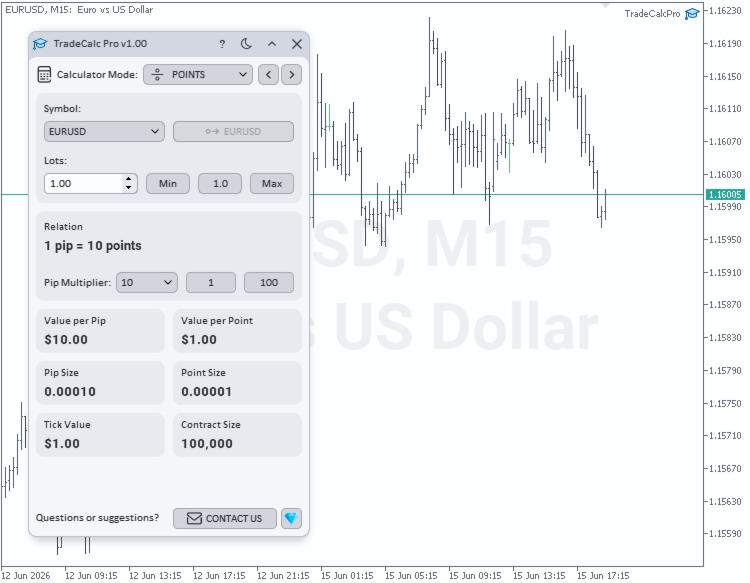
- POINTS — calculation of Value per Pip, Value per Point, and Tick Value for a specified volume with a configurable Pip Multiplier (1, 10, 100, 1000, 10000, 100000). Displays Pip Size, Point Size, and their ratio Relation. The multiplier is automatically applied in TRADE calculations.
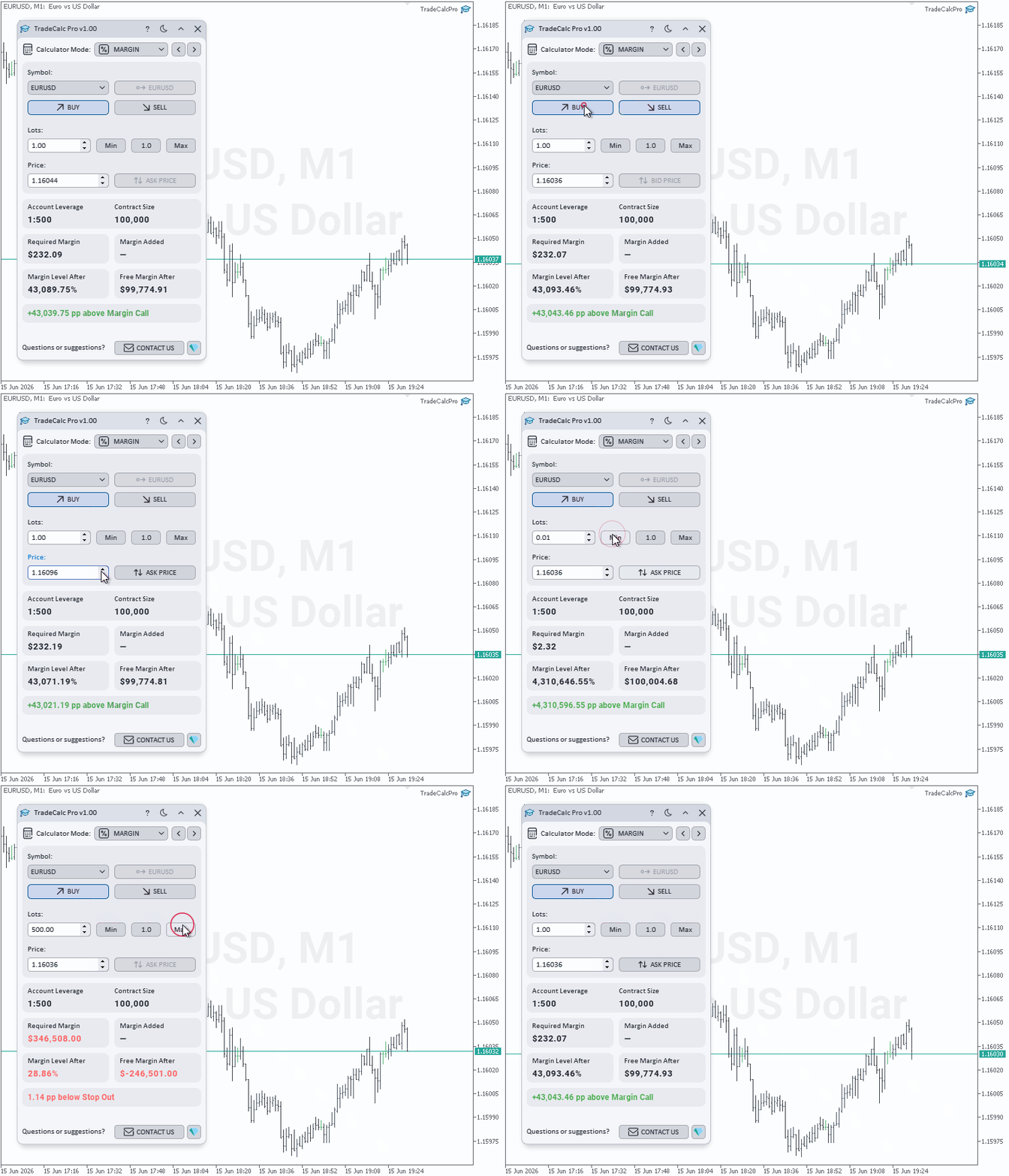
- MARGIN — margin requirements calculator for planned trades with leverage Account Leverage. Select Side (Buy / Sell), enter volume Lots and calculation price Price (with instant reset via Ask/Bid buttons) — the utility will instantly show isolated margin Required Margin, actually added margin to the portfolio Margin Added, projected free margin Free Margin After, projected margin level Margin Level After, and the exact account safety margin Distance to Margin Call / Stop Out.
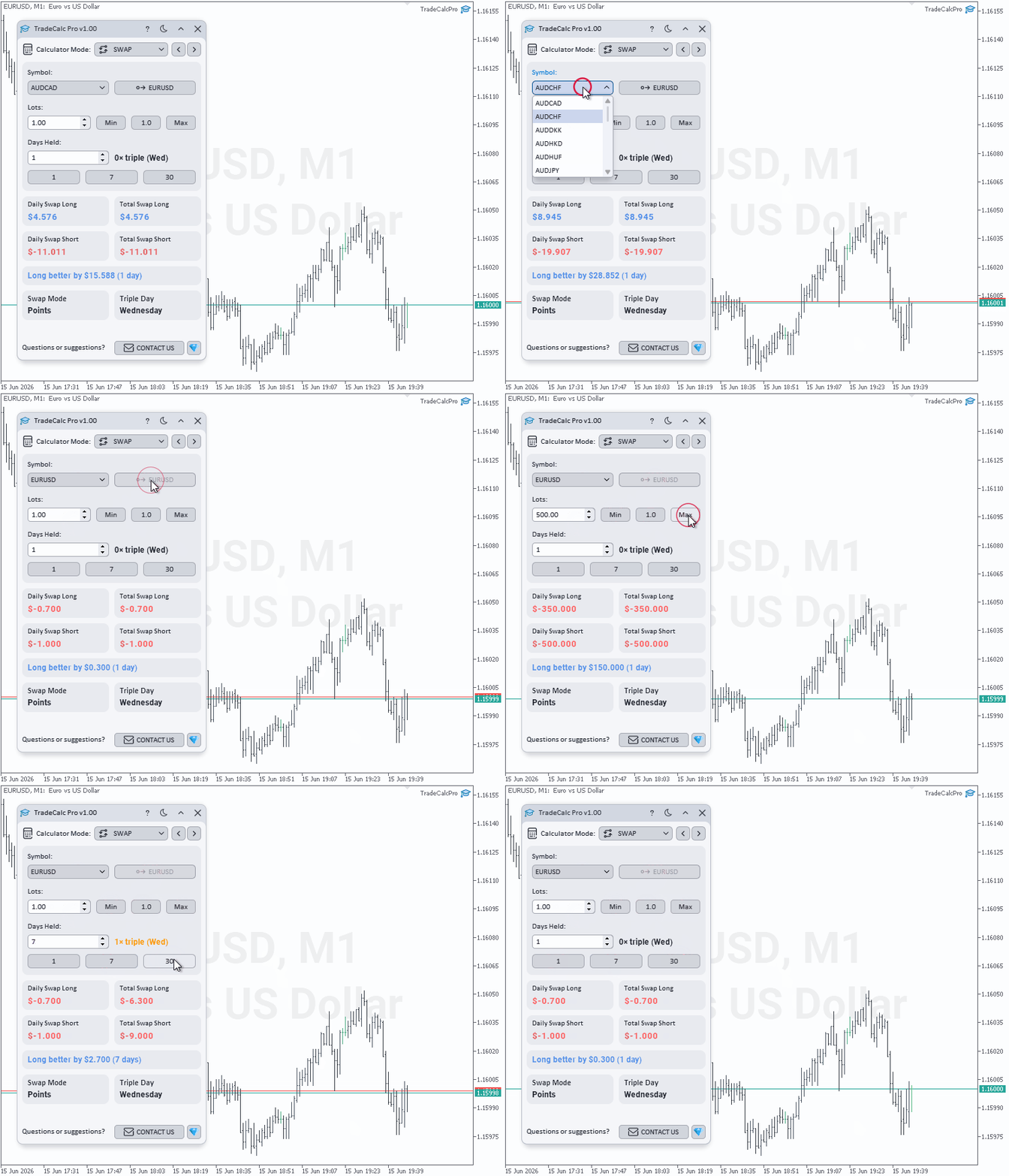
- SWAP — forecasting swap expenses for a planned holding period Days Held (with quick selection via 1 Day / 7 Days / 30 Days buttons). Shows daily and cumulative swap Total Swap Long / Total Swap Short, automatically determines the best direction Better Swap Side with the exact difference, and displays the broker's Swap Mode and triple swap day Triple Day.
- PROFIT — calculation of potential result from opening price Open Price to Close Price / Profit in Points with automatic swap accounting for the holding period Days Held (with quick selection via 1 Day / 7 Days / 30 Days buttons). Select Buy / Sell direction, enter prices or use Use Profit in Points mode. The calculator will output trading profit Trade Profit, total swap Swap, and net financial result Net Profit.
Features
- Six professional calculators in one compact interface
- Visual planning of order parameters with interactive draggable Entry/TP/SL lines on the chart
- Real-time margin monitor displaying Margin Level and Margin Load
- Point, pip, and tick value calculator with customizable Pip Multiplier (Value per Pip, Value per Point, Tick Value)
- Margin calculator for modeling planned trades with safety margin calculation (Distance to Margin Call / Stop Out)
- Swap calculator for expenses over a planned holding period Days Held
- Profit/loss calculator taking swap into account with net result calculation (Net Profit)
- Position size calculation with multiple modes in Auto Lot Size Mode
- Stop Loss and Take Profit in pips with risk/reward ratio calculation (R:R)
- Risk Risk Money / At Risk, profit Reward in account currency, and Breakeven Win Rate
- Automatic synchronization of symbol Symbol and volume Lots
- Synchronization of the Pip Multiplier between the POINTS and TRADE calculators
- Broker commission accounting in Commission Mode for precise position size calculation
- Dark and Light themes — switch color scheme with one click
- High-quality graphics with smooth rounded forms of interface elements
- Crisp and adaptive display on screens with any resolution and high DPI
- Automatic saving and restoring of all utility settings between launches
I would greatly appreciate a positive review if you like the product. If something is not working for you — send me a private message and we will find a solution. Suggestions for new features are welcome — your ideas help improve and develop the product.
Contacts
- All my products: https://www.mql5.com/en/users/tol64/seller
- Contact me: https://www.mql5.com/en/users/tol64