TradeCalc Pro MT4

TradeCalc Pro MT4 — MetaTrader 4 için etkileşimli grafik çizgilerine sahip işlem hesaplayıcıları. Entry/TP/SL çizgilerini sürükleyerek görsel olarak işlem planlayın ve pozisyon boyutu, teminat, pip değeri, swap ve kârı gerçek zamanlı olarak hesaplayın.

Ekran görüntüleri ile ayrıntılı makale: TradeCalc Pro — Tam Kılavuz

6 ayrı aracı tek bir araya getirir ve riski grafik üzerinde anında hesaplar. Bu araç yalnızca analitik hesaplamalar ve modelleme için tasarlanmıştır — gerçek işlem yapmaz veya gerçek emir açmaz. İşlem sembolü ve sözleşme özellikleri (minimum ve maksimum hacim sınırları gibi) aktif grafikten otomatik olarak belirlenir. Araç tamamen evrenseldir: tüm varlık türleriyle (Forex, CFD, kripto, endeksler) çalışır, hedging ve netting hesapları destekler ve tüm parametreler otomatik olarak kaydedilir ve geri yüklenir.

Hesaplayıcılar

TradeCalc Pro MT4, gezinme sekmeleri üzerinden erişilebilen 6 profesyonel hesaplayıcı içerir:

  • TRADE — otomatik lot boyutu modu Auto Lot Size Mode modunda veya manuel olarak pozisyon boyutunun anında hesaplanması. Stop Loss ve Take Profit değerlerini pip cinsinden belirtmeniz yeterlidir — risk/ödül oranı R:R, hesap para birimindeki risk tutarı Risk Money / At Risk, potansiyel kâr Reward, gerekli teminat Required Margin ve başaba başmak için gereken minimum kazanma oranı Breakeven Win Rate değerlerini anında görürsünüz. Grafik üzerindeki Entry/TP/SL etkileşimli çizgilerini kullanarak işlemleri görsel olarak planlayabilirsiniz.
  • ACCOUNT — gerçek zamanlı hesap durumu izleyicisi. Mevcut bakiye Balance, özsermaye Equity, kullanılan teminat Margin Used, kullanılabilir teminat Free Margin, teminat seviyesi Margin Level, teminat yükü Margin Load (iki renkli yığılmış diyagram şeklinde) ve aracı eşiği Margin Call / Stop Out gösterir. Simülasyon modu SIMULATE ile kaydırıcıları kullanarak güvenli bir şekilde çeşitli sermaye/özsermaye senaryolarını modelleyebilirsiniz.
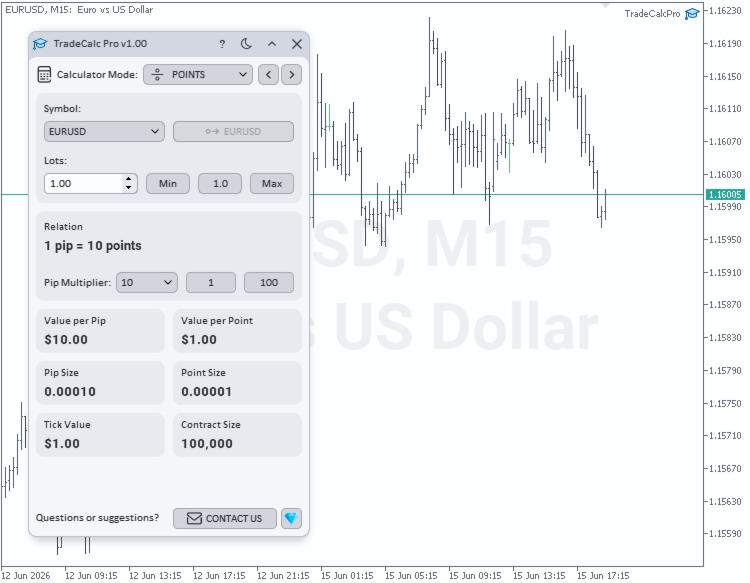
  • POINTS — belirtilen hacim için pip değeri Value per Pip, nokta değeri Value per Point ve tik değeri Tick Value hesaplaması. Yapılandırılabilir pip çarpanı Pip Multiplier (1, 10, 100, 1000, 10000, 100000) ile esnek ayarlanabilir. Pip boyutu Pip Size, standart nokta boyutu Point Size ve bunların arasındaki matematiksel ilişki Relation gösterilir. Bu çarpan TRADE hesaplamalarına otomatik olarak uygulanır.
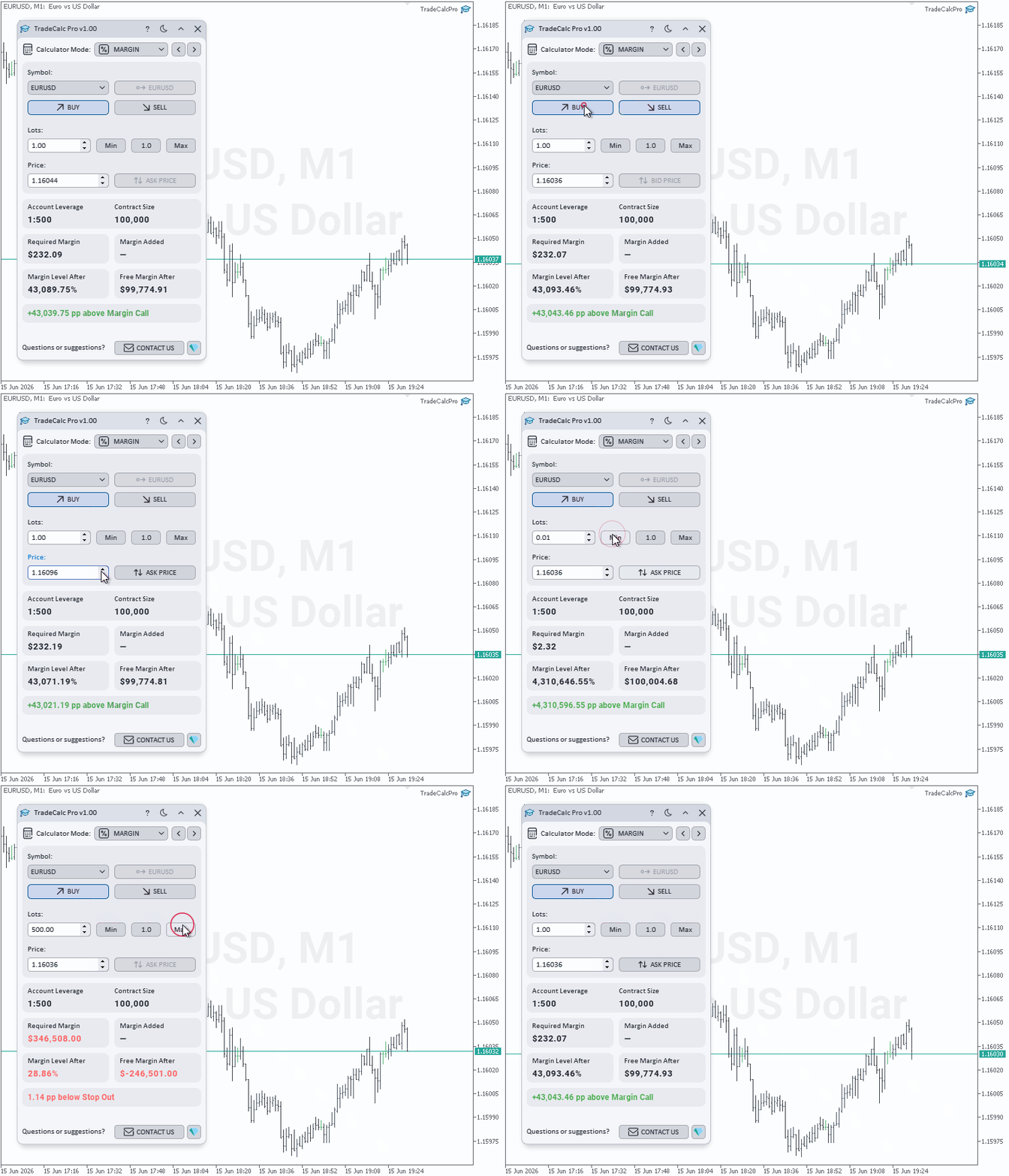
  • MARGIN — hesap kaldıracı Account Leverage dikkate alınarak planlanan işlemler için teminat hesaplayıcısı. Yön Side (Buy / Sell), hacim Lots ve hesaplama fiyatı Price girin (güncel fiyatı anında yansıtan Ask/Bid düğmeleri ile) — araç anında izole teminat Required Margin, portföye fiilen eklenen teminat Margin Added, tahmini kullanılabilir teminat Free Margin After, tahmini teminat seviyesi Margin Level After ve Distance to Margin Call / Stop Out kadar olan tam güvenlik sınırını hesaplar. Hedging (kilitleme) hesaplamalarını destekler.
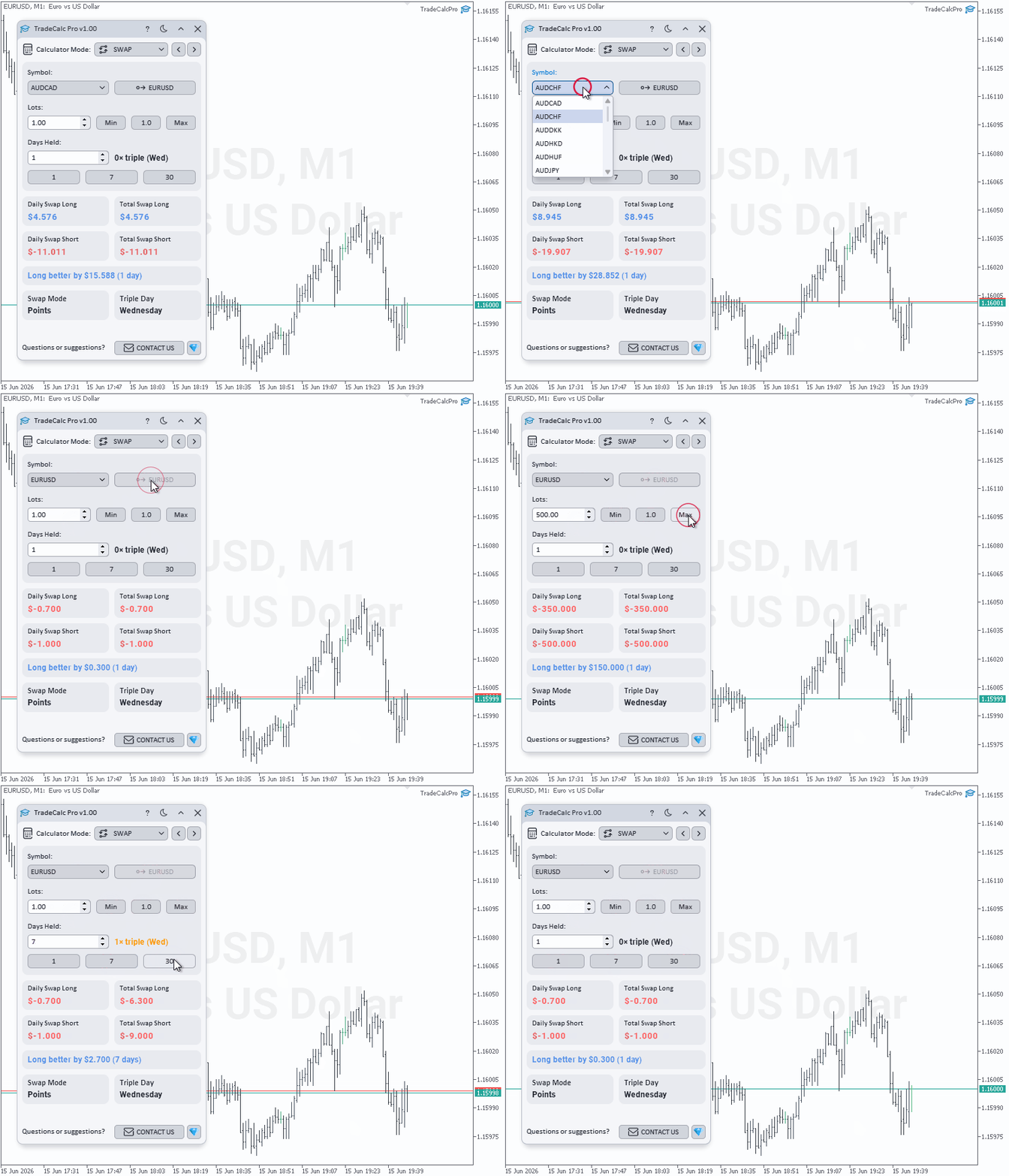
  • SWAP — planlanan tutma süresi Days Held için swap maliyeti tahmini (1 Day / 7 Days / 30 Days düğmeleri ile hızlı seçim). Günlük ve birikimli swap Total Swap Long / Total Swap Short değerlerini hesap para biriminde gösterir, daha iyi yön Better Swap Side ve farkını otomatik belirler ve aracının swap modu Swap Mode ile üçlü swap günü Triple Day değerlerini gösterir.
  • PROFIT — açılış fiyatı Open Price seviyesinden kapanış fiyatı Close Price veya nokta cinsinden mesafe Profit in Points değerine kadar potansiyel sonucun hesaplanması. Tutma süresi Days Held için swap maliyeti (1 Day / 7 Days / 30 Days hızlı düğmeler) otomatik olarak eklenir. Yön Buy / Sell seçin, fiyatları girin veya pip modunu Use Profit in Points kullanın. Hesaplayıcı toplam işlem kârı Trade Profit, birikimli swap Swap ve net finansal sonuç Net Profit değerlerini gösterir.

Özellikler

  • Tek bir kompakt arayüzde 6 profesyonel hesaplayıcı
  • Grafik üzerinde etkileşimli sürüklenebilir Entry/TP/SL çizgileri ile emir parametrelerinin görsel planlaması
  • Margin Level ve Margin Load değerlerini gösteren gerçek zamanlı teminat izleyicisi
  • Özelleştirilebilir Pip Multiplier ile nokta, pip ve tick değeri hesaplayıcısı (gerçek zamanlı Value per Pip, Value per Point, Tick Value dönüşümü)
  • Planlanan işlemler için teminat modellemesi ve güvenlik sınırı hesaplaması (Distance to Margin Call / Stop Out)
  • Planlanan tutma süresi Days Held için swap maliyeti değerlendirmesi
  • Swap dahil edilerek net sonuç (Net Profit) hesaplayan kâr/zarar hesaplayıcısı
  • Auto Lot Size Mode içinde birden fazla mod ile pozisyon boyutu hesaplaması
  • Pip cinsinden Stop Loss ve Take Profit girişi ve risk/ödül oranı R:R hesaplaması
  • Risk tutarı Risk Money / At Risk, beklenen kâr Reward hesap para biriminde ve başaba başmak için gereken kazanma oranı Breakeven Win Rate
  • Sembol Symbol ve hacim Lots otomatik senkronizasyonu
  • POINTS ve TRADE hesaplayıcıları arasında pip çarpanı Pip Multiplier otomatik senkronizasyonu
  • Komisyon modu Commission Mode ile komisyon hesaba katılarak son derece hassas pozisyon boyutu hesaplaması
  • Koyu ve açık temalar — tek tıkla renk şeması değiştirme
  • Arayüz öğeleri için yuvarlatılmış pürüzsüz formlar ile yüksek kaliteli grafikler
  • Herhangi bir çözünürlükte ve yüksek DPI ekranlarda net ve uyarlanabilir görüntüleme
  • Tüm araç ayarlarının otomatik kaydedilmesi ve başlatmalar arasında geri yüklenmesi

Üründen memnun kaldıysanız olumlu bir değerlendirme için minnettar olurum. Bir şey beklentinize uymuyorsa veya desteğe ihtiyacınız varsa — benimle özel mesaj yoluyla iletişime geçin, birlikte bir çözüm buluruz. Yeni özellik önerileri memnuniyetle karşılanır — fikirleriniz ürünü geliştirmeye yardımcı olur.

İletişim

Önerilen ürünler
Forex Noob Tube'dan Session Overlays Pro Grafiklerinizi statik kutular ve dağınık çizgilerle doldurmayı bırakın. Session Overlays Pro , seans zamanlamalarına, günlük açılışlara ve ekstrem fiyat seviyelerine güvenen günlük yatırımcılar (day traders) için tasarlanmış, tamamen etkileşimli, kurumsal düzeyde bir piyasa haritalama aracıdır. Doğrudan grafik üzerinde yer alan şık ve tıklanabilir bir panel etrafında inşa edilen bu gösterge, MT4 ayarlar menüsünü hiç açmadan piyasa seansları arasında geçiş
Martingale Osw MT4
William Oswaldo Mayorga Urduy
Kullanım Kılavuzu: Gelişmiş Martingale Yönetim ve Risk Kontrol Sistemi Bu profesyonel kılavuz, MetaTrader'da pozisyon kurtarma ve risk yönetimini otomatikleştirmek için tasarlanmış Gelişmiş Martingale emir yönetim sisteminin çalışmasını, yapılandırmasını ve görsel arayüzünü açıklamaktadır. 1. Giriş ve Amaç Bu araç, ana mantığı maliyet ortalaması olan yüksek hassasiyetli bir emir yöneticisi olarak işlev görür. Amacı, ortalama çıkış fiyatını iyileştirmek için bekleyen emirlerden oluşan bir ağ ku
* The product for MT5 converted using  "BRiCK TradeByArrow MT4"  is  here. BRiCK is a simple and versatile utility.   By combining Experts, Indicators and utilities like the Lego block, various trading styles can be realized. "TradeByArrow" is Utility that executes order processing when an arrow object is created on the chart. Combined with Indicator which outputs arrow object, it can be used like Expert. Parameter [ArrowName] EntryBuy: Arrow object name for buy order (partial match) EntrySel
FREE
Elliott Wave Helper - a panel for making elliott wave and technical analysis. Includes all known wave patterns, support and resistance levels, trend lines and cluster zones. Manual (Be sure to read before purchasing) | Version for MT5 Advantages 1. Making wave analysis and technical analysis in a few clicks 2. All Elliott wave patterns available, including triangle and combinations 3. All nine wave display styles, including a special circle font 4. E lements of technical analysis : trend lines,
Equity Shield 2 for MT4 Equity Shield 2 monitors your account limits while you trade. Set daily drawdown, maximum drawdown, daily profit and account profit targets, then track your remaining room live from one on-chart panel. When an enabled limit is reached, Equity Shield 2 can close your open positions and alert you. Built for prop firm challenges and traders who want an additional layer of account protection. Account protection Monitor up to four account limits: Daily drawdown Maximum accoun
Easy Trade Panel
Kritchavatchara Datchkanakorn
EasyTrade is a dashboard that make trading easier. EasyTrade can help you to calculate and send command. EasyTrade have 3 tabs. Tab 1 Display data about information and orders in the current symbol Show all order Profit/Loss. Show all buy order Profit/Loss. Show all sell order Profit/Loss. Show average price of all opened order(buy and sell). Show average price of all buy order. Show average price of all sell order. Show total lot buy order. Show total lot sell order. Show total order buy. Show
MT4 Terminal to Telegram Pro
Thennakoon Mudiyanselage Eranda Nuwan Kumara
**MT4 Terminal to Telegram Pro** is a professional-grade notification utility that turns your MetaTrader 4 terminal into a real-time Telegram signal channel with clean, structured, and reliable trade communication. Built for traders, account managers, and signal providers, it automatically tracks live terminal activity and delivers a complete trade lifecycle to Telegram: entry alerts, SL/TP modification updates, and close notifications. Instead of manually copying trades, you get consistent, f
The advantages of EA TWO CANDLE SMART are: It is equipped with various filters, including: maxspread, maxlot, takeprofit (4 step), stop loss (3 step), profit target per day, and many more. Open order BUY = If iClose[2] > iOpen[2] && iClose[1] > iOpen[1]. Open order SELL = If iClose[2] < iOpen[2] && iClose[1] < iOpen[1]. Target_profit_perday=50; ==> can work on forward test. lockprofit=2;//Minimal Profit in money Step_LockProfit_in_Money=25; Stoploss_in_Money=1000; Stoploss_in %=50;==> Stoploss
Time Closer can help you closing all the open position at the specified time "Everyday". Mainly for Day trader that don't want to hold position overnight, or over different session, or over a specific time. Simple Parameter to use. Usage Download and drag Time Closer on the chart (Chart Symbol should be the same Chart Symbol as you want the position close) Check Allow AutoTrading is "On" Set parameters Input Parameters Turnon  True - Turnon the utility False - Turnoff the utility Close All Open
OrderHelper script is super easy and trader friendly to use. It would boost your trading experience. Because it is designed to open one to multiple orders quickly with just one click. Besides using the OrderHelper script, traders can define various parameters for open orders such as the symbol, order type, lot size, stoploss, takeprofit and more. Basically, with this script traders can manage their open orders more efficiently and save their trading time. OrderHelper manages: • Open the number
Monitor floating profit of trades and close half of the lot size when profit reach target. Can monitor either all trades in whole account or by specified magic number. Can set amount of slippage and spread tolerance. Can set retry times and sleep seconds if split order was rejected Can set max split order times. Able to close trades after split when floating profit goes down and near 0, to prevent lose.
This TraderMaster EA is super helpful for professional trader.  Input Parameter Section: 1) Allow trader to set different line style, such as color, width; 2) Apply our chart style, if set false, it will not change the chart style; 3) Select different panel mode 3.a) Simple Mode, for trader immediately place a market order, pending order, delete and close orders; 3.b) Draw Line Mode, for price action traders who want to trade for trend and reverse in his trading plan; 3.c) Advanced Mode, includ
This indicator helps you control several pairs in a small workspace, therefore, it is not necessary to open several charts on the platform to do so. The indicator shows sequentially up to 6 different pairs, besides that each of these pairs has a button with which you can stop the indicator to observe the selected pair. Place the indicator on a chart to monitor several pairs and the rest of your space use it on the chart of the pair you wish to observe in detail.    MT5 version          Parameter
Hola Traders. Lot - lot size for pending orders. Martingale - double lot size of pending orders. *(No Martingale = 1.00) TotalGridEachSide - unit each side of pending orders. SpaceOfFirstOrder - distance for the first order in points. Take Profit - profit in points. Stop Loss - loss in points. The entire positioning uses POINTS only. (10 point = 1 pip) and you can open order BUYLIMIT, SELLLIMIT, ALLBUYANDSELL you can Close Pending, Close orders Profit and Loss and Close All ***  ideas for usin
The Definitive Performance Testing Solution for MetaTrader Environments What This Tool Does This specialized benchmark utility measures the performance of your MetaTrader environment, providing insights that impact your trading execution. Unlike generic system benchmarks, this tool evaluates performance specifically within the MetaTrader runtime environment. For Professional Traders & Developers: Performance Metrics : Measurements of calculation throughput and memory efficiency Trading-Specific
This trading bot automates order execution based on areas of interest drawn on the chart, such as supply and demand zones identified through order flow and institutional trading strategies. It’s a multi-chart bot, meaning you only need to drag it onto one of your open charts—it will monitor all of them simultaneously. How does it work? Open the charts you want to trade. Drag the bot onto just one of the open charts. Set your preferences for Risk, Stop Loss Ratio, or Take Profit Ratio. Enable an
Bloglar : https://www.mql5.com/en/blogs/post/761835 MT4 Sürümü : https://www.mql5.com/en/market/product/122732 MT5 Sürümü : https://www.mql5.com/en/market/product/122733 KORLASYON USTASI : ÇİFTLERİ İKİYE KATLAYIN, RİSKLERİ YARIN Negatif Korelasyon ve Otomatik Koruma için Akıllı EA Korelasyon Ustası, döviz çiftleri arasındaki negatif korelasyon stratejisini kullanan otomatik bir Uzman Danışmandır. Karşıt çiftlerde (örn. EURUSD Al ve USDCHF Sat) zıt pozisyonlar açarak, bu EA riskleri en aza
History Exporter can help to export your orders history from MT4 account. After that you can use another data analysis tools to get what you want.  File format is .csv file, the content such as below OrderID,Symbol,Type,Lots,OpenTime,OpenPrice,StopLoss,TakeProfit,CloseTime,ClosePrice,Commission,Swap,MagicNo,Comment,ProfitUSD,ProfitPips,NetProfit,Duration,(Days),(HH:MM:SS), 21520206,EURCHF,buy,0.05,2020.03.10 08:06:15,1.06304,0.00000,0.00000,2020.03.11 13:37:38,1.06015,-0.60,-0.05,28282888,RedRab
FREE
Hola Traders. Lot - lot size for pending orders. Martingale - double lot size of pending orders. *(No Martingale = 1.00) TotalGridEachSide - unit each side of pending orders. SpaceOfFirstOrder - distance for the first order in points. Take Profit - profit in points. Stop Loss - loss in points. The entire positioning uses POINTS only. (10 point = 1 pip) and you can open order BUYSTOP, SELLSTOP, ALLBUYANDSELL you can Close Pending, Close orders Profit and Loss and Close All ***  ideas for using
DYJ NetPilot is an Expert Advisor (Utilities) developed for the MetaTrader platform, designed to optimize trade exits by dynamically calculating the weighted average price (Pmix) of all open positions and adjusting exit levels accordingly. Key Features: Pmix Calculation: Computes the weighted average price (Price Mix) of open positions, providing a clear reference point for trade management. Dynamic Exit Strategy: Identify the prevailing direction (long/short positions) within open orders and es
Call of Night MT4
Marat Baiburin
3.67 (3)
Discount on all my products until 01.05.   Live signal: https://www.mql5.com/ru/users/bayburinmarat/seller Correct GMT setting: https://www.mql5.com/ru/blogs/post/743531 Call of Night isa professional advisor with an innovative approach to night scalping, working on only 4 currency pairs: EURUSD GBPUSD EURAUD EURCHF The EA uses a different logic for entering trades: the author's indicator works as the main signal, Price Action only filters trades. This approach increases the number of trades an
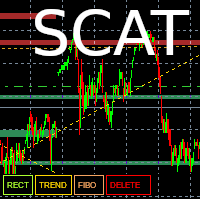
This tool allows you to draw trend lines, polarity zones, supports and resistances, Fibonacci retracements and save them. The user has 4 buttons which are displayed in their default configuration at the bottom left of the main window : - A "Level" button allowing you to draw support and resistance zones - A “Trend” button allowing you to draw a trend line - A “Fibo” button allowing you to display a Fibonacci retracement - A “DELETE” button which allows you to delete the selected object. A
Power Bank
Sergey Kasirenko
5 (2)
Power Bank EA, CCI Kanal göstergesine dayalı, trend yönünü, aşırı alım/aşırı satım bölgelerini ve potansiyel kırılma alanlarını kanal bantlarını kullanarak belirlemeye yardımcı olan bir trend takip sistemidir. EA, yükseliş ve düşüş trendlerinin başlangıcını doğru bir şekilde tespit edebilir ve TP'ye ulaşana kadar açık işlemleri martingale/ızgara tarzında kontrol eder. Önerilen pariteler: EURUSD, AUUSD, GBPUSD, NZDUSD gibi tüm ana pariteler ve ayrıca M15 zaman diliminde AUDCAD, NZDCAD, EURNZD v
The panel has the most intuitive interface that every beginner can handle. In the SLp column  – you need to specify the SL size in pips. If the value turns gray and at the same time the Bay / Sell buttons are also inactive, then you have specified a SL value that is less than that allowed before it was set by your broker. In the TP% column   – you indicate TP in% of the account balance. In the settings, you can choose on the basis of what this indicator will be calculated, by equity, balance or
Kinetix Speed Commander MT4 Kinetix Speed Commander , MetaTrader 4 (MT4) için özel olarak geliştirilmiş kurumsal düzeyde bir tek tıkla işlem yürütme kokpiti, dinamik pozisyon büyüklüğü hesaplayıcısı ve risk-ödül emir yönetim panelidir. Fon şirketi (Prop Firm) sınavlarına hazırlanan yatırımcılar, yüksek tempolu scalperlar ve sistematik gün içi işlemciler için tasarlanan Kinetix Speed Commander; manuel hesaplama gecikmelerini, lot giriş hatalarını ve aşırı kaldıraç riskini tamamen ortadan kaldırır
Assistant of Trading Pro MT4 – Ultimate Manual Trading Tool Boost your trading performance with a powerful, all-in-one MT4 trade assistant designed for precision, speed, and maximum control. Built for both beginners and professional traders, this advanced utility transforms your manual trading into a smart, structured execution system. Why Traders Choose This Tool One-Click Trading Execution Open Buy/Sell orders instantly with a single click for fast and efficient execution. Smart Auto SL & TP
Introducing the Open Order Timer EA Are you tired of manually opening trades at specific times?  Are you longing for a trading tool that can execute orders with pinpoint precision? Are you struggling to time your trades accurately in a fast-paced market environment? Introducing Open Order Timer, an Expert Advisor that automatically opens positions at your desired times with just a few clicks. This powerful tool takes the guesswork out of timed trading, allowing you to focus on your strategy whil
The Chart Navigator is a powerful and user-friendly indicator designed to enhance your chart navigation experience in the MetaTrader platform. With its advanced features and intuitive interface, it enables traders to effortlessly explore multiple timeframes, switch between symbols, and efficiently analyze price movements. Key Features: Timeframe Navigation: Seamlessly switch between different timeframes with just a single click. The Chart Navigator provides a graphical object that allows you to
FREE
This EA will make all the history trades appear on the chart,,  will make it easy to track each trade in history  separately , it will show each trade open price + time and closing price + time  simply download the EA to your MT4 platform, then apply it on any chart that belongs to any trades in mt4 history,  for example, if you have traded on GBPUSD in the history, open GBPUSD chart and apply the EA on it, it will automatically print all info on the chart about the trades ,, EA works per
FREE
This script can generated a text file including Account information such as Account Number Account Name Account Leverage Account Balance MT4 Location Data Folder Location  Demo / Real Account  Stop Out Mode  Stop Out Level etc. Enjoy the script.  Please leave a comment or send me an email if you have any idea. The Script is developed by Steve Wan (Eamil: fxac01@gmail.com)
FREE
Bu ürünün alıcıları ayrıca şunları da satın alıyor
Trade Manager EA’ye hoş geldiniz! Ticaretin daha sezgisel, hassas ve verimli hale gelmesi için tasarlanmış nihai risk yönetim aracı ile tanışın. Bu sadece bir emir verme aracı değil; ticaret planlaması, pozisyon yönetimi ve risk kontrolü için kapsamlı bir çözüm. İster yeni başlayan bir yatırımcı olun, ister deneyimli bir trader ya da hızlı emir gerektiren bir scalper, Trade Manager EA ihtiyaçlarınıza uyum sağlar ve forex, endeksler, emtialar ve kripto paralar dahil tüm piyasalarda esneklik sunar
Exp COPYLOT CLIENT for MT4
Vladislav Andruschenko
4.69 (65)
MetaTrader 4 için profesyonel işlem kopyalayıcı MetaTrader 4 için hızlı, güvenilir ve profesyonel bir işlem kopyalayıcı. COPYLOT , MetaTrader 4 ve MetaTrader 5 terminalleri arasında Forex işlemlerinin kopyalanmasını sağlar ve farklı hesap türleri ile işlem senaryoları için esnek senkronizasyon sunar. COPYLOT MT4 sürümü şunları destekler: MetaTrader 4 → MetaTrader 4 MetaTrader 5 Hedge → MetaTrader 4 MetaTrader 5 Netting → MetaTrader 4   MT5 sürümü Tam açıklama + DEMO + PDF Nasıl satın alınır Nası
Local Trade Copier EA MT4
Juvenille Emperor Limited
4.96 (111)
Local Trade Copier EA MT4, aynı Windows bilgisayarı veya Windows VPS üzerinde çalışan birden fazla MetaTrader 4 hesabı arasında işlemleri kopyalamak ve yönetmek için hızlı ve esnek bir işlem kopyalayıcıdır. Yerel işlem senkronizasyonunu, Receiver tarafında lot büyüklüğü, risk yönetimi, işlem filtreleme, sembol eşleştirme, işlem yönetimi ve hesap koruması kontrolleriyle birleştirir. Transmitter ve Receiver terminallerinizi yaklaşık 1 dakika içinde ayarlayın ve aynı veya farklı brokerlardaki hesa
Trade Assistant MT4
Evgeniy Kravchenko
4.43 (197)
It helps to calculate the risk per trade, the easy installation of a new order, order management with partial closing functions, trailing stop of 7 types and other useful functions. Additional materials and instructions Installation instructions   -   Application instructions   -   Trial version of the application for a demo account Line function -   shows on the chart the Opening line, Stop Loss, Take Profit. With this function it is easy to set a new order and see its additional characteris
TradePanel MT4
Alfiya Fazylova
4.84 (95)
Trade Panel, çok işlevli bir ticaret asistanıdır. Uygulama, manuel ticaret için 50'den fazla ticaret fonksiyonu içerir ve çoğu ticaret görevini otomatikleştirmeyi mümkün kılar. Uygulama talimatları : https://www.mql5.com/en/blogs/post/756482 Demo hesabı için uygulamanın deneme sürümü: https://www.mql5.com/en/blogs/post/750865 Uygulamayı nasıl kurulur: https://www.mql5.com/en/blogs/post/756239 Uygulamayı görsel modda nasıl test edilir: https://www.mql5.com/en/blogs/post/770277 Uygulamayı VPS Meta
Trade copier MT4
Alfiya Fazylova
4.61 (36)
Trade Copier, ticaret hesapları arasındaki işlemleri kopyalamak ve senkronize etmek için tasarlanmış profesyonel bir yardımcı programdır. Kopyalama, tedarikçinin hesabından/terminalinden alıcının aynı bilgisayarda veya vps'de kurulu olan hesabına/terminaline gerçekleşir. Satın almadan önce demo sürümünü bir demo hesabında test edebilirsiniz. Demo versiyonu burada . Tüm talimatlar burada . Ana işlevler ve avantajlar: Emirlerin kopyalanmasını destekler: МТ4> МТ4, МТ4> МТ5, МТ5> МТ4. Emirlerin kopy
Trade Indicator Assistant is a powerful MT4 utility designed to turn indicators into automated trading systems. Its main feature is the ability to automatically detect an indicator’s   BUY and SELL signal buffers , without requiring you to know the buffer numbers, search through indicator settings, or modify the indicator source code. Bonus Indicator: After purchasing Trade Indicator Assistant, contact me to receive Trade Signal Pro completely free as a bonus indicator. [Download Demo Version]
Fotokopi->Kullanışlı ve hızlı arayüz etkileşimi, kullanıcılar hemen kullanabilir       ->>>> Windows bilgisayarlarda veya VPS Windows'ta kullanılması önerilir Özellikler: Çeşitlendirilmiş ve kişiselleştirilmiş kopyalama ticareti ayarları: 1. Farklı sinyal kaynakları için farklı lot modları ayarlanabilir 2. İleri ve geri kopyalama ticareti için farklı sinyal kaynakları ayarlanabilir 3. Sinyaller yorumlarla ayarlanabilir 4. Lotun sözleşme lotuna göre kalibre edilip edilmeyeceği Çeşitlendirilmiş v
Telegram to MT4 Multi-Channel Copier   , Telegram ve Discord kanallarınızdaki alım-satım sinyallerini doğrudan MetaTrader 4'e otomatik kopyalar. Bot yok, tarayıcı uzantısı yok, elle kopyalama yok. Sinyal Telegram'a veya Discord'a düşer ve EA birkaç saniye içinde terminalinizde işlemi açar. Ve bir kanalı kopyalamadan önce, yerleşik backtester o kanalın hesabınızda ne yapmış olacağını gösterir. Ürün iki bileşenden oluşur: Telegram kanallarınızı dinleyen bir Windows uygulaması ve sinyalleri MT4 ter
Çalışan Deneme Sürümünü İndir Copy Cat More (Taklitçi Kedi) — İşlem Kopyalayıcı (Trade Copier) MT4 sadece basit bir yerel işlem kopyalayıcı değildir; bugünün ticaret zorlukları için tasarlanmış eksiksiz bir risk yönetimi ve yürütme çerçevesidir (risk management and execution framework). Prop firm challenge'larından kişisel portföy yönetimine kadar, sağlam yürütme, sermaye koruması, esnek yapılandırma ve gelişmiş işlem yönetimi karışımıyla her duruma uyum sağlar. Kopyalayıcı hem   Master (Mast
The product will copy all telegram signal to MT4   ( which you are member  ) , also it can work as remote copier.  Easy to set up, copy order instant, can work with almost signal formats, image signal, s upport to translate other language to English Work with all type of channel or group, even channel have "Restrict Saving Content", work with  multi channel, multi MT5 Work as remote copier: with signal have ticket number, it will copy exactly via ticket number. Support to backtest signal. How to
News Filter EA: Advanced Algo Trading Assistant News Filter EA is an advanced algo trading assistant designed to enhance your trading experience. By using the   News Filter EA , you can integrate a Forex economic news filter into your existing expert advisor, even if you do not have access to its source code. In addition to the news filter, you can also specify   trading days   and   hours   for your expert. The News Filter EA also includes   risk management   and   equity protection   features
RS Trade Copier - gerçek grafik arayüze sahip, ultra hızlı yerel işlem kopyalayıcı. Hesap numaralarını elle girmeyi bırakın. Artık 200'den fazla anlaşılmaz giriş parametresiyle uğraşmak yok. Birden fazla MT4 ve MT5 terminali arasında işlem operasyonlarını kopyalamak için güvenilir ve esnek bir araçtır. Hem profesyonel yatırımcılar, sinyal hizmetleri hem de bireysel yatırımcılar için uygundur. Bir veya birden fazla Sağlayıcıdan bir veya birden fazla Alıcıya ticareti senkronize eder ve bunu yüksek
Take a Break pauses your Expert Advisors when trading is a bad idea: before news, after a daily loss, outside your trading hours, or when a rule you wrote yourself says so. When the pause is over, your EAs simply continue. Account protection for all your EAs in one tool: news filter, drawdown and equity protection, time filter and custom rules. One EA on one chart protects the whole account, the free indicator gives every chart its own rules on top. Free demo | What is new in 26.09 | Support Ass
EchoTrade Telegram Signal Backtester VALIDATE TELEGRAM SIGNALS IN MINUTES - STOP GUESSING, START BACKTESTING Stop blowing accounts on "VIP" signals that don't deliver. The EchoTrade Telegram Signal Backtester is the professional solution to audit, verify, and optimize any Telegram signal provider's performance on historical data. Most signal providers show you their wins but hide their losses. This tool reveals the naked truth. By combining a powerful Data Manager (included) with an advanced MT4
Telegram'dan MT4'e:   Nihai Sinyal Kopyalama Çözümü Telegram ile MT4'e   işlemlerinizi kolaylaştırın, DLL'lere ihtiyaç duymadan doğrudan Telegram kanallarından ve sohbetlerinden MetaTrader 4 platformunuza işlem sinyallerini kopyalamak için tasarlanmış son teknoloji yardımcı program. Bu sağlam çözüm, sinyallerin benzersiz hassasiyet ve özelleştirme seçenekleriyle sorunsuz bir şekilde yürütülmesini sağlayarak size zaman kazandırır ve verimliliğinizi artırır. [ Instructions and DEMO ] Temel Özellik
MT4 to Telegram Signal Provider , Telegram'a sinyal göndermeyi sağlayan ve hesabınızı bir sinyal sağlayıcısına dönüştüren kullanımı kolay ve tamamen özelleştirilebilir bir araçtır. Mesajların formatı tamamen özelleştirilebilir! Ancak basit kullanım için, önceden tanımlanmış bir şablonu seçebilir ve mesajın belirli kısımlarını etkinleştirebilir veya devre dışı bırakabilirsiniz. [ Demo ]  [ Kullanım Kılavuzu ] [ MT5 Sürümü ] [ Discord Sürümü ] [ Telegram Kanalı ]  New: [ Telegram To MT5 ] Kurulum
Trade Copier Global: The name speaks for itself. This copier allows you to copy orders between MT4 terminals even if they are not installed on the same computer. Features Copying trades between MT4 terminals around the world with a short delay. Automatically recognizes symbol prefixes. Can connect many Slaves to the same Master. Supports pending and market orders. Supports partial order close (with limitations, see below) Can send messages and notifications to the Slaves from the Master Several
Smart Trend Line Alert is a unique professional Trend Line, Support Line and Resistance Line Touch and Break out Alert with awesome Alert History feature, designed to help traders easily manage many charts and symbols without staring at the monitor. Features Candle Break Out Alert, Price Touch Alert and Time Line Alert; 1 click for converting any drawn line into an alert line (Trend line and Horizontal line or Trend Line By Angle); Alerts History able to re-open closed charts or re-draw deleted
Riskinizi otomatik olarak hesaplarken işlemlere hızlı bir şekilde girip çıkmanıza yardımcı olacak Ticaret Yöneticisi. Aşırı Ticaret, İntikam Ticareti ve Duygusal Ticaretten korunmanıza yardımcı olacak özellikler içerir. İşlemler otomatik olarak yönetilebilir ve hesap performans ölçümleri bir grafikte görselleştirilebilir. Bu özellikler, bu paneli tüm manuel yatırımcılar için ideal kılar ve MetaTrader 4 platformunun geliştirilmesine yardımcı olur. Çoklu Dil desteği. MT5 Sürümü  |  Kullanım Kılavu
Partial Closure EA MT4
Juvenille Emperor Limited
5 (3)
Partial Closure EA MT4 , hesabınızdaki herhangi bir işlemi kısmen kapatmanıza olanak tanır. İşlemleri, lot büyüklüğünün seçilen bir yüzdesiyle ve/veya işlem biletiyle manuel olarak veya TP/SL seviyelerindeki belirli yüzdelerle otomatik olarak kapatabilir; bu, başlangıç lot büyüklüğünün yüzdesini en fazla 10 take profit ve 10 stop loss seviyesinde kapatır. Belirli magic numaralarını, yorumları veya sembolleri belirterek veya hariç tutarak hesabınızdaki tüm veya seçili işlemleri yönetebilir. İpu
VirtualTradePad mt4 Extra
Vladislav Andruschenko
4.85 (61)
1 tıklama ile ticaret için Ticaret Paneli.   Pozisyonlar ve emirlerle çalışmak!   Grafikten veya klavyeden alım satım. Alım satım panelimizi kullanarak, grafikten tek bir tıklamayla alım satım yapabilir ve alım satım işlemlerini standart MetaTrader kontrolünden 30 kat daha hızlı gerçekleştirebilirsiniz. Bir tüccar için hayatı kolaylaştıran ve bir tüccarın ticaret faaliyetlerini çok daha hızlı ve daha rahat gerçekleştirmesine yardımcı olan parametrelerin ve işlevlerin otomatik hesaplamaları. Graf
FCK CurrencyStrength Pro
Patel Hitendrakumar Mahendrabhai
Hi Friends, " FCK Currency Strength Pro " is a auto & semi auto trading expert with direction of pair. Buy-Sell separate or multi currency in one click. The strategy of  FCK Currency Strength Pro  is a combination of custom indicator, Trendlines, Support & Resistance levels ( Price Action ) and most important secretive trading algorithm mentioned above. Download News Ex4 and csv file You need the following SDSnews.ex4 in MQL4/Libraries and the daylightsavings.csv in MQL4/Files. Only 4 of 5 copi
Close If Profit or Loss with Trailing for MetaTrader 4 — toplam kâr veya toplam zarar ile otomatik kapatma MetaTrader 4 için pratik bir işlem yönetimi aracıdır. Toplam kâr veya toplam zarar belirlediğiniz seviyeye ulaştığında, seçilen pozisyonları otomatik olarak kapatabilir. Expert Advisor açık işlemleri izler, değişken kâr/zarar sonucunu hesaplar, Trailing Profit kullanabilir ve pozisyonları manuel müdahaleden daha hızlı yönetmenize yardımcı olur. MetaTrader 4 hâlâ manuel trader’lar, scalper’
Trade Dashboard simplifies how you open, manage, and control your trades, with built-in lot size calculation. It allows you to execute trades, manage risk, and control positions directly on the chart, with tools such as partial close, breakeven, and trailing stop. Designed to reduce manual work and help you stay focused on your trading decisions. A demo version is available for testing. Detailed explanations of features are provided within the MQL5 platform. Installation instructions are include
Smart Copy Local MT4
Kyra Nickaline Watson-gordon
5 (7)
Smart Copy is an Easy-to-Use EA that supports Multi Copying Metatrader4 and Metatrader5 and Local/Remote Copying. (Remote Version is coming soon) Free version is available on Smart Copy Local Free MT4 Specifications :     Real Time, Multi Terminal - Multi Account - MT4/MT5 trade copying     Copy from netting to hedge and hedge to netting is supported.     Fast and instant copy     All settings are input visually.     Easy modifying symbol names, prefix, suffix     Enable/Disable copying s
Want automatically to put the pending order, take profit and stop loss? This EA will do it on your behalf! The Fibo Heart EA strategy will place limit order after the ‘check point’ breakout. The position will be triggered when the price make a successful retest. If not, the pending order will automatically deleted after price hit certain level. You also have option to enable market order (instant execution) and custom take profit in the inputs setting. This EA must be attached with Fibo Heart In
Trailing Stop and Breakeven Manager - Trail Architect MT4 Auto Trailing Stop and Breakeven Manager for MT4. Protect profit with automatic break even, then trail your stop loss using Classic, Step, ATR or Candle trailing - all from one professional panel. Every trader knows the pain: a winning trade turns into a loss because the stop loss was never moved. Watching the chart all day just to move your stop to break even and trail the stop loss by hand is exhausting - and one missed move can wipe o
Unlimited Trade Copier Pro is a tool to copy trade remotely to multiple MT4, MT5 and cTrader accounts at different computers/locations over internet. This is an ideal solution for you if you are a signal provider and want to copy your trades to other receivers globally on your own rules. One provider can copy trades to multiple receivers and one receiver can get trade from multiple providers as well. The provider can even set the subscription expiry for each receiver, so that receiver will not b
King Trade Copier MT4
Mohammed Maher Al-sayed Mohammed Ahmed Saleh
5 (1)
King Trade Copier, aynı bilgisayarda veya VPS'te çalışan MetaTrader terminallerini birbirine bağlar. Bir hesapta açılan işlemler diğerlerinde de görünür. Dosya her iki rolü de taşır, bu yüzden aynı indirme, Mode'u neye ayarladığınıza bağlı olarak gönderici ya da alıcı olur. Her grafikte panel, bu terminalin gönderip göndermediğini ya da alıp almadığını gösterir, karşı taraftaki hesabın adını verir, yanıt veren alıcıları sayar ve son sinyalin yaşını bildirir. Kopyalanmayan bir emir, kaybolmak ye
Yazarın diğer ürünleri
TradeCalc Pro MT5 — MetaTrader 5 için etkileşimli grafik çizgilerine sahip işlem hesaplayıcıları. Entry/TP/SL çizgilerini sürükleyerek görsel olarak işlem planlayın ve pozisyon boyutu, teminat, pip değeri, swap ve kârı gerçek zamanlı olarak hesaplayın. Ekran görüntüleri ile ayrıntılı makale: TradeCalc Pro MT5 — Tam Kılavuz 6 ayrı aracı tek bir araya getirir ve riski grafik üzerinde anında hesaplar. Bu araç yalnızca analitik hesaplamalar ve modelleme için tasarlanmıştır — gerçek işlem yapmaz veya
Chart Manager , MetaTrader 5 için çoklu grafik çalışma alanı düzenleyicisidir. Ayrılmış grafik pencerelerini terminalin etrafında esnek bir ızgara düzeninde yerleştirir — her pencereyi manuel olarak yeniden boyutlandırıp konumlandırmaya gerek kalmadan birden fazla sembol ve zaman dilimini aynı anda izlemenizi sağlar. İşlem çalışma alanınızı bir kez kurun ve piyasaya odaklanın. Ekran görüntüleri ile detaylı makale: Chart Manager — Tam Kılavuz Gösterge sinyalleri ve çoklu sembol taraması için aynı
Symbol Screener , MetaTrader 5 için profesyonel bir çoklu sembol, çoklu zaman dilimi gösterge sinyal panelidir. Seçtiğiniz tüm semboller ve zaman dilimlerinde 5 popüler göstergeden gelen BUY/SELL sinyallerini izler ve bunları kompakt, renk kodlu bir tabloda görüntüler. Grafikleri manuel olarak değiştirmeyi bırakın — tüm piyasa görünümünü tek bakışta görün. Ekran görüntüleri ile detaylı makale: Symbol Screener — Tam Kılavuz Gösterge sinyal analizi olmadan bir sürüme ihtiyacınız varsa aynı yazarın
Equity Analyzer , MetaTrader 5 için bir işlem geçmişi analiz aracıdır. Hesap performansını değerlendirmenize, işlemleri dönem ve sembole göre incelemenize, farklı Expert Advisor sonuçlarını karşılaştırmanıza ve raporlardaki örüntüleri bulmanıza yardımcı olur — mevcut hesaptan veya içe aktarılan verilerden. Ekran görüntüleri ile ayrıntılı makale: Equity Analyzer — Tam Kılavuz Equity Analyzer iki temel göreve odaklanır: Equity Indicator — terminal grafiğinin alt penceresinde bakiye ve özsermaye gö
Filtrele:
Değerlendirme yok
Değerlendirmeye yanıt