TradeCalc Pro MT4

TradeCalc Pro MT4 — インタラクティブなチャートラインを備えた MetaTrader 4 用取引計算器です。 チャート上の Entry/TP/SL ラインをドラッグして視覚的に取引を計画し、ポジションサイズ、必要証拠金、ピップ値、スワップ、損益をリアルタイムで計算できます。

スクリーンショット付きの詳細記事:TradeCalc Pro — 完全ガイド

6つの個別のツールを1つに統合し、リスクをチャート上で即座に計算します。 本ユーティリティは分析計算およびシミュレーション専用に設計されており、実際の取引実行や注文発注は行いません。取引シンボルとその契約仕様(最小および最大取引数量制限など)は、アクティブなチャートから自動的に決定されます。本ツールは完全にユニバーサルで、すべての資産タイプ(FX、CFD、暗号資産、インデックス)に対応し、ヘッジ(Hedging)およびネット(Netting)口座をサポートし、すべてのパラメータは自動的に保存・復元されます。

計算器

TradeCalc Pro MT4 には、ナビゲーションタブからアクセスできる6つの専門計算器が含まれています:

  • TRADE — 自動ロットサイズモード Auto Lot Size Mode または手動によるポジションサイズの即時計算。Stop LossTake Profit をピップス(Pips)で指定するだけで、リスク報酬比 R:R、口座通貨でのリスク額 Risk Money / At Risk、潜在利益 Reward、必要証拠金 Required Margin、およびブレイクイーン(引き分け)に必要な最低勝率 Breakeven Win Rate を即座に確認できます。チャート上の Entry/TP/SL インタラクティブラインを動かして、視覚的に取引を計画できます。
  • ACCOUNT — リアルタイムの口座ステータス監視。現在の残高 Balance、有効証拠金 Equity、使用中の証拠金 Margin Used、余剰証拠金 Free Margin、証拠金維持率 Margin Level、預託金負荷率 Margin Load(2色の積み重ねグラフ形式で表示)およびブローカー閾値 Margin Call / Stop Out を監視します。シミュレーションモード SIMULATE では、スライダーを使って安全に様々な資金変動シナリオをモデル化できます。
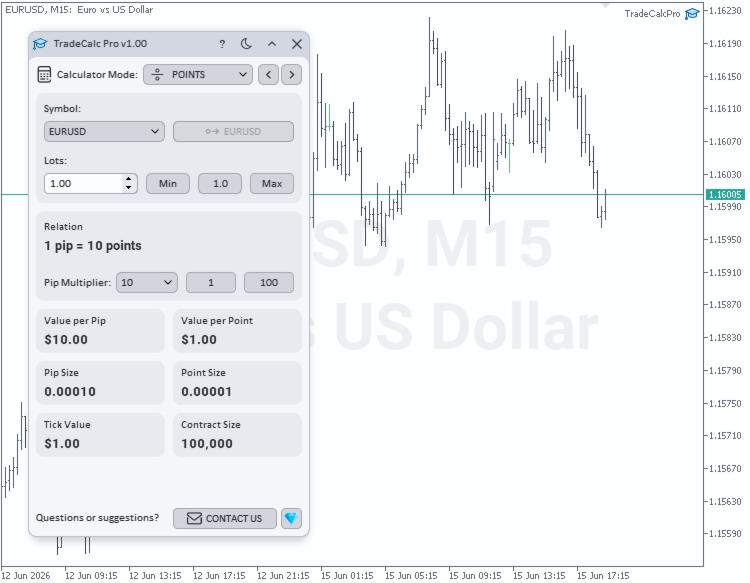
  • POINTS — 指定されたボリュームに対するピップ値 Value per Pip、ポイント値 Value per Point、および最小値幅値 Tick Value の計算。カスタムピップ乗数 Pip Multiplier(1、10、100、1000、10000、100000)を柔軟に設定できます。また、カスタムピップサイズ Pip Size、標準ポイントサイズ Point Size、およびそれらの数学的比率 Relation を表示します。この乗数は TRADE 計算器に自動的に同期適用されます。
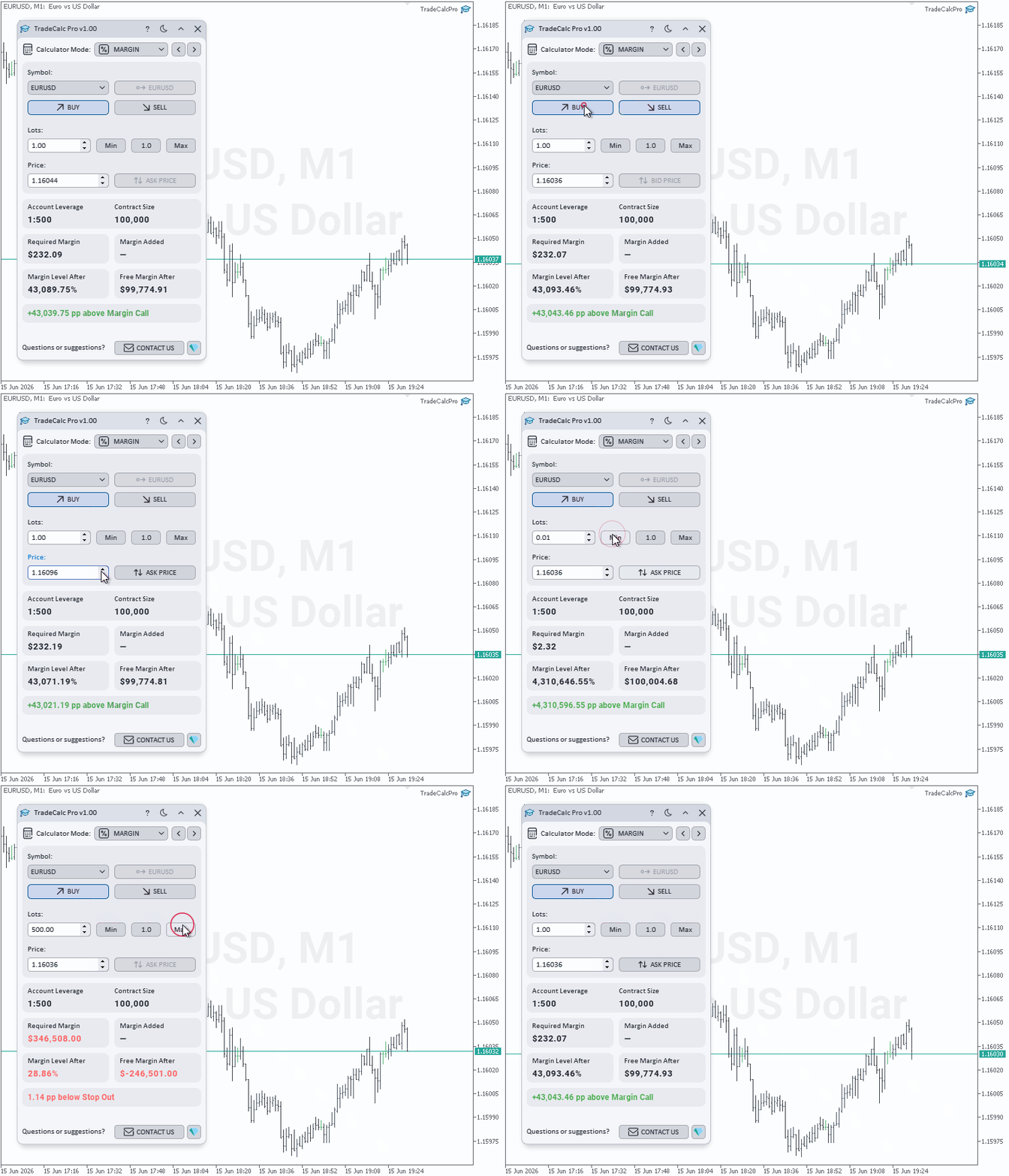
  • MARGIN — 口座レバレッジ Account Leverage を考慮した計画取引の必要証拠金計算器。売買方向 SideBuy / Sell)、取引ロット数 Lots、および計画価格 Price(現在の価格を即時取得可能な Ask/Bid ボタンを搭載)を入力するだけで、個別取引の必要証拠金 Required Margin、ポートフォリオに実際に加算される追加証拠金 Margin Added、予測される余剰証拠金 Free Margin After、予測される証拠金維持率 Margin Level After、および Distance to Margin Call / Stop Out までの正確な安全マージンを瞬時に算出します。両建て(ヘッジ)計算に対応しています。
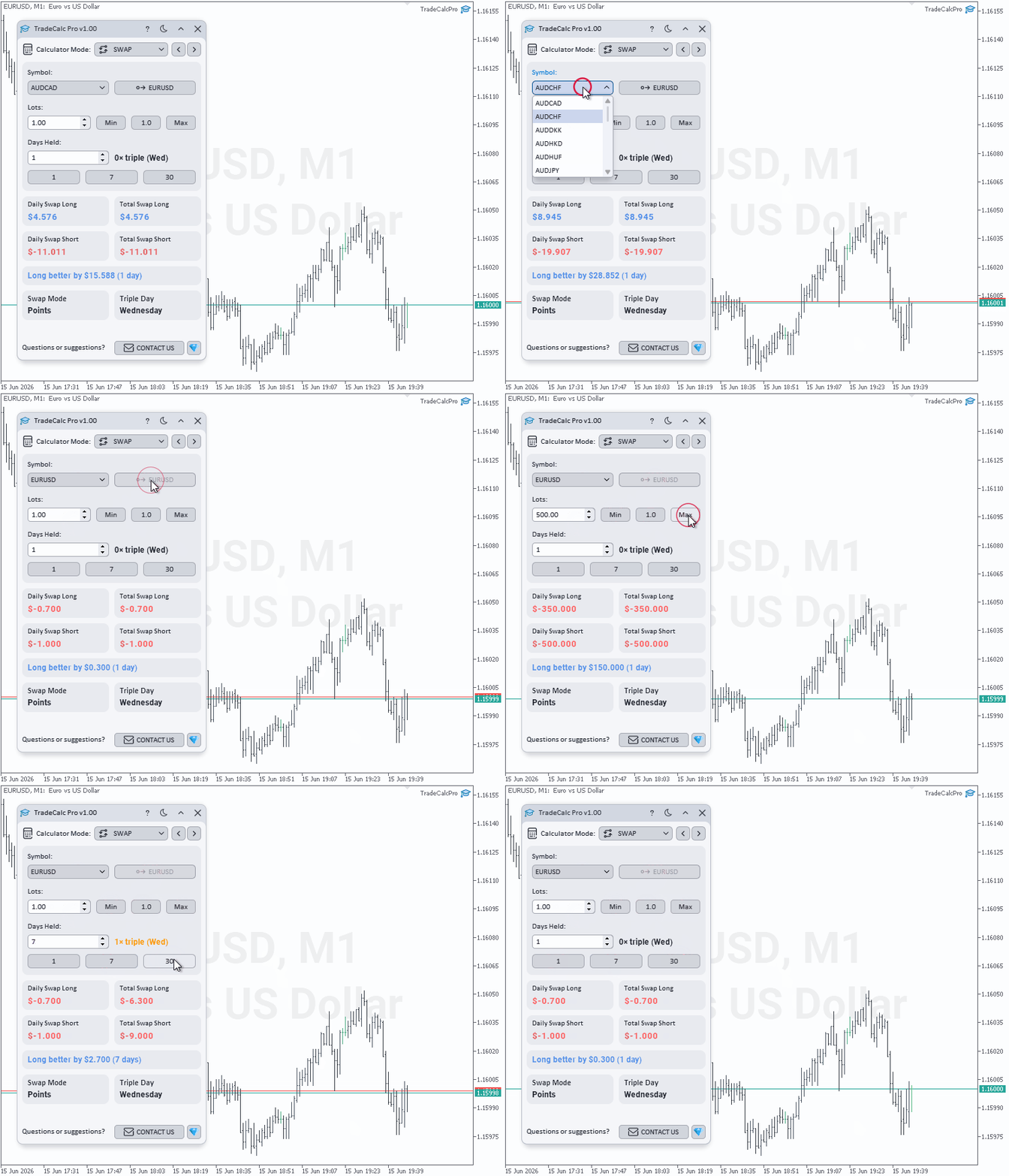
  • SWAP — 計画持続日数 Days Held におけるスワップコストの予測(1 Day / 7 Days / 30 Days ボタンで一クリック切り替え可能)。日次および累積の多空スワップ Total Swap Long / Total Swap Short を口座通貨で表示し、より有利な取引方向 Better Swap Side とその差額を自動判定するほか、ブローカーのスワップ算出モード Swap Mode や3倍スワップ日 Triple Day を表示します。
  • PROFIT — 建値 Open Price から決済値 Close Price またはポイントでの値幅 Profit in Points までの潜在損益の算出。持続日数 Days Held のスワップコスト(1 Day / 7 Days / 30 Days ボタンでクイック設定)を自動加味します。方向 Buy / Sell を選択し、価格を入力するか、ピップス指定モード Use Profit in Points を使用します。総取引損益 Trade Profit、累積スワップ Swap、および最終純利益 Net Profit を算出します。

機能特徴

  • 1つのコンパクトなインターフェースに6つのプロ向け計算器を搭載
  • チャート上のインタラクティブでドラッグ可能な Entry/TP/SL ラインによる注文パラメータの視覚的計画
  • Margin LevelMargin Load を表示するリアルタイム必要証拠金モニター
  • カスタム可能な Pip Multiplier を備えた、ピップ値、ポイント値、および最小値幅計算器(Value per PipValue per PointTick Value をリアルタイム換算)
  • 計画取引の証拠金精緻化モデリングと、安全境界算出(Distance to Margin Call / Stop Out
  • 計画持続日数 Days Held に基づくスワップコスト評価のためのスワップ計算器
  • スワップを自動加味して最終純利益(Net Profit)を算出する損益計算器
  • 固定ロット、リスク比率、固定金額など多様なリスク管理に対応した Auto Lot Size Mode によるポジションサイズ自動計算
  • ピップス指定による Stop LossTake Profit の入力、および正確なリスク報酬比 R:R の算出
  • 口座通貨でのリスク額 Risk Money / At Risk、潜在利益 Reward、および口座バランス維持に必要な勝率 Breakeven Win Rate のリアルタイム表示
  • チャート銘柄 Symbol と取引ロット数 Lots の自動同期
  • POINTSTRADE 計算器間でのピップ乗数 Pip Multiplier の自動同期
  • 極めて正確なポジションサイズ算出のための手数料考慮モード Commission Mode をサポート
  • ダーク・ライトテーマへの完璧な対応 — ワンクリックでカラー構成を高速切り替え
  • インターフェース要素に滑らかな角丸デザインを採用した高品質なグラフィックス
  • あらゆる解像度および高 DPI 画面で鮮明、かつ適応的なディスプレイ表示
  • ユーティリティの全設定を自動保存・復元、再起動時の重複設定が不要

製品にご満足いただけましたら、高評価をいただけると幸いです。ご期待に沿わない点やサポートが必要な箇所がございましたら、いつでもプライベートメッセージでご連絡ください。解決に向けて尽力いたします。新しい機能提案も大歓迎です。皆様の貴重なアイデアが製品をさらに進化させます。

連絡先

おすすめのプロダクト
Session Overlays Pro by Forex Noob Tube 静的なボックスや乱雑なラインでチャートを散らかすのはやめましょう。 Session Overlays Pro は、セッションのタイミング、日足の始値、そして極端な価格レベルを重視するデイトレーダーのために設計された、完全インタラクティブな機関投資家レベルのマーケットマッピングツールです。 チャート上の洗練されたクリック可能なダッシュボードを中心に構築されたこのインジケーターは、MT4の設定メニューを開くことなく、市場セッションの切り替え、ライブのコンフルエンス(根拠の重なり)の追跡、流動性スイープの測定をシームレスに行うことができます。 コア機能とUIダッシュボード インタラクティブなオンチャートダッシュボード: ワンクリックでアジア、ロンドン、ニューヨーク、またはSyncセッションを切り替えます。パネルをコンパクトなHUDに最小化することで、重要なデータを保持したままチャートをすっきりと保つことができます。 ヒゲ vs 実体での測定: 専用のUIボタンで、セッションの高値/安値(HC/LC)の計算を
* The product for MT5 converted using  "BRiCK TradeByArrow MT4"  is  here. BRiCK is a simple and versatile utility.   By combining Experts, Indicators and utilities like the Lego block, various trading styles can be realized. "TradeByArrow" is Utility that executes order processing when an arrow object is created on the chart. Combined with Indicator which outputs arrow object, it can be used like Expert. Parameter [ArrowName] EntryBuy: Arrow object name for buy order (partial match) EntrySel
FREE
Elliott Wave Helper - a panel for making elliott wave and technical analysis. Includes all known wave patterns, support and resistance levels, trend lines and cluster zones. Manual (Be sure to read before purchasing) | Version for MT5 Advantages 1. Making wave analysis and technical analysis in a few clicks 2. All Elliott wave patterns available, including triangle and combinations 3. All nine wave display styles, including a special circle font 4. E lements of technical analysis : trend lines,
Martingale Osw MT4
William Oswaldo Mayorga Urduy
ユーザーマニュアル:高度なマーチンゲール管理およびリスク管理システム この専門マニュアルでは、MetaTrader におけるポジションリカバリーとリスク管理を自動化するために設計された高度なマーチンゲール注文管理システムの操作、設定、およびビジュアルインターフェースについて説明します。 1. 概要と目的 このツールは、コスト平均法を主なロジックとする高精度の注文管理ツールとして機能します。その目的は、保留注文のネットワークを展開して平均決済価格を改善することにより、当初の方向とは逆の動きをした取引を保護および回復することです。 基本的なシステムとは異なり、このソフトウェアは動的な損益分岐点およびトレーリングストップアルゴリズムに加え、迅速な手動介入のための画面上のコントロールインターフェースを備えており、常に資金管理を最優先にすることができます。 2. パラメータガイド(エントリーメニュー) マーチンゲール設定と距離 マーチンゲール数:最初の取引後にシステムが許容するヘッジ注文の最大数を定義します。 距離タイプ:ポイント単位の固定距離、またはATR(平均真範囲)インジケーター
Easy Trade Panel
Kritchavatchara Datchkanakorn
EasyTrade is a dashboard that make trading easier. EasyTrade can help you to calculate and send command. EasyTrade have 3 tabs. Tab 1 Display data about information and orders in the current symbol Show all order Profit/Loss. Show all buy order Profit/Loss. Show all sell order Profit/Loss. Show average price of all opened order(buy and sell). Show average price of all buy order. Show average price of all sell order. Show total lot buy order. Show total lot sell order. Show total order buy. Show
MT4 Terminal to Telegram Pro
Thennakoon Mudiyanselage Eranda Nuwan Kumara
**MT4 Terminal to Telegram Pro** is a professional-grade notification utility that turns your MetaTrader 4 terminal into a real-time Telegram signal channel with clean, structured, and reliable trade communication. Built for traders, account managers, and signal providers, it automatically tracks live terminal activity and delivers a complete trade lifecycle to Telegram: entry alerts, SL/TP modification updates, and close notifications. Instead of manually copying trades, you get consistent, f
The advantages of EA TWO CANDLE SMART are: It is equipped with various filters, including: maxspread, maxlot, takeprofit (4 step), stop loss (3 step), profit target per day, and many more. Open order BUY = If iClose[2] > iOpen[2] && iClose[1] > iOpen[1]. Open order SELL = If iClose[2] < iOpen[2] && iClose[1] < iOpen[1]. Target_profit_perday=50; ==> can work on forward test. lockprofit=2;//Minimal Profit in money Step_LockProfit_in_Money=25; Stoploss_in_Money=1000; Stoploss_in %=50;==> Stoploss
Time Closer can help you closing all the open position at the specified time "Everyday". Mainly for Day trader that don't want to hold position overnight, or over different session, or over a specific time. Simple Parameter to use. Usage Download and drag Time Closer on the chart (Chart Symbol should be the same Chart Symbol as you want the position close) Check Allow AutoTrading is "On" Set parameters Input Parameters Turnon  True - Turnon the utility False - Turnoff the utility Close All Open
OrderHelper script is super easy and trader friendly to use. It would boost your trading experience. Because it is designed to open one to multiple orders quickly with just one click. Besides using the OrderHelper script, traders can define various parameters for open orders such as the symbol, order type, lot size, stoploss, takeprofit and more. Basically, with this script traders can manage their open orders more efficiently and save their trading time. OrderHelper manages: • Open the number
Monitor floating profit of trades and close half of the lot size when profit reach target. Can monitor either all trades in whole account or by specified magic number. Can set amount of slippage and spread tolerance. Can set retry times and sleep seconds if split order was rejected Can set max split order times. Able to close trades after split when floating profit goes down and near 0, to prevent lose.
This TraderMaster EA is super helpful for professional trader.  Input Parameter Section: 1) Allow trader to set different line style, such as color, width; 2) Apply our chart style, if set false, it will not change the chart style; 3) Select different panel mode 3.a) Simple Mode, for trader immediately place a market order, pending order, delete and close orders; 3.b) Draw Line Mode, for price action traders who want to trade for trend and reverse in his trading plan; 3.c) Advanced Mode, includ
This indicator helps you control several pairs in a small workspace, therefore, it is not necessary to open several charts on the platform to do so. The indicator shows sequentially up to 6 different pairs, besides that each of these pairs has a button with which you can stop the indicator to observe the selected pair. Place the indicator on a chart to monitor several pairs and the rest of your space use it on the chart of the pair you wish to observe in detail.    MT5 version          Parameter
Hola Traders. Lot - lot size for pending orders. Martingale - double lot size of pending orders. *(No Martingale = 1.00) TotalGridEachSide - unit each side of pending orders. SpaceOfFirstOrder - distance for the first order in points. Take Profit - profit in points. Stop Loss - loss in points. The entire positioning uses POINTS only. (10 point = 1 pip) and you can open order BUYLIMIT, SELLLIMIT, ALLBUYANDSELL you can Close Pending, Close orders Profit and Loss and Close All ***  ideas for usin
The Definitive Performance Testing Solution for MetaTrader Environments What This Tool Does This specialized benchmark utility measures the performance of your MetaTrader environment, providing insights that impact your trading execution. Unlike generic system benchmarks, this tool evaluates performance specifically within the MetaTrader runtime environment. For Professional Traders & Developers: Performance Metrics : Measurements of calculation throughput and memory efficiency Trading-Specific
ブログ: https://www.mql5.com/en/blogs/post/761835 MT4バージョン: https://www.mql5.com/en/market/product/122732 MT5バージョン: https://www.mql5.com/en/market/product/122733 CORRELATION MASTER:ペアを2倍にしてリスクを半分に 負の相関と自動ヘッジのためのスマートEA Correlation Masterは、通貨ペア間の負の相関戦略を活用する自動EAです。このEAは、反対のペア(例:EURUSDの買いとUSDCHFの売り)で反対のポジションを開くことで、リスクを最小限に抑えながら利益を最大化することを目指します。 柔軟なリスク管理と複数通貨ペアの設定を備えたこのEAは、スマートな自動ヘッジ戦略を求めるトレーダーに最適です。 主な機能 自動負相関戦略 反対方向に動く通貨ペアで買いと売りのポジションをオープンします。 例:EURUSD(買い)↔ USDCHF(売り) 複数通貨ペアのサポート 最大13通貨ペア(E
History Exporter can help to export your orders history from MT4 account. After that you can use another data analysis tools to get what you want.  File format is .csv file, the content such as below OrderID,Symbol,Type,Lots,OpenTime,OpenPrice,StopLoss,TakeProfit,CloseTime,ClosePrice,Commission,Swap,MagicNo,Comment,ProfitUSD,ProfitPips,NetProfit,Duration,(Days),(HH:MM:SS), 21520206,EURCHF,buy,0.05,2020.03.10 08:06:15,1.06304,0.00000,0.00000,2020.03.11 13:37:38,1.06015,-0.60,-0.05,28282888,RedRab
FREE
Hola Traders. Lot - lot size for pending orders. Martingale - double lot size of pending orders. *(No Martingale = 1.00) TotalGridEachSide - unit each side of pending orders. SpaceOfFirstOrder - distance for the first order in points. Take Profit - profit in points. Stop Loss - loss in points. The entire positioning uses POINTS only. (10 point = 1 pip) and you can open order BUYSTOP, SELLSTOP, ALLBUYANDSELL you can Close Pending, Close orders Profit and Loss and Close All ***  ideas for using
DYJ NetPilot is an Expert Advisor (Utilities) developed for the MetaTrader platform, designed to optimize trade exits by dynamically calculating the weighted average price (Pmix) of all open positions and adjusting exit levels accordingly. Key Features: Pmix Calculation: Computes the weighted average price (Price Mix) of open positions, providing a clear reference point for trade management. Dynamic Exit Strategy: Identify the prevailing direction (long/short positions) within open orders and es
Call of Night MT4
Marat Baiburin
3.67 (3)
Discount on all my products until 01.05.   Live signal: https://www.mql5.com/ru/users/bayburinmarat/seller Correct GMT setting: https://www.mql5.com/ru/blogs/post/743531 Call of Night isa professional advisor with an innovative approach to night scalping, working on only 4 currency pairs: EURUSD GBPUSD EURAUD EURCHF The EA uses a different logic for entering trades: the author's indicator works as the main signal, Price Action only filters trades. This approach increases the number of trades an
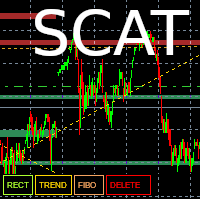
This tool allows you to draw trend lines, polarity zones, supports and resistances, Fibonacci retracements and save them. The user has 4 buttons which are displayed in their default configuration at the bottom left of the main window : - A "Level" button allowing you to draw support and resistance zones - A “Trend” button allowing you to draw a trend line - A “Fibo” button allowing you to display a Fibonacci retracement - A “DELETE” button which allows you to delete the selected object. A
Power Bank
Sergey Kasirenko
5 (2)
O パワーバンク EA は、運河の標識なしの管理システムであり、運河の管理区域や管理区域としての管理区域として、傾向を識別できる CCI の管理システムです。 O EA は、マルチンガラ/クワドリキュラのメソッドを使用して、オペラ座とバジスタとコントロールの傾向を正確に把握します。 推奨ペア: EURUSD、AUDUSD、GBPUSD、NZDUSD、AUDCAD、NZDCAD、EURNZD、EURCAD、XAUUSD を含む、マルコ テンポラル M15 は含まれません。 設定: 開始時間 – EA の開始時間 開始分 – EA の開始分 終了時間 – EA の終了時間 終了分 – EA の終了分 ロット – 取引を開始する最初のロット 可変ロットの使用 – True/False – 資金管理を使用する True/False 0.01 ロットごとのフリー マージン – 0.01 ロットごとのフリー マージン 乗算 – 1.5 などの乗数 最大ロット – 許可される最大ロット 利益確定 – ポイントでの利益確定 ポイントでのストップ ロス (0: 使用しない) – ポイントでのストップ
パネルには、すべての初心者が処理できる最も直感的なインターフェイスがあります。 SLp列で-SLサイズをピップで指定する必要があります。値が灰色に変わり、同時にベイ/セルボタンも非アクティブになっている場合は、ブローカーによって設定される前に許可されていた値よりも小さいSL値を指定しています。 [TP%]列で、アカウント残高の%でTPを示します。設定では、この指標の計算内容に基づいて、資本、残高、または自由証拠金を選択できます。 R%列では、取引のリスク値を設定できます。 Insボタン。 -設定値ですぐに注文を開くことができます。無効になっている場合は、取引のパラメータをチャートに直接プリセットできます。 上部の左上隅にあるマイナス記号をクリックすると、グラフのパネルを最小化できます。 パネル名の下にある+ボタンと-ボタンを調整することで、パネル自体のサイズを拡大または縮小することもできます。 保留中の注文を開いてBUへの転送、トレーリングストップ、注文を開くためのさまざまな設定の保存、さまざまな手法での注文のサポートも必要な場合は、より機能的なEasyTradePad
Assistant of Trading Pro MT4 – Ultimate Manual Trading Tool Boost your trading performance with a powerful, all-in-one MT4 trade assistant designed for precision, speed, and maximum control. Built for both beginners and professional traders, this advanced utility transforms your manual trading into a smart, structured execution system. Why Traders Choose This Tool One-Click Trading Execution Open Buy/Sell orders instantly with a single click for fast and efficient execution. Smart Auto SL & TP
Introducing the Open Order Timer EA Are you tired of manually opening trades at specific times?  Are you longing for a trading tool that can execute orders with pinpoint precision? Are you struggling to time your trades accurately in a fast-paced market environment? Introducing Open Order Timer, an Expert Advisor that automatically opens positions at your desired times with just a few clicks. This powerful tool takes the guesswork out of timed trading, allowing you to focus on your strategy whil
The Chart Navigator is a powerful and user-friendly indicator designed to enhance your chart navigation experience in the MetaTrader platform. With its advanced features and intuitive interface, it enables traders to effortlessly explore multiple timeframes, switch between symbols, and efficiently analyze price movements. Key Features: Timeframe Navigation: Seamlessly switch between different timeframes with just a single click. The Chart Navigator provides a graphical object that allows you to
FREE
This EA will make all the history trades appear on the chart,,  will make it easy to track each trade in history  separately , it will show each trade open price + time and closing price + time  simply download the EA to your MT4 platform, then apply it on any chart that belongs to any trades in mt4 history,  for example, if you have traded on GBPUSD in the history, open GBPUSD chart and apply the EA on it, it will automatically print all info on the chart about the trades ,, EA works per
FREE
This trading bot automates order execution based on areas of interest drawn on the chart, such as supply and demand zones identified through order flow and institutional trading strategies. It’s a multi-chart bot, meaning you only need to drag it onto one of your open charts—it will monitor all of them simultaneously. How does it work? Open the charts you want to trade. Drag the bot onto just one of the open charts. Set your preferences for Risk, Stop Loss Ratio, or Take Profit Ratio. Enable an
This script can generated a text file including Account information such as Account Number Account Name Account Leverage Account Balance MT4 Location Data Folder Location  Demo / Real Account  Stop Out Mode  Stop Out Level etc. Enjoy the script.  Please leave a comment or send me an email if you have any idea. The Script is developed by Steve Wan (Eamil: fxac01@gmail.com)
FREE
パラメータなし リスク指数: 収益指数: この製品はマーティンのようなシステムに属しています。ランダム因子を加えて、毎日のプログラムで1ポイントの収益を見積もっています。 次の日の手の数はそれなりに大きくなります。テスト中に1000ドルを使ってベースとして走り始めました。効果は2ヶ月で倍になります。 成長は明らかで、撤退はしばらく安定しています。全体の概念ではリスクと利益は同じ大きさです。 しかし、そのため、収益の安定性が高いです。 実盤口座は近いうちにオンラインします。その時にはこの紹介の中で発表します。 暖かいヒント: 1,本製品の現在のバージョンはアカウント全体の操作にしか適合していません。使用可能保証金の概念が設定されていません。使用する時はまず本を読んで紹介してください。また状況に合わせて使用します。 2,この制品は一部のランダム因子を添加していますので、大体の確率が狂っています。 注文書を見たら何回も繰り返し測定して出したのと違って、正常な現象です。 ありがとうございます。 以上のご意見をいただき、より良いアップグレード商品の更新をお手伝いします。
Economic Strategist: Advanced Economic Intelligence Economic Strategist is a high-performance trading system designed for professional traders who value a synergy of classic technical analysis and modern capital management algorithms. The bot specializes in identifying institutional price zones and adaptive position management in dynamic market conditions. Built on the principle of Capital Preservation, Economic Strategist implements a multi-level signal filtering system and flexible risk calib
このプロダクトを購入した人は以下も購入しています
Trade Manager EAへようこそ。これは、取引をより直感的、正確、そして効率的にするために設計された究極の リスク管理ツール です。これは単なるオーダー実行ツールではなく、包括的な取引計画、ポジション管理、リスク管理のためのソリューションです。初心者から上級者、迅速な実行を必要とするスキャルパーまで、Trade Manager EAはあらゆるニーズに対応し、為替、指数、商品、暗号通貨などさまざまな市場で柔軟に対応します。 Trade Manager EAを使用すると、複雑な計算が過去のものになります。市場を分析し、エントリーポイント、ストップロス、テイクプロフィットのレベルをチャート上のラインでマークし、リスクを設定するだけで、Trade Managerが最適なポジションサイズを即座に計算し、SLとTPをピップ、ポイント、口座通貨でリアルタイムに表示します。すべての取引が簡単かつ効果的に管理されます。 主な機能: ポジションサイズ計算機 :定義されたリスクに基づいて取引サイズを瞬時に決定します。 簡単な取引計画 :エントリー、ストップロス、テイクプロフィットを設定するためのド
Local Trade Copier EA MT4
Juvenille Emperor Limited
4.96 (111)
Local Trade Copier EA MT4 による、驚くほど高速な取引コピーを体験してください。1分で簡単にセットアップできるこの取引コピー機は、同じWindowsコンピュータまたはWindows VPS上の複数のMetaTrader端末間で取引をコピーすることができ、0.5秒未満の高速コピースピードを実現します。 初心者であろうとプロのトレーダーであろうと、 Local Trade Copier EA MT4 には、あなたの特定のニーズに合わせてカスタマイズするための幅広いオプションが用意されています。これは、利益の可能性を高めたい人にとって究極のソリューションです。 今すぐ試してみて、これが市場で最も速くて簡単なトレードコピー機である理由を理解してください。 ヒント: デモアカウントで Local Trade Copier EA MT4 デモバージョンをダウンロードして試すことができます: ここ ダウンロードした無料のデモ ファイルを MT4 >> ファイル >> データ フォルダを開く >> MQL4 >> Experts フォルダに貼り付けて、ターミナルを再起動しま
Exp COPYLOT CLIENT for MT4
Vladislav Andruschenko
4.69 (65)
MetaTrader 4向け 高機能トレードコピーソフト MetaTrader 4 用の、高速・安定・高機能なトレードコピーソフトです。 COPYLOT は、 MetaTrader 4 と MetaTrader 5 間でFX取引をコピーでき、さまざまな口座タイプや運用スタイルに合わせて柔軟に同期できます。 COPYLOT MT4版の対応コピー方式: MetaTrader 4 → MetaTrader 4 MetaTrader 5 Hedge → MetaTrader 4 MetaTrader 5 Netting → MetaTrader 4   MT5版 詳細説明 + DEMO + PDF 購入方法 インストール方法 ログファイルの取得方法 テストと最適化の方法 Expforexの全製品 MetaTrader 5版 を使えば、 MetaTrader 5 → MetaTrader 5 および MetaTrader 4 → MetaTrader 5 のコピーにも対応します: COPYLOT CLIENT for MT5 COPYLOT は、2台、3台、さらには10台規模のターミナル環境でも
Trade Assistant MT4
Evgeniy Kravchenko
4.43 (197)
取引 ごとのリスクの 計算、新規注文 の 簡単 な 設置、部分的 な 決済機能 を 持 つ 注文管理、 7 種類 のトレーリングストップなど 、便利 な 機能 を 備 えています 。 追加の資料と説明書 インストール手順 - アプリケーションの手順 - デモアカウント用アプリケーションの試用版 ライン機能 チャート上にオープニングライン、ストップロス、テイクプロフィットを表示します。この機能により、新規注文を簡単に設定することができ、注文を出す前にその特徴を確認することができます。   リスク計算 リスク計算機能は、設定されたリスクとストップロス注文のサイズを考慮して、新規注文のボリュームを計算します。ストップロスの大きさを自由に設定できると同時に、設定したリスクを守ることができます。 Lot calc ボタン - リスク 計算 を 有効 / 無効 にします 。 Risk フィールドでは 、必要 なリスクの 値 を 0 から 100 までのパーセンテージまたは 預金通貨 で 設定 します 。 設定」 タブで 、 リスク 計算 の 種類 を 選択 します :「 $ 通貨」、「 % 残
The product will copy all telegram signal to MT4   ( which you are member  ) , also it can work as remote copier.  Easy to set up, copy order instant, can work with almost signal formats, image signal, s upport to translate other language to English Work with all type of channel or group, even channel have "Restrict Saving Content", work with  multi channel, multi MT5 Work as remote copier: with signal have ticket number, it will copy exactly via ticket number. Support to backtest signal. How to
TradePanel MT4
Alfiya Fazylova
4.84 (95)
Trade Panelは多機能なトレーディングアシスタントです。アプリには手動取引用の50以上のトレーディング機能が搭載されており、ほとんどの取引作業を自動化することができます。 アプリの説明書+ビデオガイド: https://www.mql5.com/en/blogs/post/756482 デモ口座用アプリの試用版: https://www.mql5.com/en/blogs/post/750865 アプリのインストール方法: https://www.mql5.com/en/blogs/post/756239 アプリをビジュアルモードでテストする方法: https://www.mql5.com/en/blogs/post/770277 VPSのMetaTraderにアプリをインストールする方法: https://www.mql5.com/en/blogs/post/770190 取引。 ワンクリックで取引操作を行うことができます: リスクを自動計算して指値注文やポジションを開く。 複数の注文やポジションをワンクリックで開く。 注文のグリッドを開く。 保留中の注文やポジションをグルー
TelegramからMT4へ: 究極のシグナルコピーソリューション Telegram to MT4 は、DLLを必要とせず、TelegramのチャンネルやチャットからMetaTrader 4プラットフォームに取引シグナルを直接コピーできる最先端のユーティリティです。この堅牢なソリューションは、比類のない精度とカスタマイズオプションにより、シグナルのシームレスな実行を保証し、時間を節約し、効率性を向上させます。 [ Instructions and DEMO ] 主な特徴 直接的なTelegram API統合 電話番号とセキュアコードで認証します。 ユーザーフレンドリーな EXE ブリッジを使用して、チャット ID を簡単に取得および管理します。 複数のチャネル/チャットを追加、削除、更新して、同時に信号をコピーします。 高度なフィルターによる信号解析 カスタム例外語 (例: 「レポート」、「概要」) を含む不要な信号をスキップします。 柔軟な SL および TP 形式 (価格、ピップ、ポイント) をサポートします。 シグナルが価格ではなくポイントを指定する場合、エントリ ポイントを自動
Trade copier MT4
Alfiya Fazylova
4.6 (35)
Trade Copierは、取引口座間の取引をコピーして同期するように設計された専門的なユーティリティです。 コピーは、同じコンピューターまたはvps にインストールされている、サプライヤーのアカウント/端末から受信者のアカウント/端末に行われます。 キャンペーン - すでに「Trade copier MT4」をご購入の方は、「Trade copier MT5」を無料で入手できます(MT4 → MT5 および MT4 ← MT5 のコピー用)。詳細な条件については、どうぞ個別メッセージでお問い合わせください。 購入する前に、デモ アカウントでデモ バージョンをテストできます。 デモ版 こちら 。 詳細な説明は こちら 。 主な機能と利点: MT5ネッティングアカウントを含む、MT4> MT4、MT4> MT5、MT5> MT4のコピーをサポートします。 高いコピー速度(0.5秒未満)。 ベンダーモードと受信者モードは同じ製品内に実装されています。 チャートから直接リアルタイムでコピーを制御できる、簡単で直感的なインターフェイス。 接続が切断されたり、端末が再起動されたりしても、設定と位
Prop Guardian Risk Manager MT4 – Drawdown, Risk & Hedge Protection for Prop Firm and Managed Accounts Prop Guardian Risk Manager is a professional risk-control utility for MetaTrader 4, designed for prop firm traders, money managers and anyone who wants strict account-level risk protection. It does not generate trading signals, strategy entries or trading decisions. Instead, it runs in the background, monitors your account risk and can automatically block new exposure, close managed trades or ac
無料トライアル版ダウンロード Copy Cat More (コピーキャット・モア) MT4 トレードコピー (Trade Copier) は単なるローカルのトレードコピーではありません。今日のトレード課題のために設計された 完全なリスク管理・執行フレームワーク (risk management and execution framework) です。プロップファーム (prop firm) のチャレンジから個人のポートフォリオ管理まで、堅牢な執行、資金保護、柔軟な設定、高度なトレード処理の組み合わせによって、あらゆる状況に適応します。 このコピーは   マスター (Master、送信側) と スレーブ (Slave、受信側)   の両モードで動作し、成行注文・指値注文、トレードの変更、部分決済、そして両建て決済 (Close By) 操作をリアルタイムで同期します。デモ口座と実口座、トレード用ログインと投資家ログインの両方に対応し、永続的トレードメモリ (Persistent Trade Memory) システムにより、EA・端末・VPS が再起動しても復旧を保証します。一意の
高速。正確。革新的。テクノロジー駆動。画期的なX2 Copy MT4で、瞬時のトレードコピーを体験してください。わずか10秒の簡単セットアップで、一台のコンピューターまたはWindows VPS上のMetaTrader端末間でトレードをかつてない速度で同期する強力なツールを手に入れられます。 複数の口座を管理している場合、シグナルに従っている場合、または戦略を拡大している場合でも、X2 Copy MT4は比類のない精度と制御でワークフローに適応します。最もテクノロジー駆動なトレードコピーソリューションで、より速く、より確実に作業できます。無料トライアル版をお試しいただき、お使いのシステムでその速度を体感してください。 *重要:MT5端末での作業には、別途 X2 Copy MT5 バージョンが必要です X2 Copy MT4/5 の設定と機能の説明 | X2 Copy トライアル版のインストール方法 特徴 高速コピー — 0.1秒未満でのトレード転送 すべてのコピータイプをユニバーサルサポート: MT4>MT4, MT4>MT5, MT5>MT4, MT5>MT5 直感的なインターフェー
News Filter EA: Advanced Algo Trading Assistant News Filter EA is an advanced algo trading assistant designed to enhance your trading experience. By using the   News Filter EA , you can integrate a Forex economic news filter into your existing expert advisor, even if you do not have access to its source code. In addition to the news filter, you can also specify   trading days   and   hours   for your expert. The News Filter EA also includes   risk management   and   equity protection   features
EA Local Trade Copier Pro MT4: The Ultimate DLL-Free Trade Duplicator Are you tired of complicated trade copiers that require unsafe external DLLs, crash your terminal, or confuse you with separate "Master" and "Client" files? Experience the next generation of trade copying with EA Local Trade Copier Pro MT4. Engineered for maximum stability, lightning-fast execution, and ultimate simplicity, this utility allows you to seamlessly copy trades between multiple MetaTrader terminals on the same Wind
This trading panel has been developed for fast and comfortable operation of the financial markets. It is equipped with the necessary functions for manual and semi-automated trading. Due to the presence of the order trailing feature, trailing stop and automatic closure by equity, profit, time. You can use it to automate your trading system. All you have to do is open a position and set the parameters for maintenance, everything else will be handled by the EA. If you want to limit your losses, set
ONE DRAG SETS THE LOT SIZE - RISK STAYS WITHIN YOUR LIMIT Risk-first position sizing for traders who protect their capital Introductory offer — first 30 copies at $35, then $45. Early buyers keep the lower price forever! Also available for MT5 :  https://www.mql5.com/en/market/product/185711 Risk Sentinel is a risk-first position sizing and risk management tool for MT4, built for discretionary traders who size every trade to the same disciplined risk limit. Drag your stop-loss and the lot si
Riskless Pyramid
Snapdragon Systems Ltd
5 (1)
Introduction This powerful MT4 trade mangement EA offers a way potentially to aggressively multiply trade profits in a riskfree manner. Once a trade has been entered with a defined stoploss and take profit target then the EA will add three pyramid add-on trades in order to increase the overall level of profit. The user sets the total combined profit target to be gained if everything works out. This can be specified either as a multiple of the original trade profit or as a total dollar amount. Fo
この製品は、ニュースタイム中にすべてのエキスパートアドバイザーと手動チャートをフィルタリングするため、急激な価格変動によるマニュアルトレードのセットアップの破壊や他のエキスパートアドバイザーによって入力された取引について心配する必要はありません。この製品には、ニュースのリリース前にオープンポジションとペンディングオーダーを処理できる完全な注文管理システムも付属しています。 The News Filter  を購入すると、将来のエキスパートアドバイザーのためにビルトインのニュースフィルターに頼る必要はなく、今後はすべてのエキスパートアドバイザーをここからフィルタリングできます。 ニュース選択 ニュースソースは、Forex Factoryの経済カレンダーから取得されます。 USD、EUR、GBP、JPY、AUD、CAD、CHF、NZD、CNYなど、任意の通貨数に基づいて選択できます。 Non-Farm(NFP)、FOMC、CPIなどのキーワード識別に基づいて選択することもできます。 影響レベルによってフィルタリングするニュースを選択することができ、低、中、高の影響範囲から選択できます。
Grid Manual MT4
Alfiya Fazylova
4.71 (17)
「Grid Manual」は、注文のグリッドを操作するための取引パネルです。 ユーティリティはユニバーサルで、柔軟な設定と直感的なインターフェイスを備えています。 それは、損失を平均化する方向だけでなく、利益を増やす方向でも注文のグリッドで機能します。 トレーダーは注文のグリッドを作成して維持する必要はありません。 すべてが「Grid Manual」によって行われます。 注文を開くだけで十分であり、「Grid Manual」は注文のグリッドを自動的に作成し、非常に閉じるまでそれに付随します。 完全な説明とデモバージョン ここ。 ユーティリティの主な機能と機能 ユーティリティは、モバイル端末から開かれた注文を含め、あらゆる方法で開かれた注文を処理します。 「制限」と「停止」の2種類のグリッドで機能します。 グリッド間隔の計算には、固定と動的(ATRインジケーターに基づく)の2つの方法で機能します。 オープンオーダーグリッドの設定を変更できます。 チャート上の各注文グリッドの損益分岐点を表示します。 各注文グリッドの利益率を表示します。 ワンクリックでグリッドから収益性の高い注文を閉じるこ
Unlimited Trade Copier Pro is a tool to copy trade remotely to multiple MT4, MT5 and cTrader accounts at different computers/locations over internet. This is an ideal solution for you if you are a signal provider and want to copy your trades to other receivers globally on your own rules. One provider can copy trades to multiple receivers and one receiver can get trade from multiple providers as well. The provider can even set the subscription expiry for each receiver, so that receiver will not b
これは、トレンドラインPROインジケーターの自動パラメータオプティマイザです 簡単かつ迅速に、あなたのお気に入りのトレンドラインプロインジケーターに最適なパラメータを選択します。 最適化には数秒しかかかりません。 オプティマイザでは、振幅、TP1-TP3、StopLoss、および選択した履歴セクション(日)の時間フィルタとHTFフィルタの値など、各ペアと期間に最適なパラメータを見つ 異なる時間枠を最適化するには、異なる範囲の履歴が必要です: M5-M15計算範囲パラメータ(日)=60(三ヶ月)を設定します。 M30-H1計算範囲パラメータ(日)=120(6ヶ月)を設定します。 H4パラメータの計算範囲(日数)を設定する=240(1年) D1-W1パラメータ計算範囲(日)=720(三年)を設定します。 MN1パラメータ計算範囲(日)=1200(五年)を設定します。 最適化後、パラメータはmql4>Files>T R E N D Lineoptimizedsettingsフォルダ内の既製のセットファイルに自動的に保存されます オプティマイザユーティリティの使用方法: 最適化
Trading History - A program for trading and money management on the history of quotes in stratagy tester. It can work with pending and immediate orders, and is equipped with trailing stop, breakeven and take profit functions. Very good for training and testing different strategies. Manual (Be sure to read before purchasing) Advantages 1. Allows you to test any trading strategy in the shortest possible time 2. An excellent simulator for trading training. You can gain months of trading experience
Trade Manager は、リスクを自動的に計算しながら、取引を迅速に開始および終了するのに役立ちます。 過剰取引、復讐取引、感情的な取引を防止する機能が含まれています。 取引は自動的に管理され、アカウントのパフォーマンス指標はグラフで視覚化できます。 これらの機能により、このパネルはすべてのマニュアル トレーダーにとって理想的なものとなり、MetaTrader 4 プラットフォームの強化に役立ちます。多言語サポート。 MT5バージョン  |  ユーザーガイド + デモ Trade Manager はストラテジー テスターでは機能しません。 デモについてはユーザーガイドをご覧ください。 危機管理 % または $ に基づくリスクの自動調整 固定ロットサイズを使用するか、ボリュームとピップに基づいた自動ロットサイズ計算を使用するオプション RR、Pips、または価格を使用した損益分岐点ストップロス設定 トレーリングストップロス設定 目標に達したときにすべての取引を自動的に終了するための 1 日あたりの最大損失 (%)。 過度のドローダウンからアカウントを保護し、オーバートレードを防ぎま
MT4 to Telegram Signal Provider は使いやすく、完全にカスタマイズ可能なツールで、Telegramに信号を送信し、あなたのアカウントを信号提供者に変えることができます。 メッセージのフォーマットは 完全にカスタマイズ可能です! しかし、簡単な使用のために、あらかじめ定義されたテンプレートを選択し、メッセージの特定の部分を有効または無効にすることもできます。 [ デモ ]   [ マニュアル ] [ MT5バージョン ] [ Discordバージョン ] [ Telegramチャンネル ]  New: [ Telegram To MT5 ] セットアップ ステップバイステップの ユーザーガイド が利用可能です。 Telegram APIの知識は必要ありません。開発者が必要なものをすべて提供します。 主要機能 購読者に送信される注文の詳細をカスタマイズする機能 例えばブロンズ、シルバー、ゴールドなど、階層型のサブスクリプションモデルを作成できます。ゴールドサブスクリプションでは、すべての信号が得られますなど。 ID、シンボル、またはコメントによる注文のフ
Trade Reverse Copie4
Chukwuemeka Kingsley Anyanwu
5 (1)
Feel free to contact me for any extra features :) [SEE MT5 VERSION  https://www.mql5.com/en/market/product/128846 The Local Reverse Copier is an Expert Advisor designed to synchronize positions between a Master account and a Slave account with a twist: it reverses the trades. When a buy position is opened on the Master account, the EA opens a sell position on the Slave account, and vice versa. This allows for a unique form of trade copying where positions are mirrored in opposite directions bet
Lot Architect — Trade Panel and Position Size Calculator for MT4 Lot Architect is a trade panel and risk-based position size calculator for MetaTrader 4. It helps calculate lot size from the selected risk, displays trade parameters before entry, and supports Market, Limit and Stop orders from the chart. The utility is designed for traders who want a structured workflow for position sizing, stop-loss placement, take-profit planning and order execution. Purpose Before opening a trade, a trader nee
Trade Dashboard simplifies how you open, manage, and control your trades, with built-in lot size calculation. It allows you to execute trades, manage risk, and control positions directly on the chart, with tools such as partial close, breakeven, and trailing stop. Designed to reduce manual work and help you stay focused on your trading decisions. A demo version is available for testing. Detailed explanations of features are provided within the MQL5 platform. Installation instructions are include
Basket EA MT4
Juvenille Emperor Limited
5 (5)
Basket EA MT4 は、強力な利益収穫ツールであり、包括的な口座保護システムがシンプルで使いやすい形で統合されたソリューションです。その主な目的は、すべてのポジションを個別管理ではなく“バスケットレベル”で一括管理することで、口座全体の損益を完全にコントロールすることにあります。EAは、テイクプロフィット、ストップロス、ブレイクイーブン、トレーリングストップといったバスケットレベルの機能を備えており、これらを口座残高の%/口座通貨の固定額/管理対象取引の平均ポイントといった形で設定できます。この柔軟性により、トレーダーは個々のリスクと利益戦略を自分に合わせてカスタマイズできます。さらに、 Basket EA MT4 は、Magic Number、通貨ペア、コメントなどに基づいて特定の取引を管理対象から除外または含めるフィルタリング機能を提供し、望む取引だけを管理できるようにします。 追加の保護機能として、高度な口座セーフガード機能を搭載しています。指定したエクイティのテイクプロフィット・ストップロス水準、または最高残高からの最大ドローダウンに達した場合、EAはすべてのオープン
Custom Alerts AIO:マルチマーケット監視を一括で実現 — 設定不要ですぐに使えるインテリジェントツール 概要 Custom Alerts AIO は、追加のインジケーター設定が不要で、インストール後すぐに利用できる高機能マーケットスキャナーです。FX Power、FX Volume、FX Dynamic、FX Levels、IX Power を内部にすべて統合し、主要なすべての資産クラス(為替、金属、指数、暗号資産)を一括監視できます。MetaTrader の仕様により、株式は個別のシンボルとして追加可能ですが、一般的には利用頻度は低めです。 1. なぜ Custom Alerts AIO を選ぶべきか 追加ライセンス不要 • 必要なすべての Stein Investments インジケーターが内蔵されており、すぐに使用可能です。 • チャートに表示されるグラフィックは省略されており、アラート生成に特化した構成です。 市場を広範囲にカバー • 為替、金属、暗号資産、株価指数に対応(株式は手動追加可能)。 • シンボル名を入力する必要はなく、プロパティで資産クラス
LMBFWatchlist is an interactive tool for Metatrader 4 that lets you create and manage watch lists directly on your Metatrader charts. ‌Functionality includes: ‌Add an unlimited number of watch lists with names of your choice Add different groups of watchlists for different time frames Add comments for symbols that always appear on the chart when that symbol is selected. Easily identify which symbols have comments against them. See watch lists instantly synchronise across all open charts that hav
This EA Utility delivers a robust solution for managing an unlimited array of open orders, both manual and automated. It enables customizable partial profit levels utilizing metrics such as pips, ratios, ATR (Average True Range), and profit amounts for precise trade management. The utility features an advanced on-screen display, offering clear visualization of all orders and their profit levels to enhance strategic decision-making and control. To evaluate its performance and interface, the EA s
作者のその他のプロダクト
Chart Manager は、MetaTrader 5 向けのマルチチャートワークスペース管理ツールです。分離チャートウィンドウをターミナル周囲に柔軟なグリッドレイアウトで配置し、各ウィンドウを手動でリサイズ・配置することなく、複数の銘柄とタイムフレームを同時に監視できます。ワークスペースを一度設定すれば、あとは市場に集中できます。 スクリーンショット付きの詳細記事: Chart Manager — 完全ガイド インジケーターシグナルとマルチシンボルスクリーニングについては、同じ著者の Symbol Screener をご覧ください。 Chart Manager は2つの主要機能に特化しています: Window Layout — 分離チャートウィンドウをターミナルの任意の辺(Right、Left、Top、Bottom)にスナップし、列数・行数・間隔・余白を調整可能なグリッドに配置します。 SubCharts — メインチャートのサブウィンドウにコンパクトなマルチタイムフレームのミニチャートを表示し、追加のチャートを開くことなく各タイムフレームの値動きを素早く確認できます。 Chart
Symbol Screener は、MetaTrader 5 向けのプロフェッショナルなマルチシンボル・マルチタイムフレーム対応インジケーターシグナルダッシュボードです。選択したすべてのシンボルとタイムフレームにわたる5つの人気インジケーターからの BUY/SELL シグナル を、カラーコード付きのコンパクトなテーブルに表示します。チャートの手動切り替えはもう不要 — 市場全体の状況を一目で把握できます。 スクリーンショット付きの詳細記事: Symbol Screener — 完全ガイド インジケーターシグナル分析なしのバージョンが必要な場合は、同じ著者の Chart Manager をご覧ください。 Symbol Screener は最大5つの標準インジケーターからリアルタイムでシグナルを収集します: Moving Average (MA) MACD Relative Strength Index (RSI) Stochastic Oscillator Commodity Channel Index (CCI) 5つのインジケーターが同時に動作します。 Single Symbol モ
TradeCalc Pro MT5 — インタラクティブなチャートラインを備えた MetaTrader 5 用取引計算器です。 チャート上の Entry/TP/SL ラインをドラッグして視覚的に取引を計画し、ポジションサイズ、必要証拠金、ピップ値、スワップ、損益をリアルタイムで計算できます。 スクリーンショット付きの詳細記事: TradeCalc Pro MT5 — 完全ガイド 6つの個別のツールを1つに統合し、リスクをチャート上で即座に計算します。 本ユーティリティは分析計算およびシミュレーション専用に設計されており、実際の取引実行や注文発注は行いません。取引シンボルとその契約仕様(最小および最大取引数量制限など)は、アクティブなチャートから自動的に決定されます。本ツールは完全にユニバーサルで、すべての資産タイプ(FX、CFD、暗号資産、インデックス)に対応し、ヘッジ(Hedging)およびネット(Netting)口座をサポートし、すべてのパラメータは自動的に保存・復元されます。 計算器 TradeCalc Pro MT5 には、ナビゲーションタブからアクセスできる6つの専門計算器が
Equity Analyzer は、MetaTrader 5 向けの取引履歴分析ツールです。口座のパフォーマンス評価、期間・銘柄別の取引確認、複数の Expert Advisor の結果比較、レポート内の傾向把握をサポートします — 現在の口座またはインポートしたデータに対応します。 スクリーンショット付きの詳細記事: Equity Analyzer — 完全ガイド Equity Analyzer は2つの主要機能に特化しています: Equity Indicator — ターミナルチャートのサブウィンドウ内の残高・証拠金指標。取引の実行に伴う残高と資金の変化を表示します。 インタラクティブな結果グラフ — 残高/証拠金および銘柄別カーブの分かりやすい概要。グラフ上のポイントを選択すると、ターミナルチャート上の該当取引にすぐ移動できます。 現在の口座履歴で作業するか、 File Report を有効にして IMPORT REPORT から取引レポートを読み込みます — CSV など複数のファイル形式に対応しています。他のトレーダーの結果、テスト、アーカイブデータの分析に便利です。選択した
フィルタ:
レビューなし
レビューに返信