Scanner Trend MT5
- Indicators
-
Agus Santoso
 DISCLAIMER ON : The author of EA will not be held responsible for your losses or problems of any kind if the EA is directly or indirectly responsible for any losses.
Our software is provided “as is”, without any warranty or condition of any kind, express, implied or statutory. - Version: 1.0
- Activations: 5
MQL5 Blogs : https://www.mql5.com/en/blogs/post/771256
MT4 Version : https://www.mql5.com/en/market/product/180542
MT5 Version : https://www.mql5.com/en/market/product/180543
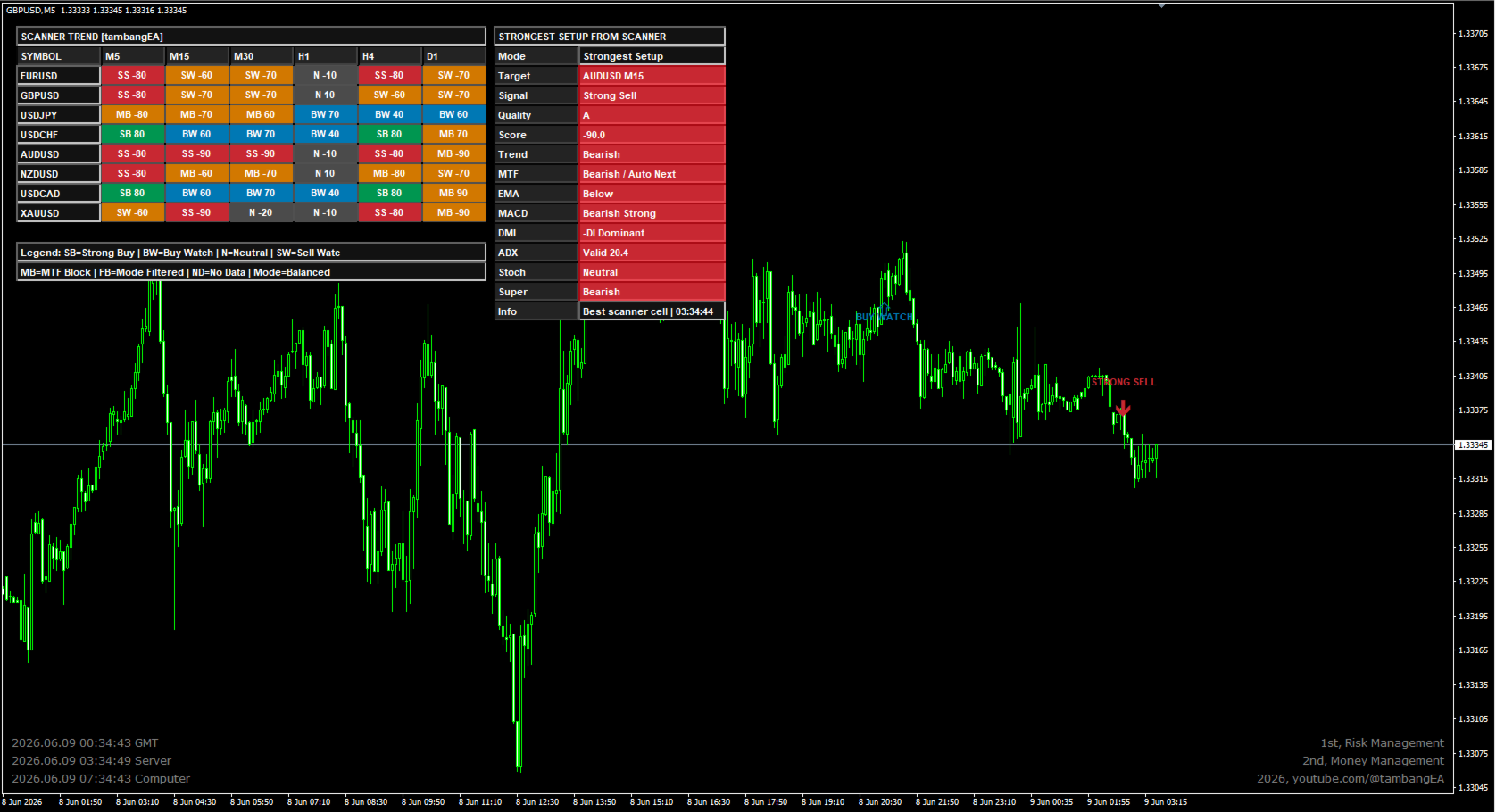
SCANNER TREND [tambangEA] is a professional dashboard indicator designed to help traders monitor multiple symbols and multiple timeframes from one clean visual interface.
The indicator combines trend direction, momentum, trend strength, pullback timing, higher-timeframe confirmation, and signal quality into a structured scanner dashboard. It is built for traders who want faster market scanning, clearer directional bias, and a more disciplined way to identify potential trading opportunities.
SCANNER TREND [tambangEA] does not open trades automatically. It is a decision-support tool that helps traders analyze market conditions more efficiently.
Main Concept
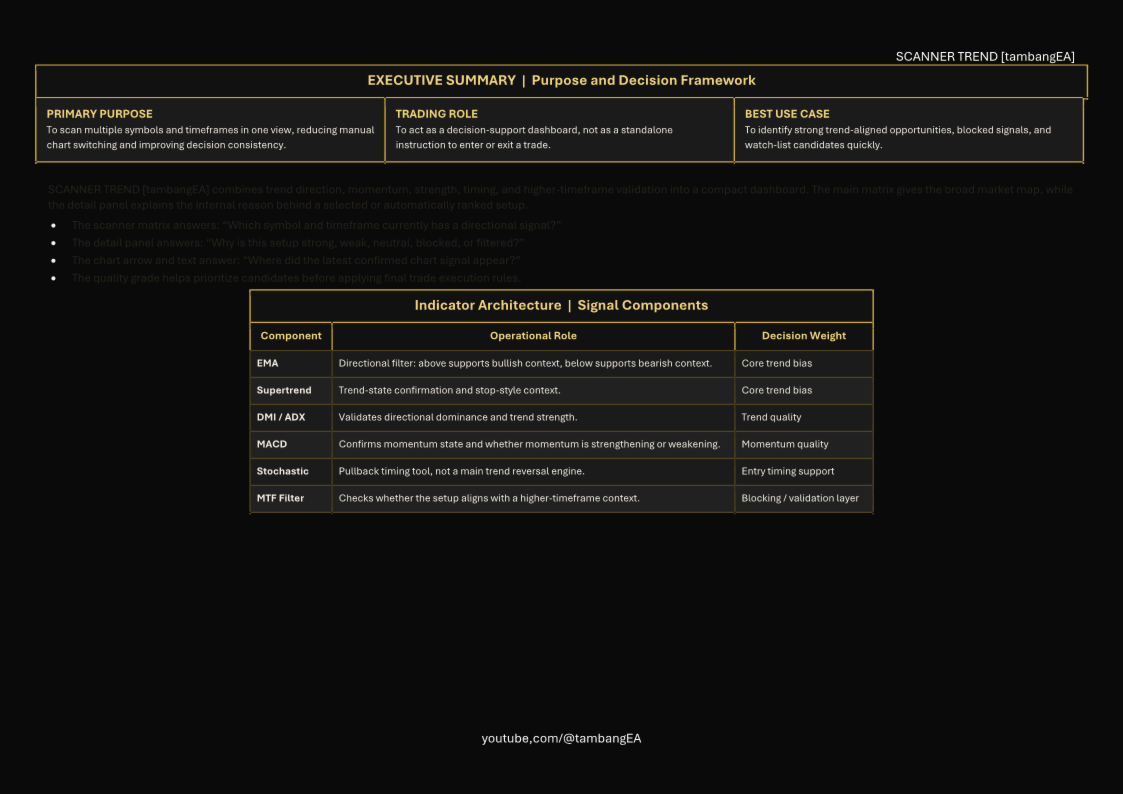
The scanner is designed around a practical trend-following workflow:
EMA is used as a trend filter.
Supertrend confirms the main market direction.
MACD measures momentum strength or weakening momentum.
DMI / ADX validates whether the market has sufficient trend strength.
Stochastic is used as a pullback timing tool, not as a standalone reversal signal.
MTF Filter helps confirm whether the lower-timeframe signal agrees with the higher-timeframe direction.
Normalized Score ranks the strength of each setup from bearish to bullish conditions.
This structure allows the trader to quickly identify whether a market is bullish, bearish, neutral, blocked by higher timeframe, or filtered by the selected signal mode.
Key Features
Multi-Symbol Scanner
Monitor several instruments from one dashboard, such as forex pairs, gold, indices, or other symbols available in your broker’s Market Watch.
Multi-Timeframe Scanner
Analyze multiple timeframes at once, for example:
M5
M15
M30
H1
H4
D1
This helps traders identify alignment or conflict between short-term and higher-timeframe conditions.
Matrix Dashboard
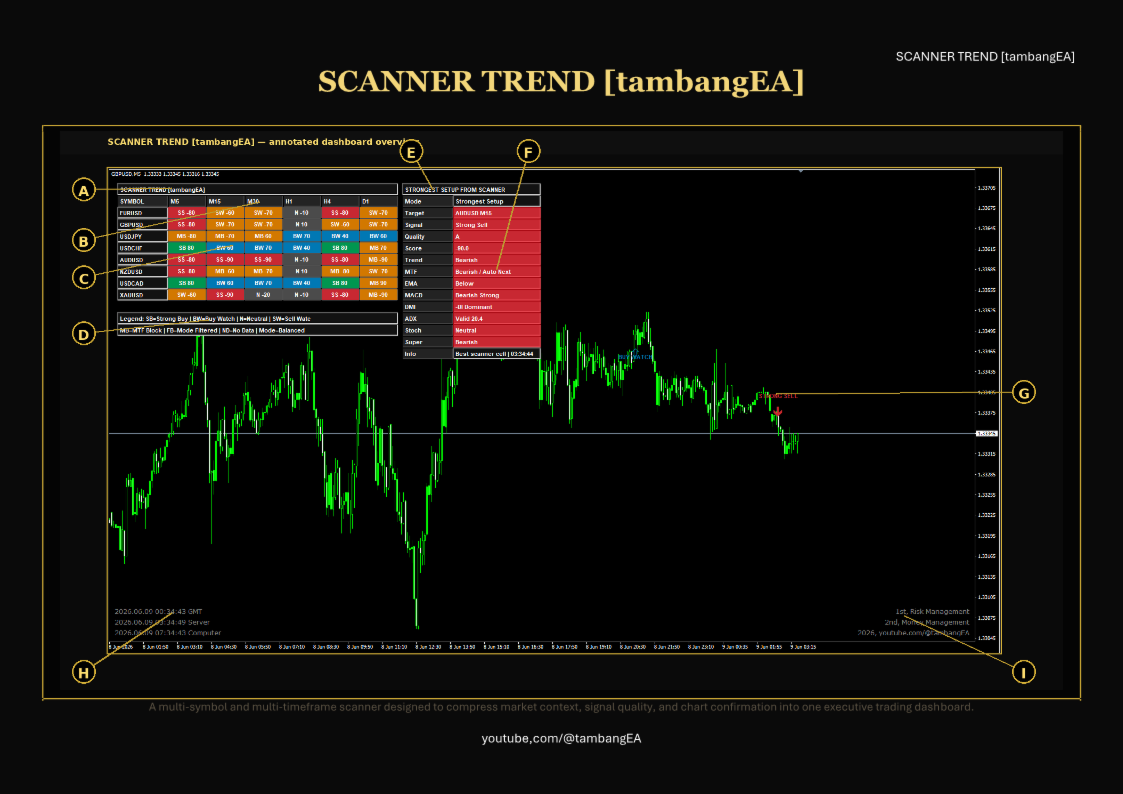
The dashboard displays symbols as rows and timeframes as columns. Each cell shows the current signal status and score.
Example:
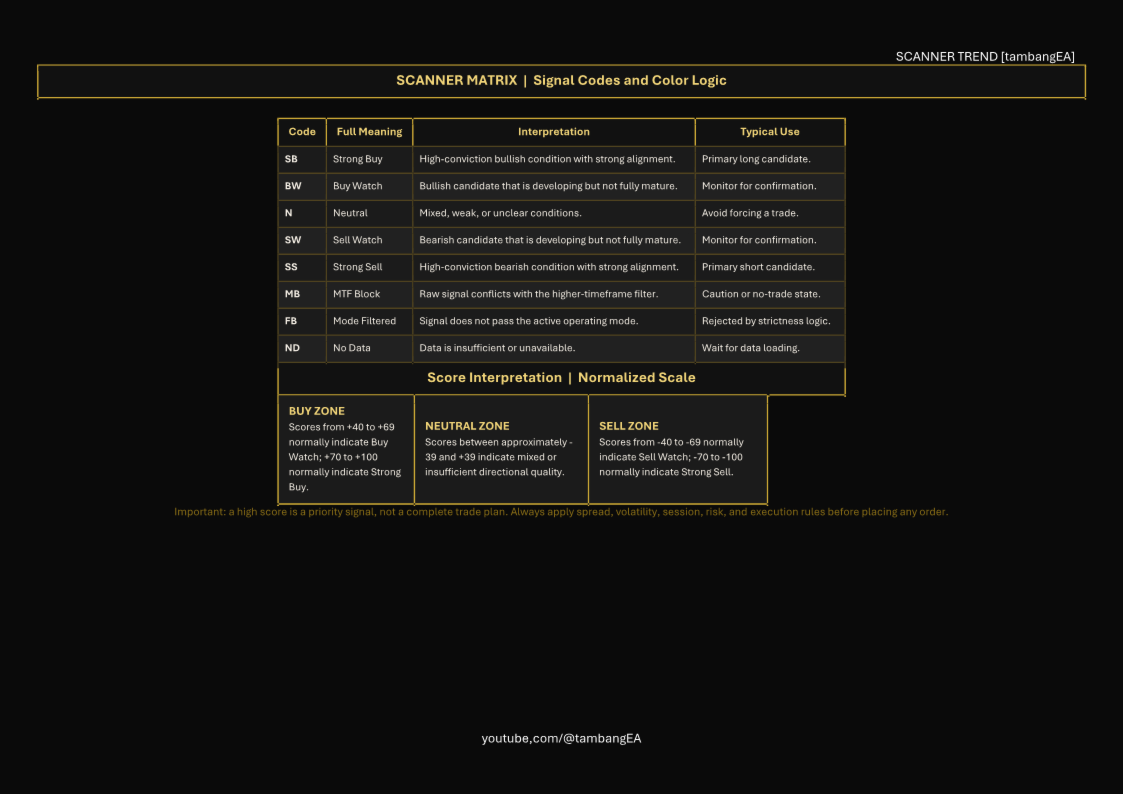
SB 90 = Strong Buy with score 90
SS -80 = Strong Sell with score -80
BW 60 = Buy Watch with score 60
SW -60 = Sell Watch with score -60
Signal Codes
SB = Strong Buy
BW = Buy Watch
N = Neutral
SW = Sell Watch
SS = Strong Sell
MB = MTF Block
FB = Mode Filtered
ND = No Data
Strongest Setup Panel
The indicator can automatically detect and display the strongest current setup from all scanned symbols and timeframes.
This panel shows:
Target symbol and timeframe
Final signal
Signal quality
Normalized score
Trend bias
MTF confirmation
EMA status
MACD status
DMI status
ADX strength
Stochastic timing
Supertrend direction
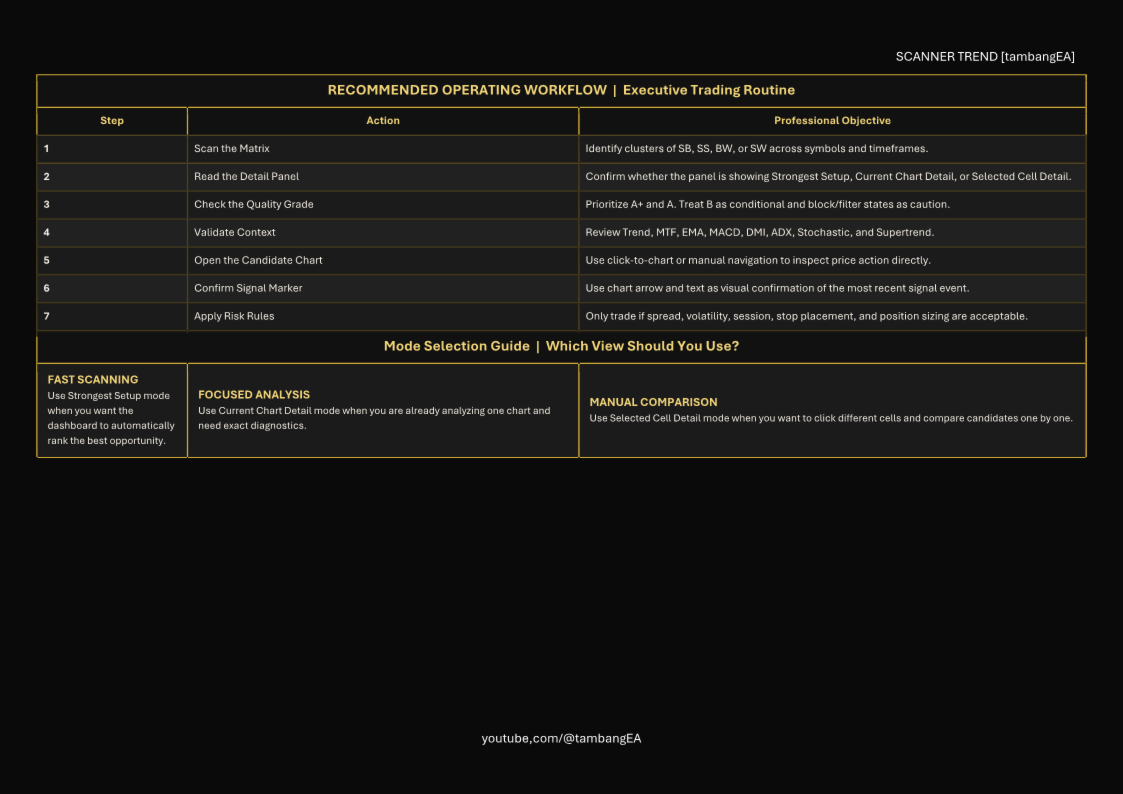
Three Detail Panel Modes
The detail panel can operate in three different modes:
Strongest Setup
Displays the best setup found across the entire scanner.
Current Chart Detail
Displays details for the currently opened chart symbol and timeframe.
Selected Cell Detail
Displays details for the scanner cell selected by the user.
This makes the dashboard flexible for both automatic scanning and manual review.
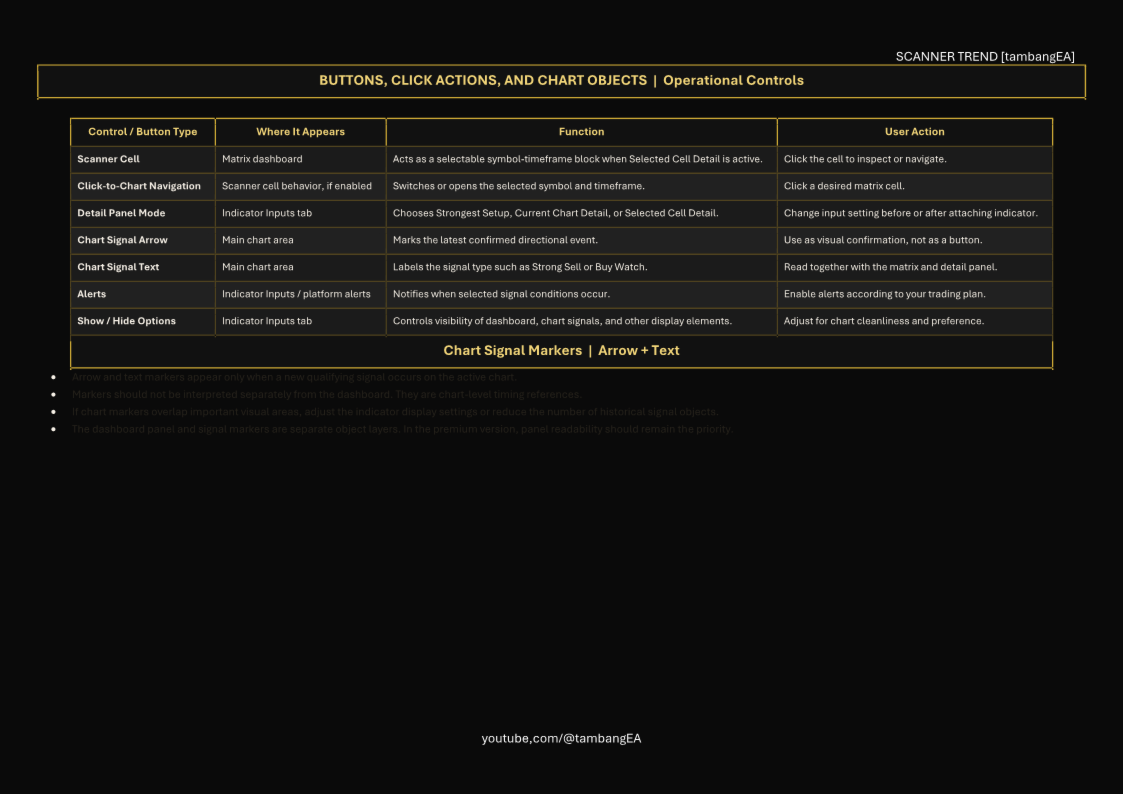
Chart Arrow and Text Signals
SCANNER TREND [tambangEA] can display arrow and text signals directly on the chart when a new signal appears.
Supported chart signals:
Strong Buy
Buy Watch
Sell Watch
Strong Sell
These chart objects help the trader visually review where the signal occurred on price action.
Signal Quality Grade
The scanner includes a quality grade system to help prioritize setups.
Examples:
A+ = Very strong setup
A = Strong valid setup
B = Watchable setup
C = Weak or neutral condition
MTF Block = Signal blocked by higher-timeframe filter
Mode Block / Filtered = Signal rejected by the selected signal mode
Signal Mode Options
The indicator supports different operating modes:
Aggressive – more sensitive signal reading
Balanced – standard recommended mode
Conservative – stricter filtering for higher-quality setups
This allows traders to adjust the scanner according to their trading style.