QuickBar Pro MT4

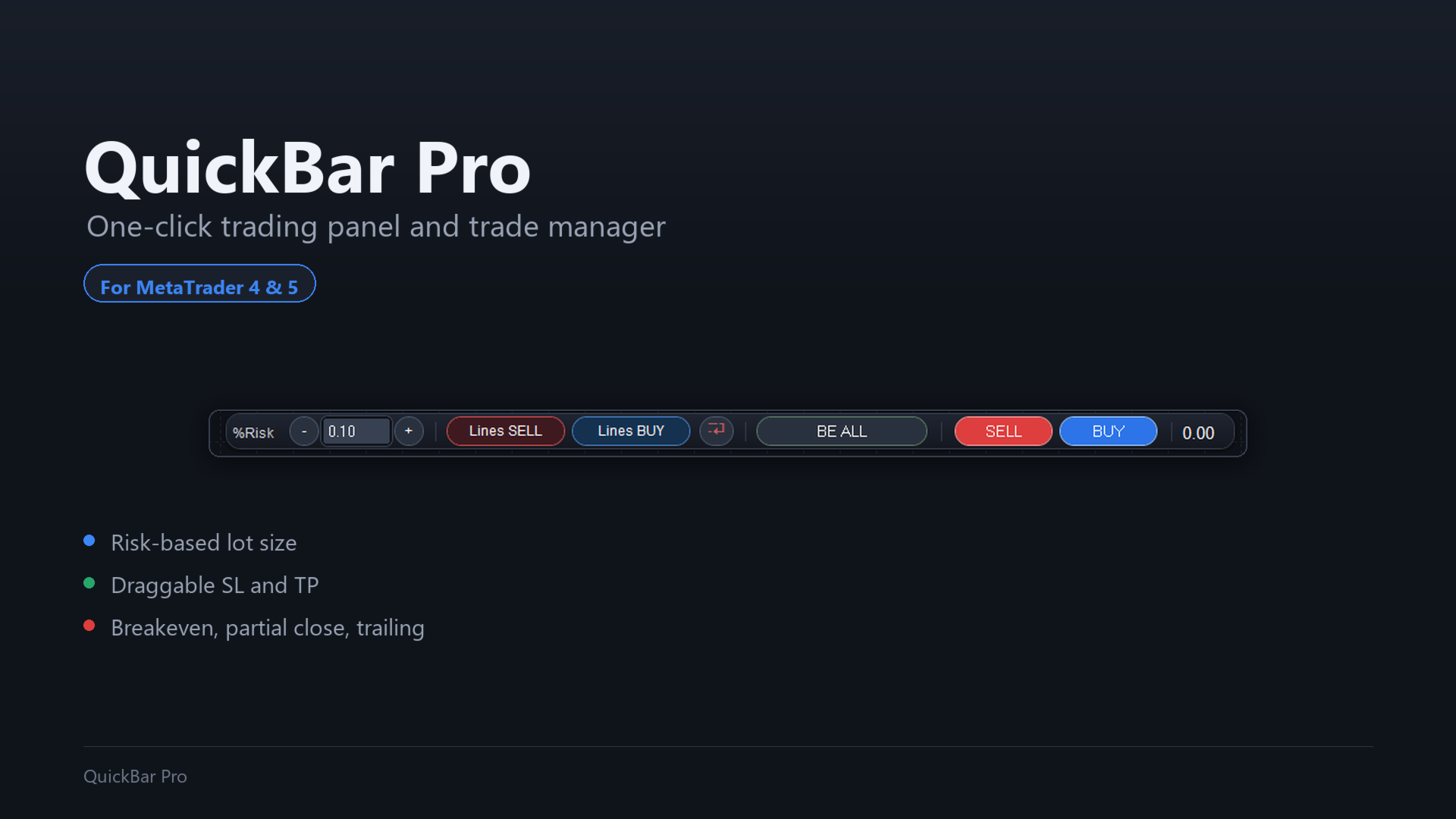
QuickBar Pro is a one-click trading panel and trade manager for MetaTrader 4: it calculates the lot size from your risk, lets you drag the SL and TP lines on the chart, and adds breakeven, partial close and trailing stop — all in a single line that never covers your chart.

Built for scalpers and day traders who decide fast and cannot afford distractions. No floating windows, no panel covering half the screen: a compact bar at the top of the chart with everything you need to place and manage a trade.

Position size that matches your risk

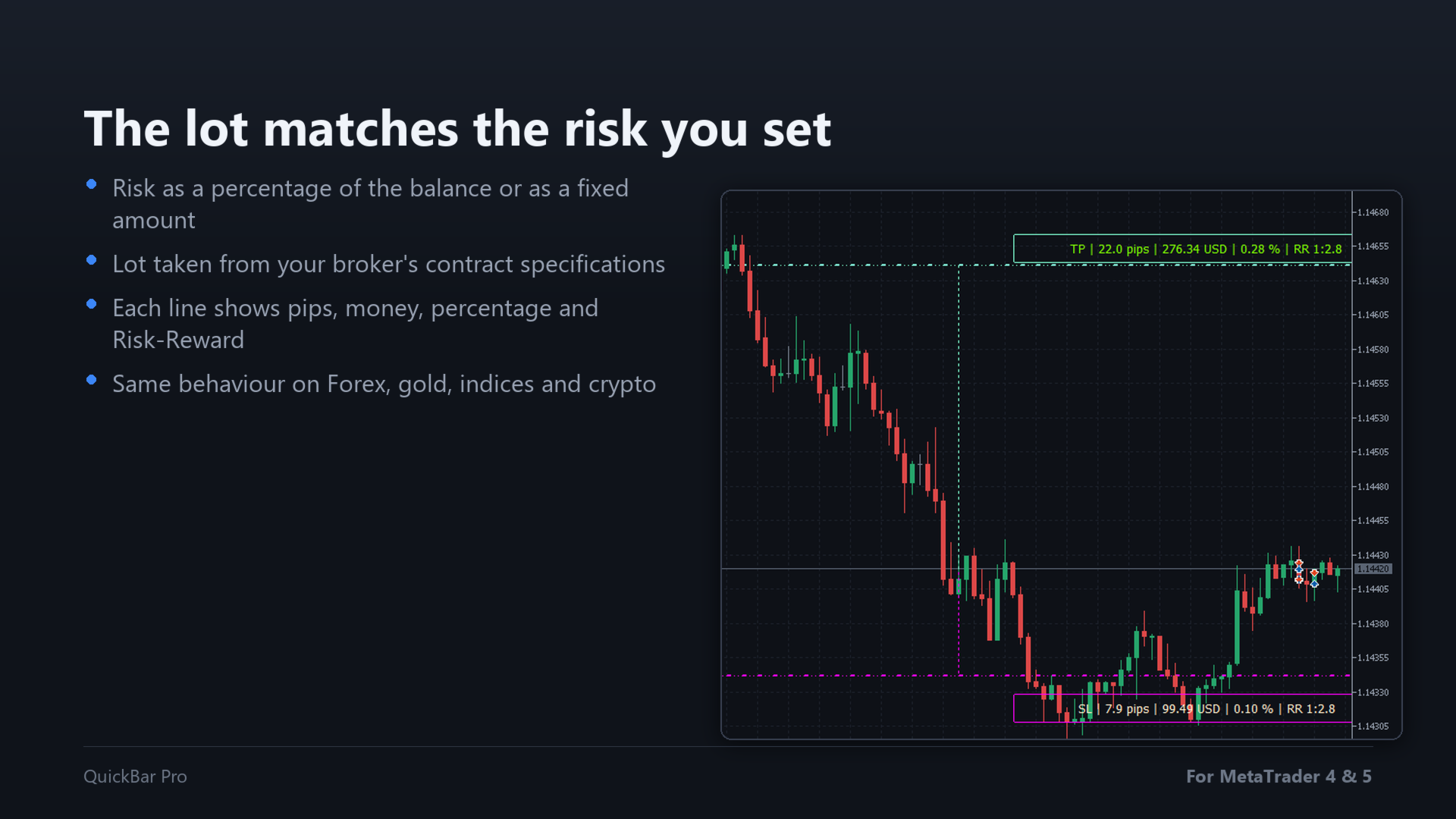
Type your risk as a percentage of the balance or as a fixed amount of money. The panel works out the lot size from your broker's own contract specifications, so the money you put at risk is what you asked for — on Forex, gold, indices or crypto alike. If the risk you set does not even reach the minimum lot, the panel tells you instead of trading a size you did not choose.

Stop Loss and Take Profit you can drag

Both lines are placed on the chart and you move them with the mouse. While you drag, each line shows the distance in pips, the money at stake, the percentage of your account and the Risk-Reward ratio, all updated in real time. Your risk setting is remembered between sessions.

One click to enter

BUY and SELL are always visible on the bar. No extra window, no dialog: the order goes out with the lot size and the levels you are already seeing on the chart.

Breakeven, partial close and trailing stop

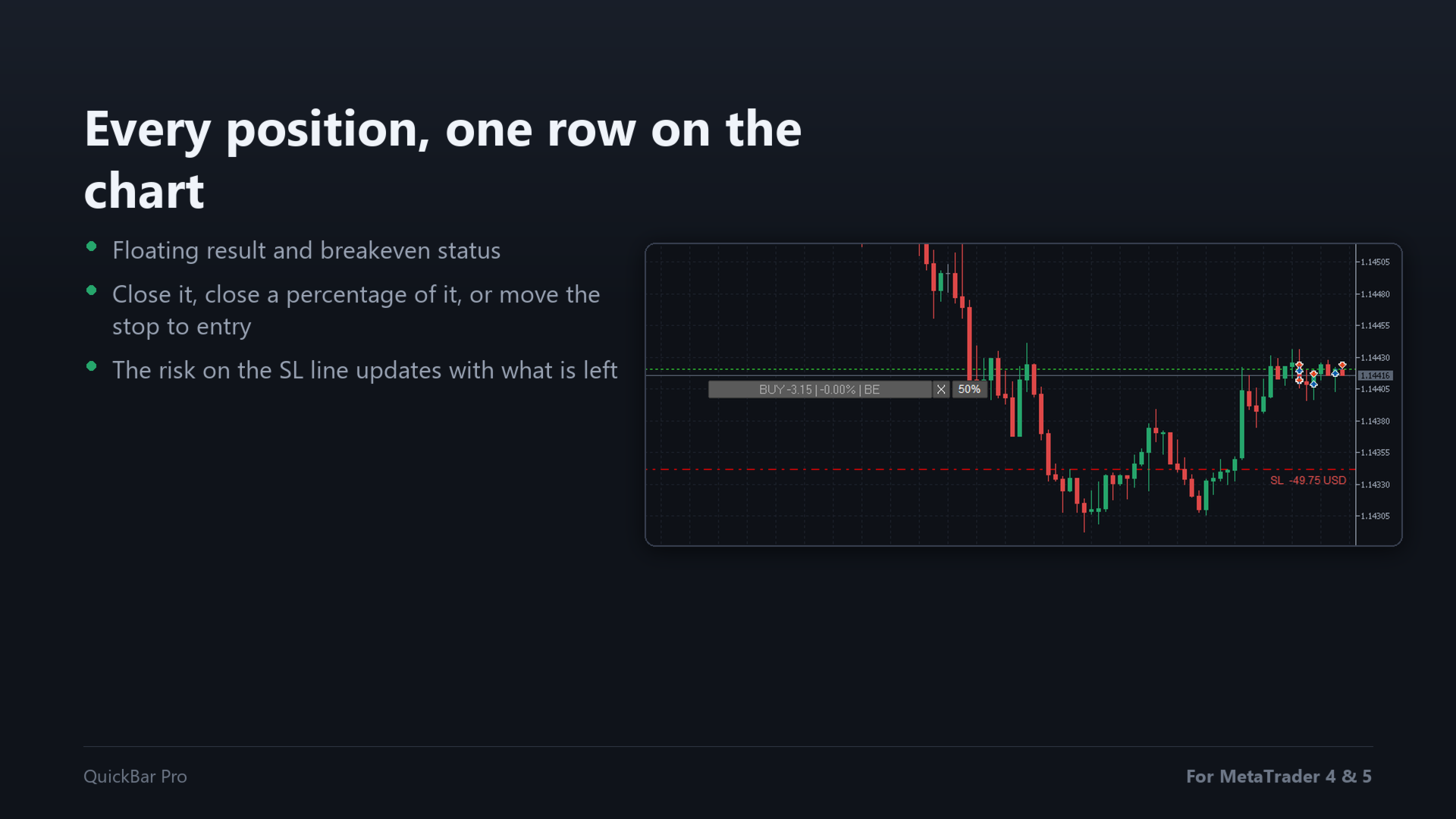
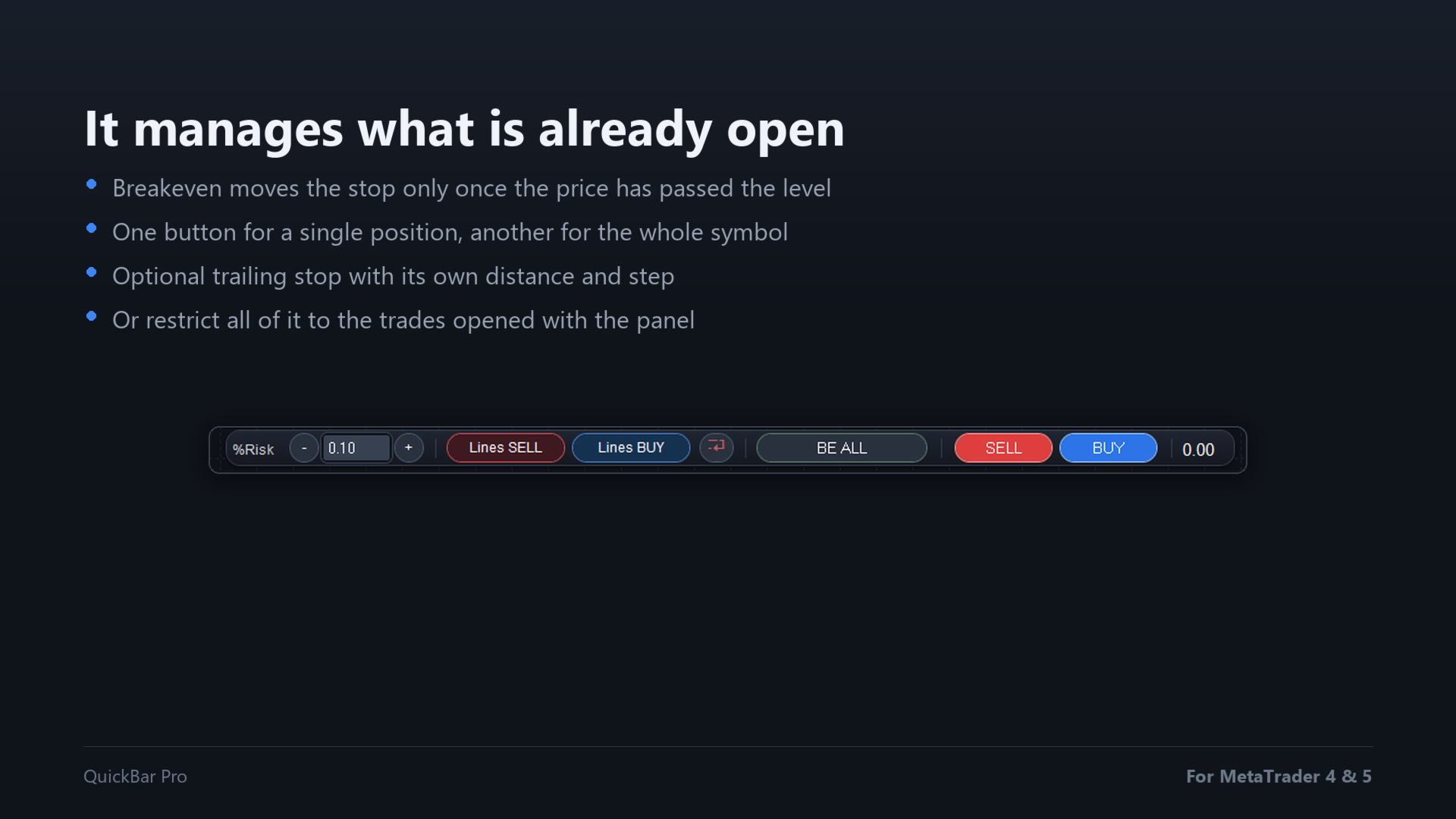
Each open position gets its own row on the chart with its floating result, a button to close it, a button to close a percentage of it, and a button to move the stop to the entry price. Breakeven only moves the stop once the price has really passed the level, so the broker never rejects it. There is also a breakeven button for every position of the symbol at once, and an optional trailing stop that follows the price at the distance you set.

Only the trades you want

The panel stamps its own magic number on every order it sends. Turn on the option to manage only its own trades and the monitor, the breakeven, the partial close and the trailing will leave alone anything opened by hand or by another Expert Advisor on the same chart.

It works in the Strategy Tester

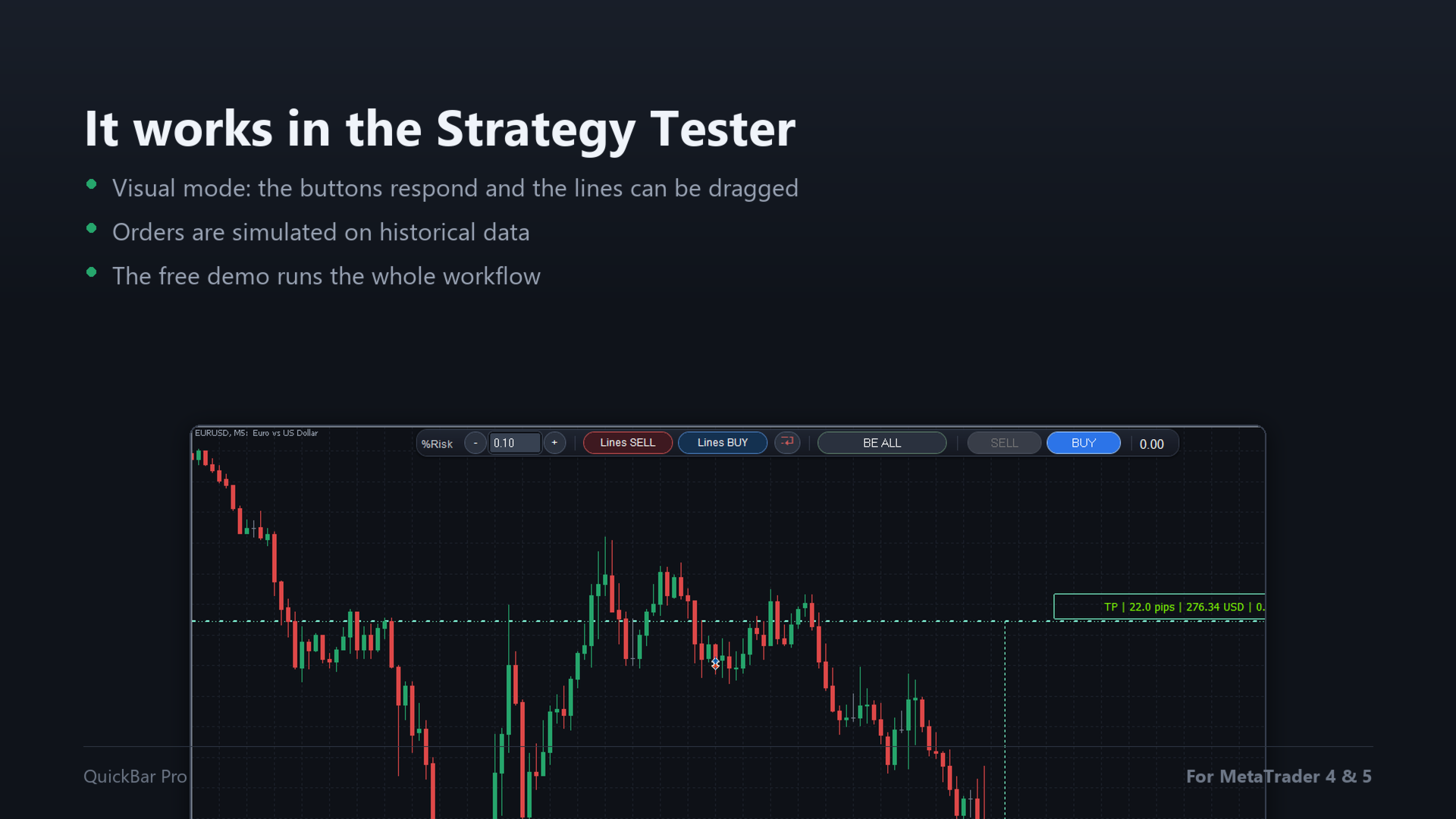
Run it in visual mode and the buttons respond, the lines can be dragged and the orders are simulated on historical data. The free demo of this product is therefore a real demo: you can try the whole workflow before buying.

Safety by design

  • Before sending an order the panel checks that the SL and the TP are on the right side of the price, and that the SL line is actually set.
  • If the broker rejects the order, your lines stay on the chart so you can correct and try again.
  • Clear messages on screen instead of silent failures.
  • Maximum slippage you decide.
  • The order filling policy of your broker is detected automatically.
  • The default MetaTrader 4 trade arrows and level lines are removed from the chart for the orders opened from the panel.

It stays out of the way

The bar re-centres itself when you resize the chart window, and it is drawn as a single image, so it is light even on slow machines and small screens.

Inputs

  • Risk mode — choose whether the risk you type is a percentage of the balance or a fixed amount of money.
  • Max slippage (points) — how much price movement you accept between the click and the fill.
  • Magic number for panel orders — the stamp the panel leaves on its own orders; change it only if another tool of yours already uses the same number (default 171590).
  • Manage only trades opened with this panel — when it is on, everything the panel manages is limited to its own orders.
  • Partial close button (% of position, 0 = off) — how much of the position the partial button closes; set it to zero and the button is not shown.
  • Trailing stop (points, 0 = off) — distance at which the stop follows the price once the trade is in profit.
  • Trailing step (points) — how far the price has to move before the stop is moved again.

Frequently asked questions

Does it work in the Strategy Tester?
Yes, in visual mode: the buttons respond and the lines can be dragged. That is what the free demo runs on.

Does the breakeven button touch trades opened by other EAs?
By default it manages every position of the chart symbol, however it was opened. Turn on "Manage only trades opened with this panel" and it will handle only its own trades.

Which symbols can I use it on?
Any symbol in your terminal: Forex, indices, metals and crypto. The lot size comes from your broker's contract specifications for that symbol.

Where is my risk setting stored?
In the terminal's global variables, so it survives closing the chart or the terminal.

Why is the lot size smaller than I expected?
Because it comes from your risk and the distance to the Stop Loss: the wider the stop, the smaller the lot for the same money. The panel also respects the minimum, maximum and step of your broker.

Does the trailing stop keep working if I close the terminal?
No. The trailing runs while the panel is on the chart, like any Expert Advisor.

Trading involves risk and can result in the loss of your capital. Try the panel on a demo account before using it live.

Compatibility

MetaTrader 4 · Forex, indices, metals and crypto.

Using MetaTrader 5? The other version is here: QuickBar Pro MT5.

Support

I answer every message. For any question about installation or settings, write to me through my MQL5 profile — I usually reply within 24 hours.

If QuickBar Pro speeds up your trading, please leave a review: it is what keeps the tool moving forward.

Keywords: trading panel, trade panel, trade manager, trade assistant, lot size calculator, position size calculator, risk manager, money management, one click trading, breakeven, partial close, trailing stop, scalping panel, gold, XAUUSD, prop firm
Recommended products
YK-Fibo Pivot Indicator: Trade Smarter with Fibonacci Pivot Points The YK-Fibo Pivot Indicator is a powerful technical analysis tool that combines the precision of Fibonacci retracements with the insights of Pivot Points. Whether you're a novice or seasoned trader, this indicator empowers you to spot profitable opportunities in the market with ease. Why Choose YK-Fibo Pivot? Pinpoint Support & Resistance: By calculating Fibonacci levels based on the previous day's high, low, and close prices, y
TradePilot
Hossein Khalil Alishir
TradePilot Expert Advisor (EA) for MetaTrader 4 TradePilot is a professional and user-friendly Expert Advisor (EA) for MetaTrader 4 (MT4) . It simplifies automated trading , risk management , and trade execution using a smart trading panel . Perfect for beginners and experienced traders looking for a reliable trade manager EA with automated lot size calculation . Key Advantages User-Friendly Trading Panel: Customizable panel with buttons and hotkeys. Smart Risk Management: Supports percen
Golden Gestion TP SL
Matthias Hubert Patrick Snidaro
Auto SL/TP Manager EA – Gestion Automatique Intelligente Auto SL/TP Manager EA est un Expert Advisor conçu pour automatiser la gestion des commandes avec une efficacité maximale et une grande discrétion. Il gère automatiquement : Le Stop Loss (SL) et le Take Profit (TP) Le Profit Lock (verrouillage progressif des bénéfices) Le Trailing Stop avec plusieurs méthodes avancées L' affichage masqué du SL et du TP pour plus de discrétion (non visible par le courtisan) C'est l'outil idéal pour les
This indicator is a great utilities tools for Fibonacci Trader that draw their chart manually. This indicator do not draw any Fibonacci Retracement or Fibonacci Expansion. It is a utilities tool for modifying the Fibonacci level for Fibonacci object manually drawn on the chart. Just draw using the Fibonacci Retracement or other Fibonacci tool in MT4 as per normal. The select the Fibonacci you have just drawn. Make sure you have only 1 object selected. Then open up this Fibonacci Level Management
This trading system requires the user to manually add Fibonacci, trend lines, horizontal lines, channel to perform semi-automatic or manual trading. The trading system can also be used in the tester. Trading panel provides: spread information margin information free marging Information The swap information to order for lots (requires your dealer support)
Price Ray MT4
Keni Chetankumar Gajanan -
4 (2)
Price Ray indicator is a utility that will improve the way you trade. Primarily, it shows the Bid, Ask or Last price as a line ray which beams till the current candle, last visible chart candle or extended to all candle bars. The enhanced features in this indicator provide information in an area where you focus most, right next to the current candle. You can select text to be shown above or below the Price ray. The indicator is fully customizable, allowing it to fit any strategy requirements. Th
FREE
Apex Fibo Tracer — Smart Auto-Fibonacci Tool Apex Fibo Tracer is a professional analytical indicator that automates one of the most powerful methods in technical analysis — Fibonacci retracement levels. By combining a high-precision ZigZag algorithm with dynamic Fibonacci plotting, the tool delivers instant and accurate visualization of market structure directly on your chart. Most traders lose valuable seconds manually adjusting Fibonacci grids during high volatility. Apex Fibo Tracer eliminate
Auto Fibo Pro m
DMITRII GRIDASOV
"Auto FIBO Pro"   Crypto_Forex  indicator  - is great auxiliary tool in trading! Indicator automatically calculate and place on chart Fibo levels and local trend lines (red color). Fibonacci levels indicate key areas where price can reverse. Most important levels are 23.6%, 38.2%, 50% and 61.8%. You can use it   for reversal scalping  or for zone grid trading. There are plenty of opportunities to  improve your current system using Auto FIBO Pro indicator as well. It has Info Spread Swap Displa
UTrailingMin
Viktor Shpakovskiy
The EA for manual trading to manage open positions.The built-in trailing stop has five modes and seven instruments. There is a virtual stop loss and a virtual take profit, which can be freely moved around the chart. With the help of the built-in trading simulator, you can check how the EA works in the strategy tester. Guide to UTrailingMin can be found in the "Comments" section. Benefits 5 trailing stop modes: virtual, normal, total, percentage and mobile stop loss; 7 options: by points, by bar
If you are looking for an indicator in the purest Tradingview style to plot your trades with Take Profit (TP) and Stop Loss (SL) as well as the entry point on the chart, Risk Reward Indicator is your indicator for Metatrader 4. This indicator, among many other functions, allows you to draw and simulate operations, as well as the risk ratio (RB) benefit and the pips that you can win or lose in that operation. In addition, this indicator includes a calculator where you can indicate the % of ris
Free automatic Fibonacci is an indicator that automatically plots a Fibonacci retracement based on the number of bars you select on the BarsToScan setting in the indicator. The Fibonacci is automatically updated in real time as new highest and lowest values appears amongst the selected bars. You can select which level values to be displayed in the indicator settings. You can also select the color of the levels thus enabling the trader to be able to attach the indicator several times with differe
FREE
Fibonacci retracements can be used to draw support lines, identify resistance levels, place stop-loss orders and set target prices. The Advanced Automatic Fibonacci retracements draws automatically all the levels. You have a lot of options to choose. For exemple you can use the tracements of another time frame (MTF) in the current chart, you can also choose between the closest level or less close to draw the retracements. You can also add 2 levels of your choice. You can add levels extensions o
Close Trades Premium MT4
Obiajulu Chukwudi Nwosa
Like you when I first started trading, It was overwhelming...learning about indicators, about lotsize, leverage and many more things. Its been almost 3 years. I am more knowledgeable in trading. My trading continues to improve as I work on my strategy, technical analysis, trading psychology and trade management. One thing I am not worried about though is being able to close my trades quicky if a trade goes against me or if the trade has reached my take profit level with the help of my Close Tra
Fibonacci SR Indicator
Martin Eshleman
5 (1)
Fibonacci SR Indicator This indicator creates support and resistance lines. This indicator is based on Fibonacci Retracement and Extension levels. It will consider many combinations of the Fibonacci levels and draw support/resistance lines based on these. This indicator uses tops and bottoms drawn by the ZigZag indicator in its calculations. The ZigZag can also be drawn on the chart, if necessary. The indicator considers many combinations of past reversal points and Fibonacci ratio levels, and w
FREE
Pivot Flow Pro
Jose Pinto
5 (1)
Pivot Flow Pro - Trend-structure market direction using pivot highs and lows to form a dynamic bull/bear band. Non-repainting trend-structure indicator that identifies market direction using averaged pivot highs and lows to form a dynamic bull/bear band, with signals confirmed strictly on closed candles. When price closes above or below the adaptive pivot levels, the indicator shifts trend and prints a flip arrow, while continuation dots highlight valid breakout points in the direction of the c
Fibonacci Levels Alert
Biswarup Banerjee
5 (2)
Fibonacci Alert MT4 is an advanced trading indicator designed to help traders identify key Fibonacci levels in real-time. By providing timely alerts when price approaches or breaks these critical levels, it empowers traders to make informed decisions and optimize their trading strategies. This indicator is beneficial for both novice and experienced traders, as it simplifies the complex task of tracking Fibonacci levels while offering essential notifications to prevent missed trading opportunitie
FREE
GoldenShield MT4
Aleksandr Bezverkhikh
Golden Shield – Account Protection Utility Golden Shield   is a professional risk management utility that automatically closes   ALL open positions   when your account equity falls below a critical level. It works as a "circuit breaker" for your trading account.   Key Features Feature Description Equity Protection Closes all positions when Equity ≤ STOP level Instant Monitoring Checks equity every 50 milliseconds – immediate reaction Interactive Panel Gainsboro panel with Teal ON / Red O
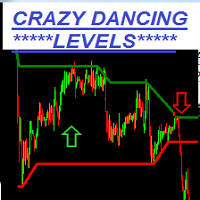
Crazy Dancing moving RES/SUP Levels Automatic redrawing of moving Supports and resistances levels  to indicate price breaking supports (signal SELL)  or breaking resistance levels (signal BUY) Very simple appearing indicator but very clever and smart too !!!! Main Inputs: # of bars for the support and resistances levels + the initial shift from start + moving average for filter signaling Smaller values for bars /shift inputs when using Higher Time frames (D1-H4) and the reverse higher values for
VR Cub
Vladimir Pastushak
VR Cub is an indicator for getting high-quality entry points. The indicator was developed to facilitate mathematical calculations and simplify the search for entry points into a position. The trading strategy for which the indicator was written has been proving its effectiveness for many years. The simplicity of the trading strategy is its great advantage, which allows even novice traders to successfully trade with it. VR Cub calculates position opening points and Take Profit and Stop Loss targe
The  SMC Venom Model BPR indicator is a tool for visual analysis of BPR/FVG zones within the Smart Money Concept (SMC). It automatically detects key price imbalance zones on the chart and allows you to analyze them not only on the current timeframe, but also in multi-timeframe mode. FVG   (Fair Value Gap) — a price imbalance zone detected from a three-candle structure, where an unfilled price area forms between the first and third candle. BPR   (Balanced Price Range) — a structure related to tw
Harvest GOLD
Sayan Vandenhout
Harvest GOLD USES THE TREND WAVE INDICATOR AND IT CAN IDENTIFY THE BEGINNING AND THE END OF A NEW WAVE TREND MOVEMENT. AS AN OSCILLATOR, THE INDICATOR IDENTIFIES THE OVERBOUGHT AND OVERSOLD ZONES. IT WORKS GREAT TO CATCH THE SHORT TERM PRICE REVERSALS AND USES A MARTINGALE STRATEGY TO CLOSE ALL TRADES IN PROFIT. USE DEFAULT SETTINGS ON H1 OR HIGHER TIME FRAME ON ANY PAIR FOR MORE ACCURATE TRADES WHY THIS EA : Smart entries calculated by 3 great strategies The EA can be run on even a $30000
Quick Funding in Prop Trading Firms
Abdeljalil El Kedmiri
4.85 (27)
This EA is designed to pass challenges of prop firms (proprietary trading firm) that allow use of High and Low Frequency trading strategies. A Gift i ncluded in this expert    :   Range Breakout strategy  that identify daily support and resistance levels and initiating both Long and Short trades automaticly at these key points. We use special HFT strategy that detect large movements and employ stop loss to protect your equity. It has build-in equity protector which will stop the EA once the pro
RelicusRoad Daily Pivots is a daily pivot points indicator for MetaTrader 4 and MetaTrader 5 that divides the previous day's range into Fibonacci levels and extends them above and below it, from minus 100 to plus 200 percent. Instead of classic floor pivots, the previous completed range is treated as a scale where the low is 0% and the high is 100%. Nineteen levels are printed as compact colored markers at the right edge of the chart, so the size of today's move reads as a fraction or a multiple
FREE
FiboRec
Alfred Kamal
This indicator depends on Fibonacci lines but there is a secret lines i used them, by using FiboRec indicator you will be able to know a lot of important information in the market such as: Features You can avoid entry during market turbulence. You can enter orders in general trend only. You will know if the trend is strong or weak. Signal Types and Frame used You can use this indicator just on H1 frame. Enter buy order in case Candle break out the square area and closed over it, at least 20 pi
Mr. Beast King Indicator No Repaint: Un Enfoque Revolucionario para Señales de Compra y Venta ¡Bienvenido al futuro del trading con el indicador Mr. Beast King! Este innovador indicador utiliza algoritmos avanzados para proporcionar señales de compra y venta precisas y sin repintado, permitiéndote tomar decisiones informadas en tus operaciones financieras. Características Principales: Precisión Inigualable : El indicador Mr. Beast King ha sido meticulosamente diseñado para ofrecer señales precis
Tester binary indicators by Veles is a tool that checks the signals of any Meta Trader 4 indicator. Main functions: Ability to select buffers of the required indicator to receive BUY and SELL signals. Ability to select the required expiration time based on indicator signals. Possibility to select the operating time range of the required indicator. Possibility to choose the trading verification scheme that is optimal for you (without martingale, martingale by candles, martingale by signal). Abil
Here is a utility that helps automatically setup stoploss, takeprofit and trailing stops for hand trades. This is not an auto-trading EA, it only supports manual trading of orders, helping you to better monitor your account management. Irrespective of symbol, server, timeframe. SETUP: On/Off: On or Off EA Take profit points:  take profit value in points Stoploss points:  s toploss   value in points Average price of all orders of one type:  when this function is enabled, the average take profit f
Virtual Collider Manual   is a trading assistant with a built-in panel for manual trading. It automatically moves a position opened by a trader in profit using innovative adaptive grid algorithm of averaging and adaptive pyramiding Know-how of the grid algorithm of averaging and pyramiding of the   Virtual Collider Manual   trading robot is based on fully automatic adaptation of all characteristics of dynamically build order grid and pyramid with actual price movement with no need for adjusting
mql5 version:  https://www.mql5.com/en/market/product/44815 Simple indicator to calculate profit on fibonacci retracement levels with fixed lot size, or calculate lot size on fibonacci levels with fixed profit. Add to chart and move trend line to set the fibonacci retracement levels. Works similar as default fibonacci retracement line study in Metatrader. Inputs Fixed - select what value will be fix, lot or profit Fixed value - value that will be fix on all levels Levels - levels for which to ca
VTB Open Positions – SL Risk Panel (MT4) Advanced Risk Management Dashboard for Open Positions VTB Open Positions – SL Risk Panel is a professional risk management indicator for MetaTrader 4 that continuously monitors all open positions and instantly displays the real risk and potential profit associated with Stop Loss and Take Profit levels. The indicator provides traders with a complete overview of their portfolio exposure, helping them make informed risk management decisions in real time. Wha
Buyers of this product also purchase
Forex Trade Manager MT4
InvestSoft
4.98 (446)
Trade Manager MT4 is an advanced position size calculator and trade management tool for MetaTrader 4, designed to help traders plan trades faster, control risk more precisely, and manage open positions directly from the chart. It combines order placement, risk based lot calculation, Stop Loss and Take Profit management, Break Even, Trailing Stop, Partial Close, Equity Protection, and external trade management in one panel. Whether you trade forex, indices, metals, commodities, or crypto, Trade M
Local Trade Copier EA MT4
Juvenille Emperor Limited
4.96 (111)
Local Trade Copier EA MT4 is a fast and flexible trade copier for copying and managing trades between multiple MetaTrader 4 accounts on the same Windows computer or Windows VPS. It combines local trade synchronization with Receiver-side controls for lot sizing, risk management, trade filtering, symbol mapping, trade management and account protection. Set up your Transmitter and Receiver terminals in about 1 minute and copy manual or EA trades between accounts at the same or different brokers. U
Trade Indicator Assistant is a powerful MT4 utility designed to turn indicators into automated trading systems. Its main feature is the ability to automatically detect an indicator’s   BUY and SELL signal buffers , without requiring you to know the buffer numbers, search through indicator settings, or modify the indicator source code. Bonus Indicator: After purchasing Trade Indicator Assistant, contact me to receive Trade Signal Pro completely free as a bonus indicator. [Download Demo Version]
Trade Assistant MT4
Evgeniy Kravchenko
4.43 (197)
It helps to calculate the risk per trade, the easy installation of a new order, order management with partial closing functions, trailing stop of 7 types and other useful functions. Additional materials and instructions Installation instructions   -   Application instructions   -   Trial version of the application for a demo account Line function -   shows on the chart the Opening line, Stop Loss, Take Profit. With this function it is easy to set a new order and see its additional characteris
Exp COPYLOT CLIENT for MT4
Vladislav Andruschenko
4.69 (65)
Professional Trade Copier for MetaTrader 4 Fast, professional, and reliable trade copier for MetaTrader 4 . COPYLOT helps you copy Forex trades between MetaTrader 4 and MetaTrader 5 terminals with flexible synchronization for different account setups. COPYLOT MT4 version supports: MetaTrader 4 to MetaTrader 4 MetaTrader 5 Hedge to MetaTrader 4 MetaTrader 5 Netting to MetaTrader 4   MT5 version Full Description + DEMO + PDF How To Buy How To Install How to get Log Files How To Test and Optimize A
Telegram to MT4 Multi-Channel Copier   automatically copies trading signals from your Telegram channels straight to MetaTrader 4. No bots, no browser extensions, no manual copying. A signal arrives in Telegram and the EA opens the trade in your terminal within seconds. And before you copy a channel, the built-in backtester shows you what that channel would have done in your account. The product has two components: a Windows application that listens to your Telegram channels, and this Expert Advi
Take a Break
Eric Emmrich
5 (31)
Take a Break pauses your Expert Advisors when trading is a bad idea: before news, after a daily loss, outside your trading hours, or when a rule you wrote yourself says so. When the pause is over, your EAs simply continue. Account protection for all your EAs in one tool: news filter, drawdown and equity protection, time filter and custom rules. One EA on one chart protects the whole account, the free indicator gives every chart its own rules on top. Free demo | What is new in 26.09 | Support Ass
Trade Manager MT4 DaneTrades
Levi Dane Benjamin
4.09 (11)
DaneTrades Trade Manager is a professional trade panel for MetaTrader 4, designed for fast, accurate execution with built‑in risk control. Place market or pending orders directly from the chart while the panel automatically calculates position size from your chosen risk, helping you stay consistent and avoid emotional decision‑making. The Trade Manager is built for manual traders who want structure: clear risk/reward planning, automation for repeatable management, and safeguards that help reduc
Smart Copy Local MT4
Kyra Nickaline Watson-gordon
5 (7)
Smart Copy is an Easy-to-Use EA that supports Multi Copying Metatrader4 and Metatrader5 and Local/Remote Copying. (Remote Version is coming soon) Free version is available on Smart Copy Local Free MT4 Specifications :     Real Time, Multi Terminal - Multi Account - MT4/MT5 trade copying     Copy from netting to hedge and hedge to netting is supported.     Fast and instant copy     All settings are input visually.     Easy modifying symbol names, prefix, suffix     Enable/Disable copying s
Fibo Heart Expert Advisor
Mohd Khairol Amin Ramli
Want automatically to put the pending order, take profit and stop loss? This EA will do it on your behalf! The Fibo Heart EA strategy will place limit order after the ‘check point’ breakout. The position will be triggered when the price make a successful retest. If not, the pending order will automatically deleted after price hit certain level. You also have option to enable market order (instant execution) and custom take profit in the inputs setting. This EA must be attached with Fibo Heart In
MT4 to Telegram Signal Provider   turns your trading account into a signal provider. Every trade action, whether manual, by EA or from your phone, is instantly sent as a message to Telegram. You can fully customize the format or use a ready-made template for quick setup. [ Demo ] [ Manual ] [ MT5 Version ] [ Discord Version ]  New: [ Telegram To MT5 ] Setup A step by step user guide is available. Key Features Ability to customize order details sent to subscribers You can create a tiered subs
King Trade Copier MT4
Mohammed Maher Al-sayed Mohammed Ahmed Saleh
5 (1)
King Trade Copier connects MetaTrader terminals that run on the same computer or VPS. Trades opened on one account appear on the others. The file carries both roles, so the same download becomes the sender or a receiver depending on what you set Mode to. On every chart the panel states whether this terminal is sending or receiving, names the account on the other side, counts the receivers that answered, and gives the age of the last signal. An order that was not copied leaves its reason on the
TradePanel MT4
Alfiya Fazylova
4.84 (95)
Trade Panel is a multi-functional trading assistant. The app contains over 50 trading functions for manual trading and allows you to automate most trading tasks. Application instructions: https://www.mql5.com/en/blogs/post/756482 Trial version of the application for a demo account: https://www.mql5.com/en/blogs/post/750865 How to install the application: https://www.mql5.com/en/blogs/post/756239 How to test the application in visual mode: https://www.mql5.com/en/blogs/post/770277 How to install
VirtualTradePad mt4 Extra
Vladislav Andruschenko
4.85 (61)
Trading Panel for trading in 1 click.  Working with positions and orders!  Trading from the chart or the keyboard. Using our trading panel, you can trade in one click from the chart and perform trading operations 30 times faster than the standard MetaTrader control. Automatic calculations of parameters and functions that make life easier for a trader and help a trader conduct their trading activities much faster and more conveniently. Graphic tips and full information on trade deals on the chart
Copier->Convenient and fast interface interaction, users can use it right away   ->>>> Recommended to use on Windows computers or VPS Windows Features: Diversified and personalized copy trading settings: 1. Different lot modes can be set for different signal sources 2. Different signal sources can be set for forward and reverse copy trading 3. Signals can be set with comments 4. Whether to calibrate the lot according to the contract lot Diversified and personalized copy order settings 2: 1. Dif
Working Trial Download Copy Cat More Trade Copier MT4 is not just a simple local trade copier; it is a complete risk management and execution framework designed for today’s trading challenges. From prop firm challenges to personal portfolio management, it adapts to every situation with its blend of robust execution, capital protection, flexible configuration, and advanced trade handling. The copier works in both   Master (sender) and Slave (receiver)   modes, with real-time synchronization of
Multi Copy
Kaijun Wang
5 (1)
Copier->Convenient and fast interface interaction, users can use it right away   ->>>> Recommended to use on Windows computers or VPS Windows Basic functions: The normal interaction speed of copy trading is less than 0.5s Automatically detect signal sources and display a list of signal source accounts Automatically match symbols, 95% of commonly used trading symbols on different platforms (special cases such as different suffixes) are automatically matched, basically no manual settings are requ
Risk manager Risk manager - it will simplify the tracking of drawdown and will notify you (alert) when the specified risk is reached, and close/lock orders when the critical DD risk level is reached. If the specified drawdown is exceeded, you can choose two options for actions: All orders will be closed that mean loss will be fixed on depo. The terminal also closes. Instead of fixing the loss on depo, the opposite order will be opened - orders locking will occure. Not a single order will be c
Trade Dashboard MT4
Fatemeh Ameri
4.96 (54)
Trade Dashboard simplifies how you open, manage, and control your trades, with built-in lot size calculation. It allows you to execute trades, manage risk, and control positions directly on the chart, with tools such as partial close, breakeven, and trailing stop. Designed to reduce manual work and help you stay focused on your trading decisions. A demo version is available for testing. Detailed explanations of features are provided within the MQL5 platform. Installation instructions are include
The product will copy all telegram signal to MT4   ( which you are member  ) , also it can work as remote copier.  Easy to set up, copy order instant, can work with almost signal formats, image signal, s upport to translate other language to English Work with all type of channel or group, even channel have "Restrict Saving Content", work with  multi channel, multi MT5 Work as remote copier: with signal have ticket number, it will copy exactly via ticket number. Support to backtest signal. How to
News Filter EA MT4
Rashed Samir
5 (10)
News Filter EA: Advanced Algo Trading Assistant News Filter EA is an advanced algo trading assistant designed to enhance your trading experience. By using the   News Filter EA , you can integrate a Forex economic news filter into your existing expert advisor, even if you do not have access to its source code. In addition to the news filter, you can also specify   trading days   and   hours   for your expert. The News Filter EA also includes   risk management   and   equity protection   features
Unlimited Trade Copier Pro is a tool to copy trade remotely to multiple MT4, MT5 and cTrader accounts at different computers/locations over internet. This is an ideal solution for you if you are a signal provider and want to copy your trades to other receivers globally on your own rules. One provider can copy trades to multiple receivers and one receiver can get trade from multiple providers as well. The provider can even set the subscription expiry for each receiver, so that receiver will not b
Bar Replay MT4
Hoang The Manh
3.43 (7)
Don't purchase before testing the Demo version first. DEMO version:   https://www.mql5.com/en/market/product/76917 __________________________________________________ This EA  - Tool allow you replay bar in Meta Trader 4 for back test. This Tool can back test in multi timeframe in only one chart. This Tool is very useful for Price action trader. It can work with Indicators, some indicators cannot works. So please download Demo to test before purchase.  Demo Version We do not accept refund in any
This is a program in the form of an EA that attaches to a chart in MetaTrader 4. Then, by using API from Bittrex, Binance websites, it downloads the history of altcoins. By selecting a pair name, the EA automatically downloads all time frames history (Daily,H12,H4,H2,H1,M30,M15,M5,M3,M1) so there is no need to attach multiple EAs to different charts. You can select one pair from Bittrex and 4 pairs from Binance exchange with one running EA and create up to 15 timeframes for 5 different pairs. Th
Strategy Builder offers an incredible amount of functionality. It combines a trade panel with configurable automation (covert indicators into an EA), real-time statistics (profit & draw down) plus automatic optimization of SL, TP/exit, trading hours, indicator inputs. Multiple indicators can be combined into an single alert/trade signal and can include custom indicators, even if just have ex4 file or purchased from Market. The system is easily configured via a CONFIG button and associated pop-up
Grid Manual MT4
Alfiya Fazylova
4.71 (17)
Grid Manual is a trading panel for working with grid strategies. The utility is universal, has flexible settings and an intuitive interface. It works with a grid of orders not only in the direction of averaging losses, but also in the direction of increasing profits. The trader does not need to create and maintain a grid of orders, the utility will do it. It is enough to open an order and the Grid manual will automatically create a grid of orders for it and will accompany it until the close. Ful
Zone Trader MT4
Lee Samson
5 (1)
Trade support and resistance or supply and demand zones automatically once you have identified the key areas you want to trade from. This EA allows you to draw buy and sell zones with a single click and then place them exactly where you expect price to turn. The EA then monitors those zones and will automatically take trades based on price action you specify for the zones. Once the initial trade is taken, the EA will then get out in profit at the opposite zone you place, which becomes the target
PZ Trade Pad Pro MT4
PZ TRADING SLU
3.67 (3)
Effortlessly calculate lot sizes and manage trades to save time and avoid costly errors The Trade Pad Pro EA is a tool for the Metatrader Platform that aims to help traders manage their trades more efficiently and effectively. It has a user-friendly visual interface that allows users to easily place and manage an unlimited number of trades, helping to avoid human errors and enhance their trading activity. [ Installation Guide | Update Guide | Troubleshooting | FAQ | All Products ] One of the k
X2 Copy MT4
Liubov' Shkandrii
Fast. Accurate. Innovative. Tech-Driven. Discover instant trade copying with the revolutionary X2 Copy MT4. With just a 10-second simple setup, you'll get a powerful tool for syncing trades between MetaTrader terminals on a single computer or Windows VPS with unprecedented speed. Whether you're managing multiple accounts, following signals, or scaling your strategy, X2 Copy MT4 adapts to your workflow with unparalleled precision and control. Work faster and more reliably with the most tech-drive
TradeMirror is a trade copier EA for MT4/MT5 platform. Tutorial Please click the Trademirror Tutorial link to view more tutorials. Why TradeMirror We understand the importance of security, stability and privacy for financial software, so we've gone the extra mile to harden these three elements in detail: Provides a user-friendly graphical interface that is easy to operate Focus on privacy and security, suitable for various financial scenarios with privacy requirements for order distribution Prec
More from author
Telegram to MT5 MultiChannel Copier
Sergio Marquez Uroz
4.61 (18)
Telegram to MT5 Multi-Channel Copier   automatically copies trading signals from your Telegram channels straight to MetaTrader 5. No bots, no browser extensions, no manual copying. A signal arrives in Telegram and the EA opens the trade in your terminal within seconds. And before you copy a channel, the built-in backtester shows you what that channel would have done in your account. The product has two components: a Windows application that listens to your Telegram channels, and this Expert Advi
Telegram to MT4 Multi-Channel Copier   automatically copies trading signals from your Telegram channels straight to MetaTrader 4. No bots, no browser extensions, no manual copying. A signal arrives in Telegram and the EA opens the trade in your terminal within seconds. And before you copy a channel, the built-in backtester shows you what that channel would have done in your account. The product has two components: a Windows application that listens to your Telegram channels, and this Expert Advi
Multi Account Local Trade Copier is a fast local trade copier for MetaTrader: copy trades between MT4/MT5 terminals running on the same Windows PC or VPS, from one master account to multiple receiver accounts — your own real, demo and prop firm accounts, at the same broker or at different ones. It is event-driven : the master publishes every trade the instant it happens, and the receiver measures and logs the real copy latency of every single trade — typically 50-150 ms . No DLLs, no internet br

ThemeManager
Sergio Marquez Uroz
ThemeManager   changes the color scheme of every open chart in MetaTrader 5 with one click. Pick one of 8 professional chart themes — dark mode, light mode, webtrader style and more — or design your own Custom theme with 13 color pickers. No more setting chart colors one by one: a small panel on the chart restyles all your charts at once. ThemeManager is completely free — every theme and every feature, no limits. More trading tools How it works Attach ThemeManager to any chart (Navigator → Indic
FREE
AutoJournal MT4
Sergio Marquez Uroz
Your trading journal, written for you. Every closed trade is logged automatically — with a chart screenshot, full statistics and a calendar dashboard. 100% local, no subscriptions. AutoJournal is a utility that runs silently in the background and turns your trading history into a professional HTML journal. No manual data entry, no spreadsheets, no external services: everything is generated and stored on your own computer, and it works the same whether you trade manually or with EAs. What gets re
Multi Account Local Trade Copier is a fast local trade copier for MetaTrader: copy trades between MT4/MT5 terminals running on the same Windows PC or VPS, from one master account to multiple receiver accounts — your own real, demo and prop firm accounts, at the same broker or at different ones. It is event-driven : the master publishes every trade the instant it happens, and the receiver measures and logs the real copy latency of every single trade — typically 50-150 ms . No DLLs, no internet br

QuickBar Pro MT5
Sergio Marquez Uroz
QuickBar Pro is a one-click trading panel and trade manager for MetaTrader 5: it calculates the lot size from your risk, lets you drag the SL and TP lines on the chart, and adds breakeven, partial close and trailing stop — all in a single line that never covers your chart. Built for scalpers and day traders who decide fast and cannot afford distractions. No floating windows, no panel covering half the screen: a compact bar at the top of the chart with everything you need to place and manage a tr

AutoJournal MT5
Sergio Marquez Uroz
Your trading journal, written for you. Every closed trade is logged automatically — with a chart screenshot, full statistics and a calendar dashboard. 100% local, no subscriptions. AutoJournal is a utility that runs silently in the background and turns your trading history into a professional HTML journal. No manual data entry, no spreadsheets, no external services: everything is generated and stored on your own computer, and it works the same whether you trade manually or with EAs. What gets re
One EA. Four uncorrelated strategies. One risk setting. Aureon Multi-Strategy Portfolio I combines four independent Aureon strategies into a single Expert Advisor, each trading its own market with its own logic and its own magic number. No single symbol decides your month. The goal is diversification : by spreading risk across weakly correlated currencies and indices, the equity curve tends to be smoother than that of a single strategy. Rent options available: $120 / 3 months · $249 / 1 year The
MT5 to Telegram MultiChannel Sender   sends your MetaTrader 5 trading signals to Telegram automatically — to one or several channels, groups or private chats. Every opening, SL/TP change, partial close, close and pending order is posted within seconds, and an on-chart panel lets you run a VIP channel and a Free channel from the same account. No coding and no inputs to fill in. Looking for the opposite direction, copying Telegram signals into MT5? See   Telegram to MT5 MultiChannel Copier . Setup
One EA, four momentum strategies, one risk setting: +399% in more than seven years of backtest at 1% risk per trade. Corvane Momentum Portfolio runs four independent, fully automated momentum strategies in a single Expert Advisor: GBPJPY on M15, USDJPY on H1, the NASDAQ 100 on H1 with an H4 filter, and the Dow Jones 30 (US30) on H1. Each strategy trades its own market with its own rules and its own magic number, and all four are controlled from one chart with one Money Management setting. Each s
Filter:
No reviews
Reply to review