

Automating Trading Strategies in MQL5 (Part 44): Change of Character (CHoCH) Detection with Swing High/Low Breaks
 14 483
 0
0

Introduction
In our previous article (Part 43), we developed an adaptive Linear Regression Channel strategy in MetaQuotes Language 5 (MQL5) that calculated regression lines with deviation bands, activated only on sufficient slope, extended or recreated dynamically on deviations, supported normal/inverse modes, opened on breakouts from inside, closed on middle-line crosses, limited positions, and visualized filled zones with labels/arrows. In Part 44, we develop a Change of Character (CHoCH) detection system with swing high/low breaks.
This system scans bars to identify and label swing highs/lows as HH/LH/LL/HL for trend determination, trades on breaks signaling reversals (buys above highs in downtrends, sells below lows in uptrends), offers per-bar/tick modes, fixed trade levels with risk to reward ratios, trade limits, trailing stops, and visuals with icons, labels, and break lines plus dynamic fonts. We will cover the following topics:
- Understanding the Change of Character (CHoCH) Strategy
- Implementation in MQL5
- Backtesting
- Conclusion
By the end, you’ll have a functional MQL5 strategy for detecting and trading CHoCH reversals with customizable scans, risk management, and clear visual feedback—let’s dive in!
Understanding the Change of Character (CHoCH) Strategy
It's a price action concept that signals a potential trend reversal when price breaks through a recent swing high or low in a way that contradicts the established trend direction. We identify swing highs (points higher than surrounding bars) and swing lows (lower than surroundings), then label them based on comparison to the prior swing: HH (higher high) or LH (lower high) for highs, LL (lower low) or HL (higher low) for lows.
A sequence of HH/HL indicates an uptrend, while LH/LL signals a downtrend; CHoCH occurs when price breaks the most recent swing high during a downtrend (bullish reversal) or the recent swing low during an uptrend (bearish reversal), showing a "change" as buyers/sellers gain control. In a downtrend (defined by LH or LL), a bullish CHoCH triggers when price closes above the recent swing high, confirming buyers have overwhelmed the prior structure—enter buy with stop-loss below the break level. Conversely, in an uptrend (HH or HL), a bearish CHoCH triggers on a close below the recent swing low, entering sell with stop-loss above and take-profit downward.
Our plan is to scan bars around each new candle to detect and label swing highs/lows as HH/LH/LL/HL, determine current trend from label sequences, trigger CHoCH buys on breaks above highs in downtrends or sells below lows in uptrends, limit total open trades, apply fixed point trade with adjustable risk-to-reward (R:R) ratios, include optional points-based trailing stops after a profit threshold, and visualize with colored icons/labels on swings plus arrowed lines/text on CHoCH breaks, with dynamic font sizing for chart scale changes. In a nutshell, here is a visual representation of our objectives.

Implementation in MQL5
To create the program in MQL5, open the MetaEditor, go to the Navigator, locate the Experts folder, click on the "New" tab, and follow the prompts to create the file. Once it is made, in the coding environment, we will need to declare some input parameters and global variables that we will use throughout the program.
//+------------------------------------------------------------------+
//|                                                     CHoCH EA.mq5 |
//|                           Copyright 2025, Allan Munene Mutiiria. |
//|                                   https://t.me/Forex_Algo_Trader |
//+------------------------------------------------------------------+
#property copyright "Copyright 2025, Allan Munene Mutiiria."
#property link      "https://t.me/Forex_Algo_Trader"
#property version   "1.00"

#include <Trade/Trade.mqh>

//+------------------------------------------------------------------+
//| Global Variables                                                 |
//+------------------------------------------------------------------+
CTrade obj_Trade;                                                 //--- Trade object
int   object_code     = 174;                                      //--- Object code
int   current_font_size = 10;                                     //--- Current font size
long  magic_number    = 123456789;                                //--- Magic number

//+------------------------------------------------------------------+
//| Enums                                                            |
//+------------------------------------------------------------------+
enum TradeMode {                                                  // Define trade mode enum
   PerBar,                                                        // Per Bar
   PerTick                                                        // Per Tick
};

enum TrailingTypeEnum {                                           // Define enum for trailing stop types
   Trailing_None   = 0,                                           // None
   Trailing_Points = 2                                            // By Points
};

//+------------------------------------------------------------------+
//| Input Parameters                                                 |
//+------------------------------------------------------------------+
input group "EA GENERAL SETTINGS"
input double inpLot             = 0.01;                           // Lotsize
input int    sl_pts             = 300;                            // Stop Loss Points
input int    tp_pts             = 300;                            // Take Profit Points
input double r2r_ratio          =
1 ;                              // Risk : Reward Ratio
input int    totalTrades        = 1;                              // Total Possible Open Trades
input color  def_clr_up         = clrBlue;                        // Swing High Color
input color  def_clr_down       = clrRed;                         // Swing Low Color
input int    ext_bars           = 5;                              // CHoCH Scan Length in Bars
input bool   prt                = true;                           // Print Statements
input int    width              = 2;                              // Width
input TradeMode trade_mode      = PerBar;                         // Trade Mode
input TrailingTypeEnum TrailingType = Trailing_None;              // Trailing Stop Type
input double Trailing_Stop_Pips = 30.0;                           // Trailing Stop in Pips (for Points type)
input double Min_Profit_To_Trail_Pips = 50.0;                     // Min Profit to Start Trailing in Pips
We begin the implementation by including the trade library with "#include <Trade/Trade.mqh>", which gives us access to the CTrade class for order and position operations. We then declare several global variables: "obj_Trade" as an instance of "CTrade" for handling trades, "object_code" set to 174 for the specific Wingdings symbol we'll use in visuals, "current_font_size" initialized to 10 for dynamic text sizing, and "magic_number" as 123456789 to uniquely identify our trades. You can have all these as inputs if you want to. We define two enumerations for user configurations. The "TradeMode" enum offers "PerBar" for detecting breaks on bar closes and "PerTick" for real-time tick-based detection. The "TrailingTypeEnum" enum provides "Trailing_None" to disable trailing and "Trailing_Points" to enable points-based trailing stops.
We group the input parameters under "EA GENERAL SETTINGS" for an organized display in the properties dialog. These include "inpLot" for lot size, "sl_pts" and "tp_pts" for stop-loss and take-profit distances in points, "r2r_ratio" for risk-to-reward multiplier (will be applied to SL for TP calculation, but you can have it differently as you like), "totalTrades" to limit concurrent open positions, "def_clr_up" and "def_clr_down" for colors of swing highs (blue) and lows (red), "ext_bars" as the scan length for CHoCH detection, "prt" to toggle print logging, "width" for line thickness in visuals, "trade_mode" using the enum for per-bar or per-tick, "TrailingType" with its enum, "Trailing_Stop_Pips" for the trailing distance, and "Min_Profit_To_Trail_Pips" for the minimum profit threshold before trailing activates. We can now define some helper functions to modularize the program.
//+------------------------------------------------------------------+
//| Update font sizes function                                       |
//+------------------------------------------------------------------+
void UpdateFontSizes() {
   long scale = 0;                                                //--- Init scale
   if (ChartGetInteger(0, CHART_SCALE, 0, scale)) {               //--- Get scale
      current_font_size = (int)(7 + scale * 0.7);                 //--- Calc font size
      if (current_font_size < 6) current_font_size = 6;           //--- Min font size
      if (current_font_size > 15) current_font_size = 15;         //--- Max font size
      for (int i = ObjectsTotal(0, -1, -1) - 1; i >= 0; i--) {    //--- Iterate objects
         string name = ObjectName(0, i, -1, -1);                  //--- Get name
         long type = ObjectGetInteger(0, name, OBJPROP_TYPE);     //--- Get type
         if (type == OBJ_TEXT) {                                  //--- Check text
            ObjectSetInteger(0, name, OBJPROP_FONTSIZE, current_font_size); //--- Set font size
         }
      }
      ChartRedraw(0);                                             //--- Redraw chart
   }
}

//+------------------------------------------------------------------+
//| High function                                                    |
//+------------------------------------------------------------------+
double high(int index) {
   return (iHigh(_Symbol,_Period,index));                         //--- Return high
}

//+------------------------------------------------------------------+
//| Low function                                                     |
//+------------------------------------------------------------------+
double low(int index) {
   return (iLow(_Symbol,_Period,index));                          //--- Return low
}

//+------------------------------------------------------------------+
//| Close function                                                   |
//+------------------------------------------------------------------+
double close(int index) {
   return (iClose(_Symbol,_Period,index));                        //--- Return close
}

//+------------------------------------------------------------------+
//| Time function                                                    |
//+------------------------------------------------------------------+
datetime time(int index) {
   return (iTime(_Symbol,_Period,index));                         //--- Return time
}

//+------------------------------------------------------------------+
//| Draw swing point                                                 |
//+------------------------------------------------------------------+
void drawSwingPoint(string objName,datetime time,double price,int arrCode,
   color clr,int direction,string label) {
   UpdateFontSizes();                                             //--- Update font sizes
   if (ObjectFind(0,objName) < 0) {                               //--- Check no object
      // Draw icon as OBJ_TEXT with Wingdings
      string iconName = objName + "_icon";                        //--- Icon name
      ObjectCreate(0,iconName,OBJ_TEXT,0,time,price);             //--- Create icon
      ObjectSetString(0,iconName,OBJPROP_FONT,"Wingdings");       //--- Set font
      ObjectSetInteger(0,iconName,OBJPROP_FONTSIZE,current_font_size); //--- Set size
      ObjectSetString(0,iconName,OBJPROP_TEXT,CharToString((uchar)arrCode)); //--- Set text
      ObjectSetInteger(0,iconName,OBJPROP_COLOR,clr);             //--- Set color
      if (direction == 1){
         ObjectSetInteger(0,iconName,OBJPROP_ANCHOR,ANCHOR_RIGHT_UPPER);   //--- Set anchor
      }
      else if (direction == -1){
         ObjectSetInteger(0,iconName,OBJPROP_ANCHOR,ANCHOR_RIGHT_LOWER);   //--- Set anchor
      }
      // Draw text label
      string txt = label;                                         //--- Set text
      string objNameDescr = objName + txt;                        //--- Descr name
      ObjectCreate(0,objNameDescr,OBJ_TEXT,0,time,price);         //--- Create descr
      ObjectSetString(0,objNameDescr,OBJPROP_FONT,"Arial");       //--- Set font
      ObjectSetInteger(0,objNameDescr,OBJPROP_COLOR,clr);         //--- Set color
      ObjectSetInteger(0,objNameDescr,OBJPROP_FONTSIZE,current_font_size); //--- Set size
      ObjectSetString(0,objNameDescr,OBJPROP_TEXT,txt);           //--- Set text
      if (direction == 1){
         ObjectSetInteger(0,objNameDescr,OBJPROP_ANCHOR,ANCHOR_LEFT_UPPER); //--- Set anchor
      }
      else if (direction == -1){
         ObjectSetInteger(0,objNameDescr,OBJPROP_ANCHOR,ANCHOR_LEFT_LOWER); //--- Set anchor
      }
   }
   ChartRedraw(0);                                                //--- Redraw chart
}

//+------------------------------------------------------------------+
//| Draw break level                                                 |
//+------------------------------------------------------------------+
void drawBreakLevel(string objName,datetime time1,double price1,
   datetime time2,double price2,color clr,int direction) {
   UpdateFontSizes();                                              //--- Update font sizes
   if (ObjectFind(0,objName) < 0) {                                //--- Check no object
      ObjectCreate(0,objName,OBJ_ARROWED_LINE,0,time1,price1,time2,price2); //--- Create arrowed line
      ObjectSetInteger(0,objName,OBJPROP_TIME,0,time1);            //--- Set time1
      ObjectSetDouble(0,objName,OBJPROP_PRICE,0,price1);           //--- Set price1
      ObjectSetInteger(0,objName,OBJPROP_TIME,1,time2);            //--- Set time2
      ObjectSetDouble(0,objName,OBJPROP_PRICE,1,price2);           //--- Set price2
      ObjectSetInteger(0,objName,OBJPROP_COLOR,clr);               //--- Set color
      ObjectSetInteger(0,objName,OBJPROP_WIDTH,width);             //--- Set width
      string txt = "CHoCH";                                        //--- Set text
      string objNameDescr = objName + txt;                         //--- Descr name
      ObjectCreate(0,objNameDescr,OBJ_TEXT,0,time2,price2);        //--- Create descr
      ObjectSetInteger(0,objNameDescr,OBJPROP_COLOR,clr);          //--- Set color
      ObjectSetInteger(0,objNameDescr,OBJPROP_FONTSIZE,current_font_size); //--- Set size
      if (direction > 0) {                                         //--- Check positive
         ObjectSetInteger(0,objNameDescr,OBJPROP_ANCHOR,ANCHOR_RIGHT_UPPER); //--- Set anchor
         ObjectSetString(0,objNameDescr,OBJPROP_TEXT, " " + txt);  //--- Set text
      }
      if (direction < 0) {                                         //--- Check negative
         ObjectSetInteger(0,objNameDescr,OBJPROP_ANCHOR,ANCHOR_RIGHT_LOWER); //--- Set anchor
         ObjectSetString(0,objNameDescr,OBJPROP_TEXT, " " + txt);  //--- Set text
      }
   }
   ChartRedraw(0);                                                 //--- Redraw chart
}
For the helper functions, we first implement the "UpdateFontSizes" function to dynamically adjust text sizes based on the current chart scale, ensuring labels remain readable as we zoom in or out. We initialize "scale" to 0 and retrieve the chart's scale value with the ChartGetInteger function using CHART_SCALE. If successful, we calculate "current_font_size" as 7 plus 70% of the scale, clamping it between 6 and 15 to avoid extremes. We then loop backward through all objects on the chart via ObjectsTotal with -1 for all windows and types, fetching each name with ObjectName and type via ObjectGetInteger and "OBJPROP_TYPE". For any OBJ_TEXT objects, we update their font size to "current_font_size" using ObjectSetInteger and OBJPROP_FONTSIZE, then redraw the chart with the ChartRedraw function.
Then, we create simple wrapper functions for quick access to bar data: "high" returns the high price at a given index via iHigh on the current symbol and period, "low" returns the low with iLow, "close" returns the close with iClose, and "time" returns the open time with the iTime function. These streamline the code for swing detection and drawing without repeated function calls. We define the "drawSwingPoint" function to visualize detected swing highs or lows. We first call "UpdateFontSizes" to ensure current sizing, then check if an object with the provided name already exists using ObjectFind — if not, we create a Wingdings icon as an "OBJ_TEXT" with a suffixed "_icon" name at the given time and price, setting font to "Wingdings", size to "current_font_size", text to the character from "arrCode" via CharToString, color to "clr", and anchor as right-upper for lows (direction 1) or right-lower for highs (direction -1).
We then draw the text label itself with the provided "label" (e.g., "HH" or "LL") as another "OBJ_TEXT" with a suffixed name, using Arial font, same color and size, the label text, and left-upper or left-lower anchor based on direction. We conclude by redrawing the chart. In case the Wingdings codes are new to you, have a look below at the already provided MQL5 Wingdings codes.
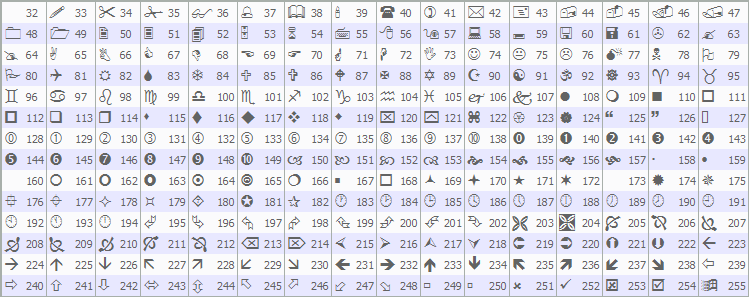
Continuing, we also implement the "drawBreakLevel" function for marking CHoCH breaks. We start with "UpdateFontSizes", then if no object exists, we create an OBJ_ARROWED_LINE from time1 at price1 to time2 at price2, explicitly setting the coordinates via "OBJPROP_TIME" and OBJPROP_PRICE for both points, applying the given color and "width". We add a "CHoCH" text label as OBJ_TEXT at time2 and price2, with matching color and "current_font_size", anchoring right-upper for positive direction or right-lower for negative, prefixed with a space for better spacing. Armed with these functions, we are set to begin the implementation. We'll set the magic number on initialization first and update any existing labels.
//+------------------------------------------------------------------+
//| Expert initialization function                                   |
//+------------------------------------------------------------------+
int OnInit() {
   obj_Trade.SetExpertMagicNumber(magic_number);                  //--- Set magic number
   UpdateFontSizes();                                             //--- Update font sizes
   return(INIT_SUCCEEDED);                                        //--- Return success
}
In the OnInit event handler, which executes once when the program is loaded or attached to a chart, we first set the "magic_number" on "obj_Trade" using "SetExpertMagicNumber" to ensure all trades are tagged with our unique identifier. We then call "UpdateFontSizes" to initialize the text sizes based on the current chart scale. We conclude by returning INIT_SUCCEEDED to indicate successful startup. Easy peasy. The next thing is detecting the trend via swing points.
//+------------------------------------------------------------------+
//| Expert tick function                                             |
//+------------------------------------------------------------------+
void OnTick() {
   static bool isNewBar = false;                                  //--- New bar flag
   int currBars = iBars(_Symbol,_Period);                         //--- Get current bars
   static int prevBars = currBars;                                //--- Previous bars
   if (prevBars == currBars) {                                    //--- Check same bars
      isNewBar = false;                                           //--- Set not new
   } else if (prevBars != currBars) {                             //--- Check new bars
      isNewBar = true;                                            //--- Set new bar
      prevBars = currBars;                                        //--- Update prev
   }
   const int length = ext_bars;                                   //--- Set length
   const int limit = ext_bars;                                    //--- Set limit
   int right_index, left_index;                                   //--- Indices
   bool isSwingHigh = true, isSwingLow = true;                    //--- Swing flags
   static double current_swing_high = -1.0, current_swing_low = -1.0; //--- Current swings
   static datetime swing_high_time = 0, swing_low_time = 0;       //--- Swing times
   static int current_trend = 0;                                  //--- Current trend (1 up, -1 down, 0 unknown)
   int curr_bar = limit;                                          //--- Set curr bar
   if (isNewBar) {                                                //--- Check new bar
      UpdateFontSizes();                                          //--- Update font sizes
      for (int j=1; j<=length; j++) {                             //--- Iterate length
         right_index = curr_bar - j;                              //--- Calc right
         left_index = curr_bar + j;                               //--- Calc left
         if ( (high(curr_bar) <= high(right_index)) || (high(curr_bar) < high(left_index)) ) { //--- Check not high
            isSwingHigh = false;                                  //--- Set not high
         }
         if ( (low(curr_bar) >= low(right_index)) || (low(curr_bar) > low(left_index)) ) { //--- Check not low
            isSwingLow = false;                                   //--- Set not low
         }
      }
      if (isSwingHigh) {                                          //--- Check swing high
         double new_high = high(curr_bar);                        //--- Get new high
         string label = "H";                                      //--- Init label
         color clr = def_clr_up;                                  //--- Set color
         if (current_swing_high > 0) {                            //--- Check existing high
            if (new_high > current_swing_high) {                  //--- Check higher
               label = "HH";                                      //--- Set HH
               current_trend = 1;                                 //--- Set up trend
            } else {                                              //--- Lower
               label = "LH";                                      //--- Set LH
               clr = def_clr_down;                                //--- Set down color
               current_trend = -1;                                //--- Set down trend
            }
         }
         if (prt) {                                               //--- Check print
            Print("SWING HIGH @ BAR INDEX ",curr_bar," of High: ",new_high, " Label: ",label); //--- Log high
         }
         drawSwingPoint(TimeToString(time(curr_bar)),time(curr_bar),new_high,object_code,clr,-1,label); //--- Draw high
         current_swing_high = new_high;                           //--- Update high
         swing_high_time = time(curr_bar);                        //--- Update time
      }
      if (isSwingLow) {                                           //--- Check swing low
         double new_low = low(curr_bar);                          //--- Get new low
         string label = "L";                                      //--- Init label
         color clr = def_clr_down;                                //--- Set color
         if (current_swing_low > 0) {                             //--- Check existing low
            if (new_low < current_swing_low) {                    //--- Check lower
               label = "LL";                                      //--- Set LL
               current_trend = -1;                                //--- Set down trend
            } else {                                              //--- Higher
               label = "HL";                                      //--- Set HL
               clr = def_clr_up;                                  //--- Set up color
               current_trend = 1;                                 //--- Set up trend
            }
         }
         if (prt) {                                               //--- Check print
            Print("SWING LOW @ BAR INDEX ",curr_bar," of Low: ",new_low, " Label: ",label); //--- Log low
         }
         drawSwingPoint(TimeToString(time(curr_bar)),time(curr_bar),new_low,object_code,clr,1,label); //--- Draw low
         current_swing_low = new_low;                             //--- Update low
         swing_low_time = time(curr_bar);                         //--- Update time
      }
   }
}
In the OnTick function, we use static variables "isNewBar" and "prevBars" to check for new bars: we fetch the current total bars with iBars on the symbol and period into "currBars", then compare to "prevBars" — if unchanged, we set "isNewBar" to false; if increased, we set "isNewBar" to true and update "prevBars" to "currBars". This ensures heavy calculations like swing scans run only once per completed bar. We set "length" and "limit" to the input "ext_bars", declare indices for left/right checks, initialize boolean flags "isSwingHigh" and "isSwingLow" to true, and use static globals for tracking the most recent "current_swing_high", "current_swing_low", their times, and "current_trend" (1 for up, -1 for down, 0 unknown). We fix "curr_bar" to "limit" as the target bar for scanning (typically the earliest in the window).
If "isNewBar" is true, we call "UpdateFontSizes" to refresh visuals, then loop from 1 to "length" to validate if "curr_bar" is a true swing: for highs, we check if its high exceeds both the right (newer) and left (older) bars' highs — if any fail, we set "isSwingHigh" false; similarly for lows, ensuring its low is below surrounding lows or we set "isSwingLow" false. If "isSwingHigh" remains true, we capture the high into "new_high", initialize the label as "H", and color as "def_clr_up". If a prior "current_swing_high" exists, we compare: if higher, label "HH" and set "current_trend" to 1 (up); if lower, label "LH", switch color to "def_clr_down", and set trend to -1 (down). If "prt" is enabled, we log the swing details, then call "drawSwingPoint" with the bar's time string, time, price, "object_code", color, direction -1 (for highs), and label. We update "current_swing_high" and "swing_high_time" to the new values. We mirror the process for swing low detection. Upon compilation, we get the following outcome.

With the swing points in place, we can scan for change of character on trend reversals, mark them on the chart, and trade them on the go. We'll start with a bullish change of character scenario.
double Ask = NormalizeDouble(SymbolInfoDouble(_Symbol,SYMBOL_ASK),_Digits); //--- Get ask
double Bid = NormalizeDouble(SymbolInfoDouble(_Symbol,SYMBOL_BID),_Digits); //--- Get bid
bool buy_break = (trade_mode == PerTick) ? (Bid > current_swing_high) : (Bid > current_swing_high && close(1) > current_swing_high); //--- Check buy break
bool sell_break = (trade_mode == PerTick) ? (Ask < current_swing_low) : (Ask < current_swing_low && close(1) < current_swing_low); //--- Check sell break
if (current_trend == -1 && current_swing_high > 0 && buy_break) { //--- Check up CHoCH
   if (prt) {                                                   //--- Check print
      Print("CHoCH UP NOW");                                    //--- Log up CHoCH
   }
   int swing_H_index = 0;                                       //--- Init index
   for (int i=0; i<=length*2+1000; i++) {                       //--- Iterate search
      double high_sel = high(i);                                //--- Get high
      if (high_sel == current_swing_high) {                     //--- Check match
         swing_H_index = i;                                     //--- Set index
         if (prt) {                                             //--- Check print
            Print("BREAK HIGH @ BAR ",swing_H_index);           //--- Log break
         }
         break;                                                 //--- Break loop
      }
   }
   drawBreakLevel(TimeToString(time(0)),swing_high_time,current_swing_high,
   time(0+1),current_swing_high,def_clr_up,-1);                 //--- Draw break level
   current_swing_high = -1.0;                                   //--- Reset high
   //--- Open Buy
   double trade_lots = NormalizeDouble(inpLot, 2);              //--- Normalize lots
   double SL_Buy = NormalizeDouble(Bid-sl_pts*r2r_ratio*_Point,_Digits); //--- Calc buy SL
   double TP_Buy = NormalizeDouble(Bid+tp_pts*_Point,_Digits);  //--- Calc buy TP
   if (PositionsTotal() < totalTrades) {                        //--- Check positions limit
      obj_Trade.Buy(trade_lots,_Symbol,Ask,SL_Buy,TP_Buy,"CHoCH Up BUY"); //--- Open buy
   }
   return;                                                      //--- Return
}
Here, we now handle the breakout detection and trade execution for bullish character change. We retrieve the current ask price with SymbolInfoDouble using SYMBOL_ASK and normalize it to the symbol's digits into "Ask", doing the same for bid with SYMBOL_BID into "Bid". We define "buy_break" based on "trade_mode": if "PerTick", we check if "Bid" exceeds "current_swing_high"; if "PerBar", we require both "Bid" above and the previous bar's close (via "close(1)") above for confirmation on close. We set "sell_break" similarly but inverted. If we have a downtrend ("current_trend == -1"), a valid "current_swing_high" above 0, and "buy_break" true, we detect a bullish CHoCH: if "prt" enabled, we log "CHoCH UP NOW". We then search for the exact bar index of this swing high by looping up to twice the scan length plus 1000 bars, comparing each "high(i)" to "current_swing_high" — when matched, we store the index in "swing_H_index", log the break bar if "prt", and break the loop.
We draw the break level with "drawBreakLevel" from the current time string, "swing_high_time" at "current_swing_high" to one bar ahead at the same price, using "def_clr_up" and direction -1. We reset "current_swing_high" to -1.0 to clear for the next swing. For the trade, we normalize lots to 2 decimals into "trade_lots", calculate buy SL as "Bid" minus "sl_pts * r2r_ratio * _Point" normalized, TP as "Bid" plus "tp_pts * _Point" normalized. For the mapping of trade levels, you can make your own decision. You can choose to have the risk-to-reward ratio or consider static levels. We added the two options as inputs, and this is where you decide their fate, your call. Then, if total positions are below "totalTrades", we open a buy with "obj_Trade.Buy" using "trade_lots", symbol, "Ask", SL, TP, and comment "CHoCH Up BUY", then return early to avoid further processing this tick. When you run the system, you get the following outcome.

From the image, we can see that we detect the bullish character change and act upon it. We just need to do the same thing for a bearish character change, with inverted logic. See below the approach.
else if (current_trend == 1 && current_swing_low > 0 && sell_break) { //--- Check down CHoCH
   if (prt) {                                                   //--- Check print
      Print("CHoCH DOWN NOW");                                  //--- Log down CHoCH
   }
   int swing_L_index = 0;                                       //--- Init index
   for (int i=0; i<=length*2+1000; i++) {                       //--- Iterate search
      double low_sel = low(i);                                  //--- Get low
      if (low_sel == current_swing_low) {                       //--- Check match
         swing_L_index = i;                                     //--- Set index
         if (prt) {                                             //--- Check print
            Print("BREAK LOW @ BAR ",swing_L_index);            //--- Log break
         }
         break;                                                 //--- Break loop
      }
   }
   drawBreakLevel(TimeToString(time(0)),swing_low_time,current_swing_low,
   time(0+1),current_swing_low,def_clr_down,1);                 //--- Draw break level
   current_swing_low = -1.0;                                    //--- Reset low
   //--- Open Sell
   double trade_lots = NormalizeDouble(inpLot, 2);              //--- Normalize lots
   double SL_Sell = NormalizeDouble(Ask+sl_pts*r2r_ratio*_Point,_Digits); //--- Calc sell SL
   double TP_Sell = NormalizeDouble(Ask-tp_pts*_Point,_Digits); //--- Calc sell TP
   if (PositionsTotal() < totalTrades) {                        //--- Check positions limit
      obj_Trade.Sell(trade_lots,_Symbol,Bid,SL_Sell,TP_Sell,"CHoCH Down SELL"); //--- Open sell
   }
   return;                                                      //--- Return
}
Here, we use the same logic as for the bullish scenario, just with inverted conditions to detect a bearish change of character, mark it on the chart, and trade it. Upon compilation, we get the following results.

Since we now detect all the character change setups, what remains is adding a trailing stop to maximise gains when the market moves in our favour, and that will be all.
//+------------------------------------------------------------------+
//| Apply Points Trailing Stop                                       |
//+------------------------------------------------------------------+
void ApplyPointsTrailing() {
   double point = _Point;                                            //--- Get point value
   for (int i = PositionsTotal() - 1; i >= 0; i--) {                 //--- Iterate positions reverse
      if (PositionGetTicket(i) > 0) {                                //--- Check valid ticket
         if (PositionGetString(POSITION_SYMBOL) == _Symbol && PositionGetInteger(POSITION_MAGIC) == magic_number) { //--- Check symbol and magic
            double sl = PositionGetDouble(POSITION_SL);              //--- Get SL
            double tp = PositionGetDouble(POSITION_TP);              //--- Get TP
            double openPrice = PositionGetDouble(POSITION_PRICE_OPEN); //--- Get open price
            ulong ticket = PositionGetInteger(POSITION_TICKET);      //--- Get ticket
            if (PositionGetInteger(POSITION_TYPE) == POSITION_TYPE_BUY) { //--- Check buy
               double newSL = NormalizeDouble(SymbolInfoDouble(_Symbol, SYMBOL_BID) - Trailing_Stop_Pips * point, _Digits); //--- Calc new SL
               if (newSL > sl && SymbolInfoDouble(_Symbol, SYMBOL_BID) - openPrice > Min_Profit_To_Trail_Pips * point) { //--- Check conditions
                  obj_Trade.PositionModify(ticket, newSL, tp);       //--- Modify position
               }
            } else if (PositionGetInteger(POSITION_TYPE) == POSITION_TYPE_SELL) { //--- Check sell
               double newSL = NormalizeDouble(SymbolInfoDouble(_Symbol, SYMBOL_ASK) + Trailing_Stop_Pips * point, _Digits); //--- Calc new SL
               if (newSL < sl && openPrice - SymbolInfoDouble(_Symbol, SYMBOL_ASK) > Min_Profit_To_Trail_Pips * point) { //--- Check conditions
                  obj_Trade.PositionModify(ticket, newSL, tp);       //--- Modify position
               }
            }
         }
      }
   }
}

//--- Call the function in the tick event handler
// Points trailing can run anytime
if (TrailingType == Trailing_Points && PositionsTotal() > 0) {      //--- Check trailing
   ApplyPointsTrailing();                                           //--- Apply trailing
}

//--- We added this incase we are manually re-scaling the chart
//+------------------------------------------------------------------+
//| Chart event function                                             |
//+------------------------------------------------------------------+
void OnChartEvent(const int id, const long &lparam, const double &dparam, const string &sparam) {
   if (id == CHARTEVENT_CHART_CHANGE) {                             //--- Check chart change
      UpdateFontSizes();                                            //--- Update font sizes
   }
}
As for the trailing, we implement the "ApplyPointsTrailing" function to manage points-based trailing stops when enabled, adjusting stop-loss dynamically as price moves favorably. We start by assigning the symbol's point value to "point" with _Point. We then loop backward through all open positions via PositionsTotal to safely handle modifications, checking each ticket's validity with the PositionGetTicket function. For positions matching our symbol and "magic_number", we retrieve stop-loss with PositionGetDouble and "POSITION_SL", take-profit with POSITION_TP, open price via "POSITION_PRICE_OPEN", and ticket with "POSITION_TICKET". For buys (POSITION_TYPE_BUY), we calculate a new stop-loss as current bid minus "Trailing_Stop_Pips * point", normalized to digits — if tighter than current SL and profit exceeds "Min_Profit_To_Trail_Pips * point", we update with "obj_Trade.PositionModify". We mirror this for the selling case.
Within the tick function, if "TrailingType" is "Trailing_Points" and positions exist per "PositionsTotal", we call "ApplyPointsTrailing" to apply these adjustments on every tick for real-time protection. We also include the OnChartEvent function to respond to events like scale changes: if the id is CHARTEVENT_CHART_CHANGE, we invoke "UpdateFontSizes" to refresh all text objects, ensuring visuals adapt seamlessly to user interactions. Upon compilation, we get the following outcome.
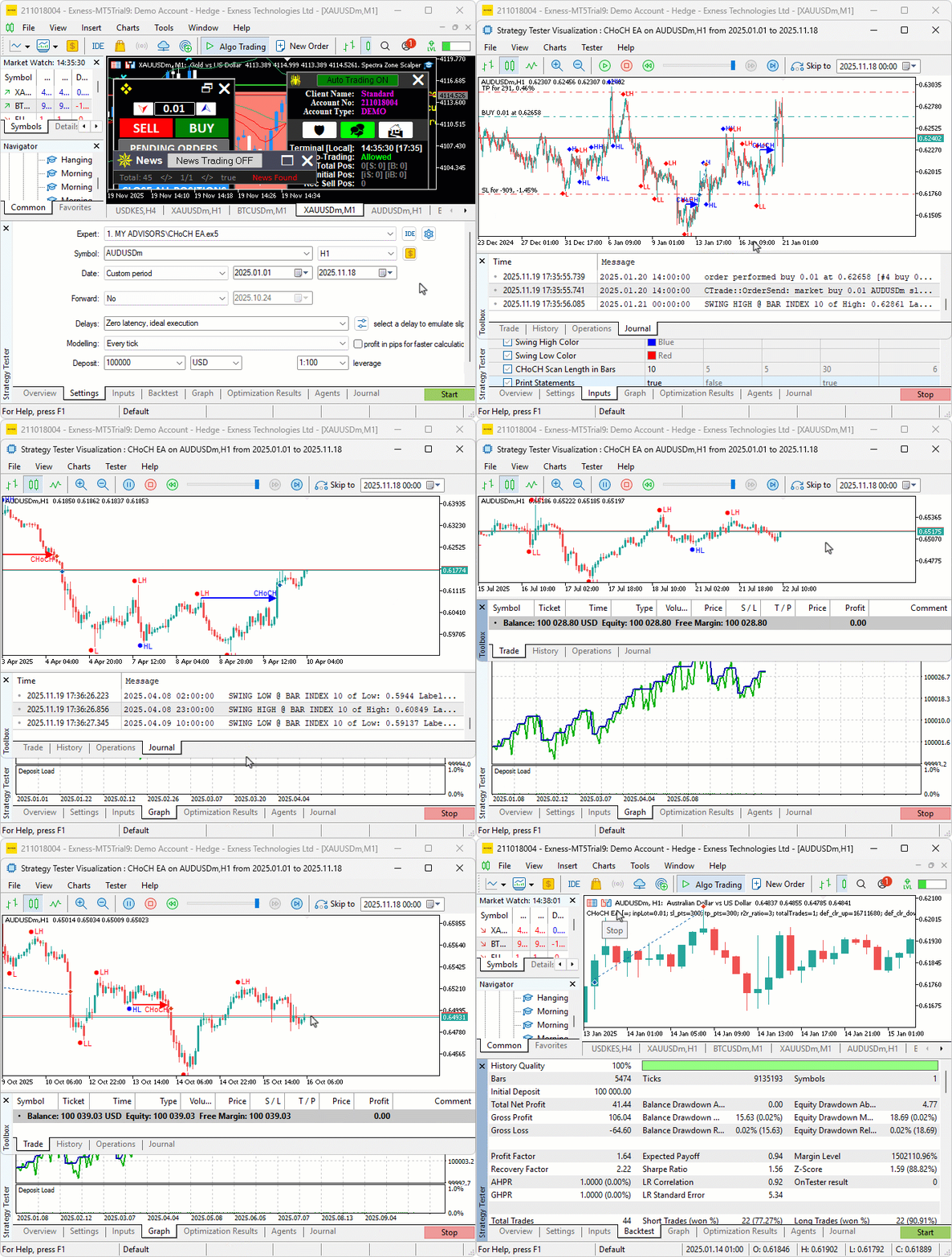
From the visualization, we can see that we detect, trade, and manage the break of structures, hence achieving our objectives. The thing that remains is backtesting the program, and that is handled in the next section.
Backtesting
After thorough backtesting, we have the following results.
Backtest graph:

Backtest report:

Conclusion
In conclusion, we’ve developed a Change of Character (CHoCH) detection system in MQL5 that scans bars to identify and label swing highs/lows for trend determination, triggers trades on breaks signaling reversals, supports per-bar/tick modes, fixed trade labels, trade limits, and optional points-based trailing stops. The system visualizes swings with colored icons/labels and CHoCH breaks with arrowed lines/text, dynamically updates font sizes on scale changes, and includes print logging for debugging.
Disclaimer: This article is for educational purposes only. Trading carries significant financial risks, and market volatility may result in losses. Thorough backtesting and careful risk management are crucial before deploying this program in live markets.
With this Change of Character strategy, detecting swing breaks for reversals, you’re equipped to trade price action signals, ready for further optimization in your trading journey. Happy trading!
Warning: All rights to these materials are reserved by MetaQuotes Ltd. Copying or reprinting of these materials in whole or in part is prohibited.
This article was written by a user of the site and reflects their personal views. MetaQuotes Ltd is not responsible for the accuracy of the information presented, nor for any consequences resulting from the use of the solutions, strategies or recommendations described.

 Introduction to MQL5 (Part 30): Mastering API and WebRequest Function in MQL5 (IV)
 Neural Networks in Trading: Multi-Task Learning Based on the ResNeXt Model
 Developing a Trading Strategy: Using a Volume-Bound Approach
 The MQL5 Standard Library Explorer (Part 5): Multiple Signal Expert

- Free trading apps
- Over 8,000 signals for copying
- Economic news for exploring financial markets
You agree to website policy and terms of use