

The MQL5 Standard Library Explorer (Part 5): Multiple Signal Expert
 5 005
5 005
 3
3

Contents
- Introduction
- Core Concepts for Multi-Signal Expert Advisor Development
- Implementation
- Testing 1
- Testing 2
- Conclusion
Introduction
In our previous discussion, we built a custom, candlestick-pattern signal compatible with the MQL5 Wizard. The goal was to master custom signal development, enabling us to fully leverage the Wizard's automation capabilities.
This raises a question: if the Wizard is so powerful, why is Expert Advisor development still challenging? The answer lies in market dynamics. While the MQL5 Wizard generates a professional and consistent EA structure, the core challenge remains the trading logic itself. Market conditions are dynamic and diverse, meaning a single set of static rules is often insufficient for long-term survival.
To create robust EAs, we must focus on the signals. By developing a diverse library of signals—and learning to modify existing ones—we can build systems that adapt. This approach allows for specialization; a developer can focus on perfecting a single signal module, contributing to a larger, collective toolkit.
Today, we will address the limitation of using only a few signals per EA. We are building an EA that can host and manage multiple trading signal modules. The advantage is resilience: in an evolving market, if one signal fails, others can continue to generate trading opportunities. This multi-strategy approach allows the EA to survive where others might fail.
As part of this project, I will create a new signal module based on Fibonacci analysis, and combine it with built-in signals from the MQL5 library.
It is also important to understand that in a multi-signal system, not all signals are used as primary entry triggers. Some act as filters, refining and enhancing the trades suggested by the primary signals, thereby creating more sophisticated strategies.
Below, I will explain the core concepts for this development in detail. Afterward, we will move to the implementation phase, where the focus will shift to the code to ensure a functional and effective multi-signal Expert Advisor.
Core Concepts for Multi-Signal Expert Advisor Development
Building an EA that can truly adapt to the markets requires a shift in thinking. Instead of a single, rigid strategy, we create a flexible system—a "team" of trading strategies working together. The MQL5 Standard Library provides the perfect framework to make this happen efficiently. Let's break down the core ideas that make this so powerful.
The Modular Mindset
The foundation of this approach is modularity. Imagine each trading strategy—be it a Moving Average crossover, an RSI signal, or our custom Fibonacci pattern—as a self-contained module. Each module is an expert in its own domain, containing all the logic it needs to decide. The beauty of the MQL5 Standard Library is that it allows us to plug these modules into a central EA, which acts as the portfolio manager. This means we can develop, test, and improve strategies in isolation, then seamlessly add them to our trading system without rewriting its core.
How Decisions Are Made
Once you have multiple signal modules, how do they reach a consensus? This is where the elegant voting and weighting system comes in. Each module doesn't just shout "buy" or "sell"; it calmly states its confidence level with a "weight" between 0 and 100.
A strong, clear signal might cast a heavy vote of 80, while a weaker one might only contribute 10. The EA then tallies all the votes. Only if the total confidence exceeds a predefined threshold does a trade execute. This system naturally prioritizes high-conviction signals and allows weaker, complementary signals to tip the scales without acting alone.
Assigning Roles: The Triggers and the Filters
Not all signals are created equal, and they shouldn't be. In a sophisticated system, we assign them specific roles:
Primary Signals (The Triggers): These are your main strategies—the ones designed to find opportunities. They carry high weights and are responsible for initiating the bulk of the trading ideas.
Filter Signals: These act as a quality control team. A volatility filter, for example, might reduce the overall weight during chaotic market periods. A time filter can block trades outside specific hours. They rarely generate trades on their own, but they can veto bad ones, making the entire system more robust.
The Ultimate Benefit: Built-In Adaptability
This entire architecture leads to the holy grail of automated trading: adaptability. Markets evolve, and strategies that worked yesterday can fail today. In a single-strategy EA, this is catastrophic. But in a multi-signal system, it's a managed risk.
When a trending market shifts to a range, your trend-following signals may grow quiet, but your mean-reversion or oscillator-based signals can pick up the slack. The EA doesn't need to be rewritten; it naturally leans on the strategies that are currently working. This built-in resilience is what allows the EA to "survive" and thrive across different market environments.

Conceptual flow of the Multi-Signal EA
How the System Flows:
- Market data continuously feeds into our multi-signal EA system.
- Primary triggers look for entry opportunities.
- Filter signals validate and refine decisions.
- All modules can be mixed (built-in + custom, like our Fibonacci).
- The weighting system collects confidence levels from all active signals.
- The decision engine evaluates if total confidence exceeds our trading threshold.
- Risk management handles position sizing and risk controls.
- Trade execution occurs only when all conditions align.
Key Benefits Visualized:
- Resilience: Multiple signal paths mean if one fails, others can still trigger.
- Adaptability: Different signals dominate in different market conditions.
- Specialization: Each module focuses on what it does best.
- Professional Foundation: MQL5 Standard Library provides the robust infrastructure.
This architecture creates what we might call "strategic diversity"—the EA isn't reliant on any single market condition or pattern to succeed, making it much more likely to adapt and survive as markets evolve. By leveraging the MQL5 Wizard to handle the complex boilerplate code, we are free to focus on what matters most: developing and refining this diverse team of signals. In the next part, we'll put this into practice, starting with coding our Fibonacci-based signal module and integrating it with the library's built-in tools.
Implementation
Building a Professional Fibonacci Trading Signal for MQL5 Wizard
The Foundation: Setting Up Our Signal Class Structure
Before we dive into the complex logic, let's elaborate on the "magic comments" that make our signal appear in the MQL5 Wizard. Notice the wizard description start/end block—this isn't just documentation; it's actually metadata that the MQL5 Wizard reads to display our signal in its dropdown menu. The title is what users see, ShortName becomes the internal identifier, and page links to documentation.
By inheriting from CExpertSignal, we're tapping into the massive infrastructure of the MQL5 Standard Library. This is like building on the shoulders of giants—we get risk management, position sizing, and trade execution for free, while we focus purely on our Fibonacci trading logic. The protected member variables you see are our configuration parameters that users will be able to adjust in the MQL5 Wizard interface.
//+------------------------------------------------------------------+
//|                                                  SignalFibonacci |
//|                                                   Copyright 2025 |
//|                                                 Clemence Benjamin|
//+------------------------------------------------------------------+
#ifndef SIGNAL_FIBONACCI_H
#define SIGNAL_FIBONACCI_H

#include <Expert\ExpertSignal.mqh>

// wizard description start
//+------------------------------------------------------------------+
//| Description of the class                                         |
//| Title=Signals of Fibonacci Retracement Levels                    |
//| Type=SignalAdvanced                                              |
//| Name=Fibonacci Retracement                                       |
//| ShortName=Fib                                                    |
//| Class=CSignalFibonacci                                           |
//| Page=signal_fibonacci                                            |
//+------------------------------------------------------------------+
// wizard description end

//+------------------------------------------------------------------+
//| CSignalFibonacci class                                           |
//| Purpose: Complete Fibonacci-based trading signal module          |
//+------------------------------------------------------------------+
class CSignalFibonacci : public CExpertSignal
{
protected:
    // Configuration parameters
    int               m_depth;              // Lookback period for swing detection
    double            m_min_retracement;    // Minimum retracement percentage
    double            m_max_retracement;    // Maximum retracement percentage
    double            m_weight_factor;      // Weight multiplier for confidence
    bool              m_use_as_filter;      // Use as filter instead of primary
    double            m_filter_weight;      // Weight when used as filter
    bool              m_combine_with_trend; // Only trade with trend
    double            m_tolerance;          // Price tolerance for levels

    // Pattern weights (0-100)
    int               m_pattern_0;          // Model 0 "price at strong Fib level (0.382/0.618)"
    int               m_pattern_1;          // Model 1 "price at medium Fib level (0.500)"
    int               m_pattern_2;          // Model 2 "price at weak Fib level (0.236/0.786)"
    int               m_pattern_3;          // Model 3 "Fib level with price action confirmation"

    // Internal state variables
    double            m_high_price;
    double            m_low_price;
    datetime          m_high_time;
    datetime          m_low_time;
    bool              m_uptrend;
    double            m_current_strength;
    ENUM_TIMEFRAMES   m_actual_period;      // Store the actual timeframe to use
Smart Configuration: Giving Users Control Without Complexity
Here's where we define the "control panel" for our Fibonacci signal. Each of these simple setter methods becomes a configurable parameter in the MQL5 Wizard interface. When users select our signal, they'll see sliders and input fields for Depth, MinRetracement, and, most importantly, the pattern weights.
The pattern weights system (0-100) is what makes this signal intelligent. Think of it as telling the system, "When you see the price at the strong 0.618 Fibonacci level, I want you to be 80% confident, but at the weaker 0.236 level, only be 60% confident." This granular control is what separates amateur indicators from professional trading systems. Users can backtest different weight combinations to find what works best for their trading style and market conditions.
public:
    // Parameter methods for Wizard
    void             Depth(int value)                { m_depth = value; }
    void             MinRetracement(double value)    { m_min_retracement = value; }
    void             MaxRetracement(double value)    { m_max_retracement = value; }
    void             WeightFactor(double value)      { m_weight_factor = value; }

    // Pattern weight methods
    void             Pattern_0(int value)            { m_pattern_0 = value; }
    void             Pattern_1(int value)            { m_pattern_1 = value; }
The Brain: Finding Significant Market Swing Points
This is where the real detective work begins! FindSwingPoints() is our method for identifying significant market structure—the peaks and troughs that define trends. We use iHighest() and iLowest() to scan back through the specified number of bars (the m_depth parameter) to find the most recent significant high and low.
Here's a pro tip: the m_depth parameter is crucial because markets have different "personalities" on different timeframes. On a 5-minute chart, looking back 50 bars might cover a few hours, while on a daily chart it could represent months of data. This parameter lets users adapt our signal to their preferred trading style without touching the code.
Notice we also determine trend direction by comparing the timestamps of the high and low—a simple yet effective way to understand market context. This trend awareness will later help us distinguish between Fibonacci support (in uptrends) and resistance (in downtrends).
bool CSignalFibonacci::FindSwingPoints(void)
{
    if(m_depth <= 0)
        return false;

    int highest_bar = iHighest(m_symbol.Name(), calc_period, MODE_HIGH, m_depth, 1);
    int lowest_bar = iLowest(m_symbol.Name(), calc_period, MODE_LOW, m_depth, 1);

    if(highest_bar == -1 || lowest_bar == -1)
        return false;

    m_high_price = iHigh(m_symbol.Name(), calc_period, highest_bar);
    m_low_price = iLow(m_symbol.Name(), calc_period, lowest_bar);
    // ... trend detection
Fibonacci Mathematics: Calculating Precise Retracement Levels
The beauty of this function is its elegant simplicity. Once we have our swing points, calculating Fibonacci levels becomes straightforward mathematics. The key insight here is that we handle uptrends and downtrends differently because Fibonacci retracements work in the opposite direction of the trend.
In an uptrend, we measure retracements downward from the high toward the low. In a downtrend, we measure retracements upward from the low toward the high. This might seem obvious, but I've seen many trading systems get this wrong! The result is precise price levels where we expect the market to find support or resistance.
Notice we're using the classic Fibonacci ratios (0.236, 0.382, 0.500, 0.618, 0.786) which represent key psychological and mathematical levels that traders worldwide watch. This common knowledge creates self-fulfilling prophecies that make these levels more reliable.
double CSignalFibonacci::CalculateRetracementLevel(double level)
{
    double range = m_high_price - m_low_price;

    if(m_uptrend) {
        // Uptrend: calculate retracement from high to low
        return m_high_price - (range * level);
    } else {
        // Downtrend: calculate retracement from low to high
        return m_low_price + (range * level);
    }
}
Intelligent Pattern Recognition: Classifying Fibonacci Setups
This is where we add intelligence to our signal. Instead of treating all Fibonacci levels equally, we classify them by strength and assign different pattern types. The 0.382 and 0.618 levels are considered the "golden" Fibonacci retracements and get the highest weight (pattern 0), while the 0.500 level is psychologically important but mathematically less significant (pattern 1).
The tolerance concept here is crucial for real-world trading. Markets rarely hit Fibonacci levels with pinpoint accuracy, so we allow a small buffer zone (defined in points) where we still consider the level "hit." This prevents missing good setups due to minor price fluctuations.
The function returns both a true/false result and a pattern type through the reference parameter. This elegant design lets the calling function know not just THAT we're at a Fibonacci level, but WHICH type of level and how significant it is.
bool CSignalFibonacci::IsAtFibonacciLevel(double price, int &pattern)
{
    // Define Fibonacci levels and their pattern types
    struct FibLevel {
        double level;
        int pattern;
    };

    FibLevel levels[5] = {
        {0.236, 2},  // Weak level -> pattern 2
        {0.382, 0},  // Strong level -> pattern 0
        {0.500, 1},  // Medium level -> pattern 1
        {0.618, 0},  // Strong level -> pattern 0
        {0.786, 2}   // Weak level -> pattern 2
    };
Price Action Confirmation: The Bullish Reversal Detective
Finding Fibonacci levels is only half the battle—we need confirmation that price is actually respecting these levels. This function looks for classic bullish reversal patterns that give us confidence to enter long positions.
The bullish engulfing pattern detection is straightforward: we look for a small red candle followed by a larger green candle that completely "engulfs" the previous candle's range. This shows a dramatic shift from selling pressure to buying pressure.
For the hammer pattern, we use some clever mathematics to identify candles with small bodies and long lower wicks. The key insight is comparing the wick length to the body length—a true hammer has a lower wick at least twice the size of its body. This represents a rejection of lower prices and a potential bullish reversal.
These confirmation patterns transform our Fibonacci signal from a simple level detector into a sophisticated trading system that waits for price to "prove" that the level is significant.
bool CSignalFibonacci::IsBullishReversal(void)
{
    double open1 = iOpen(m_symbol.Name(), calc_period, 1);
    double close1 = iClose(m_symbol.Name(), calc_period, 1);
    // ... get more price data

    // Bullish engulfing pattern
    if(close1 > open1 && open2 > close2 && close1 > open2 && open1 < close2) {
        return true;
    }

    // Hammer pattern detection
    double range1 = high1 - low1;
    double body1 = MathAbs(close1 - open1);
    double lower_wick = (open1 > close1) ? (close1 - low1) : (open1 - low1);

    if(lower_wick >= (2 * body1)) {
        return true;
    }

    return false;
}
The Decision Engine: Generating Long Trading Signals
This is where everything comes together—the LongCondition() method is the brain that makes final trading decisions. Notice it returns an integer between 0 and 100, representing the signal's confidence level. This is the standardized interface that the MQL5 Wizard expects from all signals.
The IS_PATTERN_USAGE macro is a clever system that lets users enable or disable specific patterns in the Wizard interface. Maybe they only want to trade the strong 0.618 level but ignore the weaker levels—this system gives them that flexibility without code changes.
The real intelligence here is how we combine Fibonacci levels with price action confirmation. If we have both a Fibonacci level AND a bullish reversal pattern, we use the higher weight from pattern 3 (Fibonacci + price action). This creates a hierarchy of signal quality that makes our trading decisions much more sophisticated.
int CSignalFibonacci::LongCondition(void)
{
    int result = 0;
    int pattern = -1;
    double current_price = m_symbol.Bid();

    if(IsAtFibonacciLevel(current_price, pattern)) {
        if(pattern >= 0) {
            if(IS_PATTERN_USAGE(pattern)) {
                result = (int)GetPatternWeight(pattern);
            }

            if(IS_PATTERN_USAGE(3) && IsBullishReversal()) {
                int pa_weight = (int)GetPatternWeight(3);
                if(pa_weight > result) result = pa_weight;
            }
We have built a complete trading intelligence module that understands market structure, identifies key Fibonacci mathematical levels, waits for price confirmation, and generates confidence-weighted signals. The true power comes when you combine this with other signals in the MQL5 Wizard. Now, before we combined it with other signals to achieve our goal, we, created another test EA to see if the idea was working correctly. Below is a showcase of the strategy tester. As usual, to launch the MQL5 Wizard, you select New Document in Meta Editor or press the Ctrl+N keyboard combination and choose to generate an Expert Advisor.
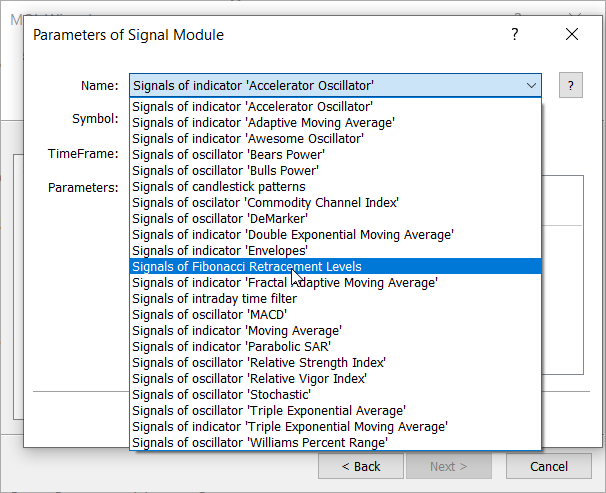
Selecting the Fibonacci Signal Using the MQL5 Wizard
Testing 1
The image below shows the visual performance of the EA generated to test our custom Fibonacci signal on USDJPY, M5.

Testing the MQL5 Wizard-generated EA on USDJPY, M5
Now that we have successfully tested our Fibonacci signal, we're ready to architect something truly powerful—a multi-signal Expert Advisor that behaves less like a simple robot and more like a team of specialized trading analysts working in perfect harmony. Think of this as building your own trading dream team where each signal brings unique expertise to the table.
The advantage of the MQL5 Wizard is that it handles the complex infrastructure, letting us focus on what really matters: crafting intelligent trading logic. Here's how we'll transform our single-signal test into a sophisticated trading system.
Using the same approach as before in MetaEditor, press Ctrl+N to open the MQL5 Wizard, then choose Expert Advisor (generate). In the Signals section, add the following modules:
- Fibonacci Signal (Precision Entry Expert)
- Accelerator Oscillator (Market Energy Reader)
- Moving Average (Trend Specialist)
- RSI (Momentum Analyst)
So here is the MQL5 Wizard generated expert advisor:
//+------------------------------------------------------------------+
//|                                          Multi-Signal Expert.mq5 |
//|                               Copyright 2025, Clemence Benjamin. |
//|                                             https://www.mql5.com |
//+------------------------------------------------------------------+
#property copyright "Copyright 2025, Clemence Benjamin."
#property link      "https://www.mql5.com"
#property version   "1.00"
//+------------------------------------------------------------------+
//| Include                                                          |
//+------------------------------------------------------------------+
#include <Expert\Expert.mqh>
//--- available signals
#include <Expert\Signal\SignalFibonacci.mqh>
#include <Expert\Signal\SignalAC.mqh>
#include <Expert\Signal\SignalMA.mqh>
#include <Expert\Signal\SignalRSI.mqh>
//--- available trailing
#include <Expert\Trailing\TrailingParabolicSAR.mqh>
//--- available money management
#include <Expert\Money\MoneySizeOptimized.mqh>
//+------------------------------------------------------------------+
//| Inputs                                                           |
//+------------------------------------------------------------------+
//--- inputs for expert
input string             Expert_Title                      ="Multi-Signal Expert"; // Document name
ulong                    Expert_MagicNumber                =-108721665;            //
bool                     Expert_EveryTick                  =false;                 //
//--- inputs for main signal
input int                Signal_ThresholdOpen              =10;                    // Signal threshold value to open [0...100]
input int                Signal_ThresholdClose             =10;                    // Signal threshold value to close [0...100]
input double             Signal_PriceLevel                 =0.0;                   // Price level to execute a deal
input double             Signal_StopLevel                  =50.0;                  // Stop Loss level (in points)
input double             Signal_TakeLevel                  =50.0;                  // Take Profit level (in points)
input int                Signal_Expiration                 =4;                     // Expiration of pending orders (in bars)
input double             Signal_Fib_Weight                 =1.0;                   // Fibonacci Retracement Weight [0...1.0]
input double             Signal_AC_Weight                  =1.0;                   // Accelerator Oscillator Weight [0...1.0]
input int                Signal_MA_PeriodMA                =12;                    // Moving Average(12,0,...) Period of averaging
input int                Signal_MA_Shift                   =0;                     // Moving Average(12,0,...) Time shift
input ENUM_MA_METHOD     Signal_MA_Method                  =MODE_SMA;              // Moving Average(12,0,...) Method of averaging
input ENUM_APPLIED_PRICE Signal_MA_Applied                 =PRICE_CLOSE;           // Moving Average(12,0,...) Prices series
input double             Signal_MA_Weight                  =1.0;                   // Moving Average(12,0,...) Weight [0...1.0]
input int                Signal_RSI_PeriodRSI              =8;                     // Relative Strength Index(8,...) Period of calculation
input ENUM_APPLIED_PRICE Signal_RSI_Applied                =PRICE_CLOSE;           // Relative Strength Index(8,...) Prices series
input double             Signal_RSI_Weight                 =1.0;                   // Relative Strength Index(8,...) Weight [0...1.0]
//--- inputs for trailing
input double             Trailing_ParabolicSAR_Step        =0.02;                  // Speed increment
input double             Trailing_ParabolicSAR_Maximum     =0.2;                   // Maximum rate
//--- inputs for money
input double             Money_SizeOptimized_DecreaseFactor=3.0;                   // Decrease factor
input double             Money_SizeOptimized_Percent       =10.0;                  // Percent
//+------------------------------------------------------------------+
//| Global expert object                                             |
//+------------------------------------------------------------------+
CExpert ExtExpert;
//+------------------------------------------------------------------+
//| Initialization function of the expert                            |
//+------------------------------------------------------------------+
int OnInit()
  {
//--- Initializing expert
   if(!ExtExpert.Init(Symbol(),Period(),Expert_EveryTick,Expert_MagicNumber))
     {
      //--- failed
      printf(__FUNCTION__+": error initializing expert");
      ExtExpert.Deinit();
      return(INIT_FAILED);
     }
//--- Creating signal
   CExpertSignal *signal=new CExpertSignal;
   if(signal==NULL)
     {
      //--- failed
      printf(__FUNCTION__+": error creating signal");
      ExtExpert.Deinit();
      return(INIT_FAILED);
     }
//---
   ExtExpert.InitSignal(signal);
   signal.ThresholdOpen(Signal_ThresholdOpen);
   signal.ThresholdClose(Signal_ThresholdClose);
   signal.PriceLevel(Signal_PriceLevel);
   signal.StopLevel(Signal_StopLevel);
   signal.TakeLevel(Signal_TakeLevel);
   signal.Expiration(Signal_Expiration);
//--- Creating filter CSignalFibonacci
   CSignalFibonacci *filter0=new CSignalFibonacci;
   if(filter0==NULL)
     {
      //--- failed
      printf(__FUNCTION__+": error creating filter0");
      ExtExpert.Deinit();
      return(INIT_FAILED);
     }
   signal.AddFilter(filter0);
//--- Set filter parameters
   filter0.Weight(Signal_Fib_Weight);
//--- Creating filter CSignalAC
   CSignalAC *filter1=new CSignalAC;
   if(filter1==NULL)
     {
      //--- failed
      printf(__FUNCTION__+": error creating filter1");
      ExtExpert.Deinit();
      return(INIT_FAILED);
     }
   signal.AddFilter(filter1);
//--- Set filter parameters
   filter1.Weight(Signal_AC_Weight);
//--- Creating filter CSignalMA
   CSignalMA *filter2=new CSignalMA;
   if(filter2==NULL)
     {
      //--- failed
      printf(__FUNCTION__+": error creating filter2");
      ExtExpert.Deinit();
      return(INIT_FAILED);
     }
   signal.AddFilter(filter2);
//--- Set filter parameters
   filter2.PeriodMA(Signal_MA_PeriodMA);
   filter2.Shift(Signal_MA_Shift);
   filter2.Method(Signal_MA_Method);
   filter2.Applied(Signal_MA_Applied);
   filter2.Weight(Signal_MA_Weight);
//--- Creating filter CSignalRSI
   CSignalRSI *filter3=new CSignalRSI;
   if(filter3==NULL)
     {
      //--- failed
      printf(__FUNCTION__+": error creating filter3");
      ExtExpert.Deinit();
      return(INIT_FAILED);
     }
   signal.AddFilter(filter3);
//--- Set filter parameters
   filter3.PeriodRSI(Signal_RSI_PeriodRSI);
   filter3.Applied(Signal_RSI_Applied);
   filter3.Weight(Signal_RSI_Weight);
//--- Creation of trailing object
   CTrailingPSAR *trailing=new CTrailingPSAR;
   if(trailing==NULL)
     {
      //--- failed
      printf(__FUNCTION__+": error creating trailing");
      ExtExpert.Deinit();
      return(INIT_FAILED);
     }
//--- Add trailing to expert (will be deleted automatically))
   if(!ExtExpert.InitTrailing(trailing))
     {
      //--- failed
      printf(__FUNCTION__+": error initializing trailing");
      ExtExpert.Deinit();
      return(INIT_FAILED);
     }
//--- Set trailing parameters
   trailing.Step(Trailing_ParabolicSAR_Step);
   trailing.Maximum(Trailing_ParabolicSAR_Maximum);
//--- Creation of money object
   CMoneySizeOptimized *money=new CMoneySizeOptimized;
   if(money==NULL)
     {
      //--- failed
      printf(__FUNCTION__+": error creating money");
      ExtExpert.Deinit();
      return(INIT_FAILED);
     }
//--- Add money to expert (will be deleted automatically))
   if(!ExtExpert.InitMoney(money))
     {
      //--- failed
      printf(__FUNCTION__+": error initializing money");
      ExtExpert.Deinit();
      return(INIT_FAILED);
     }
//--- Set money parameters
   money.DecreaseFactor(Money_SizeOptimized_DecreaseFactor);
   money.Percent(Money_SizeOptimized_Percent);
//--- Check all trading objects parameters
   if(!ExtExpert.ValidationSettings())
     {
      //--- failed
      ExtExpert.Deinit();
      return(INIT_FAILED);
     }
//--- Tuning of all necessary indicators
   if(!ExtExpert.InitIndicators())
     {
      //--- failed
      printf(__FUNCTION__+": error initializing indicators");
      ExtExpert.Deinit();
      return(INIT_FAILED);
     }
//--- ok
   return(INIT_SUCCEEDED);
  }
//+------------------------------------------------------------------+
//| Deinitialization function of the expert                          |
//+------------------------------------------------------------------+
void OnDeinit(const int reason)
  {
   ExtExpert.Deinit();
  }
//+------------------------------------------------------------------+
//| "Tick" event handler function                                    |
//+------------------------------------------------------------------+
void OnTick()
  {
   ExtExpert.OnTick();
  }
//+------------------------------------------------------------------+
//| "Trade" event handler function                                   |
//+------------------------------------------------------------------+
void OnTrade()
  {
   ExtExpert.OnTrade();
  }
//+------------------------------------------------------------------+
//| "Timer" event handler function                                   |
//+------------------------------------------------------------------+
void OnTimer()
  {
   ExtExpert.OnTimer();
  }
//+------------------------------------------------------------------+
Testing 2
After generating the EA, I ran a test in the Strategy Tester to observe its performance. The GIF screencast below shows how it behaved on EURUSD, M5. Note that at this stage we haven’t added equity curve charts or other detailed testing metrics yet, as the focus is currently on visual performance only. Below the image, I share my thoughts and critique on the performance of the generated EA as we prepare to refine it and bring it closer to our intended goals.
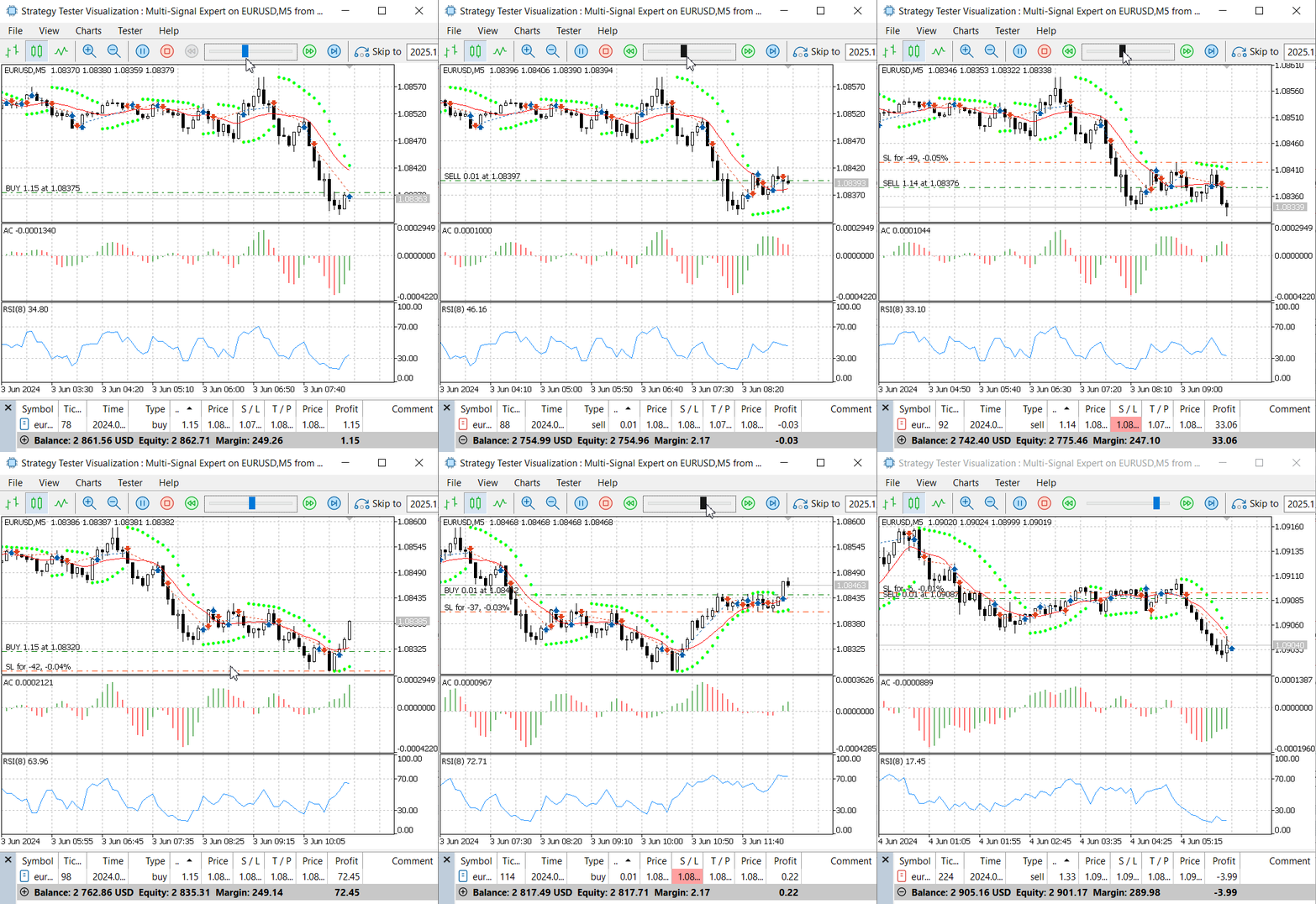
Testing the generated Multi Signal Expert
Critical Analysis—Where the Wizard-Generated EA Misses Our Vision
After reviewing the code produced by the MQL5 Wizard, it becomes clear that there is a noticeable gap between what was generated and the multi-signal, confluence-driven framework we originally envisioned. The MQL5 Wizard gives us a useful starting point, but in its default form it remains a simple signal aggregator rather than a deliberate, hierarchy-aware decision engine. In this section we walk through the main shortcomings and outline the adjustments needed to bring the Expert Advisor closer to our design goals.
1. Restoring a Meaningful Signal Hierarchy
By default, the generated EA assigns a weight of 1.0 to all signals. That might be convenient for a quick test, but it entirely ignores the fact that our signals do not carry the same importance. In our concept, Fibonacci is the primary decision maker, while Moving Average, RSI, and Accelerator Oscillator play supporting roles.
Current auto-generated inputs:
// Uniform weights (problematic)
input double Signal_Fib_Weight = 1.0;    // Should be 0.8 (80%)
input double Signal_AC_Weight  = 1.0;    // Should be 0.4 (40%)
input double Signal_MA_Weight  = 1.0;    // Should be 0.6 (60%)
input double Signal_RSI_Weight = 1.0;    // Should be 0.5 (50%)
Equal weights flatten our hierarchy, dilute the influence of Fibonacci, and waste the opportunity to embed our trading experience directly into the model. A more strategic distribution is needed:
// Strategic weight distribution
input double Signal_Fib_Weight = 0.8;    // Core signal – mathematical precision
input double Signal_MA_Weight  = 0.6;    // Trend context and alignment
input double Signal_RSI_Weight = 0.5;    // Momentum validation
input double Signal_AC_Weight  = 0.4;    // Early energy/acceleration hint
This simple change already moves us away from a “flat democracy” of signals towards a structured, intention-driven system.
2. Opening Thresholds: From Overtrading to Selective Entries
The Wizard also initializes the opening threshold at a very low value. That almost guarantees that the EA will fire trades on weak combinations of signals, especially when all weights are set to 1.0.
// Extremely permissive configuration
input int Signal_ThresholdOpen = 10;     // Too low for serious use
With such a threshold, the EA is biased towards overtrading: small flickers in the signal scores become enough to justify an entry. Transaction costs increase, confluence requirements vanish, and overall trade quality suffers.
For a multi-signal system built around confirmation, we need a much higher bar for opening trades, and a more flexible condition for closing them:
// Thresholds aligned with our confluence idea
input int Signal_ThresholdOpen  = 120;   // Strong confirmation required to open
input int Signal_ThresholdClose = 80;    // More relaxed exit behaviour
With this structure, one strong Fibonacci signal (80) plus at least one valid supporter (e.g., 40) is enough to justify a trade, while isolated minor readings no longer trigger entries on their own.
3. Missing Confluence Detection: Price and Time Clustering
Another key piece that the generated EA does not provide is a true confluence engine. Our design aims to recognize when several signals agree in both price and time, forming a higher-probability zone instead of isolated indicators firing independently.
Conceptually, we need a component that can answer questions like, are these signals clustering around the same price area? Are they appearing within the same time window? A minimal interface might look like this:
// Price–time confluence skeleton
class CConfluenceEngine
  {
public:
   bool HasPriceTimeConfluence();
   int  CalculateConfluenceBonus();
   bool CheckSignalClustering();
  };
This opens the door to adding extra “bonus” weight when multiple signals overlap in a tight range, scaling confidence when the market presents those rare aligned conditions that we care about.
4. Static Lot Size vs. Confidence-Based Position Sizing
The wizard-generated money management is essentially static. It applies the same risk percentage regardless of whether signals are weak or exceptionally strong:
// Static risk usage
input double Money_SizeOptimized_Percent = 10.0; // Same for all setups
In a confluence-driven framework, this is a missed opportunity. Strong setups, backed by multiple aligned signals, should reasonably justify a larger risk allocation than borderline conditions. A better approach is to derive position size from total signal confidence:
// Example of dynamic, confidence-based position sizing
double CalculateDynamicPositionSize(int total_confidence)
  {
   if(total_confidence >= 200) return BaseSize * 2.0;  // Exceptional confluence
   if(total_confidence >= 150) return BaseSize * 1.5;  // Strong setup
   if(total_confidence >= 120) return BaseSize * 1.0;  // Standard setup
   if(total_confidence >= 100) return BaseSize * 0.7;  // Marginal but tradable
   return 0.0;                                         // No trade
  }
This turns our signal engine into a risk engine as well: better information leads to more informed capital deployment.
5. Lack of Market Regime Awareness
The generated EA also treats all market conditions as if they were identical. It does not distinguish between quiet vs. volatile periods, or strong trends vs. choppy ranges. In practice, our signals behave very differently across regimes, and the strategy should adapt accordingly.
A simple first step is to introduce basic regime checks using common indicators such as ATR and ADX:
// Simple regime detection examples
bool IsHighVolatilityPeriod()
  {
   return (iATR(Symbol(), Period(), 14, 0) > high_vol_threshold);
  }

bool IsStrongTrendingMarket()
  {
   return (iADX(Symbol(), Period(), 14, PRICE_CLOSE, MODE_MAIN, 0) > 25);
  }

void AdjustStrategyForMarketConditions()
  {
   if(IsHighVolatilityPeriod())
     {
      // Example: tighten filters when volatility is elevated
      Signal_ThresholdOpen = 150;
     }
  }
Even these straightforward checks can prevent the EA from applying the same rules blindly in all environments.
6. From Raw Weight Summation to Meaningful Signal Interaction
In its basic form, the Wizard simply sums signal weights without considering how those signals interact. This is mathematically simple, but strategically naive:
// Naive aggregation
Total_Weight = Fib_Weight + MA_Weight + RSI_Weight + AC_Weight;
Our aim is more structured: Fibonacci should be the anchor, while other modules either confirm or stay neutral. A more expressive interaction could look like this:
Here the structure of the logic tells a clear story: Fibonacci leads, the rest confirm, and confluence is rewarded.
// Interaction-aware weighting logic
double CalculateStrategicWeight()
  {
   double total = 0.0;

   // Base: Fibonacci direction
   total += Fib_Weight;

   // Trend confirmation
   if(MA_Confirms_Fib_Direction)
      total += MA_Weight;

   // Momentum validation
   if(RSI_Confirms_Fib_Setup)
      total += RSI_Weight;

   // Acceleration / early energy
   if(AC_Shows_Momentum_Acceleration)
      total += AC_Weight;

   // Extra boost when multiple modules agree
   if(Active_Signals >= 3)
      total += Confluence_Bonus;

   return total;
  }
7. No Learning Loop: Weights Never Adapt
The current implementation is also static in time: weights, signals, and logic never evolve based on performance. In a long-running system, it is useful to at least track how each signal behaves and to leave room for future adaptive logic.
A small tracking structure is enough to start:
// Basic performance tracking per signal
struct SignalPerformance
  {
   string name;
   int    successful_trades;
   int    total_trades;
   double success_rate;
  };

void UpdateSignalWeightsBasedOnPerformance()
  {
   // Placeholder: adjust weights according to success_rate
   // e.g. increase for strong performers, decrease for weak ones
  }
Even if we begin with simple reporting in the first version, this layout makes it easier to introduce adaptive behavior later without redesigning the EA from scratch.
8. Risk Management Tied to Market and Confidence
Finally, the Wizard’s default risk management uses fixed stop and take-profit distances:
// Fixed levels for all conditions
input double Signal_StopLevel = 50.0;    // pips, independent of volatility
input double Signal_TakeLevel = 50.0;
Such constants may be acceptable for a quick demo, but they do not reflect how volatility and signal quality should influence risk. A more robust approach links the stop level to ATR and adjusts it based on overall confidence:
// Example of dynamic, ATR-based risk management
double CalculateDynamicStopLoss(int signal_confidence,double volatility)
  {
   double base_stop = volatility * 2.0;  // ATR-driven base distance

   if(signal_confidence >= 200)
      return base_stop * 0.7;           // Tighter stops on very strong setups

   if(signal_confidence <= 100)
      return base_stop * 1.5;           // Wider stops for weaker conditions

   return base_stop;
  }
In this way, the EA respects both the current state of the market and the strength of the underlying decision.
Taken together, these observations indicate that the Wizard gives us a convenient skeleton, but not the finished architecture we need. Our next steps are to gradually replace the generic components with the weighted hierarchy, confluence logic, dynamic sizing, and adaptive risk behavior described above, so that the generated EA truly reflects the design philosophy we started with.
Conclusion
In this discussion we have laid the groundwork for developing a multi-signal Expert Advisor. We explored one of the most popular technical frameworks—Fibonacci—and demonstrated how to translate that theory into a practical trading signal. Our initial test with the MQL5 Wizard produced a functioning EA that can open trades based on the custom Fibonacci signal. As always, this does not guarantee profitability; that part depends on going the extra mile with research, careful testing, and thoughtful optimization. At your own pace, you can experiment with the foundational source files provided and search for parameter combinations that align with your own trading objectives.
When we extended the idea to a multi-signal Expert Advisor, it became clear that the Wizard is only a starting point. The default generated code does not define how individual signals should work together as a coordinated team. There is no built-in logic that describes the relationships between Fibonacci, Moving Average, RSI, and Accelerator Oscillator—how they confirm, override, or reinforce one another. For this reason, further development in MetaEditor is essential after code generation. It is straightforward to generate an EA with multiple signals, but making those signals collaborate intelligently requires the developer to open the source and refine the logic manually.
Below, you will find the source code for the files used in this article. You are welcome to explore, modify, and share your thoughts in the comments section. Stay tuned for the next publication, where we will focus specifically on enhancing the Wizard-generated Expert Advisor so that it better reflects our original multi-signal design and trading goals.
| Source File | Description: |
|---|---|
| SignalFibonacci.mqh | Custom signal module that encapsulates the Fibonacci-based trading logic and exposes it to the MQL5 Wizard as a reusable signal component. |
| TestSignalFibonacci.mq5 | It is a standalone test Expert Advisor generated with the MQL5 Wizard to verify that the Fibonacci signal compiles, loads correctly, and can place trades on its own. |
| Multi-Signal Expert.mq5 | Wizard-generated multi-signal Expert Advisor that combines Fibonacci, Moving Average, RSI, and Accelerator Oscillator signals as the foundation for our advanced multi-signal framework. |
Warning: All rights to these materials are reserved by MetaQuotes Ltd. Copying or reprinting of these materials in whole or in part is prohibited.
This article was written by a user of the site and reflects their personal views. MetaQuotes Ltd is not responsible for the accuracy of the information presented, nor for any consequences resulting from the use of the solutions, strategies or recommendations described.


 Neural Networks in Trading: Multi-Task Learning Based on the ResNeXt Model
 The View component for tables in the MQL5 MVC paradigm: Base graphical element
 Automating Trading Strategies in MQL5 (Part 44): Change of Character (CHoCH) Detection with Swing High/Low Breaks
 Automating Trading Strategies in MQL5 (Part 43): Adaptive Linear Regression Channel Strategy

- Free trading apps
- Over 8,000 signals for copying
- Economic news for exploring financial markets
You agree to website policy and terms of use