

Automating Trading Strategies in MQL5 (Part 43): Adaptive Linear Regression Channel Strategy
 14 006
 0
0

Introduction
In our previous article (Part 42), we developed a session-based Opening Range Breakout (ORB) system in MetaQuotes Language 5 (MQL5) that allowed custom session start times and opening range durations in minutes, automatically determined the true high and low on a selected timeframe, and executed trades only in the breakout direction. In Part 43, we develop an adaptive linear regression channel strategy.
This system calculates a linear regression line with standard deviation bands over a user-defined period. It only activates when the absolute slope exceeds a minimum threshold to ensure a trending market. Additionally, it automatically recreates the channel when the price deviates beyond a configurable percentage of the channel width and opens positions on clean breakouts from inside the channel. We will cover the following topics:
- Understanding the Adaptive Linear Regression Channel Framework
- Implementation in MQL5
- Backtesting
- Conclusion
By the end, you’ll have a functional MQL5 program that maintains a dynamic regression channel with filled deviation zones, breakout detection, middle-line cross exits, and normal/inverse trading modes — let’s dive in!
Understanding the Adaptive Linear Regression Channel Framework
The Linear Regression Channel strategy applies a least-squares linear regression line over a set number of bars to identify the underlying trend direction and strength, then adds parallel bands at a defined number of standard deviations above and below the regression line to form upper and lower boundaries. This creates a dynamic price channel that represents the expected price range in a trending market: price oscillating within the channel indicates continuation, touches or slight penetrations of the boundaries offer pullback entries, while significant deviations signal potential exhaustion or the need to recalculate the regression on newer data. We usually buy when the price closes below the lower channel and sell when the price closes above the upper channel.
In our implementation, we will calculate the regression slope, intercept, and standard deviation over a configurable period, only creating the channel when the absolute slope exceeds the minimum threshold to confirm directional movement. The channel will be anchored from the oldest bar in the period to a future point extended by a percentage of its duration, filled in two colored zones (pink upper half, light green lower half) with solid trendlines for upper, middle, and lower boundaries. On each new bar, we will either extend the channel one bar to the right if the price remains contained, or fully recreate it if the price deviates beyond a defined percentage of channel width.
Trades will open on clean breakouts from inside the channel with fixed pip stop-loss/take-profit, maximum concurrent positions per direction, and an inverse mode option; all positions in one direction close immediately upon crossing the middle line. Labels for upper, middle, and lower channels move with the right edge, and arrows mark every entry. Inverse mode simply swaps buy and sell logic, allowing the same program to trade mean-reversion breakouts instead of continuation pullbacks. It is something we figured would be helpful in case we want to do the opposite. In a nutshell, here is a visual representation of our objectives.

Implementation in MQL5
To create the program in MQL5, open the MetaEditor, go to the Navigator, locate the Experts folder, click on the "New" tab, and follow the prompts to create the file. Once it is made, in the coding environment, we will need to declare some input parameters and global variables that we will use throughout the program.
//+------------------------------------------------------------------+
//|                                 Linear Regression Channel EA.mq5 |
//|                           Copyright 2025, Allan Munene Mutiiria. |
//|                                   https://t.me/Forex_Algo_Trader |
//+------------------------------------------------------------------+
#property copyright "Copyright 2025, Allan Munene Mutiiria."
#property link      "https://t.me/Forex_Algo_Trader"
#property version   "1.00"

#include <Trade\Trade.mqh>

//+------------------------------------------------------------------+
//| Global Variables                                                 |
//+------------------------------------------------------------------+
CTrade obj_Trade;                                                 //--- Trade object

//+------------------------------------------------------------------+
//| Enums                                                            |
//+------------------------------------------------------------------+
enum TradeMode {                                                  // Define trade mode enum
   Normal,                                                        // Normal
   Inverse                                                        // Inverse
};

//+------------------------------------------------------------------+
//| Input Parameters                                                 |
//+------------------------------------------------------------------+
input int      RegressionPeriod       = 100;                      // Period for regression calculation
input double   Deviations             = 2.0;                      // Standard deviation multiplier for channel
input double   MinSlopeThreshold      = 0.00001;                  // Min absolute slope to identify clear trend (low for detection)
input int      UpdateThresholdPercent = 30;                       // Update threshold in percent of channel width (e.g., 30 for 30%)
input double   ExtensionPercent       = 50.0;                     // Initial extension percent of channel length to the right
input TradeMode TradeDirection        = Normal;                   // Trade Mode
input double   Lots                   = 0.01;                     // Lot size
input int      StopLossPips           = 100;                      // Stop loss in pips
input int      TakeProfitPips         = 100;                      // Take profit in pips
input int      MaxBuys                = 2;                        // Maximum open buy positions
input int      MaxSells               = 2;                        // Maximum open sell positions
input int      MagicNumber            = 123456;                   // Magic number for positions
input int      Slippage               = 3;                        // Slippage
We begin the implementation by including the trade library with "#include <Trade\Trade.mqh>", which provides the CTrade class for handling order execution and position management. We declare the "obj_Trade" object globally from the "CTrade" class to use throughout the program for sending orders and modifying positions.
We define the "TradeMode" enumeration with two options: "Normal" for standard pullback-to-channel trading (buy on dips below the lower band in uptrends, sell on rallies above the upper band in downtrends) and "Inverse" to reverse the logic for mean-reversion breakout trading. We then set up the input parameters that we can adjust directly in the program properties. These include "RegressionPeriod" to specify how many bars are used for the linear regression calculation, "Deviations" as the standard deviation multiplier for the channel width (commonly 2.0 for approximately 95% containment), "MinSlopeThreshold" as the minimum absolute slope value required to consider the market trending and create a channel, and the rest which we added comments to make them easy to understand. These inputs give us full control over channel behavior, risk management, and trading style without modifying the program. The values we used are default and can be changed at any time for adaptation. When you compile, you should get the following window.

With the inputs in place, we can proceed to define some global variables for use throughout the program.
//--- Global variables
datetime lastBarTime    = 0;                                      //--- Last bar time
double   channelUpper, channelLower, channelMiddle;               //--- Channel levels
string   channelName    = "LRC_Channel";                          //--- Channel name
string   upperLabelName = "LRC_Upper_Label";                      //--- Upper label name
string   middleLabelName = "LRC_Middle_Label";                    //--- Middle label name
string   lowerLabelName = "LRC_Lower_Label";                      //--- Lower label name
bool     hasValidChannel = false;                                 //--- Valid channel flag
datetime fixedTimeOld   = 0;                                      //--- Fixed old time
double   slope_global   = 0, intercept_global = 0, stdDev_global = 0; //--- Global slope, intercept, stdDev
long     period_sec     = PeriodSeconds(_Period);                 //--- Period seconds
int      arrowCounter   = 0;                                      //--- Arrow counter
double   current_right_x = 0;                                     //--- Current right x
We continue by declaring additional global variables to support the adaptive channel logic and visualization. We use "lastBarTime" to track the timestamp of the most recently processed bar. Current projected channel levels are stored in "channelUpper", "channelLower", and "channelMiddle" for quick reference during breakout checks. Constant strings define object names: "channelName" as the base "LRC_Channel" for the multi-part channel object, with "upperLabelName", "middleLabelName", and "lowerLabelName" for the moving text labels that identify each boundary.
The boolean "hasValidChannel" flag indicates whether a trending regression channel is currently active, while "fixedTimeOld" holds the datetime anchor of the oldest bar in the regression period for consistent x-coordinate calculations. We store the calculated regression parameters globally as "slope_global", "intercept_global", and "stdDev_global" so they can be reused for projections without recalculation on every tick. "period_sec" captures the duration of one bar in seconds via "PeriodSeconds(_Period)" for accurate time-to-x conversions. An "arrowCounter" integer provides unique naming for entry arrows, and "current_right_x" tracks the x-coordinate of the channel's rightmost point as it extends bar-by-bar, allowing precise one-bar extensions without recreating the entire channel object. This is important so we don't have flickering of the channel. With that complete, we'll begin the implementation by defining helper functions for rendering the channel.
//+-----------------------------------------------------------------------------------+
//| Create Linear Regression Channel using channels for fill and trendlines for lines |
//+-----------------------------------------------------------------------------------+
bool ChannelCreate(const long chart_ID, const string name, const int sub_window, datetime time1, datetime time2) {
   double price1_middle = intercept_global;                       //--- Price1 middle
   double price2_middle = intercept_global + slope_global * current_right_x; //--- Price2 middle
   double price1_upper = price1_middle + Deviations * stdDev_global; //--- Price1 upper
   double price2_upper = price2_middle + Deviations * stdDev_global; //--- Price2 upper
   double price1_lower = price1_middle - Deviations * stdDev_global; //--- Price1 lower
   double price2_lower = price2_middle - Deviations * stdDev_global; //--- Price2 lower
   // Upper-middle fill channel
   string um_name = name + "_um";                                 //--- UM name
   if (!ObjectCreate(chart_ID, um_name, OBJ_CHANNEL, sub_window, time1, price1_upper, time2, price2_upper, time1, price1_middle)) { //--- Create UM channel
      Print(__FUNCTION__, ": failed to create upper-middle channel! Error code = ", GetLastError()); //--- Log error
      return(false);                                              //--- Return failure
   }
   ObjectSetInteger(chart_ID, um_name, OBJPROP_COLOR, clrPink);   //--- Set color
   ObjectSetInteger(chart_ID, um_name, OBJPROP_STYLE, STYLE_SOLID); //--- Set style
   ObjectSetInteger(chart_ID, um_name, OBJPROP_WIDTH, 1);         //--- Set width
   ObjectSetInteger(chart_ID, um_name, OBJPROP_FILL, true);       //--- Set fill
   ObjectSetInteger(chart_ID, um_name, OBJPROP_BACK, true);       //--- Set back
   ObjectSetInteger(chart_ID, um_name, OBJPROP_SELECTABLE, true); //--- Set selectable
   ObjectSetInteger(chart_ID, um_name, OBJPROP_SELECTED, false);  //--- Set not selected
   ObjectSetInteger(chart_ID, um_name, OBJPROP_RAY_RIGHT, false); //--- Set no ray
   ObjectSetInteger(chart_ID, um_name, OBJPROP_HIDDEN, false);    //--- Set not hidden
   ObjectSetInteger(chart_ID, um_name, OBJPROP_ZORDER, 0);        //--- Set zorder
   // Middle-lower fill channel
   string ml_name = name + "_ml";                                 //--- ML name
   if (!ObjectCreate(chart_ID, ml_name, OBJ_CHANNEL, sub_window, time1, price1_middle, time2, price2_middle, time1, price1_lower)) { //--- Create ML channel
      Print(__FUNCTION__, ": failed to create middle-lower channel! Error code = ", GetLastError()); //--- Log error
      return(false);                                              //--- Return failure
   }
   ObjectSetInteger(chart_ID, ml_name, OBJPROP_COLOR, clrLightGreen); //--- Set color
   ObjectSetInteger(chart_ID, ml_name, OBJPROP_STYLE, STYLE_SOLID); //--- Set style
   ObjectSetInteger(chart_ID, ml_name, OBJPROP_WIDTH, 1);         //--- Set width
   ObjectSetInteger(chart_ID, ml_name, OBJPROP_FILL, true);       //--- Set fill
   ObjectSetInteger(chart_ID, ml_name, OBJPROP_BACK, true);       //--- Set back
   ObjectSetInteger(chart_ID, ml_name, OBJPROP_SELECTABLE, true); //--- Set selectable
   ObjectSetInteger(chart_ID, ml_name, OBJPROP_SELECTED, false);  //--- Set not selected
   ObjectSetInteger(chart_ID, ml_name, OBJPROP_RAY_RIGHT, false); //--- Set no ray
   ObjectSetInteger(chart_ID, ml_name, OBJPROP_HIDDEN, false);    //--- Set not hidden
   ObjectSetInteger(chart_ID, ml_name, OBJPROP_ZORDER, 0);        //--- Set zorder
   // Upper trendline
   string upper_name = name + "_upper";                           //--- Upper name
   if (!ObjectCreate(chart_ID, upper_name, OBJ_TREND, sub_window, time1, price1_upper, time2, price2_upper)) { //--- Create upper trend
      Print(__FUNCTION__, ": failed to create upper trendline! Error code = ", GetLastError()); //--- Log error
      return(false);                                              //--- Return failure
   }
   ObjectSetInteger(chart_ID, upper_name, OBJPROP_COLOR, clrRed); //--- Set color
   ObjectSetInteger(chart_ID, upper_name, OBJPROP_STYLE, STYLE_SOLID); //--- Set style
   ObjectSetInteger(chart_ID, upper_name, OBJPROP_WIDTH, 1);      //--- Set width
   ObjectSetInteger(chart_ID, upper_name, OBJPROP_BACK, false);   //--- Set foreground
   ObjectSetInteger(chart_ID, upper_name, OBJPROP_SELECTABLE, true); //--- Set selectable
   ObjectSetInteger(chart_ID, upper_name, OBJPROP_SELECTED, false); //--- Set not selected
   ObjectSetInteger(chart_ID, upper_name, OBJPROP_RAY_RIGHT, false); //--- Set no ray
   ObjectSetInteger(chart_ID, upper_name, OBJPROP_HIDDEN, false); //--- Set not hidden
   ObjectSetInteger(chart_ID, upper_name, OBJPROP_ZORDER, 1);     //--- Set zorder
   // Middle trendline
   string middle_name = name + "_middle";                         //--- Middle name
   if (!ObjectCreate(chart_ID, middle_name, OBJ_TREND, sub_window, time1, price1_middle, time2, price2_middle)) { //--- Create middle trend
      Print(__FUNCTION__, ": failed to create middle trendline! Error code = ", GetLastError()); //--- Log error
      return(false);                                              //--- Return failure
   }
   ObjectSetInteger(chart_ID, middle_name, OBJPROP_COLOR, clrBlue); //--- Set color
   ObjectSetInteger(chart_ID, middle_name, OBJPROP_STYLE, STYLE_SOLID); //--- Set style
   ObjectSetInteger(chart_ID, middle_name, OBJPROP_WIDTH, 1);     //--- Set width
   ObjectSetInteger(chart_ID, middle_name, OBJPROP_BACK, false);  //--- Set foreground
   ObjectSetInteger(chart_ID, middle_name, OBJPROP_SELECTABLE, true); //--- Set selectable
   ObjectSetInteger(chart_ID, middle_name, OBJPROP_SELECTED, false); //--- Set not selected
   ObjectSetInteger(chart_ID, middle_name, OBJPROP_RAY_RIGHT, false); //--- Set no ray
   ObjectSetInteger(chart_ID, middle_name, OBJPROP_HIDDEN, false); //--- Set not hidden
   ObjectSetInteger(chart_ID, middle_name, OBJPROP_ZORDER, 1);    //--- Set zorder
   // Lower trendline
   string lower_name = name + "_lower";                           //--- Lower name
   if (!ObjectCreate(chart_ID, lower_name, OBJ_TREND, sub_window, time1, price1_lower, time2, price2_lower)) { //--- Create lower trend
      Print(__FUNCTION__, ": failed to create lower trendline! Error code = ", GetLastError()); //--- Log error
      return(false);                                              //--- Return failure
   }
   ObjectSetInteger(chart_ID, lower_name, OBJPROP_COLOR, clrGreen); //--- Set color
   ObjectSetInteger(chart_ID, lower_name, OBJPROP_STYLE, STYLE_SOLID); //--- Set style
   ObjectSetInteger(chart_ID, lower_name, OBJPROP_WIDTH, 1);      //--- Set width
   ObjectSetInteger(chart_ID, lower_name, OBJPROP_BACK, false);   //--- Set foreground
   ObjectSetInteger(chart_ID, lower_name, OBJPROP_SELECTABLE, true); //--- Set selectable
   ObjectSetInteger(chart_ID, lower_name, OBJPROP_SELECTED, false); //--- Set not selected
   ObjectSetInteger(chart_ID, lower_name, OBJPROP_RAY_RIGHT, false); //--- Set no ray
   ObjectSetInteger(chart_ID, lower_name, OBJPROP_HIDDEN, false); //--- Set not hidden
   ObjectSetInteger(chart_ID, lower_name, OBJPROP_ZORDER, 1);     //--- Set zorder
   return(true);                                                  //--- Return success
}

//+------------------------------------------------------------------+
//| Delete the channel                                               |
//+------------------------------------------------------------------+
bool ChannelDelete(const long chart_ID, const string name) {
   bool success = true;                                           //--- Init success
   if (!ObjectDelete(chart_ID, name + "_um")) {                   //--- Delete um
      Print(__FUNCTION__, ": failed to delete um! Error code = ", GetLastError()); //--- Log error
      success = false;                                            //--- Set failure
   }
   if (!ObjectDelete(chart_ID, name + "_ml")) {                   //--- Delete ml
      Print(__FUNCTION__, ": failed to delete ml! Error code = ", GetLastError()); //--- Log error
      success = false;                                            //--- Set failure
   }
   if (!ObjectDelete(chart_ID, name + "_upper")) {                //--- Delete upper
      Print(__FUNCTION__, ": failed to delete upper! Error code = ", GetLastError()); //--- Log error
      success = false;                                            //--- Set failure
   }
   if (!ObjectDelete(chart_ID, name + "_middle")) {               //--- Delete middle
      Print(__FUNCTION__, ": failed to delete middle! Error code = ", GetLastError()); //--- Log error
      success = false;                                            //--- Set failure
   }
   if (!ObjectDelete(chart_ID, name + "_lower")) {                //--- Delete lower
      Print(__FUNCTION__, ": failed to delete lower! Error code = ", GetLastError()); //--- Log error
      success = false;                                            //--- Set failure
   }
   return(success);                                               //--- Return success
}
Here, we implement the "ChannelCreate" function to build the visual Linear Regression Channel using a combination of filled channel objects and trendlines, giving us colored zones and clear boundary lines without relying on a single built-in channel object. By now, you might have noticed we equally give deep attention to visualization so as to simulate everything clearly. We begin by calculating the exact price coordinates for both ends of the channel using the stored global regression values: we set the left middle price to "intercept_global", the right middle to "intercept_global + slope_global * current_right_x", and then derive the upper and lower prices at both ends by adding or subtracting "Deviations * stdDev_global".
To create the filled zones, we first construct the upper-middle section: we form a unique name by appending "_um" to the base name, then use ObjectCreate with OBJ_CHANNEL to draw a three-point channel from left upper to right upper to left middle. We configure this channel with pink color, solid style, width 1, filling enabled, background placement, selectable but not selected, no right ray, not hidden, and z-order 0. We repeat the process for the middle-lower section with "_ml" suffix: we create another OBJ_CHANNEL from left middle to right middle to left lower, this time using light green color with identical styling to achieve the two-tone filled effect we want.
We then draw the three visible boundary lines as separate trendlines for sharper appearance: we create the upper trendline with "_upper" suffix using OBJ_TREND from left upper to right upper, setting it red, solid, width 1, foreground (not back), selectable, no ray, z-order 1; we do the same for the middle trendline in blue with "_middle" suffix, and the lower in green with "_lower" suffix. By separating the fills and lines, we get both colored zones and crisp boundaries that remain clear even when the price moves inside. If any "ObjectCreate" call fails, we log the error with GetLastError and return false; otherwise, we return true on full success.
We also define the companion "ChannelDelete" function to cleanly remove all five components when we need to recreate or reset the channel: we attempt to delete each object by its full name ("_um", "_ml", "_upper", "_middle", "_lower"), logging any failures but continuing, and return true if everything deleted or false if any error occurred. We use the ObjectDelete function to achieve this. These paired functions will allow us to fully rebuild the visual channel whenever price breaks out significantly or a new trend forms. We will also need to display the signals via arrows and update the channel labels.
//+------------------------------------------------------------------+
//| Draw arrow on chart for signal                                   |
//+------------------------------------------------------------------+
void DrawArrow(bool isBuy, datetime time, double price) {
   string name = "SignalArrow_" + IntegerToString(arrowCounter++);  //--- Arrow name
   ObjectCreate(0, name, OBJ_ARROW, 0, time, price);                //--- Create arrow
   ObjectSetInteger(0, name, OBJPROP_ARROWCODE, isBuy ? 233 : 234); //--- Set code
   ObjectSetInteger(0, name, OBJPROP_COLOR, isBuy ? clrGreen : clrRed); //--- Set color
   ObjectSetInteger(0, name, OBJPROP_WIDTH, 2);                     //--- Set width
   ObjectSetInteger(0, name, OBJPROP_ANCHOR, isBuy ? ANCHOR_TOP : ANCHOR_BOTTOM); //--- Set anchor
   ObjectSetInteger(0, name, OBJPROP_SELECTABLE, false);            //--- Set not selectable
   ChartRedraw(0);                                                  //--- Redraw chart
}

//+------------------------------------------------------------------+
//| Update channel labels                                            |
//+------------------------------------------------------------------+
void UpdateLabels(datetime labelTime) {
   double label_x = (double)(labelTime - fixedTimeOld) / period_sec; //--- Calc label x
   double middlePrice = intercept_global + slope_global * label_x;   //--- Calc middle
   double upperPrice = middlePrice + Deviations * stdDev_global;     //--- Calc upper
   double lowerPrice = middlePrice - Deviations * stdDev_global;     //--- Calc lower
   // Upper label
   if (ObjectFind(0, upperLabelName) < 0) {                          //--- Check no upper label
      ObjectCreate(0, upperLabelName, OBJ_TEXT, 0, labelTime, upperPrice); //--- Create upper label
   } else {                                                          //--- Exists
      ObjectMove(0, upperLabelName, 0, labelTime, upperPrice);       //--- Move upper label
   }
   ObjectSetString(0, upperLabelName, OBJPROP_TEXT, "Upper Channel"); //--- Set text
   ObjectSetInteger(0, upperLabelName, OBJPROP_COLOR, clrRed);       //--- Set color
   ObjectSetInteger(0, upperLabelName, OBJPROP_ANCHOR, ANCHOR_LEFT_UPPER); //--- Set anchor
   ObjectSetInteger(0, upperLabelName, OBJPROP_SELECTABLE, false);   //--- Set not selectable
   // Middle label
   if (ObjectFind(0, middleLabelName) < 0) {                         //--- Check no middle label
      ObjectCreate(0, middleLabelName, OBJ_TEXT, 0, labelTime, middlePrice); //--- Create middle label
   } else {                                                          //--- Exists
      ObjectMove(0, middleLabelName, 0, labelTime, middlePrice);     //--- Move middle label
   }
   ObjectSetString(0, middleLabelName, OBJPROP_TEXT, "Middle Channel"); //--- Set text
   ObjectSetInteger(0, middleLabelName, OBJPROP_COLOR, clrBlue);     //--- Set color
   ObjectSetInteger(0, middleLabelName, OBJPROP_ANCHOR, ANCHOR_LEFT); //--- Set anchor
   ObjectSetInteger(0, middleLabelName, OBJPROP_SELECTABLE, false);  //--- Set not selectable
   // Lower label
   if (ObjectFind(0, lowerLabelName) < 0) {                          //--- Check no lower label
      ObjectCreate(0, lowerLabelName, OBJ_TEXT, 0, labelTime, lowerPrice); //--- Create lower label
   } else {                                                          //--- Exists
      ObjectMove(0, lowerLabelName, 0, labelTime, lowerPrice);       //--- Move lower label
   }
   ObjectSetString(0, lowerLabelName, OBJPROP_TEXT, "Lower Channel"); //--- Set text
   ObjectSetInteger(0, lowerLabelName, OBJPROP_COLOR, clrGreen);     //--- Set color
   ObjectSetInteger(0, lowerLabelName, OBJPROP_ANCHOR, ANCHOR_LEFT_LOWER); //--- Set anchor
   ObjectSetInteger(0, lowerLabelName, OBJPROP_SELECTABLE, false);   //--- Set not selectable
   ChartRedraw(0);                                                   //--- Redraw chart
}
We proceed to implement the "DrawArrow" function to place a clear visual marker on the chart whenever a trade signal occurs. We generate a unique object name by combining "SignalArrow_" with an incrementing "arrowCounter", then create an OBJ_ARROW at the specified time and price. We choose wingdings symbol 233 for buy signals (upward arrow) or 234 for sell signals (downward arrow), apply green color for buys and red for sells, set width to 2 for visibility, anchor the arrow at the top for buys or bottom for sells so it points correctly from the candle, make it non-selectable to avoid accidental moves, and redraw the chart immediately. MQL5 provides code. You can see below to switch to your desired ones.

Moving on with the implementation, we create the "UpdateLabels" function to keep descriptive text labels positioned exactly at the current right edge of the channel, moving them smoothly as the channel extends or recreates. We first calculate the x-coordinate equivalent of the provided "labelTime" by subtracting "fixedTimeOld" and dividing by "period_sec", then use this x-value with the global regression parameters to compute precise middle, upper, and lower prices at that exact point.
For each of the three labels (upper, middle, lower), we first check with ObjectFind whether it already exists; if not, we create a new OBJ_TEXT object at the label time and calculate the price, otherwise we simply move the existing one with ObjectMove to the new position. We set the appropriate text ("Upper Channel", "Middle Channel", "Lower Channel"), apply matching colors (red, blue, green), position the anchor as left-upper, left, or left-lower, respectively, so the text sits neatly beside the lines without overlapping, make them non-selectable, and finally redraw the chart. We can now use these functions to identify and draw the channel. We will have the logic as a function as well to modularize the code as below.
//+------------------------------------------------------------------+
//| Create channel if clear trend                                    |
//+------------------------------------------------------------------+
void CreateChannelIfTrend() {
   if (Bars(_Symbol, _Period) < RegressionPeriod + 1) return;     //--- Return if insufficient bars
   double closeArray[];                                           //--- Close array
   ArraySetAsSeries(closeArray, true);                            //--- Set as series
   if (CopyClose(_Symbol, _Period, 1, RegressionPeriod, closeArray) != RegressionPeriod) return; //--- Copy close or return
   double sumX = 0, sumY = 0, sumXY = 0, sumX2 = 0;               //--- Init sums
   int n = RegressionPeriod;                                      //--- Set n
   for (int i = 0; i < n; i++) {                                  //--- Iterate
      double x = (double)(n - 1 - i);                             //--- Calc x
      double y = closeArray[i];                                   //--- Get y
      sumX += x;                                                  //--- Add x
      sumY += y;                                                  //--- Add y
      sumXY += x * y;                                             //--- Add xy
      sumX2 += x * x;                                             //--- Add x2
   }
   double slope = (n * sumXY - sumX * sumY) / (n * sumX2 - sumX * sumX); //--- Calc slope
   // Check for clear trend
   if (MathAbs(slope) < MinSlopeThreshold) {                      //--- Check no trend
      hasValidChannel = false;                                    //--- Reset channel
      ChannelDelete(0, channelName);                              //--- Delete channel
      ObjectDelete(0, upperLabelName);                            //--- Delete upper label
      ObjectDelete(0, middleLabelName);                           //--- Delete middle label
      ObjectDelete(0, lowerLabelName);                            //--- Delete lower label
      return;                                                     //--- Return
   }
   double intercept = (sumY - slope * sumX) / n;                  //--- Calc intercept
   // Calculate stdDev
   double sumRes2 = 0;                                            //--- Init res2 sum
   for (int i = 0; i < n; i++) {                                  //--- Iterate
      double x = (double)(n - 1 - i);                             //--- Calc x
      double predicted = intercept + slope * x;                   //--- Calc predicted
      double res = closeArray[i] - predicted;                     //--- Calc res
      sumRes2 += res * res;                                       //--- Add res2
   }
   double variance = sumRes2 / (n - 2);                           //--- Calc variance
   double stdDev = MathSqrt(variance);                            //--- Calc stdDev
   // Store for projection
   slope_global = slope;                                          //--- Set global slope
   intercept_global = intercept;                                  //--- Set global intercept
   stdDev_global = stdDev;                                        //--- Set global stdDev
   // Fixed anchors with initial extension (future time2)
   fixedTimeOld = iTime(_Symbol, _Period, RegressionPeriod);      //--- Set old time
   datetime fixedTimeNew = iTime(_Symbol, _Period, 1);            //--- Set new time
   long channel_sec = fixedTimeNew - fixedTimeOld;                //--- Calc channel sec
   long extension_sec = (long)(channel_sec * (ExtensionPercent / 100.0)); //--- Calc extension
   datetime time_extended = fixedTimeNew + (datetime)extension_sec; //--- Calc extended time
   current_right_x = (double)(time_extended - fixedTimeOld) / period_sec; //--- Calc right x
   // Delete old and create new
   ChannelDelete(0, channelName);                                 //--- Delete channel
   if (!ChannelCreate(0, channelName, 0, fixedTimeOld, time_extended)) return; //--- Create channel or return
   hasValidChannel = true;                                        //--- Set valid channel
   double channelWidth = 2 * Deviations * stdDev_global;          //--- Calc width
   double channelWidthPoints = channelWidth / _Point;             //--- Calc width points
   Print("Channel created: slope=" + DoubleToString(slope, 8) + ", range=" + DoubleToString(channelWidth, _Digits) + " (" + DoubleToString(channelWidthPoints, 0) + " points), times: " + TimeToString(fixedTimeOld) + " to " + TimeToString(time_extended)); //--- Log channel
   UpdateLabels(time_extended);                                   //--- Update labels
   ChartRedraw(0);                                                //--- Redraw chart
}
Here, we implement the "CreateChannelIfTrend" function to perform the full linear regression calculation and decide whether to build or update the channel, ensuring we only display it during clear trending periods. We first verify that sufficient historical bars exist (at least "RegressionPeriod + 1") — if not, we return immediately to avoid errors. We then declare a dynamic array for close prices, set it as a series with ArraySetAsSeries so index 0 is the most recent bar, and copy exactly "RegressionPeriod" closes starting from shift 1 via CopyClose — returning early if the copy fails.
We initialize summation variables for the least-squares formula and loop through the period: for each bar i, we assign x as (n-1-i) so the oldest bar gets x = n-1 and the newest gets x = 0, y as the close price, and accumulate sumX, sumY, sumXY, and sumX2 accordingly. We strongly need this for the trend calculation formula. We calculate the slope using the standard formula. If the absolute slope is below "MinSlopeThreshold", we consider the market flat, set "hasValidChannel" to false, delete any existing channel and labels with "ChannelDelete" and ObjectDelete, and return — this prevents drawing meaningless horizontal channels in ranging conditions. You can skip this check if you want to trade ranging markets, though.
When the slope is sufficient, we proceed to compute the intercept as (sumY - slope × sumX) / n. We then calculate the standard deviation: in the second loop, we find the predicted price for each x, compute the squared residual from the actual close, sum them, divide by (n-2) to get the variance, and take the square root for the standard deviation. We store slope, intercept, and deviation in the global variables for later projections. We anchor the channel's left side at the oldest bar's time via iTime at shift "RegressionPeriod" into "fixedTimeOld", set the base right anchor at the most recent completed bar (shift 1), calculate the channel duration in seconds, extend it rightward by "ExtensionPercent" of that duration, and compute "current_right_x" as the exact x-coordinate of the extended endpoint.
We delete any previous channel with "ChannelDelete", then call "ChannelCreate" to build the new multi-part channel from "fixedTimeOld" to the extended time. On success, we set "hasValidChannel" to true, log the new channel details (slope, width in price and points, time range), update the moving labels to the extended right edge with "UpdateLabels", and redraw the chart. We can now call this function in the OnInit event handler to draw the first channel if we have enough data.
//+------------------------------------------------------------------+
//| Expert initialization function                                   |
//+------------------------------------------------------------------+
int OnInit() {
   obj_Trade.SetExpertMagicNumber(MagicNumber);                   //--- Set magic number
   CreateChannelIfTrend();                                        //--- Initial try
   return(INIT_SUCCEEDED);                                        //--- Return success
}

//+------------------------------------------------------------------+
//| Expert deinitialization function                                 |
//+------------------------------------------------------------------+
void OnDeinit(const int reason) {
   ChannelDelete(0, channelName);                                 //--- Delete channel
   ObjectDelete(0, upperLabelName);                               //--- Delete upper label
   ObjectDelete(0, middleLabelName);                              //--- Delete middle label
   ObjectDelete(0, lowerLabelName);                               //--- Delete lower label
}
In the OnInit event handler, we start by assigning the "MagicNumber" to the "obj_Trade" object with "SetExpertMagicNumber", ensuring every trade we open carries this identifier for proper management. We then call "CreateChannelIfTrend" to attempt building the regression channel using the most recent data available at startup, giving us an initial channel if the market already shows sufficient trend strength. We finish by returning INIT_SUCCEEDED to confirm successful initialization.
Also, in the OnDeinit function, we perform a complete cleanup: we call "ChannelDelete" to remove all five components of the regression channel (the two filled zones and three trendlines), then individually delete the three moving text labels with ObjectDelete using "upperLabelName", "middleLabelName", and "lowerLabelName". This ensures no orphaned objects remain on the chart after the program stops running. Upon compilation, we get the following outcome.

From the image, we can see that we initialize the channel if we have a trend and enough bars to calculate it. We can now move on to managing it and updating it as we have more bars in the tick function. We'll need to do that on new bars only to avoid overloading the program unnecessarily. We defined the following function to handle that.
//+------------------------------------------------------------------+
//| Check if new bar has opened                                      |
//+------------------------------------------------------------------+
bool IsNewBar() {
   datetime currentBarTime = iTime(_Symbol, _Period, 0);          //--- Get current time
   if (currentBarTime != lastBarTime) {                           //--- Check new
      lastBarTime = currentBarTime;                               //--- Update last
      return true;                                                //--- Return true
   }
   return false;                                                  //--- Return false
}
Here, we define the "IsNewBar" function to detect when a new bar has fully formed on the chart's timeframe, allowing us to run the main calculation and trading logic only once per bar instead of on every tick. We obtain the open time of the current bar (shift 0) using iTime with the current symbol and timeframe, storing it in "currentBarTime". We then compare this to the stored "lastBarTime" global variable: if they differ, we have a new bar, so we update "lastBarTime" to the current value and return true to signal that processing should continue. If the times match, we simply return false, skipping the heavy logic for the rest of the tick. We can now use this in the OnTick event handler for when new bars are born.
//+------------------------------------------------------------------+
//| Expert tick function                                             |
//+------------------------------------------------------------------+
void OnTick() {
   // Check for new bar
   if (!IsNewBar()) return;                                       //--- Return if not new bar
   // Scan every bar if no channel
   if (!hasValidChannel) {                                        //--- Check no channel
      CreateChannelIfTrend();                                     //--- Create if trend
      if (!hasValidChannel) return;                               //--- Return if no channel
   }
   // Project values manually for completed bar (shift 1)
   datetime previousTime = iTime(_Symbol, _Period, 1);            //--- Get previous time
   int x = Bars(_Symbol, _Period, fixedTimeOld, previousTime) - 1; //--- Calc x
   channelMiddle = intercept_global + slope_global * x;           //--- Calc middle
   channelUpper = channelMiddle + Deviations * stdDev_global;     //--- Calc upper
   channelLower = channelMiddle - Deviations * stdDev_global;     //--- Calc lower
   // Project for shift 2
   datetime time2 = iTime(_Symbol, _Period, 2);                   //--- Get time 2
   if (time2 <= fixedTimeOld) return;                             //--- Return if invalid
   int x2 = Bars(_Symbol, _Period, fixedTimeOld, time2) - 1;      //--- Calc x2
   double middle2 = intercept_global + slope_global * x2;         //--- Calc middle2
   double upper2 = middle2 + Deviations * stdDev_global;          //--- Calc upper2
   double lower2 = middle2 - Deviations * stdDev_global;          //--- Calc lower2
   // Get closes
   double closePrevious = iClose(_Symbol, _Period, 1);            //--- Get close previous
   double close2 = iClose(_Symbol, _Period, 2);                   //--- Get close 2
   if (closePrevious == 0 || close2 == 0) return;                 //--- Return if invalid
   // Check if beyond end
   datetime current_time2 = (datetime)ObjectGetInteger(0, channelName + "_middle", OBJPROP_TIME, 1); //--- Get current time2
   if (previousTime > current_time2) {                            //--- Check beyond end
      Print("Bars beyond channel end: previousTime=" + TimeToString(previousTime) + ", current_time2=" + TimeToString(current_time2) + " - recreating channel"); //--- Log recreate
      CreateChannelIfTrend();                                     //--- Recreate channel
      return;                                                     //--- Return
   }
}
In the OnTick function, we begin by calling "IsNewBar" to detect whether a new bar has fully formed on the current timeframe. If no new bar is present, we immediately return to avoid running the logic multiple times within the same candle, keeping everything synchronized to completed bars only. If "hasValidChannel" is false — meaning we currently have no active regression channel due to insufficient trend or a previous deletion — we immediately invoke "CreateChannelIfTrend" to scan the latest data and build a fresh channel if the slope now meets the minimum threshold. Should the function still leave "hasValidChannel" false (flat market), we return early and wait for the next bar.
Once we confirm a valid channel exists, we manually project the regression levels specifically for the just-completed bar (shift 1). We retrieve its timestamp with iTime at shift 1 into "previousTime", calculate its exact x-coordinate relative to our fixed left anchor using Bars between "fixedTimeOld" and "previousTime" minus 1, then compute the middle, upper, and lower channels. This gives us precise channel positions exactly at the close of the previous bar. We repeat the projection for the bar before that (shift 2). These values let us determine whether the previous bar's close broke out from inside the channel on the prior bar. We then fetch the actual close prices: "closePrevious" from shift 1 and "close2" from shift 2, returning early if either is invalid (zero).
Finally, we perform a safety check: we read the current right endpoint time of the middle trendline object ("channelName + "_middle"") via the ObjectGetInteger function with OBJPROP_TIME index 1 into "current_time2". If the previous bar's time already exceeds this endpoint — meaning price has moved beyond where our channel currently reaches — we log the situation and force an immediate recreation with "CreateChannelIfTrend", ensuring the channel never lags behind developing price action. Upon compilation, we get the following.

So far, so good. We can see that we update the channel on new bars when the trend is confirmed. We can now proceed to detect the breakouts, so we either extend the channel or redraw it. Here is the code snippet we use to achieve that.
// Check if breakout (deviation > threshold * width) for recreation
double channelWidth = channelUpper - channelLower;             //--- Calc width
double channelWidthPoints = channelWidth / _Point;             //--- Calc width points
double updateThreshold = UpdateThresholdPercent / 100.0;       //--- Calc threshold
double deviation = MathMax(closePrevious - channelUpper, channelLower - closePrevious); //--- Calc deviation
double deviationPercent = (deviation / channelWidth) * 100;    //--- Calc percent
if (deviation > updateThreshold * channelWidth) {              //--- Check breakout
   Print("Breakout detected - deviation: " + DoubleToString(deviation, _Digits) + " (" + DoubleToString(deviationPercent, 2) + "%), threshold: " + DoubleToString(updateThreshold * channelWidth, _Digits) + " (" + IntegerToString(UpdateThresholdPercent) + "%) - recreating channel"); //--- Log breakout
   CreateChannelIfTrend();                                     //--- Recreate channel
   return;                                                     //--- Return
} else {                                                       //--- No breakout
   // Extend right by one bar if within
   datetime new_time2 = current_time2 + (datetime)period_sec;  //--- Calc new time2
   current_right_x += 1.0;                                     //--- Increment x
   double new_price_middle = intercept_global + slope_global * current_right_x; //--- Calc new middle
   double new_price_upper = new_price_middle + Deviations * stdDev_global; //--- Calc new upper
   double new_price_lower = new_price_middle - Deviations * stdDev_global; //--- Calc new lower
   // Move channels
   ObjectMove(0, channelName + "_um", 1, new_time2, new_price_upper); //--- Move um
   ObjectMove(0, channelName + "_ml", 1, new_time2, new_price_middle); //--- Move ml
   // Move trendlines
   ObjectMove(0, channelName + "_upper", 1, new_time2, new_price_upper); //--- Move upper
   ObjectMove(0, channelName + "_middle", 1, new_time2, new_price_middle); //--- Move middle
   ObjectMove(0, channelName + "_lower", 1, new_time2, new_price_lower); //--- Move lower
   UpdateLabels(new_time2);                                    //--- Update labels
   ChartRedraw(0);                                             //--- Redraw chart
}
We now handle the adaptive behavior of the channel: deciding whether to extend it bar-by-bar or fully recreate it when price shows a significant breakout from the current regression. We first calculate the full channel width as the distance between "channelUpper" and "channelLower", convert it to points for reference, and compute the update threshold as "UpdateThresholdPercent" divided by 100. We then determine the deviation of the previous close from the nearer boundary using MathMax, and express this deviation as a percentage of the total channel width. If this deviation exceeds the threshold (for example, 30% of width by default), we consider it a meaningful breakout or exhaustion of the current regression, log the details including deviation in price and percentage along with the threshold, and immediately call "CreateChannelIfTrend" to recalculate the regression on the newest data and build a fresh channel that better fits the updated trend — then return early since the channel has been rebuilt. The logic for recreation can be altered as per your choice; this is just an arbitrary logic we figured when building the system.
Then, when the price remains reasonably contained (deviation <= threshold), we instead extend the existing channel one bar to the right for continuity. We advance the right endpoint time by one full bar period with "current_time2 + period_sec" into "new_time2", increment "current_right_x" by 1.0, and project the new middle, upper, and lower prices using the stored globals. We then update every component by moving its right anchor point (index 1) to the new time and corresponding price: the upper-middle fill with "_um", middle-lower with "_ml", and the three trendlines "_upper", "_middle", and "_lower". Finally, we call "UpdateLabels" with the new right time to reposition the text labels and redraw the chart. This extension keeps the channel smoothly following the price in trending conditions without unnecessary recalculation, while ensuring it snaps to a new regression when the price moves too far outside the expected range. When we have a breakout, now we will know via the print-out as below.

Since we can manage the channel fully now, we can proceed to generate signals when the price breaks from the channel itself, though we also want to close existing positions when we have middle line crosses. Another arbitrary management logic that you can skip if you want positions to fully close only on stop-loss or take-profit hits.
// Count existing positions
int buyCount = 0, sellCount = 0;                               //--- Init counts
int total = PositionsTotal();                                  //--- Get total positions
for (int i = total - 1; i >= 0; i--) {                         //--- Iterate reverse
   ulong ticket = PositionGetTicket(i);                        //--- Get ticket
   if (PositionGetString(POSITION_SYMBOL) == _Symbol && PositionGetInteger(POSITION_MAGIC) == MagicNumber) { //--- Check symbol magic
      if (PositionGetInteger(POSITION_TYPE) == POSITION_TYPE_BUY) { //--- Check buy
         buyCount++;                                              //--- Increment buy
      } else if (PositionGetInteger(POSITION_TYPE) == POSITION_TYPE_SELL) { //--- Check sell
         sellCount++;                                             //--- Increment sell
      }
   }
}
// Close logic: Close all buys if crossed above middle, all sells if below
if (closePrevious > channelMiddle) {                           //--- Check close above middle
   for (int i = PositionsTotal() - 1; i >= 0; i--) {           //--- Iterate reverse
      ulong ticket = PositionGetTicket(i);                     //--- Get ticket
      if (PositionGetString(POSITION_SYMBOL) == _Symbol && PositionGetInteger(POSITION_MAGIC) == MagicNumber && PositionGetInteger(POSITION_TYPE) == POSITION_TYPE_BUY) { //--- Check buy
         obj_Trade.PositionClose(ticket, Slippage);                 //--- Close position
         Print("Closing Buy: Price " + DoubleToString(closePrevious, _Digits) + " crossed above middle channel " + DoubleToString(channelMiddle, _Digits)); //--- Log close
      }
   }
}
if (closePrevious < channelMiddle) {                           //--- Check close below middle
   for (int i = PositionsTotal() - 1; i >= 0; i--) {           //--- Iterate reverse
      ulong ticket = PositionGetTicket(i);                     //--- Get ticket
      if (PositionGetString(POSITION_SYMBOL) == _Symbol && PositionGetInteger(POSITION_MAGIC) == MagicNumber && PositionGetInteger(POSITION_TYPE) == POSITION_TYPE_SELL) { //--- Check sell
         obj_Trade.PositionClose(ticket, Slippage);                 //--- Close position
         Print("Closing Sell: Price " + DoubleToString(closePrevious, _Digits) + " crossed below middle channel " + DoubleToString(channelMiddle, _Digits)); //--- Log close
      }
   }
}
// Open on clear breakout if room (with inverse option)
bool buySignal = (close2 >= lower2) && (closePrevious < channelLower); //--- Buy signal
bool sellSignal = (close2 <= upper2) && (closePrevious > channelUpper); //--- Sell signal
if (TradeDirection == Inverse) {                               //--- Check inverse
   bool temp = buySignal;                                      //--- Temp buy
   buySignal = sellSignal;                                     //--- Swap buy
   sellSignal = temp;                                          //--- Swap sell
}
double ask = SymbolInfoDouble(_Symbol, SYMBOL_ASK);            //--- Get ask
double bid = SymbolInfoDouble(_Symbol, SYMBOL_BID);            //--- Get bid
if (buySignal && buyCount < MaxBuys) {                         //--- Check buy signal
   // Buy
   double sl = (StopLossPips == 0) ? 0 : NormalizeDouble(ask - StopLossPips * _Point, _Digits); //--- Calc SL
   double tp = (TakeProfitPips == 0) ? 0 : NormalizeDouble(ask + TakeProfitPips * _Point, _Digits); //--- Calc TP
   if (obj_Trade.Buy(Lots, _Symbol, 0, sl, tp, "LRC Buy")) {      //--- Open buy
      Print("Buy signal: Price " + DoubleToString(closePrevious, _Digits) + " broke below lower channel from inside"); //--- Log signal
      DrawArrow(true, previousTime, closePrevious);            //--- Draw arrow
   } else {                                                    //--- Failed
      Print("Buy order failed: " + obj_Trade.ResultRetcodeDescription()); //--- Log failure
   }
}
if (sellSignal && sellCount < MaxSells) {                      //--- Check sell signal
   // Sell
   double sl = (StopLossPips == 0) ? 0 : NormalizeDouble(bid + StopLossPips * _Point, _Digits); //--- Calc SL
   double tp = (TakeProfitPips == 0) ? 0 : NormalizeDouble(bid - TakeProfitPips * _Point, _Digits); //--- Calc TP
   if (obj_Trade.Sell(Lots, _Symbol, 0, sl, tp, "LRC Sell")) {    //--- Open sell
      Print("Sell signal: Price " + DoubleToString(closePrevious, _Digits) + " broke above upper channel from inside"); //--- Log signal
      DrawArrow(false, previousTime, closePrevious);           //--- Draw arrow
   } else {                                                    //--- Failed
      Print("Sell order failed: " + obj_Trade.ResultRetcodeDescription()); //--- Log failure
   }
}
We now turn to position management and trade execution on each new bar. We first count how many buy and sell positions are currently open that belong to this program: we loop backward through PositionsTotal, retrieve each ticket with "PositionGetTicket", and check for matching symbol and "MagicNumber". We increment "buyCount" for POSITION_TYPE_BUY or "sellCount" for "POSITION_TYPE_SELL", giving us accurate limits before opening new trades. We then implement the middle-line cross exit logic: if the previous bar's close ("closePrevious") is above "channelMiddle", we immediately close every open buy position by iterating again, checking type, and calling "obj_Trade.PositionClose" with the ticket and allowed "Slippage", while logging the reason. Similarly, if the previous close is below "channelMiddle" triggers the closure of all sell positions with the same process and logging. This aggressively protects profits or cuts losses the moment the price crosses the regression line itself, regardless of how many deviations away it is.
Then, we define entry signals based on clean breakouts from inside the channel: a buy signal occurs when the bar-2's close ("close2") was at or above the lower band at that time ("lower2") but the previous bar's close is below the current lower band ("channelLower"), meaning price has decisively broken downward out of the channel. A sell signal triggers with inverted conditions. If "TradeDirection" is "Inverse", we simply swap the two signals, instantly converting the program from trend-continuation pullbacks to mean-reversion fade trading.
We retrieve current ask and bid prices, then check for a buy signal and room under "MaxBuys": if both conditions are met, we calculate stop-loss, take-profit, and send a market buy order via "obj_Trade.Buy" with fixed "Lots", no predefined price (market execution), the calculated SL/TP, and comment "LRC Buy". On success, we log the signal details and call "DrawArrow" with true for a green upward arrow at the previous bar's time and close; on failure, we log the retcode description. We mirror the process for sell signals. Upon compilation, we get the following outcome.
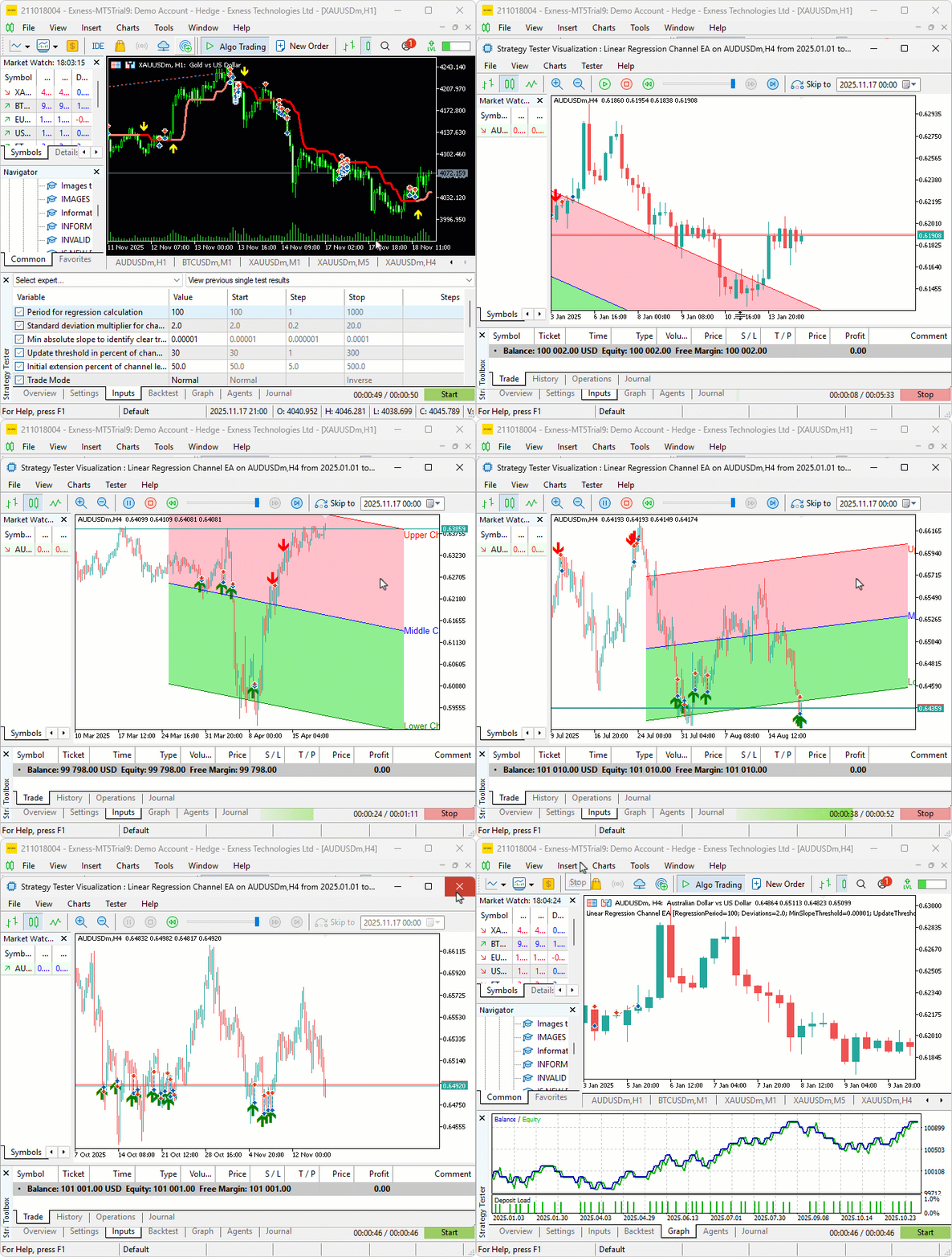
From the visualization, we can see that we define the linear regression channel, update it when needed, and open positions on breakouts, hence achieving our objectives. The thing that remains is backtesting the program, and that is handled in the next section.
Backtesting
After thorough backtesting, we have the following results.
Backtest graph:

Backtest report:

Conclusion
In conclusion, we’ve developed an adaptive Linear Regression Channel system in MQL5. It calculates the regression line and standard deviation bands over a user-defined period. The system only activates when the absolute slope exceeds a minimum threshold. The channel extends automatically bar-by-bar while the price stays inside. It fully recreates the channel when the price moves beyond a configurable percentage of the channel width. The system supports both normal (pullback) and inverse (fade) trading modes. It opens positions on clean breakouts from inside the channel. Visually, it displays filled dual-color zones, solid trendlines for upper, middle, and lower boundaries, as well as moving labels and entry arrows.
Disclaimer: This article is for educational purposes only. Trading carries significant financial risks, and market volatility may result in losses. Thorough backtesting and careful risk management are crucial before deploying this program in live markets.
This adaptive Linear Regression Channel strategy offers dynamic updates, normal or inverse modes, and middle-line cross exits. You’re equipped to trade trending markets with channel-based signals. The strategy is ready for further optimization in your trading journey. Happy trading!
Warning: All rights to these materials are reserved by MetaQuotes Ltd. Copying or reprinting of these materials in whole or in part is prohibited.
This article was written by a user of the site and reflects their personal views. MetaQuotes Ltd is not responsible for the accuracy of the information presented, nor for any consequences resulting from the use of the solutions, strategies or recommendations described.

 The View component for tables in the MQL5 MVC paradigm: Base graphical element
 Price Action Analysis Toolkit Development (Part 53): Pattern Density Heatmap for Support and Resistance Zone Discovery
 The MQL5 Standard Library Explorer (Part 5): Multiple Signal Expert
 Introduction to MQL5 (Part 29): Mastering API and WebRequest Function in MQL5 (III)

- Free trading apps
- Over 8,000 signals for copying
- Economic news for exploring financial markets
You agree to website policy and terms of use