Charts symbol changer and synchronizer

4.93

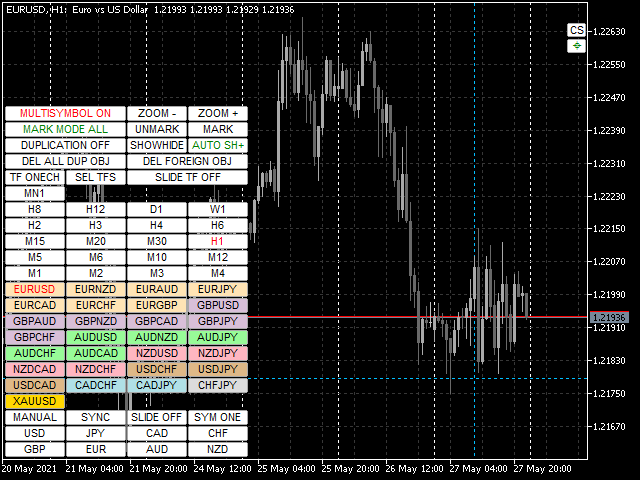
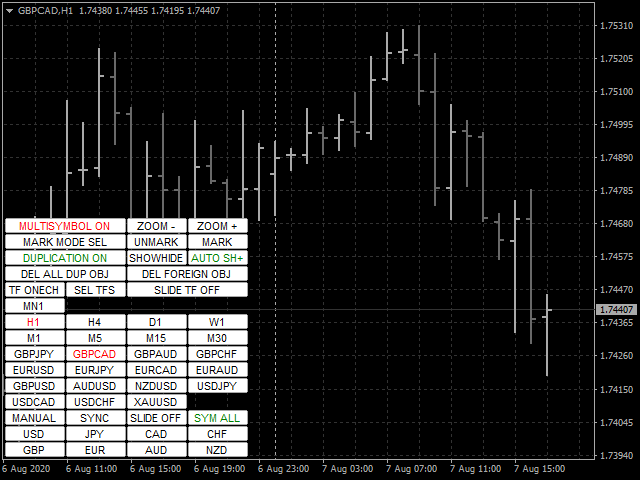
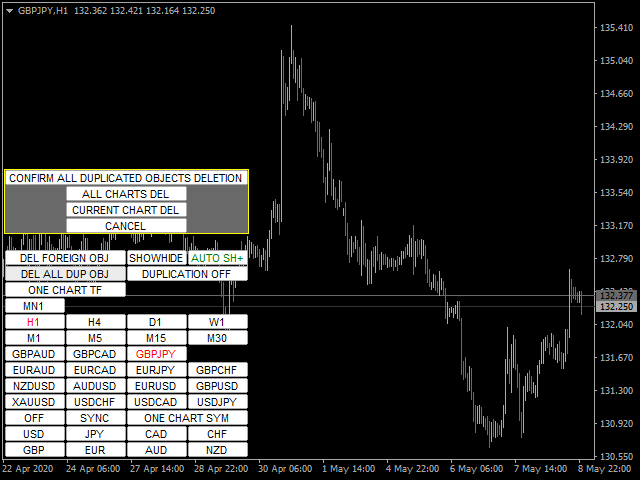
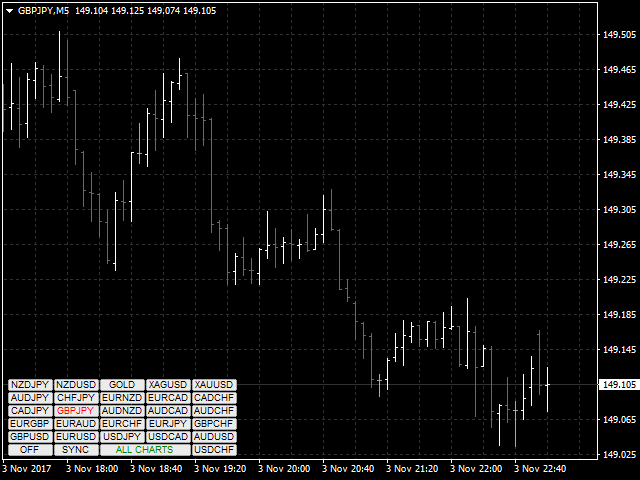
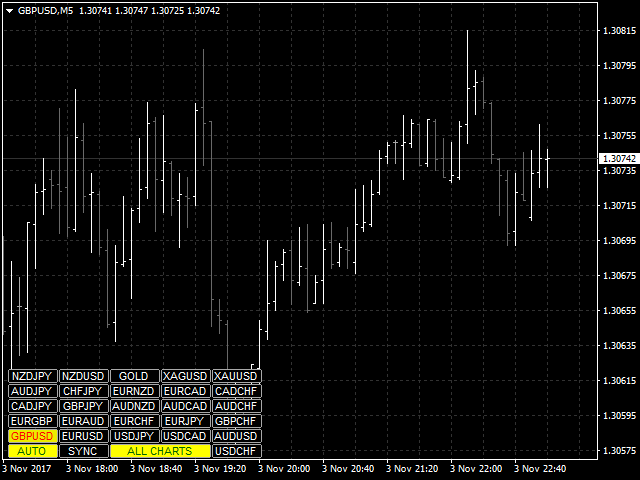
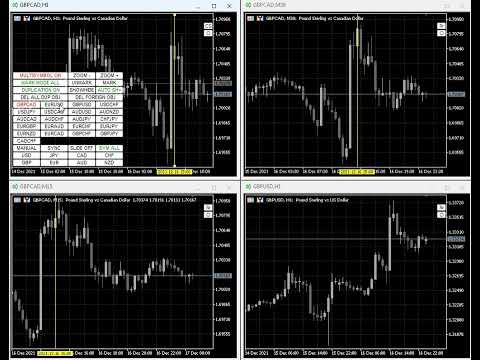
The utility is designed to change the symbol of the current, all or selected charts, change the timeframe, as well as to synchronously move through the history of all charts (automatically or by clicking the button). The list of symbols is read from the "Market Watch" or is set manually. The color, size and position of the buttons are customizable. Synchronization of charts occurs according to the time of the first visible bar when you press the "SYNC" button or when moving the mouse/keyboard in automatic mode.

The utility uses functions for working with charts that are not supported by the strategy tester, therefore the demo version of the utility cannot work fully. If you are interested in exactly how any of the functions of the utility works, write me a private message, I will record a video and publish it for you.

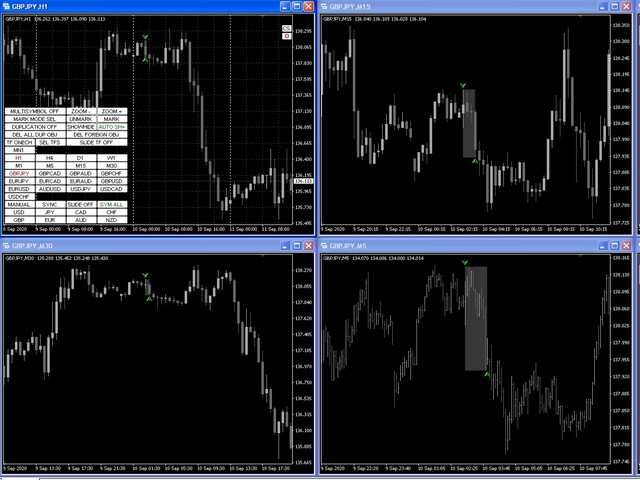
Duplication and synchronization mode allows copying objects to all charts of the current instrument at once.

The global crosshair allows you to look at the price action of the specified bar on the selected charts.

The Multi-symbol mode allows graphic objects to be displayed only on the instrument for which they were created.

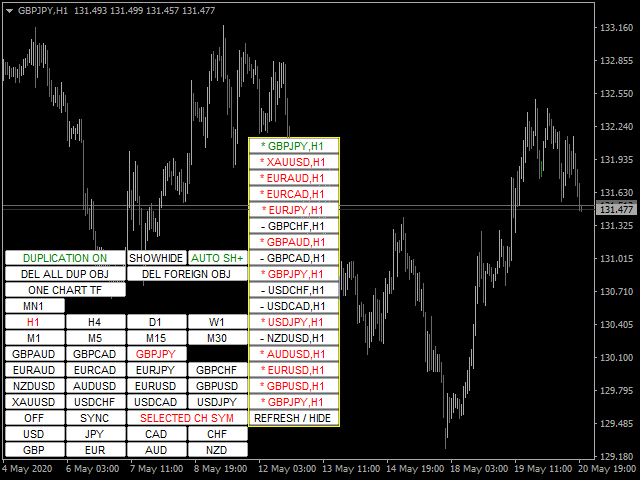
Highlighting profit/loss of open positions for trading instruments on the corresponding button

The buttons for 8 major currencies open the charts containing the currency from the list of currency pairs. The template for new charts is specified in the "Template name for new charts" parameter. When you change the symbol, the templates of the current charts are saved (charts opened by the indicator are used). When you reselect a symbol, the corresponding templates are loaded.

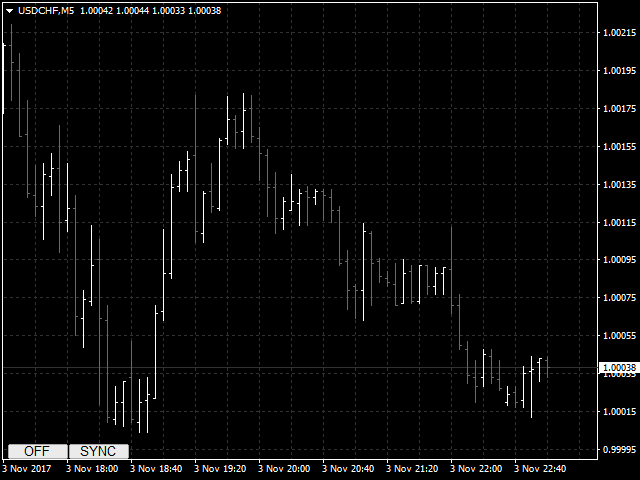
Buttons for unused functions can be disabled (hidden).

download Description of parameters and instructions.

List of main functions (the utility is constantly being improved, for all new functions and updates, see the "What's New" tab):

  • Switching trading instruments for the current/selected/all charts using buttons or cursor keys up/down or when changing in the main chart (main chart is a chart with the installed utility)
  • Highlighting buttons of trading instruments using the mouse button
  • A configurable list of displayed trading instruments
  • Switching TF for the current/all charts using the buttons or cursor keys left/right with the choice of a set of TF buttons or when changing the TF of the main chart
  • Zooming current/selected/all charts
  • Opening charts of all available currency pairs for one of the 8 major currencies with saving and restoring the template for charts opened by the utility
  • Manual or automatic synchronization of charts with the main chart
  • Automatic switching between trading instruments or TFs with a specified interval and direction. 3 modes available: all instruments, selected instruments, instruments with open positions
  • Setting the color of buttons, anchor angle, offset from the edge, size, font, number of buttons per line, placement subwindow, setting the transparency mode
  • MultiSymbol mode for displaying only objects of the current trading instrument when switching
  • Copying, synchronizing and controlling the display of most of the available graphic objects on the charts of the corresponding trading instrument when they are created and/or moved in the main chart
  • Ignoring objects with selected prefixes
  • Removing objects when switching a trading instrument with specified prefixes or all
  • Disable buttons for unused functions
  • Ability to hide/show all utility buttons
  • Highlighting the border color of the profit/loss button of open positions for trading instruments
  • Selecting a bar for analyzing the price behavior inside it (highlighting and scrolling to the center of the chart of the corresponding bars that make up the selected bar on smaller time frames)
  • Managing autoscrolling charts
  • Global crosshair function that displays and moves crosshairs synchronously on current/selected/all charts
  • The utility can work in four modes: single, main, auxiliary and auto. This feature allows you to customize the utility to control features from any chart
  • Possibility of color highlighting of families of currency pairs by base currency

Reviews 38
customanalog
164
customanalog 2023.08.30 17:48 
 

Both chart sync modes are useful. I use the crosshair feature constantly. Also, having a new trendline, Fibo or other object replicate across all charts saves time. Overall, excellent tool at a fair price.

fxcommentary
1928
fxcommentary 2022.09.06 22:25 
 

At this point it is probably the best tool for switching TF, symbols. It has many features, very flexible to use. It has so many features that if you want to use them all you will have to learn all of its options. It is certainly worth it. Recent changes made this tool probably the best. I have not seen better.

Jay A
206
Jay A 2022.03.19 03:25 
 

The best symbol changer out there

Recommended products
FastMove
Adrian Ferreyra
FastMove is a panel with 5 buttons, a notification area and a text entry. Its goal is to enable quick and simple execution. Buttons: MOVE - Move the interface BUY - Start of buy process SELL - Start of sell process L - Select quantity of lots % - Select quantity of percent of balance Keyboard inputs ' ESC ' - Cancels the operation or return to the previous stage. ' F ' - Lock or unlock interface to prevent accidental executions. M - Move the interface. P - Exchange between pending orders or mark
Every trader is watching over his account over and over.... trying to anlayse every system he or she has. With this tool you are able to  export your complete history of every account export withdrawls / deposits / rebates to a separate file export account status with balance / equity / current drawdown recalculate micro to standard lots / profits ...  export decimal by "." or ","  combine a series of Magic Numbers to one unique Magic Number   filter to ignore OrderComments.
DepoControl
Evgeniy Zhdan
DepoControl – Full Control Over the Deposit Closers   Expert Advisor controls the overall account status and closes ALL market orders on the account when certain conditions occur. The trading robot closes ALL orders on the account in the following cases (by profit): Close ALL orders by a total profit on the account   in monetary terms . For example, suppose that the settings specify that   positions should be closed when profit of 100 is reached. In this case, the Expert Advisor closes all mark
Basic Trade Buttons is a tool to help you to quickly open and close trades, place take profit and stop loss points by clicking on the button of each job that you preferred. Once you attached this tool to mt4 chart, the program will calculate a trade volume(Lots size) automatically to prepare to send to the trade server when you click on 'Buy' or 'Sell' button. Click on 'TP', 'SL' or 'Close' button to place take profit, stop loss based on the predefined levels or to close all open positions respe
Title : Trade Assistant Manager for MT4 Trade Assistant Manager   — See your risk before you click Trade Assistant Manager is a MetaTrader 4 chart utility for discretionary   traders who want a clear, visual way to size positions . Place your Entry, Stop Loss, and Take Profit directly on the chart. The panel shows the lot size, the money at risk, the profit target in money, and the reward-to-risk ratio — updated as you move the lines. What you gain   Faster decisions   : - Automatically   calcu
FREE
This program sends alerts to telegram when a specified profit target or drawdown level is reached. The profit target and drawdown level are specified as percentages of the daily starting balance in the inputs. When you purchase feel free to contact me for any assistance required with the setup. I am open to adding custom functions limited to profit or drawdown alerts
What is Discord to Telegram Pro? Discord to Telegram Pro is a professional bridge for MetaTrader 4 that automatically reads messages from your selected Discord channel and forwards them directly to your Telegram channel, group, or private chat. This Expert Advisor is designed for signal providers, private communities, Discord trading groups, and users who want to automatically forward Discord messages to Telegram without manual copy and paste. The system works inside MetaTrader 4 as a bridge: It
The script allows to use the mouse for placing a grid of orders with fixed or variable step quickly and with as few mistakes as possible. Drag the script to the chart using the left mouse button and release. The grid will be plotted starting from that point. If the current price is lower than the grid start point, the grid will be placed "to the north" towards the buys, and if higher - towards the sells, "to the south". Setting take profit and stop loss is left to trader's discretion. Input Par
"Support or Resistance Alert Broken" is a simple and very intuitive tool that allows you to create or eliminate horizontal and trend supports and / or resistances with a simple click. When the support or resistance line is broken by the closing price at the end of the current candle, the "Support or Resistance Alert Broken" tool will send an alert with sound, as well as a notification to the MT4 or MT5 mobile application. This tool can send alerts from multiple pairs at the same time. Utility
Trades Viewer
Qing Cai
5 (1)
Trades Viewer is a trading helper app for a serious trader. It offers several important data like day range, 22 days average range and predefined PL. It draws trades history and current open positions on a chart. It has a detail panel for viewing a particular trade with just a click on that trade. All these make it very convenient and straightforward to view your entry/exit positions and thus improve your trading system. Features Profit/loss of the current symbol, counting all trades of the sym
One Click Trader is a tool designed for MetaTrader 4 platform, which enables you to take your trading to the next level. It enables you to open, manage and close your trades in simple an efficient way by just one click of your mouse button. Up arrow minimizes the OCT panel Down arrow maximizes the OCT panel Right arrow displays the next panel with additional features Left arrow hides the panel with additional features Red SELL button enables you to open short market orders Red SELL STOP button e
Symbol Cost Monitor is a professional analytical utility for MetaTrader 4 designed to provide fast control over trading costs across multiple instruments simultaneously. Spread and swap directly affect the final trading result. This is especially important for scalping, active intraday trading, holding positions for several days, and working with multiple symbols at the same time. The standard MetaTrader 4 interface does not provide a convenient way to compare all these parameters in one window,
FREE
MultiStopOrder
Agus Wahyu Pratomo
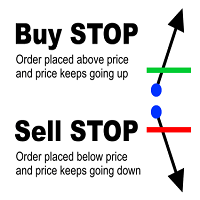
MultiStopOrder Tis Script will help us to put multiple stop order with single one click. This is a script not an EA Will place BUYSTOP and SELLSTOP with single click Main Feature 1. Put Multiple Stop Order 2. Specify how much stop orders will make 3. Set distance from current price 4. Set distance for each stop order 5. Set Take Profit dan Stop Loss  6. Use it on MT4 7. Set lot size with minmum 0.01 lots 8. Use with single one clicks
automatically sets a pre set take profit and stop loss on all orders that lack the selected stop(orders without sl/tp or both). This enables quicker opening of orders especially if you use a common take profit, stop loss or both for all orders of a current pair. You only need to open orders without having to calculate your stops and no matter how many orders you have opened the EA will set stops for you as long as you have attached the EA on the currency pairs chart. For pending orders the EA
PositionCalculatorMT4
Nguyen Duy Trung
5 (6)
Position Calculator calculates how many lots to trade based on: Entry and stop-loss levels Risk tolerance Account size (balance, equity, or even your savings account) Account currency Currency exchange rates - The main tab of the panel provides the primary control over the EA's functions and serves to output the most important calculation results: the position size, risk, reward, and risk-to-reward ratio. - The risk tab can help you assess current and potential risk and reward profile. Using a s
FREE
Metrics Pro for Telegram - MT4 Metrics Pro for Telegram is a reporting utility for MetaTrader 4 that automatically sends your account performance data to a Telegram chat or channel via the Telegram Bot API. It is designed for algo-traders, signal providers, and fund managers who need scheduled performance summaries delivered directly to their phone without checking the terminal manually. The utility runs in the background on a chart and posts formatted reports at a scheduled server time. Reports
RiskManager
Roman Zhitnik
5 (4)
The Expert Advisor is a risk manager helping users to control their trading. In the settings, it is possible to specify the parameters at which the risk manager force closes the opened trades and closes the terminal as well, if it is needed to prevent opening trades on emotions, which do not correspond to the trading strategy. Risk Manager settings Check limit to close - check the equity limit Limit to close (account currency)   - equity limit that is checked when  Check limit to close is activ
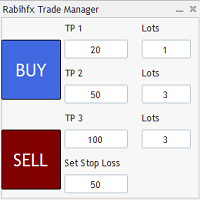
Introducing RabihFx Trade Manager New vesrion 2022 Update at 15/11/2022 and 100 activations now Rabihfx Trade Manager V2 is here with added Features click here Rabihfx Trade Manager is a trading utility tool (EA) allow you to place 3 orders with 3 take profit levels with custom  lot size for each trade with a stop loss  If your signal provider give you 3 take profit levels and a stop loss you will place these levels in  rabihfx trade manager with custom lot size for each level  and you choose
MT4 Send To Telegram – Real-Time Trade Alerts & Monitoring for Telegram MT4 Send To Telegram EA is a read-only monitoring and notification utility for MetaTrader 4. It sends clean, real-time trading activity from your MT4 account to Telegram , so you can stay informed from anywhere on mobile or desktop. Safe by design: this EA does not open, close, modify, or manage trades . It only monitors your account, sends alerts, and replies to supported read-only Telegram requests. Receive alerts for new
MTSBSPanel
Andrei Kossarev
MTSBSPanel is a multifunctional trading panel with an integrated risk manager. Main features of the trading panel Placement of pending orders directly from the chart with the ability to divide a position into multiple orders Opening by market in one click with the ability to divide a position into multiple orders Risk management: risk per trade and per day Dynamically calculated lot depending on the specified risk per trade Brief information on the account, result of trades for the day, week, m
This product can be used to synchronize multiple Charts, and each Chart can be set to a different sync mode. With this product you can better view and manipulate charts: different time frames for a single Symbol, the same time frame for multiple Symbols... and more. PS: The link below is the FreeDemo product, you can use it on EURUSD/XUAUSD/USDCNH symbol: https://www.mql5.com/en/market/product/38557 Feature: Chart settings  can be synchronized, including : background, indentation, size, etc. M
A simple script that closes all current orders. Terminate once close all positions, so please don't worry about constantly closing your order. How to use : Drag the script from the navigator to the chart to activate it. Do remember to enable algo trading to use this script. There are different versions of the script that can choose whether to close all buy/sell posiitons, if you need this, do contact me in MQL5.
Quick Close Pro by one click: * Close Buy positions * Close Sell positions * Close Win positions * Close All positions * Close All pending orders To close all positions by one click from your Telegram, please refer  Master Close . Thank you! Join my channel   here   for more useful EAs: - Tele Notify, Price Alert, Equity Alert, Remote Algo OnOff - Auto SLTP, Close Timer
FREE
This version only supports orders with a single order transaction count of<1. If the single order transaction count is>1, please subscribe to a higher version This EA is not actively profitable, but only uses trading time to increase trading frequency and achieve the goal of saving swap fees. Working principle: This EA will generate MQL4 Experts Orderhis before the trading deadline of the day_ The today.csv file is used to record the information that has been opened on the current day, generat
MQT Prop Guard DD MT4
Josue Fernando Servellon Fuentes
MQT Prop Guard DD protects prop firm accounts against daily drawdown and total drawdown breaches. It monitors your equity every second and closes everything before the daily loss limit of your prop firm challenge is hit — then locks trading until the next daily reset. Compatible with the rules used by prop firms such as FTMO, The5ers or FundedNext (always verify your firm's exact reset time and limits). How it works (logic summary): At your configured reset hour (server time) it snapshots the da
FREE
Draw Agent
Omar Alkassar
Draw Agent is designed as beautiful and innovative way to create and manage all your chart analysis, scribbles, notes and more. This tool provides a freehand drawing method, to treat the chart space as a blackboard and draw by-hand. This Freehand Drawing tool lets you draw onto MT4/MT5 charts, in order to mark or highlight events on the chart.  Its helpful tool if you like to  to draft Elliott waves by hand, draw lines on chart, or to illustrate ideas on your chart, and  It is particularly usef
Grid Trading Manager EA
Ibrahim Mohamed Ibrahim Mohamed Elsahafy
Professional grid management EA with 3-tab GUI, progressive placement, 5 take profit levels (TP1-TP5), basket breakeven protection, and advanced trailing stop. Automatically manages manual trades with intelligent limit order distribution. --- ### KEY FEATURES **3-Tab Interactive GUI** - STATUS: Real-time monitoring, profit tracking, trailing targets - SETTINGS: Runtime configuration without EA restart - TAKE PROFIT: Configure 5 sequential TP levels **Progressive Order Placement** - Wave-
FREE
FastMoveDemo
Adrian Ferreyra
FastMove is a panel with 5 buttons, a notification area and a text entry. Its goal is to enable quick and simple execution. Buttons: MOVE - Move the interface BUY - Start of buy process SELL - Start of sell process L - Select quantity of lots % - Select quantity of percent of balance Areas: Notifications - This area displays notifications of the various states of the program and the commands sent. Text input - Here you enter the number of lots or the percentage of risk capital depending on the o
FREE
This utility can compare simultaneously time frames of different instruments and keep under control   the nine major time frames  of an instrument. It is composed by two changers, a crosshair and some additional components : the  multicharts time frames changer   is designed to simultaneously compare time frames for up  to thirty different sy th symbols with the  keyboard or the button the multicharts symbols changer can  link up to nine charts and control simultaneously the nine major time fra
One Click MT4
MQL TOOLS SL
5 (3)
One Click Close MT4 is an EA which allows you close orders quickly. EA display on chart two buttons. The first button "Close All Positions" is using to close all opened orders. The second button "Close Profit Positions" is using to close only profitable orders. EA is closing orders for all available symbols, not only for chart symbol. In EA params you can set distance from upper chart frame (Y Offset) and from left chart frame (X Offset). For installation EA it is only need to copy One Click Clo
FREE
Buyers of this product also purchase
Forex Trade Manager MT4
InvestSoft
4.98 (443)
Trade Manager MT4 is an advanced position size calculator and trade management tool for MetaTrader 4, designed to help traders plan trades faster, control risk more precisely, and manage open positions directly from the chart. It combines order placement, risk based lot calculation, Stop Loss and Take Profit management, Break Even, Trailing Stop, Partial Close, Equity Protection, and external trade management in one panel. Whether you trade forex, indices, metals, commodities, or crypto, Trade M
Unlimited Trade Copier Pro is a tool to copy trade remotely to multiple MT4, MT5 and cTrader accounts at different computers/locations over internet. This is an ideal solution for you if you are a signal provider and want to copy your trades to other receivers globally on your own rules. One provider can copy trades to multiple receivers and one receiver can get trade from multiple providers as well. The provider can even set the subscription expiry for each receiver, so that receiver will not b
News Filter EA MT4
Rashed Samir
5 (10)
News Filter EA: Advanced Algo Trading Assistant News Filter EA is an advanced algo trading assistant designed to enhance your trading experience. By using the   News Filter EA , you can integrate a Forex economic news filter into your existing expert advisor, even if you do not have access to its source code. In addition to the news filter, you can also specify   trading days   and   hours   for your expert. The News Filter EA also includes   risk management   and   equity protection   features
The product will copy all telegram signal to MT4   ( which you are member  ) , also it can work as remote copier.  Easy to set up, copy order instant, can work with almost signal formats, image signal, s upport to translate other language to English Work with all type of channel or group, even channel have "Restrict Saving Content", work with  multi channel, multi MT5 Work as remote copier: with signal have ticket number, it will copy exactly via ticket number. Support to backtest signal. How to
Support and Resistance Dashboard for MT4 is a multi-timeframe and multi-symbol scanner and alert system that finds S/R zones and pivot points for all timeframes and symbols and alerts when price has interaction with them. If you are using support and resistance (or supply and demand) zones in your trading strategy, this dashboard and its alert and filtering system is a big time saver for you. Download demo version   (works on M 1,M5,M30,W1   timeframes) Full description of scanner parameters ->
VirtualTradePad PRO SE MT4 — advanced trading panel and chart workspace for MetaTrader 4 VirtualTradePad PRO SE is a professional trading panel and trade-management workspace for MetaTrader 4 . It helps traders open, manage, protect, close and analyze trades faster from one chart-based interface. The product was created for active manual traders who need more than a simple set of buttons. PRO SE combines one-click execution, pending orders, position control, partial close, basket profit/loss log
Strategy Builder offers an incredible amount of functionality. It combines a trade panel with configurable automation (covert indicators into an EA), real-time statistics (profit & draw down) plus automatic optimization of SL, TP/exit, trading hours, indicator inputs. Multiple indicators can be combined into an single alert/trade signal and can include custom indicators, even if just have ex4 file or purchased from Market. The system is easily configured via a CONFIG button and associated pop-up
The Risk to Reward Ratio Manager is a visual order management tool and position size calculator designed to support disciplined trading and professional risk management. It allows traders to visually set entry, stop-loss, and take-profit levels directly on the chart, while automatically calculating the lot size and risk-to-reward ratio before sending an order. The tool helps standardize trade preparation and ensures that each position is opened with a predefined and controlled level of risk. Thi
PZ Trade Pad Pro MT4
PZ TRADING SLU
3.67 (3)
Effortlessly calculate lot sizes and manage trades to save time and avoid costly errors The Trade Pad Pro EA is a tool for the Metatrader Platform that aims to help traders manage their trades more efficiently and effectively. It has a user-friendly visual interface that allows users to easily place and manage an unlimited number of trades, helping to avoid human errors and enhance their trading activity. [ Installation Guide | Update Guide | Troubleshooting | FAQ | All Products ] One of the k
MT4 to Telegram Signal Provider   turns your trading account into a signal provider. Every trade action, whether manual, by EA or from your phone, is instantly sent as a message to Telegram. You can fully customize the format or use a ready-made template for quick setup. [ Demo ] [ Manual ] [ MT5 Version ] [ Discord Version ]  New: [ Telegram To MT5 ] Setup A step by step user guide is available. Key Features Ability to customize order details sent to subscribers You can create a tiered subs
A professional panel for manual trading that keeps the whole trade cycle in one window on the chart, from a precise entry to protecting your account. Size every position strictly to a defined risk, build the trade with lines directly on the chart using the RR Tool, and place market and pending orders, grids and OCO. The panel takes position management off your hands: partial closing across up to five levels, six types of trailing stop, breakeven and Virtual SL/TP. Daily, weekly and monthly limit
Zone Trader MT4
Lee Samson
5 (1)
Trade support and resistance or supply and demand zones automatically once you have identified the key areas you want to trade from. This EA allows you to draw buy and sell zones with a single click and then place them exactly where you expect price to turn. The EA then monitors those zones and will automatically take trades based on price action you specify for the zones. Once the initial trade is taken, the EA will then get out in profit at the opposite zone you place, which becomes the target
TradePanel MT4
Alfiya Fazylova
4.84 (95)
Trade Panel is a multi-functional trading assistant. The app contains over 50 trading functions for manual trading and allows you to automate most trading tasks. Before making a purchase, you can test the demo version on a demo account. Download the trial version of the application for a demonstration account: https://www.mql5.com/en/blogs/post/750865 . Full instructions here . Trade. Allows you to perform trading operations in one click: Open pending orders and positions with automatic risk cal
Automatic profit locking when target profit is reached EquityTargetCloser   — is a utility expert advisor for MetaTrader 5 that automatically closes all market positions and deletes pending orders as soon as   equity exceeds the current balance by a specified profit amount . After all positions are closed, the target automatically increases: the new threshold = new balance + specified profit. The EA does not open trades, it only manages existing positions, helping to reliably lock in profit and
DrawDown Limiter MT4
Haidar Lionel Haj Ali
5 (8)
Drawdown Limiter EA You are in the right place if you were searching for Drawdown control, Drawdown limiter, Balance protection, Equity Protection or Daily Drawdown Limit related to Prop Firm, FTMO, or Funded account trading, or if you want to protect your trading account. Have you suffered from controlling your drawdown when trading funded accounts? This EA is meant for you. Prop firms usually set a rule called “Trader Daily Drawdown”, and if it is not respected, you are disqualified.  I am an
Telegram to MT4 Coppy
Sergey Batudayev
4.09 (11)
Telegram to MT4: The Ultimate Signal Copying Solution Streamline your trading with Telegram to MT4 , the cutting-edge utility designed to copy trading signals directly from Telegram channels and chats to your MetaTrader 4 platform—without the need for DLLs. This robust solution ensures seamless execution of signals with unparalleled precision and customization options, saving you time and boosting your efficiency. [ Instructions and DEMO ] [ FAQ ] [ How atach logs properly ] [Settings descrition
Trade Copier Global
Laszlo Tormasi
5 (15)
Trade Copier Global: The name speaks for itself. This copier allows you to copy orders between MT4 terminals even if they are not installed on the same computer. Features Copying trades between MT4 terminals around the world with a short delay. Automatically recognizes symbol prefixes. Can connect many Slaves to the same Master. Supports pending and market orders. Supports partial order close (with limitations, see below) Can send messages and notifications to the Slaves from the Master Several
Custom Alerts AIO: All-in-One Market Scanner – No Setup Required Overview Custom Alerts AIO is the fastest and easiest way to monitor multiple markets for real-time trading signals—without any setup or extra licenses. It comes with all required Stein Investments indicators already embedded, making it the perfect plug-and-play solution for traders who value simplicity and performance. Just load it to any chart and start receiving alerts across Forex, Metals, Crypto, and Indices. Shares can be a
MACD Divergence Scanner is a multi-timeframe and multi-symbol dashboard and alert that checks all timeframes and symbols to find regular and hidden divergences between price chart and MACD indicator. This divergence scanner is integrated with support and resistance zones so you can check the MACD divergences in the most important areas of the chart to find trend reversals in the price chart. Download demo version   (works on M 1,M5,M30,W1   timeframes) Full description of scanner parameters ->  
Telegram to MT4 Multi-Channel Copier automatically copies trading signals from your Telegram channels directly into MetaTrader 4. No bots, no browser extensions, no manual copying. You receive a signal on Telegram and the EA opens the trade on your terminal in a few seconds. The product includes two components: a Windows application that listens to your Telegram channels, and this Expert Advisor that executes the signals on your MT4 terminal. An MT5 version is also available. Setup guide and app
RSI Divergence Scanner is a multi-timeframe and multi-symbol dashboard and alert that checks all timeframes and symbols to find divergences between price chart and RSI indicator. This divergence scanner is integrated with support and resistance zones so you can check the RSI divergences in the most important areas of the chart to find trend reversals in the price chart. Download demo version   (works on M 1,M5,M30,W1 timeframes) Full description of scanner parameters ->   click here . How to get
The News Filter
Leolouiski Gan
5 (25)
This product filters all expert advisors and manual charts during news time. It is able to remove any of your EA during news and automatically reattach them after news ends. This product also comes with a complete  order management system that can handle your open positions and pending orders before the release of any news. Once you purchase The News Filter , you will no longer need to rely on built-in news filters for future expert advisors, as this product can filter them all from here onwards
Auto Trade Copier
Vu Trung Kien
4.76 (85)
Auto Trade Copier is designed to copy trades to multiple MT4, MT5 and cTrader accounts/terminals with 100% accuracy. The provider and receiver accounts must be on the same PC/VPS. With this tool, you can copy trades to receiver accounts on the same PC/VPS. All trading actions will be copied from provider to receiver perfectly. This version can be used on MT4 accounts only. For MT5 accounts, you must use Auto Trade Copier for MT5 . Reference: - For MT4 receiver, please download Trade Receiver Fre
Coppy Master MT4
Sergey Batudayev
4 (3)
Coppy Master MT4   is a trade copier tool for MetaTrader 4 and MetaTrader 5 terminals. It supports copying in both directions: from MT4 to MT5, from MT5 to MT4, as well as between accounts of the same type MT4 to MT4. To work correctly, all terminals must be running on the same PC or VPS. [ Instruction  and Demo ]  For copying to MetaTrader 4, a separate version —   Coppy Master MT5   — is required. Main Features: Copying Modes Supports both Master and Receiver roles. Flexible setup for sending
Trade Manager MT4 DaneTrades
Levi Dane Benjamin
4.09 (11)
DaneTrades Trade Manager is a professional trade panel for MetaTrader 4, designed for fast, accurate execution with built‑in risk control. Place market or pending orders directly from the chart while the panel automatically calculates position size from your chosen risk, helping you stay consistent and avoid emotional decision‑making. The Trade Manager is built for manual traders who want structure: clear risk/reward planning, automation for repeatable management, and safeguards that help reduc
TradeMirror is a trade copier EA for MT4/MT5 platform. Tutorial Please click the Trademirror Tutorial link to view more tutorials. Why TradeMirror We understand the importance of security, stability and privacy for financial software, so we've gone the extra mile to harden these three elements in detail: Provides a user-friendly graphical interface that is easy to operate Focus on privacy and security, suitable for various financial scenarios with privacy requirements for order distribution Prec
Elevate Your Trading Signals with Our Advanced Telegram Bridge EA It’s time to captivate your audience with real-time trading updates that are both professional and visually appealing. Contact me to receive a trial and see the demo channel! We have significantly invested in user friendly features that create a unique experience for customers and providers.  SIGNAL BRIDGE is able to deliver 100% COPIER FRIENDLY SIGNALS for all business cases, even bypassing Metatrader logics where other EAs stru
EasyTrade MT4
Alain Verleyen
5 (1)
Easy Trade – Smart, Simple, Powerful Trade Management Easy Trade is the all-in-one trade management solution for MetaTrader users who want to keep risk under control and execution ultra-smooth. Designed from scratch with trader feedback in mind, Easy Trade makes it easy to execute, monitor, and manage trades across multiple symbols – without overcomplicating your workflow. Whether you're scalping manually or managing a small portfolio of setups, Easy Trade keeps your focus where it belongs: on
Close by percentage MT4
Konstantin Kulikov
5 (1)
Hello friends. I wrote this utility specifically for use in my profile with a large number of Expert Advisors and sets ("Joint_profiles_from_grid_sets" https://www.mql5.com/en/blogs/post/747929 ). Now, in order to limit losses on the account, there is no need to change the "Close_positions_at_percentage_of_loss" parameter on each chart. Just open one additional chart, attach this utility and set the desired percentage for closing all trades on the account. The utility has the following function
Smart Channel M4
Vahidreza Heidar Gholami
The trend in the market can be predicted using trend lines but the problem is you don’t know where exactly the price is going to touch the trend line where you can put your pending orders on. Smart Channel Expert Advisor makes it possible to put an advanced channel around the price data, which can be configured to handle placing orders, opening and closing positions, managing risk per trade, spread, slippage, and trailing stop-loss and take-profit automatically. Features Money Management (Calcul
More from author
The utility is designed to   change the symbol   of the current, all or selected charts,   change the timeframe , as well as to   synchronously move through the history   of all charts (automatically or by clicking the button). The list of symbols is read from the "Market Watch" or is set manually. The color, size and position of the buttons are customizable. Synchronization of charts occurs according to the time of the first visible bar when you press the "SYNC" button or when moving the mouse/
Mini Charts MT5
Sergey Efimenko
4.83 (24)
The indicator displays minimized charts of any symbol from any timeframe. The maximum number of displayed charts is 28. The charts can be located both in the main and bottom window. Two display modes: candles and bars. Amount of displayed data (bars and candles) and chart sizes are adjustable. To work with a mini chat, you must first put the desired indicator(s) on a regular chart, then save it as a template and apply a template for the mini chart via the appropriate parameter, for example, for
FREE
Mini Charts
Sergey Efimenko
4.78 (9)
The indicator displays minimized charts of any symbol from any timeframe. The maximum number of displayed charts is 28. The charts can be located both in the main and bottom window. Two display modes: candles and bars. Amount of displayed data (bars and candles) and chart sizes are adjustable. Parameters: Corner - display start corner (selected from the list) CandleMode - display mode: true - candles, false - bars ShowLastBid - enable/disable the last price display LastBidShiftX - last price lin
FREE
CPM Extended MT5
Sergey Efimenko
4.5 (4)
The algorithm is based on the idea of the Currency Power Meter indicator. In this version, the number of displayed values is unlimited, its code is more compact and fast, values of the current bar can be obtained through indicator buffers. What the indicator shows : a thin band and the upper number in front of the currency shows the relative strength index for the last N hours (N is set in the parameters in the variable 'Hours'), a wider band shows the daily index. The more currency pairs using

FREE
CPM Extended
Sergey Efimenko
4.8 (10)
The algorithm is based on the idea of the Currency Power Meter indicator. In this version, the number of displayed values is unlimited, its code is more compact and fast, values of the current bar can be obtained through indicator buffers. What the indicator shows : a thin band and the upper number in front of the currency shows the relative strength index for the last N hours (N is set in the parameters in the variable 'Hours'), a wider band shows the daily index. The more currency pairs using


FREE
The indicator allows you to determine the current price direction and market volatility. This version of the Traders Dynamic Index  (TDI) has the redrawing of the historical data eliminated, the algorithm calculation speed optimized, more external parameters for a more precise adjustments, and its functionalities extended: added the selection of the initial oscillator and the smoothing methods of the averages. Parameters: Mode Osc - estimation oscillator selection; Period Osc - the calculation p
The indicator allows you to determine the current price direction and market volatility. This version of the Traders Dynamic Index (TDI) has the redrawing of the historical data eliminated, the algorithm calculation speed optimized, more external parameters for a more precise adjustments, and its functionalities extended: added the selection of the initial oscillator and the smoothing methods of the averages. Parameters: Mode Osc - estimation oscillator selection; Period Osc - the calculation p
Filter:
customanalog
164
customanalog 2023.08.30 17:48 
 

Both chart sync modes are useful. I use the crosshair feature constantly. Also, having a new trendline, Fibo or other object replicate across all charts saves time. Overall, excellent tool at a fair price.

elite luis
3481
elite luis 2023.03.23 21:18 
 

User didn't leave any comment to the rating
fxcommentary
1928
fxcommentary 2022.09.06 22:25 
 

At this point it is probably the best tool for switching TF, symbols. It has many features, very flexible to use. It has so many features that if you want to use them all you will have to learn all of its options. It is certainly worth it. Recent changes made this tool probably the best. I have not seen better.

Gordon Walsh
42
Gordon Walsh 2022.03.22 11:44 
 

Wen ever I load the indicator to a chart my MT4 platform crash's and closes. HELP Please

Sergey Efimenko
35358
Reply from developer Sergey Efimenko 2022.03.23 15:39
I replied to you in a personal message.
Jay A
206
Jay A 2022.03.19 03:25 
 

The best symbol changer out there

Sergey Efimenko
35358
Reply from developer Sergey Efimenko 2022.03.19 12:27
Thank you for your positive review! Glad you like it! I will continue to improve the quality of the utility and expand its functionality.
James Timpson
542
James Timpson 2022.01.19 03:31 
 

I had been searching for weeks for this product. Every other one was faulty in some respect. This Charts symbol changer and synchronizer is so far past every other one that this deserves a 10 ! Most importantly, I am able to have 3 windows instead of the usual 30 (that sometimes froze my MT4) and easily scroll manually or automatically thru all the symbol's charts. Bravo ! (Extra Credit to the Author Sergey who responded back promptly to my questions). Very pleased. If you are looking for this type of Utility, this is the Best of Class by a country mile. . . (Also a steal at only $35!) Cheers, Jim

Sergey Efimenko
35358
Reply from developer Sergey Efimenko 2022.01.19 12:51
Thank you for your positive review and kind words! I am very glad that you chose my product and you liked it. I hope to continue to please you with useful updates and other products.
Osagie Obasuyi
182
Osagie Obasuyi 2021.08.31 00:15 
 

Must I buy it every year from you?

stormcombat
351
stormcombat 2021.07.18 05:21 
 

A very useful tool. The global crosshair not rendering on my chart however, but all other functions are working great.

Sergey Efimenko
35358
Reply from developer Sergey Efimenko 2021.07.18 11:14
Why didn't you contact me in private messages or in comments? I would help solve the problem. The crosshair works correctly, probably you are doing something wrong. Either you have not enabled the necessary mode, or do not hold down the middle mouse button to activate it and move it.
HomayounT
348
HomayounT 2021.05.19 19:29 
 

As a multi pair trader it helps me a lot to navigate between chart by a little click on my every chart. It has many options to customize your panel as you wish. I am so satisfied with that and thanks to author for the smart utility. It is saving my time and energy very effectively. Five star from me and I recommend. Author is a quick response and very supportive.

kishore8460
353
kishore8460 2021.01.09 22:09 
 

The updated version is working well

asaens15
2125
asaens15 2021.01.09 19:02 
 

If you need this sort of thing, it's GREAT and indispensable... I've seen nothing else like it, so it has its own niche.

Mars Montero
367
Mars Montero 2020.11.07 02:00 
 

Very useful and makes multi-time frame analysis much easier, also the only symbol changer that doesn't copy trend lines or objects when switching to another symbol. Highly recommended

ohyman
321
ohyman 2020.11.03 00:58 
 

Please I need more activation,, my just finish due to pc problems. Thanks

Chalin Saranga Jayathilake
6414
Chalin Saranga Jayathilake 2020.09.26 11:20 
 

User didn't leave any comment to the rating

Blues Time
33
Blues Time 2020.09.21 08:43 
 

Hi Sergey, one additionally button is needing to save pairs windows positions or main pair window save. For example for selection 8 Pair currently, open pairs position very randomly (also very different by brokers MT4 and Market list strings). We will find any pair what we saved position if you add this additional function or what ever. Please let me know, Thanks

FX167
206
FX167 2020.08.18 19:46 
 

My daily chart driver. I don't think I've seen another symbol changer being able to come close.

The new feature of slideshow between charts with open positions: very nice. Thanks Sergey for putting this on the market and for listening to user feedback.

FXFund
442
FXFund 2020.06.18 23:46 
 

User didn't leave any comment to the rating

Osman Osman
926
Osman Osman 2020.05.29 09:07 
 

User didn't leave any comment to the rating

Dom29600
53
Dom29600 2020.05.28 15:36 
 

Really good indicator , feels like my MT4 terminal has been upgraded.

The indicator lets me check multiple time frames on different pairs easily.

It also has a great slide show feature , which switches the chart to the next chart on the list after a specified amount of time.

Thank you.

Paulus Nangoy
3545
Paulus Nangoy 2020.05.15 18:07 
 

Great and very useful tool, highly recommended! thank you!

12
Reply to review