Charts symbol changer and synchronizer

4.93

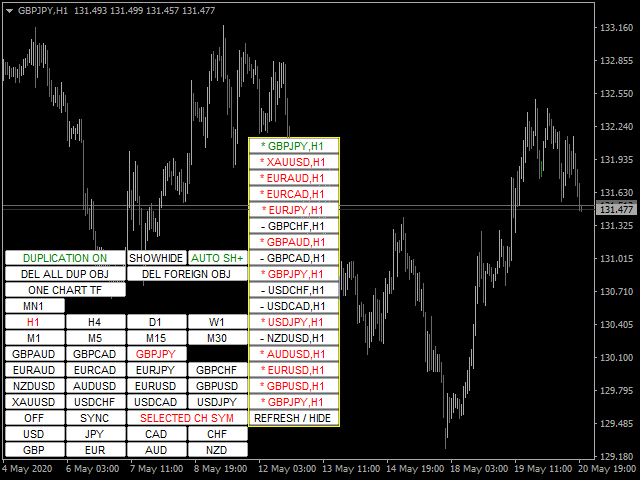
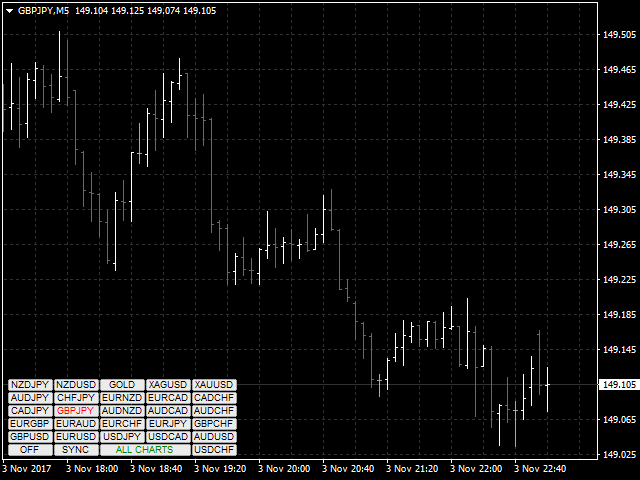
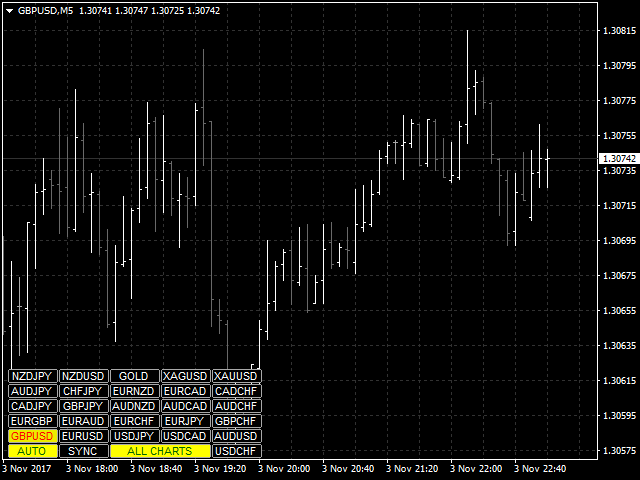
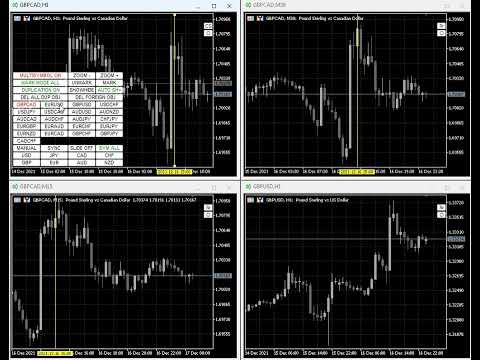
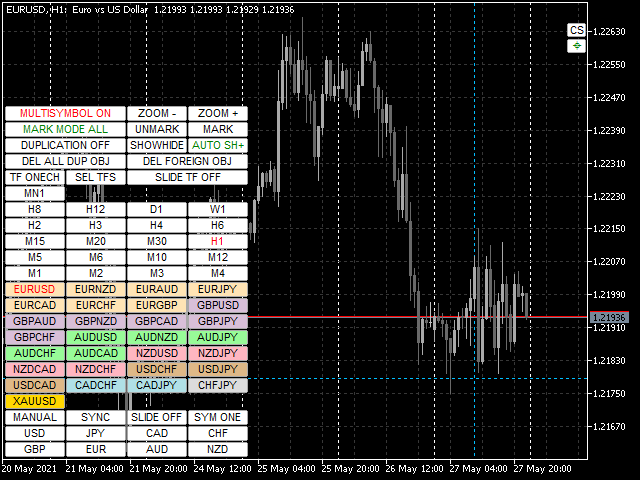
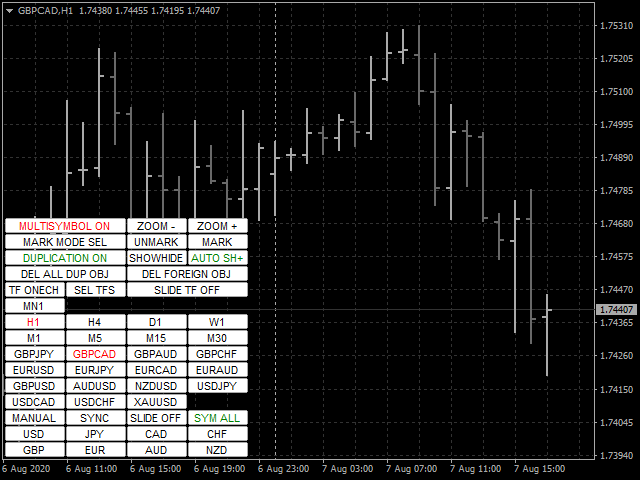
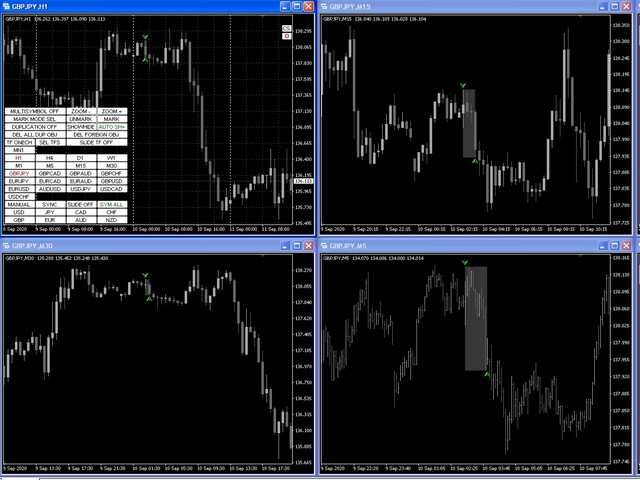
Utility progettata per cambiare lo strumento di trading per i grafici attuali, tutti o selezionati, il cambio di timeframe e per il movimento simultaneo nella cronologia (automaticamente o al clic) di tutti i grafici. L'elenco dei simboli viene letto dalla "Panoramica del mercato". È possibile modificare il colore, le dimensioni e la posizione dei pulsanti. La sincronizzazione dei grafici avviene al momento della prima barra visibile nel grafico attivo quando si fa clic sul pulsante di sincronizzazione o quando si sposta il mouse/tastiera in modalità automatica. Il TF può essere modificato utilizzando i tasti cursore: sinistra/destra e i simboli di trading - su/giù.

I pulsanti per le 8 principali valute consentono di aprire grafici dall'elenco delle coppie di valute (prese dalla panoramica del mercato o dalla stringa utente). Il modello per i nuovi grafici può essere specificato nel parametro "Nome modello per nuovi grafici". Quando si cambia la valuta, i modelli dei grafici correnti vengono salvati e le valute della coppia vengono sostituite sui grafici aperti dall'indicatore. Quando si seleziona nuovamente la valuta, vengono caricati i modelli corrispondenti.

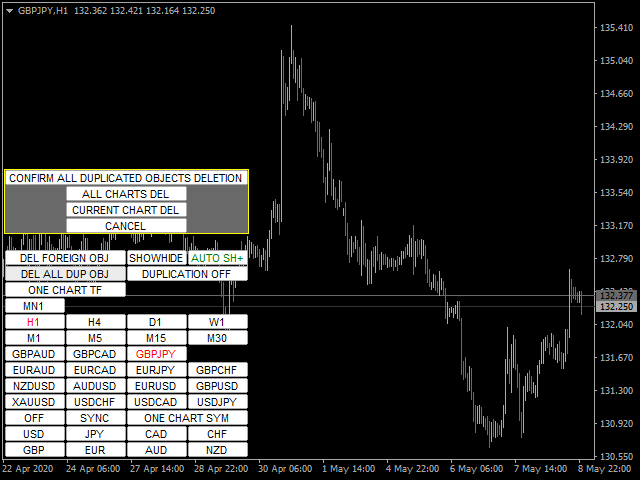
La modalità Duplica consente di copiare gli oggetti su tutti i grafici dello strumento corrente contemporaneamente.

Il mirino globale consente di visualizzare le azioni di prezzo della barra specificata sui grafici selezionati.

Descrizione dei parametri e delle istruzioni .

L'elenco delle funzioni principali (tutte le nuove funzioni e gli aggiornamenti sono disponibili nella scheda "Novità"):

  • Cambia gli strumenti di trading per i grafici correnti/selezionati/tutti.
  • Cambio degli strumenti di trading per tutti i grafici selezionati quando si cambia sul grafico principale (il grafico principale è il grafico con l'utilità installata).
  • Evidenzia i pulsanti degli strumenti di trading utilizzando il pulsante del mouse.
  • Elenco preimpostato di strumenti di trading: tutti gli strumenti correnti inclusi dalla finestra di panoramica del mercato o dal set di strumenti di trading dell'utente.
  • Cambia TF per le carte correnti/tutte.
  • Apertura delle finestre del grafico per tutte le coppie di valute disponibili per una delle 8 valute principali con salvataggio e ripristino del modello di grafico per l'utilità.
  • Sincronizzazione manuale o automatica dei grafici con il grafico principale
  • Passaggio automatico tra strumenti di trading con un intervallo e una direzione specificati.
  • Passaggio automatico tra TF con un intervallo impostato.
  • La possibilità di cambiare il colore dei pulsanti, l'angolo di ancoraggio, l'offset dal bordo, la dimensione, il carattere, il numero di pulsanti nella riga, la sottofinestra di posizionamento, l'impostazione della modalità di trasparenza per i pulsanti di utilità e TF.
  • Modalità multi-carattere per visualizzare solo gli oggetti dello strumento di trading corrente al momento del cambio.
  • Copia, sincronizza e controlla la visualizzazione della maggior parte degli oggetti grafici disponibili sui grafici dello strumento di trading corrispondente quando vengono creati e/o spostati nel grafico principale.
  • Possibilità di ignorare gli oggetti con i prefissi specificati.
  • La possibilità di eliminare oggetti quando si cambia uno strumento di trading con i prefissi specificati o tutti.
  • Possibilità di disabilitare (nascondere) i pulsanti delle funzioni non utilizzate.
  • Evidenzia il colore del bordo del pulsante per il profitto/perdita delle posizioni aperte sugli strumenti di trading.
  • Funzione di selezione delle barre per analizzare l'andamento del prezzo al suo interno (evidenziando e scorrendo al centro del grafico le barre corrispondenti sui TF più piccoli).
  • Disabilita i grafici a scorrimento automatico per la modalità di sincronizzazione automatica ed evidenzia l'intervallo della candela.
  • Funzione mirino globale che visualizza e sposta in modo sincrono il mirino sui grafici correnti/selezionati/tutti
  • L'utility può funzionare in tre modalità: singola, principale e ausiliaria. Questa funzione consente di configurare l'utilità per gestire il mirino globale da qualsiasi grafico.
  • La possibilità di evidenziare a colori le famiglie di coppie di valute in base alla valuta di base.
Recensioni 38
customanalog
164
customanalog 2023.08.30 17:48 
 

Both chart sync modes are useful. I use the crosshair feature constantly. Also, having a new trendline, Fibo or other object replicate across all charts saves time. Overall, excellent tool at a fair price.

fxcommentary
1930
fxcommentary 2022.09.06 22:25 
 

At this point it is probably the best tool for switching TF, symbols. It has many features, very flexible to use. It has so many features that if you want to use them all you will have to learn all of its options. It is certainly worth it. Recent changes made this tool probably the best. I have not seen better.

Jay A
206
Jay A 2022.03.19 03:25 
 

The best symbol changer out there

Prodotti consigliati
You can check out comment #1 how does it work This is a very useful tool, enter the currency charts you need to open, use the symbol "/" to distinguish them, and select the periodicity /TF of the chart, press the button and they will open the charts for you in batches without you having to manually open them each! Because some EA use multiple currency pairs strategy, but do not support one chart to support all currency pairs, so I developed this tool, hope you like it, if you are satisfied with
FREE
The utility is designed to close several types of orders. Closing is done by pressing the hot key. How to place and delete orders by voice using the utilities of this type, see the video below the description.  https://www.youtube.com/channel/UCTpVWJkEic6TzoXr0qc9RIw/featured Provided closing options: KEY "1" DELETE BUY STOP. KEY "2" DELETE SELL STOP. KEY "3" DELETE BUY AND SELL STOP. KEY "4" DELETE BUY LIMIT. KEY "5" DELETE SELL LIMIT. KEY "6" DELETE BUY AND SELL LIMIT. KEY "7" DELETE ALL PEND
FREE
Every trader is watching over his account over and over.... trying to anlayse every system he or she has. With this tool you are able to  export your complete history of every account export withdrawls / deposits / rebates to a separate file export account status with balance / equity / current drawdown recalculate micro to standard lots / profits ...  export decimal by "." or ","  combine a series of Magic Numbers to one unique Magic Number   filter to ignore OrderComments.
One Click MT4
MQL TOOLS SL
5 (2)
One Click Close MT4 is an EA which allows you close orders quickly. EA display on chart two buttons. The first button "Close All Positions" is using to close all opened orders. The second button "Close Profit Positions" is using to close only profitable orders. EA is closing orders for all available symbols, not only for chart symbol. In EA params you can set distance from upper chart frame (Y Offset) and from left chart frame (X Offset). For installation EA it is only need to copy One Click Clo
FREE
DepoControl
Evgeniy Zhdan
DepoControl – Full Control Over the Deposit Closers   Expert Advisor controls the overall account status and closes ALL market orders on the account when certain conditions occur. The trading robot closes ALL orders on the account in the following cases (by profit): Close ALL orders by a total profit on the account   in monetary terms . For example, suppose that the settings specify that   positions should be closed when profit of 100 is reached. In this case, the Expert Advisor closes all mark
Draw Agent
Omar Alkassar
Draw Agent è progettato come un modo bello e innovativo per creare e gestire tutte le analisi dei grafici, gli scarabocchi, le note e altro ancora. Questo strumento fornisce un metodo di disegno a mano libera, per trattare lo spazio del grafico come una lavagna e disegnare a mano. Questo strumento di disegno a mano libera ti consente di disegnare sui grafici MT4/MT5, al fine di contrassegnare o evidenziare gli eventi sul grafico. È uno strumento utile se ti piace   disegnare manualmente le onde
FastMove
Adrian Ferreyra
FastMove is a panel with 5 buttons, a notification area and a text entry. Its goal is to enable quick and simple execution. Buttons: MOVE - Move the interface BUY - Start of buy process SELL - Start of sell process L - Select quantity of lots % - Select quantity of percent of balance Keyboard inputs ' ESC ' - Cancels the operation or return to the previous stage. ' F ' - Lock or unlock interface to prevent accidental executions. M - Move the interface. P - Exchange between pending orders or mark
FastMoveDemo
Adrian Ferreyra
FastMove is a panel with 5 buttons, a notification area and a text entry. Its goal is to enable quick and simple execution. Buttons: MOVE - Move the interface BUY - Start of buy process SELL - Start of sell process L - Select quantity of lots % - Select quantity of percent of balance Areas: Notifications - This area displays notifications of the various states of the program and the commands sent. Text input - Here you enter the number of lots or the percentage of risk capital depending on the o
FREE
"Support or Resistance Alert Broken" is a simple and very intuitive tool that allows you to create or eliminate horizontal and trend supports and / or resistances with a simple click. When the support or resistance line is broken by the closing price at the end of the current candle, the "Support or Resistance Alert Broken" tool will send an alert with sound, as well as a notification to the MT4 or MT5 mobile application. This tool can send alerts from multiple pairs at the same time. Utility
A simple script that closes all current orders. Terminate once close all positions, so please don't worry about constantly closing your order. How to use : Drag the script from the navigator to the chart to activate it. Do remember to enable algo trading to use this script. There are different versions of the script that can choose whether to close all buy/sell posiitons, if you need this, do contact me in MQL5.
Basic Trade Buttons mt4
Kriengsak Peitaisong
Basic Trade Buttons is a tool to help you to quickly open and close trades, place take profit and stop loss points by clicking on the button of each job that you preferred. Once you attached this tool to mt4 chart, the program will calculate a trade volume(Lots size) automatically to prepare to send to the trade server when you click on 'Buy' or 'Sell' button. Click on 'TP', 'SL' or 'Close' button to place take profit, stop loss based on the predefined levels or to close all open positions respe
Trades Viewer
Qing Cai
5 (1)
Trades Viewer is a trading helper app for a serious trader. It offers several important data like day range, 22 days average range and predefined PL. It draws trades history and current open positions on a chart. It has a detail panel for viewing a particular trade with just a click on that trade. All these make it very convenient and straightforward to view your entry/exit positions and thus improve your trading system. Features Profit/loss of the current symbol, counting all trades of the sym
This product can be used to synchronize multiple Charts, and each Chart can be set to a different sync mode. With this product you can better view and manipulate charts: different time frames for a single Symbol, the same time frame for multiple Symbols... and more. PS: The link below is the FreeDemo product, you can use it on EURUSD/XUAUSD/USDCNH symbol: https://www.mql5.com/en/market/product/38557 Feature: Chart settings  can be synchronized, including : background, indentation, size, etc. M
This program sends alerts to telegram when a specified profit target or drawdown level is reached. The profit target and drawdown level are specified as percentages of the daily starting balance in the inputs. When you purchase feel free to contact me for any assistance required with the setup. I am open to adding custom functions limited to profit or drawdown alerts
One Click Close All Script
Joaquin Nicolas Metayer
5 (1)
One Click Close All is a script that when thrown on any chart will automatically close all orders regardless of the asset or what type of orders they are, it will close everything much faster than a human could. You will find paid versions of the same style of this script, but read carefully and you will see that it performs the same function ... here you have it for free, enjoy it.
FREE
PositionCalculatorMT4
Nguyen Duy Trung
5 (6)
Position Calculator calculates how many lots to trade based on: Entry and stop-loss levels Risk tolerance Account size (balance, equity, or even your savings account) Account currency Currency exchange rates - The main tab of the panel provides the primary control over the EA's functions and serves to output the most important calculation results: the position size, risk, reward, and risk-to-reward ratio. - The risk tab can help you assess current and potential risk and reward profile. Using a s
FREE
It computes BUY and SELL lot sizing in either % of balance or in fixed intervals. In market orders, this EA contains the adaptive slippage, logs tickets for instant confirmation of opening trades, and contains every market symbol at a glance. Real-time balance/equity display keeps margin health in view without tab-switching, toggling spread if needed for liquidity checks. Compact left-panel layout minimizes screen real estate, empowering blind trades where speed trumps overanalyze—perfect for
FREE
Introducing RabihFx Trade Manager New vesrion 2022 Update at 15/11/2022 and 100 activations now Rabihfx Trade Manager V2 is here with added Features click here Rabihfx Trade Manager is a trading utility tool (EA) allow you to place 3 orders with 3 take profit levels with custom  lot size for each trade with a stop loss  If your signal provider give you 3 take profit levels and a stop loss you will place these levels in  rabihfx trade manager with custom lot size for each level  and you choose
This version only supports orders with a single order transaction count of<1. If the single order transaction count is>1, please subscribe to a higher version This EA is not actively profitable, but only uses trading time to increase trading frequency and achieve the goal of saving swap fees. Working principle: This EA will generate MQL4 Experts Orderhis before the trading deadline of the day_ The today.csv file is used to record the information that has been opened on the current day, generat
Quick Close Pro by one click: * Close Buy positions * Close Sell positions * Close Win positions * Close All positions * Close All pending orders To close all positions by one click from your Telegram, please refer  Master Close . Thank you! Join my channel   here   for more useful EAs: - Tele Notify, Price Alert, Equity Alert, Remote Algo OnOff - Auto SLTP, Close Timer
FREE
The script allows to use the mouse for placing a grid of orders with fixed or variable step quickly and with as few mistakes as possible. Drag the script to the chart using the left mouse button and release. The grid will be plotted starting from that point. If the current price is lower than the grid start point, the grid will be placed "to the north" towards the buys, and if higher - towards the sells, "to the south". Setting take profit and stop loss is left to trader's discretion. Input Par

ATTENZIONE: l'applicazione non può funzionare nello Strategy Tester, se desideri provare la versione demo gratuitamente per una settimana, o hai delle domande, scrivimi una mail! Trovi il mio indirizzo sul mio profilo utente. TrendLine Auto Executor   è un software capace di individuare le trendline che hai tracciato sul grafico ed aprire gli ordini non appena queste vengono toccate o superate. Il software permette di gestire due ordini alla volta per ogni chart tramite il tracciamento di due gr
Partial Close MT4
Ahmed Alaoui Chrifi
This is a very simple, and easy-to-use Trade Manager with features like   Auto Partial Close, Auto Stop-loss, Breakeven. EA  closes a profitable position in partial closes when the price moves first in the direction of profits, and then comes back. EA monitors the position. If the price moves in the direction of profits, then ea establish the first level of rollback price at a distance. If the price continues to move in the direction of profits, this level of profit continues modifying this lev
Quick Style
Maxim Polishchuk
4.71 (7)
The Quick Style utility is designed for facilitation and acceleration of working with the properties of graphical objects. Left-click a graphical object while holding the Shift key to open the quick access window for configuring the object properties. In the window, you can change the color, style and line width with one click, including those of other graphical objects. All changes are displayed immediately. To close the Quick Style , simply click the free space on the chart. The utility is eas
FREE
API - Account Push Info is a Tool for "EVERYONE", who want to get the Live Statistics of an MT4 Trading Account, independent if you trade live or demo or automaticly or manual. It send the Report periodly to the Mobile Device with Push Message or to your Mail Account. The Report includes many important kind of Data, like: - a Specified Name for the Account / System - its a Live or Demo Account - Balance, Equity, - Drawdown in Currency and Percent, - Sum of Deposits, - Active Positions - Accou
My Trades in Pips
Bernhard Schweigert
4.83 (18)
Uno strumento di trading da non perdere. L'indicatore visualizza tutte le operazioni/deal nel grafico con il simbolo a cui è collegato. Stampa il numero di pip in profitto o in perdita. A scelta, stampa una linea verticale attraverso le sottofinestre per una migliore analisi. Consultate anche la versione PRO qui: My Trade History PRO https://www.mql5.com/en/market/product/50206 Inoltre, aggiunge le informazioni sul risultato totale delle operazioni nella valuta di deposito e sul totale dei pi
FREE
Equity Aler t can help you send notifications to your personal Telegram when your account equity reaches/ drops below a preset value. Additionally,   you can check your MT4/5 account info anytime from your Telegram by simple command:   /check .    Get more free useful EAs  here ! HOW TO SET UP?   * Get inputs for EA: - Telegram Bot Token: Create a Telegram bot by   @BotFather   ,   and save your Bot Token. Find your bot by username & press "start". - Telegram User ID: Use your User ID by chatti
FREE
Questo l'indicatore è utile per tenere monitorato gli andamenti delle singole strategie o addirittura tutto di tutto il portafoglio di strategie direttamente sulla propria MT4. In questo modo si può visionare la linea dell'equity e la linea del balance direttamente sul grafico. Inoltre si può impostare una linea in base al numero percentuale di DD Max che la singola strategia può arrivare. 
CorrelationUSD is a basic indicator, which is located on the chart. This tool allows you to monitor the relationship between assets, it reliably determines the patterns of quotation changes of one relative other asset. What is the indicator? All basic assets are interconnected, first of all, by a full complex of essential fundamental factors. For example, most currency pairs have a strong influence on measurements of each other’s quotes. Trends of this kind create macroeconomic news.
MultiStopOrder
Agus Wahyu Pratomo
MultiStopOrder Tis Script will help us to put multiple stop order with single one click. This is a script not an EA Will place BUYSTOP and SELLSTOP with single click Main Feature 1. Put Multiple Stop Order 2. Specify how much stop orders will make 3. Set distance from current price 4. Set distance for each stop order 5. Set Take Profit dan Stop Loss  6. Use it on MT4 7. Set lot size with minmum 0.01 lots 8. Use with single one clicks
Gli utenti di questo prodotto hanno anche acquistato
Forex Trade Manager MT4
InvestSoft
4.98 (425)
Benvenuto a Trade Manager EA, lo strumento definitivo per la gestione del rischio , progettato per rendere il trading più intuitivo, preciso ed efficiente. Non è solo uno strumento per l'esecuzione degli ordini, ma una soluzione completa per la pianificazione delle operazioni, la gestione delle posizioni e il controllo del rischio. Che tu sia un principiante, un trader avanzato o uno scalper che necessita di esecuzioni rapide, Trade Manager EA si adatta alle tue esigenze, offrendo flessibilità s
Local Trade Copier EA MT4
Juvenille Emperor Limited
4.96 (105)
Sperimenta una copia di trading eccezionalmente veloce con il Local Trade Copier EA MT4 . Con la sua facile configurazione in 1 minuto, questo copiatore di trading ti consente di copiare i trades tra diversi terminali di MetaTrader sullo stesso computer Windows o su Windows VPS con velocità di copia ultra veloci inferiori a 0.5 secondi. Che tu sia un trader principiante o professionista, Local Trade Copier EA MT4 offre una vasta gamma di opzioni per personalizzarlo alle tue esigenze specifiche.
Trade Assistant MT4
Evgeniy Kravchenko
4.42 (192)
It helps to calculate the risk per trade, the easy installation of a new order, order management with partial closing functions, trailing stop of 7 types and other useful functions. Additional materials and instructions Installation instructions   -   Application instructions   -   Trial version of the application for a demo account Line function -   shows on the chart the Opening line, Stop Loss, Take Profit. With this function it is easy to set a new order and see its additional characteris
The product will copy all telegram signal to MT4   ( which you are member  ) , also it can work as remote copier.  Easy to set up, copy order instant, can work with almost signal formats, image signal, s upport to translate other language to English Work with all type of channel or group, even channel have "Restrict Saving Content", work with  multi channel, multi MT5 Work as remote copier: with signal have ticket number, it will copy exactly via ticket number. Support to backtest signal. How to
Exp COPYLOT CLIENT for MT4
Vladislav Andruschenko
4.69 (65)
Copiatore commerciale per MetaTrader 4.       Copia le operazioni, le posizioni e gli ordini forex da qualsiasi conto. È uno dei migliori copiatori commerciali       MT4 - MT4, MT5 - MT4       per il       COPYLOT MT4       versione (o       MT4 - MT5 MT5 - MT5       per il       COPYLOT MT5       versione). Versione MT5 Descrizione completa   +DEMO +PDF Come comprare Come installare     Come ottenere i file di registro     Come testare e ottimizzare     Tutti i prodotti di Expforex Versione
Unlimited Trade Copier Pro
Vu Trung Kien
3.86 (7)
Unlimited Trade Copier Pro is a tool to copy trade remotely to multiple MT4, MT5 and cTrader accounts at different computers/locations over internet. This is an ideal solution for you if you are a signal provider and want to copy your trades to other receivers globally on your own rules. One provider can copy trades to multiple receivers and one receiver can get trade from multiple providers as well. The provider can even set the subscription expiry for each receiver, so that receiver will not b
Strategy Builder offers an incredible amount of functionality. It combines a trade panel with configurable automation (covert indicators into an EA), real-time statistics (profit & draw down) plus automatic optimization of SL, TP/exit, trading hours, indicator inputs. Multiple indicators can be combined into an single alert/trade signal and can include custom indicators, even if just have ex4 file or purchased from Market. The system is easily configured via a CONFIG button and associated pop-up
Copy Cat More Trade Copier MT4 (Copia Gatto MT4) non è solo un semplice copiatore locale di operazioni; è un quadro completo di gestione del rischio ed esecuzione, progettato per le sfide del trading moderno. Dai challenge delle prop firm alla gestione dei conti personali, si adatta a ogni situazione grazie a una combinazione di esecuzione robusta, protezione del capitale, configurazione flessibile e gestione avanzata delle operazioni. Il copiatore funziona sia in modalità Master (mittente) che
TradePanel MT4
Alfiya Fazylova
4.84 (89)
Trade Panel è un assistente commerciale multifunzionale. L'applicazione contiene più di 50 funzioni di trading per il trading manuale e consente di automatizzare la maggior parte delle operazioni di trading. Attenzione, l'applicazione non funziona nel tester di strategia. Prima dell'acquisto, puoi testare la versione demo su un conto demo. Versione demo qui . Istruzioni complete qui . Commercio. Ti consente di eseguire operazioni di trading con un clic: Apri ordini e posizioni pendenti con calco
Il MT4 to Telegram Signal Provider è uno strumento facile da usare e completamente personalizzabile che consente l'invio di segnali a Telegram, trasformando il tuo account in un fornitore di segnali. Il formato dei messaggi è completamente personalizzabile! Tuttavia, per un uso semplice, puoi anche optare per un modello predefinito e abilitare o disabilitare parti specifiche del messaggio. [ Dimostrativo ]  [ Manuale ] [ Versione MT5 ] [ Versione Discord ] [ Canale Telegram ]  New: [ Telegram To
EchoTrade Telegram to MT4 Copier
Perpetual Chinemerem Vincent
5 (2)
EchoTrade Telegram to MT5 Copier Seamless, Instant, and Reliable Signal Copying - Direct from Telegram to MetaTrader 4! The product does not run in the strategy tester but you can get free trial version   here  for testing before purchase. Tired of manually executing trades from Telegram signals? EchoTrade automates the process, instantly copying trades from any Telegram channel or group directly into your MT5 account—accurately, efficiently, and without delay. Key Features: Universal Compatib

Trade Dashboard MT4
Fatemeh Ameri
4.96 (53)
Tired of complex order placement and manual calculations? Trade Dashboard is your solution. With its user-friendly interface, placing orders becomes effortless, by a single click, you can open trades, set stop loss and take profit levels, manage trade lot size, and calculate risk to reward ratios, allowing you to only focus on your strategy. Say goodbye to manual calculations and streamline your trading experience with Trade Dashboard. Download  Demo Version  right now. You can find  Details of
Grid Manual MT4
Alfiya Fazylova
4.71 (17)
Grid Manual è un pannello di trading per lavorare con una griglia di ordini. L'utilità è universale, ha impostazioni flessibili e un'interfaccia intuitiva. Funziona con una griglia di ordini non solo nella direzione delle perdite, ma anche nella direzione dell'aumento dei profitti. Il trader non ha bisogno di creare e mantenere una griglia di ordini, lo farà l'utilità. È sufficiente aprire un ordine e il manuale di Grid creerà automaticamente una griglia di ordini per esso e lo accompagnerà fino
Ultimate Extractor - Professional Trading Analytics for MT4 Ultimate Extractor transforms your MetaTrader 4 trading history into actionable insights with comprehensive analytics, interactive charts, and real-time performance tracking. Ability to combine multiple accounts and MT4 and MT5 into a single dashboard. What It Does Automatically analyzes your MT4 trading history across all Expert Advisors and generates detailed HTML reports with interactive visualizations. Tracks live performance metric
Take a Break
Eric Emmrich
5 (31)
The most advanced news filter on MQL market - free demo available Take a Break has transformed from a basic news filter into a comprehensive account protection solution. It seamlessly pauses any other Expert Advisors during news events or based on your custom filters, all while safeguarding your EA settings - restoring them automatically when trading resumes for complete peace of mind. Typical use cases: A single news filter for all your EAs. Stop trading during news/high volatility (+ close all
Discord To MT4 Receiver
Levi Dane Benjamin
5 (1)
Copia i segnali da qualsiasi canale di cui sei membro (   senza la necessità di un Token Bot o Permessi di Amministratore  direttamente nel tuo MT4. È stato progettato con l'utente in mente offrendo molte delle funzionalità di cui hai bisogno Questo prodotto è presentato in un'interfaccia grafica facile da usare e visivamente attraente. Personalizza le tue impostazioni e inizia ad utilizzare il prodotto in pochi minuti! Guida Utente + Demo  | Versione MT5 | Versione Telegram Se desideri provar

Trade Manager MT4 DaneTrades
Levi Dane Benjamin
4.09 (11)
Trade Manager per aiutarti a entrare e uscire rapidamente dalle operazioni calcolando automaticamente il tuo rischio. Incluse funzionalità che ti aiutano a prevenire l'eccessivo trading, il vendetta trading e il trading emotivo. Le operazioni possono essere gestite automaticamente e i parametri di performance del conto possono essere visualizzati in un grafico. Queste caratteristiche rendono questo pannello ideale per tutti i trader manuali e aiuta a migliorare la piattaforma MetaTrader 4. Suppo
Everything for chart Technical Analysis indicator MT4 in one tool Draw your supply demand zone with rectangle and support resistance with trendline and get alerts to mobile phone or email alert -  Risk reward indicator Video tutorials, manuals, DEMO download   here .  Find contacts on my   profile . 1.   Extended rectangles and trendlines Object will be extended to the right edge of the chart when price will draw new candles on chart. This is rectangle extender or trendline extender. 2. Price to
News Filter EA MT4
Rashed Samir
5 (9)
News Filter EA: Advanced Algo Trading Assistant News Filter EA is an advanced algo trading assistant designed to enhance your trading experience. By using the   News Filter EA , you can integrate a Forex economic news filter into your existing expert advisor, even if you do not have access to its source code. In addition to the news filter, you can also specify   trading days   and   hours   for your expert. The News Filter EA also includes   risk management   and   equity protection   features
Copier4Fee Advanced
Vladimir Tkach
4.75 (16)
The utility copies trades from the signal provider accounts (master accounts, one or multiple providers) to unlimited number of receiver accounts (slave accounts).  Attention! Y ou need to use identifiers (Provider number) of the same length if you use several master copiers. For example. 1, 2, 3 or 11, 13, 22. The copying can be set in the opposite direction. The comments with all the recently performed actions are displayed on the screen to monitor the utility actions in slave mode. To avoid p
Automate your Trendsurfer trailing stop management - day and night With this Expert Advisor for Metatrader 4 you save time, avoid mistakes and trade more relaxed - specially developed for the Trendsurfer trading system. Always the right stop loss Fully automatic Simple to use Saves you time How it works 1. download the Expert Advisor and install it in Metatrader 4 (I will give you instructions on how to do this) 2. define your stop-loss rule 3. run your computer or VPS - the Expert Advisor
This is a simple utility which will put Automatic Stop Loss and Take Profit. It also has Trailing Stop Loss and Break Even features. The input value of the Stop Loss and Take Profit is in Pips. Whenever you open a trade it will put stop loss and take profit in pips automatically. *If you need a more practical stop loss and take profit for your trades then you may like this ATR based stop loss utility,  Here! Inputs: 1. SL and Trailing SL - This is the Stop Loss value in Pips. Also used as Traili
Copiatrice->Interazione dell'interfaccia comoda e veloce, gli utenti possono utilizzarla subito       ->>>> Si consiglia di utilizzarlo su computer Windows o VPS Windows Caratteristiche: Impostazioni di copy trading diversificate e personalizzate: 1. È possibile impostare diverse modalità di lotto per diverse fonti di segnale 2. È possibile impostare diverse fonti di segnale per il copy trading forward e reverse 3. I segnali possono essere impostati con commenti 4. Se calibrare il lotto in base
VirtualTradePad mt4 Extra
Vladislav Andruschenko
4.86 (59)
Pannello di trading per il trading in 1 clic.   Lavorare con posizioni e ordini!   Trading dal grafico o dalla tastiera. Utilizzando il nostro pannello di trading, puoi fare trading con un clic dal grafico ed eseguire operazioni di trading 30 volte più velocemente rispetto al controllo MetaTrader standard. Calcoli automatici di parametri e funzioni che semplificano la vita di un trader e lo aiutano a condurre le proprie attività di trading in modo molto più rapido e conveniente. Suggerimenti gra
The News Filter
Leolouiski Gan
5 (25)
Questo prodotto filtra tutti gli esperti consulenti e i grafici manuali durante il periodo delle notizie, così non dovrai preoccuparti di improvvisi picchi di prezzo che potrebbero distruggere le tue impostazioni di trading manuali o le negoziazioni effettuate da altri esperti consulenti. Questo prodotto viene fornito anche con un sistema completo di gestione degli ordini che può gestire le tue posizioni aperte e gli ordini in sospeso prima della pubblicazione di qualsiasi notizia. Una volta che
Custom Alerts AIO: Monitora tutti i mercati — senza alcuna configurazione Panoramica Custom Alerts AIO è una soluzione di monitoraggio dei mercati pronta all’uso che non richiede alcuna configurazione. Tutti gli indicatori necessari — FX Power, FX Volume, FX Dynamic, FX Levels, IX Power — sono integrati internamente. Non vengono mostrati grafici, rendendolo ideale per generare alert in tempo reale in modo discreto ed efficiente. Supporta tutte le classi di asset offerte dal tuo broker: Forex,
EasyTrade MT4
Alain Verleyen
5 (1)
Easy Trade – Gestione Operativa Intelligente, Semplice e Potente Easy Trade è la soluzione tutto-in-uno per la gestione delle operazioni su MetaTrader, ideale per chi desidera mantenere il rischio sotto controllo e garantire un’esecuzione fluida. Progettato da zero con il feedback reale dei trader, Easy Trade rende semplice eseguire, monitorare e gestire operazioni su più simboli – senza complicare il tuo flusso di lavoro. Che tu faccia scalping manuale o gestisca un piccolo portafoglio di str
PZ Trade Pad Pro MT4
PZ TRADING SLU
5 (2)
Effortlessly calculate lot sizes and manage trades to save time and avoid costly errors The Trade Pad Pro EA is a tool for the Metatrader Platform that aims to help traders manage their trades more efficiently and effectively. It has a user-friendly visual interface that allows users to easily place and manage an unlimited number of trades, helping to avoid human errors and enhance their trading activity. One of the key features of the Trade Pad Pro EA is its focus on risk and position manageme
Trading History MT4
Siarhei Vashchylka
5 (9)
Trading History - A program for trading and money management on the history of quotes in stratagy tester. It can work with pending and immediate orders, and is equipped with trailing stop, breakeven and take profit functions. Very good for training and testing different strategies. Manual (Be sure to read before purchasing) Advantages 1. Allows you to test any trading strategy in the shortest possible time 2. An excellent simulator for trading training. You can gain months of trading experience
Visualizza immediatamente la cronologia delle tue operazioni chiuse per giorno e settimana, le tue operazioni aperte correnti e l'esposizione forex su un grafico! Utilizza la mappa di calore per identificare le operazioni redditizie e dove si trova il tuo drawdown attuale all'interno del tuo portafoglio di trading. Pulsanti di chiusura rapida Utilizza i pulsanti di chiusura rapida per chiudere ogni operazione su un singolo simbolo, chiudere singole operazioni per intero o ottenere profitti o p
Altri dall’autore
Versione estesa dell'indicatore "Keltner Channel". Questo è uno strumento analitico che consente di determinare il rapporto tra la posizione del prezzo rispetto alla sua volatilità. È possibile utilizzare 26 tipi di media mobile e 11 opzioni di prezzo per calcolare la linea centrale dell'indicatore. Avvisi configurabili ti avviseranno quando il prezzo tocca il bordo superiore o inferiore del canale. Tipi di media disponibili: media mobile semplice, media mobile esponenziale, media mobile esponen
L'indicatore consente di determinare la direzione del prezzo corrente e la volatilità del mercato. Questa versione del Traders Dynamic Index ha eliminato il ridisegno dei dati storici, ottimizzata la velocità di calcolo dell'algoritmo, più parametri esterni per un aggiustamento più preciso e le sue funzionalità estese: aggiunta la selezione dell'oscillatore iniziale e le modalità di smoothing delle medie . Parametri: Mode Osc - stima della selezione dell'oscillatore Period Osc - il periodo di ca
Mini Charts MT5
Sergey Efimenko
4.81 (21)
L'indicatore mostra grafici ridotti a icona di qualsiasi simbolo da qualsiasi intervallo di tempo. Il numero massimo di carte visualizzate è 28. Le carte possono essere posizionate sia nella finestra principale che in quella inferiore. Due modalità di visualizzazione: candele e barre. La quantità di dati visualizzati (barre e candele) e le dimensioni del grafico sono regolabili. Per lavorare con una mini chat, devi prima mettere l'indicatore o gli indicatori desiderati su un normale grafico, qui
FREE
Mini Charts
Sergey Efimenko
4.78 (9)
L'indicatore mostra grafici ridotti a icona di qualsiasi simbolo da qualsiasi intervallo di tempo. Il numero massimo di carte visualizzate è 28. Le carte possono essere posizionate sia nella finestra principale che in quella inferiore. Due modalità di visualizzazione: candele e barre. La quantità di dati visualizzati (barre e candele) e le dimensioni del grafico sono regolabili. Parametri: Corner - angolo di inizio visualizzazione (selezionato dall'elenco) CandleMode - modalità di visualizzazion
FREE
CPM Extended MT5
Sergey Efimenko
4.5 (4)
L'algoritmo si basa sull'idea dell'indicatore Currency Power Meter. In questa versione il numero di valori visualizzati è illimitato, il suo codice è più compatto e veloce, i valori della barra corrente possono essere ottenuti tramite buffer indicatori. Cosa mostra l'indicatore   : una banda sottile e il numero in alto davanti alla valuta mostrano l'indice di forza relativa delle ultime N ore (N è impostato nei parametri nella variabile 'Ore'), una banda più ampia mostra l'indice giornaliero. Pi
FREE
CPM Extended
Sergey Efimenko
4.8 (10)
L'algoritmo si basa sull'idea dell'indicatore Currency Power Meter. In questa versione il numero di valori visualizzati è illimitato, il suo codice è più compatto e veloce, i valori della barra corrente possono essere ottenuti tramite buffer indicatori. Cosa mostra l'indicatore   : una banda sottile e il numero in alto davanti alla valuta mostrano l'indice di forza relativa delle ultime N ore (N è impostato nei parametri nella variabile 'Ore'), una banda più ampia mostra l'indice giornaliero. Pi
FREE
Versione estesa dell'indicatore "Keltner Channel". Questo è uno strumento analitico che consente di determinare il rapporto tra la posizione del prezzo rispetto alla sua volatilità. È possibile utilizzare 26 tipi di media mobile e 11 opzioni di prezzo per calcolare la linea centrale dell'indicatore. Avvisi configurabili ti avviseranno quando il prezzo tocca il bordo superiore o inferiore del canale. Tipi di media disponibili: media mobile semplice, media mobile esponenziale, media mobile esponen
L'indicatore mostra modelli armonici sul grafico basati su Dynamic ZigZag (   https://www.mql5.com/en/market/product/5356   ) ed è quasi un analogo completo di una delle versioni del noto korHarmonics. L'indicatore riconosce i seguenti modelli e le loro varietà: ABCD, Gartley (Butterfly, Crab, Bat), 3Drives, 5-0, Batman, SHS, One2One, Camel, Triangles, WXY, Fibo e Vibrations. Per impostazione predefinita, nelle impostazioni è abilitata solo la visualizzazione dei modelli ABCD e Gartley. La linea
Questo è un indicatore MTF dei livelli di supporto e resistenza basato sugli   estremi dell'indicatore Advanced ZigZag Dynamic   e/o   Extended Fractals   con etichette dei prezzi (può essere disabilitato). È possibile selezionare TF più alti per la modalità MTF. Per impostazione predefinita, i livelli vengono generati in base ai punti indicatori ZigZag. I punti indicatori frattali possono essere utilizzati anche insieme a ZigZag o al suo posto. Per semplificare l'uso e risparmiare tempo di CPU,
Questo è un indicatore lineare di un potere valutario che ha la capacità di filtrare livellando i valori. Mostra la potenza attuale delle valute selezionate (il numero massimo è 8), così come i valori storici. Il calcolo dipende dall'intervallo di tempo del grafico selezionato in cui viene lanciato l'indicatore. L'indicatore mostra i dati come linee per tutte le valute o come istogramma per la coppia di valute corrente. L'intersezione degli indici di forza della valuta per la coppia di valute co
L'indicatore mostra modelli armonici sul grafico   senza ridipingere   con il minimo ritardo possibile. La ricerca dei massimi degli indicatori si basa sul principio dell'onda dell'analisi dei prezzi. Le impostazioni avanzate ti consentono di scegliere i parametri per il tuo stile di trading. All'apertura di una candela (bar), quando si forma un nuovo pattern, viene fissata una freccia della probabile direzione del movimento del prezzo, che rimane invariata. L'indicatore riconosce i seguenti mod
L'indicatore mostra modelli armonici sul grafico basati su Dynamic ZigZag (   https://www.mql5.com/en/market/product/5356   ) ed è quasi un analogo completo di una delle versioni del noto korHarmonics. L'indicatore riconosce i seguenti modelli e le loro varietà: ABCD, Gartley (Butterfly, Crab, Bat), 3Drives, 5-0, Batman, SHS, One2One, Camel, Triangles, WXY, Fibo e Vibrations. Per impostazione predefinita, nelle impostazioni è abilitata solo la visualizzazione dei modelli ABCD e Gartley. La linea
Questo è un indicatore MTF dei livelli di supporto e resistenza basato sugli   estremi dell'indicatore Advanced ZigZag Dynamic   e/o   Extended Fractals   con etichette dei prezzi (può essere disabilitato). È possibile selezionare TF più alti per la modalità MTF. Per impostazione predefinita, i livelli vengono generati in base ai punti indicatori ZigZag. I punti indicatori frattali possono essere utilizzati anche insieme a ZigZag o al suo posto. Per semplificare l'uso e risparmiare tempo di CPU,
Questo è un indicatore lineare di un potere valutario che ha la capacità di filtrare livellando i valori. Mostra la potenza attuale delle valute selezionate (il numero massimo è 8), così come i valori storici. Il calcolo dipende dall'intervallo di tempo del grafico selezionato in cui viene lanciato l'indicatore. L'indicatore mostra i dati come linee per tutte le valute o come istogramma per la coppia di valute corrente. L'intersezione degli indici di forza della valuta per la coppia di valute co
L'indicatore mostra modelli armonici sul grafico   senza ridipingere   con il minimo ritardo possibile. La ricerca dei massimi degli indicatori si basa sul principio dell'onda dell'analisi dei prezzi. Le impostazioni avanzate ti consentono di scegliere i parametri per il tuo stile di trading. All'apertura di una candela (bar), quando si forma un nuovo pattern, viene fissata una freccia della probabile direzione del movimento del prezzo, che rimane invariata. L'indicatore riconosce i seguenti mod
Utility progettata per cambiare lo strumento di trading per i grafici attuali, tutti o selezionati, il cambio di timeframe e per il movimento simultaneo nella cronologia (automaticamente o al clic) di tutti i grafici. L'elenco dei simboli viene letto dalla "Panoramica del mercato". È possibile modificare il colore, le dimensioni e la posizione dei pulsanti. La sincronizzazione dei grafici avviene al momento della prima barra visibile nel grafico attivo quando si fa clic sul pulsante di sincroniz
Filtro:
customanalog
164
customanalog 2023.08.30 17:48 
 

Both chart sync modes are useful. I use the crosshair feature constantly. Also, having a new trendline, Fibo or other object replicate across all charts saves time. Overall, excellent tool at a fair price.

elite luis
3483
elite luis 2023.03.23 21:18 
 

L'utente non ha lasciato alcun commento sulla valutazione.

fxcommentary
1930
fxcommentary 2022.09.06 22:25 
 

At this point it is probably the best tool for switching TF, symbols. It has many features, very flexible to use. It has so many features that if you want to use them all you will have to learn all of its options. It is certainly worth it. Recent changes made this tool probably the best. I have not seen better.

Gordon Walsh
42
Gordon Walsh 2022.03.22 11:44 
 

Wen ever I load the indicator to a chart my MT4 platform crash's and closes. HELP Please

Sergey Efimenko
35351
Risposta dello sviluppatore Sergey Efimenko 2022.03.23 15:39
I replied to you in a personal message.
Jay A
206
Jay A 2022.03.19 03:25 
 

The best symbol changer out there

Sergey Efimenko
35351
Risposta dello sviluppatore Sergey Efimenko 2022.03.19 12:27
Thank you for your positive review! Glad you like it! I will continue to improve the quality of the utility and expand its functionality.
James Timpson
525
James Timpson 2022.01.19 03:31 
 

I had been searching for weeks for this product. Every other one was faulty in some respect. This Charts symbol changer and synchronizer is so far past every other one that this deserves a 10 ! Most importantly, I am able to have 3 windows instead of the usual 30 (that sometimes froze my MT4) and easily scroll manually or automatically thru all the symbol's charts. Bravo ! (Extra Credit to the Author Sergey who responded back promptly to my questions). Very pleased. If you are looking for this type of Utility, this is the Best of Class by a country mile. . . (Also a steal at only $35!) Cheers, Jim

Sergey Efimenko
35351
Risposta dello sviluppatore Sergey Efimenko 2022.01.19 12:51
Thank you for your positive review and kind words! I am very glad that you chose my product and you liked it. I hope to continue to please you with useful updates and other products.
Osagie Obasuyi
183
Osagie Obasuyi 2021.08.31 00:15 
 

Must I buy it every year from you?

stormcombat
351
stormcombat 2021.07.18 05:21 
 

A very useful tool. The global crosshair not rendering on my chart however, but all other functions are working great.

Sergey Efimenko
35351
Risposta dello sviluppatore Sergey Efimenko 2021.07.18 11:14
Why didn't you contact me in private messages or in comments? I would help solve the problem. The crosshair works correctly, probably you are doing something wrong. Either you have not enabled the necessary mode, or do not hold down the middle mouse button to activate it and move it.
HomayounT
343
HomayounT 2021.05.19 19:29 
 

As a multi pair trader it helps me a lot to navigate between chart by a little click on my every chart. It has many options to customize your panel as you wish. I am so satisfied with that and thanks to author for the smart utility. It is saving my time and energy very effectively. Five star from me and I recommend. Author is a quick response and very supportive.

kishore8460
353
kishore8460 2021.01.09 22:09 
 

The updated version is working well

asaens15
2126
asaens15 2021.01.09 19:02 
 

If you need this sort of thing, it's GREAT and indispensable... I've seen nothing else like it, so it has its own niche.

Mars Montero
370
Mars Montero 2020.11.07 02:00 
 

Very useful and makes multi-time frame analysis much easier, also the only symbol changer that doesn't copy trend lines or objects when switching to another symbol. Highly recommended

ohyman
301
ohyman 2020.11.03 00:58 
 

Please I need more activation,, my just finish due to pc problems. Thanks

Chalin Saranga Jayathilake
6414
Chalin Saranga Jayathilake 2020.09.26 11:20 
 

L'utente non ha lasciato alcun commento sulla valutazione.

Blues Time
33
Blues Time 2020.09.21 08:43 
 

Hi Sergey, one additionally button is needing to save pairs windows positions or main pair window save. For example for selection 8 Pair currently, open pairs position very randomly (also very different by brokers MT4 and Market list strings). We will find any pair what we saved position if you add this additional function or what ever. Please let me know, Thanks

FX167
206
FX167 2020.08.18 19:46 
 

My daily chart driver. I don't think I've seen another symbol changer being able to come close.

The new feature of slideshow between charts with open positions: very nice. Thanks Sergey for putting this on the market and for listening to user feedback.

FXFund
442
FXFund 2020.06.18 23:46 
 

L'utente non ha lasciato alcun commento sulla valutazione.

Osman Osman
926
Osman Osman 2020.05.29 09:07 
 

L'utente non ha lasciato alcun commento sulla valutazione.

Dom29600
54
Dom29600 2020.05.28 15:36 
 

Really good indicator , feels like my MT4 terminal has been upgraded.

The indicator lets me check multiple time frames on different pairs easily.

It also has a great slide show feature , which switches the chart to the next chart on the list after a specified amount of time.

Thank you.

Paulus Nangoy
3550
Paulus Nangoy 2020.05.15 18:07 
 

Great and very useful tool, highly recommended! thank you!

12
Rispondi alla recensione