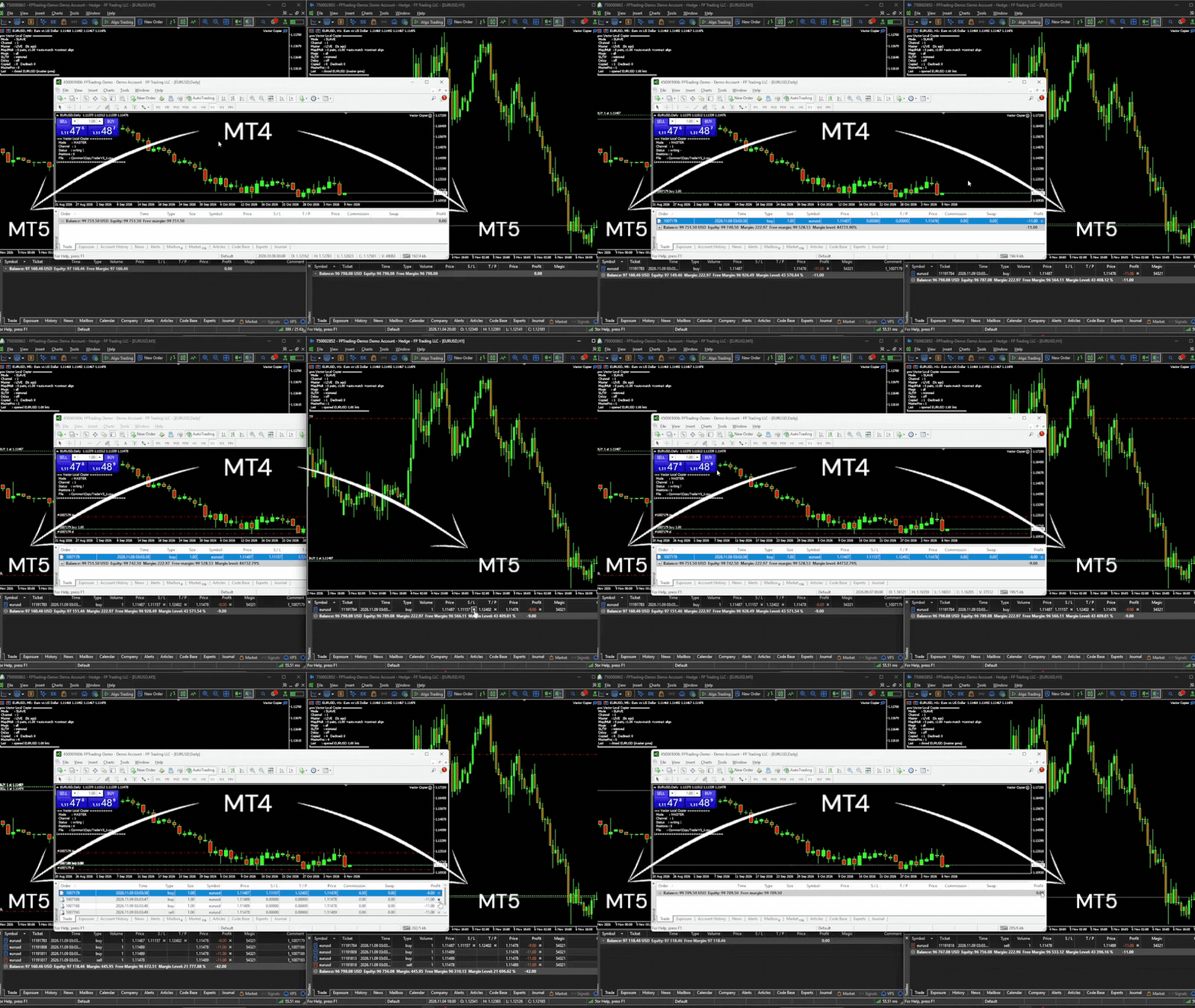
Vector Local Copier MT4 EA

Most trade copiers give you forty features and a forty-page manual. Vector Local Copier gives you the copying that actually matters done reliably, set up in a minute, and protected by safety logic most copiers simply don't have.

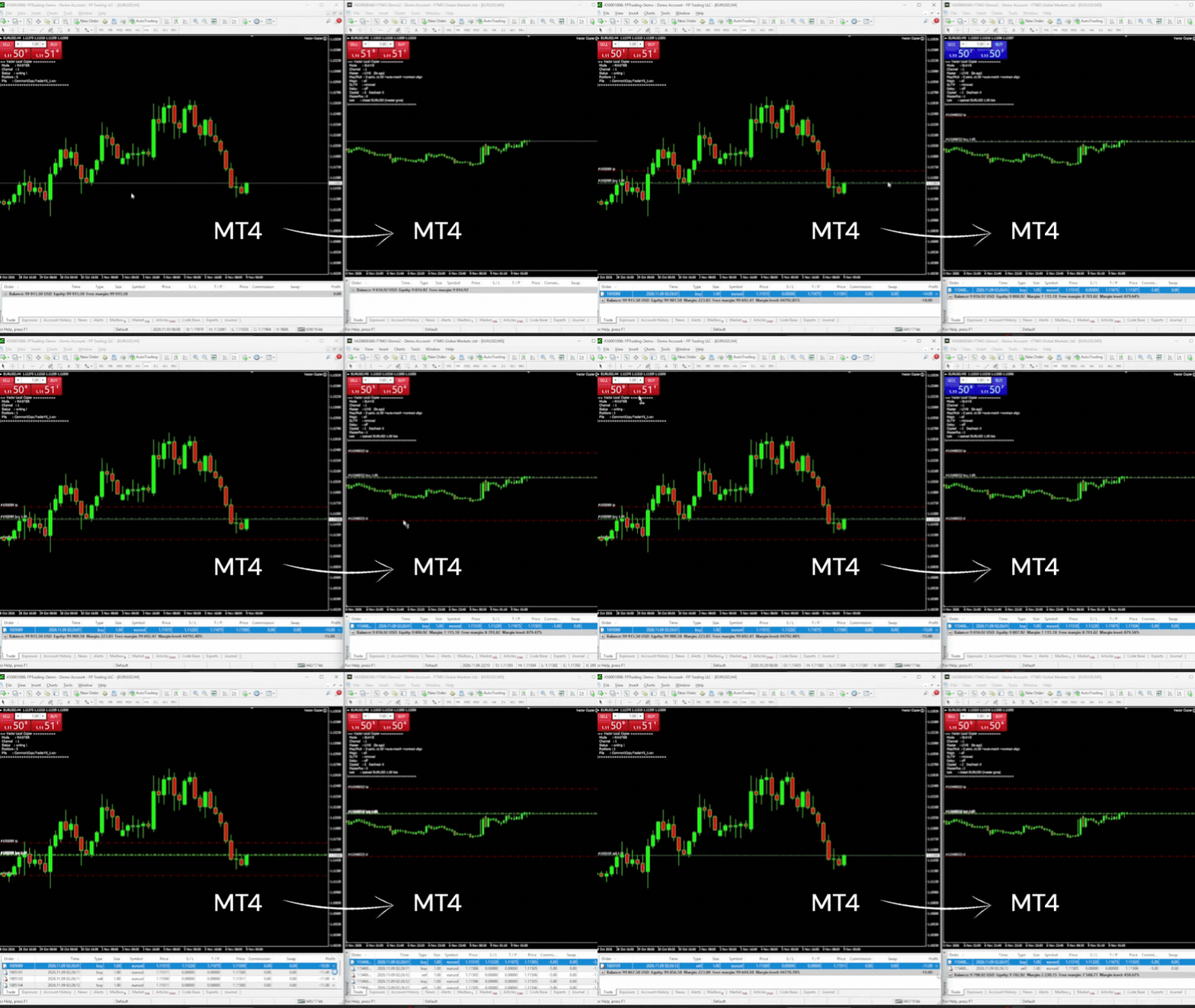
It mirrors trades from one master terminal to any number of slave terminals on the SAME Windows PC or VPS, MT4 to MT4, MT4 to MT5, or MT5 to MT4. No cloud, no DLLs, no external servers, no account passwords leaving your machine. Just fast, faithful local copying.


⚡ WHO IT'S FOR

Traders running multiple MT4 accounts on one machine at the same broker or at different brokers, or with some accounts on MT5 who want copies that are faithful and safe, without paying premium prices or wading through dozens of settings they'll never use.

Running several EAs on one account? Each slave can copy just the EAs you pick, by magic number, and just the symbols you pick, by symbol map. Symbol suffixes are matched automatically, different account currencies are converted, and anything named differently is one SymbolMap entry away. If you've looked at the big copiers and found them bloated, overpriced, or intimidating, Vector is the clean alternative.


🔁 MT4 AND MT5, ONE COPIER

The MT4 and MT5 versions of Vector speak the same language. Put the MT4 version on your MT4 terminals and the MT5 version on your MT5 terminals, give them the same Channel ID, and they copy to each other:
• MT4 master → MT5 slaves (e.g. move an MT4 EA's signals onto an MT5 prop account)
• MT5 master → MT4 slaves
• One master feeding slaves on both platforms at once

Partial closes on an MT4 master are copied as partial closes (not as a close plus a new trade) on both MT4 and MT5 slaves.


🛡️ WHAT MAKES IT DIFFERENT

Vector's edge isn't the length of its feature list, it's what happens when things go wrong. Three protections built in as standard:

✅ Anti-chase entry guard. If a master trade is already older than your chosen window (say your slave was offline and just reconnected), or price has already moved against the master's entry by more than your limit, Vector will NOT open it at a now-worse price. It skips it instead of chasing a move that already happened. Price is measured on the master's own feed, so small price differences between brokers don't cause false skips. The time guard is on by default (10 seconds); the price guard is an option you switch on with MaxSlippagePercent.

✅ Broker-safe lot sizing. Every copied lot is validated against the slave symbol's min / max / step BEFORE it's sent. Invalid sizes are safely skipped or bumped to the minimum, your choice never blindly rejected by the broker.

✅ Master-offline protection. If the master terminal dies or freezes, Vector detects the silence, alerts you (popup and/or push notification), and either holds or flattens the slave positions, it follows your policy instead of blindly holding a dead master's trades forever. You're alerted again when the master is back.


🎯 COPY ONLY WHAT YOU WANT

Two filters, set per slave, each working on its own:

• By EA (magic number). MagicFilter = 111;222 copies only the trades of those two EAs. Use 0 for manual trades only. Put "!" in front to exclude instead: !0 copies every EA but not your manual trades, !333 copies everything except one EA(333). Empty = copy everything.

• By symbol. List the pairs in SymbolMap and set CopyUnmapped = false: only the listed pairs are copied, each with its own name on the slave and its own lot multiplier if you want one.

A trade must pass both filters. So with MagicFilter = 111 and SymbolMap = EURUSD=EURUSD;XAUUSD=GOLD, the slave copies EA 111's EURUSD and gold trades — and skips EA 111's GBPJPY trade, because GBPJPY isn't in your map. Use either filter alone, both together, or neither.

Different slaves can follow different EAs from the same master: give each slave its own MagicFilter.


📋 FEATURES

Copying:
• Local, real-time copying between MT4 terminals on the same PC or VPS — and to/from MT5 terminals running the MT5 version
• One master, many slaves — each slave with its own settings
• Full open / close / partial-close copying — plus position increases and reversals when the master is an MT5 netting account
• Magic number filter — copy only chosen EAs (or exclude some, or exclude manual trades)
• Symbol mapping — map any master symbol to any slave symbol (e.g. GER40 to GER30) for brokers with different instrument names, or use the map as a list of the only symbols to copy
• Automatic suffix matching — symbols that only differ by a broker suffix or prefix (EURUSD.m, EURUSD.pro, EURUSDm, #EURUSD) are matched automatically, only when the contract size is identical (unless contract-size alignment is on, which scales the lots to match)
• Optional SL/TP mirroring — including when the master adds, moves, or removes them. Works on market-execution (ECN) accounts too
• Copy delay — optionally wait a set number of seconds before copying a new trade
• Independent copier groups — run multiple master-to-slave groups on one machine with separate Channel IDs
• Discreet, configurable order comments (or blank)

Lot sizing:
• Global and per-symbol lot multipliers
• Equity-ratio lot sizing, optionally scale lots by slave equity ÷ master equity, with automatic currency conversion
• Contract-size alignment optional, off by default: when brokers use different contract sizes for the same instrument (e.g. SOLUSD 100 vs 1), slave lots are scaled so both accounts hold the same amount
• Broker-safe lot validation

Safety:
• Anti-chase guard, by time and by price
• Master-offline hold/flatten policy
• Duplicate-proof tracking, copies are linked to their master trade independently of the order comment, so brokers that rewrite comments can't cause double trades, and links follow MT4's new ticket after a partial close
• Optional equity targets, auto-close all copied trades and stop at a set profit or loss, retrying until flat if the market is closed
• Copy links survive restarts, a restarted terminal picks up and manages its existing copies

Monitoring:
• Master offline / back online alerts by popup and/or push notification
• Live on-chart dashboard — connection health, positions copied, skipped trades, trades waiting out the copy delay, the magic filter in use and how many trades it holds back, the equity ratio in use, equity-target closing status, last action, configurable text color
• Low resource use — runs on a simple timer, accurate and light on CPU


🚀 HOW IT WORKS — 1-MINUTE SETUP

1. Install the EA on EVERY terminal that will send or receive (same PC or VPS): this MT4 version on MT4 terminals, the MT5 version on MT5 terminals
2. On the source account: attach in MASTER mode
3. On each copy account: attach in SLAVE mode with the SAME Channel ID, and set your multiplier. Optional: a symbol map, and a magic filter to copy only certain EAs
4. Done. Slaves now mirror the master automatically


🎁 TRY IT FREE

A free demo version is available. It runs the complete copier — mapping, magic filter, dashboard, close sync, MT5 bridging, every feature — with a cap at 0.01 lots on the slave side, so you can confirm it works on your exact setup before buying.

To install the demo: MT4 → File → Open Data Folder → MQL4 → Experts → paste the demo file → restart the terminal. Test on a demo account first.

You can find the demo version here 👉 : https://www.mql5.com/en/market/product/207121
Copying with MT5 terminals too? The MT5 version has its own free demo: https://www.mql5.com/en/market/product/187177


⚠️ IMPORTANT — PLEASE READ BEFORE BUYING

• Same machine only. Vector copies between terminals on the same Windows PC or VPS. It does NOT copy over the internet to a different computer.
• MT5 terminals need the MT5 version. This product runs on MT4. To copy to or from an MT5 terminal, that terminal runs Vector Local Copier for MT5 (sold separately: https://www.mql5.com/en/market/product/187169). Use version 2.10 on both.
• Slave accounts must allow hedging. Accounts that forbid opposite trades on one symbol (US / FIFO accounts) are not supported as slaves. An MT5 slave must be a hedging account; the master can be hedging or netting.
• Copying between different brokers? Check each symbol's contract size on both accounts first (crypto, stocks and indices often differ). Where they differ, turn on AlignContracts or set a per-symbol multiplier.
• Positions only. Copies market orders (open/close/partial). Pending orders are copied once they fill on the master.
• The magic filter decides which NEW trades are copied. Copies that are already open keep following their master trade even if you change the filter.
• Test on demo first. Always verify mapping, filters, multiplier, and close behavior on demo accounts before going live.


💬 SUPPORT

Questions or setup help? Message me through MQL5 — happy to help you get running. If Vector works well for you, a positive review is hugely appreciated. If something's not right, contact me first and I'll help you sort it out.


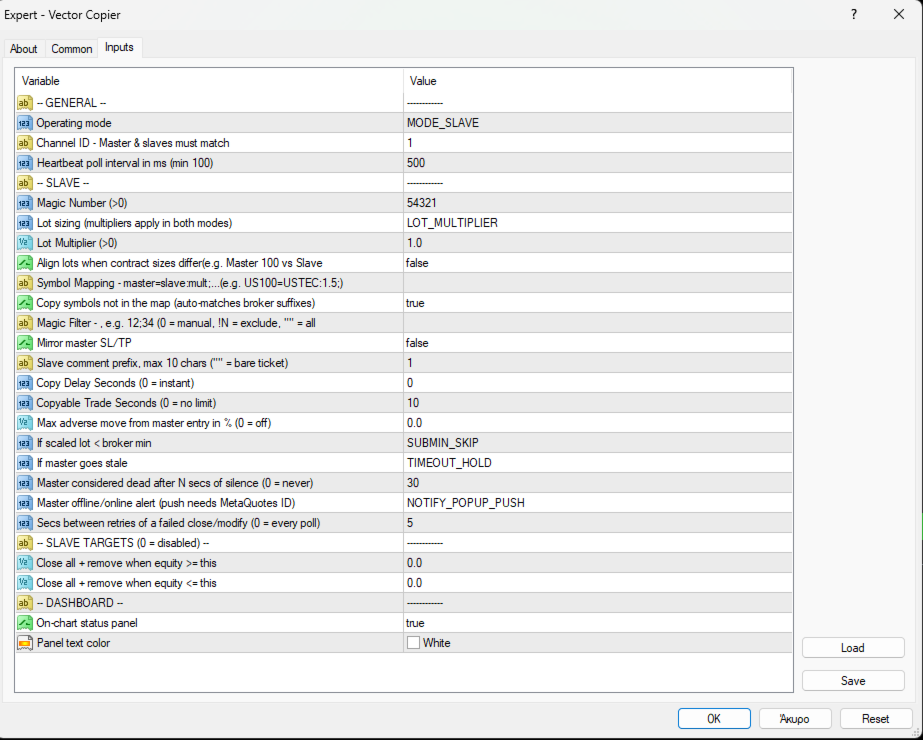
INPUT PARAMETERS

General:
• CopyMode — MASTER or SLAVE
• ChannelID — must match between a master and its slaves (MT4 or MT5). Different IDs = separate independent copier groups on one machine
• MilliSecs — poll interval in milliseconds (default 500, minimum 100)

Slave:
• Magic — unique ID for this slave's orders (> 0; different per slave on the same account). This is the slave's own magic, not the filter
• LotMode — MULTIPLIER (fixed scaling) or EQUITY_RATIO (scales by slave equity ÷ master equity). The multipliers apply in both modes
• GlobalMultiplier — lot multiplier applied to every copied trade (> 0)
• AlignContracts — scale slave lots when the two brokers use different contract sizes for the same instrument, e.g. SOLUSD 100 vs 1 → 1 master lot = 100 slave lots (default false). Check your symbols' contract sizes before relying on it
• SymbolMap — e.g. GBPUSD=GBPUSD;GER40=GER30:0.5 — format is master=slave with an optional :multiplier per pair
• CopyUnmapped — copy symbols not in the map: same name, or auto-matched broker suffix/prefix; contract sizes must match unless AlignContracts is on (default true). Set false to copy ONLY the symbols in SymbolMap
• MagicFilter — master magic numbers to copy, separated by ; (e.g. 111;222). 0 = manual trades. Prefix with ! to exclude (e.g. !0 = all except manual). Empty = copy all (default)
• CopySLTP — mirror the master's stop loss / take profit
• CommentTag — tag on slave orders, max 10 characters (empty for none)
• CopyDelaySeconds — wait this long before copying a new trade (0 = instant). Trades the master closes within the delay are never copied
• MaxCopyAgeSeconds — don't copy a master trade older than this, counted after the copy delay (anti-chase; 0 = no age limit)
• MaxSlippagePercent — don't copy if price has moved against the master's entry by more than this % (anti-chase; 0 = off). E.g. 0.05% ≈ 5 pips on EURUSD
• OnSubMinVolume — if a scaled lot is below broker minimum: SKIP or BUMP to min
• OnMasterTimeout — if the master goes silent: HOLD or FLATTEN
• StaleSeconds — master silence duration that counts as offline (0 = never)
• NotifyVia — master offline / back online alert: popup + push, push only, or popup only. Push needs your MetaQuotes ID set in the terminal
• RetrySeconds — seconds between retries of a failed close or SL/TP change (0 = every poll)

Slave targets (0 = off):
• EquityTarget — close all copied trades and stop copying when equity reaches this
• EquityLoss — close all copied trades and stop copying when equity falls to this

Dashboard:
• ShowDashboard — on-chart status panel
• DashboardColor — panel text color
Recommended products
Risk Commander
Adisorn Soodkanueng
Product Name: Risk Commander: Trade Assistant & Strategy Simulator Risk Commander is more than just a trade panel—it is a complete Manual Trading Ecosystem . It serves two powerful purposes: Live Assistant: Helps you execute trades with speed, precision, and perfect risk management in real-time markets. Training Simulator: Fully compatible with the Strategy Tester (Visual Mode) , allowing you to practice manual trading on historical data without risking a cent. NEW! Built-in Simulator Mode Stop
Auto Breakeven level
Makarii Gubaydullin
Automatic Breakeven levels Using   this   utility ,   y ou can activate the automatic SL movement, when the trade reaches a desired profit.  Especially   important   for a   short -term   traders.   Offset option is also available: some profit may be protected. Multifunctional utility : 66+ features, including this tool  |   Contact me  if you have any questions  |   MT5 version The process of activating the automatic breakeven function: 1.   Select the Symbol or Trade   for which the Auto BE f
Trade Assistant Pro 36 in 1
Makarii Gubaydullin
4.76 (21)
Multifunctional tool: Lot Calculator, Grid Orders, R/R ratio, Trade Manager, Supply and Demand zones, Price Action and much more Demo version   |   User manual Trade Assistant   doesn't work in the strategy tester: you can download the Demo Version HERE  to test the utility . Contact me for any questions  / ideas for improvement / in case of a bug found If you need a MT5 version, it is available   here Simplify, speed up and automate your trading process . Expand the standard terminal capabilit
Smartility
Syed Oarasul Islam
This utility is designed to help you with your Manual Trading. It allows different ways of closing trades. It can display total number of BUY and SELL orders individually and also their individual profits. It can enter trades without stopl loss and take profits. However upon selecting UseStopLossTakeProfit from the settings it can use best possible stop loss and take profits based on the market conditions. Upon selecting the CloseOppositeTrades  from the settings it can close opposite trades. Fo
ForexcopyLocalMT4
Wei Ming Ding
3 (1)
Instructions for use: https://www.mql5.com/zh/blogs/post/754946 MT4 version: https://www.mql5.com/EN/market/product/88205 MT5 version: https://www.mql5.com/EN/market/product/88204 ---------------------------------------------- 1. Copy orders, from 12 master accounts to 100 slave accounts. The number of slave accounts can be customized, from 12 to 100. 2. Support MT4 to MT4, MT4 to MT5, MT5 to MT4, MT5 to MT5. 3. Identify the suffixes of trading varieties on different platforms, such as EURUSD,
CoPilot dashboard MT4
Frederic Jacques Collomb
CoPilot — Daily Trading Dashboard Know your numbers. Trade with clarity. MT5 version What is CoPilot? CoPilot is a professional-grade trading assistant that displays in real time all your daily performance statistics directly on the chart — with a live equity curve that updates trade by trade. Designed for active traders who need instant visibility into their session without leaving the chart, CoPilot aggregates every closed trade of the day across all symbols and presents them in a clean, color
Virtual Collider Manual   is a trading assistant with a built-in panel for manual trading. It automatically moves a position opened by a trader in profit using innovative adaptive grid algorithm of averaging and adaptive pyramiding Know-how of the grid algorithm of averaging and pyramiding of the   Virtual Collider Manual   trading robot is based on fully automatic adaptation of all characteristics of dynamically build order grid and pyramid with actual price movement with no need for adjusting
Noize Absorption Index MT4
Ekaterina Saltykova
5 (1)
Noize Absorption Index - is the manual trading system that measures the difference of pressure between bears forces and bulls forces. Green line - is a noize free index that showing curent situation. Zero value of index shows totally choppy/flat market.Values above zero level shows how powerfull bullish wave is and values below zero measures bearish forces.Up arrow appears on bearish market when it's ready to reverse, dn arrow appears on weak bullish market, as a result of reverse expectation. S
TSTrendLineSymbol
Salvatore Labriola
Utility, which draws buy or sell trendlines, which can also become support or resistances able to close any position on the screen Algorithm that calculates the gain of the position, at the touch closure of the line.   The benefits you get: Works on forex and CFD, timeframe from M1 to Weekly. Easy to use screen control panel. Audible warning messages at the touch of the line. Easy to use.
Auto Fibo Pro m
DMITRII GRIDASOV
"Auto FIBO Pro"   Crypto_Forex  indicator  - is great auxiliary tool in trading! Indicator automatically calculate and place on chart Fibo levels and local trend lines (red color). Fibonacci levels indicate key areas where price can reverse. Most important levels are 23.6%, 38.2%, 50% and 61.8%. You can use it   for reversal scalping  or for zone grid trading. There are plenty of opportunities to  improve your current system using Auto FIBO Pro indicator as well. It has Info Spread Swap Displa
VR Cub
Vladimir Pastushak
VR Cub is an indicator for getting high-quality entry points. The indicator was developed to facilitate mathematical calculations and simplify the search for entry points into a position. The trading strategy for which the indicator was written has been proving its effectiveness for many years. The simplicity of the trading strategy is its great advantage, which allows even novice traders to successfully trade with it. VR Cub calculates position opening points and Take Profit and Stop Loss targe
GGP Trade Copier MT4
Mohammadmahmood Pirayeh
GGP Trade Copier  EA is an automatic trading bot that can help traders automatically replicate the trading strategies and operations from one trading terminal to others by experiencing exceptionally fast trade copying system. Its easy-to-use setup allows you to copy trades between multiple MetaTrader terminals on the same Windows computer or Windows VPS with lightning-fast copying speeds of under 0.5 seconds. The software supports multiple trading varieties, including Forex, commodities, stocks,
Criflow Scalper Pro
Cristian Spedicato
CRIFLOW SCALPER PRO  Advanced Trade Management & Smart Scaling System CRIFLOW SCALPER PRO is an Expert Advisor designed to transform any manual operation into an advanced professional management system, automating scaling, capital protection and profit maximization. It's not just an input EA: is an intelligent order management engine designed for serious traders, scalpers and professionals. ⸻ Smart Trade Detection • Automatically detect manual trades • Intervenes in real time witho
The Infinity Expert Advisor is a scalper. When the resistance and support levels are broken, trades are opened in the direction of the price movement. Open positions are managed by several algorithms based on the current market situation (fixed stop loss and take profit, trailing stop, holding positions in case of trend indication, etc.). Requirements for the broker The EA is sensitive to spread, slippages and execution quality. It is strongly recommended not to use the EA for currencies with s
Your stop is already on the MT5 chart. What lot size keeps your loss within the risk you chose? Easy Trade Executor (ETE) shows the lot, loss at the stop, profit at take profit and required margin. After entry, you set the rules: move to breakeven, Close 50% or start a trailing stop. The panel carries out each action according to your rules. Open it and go from sizing the lot to closing the trade in a few clicks on your MT5 chart. Calculate the trade and set your exit by your own rules Lot from
PZ Mean Reversion MT4
PZ TRADING SLU
3 (4)
Outperform traditional strategies: effective mean reversion for savvy traders Unique indicator that implements a professional and quantitative approach to mean reversion trading. It capitalizes on the fact that the price diverts and returns to the mean in a predictable and measurable fashion, which allows for clear entry and exit rules that vastly outperform non-quantitative trading strategies. [ Installation Guide | Update Guide | Troubleshooting | FAQ | All Products ] Clear trading signals Am
Description: Please tick "Show object descriptions" in chart properties to enable hrays views That utility converts a trendline into a horizontal ray known as tool for drawing supply and demand zones. Simply create a trendline on a chart and once selected, it will get converted. Ray remains horizontal while dragging.  Quick ray plot: press "R" key to create horizontal ray. It will be snapped to the nearest OHLC value Further versions will be improved. For feature request please post new comm
Trade panel manual is a multifunctional trading assistant. It allows you to open market and pending orders in one click. Value is set via button menu edit or deleted by specific buttons pending orders and the value of take profit and stop loss in one click. Through the edit menu of the button, a value is set that can be easily changed by simply moving level_tp lines for take profit or stop loss levels and for pending orders. It is possible to select orders and determine for them and set the leve
It is so very disappointing when the price does not have enough points to achieve Take Profit and makes a reversal. This EA sets virtual levels near the TakeProfit levels. This EA sets virtual levels next to TakeProfit orders. If these levels are reached by price, breakeven or trailing stop is applied for an order. Features This EA does not set new orders. The aim of this EA is to manage stop losses of existing orders that are set by another EA or manually (magic number equals 0). For correct w
H4 GBPUSD Trend Scalper is a trend signal scalper The EA trades according to the trend strategy using original built-in indicator for opening and closing orders. The external inputs for limiting trading on Fridays and Mondays are available. The purpose of the strategy is to use the current trend with the most benefit. According to the results of testing and working on demo and real accounts, the best results achieved by using the Н4 timeframe on the GBP/USD pair Works on MetaTrader 4 Build 971+
Forex Diamond EA
Lachezar Krastev
5 (6)
BLACK FRIDAY SPECIAL: 70% OFF + FREE GIFT! Massive savings on our top automated systems: Buy Forex Diamond EA: Only $197 (Save 70% — Regular price: $547) BONUS EA: Get Crypto Master EA 100% FREE (Regular price: $497) Total Value: $1044 — Yours today for just $197! How to claim: Direct message (DM) us your purchase confirmation to unlock your free Crypto Master EA license! Full offer details & live performance stats: https://www.mql5.com/en/blogs/post/778315 Live Results:   https://www.mql5.com/
| Fully-automated Smart Money Concept (ICT) inspired trading solution with multi-strategy capabilities | Built by a grid trader >> for grid traders.  This is MT4 version, click  here  for  Blue CARA MT5  (settings and logics are same in both versions)     Real monitoring signal  -->  Cara Gold Intro Blue CARA EA   ('CARA') - short for  C omprehensive  A lgorithmic R esponsive A dvisor is a next-gen  multi-currency    multi-timeframe  EA base on the widely known (and perhapse most popular) Inn
Night Trader EURUSD
Ugur Oezcan
4.21 (29)
The EA can trade multiple currencies. Please check our signals ( https://www.mql5.com/en/users/ugur-edin/seller ) for detailed information. No grid or martingale! No manual configuration or adjustment needed! Every trade is protected by stop loss. This Expert Advisor only trades for a short time frame at night, during the ending of the New York session. It uses low volatility moments and enters trades based on indicators. It then manages those trades with dynamic stop losses and take profits als
Expert Advisor for MT4 Useful utility MUST have for all traders.  With 1 click button, you're able to close all your open positions. Its come with a warning pop up notification when you click to close all your trades, to avoid an accident press the button. Just press 'Yes' to confirm or 'No' to cancel it. The expert will close all your open positions no matter what pairs you currently open or directions. Just attach the expert on 1 of your chart, and you're good to go.
NRP Risk Manager Pro Institutional-Grade Trade Management & Prop Firm Protection Get the MetaTrader 4 Version Here: https://www.mql5.com/en/market/product/179888 Get the MetaTrader 5 Version Here: https://www.mql5.com/en/market/product/179885 Trading isn't just about finding the right entry; it is about flawlessly executing your edge while fiercely protecting your capital. NRP Risk Manager Pro is not an automated trading robot—it is a comprehensive, institutional-grade trade terminal d
Standard Trailing Stop is too slow! In the world of high-speed scalping like GOLD (XAUUSD) or volatile Forex pairs, even a few pips of delay in taking profit can be fatal.  "Just 5 more pips, then I'll cut!"  "But I need to find the next entry too!"  For scalpers fighting under such extreme pressure, we developed the "WOLF SCALPER PRO."  While inheriting the ironclad defense of "Auto SL/TP Insertion" and "Brother-Sync" from the original WOLF SYNC MANAGER, this new model is equipped with an
The analyzer panel allows traders to add the pending order grid (Buy Limit, Sell Limit, Buy Stop, Sell Stop) quickly and efficiently.   Parameters stop mode - select stop setting mode every order - stop levels are set for each order separately position as - common stop levels for all orders order type - select pending order type Buy Limit Sell Limit Buy Stop Sell Stop magic - set a magic number for open orders if necessary. If position as mode is enabled, stop levels are corrected for all orders
TradePilot
Hossein Khalil Alishir
TradePilot Expert Advisor (EA) for MetaTrader 4 TradePilot is a professional and user-friendly Expert Advisor (EA) for MetaTrader 4 (MT4) . It simplifies automated trading , risk management , and trade execution using a smart trading panel . Perfect for beginners and experienced traders looking for a reliable trade manager EA with automated lot size calculation . Key Advantages User-Friendly Trading Panel: Customizable panel with buttons and hotkeys. Smart Risk Management: Supports percen
The Best One Scalping Trade Panel functional manual trade panel with risk reward, auto SL by candle ( original solution), lot size calculation, one-click trading, scale in and out of trades (partial close),  Works with all symbols not just currency pairs, perfect works on DAX, NASDAQ, GOLD, ...... I earn every day during live stream on ZakopiecFX - join Me Risk by lot Risk by percent SL by points SL by Candle, Renko, RangeBar ( original solution) TP by point TP by Risk/Reward Auto Trailing by P
One of the number sequences is called "Forest Fire Sequence". It has been recognized as one of the most beautiful new sequences. Its main feature is that this sequence avoids linear trends, even the shortest ones. It is this property that formed the basis of this indicator. When analyzing a financial time series, this indicator tries to reject all possible trend options. And only if he fails, then he recognizes the presence of a trend and gives the appropriate signal. This approach allows one t
Buyers of this product also purchase
Forex Trade Manager MT4
InvestSoft
4.98 (447)
Trade Manager MT4 is an advanced position size calculator and trade management tool for MetaTrader 4, designed to help traders plan trades faster, control risk more precisely, and manage open positions directly from the chart. It combines order placement, risk based lot calculation, Stop Loss and Take Profit management, Break Even, Trailing Stop, Partial Close, Equity Protection, and external trade management in one panel. Whether you trade forex, indices, metals, commodities, or crypto, Trade M
Exp COPYLOT CLIENT for MT4
Vladislav Andruschenko
4.69 (65)
Professional Trade Copier for MetaTrader 4 Fast, professional, and reliable trade copier for MetaTrader 4 . COPYLOT helps you copy Forex trades between MetaTrader 4 and MetaTrader 5 terminals with flexible synchronization for different account setups. COPYLOT MT4 version supports: MetaTrader 4 to MetaTrader 4 MetaTrader 5 Hedge to MetaTrader 4 MetaTrader 5 Netting to MetaTrader 4   MT5 version Full Description + DEMO + PDF How To Buy How To Install How to get Log Files How To Test and Optimize A
Trade Assistant MT4
Evgeniy Kravchenko
4.43 (197)
It helps to calculate the risk per trade, the easy installation of a new order, order management with partial closing functions, trailing stop of 7 types and other useful functions. Additional materials and instructions Installation instructions   -   Application instructions   Line function -   shows on the chart the Opening line, Stop Loss, Take Profit. With this function it is easy to set a new order and see its additional characteristics before opening.   Risk management  - The risk calcu
Local Trade Copier EA MT4
Juvenille Emperor Limited
4.96 (111)
Local Trade Copier EA MT4 is a fast and flexible trade copier for copying and managing trades between multiple MetaTrader 4 accounts on the same Windows computer or Windows VPS. It combines local trade synchronization with Receiver-side controls for lot sizing, risk management, trade filtering, symbol mapping, trade management and account protection. Set up your Transmitter and Receiver terminals in about 1 minute and copy manual or EA trades between accounts at the same or different brokers. U
The product will copy all telegram signal to MT4   ( which you are member  ) , also it can work as remote copier.  Easy to set up, copy order instant, can work with almost signal formats, image signal, s upport to translate other language to English Work with all type of channel or group, even channel have "Restrict Saving Content", work with  multi channel, multi MT5 Work as remote copier: with signal have ticket number, it will copy exactly via ticket number. Support to backtest signal. How to
News Filter EA MT4
Rashed Samir
5 (10)
News Filter EA: Advanced Algo Trading Assistant News Filter EA is an advanced algo trading assistant designed to enhance your trading experience. By using the   News Filter EA , you can integrate a Forex economic news filter into your existing expert advisor, even if you do not have access to its source code. In addition to the news filter, you can also specify   trading days   and   hours   for your expert. The News Filter EA also includes   risk management   and   equity protection   features
TradePanel MT4
Alfiya Fazylova
4.84 (95)
Trade Panel is a multi-functional trading assistant. The app contains over 50 trading functions for manual trading and allows you to automate most trading tasks. Application instructions: https://www.mql5.com/en/blogs/post/756482 Trial version of the application for a demo account: https://www.mql5.com/en/blogs/post/750865 How to install the application: https://www.mql5.com/en/blogs/post/756239 How to test the application in visual mode: https://www.mql5.com/en/blogs/post/770277 How to install
Telegram to MT4 Coppy
Sergey Batudayev
4.09 (11)
Telegram to MT4: The Ultimate Signal Copying Solution Streamline your trading with Telegram to MT4 , the cutting-edge utility designed to copy trading signals directly from Telegram channels and chats to your MetaTrader 4 platform—without the need for DLLs. This robust solution ensures seamless execution of signals with unparalleled precision and customization options, saving you time and boosting your efficiency. [ Instructions and DEMO ] [ FAQ ] [ How atach logs properly ] [Settings descrition
Trade copier MT4
Alfiya Fazylova
4.62 (37)
Trade Copier is a professional utility designed to copy and synchronize trades between trading accounts. Copying occurs from the account / terminal of the supplier to the account / terminal of the recipient, which are installed on the same computer or VPS . Before buying, you can test the demo version on a demo account. Demo version here . Full instruction here . Main functionality and benefits: Supports copying MT4> MT4, MT4> MT5, MT5> MT4, including MT5 netting accounts. * Supports copying Dem
DoIt Trade Manager - Risk Panel and EA Position Manager for MT4 Finding an entry is only half the job. Many execution mistakes happen in position sizing, partial exits, breakeven, trailing and account protection. DoIt Trade Manager puts the complete workflow on the chart. Plan the risk before entry, execute the order and apply consistent management rules to your manual trades and selected positions opened by other EAs. Full setup guide + how the free version works and where PRO starts :  https:/
Trade Indicator Assistant is a powerful MT4 utility designed to turn indicators into automated trading systems. Its main feature is the ability to automatically detect an indicator’s   BUY and SELL signal buffers , without requiring you to know the buffer numbers, search through indicator settings, or modify the indicator source code. Bonus Indicator: After purchasing Trade Indicator Assistant, contact me to receive Trade Signal Pro completely free as a bonus indicator. [Download Demo Version]
PZ Trade Pad Pro MT4
PZ TRADING SLU
3.67 (3)
Effortlessly calculate lot sizes and manage trades to save time and avoid costly errors The Trade Pad Pro EA is a tool for the Metatrader Platform that aims to help traders manage their trades more efficiently and effectively. It has a user-friendly visual interface that allows users to easily place and manage an unlimited number of trades, helping to avoid human errors and enhance their trading activity. [ Installation Guide | Update Guide | Troubleshooting | FAQ | All Products ] One of the k
Trade Manager Pro MT4
Bryan Djoufack Nguessong
This is an Utility to make your trading easier by putting at   one click or a few clicks   time-consuming tasks as order management and risk management. Contact for a free trial. Features Risk Management   Calculates automatically lots based on risk specified in either   % or $  in the risk field and let you enter just   by placing lines for SL TP   etc and display   real-time Risk Reward . TrueRisk   so   it includes commissions when calculating lot size on FX pairs only so you risk 1% with
Trading History MT4
Siarhei Vashchylka
5 (9)
Trading History - A program for trading and money management on the history of quotes in stratagy tester. It can work with pending and immediate orders, and is equipped with trailing stop, breakeven and take profit functions. Very good for training and testing different strategies. Manual (Be sure to read before purchasing) Advantages 1. Allows you to test any trading strategy in the shortest possible time 2. An excellent simulator for trading training. You can gain months of trading experience
Shepherd Safety EA
AW Trading Software Limited
4.92 (13)
AW Shepherd Safety EA is an Expert Advisor for managing open positions. The trader opens the first order from the panel, and from there the EA runs the basket on its own: it adds recovery orders with a trend filter, closes a side on TakeProfit, trailing or stop, and shows the close levels on the chart. Buys and sells are managed separately, and both sides can be open at the same time. A recovery order opens not just on a price step but once Parabolic SAR, two MAs or candle color show a reversal
RS Trade Copier
Boris Sedov
5 (1)
RS Trade Copier - the ultra-fast local trade copier with a real graphical interface. Stop typing account numbers manually. No more 200+ cryptic inputs. A reliable and flexible tool for copying trading operations between multiple MT4 and MT5 terminals. It suits experienced traders, signal providers, and individual investors. It enables trade synchronization from one or multiple Providers to one or multiple Clients with high precision and minimal latency. It supports simple automatic configuration
Telegram to MT4 Multi-Channel Copier   automatically copies trading signals from your Telegram and Discord channels straight to MetaTrader 4. No bots, no browser extensions, no manual copying. A signal arrives in Telegram or Discord and the EA opens the trade in your terminal within seconds. And before you copy a channel, the built-in backtester shows you what that channel would have done in your account. The product has two components: a Windows application that listens to your Telegram channel
Rhino Chart Drawing Tools provides a TradingView-style drawing workflow for MetaTrader 4. It includes 54 drawing tools , a customizable toolbar, Favorites, quick styling, object settings, templates and an object manager. User manual: How to use the product Free demo version: Download the demo MetaTrader 5 version: Rhino Drawing Tools for MT5 Drawing Tools Group Object List Lines Trend line, ray, extended line, horizontal line, vertical line, horizontal ray, cross line, trend angle, arrow, path
MT4 to Telegram Signal Provider   turns your trading account into a signal provider. Every trade action, whether manual, by EA or from your phone, is instantly sent as a message to Telegram. You can fully customize the format or use a ready-made template for quick setup. [ Demo ] [ Manual ] [ MT5 Version ] [ Discord Version ]  New: [ Telegram To MT5 ] Setup A step by step user guide is available. Key Features Ability to customize order details sent to subscribers You can create a tiered subs
Multi Account Local Trade Copier is a fast local trade copier for MetaTrader: copy trades between MT4/MT5 terminals running on the same Windows PC or VPS, from one master account to multiple receiver accounts — your own real, demo and prop firm accounts, at the same broker or at different ones. It is event-driven : the master publishes every trade the instant it happens, and the receiver measures and logs the real copy latency of every single trade — typically 50-150 ms . No DLLs, no internet br
Magnifier Ruler Crosshair
Taras Slobodyanik
5 (2)
The indicator has three main tools: Magnifier (Zoom chart), Ruler  ( Time and Price scales ),   and Crosshair. You can move it all around with your mouse and customize different formats for  displaying , customize   size and color of each element. The Magnifier (zoom chart) allows you to display candles from any time frame and at different scales. Hotkeys: 'Q' - higher timeframe, 'A' - lower timeframe, 'W' - decrease candle size, 'S' - increase candle size, 'Z' - show/hide zoom chart You can

Automatic Trailing Stop Based on Take Profit Percentage with Profit Lock EA MT4   Lock in your profits and "let your winners run" past your 100% take profit target with this EA.  This Expert Advisor automatically adjusts your Stop Loss based on up to 4 user-defined Take Profit Target Percentages, locking in your profit.  If price pushes past your 100% take profit target, the EA will automatically trail the price by user-defined pips, so you won't miss that runaway train again.   EA Features The


Exit Manager
Victor Christiaanse
5 (2)
Close every trade at the right moment, automatically. Most traders spend their energy on the entry and then close too early, too late, or on a feeling. Exit Manager takes the exit off your hands. Open a trade the way you always do, by hand or with any Expert Advisor, and Exit Manager watches it and closes it, fully or partly, when the indicator signal you chose appears. You can see it working on the chart. A clean panel on your chart shows, for every open trade, which rule will close it next, ho
TradeMirror is a trade copier EA for MT4/MT5 platform. Tutorial Please click the Trademirror Tutorial link to view more tutorials. Why TradeMirror We understand the importance of security, stability and privacy for financial software, so we've gone the extra mile to harden these three elements in detail: Provides a user-friendly graphical interface that is easy to operate Focus on privacy and security, suitable for various financial scenarios with privacy requirements for order distribution Prec
Unlimited Trade Copier Pro is a tool to copy trade remotely to multiple MT4, MT5 and cTrader accounts at different computers/locations over internet. This is an ideal solution for you if you are a signal provider and want to copy your trades to other receivers globally on your own rules. One provider can copy trades to multiple receivers and one receiver can get trade from multiple providers as well. The provider can even set the subscription expiry for each receiver, so that receiver will not b
King Trade Copier MT4
Mohammed Maher Al-sayed Mohammed Ahmed Saleh
5 (1)
King Trade Copier connects MetaTrader terminals that run on the same computer or VPS. Trades opened on one account appear on the others. The file carries both roles, so the same download becomes the sender or a receiver depending on what you set Mode to. On every chart the panel states whether this terminal is sending or receiving, names the account on the other side, counts the receivers that answered, and gives the age of the last signal. An order that was not copied leaves its reason on the
Take a Break
Eric Emmrich
5 (31)
Take a Break pauses your Expert Advisors when trading is a bad idea: before news, after a daily loss, outside your trading hours, or when a rule you wrote yourself says so. When the pause is over, your EAs simply continue. Account protection for all your EAs in one tool: news filter, drawdown and equity protection, time filter and custom rules. One EA on one chart protects the whole account, the free indicator gives every chart its own rules on top. Free demo | What is new in 26.09 | Support Ass
Copier->Convenient and fast interface interaction, users can use it right away   ->>>> Recommended to use on Windows computers or VPS Windows Features: Diversified and personalized copy trading settings: 1. Different lot modes can be set for different signal sources 2. Different signal sources can be set for forward and reverse copy trading 3. Signals can be set with comments 4. Whether to calibrate the lot according to the contract lot Diversified and personalized copy order settings 2: 1. Dif
Currency strength meter for MetaTrader 4 This currency strength indicator reads up to 28 major pairs and turns them into one number per currency, for the 8 majors: USD, EUR, GBP, JPY, CHF, CAD, AUD and NZD. Instead of opening chart after chart to work out who is leading, you read one panel on your MetaTrader 4 chart and you know which currency is being bought and which one is being sold. What you see on the chart A ranked strength bar for each of the 8 currencies, with its percentage A multi-tim
Trade Manager MT4 DaneTrades
Levi Dane Benjamin
4.09 (11)
DaneTrades Trade Manager is a professional trade panel for MetaTrader 4, designed for fast, accurate execution with built‑in risk control. Place market or pending orders directly from the chart while the panel automatically calculates position size from your chosen risk, helping you stay consistent and avoid emotional decision‑making. The Trade Manager is built for manual traders who want structure: clear risk/reward planning, automation for repeatable management, and safeguards that help reduc
More from author
Vector Local Copier MT5
Sotirios Apostolos Adaloglou
Most trade copiers give you forty features and a forty-page manual. Vector Local Copier gives you the copying that actually matters — done reliably, set up in a minute, and protected by safety logic most copiers simply don't have. It mirrors trades from one master MT5 terminal to any number of slave terminals on the SAME Windows PC or VPS, MT5 to MT5, and now to and from MT4 too. No cloud, no DLLs, no external servers, no account passwords leaving your machine. Just fast, faithful local copyin
Vector Local Copier
Sotirios Apostolos Adaloglou
This is the FREE DEMO version of Vector Local Copier. It's the complete copier — real-time local copying, MT5 ↔ MT4 bridging, symbol mapping, the magic number filter, multipliers, SL/TP sync, the safety guards, the live dashboard — with one limitation: slave trades are capped to 0.01 lots. That's enough to prove it works perfectly on your exact terminals, brokers, EAs and symbols before you buy the full-size version. GET THE FULL VERSION (no lot cap) HERE: https://www.mql5.com/en/market/prod
FREE
Vector Local Copier EA
Sotirios Apostolos Adaloglou
This is the FREE DEMO version of Vector Local Copier for MT4. It's the complete copier — real-time local copying, MT4 ↔ MT5 bridging, symbol mapping, the magic number filter, multipliers, SL/TP sync, the safety guards, the live dashboard — with one limitation: slave trades are capped to 0.01 lots. That's enough to prove it works perfectly on your exact terminals, brokers, EAs and symbols before you buy the full-size version. GET THE FULL VERSION (no lot cap) HERE: https://www.mql5.com/en/ma
FREE
Redline Prop Firm Risk Manager MT5
Sotirios Apostolos Adaloglou
Redline - Account/Prop Firm Risk Manager MT5 — Daily Loss, Max Drawdown & Equity Protection Watchdog You're in the right place if you searched for: drawdown limiter, daily loss protection, equity guard, prop firm risk manager, account protector, FTMO drawdown tool, funded account protection. Redline is a NON-TRADING safety layer. It opens no trades and has no signals. It sits on one chart and polices your ENTIRE account — manual trades, other EAs, copy trading — every single second. When one
Filter:
No reviews
Reply to review