Vector Local Copier MT4 EA

Most trade copiers give you forty features and a forty-page manual. Vector Local Copier gives you the copying that actually matters — done reliably, set up in a minute, and protected by safety logic most copiers simply don't have.

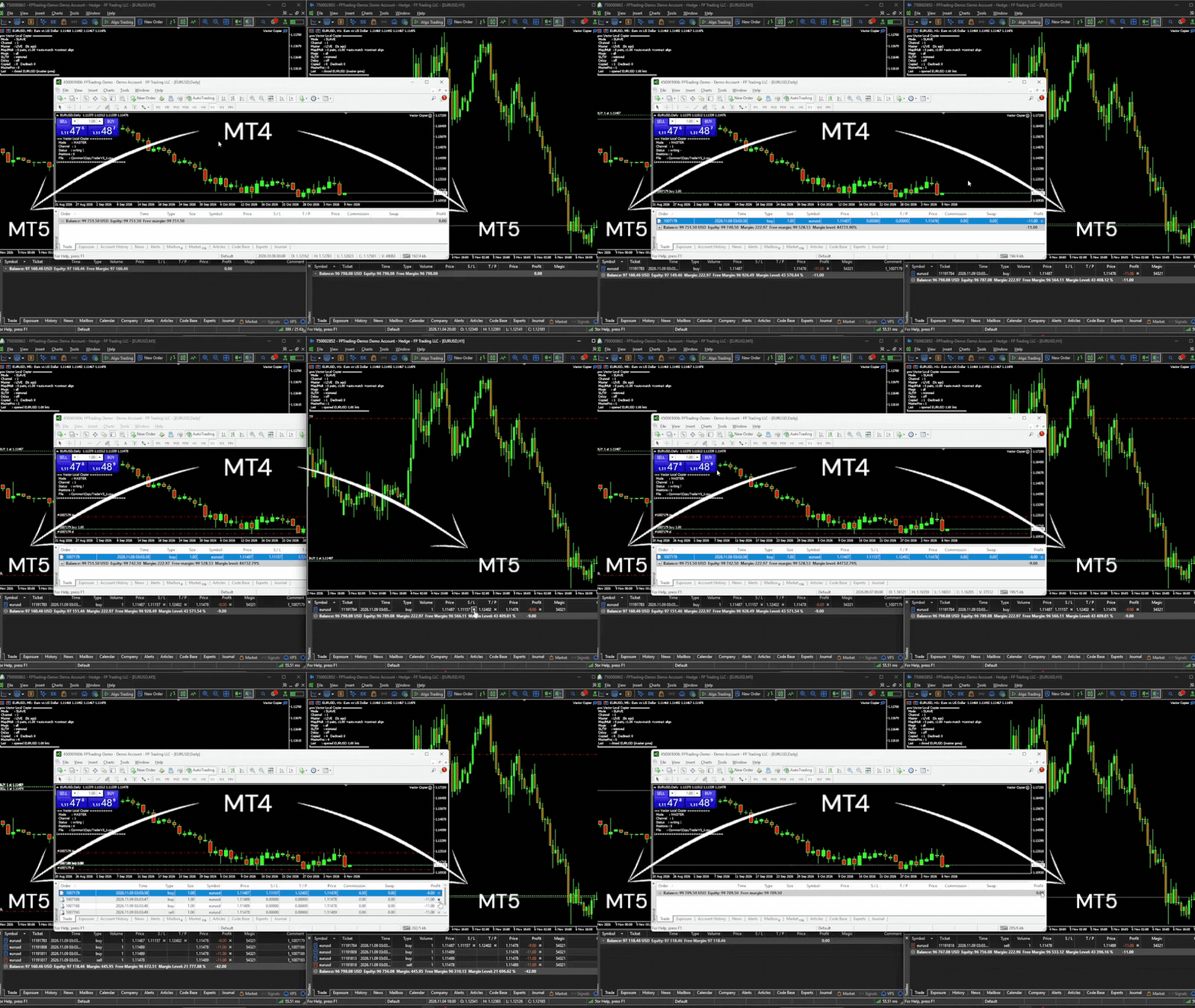
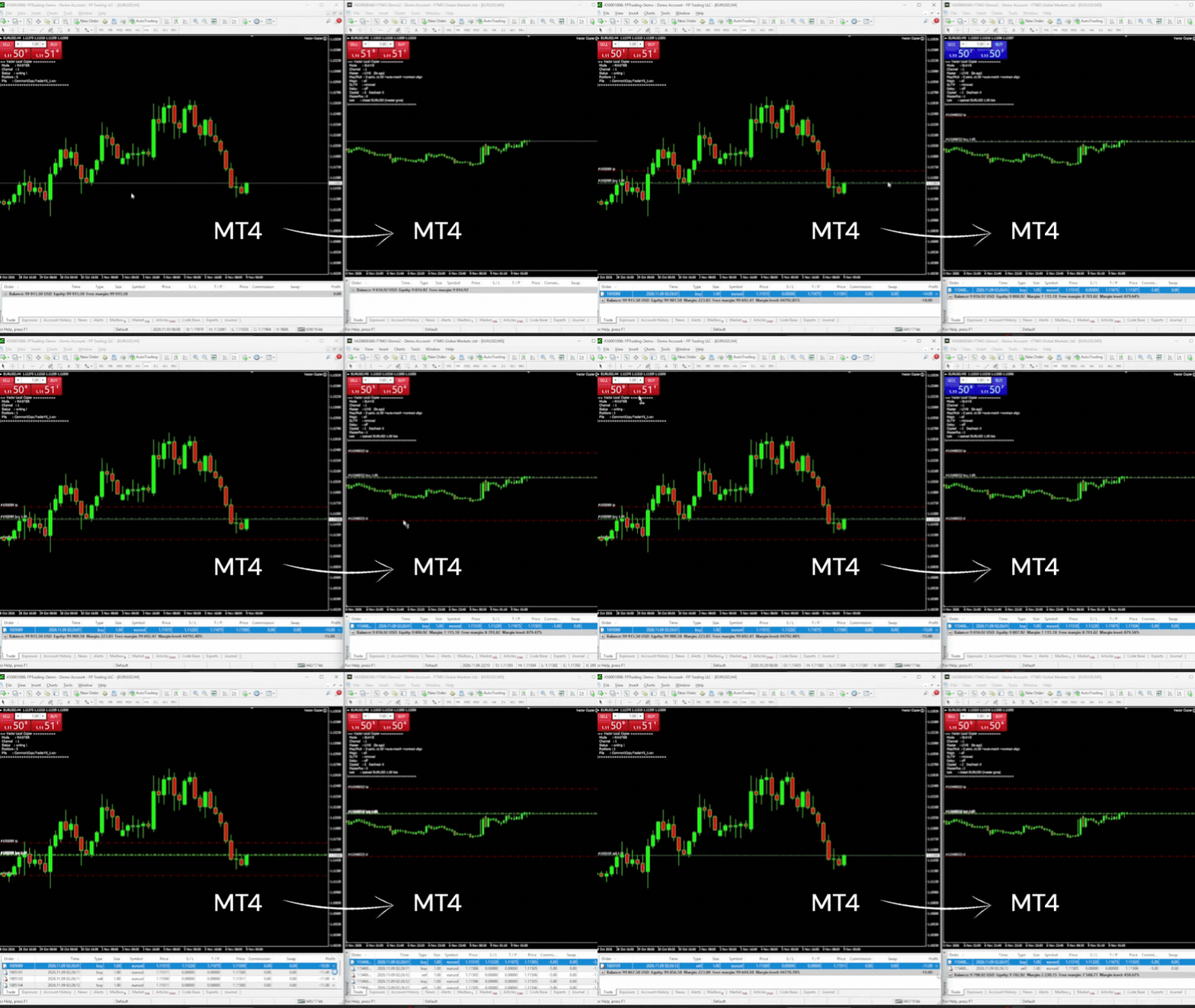
It mirrors trades from one master terminal to any number of slave terminals on the SAME Windows PC or VPS — MT4 to MT4, MT4 to MT5, or MT5 to MT4. No cloud, no DLLs, no external servers, no account passwords leaving your machine. Just fast, faithful local copying.


⚡ WHO IT'S FOR

Traders running multiple MT4 accounts on one machine — at the same broker or at different brokers, or with some accounts on MT5 — who want copies that are faithful and safe, without paying premium prices or wading through dozens of settings they'll never use.

Running several EAs on one account? Each slave can copy just the EAs you pick, by magic number, and just the symbols you pick, by symbol map. Symbol suffixes are matched automatically, different account currencies are converted, and anything named differently is one SymbolMap entry away. If you've looked at the big copiers and found them bloated, overpriced, or intimidating, Vector is the clean alternative.


🔁 MT4 AND MT5, ONE COPIER

The MT4 and MT5 versions of Vector speak the same language. Put the MT4 version on your MT4 terminals and the MT5 version on your MT5 terminals, give them the same Channel ID, and they copy to each other:
• MT4 master → MT5 slaves (e.g. move an MT4 EA's signals onto an MT5 prop account)
• MT5 master → MT4 slaves
• One master feeding slaves on both platforms at once

Partial closes on an MT4 master are copied as partial closes — not as a close plus a new trade — on both MT4 and MT5 slaves.


🛡️ WHAT MAKES IT DIFFERENT

Vector's edge isn't the length of its feature list — it's what happens when things go wrong. Three protections built in as standard:

✅ Anti-chase entry guard. If a master trade is already older than your chosen window (say your slave was offline and just reconnected), or price has already moved against the master's entry by more than your limit, Vector will NOT open it at a now-worse price. It skips it instead of chasing a move that already happened. Price is measured on the master's own feed, so small price differences between brokers don't cause false skips. The time guard is on by default (10 seconds); the price guard is an option you switch on with MaxSlippagePercent.

✅ Broker-safe lot sizing. Every copied lot is validated against the slave symbol's min / max / step BEFORE it's sent. Invalid sizes are safely skipped or bumped to the minimum — your choice — never blindly rejected by the broker.

✅ Master-offline protection. If the master terminal dies or freezes, Vector detects the silence, alerts you (popup and/or push notification), and either holds or flattens the slave positions — your policy — instead of blindly holding a dead master's trades forever. You're alerted again when the master is back.


🎯 COPY ONLY WHAT YOU WANT

Two filters, set per slave, each working on its own:

• By EA (magic number). MagicFilter = 111;222 copies only the trades of those two EAs. Use 0 for manual trades. Put "!" in front to exclude instead: !0 copies every EA but not your manual trades, !333 copies everything except one EA. Empty = copy everything.

• By symbol. List the pairs in SymbolMap and set CopyUnmapped = false: only the listed pairs are copied, each with its own name on the slave and its own lot multiplier if you want one.

A trade must pass both filters. So with MagicFilter = 111 and SymbolMap = EURUSD=EURUSD;XAUUSD=GOLD, the slave copies EA 111's EURUSD and gold trades — and skips EA 111's GBPJPY trade, because GBPJPY isn't in your map. Use either filter alone, both together, or neither.

Different slaves can follow different EAs from the same master: give each slave its own MagicFilter.


📋 FEATURES

Copying:
• Local, real-time copying between MT4 terminals on the same PC or VPS — and to/from MT5 terminals running the MT5 version
• One master, many slaves — each slave with its own settings
• Full open / close / partial-close copying — plus position increases and reversals when the master is an MT5 netting account
• Magic number filter — copy only chosen EAs (or exclude some, or exclude manual trades)
• Symbol mapping — map any master symbol to any slave symbol (e.g. GER40 to GER30) for brokers with different instrument names, or use the map as a list of the only symbols to copy
• Automatic suffix matching — symbols that only differ by a broker suffix or prefix (EURUSD.m, EURUSD.pro, EURUSDm, #EURUSD) are matched automatically, only when the contract size is identical (unless contract-size alignment is on, which scales the lots to match)
• Optional SL/TP mirroring — including when the master adds, moves, or removes them. Works on market-execution (ECN) accounts too
• Copy delay — optionally wait a set number of seconds before copying a new trade
• Independent copier groups — run multiple master-to-slave groups on one machine with separate Channel IDs
• Discreet, configurable order comments (or blank)

Lot sizing:
• Global and per-symbol lot multipliers
• Equity-ratio lot sizing — optionally scale lots by slave equity ÷ master equity, with automatic currency conversion
• Contract-size alignment — optional, off by default: when brokers use different contract sizes for the same instrument (e.g. SOLUSD 100 vs 1), slave lots are scaled so both accounts hold the same amount
• Broker-safe lot validation

Safety:
• Anti-chase guard, by time and by price
• Master-offline hold/flatten policy
• Duplicate-proof tracking — copies are linked to their master trade independently of the order comment, so brokers that rewrite comments can't cause double trades, and links follow MT4's new ticket after a partial close
• Optional equity targets — auto-close all copied trades and stop at a set profit or loss, retrying until flat if the market is closed
• Copy links survive restarts — a restarted terminal picks up and manages its existing copies

Monitoring:
• Master offline / back online alerts by popup and/or push notification
• Live on-chart dashboard — connection health, positions copied, skipped trades, trades waiting out the copy delay, the magic filter in use and how many trades it holds back, the equity ratio in use, equity-target closing status, last action, configurable text color
• Low resource use — runs on a simple timer, accurate and light on CPU


🚀 HOW IT WORKS — 1-MINUTE SETUP

1. Install the EA on EVERY terminal that will send or receive (same PC or VPS): this MT4 version on MT4 terminals, the MT5 version on MT5 terminals
2. On the source account: attach in MASTER mode
3. On each copy account: attach in SLAVE mode with the SAME Channel ID, and set your multiplier. Optional: a symbol map, and a magic filter to copy only certain EAs
4. Done. Slaves now mirror the master automatically


🎁 TRY IT FREE

A free demo version is available. It runs the complete copier — mapping, magic filter, dashboard, close sync, MT5 bridging, every feature — with a cap at 0.01 lots on the slave side, so you can confirm it works on your exact setup before buying.

To install the demo: MT4 → File → Open Data Folder → MQL4 → Experts → paste the demo file → restart the terminal. Test on a demo account first.

You can find the demo version here 👉 : https://www.mql5.com/en/market/product/207121
Copying with MT5 terminals too? The MT5 version has its own free demo: https://www.mql5.com/en/market/product/187177


⚠️ IMPORTANT — PLEASE READ BEFORE BUYING

• Same machine only. Vector copies between terminals on the same Windows PC or VPS. It does NOT copy over the internet to a different computer.
• MT5 terminals need the MT5 version. This product runs on MT4. To copy to or from an MT5 terminal, that terminal runs Vector Local Copier for MT5 (sold separately: https://www.mql5.com/en/market/product/187169). Use version 2.10 on both.
• Slave accounts must allow hedging. Accounts that forbid opposite trades on one symbol (US / FIFO accounts) are not supported as slaves. An MT5 slave must be a hedging account; the master can be hedging or netting.
• Copying between different brokers? Check each symbol's contract size on both accounts first (crypto, stocks and indices often differ). Where they differ, turn on AlignContracts or set a per-symbol multiplier.
• Positions only. Copies market orders (open/close/partial). Pending orders are copied once they fill on the master.
• The magic filter decides which NEW trades are copied. Copies that are already open keep following their master trade even if you change the filter.
• Test on demo first. Always verify mapping, filters, multiplier, and close behavior on demo accounts before going live.


💬 SUPPORT

Questions or setup help? Message me through MQL5 — happy to help you get running. If Vector works well for you, a positive review is hugely appreciated. If something's not right, contact me first and I'll help you sort it out.


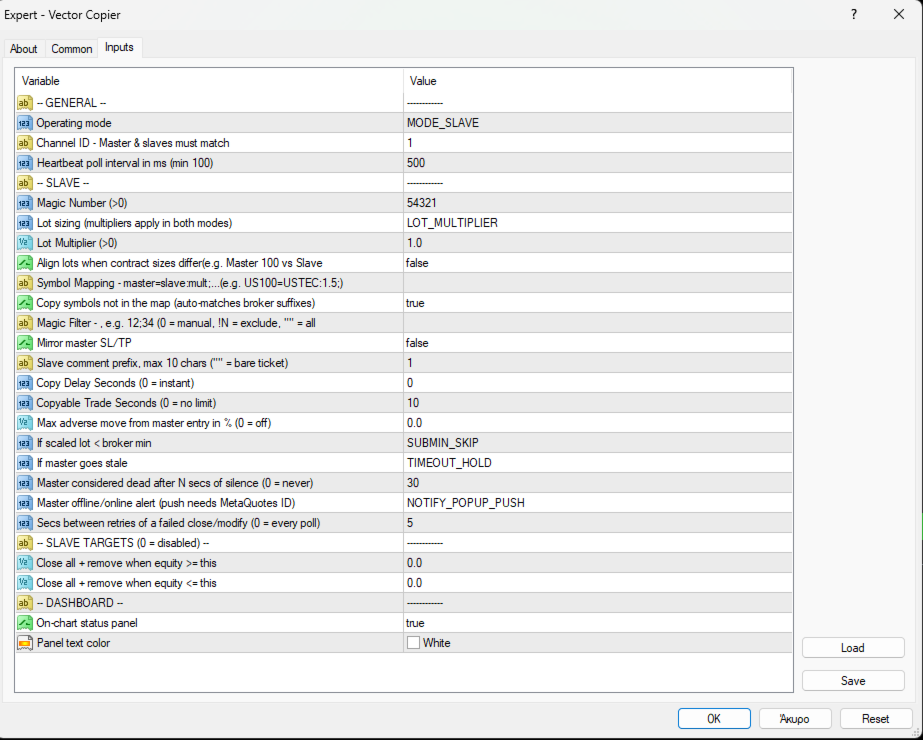
INPUT PARAMETERS

General:
• CopyMode — MASTER or SLAVE
• ChannelID — must match between a master and its slaves (MT4 or MT5). Different IDs = separate independent copier groups on one machine
• MilliSecs — poll interval in milliseconds (default 500, minimum 100)

Slave:
• Magic — unique ID for this slave's orders (> 0; different per slave on the same account). This is the slave's own magic, not the filter
• LotMode — MULTIPLIER (fixed scaling) or EQUITY_RATIO (scales by slave equity ÷ master equity). The multipliers apply in both modes
• GlobalMultiplier — lot multiplier applied to every copied trade (> 0)
• AlignContracts — scale slave lots when the two brokers use different contract sizes for the same instrument, e.g. SOLUSD 100 vs 1 → 1 master lot = 100 slave lots (default false). Check your symbols' contract sizes before relying on it
• SymbolMap — e.g. GBPUSD=GBPUSD;GER40=GER30:0.5 — format is master=slave with an optional :multiplier per pair
• CopyUnmapped — copy symbols not in the map: same name, or auto-matched broker suffix/prefix; contract sizes must match unless AlignContracts is on (default true). Set false to copy ONLY the symbols in SymbolMap
• MagicFilter — master magic numbers to copy, separated by ; (e.g. 111;222). 0 = manual trades. Prefix with ! to exclude (e.g. !0 = all except manual). Empty = copy all (default)
• CopySLTP — mirror the master's stop loss / take profit
• CommentTag — tag on slave orders, max 10 characters (empty for none)
• CopyDelaySeconds — wait this long before copying a new trade (0 = instant). Trades the master closes within the delay are never copied
• MaxCopyAgeSeconds — don't copy a master trade older than this, counted after the copy delay (anti-chase; 0 = no age limit)
• MaxSlippagePercent — don't copy if price has moved against the master's entry by more than this % (anti-chase; 0 = off). E.g. 0.05% ≈ 5 pips on EURUSD
• OnSubMinVolume — if a scaled lot is below broker minimum: SKIP or BUMP to min
• OnMasterTimeout — if the master goes silent: HOLD or FLATTEN
• StaleSeconds — master silence duration that counts as offline (0 = never)
• NotifyVia — master offline / back online alert: popup + push, push only, or popup only. Push needs your MetaQuotes ID set in the terminal
• RetrySeconds — seconds between retries of a failed close or SL/TP change (0 = every poll)

Slave targets (0 = off):
• EquityTarget — close all copied trades and stop copying when equity reaches this
• EquityLoss — close all copied trades and stop copying when equity falls to this

Dashboard:
• ShowDashboard — on-chart status panel
• DashboardColor — panel text color
Produtos recomendados
Risk Commander
Adisorn Soodkanueng
Product Name: Risk Commander: Trade Assistant & Strategy Simulator Risk Commander is more than just a trade panel—it is a complete Manual Trading Ecosystem . It serves two powerful purposes: Live Assistant: Helps you execute trades with speed, precision, and perfect risk management in real-time markets. Training Simulator: Fully compatible with the Strategy Tester (Visual Mode) , allowing you to practice manual trading on historical data without risking a cent. NEW! Built-in Simulator Mode Stop
Níveis automáticos de ponto de equilíbrio Usando   esta   ferramenta ,   v ocê pode ativar o movimento automático do SL, quando a operação atingir um lucro desejado.  Especialmente   importante   para   traders   de   curto prazo   .   A opção de deslocamento também está disponível: algum lucro pode ser protegido. Ferramenta multifuncional : 66+ recursos, incluindo esta ferramenta  |   Contate-me  se tiver alguma dúvida  |   Versão MT5 Processo de ativação da função automática de ponto de equil
Trade Assistant Pro 36 in 1
Makarii Gubaydullin
4.76 (21)
Ferramenta Multifuncional: Calculadora de Lotes, Ordens Grid, Proporção R/R, Gerenciador de Trades, Zonas de Oferta e Demanda, Price Action e muito mais Versão Demo   |   Manual do usuário O Assistente de Trading não funciona no testador de estratégias: você pode baixar a Versão Demo AQUI para testar a utilidade . Entre em contato para qualquer dúvida / ideias de melhoria / em caso de encontrar um bug Se você precisa de uma versão MT5, está disponível aqui Simplifique, acelere e automatize seu
Smartility
Syed Oarasul Islam
This utility is designed to help you with your Manual Trading. It allows different ways of closing trades. It can display total number of BUY and SELL orders individually and also their individual profits. It can enter trades without stopl loss and take profits. However upon selecting UseStopLossTakeProfit from the settings it can use best possible stop loss and take profits based on the market conditions. Upon selecting the CloseOppositeTrades  from the settings it can close opposite trades. Fo
ForexcopyLocalMT4
Wei Ming Ding
3 (1)
Instruções de uso: https://www.mql5.com/zh/blogs/post/754946 Versão MT4: https://www.mql5.com/zh/market/product/88205 Versão MT5: https://www.mql5.com/zh/market/product/88204 -------------------------------------------------- 1. Copiar pedidos, de 12 contas master para 100 contas slave. O número de contas slave pode ser personalizado, de 12 a 100. 2. Suporte MT4 a MT4, MT4 a MT5, MT5 a MT4, MT5 a MT5. 3. Identifique os sufixos de variedades de negociação em diferentes plataformas, como EURUSD,
CoPilot dashboard MT4
Frederic Jacques Collomb
CoPilot — Painel de trading diário Conheça os seus números. Opere com clareza. Versão MT5 O que é o CoPilot? O CoPilot é um assistente de trading de nível profissional que exibe em tempo real todas as estatísticas de desempenho diário diretamente no gráfico — com uma curva de equidade ao vivo que se atualiza operação por operação. Desenvolvido para traders ativos que precisam de visibilidade instantânea da sua sessão sem sair do gráfico, o CoPilot agrega cada operação fechada do dia em todos os
Virtual Collider Manual   is a trading assistant with a built-in panel for manual trading. It automatically moves a position opened by a trader in profit using innovative adaptive grid algorithm of averaging and adaptive pyramiding Know-how of the grid algorithm of averaging and pyramiding of the   Virtual Collider Manual   trading robot is based on fully automatic adaptation of all characteristics of dynamically build order grid and pyramid with actual price movement with no need for adjusting
Noize Absorption Index MT4
Ekaterina Saltykova
5 (1)
Noize Absorption Index - is the manual trading system that measures the difference of pressure between bears forces and bulls forces. Green line - is a noize free index that showing curent situation. Zero value of index shows totally choppy/flat market.Values above zero level shows how powerfull bullish wave is and values below zero measures bearish forces.Up arrow appears on bearish market when it's ready to reverse, dn arrow appears on weak bullish market, as a result of reverse expectation. S
Utility, which draws buy or sell trendlines, which can also become support or resistances able to close any position on the screen Algorithm that calculates the gain of the position, at the touch closure of the line.   The benefits you get: Works on forex and CFD, timeframe from M1 to Weekly. Easy to use screen control panel. Audible warning messages at the touch of the line. Easy to use.
O indicador Crypto_Forex "Auto FIBO Pro" é uma ótima ferramenta auxiliar na negociação! - O indicador calcula e coloca automaticamente no gráfico os níveis de Fibonacci e as linhas de tendência locais (cor vermelha). - Os níveis de Fibonacci indicam áreas-chave onde o preço pode reverter. - Os níveis mais importantes são 23,6%, 38,2%, 50% e 61,8%. - Pode utilizá-lo para scalping de reversão ou para negociação de grelha de zona. - Existem muitas oportunidades para melhorar o seu sistema atual ut
VR Cub
Vladimir Pastushak
VR Cub é um indicador para obter pontos de entrada de alta qualidade. O indicador foi desenvolvido para facilitar cálculos matemáticos e simplificar a busca por pontos de entrada em uma posição. A estratégia de negociação para a qual o indicador foi escrito tem provado a sua eficácia há muitos anos. A simplicidade da estratégia de negociação é a sua grande vantagem, o que permite que até mesmo os comerciantes novatos negociem com sucesso com ela. VR Cub calcula os pontos de abertura de posição e
GGP Trade Copier MT4
Mohammadmahmood Pirayeh
GGP Trade Copier  EA is an automatic trading bot that can help traders automatically replicate the trading strategies and operations from one trading terminal to others by experiencing exceptionally fast trade copying system. Its easy-to-use setup allows you to copy trades between multiple MetaTrader terminals on the same Windows computer or Windows VPS with lightning-fast copying speeds of under 0.5 seconds. The software supports multiple trading varieties, including Forex, commodities, stocks,
CRIFLOW SCALPER PRO  Advanced Trade Management & Smart Scaling System CRIFLOW SCALPER PRO is an Expert Advisor designed to transform any manual operation into an advanced professional management system, automating scaling, capital protection and profit maximization. It's not just an input EA: is an intelligent order management engine designed for serious traders, scalpers and professionals. ⸻ Smart Trade Detection • Automatically detect manual trades • Intervenes in real time witho
The Infinity Expert Advisor is a scalper. When the resistance and support levels are broken, trades are opened in the direction of the price movement. Open positions are managed by several algorithms based on the current market situation (fixed stop loss and take profit, trailing stop, holding positions in case of trend indication, etc.). Requirements for the broker The EA is sensitive to spread, slippages and execution quality. It is strongly recommended not to use the EA for currencies with s
Easy Trade Executor es una herramienta para el cálculo rápido del tamaño de posición, la ejecución de operaciones y la gestión de operaciones en MT4. Coloque los niveles de Precio de Entrada, Stop Loss y Take Profit directamente en el gráfico, obtenga el cálculo automático del tamaño de posición y abra operaciones con un riesgo controlado en solo unos clics. ¿Por qué Easy Trade Executor? Easy Trade Executor está diseñado para traders que buscan algo más que simples cálculos de riesgo: quieren g
Indicador único que implementa uma abordagem profissional e quantitativa para significar negociação de reversão. Ele capitaliza o fato de que o preço desvia e retorna à média de maneira previsível e mensurável, o que permite regras claras de entrada e saída que superam amplamente as estratégias de negociação não quantitativas. [ Installation Guide | Update Guide | Troubleshooting | FAQ | All Products ] Sinais de negociação claros Incrivelmente fácil de negociar Cores e tamanhos personalizáveis
Description: Please tick "Show object descriptions" in chart properties to enable hrays views That utility converts a trendline into a horizontal ray known as tool for drawing supply and demand zones. Simply create a trendline on a chart and once selected, it will get converted. Ray remains horizontal while dragging.  Quick ray plot: press "R" key to create horizontal ray. It will be snapped to the nearest OHLC value Further versions will be improved. For feature request please post new comm
Trade panel manual is a multifunctional trading assistant. It allows you to open market and pending orders in one click. Value is set via button menu edit or deleted by specific buttons pending orders and the value of take profit and stop loss in one click. Through the edit menu of the button, a value is set that can be easily changed by simply moving level_tp lines for take profit or stop loss levels and for pending orders. It is possible to select orders and determine for them and set the leve
It is so very disappointing when the price does not have enough points to achieve Take Profit and makes a reversal. This EA sets virtual levels near the TakeProfit levels. This EA sets virtual levels next to TakeProfit orders. If these levels are reached by price, breakeven or trailing stop is applied for an order. Features This EA does not set new orders. The aim of this EA is to manage stop losses of existing orders that are set by another EA or manually (magic number equals 0). For correct w
H4 GBPUSD Trend Scalper is a trend signal scalper The EA trades according to the trend strategy using original built-in indicator for opening and closing orders. The external inputs for limiting trading on Fridays and Mondays are available. The purpose of the strategy is to use the current trend with the most benefit. According to the results of testing and working on demo and real accounts, the best results achieved by using the Н4 timeframe on the GBP/USD pair Works on MetaTrader 4 Build 971+
Forex Diamond EA
Lachezar Krastev
5 (6)
BLACK FRIDAY SPECIAL: 70% OFF + FREE GIFT! Massive savings on our top automated systems: Buy Forex Diamond EA: Only $197 (Save 70% — Regular price: $547) BONUS EA: Get Crypto Master EA 100% FREE (Regular price: $497) Total Value: $1044 — Yours today for just $197! How to claim: Direct message (DM) us your purchase confirmation to unlock your free Crypto Master EA license! Full offer details & live performance stats: https://www.mql5.com/en/blogs/post/778315 Live Results:   https://www.mql5.com/
| Fully-automated Smart Money Concept (ICT) inspired trading solution with multi-strategy capabilities | Built by a grid trader >> for grid traders.  This is MT4 version, click  here  for  Blue CARA MT5  (settings and logics are same in both versions)     Real monitoring signal  -->  Cara Gold Intro Blue CARA EA   ('CARA') - short for  C omprehensive  A lgorithmic R esponsive A dvisor is a next-gen  multi-currency    multi-timeframe  EA base on the widely known (and perhapse most popular) Inn
Night Trader EURUSD
Ugur Oezcan
4.21 (29)
The EA can trade multiple currencies. Please check our signals ( https://www.mql5.com/en/users/ugur-edin/seller ) for detailed information. No grid or martingale! No manual configuration or adjustment needed! Every trade is protected by stop loss. This Expert Advisor only trades for a short time frame at night, during the ending of the New York session. It uses low volatility moments and enters trades based on indicators. It then manages those trades with dynamic stop losses and take profits als
Expert Advisor for MT4 Useful utility MUST have for all traders.  With 1 click button, you're able to close all your open positions. Its come with a warning pop up notification when you click to close all your trades, to avoid an accident press the button. Just press 'Yes' to confirm or 'No' to cancel it. The expert will close all your open positions no matter what pairs you currently open or directions. Just attach the expert on 1 of your chart, and you're good to go.
NRP Risk Manager Pro Institutional-Grade Trade Management & Prop Firm Protection Get the MetaTrader 4 Version Here: https://www.mql5.com/en/market/product/179888 Get the MetaTrader 5 Version Here: https://www.mql5.com/en/market/product/179885 Trading isn't just about finding the right entry; it is about flawlessly executing your edge while fiercely protecting your capital. NRP Risk Manager Pro is not an automated trading robot—it is a comprehensive, institutional-grade trade terminal d
Standard Trailing Stop is too slow! In the world of high-speed scalping like GOLD (XAUUSD) or volatile Forex pairs, even a few pips of delay in taking profit can be fatal.  "Just 5 more pips, then I'll cut!"  "But I need to find the next entry too!"  For scalpers fighting under such extreme pressure, we developed the "WOLF SCALPER PRO."  While inheriting the ironclad defense of "Auto SL/TP Insertion" and "Brother-Sync" from the original WOLF SYNC MANAGER, this new model is equipped with an
The analyzer panel allows traders to add the pending order grid (Buy Limit, Sell Limit, Buy Stop, Sell Stop) quickly and efficiently.   Parameters stop mode - select stop setting mode every order - stop levels are set for each order separately position as - common stop levels for all orders order type - select pending order type Buy Limit Sell Limit Buy Stop Sell Stop magic - set a magic number for open orders if necessary. If position as mode is enabled, stop levels are corrected for all orders
TradePilot
Hossein Khalil Alishir
TradePilot Expert Advisor (EA) for MetaTrader 4 TradePilot is a professional and user-friendly Expert Advisor (EA) for MetaTrader 4 (MT4) . It simplifies automated trading , risk management , and trade execution using a smart trading panel . Perfect for beginners and experienced traders looking for a reliable trade manager EA with automated lot size calculation . Key Advantages User-Friendly Trading Panel: Customizable panel with buttons and hotkeys. Smart Risk Management: Supports percen
The Best One Scalping Trade Panel functional manual trade panel with risk reward, auto SL by candle ( original solution), lot size calculation, one-click trading, scale in and out of trades (partial close),  Works with all symbols not just currency pairs, perfect works on DAX, NASDAQ, GOLD, ...... I earn every day during live stream on ZakopiecFX - join Me Risk by lot Risk by percent SL by points SL by Candle, Renko, RangeBar ( original solution) TP by point TP by Risk/Reward Auto Trailing by P
Uma das sequências numéricas é chamada de "Forest Fire Sequence". Foi reconhecida como uma das mais belas novas sequências. Sua principal característica é que essa sequência evita tendências lineares, mesmo as mais curtas. É esta propriedade que formou a base deste indicador. Ao analisar uma série temporal financeira, este indicador tenta rejeitar todas as opções de tendência possíveis. E somente se ele falhar, ele reconhece a presença de uma tendência e dá o sinal apropriado. Esta abordagem pe
Os compradores deste produto também adquirem
Bem-vindo ao Trade Manager EA—uma ferramenta de gestão de risco criada para tornar o trading mais intuitivo, preciso e eficiente. Não é apenas uma ferramenta para executar ordens, mas uma solução abrangente para planejamento de operações, gerenciamento de posições e controle de risco. Seja você um iniciante, trader avançado ou scalper que precisa de execução rápida, o Trade Manager EA adapta-se às suas necessidades, oferecendo flexibilidade em todos os mercados, desde forex e índices até commodi
Exp COPYLOT CLIENT for MT4
Vladislav Andruschenko
4.69 (65)
Copiador profissional de operações para MetaTrader 4 Copiador de operações rápido, profissional e confiável para MetaTrader 4 . COPYLOT permite copiar operações de Forex entre os terminais MetaTrader 4 e MetaTrader 5 , com sincronização flexível para diferentes tipos de conta e cenários de negociação. A versão COPYLOT MT4 oferece suporte para: MetaTrader 4 → MetaTrader 4 MetaTrader 5 Hedge → MetaTrader 4 MetaTrader 5 Netting → MetaTrader 4   Versão MT5 Descrição completa + DEMO + PDF Como compra
Trade Assistant MT4
Evgeniy Kravchenko
4.43 (197)
Ajuda a calcular o risco por comércio, a fácil instalação de uma nova encomenda, gestão de encomendas com funções de fecho parcial, trailing stop de 7 tipos e outras funções úteis. Materiais e instruções adicionais Instruções de instalação - Instruções para a aplicação   Função de linha Mostra no gráfico a linha de Abertura, Stop Loss, Take Profit. Com esta função é fácil definir uma nova ordem e ver as suas características adicionais antes da abertura.   Gestão de risco A função de cálculo do
Local Trade Copier EA MT4
Juvenille Emperor Limited
4.96 (111)
Local Trade Copier EA MT4 é um copiador de operações rápido e flexível para copiar e gerenciar operações entre várias contas MetaTrader 4 no mesmo computador Windows ou Windows VPS. Ele combina a sincronização local de operações com controles no lado do Receiver para tamanho de lote, gerenciamento de risco, filtragem de operações, mapeamento de símbolos, gerenciamento de operações e proteção da conta. Configure seus terminais Transmitter e Receiver em aproximadamente 1 minuto e copie operações
The product will copy all telegram signal to MT4   ( which you are member  ) , also it can work as remote copier.  Easy to set up, copy order instant, can work with almost signal formats, image signal, s upport to translate other language to English Work with all type of channel or group, even channel have "Restrict Saving Content", work with  multi channel, multi MT5 Work as remote copier: with signal have ticket number, it will copy exactly via ticket number. Support to backtest signal. How to
News Filter EA MT4
Rashed Samir
4.64 (11)
News Filter EA: Advanced Algo Trading Assistant News Filter EA is an advanced algo trading assistant designed to enhance your trading experience. By using the   News Filter EA , you can integrate a Forex economic news filter into your existing expert advisor, even if you do not have access to its source code. In addition to the news filter, you can also specify   trading days   and   hours   for your expert. The News Filter EA also includes   risk management   and   equity protection   features
TradePanel MT4
Alfiya Fazylova
4.84 (95)
Trade Panel é um assistente de negociação multifuncional. O aplicativo contém mais de 50 funções de negociação para trading manual e permite automatizar a maioria das tarefas de negociação. Instruções para o aplicativo: https://www.mql5.com/pt/blogs/post/762435 Versão de teste do aplicativo para conta demo: https://www.mql5.com/pt/blogs/post/762547 Como instalar o aplicativo: https://www.mql5.com/pt/blogs/post/762548 Como testar o aplicativo no modo visual: https://www.mql5.com/pt/blogs/post/770
Telegram to MT4 Coppy
Sergey Batudayev
4.09 (11)
Telegram para MT4:   A solução definitiva para cópia de sinais Otimize suas negociações com   o Telegram para MT4   , o utilitário de última geração desenvolvido para copiar sinais de negociação diretamente de canais e chats do Telegram para sua plataforma MetaTrader 4 — sem a necessidade de DLLs. Esta solução robusta garante a execução perfeita de sinais com precisão incomparável e opções de personalização, economizando seu tempo e aumentando sua eficiência. [ Instructions and DEMO ] Principais
Trade copier MT4
Alfiya Fazylova
4.62 (37)
Trade Copier é um utilitário profissional projetado para copiar e sincronizar negociações entre contas de negociação. A cópia ocorre da conta / terminal do fornecedor para a conta / terminal do destinatário, instalada no mesmo computador ou vps. Antes de comprar, você pode testar a versão demo em uma conta demo. Versão de demonstração aqui . Instruções completas aqui . Principais funcionalidades e benefícios: Suporta a cópia de MT4> MT4, MT4> MT5, MT5> MT4, incluindo contas "MT5 netting". Os mod
O Telegram to MT4 Multi-Channel Copier copia automaticamente os sinais de trading dos seus canais de Telegram e Discord diretamente para o MetaTrader 4. Sem bots, sem extensões de navegador, sem copiar à mão. O sinal chega ao Telegram ou ao Discord e o EA abre a operação no seu terminal em poucos segundos. E antes de copiar um canal, o backtester integrado mostra o que esse canal teria feito na sua conta. O produto inclui dois componentes: um aplicativo de Windows que escuta os seus canais de Te
DoIt Trade Manager - Risk Panel and EA Position Manager for MT4 Finding an entry is only half the job. Many execution mistakes happen in position sizing, partial exits, breakeven, trailing and account protection. DoIt Trade Manager puts the complete workflow on the chart. Plan the risk before entry, execute the order and apply consistent management rules to your manual trades and selected positions opened by other EAs. Full setup guide + how the free version works and where PRO starts :  https:/
Trade Indicator Assistant is a powerful MT4 utility designed to turn indicators into automated trading systems. Its main feature is the ability to automatically detect an indicator’s   BUY and SELL signal buffers , without requiring you to know the buffer numbers, search through indicator settings, or modify the indicator source code. Bonus Indicator: After purchasing Trade Indicator Assistant, contact me to receive Trade Signal Pro completely free as a bonus indicator. [Download Demo Version]
PZ Trade Pad Pro MT4
PZ TRADING SLU
3.67 (3)
Este é um painel de negociação visual que ajuda você a realizar e gerenciar operações facilmente, evitando erros humanos e aprimorando sua atividade comercial. Ele combina uma interface visual fácil de usar com uma abordagem sólida de gerenciamento de riscos e posições. [ Guia de instalação | Guia de atualização | Solução de problemas | FAQ | Todos os produtos ] Surpreendentemente fácil de usar Negocie facilmente a partir do gráfico Negocie com gerenciamento preciso de riscos, sem complicações
Trading History MT4
Siarhei Vashchylka
5 (9)
Trading History - A program for trading and money management on the history of quotes in stratagy tester. It can work with pending and immediate orders, and is equipped with trailing stop, breakeven and take profit functions. Very good for training and testing different strategies. Manual (Be sure to read before purchasing) Advantages 1. Allows you to test any trading strategy in the shortest possible time 2. An excellent simulator for trading training. You can gain months of trading experience
Trade Manager Pro MT4
Bryan Djoufack Nguessong
Esta é uma utilidade para facilitar a sua negociação, colocando a um clique ou alguns cliques tarefas demoradas como gestão de ordens e gestão de riscos. Características Gestão do risco   Calcula automaticamente os lotes com base no risco especificado em % ou $ no campo de risco e deixa-o entrar apenas colocando linhas para SL TP etc. e exibir a Recompensa de Risco em tempo real. TrueRisk para que inclua comissões ao calcular o tamanho do lote em pares FX apenas para que arrisque 1% com tod
Shepherd Safety EA
AW Trading Software Limited
4.92 (13)
AW Shepherd Safety EA é um Expert Advisor para gerenciar posições abertas. A primeira ordem é aberta pelo trader no painel, e a partir daí o EA conduz a cesta sozinho: adiciona ordens de recuperação com filtro de tendência, fecha o lado por TakeProfit, trailing ou stop e mostra os níveis de fechamento no gráfico. Compras e vendas são geridas separadamente, e os dois lados podem ficar abertos ao mesmo tempo. A ordem de recuperação não é aberta apenas pelo passo de preço, mas depois de uma reversã
RS Trade Copier - o local trade copier ultrarrápido com uma interface gráfica verdadeira . Pare de digitar números de conta manualmente. Chega daquela lista enorme de 200+ parâmetros de entrada incompreensíveis. Uma ferramenta confiável e flexível para cópia de operações comerciais entre múltiplos terminais MT4 e MT5. Atende tanto traders experientes e serviços de sinais quanto investidores individuais. Permite sincronizar negociações de um ou múltiplos Provedores para um ou múltiplos Clientes c
Rhino Chart Drawing Tools oferece um fluxo de trabalho de desenho no estilo TradingView para o MetaTrader 4. Inclui 54 ferramentas de desenho , uma barra de ferramentas personalizável, Favoritos, estilos rápidos, configurações de objetos, modelos e um gerenciador de objetos. Manual do usuário: Como usar o produto Versão demo gratuita: Baixar a demo Versão para MetaTrader 5: Rhino Drawing Tools para MT5 Ferramentas de desenho Grupo Lista de objetos Linhas Linha de tendência, raio, linha estendi
Trade Dashboard MT4
Fatemeh Ameri
4.96 (55)
Trade Dashboard simplifies how you open, manage, and control your trades, with built-in lot size calculation. It allows you to execute trades, manage risk, and control positions directly on the chart, with tools such as partial close, breakeven, and trailing stop. Designed to reduce manual work and help you stay focused on your trading decisions. A demo version is available for testing. Detailed explanations of features are provided within the MQL5 platform. Installation instructions are include
O MT4 para Telegram Signal Provider é uma ferramenta fácil de usar e totalmente personalizável que permite o envio de sinais para o Telegram, transformando sua conta em um provedor de sinais. O formato das mensagens é totalmente personalizável! No entanto, para uso simples, você também pode optar por um modelo predefinido e habilitar ou desabilitar partes específicas da mensagem. [ Demonstração ]   [ Manual ] [ Versão MT5 ] [ Versão Discord ] [ Canal do Telegram ]  New: [ Telegram To MT5 ] Conf
Multi Account Local Trade Copier é um copiador local rápido para MetaTrader: copie operações entre terminais MT4/MT5 no mesmo PC ou VPS Windows, de uma conta master para múltiplas contas receptoras — as suas próprias contas reais, demo ou de prop firm, na mesma corretora ou em várias diferentes. Funciona por eventos : o master publica cada operação no instante em que acontece, e o receptor mede e registra a latência real de cópia de cada operação — tipicamente 50-150 ms . Sem DLLs, sem ponte pel
O indicador possui três ferramentas principais: Lupa (gráfico de zoom), Régua (escalas de tempo e preço) e Mira. Você pode mover tudo com o mouse e personalizar diferentes formatos de exibição, personalizar o tamanho e a cor de cada elemento. A Lupa   (gráfico de zoom) permite exibir velas de qualquer período de tempo e em diferentes escalas. Teclas de atalho padrão: 'Q' - período de tempo mais alto, 'A' - período de tempo mais baixo, 'W' - diminui o tamanho da vela, 'S' - aumenta o tamanho da
Automatic Trailing Stop Based on Take Profit Percentage with Profit Lock EA MT4   Lock in your profits and "let your winners run" past your 100% take profit target with this EA.  This Expert Advisor automatically adjusts your Stop Loss based on up to 4 user-defined Take Profit Target Percentages, locking in your profit.  If price pushes past your 100% take profit target, the EA will automatically trail the price by user-defined pips, so you won't miss that runaway train again.   EA Features The
Exit Manager
Victor Christiaanse
5 (2)
Close every trade at the right moment, automatically. Most traders spend their energy on the entry and then close too early, too late, or on a feeling. Exit Manager takes the exit off your hands. Open a trade the way you always do, by hand or with any Expert Advisor, and Exit Manager watches it and closes it, fully or partly, when the indicator signal you chose appears. You can see it working on the chart. A clean panel on your chart shows, for every open trade, which rule will close it next, ho
TradeMirror é uma ferramenta local de cópia de ordens desenvolvida para as plataformas MT4/MT5, com suporte à sincronização de negociações em tempo real. Samouczek Kliknij link Samouczek Trademirror , aby zobaczyć więcej samouczków. Vantagens do Produto Alinhado com os altos padrões de segurança, estabilidade e privacidade para softwares financeiros, otimizamos três aspectos fundamentais: Interface gráfica intuitiva para operação simplificada Proteção de privacidade reforçada para isolamento de
Unlimited Trade Copier Pro is a tool to copy trade remotely to multiple MT4, MT5 and cTrader accounts at different computers/locations over internet. This is an ideal solution for you if you are a signal provider and want to copy your trades to other receivers globally on your own rules. One provider can copy trades to multiple receivers and one receiver can get trade from multiple providers as well. The provider can even set the subscription expiry for each receiver, so that receiver will not b
King Trade Copier MT4
Mohammed Maher Al-sayed Mohammed Ahmed Saleh
5 (1)
O King Trade Copier conecta terminais MetaTrader que funcionam no mesmo computador ou VPS. As operações abertas numa conta aparecem nas outras. O arquivo traz as duas funções, de modo que o mesmo download se torna o emissor ou um receptor, dependendo do valor que você definir em Mode. Em cada gráfico, o painel informa se este terminal está enviando ou recebendo, indica o nome da conta do outro lado, conta os receptores que responderam e mostra a idade do último sinal. Uma ordem que não foi copi

Take a Break
Eric Emmrich
5 (31)
Take a Break pauses your Expert Advisors when trading is a bad idea: before news, after a daily loss, outside your trading hours, or when a rule you wrote yourself says so. When the pause is over, your EAs simply continue. Account protection for all your EAs in one tool: news filter, drawdown and equity protection, time filter and custom rules. One EA on one chart protects the whole account, the free indicator gives every chart its own rules on top. Free demo | What is new in 26.09 | Support Ass


Copiadora->Interação de interface conveniente e rápida, os usuários podem usá-la imediatamente       ->>>> Recomendado para uso em computadores Windows ou VPS Windows Características: Configurações de negociação de cópias diversificadas e personalizadas: 1. Diferentes modos de lote podem ser definidos para diferentes fontes de sinal 2. Diferentes fontes de sinal podem ser definidas para negociação de cópias direta e reversa 3. Os sinais podem ser definidos com comentários 4. Se deve calibrar o
Indicador de força das moedas para MetaTrader 4 Este indicador de força das moedas analisa até 28 pares principais e produz um valor por moeda, para as 8 principais: USD, EUR, GBP, JPY, CHF, CAD, AUD e NZD. Em vez de abrir gráfico após gráfico para saber quem lidera, você lê um único painel no seu gráfico MetaTrader 4 e sabe qual moeda está a ser comprada e qual está a ser vendida. O que o painel mostra Uma barra de força ordenada para cada uma das 8 moedas, com a sua percentagem Uma matriz mult
Mais do autor
Vector Local Copier MT5
Sotirios Apostolos Adaloglou
Most trade copiers give you forty features and a forty-page manual. Vector Local Copier gives you the copying that actually matters — done reliably, set up in a minute, and protected by safety logic most copiers simply don't have. It mirrors trades from one master MT5 terminal to any number of slave terminals on the SAME Windows PC or VPS. No cloud, no DLLs, no external servers, no account passwords leaving your machine. Just fast, faithful local copying. WHO IT'S FOR Traders running mult
Vector Local Copier
Sotirios Apostolos Adaloglou
This is the FREE DEMO version of Vector Local Copier. It's the complete copier — real-time local copying, symbol mapping, the magic number filter, multipliers, SL/TP sync, the safety guards, the live dashboard — with one limitation: slave trades are capped to 0.01 lots. That's enough to prove it works perfectly on your exact terminals, brokers, EAs and symbols before you buy the full-size version. GET THE FULL VERSION (no lot cap) HERE: https://www.mql5.com/en/market/product/187169 Vector
FREE
Vector Local Copier EA
Sotirios Apostolos Adaloglou
This is the FREE DEMO version of Vector Local Copier for MT4. It's the complete copier — real-time local copying, MT4 ↔ MT5 bridging, symbol mapping, the magic number filter, multipliers, SL/TP sync, the safety guards, the live dashboard — with one limitation: slave trades are capped to 0.01 lots. That's enough to prove it works perfectly on your exact terminals, brokers, EAs and symbols before you buy the full-size version. GET THE FULL VERSION (no lot cap) HERE: https://www.mql5.com/en/ma
FREE
Redline - Account/Prop Firm Risk Manager MT5 — Daily Loss, Max Drawdown & Equity Protection Watchdog You're in the right place if you searched for: drawdown limiter, daily loss protection, equity guard, prop firm risk manager, account protector, FTMO drawdown tool, funded account protection. Redline is a NON-TRADING safety layer. It opens no trades and has no signals. It sits on one chart and polices your ENTIRE account — manual trades, other EAs, copy trading — every single second. When one
Filtro:
Sem comentários
Responder ao comentário