Chart Sync MT5 Trading Capital P

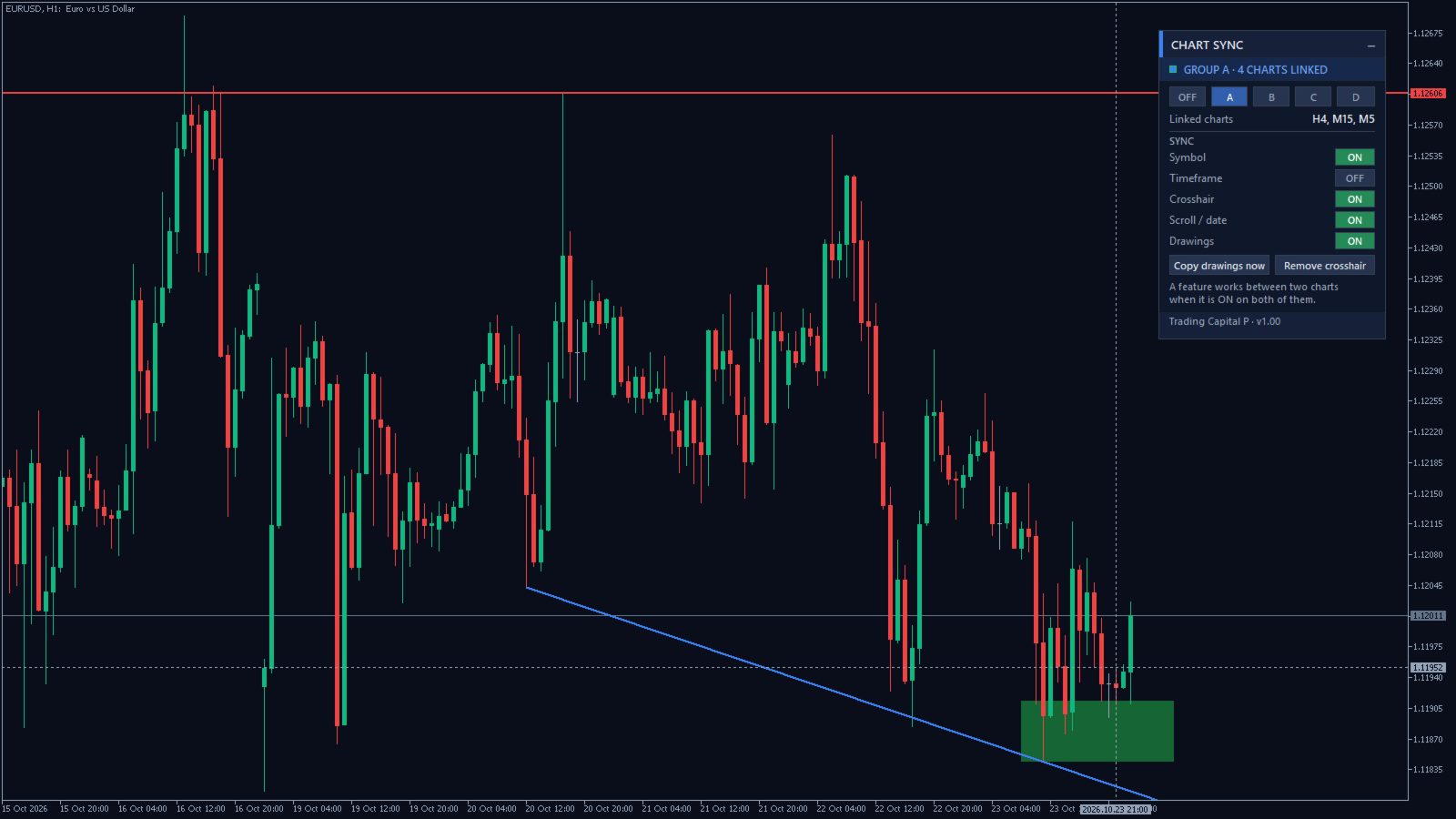
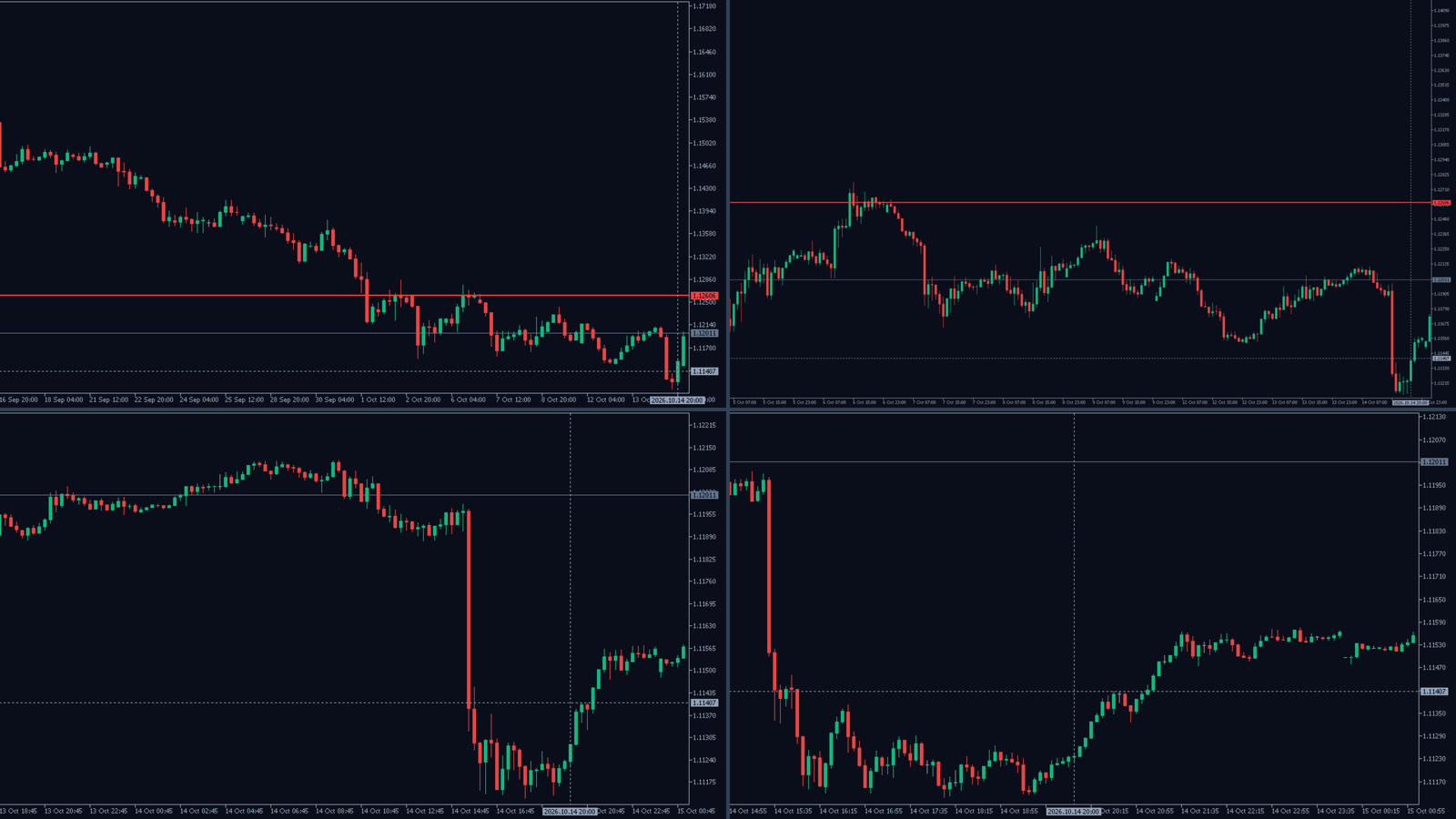
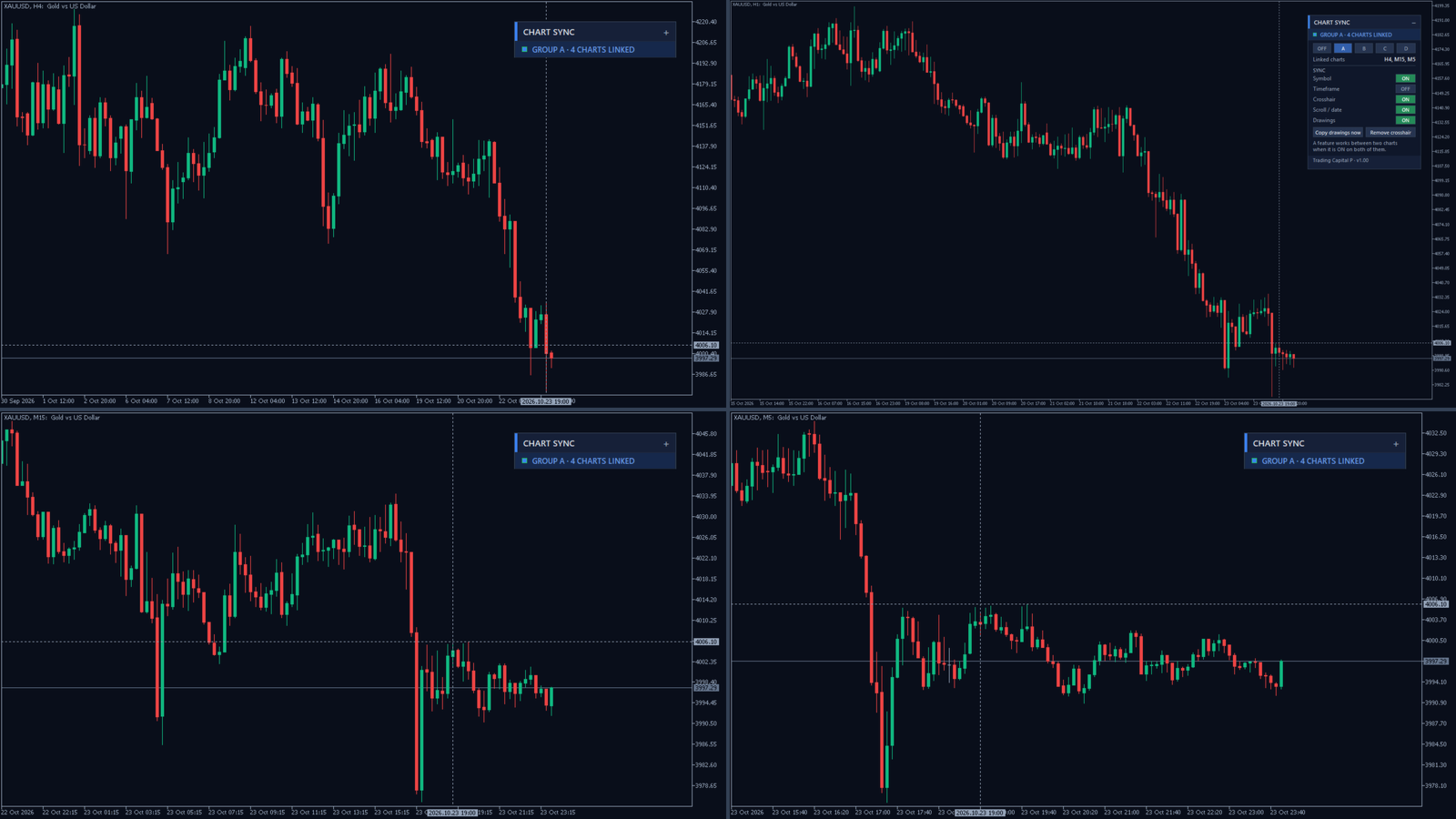
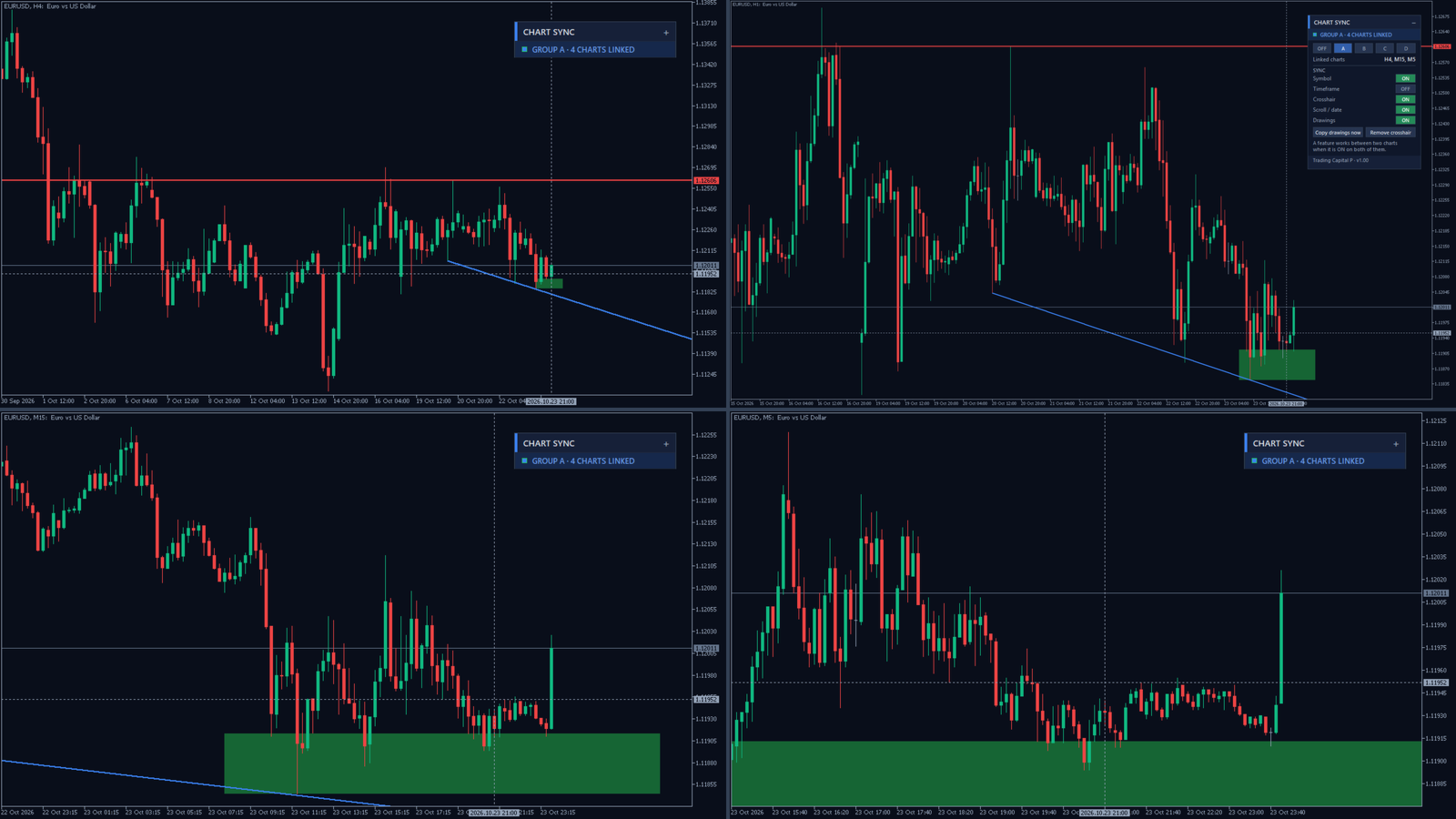
Chart Sync MT5 Trading Capital P links your charts in colour groups, like the linked windows of a trading platform workspace. Change the symbol on one chart and the others follow; move the mouse and a crosshair follows on the other charts; scroll back in history and the other charts go to the same date; draw a level and it appears on every linked chart of that symbol. It is free and complete, with no limits.

What is synchronised

  • Symbol: change the symbol on any chart of the group and the others switch to it, each keeping its own timeframe
  • Timeframe (optional, off by default so multi-timeframe layouts stay as they are)
  • Crosshair: a dotted time line follows your mouse on the other charts, and a price line on the charts of the same symbol
  • Scroll position: scroll back to any date on one chart and the linked charts move to the same date; go back to the live edge and they follow, with auto scroll restored
  • Drawings: trend lines, horizontal and vertical lines, rectangles, channels, Fibonacci tools, text and arrows drawn on one chart are copied to the linked charts of the same symbol, together with later moves, edits and deletions; the copies are normal drawings you can edit on any chart

Groups

  • Four groups (A, B, C, D) with their own colour, plus OFF: for example group A for your EURUSD analysis on H4, H1 and M15, and group B for gold
  • Each feature can be switched on or off per chart in the panel; a feature works between two charts when it is on in both
  • Settings are kept per chart, also after a symbol change or a terminal restart

Light and safe

  • Only objects drawn by you are copied; objects of other indicators and Expert Advisors are never touched
  • No trading, no DLL, no internet access; it reacts to chart events and checks every 0.5 s, so it costs almost nothing
  • Small movable panel that can be minimised, with tooltips on every control

How to use

  • Attach Chart Sync to every chart you want to link and choose the same group letter
  • Tip: save the linked charts as a profile or template; the group is kept

Part of the Trading Capital P family of tools for MetaTrader 5, together with Prop Challenge Replay, Prop Firm Guardian, Trade Manager and the free Session Breakout, Key Levels and Chart Drawing Toolkit.
Recommended products
Automated Timeframe cycling with Symbols centered.  Force every timeframe onto one clock window, so the story you see on Daily is the same story you are slicing on H4, H1, and M1.  Traders usually flip timeframes and lose the span. A Daily chart shows a few weeks, then M15 shows a few hours, and the eye treats them as different markets. This indicator locks the window to N bars of the highest enabled timeframe — default 10 Daily — and maps every lower timeframe to that same stretch. You stay ins
FREE
VWAP Fibo Bands RSJ
JETINVEST
4.83 (12)
VWAP Fibo Bands RSJ is an indicator that traces the lines of the daily VWAP and from it creates bands using Fibonacci proportions. This spectacular indicator creates 10 band levels through the selected VWAP period using Fibonacci ratios. It is fantastic how the prices respect each level of the bands, where it is possible to realize that almost every time the price closes above / below a level of the bands he will seek the next one. If close above will seek to reach the level above and if close
FREE
Watermark Centralized
Ronnie Ferreira Silva
4 (4)
Watermark Centralized Adds a watermark centered with the asset name and chosen period. It is possible to override the font type, font size, font color and separator character. The watermark is positioned behind the candles, not disturbing the visualization. It has automatic re-centering if the window is resized. Hope this indicator helps you, good trading ;)
FREE
Babel Assistant
Iurii Bazhanov
4.33 (9)
Babel assistant 1 The MT5 netting robot "Babel_assistant_1" uses the ZigZag indicator to generate Fibonacci levels across M1, M5, M15, H1, H4, D1, and W1 timeframes, and calculates the strength of buy and sell trends. It opens a position using the "Lot for open a position" setting if the specified trend level of 4.925 is exceeded. Then, Babel places pending orders at certain Fibonacci levels and sets the specified Stop Loss and Take Profit lines. The screen displays the current results of the po
FREE
Market Projection Pro — MT5 Want to visualize how the price cycles in your chosen chart section could extend? Market Projection Pro analyzes a historical window you select, extracts cycle components and draws a composite projection to its right. You control the source window and forward horizon to compare the scenario with price structure and potential turning zones. What you see on the chart Interactive boundaries let you select a historical analysis window directly on the chart. Cycle componen
VWAP Wave
Rizwan Akram
VWAP WAVE [Riz] - MT5 Indicator               Advanced VWAP Divergence Detection System VWAP Wave is a professional-grade Volume Weighted Average Price indicator with built-in divergence detection system. It identifies high-probability reversal and continuation signals by analyzing price-VWAP relationships across multiple timeframes.
FREE
DCA Buddy
Karim Abdelwahab
DCA Buddy is a utility indicator for MetaTrader 5 designed to calculate and display the break-even levels, profit targets, and recovery thresholds for open positions on the current chart. The indicator supports both single-direction baskets (buys only or sells only) and hedged positions (simultaneous buy and sell trades). Calculations use the native MetaTrader 5 profit calculation engine to account for contract specifications, broker tick values, and optional trading fees (swaps and commissions)
Renko Chart Custom
Pablo Filipe Soares De Almeida
"Renko Chart Custom" This Expert Advisor creates a custom offline Renko chart in real time with high precision and stability. Perfect for traders looking for a clean market view, eliminating noise and focusing on the true price direction. Main Features 6 Advanced Brick Size Methods "Fixed" — Fixed size in points "ATR M1" — Based on ATR from the M1 timeframe "ATR Daily" — Daily ATR divided by a divisor (great for real daily volatility) "% of Price" — Percentage of the current price (ideal for XA
Fvg Edge
Ahmad Meftah Abdulsalam Alawwami
5 (3)
FVG Smart Zones – Free Edition Fair Value Gap Detection Indicator for MetaTrader 5 (MT5) Are you looking for a real trading tool – not just another random indicator? FVG Smart Zones – Free Edition gives you professional market insight by automatically detecting Fair Value Gaps (FVGs) and highlighting high-probability trading zones directly on your chart. Built for traders following: Smart Money Concepts (SMC) ICT Trading Concepts Price Action Supply & Demand Analysis Institutiona
FREE
Short Description: Prop Firm Protector EZ MT5 is an EA designed to protect your funded account by managing risk and ensuring compliance with the Prop Firm's trading rules. This EA automatically monitors equity levels, closes trades when profit targets or drawdown limits are reached, and provides a visual display of key account metrics. The EA features a Super Easy setup, is simple to use, and works with all different Prop Firm service providers. Overview: Prop Firm Protector EZ MT5 is an Draw
Utility for show on charts the visual informations about: - a vertical line at start of each bar of selected timeframe - a vertical line at start of each day - a vertical line at start of each week - vertical lines at start / end of trading sessions selected - bid / ask prices, spread, money value for each point (of 1 standard lot) and last tick time recived" You can enable / disable each information and set the color for each line
FREE
Momentum Ninja Advanced MT5
Mohammed Maher Al-sayed Mohammed Ahmed Saleh
Momentum Ninja Advanced MT5 This indicator is an enhanced version of the classic Momentum indicator.  Main features: - Based on NinjaTrader-style momentum logic. - Uses EMA-based smoothing for cleaner and more stable readings. - Displays dynamic color changes to highlight bullish and bearish strength. - Sends alerts when the momentum crosses above or below zero. - Fully customizable and completely non-repainting. - Lightweight and optimized for all symbols and timeframes. How it differs from t
Auto Fib Retracements
Ross Adam Langlands Nelson
4.2 (5)
Automatic Fibonacci Retracement Line Indicator. This indicator takes the current trend and if possible draws Fibonacci retracement lines from the swing until the current price. The Fibonacci levels used are: 0%, 23.6%, 38.2%, 50%, 61.8%, 76.4%, 100%. This indicator works for all charts over all timeframes. The Fibonacci levels are also recorded in buffers for use by other trading bots. Any comments, concerns or additional feature requirements are welcome and will be addressed promptly. 
FREE
See Asia, London and New York as real high-low boxes, with optional fills and opening-window overlays. BrioQuant Trading Sessions draws Asia, London and New York as boxes fitted to each session's actual high and low. Choose broker time or GMT with automatic broker-offset handling, then add optional fills, labels and opening-window boxes. Features: - Boxes hug each session's real range, not arbitrary full-height bands - Optional background fills, auto-tinted from your session colours - Optional
FREE
Alfa for MT5: Your Smart Trading Command Center Say goodbye to tedious operations and focus on decision-making. Tired of juggling multiple chart windows? Ever missed an opportunity or suffered a loss due to messy order management?   Alfa   is made for you. It's not just a tool; it's your   trading command center   deployed on the MT5/MT4 platform, designed to automate and intelligentize your workflow, freeing you from repetitive tasks and allowing you to focus on capturing market opportunities.
MultiSymbolsWpr Indice x IBOV
Israel Goncalves Moraes De Souza
O Indicador identifica relação do Índice com a soma dos principais ativos, funciona para qualquer mercado do mund o, possui um oscilador WPR com a soma dos principais ativos escolhidos, indicando a antecipação do movimento em relação ao Índice. Características WPR com a soma dos papéis escolhidos - branco WPR do papel atual - vermelho Canal de Tendência O indicador pode indicar movimento de entradas, sendo: cruzamento das linhas cruzamento da linha Multi Symbols no -50 cruzamento entre os canai
FREE
PatternGuard VWAP Trader — A uthor's  Smart Trading Advisor for VWAP Breakout and Pattern-Based Entries PatternGuard VWAP Trader is a professional Expert Advisor for MetaTrader 5 designed to identify trading opportunities after price exits a dynamic NO TRADE zone based on VWAP and volatility bands. The main idea of the system is simple and effective: avoid trading inside uncertain, low-quality market zones and look for entries only when price breaks out of consolidation, confirms direction with
Aureus Quant Edge Basic
David Catharina Maria Habets
Aureus Quant Edge (AQE) is a professional-grade, strictly algorithmic mean-reversion engine designed for MetaTrader 5. Moving away from traditional retail "black-box" trading, AQE utilizes a transparent, mathematics-driven Z-Score anomaly detection core combined with institutional-grade risk management. Built for the quantitative trader, AQE does not rely on hazardous grid or martingale systems. Instead, it identifies statistical exhaustion points in the market using dynamic standard deviations,
FREE
Fibonacci Auto Levels draws Fibonacci retracement levels automatically, so you do not have to drag the Fibonacci tool by hand every time the chart moves. How it works - The indicator looks at the last N bars (100 by default) and finds the highest high and the lowest low. - The direction follows which extreme came last. - Low after the high: the last swing was down. Level 0 sits at the low and level 1 at the high, so the levels show how far price has bounced back up. - High after the low: the la
FREE
Pulse Trade Dashboard is an interactive trade management panel for MetaTrader 5, built for traders who want full control of their account without leaving the chart. Attach it to any chart and get a real-time overview of your balance, equity, open positions, and floating P&L — all updating live. Place market orders instantly with the one-click BUY and SELL buttons, adjusting your lot size, stop loss, and take profit directly on the dashboard without opening a single settings menu. What's included
FREE
Amazing Edge Maker
Satendra Kumar Gupta
Amazing XAU Edge Maker Overview Amazing XAU Edge Maker is an Expert Advisor for MetaTrader 5 designed to automate trading using configurable entry methods, position management, and risk management tools. It is optimized for XAU/USD (Gold) but can also be configured for other symbols supported by your broker. The EA combines signal-based trading with flexible trade management, allowing traders to customize its behavior according to their trading strategy. Main Features Trading Modes Signal Tradin
Pivot Monster EA
Alexandre Vincent Traber
PIVOT MONSTER EA Overview PIVOT MONSTER trades daily pivot levels (Classic, Camarilla, or Woodie) combined with previous day High/Low breakouts. It runs three interchangeable strategies — Bounce, Breakout, or Combo confluence — with pending orders placed once per day and unified SL/TP sizing in either ATR multiples or percent of price. Built for traders who want a rules-based, fully optimizable pivot system rather than a fixed indicator overlay. How it works At the start of each trading day, th
FREE
Day Direction Scanner
Efren Hernandez Partida
5 (3)
Day Direction Scanner is an indicator that uses the direction of the current candlestick on the 1-Day, 4-Hour, 1-Hour, 15-Minute, and 5-Minute periods to determine the market's direction. When all the candlesticks converge in a single direction, the indicator indicates whether the day is bullish or bearish, or if there is no clear direction. It is useful for easily getting an idea of the market's direction during the day. Features: - Works on all currency pairs, indices, and commodities. - F
FREE
FoxWave Volume Suite combines three essential volume-based tools into a single indicator: a horizontal Volume Profile with Point of Control and Value Area, a real-time volume spike detector with instant alerts, and a buy/sell pressure delta gauge. No need to run three separate indicators — everything you need to read volume is in one clean Fox Wave panel. What it does Volume Profile (POC / VAH / VAL) Builds a horizontal histogram showing how much volume traded at each price level over your cho
RelicusRoad Daily Pivots is a daily pivot points indicator for MetaTrader 4 and MetaTrader 5 that divides the previous day's range into Fibonacci levels and extends them above and below it, from minus 100 to plus 200 percent. Instead of classic floor pivots, the previous completed range is treated as a scale where the low is 0% and the high is 100%. Nineteen levels are printed as compact colored markers at the right edge of the chart, so the size of today's move reads as a fraction or a multiple
FREE
This is a buyer and seller aggression indicator that analyzes the shape of each candle and project this data in a histogram form. There are 4 histograms in one. On the front we have two: Upper - Buyer force. Lower - Seller force. At the background we also have two histogram, both with same color. They measure the combined strenght of buyers and sellers. This histograms can be turned off in Input Parameters. It is also possible to have the real or tick volume to help on this force measurement. IN
FREE
The   Pivot Point indicator   automatically calculates and displays the pivot point line and support and resistance levels. Pivot can be calculated according to the Classic, Floor, Fibonacci, Woodie, Camarilla or DeMark formula. It is also possible to select the period for calculating the indicator. A trader can choose from daily, weekly, monthly, or user-defined periods. Types of pivots Classic Floor Fibonacci Woodie Camarilla DeMark Main features The indicator shows the current and historic
FREE
Renko Chart
Marcin Konieczny
3.56 (9)
This indicator allows to display Renko charts in the indicator window. Renko charts show only price movements that are bigger than the specified box size. It helps to eliminate noise and allows to focus on main trends. Time is not a factor here. Only price movements are taken into account. That's why Renko chart is not synchronized with the main chart it is attached to. Indicator works in two modes: CLOSE - only close prices are taken into account while building the chart HIGH_LOW - only high/l
FREE
Haven Stop Loss Hunter
Maksim Tarutin
4.5 (6)
Haven Stop Loss Hunter 2.0 - A New Level of Liquidity Analysis Meet the major update — Haven Stop Loss Hunter 2.0 ! This is a professional tool designed for identifying liquidity pools and false breakouts (Sweeps), now with even greater flexibility and functionality [1]. In this version, we have implemented full multi-timeframe (MTF) analysis and an advanced alert system, helping you track market manipulations based on the Smart Money Concept with timely notifications, without wasting time switc
FREE
Renko Maker
Aleksandr Slavskii
5 (1)
Это DEMO версия Renko Maker PRO  к сожалению правила маркета не позволили указать это в названии. Почему то проверка маркета запрещает в названии слово DEMO. Демо версия строит ренко бары только на основе EURUSD из 1000 последних минутных баров. Revolution Renko Maker PRO — Инновационный Конструктор Ренко Графиков для MetaTrader 5   Создавайте идеальные ренко-бары с сохранением тиковых данных и реальных объемов — теперь с полной поддержкой индикаторов, советников и тестера стратегий!  
FREE
Buyers of this product also purchase
Trade Assistant MT5
Evgeniy Kravchenko
4.43 (216)
It helps to calculate the risk per trade, the easy installation of a new order, order management with partial closing functions, trailing stop of 7 types and other useful functions. Additional materials and instructions Installation instructions - Application instructions Line function -   shows on the chart the Opening line, Stop Loss, Take Profit. With this function it is easy to set a new order and see its additional characteristics before opening.   Risk management  - The risk calculation
Forex Trade Manager MT5
InvestSoft
4.98 (688)
Trade Manager MT5 is an advanced position size calculator and trade management tool for MetaTrader 5, designed to help traders plan trades faster, control risk more precisely, and manage open positions directly from the chart. It combines order placement, risk based lot calculation, Stop Loss and Take Profit management, Break Even, Trailing Stop, Partial Close, Equity Protection, and external trade management in one panel. Whether you trade forex, indices, metals, commodities, crypto, or future

Local Trade Copier EA MT5
Juvenille Emperor Limited
4.94 (149)
Local Trade Copier EA MT5 is a fast and flexible trade copier for copying and managing trades between multiple MetaTrader 5 accounts on the same Windows computer or Windows VPS. It combines local trade synchronization with Receiver-side controls for lot sizing, risk management, trade filtering, symbol mapping, trade management and account protection. Set up your Transmitter and Receiver terminals in about 1 minute and copy manual or EA trades between accounts at the same or different brokers. U
Telegram to MT5 MultiChannel Copier
Sergio Marquez Uroz
4.67 (21)
Telegram to MT5 Multi-Channel Copier   automatically copies trading signals from your Telegram and Discord channels straight to MetaTrader 5. No bots, no browser extensions, no manual copying. A signal arrives in Telegram or Discord and the EA opens the trade in your terminal within seconds. And before you copy a channel, the built-in backtester shows you what that channel would have done in your account. The product has two components: a Windows application that listens to your Telegram channel
FarmedHedge Pair Trading Dashboard
Tanapisit Tepawarapruek
5 (7)
Farmed Hedge Yield Farming | All Markets (Manual - Hybrid - Semi/Automated EA) VERIFIED TRADING RESULTS - Farmed Hedge Yield Axi Copy:  https://www.mql5.com/en/signals/2356376 - Farmed Hedge Yield Exn Copy:   https://www.mql5.com/en/signals/2356404 - Farmed Hedge Yield V Copy:  https://www.mql5.com/en/signals/2357156 IMPORTANT NOTICE: FarmedHedge is a MANUAL-FOCUSED TRADING UTILITY ,not a fully automated EA. Results shown on this Signal include manual trades and overall strategic management.
Copy Telegram signals with your own trading rules Telegram to MT5 Signal Trader automatically copies text-based trading signals from public and private Telegram channels and groups into MetaTrader 5. Manage multiple providers and MT5 accounts from one desktop app, with individual risk and trade settings for each provider . No Telegram bot or API setup needed for copying. Simply sign in with your own Telegram account by phone or QR code and select the channels or groups you have already joined. Y
News Trade EA MT5
Konstantin Kulikov
4.55 (11)
Present to you the useful robot that I have been using for several years. It can be used in both semi-automatic mode and fully automatic mode. >>> Chat <<< The program contains flexible settings for trading on the news of the economic calendar. It cannot be checked in the strategy tester. Only real work. In the terminal settings, you need to add the news site to the list of allowed URLs. Click Tools > Options > Expert Advisors. Check the option "Allow WebRequests for listed URL:". Add this (de
================================================================================ POC BREAKOUT - V20.72. Full Professional Grade Toolkit ================================================================================ POC Breakout is a full MetaTrader 5 trading dashboard for discretionary traders who want breakout signals, Point of Control (POC) context, volume profiles, order flow, market structure, news, alerts, and advanced trade planning in one professional workspace. Attached directly to you
TradePanel MT5
Alfiya Fazylova
4.88 (170)
Trade Panel is a multi-functional trading assistant. The app contains over 50 trading functions for manual trading and allows you to automate most trading tasks. Application instructions: https://www.mql5.com/en/blogs/post/756482 Trial version of the application for a demo account: https://www.mql5.com/en/blogs/post/750865 How to install the application: https://www.mql5.com/en/blogs/post/756239 How to test the application in visual mode: https://www.mql5.com/en/blogs/post/770277 How to install
Strategy Ledger Pro
Abdullah Uygar Tuna
5 (13)
Strategy Ledger Pro is a read-only account analysis panel for MetaTrader 5. It separates account results by Expert Advisor, strategy, symbol, and magic number, so you can see what each one really contributes. The panel is available in 11 languages: English, Français, Deutsch, Español, Italiano, Português, Русский, Türkçe, 中文, 日本語 and 한국어. Before you download the demo. The Market runs the demo of any paid product in the Strategy Tester only. This panel analyses the trades on your own account, and
Master Your Trading Discipline   Stop losing your hard-earned gains to overtrading and emotional decisions. The Discipline Tool is your ultimate trading assistant, ensuring strict risk management in real-time. Key Protection Features: Advanced Drawdown Defense : Automatically halts trading if your daily drawdown exceeds a preset threshold (percentage or dollar amount). Real-Time Equity Lock : Safeguard profits by referencing peak equity, ensuring drawdown stays within control. Hard Profit Target
Dealer Panel
Mian Rameez Ali
Dealer's Panel No signal decides anything here — a hand does. One click, and the panel calculates what's underneath: lot size from risk, target from a 30-step balance ladder that remembers exactly how far an account has climbed. Toggle between market and pending without touching an input field. Set a stop, and the take-profit can write itself — a fixed share of the balance, translated into price with no arithmetic left for the trader to get wrong. One trade live at a time; it won't let a seco
Exp COPYLOT CLIENT for MT5
Vladislav Andruschenko
3.97 (35)
Professional Trade Copier for MetaTrader 5 Fast, professional, and reliable trade copier for MetaTrader . COPYLOT allows you to copy Forex trades between MT4 and MT5 terminals with support for Hedge and Netting accounts. COPYLOT MT5 version supports: - MT5 Hedge to MT5 Hedge - MT5 Hedge to MT5 Netting - MT5 Netting to MT5 Hedge - MT5 Netting to MT5 Netting - MT4 to MT5 Hedge - MT4 to MT5 Netting MT4 version Full Description +DEMO +PDF How To Buy How To Install How to get Log Files H
HINN MagicEntry Extra
ALGOFLOW OÜ
4.74 (19)
HINN MAGIC ENTRY – the ultimate tool for entry and position management! SIMPLE. FASTEST. INTUITIVE. MAX AUTOMATED. Place orders by selecting a level directly on the chart! full description   ::  demo-version  :: 60-sec-video-description Key features: - Market, limit, and pending orders - Automatic lot size calculation - Automatic spread and commission accounting - Unlimited partitial take-profits  - Breakeven and trailing stop-loss and take-profit  functions - Invalidation leves - Intuitive, a
The product will copy all telegram signal to MT5 ( which you are member) , also it can work as remote copier.  Easy to set up, copy order instant, can work with almost signal formats, image signal,  s upport to translate other language to English Work with all type of channel or group, even channel have "Restrict Saving Content", work with  multi channel, multi MT5 Work as remote copier: with signal have ticket number, it will copy exactly via ticket number. Support to backtest signal. How to s
RETAILBERG FOOTPRINT CHART PRO — Order-Flow Workspace for MetaTrader 5 Version 7.00  |  Professional System  |  31 tools  |  One chart A full 150-page illustrated User Manual is included. Please read the full manual to understand this feature packed footprint chart elements and ui. https://www.mql5.com/en/blogs/post/777982 DEMO / STRATEGY TESTER — PLEASE READ FIRST
Next Update — Version 2.52 Coming Soon! [NEW] Get Ready for 4 Major New Features Designed to Enhance Your Market Analysis and Trading Workflow We’re taking market analysis to the next level with 4   new features designed to meet your trading needs. Introducing: TRADE OVERVIEW DASHBOARD CONFLUENCE AT ZONE STRONG & WEAK HIGH/LOW OTE 1. TADE OVERVIEW DASHBOARD  A dashboard that helps you understand the overall market picture more easily, providing guidance to support your trading decisions and h
EasyInsight AIO MT5
Alain Verleyen
4.92 (12)
EASY Insight AIO – All-In-One Power for AI-Driven Trading Want to skip the setup and start scanning the entire market – Forex, Gold, Crypto, Indices, and even Stocks – in seconds? EASY Insight AIO is the complete plug-and-play solution for AI-powered trade analysis. It includes all core Stein Investments indicators built-in and automatically exports clean, structured CSV files – perfect for backtesting, AI prompts, and live market decision-making. No need to install or configure indicators manu
Telegram To MT5 Ultra
Mirel Daniel Gheonu
5 (5)
Telegram To MT5 — Signal Copier Turn the trading calls from your Telegram channels into real MT5 orders — automatically, on as many accounts as you like, with risk and rules fully under your control. Telegram To MT5 connects the VIP / signal channels you already follow on Telegram to your MetaTrader 5 terminal. A free companion desktop app reads the messages (even from channels that block bots), and this Expert Advisor executes them on your account — applying your own risk settings, symbol mappi
MT5 to Telegram Signal Provider turns your trading account into a signal provider. Every trade action, whether manual, by EA or from your phone, is instantly sent as a message to Telegram. You can fully customize the format or use a ready-made template for quick setup. [ Demo ] [ Manual ] [ MT4 Version ] [ Discord Version ]     New: [ Telegram To MT5 ] Setup A step by step user guide is available. Key Features Ability to customize order details sent to subscribers You can create a tiered subs
The Patch
Mian Rameez Ali
The Patch It never opens a trade. It walks behind the ones that did. Every open position, every pending order — checked twice a second for the one thing that's easy to forget: a stop, a target. Found bare, it doesn't ask. It writes the missing number in, measured in points from wherever the position began, and moves on to the next. No strategy, no opinion on direction. Just the quiet assumption that nothing should ever sit on the market unprotected — not because someone decided it shouldn't,
Trade copier MT5
Alfiya Fazylova
4.61 (57)
Trade Copier is a professional utility designed to copy and synchronize trades between trading accounts. Copying occurs from the account / terminal of the supplier to the account / terminal of the recipient, which are installed on the same computer or VPS . Before buying, you can test the demo version on a demo account. Demo version here . Full instruction here . Main functionality and benefits: Supports copying MT5> MT5, MT4> MT5, MT5> MT4, including MT5 netting accounts. * Supports copying Dem
Grid Manual MT5
Alfiya Fazylova
4.73 (22)
Grid Manual is a trading panel for working with grid strategies. The utility is universal, has flexible settings and an intuitive interface. It works with a grid of orders not only in the direction of averaging losses, but also in the direction of increasing profits. The trader does not need to create and maintain a grid of orders, the utility will do it. It is enough to open an order and the "Grid manual" will automatically create a grid of orders for it and will accompany it until the close. F
Signal Trading View to MT5 Pro
Mirel Daniel Gheonu
4.5 (2)
Signal TradingView to MT5 Pro  Instant professional execution between TradingView and MetaTrader 5 Automate your trading strategy with the most robust communication bridge between TradingView alerts and real execution in MT5. Designed for traders who demand speed, flexibility, and impeccable risk management, this Expert Advisor transforms any alert message into a precise market or limit order.   Install and TEST the TRIAL version HERE STRENGTHS AND ADVANTAGES Universal Parsing Engine (Propriet
Power Candles Strategy Scanner - Self-Optimizing Multi-Symbol Setup Finder Self-optimizing settings work one chart at a time, and finding where they pay off right now means opening chart after chart. Power Candles Strategy Scanner runs the same self-optimizing engine as the Power Candles indicator on every symbol in your Market Watch, side by side. One panel ranks where it pays off: the winning strategy per symbol, its optimized Stop Loss and Take Profit. An alert fires the moment a fresh signal
Anchor Trade Manager
Kalinskie Gilliam
5 (9)
Your EAs cannot see each other, but Anchor can. Anchor gives you one place to coordinate your EAs, manage risk, and decide when trading is allowed. It works alongside the trading bots you already use without any changes to them. The Problem One EA opens a trade. Then another starts trading. The next thing you know, you wake up to multiple grids built across your account. Each EA may be doing exactly what it was designed to do, but together they can place far more risk on your account than you in
VirtualTradePad PRO SE MT5 — professional trading control center for MetaTrader 5 VirtualTradePad PRO SE is a premium chart-based trading panel and trade-management workspace for MetaTrader 5 . It is designed for traders who want faster execution, clearer position control, structured trade management, visual level planning and a professional workflow directly from the chart. This is not only a BUY / SELL panel. PRO SE combines manual trading, pending orders, position management, partial exits, b
The News Filter MT5
Leolouiski Gan
4.79 (24)
This product filters   all expert advisors and manual charts   during news time.  It is able to remove any of your EA during news and automatically reattach them after news ends. This product also comes with a complete  order management system   that can handle your open positions and pending orders before the release of any news. Once you purchase   The News Filter , you will no longer need to rely on built-in news filters for future expert advisors, as this product can filter them all from her
VirtualTradePad One Click Trading Panel
Vladislav Andruschenko
4.59 (74)
Trading Panel for MetaTrader 5 — professional one-click trading from chart and keyboard A powerful trading panel for active manual trading, designed to open, manage, and close trades far faster and more efficiently than the standard MetaTrader interface. This panel is built for traders who want full control over positions, pending orders, profit management, and trading execution inside one professional workspace. This is not just another utility. It is a complete trading cockpit for MetaTrader
Floor Watch
Syed Tauqeer Hussain Shah
Floor Watch One number, watched every thirty seconds: how far equity has fallen since the day began — or since its highest point, if it's told to trail the peak instead of the open. Cross the line and it doesn't argue. Every open position closes, every pending order vanishes, and anything that slips through afterward gets shut the moment it appears. Not asked. Removed. The floor holds until the clock turns 5 AM Pakistan time — then, and only then, does the day start over. One rule. No except
More from author
Key Levels puts the levels most traders watch on one chart, taken from your broker's own daily, weekly and monthly candles, and tells you which one is closest. Free, with no limits. Period levels Previous day high and low (and close), previous week high and low, previous month high and low, today open Drawn as stepped lines through history, so you can see how price reacted to them in the past Taken from the broker's D1, W1 and MN1 candles: the levels match your own daily candles; closed periods
FREE
VWAP Bands draws the volume weighted average price from the anchor you choose, with up to three standard-deviation bands and a second VWAP for context. Free, with no limits. Anchored VWAP Anchor: day, week, month, year or a fixed date and time Configurable period start time (server time): for example 00:00, or 17:00 New York close for forex, where a session starting in the evening counts as the next trading day Price: typical, close, (high+low)/2 or OHLC/4; tick or real volume Bands and context
FREE
Position Size Calculator turns "I want to risk 1%" into the right number of lots in one move: drag the red stop-loss line and read the size. Right on every symbol The loss per lot comes from the terminal's own tick values for each symbol (profit and loss side), so it is correct for forex crosses, gold and silver, indices, energies, stock CFDs and crypto, in any account currency Lots are rounded DOWN to the broker's volume step, so the real risk is never above yours, and the real risk is shown ne
FREE
Volatility Meter answers a simple question before every trade: how much room is left today? It compares today's range with the average daily and weekly range and draws the projected targets on the chart. Free, with no limits. Daily and weekly range Share of the average daily range (ADR) already used today, with 80%, 100% and 130% zones The same for the week against the average weekly range Ranges come from the broker's D1 and W1 candles; on symbols that do not trade on Saturday a short Sunday ca
FREE
Session Breakout MT5 Trading Capital P draws the range of up to three trading sessions, such as the Asian range, the London open or the New York 15-minute opening range, extends it to a cut-off time and marks every breakout on the close of a candle. It is free, with no limits, and it never repaints. Your sessions, in their own clock Up to 3 sessions, each with its own name, range hours, breakout window end, colour and alert switch Hours in broker server time, UTC, New York, London, Tokyo, Sydney
FREE
Fair Value Gaps finds every three-candle imbalance on your chart, follows it until price fills it and shows the gaps of a higher timeframe on the same chart. Free, with no limits. Gaps that never repaint Bullish and bearish fair value gaps found on closed candles only: a gap is known when its third candle closes and never moves afterwards Verified on real history: 135,510 buffer comparisons, 0 changes Size filter in points and/or as a fraction of ATR(14), so small noise gaps can be ignored The d
FREE
Chart Drawing Toolkit puts the drawing tools you use every day on a small toolbar, so you can mark up a chart in seconds instead of going through the MetaTrader 5 menus. Version 2.00 adds alerts on any drawing : put an alert on a horizontal line, a trend line, a box, a channel or a Fibonacci level in two clicks, and switch it off whenever you want. Free, with no limits. 12 drawing tools, one click each Lines: trend line, ray, horizontal line, vertical line Shapes: box, Fibonacci retracement, par
FREE
Candle Timer Sessions answers three questions at a glance: how long until this candle closes, which markets are open right now, and how much the price has already moved today. Candle countdown that does not freeze Refreshed by a timer, so it keeps counting when no tick arrives Next to the price and in the panel; turns amber in the last seconds Optional alert a few seconds before the close (once per candle) Shows "market closed" during weekends and breaks instead of a wrong time Works on every ti
FREE
Copy Trader Master MT5 Trading Capital P is the sender of a local trade copier for MetaTrader 5. It never opens, modifies or closes trades. It reads the source account and publishes all market positions and pending orders, with their volume, SL, TP and expiration, every time something changes. The receiving terminals run Copy Trader MT5 Trading Capital P in Slave mode on the same Windows computer or VPS. One sender can feed any number of receivers, at any broker. Features Publishes positions and
FREE
Daily Target Lock MT5 Trading Capital P stops trading for the day once a profit target or a loss limit is reached, for the whole account or only for the magic numbers and symbols you choose. It closes the positions of that scope, deletes its pending orders and keeps the scope blocked until the next daily reset. It works with manual trading and with any other Expert Advisor. It is free, with no limits. Protect the whole account or one EA Scope by magic numbers (0 = manual trades) and/or symbols;
FREE
Account Dashboard shows the numbers you check every day in one light panel, read straight from your account history. It is an indicator: it only reads the account and can never trade. Free, with no limits. Live account Balance, equity, floating profit/loss, margin level and open exposure Results by period Net result today, this week, this month and for the whole history In money and in % of the balance at the start of each period, with deposits and withdrawals excluded Details of the selected pe
FREE
Copy Trader Master MT4 publishes every trade of an MT4 account so that Copy Trader MT5 Trading Capital P (Slave mode) can copy it into any number of MT5 accounts on the same computer or VPS, with any broker. It never trades. It only reads this account and writes a checksummed file in the terminal Common folder that the receivers read many times per second. What is published Market orders and pending orders (buy/sell limit and stop) with volume, open price, SL, TP, magic number, comment and expir
FREE
Currency Strength MT4 Trading Capital P measures each of the 8 major currencies against the other seven and shows, at a glance, which one is strong, which one is weak and which pair puts them face to face. How strength is measured USD, EUR, GBP, JPY, CHF, CAD, AUD and NZD, calculated from the 28 pairs between them Each currency is the average change of its 7 pairs over the last N bars (20 by default): + when it is the base currency, - when it is the quote Two units: change in % (classic) or chan
Copy Trader MT5 Trading Capital P copies trades between MetaTrader 5 accounts that run on the same Windows computer or VPS. One download contains both modes: attach it as MASTER on the source account and as SLAVE on every receiving account. The accounts can be at different brokers. How it works The Master never trades. It publishes its positions and pending orders to a file in the terminal Common folder, protected by a checksum, so a partially written file is never used. The Slave compares what
Market Structure maps the swings, the breaks and the order blocks of any chart with rules that never change after the fact, and tells you at a glance whether four timeframes agree. Structure you can trust Swing highs and lows confirmed with your own left/right bars, labelled HH, HL, LH, LL, and EQH/EQL with an optional tolerance BOS (break with the trend) and CHoCH (first break against it), by candle close or by wick No repainting: everything is decided on closed candles, a swing appears after i
Trade Manager sizes every order by the risk you choose and manages it after entry, from a light panel on the chart. Correct size on every symbol Risk as % of balance, % of equity, fixed money or fixed lots The loss per lot is priced by MetaTrader 5 itself, so the size is right on forex, gold, indices, energies, stock CFDs and crypto, whatever the contract size or currency Volumes are rounded down to the broker step: the real risk shown before you click is never above your risk Commission per lot
Prop Firm Guardian enforces prop-firm risk rules on your whole MetaTrader 5 account, in real time. It works with manual trading and with any other Expert Advisor on the same account. When a limit is about to be reached (by default at 95% of it), it closes every position (largest loss first), deletes pending orders and keeps the account flat until the lock ends. Any new position opened during a lock is closed immediately. Match your firm's formula, not a generic one Daily loss as % of the initial
Currency Strength measures each of the 8 major currencies against the other seven and shows, at a glance, which one is strong, which one is weak and which pair puts them face to face. How strength is measured USD, EUR, GBP, JPY, CHF, CAD, AUD and NZD, calculated from the 28 pairs between them Each currency is the average change of its 7 pairs over the last N bars (20 by default): + when it is the base currency, - when it is the quote Two units: change in % (classic) or change in ATRs of each pai
Structure Stop answers one question on every chart: where does the market structure say my stop should be? It keeps a stop level under the last confirmed swing low in a buy phase and above the last confirmed swing high in a sell phase, moves it only toward less risk, and tells you when it is broken. How the stop works Swings are confirmed with bars on the left and on the right (3 / 3 by default) BUY phase: the stop sits under the last swing low; when a new, higher swing low is confirmed the stop
Power Bar marks the candles that matter: unusually large, with a strong body and a close near the extreme. Then it answers the question every trader asks next: after a candle like this, does the move usually continue on this market and timeframe? The answer is measured on the chart's own history and shown in the panel. What is a power bar A range of at least 1.8 times the ATR of the bars before it (adjustable) A body of at least 60 % of the range and a close in the top 25 % (bullish) or bottom 2
Structure Scanner reads the market structure of up to 30 symbols on four timeframes at once and puts it in one compact table, so you see in seconds which markets are aligned, which just changed direction and where a power bar has just appeared. Click any symbol to open it on the chart. Every cell of the table Structure phase: BUY (stop under the last swing low) or SELL (stop above the last swing high), the same engine as Structure Stop MT5 Distance from the price to that structure stop, in % of
Gold Structure EA MT5 Trading Capital P trades XAUUSD with the market structure. It uses the same two engines as Structure Stop MT5 and Power Bar MT5: it enters with a power bar or a structure turn in the direction of the H1 and H4 structure, places the stop loss on the structure stop and takes profit at 3 R. No grid, no martingale, no averaging down. One trade at a time per symbol, always with a stop loss, sized by the risk you choose. How it trades Direction: the structure phase of the chart.
Supply Demand Zones MT5 Trading Capital P draws the supply and demand zones that matter now: a base of small candles followed by a strong departure candle. Every zone follows a clear life cycle (fresh, tested, broken), only the zones nearest to the price are drawn, and nothing repaints. Zones built on clear rules Departure candle: range of at least 1.5 ATR, strong body, and a close beyond the base. Base: 1 to 4 candles no larger than 1 ATR. All thresholds are inputs Demand: proximal line at the
Prop Challenge Replay MT5 Trading Capital P replays any symbol from a past date on up to four synchronised timeframes, lets you trade the replay on a paper account and judges your trading like a prop-firm challenge, with an automatic journal of every trade. It never sends an order to your broker. A real replay, without the future A temporary custom symbol is cloned from your chart symbol (digits, contract, tick value, currencies, swaps, volumes); only data before the replay time is ever loaded U
Filter:
No reviews
Reply to review