Chart Drawing Toolkit MT5 Trading Capital P
- Utilities
- Version: 2.0
- Updated: 24 October 2026

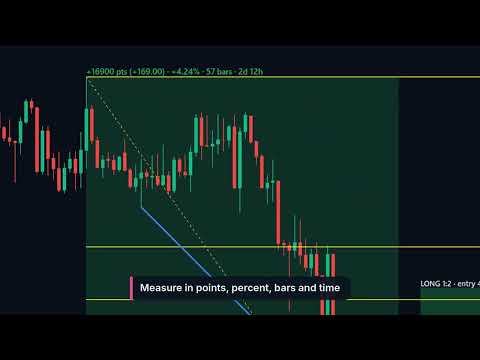
Chart Drawing Toolkit puts the drawing tools you use every day on a small toolbar, so you can mark up a chart in seconds instead of going through the MetaTrader 5 menus. Version 2.00 adds alerts on any drawing: put an alert on a horizontal line, a trend line, a box, a channel or a Fibonacci level in two clicks, and switch it off whenever you want. Free, with no limits.
12 drawing tools, one click each
- Lines: trend line, ray, horizontal line, vertical line
- Shapes: box, Fibonacci retracement, parallel channel, text
- Tools: measure (points, %, bars and time), long/short risk-reward box with your R multiple, price label, arrow
- Six-colour palette, line width and style buttons; magnet to the candle open, high, low or close; "this timeframe and lower" visibility
- Keyboard shortcuts for every tool, undo, hide/show and delete all (only the toolkit's own drawings)
Alerts on your drawings
- Works on the lines you draw with the MetaTrader tools and on the toolkit's own drawings: horizontal line, trend line and ray, vertical line (time alert), box, channel, every Fibonacci level, price label
- Arm it: select the drawing, press K or the Arm button. An ALERT tag shows which drawings are armed
- Touch: Bid or Ask reaches or crosses the line, tick by tick, with a tolerance in points
- Wick sweep: the wick goes beyond the line and the bar closes back, checked on the close of the timeframe you choose (chart, M5, M15, H1, H4, D1)
- Close beyond: the bar closes on the other side of the line
- Boxes as zones: price enters the zone, breakout above, breakout below, or a single edge (top, middle, bottom)
- Channels: both borders, the upper or the lower one, or the middle line
- Direction filter: both ways, up only, down only
Alerts that do what you tell them
- On/Off per drawing, always respected: an alert that is off never fires, also after a restart, and switching it off stops a playing sound
- One alert or repeat, cooldown in minutes per drawing, and a short note added to the message
- List of armed drawings with their condition and state (armed, off, fired), with buttons to switch off or remove
- No alerts from history: after a timeframe or symbol change, a restart or new settings, nothing fires for the past
- Saved per chart: alerts come back after a restart; moving a line updates its alert, deleting it removes the alert
- Alert window, sound, push notification to your phone and e-mail. Telegram and other web services are not possible in an indicator (MetaTrader does not allow web requests there)
- Light on the CPU: only armed drawings are checked, touches on ticks, bar conditions once per new bar
Normal MetaTrader objects
- Drawings can be moved and edited like any other object and are saved with templates
- They stay on the chart when the toolkit is removed
- It is an indicator: it never trades, needs no DLL and no internet access
- Small panel with two tabs (Draw, Alerts) that you can move and minimise; it remembers its place on every chart
Inputs
- Defaults: reward multiple, long/short box width, default text, text size, magnet, timeframe visibility
- Keyboard shortcuts on or off; panel corner and distance
- Alerts: alert window, sound and sound file, push, e-mail, price used for touches, defaults for new alerts (tolerance, cooldown, repeat, timeframe), ALERT tags on the chart
Part of the Trading Capital P family of tools for MetaTrader 5. Free tools: Candle Timer Sessions, Position Size Calculator, Fair Value Gaps, VWAP Bands, Key Levels, Account Dashboard, Volatility Meter, Session Breakout, Chart Sync and Chart Drawing Toolkit. Paid tools: Trade Manager, Market Structure, Prop Firm Guardian and Prop Challenge Replay.