MQLTeam SuperTrend
- Indicators
- Version: 1.0

MQLTeam SuperTrend is a SuperTrend indicator for MetaTrader 5. It draws the trend on the price chart: a line under price while the trend is up, a line over price while the trend is down, and an arrow on the bar where the trend flips.
The distance comes from ATR. Period and multiplier set how far the line sits from price. While the trend holds, the line only moves with price. A close through the line flips the trend. The calculation uses the bar high, low, and close. It does not need a separate oscillator window.
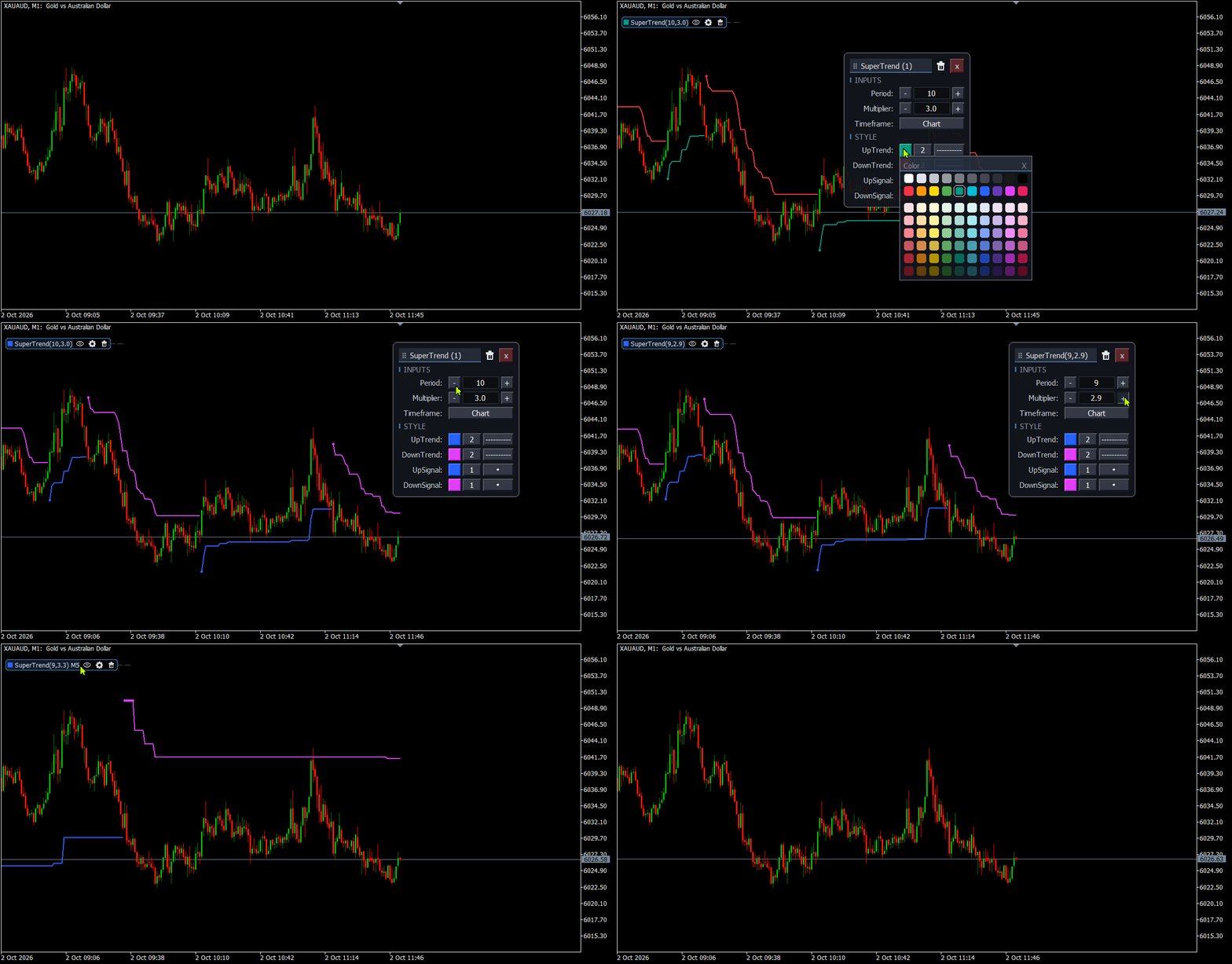
Settings are changed on the chart, in a TradingView style panel. The line updates with the new period, multiplier, timeframe, or color, so you can compare setups without leaving the chart and without removing the indicator. A copy you do not need right now can be hidden. Its settings stay, and the chart stays clear until you show it again.
Key Features
- SuperTrend on the chart: UpTrend and DownTrend are two lines. Only the active side is drawn. The up line uses one color and the down line uses another.
- Flip arrows: UpSignal marks the bar that turns the trend up. DownSignal marks the bar that turns it down. The same names appear in the Data Window.
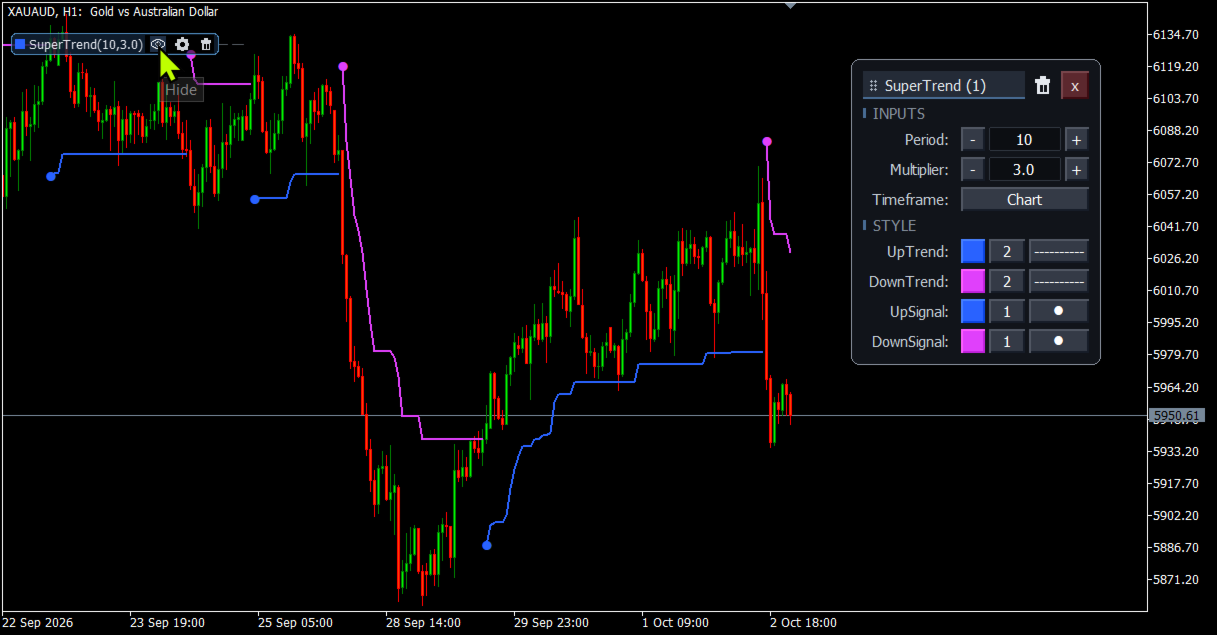
- ATR period and multiplier: The period defaults to 10 and the multiplier to 3.0. The multiplier runs from 0.1 to 20. The chip title shows both, as in SuperTrend(10, 3.0).
- Line and arrow style: Set color, width, and line style for each trend line. Set color, width, and arrow shape for each signal. Arrow width is separate from line width.
- Arrow color follows the line: A new up arrow uses the up-line color, and a new down arrow uses the down-line color. After you pick an arrow color, that arrow keeps it. Changing the line does not pull a chosen arrow color back. Up and down stay separate.
- Higher timeframe: Keep the chart timeframe, or pick a higher one. A higher-timeframe SuperTrend is stepped onto the chart candles. The chip adds the timeframe when it is not the chart.
- Live panel: Open it from the chip. Change period, multiplier, timeframe, colors, widths, line style, and arrow there, and read the line on the same chart. Drag the panel. Delete that copy from the panel only when you want it gone.
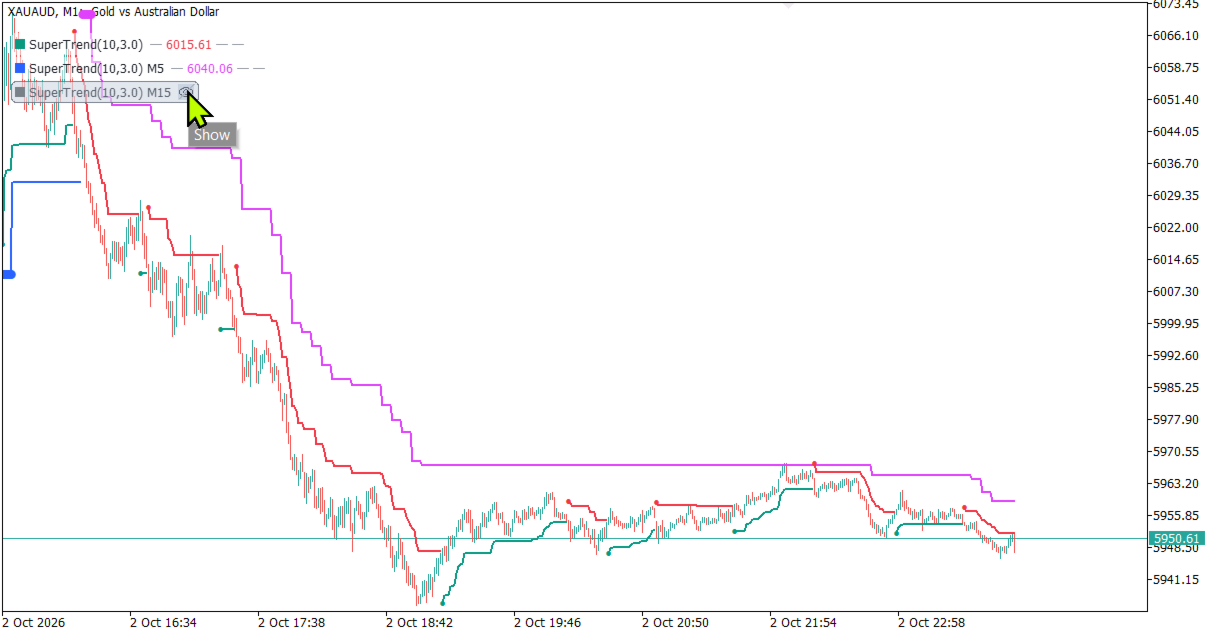
- Chip on the chart: The name shows the period and the multiplier. The line price follows the candle under the mouse. On a flip bar the signal cell shows 1. On other bars it shows a dash.
- Hide without deleting: The eye hides that copy and leaves its settings in place. Show it again from the same chip. The chart stays clear while the setup is kept.
- Several copies: More than one SuperTrend can share the chart, each with its own period, multiplier, or timeframe. An MTF SuperTrend copy on the higher timeframe marks the trend side. Read the faster copy's flip when it agrees with that side. Each copy is named SuperTrend (1), SuperTrend (2), and so on, and keeps its own settings when the chart timeframe changes.
- Inputs and the panel: The inputs set a new line: ATR period, multiplier, timeframe, up color, down color, show panel, and max bars. After the first save, the panel is what reloads. Changing the indicator properties replaces the saved panel for that copy.
- Panel off: Turn Show panel off and the lines still draw, without the chip or the panel.
- History limit: Max bars to calculate caps how far back the line is drawn. The default is 5000.
=================== Arabic Description - الوصف باللغة العربية ===================
MQLTeam SuperTrend مؤشر SuperTrend لميتاتريدر 5. يرسم الاتجاه على شارت السعر: خط تحت السعر حين يكون الاتجاه صاعداً، وخط فوق السعر حين يكون هابطاً، وسهم على الشمعة التي ينقلب عندها الاتجاه.
المسافة تأتي من ATR. الفترة والمضاعف يحددان بُعد الخط عن السعر. ما دام الاتجاه قائماً يتحرك الخط مع السعر فقط. إغلاق يخترق الخط يقلب الاتجاه. الحساب يستخدم أعلى الشمعة وأدناها وإغلاقها. لا يحتاج نافذة مذبذب منفصلة.
تُغيَّر الإعدادات على الشارت، من لوحة بأسلوب TradingView style. يتحدث الخط مع الفترة أو المضاعف أو الفريم أو اللون الجديد، فتقارن الإعدادات دون مغادرة الشارت ودون حذف المؤشر. النسخة التي لا تحتاجها الآن يمكن إخفاؤها. تبقى إعداداتها، ويبقى الشارت واضحاً إلى أن تُظهرها من جديد.
أبرز المميزات
- SuperTrend على الشارت: UpTrend وDownTrend خطان. يُرسم الجانب النشط فقط. للخط الصاعد لون، وللخط الهابط لون آخر.
- أسهم الانقلاب: UpSignal يعلّم الشمعة التي يتحول عندها الاتجاه إلى صاعد. DownSignal يعلّم الشمعة التي يتحول عندها إلى هابط. نفس الأسماء تظهر في Data Window.
- فترة ATR والمضاعف: الفترة الافتراضية 10 والمضاعف 3.0. المضاعف من 0.1 إلى 20. عنوان الشريحة يعرضهما، مثل SuperTrend(10, 3.0).
- نمط الخط والسهم: اضبط اللون والعرض ونمط الخط لكل خط اتجاه. واضبط اللون والعرض وشكل السهم لكل إشارة. عرض السهم مستقل عن عرض الخط.
- لون السهم يتبع الخط: السهم الصاعد الجديد يستخدم لون الخط الصاعد، والسهم الهابط الجديد يستخدم لون الخط الهابط. بعد اختيار لون للسهم يبقى عليه. تغيير الخط لا يرجع لون السهم الذي اخترته. الصاعد والهابط منفصلان.
- فريم أعلى: أبقِ فريم الشارت، أو اختر فريماً أعلى. يُرسم SuperTrend الخاص بالفريم الأعلى على شموع الشارت بشكل متدرج. الشريحة تضيف الفريم حين لا يكون فريم الشارت.
- لوحة حية: افتحها من الشريحة. غيّر الفترة والمضاعف والفريم والألوان والعروض ونمط الخط والسهم هناك، واقرأ الخط على نفس الشارت. اسحب اللوحة. احذف هذه النسخة من اللوحة فقط حين تريد إزالتها.
- شريحة على الشارت: الاسم يعرض الفترة والمضاعف. سعر الخط يتبع الشمعة تحت الماوس. على شمعة الانقلاب تظهر خانة الإشارة 1. وعلى باقي الشموع تظهر شرطة.
- إخفاء دون حذف: العين تخفي هذه النسخة وتُبقي إعداداتها. أظهرها من جديد من نفس الشريحة. يبقى الشارت واضحاً والإعداد محفوظاً.
- أكثر من نسخة: يمكن أن يشارك أكثر من SuperTrend الشارت نفسه، ولكل نسخة فترتها أو مضاعفها أو فريمها. نسخة SuperTrend MTF على الفريم الأعلى تحدد جهة الاتجاه. اقرأ انقلاب النسخة الأسرع عندما يوافق تلك الجهة. كل نسخة باسم SuperTrend (1) ثم SuperTrend (2)، وتحتفظ بإعداداتها عند تغيير فريم الشارت.
- المدخلات واللوحة: المدخلات تضبط خطاً جديداً: فترة ATR، والمضاعف، والفريم، ولون الصعود، ولون الهبوط، وShow panel، وعدد الشموع الأقصى. بعد أول حفظ، اللوحة هي ما يُعاد تحميله. تغيير خصائص المؤشر يستبدل اللوحة المحفوظة لهذه النسخة.
- إيقاف اللوحة: أطفئ Show panel وتبقى الخطوط مرسومة، بلا شريحة ولا لوحة.
- حد التاريخ: Max bars to calculate يحدد إلى أي مدى يُرسم الخط للخلف. الافتراضي 5000.