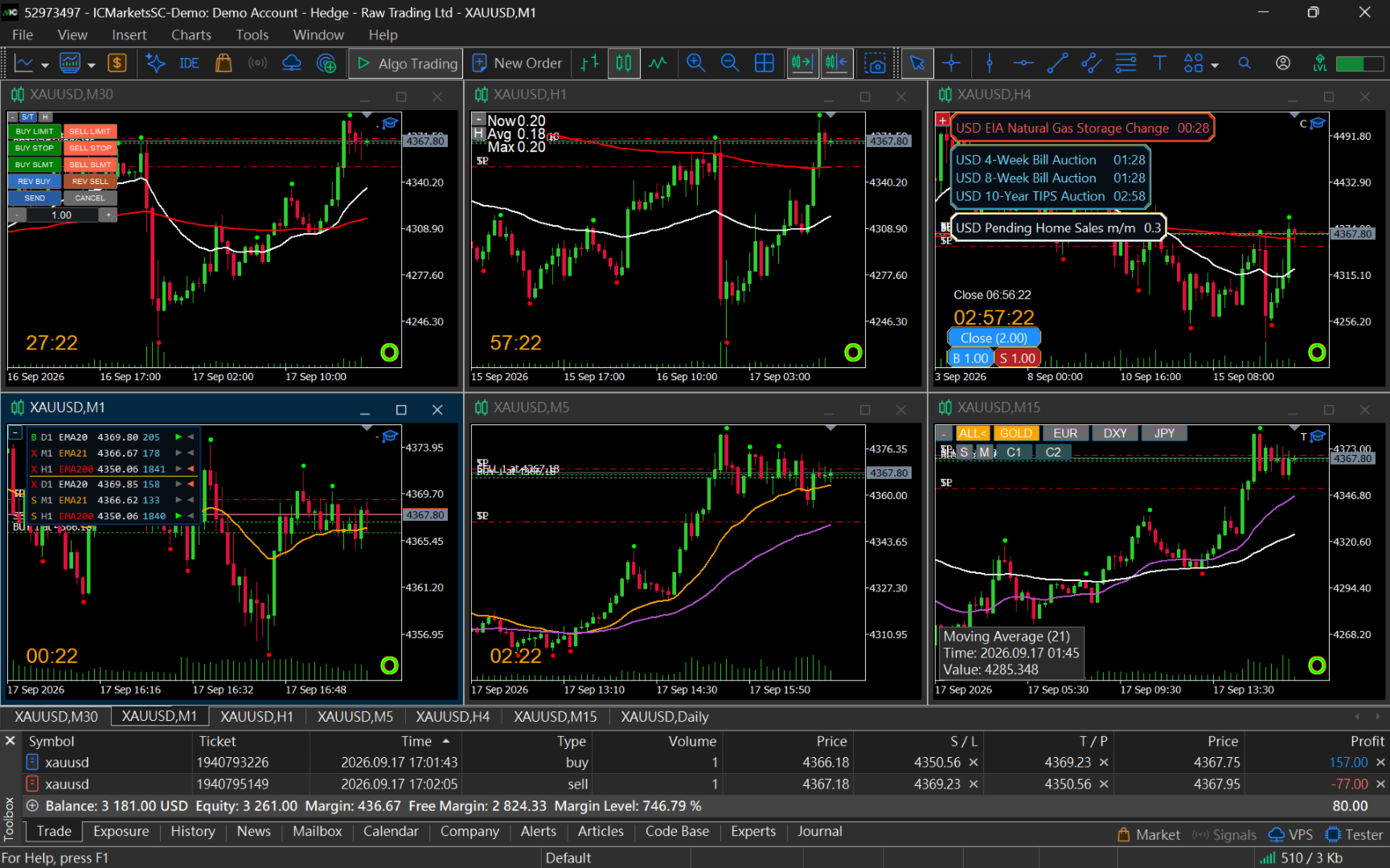
ApexForge Dynamic MA Exit Manager

  • Utilities
  • Po-hsiung Huang
    Po-hsiung Huang
    • Founder & Developer at  ApexForge
    • Taiwan
    • 994
    Founder and developer of ApexForge.
    I develop practical trading tools for MetaTrader 5, focusing on usability, efficiency, stability, and low system resource usage.
  • Version: 1.60
  • Updated: 21 September 2026
  • Activations: 5
ApexForge Dynamic MA Exit Manager

MT5 Dynamic Moving Average TP & SL Management | Moving Average TP SL | EMA SMA Dynamic Exit | Multi-Timeframe MA Support & Resistance | Automatic TP SL Updates | Position Manager

◆ Demo Version

Before purchasing the full version, you can test ApexForge Dynamic MA Exit Manager on an MT5 Demo Account.

Demo Download, Installation & User Guide: ApexForge Dynamic MA Exit Manager – MT5 Demo Version

Are you a manual trader?

Do you use MA, EMA, or SMA as part of your technical analysis?

Are you still adjusting your Stop Loss and Take Profit manually, one position and one line at a time?

The market keeps moving.

Moving Averages keep moving too.

So why should your Stop Loss and Take Profit stay fixed?

If your trading method uses MA, EMA, or SMA as Take Profit targets, Stop Loss levels, dynamic support, or dynamic resistance, you may constantly need to check the latest MA price and manually modify your positions.

ApexForge Dynamic MA Exit Manager is designed to solve exactly this problem.

It is a Moving Average dynamic exit and position management tool built specifically for MetaTrader 5 manual traders.

You are no longer selecting only a fixed price.

You are selecting the MA itself.

◆ One Panel — Manage SL / TP Across Your Positions

No need to modify positions one by one.

No need to repeatedly open the MT5 order modification window and enter new prices manually.

Simply select the Moving Average you want directly from the ApexForge panel and assign it to eligible positions as a:

Dynamic Take Profit

or

Dynamic Stop Loss

For example:

Buy TP → H1 EMA20
Buy SL → M15 EMA32

Once configured, ApexForge remembers which MA you selected, not just the MA price at the moment you clicked it.

As the selected MA changes with new candles, ApexForge recalculates the corresponding exit level and automatically manages the actual TP / SL of your positions.

One panel. Multiple positions. Centralized exit management.

If additional positions are opened in the same direction, they can automatically join the existing Dynamic Exit Management.

No more chasing a Moving Average and manually modifying every position.

◆ Turn Your Moving Average Into an Exit Management Tool

A standard MT5 Moving Average tells you where the MA is.

But after entering a trade, you still have to decide:

Which MA is my Take Profit?

Which MA is my Stop Loss?

When the MA moves, should I modify my positions again?

ApexForge integrates this process directly into position management.

You decide:

Which MA manages Buy TP

Which MA manages Buy SL

Which MA manages Sell TP

Which MA manages Sell SL

All four Exit Roles are managed independently.

You analyze the market and decide when to Buy or Sell.

ApexForge helps execute and maintain your MA-based exit plan.

◆ Dynamic MA Take Profit

Any compatible Moving Average can be assigned directly as a Take Profit target.

For example:

Buy TP → H4 EMA48

or:

Sell TP → M30 EMA20

Once selected, ApexForge continues tracking that MA.

As the MA changes with new candles, the actual Take Profit can be updated according to the latest MA position.

Your Take Profit therefore does not have to remain fixed at the original price.

It can continue following your Moving Average structure.

◆ Dynamic MA Stop Loss

Stop Loss can also be linked directly to a Moving Average.

For example:

Buy SL → M15 EMA32

or:

Sell SL → H1 EMA60

ApexForge tracks the selected MA and manages the position SL according to its latest calculated level.

TP and SL can independently use different:

Timeframes

MA Periods

Moving Averages

Buy and Sell positions are also managed independently.

◆ MA Moves — TP / SL Updates Automatically

ApexForge does not simply copy the MA price at the moment you configure the exit.

It remembers which Moving Average you selected.

The process is:

Select an MA

→ ApexForge remembers the selected MA

→ The selected MA continues to be tracked

→ A new candle produces an updated MA position

→ Dynamic Exit is recalculated

→ The actual position TP / SL is updated

This turns a Moving Average from a visual chart reference into a continuously tracked dynamic exit structure.

◆ Real Broker-Side TP / SL

ApexForge does not rely only on virtual exit lines inside the EA.

Dynamic MA TP / SL levels are synchronized with the position's actual broker-side TP / SL according to the system's update logic.

The last TP / SL successfully accepted by the trading server remains stored on the broker side.

Therefore, if MT5 or the EA later stops running, the last successfully submitted TP / SL can remain active on the trading server.

Important:

If MT5 or the EA stops running, future MA movements cannot continue updating the broker-side TP / SL automatically.

For continuous Dynamic TP / SL updates, MT5, the EA, and the trading connection must remain operational.

◆ TP Exit Offset Points

Using an MA as Take Profit does not necessarily mean waiting until price touches the MA exactly.

ApexForge provides adjustable TP Exit Offset Points.

For example:

Buy TP → H1 EMA20
Exit Offset → 10 Points

The actual TP can maintain a user-defined early-exit distance from the target MA.

As the MA moves, the Offset is recalculated using the latest MA position.

◆ SL Buffer Points

Stop Loss can also use additional SL Buffer Points.

For example:

SL → M15 EMA32
SL Buffer → 5 Points

The actual SL is positioned beyond the selected MA in the correct Stop Loss direction for Buy or Sell, with the configured buffer distance.

As the MA moves, the SL Buffer is recalculated accordingly.

This allows the Moving Average to act as a dynamic protection reference while still preserving user-defined price movement space.

◆ Quickly Set, Change, or Cancel TP / SL

Automatic management does not mean giving up manual control.

If market structure changes, you can quickly use the panel to:

Set TP / SL

Change the selected MA

Cancel TP / SL

For example, you may currently have:

Buy TP → H1 EMA20

and decide to change it to:

Buy TP → H4 EMA12

Simply select the new MA from the panel.

There is no need to check the H4 EMA12 price first and manually enter that price into the MT5 order window.

Buy TP, Buy SL, Sell TP, and Sell SL can all be managed independently.

◆ New Positions Automatically Join Existing Management

If Dynamic TP / SL is already configured for one direction, additional positions opened in the same direction can automatically join the existing Exit Management.

For example, your current Buy management may be:

TP → H1 EMA20
SL → M15 EMA32

If another Buy position is opened, you do not need to configure the same TP / SL again.

Ideal for:

Scaling into positions

Adding to positions

Managing multiple positions in the same direction

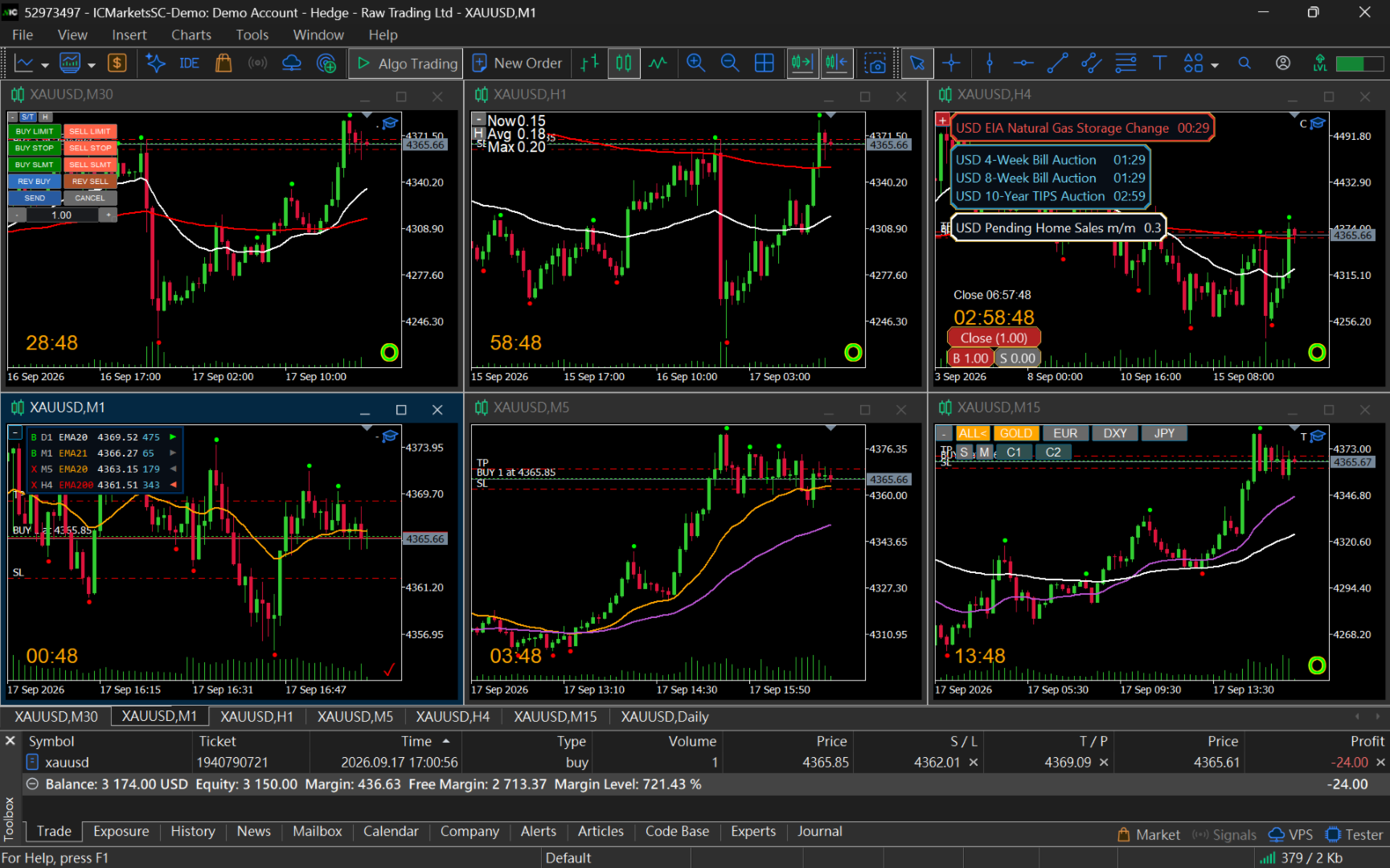
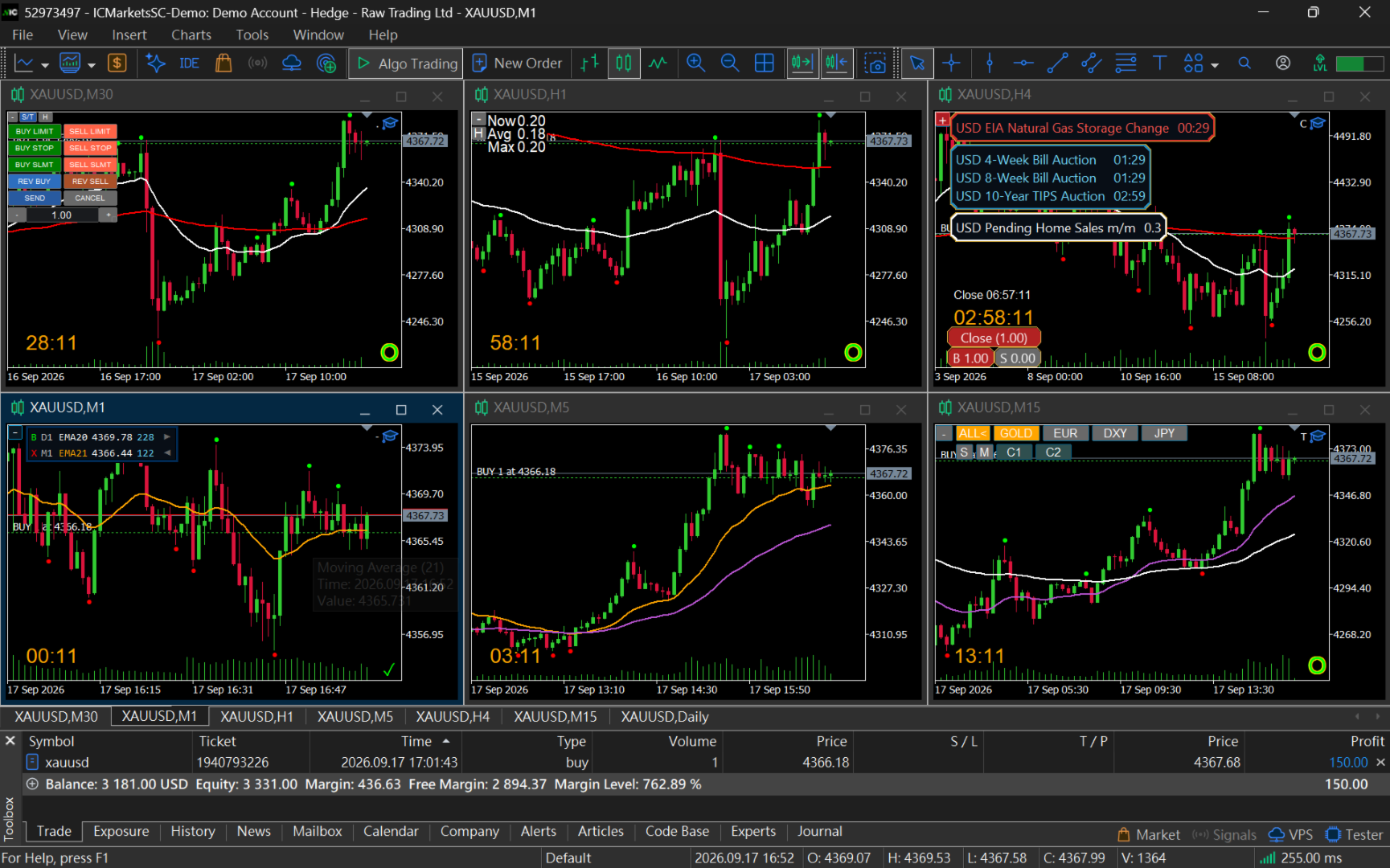
◆ Automatically Reads MAs From All Open Charts of the Same Symbol

ApexForge is not limited to the single chart where the EA is attached.

It can automatically read compatible Moving Averages from all open charts of the same symbol.

For example, you may have:

M1 / M5 / M15 / M30 / H1 / H4 / D1

with different Moving Averages on each timeframe.

ApexForge organizes those multi-timeframe Moving Averages in one management interface.

You do not need to stack every MA onto a single chart.

This is especially useful for:

Multi-Timeframe Analysis

Multi-chart workspaces

Grid chart layouts

Multi-monitor trading environments

◆ Supports SMA / EMA / SMMA / LWMA

ApexForge supports the main built-in MetaTrader 5 Moving Average methods:

SMA — Simple Moving Average

EMA — Exponential Moving Average

SMMA — Smoothed Moving Average

LWMA — Linear Weighted Moving Average

Compatible ApexForge MA Renderer configurations are also supported.

Third-party Custom Indicators using different data structures, such as T3 or JMA, may not be automatically recognized.

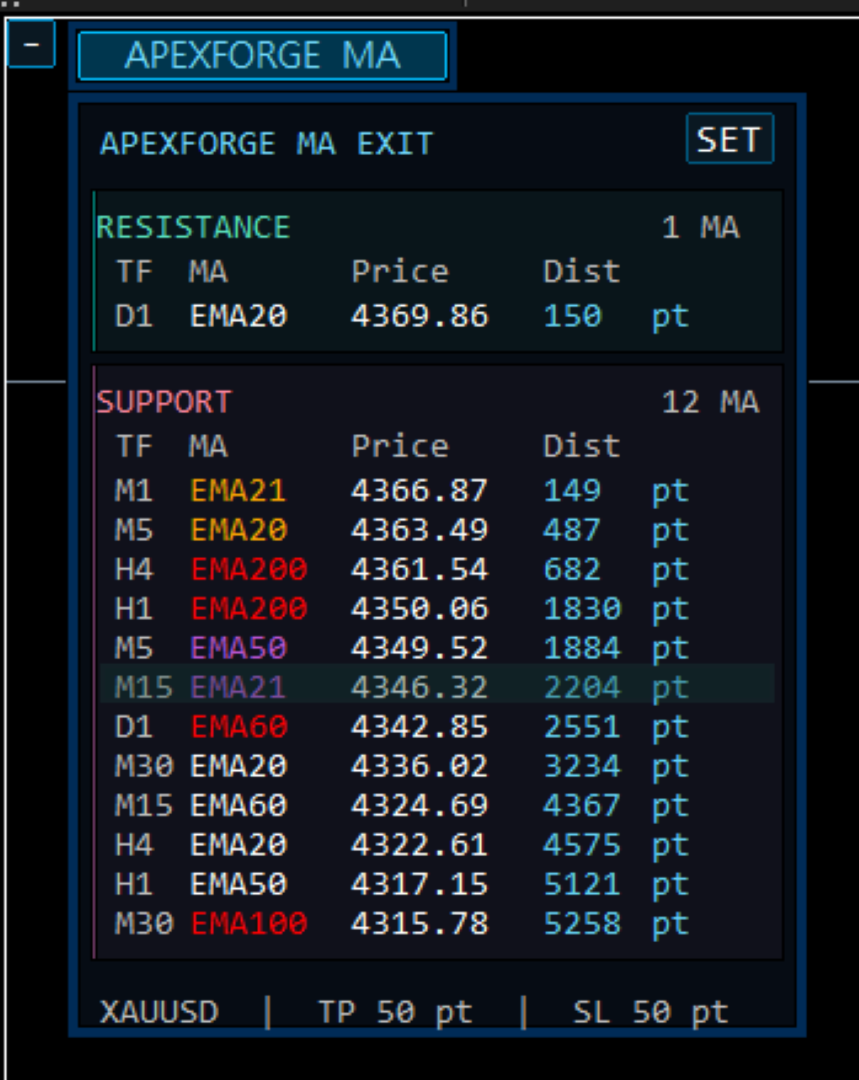
◆ Automatic Support / Resistance Classification

ApexForge automatically classifies detected MAs according to their current relationship with market price:

Above price → Resistance MA

Below price → Support MA

The panel can display:

Timeframe

MA

Current Price

Distance from Market Price

Exit Controls

There is no need to constantly switch between different timeframes just to locate your Moving Averages.

When market price crosses an MA, ApexForge reorganizes the structure according to the new price relationship.

◆ Automatic Nearest MA Tracking

In addition to your selected Dynamic TP / SL, ApexForge can also track relevant Moving Averages closest to the current market price.

This allows you to see both:

Your currently selected MA

and:

The MA currently closest to market price

For example:

Selected Buy TP → H4 EMA48

while the nearest MA above price may now be:

M15 EMA32

Both can be displayed simultaneously.

If the selected MA is already the nearest MA, it is not displayed twice.

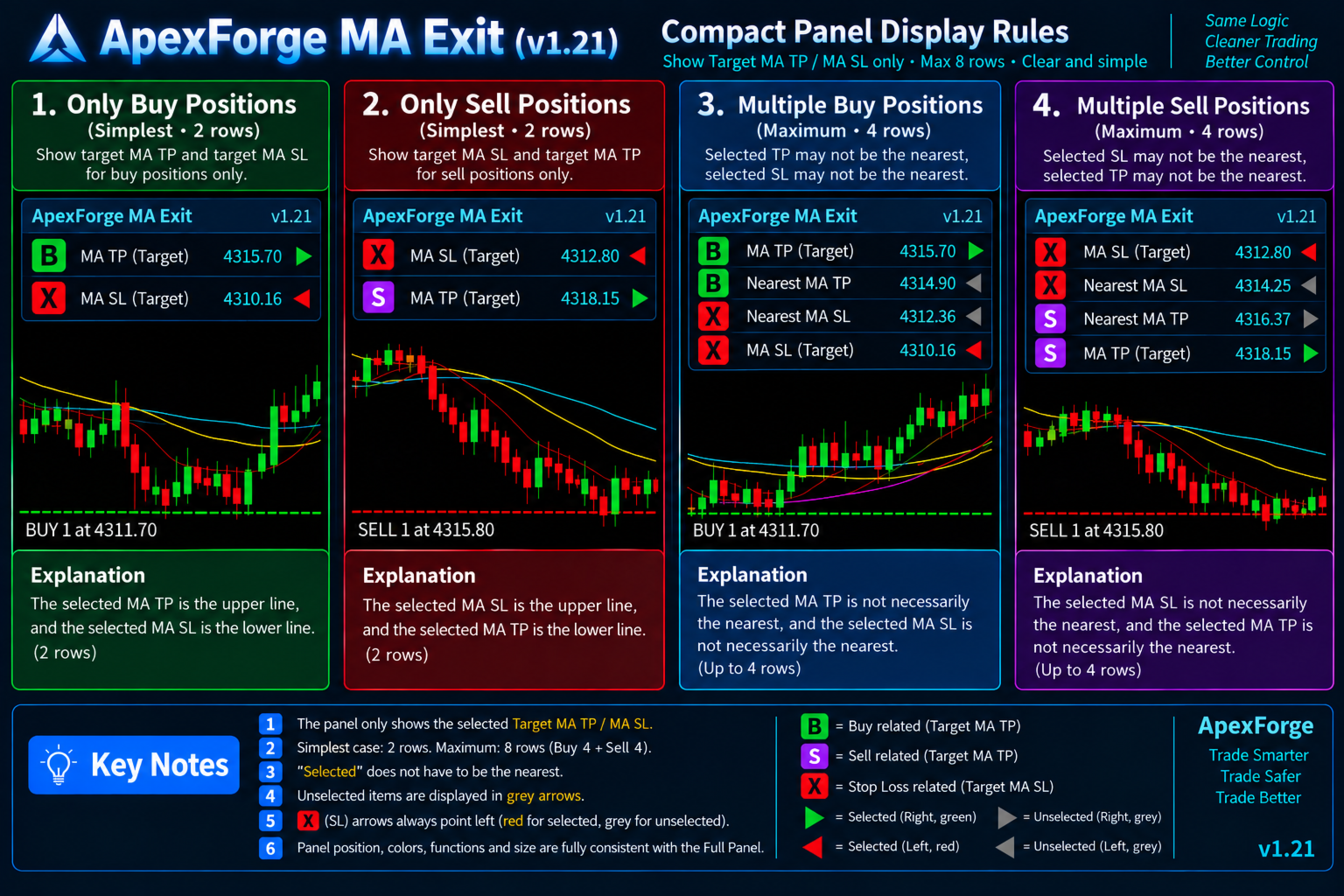
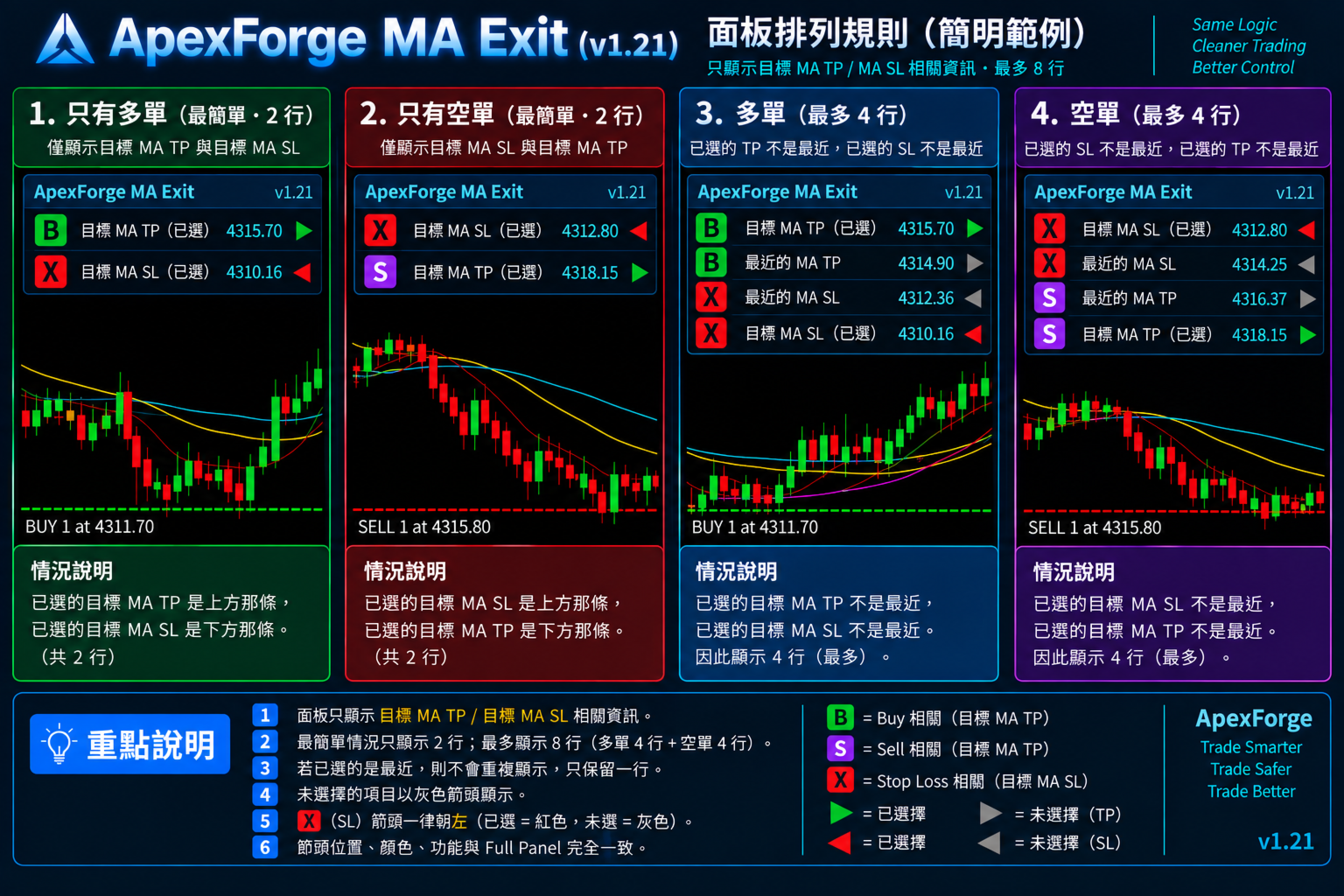
◆ Adaptive Compact Position Panel

During active trading, you may not want a large MA management panel covering your chart.

ApexForge includes an adaptive Compact Position Panel that displays only the Exit information currently needed.

Role indicators include:

B = Buy TP

S = Sell TP

X = Stop Loss

Together with:

Timeframe | MA | Price | Distance | Exit

The panel automatically adapts its size according to current positions and MA status.

◆ From Only 2 Rows Up to 8 Rows

For a single direction, the simplest layout requires only 2 rows.

Additional information appears only when the selected MA and nearest MA are different.

Buy can display up to:

Selected Buy TP

Nearest Buy TP MA

Nearest Buy SL MA

Selected Buy SL

Sell can display up to:

Selected Sell SL

Nearest Sell SL MA

Nearest Sell TP MA

Selected Sell TP

When Buy and Sell positions exist simultaneously:

Buy 4 rows + Sell 4 rows = maximum 8 rows

If the selected MA and nearest MA are the same, duplicate information is not displayed.

◆ Clear Buy / Sell Separation for Hedged Positions

ApexForge supports simultaneous Buy and Sell position management.

In a hedged position environment:

Buy information is displayed above

Sell information is displayed below

A gold separator distinguishes the two sections.

Even if Buy and Sell use the same Moving Average, their Exit states remain independent.

For example:

Buy TP → H1 EMA20

while simultaneously:

Sell SL → H1 EMA20

ApexForge keeps the different Exit Roles separate even when they reference the same MA.

◆ Position Direction Remains Visible Even Without an Available MA

If a Buy position exists but there is currently no available MA above price, the Buy position indicator does not disappear.

The position direction remains visible, with a dash displayed where the Exit Arrow would normally appear.

Therefore:

No available MA ≠ No open position

You can immediately see that a position still exists, even if there is currently no suitable MA target for that direction.

◆ Full MA Management Panel

When you need to inspect the complete MA structure, open the Full Panel.

All detected Moving Averages are organized into:

Resistance

Support

with information including:

Timeframe

MA

Price

Distance

Exit

The Full Panel can display up to 64 Moving Averages.

You can select an MA directly from the Full Panel and assign it as TP or SL.

◆ Compact Mode + Full Mode

ApexForge provides two different interfaces:

Compact Panel — Fast position and Exit monitoring

Full Panel — Complete MA structure and TP / SL management

Keep the interface compact during normal trading and expand the Full Panel only when you need to configure exits or inspect the complete MA structure.

Ideal for traders working with limited chart space or large multi-chart workspaces.

◆ Adaptive Interface, Free Dragging, and Position Memory

The Compact Panel automatically adjusts its:

Width

Height

Number of rows

Unused space is not permanently reserved.

The panel can be freely dragged to a suitable location on the chart and automatically remembers its last position.

When the trading environment is reloaded, the saved panel position can be restored without manually arranging it again.

◆ + / − Minimize Control

When you temporarily do not need to view Exit information, use the + / − control to minimize the panel.

The minimized state keeps only compact controls visible, reducing obstruction of candles and Moving Averages.

Expand it again whenever needed.

◆ Success / Failure Audio Feedback

ApexForge provides audio feedback when TP / SL operations are performed.

Success → Success sound

Failure → Failure sound

If the broker rejects a modification because of Stop Level, Freeze Level, price distance, trading status, or another restriction, you can notice the failed operation more quickly.

◆ More Than a Traditional Trailing Stop

A traditional Trailing Stop usually moves the Stop Loss according to a fixed number of Points or a fixed distance.

ApexForge uses a different concept:

TP can follow a selected MA

SL can follow a selected MA

Instead of asking only:

“How many Points away from my entry should the Stop Loss be?”

ApexForge allows you to define:

“Which Moving Average should manage my current exit structure?”

If your trading strategy already uses EMA / SMA as dynamic support, resistance, Take Profit, or Stop Loss references, the Moving Average itself can become your Dynamic Exit instead of relying only on a fixed-distance Trailing Stop.

◆ Key Features
  • MT5 Dynamic MA Exit Manager

  • Dynamic Moving Average Take Profit

  • Dynamic Moving Average Stop Loss

  • One-panel TP / SL management across multiple positions

  • Automatic actual TP / SL updates

  • Broker-side TP / SL synchronization

  • TP Exit Offset Points

  • SL Buffer Points

  • Quickly set / change / cancel TP and SL

  • Independent Buy TP / Buy SL / Sell TP / Sell SL management

  • New positions automatically join existing Exit Management

  • Automatically reads MAs from all open charts of the same symbol

  • Multi-Timeframe MA Management

  • SMA / EMA / SMMA / LWMA support

  • Automatic Support / Resistance classification

  • Automatic Nearest MA tracking

  • Selected MA + Nearest MA display

  • Simultaneous Buy / Sell hedge management

  • Independent Exit Roles on the same MA

  • Adaptive Compact Position Panel

  • Compact Panel from 2 rows up to 8 rows

  • Full MA Management Panel

  • Full Panel supports up to 64 MAs

  • MA Price / Distance display

  • Freely draggable panel

  • Automatic panel position memory

    • / − minimize control

  • Success / failure audio feedback

  • Designed for multi-timeframe, multi-chart, and multi-monitor workspaces

  • No Buy / Sell signals

◆ Basic Workflow

1. Keep using your existing MT5 Moving Average chart setup

↓

2. ApexForge reads compatible MAs from open charts of the same symbol

↓

3. MAs are automatically organized into Resistance / Support

↓

4. Select an MA from the panel as Buy / Sell TP or SL

↓

5. Apply the selected Dynamic Exit to eligible positions

↓

6. Configure TP Offset or SL Buffer if needed

↓

7. ApexForge continues tracking the selected MA

↓

8. As the MA position changes, the actual TP / SL is updated

↓

9. Additional positions can automatically join the current management

↓

10. When your trading plan changes, simply select another MA or cancel the TP / SL

◆ Important Information

ApexForge Dynamic MA Exit Manager is an MT5 Trade Management / Position Management / Exit Management tool. It is not an automated trading strategy or trading signal EA.

This product does not provide Buy / Sell signals, does not predict market direction, and does not guarantee trading results.

It supports built-in MT5 Moving Averages including SMA, EMA, SMMA, and LWMA, as well as compatible ApexForge MA Renderer configurations. Other third-party custom MA indicators may not be automatically recognized.

Actual Dynamic TP / SL modifications remain subject to broker and symbol restrictions, including Stop Level, Freeze Level, minimum price distance, market trading status, and other trading conditions.

The last TP / SL successfully submitted to the broker can remain active on the trading server. However, if MT5 or the EA stops running, future MA movements cannot continue to synchronize automatically.

Before live trading, it is recommended to first use a Demo Account to become familiar with MA selection, Dynamic TP / SL, TP Offset, SL Buffer, changing or cancelling exits, and additional-position management.

ApexForge Dynamic MA Exit Manager

Your Moving Average is no longer just a line on the chart.

You select the MA.

ApexForge turns it into your Dynamic TP / SL.

MA moves → Your Exit moves with it.

Move beyond adjusting TP / SL one position at a time:

One Panel → Select Your MA → Manage Your Position Exits.


Recommended products
ABQ Visual Risk Sizer
Cristian David Castillo Arrieta
ABQ Visual Risk Sizer - Institutional Risk & Trade Execution Category: Utilities / Risk Management Manual lot calculation costs time and money. In modern trading, especially when operating with funded accounts (Prop Firms), a lot sizing error or a 5-second delay in entering an order can mean violating the Daily Drawdown rule or missing the perfect entry price. ABQ Visual Risk Sizer is an institutional-grade tool designed to solve this problem permanently. It transforms complex mathematical risk
Pro Order Lot Size Calculator Pro Order Lot Size Calculator is a simple and practical tool designed to help you calculate the appropriate lot size based on the amount of risk you want to take . With this tool, you can easily calculate your trading risk directly from the panel according to the amount of money available in your account. Easy Risk & Lot Calculation The panel is designed to be very simple and easy to use. You can choose how you want to define your risk: Enter your desired risk amoun
The indicator detects and displays М. Gartley's Butterfly pattern. The pattern is plotted by the extreme values of the ZigZag indicator (included in the resources, no need to install). After detecting the pattern, the indicator notifies of that by the pop-up window, a mobile notification and an email. The pattern and wave parameters are displayed on the screenshots. The default parameters are used for demonstration purposes only in order to increase the amount of detected patterns. Parameters z
Renko bars with tail
Dionisio Munir Miziarajunior
This EA generates high-precision Offline Renko charts from 1-minute data. When attached to a live chart, it processes every tick to update the bricks at the configured size (Default: 100 points). Although the generated chart is offline (not directly tradable), the EA features an exclusive synchronization system that mirrors all pending orders, open positions, and trading history from the real asset onto the Renko chart in real-time, allowing for flawless technical analysis and operational forens
Renko Chart Generator 90
Ahmd Abrahym Mhmwd Abrahym
A deterministic Renko engine for MetaTrader 5. It builds a real, custom Renko symbol from broker M1 tick/candle history using a fixed brick size (in pips) — so the chart plays out identically whether it's running on your VPS or your local PC, restart after restart. No ATR-based sizing, no drift between terminals. Key features Fixed brick size in pips — no ATR drift, same lattice every time Creates its own custom Renko symbol in Market Watch — works on any broker or symbol Optional wicks — toggle
FREE
Donchian Breakout And Rsi
Mattia Impicciatore
4.5 (2)
General Description This indicator is an enhanced version of the classic Donchian Channel , upgraded with practical trading functions. In addition to the standard three lines (high, low, and middle), the system detects breakouts and displays them visually with arrows on the chart, showing only the line opposite to the current trend direction for a cleaner view. The indicator includes: Visual signals : colored arrows on breakout Automatic notifications : popup, push, and email RSI filter : to val
FREE
FiT Panel Pro
Thonglak Janyakorn
Overview FiT Panel Pro is a professional-grade trade management panel designed for MetaTrader 5 traders who demand speed, precision, and full control over their trades. Built with a modern dark-theme UI, it combines one-click execution with advanced risk management, visual SL/TP drag lines, automatic Fibonacci-based levels, and comprehensive order management — all in a single, compact panel. Whether you are a scalper, day trader, or swing trader, FiT Panel Pro gives you the edge you need to exec
FREE
Statistic Candles. Утилита для получения статистики с графика "Японские свечи". Статистика собирается нижеописанными методами.  Выполняет следующие функции: Подсчёт свечей на 19-ти таймфреймах (внутридневные свечи):   Количества бычьих и медвежьих свечей в указанном промежутке дат. Количества бычьих и медвежьих свечей в указанном промежутке дат в обозначенное время. Подсчёт количества нестандартных свечей (прим.: Custom _ time = 14:56, Period _ time = 1 H ). Данные средних значений open - close
- وصف المنتج - مؤشر احترافي متكامل لا يعد KING Fusion MACD-Vol من KING TRADING EA مجرد MACD آخر — فهو عبارة عن مجموعة أدوات تداول كاملة تجمع بين مؤشرات احترافية متعددة في نافذة فرعية واحدة أنيقة. لم تعد بحاجة إلى تحميل مخططك بأدوات منفصلة. يجمع هذا المؤشر بين: MACD مع خطوط مزدوجة ورسم بياني مكبر رسم بياني ملون ومثبت بالحجم ملصقات ديناميكية مع قيم المؤشرات في الوقت الفعلي (ATR، ADX، RSI، Volume) عداد تنازلي للبار التنبيهات المتقاطعة (مرئية + صوتية) كل ما تحتاجه من الوضوح والسرعة والدقة -
FREE
Tick Volume Chart is a unique tool for building charts based on tick volumes in MetaTrader 5 . With Tick Volume Chart , you can create charts where each candle is formed not by time, but by a specified number of ticks. This gives you perfect precision in analyzing market activity, which is unattainable on standard time-based charts. You can use any indicators and Expert Advisors that support custom symbols. Working with the resulting charts is just as convenient as with standard ones. Unlike sta
TradeGuard Capital Protection Professional Risk, Exposure & Trade Manager for MetaTrader 5 This utility acts as a professional insurance system for your trading account. TradeGuard Capital Protection is a professional-grade risk & money management utility designed to protect your trading account from excessive losses, emotional trading, and uncontrolled exposure. This tool does NOT open trades . It strictly manages risk, drawdown, exposure, and safety protections . Perfect for manual traders, EA
SIMPLE AND QUICK CHART CLEANUP SCRIPT - FREE FOR ALL - EASY TO DRAG AND DROP ONTO THE CHART - A MUST HAVE IN MY EYES Everybody loves to draw on a chart! But cleaning is nobodies favor. Most of the time it will be faster to dump all and redraw the important part. Repetition makes you good! ALWAYS think about that! KEEP IT GROWING, ;-) I wish you a good day, Traders! If you need something, send me a message. Best wishes to you from Vienna!
FREE
CosmiCLab SMC FIBO CosmiCLab SMC FIBO is a professional trading indicator designed for traders who use Smart Money Concepts (SMC), market structure analysis and Fibonacci retracement levels. The indicator automatically detects market swings and builds Fibonacci levels based on the latest impulse movement. It also identifies market structure changes such as BOS (Break of Structure) and CHOCH (Change of Character), helping traders understand the current market direction. CosmiCLab SMC FIBO also pr
Risk Manager – Account Protection Tool Risk Manager is an Expert Advisor for MetaTrader 5 designed to protect your trading account by applying automatic risk management rules. This tool does not open trades . It continuously monitors your account and enforces predefined limits to help prevent excessive losses and maintain disciplined trading. Risk Manager works in the background and can manage positions opened by manual trading or other Expert Advisors. It is particularly useful for: • Manual tr
FREE
RENKO PRICE ACTION ATR is an "Expert Advisor" developed through the construction of the Renko Chart where each BRICK has the size calculated through the ATR of the period selected by the user. Renko charts are designed to filter out minor price movements, thus making it easier for traders to focus on important trends. Due to its efficiency in detecting price trends, it is also possible to clearly identify supports and resistances as well as top and bottom divergences, thus making better use of t
MT5 to Binance
Roman Zhitnik
4.2 (5)
The MT5 to Binance trading panel is the perfect tool for cryptocurrency traders looking to maximize their purchases on Binance and Binance US exchanges. Before purchase please familiarize with comparison between MT5 to Binance and Binance Copier To get started, simply input your API Key and Secret Key created in the client area of Binance and select the Enable Spot & Margin Trading and Enable Futures checkboxes and start trading Once launched, the trading panel automatically loads all Spot and F
NHK Local Time Scale NHK Local Time Scale displays your PC/local time directly on the MT5 chart , alongside the broker's native chart time. The trader can easily compare both time zones for any candle. Benefits for Traders: Quickly convert Broker Time ↔ Local/PC Time . Helps accurately set News Stop/News Filter times. Makes London, New York, Asian and other trading sessions easier to identify in your local time. Helps verify that EA session and news time settings are correct. Reduces mistakes ca
FREE
DF Fib Trader Pro DF Fib Trader Pro is an automated trading system designed for MetaTrader 5. It uses Fibonacci-based price levels combined with trend and structure analysis to define entry and exit points. The EA supports both long and short positions and includes built-in risk management parameters. Core Features: Uses Fibonacci retracement and extension logic to plot entry, SL and TP points. Configurable lot size and stop loss/take profit levels Choice of 1 or 2 entry points Supports fixed o
FREE
Clock Et Mt5
Andrew Tsujiguchi
Simple Eastern Time (ET) clock displayed on your chart, auto-synced with US market hours. Updates every second. Full description: ClockET — Lightweight indicator that displays the current date and time in US Eastern Time (ET) directly on your chart, so you always know exactly where the US session stands — no manual timezone math needed. What You See • Live Clock — Day, month, date and time in ET, updated every second (e.g. "Thu Jul 24  07:36:45 ET") • Centered Label — Displayed at the bottom
FREE
Renko subwindow
Alexandre Vincent Traber
Overview Renko SubWindow plots a Renko brick chart as colored candles inside a separate indicator window, without affecting the main chart. Brick size can be fixed in points or calculated dynamically from ATR for adaptive volatility-based bricks. How it works Reconstructs Renko bricks from closing prices of the current symbol/timeframe history. Each brick forms once price moves beyond the defined brick size from the last brick's close. Bricks are rendered as colored candles: bullish (up) and bea
FREE
Imagine flying a real aircraft without ever stepping into a flight simulator. That's what trading is like. You have to simulate your strategy before you can take it to a live market. It is good if you can simulate things speedily before even stepping into any live market, or before coming up with an automated system.  People don't have all day to stare at a higher timeframe chart until the entry signal finally arrives. That's why I built this so that you can simulate your strategy with speed. Th
FREE
Indicator Description 4 Hull MA Color + Envelopes is a powerful trend-following indicator for MetaTrader 5 that combines four Hull Moving Averages (HMA) with Moving Average Envelopes to clearly identify market direction, trend strength, and potential reversal or pullback zones. This indicator is designed to reduce noise, react quickly to price movement, and provide a clean visual structure for professional trading.   Key Features   4 Hull Moving Averages (20, 50, 100, 200) Automatic color change
FREE
RSI Divergence Risk Target Signals RSI Divergence Risk Target Signals is a MetaTrader 5 indicator that detects confirmed bullish and bearish RSI divergence and combines the signals with optional trend filters, ATR-based Stop Loss levels, three Take Profit targets, alerts and an internal trade statistics dashboard. The indicator compares confirmed RSI pivot structure with corresponding price highs and lows. It is designed to help traders identify momentum divergence while providing a structure
Chart Pro Classic Dark v1.00 Chart Pro Classic Dark is a professional MT5 chart styling and customization tool designed to give your charts a clean, modern, and professional dark appearance. Key Features Dark Black Background — Applies a clean black background to the chart. ️ Candlestick Chart — Automatically configures the chart to use candlesticks. Bullish Candles — Green/Lime bullish candles. Bearish Candles — White bearish candles. Grid Removal — Hides the chart grid for a clean
FREE
NAS100 Auto Sl And TP MT5
Moustapha Boulouz
5 (2)
Introducing NAS100 Auto SL and TP Maker for MT5: Never miss setting StopLoss and TakeProfit again with our NAS100 Auto SL and TP Maker, an indispensable assistant for traders navigating the Nasdaq 100 market on MetaTrader 5. This tool is designed for those who seek a seamless solution to automate the management of StopLoss and TakeProfit levels. Key Features: Effortless Automation: Automatically monitors Nasdaq 100 trades without StopLoss and/or TakeProfit. Dynamically adjusts levels based on u
FREE
PZ Penta O MT5
PZ TRADING SLU
3.8 (5)
The Penta-O is a 6-point retracement harmonacci pattern which usually precedes big market movements. Penta-O patterns can expand and repaint quite a bit. To make things easier this indicator implements a twist: it waits for a donchian breakout in the right direction before signaling the trade. The end result is an otherwise repainting indicator with a very reliable trading signal. The donchian breakout period is entered as an input. [ Installation Guide | Update Guide | Troubleshooting | FAQ | A
FREE
Rhino Chart Drawing Tools for MetaTrader 5 Rhino Chart Drawing Tools provides a TradingView-style drawing workflow for MetaTrader 5. It includes 54 drawing tools, a customizable toolbar, favorites, quick styling, object settings, templates and an object manager. Drawing Tools Lines Trend line, ray, extended line, horizontal line, vertical line, horizontal ray, cross line, trend angle, arrow, path, polyline and info line. Channels Parallel channel, regression channel, flat channel, disjoint chann
GDS Renko Pip ST Chart - Pip-Based Renko Chart Indicator for MetaTrader 5 GDS Renko Pip ST Chart is a pip-based Renko chart indicator for MetaTrader 5. It helps traders build and study cleaner Renko price movement using a practical fixed pip or point-based brick structure. This tool is designed as a Renko chart foundation for manual analysis. It does not predict the market, does not generate buy or sell signals and does not decide whether a trade should be opened. Renko EDGE EA Golden Delta | A
Know the Candle Close Time
Benbyaanda Silvere Henri Sedric Kabore
This indicator allows to know the remaining time before the closing of the candle. It works on every timeframe. It is very usefull when your trading strategy depend of the close or the open of a specific candle. So use it like you want. Don't forget to leave a comment or a request for a EA or an indicator. Also spread it to your friends and don't hesitate to visit my profile to see others tools.
FREE
The Trade Manager Pro
AL MOOSAWI ABDULLAH JAFFER BAQER
Trade Manager Pro Professional trade management. Smarter execution. Complete control. Trade Manager Pro is an all-in-one MetaTrader trading utility designed to simplify and enhance manual trading. From precise order execution and advanced position management to intelligent risk control and real-time trade monitoring, Trade Manager Pro provides everything you need to manage your trades efficiently from a single, intuitive interface. Whether you're a scalper, day trader, swing trader, or prop firm
Buyers of this product also purchase
Trade Assistant MT5
Evgeniy Kravchenko
4.43 (216)
It helps to calculate the risk per trade, the easy installation of a new order, order management with partial closing functions, trailing stop of 7 types and other useful functions. Additional materials and instructions Installation instructions - Application instructions - Trial version of the application for a demo account Line function -   shows on the chart the Opening line, Stop Loss, Take Profit. With this function it is easy to set a new order and see its additional characteristics bef
Forex Trade Manager MT5
InvestSoft
4.98 (684)
Trade Manager MT5 is an advanced position size calculator and trade management tool for MetaTrader 5, designed to help traders plan trades faster, control risk more precisely, and manage open positions directly from the chart. It combines order placement, risk based lot calculation, Stop Loss and Take Profit management, Break Even, Trailing Stop, Partial Close, Equity Protection, and external trade management in one panel. Whether you trade forex, indices, metals, commodities, crypto, or future
================================================================================ POC BREAKOUT - V20.72. Full Professional Grade Toolkit ================================================================================ POC Breakout is a full MetaTrader 5 trading dashboard for discretionary traders who want breakout signals, Point of Control (POC) context, volume profiles, order flow, market structure, news, alerts, and advanced trade planning in one professional workspace. Attached directly to you
Strategy Ledger Pro
Abdullah Uygar Tuna
5 (7)
Strategy Ledger Pro is a read-only account analysis panel for MetaTrader 5. It separates account results by Expert Advisor, strategy, symbol, and magic number, so you can see what each one really contributes. The panel is available in 11 languages: English, Français, Deutsch, Español, Italiano, Português, Русский, Türkçe, 中文, 日本語 and 한국어. Before you download the demo. The Market runs the demo of any paid product in the Strategy Tester only. This panel analyses the trades on your own account, and
Local Trade Copier EA MT5
Juvenille Emperor Limited
4.94 (149)
Local Trade Copier EA MT5 is a fast and flexible trade copier for copying and managing trades between multiple MetaTrader 5 accounts on the same Windows computer or Windows VPS. It combines local trade synchronization with Receiver-side controls for lot sizing, risk management, trade filtering, symbol mapping, trade management and account protection. Set up your Transmitter and Receiver terminals in about 1 minute and copy manual or EA trades between accounts at the same or different brokers. U
Telegram to MT5 MultiChannel Copier
Sergio Marquez Uroz
4.59 (17)
Telegram to MT5 Multi-Channel Copier   automatically copies trading signals from your Telegram channels straight to MetaTrader 5. No bots, no browser extensions, no manual copying. A signal arrives in Telegram and the EA opens the trade in your terminal within seconds. And before you copy a channel, the built-in backtester shows you what that channel would have done in your account. The product has two components: a Windows application that listens to your Telegram channels, and this Expert Advi
TradePanel MT5
Alfiya Fazylova
4.88 (170)
Trade Panel is a multi-functional trading assistant. The app contains over 50 trading functions for manual trading and allows you to automate most trading tasks. Application instructions: https://www.mql5.com/en/blogs/post/756482 Trial version of the application for a demo account: https://www.mql5.com/en/blogs/post/750865 How to install the application: https://www.mql5.com/en/blogs/post/756239 How to test the application in visual mode: https://www.mql5.com/en/blogs/post/770277 How to install
Copy Telegram signals with your own trading rules Telegram to MT5 Signal Trader automatically copies text-based trading signals from public and private Telegram channels and groups into MetaTrader 5. Manage multiple providers and MT5 accounts from one desktop app, with individual risk and trade settings for each provider . No Telegram bot or API setup needed for copying. Simply sign in with your own Telegram account by phone or QR code and select the channels or groups you have already joined. Y
FarmedHedge Pair Trading Dashboard
Tanapisit Tepawarapruek
5 (5)
Farmed Hedge Yield Farming | All Markets (Manual - Hybrid - Semi/Automated EA) VERIFIED TRADING RESULTS - Farmed Hedge Yield Axi Copy:  https://www.mql5.com/en/signals/2356376 - Farmed Hedge Yield Exn Copy:   https://www.mql5.com/en/signals/2356404 - Farmed Hedge Yield V Copy:  https://www.mql5.com/en/signals/2357156 IMPORTANT NOTICE: FarmedHedge is a MANUAL-FOCUSED TRADING UTILITY ,not a fully automated EA. Results shown on this Signal include manual trades and overall strategic management.
Exp COPYLOT CLIENT for MT5
Vladislav Andruschenko
3.97 (35)
Professional Trade Copier for MetaTrader 5 Fast, professional, and reliable trade copier for MetaTrader . COPYLOT allows you to copy Forex trades between MT4 and MT5 terminals with support for Hedge and Netting accounts. COPYLOT MT5 version supports: - MT5 Hedge to MT5 Hedge - MT5 Hedge to MT5 Netting - MT5 Netting to MT5 Hedge - MT5 Netting to MT5 Netting - MT4 to MT5 Hedge - MT4 to MT5 Netting MT4 version Full Description +DEMO +PDF How To Buy How To Install How to get Log Files H
Trade copier MT5
Alfiya Fazylova
4.61 (56)
Trade Copier is a professional utility designed to copy and synchronize trades between trading accounts. Copying occurs from the account / terminal of the supplier to the account / terminal of the recipient, which are installed on the same computer or VPS . Before buying, you can test the demo version on a demo account. Demo version here . Full instruction here . Main functionality and benefits: Supports copying MT5> MT5, MT4> MT5, MT5> MT4, including MT5 netting accounts. * Supports copying Dem
Power Candles Strategy Scanner - Self-Optimizing Multi-Symbol Setup Finder Self-optimizing settings work one chart at a time, and finding where they pay off right now means opening chart after chart. Power Candles Strategy Scanner runs the same self-optimizing engine as the Power Candles indicator on every symbol in your Market Watch, side by side. One panel ranks where it pays off: the winning strategy per symbol, its optimized Stop Loss and Take Profit. An alert fires the moment a fresh signal
Signal Trading View to MT5 Pro
Mirel Daniel Gheonu
4.5 (2)
Signal TradingView to MT5 Pro  Instant professional execution between TradingView and MetaTrader 5 Automate your trading strategy with the most robust communication bridge between TradingView alerts and real execution in MT5. Designed for traders who demand speed, flexibility, and impeccable risk management, this Expert Advisor transforms any alert message into a precise market or limit order.   Install and TEST the TRIAL version HERE STRENGTHS AND ADVANTAGES Universal Parsing Engine (Propriet
MT5 to Telegram Signal Provider turns your trading account into a signal provider. Every trade action, whether manual, by EA or from your phone, is instantly sent as a message to Telegram. You can fully customize the format or use a ready-made template for quick setup. [ Demo ] [ Manual ] [ MT4 Version ] [ Discord Version ]     New: [ Telegram To MT5 ] Setup A step by step user guide is available. Key Features Ability to customize order details sent to subscribers You can create a tiered subs
Premium Trade Manager - The Trade Panel With a Coach Built In Premium Trade Manager puts a trading coach inside your chart, with a full execution engine underneath it. Set the trade up the way you always do, then let Max, your AI trading coach, read that exact setup against your live account and give you a straight verdict before you commit: is the stop disciplined, is the risk sane, is a high-impact release minutes away, are you near a prop-firm limit. Below sits the engine that runs everything
HINN MagicEntry Extra
ALGOFLOW OÜ
4.74 (19)
HINN MAGIC ENTRY – the ultimate tool for entry and position management! SIMPLE. FASTEST. INTUITIVE. MAX AUTOMATED. Place orders by selecting a level directly on the chart! full description   ::  demo-version  :: 60-sec-video-description Key features: - Market, limit, and pending orders - Automatic lot size calculation - Automatic spread and commission accounting - Unlimited partitial take-profits  - Breakeven and trailing stop-loss and take-profit  functions - Invalidation leves - Intuitive, a
EA Overfitter
Stephen J Martret
5 (1)
That backtest looks great. But will it still be making money tomorrow, next week, next month? EA Overfitter re-runs your EA on 100 price histories it has never seen. One score tells you if the edge is real. A backtest tells you what an EA did on one price history — the one that happened to occur. What you cannot tell from it is how much of that result was the strategy and how much was the particular path. EA Overfitter answers that. It builds up to 100 synthetic price histories your EA has n
Message me after purchase to receive the complete manual kit + 3-day OpenAI API trial to test the AI features + Another bonus gift The current price is a limited discount for August Relaunch Update — secure your edition now before price go up. Next Price: $340 This is completely different from any trading panel you’ve tried or seen on the market. It’s one of the most innovative AI-powered trading panels available in the retail market right now. Imagine connecting   AI directly to your chart   —
Footprint Chart Pro — Professional OrderFlow EA for MetaTrader 5 Version 6.34 | Professional tool for real traders | Institutional-Grade Visualization DEMO USERS - PLEASE SELECT EVERY TICK / REAL TICK WHEN TESTING AND YOU HAVE DOWNLOADED HISTORICAL DATA. IF YOU SEE A WAITING SCREEN AND IT IS NOT DOWNLOADING, IT MEANS YOU HAVE LOW HISTORICAL DATA. TRY 1 MIN AND 5 MIN FIRST ON 1 DAY DATA. ONE DAY DATA SHOULD BE THE NEWEST AND MOST CURRENT DATE. PLEASE WAIT UNTIL THE MARKET HAS ROLLED OVER PERIOD.
EA Slipstream
Stephen J Martret
5 (1)
Your backtest filled every order at the price it asked for. Your account does not. EA Slipstream measures what execution costs your EA, using your own fills, slippages and spreads to show you the true performance of your EA. A backtest prices every trade at the level the EA named. In live trading a pending order fills at whatever price is available when it triggers, a stop closes wherever the market is when it is hit, and the spread at that moment is whatever the account was quoting. The differ
Trade Manager DaneTrades
Levi Dane Benjamin
4.23 (30)
DaneTrades Trade Manager is a professional trade panel for MetaTrader 5, designed for fast, accurate execution with built‑in risk control. Place market or pending orders directly from the chart while the panel automatically calculates position size from your chosen risk, helping you stay consistent and avoid emotional decision‑making. The Trade Manager is built for manual traders who want structure: clear risk/reward planning, automation for repeatable management, and safeguards that help reduc
Telegram To MT5 Ultra
Mirel Daniel Gheonu
5 (5)
Telegram To MT5 — Signal Copier Turn the trading calls from your Telegram channels into real MT5 orders — automatically, on as many accounts as you like, with risk and rules fully under your control. Telegram To MT5 connects the VIP / signal channels you already follow on Telegram to your MetaTrader 5 terminal. A free companion desktop app reads the messages (even from channels that block bots), and this Expert Advisor executes them on your account — applying your own risk settings, symbol mappi
Dynamic Fibonacci Grid
Tsvetan Tsvetanov
5 (1)
Introducing the latest version of the Dynamic Fibonacci Grid Dashboard for MT5. Now packed with many new features, this new dashboard transforms your trading experience and allows you to see the market and the price action from a completely different perspective. Discover new possibilities with simultaneous analysis of multiple timeframes covering multiple symbols. User-friendly interface for manual trading and management of positions and an expanded ability to apply predefined automated strate
Trade Indicator Assistant   is a powerful MT5 utility designed to turn indicators into automated trading systems. Its main feature is the ability to automatically detect an indicator’s   BUY and SELL signal buffers , without requiring you to know the buffer numbers, search through indicator settings, or modify the indicator source code. Bonus Indicator:   After purchasing Trade Indicator Assistant, contact me to receive   Trade Signal Pro   completely free as a bonus indicator. [Download Demo V
Welcome to ENTRY IN THE ZONE AND SMC MULTI TIMEFRAME Entry In The Zone and SMC Multi Timeframe is a real-time market analysis tool based on Smart Money Concepts (SMC), designed to analyze market structure, price direction, and key trading zones. It supports both Single-Timeframe Analysis and Multi-Timeframe Analysis, providing a clearer view of the overall market structure across multiple timeframes, with real-time BUY / SELL signals that do not repaint. It is designed to help filter trading opp
Grid Manual MT5
Alfiya Fazylova
4.73 (22)
Grid Manual is a trading panel for working with grid strategies. The utility is universal, has flexible settings and an intuitive interface. It works with a grid of orders not only in the direction of averaging losses, but also in the direction of increasing profits. The trader does not need to create and maintain a grid of orders, the utility will do it. It is enough to open an order and the "Grid manual" will automatically create a grid of orders for it and will accompany it until the close. F

DrawDown Limiter
Haidar Lionel Haj Ali
5 (22)
DrawDown Limiter v5.0 — Advanced Account Protection Controller DrawDown Limiter v5.0 is a client-side account protection controller designed to supervise your trading account and automatically react when configured risk, profit, news, schedule, rollover, or position limits are reached. It can monitor manual trades, automated strategies, multiple Expert Advisors, pending orders and floating positions from one dedicated chart. It can protect the complete account or be configured to supervise a spe
Exp5 Duplicator
Vladislav Andruschenko
4.78 (9)
Duplicator for MetaTrader 5 — professional position duplicator inside one terminal A reliable Expert Advisor for traders who want to automatically duplicate already opened positions in MetaTrader 5, increase volume, apply custom lot settings, and manage duplicates with precise rules. It is a practical tool for manual trading, algorithmic systems, and flexible management of existing positions inside one terminal. Duplicator for MT5 does not open positions by its own trading strategy. Its role is
Seconds Chart MT5
Boris Sedov
4.61 (18)
Seconds Chart is a unique tool for creating second-based charts in MetaTrader 5 . With Seconds Chart , you can construct charts with timeframes set in seconds, providing unparalleled flexibility and precision in analysis that is unavailable with standard minute or hourly charts. For example, the S15 timeframe indicates a chart with candles lasting 15 seconds. You can use any indicators and Expert Advisors that support custom symbols. Working with them is just as convenient as on standard charts.

Multi Account Local Trade Copier is a fast local trade copier for MetaTrader: copy trades between MT4/MT5 terminals running on the same Windows PC or VPS, from one master account to multiple receiver accounts — your own real, demo and prop firm accounts, at the same broker or at different ones. It is event-driven : the master publishes every trade the instant it happens, and the receiver measures and logs the real copy latency of every single trade — typically 50-150 ms . No DLLs, no internet br
More from author
# ApexForge KTimer ### MT5 Bar Countdown, Market Close Countdown, Holiday and Early Close Handling, Draggable Timer Panel ApexForge KTimer is a time and market status utility designed for MetaTrader 5. KTimer displays the remaining time of the current chart bar and also provides market session close countdown, market status, holiday handling, and early market close handling. The timer panel can be freely moved and its position can be saved automatically. Full panel and text-only display mode
FREE
# ApexForge One Click Close EA ## Overview **ApexForge One Click Close EA** is a lightweight, non-blocking trading utility that allows you to close all matching positions—and optionally delete pending orders—with a single click. Instead of manually closing trades one by one during volatile markets, this EA provides a fast, reliable, and visually clear way to manage your exposure instantly. > ️ This tool does not generate trading signals or open positions automatically. It is designed purely
FREE
ApexForge MA Radar  Lightweight Automatic MA Direction Panel ApexForge MA Radar  is a lightweight moving-average direction panel for MT5. It automatically detects EMA indicators attached to the current chart and displays them in real time according to their price order. Designed for traders who want a clean market overview with extremely low CPU usage. Features Automatic EMA detection Real-time MA sorting Bullish / Neutral / Bearish direction display Ultra-low CPU usage Automatic chart sync
FREE
ApexForge Price Ray Marker ApexForge Price Ray Marker is a lightweight MT5 utility designed for fast and efficient price structure analysis. With a simple keyboard shortcut, you can instantly place horizontal price rays and price labels on candle highs or lows without manually drawing objects. It is ideal for Price Action traders, Smart Money Concepts (SMC), ICT methodologies, support and resistance analysis, liquidity mapping, and multi-timeframe trading. Features Shift + Left Click → Ma
FREE
ApexForge Quote Paused Notification is a lightweight monitoring utility designed for MetaTrader 5 that detects when market quotes stop updating and immediately alerts you when abnormal quote interruptions occur. Whether caused by server issues, network disconnections, market closures, or temporary liquidity interruptions, the tool helps traders recognize quote freezes before they lead to missed opportunities or unexpected trading behavior. A notification is also generated once normal price upda
FREE
ApexForge MA Radar Advanced is designed for traders who need more powerful market analysis without sacrificing performance. Building on the core features of the free edition, the Advanced version introduces professional tools that help you evaluate moving averages, trend strength, and market structure faster and more efficiently. The indicator automatically detects moving averages on the current chart and sorts them by price position, giving you an instant overview of market alignment. It suppor
ApexForge MA Trend Strength Professional is the flagship edition of the ApexForge product line, delivering the most complete feature set for traders who demand professional-grade market analysis. Built for serious traders, it combines powerful trend evaluation with extensive customization, providing a flexible solution for scalping, intraday trading, swing trading, and multi-timeframe analysis. The indicator automatically evaluates moving average slopes and converts them into five intuitive tren
ApexForge Trader Safety Dashboard MT5 Economic Calendar・High-Speed One-Click Close・Economic Event Alerts・Holiday & Early-Close Detection・Mobile Push ApexForge Trader Safety Dashboard is an MT5 risk-awareness and trade-management utility . It combines: MT5 Economic Calendar Economic event countdowns Actual / Forecast / Previous Holiday detection Broker Trading Sessions Early-Close Risk High-Speed One-Click Close Directional Buy / Sell close controls Real-time Floating P/L Position Hover informati
ApexForge Visual Pending Orders Visual Drag-and-Drop Pending Orders | Multi-Chart Sync | Host Chart (H) | Quick Send / Cancel ApexForge Visual Pending Orders is a visual pending-order tool designed for MT5 manual traders. Instead of repeatedly opening the MT5 order window and manually entering prices, simply select a pending-order mode and the EA will create the required price lines directly on the chart. Drag the lines with your mouse to adjust the order price, review the setup visually, and se
ApexForge Multi Chart Symbol Timeframe Changer MT5 Symbol Changer | Timeframe Changer | Multi Chart Switcher | Multi Timeframe Tool ApexForge Multi Chart Symbol Timeframe Changer is an MT5 Symbol Changer, Timeframe Changer, Multi Chart Switcher and Workspace Manager designed for traders using multiple MetaTrader 5 charts. Demo Version Before purchasing the full version, you can test ApexForge Workspace Switcher on an MT5 Demo Account, including fast symbol switching, timeframe switching, works
ApexForge Trade Risk Manager MT5 Trade Manager + Risk Manager + Visual Trade Planner + Order Manager + Position Manager A visual trading workspace designed specifically for MetaTrader 5 manual traders . Demo Version Before purchasing the full version, you can test ApexForge Trade Risk Manager on an MT5 Demo Account, including trade planning, risk calculation, order execution, and position management. Demo Download, Installation & User Guide: ApexForge Trade Risk Manager – MT5 Demo Version From
ApexForge Economic Calendar Safety Dashboard MT5 Economic Calendar | Forex Calendar | News Filter | High Impact News Alert | Economic Event Countdown | Emergency Close | Close All | Market Holiday Alert | Early Close Reminder | KTimer | Candle Countdown | Mobile Push Notification | 12 Languages + Auto ApexForge Economic Calendar Safety Dashboard is an integrated MetaTrader 5 trading information dashboard combining an MT5 Economic Calendar, Forex News Filter, High Impact News Alert, Economic Even
Filter:
No reviews
Reply to review