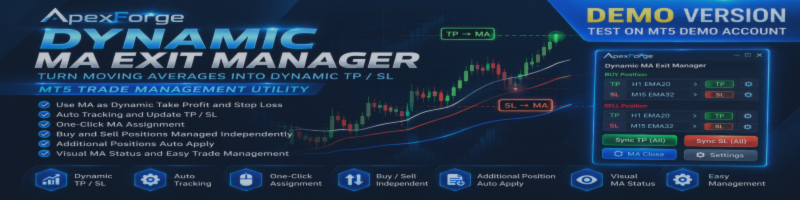

ApexForge Dynamic MA Exit Manager is an MT5 trade management utility designed for manual traders who use Moving Averages as part of their trading and exit strategy.
This page provides the Demo Version of the MQL5 Market product ApexForge Dynamic MA Exit Manager.
The Demo Version allows users to test the interface and available functions on a MetaTrader 5 Demo Account before purchasing the full version.
◆ Demo Version
ApexForge Dynamic MA Exit Manager Demo – Download
The Demo Version is intended for testing purposes and can only be used on MT5 Demo Accounts.
Demo Limitations
- Works on Demo Accounts only
- Cannot be used on Real Accounts
- Designed for evaluating the product before purchasing the full version
- Trading and execution results may vary depending on the broker and market conditions
The Demo Version allows you to test the utility directly on a normal MT5 chart and experience how Moving Averages can be used as dynamic Take Profit and Stop Loss management levels.
◆ Turn Moving Averages into Dynamic TP / SL
ApexForge Dynamic MA Exit Manager allows selected Moving Averages to act as dynamic Take Profit or Stop Loss levels.
For example:
Buy TP → H1 EMA20
Buy SL → M15 EMA32
Instead of using only a fixed price level, the selected TP or SL can follow the Moving Average as it changes over time.
This makes the exit level dynamic while allowing the trader to decide which Moving Average should be used.
◆ Dynamic TP / SL Tracking
Once a Moving Average has been assigned to a position, the utility can automatically update the corresponding TP or SL as the selected MA moves.
The management logic follows the configured Moving Average and chart conditions without requiring the trader to manually modify the position every time the MA changes.
◆ One-Click MA Assignment
Moving Average levels can be assigned directly from the chart interface.
This allows the trader to quickly synchronize the selected Moving Average with the TP or SL of the relevant positions without repeatedly entering prices manually.
The trading direction and exit strategy remain entirely under the trader's control.
◆ Buy and Sell Positions Managed Independently
Buy and Sell positions are handled independently.
This allows different MA-based TP and SL configurations to be maintained for long and short positions, which is particularly useful when managing positions in both directions.
◆ Additional Positions
When additional positions are opened, the utility can automatically apply the corresponding TP / SL management configuration according to the active settings.
This helps maintain consistent exit management when positions are added manually.
◆ Visual MA Status
The chart interface provides visual information showing the currently selected MA-based TP and SL configuration.
This makes it easier to identify which Moving Average is currently responsible for managing each exit level.
The interface is designed to keep MA-based trade management visible without requiring repeated navigation through the standard MT5 position modification window.
◆ MA Close
In addition to dynamic TP / SL management, the utility includes MA-based closing functionality according to the configured settings.
This provides another way to manage exits when a Moving Average is used as part of the trader's exit methodology.
◆ Designed for Manual Traders
ApexForge Dynamic MA Exit Manager does not decide when to Buy or Sell.
It is designed for traders who already use their own trading strategy and want to manage exits using Moving Averages.
The trader determines:
Trade Direction
Entry
Moving Average
Take Profit Logic
Stop Loss Logic
ApexForge handles the corresponding trade-management process according to those selections.
◆ Installing the Demo Version
- Download ApexForge Dynamic MA Exit Manager Demo from this page.
- Open MetaTrader 5.
- Select:
File → Open Data Folder
- Open:
MQL5 → Experts
- Copy the Demo file into the Experts folder.
- Return to MetaTrader 5 and refresh the Navigator, or restart MetaTrader 5.
- Log in to an MT5 Demo Account.
- Attach ApexForge Dynamic MA Exit Manager Demo to the desired chart.
- Configure the available settings according to your trading method.
The Demo Version is now ready for testing.
◆ Recommended Demo Test
When testing the product for the first time, you can explore:
Dynamic MA Take Profit
Dynamic MA Stop Loss
MA Selection and Assignment
TP / SL Tracking
Buy / Sell Independent Management
Additional Position Management
MA Close Functions
Visual Position and MA Status
Testing on a Demo Account is recommended before using the full version in a live trading environment.
◆ Full Version
If the Demo Version meets your requirements, the full version of:
ApexForge Dynamic MA Exit Manager
is available from the MQL5 Market.
The full version removes the Demo Account restriction and is intended for normal use according to the product specifications.
◆ Important Notice
ApexForge Dynamic MA Exit Manager is a trade management utility.
It does not provide Buy or Sell trading signals.
It does not predict future market direction.
It does not guarantee trading performance or profitability.
Moving Average based TP / SL management does not guarantee that an order will be executed at a specific price. Actual execution depends on broker conditions, market liquidity, spread, price movement, and the trading environment.
All trading decisions remain entirely under the control and responsibility of the user.
ApexForge
MT5 Trading Utilities for Discretionary Traders