ApexForge Dynamic MA Exit Manager

ApexForge Dynamic MA Exit Manager

MT5 移動平均線による動的TP・SL管理|Moving Average TP SL|EMA SMA ダイナミック決済|マルチタイムフレームMAサポート・レジスタンス|TP SL自動更新|Position Manager

◆ デモ版

製品版をご購入いただく前に、MT5のデモ口座で ApexForge Dynamic MA Exit Manager の機能を実際にお試しいただけます。

デモ版のダウンロード、インストール方法、ユーザーガイド:ApexForge Dynamic MA Exit Manager – MT5 Demo Version

あなたは裁量トレーダーですか?

MA・EMA・SMAを使ったテクニカル分析をしていますか?

Stop Loss と Take Profit を、まだポジションごと・ラインごとに手動で調整していませんか?

相場は常に動いています。

Moving Averageも常に動いています。

それなのに、なぜあなたの Stop Loss と Take Profit は固定されたままなのでしょうか?

あなたのトレード手法で MA・EMA・SMA をTake Profitの目標、Stop Lossの基準、動的サポート、動的レジスタンスとして使用している場合、MAの最新価格を確認し、そのたびに各ポジションのTP / SLを手動で変更しているかもしれません。

ApexForge Dynamic MA Exit Manager は、その作業を効率化するために設計されています。

MetaTrader 5の裁量トレーダー向けに開発された、Moving Averageベースのダイナミック決済・ポジション管理ツールです。

選択するのは、単なる固定価格ではありません。

選択するのは「そのMA自体」です。

◆ 1つのパネルで複数ポジションのSL / TPを管理

ポジションを1つずつ変更する必要はありません。

MT5の注文変更画面を何度も開いて、新しい価格を手入力する必要もありません。

ApexForgeのパネルから使用したいMoving Averageを選択し、対象ポジションの:

Dynamic Take Profit

または

Dynamic Stop Loss

として設定できます。

例えば:

Buy TP → H1 EMA20
Buy SL → M15 EMA32

設定後、ApexForgeが記憶するのは、クリックした瞬間のMA価格だけではありません。

どのMAを選択したのかを記憶します。

選択したMAが新しいローソク足とともに変化すると、ApexForgeは対応するExitレベルを再計算し、ポジションの実際のTP / SLを自動的に管理します。

1つのパネル。複数のポジション。Exit管理を一元化。

その後、同じ方向に新しいポジションを追加した場合も、現在のDynamic Exit Managementへ自動的に追加できます。

Moving Averageを追いながら、ポジションを1つずつ手動変更する必要はありません。

◆ Moving Averageを「見るライン」から「Exit管理ツール」へ

通常のMT5 Moving Averageは、現在MAがどこにあるかを表示します。

しかしポジションを持った後は、自分で判断しなければなりません。

どのMAをTake Profitにするのか?

どのMAをStop Lossにするのか?

MAが動いたら、もう一度ポジションを変更するのか?

ApexForgeは、このプロセスをポジション管理へ直接統合します。

あなた自身で選択できます:

どのMAで Buy TP を管理するか

どのMAで Buy SL を管理するか

どのMAで Sell TP を管理するか

どのMAで Sell SL を管理するか

4つのExit Roleは、それぞれ独立して管理されます。

相場を分析し、Buy / Sellを決めるのはあなたです。

ApexForgeは、あなたのMAベースのExitプランの実行と管理をサポートします。

◆ Dynamic MA Take Profit — MA連動型ダイナミック利確

対応しているMoving Averageを、Take Profitとして直接指定できます。

例えば:

Buy TP → H4 EMA48

または:

Sell TP → M30 EMA20

設定後、ApexForgeは指定されたMAを継続して追跡します。

新しいローソク足によってMAの位置が変化すると、実際のTake Profitも最新のMA位置に応じて更新できます。

そのためTake Profitを、最初に設定した固定価格へ永久に固定する必要はありません。

あなたのMoving Average構造に合わせて追従させることができます。

◆ Dynamic MA Stop Loss — MA連動型ダイナミック損切り

Stop LossもMoving Averageへ直接連動させることができます。

例えば:

Buy SL → M15 EMA32

または:

Sell SL → H1 EMA60

ApexForgeは選択したMAを追跡し、最新位置に基づいてポジションのSLを管理します。

TPとSLには、それぞれ異なる:

Timeframe

MA Period

Moving Average

を使用できます。

BuyとSellも独立して管理されます。

◆ MAが動く → TP / SLも自動更新

ApexForgeは、設定した瞬間のMA価格をTP / SLへコピーするだけではありません。

システムはどのMoving Averageを選択したのかを記憶します。

基本的な流れ:

MAを選択

→ ApexForgeが選択したMAを記憶

→ 指定MAを継続して追跡

→ 新しいローソク足でMAの位置が更新

→ Dynamic Exitを再計算

→ 実際のTP / SLを更新

これにより、チャート上の視覚的な参考ラインだったMoving Averageを、継続的に追跡されるダイナミックなExit構造として利用できます。

◆ ブローカー側の実TP / SL

ApexForgeは、EA内部だけの仮想Exitラインに依存する仕組みではありません。

Dynamic MAに対応するTP / SLは、システムの更新ロジックに従って、ポジションの実際のブローカー側TP / SLへ同期されます。

取引サーバーに最後に正常受理されたTP / SLは、ブローカー側に残ります。

そのため、その後MT5やEAが停止しても、最後に正常送信されたTP / SLは取引サーバー上で有効な状態を維持できます。

重要:

MT5またはEAが停止した後は、その後のMAの動きをブローカー側TP / SLへ自動追従させることはできません。

Dynamic TP / SLを継続して自動更新するには、MT5、EA、取引接続が正常に動作している必要があります。

◆ TP Exit Offset Points

MAをTake Profitとして使用する場合でも、価格がMAへ完全に到達するまで待つ必要はありません。

ApexForgeでは TP Exit Offset Points を調整できます。

例えば:

Buy TP → H1 EMA20
Exit Offset → 10 Points

実際のTPを、目標MAより手前の指定距離に設定できます。

MAが動くと、Offsetも最新のMA位置を基準に再計算されます。

◆ SL Buffer Points

Stop Lossには追加の SL Buffer Points を設定できます。

例えば:

SL → M15 EMA32
SL Buffer → 5 Points

実際のSLは、Buy / Sellそれぞれの正しいStop Loss方向に応じて、指定MAの外側へBuffer分の距離を確保して設定されます。

MAが動くと、SL Bufferも再計算されます。

これにより、Moving Averageを動的な保護基準として利用しながら、ユーザーが指定した値動きの余裕を残すことができます。

◆ TP / SLを素早く設定・変更・解除

自動管理だからといって、手動コントロールを失うわけではありません。

相場構造が変化した場合、パネルからすぐに:

TP / SLを設定

使用するMAを変更

TP / SLを解除

できます。

例えば現在:

Buy TP → H1 EMA20

を使用していて、

Buy TP → H4 EMA12

へ変更したい場合。

パネルから新しいMAを選択するだけです。

H4 EMA12の現在価格を確認して、その価格をMT5の注文画面へ手入力する必要はありません。

Buy TP / Buy SL / Sell TP / Sell SL はすべて独立して管理できます。

◆ 追加ポジションも現在の管理へ自動追加

特定方向にDynamic TP / SLがすでに設定されている場合、その後同じ方向に追加された新しいポジションも、現在のExit Managementへ自動的に追加できます。

例えばBuyに:

TP → H1 EMA20
SL → M15 EMA32

を設定している状態で、新しいBuy Positionを追加した場合。

同じTP / SLをもう一度設定する必要はありません。

以下のような運用に適しています:

分割エントリー

追加エントリー

同方向の複数ポジション管理

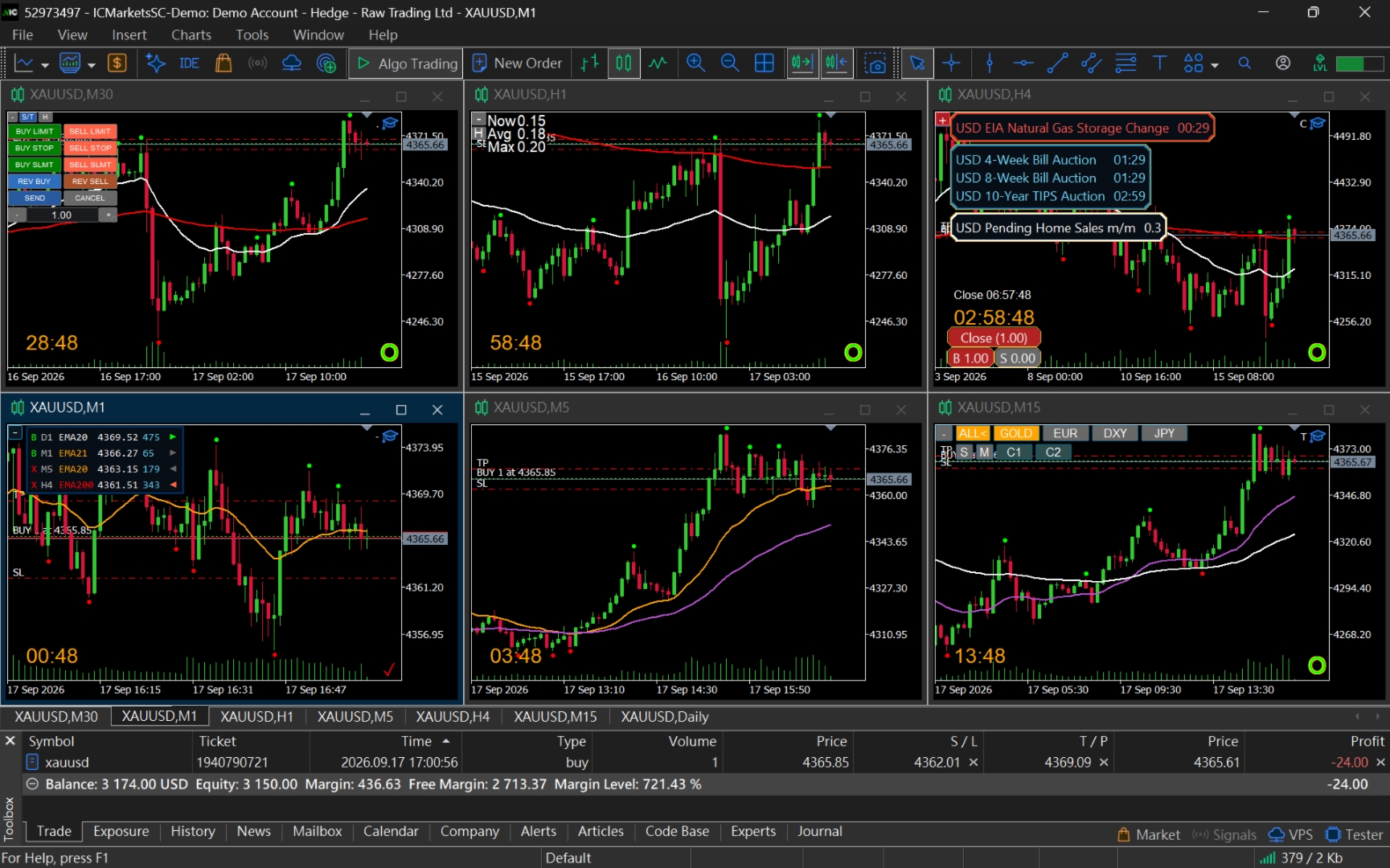
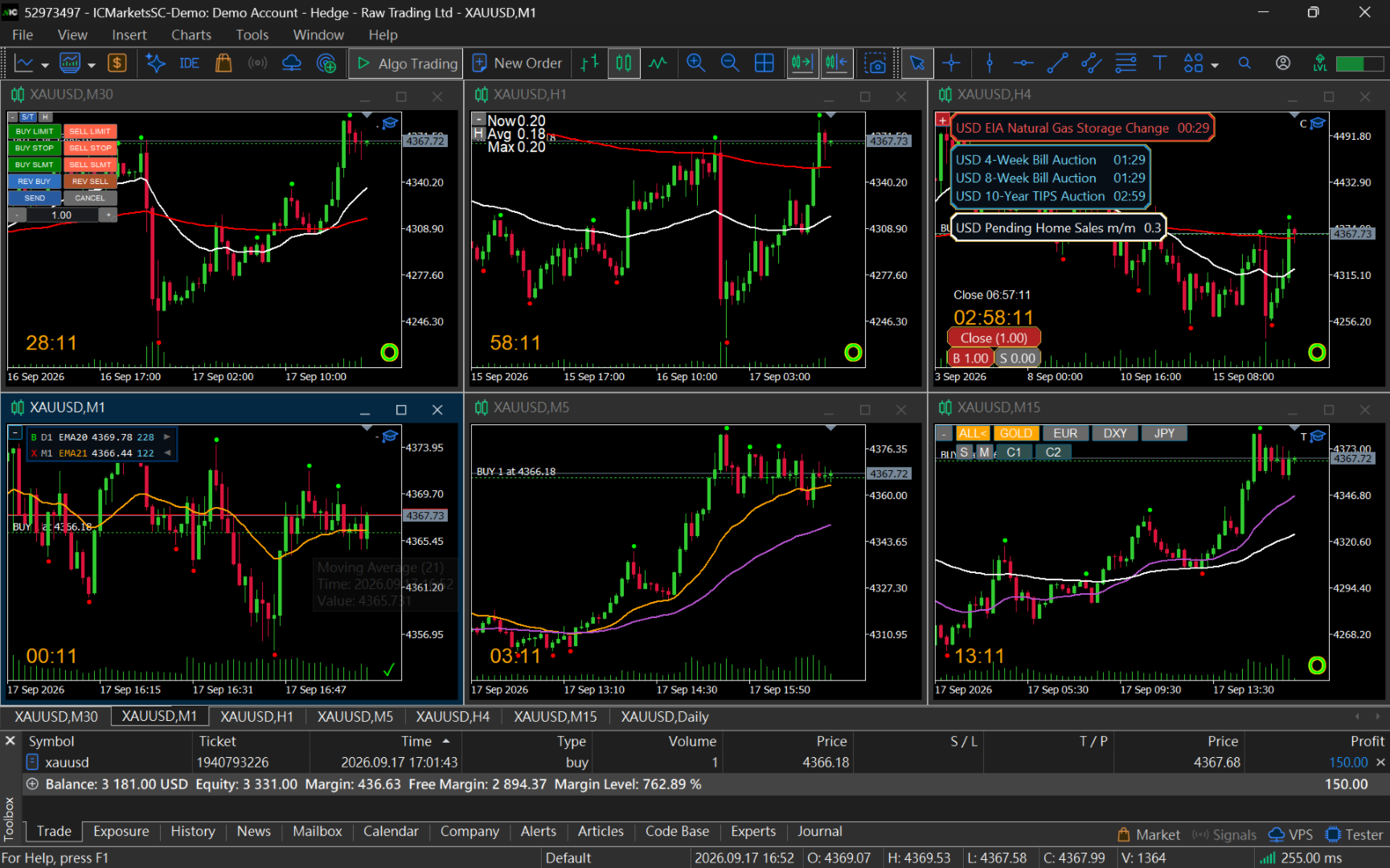
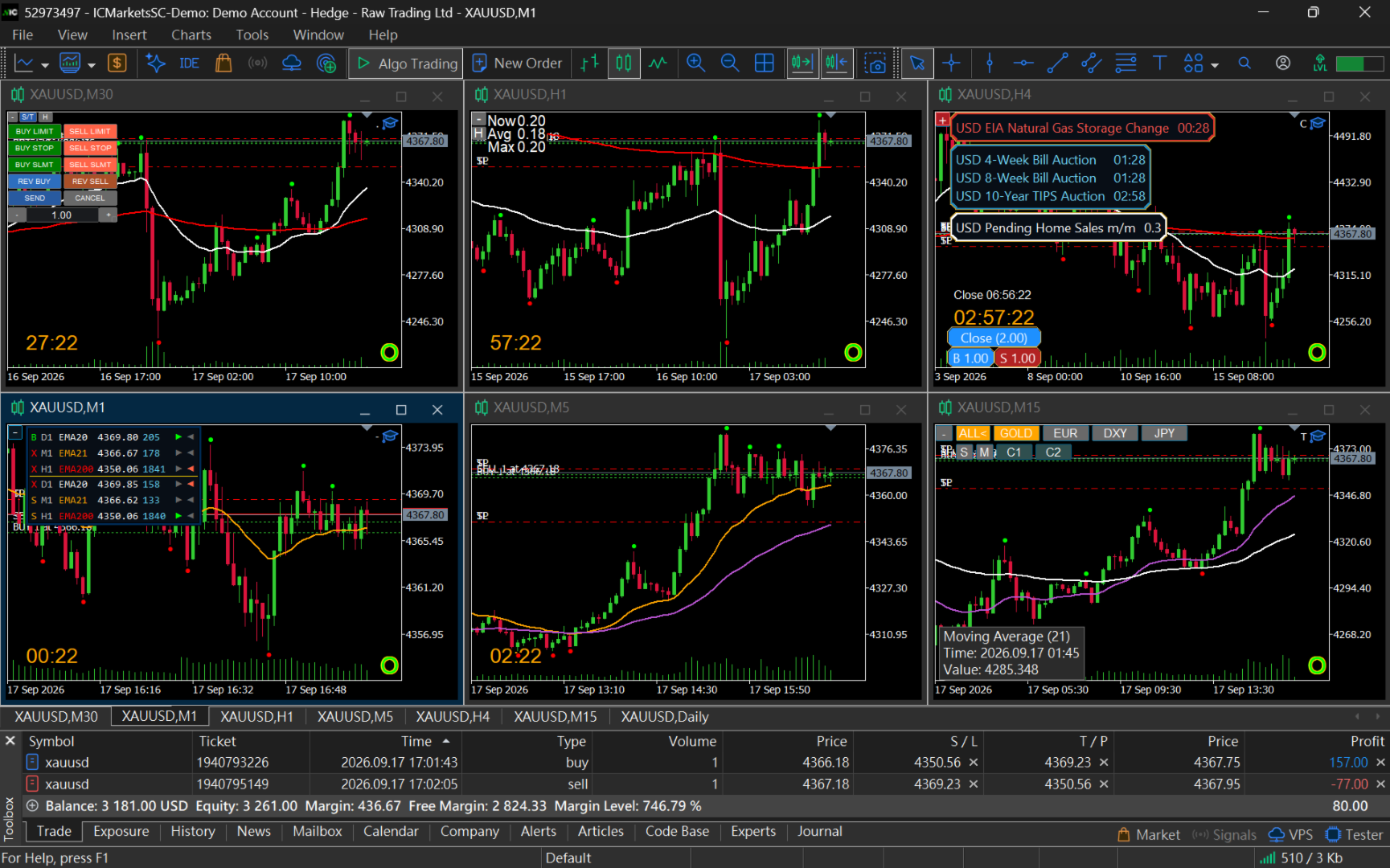
◆ 同一シンボルの全オープンチャートからMAを自動取得

ApexForgeは、EAを設置した1枚のチャートだけに限定されません。

同じシンボルで開いているすべてのチャートから、認識可能なMoving Averageを自動取得できます。

例えば:

M1 / M5 / M15 / M30 / H1 / H4 / D1

それぞれのTimeframeに異なるMoving Averageを設定できます。

ApexForgeは、それらのマルチタイムフレームMAを1つの管理インターフェースへ整理します。

すべてのMAを1枚のチャートへ重ねる必要はありません。

特に:

Multi-Timeframe Analysis

マルチチャート環境

グリッド型チャートレイアウト

マルチモニター取引環境

に適しています。

◆ SMA / EMA / SMMA / LWMA 対応

ApexForgeはMetaTrader 5標準Moving Averageの主要方式に対応しています:

SMA — Simple Moving Average

EMA — Exponential Moving Average

SMMA — Smoothed Moving Average

LWMA — Linear Weighted Moving Average

互換性のある ApexForge MA Renderer にも対応しています。

T3やJMAなど、異なるデータ構造を使用するサードパーティ製Custom Indicatorは、自動認識できない場合があります。

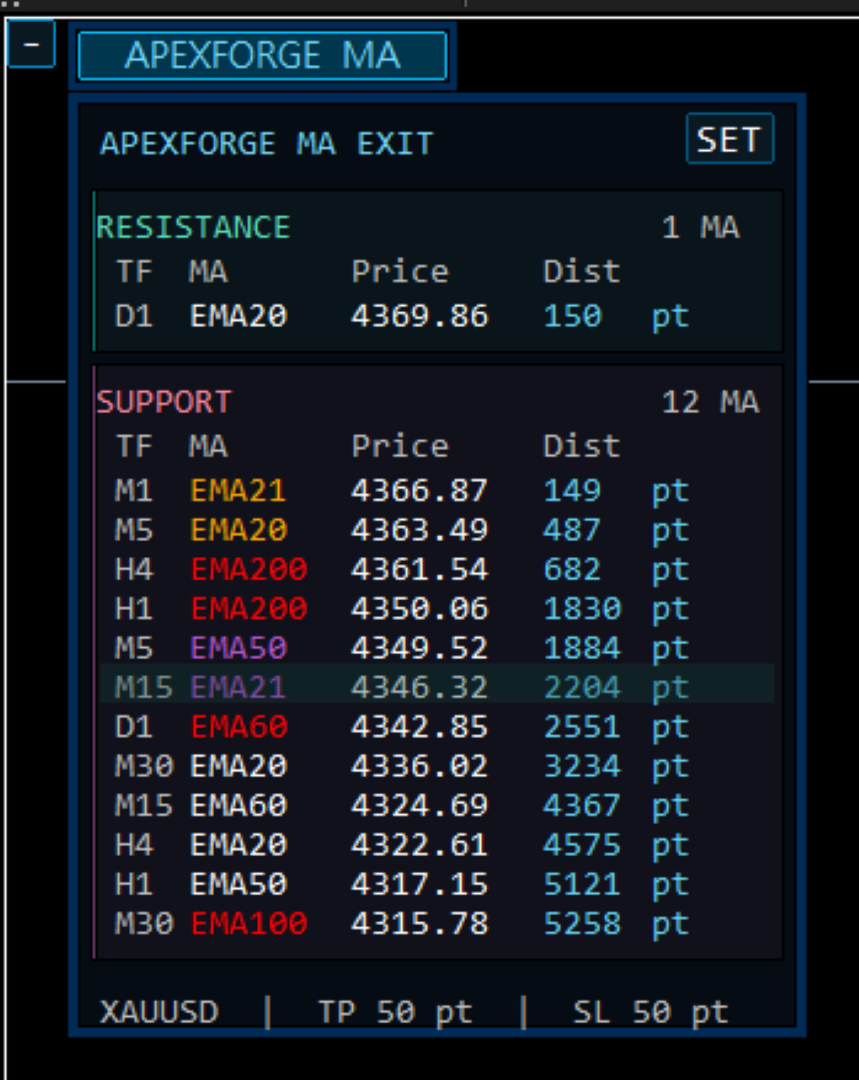
◆ Support / Resistanceを自動分類

ApexForgeは、検出したMAと現在価格の位置関係に基づいて自動分類します。

価格より上 → Resistance MA

価格より下 → Support MA

パネルでは:

Timeframe

MA

現在価格

現在価格からのDistance

Exit操作

を確認できます。

MAを探すためだけに、何度もTimeframeを切り替える必要はありません。

市場価格がMAを通過した場合、新しい価格関係に基づいて自動的に再整理されます。

◆ 最も近いMAを自動追跡

設定済みのDynamic TP / SLだけでなく、現在価格に最も近い関連MAも追跡できます。

そのため:

現在選択しているMA

と

現在価格に最も近いMA

を同時に確認できます。

例えば:

選択中 Buy TP → H4 EMA48

しかし現在、価格上方で最も近いMAが:

M15 EMA32

になっている場合、両方を同時に表示できます。

選択中のMA自体が最も近いMAの場合は、重複表示されません。

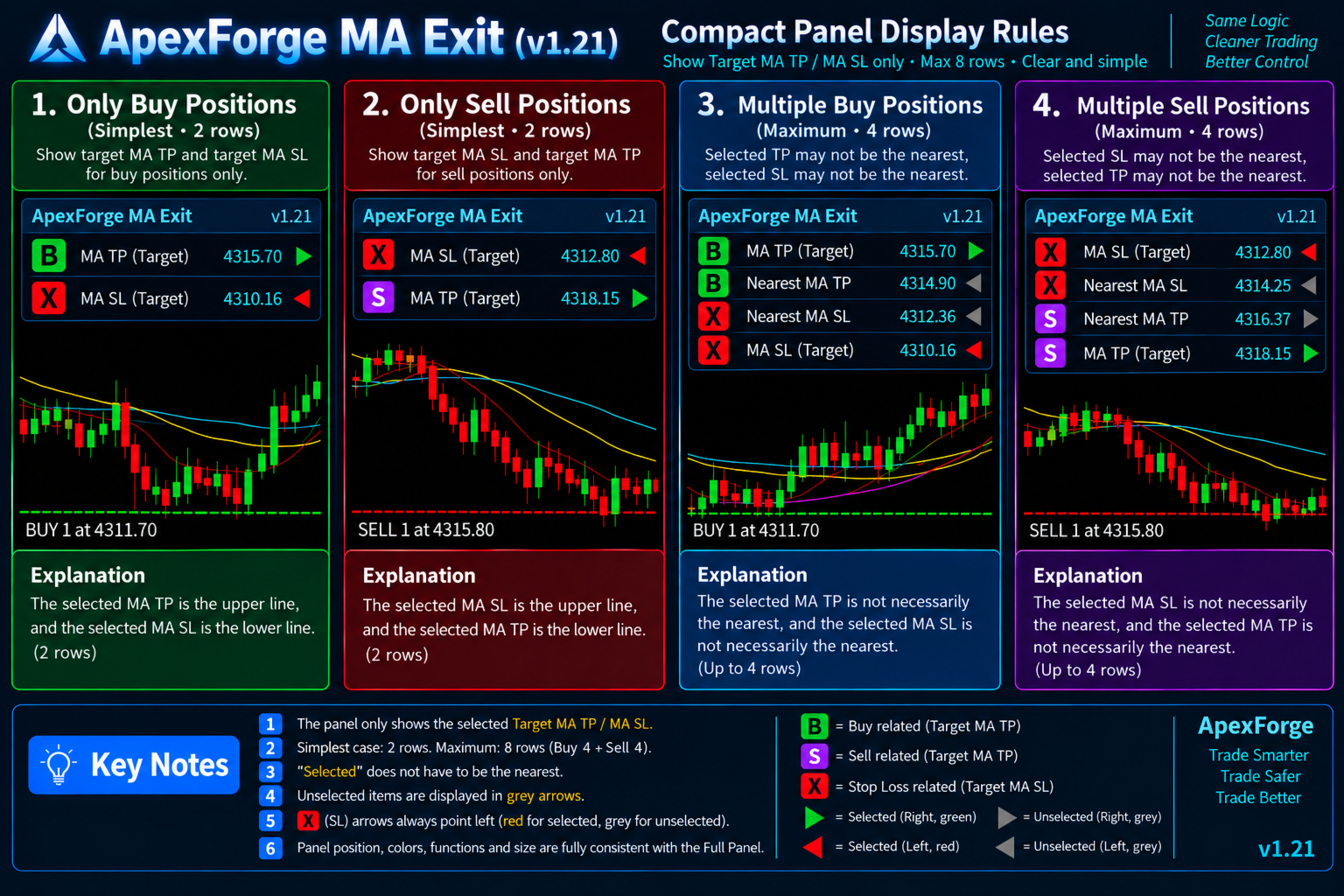
◆ Adaptive Compact Position Panel

取引中、大きなMA管理パネルでチャートを常に隠す必要はありません。

ApexForgeには、現在必要なExit情報だけを表示するAdaptive Compact Position Panelがあります。

役割表示:

B = Buy TP

S = Sell TP

X = Stop Loss

さらに:

Timeframe | MA | Price | Distance | Exit

を表示します。

現在のポジションとMA状態に応じて、パネルサイズが自動調整されます。

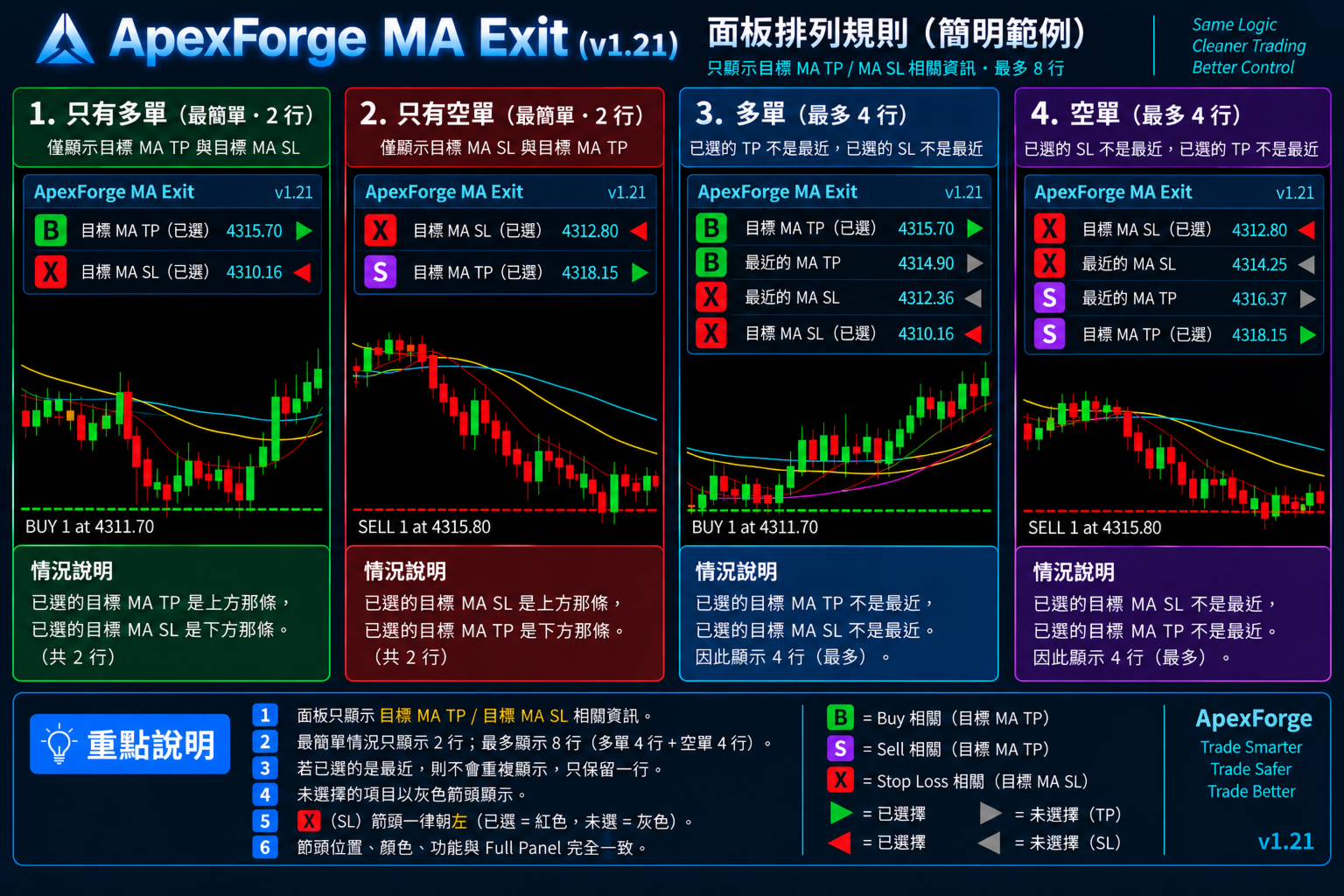
◆ 最小2行、最大8行

片方向のみの最もシンプルな状態では、2行だけで表示できます。

「選択中MA」と「最も近いMA」が異なる場合のみ、追加情報が表示されます。

Buyでは最大:

選択中 Buy TP

最も近い Buy TP MA

最も近い Buy SL MA

選択中 Buy SL

Sellでは最大:

選択中 Sell SL

最も近い Sell SL MA

最も近い Sell TP MA

選択中 Sell TP

BuyとSellが同時に存在する場合:

Buy 4行 + Sell 4行 = 最大8行

選択中MAと最も近いMAが同じ場合、重複する行は表示されません。

◆ Hedge時もBuy / Sellを明確に分離

ApexForgeはBuyとSellの同時ポジション管理に対応しています。

Hedge状態では:

Buy情報を上部

Sell情報を下部

に表示します。

その間をゴールドの区切り線で分離します。

BuyとSellが同じMoving Averageを使用していても、それぞれのExit状態は独立しています。

例えば:

Buy TP → H1 EMA20

と同時に:

Sell SL → H1 EMA20

を設定しても、同じMAを参照しているという理由だけで異なるExit Roleが混同されることはありません。

◆ 使用可能なMAがなくてもポジション方向を表示

Buy Positionが存在していても、現在価格より上に使用可能なMAがない場合があります。

その場合でもBuy表示は消えません。

ポジション方向はそのまま表示され、通常Exit Arrowが表示される位置には「-」が表示されます。

つまり:

使用可能なMAがない ≠ ポジションがない

現在ポジションが存在していることと、その方向に適したMA Targetが一時的に存在しないことを区別できます。

◆ Full MA Management Panel

MA構造全体を確認したい場合は、Full Panelを展開できます。

検出されたすべてのMoving Averageを:

Resistance

Support

に整理し、

Timeframe

MA

Price

Distance

Exit

を表示します。

Full Panelでは最大 64本のMA を表示できます。

Full Panelから直接MAを選択してTPまたはSLへ設定できます。

◆ Compact Mode + Full Mode

ApexForgeには2種類のインターフェースがあります:

Compact Panel — ポジションとExitの高速モニタリング

Full Panel — MA構造全体とTP / SL管理

通常の取引中はCompact表示を維持し、Exit設定やMA全体を確認したい場合だけFull Panelを展開できます。

チャートスペースが限られている場合や、多数のChartを同時に使用する環境にも適しています。

◆ アダプティブUI・自由移動・位置記憶

Compact Panelは実際の表示内容に応じて:

幅

高さ

行数

を自動調整します。

不要なスペースを固定で確保しません。

パネルはチャート上の好きな位置へ自由にドラッグでき、最後の位置を自動的に記憶します。

取引環境を再読み込みした後も、保存された位置を復元できるため、毎回パネルを配置し直す必要はありません。

◆ + / − 最小化

一時的にExit情報を確認する必要がない場合、+ / − を使用してパネルを最小化できます。

最小化時はコンパクトなコントロールだけを残し、ローソク足やMoving Averageへの視覚的な干渉を減らします。

必要なときに再度展開できます。

◆ 成功 / 失敗サウンド

TP / SLの設定・変更操作にはサウンドフィードバックがあります。

成功 → 成功サウンド

失敗 → 失敗サウンド

Stop Level、Freeze Level、価格距離、取引状態、その他のブローカー制限によって変更が拒否された場合も、操作が成功しなかったことを素早く確認できます。

◆ 単なるTrailing Stopではありません

一般的なTrailing Stopは、固定Pointsまたは固定距離を基準にStop Lossを移動します。

ApexForgeの考え方は異なります。

TPを指定MAへ追従させる

SLも指定MAへ追従させる

単に:

「エントリーから何Points離れた位置にStop Lossを置くか?」

ではなく、

「現在のExit構造を、どのMoving Averageに管理させるか?」

を選択できます。

あなたのトレード戦略がすでにEMA / SMAを動的サポート、レジスタンス、Take Profit、Stop Lossとして利用しているなら、固定距離のTrailing Stopだけに頼るのではなく、Moving AverageそのものをDynamic Exitとして利用できます。

◆ 主な機能
  • MT5 Dynamic MA Exit Manager

  • Dynamic Moving Average Take Profit

  • Dynamic Moving Average Stop Loss

  • 1つのパネルから複数ポジションのTP / SLを管理

  • 実TP / SLの自動更新

  • ブローカー側TP / SL同期

  • TP Exit Offset Points

  • SL Buffer Points

  • TP / SLの素早い設定・変更・解除

  • Buy TP / Buy SL / Sell TP / Sell SL 独立管理

  • 追加ポジションを現在のExit Managementへ自動追加

  • 同一シンボルの全オープンチャートからMAを自動取得

  • Multi-Timeframe MA Management

  • SMA / EMA / SMMA / LWMA対応

  • Support / Resistance自動分類

  • Nearest MA自動追跡

  • Selected MA + Nearest MA同時表示

  • Hedge Buy / Sell同時管理

  • 同一MAでもExit Roleを独立管理

  • Adaptive Compact Position Panel

  • Compact Panel 最小2行・最大8行

  • Full MA Management Panel

  • Full Panel 最大64本のMA

  • MA Price / Distance表示

  • パネル自由ドラッグ

  • パネル位置自動記憶

    • / − 最小化

  • 成功 / 失敗サウンド

  • マルチタイムフレーム・マルチチャート・マルチモニター環境に対応

  • Buy / Sell Signalは提供しません

◆ 基本的な使用フロー

1. 普段使用しているMT5 Moving Averageチャート構成をそのまま使用

↓

2. ApexForgeが同一シンボルのオープンチャートから対応MAを読み込み

↓

3. MAをResistance / Supportへ自動整理

↓

4. パネルからBuy / SellのTPまたはSLとして使用するMAを選択

↓

5. 選択したDynamic Exitを対象ポジションへ適用

↓

6. 必要に応じてTP OffsetまたはSL Bufferを設定

↓

7. ApexForgeが選択したMAを継続追跡

↓

8. MAの位置が変化すると実際のTP / SLを更新

↓

9. 追加ポジションも現在の管理へ自動参加可能

↓

10. トレードプランが変わったら別のMAへ変更、またはTP / SLを解除

◆ 注意事項

ApexForge Dynamic MA Exit Managerは MT5 Trade Management / Position Management / Exit Managementツールです。

自動売買戦略や売買シグナルEAではありません。

本製品はBuy / Sell Signalを提供せず、市場方向を予測するものではなく、取引結果を保証するものでもありません。

MT5標準Moving AverageであるSMA、EMA、SMMA、LWMA、および互換性のあるApexForge MA Rendererに対応しています。

その他のサードパーティ製カスタムMAインジケーターは、自動認識できない場合があります。

Dynamic TP / SLの実際の変更は、ブローカーおよび取引シンボルのStop Level、Freeze Level、最小価格距離、市場の取引状態、その他の取引制限に従います。

ブローカーへ最後に正常送信されたTP / SLは、取引サーバー上に残ることがあります。

ただしMT5またはEAが停止すると、その後のMAの動きを自動的に同期することはできません。

実口座で使用する前に、まずDemo AccountでMA選択、Dynamic TP / SL、TP Offset、SL Buffer、Exitの変更・解除、追加ポジション管理などの操作を確認することを推奨します。

ApexForge Dynamic MA Exit Manager

あなたのMoving Averageは、もうチャート上のラインだけではありません。

MAを選ぶ。

ApexForgeがDynamic TP / SLへ変える。

MAが動く → Exitも動く。

ポジションごとにTP / SLを手動調整する作業から:

1つのパネル → MAを選択 → ポジションのExitを一括管理。


おすすめのプロダクト
Pro Trade Manager Panel は、MetaTrader 5 のチャート上の1つのパネルに手動トレードの流れをまとめます。トレードをビジュアルで計画し、リスクからポジションサイズを自動計算し、注文を出し、管理・保護まで行えます。FX、金属、株価指数などに対応します。 ビジュアルなトレード計画 エントリー、ストップロス、テイクプロフィットのボックスをチャート上に表示し、ドラッグして調整できます。 テイクプロフィットは1〜3段階(ロット分割)。オプションのステップSL:TP1到達後にSLをエントリー価格へ、TP2到達後にTP1へ移動します。 ワンクリックで買い/売りを切り替え。LimitまたはStop注文は自動選択、成行でも発注できます。 ロット、金額リスク、SLまでの距離、リスクリワードをリアルタイム表示します。 複数のトレードプラン(新機能) チャート上に BUY と SELL のプランを最大 8 つ同時に保持できます。各プランは独自のリスク、ロット、分割利確、Step SL を持ちます。 チャート、パネルの一覧、または上部バーでプランをクリックすると編集できます。選択
RoundReflection Live trading signal RoundReflection is a MetaTrader 5 Expert Advisor for USDJPY that trades reversals near round-number levels. Core strategy settings are preset. Users control trading volume, protection filters, tester time settings, and the dashboard. Strategy and risk settings The EA uses a limited sequence of entries at predefined price intervals. Later entries use larger volumes, and each trading set shares a Stop Loss level and a price-based exit target. It does not double
Fvg In Fvg
Claudiu-georgian Zavera
FVG In FVG EA — From Learn to Earn. The most-watched imbalance on any chart, taken where you have not seen it before: a Fair Value Gap confirmed inside a Fair Value Gap. A GAP EVERYONE WATCHES. AN EXECUTION NO ONE ELSE HAS. The EA detects the Fair Value Gap — the 3-candle imbalance — on a higher timeframe, then requires a second FVG, formed inside the first, on the timeframes you choose. Only an overlap above your threshold validates the zone: Most Powerful Overlap FVG Zones — rigorously selec
Trade Control Panel Function Normal One Click Function Close All Close All Profit Close All Loss Close All Pending Order Close All Sell Close All Buy Advance One Click Function 1.  Close Partial Lot Sell by Percent It will help you partial close for all open position by desire percent you wanted. No longer partial close one by one for every open position Manual input for desire percent 2. Close Partial Lot Buy by Percent It will help you partial close for all open position by desire percent
The real‑time view of what is happening inside the market. Footprint Secrets brings detailed analysis directly into MetaTrader 5. It shows where volume is trading, how buyers and sellers are interacting, and how liquidity shifts as the market evolves. Designed for traders who want a precise, real‑time understanding of market behavior. Check out the free preview version here:  https://www.mql5.com/en/market/product/172398 Benefits for the Trader See the real activity behind price . Footprint ch
VENIQOR Smart Trade Copier PRO is more than a simple MT5 trade copier. It combines fast local trade synchronization with flexible risk management, Account Protection and optional News Protection for every Receiver account. As with our other VENIQOR products, we welcome useful customer feedback and are happy to implement meaningful improvements and new features whenever possible. The same EA works as both Master and Receiver . One Master can copy trades to multiple Receivers running on the same
ProBridger
Marius Ovidiu Sunzuiana
How Traders and Analysts Can Use the Data Export Bridge to Improve Their Analytics The MQL Data Export Bridge unlocks a new level of analytical power by transforming MetaTrader into a real‑time data provider for any external research environment. Here are the most impactful ways different users can apply the bridge to enhance their trading performance. Build Predictive Models with Machine Learning Who benefits: Quantitative traders, data scientists, algorithm developers How it helps: Export t
Close exactly the trades you want, in one click. Smart Close Panel puts six buttons on your chart: close all, only the winners, only the losers, only buy, only sell, or delete pending orders. Each button shows how many trades it will close and their profit, before you click. When the market turns fast, closing trades one by one in the Trade tab is slow and easy to get wrong. With this panel you take the profit of all winning trades, or cut all losing trades, in one second. THE SIX BUTTONS Close
Keyboard Scalper Pro
Mauricio Eduardo Lara Perez
Keyboard Scalper Pro is a customizable keyboard trading utility for MetaTrader 5. It is designed for traders who want direct manual control of order execution without being limited to a fixed keyboard layout. Every trading hotkey can be configured to match the user's preferred workflow, while the default layout is built around the numeric keypad for fast operation. The utility does not generate signals and does not decide when to trade. The trader chooses the setup, direction and timing. Keyb
Omni Signal Copier – Telegram, Discord, Slack and TradingView signals into MetaTrader Omni Signal Copier reads trading signals from Telegram, Discord, Slack, TradingView alerts (via ntfy), text files and manual input , understands them with a multi-language parser and trades them on your MetaTrader account – with multi-TP, break-even, trailing, a prop-firm guard and a live dashboard with 8 tabs. Everything runs inside the Expert Advisor: no extra program, no DLL, no external server of ours . The
Ea does not use martingale or grid and has a stop loss for every position.  Symbols: EURCHF, EURCAD, USDCHF and other. Time frame: M15 Best results on EURCAD M15. Live signals and other products here -  https://www.mql5.com/ru/users/leron34/seller#products The EA should run on a VPS continuously without interruption.  Multicurrency advisor. You can enter pairs in the EA settings for tests. I recommend the default settings. You can install an adviser on any pair on M15. The EA has a news filter
Trend Pyramid v5.00 | Gold XAUUSD Floating‑Profit Pyramid EA   This floating‑profit pyramid gold EA only adds positions after existing orders generate floating profit, avoiding blind position‑adding under loss conditions. It adopts EMA20 plus ADX24 dual‑indicator filter to filter false oscillation signals and reduce invalid order openings. Multiple hard risk controls are built‑in to protect your account.   Core advantages   1. Add positions only on floating profit, no position‑adding at loss: a
[Target currency pair / time] [EURUSD/15M] Recommended. Variable lot MT5EA for compound interest operation! [About EA operation] After purchasing an EA, it is recommended to operate with a real account after operating with a demo account for a certain period of time. [About kikyo/logic overview] Kikyo is an EA that supports EURUSD/15M. Adopts a variable lot system that can easily realize compound interest operation according to the amount of funds (the default is a fixed lot. Please change
Smart Trade Manager Pro is an MT5 Expert Advisor. It manages positions opened manually or by other EAs, and only the positions that match your scope rules. It does not open trades on a live account. The one exception is the Strategy Tester, where it can open demo trades to manage (see the Market validation section). Files: | File | Purpose | |---|---| | `SmartTradeManagerPro.mq5` | Complete source code | | `SmartTradeManagerPro.ex5` | Compiled program (MetaEditor: 0 errors, 0 warnings) | | `R
AO Trade
Ka Lok Louis Wong
AOトレードシステムは、市場のトレンドを利用したトレードに特化しており、競売やニュースの時間を参照ポイントとして、他の特定の注文時間と比較し、市場のトレンドを予測します。 **EAで使用されるすべての時間パラメータは、あなたの端末の時間を基にしています。異なるブローカーは異なるGMTのタイムゾーンで動作する場合があり、夏時間の調整によりさらに変化する可能性があります。** **実装前に、端末に合わせて時間設定を十分に確認してください。** 推奨設定: M1タイムフレームで使用する HK50 / DE40 / ustec / UK100 時間のチェック中には、特定のチェック時間の分後に価格のチェックが行われることに気付くでしょう(1.2チェック時間の分)。この設計は意図的であり、参照されているバーが完了することを許可し、オープン、ハイ、ロー、およびクローズの値が注文時間と正確に比較できるようにします。 設定 -----------------1 タイマー------------------- 1.1 チェック時間の時間(HH) -- 価格を記録するために使用されるタイムスタンプ
QUANTUM LIQUIDITY EA Automated Liquidity-Sweep Price Action for MetaTrader 5 Quantum Liquidity EA is a rules-based automated trading system designed to identify liquidity-sweep opportunities and manage trades systematically inside MetaTrader 5. The EA focuses on market structure around recent highs and lows, looking for price movements that temporarily sweep a previous liquidity area before rejecting back through that level. Instead of relying on a single indicator, the system combines its confi
EAs Manager
Abdeljalil El Kedmiri
5 (2)
Are you running multiple EAs on the same MT5 account and losing sleep over stacked risk? EAs Manager Pro is the central risk-control layer for your entire MT5 account. Attach it to one chart, and it automatically detects every EA you're running by  Magic Number — no source code changes, no per-EA setup. It then monitors every  position, automated or manual, and enforces the risk rules you set across your whole account, not just one strategy at a time. Built for traders running scalpers, breakout
Info Exporter MT5は、ターミナル情報、アカウント情報、取引履歴、注文履歴をローカルCSVファイルへエクスポートし、メールを送信したり、Apps ScriptでデプロイされたURLを使用してGoogleスプレッドシートに直接エクスポートしたりできます。 CSVへのエクスポート、メールを使用したエクスポート、Googleスプレッドシートへのエクスポートから選択できます。また、エクスポートしたファイル名やスプレッドシート名を変更することもできます。 使用する入力パラメータ: export terminal informations ? : 端末情報をエクスポートするかどうかを選択します。値は true または false に変更できます。 terminal info file or sheet name : デフォルトは「 Terminal_Info 」ですが、入力プロンプトで変更できます。 export historical deals ? : 取引履歴をエクスポートするかどうかを選択します。値は true または false に変更できます。デフォルトは false で、
FREE
Description:   -   Chart Time + Indicator is very simple and easy, but it can be very important to control the time before opening any manual trade. This indicator shows the time in a panel between 3 different options. Can be possible to move the panel with mouse or with fixed coordinates on the chart. Input Parameters:   -   Local Time : Enable Local Time if you want to show it (Personal Computer Time).   -   Server Time : Enable Server Time if you want to show it (Broker Time).   -   GMT Time
EASY Insight – スマートなトレードはここから始まる 概要 もし数秒で市場全体(FX、ゴールド、暗号通貨、指数、株式まで)を、手作業のチャート確認なしでスキャンできたらどうでしょう? EASY Insight は、インジケーターデータを実践的なトレードインテリジェンスに変換する、AI対応のエクスポートツールです。無駄な推測や視覚的な混乱に疲れたトレーダーのために設計されており、市場全体のスナップショットを1つのクリーンなCSVファイルで提供します。 これまでとは全く違う新しいトレード体験です。ウィンドウの切り替えも、グラフのごちゃごちゃしたオーバーレイもありません。FX Power (FXP)、FX Volume (FXV)、FX Dynamic (FXD)、FX Levels (FXL)、そして非FX資産用のIX Power (IXP) ― あなたがすでに知っているツールから得られる、純粋に構造化されたインサイトだけ。 さらに便利さを求めるなら、 EASY Insight AIO を選んでください。すべてが1つのインストールに含まれ、設定不要。チャート上にインジケータ
Overview : The Advanced News Trading Panel is a versatile tool designed for traders who rely on news-based trading strategies. This Expert Advisor (EA) provides an intuitive graphical interface that allows users to quickly set up pending orders and manage risk with ease. With the ability to automatically place Buy/Sell Stop orders based on your pre-set stop order distance from the bid/ask price, stop-loss and take-profit levels, the EA allows for precision trading during high-volatility news eve
One Click Trader  is a tool designed for MetaTrader 4 platform, which enables you to take your trading to the next level. It enables you to open, manage and close your trades in simple an efficient way by just one click of your mouse button. "-"   ,  "+"  change OCT window size  Up arrow minimizes the OCT panel Down arrow maximizes the OCT panel Right arrow displays the next panel with additional features Left arrow hides the panel with additional features Red  SELL  button enables you to open s
Hedgehog Pro
Alex Amuyunzu Raymond
Hedgehog Pro: Roll Up. Stay Safe. The Automated Hedge Shield for Your MT5 Account A hedgehog does not run from danger. It curls into a ball and lets nothing through. Hedgehog Pro does the same for your account. When a trade moves against you, it opens an opposite position at the moment you choose and holds the damage there, instead of letting one bad trade eat your balance. What Hedgehog Pro is Hedgehog Pro is a capital protection engine for MetaTrader 5. It does not generate entry signals and i
ApexForge Economic Calendar Safety Dashboard MT5 経済カレンダー | Forex 経済カレンダー | News Filter | 重要経済指標アラート | 経済イベントカウントダウン | 緊急決済 | Close All | 市場休場日アラート | 早期取引終了リマインダー | KTimer | ローソク足カウントダウン | モバイルPush通知 | 12言語 + Auto ApexForge Economic Calendar Safety Dashboard は、 MT5 Economic Calendar 経済カレンダー、Forex News Filter、重要経済指標アラート、経済イベントのカウントダウン、緊急決済、市場休場日アラート、早期取引終了リマインダー、KTimer / ローソク足カウントダウン、モバイルPush通知、12言語 + Auto言語自動検出 を統合したMetaTrader 5用の総合トレーディング情報ダッシュボードです。 Forex、XAUUSD / Gold、株価指数、スキャルピング、デイトレード、裁量トレー
Algo Trading Indicaor MT5 The ATC ALGO indicator has been developed to work on the MetaTrader 5 platform. It has the same specifications and zones as the MetaTrader 4 version. There may be slight lag, which we believe is due to differences in MetaTrader 5 programming. We will work on improving it, God willing. MT5 Version                    https://www.mql5.com/en/market/product/170028 MT4 Version                    https://www.mql5.com/en/market/product/88034 With this indicator , you’ll have
Vector Local Copier
Sotirios Apostolos Adaloglou
This is the FREE DEMO version of Vector Local Copier. It's the complete copier — real-time local copying, MT5 ↔ MT4 bridging, symbol mapping, the magic number filter, multipliers, SL/TP sync, the safety guards, the live dashboard — with one limitation: slave trades are capped to 0.01 lots. That's enough to prove it works perfectly on your exact terminals, brokers, EAs and symbols before you buy the full-size version. GET THE FULL VERSION (no lot cap) HERE: https://www.mql5.com/en/market/prod
FREE
TerminatorTrades
Uriel Alfredo Evia Canche
"Terminator Trades " EA robot, built on the powerful MQ5 code,  is designed to simplify the process of closing your positions and pending orders. You can adjust if you want close all the trades or by specific symbols. With just a single click on a button, you can efficiently manage your current positions, ensuring that you never miss an opportunity to terminate a trade.  Close Trades , Delete Pending Orders with Terminator Trades. 
FREE
Trade Panel HotKey – MT5 Scalping Utility Fast Trade Panel HotKey is a lightweight MT5 trading utility designed for traders who need to open, manage, and close positions as quickly as possible . The main purpose of this tool is to reduce the time between a trading decision and execution. Instead of moving the mouse, opening order windows, or manually modifying multiple positions, most important actions can be performed instantly through customizable keyboard hotkeys or directly from the compact
MasterEA MT5 Premium – Professional Copy Trade Sender One Purchase. Unlimited Possibilities. MasterEA MT5 Premium is a professional MT5 trade broadcasting solution that instantly sends your trading activity to one or multiple receiving accounts. Buy only the Master EA. SlaveEA MT5 Premium (Trade Receiver) is included FREE with your purchase. No additional payment is required for the Receiver EA. What Can Be Copied? MasterEA automatically broadcasts: Market Buy Orders Market Sell Orders
Gold Scalping Matrix MT5
Mohamed Abdulmohsen Mohamed Saeed Ali
The Gold Scalping Matrix is an advanced trading algorithm designed to capitalize on market action and price reversals in the gold market. This innovative bot employs real time market behavior trading strategy, intelligently placing buy and sell orders at predetermined intervals around the current market price.  All Configuration Set Files for back-test and live accounts   All Experts for back-Test find the new free versions before change to paid Recommended Broker Support group   or DM for any
このプロダクトを購入した人は以下も購入しています
Trade Assistant MT5
Evgeniy Kravchenko
4.43 (216)
取引 ごとのリスクの 計算、新規注文 の 簡単 な 設置、部分的 な 決済機能 を 持 つ 注文管理、 7 種類 のトレーリングストップなど 、便利 な 機能 を 備 えています 。 追加の資料と説明書 インストール手順   -   アプリケーションの手順   ライン機能 チャート上にオープニングライン、ストップロス、テイクプロフィットを表示します。この機能により、新規注文を簡単に設定することができ、注文を出す前にその特徴を確認することができます。   リスク計算 リスク計算機能は、設定されたリスクとストップロス注文のサイズを考慮して、新規注文のボリュームを計算します。ストップロスの大きさを自由に設定できると同時に、設定したリスクを守ることができます。 Lot calc ボタン - リスク 計算 を 有効 / 無効 にします 。 Risk フィールドでは 、必要 なリスクの 値 を 0 から 100 までのパーセンテージまたは 預金通貨 で 設定 します 。 設定」 タブで 、 リスク 計算 の 種類 を 選択 します :「 $ 通貨」、「 % 残高」、「 % エクイティ 」、「
Farmed Hedge Yield Farming | All Markets (Manual - Hybrid - Semi/Automated EA) VERIFIED TRADING RESULTS - Farmed Hedge Yield Axi Copy:  https://www.mql5.com/en/signals/2356376 - Farmed Hedge Yield Exn Copy:   https://www.mql5.com/en/signals/2356404 - Farmed Hedge Yield V Copy:  https://www.mql5.com/en/signals/2357156 IMPORTANT NOTICE: FarmedHedge is a MANUAL-FOCUSED TRADING UTILITY ,not a fully automated EA. Results shown on this Signal include manual trades and overall strategic management.
Trade Manager EAへようこそ。これは、取引をより直感的、正確、そして効率的にするために設計された究極の リスク管理ツール です。これは単なるオーダー実行ツールではなく、包括的な取引計画、ポジション管理、リスク管理のためのソリューションです。初心者から上級者、迅速な実行を必要とするスキャルパーまで、Trade Manager EAはあらゆるニーズに対応し、為替、指数、商品、暗号通貨などさまざまな市場で柔軟に対応します。 Trade Manager EAを使用すると、複雑な計算が過去のものになります。市場を分析し、エントリーポイント、ストップロス、テイクプロフィットのレベルをチャート上のラインでマークし、リスクを設定するだけで、Trade Managerが最適なポジションサイズを即座に計算し、SLとTPをピップ、ポイント、口座通貨でリアルタイムに表示します。すべての取引が簡単かつ効果的に管理されます。 主な機能: ポジションサイズ計算機 :定義されたリスクに基づいて取引サイズを瞬時に決定します。 簡単な取引計画 :エントリー、ストップロス、テイクプロフィットを設定するためのド
Telegram to MT5 Multi-Channel Copier   は、 Telegram と Discord チャンネルのトレードシグナルを MetaTrader 5 へ自動コピーします。ボット不要、ブラウザ拡張不要、手動コピー不要。Telegram や Discord にシグナルが届くと、EA が数秒であなたのターミナルに注文を出します。 さらに、チャンネルをコピーする前に、内蔵バックテスターでそのチャンネルがあなたの口座でどう動いたかを確認できます。 製品は 2 つのコンポーネントで構成されます:Telegram チャンネルを監視する Windows アプリと、MT5 ターミナルでシグナルを執行する本 EA です。MT4 版もあります   こちら . 購入前にお試しください:   アプリは無料でダウンロードできます。ご自身のチャンネルを接続し、各シグナルがどのように読み取られるかをご確認ください。Backtest タブと実際の取引には、購入またはレンタルした EA が必要です。このページの無料デモはストラテジーテスターでのみ動作し、テスターでは Telegram と D
Local Trade Copier EA MT5
Juvenille Emperor Limited
4.94 (150)
Local Trade Copier EA MT5 は、同一の Windows PC または Windows VPS 上で稼働する複数の MetaTrader 5 口座間で、取引をコピーおよび管理するための高速で柔軟なトレードコピーツールです。 ローカルでの取引同期に加え、Receiver 側でロットサイズ、リスク管理、取引フィルター、シンボルマッピング、取引管理、口座保護を個別に設定できます。 Transmitter と Receiver のターミナルは約 1分 で設定でき、同一ブローカーまたは異なるブローカーの口座間で、手動取引や EA による取引をコピーできます。適切な条件下では、ローカルの MetaTrader ターミナル間で取引情報を 0.5秒未満 で同期できます。実際の約定速度は、ブローカーのレイテンシー、ネットワーク状況、PC/VPS の性能、ターミナルの負荷によって異なります。 ご購入前に無料デモをお試しください Local Trade Copier EA MT5 の完全機能版無料デモ を、MT5 デモ口座で 1回につき4時間 テストできます。 Local Trad
TradePanel MT5
Alfiya Fazylova
4.88 (172)
Trade Panelは多機能なトレーディングアシスタントです。アプリには手動取引用の50以上のトレーディング機能が搭載されており、ほとんどの取引作業を自動化することができます。 アプリの説明書: https://www.mql5.com/en/blogs/post/756482 デモ口座用アプリの試用版: https://www.mql5.com/en/blogs/post/750865 アプリのインストール方法: https://www.mql5.com/en/blogs/post/756239 アプリをビジュアルモードでテストする方法: https://www.mql5.com/en/blogs/post/770277 VPSのMetaTraderにアプリをインストールする方法: https://www.mql5.com/en/blogs/post/770190 取引。 ワンクリックで取引操作を行うことができます: リスクを自動計算して指値注文やポジションを開く。 複数の注文やポジションをワンクリックで開く。 注文のグリッドを開く。 保留中の注文やポジションをグループごとに閉じる
News Trade EA MT5
Konstantin Kulikov
4.55 (11)
僕自身が数年間使っている便利なロボットをご紹介します。半自動モードでも完全自動モードでもお使いいただけます。 >>> Chat <<< 当プログラムは経済指標カレンダーで発表されるニュースをもとにした取引の柔軟な設定が可能です。戦略テスターでは確認不可です。実際の取引のみです。 最新の設定アーカイブをダウンロードしてください: https://www.mql5.com/en/blogs/post/747929 シグナルモニタリング: https://www.mql5.com/en/signals/author/test-standart 当該エキスパート・アドバイザーのためのカスタマイズ設定セットを作る場合は、ブログの全パラメータの説明を参照してください :   https://www.mql5.com/en/blogs/post/748545 。 基本的なデフォルト設定について 一つのチャートからGBPとの通貨ペア(GBPUSD、EURGBP、GBPJPY、GBPCAD、GBPAUD、GBPCHF)で取引をします。GBPは最もボラティリティの高い通貨のため、取引が成功するチ
自分の取引ルールで Telegram のシグナルをコピー Telegram to MT5 Signal Trader は、Telegram の公開・非公開チャンネルやグループから、テキスト形式の取引シグナルを MetaTrader 5 へ自動でコピーします。1つのデスクトップアプリで複数の配信者と MT5 口座を管理し、 配信者ごとにリスクと取引設定を個別に指定 できます。 シグナルのコピーに Telegram ボットや API 設定は必要ありません。 電話番号または QR コードでご自身の Telegram アカウントにログインし、すでに参加しているチャンネルやグループを選ぶだけです。ボットの作成や、Telegram API トークン、API ID、API hash の入力は不要です。 ポジションサイズを選び、複数の利確水準に分けて決済し、建値へのストップ移動やトレーリングストップを自動化できます。配信者のシグナルを受け取りながら、実際の取引方法は自分で管理できます。 本製品は、この MT5 エキスパートアドバイザ(EA)と、必須の Windows 連携アプリで構成されます。 インス
Strategy Ledger Pro
Abdullah Uygar Tuna
5 (14)
日本語に対応しました。 Strategy Ledger Pro は、MetaTrader 5 用の読み取り専用の口座分析パネルです。口座の成績をエキスパートアドバイザー(EA)、戦略、銘柄、マジックナンバーごとに分け、それぞれが実際にどれだけ貢献しているかを明らかにします。 パネルは 11 言語に対応しています:English、Français、Deutsch、Español、Italiano、Português、Русский、Türkçe、中文、日本語、한국어。 デモをダウンロードする前に。 Market では、有料製品のデモはストラテジーテスター内でのみ実行されます。このパネルはご自身の口座の取引を分析しますが、ストラテジーテスターには読み取る口座履歴がないため、デモは空のパネルで起動し、その旨を表示します。これはデモの仕組みによるもので、製品の制限ではありません。 この説明内の動画では、実口座でのパネルの動作をご覧いただけます。 すべての機能を解説した詳しい マニュアル (英語)と、情報交換やお知らせのための AureusAI Trading Suite グループをご用意し
================================================================================ POC BREAKOUT - V20.72. Full Professional Grade Toolkit ================================================================================ POC Breakout is a full MetaTrader 5 trading dashboard for discretionary traders who want breakout signals, Point of Control (POC) context, volume profiles, order flow, market structure, news, alerts, and advanced trade planning in one professional workspace. Attached directly to you
Exp COPYLOT CLIENT for MT5
Vladislav Andruschenko
3.97 (35)
MetaTrader 5 用のプロフェッショナル取引コピー機 MetaTrader 向けの高速・高性能・信頼性の高い 取引コピー機 です。 COPYLOT は、MT4 と MT5 のターミナル間で Forex 取引をコピーでき、 Hedge 口座と Netting 口座の両方に対応しています。 COPYLOT MT5 版の対応構成: - MT5 Hedge → MT5 Hedge - MT5 Hedge → MT5 Netting - MT5 Netting → MT5 Hedge - MT5 Netting → MT5 Netting - MT4 → MT5 Hedge - MT4 → MT5 Netting MT4 版 完全な説明 + DEMO + PDF 購入方法 インストール方法 ログファイルの取得方法 テストと最適化の方法 Expforex のすべての製品 MT4 ターミナルへのコピーも可能です(MT4 → MT4、MT5 → MT4): COPYLOT CLIENT for MT4 COPYLOT は、2台、3台、さらには10台のターミナル間で同時に動作できる、プロフェッ
The product will copy all telegram signal to MT5 ( which you are member) , also it can work as remote copier.  Easy to set up, copy order instant, can work with almost signal formats, image signal,  s upport to translate other language to English Work with all type of channel or group, even channel have "Restrict Saving Content", work with  multi channel, multi MT5 Work as remote copier: with signal have ticket number, it will copy exactly via ticket number. Support to backtest signal. How to s
EA Overfitter
Stephen J Martret
5 (3)
That backtest looks great. But will it still be making money tomorrow, next week, next month? EA Overfitter re-runs your EA on 100 price histories it has never seen. One score tells you if the edge is real. A backtest tells you what an EA did on one price history — the one that happened to occur. What you cannot tell from it is how much of that result was the strategy and how much was the particular path. EA Overfitter answers that. It builds up to 100 synthetic price histories your EA has n
Power Candles Strategy Scanner - 自動最適化型マルチシンボル設定ファインダー パワーキャンドル・ストラテジー・スキャナーは 、パワーキャンドル・インジケーターを駆動するのと全く同じ自己最適化エンジンを、マーケットウォッチに登録されているすべての銘柄に対して並行して実行します。1つのパネルで、現在統計的に取引可能な銘柄、各銘柄で勝率の高い戦略、最適なストップロス/テイクプロフィットの組み合わせが表示され、新たなシグナルが発生した瞬間に通知が届きます。 このツールは、Stein Investmentsのエコシステムの一部です。  18種類以上のツールをすべて閲覧し、AIを活用したセットアップの推奨を受け取り、  https://stein.investments でコミュニティに参加しましょう 市場動向を網羅。銘柄ごとに3,000件以上の自動最適化。2種類のアラート。ワンクリックでチャートを切り替えて即座にアクション。 なぜこれが必要なのか 多くのマルチ銘柄スキャナーは、 価格の動き (ボラティリティ、変動率、銘柄ごとのRSI)を表示するだけです。それ
Telegram To MT5 — シグナルコピア Telegram チャンネルのトレードコールを、実際の MT5 注文に変換します — 自動で、好きなだけの口座に対応し、リスクとルールは完全にあなたの管理下に置けます。 Telegram To MT5 は、あなたが Telegram で既にフォローしている VIP / シグナルチャンネルを MetaTrader 5 端末に接続します。無料の付属デスクトップアプリがメッセージを読み取り(ボットを禁止しているチャンネルでも可能)、この EA があなたの口座でそれらを執行します — あなた自身のリスク設定、シンボルマッピング、テイクプロフィット処理、セッションおよびニュースフィルターを適用します。 これはシグナルコピアであり、ブラックボックス戦略ではありません。どのチャンネルを信頼するか、各トレードのロットと管理方法をあなたが決めます。 ステップバイステップの設定と付属アプリのインストールガイド 仕組み [あなたの Telegram チャンネル] -> [付属デスクトップアプリ] -> [MT5 + この EA] -> 注文 付属デスクトッ
Timeless Charts
Samuel Manoel De Souza
5 (9)
Timeless Charts is an all-in-one trading utility for professional traders. It combines custom chart types such as Seconds Charts and Renko with advanced order flow analysis using Footprints , Clusters , Volume Profiles , VWAP studies, and anchored analysis tools for deeper market insight. Trading and position management are handled directly from the chart through an integrated trade management panel , while Market Replay and Virtual Accounts provide environments for practicing trading skills and
TelegramからMT5へ: 究極のシグナルコピーソリューション Telegram to MT5 を使えば、取引がシンプルになります。DLL を必要とせず、Telegram のチャンネルやチャットから MetaTrader 5 プラットフォームに取引シグナルを直接コピーできる最新ツールです。この強力なソリューションは、正確なシグナル実行、豊富なカスタマイズオプション、時間の節約、そして効率性の向上を実現します。 [ Instructions and DEMO ] 主な特徴 直接的なTelegram API統合 電話番号とセキュアコードで認証します。 ユーザーフレンドリーな EXE ブリッジを通じてチャット ID を簡単に管理できます。 複数のチャネル/チャットを追加、削除、更新して、同時に信号をコピーします。 高度なフィルターによる信号解析 例外的な単語 (例: 「レポート」、「結果」) を含む不要な信号をスキップします。 柔軟な SL および TP 形式 (価格、ピップ、ポイント) をサポートします。 価格ではなくポイントを指定するシグナルのエントリ ポイントを自動的に計算します。
MetaTrader 5 用トレーディングパネル — チャートとキーボードから行うプロフェッショナルなワンクリック取引 アクティブトレーダーのために設計された高機能 Trading Panel。標準の MetaTrader 操作よりも、はるかに速く、直感的に、そして効率的に取引を実行できます。 本パネルは、ポジション管理、未決注文管理、利益コントロール、執行スピードをひとつのプロフェッショナルなワークスペースに集約した実践的なソリューションです。 これは単なる補助ツールではありません。MetaTrader 5 のための本格的な trading cockpit です。チャートから直接操作し、キーボードで素早くコマンドを実行し、自動計算や視覚的なガイドを活用することで、手動トレードをより速く、より明確に、より快適にします。 このパネルを使えば、チャート上からワンクリックで注文を実行でき、標準の MetaTrader コントロールと比べて最大 30 倍速く取引操作を行うことができます。 新しいプレミアム版が利用可能です: VirtualTradePad PRO SE で取引ワークフローを強
Your EAs cannot see each other, but Anchor can. Anchor gives you one place to coordinate your EAs, manage risk, and decide when trading is allowed. It works alongside the trading bots you already use without any changes to them. The Problem One EA opens a trade. Then another starts trading. The next thing you know, you wake up to multiple grids built across your account. Each EA may be doing exactly what it was designed to do, but together they can place far more risk on your account than you in
次回アップデート — バージョン 2.52 近日公開!【新機能】 市場分析とトレードワークフローを強化する、4つの主要な新機能にご期待ください 皆様のトレードニーズに応える4つの新機能により、市場分析を次のレベルへと引き上げます。新機能をご紹介します: 1. TRADE OVERVIEW DASHBOARD 2. CONFLUENCE AT ZONE 3. STRONG & WEAK HIGH/LOW 4. OTE 1. TRADE OVERVIEW DASHBOARD 市場全体の状況をより簡単に把握できるダッシュボードです。トレード判断をサポートするガイダンスを提供し、市場分析とトレード計画を体系的に行えるよう支援します。すべてを1つの画面で確認できます。 マルチタイムフレーム市場概要(Multi-Timeframe Market Overview) 市場の方向性と価格構造をより明確に把握 市場状況をすばやく確認 体系的な市場分析とエントリー計画のためのガイダンス 2. CONFLUENCE AT ZONE 価格が重要なゾーンに入るとき…いくつのサポート要因が一致しているかを確認で
VirtualTradePad PRO SE MT5 — MetaTrader 5向けプロフェッショナル取引コントロールセンター VirtualTradePad PRO SE は、 MetaTrader 5 向けのプレミアムなチャートベースの取引パネルであり、トレード管理ワークスペースです。より速い執行、明確なポジション管理、構造化されたトレード管理、視覚的なレベル計画、そしてチャート上で完結するプロフェッショナルなワークフローを求めるトレーダー向けに設計されています。 これは単なる BUY / SELL パネルではありません。PRO SE は、手動取引、予約注文、ポジション管理、部分決済、バスケット損益管理、平均化レベル、ATMルール、シグナル監視、リアルタイム市場情報、ストラテジーテスター (Strategy Tester) ワークフロー、VPS向け運用を、1つの連携されたインターフェースに統合します。 MT4版 | 完全な説明とスクリーンショット | 購入方法 | インストール方法 | ログファイルの取得方法 | テストと最適化の方法 | Expforex のすべての製品 PRO
Trade Indicator Assistant   is a powerful MT5 utility designed to turn indicators into automated trading systems. Its main feature is the ability to automatically detect an indicator’s   BUY and SELL signal buffers , without requiring you to know the buffer numbers, search through indicator settings, or modify the indicator source code. Bonus Indicator:   After purchasing Trade Indicator Assistant, contact me to receive   Trade Signal Pro   completely free as a bonus indicator. [Download Demo V
EA Auditor
Stephen J Martret
5 (7)
EA Auditor is an independent analysis tool for traders evaluating Expert Advisors and trading signals on MetaTrader 5. It audits backtest reports, reviews posted developer signals, and cross-verifies the two against each other to help traders assess strategies before committing capital. The MQL5 market offers a wide range of Expert Advisors from many developers, with varying approaches, quality, and transparency. EA Auditor provides a consistent, data-driven framework for reviewing them, answer
Trade Manager は、リスクを自動的に計算しながら、取引を迅速に開始および終了するのに役立ちます。 過剰取引、復讐取引、感情的な取引を防止する機能が含まれています。 取引は自動的に管理され、アカウントのパフォーマンス指標はグラフで視覚化できます。 これらの機能により、このパネルはすべてのマニュアル トレーダーにとって理想的なものとなり、MetaTrader 5 プラットフォームの強化に役立ちます。多言語サポート。 MT4バージョン  |  ユーザーガイド + デモ Trade Manager はストラテジー テスターでは機能しません。 デモについてはユーザーガイドをご覧ください。 危機管理 % または $ に基づくリスクの自動調整 固定ロットサイズを使用するか、ボリュームとピップに基づいた自動ロットサイズ計算を使用するオプション RR、Pips、または価格を使用した損益分岐点ストップロス設定トレーリングストップロス設定 目標に達したときにすべての取引を自動的に終了するための 1 日あたりの最大損失 (%)。 過度のドローダウンからアカウントを保護し、オーバートレードを防ぎます
MT5 to Telegram Signal Provider は、Telegramのチャット、チャンネル、またはグループに 指定された シグナルを送信することができる、完全にカスタマイズ可能な簡単なユーティリティです。これにより、あなたのアカウントは シグナルプロバイダー になります。 競合する製品とは異なり、DLLのインポートは使用していません。 [ デモ ] [ マニュアル ] [ MT4版 ] [ Discord版 ] [ Telegramチャンネル ]  New: [ Telegram To MT5 ] セットアップ ステップバイステップの ユーザーガイド が利用可能です。 Telegram APIの知識は必要ありません。必要な全ては開発者から提供されます。 主な特長 購読者に送信する注文の詳細をカスタマイズする機能 例えば、Bronze、Silver、Goldといった階層型のサブスクリプションモデルを作成できます。Goldサブスクリプションでは、すべてのシグナルが提供されます。 id、シンボル、またはコメントによって注文をフィルターできます 注文が実行されたチャート
RETAILBERG FOOTPRINT CHART PRO — Order-Flow Workspace for MetaTrader 5 Version 7.00  |  Professional System  |  31 tools  |  One chart A full 150-page illustrated User Manual is included. Please read the full manual to understand this feature packed footprint chart elements and ui. https://www.mql5.com/en/blogs/post/777982 DEMO / STRATEGY TESTER — PLEASE READ FIRST
Trader Evolution
Siarhei Vashchylka
5 (7)
" Trader Evolution " - A utility designed for traders who use wave and technical analysis in their work. One tab of the utility is capable of money management and opening orders, and the other can help in making Elliott wave and technical analysis. Manual (Be sure to read before purchasing) | Version for MT4 Advantages 1. Trading in a few clicks. Immediate and pending orders are available in the panel 2. Money management. The program automatically selects the appropriate lot size 3. Simplifies
Trade copier MT5
Alfiya Fazylova
4.61 (57)
Trade Copierは、取引口座間の取引をコピーして同期するように設計された専門的なユーティリティです。 コピーは、同じコンピューターまたはvps にインストールされている、サプライヤーのアカウント/端末から受信者のアカウント/端末に行われます。 購入する前に、デモ アカウントでデモ バージョンをテストできます。 デモ版 こちら 。 詳細な説明は こちら 。 主な機能と利点: MT5ネッティングアカウントを含む、MT5> MT5、MT4> MT5、MT5> MT4のコピーをサポートします。 高いコピー速度(0.5秒未満)。 ベンダーモードと受信者モードは同じ製品内に実装されています。 チャートから直接リアルタイムでコピーを制御できる、簡単で直感的なインターフェイス。 接続が切断されたり、端末が再起動されたりしても、設定と位置が失われることはありません。 コピーするシンボルを選択できます。また、受信者のシンボルを置き換えることもできます(例:EURUSD> USDJPY)。 各シンボルごとにコピーの個別設定を行うことができます。 バックコピーをサポートします。 特定の注文のみのコピー
DrawDown Limiter
Haidar Lionel Haj Ali
5 (23)
DrawDown Limiter v5.0 — 高度な口座保護コントローラー DrawDown Limiter v5.0 は、取引口座を監視し、設定されたリスク、利益、ニュース、スケジュール、ロールオーバー、またはポジション数の制限に達した際に自動的に対応する、クライアント側で動作する口座保護コントローラーです。 1つの専用チャートから、 手動取引、自動売買戦略、複数のExpert Advisor、指値・逆指値注文、保有ポジション を監視できます。口座全体を保護することも、Magic Numberを使用して特定のEAまたは複数のEAのみを監視することもできます。 DrawDown Limiter の目的は、単にドローダウンを表示することではありません。 設定した取引ルールを積極的に適用し 、保護条件が有効である限り、そのルールを継続的に実行することを目的としています。 DrawDown Limiter v5.0 は、損失額だけを監視するのではなく、戦略がいつ取引を継続できるのか、どのエクスポージャーを維持できるのか、いつ取引を停止すべきか、そして自動売買環境をいつ安全に再開できるのかま
RS Trade Copier - 超高速 で動作するローカルトレードコピー機。 真の グラフィカルインターフェース搭載。口座番号の手動入力はもう終わりです。200項目を超える長大なパラメータリストとも、これでおさらばです。 複数のMT5とMT4ターミナル間で取引操作をコピーするための、信頼性が高く柔軟なツールです。経験豊富なトレーダーやシグナルサービス、個人投資家に適しています。1つまたは複数のシグナルソース(Provider)から1つまたは複数のレシーバー(Client)へ、高い精度と最小限の遅延で 取引を同期 します。シンプルな自動設定と高度な手動設定の両方をサポートしています。手動または他のEAで開かれた注文に干渉しません。すべての処理は MT5内でローカルに 行われ、サードパーティサーバーを使用しません。 RS Trade Copierと他のソリューションの比較 RS Trade Copier 他のソリューション 設定 ビジュアルステップバイステップウィザード。 設定時間は約1分。 200以上の分かりにくい入力パラメータ。 設定時間は約20分。 速度 非同期トレード操作。 5
作者のその他のプロダクト
# ApexForge KTimer ### MT5ローソク足カウントダウン、市場クローズカウントダウン、祝日・早期終了対応、移動可能なタイマーパネル ApexForge KTimerは、MetaTrader 5向けに設計された時間および市場ステータス表示ツールです。 KTimerは、現在のローソク足が確定するまでの残り時間を表示します。また、市場の取引セッション終了までのカウントダウン、市場ステータス、祝日および早期終了日の処理にも対応しています。 タイマーパネルは自由に移動でき、その位置は自動的に保存されます。フルパネル表示とテキストのみの表示モードを選択できます。単一チャートだけでなく、複数チャートや複数時間足を使用するMetaTrader 5のワークスペースでも利用できます。 ## ローソク足カウントダウン KTimerは、現在のローソク足が確定するまでの残り時間を表示し、現在のチャート時間足に自動的に対応します。 M1、M5、M15、M30、H1、H4、D1など、MetaTrader 5で利用可能な時間足に対応しています。 ローソク足の確定後に取引条件を確認す
FREE
ApexForge Price Ray Marker ApexForge Price Ray Marker is a lightweight MT5 utility designed for fast and efficient price structure analysis. With a simple keyboard shortcut, you can instantly place horizontal price rays and price labels on candle highs or lows without manually drawing objects. It is ideal for Price Action traders, Smart Money Concepts (SMC), ICT methodologies, support and resistance analysis, liquidity mapping, and multi-timeframe trading. Features Shift + Left Click → Ma
FREE
# ApexForge One Click Close EA ## Overview **ApexForge One Click Close EA** is a lightweight, non-blocking trading utility that allows you to close all matching positions—and optionally delete pending orders—with a single click. Instead of manually closing trades one by one during volatile markets, this EA provides a fast, reliable, and visually clear way to manage your exposure instantly. > ️ This tool does not generate trading signals or open positions automatically. It is designed purely
FREE
ApexForge MA Radar  Lightweight Automatic MA Direction Panel ApexForge MA Radar  is a lightweight moving-average direction panel for MT5. It automatically detects EMA indicators attached to the current chart and displays them in real time according to their price order. Designed for traders who want a clean market overview with extremely low CPU usage. Features Automatic EMA detection Real-time MA sorting Bullish / Neutral / Bearish direction display Ultra-low CPU usage Automatic chart sync
FREE
ApexForge Quote Paused Notification is a lightweight monitoring utility designed for MetaTrader 5 that detects when market quotes stop updating and immediately alerts you when abnormal quote interruptions occur. Whether caused by server issues, network disconnections, market closures, or temporary liquidity interruptions, the tool helps traders recognize quote freezes before they lead to missed opportunities or unexpected trading behavior. A notification is also generated once normal price upda
FREE
ApexForge MA Radar Advanced is designed for traders who need more powerful market analysis without sacrificing performance. Building on the core features of the free edition, the Advanced version introduces professional tools that help you evaluate moving averages, trend strength, and market structure faster and more efficiently. The indicator automatically detects moving averages on the current chart and sorts them by price position, giving you an instant overview of market alignment. It suppor
ApexForge MA Trend Strength Professional is the flagship edition of the ApexForge product line, delivering the most complete feature set for traders who demand professional-grade market analysis. Built for serious traders, it combines powerful trend evaluation with extensive customization, providing a flexible solution for scalping, intraday trading, swing trading, and multi-timeframe analysis. The indicator automatically evaluates moving average slopes and converts them into five intuitive tren
ApexForge Trader Safety Dashboard MT5 Economic Calendar・高速ワンクリック決済・経済イベント通知・Holiday / Early-Close Detection・Mobile Push ApexForge Trader Safety Dashboard は、MT5向けの リスク情報・ポジション管理ツール です。 主な機能: MT5 Economic Calendar 経済イベントカウントダウン Actual / Forecast / Previous Holiday Broker Trading Session Early-Close Risk High-Speed One-Click Close Buy / Sell 個別決済 Floating P/L Hover ポジション情報 MT5 Mobile Push Optional MT5 Impact Reference 自動売買戦略ではなく、自動エントリーもしません。 目的は: 重要なリスクが近づく前に必要な情報をMT5チャートへ表示すること。 そして: 退出を決めたとき、より速
ApexForge Visual Pending Orders ## ビジュアル指値・逆指値注文|ドラッグ可能な価格ライン|マルチチャート同期|H ホストチャート|S/C 高速送信・キャンセル ApexForge Visual Pending Orders は、MT5で手動取引を行うトレーダー向けに設計された、ビジュアル型の保留注文管理ツールです。 MT5の注文画面を何度も開き、価格を入力して確認する必要はありません。 保留注文モードを選択すると、EAが対応する価格ラインをチャート上に直接作成します。マウスでラインをドラッグしてエントリー価格を調整し、確認後そのまま注文を送信できます。 新バージョンでは、H(Host Chart)によるホストチャート指定、複数チャート間の双方向同期、S / C クイック操作ボタンを追加しました。 M1、M5、M15、M30、H1、H4 など、複数の時間足を同時に確認しながら注文位置を判断するトレーダーに特に適しています。 デモ版 製品版をご購入いただく前に、MT5のデモ口座で ApexForge Visual Pending Order
ApexForge Multi Chart Symbol Timeframe Changer ## MT5 マルチチャート・シンボル切替 | タイムフレーム切替 | Symbol Switcher | Timeframe Changer ApexForge Multi Chart Symbol Timeframe Changer は、MetaTrader 5(MT5)のマルチチャート環境向けに設計された Symbol Changer、Timeframe Changer、Multi Chart Manager です。 4枚、6枚、あるいはそれ以上の MT5 チャートを同時に使用している場合でも、各チャートの Symbol と Timeframe を1枚ずつ変更する必要はありません。 デモ版 製品版をご購入いただく前に、MT5のデモ口座で ApexForge Workspace Switcher の機能を実際にお試しいただけます。銘柄の高速切り替え、時間足の切り替え、ワークスペース管理、内蔵 MA Renderer などの機能をテストできます。 デモ版には必要なすべてのコンポーネ
ApexForge Trade Risk Manager MT5 Trade Manager | Risk Manager | Visual Trade Planner | Order Manager | Position Manager デモ版 製品版をご購入いただく前に、MT5のデモ口座で ApexForge Trade Risk Manager の機能を実際にお試しいただけます。取引計画、リスク計算、注文執行、ポジション管理などの主要機能をテストできます。 デモ版のダウンロード、インストール方法、ユーザーガイド: ApexForge Trade Risk Manager – MT5 Demo Version ApexForge Trade Risk Manager は、MetaTrader 5 の裁量トレーダー向けに設計されたビジュアル型トレード管理ワークスペースです。 トレードの一連の流れを1つのインターフェースに統合します。 トレード計画 → リスク計算 → 注文執行 → ポジション検索 → 分割決済 → ポジション管理 → 最終決済 ApexForge は売
ApexForge Economic Calendar Safety Dashboard MT5 経済カレンダー | Forex 経済カレンダー | News Filter | 重要経済指標アラート | 経済イベントカウントダウン | 緊急決済 | Close All | 市場休場日アラート | 早期取引終了リマインダー | KTimer | ローソク足カウントダウン | モバイルPush通知 | 12言語 + Auto ApexForge Economic Calendar Safety Dashboard は、 MT5 Economic Calendar 経済カレンダー、Forex News Filter、重要経済指標アラート、経済イベントのカウントダウン、緊急決済、市場休場日アラート、早期取引終了リマインダー、KTimer / ローソク足カウントダウン、モバイルPush通知、12言語 + Auto言語自動検出 を統合したMetaTrader 5用の総合トレーディング情報ダッシュボードです。 Forex、XAUUSD / Gold、株価指数、スキャルピング、デイトレード、裁量トレー
フィルタ:
レビューなし
レビューに返信