Multi Account Trade Desk MT5
- Utilitários
- Versão: 1.77
- Ativações: 10

Multi Account Trade Desk MT5
## Short description
Account-wide MASTER-to-SLAVE trade copier for MetaTrader 5 with per-account risk
sizing, automatic broker symbol matching, live readiness monitoring and
parallel execution.
## Product description
Multi Account Trade Desk MT5 is built for traders who manage several MT5
accounts and want one central place to control risk, account readiness and trade
replication.
Attach the same EA as MASTER on the source terminal and as SLAVE on every target
terminal. One SLAVE instance monitors the entire account, so you do not need to
attach the copier to every symbol chart.
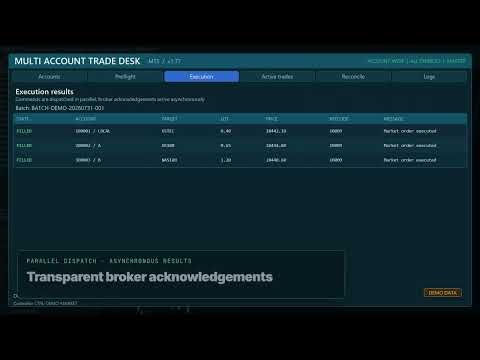
When a new MASTER position or pending order appears, the system creates one
logical trade plan and sends commands to all READY accounts in parallel. Each
SLAVE uses its own live broker price and contract specification to calculate
volume and validate spread, margin, stop levels and trading permissions.
### Main features
- One EX5 file with selectable MASTER and SLAVE modes
- Account-wide monitoring of all symbols
- Copies manual trades, Trade Assistant entries and EA trades
- Market orders, pending orders, SL/TP modifications, partial closes and closes
- Per-account Fixed lot, percentage, fixed-money and proportional sizing
- Automatic cross-broker symbol matching for Forex, metals, energy and major
index aliases such as USTEC / US100 / NAS100 and DE40 / GER40 / DAX40
- Prefix and suffix handling including `.idx`, `.cash`, `.sml`, `.pro`, `.r`,
`_SB`, `+` and similar broker naming conventions
- Continuous background preflight with lot, risk, margin, spread and reason
- Parallel command batches with asynchronous broker acknowledgements
- Short market-command TTL to reject delayed execution
- Per-account spread, lot, daily loss, drawdown, open risk, position, session,
direction and order-type limits
- Read-only reconciliation report
- Persistent settings and restart recovery
- Duplicate-command protection and no automatic retry after uncertain execution
- CSV event logging
### Important operating model
The product synchronizes MT5 terminals that are running under the same Windows
user or VPS environment through the MetaTrader Common Files directory. Every
trading account requires its own logged-in MT5 terminal. No DLL and no WebRequest
configuration are required.
### Safety defaults
SLAVE live execution is disabled by default. Real-account execution has a
second independent safety lock. Existing MASTER positions are not imported on
startup unless explicitly enabled. Reconciliation is report-only and never
repairs or reopens a position automatically.
### Recommended first test
Use demo accounts first. Configure one MASTER and one SLAVE, enable demo live
execution, verify the Preflight page, then open a small trade with a real Stop
Loss. Add more SLAVE terminals only after confirming the complete open,
modify and close workflow.
### Risk notice
Trading and trade copying involve financial risk. Broker prices, contract
specifications, execution policies, slippage and connectivity can differ between
accounts. Always test the complete configuration on demo accounts before using
real funds.
Multi Account Trade Desk MT5 — Inputs Guide
The same single EX5 file is installed on every MetaTrader 5 terminal. The
`InpOperatingMode` input decides whether that copy works as the MASTER or as a
SLAVE.
## Operating mode
| Input | Values | Purpose |
|---|---|---|
| `InpOperatingMode` | `MASTER` / `SLAVE` | `MASTER` monitors source trades and manages connected accounts. `SLAVE` validates and executes commands on one target terminal. |
## MASTER settings
| Input | Default | What it does |
|---|---:|---|
| `InpHeartbeatWarningSeconds` | `3` | Shows a warning when a SLAVE heartbeat has not been refreshed for this many seconds. |
| `InpHeartbeatOfflineSeconds` | `10` | Marks the SLAVE offline after this timeout. Must be greater than the warning value. |
| `InpRegistryRefreshMs` | `500` | How often the MASTER refreshes the shared account registry and acknowledgements. |
| `InpMaximumDisplayedAccounts` | `20` | Maximum number of discovered accounts kept in the dashboard list. |
| `InpMaximumBatchAccounts` | `50` | Hard safety ceiling for the number of accounts in one parallel command batch. |
## MASTER readiness monitor
These parameters create the informational background trade plan shown on the
Preflight tab. They do not place an order by themselves.
| Input | Default | What it does |
|---|---:|---|
| `InpPreflightDirection` | `BUY` | Direction used by the background readiness example. |
| `InpPreflightStopDistancePoints` | `500` | Example Stop Loss distance, in broker points, used for continuous risk and margin validation. |
| `InpPreflightRiskReward` | `2.0` | Example Take Profit distance expressed as a multiple of the Stop Loss distance. |
| `InpDefaultRiskPercent` | `1.0` | Default percentage-risk value used for the readiness plan before account-specific settings are applied. |
| `InpControllerReferenceLot` | `0.01` | Reference source lot used by controller-lot sizing modes. It is not forced onto SLAVE accounts. |
| `InpPreflightTTLSeconds` | `10` | Preflight requests older than this are rejected as stale. |
| `InpIncludeMasterAccount` | `true` | Adds the MASTER account to the same risk, readiness and monitoring workflow. |
| `InpBackgroundPreflightMs` | `1000` | Interval between automatic readiness recalculations. |
| `InpMarketCommandTTLms` | `1500` | Maximum lifetime of a market command. An expired command is rejected instead of being executed late. |
| `InpAllOrNothingBatch` | `false` | When `false`, blocked/offline accounts are skipped and READY accounts continue. When `true`, any blocked account prevents the entire batch. |
## MASTER trade copier
| Input | Default | What it does |
|---|---:|---|
| `InpCopyMasterTrades` | `true` | Enables account-wide copying of new positions, pending orders, modifications and closes from the MASTER account. |
| `InpSourceMagicFilter` | `-1` | `-1` accepts every magic number. Set a specific magic number to copy only one source EA. |
| `InpCopyManualTrades` | `true` | Includes trades with magic number `0`, such as manual orders and trades opened by a chart assistant. |
| `InpSourceCommentContains` | empty | Optional case-sensitive source comment filter. Empty means no comment restriction. |
| `InpTargetGroup` | empty | Empty targets every enabled account. Enter a group name to target only matching SLAVE account settings. |
| `InpCopyExistingPositionsOnStart` | `false` | If enabled, imports positions that already existed when the MASTER started. Keep disabled unless intentional to avoid unexpected duplication. |
## SLAVE settings
| Input | Default | What it does |
|---|---:|---|
| `InpHeartbeatIntervalMs` | `1000` | How often the SLAVE publishes account state, balance, equity, symbol and safety status. Minimum accepted value is 250 ms. |
| `InpAllowLiveExecution` | `false` | Primary execution lock. No market or pending command can trade while this is disabled. |
| `InpAllowRealAccountExecution` | `false` | Independent second lock for real-money accounts. Demo accounts do not require this second permission. |
## Account settings controlled from the MASTER dashboard
These are saved automatically for each discovered account and restored after a
terminal restart.
| Control | Purpose |
|---|---|
| `Enabled` | Includes or excludes this account from all command batches. |
| `Emergency Lock` | Immediately blocks new execution for this account without deleting its other settings. |
| `Group` | Logical account group used by `InpTargetGroup`. |
| `Sizing mode` | Chooses Fixed lot, Balance %, Equity %, Fixed money, Controller lot ratio or another supported risk-sizing method. |
| `Sizing value` | Numeric value interpreted by the selected sizing mode. |
| `Maximum spread` | Blocks execution when the local SLAVE spread exceeds this number of broker points. `0` disables this limit. |
| `Maximum lot` | Caps calculated volume. `0` disables the cap. A value below the broker minimum blocks the order rather than silently changing risk. |
| `Automatic symbol matching` | Maps broker aliases such as `USTEC`, `US100`, `NAS100`, `DE40`, `GER40`, `XAUUSD` and `GOLD`, including common prefixes and suffixes. |
| `Daily loss` | Blocks new entries after the configured realized daily loss. `0` disables this limit. |
| `Drawdown %` | Blocks new entries after the configured daily equity drawdown percentage. `0` disables this limit. |
| `Maximum open risk` | Limits estimated money risk across currently open managed positions. `0` disables the limit. |
| `Maximum positions` | Maximum simultaneous positions for this account. `0` disables the limit. |
| `Per symbol` | Maximum simultaneous positions on one target symbol. `0` disables the limit. |
| `Daily reset (min)` | Broker-server minute of day when daily counters reset: `0` is 00:00 and `1439` is 23:59. |
| `Maximum deviation` | Permitted market-order deviation in broker points. |
| `Session start / end` | Allowed broker-server trading window expressed as minutes from midnight. |
| `Market ON/OFF` | Allows or blocks market orders. |
| `Pending ON/OFF` | Allows or blocks pending orders. |
| `Long ON/OFF` | Allows or blocks BUY exposure. |
| `Short ON/OFF` | Allows or blocks SELL exposure. |
## Important MT5 permissions
- The MT5 `Algo Trading` toolbar button must be enabled on each trading terminal.
- `Allow Algo Trading` must be enabled in the EA properties.
- One SLAVE instance is enough per target terminal because it works account-wide
and monitors every symbol.
- Each trading account still requires its own logged-in MT5 terminal instance.
- Market commands are never retried automatically after an uncertain execution;
this prevents accidental duplicate positions.