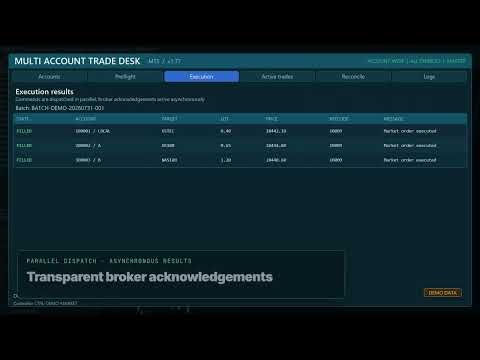
Multi Account Trade Desk MT5

Multi Account Trade Desk MT5

## Short description

Account-wide MASTER-to-SLAVE trade copier for MetaTrader 5 with per-account risk
sizing, automatic broker symbol matching, live readiness monitoring and
parallel execution.

## Product description

Multi Account Trade Desk MT5 is built for traders who manage several MT5
accounts and want one central place to control risk, account readiness and trade
replication.

Attach the same EA as MASTER on the source terminal and as SLAVE on every target
terminal. One SLAVE instance monitors the entire account, so you do not need to
attach the copier to every symbol chart.

When a new MASTER position or pending order appears, the system creates one
logical trade plan and sends commands to all READY accounts in parallel. Each
SLAVE uses its own live broker price and contract specification to calculate
volume and validate spread, margin, stop levels and trading permissions.

### Main features

- One EX5 file with selectable MASTER and SLAVE modes
- Account-wide monitoring of all symbols
- Copies manual trades, Trade Assistant entries and EA trades
- Market orders, pending orders, SL/TP modifications, partial closes and closes
- Per-account Fixed lot, percentage, fixed-money and proportional sizing
- Automatic cross-broker symbol matching for Forex, metals, energy and major
  index aliases such as USTEC / US100 / NAS100 and DE40 / GER40 / DAX40
- Prefix and suffix handling including `.idx`, `.cash`, `.sml`, `.pro`, `.r`,
  `_SB`, `+` and similar broker naming conventions
- Continuous background preflight with lot, risk, margin, spread and reason
- Parallel command batches with asynchronous broker acknowledgements
- Short market-command TTL to reject delayed execution
- Per-account spread, lot, daily loss, drawdown, open risk, position, session,
  direction and order-type limits
- Read-only reconciliation report
- Persistent settings and restart recovery
- Duplicate-command protection and no automatic retry after uncertain execution
- CSV event logging

### Important operating model

The product synchronizes MT5 terminals that are running under the same Windows
user or VPS environment through the MetaTrader Common Files directory. Every
trading account requires its own logged-in MT5 terminal. No DLL and no WebRequest
configuration are required.

### Safety defaults

SLAVE live execution is disabled by default. Real-account execution has a
second independent safety lock. Existing MASTER positions are not imported on
startup unless explicitly enabled. Reconciliation is report-only and never
repairs or reopens a position automatically.

### Recommended first test

Use demo accounts first. Configure one MASTER and one SLAVE, enable demo live
execution, verify the Preflight page, then open a small trade with a real Stop
Loss. Add more SLAVE terminals only after confirming the complete open,
modify and close workflow.

### Risk notice

Trading and trade copying involve financial risk. Broker prices, contract
specifications, execution policies, slippage and connectivity can differ between
accounts. Always test the complete configuration on demo accounts before using
real funds.


Multi Account Trade Desk MT5 — Inputs Guide

The same single EX5 file is installed on every MetaTrader 5 terminal. The
`InpOperatingMode` input decides whether that copy works as the MASTER or as a
SLAVE.

## Operating mode

| Input | Values | Purpose |
|---|---|---|
| `InpOperatingMode` | `MASTER` / `SLAVE` | `MASTER` monitors source trades and manages connected accounts. `SLAVE` validates and executes commands on one target terminal. |

## MASTER settings

| Input | Default | What it does |
|---|---:|---|
| `InpHeartbeatWarningSeconds` | `3` | Shows a warning when a SLAVE heartbeat has not been refreshed for this many seconds. |
| `InpHeartbeatOfflineSeconds` | `10` | Marks the SLAVE offline after this timeout. Must be greater than the warning value. |
| `InpRegistryRefreshMs` | `500` | How often the MASTER refreshes the shared account registry and acknowledgements. |
| `InpMaximumDisplayedAccounts` | `20` | Maximum number of discovered accounts kept in the dashboard list. |
| `InpMaximumBatchAccounts` | `50` | Hard safety ceiling for the number of accounts in one parallel command batch. |

## MASTER readiness monitor

These parameters create the informational background trade plan shown on the
Preflight tab. They do not place an order by themselves.

| Input | Default | What it does |
|---|---:|---|
| `InpPreflightDirection` | `BUY` | Direction used by the background readiness example. |
| `InpPreflightStopDistancePoints` | `500` | Example Stop Loss distance, in broker points, used for continuous risk and margin validation. |
| `InpPreflightRiskReward` | `2.0` | Example Take Profit distance expressed as a multiple of the Stop Loss distance. |
| `InpDefaultRiskPercent` | `1.0` | Default percentage-risk value used for the readiness plan before account-specific settings are applied. |
| `InpControllerReferenceLot` | `0.01` | Reference source lot used by controller-lot sizing modes. It is not forced onto SLAVE accounts. |
| `InpPreflightTTLSeconds` | `10` | Preflight requests older than this are rejected as stale. |
| `InpIncludeMasterAccount` | `true` | Adds the MASTER account to the same risk, readiness and monitoring workflow. |
| `InpBackgroundPreflightMs` | `1000` | Interval between automatic readiness recalculations. |
| `InpMarketCommandTTLms` | `1500` | Maximum lifetime of a market command. An expired command is rejected instead of being executed late. |
| `InpAllOrNothingBatch` | `false` | When `false`, blocked/offline accounts are skipped and READY accounts continue. When `true`, any blocked account prevents the entire batch. |

## MASTER trade copier

| Input | Default | What it does |
|---|---:|---|
| `InpCopyMasterTrades` | `true` | Enables account-wide copying of new positions, pending orders, modifications and closes from the MASTER account. |
| `InpSourceMagicFilter` | `-1` | `-1` accepts every magic number. Set a specific magic number to copy only one source EA. |
| `InpCopyManualTrades` | `true` | Includes trades with magic number `0`, such as manual orders and trades opened by a chart assistant. |
| `InpSourceCommentContains` | empty | Optional case-sensitive source comment filter. Empty means no comment restriction. |
| `InpTargetGroup` | empty | Empty targets every enabled account. Enter a group name to target only matching SLAVE account settings. |
| `InpCopyExistingPositionsOnStart` | `false` | If enabled, imports positions that already existed when the MASTER started. Keep disabled unless intentional to avoid unexpected duplication. |

## SLAVE settings

| Input | Default | What it does |
|---|---:|---|
| `InpHeartbeatIntervalMs` | `1000` | How often the SLAVE publishes account state, balance, equity, symbol and safety status. Minimum accepted value is 250 ms. |
| `InpAllowLiveExecution` | `false` | Primary execution lock. No market or pending command can trade while this is disabled. |
| `InpAllowRealAccountExecution` | `false` | Independent second lock for real-money accounts. Demo accounts do not require this second permission. |

## Account settings controlled from the MASTER dashboard

These are saved automatically for each discovered account and restored after a
terminal restart.

| Control | Purpose |
|---|---|
| `Enabled` | Includes or excludes this account from all command batches. |
| `Emergency Lock` | Immediately blocks new execution for this account without deleting its other settings. |
| `Group` | Logical account group used by `InpTargetGroup`. |
| `Sizing mode` | Chooses Fixed lot, Balance %, Equity %, Fixed money, Controller lot ratio or another supported risk-sizing method. |
| `Sizing value` | Numeric value interpreted by the selected sizing mode. |
| `Maximum spread` | Blocks execution when the local SLAVE spread exceeds this number of broker points. `0` disables this limit. |
| `Maximum lot` | Caps calculated volume. `0` disables the cap. A value below the broker minimum blocks the order rather than silently changing risk. |
| `Automatic symbol matching` | Maps broker aliases such as `USTEC`, `US100`, `NAS100`, `DE40`, `GER40`, `XAUUSD` and `GOLD`, including common prefixes and suffixes. |
| `Daily loss` | Blocks new entries after the configured realized daily loss. `0` disables this limit. |
| `Drawdown %` | Blocks new entries after the configured daily equity drawdown percentage. `0` disables this limit. |
| `Maximum open risk` | Limits estimated money risk across currently open managed positions. `0` disables the limit. |
| `Maximum positions` | Maximum simultaneous positions for this account. `0` disables the limit. |
| `Per symbol` | Maximum simultaneous positions on one target symbol. `0` disables the limit. |
| `Daily reset (min)` | Broker-server minute of day when daily counters reset: `0` is 00:00 and `1439` is 23:59. |
| `Maximum deviation` | Permitted market-order deviation in broker points. |
| `Session start / end` | Allowed broker-server trading window expressed as minutes from midnight. |
| `Market ON/OFF` | Allows or blocks market orders. |
| `Pending ON/OFF` | Allows or blocks pending orders. |
| `Long ON/OFF` | Allows or blocks BUY exposure. |
| `Short ON/OFF` | Allows or blocks SELL exposure. |

## Important MT5 permissions

- The MT5 `Algo Trading` toolbar button must be enabled on each trading terminal.
- `Allow Algo Trading` must be enabled in the EA properties.
- One SLAVE instance is enough per target terminal because it works account-wide
  and monitors every symbol.
- Each trading account still requires its own logged-in MT5 terminal instance.
- Market commands are never retried automatically after an uncertain execution;
  this prevents accidental duplicate positions.
おすすめのプロダクト
NeoPips Engine EA – 究極のトレーディング革命が到来! 「トレーディングの真の力は、他者が見逃すものを見抜くことにあります。NeoPips Engineは市場を追うのではなく、市場を掌握します。」 NeoPips Engine EAについて:あなたのインテリジェントなトレーディングの味方 NeoPips Engine EAは、ありきたりなトレーディングロボットではありません。精度、適応性、そして長期的なパフォーマンスを求めるトレーダーのために開発された、AIに最適化された多次元のエキスパートアドバイザーです。 時代遅れの厳格なルールを持つボットとは異なり、NeoPips Engineは生きた戦略です。リアルタイムで市場を思考し、学習し、適応します。 これは単なる自動化ではなく、進化の過程です。 次世代のインテリジェンス:あなたを自由にするコア機能 AIによる意思決定 動的パターン認識 予測トレンド分析 ライブデータに基づくスマートなエントリー/エグジットロジック マルチエンジン戦略コア – 4つのモード。目標はただ
Equity Tracker MT5 Equity Tracker MT5 は、MetaTrader 5 用のモニタリング型エキスパートアドバイザーで、取引活動、口座状況、および技術的な状態を通知メッセージとして報告します。 このエキスパートアドバイザーは取引ロジックとは独立して動作し、注文の執行や取引管理には一切影響しません。 本製品は取引の新規発注、変更、決済を行いません。 監視および通知機能のみを提供します。 目的 Equity Tracker MT5 は、取引ターミナルを常に監視することなく、取引口座の状況を把握したいトレーダー向けに設計されています。あらゆる取引戦略や他のエキスパートアドバイザーと併用できます。 口座レベルのモニタリング 取引活動の通知 技術的状態の把握 口座およびリスク状況のモニタリング エキスパートアドバイザーは口座パラメータを継続的に評価し、事前に定義された条件が満たされた場合に変更を通知します。 有効証拠金(Equity)およびドローダウン水準の通知 証拠金維持率のモニタリング ユーザー定義のアラート閾値 ハートビート機能とターミナルの状態 ハートビー
BulkOp Trade Manager
Ahmed Jumaa Saif Ali Almheiri
BulkOp Trade Manager Trade faster. Manage smarter. Close with confidence. BulkOp Trade Manager is a powerful MT5 utility EA built for traders who need speed, control, and clean execution directly from the chart. It is designed for active manual traders, scalpers, gold traders, and anyone who wants to manage multiple positions with less delay and fewer clicks. Why BulkOp? Ultra-fast Buy and Sell execution One-click Bulk Close Profit One-click Bulk Close Loss Keyboard trading control Bulk order e
Auto Screenshot Utility MT5
AL MOOSAWI ABDULLAH JAFFER BAQER
The trading limiter that stops you from breaking your own daily loss and trade limits. • Please test the product in the Strategy Tester before purchasing to understand how it works. • If you face any issues, contact me via private message—I’m always available to help. • After purchase, send me a screenshot of your order to receive a   FREE EA   as a gift. Auto Screenshot Utility - The Ultimate Trading Session Tracker & Screenshot Tool Revolutionize Your Trading Documentation with Precision Tim
MT5のエキスパートアドバイザーリスクマネージャーは非常に重要であり、私の意見ではすべてのトレーダーにとって必要なプログラムです。 このエキスパートアドバイザーを使用すると、取引口座のリスクを管理することができます。リスクと利益の管理は、金銭的およびパーセンテージの両方で実行できます。 エキスパートアドバイザーが機能するには、それを通貨ペアチャートに添付し、許容可能なリスク値を預金通貨または現在の残高の%で設定するだけです。 [Instruction for Risk Manager parameters] アドバイザ機能 このリスクマネージャーは、リスクの管理を支援します。 -取引のために -1日あたり - 1週間 - ひと月ほど 制御することもできます 1)取引時の最大許容ロット 2)1日あたりの最大注文数 3)1日あたりの最大利益 4)エクイティを引き受ける利益を設定する それだけではありません。設定で自動設定を指定した場合、アドバイザーはデフォルトのSLとTPを設定することもできます。 アドバイザーは各イベントにアラートを添えて、注文を削除する理由を説明し
Expert advisor that automatically closes all open positions when a specific profit amount or loss amount is reached. The profit and loss amounts are configurable inputs and can be set when attaching the EA to a chart. This EA has proven to be useful in high quantity trading strategies to control and minimize risk. The EA works for all account currencies and is designed to close out all trades once the desired profit or loss is hit.
SmartRisk MA Pro Strategy Overview: SmartRisk MA Pro is an optimized, risk-oriented automated trading strategy (Expert Advisor) developed for the MetaTrader 5 platform. It is designed to identify trading opportunities based on price deviations from moving averages and incorporates a comprehensive capital management system. The Expert Advisor operates on a "new bar" logic, ensuring stability and predictability in trade signal execution. Operating Principles and Trading Logic: At its core, the st
️ Aureus Edge Gold Trader (v2.10) The Specialist Engine for XAUUSD Aureus Edge is not a "jack-of-all-trades" bot. It is a high-precision Expert Advisor engineered strictly for Gold (XAUUSD) . While it includes stability protocols to pass global market validation, every line of logic is optimized for the unique volatility and liquidity of the Gold market . ️ Built for Professional Capital Preservation Unlike popular EAs that use dangerous recovery grids, Aureus Edge focuses on disciplined br
Protected profit это логическое продолжение проекта Equity monitor. Исправлены недочёты и внесены дополнительные моменты. В данном продукте разработан процентный  Traling stop, как на отдельную позицию, так и на дневную прибыль в целом. Есть возможность закрыть позицию по заданному проценту убытка, а так же можно закрыть все позиции по проценту дневной прибыли. Настройки просты и понятны.  Например: Риск на позицию 1% Позиция закроется если процент убытка превысит 1%. Traling 3% допустимое сниже
Aurum Intraday EA
Rodrigo Leonardo Favreau Giuliodoro
Aurum Intraday EA – Advanced Gold Trading Algorithm The Aurum Intraday EA is a powerful automated trading system designed specifically for Gold (XAUUSD) traders who want to capture strong intraday movements while maintaining full control over risk and strategy configuration. Built with a robust algorithm and optimized for H1 and H4 timeframes (H4 recommended) , this Expert Advisor is capable of identifying high-probability opportunities in the gold market and executing trades with precision and
Code Green
Md Wakiluzzaman Raz
Code Green EA This is a breakout strategy featuring advanced market confirmation and robust risk management. The system is designed to be highly flexible, offering the choice to utilize a Martingale recovery module or trade without it. Performance & Transparency This EA is built to provide realistic, sustainable results rather than inflated or unrealistic returns. While I have conducted my own internal forward testing, I encourage all traders to verify the strategy’s performance independently on
SolarTrade Suite 金融ロボット: LaunchPad Market Expert - 取引を開始するために設計されています! これは、革新的で高度なアルゴリズムを使用して値を計算する取引ロボットであり、金融​​市場の世界でのアシスタントです。 SolarTrade Suite シリーズのインジケーター セットを使用して、このロボットを起動するタイミングをより適切に選択してください。 説明の下部にある SolarTrade Suite シリーズの他の製品をご覧ください。 投資と金融市場の世界を自信を持ってナビゲートしたいですか? SolarTrade Suite 金融ロボット: LaunchPad Market Expert は、情報に基づいた投資決定を行い、利益を増やすのに役立つ革新的なソフトウェアです。 SolarTrade Suite 金融ロボット: LaunchPad Market Expert の利点: - 正確な計算: 当社のロボットは、高度なアルゴリズムと分析方法を使用して、市場の動きを正確に予測します。 資産を売買するのに最適なタイミングを
SOLOMON Statistical Arbitrage PRO Advanced Pairs Trading EA with Kalman Filter + Monte Carlo Optimization Overview SOLOMON Statistical Arbitrage PRO is a sophisticated pairs trading Expert Advisor designed for serious traders who want to profit from mean-reversion opportunities between two correlated financial instruments. Using advanced statistical methods including Kalman Filter for dynamic hedge ratio calculation, Monte Carlo simulation for optimal Z-Score detection, and robust risk manageme
EA Auto Martingale MT5の紹介 Auto Martingale は、手動トレードからドルコスト平均法(DCA)トレードを簡単に作成できるエキスパートアドバイザー(EA)です。高度な設定により、EA Auto Martingale は、利益を最適化し、リスクを効果的に管理しながら、独自の方法で完璧なマーチンゲール戦略を作成することができます。 Auto Martingaleの主な機能: Magic Number : デフォルトは0です。この値は最初の手動トレードに基づいて自動的に設定されます。 Maximum Deviation / Slippage : トレードを保護するための最大偏差/スリッページを制限します。 Validate Available Order Margin : 新しいトレードを実行する前に利用可能なマージンを確認します。 Indicator Input : Auto Martingaleは、period=3およびshift=2のパラメータを持つSMAインジケーターを使用して、価格が逆行したときのエントリーポイントを決定し、その後価格が回復する兆候
あなたのグリッドEAは10回中9回勝っています。問題はそこではありませんでした。 最も売れている金のロボットが使っている仕組み——グリッド、ナンピン回復、どのポジションにもストップロスなし、あるのは硬い証拠金ストップひとつだけ——を、4年分の実際のXAUUSDデータで動かしました。スプレッドは各足に記録された実測値、手数料もスワップも実測値です。 169シリーズ中156シリーズが利益。勝率92.3%。 口座は86.2%のマイナスで終わり、最大ドローダウンは96.8%でした。 この二つの数字は同時に真実であり、問題はまさにそこにあります。92%は販売ページに載る数字です。8%は、ある火曜日にやってくる数字です。 GRID GUARDはあなたのEAを置き換えません。見張ります。 すでに購入したロボットと同じチャートに載せてください。建玉を読み取り、そこからグリッドの実際の値幅とロットの増え方を測り、あなたのEAが決して見せてくれない唯一の問いに答えます。 あと4層積んだら、このバスケットはいくらになるのか。 その数字を、口座通貨と有効証拠金に対する割合の両方で、部屋の反対側からでも読める大
Black Viper GOLD
Ignacio Agustin Mene Franco
Black Viper GOLD v2.0 — Expert Advisor MT5 Pair: XAU/USD | Timeframe: M1 (Scalping) | Minimum Capital: $1,000 USD Overview Black Viper GOLD is a professional Expert Advisor for MetaTrader 5, specifically designed to trade the XAU/USD pair on the M1 timeframe using a high-precision scalping strategy. It combines four advanced technical analysis systems with dynamic risk management, session filters, and an aggressive turbo mode, all within a robust framework focused on capital preservation. In
Exp COPYLOT CLIENT for MT5
Vladislav Andruschenko
3.97 (35)
MetaTrader 5 用のプロフェッショナル取引コピー機 MetaTrader 向けの高速・高性能・信頼性の高い 取引コピー機 です。 COPYLOT は、MT4 と MT5 のターミナル間で Forex 取引をコピーでき、 Hedge 口座と Netting 口座の両方に対応しています。 COPYLOT MT5 版の対応構成: - MT5 Hedge → MT5 Hedge - MT5 Hedge → MT5 Netting - MT5 Netting → MT5 Hedge - MT5 Netting → MT5 Netting - MT4 → MT5 Hedge - MT4 → MT5 Netting MT4 版 完全な説明 + DEMO + PDF 購入方法 インストール方法 ログファイルの取得方法 テストと最適化の方法 Expforex のすべての製品 MT4 ターミナルへのコピーも可能です(MT4 → MT4、MT5 → MT4): COPYLOT CLIENT for MT4 COPYLOT は、2台、3台、さらには10台のターミナル間で同時に動作できる、プロフェッ
Basic working principles of EA will have 2 main systems. 1. Timed order opening means that at the specified time the EA will open 1 Buy order and 1 Sell order. 2. When the graph is strong, the EA will remember the speed of the graph. is the number of points per second which can be determined You can set the number of orders in the function ( Loop Order ). The order closing system uses the trailling moneym Loss system, but I set it as a percentage to make it easier to calculate when the capital
Trade Manager Simple
Juan Andres Montoya Robledo
Trade Manager Simple NQ and XAUUSD — Manual Trading Panel and Local Replicator Open the trade once. Your other MT5 terminals open it on their own, each with the lot size that fits that account. TMS is two tools in one: a panel for trading by hand with your risk under control, and a replicator that copies your entries to every other MetaTrader 5 terminal running on the same computer. No VPS, no signal service, no connection between brokers. The terminals talk through MetaTrader's shared folder,
Trading panel for manual trading. Has a fairly wide functionality. Allows you to automatically calculate the order size, open both market and pending orders. It has a wide range of options for closing orders, it is possible to partially close orders, close orders after reaching a certain profit or loss, separately close profitable and unprofitable, buy and sell, as well as pending orders. The panel also contains a simple implementation of a grid of pending orders, reverse and lock functions, tr
Bober Real MT5
Arnold Bobrinskii
4.88 (16)
Bober Real MT5 is a fully automatic Forex trading Expert Advisor. This robot was made in 2014 year and did a lot of profitbale trades during this period. So far over 7000% growth on my personal account. There was many updates but 2019 update is the best one. The robot can run on any instrument, but the results are better with EURGBP, GBPUSD, on the M5 timeframe. Robot doesn't show good results in tester or live account if you run incorrect sets. Set files for Live accounts availible only for cu
SBR Canvas — Expert Advisor for MetaTrader 5 Overview SBR Canvas is a comprehensive, fully visual trading assistant for MetaTrader 5. It combines automated trade execution with an advanced drag-and-drop control panel built directly onto the chart canvas, giving traders real-time control over every aspect of their trading strategy without leaving the chart. Advice for all trader using this Expert Advisor - Safest amount to use this $5000 - $10000 as a starting point. Core Trading Engine Direc
HMA Scalper Pro EA
Vladimir Shumikhin
5 (2)
HMA Scalper Pro EA — Hull Moving Average (HMA) インジケーターに基づく MetaTrader 5 用自動売買アドバイザー 概要 HMA Scalper Pro EA は、Hull Moving Average (HMA) の方向にトレードする MetaTrader 5 用のプロフェッショナルなトレーディングロボット(Expert Advisor)です。HMA インジケーターは現在のトレンド方向を判定し、アドバイザーはその方向にトレードを執行し、Smart Risk キャピタルマネジメント、アダプティブグリッドトレーディング、トレイリングストップ、ブレイクイーブン、タイムフィルターでエントリーを補完します。 このアドバイザーは Netting アカウントと Hedging アカウントの両方をサポートし、金(XAU/USD)、外国為替通貨ペア、原油、指数、暗号資産の取引に適しています。 HMA SCALPER PRO EA を選ぶ理由 - Hull Moving Average シグナル — HMA の方向に基づくエントリー。HMA
Maximas e Minimas
Lucas Ricardo Almeida Muniz
LUCRAM EA 2.01 — Configurable Trading Robot for MetaTrader 5 LUCRAM EA is an automated trading robot developed for MetaTrader 5. It allows traders to create different trading configurations by combining high-and-low strategies, moving averages, technical indicators, market filters, and customizable exit rules. The robot can open buy positions, sell positions, or trade in both directions. It is suitable for testing Day Trading and Swing Trading strategies across different financial instruments an
EN DESARROLLO, TESTING PERIOD. PRISM KellyEngine aplica disciplina de riesgo profesional directamente en tu flujo MT5. Te ayuda a: definir lotaje de forma consistente, limitar sobrecarga de riesgo, proteger cuenta en escenarios de volatilidad. Ideal para traders que quieren dejar atras el lotaje por intuicion. Parametros principales  Riesgo base por operacion (%) Limite maximo de lotaje Umbral de confianza Multiplicadores de seguridad Incluye Motor de sizing adaptable Controles de limites de ri
PROMO: ONLY 10 LEFT AT $90! Next price:        $199 Price will be kept high to limit number of users for this strategy. This EA starts trading at the open of   London (UK) Session . It is based on analysis of advanced statistical distributions combined with short to medium term reversal patterns which have mean-reversion attributes. The EA includes several smart features and allows you to trade with a fixed or automatic lot size. The EA is not sensitive to spreads but can be backtested on both
Introducing Neural Bitcoin Impulse - an innovative trading bot created using neural network training technology on voluminous market data sets. The built-in mathematical model of artificial intelligence searches for the potential impulse of each next market bar and uses the resulting patterns of divergence and convergence between the predictive indicators and the price to form high-precision reversal points for opening trading positions. The trading robot is based on the Neural Bar Impulse ind

# DS_Copy_EA - User Description DS_Copy_EA is a MetaTrader 5 Expert Advisor that copies trades between MT5 terminals running on the same machine. One EA instance acts as a **Provider** (signal source) and another acts as a **Receiver** (copier). The mode is selected in the EA settings. **How it works:** 1. The **Provider** publishes its open positions internally every 500ms 2. The **Receiver** reads every 1 second, detects new/changed/closed positions, and mirrors them on its own account 3. I

Только сейчас вы можете приобрести  TradeOps Command Center с 10% скидкой всего за 630$. Акция действует до 01.04.2026 Для получение инструкции об использование утилиты обратитесь в личные сообщения! TradeOps Command Center — Профессиональный инструмент контроля риска и дисциплины в трейдинге TradeOps Command Center — это многофункциональная утилита для MetaTrader 5, разработанная для трейдеров, которые стремятся к системному и дисциплинированному подходу к торговле. Продукт объединяет в себе у
このプロダクトを購入した人は以下も購入しています
Trade Assistant MT5
Evgeniy Kravchenko
4.43 (215)
取引 ごとのリスクの 計算、新規注文 の 簡単 な 設置、部分的 な 決済機能 を 持 つ 注文管理、 7 種類 のトレーリングストップなど 、便利 な 機能 を 備 えています 。 追加の資料と説明書 インストール手順   -   アプリケーションの手順   -   デモアカウント用アプリケーションの試用版 ライン機能 チャート上にオープニングライン、ストップロス、テイクプロフィットを表示します。この機能により、新規注文を簡単に設定することができ、注文を出す前にその特徴を確認することができます。   リスク計算 リスク計算機能は、設定されたリスクとストップロス注文のサイズを考慮して、新規注文のボリュームを計算します。ストップロスの大きさを自由に設定できると同時に、設定したリスクを守ることができます。 Lot calc ボタン - リスク 計算 を 有効 / 無効 にします 。 Risk フィールドでは 、必要 なリスクの 値 を 0 から 100 までのパーセンテージまたは 預金通貨 で 設定 します 。 設定」 タブで 、 リスク 計算 の 種類 を 選択 します :「 $ 通
Trade Manager EAへようこそ。これは、取引をより直感的、正確、そして効率的にするために設計された究極の リスク管理ツール です。これは単なるオーダー実行ツールではなく、包括的な取引計画、ポジション管理、リスク管理のためのソリューションです。初心者から上級者、迅速な実行を必要とするスキャルパーまで、Trade Manager EAはあらゆるニーズに対応し、為替、指数、商品、暗号通貨などさまざまな市場で柔軟に対応します。 Trade Manager EAを使用すると、複雑な計算が過去のものになります。市場を分析し、エントリーポイント、ストップロス、テイクプロフィットのレベルをチャート上のラインでマークし、リスクを設定するだけで、Trade Managerが最適なポジションサイズを即座に計算し、SLとTPをピップ、ポイント、口座通貨でリアルタイムに表示します。すべての取引が簡単かつ効果的に管理されます。 主な機能: ポジションサイズ計算機 :定義されたリスクに基づいて取引サイズを瞬時に決定します。 簡単な取引計画 :エントリー、ストップロス、テイクプロフィットを設定するためのド
================================================================================ POC BREAKOUT - V20.72. Full Professional Grade Toolkit ================================================================================ POC Breakout is a full MetaTrader 5 trading dashboard for discretionary traders who want breakout signals, Point of Control (POC) context, volume profiles, order flow, market structure, news, alerts, and advanced trade planning in one professional workspace. Attached directly to you
TradePanel MT5
Alfiya Fazylova
4.88 (167)
Trade Panelは多機能なトレーディングアシスタントです。アプリには手動取引用の50以上のトレーディング機能が搭載されており、ほとんどの取引作業を自動化することができます。 アプリの説明書+ビデオガイド: https://www.mql5.com/en/blogs/post/772292 デモ口座用アプリの試用版: https://www.mql5.com/en/blogs/post/750865 アプリのインストール方法: https://www.mql5.com/en/blogs/post/756239 アプリをビジュアルモードでテストする方法: https://www.mql5.com/en/blogs/post/770277 VPSのMetaTraderにアプリをインストールする方法: https://www.mql5.com/en/blogs/post/770190 取引。 ワンクリックで取引操作を行うことができます: リスクを自動計算して指値注文やポジションを開く。 複数の注文やポジションをワンクリックで開く。 注文のグリッドを開く。 保留中の注文やポジションをグルー
Telegram to MT5 Multi-Channel Copier   は、Telegram チャンネルのトレードシグナルを MetaTrader 5 へ自動コピーします。ボット不要、ブラウザ拡張不要、手動コピー不要。Telegram にシグナルが届くと、EA が数秒であなたのターミナルに注文を出します。 さらに、チャンネルをコピーする前に、内蔵バックテスターでそのチャンネルがあなたの口座でどう動いたかを確認できます。 製品は 2 つのコンポーネントで構成されます:Telegram チャンネルを監視する Windows アプリと、MT5 ターミナルでシグナルを執行する本 EA です。MT4 版もあります   こちら . セットアップガイドとアプリのダウンロード:   https://www.mql5.com/en/blogs/post/768988 現在の価格は今後値上げされます。 仕組み Windows アプリは、ボットではなくあなた自身の API 認証情報で Telegram に接続します。そのため、プライベートや VIP を含む、購読中のあらゆるチャンネル・グループ・トピッ
ベータリリース Telegram to MT5 Signal Trader はまもなく正式なアルファ版をリリースします。いくつかの機能はまだ開発中で、小さな不具合に遭遇する可能性があります。問題が発生した場合はぜひご報告ください。皆さまのフィードバックがソフトウェア改善に役立ちます。 Telegram to MT5 Signal Trader は、 Telegram のチャンネルやグループからの取引シグナルを自動的に MetaTrader 5 にコピーする強力なツールです。 パブリックおよびプライベートの両方のチャネルに対応し、複数のシグナル提供元を複数のMT5口座に接続可能です。ソフトウェアは高速で安定し、すべての取引を細かく制御できます。 インターフェースは直感的で、ダッシュボードとチャートは見やすく設計されており、リアルタイムで動作状況をモニターできます。 必要環境 MQL の制限により、EA は Telegram と通信するためのデスクトップアプリが必要です。 インストーラーは公式の インストールガイド にあります。 主な機能 マルチプロバイダー: 複数の Telegram
Farmed Hedge Yield Farming | All Markets (Manual - Hybrid - Semi/Automated EA) VERIFIED TRADING RESULTS - Farmed Hedge Yield Axi Copy:  https://www.mql5.com/en/signals/2356376 - Farmed Hedge Yield Exn Copy:   https://www.mql5.com/en/signals/2356404 - Farmed Hedge Yield V Copy:  https://www.mql5.com/en/signals/2357156 IMPORTANT NOTICE: FarmedHedge is a MANUAL-FOCUSED TRADING UTILITY ,not a fully automated EA. Results shown on this Signal include manual trades and overall strategic management.
25% discount on the release of the tool: only for the next 3 buyers Send a message to receive a demo version. AstroTrade Trading Assistant AstroTrade is a comprehensive multi-functional trading utility developed for the MetaTrader 5 platform. It integrates essential tools for trade execution, risk management, and technical monitoring into a single unified interface. The application is designed to assist traders in managing their daily operations through a visual and structured environment. Vi
Premium Trade Manager - コーチ内蔵型トレードパネル Premium Trade Manager は、AIトレーディングコーチをあなたのチャートの中に置き、その下に完全な執行エンジンを備えたツールです。いつも通りにトレードをセットアップし、あなた専任のAIトレーディングコーチ Max にそのセットアップをそのまま読み取らせて、発注前に率直な見解を伝えてもらいましょう。ストップの幅が規律あるアプローチに合っているか、リスクサイズは適切か、高影響のニュースイベントが数分後に迫っていないか、プロップファームの制限に近づいていないか。その下には、クリックの後をすべて処理するエンジンが備わっています。ワンクリックのリスクサイズ計算による発注、チャート上でドラッグして組み立て、発注後も動かせるプラン、最大4段階の分割利確、7種類のトレール方式、リアルタイムのプロップファームコンプライアンス、ニュースガード、そしてコストを自ら採点するスプレッド機能。判断はあなたが下す。Max がもう一度確認する。後のことはすべてパネルが担う。 購入前に実際に触れて試せます。 ブラウザ上でライブ
EA Overfitter
Stephen J Martret
5 (1)
That backtest looks great. But will it still be making money tomorrow, next week, next month? EA Overfitter re-runs your EA on 100 price histories it has never seen. One score tells you if the edge is real. A backtest tells you what an EA did on one price history — the one that happened to occur. What you cannot tell from it is how much of that result was the strategy and how much was the particular path. EA Overfitter answers that. It builds up to 100 synthetic price histories your EA has n
Grid Manual MT5
Alfiya Fazylova
4.73 (22)
「Grid Manual」は、注文のグリッドを操作するための取引パネルです。 ユーティリティはユニバーサルで、柔軟な設定と直感的なインターフェイスを備えています。 それは、損失を平均化する方向だけでなく、利益を増やす方向でも注文のグリッドで機能します。 トレーダーは注文のグリッドを作成して維持する必要はありません。 すべてが「Grid Manual」によって行われます。 注文を開くだけで十分であり、「Grid Manual」は注文のグリッドを自動的に作成し、非常に閉じるまでそれに付随します。 完全な説明とデモバージョン ここ。 ユーティリティの主な機能と機能 ユーティリティは、モバイル端末から開かれた注文を含め、あらゆる方法で開かれた注文を処理します。 「制限」と「停止」の2種類のグリッドで機能します。 グリッド間隔の計算には、固定と動的(ATRインジケーターに基づく)の2つの方法で機能します。 オープンオーダーグリッドの設定を変更できます。 チャート上の各注文グリッドの損益分岐点を表示します。 各注文グリッドの利益率を表示します。 ワンクリックでグリッドから収益性の高い注文を閉じるこ
The product will copy all telegram signal to MT5 ( which you are member) , also it can work as remote copier.  Easy to set up, copy order instant, can work with almost signal formats, image signal,  s upport to translate other language to English Work with all type of channel or group, even channel have "Restrict Saving Content", work with  multi channel, multi MT5 Work as remote copier: with signal have ticket number, it will copy exactly via ticket number. Support to backtest signal. How to s
Signal TradingView to MT5 Pro Automator TradingViewとMetaTrader 5間の即時プロフェッショナル実行 TradingViewのシグナル(アラート)とMT5での実際の約定を繋ぐ、最も強固なコミュニケーションブリッジで、取引戦略を自動化します。スピード、柔軟性、そして完璧なリスク管理を求めるトレーダー向けに設計されたこのExpert Advisorは、あらゆるアラートメッセージを正確な成行または指値注文に変換します。 強みと利点 ユニバーサルパーシングエンジン(独自技術): あらゆるアラート形式からデータを自動的に認識し、抽出できる高度なテクノロジー。単一の固定フォーマットに制限されることはありません。システムはシンボル(銘柄)、アクション、価格、SL(ストップロス)、TP(テイクプロフィット)を自動的に理解します。 リアルタイム実行: レイテンシ(遅延)を最小限に抑えるよう最適化された、1秒未満の超高速ポーリング技術。シグナルを受信してから数ミリ秒以内に注文が実行されます。 機関投資家レベルのリスク管理: 以下に基づく自動かつ正確
FUTURES ORDERFLOW FOOTPRINT CHART Professional OrderFlow EA for MetaTrader 5 Version 1.01| Professional tool for real traders | Institutional-Grade Visualization STRATEGY TESTER USERS - PLEASE SELECT EVERY REAL TICK WHEN TESTING AND YOU HAVE DOWNLOADED HISTORICAL DATA. IF YOU SEE A WAITING SCREEN AND IT IS NOT DOWNLOADING, IT MEANS YOU HAVE LOW HISTORICAL DATA. TRY 1 MIN AND 5 MIN FIRST ON 1 DAY DATA. ONE DAY DATA SHOULD BE THE NEWEST AND MOST CURRENT DATE. PLEASE WAIT UNTIL THE MARKET HAS ROL
Footprint Chart Pro — Professional OrderFlow EA for MetaTrader 5 Version 6.34 | Professional tool for real traders | Institutional-Grade Visualization DEMO USERS - PLEASE SELECT EVERY TICK / REAL TICK WHEN TESTING AND YOU HAVE DOWNLOADED HISTORICAL DATA. IF YOU SEE A WAITING SCREEN AND IT IS NOT DOWNLOADING, IT MEANS YOU HAVE LOW HISTORICAL DATA. TRY 1 MIN AND 5 MIN FIRST ON 1 DAY DATA. ONE DAY DATA SHOULD BE THE NEWEST AND MOST CURRENT DATE. PLEASE WAIT UNTIL THE MARKET HAS ROLLED OVER PERIOD.
Trade Copier Ultimate
Janitha Sandaruwan Amaradasa Wickramasingha Arachchilage
5 (5)
Trade Copier Ultimate - Telegram to MT5 Signal Copier Trade Copier Ultimate automatically copies Telegram trading signals into MetaTrader 5. The EA can read signal messages, detect the symbol, order type, entry price, Stop Loss, Take Profit levels and selected update commands, then execute or manage the trade in MT5 using your lot and risk settings. It is more than a basic Telegram to MT5 copier. TCU also supports Bot API and user-account Bridge workflows, Discord signal routing, local MT5 to MT
Timeless Charts
Samuel Manoel De Souza
5 (8)
Timeless Charts is an all-in-one trading utility for professional traders. It combines custom chart types such as Seconds Charts and Renko with advanced order flow analysis using Footprints , Clusters , Volume Profiles , VWAP studies, and anchored analysis tools for deeper market insight. Trading and position management are handled directly from the chart through an integrated trade management panel , while Market Replay and Virtual Accounts provide environments for practicing trading skills and
MT5 to Telegram Signal Provider は、Telegramのチャット、チャンネル、またはグループに 指定された シグナルを送信することができる、完全にカスタマイズ可能な簡単なユーティリティです。これにより、あなたのアカウントは シグナルプロバイダー になります。 競合する製品とは異なり、DLLのインポートは使用していません。 [ デモ ] [ マニュアル ] [ MT4版 ] [ Discord版 ] [ Telegramチャンネル ]  New: [ Telegram To MT5 ] セットアップ ステップバイステップの ユーザーガイド が利用可能です。 Telegram APIの知識は必要ありません。必要な全ては開発者から提供されます。 主な特長 購読者に送信する注文の詳細をカスタマイズする機能 例えば、Bronze、Silver、Goldといった階層型のサブスクリプションモデルを作成できます。Goldサブスクリプションでは、すべてのシグナルが提供されます。 id、シンボル、またはコメントによって注文をフィルターできます 注文が実行されたチャート
Trade Indicator Assistant   is a powerful MT5 utility designed to turn indicators into automated trading systems. Its main feature is the ability to automatically detect an indicator’s   BUY and SELL signal buffers , without requiring you to know the buffer numbers, search through indicator settings, or modify the indicator source code. Bonus Indicator:   After purchasing Trade Indicator Assistant, contact me to receive   Trade Signal Pro   completely free as a bonus indicator. [Download Demo V
MetaTrader 5 用トレーディングパネル — チャートとキーボードから行うプロフェッショナルなワンクリック取引 アクティブトレーダーのために設計された高機能 Trading Panel。標準の MetaTrader 操作よりも、はるかに速く、直感的に、そして効率的に取引を実行できます。 本パネルは、ポジション管理、未決注文管理、利益コントロール、執行スピードをひとつのプロフェッショナルなワークスペースに集約した実践的なソリューションです。 これは単なる補助ツールではありません。MetaTrader 5 のための本格的な trading cockpit です。チャートから直接操作し、キーボードで素早くコマンドを実行し、自動計算や視覚的なガイドを活用することで、手動トレードをより速く、より明確に、より快適にします。 このパネルを使えば、チャート上からワンクリックで注文を実行でき、標準の MetaTrader コントロールと比べて最大 30 倍速く取引操作を行うことができます。 新しいプレミアム版が利用可能です: VirtualTradePad PRO SE で取引ワークフローを強
Your EAs cannot see each other, but Anchor can. Anchor gives you one place to coordinate your EAs, manage risk, and decide when trading is allowed. It works alongside the trading bots you already use without any changes to them. The Problem One EA opens a trade. Then another starts trading. The next thing you know, you wake up to multiple grids built across your account. Each EA may be doing exactly what it was designed to do, but together they can place far more risk on your account than you in
Trade Manager DashPlus
Henry Lyubomir Wallace
4.85 (13)
DashPlus は、MetaTrader 5プラットフォーム上での取引効率と効果を向上させるために設計された高度なトレード管理ツールです。リスク計算、注文管理、高度なグリッドシステム、チャートベースのツール、パフォーマンス分析など、包括的な機能を提供します。 主な機能 1. リカバリーグリッド 逆境の市場環境下で取引を管理するための平均化および柔軟なグリッドシステムを実装します。 取引回復のための戦略的なエントリーおよびエグジットポイントを可能にします。 2. スタックグリッド 強い市場の動きの中でポジションを追加することで、有利な取引での潜在的なリターンを最大化するように設計されています。 トレンド市場で利益を得られるよう、勝ち取引を拡大します。 3. 損益(P&L)ライン チャート上に直接、潜在的な利益と損失のシナリオを視覚的に表示します。 設定を調整し、P&Lラインをドラッグして、実行前にさまざまな取引結果を評価します。 4. バスケットモード 同じシンボルでの複数ポジションの管理を簡素化し、それらを単一の集約ポジションにまとめます。 平均価格に基づいて、ストップロスやテイクプ
Power Candles Strategy Scanner - 自動最適化型マルチシンボル設定ファインダー パワーキャンドル・ストラテジー・スキャナーは 、パワーキャンドル・インジケーターを駆動するのと全く同じ自己最適化エンジンを、マーケットウォッチに登録されているすべての銘柄に対して並行して実行します。1つのパネルで、現在統計的に取引可能な銘柄、各銘柄で勝率の高い戦略、最適なストップロス/テイクプロフィットの組み合わせが表示され、新たなシグナルが発生した瞬間に通知が届きます。 このツールは、Stein Investmentsのエコシステムの一部です。  18種類以上のツールをすべて閲覧し、AIを活用したセットアップの推奨を受け取り、  https://stein.investments でコミュニティに参加しましょう 市場動向を網羅。銘柄ごとに3,000件以上の自動最適化。2種類のアラート。ワンクリックでチャートを切り替えて即座にアクション。 なぜこれが必要なのか 多くのマルチ銘柄スキャナーは、 価格の動き (ボラティリティ、変動率、銘柄ごとのRSI)を表示するだけです。それ
This Expert Advisor waits a position to be opened, no matter if you open manually or with the EA buttons or eventually via mobile: it creates a Grid in Anti Martingale with pending stop orders in the same direction of the first position. You can specify the number of orders, the size and the distance between the orders. You can also adjust the Monetary Target of the Grid, the monetary Stop Loss, the Intermediate Target (when reached the EA insert an order with opposite direction of the total pos
Risk Manager Pro MT5 is an account protection Expert Advisor for traders who want strict risk control inside MetaTrader 5. The utility monitors your account equity, daily and weekly results, drawdown, open positions, trade count, consecutive losses, and trading hours. When a configured limit is reached, it can automatically close positions, cancel pending orders, stop other EAs, send notifications, or close the terminal. Instead of relying on discipline during a stressful trading session, you de
Trade Assistant 38 in 1
Makarii Gubaydullin
4.91 (23)
多機能ツール:ロット計算、グリッド注文、R/R比率、トレードマネージャー、サプライ&デマンドゾーン、プライスアクションなど デモ版   |   ユーザーマニュアル トレードアシスタント   はストラテジーテスターでは動作しません :   こちらからデモ版をダウンロード  して ユーティリティ をテストできます。 ご質問、改善のご提案、バグ発見の場合は ご連絡ください MT4版が必要な場合は こちら から入手できます トレード   プロセス を簡素化、高速化、自動化。   ダッシュボード で標準端末の機能を拡張。 トレードパネルは  あらゆる取引商品で動作:外国為替、株式、インデックス、暗号通貨など。 1. 新規トレードの実行 :ロット / リスク / R/R計算 :手動トレードのためのリスク管理 ロット計算機(リスクサイズに基づく取引量計算) リスク計算機(ロットサイズに基づくリスク額) リスクリワード   比率 グリッド注文:  + 動的間隔オプション、スプリットロットオプション 注文のアクティベーショントリガー、+ バイストップリミット / セルストップリミット 仮想SL、仮想
アシスタント: トレードアシスタント-MT4 (クリックしてダウンロード) トレードアシスタント-MT5 (クリックしてダウンロード) 取扱説明書をよくお読みください。 基本事項: ポジションの迅速な開設と閉鎖、ワンクリックでのポジションの開設と閉鎖、ワンクリックでの注文の発注 ドローライントレード 自動SL/TP 近くのシンボル 利益保護 SLプロテクトを移動 トレーリングSL アカウントリスクコントロール 秩序の影 注文の自動追加 自動決済注文 閉じる 再開 記号情報 チャット受付中 データ統計 言語選択と切り替えに対応(現在、中国語と英語に対応)         自動言語認識 サポート   ホットキーの開閉   バインディング、ショートカットキーを使用してポジションを素早く開閉します...     ショートカットキーで閉じる。最大30個のホットキーをサポート。 ロック解除はほとんどの機能をサポートしています   リプレイ   操作と   テスト環境で使用される 求人情報(開店・閉店): ワンクリック位置オープン(       (損切り注文の便利な設定、ロットサイズの自
YuClusters
Yury Kulikov
4.93 (43)
Attention: You can view the program operation in the free version  YuClusters DEMO .  YuClusters is a professional market analysis system. The trader has unique opportunities to analyze the flow of orders, trade volumes, price movements using various charts, profiles, indicators, and graphical objects. YuClusters operates on data based on Time&Sales or ticks information, depending on what is available in the quotes of a financial instrument. YuClusters allows you to build graphs by combining da
Copy your MT5 trades to Interactive Brokers You keep using MT5. Every order you open or close is sent to your IB account. In real time. No coding. No changes to your strategy or EA. Try it first Rent 1 month: $30. Test on a live or paper account. What it does Real-time copying: same direction, reverse, or one side only. Map any MT5 symbol to any IB symbol. Set a lot ratio for each. Forex, Futures, Stocks, CFDs, Metals and Crypto. Position sync: both accounts checked, any difference fixed. Optio
作者のその他のプロダクト
Range Breakout EA  Hey there! Our Range Breakout EA is built to help you take advantage of those early moves in the Asian session. Here’s how it works: during a specific time window, it marks the highest and lowest points to create a range. Then, it sets up buy and sell limit orders just outside that range, so you’re ready to catch a breakout in either direction! :) For safety, the stop loss goes at the opposite end of the range, but you can customize it in the settings if you like. The take pro
FREE
Initial Balance Indicator for MQL5 The Initial Balance Indicator is a powerful trading tool for the MetaTrader 5 (MT5) platform that helps traders analyze market structure by marking the Initial Balance (IB) range of a trading session. This range is typically formed during the first X minutes of a trading session (e.g., the first hour in futures markets) and acts as a key reference for potential price movements. Key Features: Customizable Time Period: Define the exact start and end time for the
Range Breakout with new ranges every day for better results. Inputs for every day with size filter. You can optimize it for every day with your settings , or i can send profitable settings for live trading longterm. Its not grid system its only for persons who know what is algotrading and not looking for overfitting grid strategies which can blow your account.
Short Description: Automated trading on NASDAQ 100 using M15 timeframe. Advanced risk management, trend and breakout detection. Full Description: Trade NASDAQ 100 efficiently with this fully automated Expert Advisor designed for the M15 timeframe. The bot uses a combination of trend-following and breakout strategies to enter and manage trades. Key Features: Works on NASDAQ 100 (US100) , timeframe M15 . Automated trade execution : no manual intervention required. Smart risk management : customi
In this video, I’m testing a Gold trading bot for MetaTrader 5 on the 3-hour timeframe. This Expert Advisor is designed for XAUUSD and uses a systematic trading approach with automated entries, exits, and risk management. The goal of this backtest is to see how the strategy performs on gold across different market conditions, including trends, pullbacks, volatility spikes, and ranging periods. Backtest overview: • Symbol: XAUUSD / Gold • Platform: MetaTrader 5 • Type: Expert Advisor • Timefra
Gold Limit EA is an automated trading system for MetaTrader 5, designed for trading XAUUSD on the H1 timeframe. The Expert Advisor uses a limit-entry based approach. Instead of entering the market immediately, the EA waits for price to reach a predefined entry area and places pending orders according to the internal strategy logic. This approach is designed to avoid emotional trading decisions and keep the execution fully systematic. The EA includes automatic entry management, stop loss place
Pair Divergence Hybrid Pair Divergence Hybrid is a MetaTrader 5 Expert Advisor designed for statistical pair trading between two selected instruments. The EA analyzes the relationship between two symbols and looks for moments when their statistical spread diverges from its normal range. When the divergence reaches the configured threshold, the EA opens a two-leg basket position: one symbol is bought and the second symbol is sold, or vice versa. The exit logic is based on statistical mean reversi
Visual MT5 trade planner with draggable entry, SL and TP, risk sizing and order management. ## Full description Risk Assistant MT5 is a manual trading utility for planning, sizing and managing orders directly on a MetaTrader 5 chart. The utility does not generate trading signals and does not decide when to enter the market. The trader selects the direction, entry, stop loss, take profit and acceptable risk. Risk Assistant displays the planned trade, calculates the volume and sends the order
フィルタ:
レビューなし
レビューに返信