Margin Tick Ratio

Margin Tick Ratio — margin efficiency analysis for all broker's instruments

Margin Tick Ratio is a script for MetaTrader 5 that runs through your broker's tools in one run and answers a practical question: how much "tick" profit do you get for each unit of collateral, and how expensive is the entry spread.

The script does not trade. It collects data, ranks tools by efficiency, and generates a user-friendly report in a terminal, CSV, and interactive HTML file.

───

Who is this product for

• Traders who choose the instruments with the best return on margin
• Scalpers and Intraday traders — estimate Spread/Tick and entry cost
• Users with a limited deposit — MaxLot and RiskLot calculations
• Those who compare broker conditions using hundreds of symbols (Forex, CFD, indices, metals, oil, crypto, stocks) • Analysts who need CSV export for Excel/Google Sheets

───

What does the script do?

1. Downloads symbols — all broker's tools or just a Market Overview
2. For each symbol, it calculates for a given test lot:
• Margin — deposit for opening a BUY
• Tick P/L — profit/loss when the price moves by 1 tick
• Spread — the cost of the spread in the deposit currency • Ratio — Tick P/L ÷ Margin (the main indicator of efficiency)
• Spread/Tick — how many ticks of profit are "eaten up" by the spread
• MaxLot — the maximum lot on the current balance
3. Sorts the results by Ratio (the best ones are on top)
4. Outputs the table to the terminal log 5. Exports CSV and interactive HTML to a shared terminal folder

───

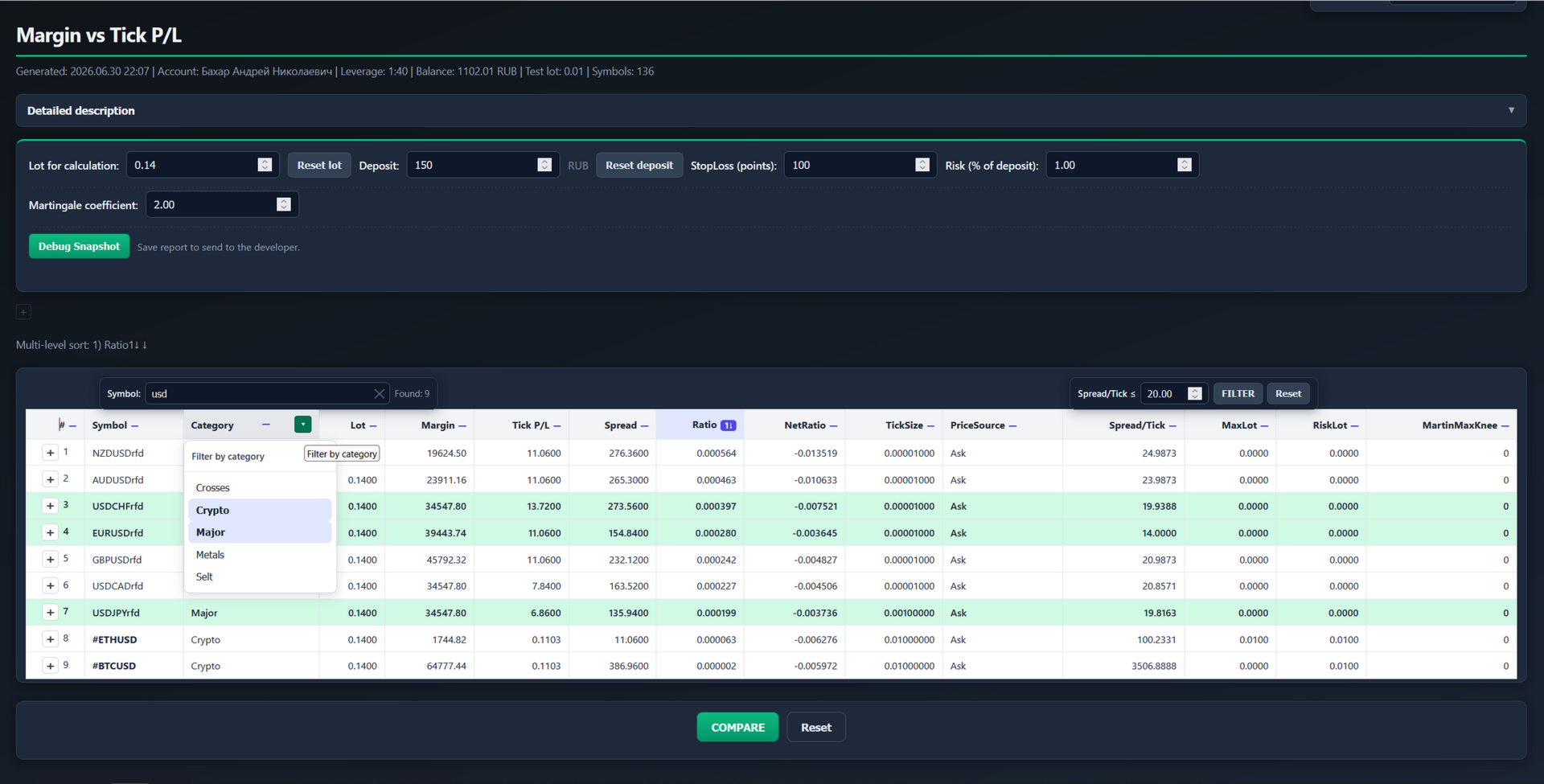
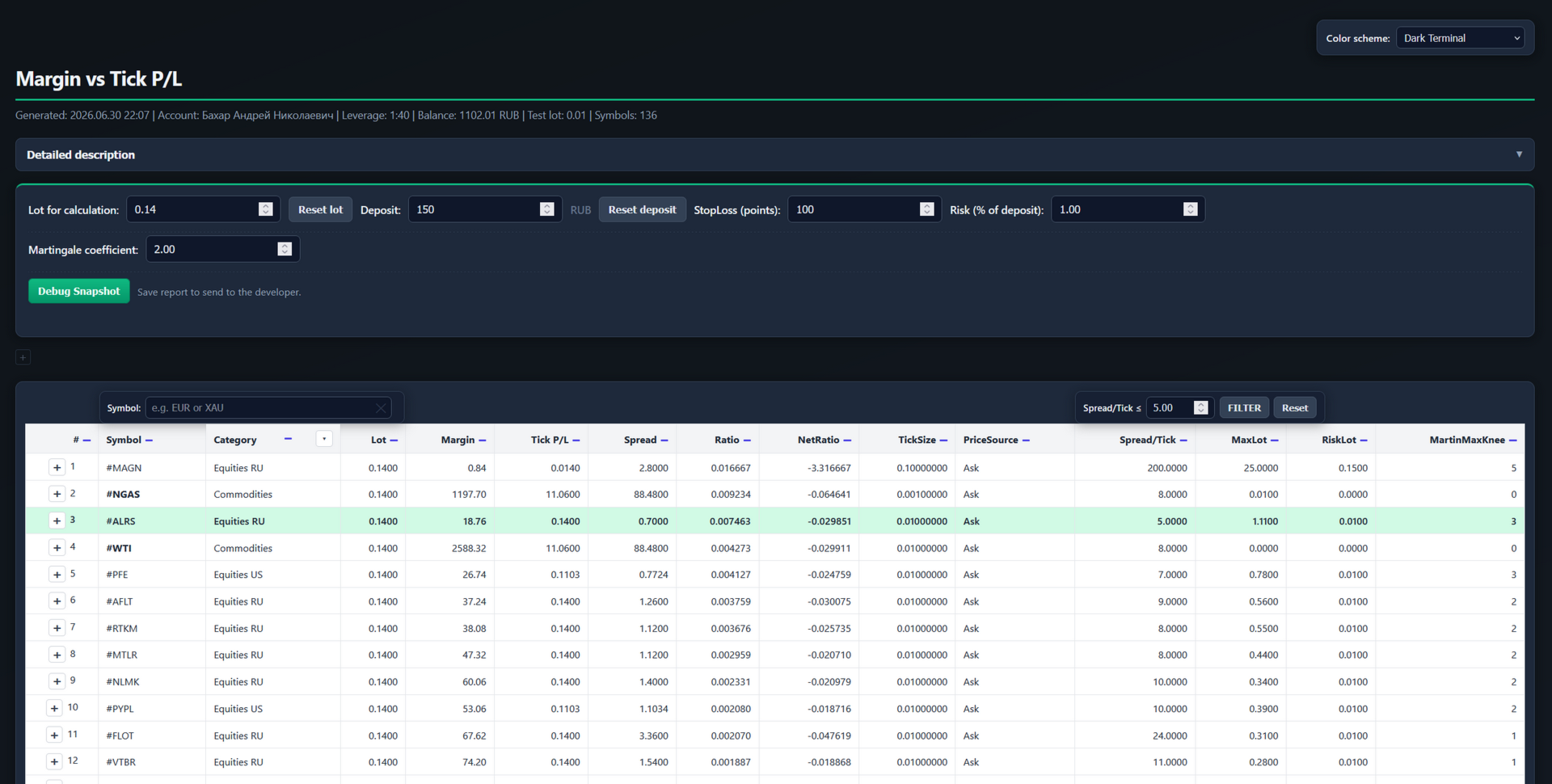
Interactive HTML report (main feature)

The HTML file opens in a browser and works without the Internet — all calculations are already inside.

Settings panel above the table:
• Lot for calculation — recalculation of Margin, Tick P/L, Spread, Ratio
• Deposit — recalculation of MaxLot, RiskLot, MartinMaxKnee
• StopLoss (points) and Risk (% of deposit) — RiskLot calculation
• The Martingale coefficient is for MartinMaxKnee
• Spread/Tick threshold — green illumination of "cheap" spread instruments

Table:
• Symbol search — filtering by name occurrence (EUR, XAU, #WTI...) with a clear button
• Sorting: LCM — one column at a time; PCM — multi-level (up to 4 levels)
• Comparison mode — select lines with the "+" button, leave only them
• Green illumination of rows with Spread/Tick < threshold • Bold Symbol — highly volatile instruments (TRY, metals, indices, oil, gas, crypto, etc.; different broker names are taken into account: GOLD, WTI, USOIL, #NGAS...)
• Detailed description of the columns — collapsible help block
• Tooltips on RiskLot / MartinMaxKnee headings and cells

Additional HTML columns:
• RiskLot — max. a lot in which the loss on SL does not exceed the risk (deposit × %)
• MartinMaxKnee — how many consecutive losses a martingale can withstand at a given coefficient (spread + SL on each lap)
• PriceSource — where the price comes from (Ask, Bid+Spread, D1/H1, etc.)

───

Reliable calculation even outside the trading session

The script uses the official MT5 functions:
• OrderCalcMargin, OrderCalcProfit
• alternate options via symbol properties

BUY price: Ask priority; in the absence of quotes, Bid+Spread, Last, and D1/H1/W1 closing estimates.

Symbols outside the trading session can be included in the calculation (InpUseDisabledSymbols = true by default) — the history is loaded, the price source is visible in the report.

───

The results of the work

In the terminal log:
• A table with the best Ratio tools
• Summary: processed / skipped / best character
• Reasons for omissions (no price, margin, min. lot, etc.)

Files (Terminal\Common\Files folder):
• MarginTickRatio.html — interactive report
• MarginTickRatio.csv — for Excel and external analysis

───

How to use it

1. Connect the terminal to the broker's server
2. For the full list: Market Overview → PCM → Symbols → "Show all"
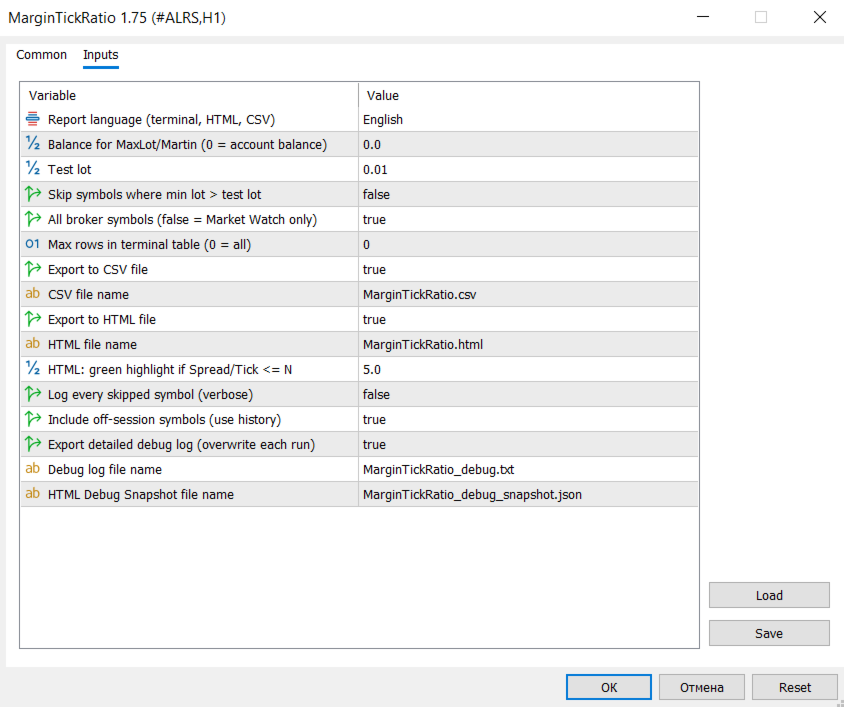
3. Run the script on any chart (optional parameters)
4. Open the HTML from File → Open the data directory → Common → Files
5. In HTML, change the lot, deposit, risk, look for symbols, sort and compare

───

Important notes

• The script does not open transactions — only analysis
• Calculations depend on the conditions of your broker (margin, spread, contract)
• MartinMaxKnee is a valuation model, not a guarantee of real trading; on large lots, the margin may differ from the linear valuation
• StopLoss in points is SYMBOL_POINT (not pips) • For symbols without quotes and history, calculation is not possible — the symbol is included in the missing list.

───

What makes a product stand out from "simple margin tables"

• Ratio metric — margin efficiency, not just the amount of collateral
• Spread/Tick — the real cost of entry in "ticks"
• Interactive HTML with search, multi-level sorting and comparison
• RiskLot and MartinMaxKnee in one report
• Work with the broker's entire catalog, including tools outside the session • Recognition of volatile instruments with different tickers
Recommended products
Clock Et Mt5
Andrew Tsujiguchi
Simple Eastern Time (ET) clock displayed on your chart, auto-synced with US market hours. Updates every second. Full description: ClockET — Lightweight indicator that displays the current date and time in US Eastern Time (ET) directly on your chart, so you always know exactly where the US session stands — no manual timezone math needed. What You See • Live Clock — Day, month, date and time in ET, updated every second (e.g. "Thu Jul 24  07:36:45 ET") • Centered Label — Displayed at the bottom
FREE
Boleta de negociação, adiciona automáticamente as ordens Take Profit e Stop Loss quando excutada uma ordem de compra ou venda. Ao apertar as teclas de atalho (A, D, ou TAB), serão inseridas duas linhas de pre-visualização, representando as futuras ordens de take profit (azul) e stop loss (vermelho), as quais irão manter o distanciamento especificado pelo usuário. Ditas ordens só serão adicionadas ao ser executada a ordem inicial. Ao operar a mercado, as ordens pendentes de take profit, e stop lo
News History Expoter
Donaldo Sande Angiela
This program is designed to download economic calendar news events for a specified country over a selected date range, allowing traders to analyze and incorporate important economic data into their trading strategies. By specifying both a start and end date, as well as a country code, the program retrieves relevant news events within the defined period and exports them to a CSV file for easy review and analysis. This tool helps traders stay informed about scheduled economic events that may impac

FREE
Delta Volume Profile v3 — Institutional Footprint with a Clean Chart Delta Volume Profile v3 is a professional volume profile indicator designed for Tape Reading, Order Flow, and Smart Money Concepts (SMC) traders, delivering high analytical precision without cluttering the screen. Unlike traditional profiles that cover the candlesticks and hinder price action analysis, this version plots the profile fully aligned to the far right of the chart, ensuring a clean, elegant view without boxes
FREE
Xau Vector
Johnny Da Silva
If you would like to receive more high-quality free EAs, please support my work by leaving a review. My Products: View My Products My Profile / Support / Contact: Visit My Profile My Channel: Follow My Channel XAU Vector is an automated trading system developed specifically for Gold (XAUUSD), combining quantitative analysis with local machine learning architecture. Designed for structural capital management, the Expert Advisor focuses on disciplined execution, making it suitable for both pe
FREE
One EA blows through your daily loss in a few minutes — and the challenge is gone. Multi-EA Guard Pro is an account-level risk manager and equity protector that watches your account, every EA you run (by magic number) and your manual trading, and acts before a limit is broken: it closes positions, deletes pending orders and alerts you. It never opens a trade. Built for prop firm accounts (FTMO, The5ers, FundedNext, Funding Pips presets included, each with a safety margin below the firm's offic
HMA Scalper Pro EA
Vladimir Shumikhin
5 (2)
HMA Scalper Pro EA — Automated Trading Advisor Based on Hull Moving Average (HMA) for MetaTrader 5 OVERVIEW HMA Scalper Pro EA is a professional trading robot (Expert Advisor) for MetaTrader 5 that trades in the direction of the Hull Moving Average (HMA). The HMA indicator determines the current trend direction, and the EA opens trades in that direction, enhanced by Smart Risk capital management, adaptive grid trading, trailing stop, breakeven, and time filters. The EA supports both Netting a
PZ Mean Reversion MT5
PZ TRADING SLU
1 (1)
Outperform traditional strategies: effective mean reversion for savvy traders Unique indicator that implements a professional and quantitative approach to mean reversion trading. It capitalizes on the fact that the price diverts and returns to the mean in a predictable and measurable fashion, which allows for clear entry and exit rules that vastly outperform non-quantitative trading strategies. [ Installation Guide | Update Guide | Troubleshooting | FAQ | All Products ] Clear trading signals Ama
Ritz Prime TradeCopier – Institutional Cross-Broker Sync Engine Say goodbye to lagging copy trades, mismatched broker symbols, and missed Stop Losses. Ritz Prime TradeCopier is an ultra-fast, high-frequency copy trading engine designed for professional portfolio managers and retail traders. Powered by a custom Bit-Banger JSON architecture and an advanced Global Variable (GV) mapping system, it seamlessly bridges multiple MetaTrader terminals on a single VPS/SERVER with true zero-lag performance.
Tick Volume Chart is a unique tool for building charts based on tick volumes in MetaTrader 5 . With Tick Volume Chart , you can create charts where each candle is formed not by time, but by a specified number of ticks. This gives you perfect precision in analyzing market activity, which is unattainable on standard time-based charts. You can use any indicators and Expert Advisors that support custom symbols. Working with the resulting charts is just as convenient as with standard ones. Unlike sta
Keyboard Scalper Pro
Mauricio Eduardo Lara Perez
Keyboard Scalper Pro is a customizable keyboard trading utility for MetaTrader 5. It is designed for traders who want direct manual control of order execution without being limited to a fixed keyboard layout. Every trading hotkey can be configured to match the user's preferred workflow, while the default layout is built around the numeric keypad for fast operation. The utility does not generate signals and does not decide when to trade. The trader chooses the setup, direction and timing. Keyb
This is the copier module for the TradeCoach system. It is free with the purchase of our 3 in 1 trade sorting and distribution system. This piece is intended for any trades that you make through the system to be copied to any other accounts you are in charge of Add them to as many accounts as your VPS will allow. This Trade Copier Links to the TradeCoach system found here:
FREE
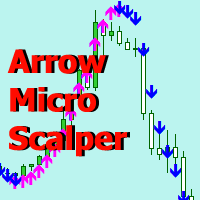
Arrow Micro Scalper - an indicator designed for scalping and short-term trading, integrated into any chart and financial instrument (currency, crypto, stocks, metals). In its work, it uses wave analysis and a trend direction filter. It is recommended to use on time frames from M1 to H4. How to work with the indicator. The indicator contains 2 external parameters for changing the settings, the rest are already configured by default. Large arrows indicate a change in trend direction, blue - the
MQL5 Blogs : https://www.mql5.com/en/blogs/post/761446 MT4 Version : https://www.mql5.com/en/market/product/136790 MT5 Version : https://www.mql5.com/en/market/product/136791 Time Wizard is a professional trading assistant built for traders who need speed, timing, and execution control in one clean dashboard. This Expert Advisor is designed for event-based trading, scheduled execution, and fast semi-automatic order management. It allows you to prepare your orders in advance, define the exact
Trade2Telegram
Strifor (Mauritius) Ltd
5 (12)
Trade2Telegram — a plugin for automatic trade notifications from MetaTrader to Telegram. This tool is designed for traders managing capital, running signal channels, or leading educational communities. The plugin copies all trading operations from the terminal and publishes them to a selected Telegram chat, group, or channel. Messages are sent automatically when positions are opened or closed, stop-loss or take-profit levels are changed, pending orders are triggered, or trades are partially clos
FREE
BeansAssist
Ivanvielle Bonifacio Dupaya
BeansAssist *Major update 3.00 released. Kindly update your copy of BeansAssist Gives you fruitful information of the price of the symbol that you are trading. Improve your trades simply by following the suggestion that it gives you. Tracks deal stats daily so you keep track of your performance. Don't let emotions take control, be a better and profitable trader with BeansAssist to guide you. *Note: This utility is not for free 
OB FVG Trade Copier: Unified Master & Slave EA Version: 2.00 Type: Trade Copier / Risk Management Utility Compatibility: MetaTrader 4 & MetaTrader 5 (Cross-compatible codebase) Overview The OB FVG Trade Copier is a professional-grade, unified trade copying system designed to mirror trades between Master and Slave accounts seamlessly. Built with a unified architecture, a single EA file serves as both the sender (Master) and receiver (Slave) simply by toggling the EA Mode in the settings. It uti
FREE
Automated Timeframe cycling with Symbols centered.  Force every timeframe onto one clock window, so the story you see on Daily is the same story you are slicing on H4, H1, and M1.  Traders usually flip timeframes and lose the span. A Daily chart shows a few weeks, then M15 shows a few hours, and the eye treats them as different markets. This indicator locks the window to N bars of the highest enabled timeframe — default 10 Daily — and maps every lower timeframe to that same stretch. You stay ins
FREE
Broker Basket Preflight A read-only MetaTrader 5 diagnostic script for checking exact broker symbols before testing a multi-symbol strategy. It reports contract and volume rules, price increments, quote age and spread in the Experts journal. October 2026 update kit: setup notes, executable defaults and matched simulation summary . MT5 Setup Hub . Install the ready-to-run version for free from the Market in desktop MetaTrader 5, then find Broker Basket Preflight under Navigator → Scripts → Market
FREE
SolarTrade Suite Financial Robot: LaunchPad Market Expert - designed to open trades! This is a trading robot that uses special innovative and advanced algorithms to calculate its values, Your Assistant in the World of Financial Markets. Use our set of indicators from the SolarTrade Suite series to better choose the moment to launch this robot. Check out our other products from the SolarTrade Suite series at the bottom of the description. Do you want to confidently navigate the world of inves
Dolphin Wave Rider IMM is an automated MetaTrader 5 strategy designed to evaluate structured trend opportunities using hourly price data. The strategy combines market-structure breaks with trend alignment and Relative Strength Index confirmation. By default, trading decisions use completed candles to reduce intrabar signal changes. ### Trade management Automatic entries use broker-adapted stop-loss and take-profit prices. Position volume can be calculated from an equity-risk percentage or a fixe
Volume Calculator Botti
Guilherme Bitencourt Botti
3 (4)
Volume Calculator This indicator shows the volume to be used in an operation based on the maximum acceptable stop value and the size of the stop. That way you will not use a calculator to calculate the volume you are going to use every time. This indicator makes your life much easier and faster. Suitable for any type of trader: Scalper, DayTrader, SwingTrader.
FREE
Pattern Recognition EA
Claudiu-georgian Zavera
Pattern Recognition EA - From Learn to Earn. The market repeats itself. This EA finds every past repeat of the current candle sequence - and lets history vote the direction. ONE SHAPE. EVERY REPEAT IN HISTORY VOTES. The last N candles on your signal timeframe form a shape. The EA scans the history you choose - a fixed number of bars or everything your broker provides - for the SAME shape, and checks what happened next, every single time. Only when enough repeats exist AND a clear majority of t
This is my first ExpertAdvisor, but it came along with more than 7 years in experience trading Forex , Crypto and Index.                                                                                SHEERAN: The Advanced Multi-Timeframe EA for Dynamic and Adaptive Trading   EA SHEERAN, is designed for traders who demand precision, flexibility, and reliability across multiple timeframes. Whether you’re targeting short-term gains on the M30 chart or looking for sustained moves on the H4, this E
Binance Quotes Updater
Andrey Khatimlianskii
5 (1)
This service is designed to stream online cryptocurrency quotes   from the Binance exchange to your MetaTrader 5 terminal. You will find it perfectly suitable if you want to see the quotes of cryptocurrencies in real time — in the Market watch window and on the MetaTrader 5 charts. After running the service, you will have fully featured and automatically updated  cryptocurrency charts in your MetaTrader 5. You can apply templates, color schemes, technical indicators and any non-trading tools to
Like the logic of this tool? Explore the full ecosystem of professional indicators and utilities, built by a trader for traders: All author's products in MQL5 Market: https://www.mql5.com/en/users/musa1994/seller Trading philosophy and details: https://developer-mql4-mql5.netlify.app/ Volume Profile + CVD is a professional volume analysis indicator for MetaTrader 5 that displays volume distribution by price levels and cumulative volume delta. The indicator answers two key trader questio
CRYPTO ZEUS DUAL-CORE PROTOCOL  Advanced Crypto Matrix: Supertrend AI + External Sync Module - [NEW] 24/7 Crypto Unlock: The EA now fully supports weekend trading by auto-detecting Crypto assets. - [NEW] Continuous Trend Rider: Re-enters trades continuously on pullbacks if the macro-trend remains strong, maximizing profit on long runs. - [NEW] Ghost Trailing Stop: Added a virtual trailing stop to fully ride breakouts instead of exiting at fixed Fibo targets. - [NEW] Preset System: Added a buil
Trading Journal pro
Israr Hussain Shah
Here   our more valuable tools SMC Trend Trading   ,  Easy SMC Trading  ,  Institutional SMC Architect Volume Analysis Tools  ,  Volume flow Profile  ,  Market volume profile  , FVG with Volume  , Liquidity Heatmap Profile  ,  Volume Spread Analysis Key Features 1.  Total Immersion UI (The "Blackout") Chart Masking:   Upon loading, the tool turns the background, grid, and candles pitch black. This hides the noise of the market ticks, allowing you to focus purely on your performance data withou
Relentless News Guard
Loysean Mappang Bandaay
Relentless News Guard — Free Economic Calendar and News Warning Panel for MetaTrader 5 Relentless News Guard is a free, on-chart economic calendar panel for MetaTrader 5. It shows the upcoming high-impact news events for the currencies you trade, with a live countdown and a clear on-chart status, so you know when to stay out of the market before you place a trade. It is free. If it keeps you out of one bad news spike, an honest review helps other traders find it. It reads the built-in MetaTra
FREE
Trade Manger
Israr Hussain Shah
Here   our more valuable tools SMC Trend Trading   ,  Easy SMC Trading  ,  Institutional SMC Architect Volume Analysis Tools  ,  Volume flow Profile  ,  Market volume profile  , FVG with Volume  , Liquidity Heatmap Profile  ,  Volume Spread Analysis You Give an Instruction: When you run the script, a window pops up with a dropdown menu. You choose exactly what you want it to do from the list (e.g., "Close Profit Only" or "Delete Pending Orders"). It Scans Your Positions: The script then reads
Buyers of this product also purchase
Trade Assistant MT5
Evgeniy Kravchenko
4.43 (216)
It helps to calculate the risk per trade, the easy installation of a new order, order management with partial closing functions, trailing stop of 7 types and other useful functions. Additional materials and instructions Installation instructions - Application instructions Line function -   shows on the chart the Opening line, Stop Loss, Take Profit. With this function it is easy to set a new order and see its additional characteristics before opening.   Risk management  - The risk calculation
Forex Trade Manager MT5
InvestSoft
4.98 (692)
Trade Manager MT5 is an advanced position size calculator and trade management tool for MetaTrader 5, designed to help traders plan trades faster, control risk more precisely, and manage open positions directly from the chart. It combines order placement, risk based lot calculation, Stop Loss and Take Profit management, Break Even, Trailing Stop, Partial Close, Equity Protection, and external trade management in one panel. Whether you trade forex, indices, metals, commodities, crypto, or future
FarmedHedge Pair Trading Dashboard
Tanapisit Tepawarapruek
5 (7)
Farmed Hedge Yield Farming | All Markets (Manual - Hybrid - Semi/Automated EA) VERIFIED TRADING RESULTS - Farmed Hedge Yield Axi Copy:  https://www.mql5.com/en/signals/2356376 - Farmed Hedge Yield Exn Copy:   https://www.mql5.com/en/signals/2356404 - Farmed Hedge Yield V Copy:  https://www.mql5.com/en/signals/2357156 IMPORTANT NOTICE: FarmedHedge is a MANUAL-FOCUSED TRADING UTILITY ,not a fully automated EA. Results shown on this Signal include manual trades and overall strategic management.
Local Trade Copier EA MT5
Juvenille Emperor Limited
4.94 (150)
Local Trade Copier EA MT5 is a fast and flexible trade copier for copying and managing trades between multiple MetaTrader 5 accounts on the same Windows computer or Windows VPS. It combines local trade synchronization with Receiver-side controls for lot sizing, risk management, trade filtering, symbol mapping, trade management and account protection. Set up your Transmitter and Receiver terminals in about 1 minute and copy manual or EA trades between accounts at the same or different brokers. U
Telegram to MT5 MultiChannel Copier
Sergio Marquez Uroz
4.72 (25)
Telegram to MT5 Multi-Channel Copier   automatically copies trading signals from your Telegram and Discord channels straight to MetaTrader 5. No bots, no browser extensions, no manual copying. A signal arrives in Telegram or Discord and the EA opens the trade in your terminal within seconds. And before you copy a channel, the built-in backtester shows you what that channel would have done in your account. The product has two components: a Windows application that listens to your Telegram channel
EA Overfitter
Stephen J Martret
5 (4)
That backtest looks great. But will it still be making money tomorrow, next week, next month? EA Overfitter re-runs your EA on 100 price histories it has never seen. One score tells you if the edge is real. A backtest tells you what an EA did on one price history — the one that happened to occur. What you cannot tell from it is how much of that result was the strategy and how much was the particular path. EA Overfitter answers that. It builds up to 100 synthetic price histories your EA has n
TradePanel MT5
Alfiya Fazylova
4.89 (174)
Trade Panel is a multi-functional trading assistant. The app contains over 50 trading functions for manual trading and allows you to automate most trading tasks. Application instructions: https://www.mql5.com/en/blogs/post/756482 Trial version of the application for a demo account: https://www.mql5.com/en/blogs/post/750865 How to install the application: https://www.mql5.com/en/blogs/post/756239 How to test the application in visual mode: https://www.mql5.com/en/blogs/post/770277 How to install
Exp COPYLOT CLIENT for MT5
Vladislav Andruschenko
3.97 (35)
Professional Trade Copier for MetaTrader 5 Fast, professional, and reliable trade copier for MetaTrader . COPYLOT allows you to copy Forex trades between MT4 and MT5 terminals with support for Hedge and Netting accounts. COPYLOT MT5 version supports: - MT5 Hedge to MT5 Hedge - MT5 Hedge to MT5 Netting - MT5 Netting to MT5 Hedge - MT5 Netting to MT5 Netting - MT4 to MT5 Hedge - MT4 to MT5 Netting MT4 version Full Description +DEMO +PDF How To Buy How To Install How to get Log Files H
News Trade EA MT5
Konstantin Kulikov
4.55 (11)
Present to you the useful robot that I have been using for several years. It can be used in both semi-automatic mode and fully automatic mode. >>> Chat <<< The program contains flexible settings for trading on the news of the economic calendar. It cannot be checked in the strategy tester. Only real work. Download the latest archive of settings: https://www.mql5.com/en/blogs/post/747929 Signals monitoring: https://www.mql5.com/en/signals/author/test-standart When creating your own sets of setti
Strategy Ledger Pro
Abdullah Uygar Tuna
5 (17)
Strategy Ledger Pro is a read-only account analysis panel for MetaTrader 5. It separates account results by Expert Advisor, strategy, symbol, and magic number, so you can see what each one really contributes. The panel is available in 11 languages: English, Français, Deutsch, Español, Italiano, Português, Русский, Türkçe, 中文, 日本語 and 한국어. Before you download the demo. The Market runs the demo of any paid product in the Strategy Tester only. This panel analyses the trades on your own account, and
Power Candles Strategy Scanner - Self-Optimizing Multi-Symbol Setup Finder Self-optimizing settings work one chart at a time, and finding where they pay off right now means opening chart after chart. Power Candles Strategy Scanner runs the same self-optimizing engine as the Power Candles indicator on every symbol in your Market Watch, side by side. One panel ranks where it pays off: the winning strategy per symbol, its optimized Stop Loss and Take Profit. An alert fires the moment a fresh signal
Copy Telegram signals with your own trading rules Telegram to MT5 Signal Trader automatically copies text-based trading signals from public and private Telegram channels and groups into MetaTrader 5. Manage multiple providers and MT5 accounts from one desktop app, with individual risk and trade settings for each provider . No Telegram bot or API setup needed for copying. Simply sign in with your own Telegram account by phone or QR code and select the channels or groups you have already joined. Y
================================================================================ POC BREAKOUT - V20.72. Full Professional Grade Toolkit ================================================================================ POC Breakout is a full MetaTrader 5 trading dashboard for discretionary traders who want breakout signals, Point of Control (POC) context, volume profiles, order flow, market structure, news, alerts, and advanced trade planning in one professional workspace. Attached directly to you
The product will copy all telegram signal to MT5 ( which you are member) , also it can work as remote copier.  Easy to set up, copy order instant, can work with almost signal formats, image signal,  s upport to translate other language to English Work with all type of channel or group, even channel have "Restrict Saving Content", work with  multi channel, multi MT5 Work as remote copier: with signal have ticket number, it will copy exactly via ticket number. Support to backtest signal. How to s
HINN MagicEntry Extra
ALGOFLOW OÜ
4.74 (19)
HINN MAGIC ENTRY – the ultimate tool for entry and position management! SIMPLE. FASTEST. INTUITIVE. MAX AUTOMATED. Place orders by selecting a level directly on the chart! full description   ::  demo-version  :: 60-sec-video-description Key features: - Market, limit, and pending orders - Automatic lot size calculation - Automatic spread and commission accounting - Unlimited partitial take-profits  - Breakeven and trailing stop-loss and take-profit  functions - Invalidation leves - Intuitive, a
VirtualTradePad PRO SE MT5 — professional trading control center for MetaTrader 5 VirtualTradePad PRO SE is a premium chart-based trading panel and trade-management workspace for MetaTrader 5 . It is designed for traders who want faster execution, clearer position control, structured trade management, visual level planning and a professional workflow directly from the chart. This is not only a BUY / SELL panel. PRO SE combines manual trading, pending orders, position management, partial exits, b
Telegram To MT5 Ultra
Mirel Daniel Gheonu
5 (5)
Telegram To MT5 — Signal Copier Turn the trading calls from your Telegram channels into real MT5 orders — automatically, on as many accounts as you like, with risk and rules fully under your control. Telegram To MT5 connects the VIP / signal channels you already follow on Telegram to your MetaTrader 5 terminal. A free companion desktop app reads the messages (even from channels that block bots), and this Expert Advisor executes them on your account — applying your own risk settings, symbol mappi
Timeless Charts
Samuel Manoel De Souza
5 (9)
Timeless Charts is an all-in-one trading utility for professional traders. It combines custom chart types such as Seconds Charts and Renko with advanced order flow analysis using Footprints , Clusters , Volume Profiles , VWAP studies, and anchored analysis tools for deeper market insight. Trading and position management are handled directly from the chart through an integrated trade management panel , while Market Replay and Virtual Accounts provide environments for practicing trading skills and
Welcome to Entry In The Zone with SMC Multi Timeframe / Complete SMC Analysis System & Trading Tools — All in One Indicator Entry In The Zone with SMC Multi Timeframe An indicator designed for market analysis based on Smart Money Concepts (SMC), displaying Market Structure, Key Zones (Order Blocks, Supply & Demand Zones, and Fair Value Gaps), Liquidity, and real-time BUY / SELL signals. It supports both Single-Timeframe and Multi-Timeframe analysis, along with the Confluence at Zone feature, whi
News Filter EA
Rashed Samir
5 (2)
News Filter EA: Advanced Algo Trading Assistant News Filter EA is an advanced algo trading assistant designed to enhance your trading experience. By using the News Filter EA , you can integrate a Forex economic news filter into your existing expert advisor, even if you do not have access to its source code. In addition to the news filter, you can also specify trading days and hours for your expert. The News Filter EA also includes risk management  and equity protection features. MT4 Version Ma
Strategy Builder offers an incredible amount of functionality. It combines a trade panel with configurable automation (covert indicators into an EA), real-time statistics (profit & draw down) plus automatic optimization of SL, TP/exit, trading hours, indicator inputs. Multiple indicators can be combined into an single alert/trade signal and can include custom indicators, even if just have ex4 file or purchased from Market. The system is easily configured via a CONFIG button and associated pop-u
EA Auditor
Stephen J Martret
5 (7)
EA Auditor is an independent analysis tool for traders evaluating Expert Advisors and trading signals on MetaTrader 5. It audits backtest reports, reviews posted developer signals, and cross-verifies the two against each other to help traders assess strategies before committing capital. The MQL5 market offers a wide range of Expert Advisors from many developers, with varying approaches, quality, and transparency. EA Auditor provides a consistent, data-driven framework for reviewing them, answer
Trade copier MT5
Alfiya Fazylova
4.61 (57)
Trade Copier is a professional utility designed to copy and synchronize trades between trading accounts. Copying occurs from the account / terminal of the supplier to the account / terminal of the recipient, which are installed on the same computer or VPS . Before buying, you can test the demo version on a demo account. Demo version here . Full instruction here . Main functionality and benefits: Supports copying MT5> MT5, MT4> MT5, MT5> MT4, including MT5 netting accounts. * Supports copying Dem
Kontrol01 Manager
Andrei Koval
5 (2)
EA Portfolio Control & Cloud Monitoring for MetaTrader 5 Your EAs manage trades. KONTROL_01 manages your EAs. A control system for traders running multiple Expert Advisors on the same account. Coordinate EA activity, manage trading risks and monitor your setup remotely. A detailed User Manual is available via DM after purchase. IN PRACTICE Multiple EAs. No coordination. Your EAs trade independently, unaware of each other's activity. KONTROL_01 coordinates them, limits simultaneous activity a
RS Trade Copier - the ultra-fast local trade copier with a real graphical interface. Stop typing account numbers manually. No more 200+ cryptic inputs. A reliable and flexible tool for copying trading operations between multiple MT5 and MT4 terminals. It suits experienced traders, signal providers, and individual investors. It enables trade synchronization from one or multiple Providers to one or multiple Clients with high precision and minimal latency. It supports simple automatic configuration
Boleta Scalper Ultra
Nelson Lopes De Paula Neto
ScalperBoleta Ultra — Trading Panel for MetaTrader 5 ScalperBoleta Ultra is a manual trading panel developed for MetaTrader 5, focused on scalping and day trading. It centralizes order execution, position management, and risk control directly on the chart, providing greater convenience and operational efficiency. Main Features: Buy and Sell: Execute orders using on-screen buttons or keyboard shortcuts. Position Management: Fully or partially close open positions. Lot Size Control: Adjust trading
Trade Manager DaneTrades
Levi Dane Benjamin
4.13 (31)
DaneTrades Trade Manager is a professional trade panel for MetaTrader 5, designed for fast, accurate execution with built‑in risk control. Place market or pending orders directly from the chart while the panel automatically calculates position size from your chosen risk, helping you stay consistent and avoid emotional decision‑making. The Trade Manager is built for manual traders who want structure: clear risk/reward planning, automation for repeatable management, and safeguards that help reduc
Effortlessly manage multiple trading accounts The Local Trade Copier EA is a solution for individual traders or account managers who need to execute trade signals from external sources or who need to manage several accounts at the same time, without the need for a MAM or a PAMM account. It copies from up to 8 master accounts to unlimited slave accounts . [ Installation Guide | Update Guide | Troubleshooting | FAQ | All Products  ] 100% self hosted Easy to install and use It can copy from MT4 t
Seconds Chart MT5
Boris Sedov
4.61 (18)
Seconds Chart is a unique tool for creating second-based charts in MetaTrader 5 . With Seconds Chart , you can construct charts with timeframes set in seconds, providing unparalleled flexibility and precision in analysis that is unavailable with standard minute or hourly charts. For example, the S15 timeframe indicates a chart with candles lasting 15 seconds. You can use any indicators and Expert Advisors that support custom symbols. Working with them is just as convenient as on standard charts.
SMC Trade Pilot MT5
Prime Horizon
5 (1)
Order block, BOS and ChoCH expert advisor for MetaTrader 5, with Telegram alerts SMC Trade Pilot MT5 reads market structure on your chart and sends the signal to Telegram. It marks break of structure (BOS) and change of character (ChoCH), draws order blocks with a strength score , tracks fair value gaps (FVG) and liquidity sweeps, displays a volume profile with point of control, value area high and low, and sums everything up in a compact dashboard with a multi-timeframe panel, a confluence scor
Filter:
Maria Chernyuk
33
Maria Chernyuk 2026.07.01 18:46 

User didn't leave any comment to the rating

Reply to review