
Margin Tick Ratio
- Utilità
- Versione: 1.88
- Aggiornato: 10 luglio 2026

Margin Tick Ratio — margin efficiency analysis for all broker's instruments
Margin Tick Ratio is a script for MetaTrader 5 that runs through your broker's tools in one run and answers a practical question: how much "tick" profit do you get for each unit of collateral, and how expensive is the entry spread.
The script does not trade. It collects data, ranks tools by efficiency, and generates a user-friendly report in a terminal, CSV, and interactive HTML file.
───
Who is this product for
• Traders who choose the instruments with the best return on margin
• Scalpers and Intraday traders — estimate Spread/Tick and entry cost
• Users with a limited deposit — MaxLot and RiskLot calculations
• Those who compare broker conditions using hundreds of symbols (Forex, CFD, indices, metals, oil, crypto, stocks) • Analysts who need CSV export for Excel/Google Sheets
───
What does the script do?
1. Downloads symbols — all broker's tools or just a Market Overview
2. For each symbol, it calculates for a given test lot:
• Margin — deposit for opening a BUY
• Tick P/L — profit/loss when the price moves by 1 tick
• Spread — the cost of the spread in the deposit currency • Ratio — Tick P/L ÷ Margin (the main indicator of efficiency)
• Spread/Tick — how many ticks of profit are "eaten up" by the spread
• MaxLot — the maximum lot on the current balance
3. Sorts the results by Ratio (the best ones are on top)
4. Outputs the table to the terminal log 5. Exports CSV and interactive HTML to a shared terminal folder
───
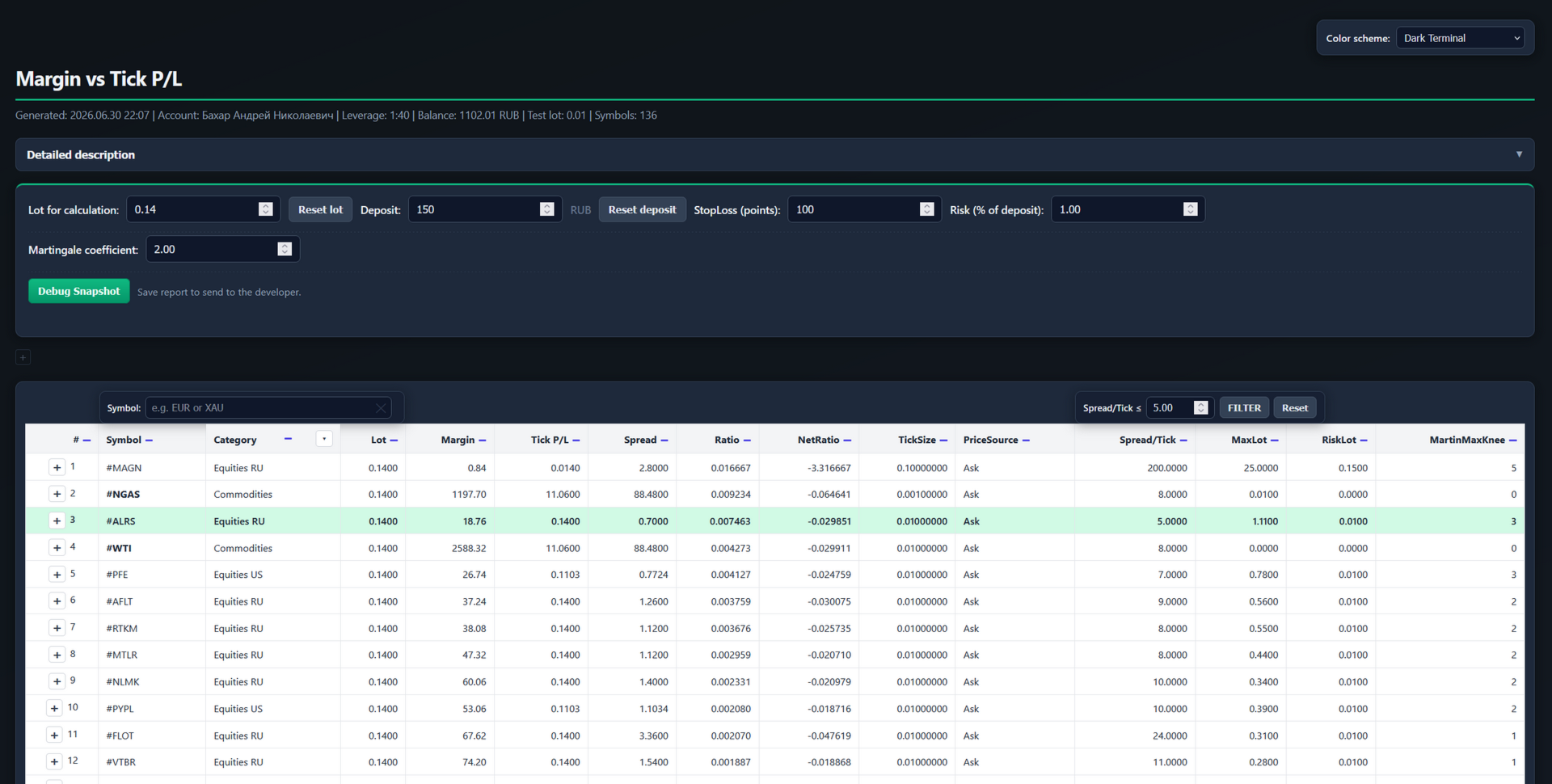
Interactive HTML report (main feature)
The HTML file opens in a browser and works without the Internet — all calculations are already inside.
Settings panel above the table:
• Lot for calculation — recalculation of Margin, Tick P/L, Spread, Ratio
• Deposit — recalculation of MaxLot, RiskLot, MartinMaxKnee
• StopLoss (points) and Risk (% of deposit) — RiskLot calculation
• The Martingale coefficient is for MartinMaxKnee
• Spread/Tick threshold — green illumination of "cheap" spread instruments
Table:
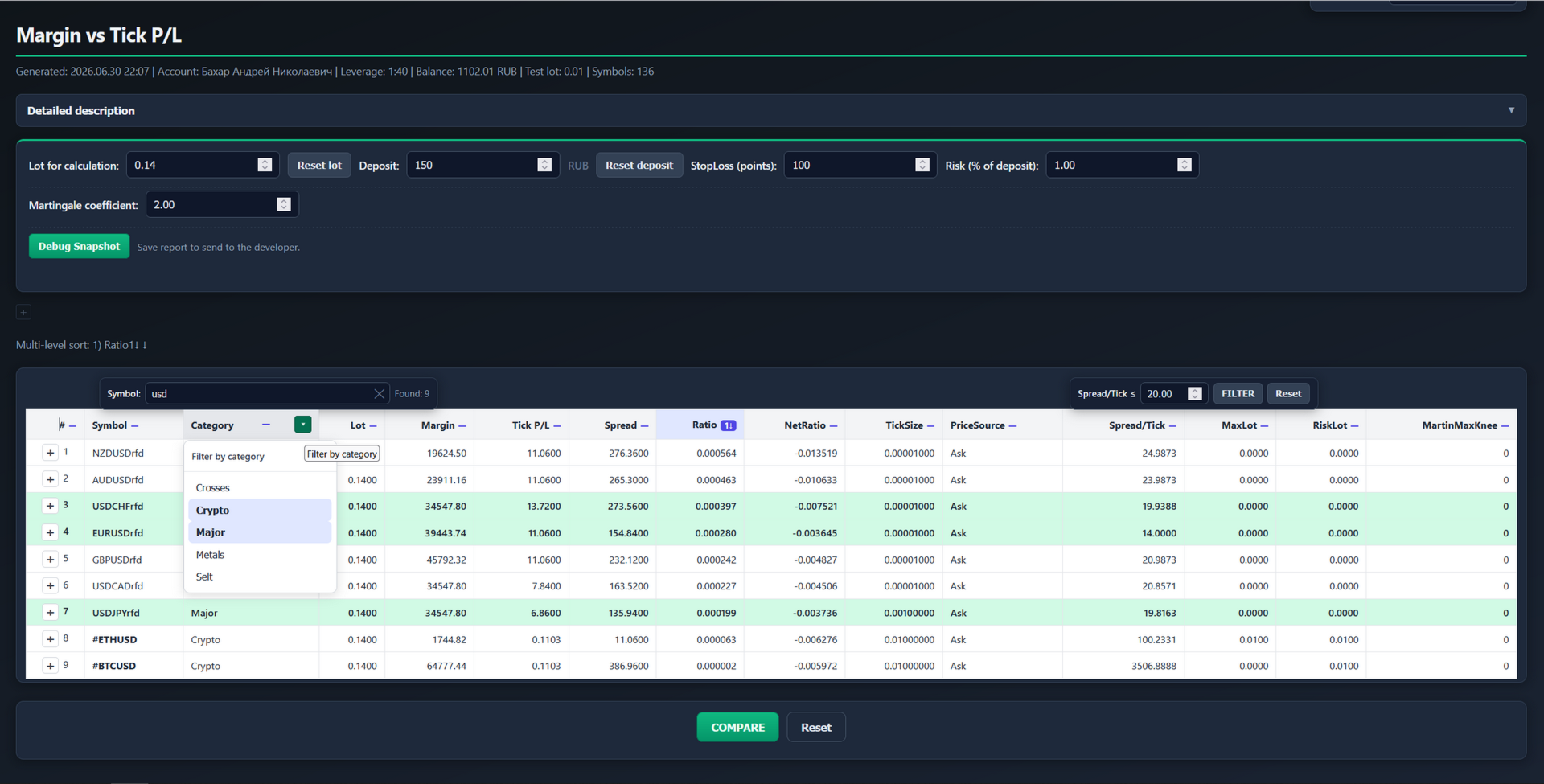
• Symbol search — filtering by name occurrence (EUR, XAU, #WTI...) with a clear button
• Sorting: LCM — one column at a time; PCM — multi-level (up to 4 levels)
• Comparison mode — select lines with the "+" button, leave only them
• Green illumination of rows with Spread/Tick < threshold • Bold Symbol — highly volatile instruments (TRY, metals, indices, oil, gas, crypto, etc.; different broker names are taken into account: GOLD, WTI, USOIL, #NGAS...)
• Detailed description of the columns — collapsible help block
• Tooltips on RiskLot / MartinMaxKnee headings and cells
Additional HTML columns:
• RiskLot — max. a lot in which the loss on SL does not exceed the risk (deposit × %)
• MartinMaxKnee — how many consecutive losses a martingale can withstand at a given coefficient (spread + SL on each lap)
• PriceSource — where the price comes from (Ask, Bid+Spread, D1/H1, etc.)
───
Reliable calculation even outside the trading session
The script uses the official MT5 functions:
• OrderCalcMargin, OrderCalcProfit
• alternate options via symbol properties
BUY price: Ask priority; in the absence of quotes, Bid+Spread, Last, and D1/H1/W1 closing estimates.
Symbols outside the trading session can be included in the calculation (InpUseDisabledSymbols = true by default) — the history is loaded, the price source is visible in the report.
───
The results of the work
In the terminal log:
• A table with the best Ratio tools
• Summary: processed / skipped / best character
• Reasons for omissions (no price, margin, min. lot, etc.)
Files (Terminal\Common\Files folder):
• MarginTickRatio.html — interactive report
• MarginTickRatio.csv — for Excel and external analysis
───
How to use it
1. Connect the terminal to the broker's server
2. For the full list: Market Overview → PCM → Symbols → "Show all"
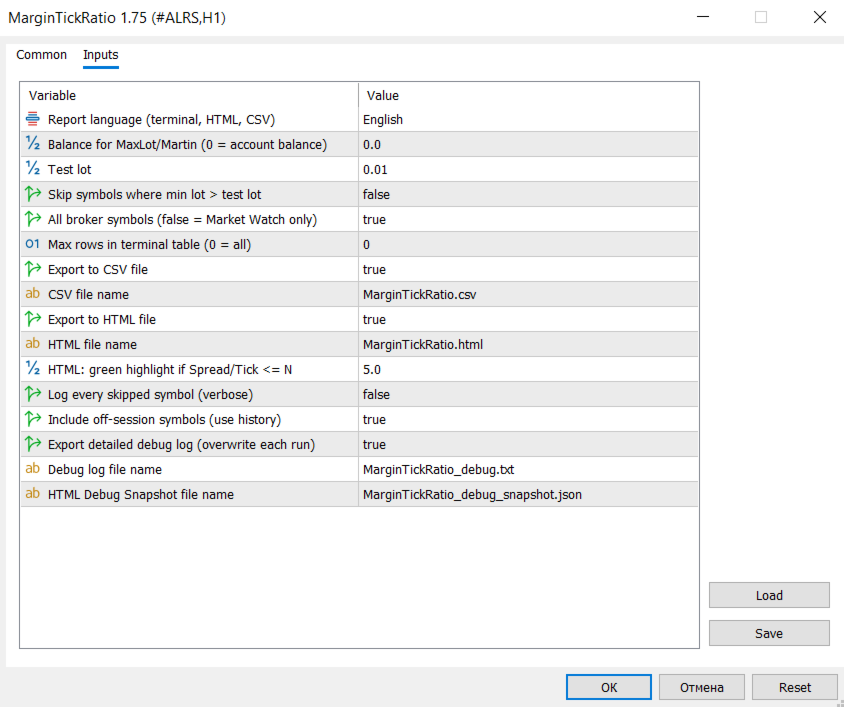
3. Run the script on any chart (optional parameters)
4. Open the HTML from File → Open the data directory → Common → Files
5. In HTML, change the lot, deposit, risk, look for symbols, sort and compare
───
Important notes
• The script does not open transactions — only analysis
• Calculations depend on the conditions of your broker (margin, spread, contract)
• MartinMaxKnee is a valuation model, not a guarantee of real trading; on large lots, the margin may differ from the linear valuation
• StopLoss in points is SYMBOL_POINT (not pips) • For symbols without quotes and history, calculation is not possible — the symbol is included in the missing list.
───
What makes a product stand out from "simple margin tables"
• Ratio metric — margin efficiency, not just the amount of collateral
• Spread/Tick — the real cost of entry in "ticks"
• Interactive HTML with search, multi-level sorting and comparison
• RiskLot and MartinMaxKnee in one report
• Work with the broker's entire catalog, including tools outside the session • Recognition of volatile instruments with different tickers
Margin Tick Ratio is a script for MetaTrader 5 that runs through your broker's tools in one run and answers a practical question: how much "tick" profit do you get for each unit of collateral, and how expensive is the entry spread.
The script does not trade. It collects data, ranks tools by efficiency, and generates a user-friendly report in a terminal, CSV, and interactive HTML file.
───
Who is this product for
• Traders who choose the instruments with the best return on margin
• Scalpers and Intraday traders — estimate Spread/Tick and entry cost
• Users with a limited deposit — MaxLot and RiskLot calculations
• Those who compare broker conditions using hundreds of symbols (Forex, CFD, indices, metals, oil, crypto, stocks) • Analysts who need CSV export for Excel/Google Sheets
───
What does the script do?
1. Downloads symbols — all broker's tools or just a Market Overview
2. For each symbol, it calculates for a given test lot:
• Margin — deposit for opening a BUY
• Tick P/L — profit/loss when the price moves by 1 tick
• Spread — the cost of the spread in the deposit currency • Ratio — Tick P/L ÷ Margin (the main indicator of efficiency)
• Spread/Tick — how many ticks of profit are "eaten up" by the spread
• MaxLot — the maximum lot on the current balance
3. Sorts the results by Ratio (the best ones are on top)
4. Outputs the table to the terminal log 5. Exports CSV and interactive HTML to a shared terminal folder
───
Interactive HTML report (main feature)
The HTML file opens in a browser and works without the Internet — all calculations are already inside.
Settings panel above the table:
• Lot for calculation — recalculation of Margin, Tick P/L, Spread, Ratio
• Deposit — recalculation of MaxLot, RiskLot, MartinMaxKnee
• StopLoss (points) and Risk (% of deposit) — RiskLot calculation
• The Martingale coefficient is for MartinMaxKnee
• Spread/Tick threshold — green illumination of "cheap" spread instruments
Table:
• Symbol search — filtering by name occurrence (EUR, XAU, #WTI...) with a clear button
• Sorting: LCM — one column at a time; PCM — multi-level (up to 4 levels)
• Comparison mode — select lines with the "+" button, leave only them
• Green illumination of rows with Spread/Tick < threshold • Bold Symbol — highly volatile instruments (TRY, metals, indices, oil, gas, crypto, etc.; different broker names are taken into account: GOLD, WTI, USOIL, #NGAS...)
• Detailed description of the columns — collapsible help block
• Tooltips on RiskLot / MartinMaxKnee headings and cells
Additional HTML columns:
• RiskLot — max. a lot in which the loss on SL does not exceed the risk (deposit × %)
• MartinMaxKnee — how many consecutive losses a martingale can withstand at a given coefficient (spread + SL on each lap)
• PriceSource — where the price comes from (Ask, Bid+Spread, D1/H1, etc.)
───
Reliable calculation even outside the trading session
The script uses the official MT5 functions:
• OrderCalcMargin, OrderCalcProfit
• alternate options via symbol properties
BUY price: Ask priority; in the absence of quotes, Bid+Spread, Last, and D1/H1/W1 closing estimates.
Symbols outside the trading session can be included in the calculation (InpUseDisabledSymbols = true by default) — the history is loaded, the price source is visible in the report.
───
The results of the work
In the terminal log:
• A table with the best Ratio tools
• Summary: processed / skipped / best character
• Reasons for omissions (no price, margin, min. lot, etc.)
Files (Terminal\Common\Files folder):
• MarginTickRatio.html — interactive report
• MarginTickRatio.csv — for Excel and external analysis
───
How to use it
1. Connect the terminal to the broker's server
2. For the full list: Market Overview → PCM → Symbols → "Show all"
3. Run the script on any chart (optional parameters)
4. Open the HTML from File → Open the data directory → Common → Files
5. In HTML, change the lot, deposit, risk, look for symbols, sort and compare
───
Important notes
• The script does not open transactions — only analysis
• Calculations depend on the conditions of your broker (margin, spread, contract)
• MartinMaxKnee is a valuation model, not a guarantee of real trading; on large lots, the margin may differ from the linear valuation
• StopLoss in points is SYMBOL_POINT (not pips) • For symbols without quotes and history, calculation is not possible — the symbol is included in the missing list.
───
What makes a product stand out from "simple margin tables"
• Ratio metric — margin efficiency, not just the amount of collateral
• Spread/Tick — the real cost of entry in "ticks"
• Interactive HTML with search, multi-level sorting and comparison
• RiskLot and MartinMaxKnee in one report
• Work with the broker's entire catalog, including tools outside the session • Recognition of volatile instruments with different tickers














































L'utente non ha lasciato alcun commento sulla valutazione.