Zikiman Risk Panel Pro MT4
- Utilities
- Version: 1.70
- Activations: 5

# Zikiman Risk Panel Pro — MT4 Risk Manager, Lot Size Calculator and Trade Manager
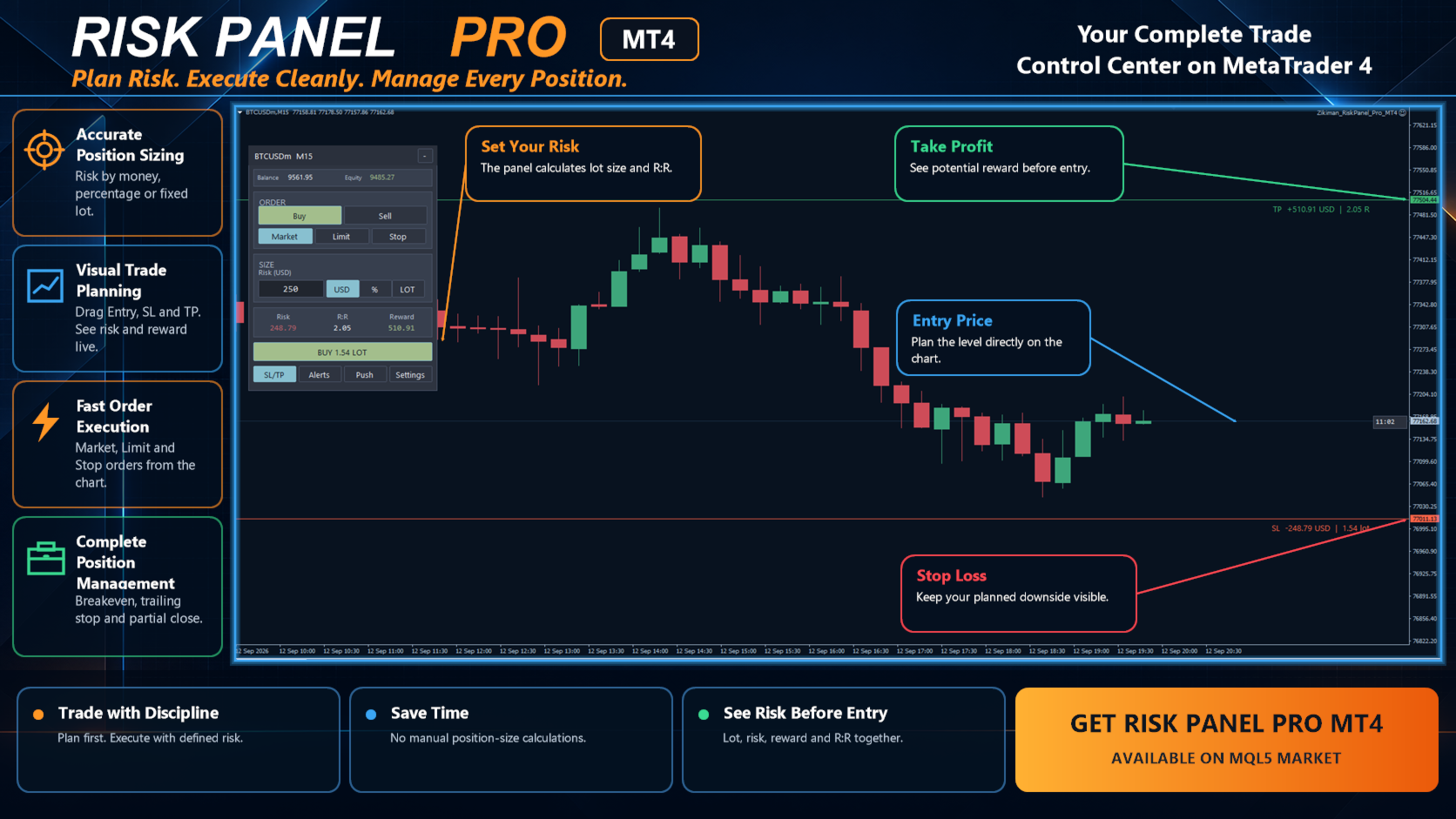
Zikiman Risk Panel Pro is an MT4 risk management EA for manual traders. It combines a Risk Manager for MT4, Lot Size Calculator, Position Size Calculator, Risk Calculator, Trading Panel, Trade Manager and Position Manager in one chart-based workflow.
Choose the direction, risk and price levels yourself. The panel calculates the lot size, displays the planned risk and reward, sends Market or pending orders, and provides practical tools for managing open positions. It does not generate signals or open trades by itself.
## Risk calculator and position sizing on the chart
Set risk in the form that fits your trading plan:
- Fixed amount in the account currency
- Percentage of account balance
- Fixed lot size, with the monetary risk calculated in reverse
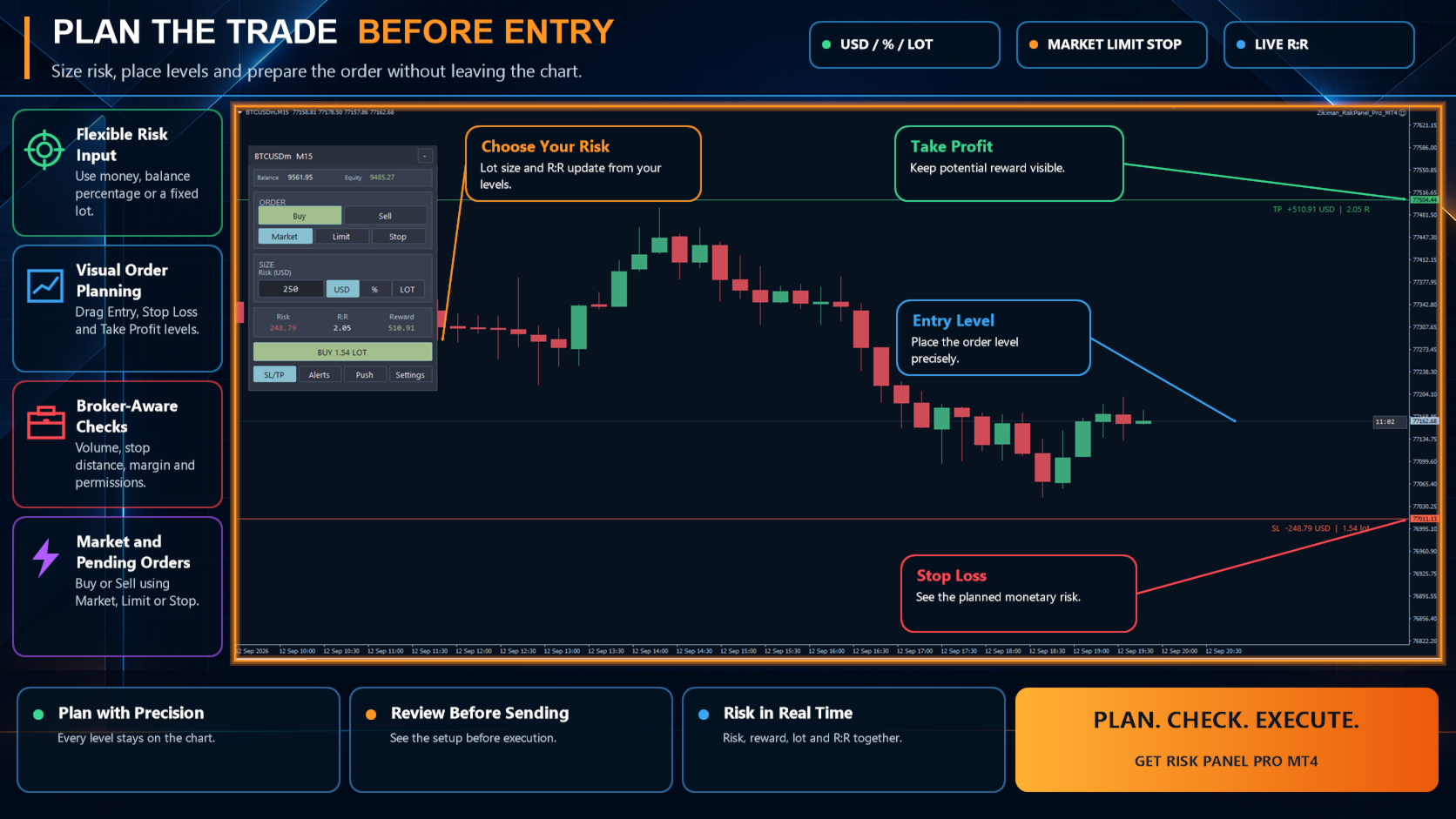
Drag the Entry, Stop Loss and Take Profit lines directly on the MT4 chart. As the levels move, the position size calculator updates the planned lot size, monetary risk, potential reward and risk-to-reward ratio (R:R) in real time.
Calculations use the symbol specifications supplied by your broker, including tick size, tick value, volume minimum, volume maximum and volume step. This makes the panel suitable for Forex, gold and XAUUSD, indices, commodities, crypto CFDs and other symbols supported by the connected broker.
## MT4 trading panel for Market, Limit and Stop orders
Prepare Buy or Sell orders without leaving the chart. The trade panel supports:
- Market orders
- Buy Limit and Sell Limit orders
- Buy Stop and Sell Stop orders
- Stop Loss and Take Profit attached when the order is sent
- One-click order execution after you review the setup
- Draggable pending-entry, SL and TP lines
Before enabling execution, Risk Panel Pro checks the broker’s volume rules, minimum stop distance, available margin and terminal trading permissions. If the setup is invalid, the panel shows the reason instead of silently changing the selected order type.
This is chart trading for discretionary traders: you define the setup and confirm the order; the EA handles the repetitive position-sizing and order-entry work.
## Trade manager and position manager
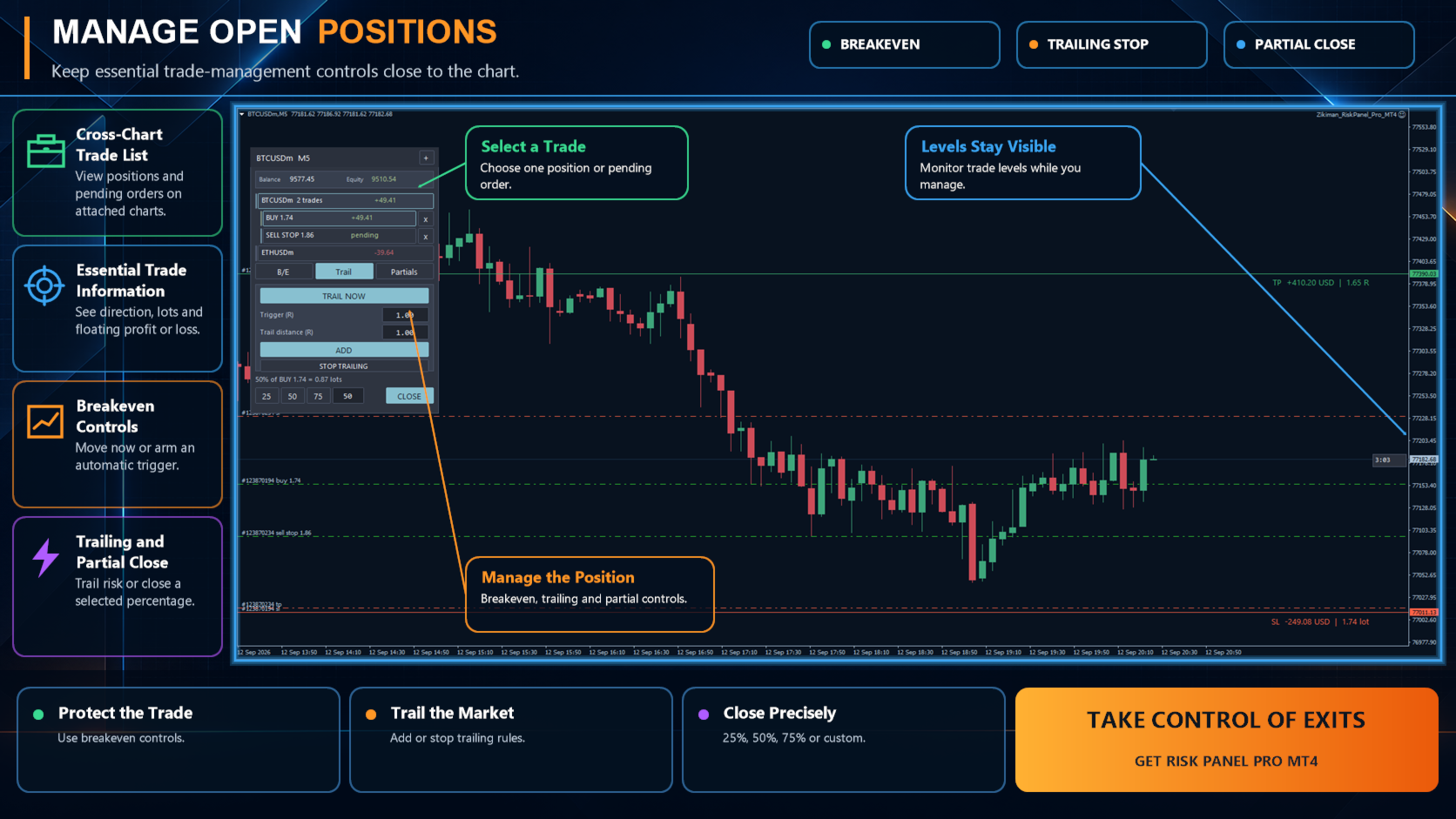
Minimise the main trading panel to open the position-management view. It shows balance, equity, open positions, floating profit or loss, symbol totals and pending orders. Positions and orders from other symbols are shown when Risk Panel Pro is active on those symbol charts.
Select an individual position to use:
- Immediate breakeven or automatic breakeven at a chosen trigger
- One-time trailing-stop adjustment or continuous trailing stop
- Up to three automatic partial take-profit targets
- Equal or custom allocation across TP1, TP2 and TP3
- Manual partial close at 25%, 50%, 75% or a custom percentage
- Live estimated profit or loss for the partial volume selected
- Individual or grouped position closing with confirmation
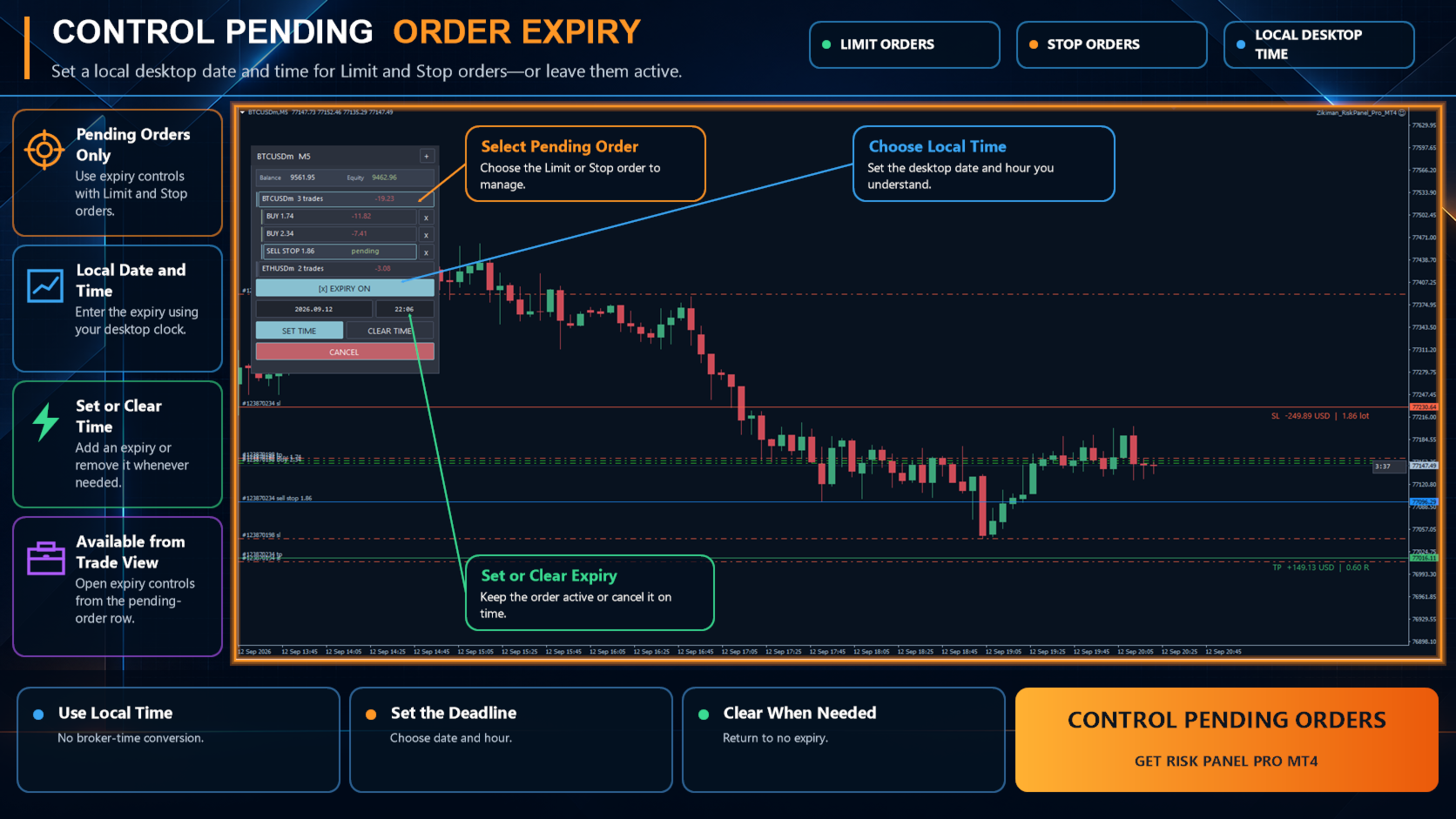
Pending Limit and Stop orders remain available from the global list. Open the correct symbol chart to inspect Entry, Stop Loss and Take Profit, or cancel the pending order from the panel.
Set an optional expiration date and time, based on your computer's local time, for Buy Limit, Sell Limit, Buy Stop and Sell Stop orders. If the broker rejects native MT4 expiration, Risk Panel Pro stores the deadline and cancels that pending ticket while MetaTrader and at least one panel remain running.
Automated breakeven, trailing-stop and partial-close rules are attached to the selected position. They operate only while Risk Panel Pro remains attached to that symbol’s chart and MetaTrader is running.
## Price alerts and push notifications
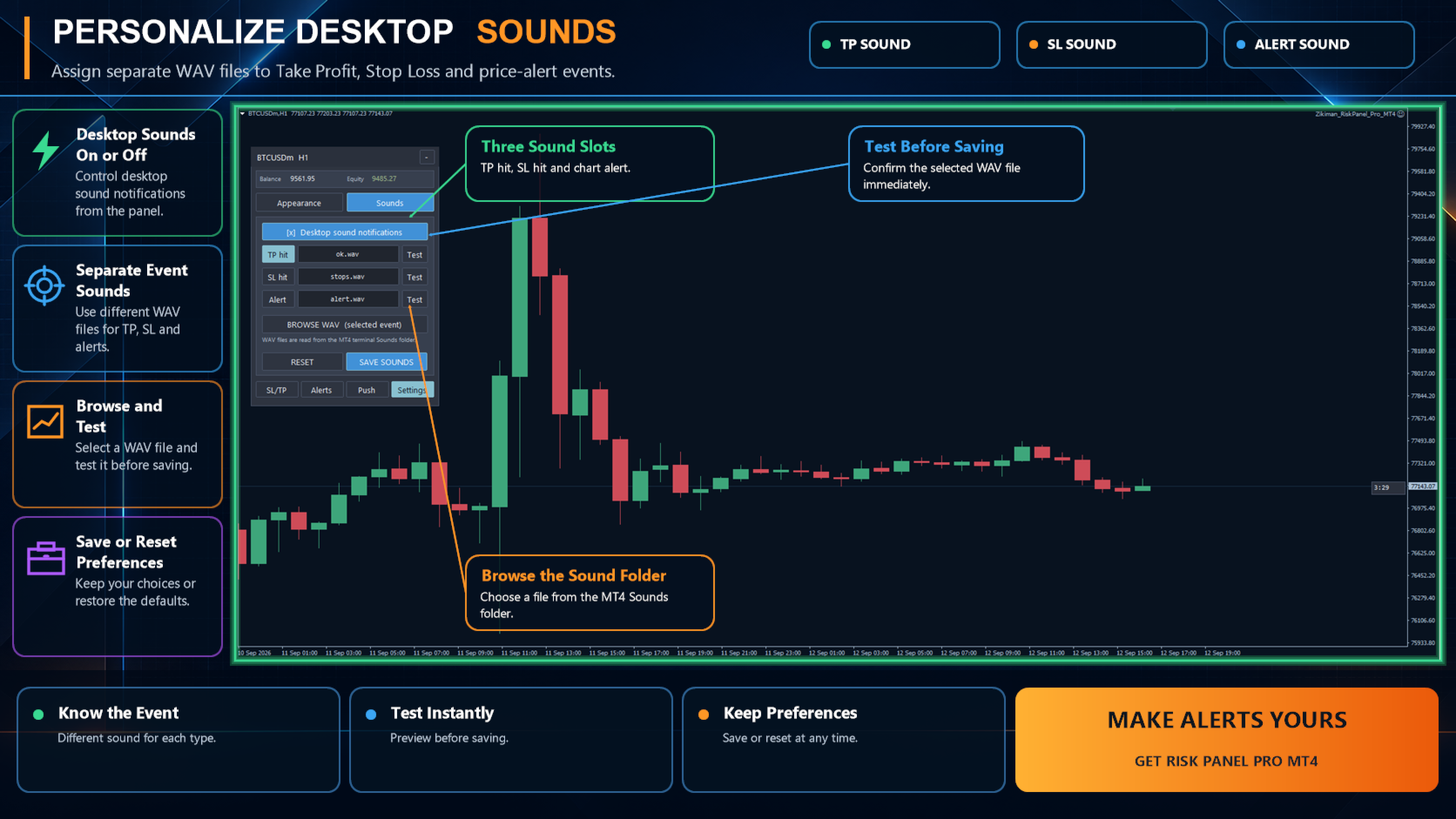
Create draggable one-shot price alerts directly on the chart. Alerts keep their level and message through timeframe changes and terminal restarts. When price reaches the level, the panel can issue a desktop popup, play a chosen WAV sound and send a push notification to the MT4 mobile app.
The Push matrix lets you choose notifications for pending-order fills, Take Profit, Stop Loss, trailing-stop actions, breakeven actions and chart price alerts. Mobile delivery requires a valid MetaQuotes ID in MetaTrader notification settings.
## Compact workspace and themes
Choose from six panel themes and six chart themes. The latest selection follows the symbol across timeframes, while ORIGINAL restores the saved chart colours for each timeframe.
Use the full panel to plan and place orders, the compact view to manage positions, or the small chart control to free more chart space. Alerts, trade levels and armed management rules remain separate from the visual size of the panel.
## Main settings
- Default money risk, percentage risk and remembered sizing preferences
- Magic Number, maximum slippage and order comment
- Panel location, font size and line visibility
- Entry, Stop Loss, Take Profit and alert colours
- Default breakeven, trailing-stop and partial-allocation values
- Popup alerts, separate event sounds and push-notification preferences
- Optional diagnostic logging
## Technical information and important notes
- Platform: MetaTrader 4
- Product type: manual trading and risk-management utility running as an EA
- Uses broker volume, price, margin, tick-size and stop-level specifications
- No DLL or WebRequest is required
- AutoTrading permission is required to send or manage orders
- Works with broker-supported symbols and timeframes
- Final fills, slippage, commission, swap, spread and gaps can cause actual results to differ from pre-trade estimates
Zikiman Risk Panel Pro is not an automated trading robot, signal provider or trading strategy. It does not choose Buy or Sell, select entries or guarantee results. It is designed for traders who already have a method and want a clearer, faster and more consistent manual trading workflow in MetaTrader 4.