
Suppy Demand KPG
- Indicators
- Version: 2.20
- Updated: 13 August 2026

Supply Demand KPG – Supply and Demand Zones Indicator for MetaTrader 5
SuPply Demand KPG automatically identifies Supply (resistance) and Demand (support) zones based on price behavior and volume. Instead of drawing zones manually, the indicator displays them directly on the chart, helping traders quickly spot areas where price may reverse or break through.
Key Advantages
1. Intelligent Supply and Demand Zone Detection
- Supply zones are displayed in orange – potential resistance areas.
- Demand zones are displayed in blue – potential support areas.
- The indicator automatically scans the chart and keeps only relevant zones, removing those that have been broken or overlap.
2. Zone Strength Evaluation Based on Volume
- Each zone shows accumulated volume value and percentage contribution relative to the total.
- Thick border = high reliability zone.
- Thin border = lower reliability zone (requires additional confirmation).
3. Dynamic Updates and Automatic Zone Removal
- Broken zones disappear automatically, keeping the chart clean.
- Older zones beyond the allowed limit are removed to focus on the most recent ones.
4. Total Supply / Total Demand Display
- Two text lines (Total Supply and Total Demand) are shown at the left corner of the chart, indicating cumulative strength of all active zones.
- Position and font size are customizable.
5. Usage Guide Panel
- A compact guide panel explains zone colors, border thickness, and how to interpret them.
- Can be toggled on/off with a button on the chart (Guide: ON/OFF).
6. Flexible Customization
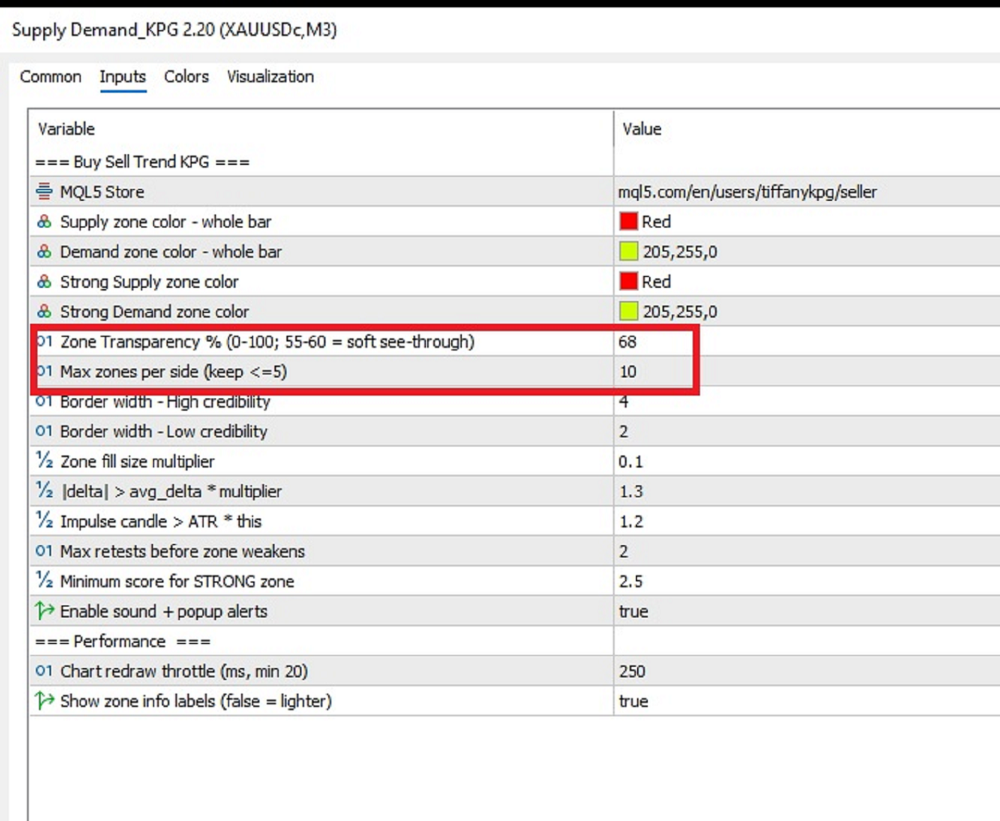
- Adjust the maximum number of zones displayed per side (Supply / Demand).
- Change colors, border thickness for high/low credibility zones.
- Adjust zone size multiplier.
7. Clean Interface, Low System Load
- Zones are drawn as semi-transparent rectangles without cluttering the chart.
- Zone labels are placed to the right side, avoiding candle occlusion.
Important Notes
- The indicator is designed to support technical analysis, not as a fully automated trading system.
- Effectiveness depends on the user's skill and risk management strategy.
- Always test on a demo account before using on a live account.
Support
Support is provided through the product comments section or via the mql5.com internal messaging system. Support is not offered via Telegram, other messengers, or external websites.













































User didn't leave any comment to the rating